

The real cost of cold emails landing in spam
Roughly 1 in 6 cold emails never reaches the primary inbox, according to EmailToolTester benchmarks. For go-to-market professionals running outbound campaigns, that number represents real pipeline walking out the door before a single conversation starts.
The problem is not that cold email is broken. The problem is that most teams treat deliverability as an afterthought, fixing symptoms (low reply rates, high bounce rates) rather than the five root causes that land legitimate cold emails in spam folders:
Missing or misconfigured domain authentication: SPF, DKIM, and DMARC records that are absent or misaligned tell receiving servers your email cannot be trusted. See the Domain authentication section.
Unverified or stale contact lists: Sending to outdated or scraped contacts generates hard bounces and spam trap hits that permanently damage sender reputation. See List hygiene and contact verification.
Spam trigger words and templated copy: Mass-produced copy triggers both algorithmic and human spam signals. See Eight ways to improve cold emails.
Excessive sending volume: New domains and per-inbox volume limits are real infrastructure constraints, not guidelines. See Domain warm-up and sending volume.
Non-compliant opt-out mechanisms: Missing or broken unsubscribe links violate CAN-SPAM and signal spam behavior to ISPs. See the Pre-send checklist.
This article covers each root cause as a system, not a checklist, so you can build avoiding spam in cold emails into your outbound process rather than patching it after the damage is done.
Cold email vs. spam: the legal and practical distinction
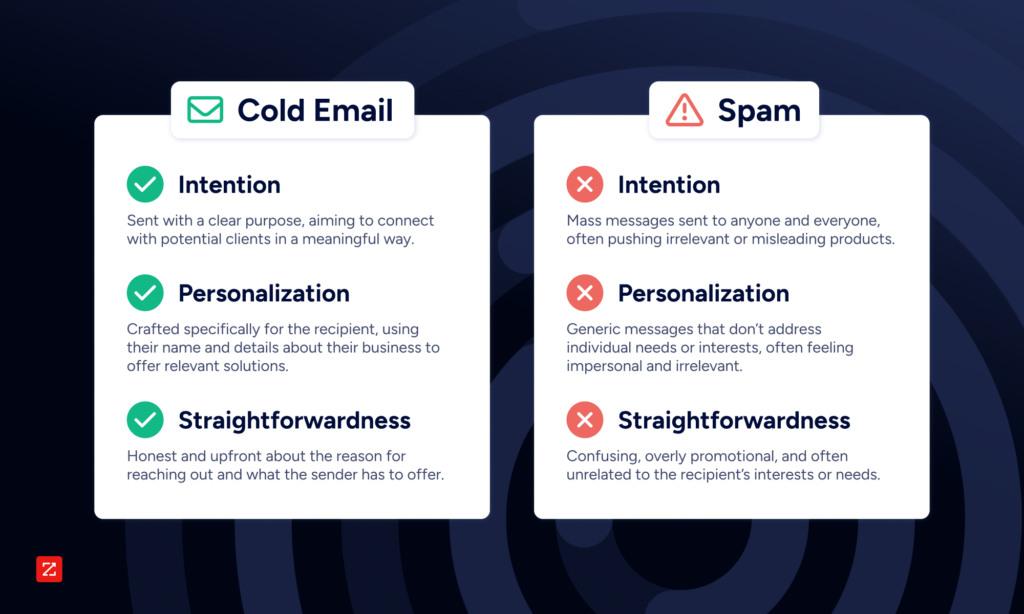
Cold email is not spam. The distinction comes down to three conditions: relevance (the recipient was specifically identified as a potential fit), legal compliance (the email follows applicable regulations for the recipient's jurisdiction), and sender transparency (the sender is clearly identified and an opt-out mechanism is provided).
Kevin Hopkinson, who manages marketing operations at ZoomInfo, outlines the three elements that differentiate cold emails from spam.
Intention: "Targeted cold email lists involve a personalized message sent to potential clients or contacts with legitimate business intent," Hopkinson says. "Spam, on the other hand, is unsolicited bulk messaging sent indiscriminately, such as promoting irrelevant or misleading products to random unqualified contacts."
Personalization: Effective cold emails address the recipient by name, reference specific details about their business or role, and offer solutions tailored to their needs. "Tailoring content to the recipient's preferences, behaviors, and past interactions enhances customer experience, fosters brand loyalty, and allows conversations to quickly improve into conversions with relevance and value," Hopkinson says.
Straightforwardness: Well-crafted cold emails are transparent about their purpose. They clearly state why the sender is reaching out and what they are offering. "Spam is vague, overly promotional, and irrelevant in every way to the audience receiving it," Hopkinson says.
On the legal question: under CAN-SPAM (US) and PECR (UK B2B), explicit prior consent is not required for cold email. However, legitimate interest must be demonstrable under GDPR for cross-border campaigns reaching EU recipients. This implied-consent nuance is what separates legal cold outreach from spam in international campaigns. When cold email fails these three conditions, relevance, compliance, and transparency, it becomes spam by both legal definition and ISP classification.
Dimension | Cold outreach | Spam |
|---|---|---|
Consent model | No prior consent required (CAN-SPAM, PECR B2B); legitimate interest required under GDPR | No consent; sent indiscriminately |
Targeting approach | Specific individuals identified as potential fits | Mass send to unqualified, random recipients |
Sender transparency | Sender clearly identified with real domain | Often disguised identity or compromised accounts |
Subject line honesty | Accurately reflects email body | Misleading, deceptive, or irrelevant |
Opt-out mechanism | Clear, functional, honored promptly | Hidden, broken, or ignored |
Legal compliance | Conforms to CAN-SPAM, PECR, GDPR as applicable | Violates applicable regulations |
List quality | Verified, targeted, consent-aware | Purchased, scraped, or indiscriminate |
Purpose | Start a relevant business conversation | Drive immediate conversion regardless of fit |
Why cold emails land in spam even when you're following the rules
Here is a distinction most sending platforms obscure: "delivered" does not mean "in the inbox." A delivery confirmation tells you the receiving server accepted the message. It says nothing about where that server placed it. Cold emails spam filters classify as low-quality end up in the spam folder or promotions tab, counted as delivered, invisible to your recipient.
Five systemic causes explain why legitimate cold emails get misclassified:
Missing or misconfigured SPF/DKIM/DMARC: Without all three authentication records present and aligned, receiving servers have no way to verify your identity. Even one missing record degrades deliverability.
New domain without warm-up: ISPs assign reputation scores starting at zero for new domains. Sending high volumes immediately triggers spam classification before any positive engagement signals exist.
Excessive per-inbox sending volume: ISPs track behavioral patterns per inbox, not just per domain. Sending above per-inbox thresholds triggers spam classification regardless of content quality.
Templated copy flagged as mass-produced: Modern spam filters evaluate content patterns holistically. Repetitive sentence structures, identical CTAs, and copy that reads as bulk-generated all contribute to spam scoring.
Open tracking pixels introducing third-party domains: Tracking pixels embed external domain references that spam filters flag, and since Apple's Mail Privacy Protection launched in 2021, open tracking data has become unreliable anyway.
Google's February 2024 bulk sender policy made these requirements non-negotiable for anyone sending 5,000 or more emails per day to Gmail addresses: mandatory SPF, DKIM, and DMARC authentication; one-click unsubscribe; and spam complaint rates below 0.10% to avoid throttling. Rates above 0.30% risk throttling; rates above 3% result in Gmail blocking your emails entirely. These thresholds apply to cold email campaigns at scale, not just commercial email marketers.
Domain authentication: SPF, DKIM, and DMARC explained
Domain authentication is the foundation of cold email deliverability. Having all three records present and in alignment is what matters. A common misconfiguration is SPF records with more than 10 DNS lookups, which causes lookup failures even when the record technically exists.
SPF (Sender Policy Framework)
SPF defines which servers are authorized to send email on your domain's behalf. When a receiving server checks an incoming email, it queries your domain's DNS records to confirm the sending server is on your authorized list. If it is not, the email fails SPF and receiving servers treat it with suspicion.
DKIM (DomainKeys Identified Mail)
DKIM adds a cryptographic signature to outgoing emails, proving the message was not altered in transit between your sending server and the recipient's inbox. The signature is verified against a public key published in your DNS records. A passing DKIM check tells the receiving server the email is authentic and unmodified.
DMARC (Domain-based Message Authentication, Reporting, and Conformance)
DMARC tells receiving servers what to do when SPF or DKIM fail: monitor (p=none), quarantine (p=quarantine), or reject (p=reject). It also enables reporting so you can see authentication failures across your domain. Starting with p=none lets you monitor without affecting deliverability while you diagnose alignment issues.
Authentication setup checklist
Check your existing records using MXToolbox to identify what is present and what is missing.
Add an SPF record to your domain's DNS if one does not exist, listing your authorized sending servers.
Enable DKIM signing in your email sending platform and publish the public key to your DNS.
Publish a DMARC policy starting with p=none to begin monitoring authentication failures without affecting sends.
Verify alignment: the domain in your From address must match the domain in your SPF and DKIM records. Misalignment causes DMARC failures even when individual records pass.
As of February 2024, Google and Yahoo require all three authentication standards for bulk senders. These are the new baseline, not advanced best practices. Spam is less likely to use authentication methods effectively, if at all.
Domain warm-up and sending volume: the infrastructure layer most teams skip
Domain warm-up
ISPs assign reputation scores to new domains starting at zero. There is no inherited trust, no grace period, and no shortcut. Sending high volumes from a new domain immediately signals spam behavior before any positive engagement signals have been built.
The standard approach is a graduated volume ramp: 5 emails per day in week 1, 15 per day in week 2, 30 per day in week 3, and 40 or more per day by week 4. A minimum 2-4 week warm-up period before scaling is the practical baseline.
One genuine debate worth noting: automated warm-up tools are increasingly detectable by ISPs. These tools create artificial engagement signals (simulated opens and replies from seed networks), and modern spam filters are trained to identify them. Some platforms use private deliverability networks that are harder to detect; others argue that any automated warm-up is counterproductive compared to genuine early sends to real, highly engaged contacts. The honest answer is that results vary by platform and sending infrastructure. If you use an automated warm-up tool, verify that your platform has a track record with the specific ISPs you are targeting before relying on it.
Sending volume limits
Volume limits apply per inbox, not per domain. This is the constraint most teams miss. The practical implication: you can scale sending by adding inboxes rather than increasing per-inbox volume.
Domain stage | Daily volume per inbox |
|---|---|
New domain (days 1-7) | 5-10 emails/day |
Warming domain (weeks 2-4) | 20-40 emails/day |
Established domain | 40-50 emails/day |
Spreading sends throughout the day rather than batch-blasting also reduces the behavioral flags that trigger ISP thresholds. A sudden burst of 50 emails in 10 minutes looks different to a spam filter than 50 emails distributed across an 8-hour window.
List hygiene and contact verification: the upstream variable
List quality determines whether any downstream deliverability tactic can succeed. Sending to unverified, stale, or scraped contacts generates hard bounces and spam trap hits that permanently damage sender reputation. No amount of authentication tuning or warm-up work recovers a domain that has hit enough spam traps.
What spam traps are: Spam traps are email addresses maintained by ISPs and blacklist operators specifically to catch senders who are not practicing proper list hygiene. They are invisible in a list, generate no engagement, and immediately flag the sender when hit. Purchased and scraped lists have high spam trap density because the addresses were never collected through legitimate opt-in or verified sourcing. Considering email list building services that verify contacts at the point of acquisition is the cleaner alternative to post-hoc scrubbing.
The 2% hard bounce threshold: Exceeding a 2% hard bounce rate triggers ISP action, according to Campaign Monitor benchmarks. Hard bounces signal that you are sending to addresses that do not exist or have been abandoned, which is a strong indicator of poor list hygiene. Most ISPs begin throttling or blocking senders who consistently exceed this threshold.
How to verify lists: Verification should happen before every campaign, not just at list acquisition. Three tools commonly used for this: NeverBounce, ZeroBounce, and Emailable. Each validates whether an email address is deliverable, flags risky addresses (role-based, catch-all, disposable), and removes known spam traps from your list before you send.
The proactive alternative: Reactive list cleaning addresses the symptom after your list has already degraded. ZoomInfo takes a different approach: with 200M+ verified business emails continuously verified against 1.5B+ data points processed daily, outreach starts from a clean list rather than requiring post-hoc scrubbing. The difference is not just efficiency. Stale lists degrade sender reputation with every send; continuously verified data means the contacts you are reaching today reflect reality today, not the state of your market six months ago.
Eight ways to improve cold emails and avoid the spam folder
Writing cold emails that reach the inbox requires more than avoiding obvious mistakes. Each of the following dimensions affects both deliverability and conversion.
1. Personal vs. generic messaging
Cold outreach: Tailored to the recipient, cold outreach emails typically start with personalized greetings and mention details specific to the individual or their company. This approach shows that you have done your research and presents a genuine potential for a mutually beneficial relationship.
Spam: A spam message is the polar opposite, with generic greetings like "Dear Sir/Madam," or no personalization at all. These emails are sent in bulk and lack any specific details relevant to the audience and the business they are targeting.
2. Relevance vs. randomness
Cold outreach: Even though your message might be considered "cold" because you are making the first move, an effective outreach email is highly targeted and sent to individuals or businesses that you specifically identified as potentially benefiting from your products or services. Personalization also has a direct deliverability benefit: ISPs use engagement signals (open rate, reply rate, delete-without-open rate) as inputs to sender reputation scoring. Personalized emails that generate replies improve domain reputation over time; mass-templated emails that get ignored degrade it.
Spam: These messages are sent out to a wide, indiscriminate audience without any consideration for the recipient's interests, needs, or even industry. The lack of relevance, with no targeting, customization, or forethought, is a hallmark of spam emails.
3. Unsubscribing: respectful compliance vs. deliberate evasion
Cold outreach: Demonstrate respect for the recipient's autonomy by providing a clear, straightforward method for unsubscribing from future communications. This is not only a legal requirement under laws like CAN-SPAM, but also a sign of your commitment to maintaining a respectful relationship with your customers. By making the unsubscribe process simple and honoring it promptly, you are communicating that you value the recipient's preferences and consent.
Spam: Actual spam will make it difficult, if not impossible, for recipients to opt out of future messages. They may hide the unsubscribe link, make the process convoluted, or ignore unsubscribe requests altogether. This frustrates recipients and violates email marketing regulations, clearly demonstrating a disregard for recipient preferences.
4. Value proposition vs. empty promises
Cold outreach: Provides clear value to the recipient, whether it is through informative content, an offer, or an invitation to discuss potential solutions to their problems. The intention is to start a conversation based on the recipient's needs and interests. Any offer should have tangible value.
Spam: Offers little more than empty calories, packed with exaggerated claims and deals that are too good to be true. These emails are typically self-serving, offer little value, and are not beneficial or relevant to the recipient.
5. Frequency and timing vs. bombardment
Cold outreach: Emails are sent at a frequency that respects the recipient's time. Follow-up emails are spaced out to give them time to consider your offer without feeling pressured. Non-engagement over time should lead to a sunsetting policy where the recipient is automatically removed from your list.
Spam: Sent repeatedly and at random, flooding the recipient's inbox, and often prompting them to mark the email as spam. Regardless of engagement, emails will continue to be delivered as long as the email does not bounce.
6. Professional branding vs. suspicious elements
Cold outreach: Reflects professionalism and includes proper branding elements that reassure the recipient of the email's legitimacy. These emails are well-written, free of errors, sent using a brand-specific domain, and aim to build trust and credibility. One deliverability trade-off worth understanding: open tracking pixels embed third-party tracking domains that spam filters flag. Since Apple's Mail Privacy Protection launched in 2021, open tracking data has become unreliable, making the deliverability cost outweigh the analytical benefit for most senders. Misleading cold email subject lines are also a direct spam signal, both algorithmically and with recipients who report emails manually.
Spam: May contain suspicious elements, such as misleading subject lines, poor spelling and grammar, or a lack of professional branding.
7. Building relationships vs. immediate conversions
Cold outreach: Seeks to lay the foundation for a beneficial relationship. These emails prioritize engagement and dialogue over immediate sales, recognizing that trust and rapport are prerequisites to conversion.
Spam: Eyes the short-term prize, pushing for a quick conversion with little regard for the recipient's readiness or interest.
8. Authentication: trustworthiness vs. anonymity
Cold outreach: Will conform with traditional email authentication standards such as the Sender Policy Framework (SPF) and DomainKeys Identified Mail (DKIM) that point back to the sender's email domain, and have a DMARC policy published to the sender's domain. These technologies verify your identity, ensuring for the recipient that the email originated from your stated domain and was not altered in transit. When companies demonstrate their commitment to security and trustworthiness, recipients and email service providers can more easily verify the legitimacy of these emails, which helps build trust and improve deliverability rates.
Spam: Spam is less likely to use authentication methods effectively, if at all. Spammers often attempt to disguise their identity or use compromised accounts and domains. A lack of proper authentication often indicates that an email is illegitimate and undermines trust between the sender and the recipient.
Pre-send checklist: what to verify before every cold email campaign
Run this checklist before every campaign, not just new ones. Deliverability conditions change: domains age, list quality drifts, and sending volume creeps up over time.
Domain authentication: SPF, DKIM, and DMARC records are all present and aligned. Verify with MXToolbox before every new campaign or domain configuration change.
Domain warm-up: New domains have been warmed for at least 2-4 weeks before scaling beyond 40 emails per inbox per day.
List verification: All contacts have been verified, hard bounce rate is below 2%, and no purchased or scraped lists are in the send. Use data quality tools to clean lists before every campaign, not just at acquisition.
Content review: No spam trigger words (free, guaranteed, act now, click here, earn money) in subject line or body. Subject line accurately reflects the email body. Plain text is preferred over HTML-heavy templates. Avoid excessive capitalization and exclamation marks.
Sending volume: Per-inbox daily cap respected (40-50 emails per day for established domains). Sends are distributed throughout the day rather than batch-blasted in a short window.
Opt-out mechanism: One-click unsubscribe is present and functional. Unsubscribe requests are honored within 10 business days, as required by CAN-SPAM.
Post-send monitoring: Bounce rate, spam complaint rate (target below 0.10% for Gmail per Google's February 2024 policy), and reply rate are all tracked. Monitor spam complaint rate via Google Postmaster Tools for Gmail-specific visibility.
How verified data changes the cold email equation
Every deliverability tactic in this article operates downstream of one variable: the quality of the data behind your outreach. Authentication, warm-up, and content optimization all matter, but they cannot compensate for a list built on stale, unverified, or scraped contacts.
ZoomInfo is an all-in-one AI GTM Platform built on a data foundation of 200M+ verified business emails, continuously refreshed against 1.5B+ data points processed daily. That data scale means outreach starts from a clean list rather than requiring post-hoc scrubbing. Smartsheet increased MQLs by 84% and opportunity rates by 26% using ZoomInfo's marketing platform, a result that reflects what better-targeted outreach from cleaner, more current data actually produces in pipeline terms.
The GTM Context Graph goes further than data freshness. It is the intelligence layer that fuses ZoomInfo's verified B2B data with CRM history, conversation intelligence, and behavioral signals into a unified reasoning layer. The result is not just a cleaner list of who to email, but context about why a specific account is likely to respond now: what they are researching, what they have already engaged with, and where they are in a buying motion. That context is what separates a relevant cold email from a well-formatted one that still gets ignored.
The access dimension completes the picture. GTM Studio gives marketers and RevOps teams the environment to build targeted audiences and launch campaigns without engineering dependencies. APIs and MCP connect that same intelligence to any workflow already built, so the data reaches your team in the tools they already use.
Request a demo to see how ZoomInfo's verified data and GTM Context Graph improve cold email targeting.
Frequently asked questions
Is cold email considered spam?
No, cold email is not inherently spam. The distinction comes down to three factors: relevance (the recipient was specifically identified as a potential fit), legal compliance (the email follows CAN-SPAM, GDPR, or PECR requirements for the recipient's jurisdiction), and sender transparency (the sender is clearly identified and an opt-out mechanism is provided). Cold email becomes spam when it is sent indiscriminately, uses deceptive subject lines, or lacks a functioning opt-out. In B2B contexts under CAN-SPAM (US) and PECR (UK), explicit prior consent is not required, but the email must still meet all other compliance requirements. Avoiding spam in cold emails is fundamentally about maintaining these three conditions on every send.
How do I stop my cold emails from going to spam?
Stopping cold emails from landing in spam requires a multi-layer approach. Authenticate your domain with SPF, DKIM, and DMARC records and verify alignment before sending. Warm up new domains gradually over 2-4 weeks before scaling volume. Verify your contact list before every campaign to keep hard bounces below 2%, email list cleaning tools make this a repeatable step rather than a one-time fix. Personalize each email, since templated mass sends are flagged by ISPs. Avoid spam trigger words and misleading subject lines. Respect per-inbox sending limits (40-50 emails per day for established domains). Include a clear, functional one-click unsubscribe. Starting with verified contact data eliminates the list hygiene problem at the source.
What is the spam rate limit for Gmail cold emails?
As of February 2024, Google requires bulk senders (those sending 5,000 or more emails per day) to keep spam complaint rates below 0.10% to avoid throttling. Rates above 0.30% risk throttling, and rates above 3% can result in Gmail blocking your emails entirely. These thresholds apply to all bulk senders reaching Gmail inboxes, not just commercial email marketers, cold email campaigns at scale are subject to the same requirements. Monitoring your spam complaint rate via Google Postmaster Tools is the most direct way to track your standing.
What words trigger spam filters in cold emails?
Common spam trigger words include "free," "guaranteed," "no obligation," "act now," "click here," and "earn money." Excessive capitalization and exclamation marks also raise spam scores. However, modern AI-based spam filters (including Gmail's) evaluate holistic content patterns rather than word lists alone. Repetitive templated copy, misleading subject lines, and mismatched subject/body content all contribute to spam scoring independently of specific trigger words. The safest approach is to write each email as if it were a genuine one-to-one message: specific, relevant, and free of urgency-pressure language. Reviewing cold email subject lines best practices is a practical starting point for reducing subject-line spam signals.
What email authentication standards do cold emails need?
Cold emails should conform to three authentication standards: SPF (Sender Policy Framework), which defines which servers are authorized to send on your domain's behalf; DKIM (DomainKeys Identified Mail), which adds a cryptographic signature proving the email was not altered in transit; and DMARC (Domain-based Message Authentication, Reporting, and Conformance), which tells receiving servers what to do when SPF or DKIM fail. All three must be present and in alignment, having records present without alignment still causes deliverability failures. Since February 2024, Google and Yahoo require all three for bulk senders as a non-negotiable baseline.
What is a sunsetting policy for cold email lists?
A sunsetting policy is a rule that automatically removes contacts from your cold email list after a defined period of non-engagement. For example, if a contact has not opened, clicked, or replied to any email in 90 days, they are removed from active sequences. Sunsetting protects sender reputation by reducing the volume of emails sent to disengaged contacts. High delete-without-open rates signal to ISPs that your emails are unwanted, which degrades domain reputation over time. A typical sunsetting threshold is 60-90 days of non-engagement, though this varies by sales cycle length. For guidance on writing the individual cold email that earns engagement before a contact reaches that threshold, the fundamentals of relevance and personalization apply from the first touch.