
Loxo is an AI Talent Intelligence Platform that combines sourcing, CRM, ATS, outreach, and AI agents into a single system of record for recruiting teams.
With 13,200+ clients, a talent graph of 1.2 billion candidate profiles, and a $115M investment from Tritium Partners, the platform replaces the scattered tool stacks most agencies have been running for years.
But even the most complete recruiting platform has limits.
Loxo tracks candidate pipelines, manages outreach sequences, and stores every recruiter interaction. On its own, it cannot route calls through an AI phone system that logs transcripts to candidate profiles, sync your client database with a dedicated CRM and marketing automation engine, hand off placed candidates into an enterprise HRIS, or distribute job postings across thousands of boards in a single action.
The right integrations close those gaps. They add communication intelligence, automate scheduling, connect HR systems, and extend Loxo's reach to tools it doesn't connect to natively.
This guide covers the strongest integration for each of the jobs Loxo users most commonly need done:
Log every call, SMS, and WhatsApp message to candidate profiles with AI conversation intelligence
Sync your candidate and client database with a CRM and marketing automation platform
Automate the handoff from placement to employee onboarding in an enterprise HRIS
Capture structured interview notes and transcripts on candidate records without manual documentation
Eliminate scheduling coordination between recruiters, candidates, and hiring managers
Distribute open roles to thousands of job boards in a single posting action
Connect the rest of your recruiting stack through no-code automated workflows
Each section walks through how the integration connects with Loxo, what data flows between the platforms, pricing, and who benefits most.
Best Loxo Integrations at a Glance |
|---|
Best Loxo Integration for Communication and AI Call Intelligence Logs every call, SMS, and WhatsApp message to Loxo candidate profiles, with AI transcripts, topic detection, and sentiment analysis that turn conversations into structured data inside the ATS. |
Best Loxo Integration for CRM Synchronization and Marketing Automation Syncs contacts between Loxo and HubSpot (bidirectional or one-way), giving recruiting firms access to HubSpot's nurture workflows, email sequences, and marketing automation for their Loxo-sourced candidate and client database. |
Best Loxo Integration for Enterprise HCM Sync and Hired-Candidate Onboarding Pushes placed-candidate data from Loxo into Workday's onboarding and worker record workflows, syncs requisitions and disposition statuses, and eliminates the manual re-entry that normally falls on HR coordinators after every confirmed hire. |
Best Loxo Integration for Structured Interview Intelligence Joins Loxo-linked interview calls automatically, generates AI-structured notes and transcripts, and pushes them into candidate profiles with scorecard tooling that ties each evaluation to specific conversation evidence. |
Best Loxo Integration for Interview Scheduling Automation Collects availability from candidates and hiring managers through a single smart link, identifies the earliest overlapping slot, and syncs confirmed interview details back into the correct Loxo candidate record and pipeline stage. |
Best Loxo Integration for Multi-Board Job Distribution Distributes open roles from Loxo across 7,000+ job boards in a single posting action, routes all applications back into Loxo with source-level tagging, and surfaces channel performance analytics to optimize job board spend. |
Best Loxo Integration for Connecting Your Recruiting Stack Through Automated Workflows Extends Loxo's reach to 8,000+ applications through API automation, triggering workflows from Loxo events that push data to tools outside the native marketplace without writing code. |
What Is Loxo?
Source: Loxo
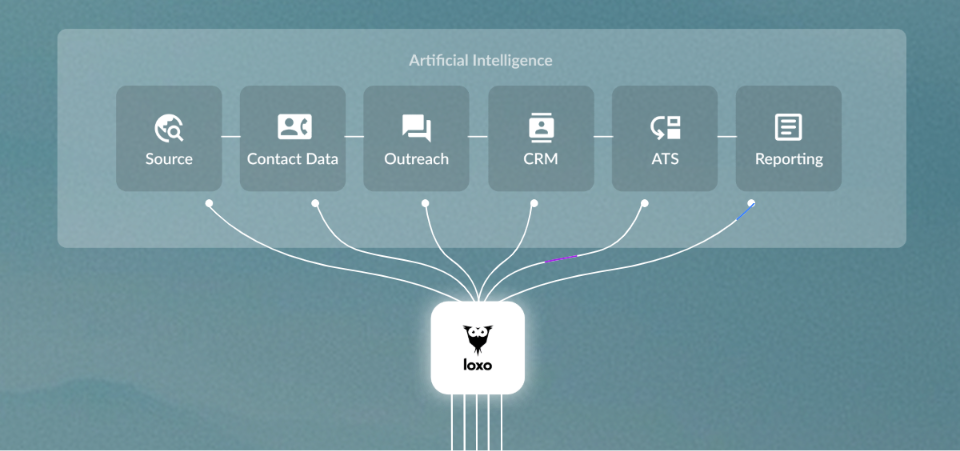
Loxo is an AI Talent Intelligence Platform that combines sourcing, CRM, ATS, outreach, and business development into a single system built for recruiting firms.
The company calls itself the inventor of the Talent Intelligence Platform category, built on the premise that it shouldn't take 10+ tools to make one placement.
Its AI infrastructure includes 50+ machine learning models trained on recruiter behavior since 2012, powering features like Natural Language Search, a Self-Updating CRM Agent, and Outreach GPT for AI-generated campaign sequences.
Loxo holds a 4.6-star rating across G2, Capterra, Software Advice, and GetApp and was named #1 Momentum Leader in Talent Intelligence Platforms by G2.
Loxo's integration ecosystem works through the Loxo Marketplace and an Open API with webhook support for ten object types. The Marketplace lists pre-built connectors across the recruiting tech stack, while the REST API enables custom integrations with any tool that can make HTTP requests.
The API supports Bearer token authentication and real-time event notifications for candidate, job, deal, placement, and company record changes.
The integration categories available to Loxo users include:
Communication and VOIP: Ringover, RingCentral, Twilio, KrispCall, TalentLynk
CRM and email marketing: HubSpot, Mailchimp, Mailgun
Scheduling and interviews: Arrange, Zoom, Hireflix, Metaview, CoRecruit
Job boards and distribution: Indeed, Monster, Broadbean, Seek, Totaljobs
HCM, payroll, and back office: Workday, Greenhouse, Xero, FoxHire, Ascen
AI and productivity enrichment: Boostie, Talentalk, Vente, Selligence
Workflow automation and iPaaS: Zapier, Unified
Here are the seven integrations we selected as the best options across the categories that matter most to recruiting teams.
1. Ringover: Best Loxo Integration for Communication and AI Call Intelligence
Source: Ringover
Ringover is a cloud communication platform that integrates with Loxo through a native connection to turn every recruiter conversation into a structured activity record on the candidate's Loxo profile.
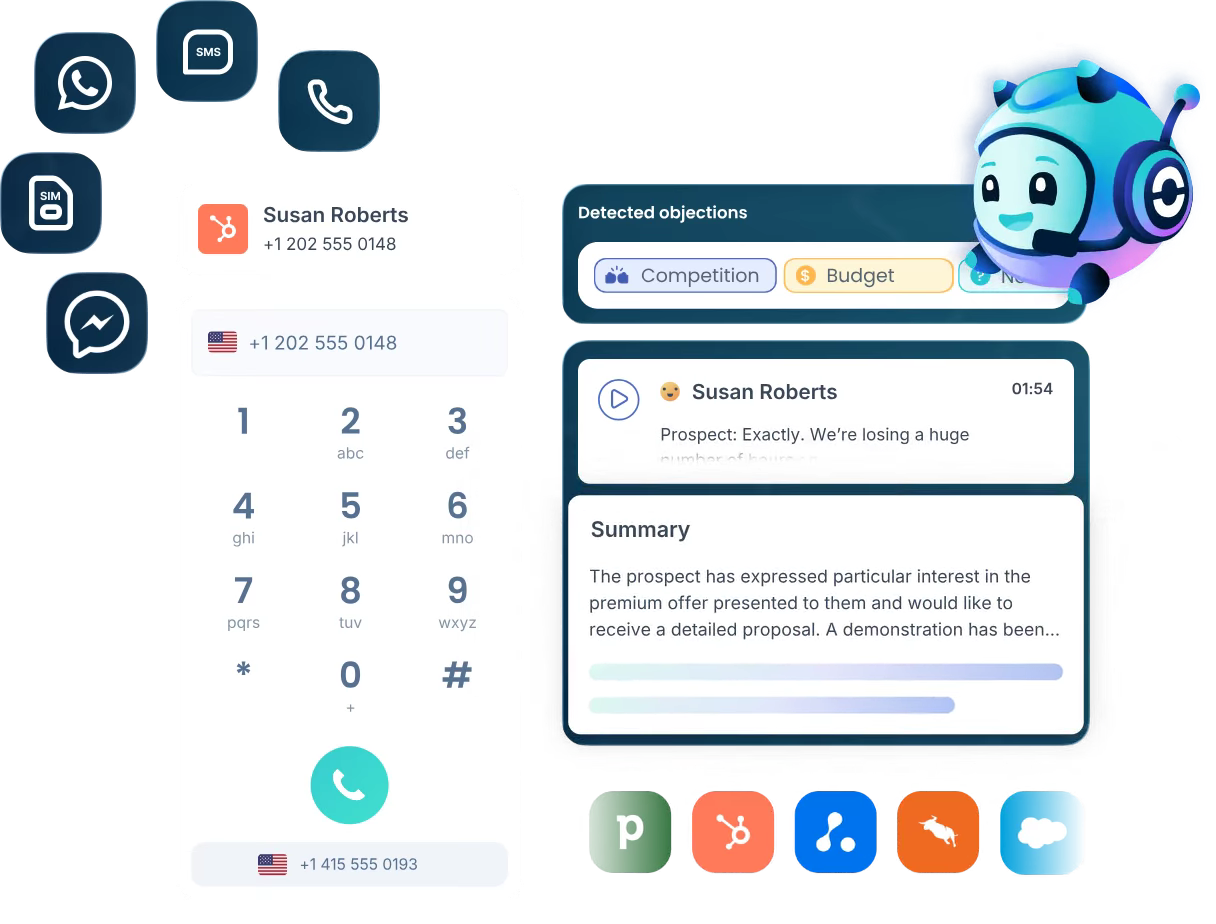
The integration works both ways: Ringover pushes call recordings, transcripts, summaries, and tags into Loxo, while Loxo pushes candidate profile data into Ringover's caller context sidebar.
Key integration capabilities include:
Automatic logging of every call, SMS, and WhatsApp message to the candidate's Loxo profile, with AI transcripts and recordings attached in real time
An Empower AI layer that surfaces summaries, topic detection, and sentiment signals from every logged call
A real-time caller context sidebar pulling the candidate's full Loxo history before the recruiter answers an inbound call
Power Dialer support for sequential automated dialing through Loxo pipeline contacts
How Ringover Integrates with Loxo
Ringover connects to Loxo as a native integration listed in Loxo's Marketplace. Setup follows Ringover's standard authentication flow and activates across all users on the Ringover workspace once connected.
1. Automatic Activity Logging with Recordings and AI Transcripts.
Every call placed or received through Ringover creates an activity record on the candidate's Loxo profile. The record includes the call recording, the full AI transcript in the candidate's language, a summary, and any tags the recruiter applied.
SMS and WhatsApp messages log the same way, creating a complete contact history across channels on each profile without manual documentation.
2. Empower AI Conversation Intelligence.
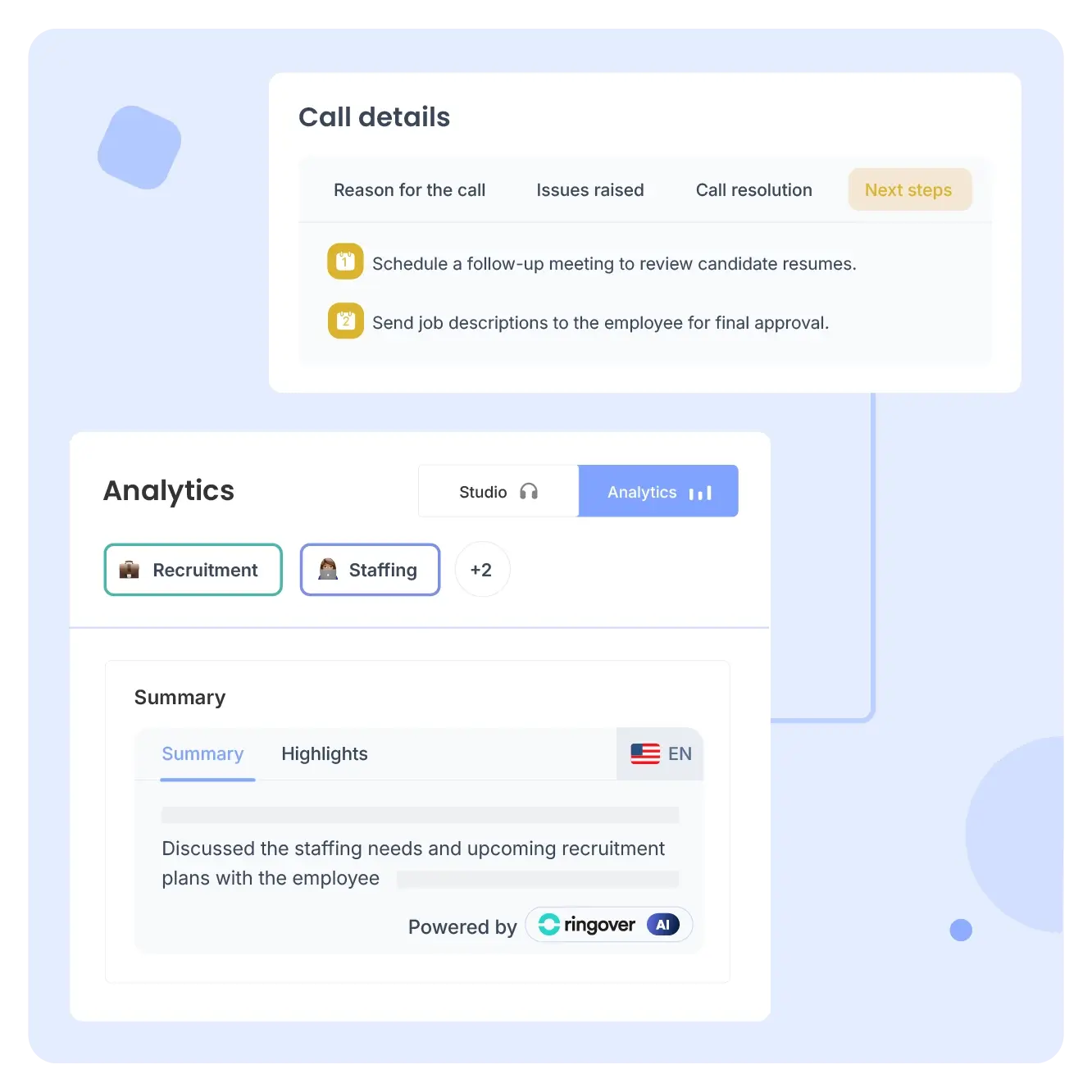
With Ringover's Empower AI add-on, every logged call gets topic detection, sentiment analysis, and Call Analysis AI output that identifies action items and decision points. All of this syncs into Loxo as candidate data.
Source: Ringover
A profile reviewed after a Ringover call shows not just "a call happened" but what was discussed, how the candidate responded, and what needs follow-up.
3. Real-Time Candidate Context on Inbound Calls.
When a candidate calls a Ringover number, the integration pulls the candidate's full Loxo history into a sidebar: pipeline stage, previous call recordings and transcripts, recruiter notes, and applied tags. The recruiter answers with full context instead of stalling while searching for the right file.
4. Omnichannel Coverage with Power Dialer.
Ringover handles calls, SMS, WhatsApp, and video through a single interface alongside Loxo. The Power Dialer dials through imported contact lists sequentially, and voicemail drop deposits pre-recorded messages on unanswered attempts, keeping the pipeline moving without individual rep attention on each call.
Ringover Pricing
Ringover uses per-seat pricing. The Loxo integration requires the BUSINESS plan or higher:
TALK: $15/user/month (annual) or $24/user/month (monthly). Does not include CRM/ATS integrations.
BUSINESS: $47/user/month (annual) or $57/user/month (monthly). Includes 100+ CRM/ATS integrations (including Loxo), Power Dialer, and advanced IVR routing.
ADVANCED: Custom pricing. Adds call campaigns and voicemail drop.
Key add-ons: Empower AI at $39/license/month adds the conversation intelligence layer that syncs summaries into Loxo. Omnichannel Messaging at $29/license/month (minimum 3 users) adds WhatsApp and social channel logging.
Who Should Use the Ringover Integration?
Staffing agencies running high call volume that need every conversation documented in Loxo automatically, with AI transcripts and summaries replacing manual post-call note-taking
Teams that want AI candidate data attached to Loxo profiles after every call, converting conversations into structured records any recruiter can act on
Recruiters managing hundreds of active candidates who need inbound caller context before answering, so every conversation begins with the full pipeline picture
2. HubSpot: Best Loxo Integration for CRM Synchronization and Marketing Automation
Source: HubSpot
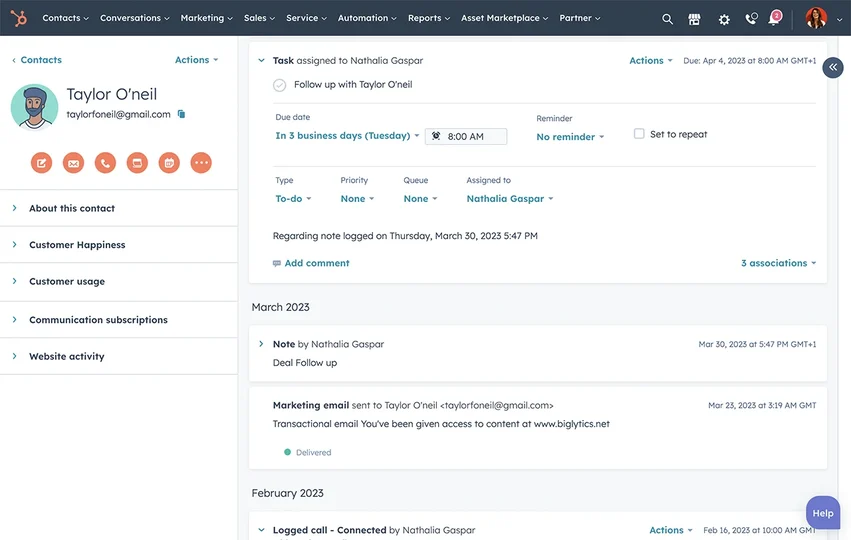
HubSpot is a CRM and customer platform that integrates with Loxo through a native connection in Loxo's Settings panel.
The integration keeps contact records synchronized across both systems so the candidate pipeline in Loxo and the contact pool in HubSpot reflect the same data without manual export or duplicate entry.
Key integration capabilities include:
Bidirectional or one-way contact sync between Loxo and HubSpot, configurable at setup
Automatic contact creation in HubSpot whenever a new person is added to Loxo, with field-level mapping including mobile phone numbers
Marketing automation and email sequence access for the synced contact pool
Custom field mapping between firm-specific Loxo fields and HubSpot contact properties
How HubSpot Integrates with Loxo
The integration is a native first-party connector accessed from Loxo's Settings > Integrations panel. It connects at the contact record level and runs continuously once configured.
1. Contact Synchronization and Field Mapping.
Every time a new person is added to Loxo, that record is created as a contact in HubSpot. Field-level mapping connects Loxo profile attributes to HubSpot properties: mobile phone numbers, name, email, company, and job title sync automatically.
Custom field mappings for firm-specific Loxo fields can be configured through Loxo's support team. Historical data migration for existing records requires a one-time support-initiated process.
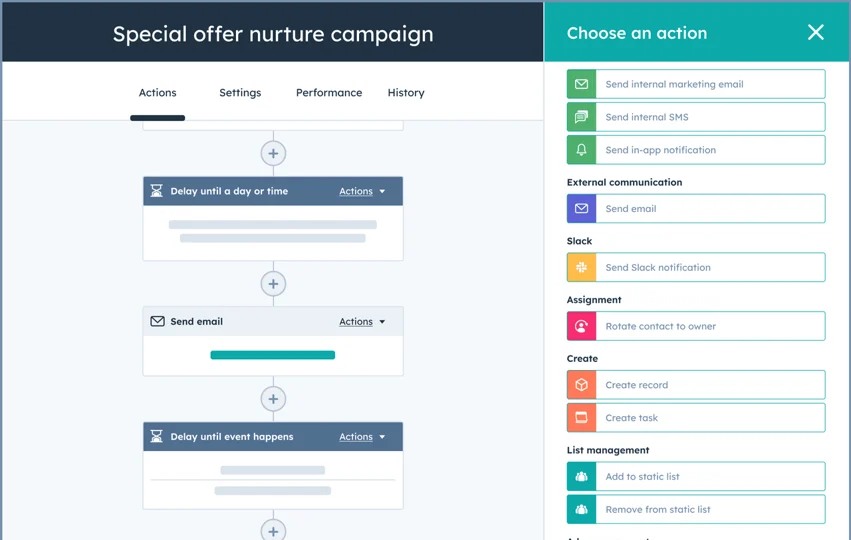
2. Marketing Automation and Email Sequences.
Once contacts sync to HubSpot, they become eligible for HubSpot's full marketing automation and email sequence infrastructure. Recruiters can enroll synced candidates into nurture campaigns, newsletter sends, or re-engagement sequences without adding those candidates to HubSpot separately.
Source: HubSpot
On the business development side, prospective clients added to Loxo's Sales CRM and synced to HubSpot can enter deal nurture sequences through HubSpot's Sales Hub.
3. One-Way vs. Bidirectional Sync.
One-way sync (Loxo to HubSpot) treats Loxo as the system of record: new contacts propagate to HubSpot, but HubSpot changes do not flow back. Bidirectional sync adds the reverse flow, valuable for firms where HubSpot generates new contacts through inbound forms or marketing campaigns.
With bidirectional sync active, a prospective client captured through a HubSpot campaign appears in Loxo's CRM without manual import.
HubSpot Pricing
HubSpot uses a hybrid pricing model combining per-seat pricing, flat monthly tiers, and a permanent free CRM:
Free CRM: $0, unlimited contacts (up to 1M records), basic deal pipeline. Capped at 2 seats; does not include marketing automation or email sequences.
Sales Hub Starter: $20/seat/month (monthly) or $9/seat/month (annual).
Sales Hub Professional: $90/seat/month (annual). Includes email sequences and the full sales automation suite.
Marketing Hub Professional: $800/month (annual) for 3 Core Seats. Includes marketing automation workflows, A/B testing, and 2,000 marketing contacts.
HubSpot's Marketing Hub charges based on "marketing contacts," so contacts synced from Loxo and enrolled in marketing workflows count against this limit.
Who Should Use the HubSpot Integration?
Firms running parallel candidate outreach and client business development that need both contact pools synchronized without manual export cycles
Teams using HubSpot email sequences or marketing automation to nurture candidates through longer engagement cycles, with Loxo as the sourcing and primary ATS layer
Firms with inbound marketing operations generating contacts in HubSpot that should also appear in Loxo's CRM without manual import
3. Workday: Best Loxo Integration for Enterprise HCM Sync and Hired-Candidate Onboarding
Source: Workday
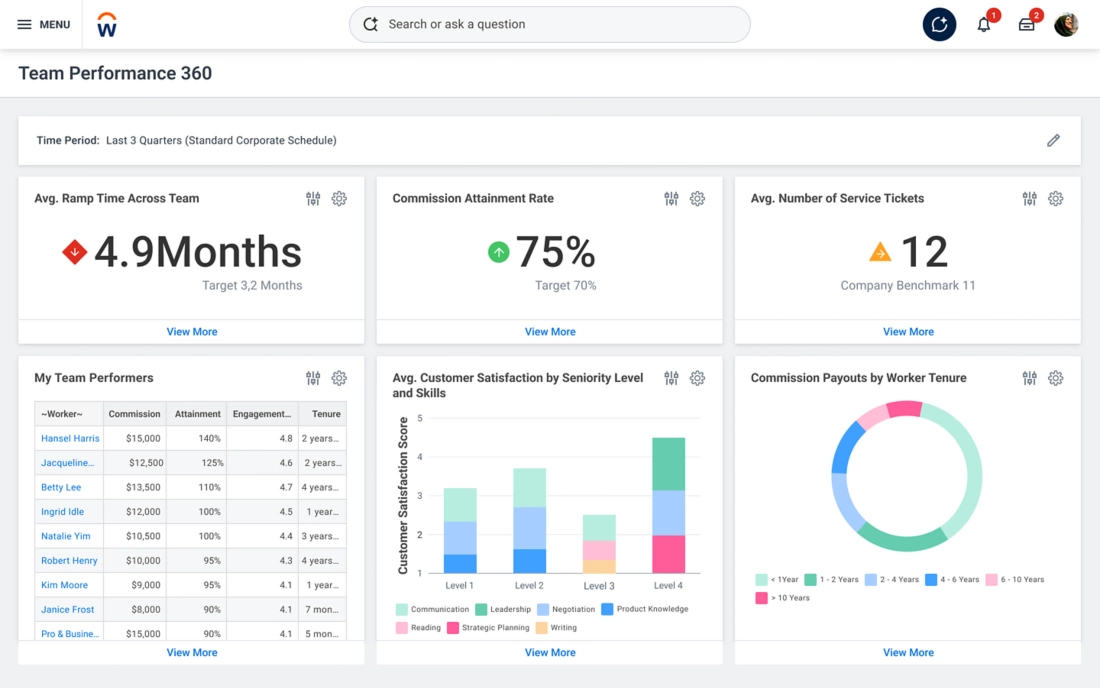
Workday is an enterprise cloud platform for HR, Finance, and IT that integrates with Loxo to bridge the data gap between ATS and HRIS when a candidate moves from "placed" to "employee."
The integration is a native connection available through the Loxo Marketplace, restricted to Loxo's Enterprise tier, and requires coordination between Loxo's support team and the client organization's Workday administrator.
Key integration capabilities include:
Pushing placed-candidate profile data from Loxo into Workday's onboarding and worker record workflows
Synchronizing candidate disposition statuses and offer data between both platforms
Receiving approved open requisitions from Workday and surfacing them inside Loxo
Maintaining Workday as the authoritative workforce data source downstream of Loxo placements
How Workday Integrates with Loxo
On the Workday side, access is granted through a dedicated Integration System User (ISU) with scoped security domain permissions. On the Loxo side, Enterprise tier access is required, which also includes SSO, SAML, and custom AI configurations.
1. Placed-Candidate Data Transfer and Onboarding Trigger.
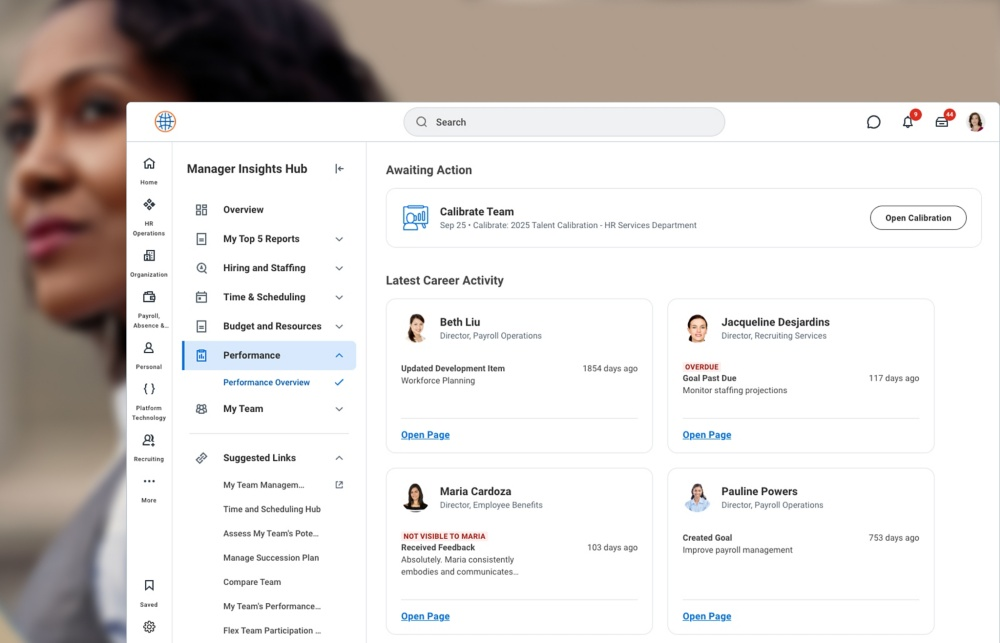
When a recruiter closes a placement in Loxo, the candidate profile data accumulated throughout the recruiting process (contact information, employment history, position details, and offer terms) can push into Workday.
This triggers Workday's onboarding workflow automatically, eliminating the manual re-entry step that normally falls on HR coordinators after every confirmed hire.
Source: Workday
2. Candidate Disposition Status and Offer Data Sync.
As candidates move through late-stage pipeline activity in Loxo (offer extended, accepted, declined), that activity maps to corresponding status changes in Workday's talent acquisition records.
This keeps the central HR system of record aligned with what is happening in the ATS, so headcount planning and workforce analytics stay accurate without periodic manual reconciliation.
3. Workday Requisition Push to Loxo.
Approved open requisitions in Workday flow into Loxo automatically, giving recruiters a starting point that is both current and authorized.
This matters in enterprise environments where headcount is managed through a formal approval process: recruiters work against live, authorized roles rather than informal job briefs that may differ from the approved requisition.
Workday Pricing
Workday does not publish pricing for its HCM platform. All pricing is negotiated through Workday's enterprise sales team. Its Gartner Magic Quadrant positioning targets organizations with 1,000+ employees. On the Loxo side, the integration requires Loxo's Enterprise tier, which is custom-priced.
Who Should Use the Workday Integration?
Corporate recruiting teams at large enterprises where Workday is the mandated HR platform and Loxo handles sourcing and ATS, requiring both systems to stay synchronized without parallel candidate records
RPO firms managing recruiting operations for enterprise clients whose HRIS environment runs on Workday, needing placed-candidate data to flow into client Workday instances automatically
Organizations with formal headcount approval processes where approved requisitions in Workday should appear in Loxo so recruiters work against current, authorized hiring plans
4. Metaview: Best Loxo Integration for Structured Interview Intelligence
Source: Metaview
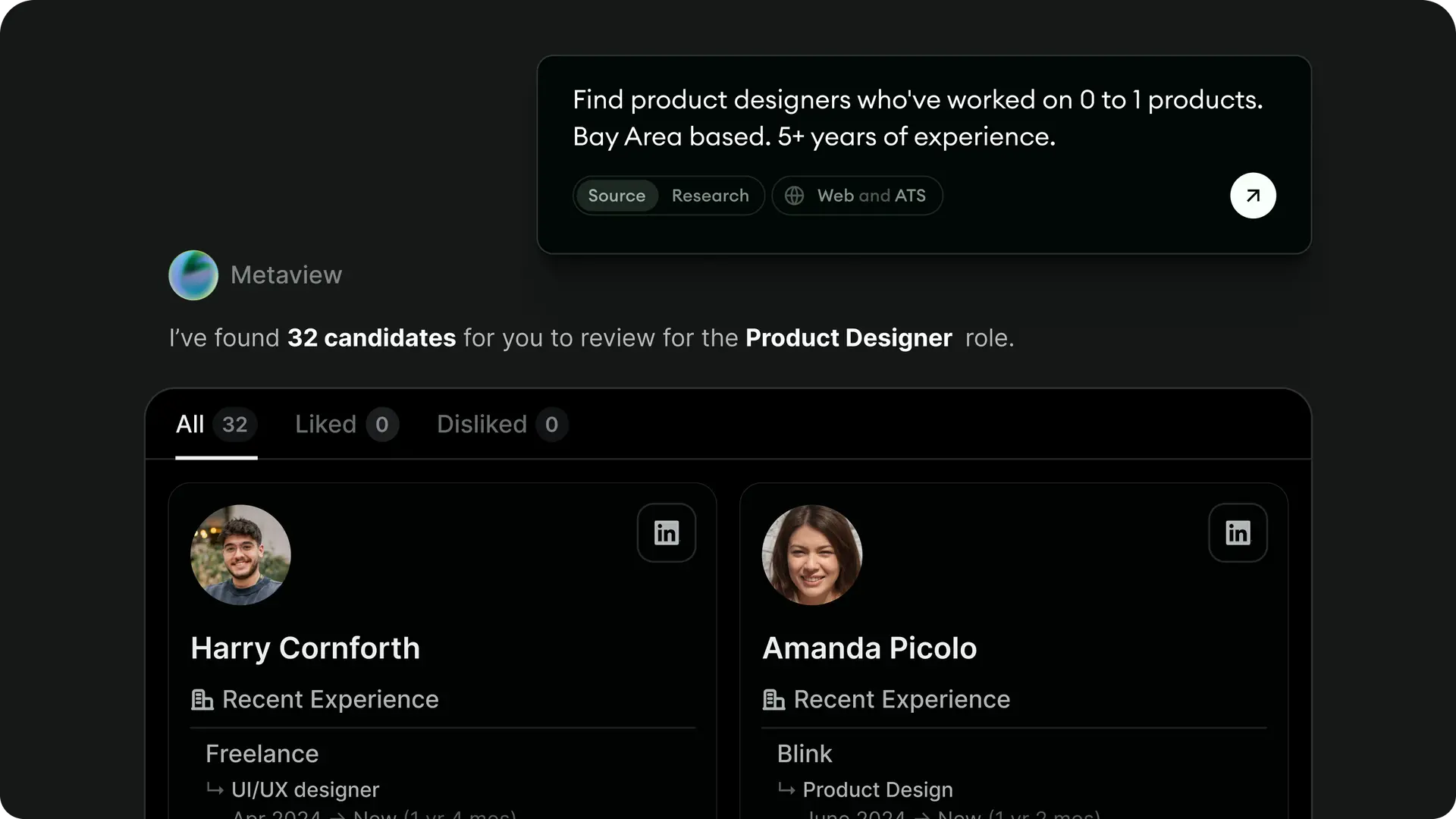
Metaview is a recruiting AI platform that integrates with Loxo through a native Marketplace connection to capture, transcribe, and push AI-structured interview notes into candidate profiles.
The integration is bidirectional: Loxo pushes candidate profile context into Metaview before interviews begin, and Metaview pushes structured outputs back into Loxo candidate records after calls end.
Key integration capabilities include:
Automatic detection and joining of Loxo-linked interview events as an AI notetaker
AI-generated notes, TLDRs, and full transcripts pushed to the candidate's Loxo activity feed, tagged with activity types synced from the Loxo account
Pre-population of Metaview records with Loxo candidate data (name, job title, pipeline stage, location, CV)
Scorecard filling via drag-and-drop from AI transcript passages into structured evaluation sections
How Metaview Integrates with Loxo
Automatic call joining is driven by calendar integrations (Google Calendar, Outlook, Calendly). When an interview is linked to a Loxo candidate profile, Metaview detects the event and joins without the recruiter triggering a recording session.
1. Automatic Interview Detection and Loxo-Linked Call Joining.
Metaview detects scheduled interviews through the connected calendar or ATS integration and adds itself as a notetaker participant. Supported video platforms include Google Meet, Zoom, Microsoft Teams, and Webex.
Automatic joining requires a valid video conference link, creation at least 30 minutes in advance, and a cap of 12 attendees.
2. AI Notes and Transcripts Pushed to Loxo.
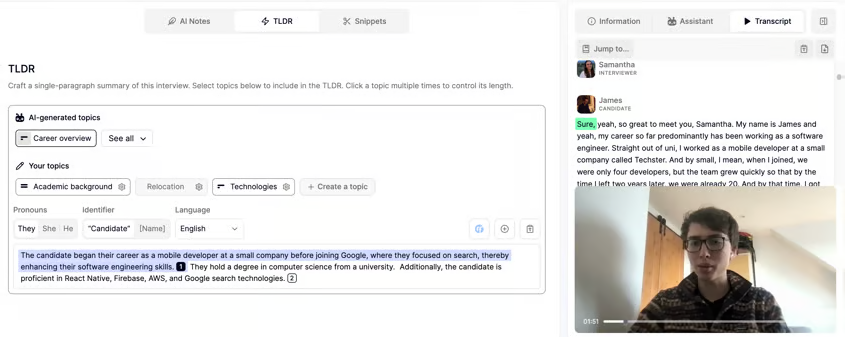
After each call, Metaview pushes three outputs into the candidate's Loxo activity feed: a structured note formatted against the applied template, a TLDR paragraph synthesizing key takeaways, and the full searchable transcript.
Source: Metaview
The TLDR includes footnotes linking back to specific transcript moments for verification. All three arrive within minutes of the call ending, producing consistent records across every interview loop.
3. Scorecard Tooling with Transcript Evidence.
Metaview's scorecard feature lets interviewers drag specific transcript passages into structured evaluation fields, tying each competency rating to a concrete piece of conversation evidence.
This reduces feedback lag and standardizes how candidates are assessed, regardless of which interviewer conducted the call.
4. Bidirectional Navigation.
Deep links connect both platforms: from a Loxo candidate profile, a recruiter navigates to the full Metaview interview record (including recording and transcript), and from Metaview, a recruiter jumps back to the Loxo profile in one click.
Metaview Pricing
Metaview prices its AI Notetaker separately from its other modules. The Loxo integration is part of the Notetaker product:
Free: $0/month. 25 calls/month per user (subject to a 60-credit team cap), 14-day conversation history access.
Pro: $60/month per user. Unlimited calls, full history access, all templates, custom templates, TLDR generation, and ATS integrations including Loxo.
Enterprise: Custom pricing. SSO, SAML, SCIM provisioning, and dedicated onboarding support.
Who Should Use the Metaview Integration?
Recruiting teams running five or more interviews per recruiter per week where note-taking and scorecard completion compete with sourcing capacity
Teams where interview signal gets lost between the call and the Loxo record, with notes arriving too late or too inconsistently for effective candidate comparison
Organizations using Loxo's Hiring Manager Portal to share pipeline status with clients, wanting richer interview evidence surfaced in the ATS beneath each candidate
5. Arrange: Best Loxo Integration for Interview Scheduling Automation
Source: Arrange
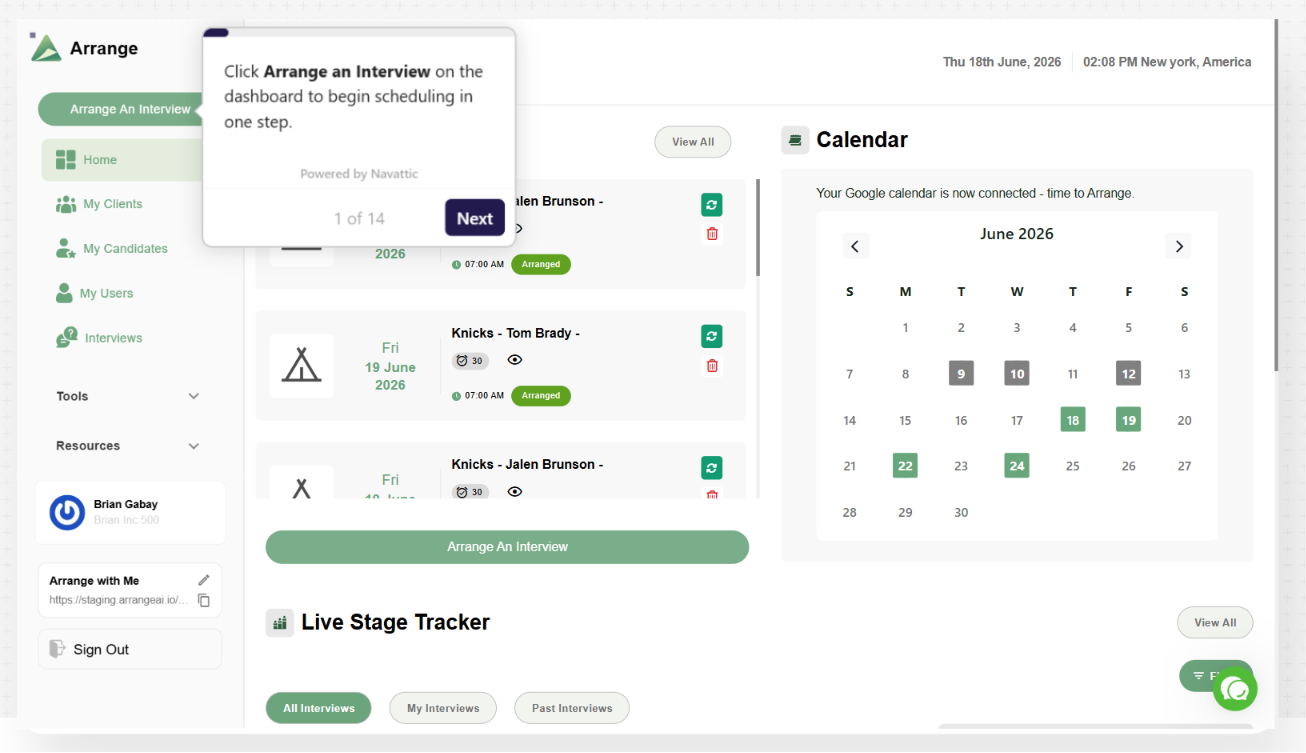
Arrange is a multi-party interview scheduling platform that integrates with Loxo through a native Marketplace connection to eliminate manual coordination between recruiters, candidates, and hiring managers.
Confirmed interview details sync back into the correct Loxo candidate record and job pipeline automatically.
Key integration capabilities include:
A single smart scheduling link that collects availability from both parties, identifies the earliest overlap, and dispatches calendar invites automatically
Confirmed interviews writing back to Loxo with pipeline stage updates and job tagging
Three scheduling modes (Candidate First, Client First, Matchmaker) to match client workflow preferences
Arrange Connect for panel interview scheduling across multiple hiring managers
How Arrange Integrates with Loxo
To connect, a recruiter enters their Loxo API key and agency slug in Arrange's Integrations section. A standard user API key is sufficient; no admin access is required. The integration is available on Arrange's Pro and Enterprise plans.
1. Three-Party Scheduling Without Login Requirements.
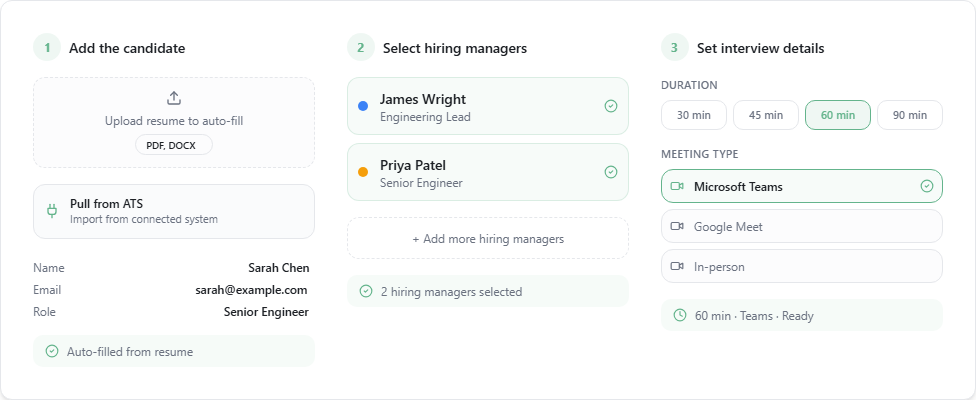
The recruiter generates a unique link tied to a specific candidate-client pairing and embeds it in the submission email. The hiring manager clicks the link, sees a branded form with no login prompt, and either requests the candidate's availability or provides their own.
Arrange contacts the other party, identifies the first mutual overlap, and sends calendar invites and confirmation emails automatically.
The three modes adapt to each relationship: Candidate First collects candidate availability before reaching the hiring manager, Client First reverses the order, and Matchmaker contacts both simultaneously.
Source: Arrange
2. Automatic ATS Sync Back to Loxo.
When an interview is confirmed, details sync back to Loxo automatically: interview status, job tagging connecting the interview to the correct open role, and candidate stage progression. The Loxo pipeline reflects a live, accurate state without any recruiter action after the initial link is sent.
3. Panel Interview Coordination.
Arrange Connect aggregates the real-time availability of all connected hiring managers into a single shared view. The candidate receives one booking link, sees the combined availability pool, and self-selects a slot that works across the entire panel. Confirmed details sync back to Loxo through the same integration channel.
Arrange Pricing
Arrange uses per-seat pricing. The Loxo integration is available only on paid plans:
Starter (Free): Single user, 1:1 booking only. Does not include Loxo integration, Matchmaker, or Live Stage Tracker.
Pro: $35/user/month, or approximately $28/user/month billed annually. Full Loxo ATS integration, Matchmaker, Live Stage Tracker, unlimited workspaces, and Arrange Connect for panel scheduling. 14-day free trial available.
Enterprise: Custom pricing. White-labeled booking links, custom domain, API access, and 24/7 priority support.
Who Should Use the Arrange Integration?
Recruiters spending hours weekly on availability emails and calendar cross-referencing, where that time competes with sourcing and client development
Teams whose Loxo pipeline data lags behind actual interview activity because ATS updates depend on recruiter memory rather than automated sync
Agencies working with hiring managers who will not install scheduling tools, since Arrange's no-login flows work entirely through email-based forms
6. Broadbean: Best Loxo Integration for Multi-Board Job Distribution
Source: Broadbean
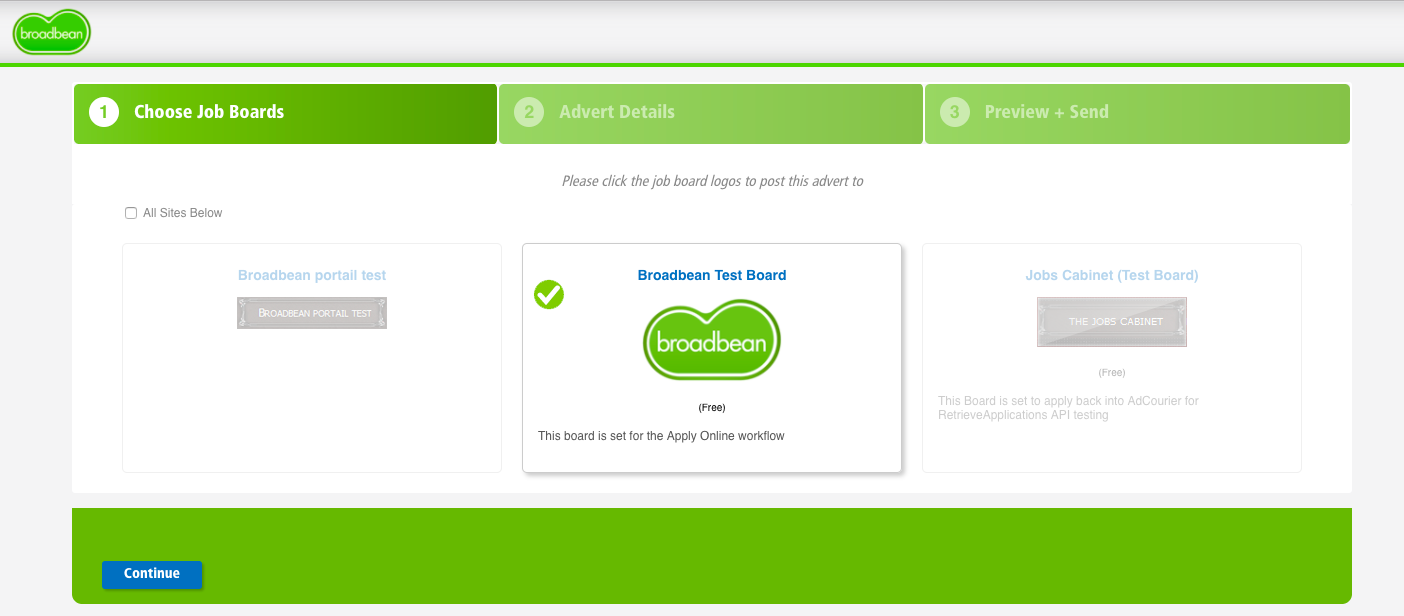
Broadbean is a job board aggregator that integrates with Loxo through a native Marketplace connection, letting recruiters distribute any open role across 7,000+ job boards, search engines, and social channels in a single posting action from inside the Loxo job pipeline.
Key integration capabilities include:
Single-click multi-board distribution from within a Loxo job pipeline
Automatic application routing back into Loxo as candidate records with source-level tagging
Channel performance analytics showing which boards generate the most applicants by role type
Coverage across 100+ countries and 7,000+ distribution endpoints
How Broadbean Integrates with Loxo
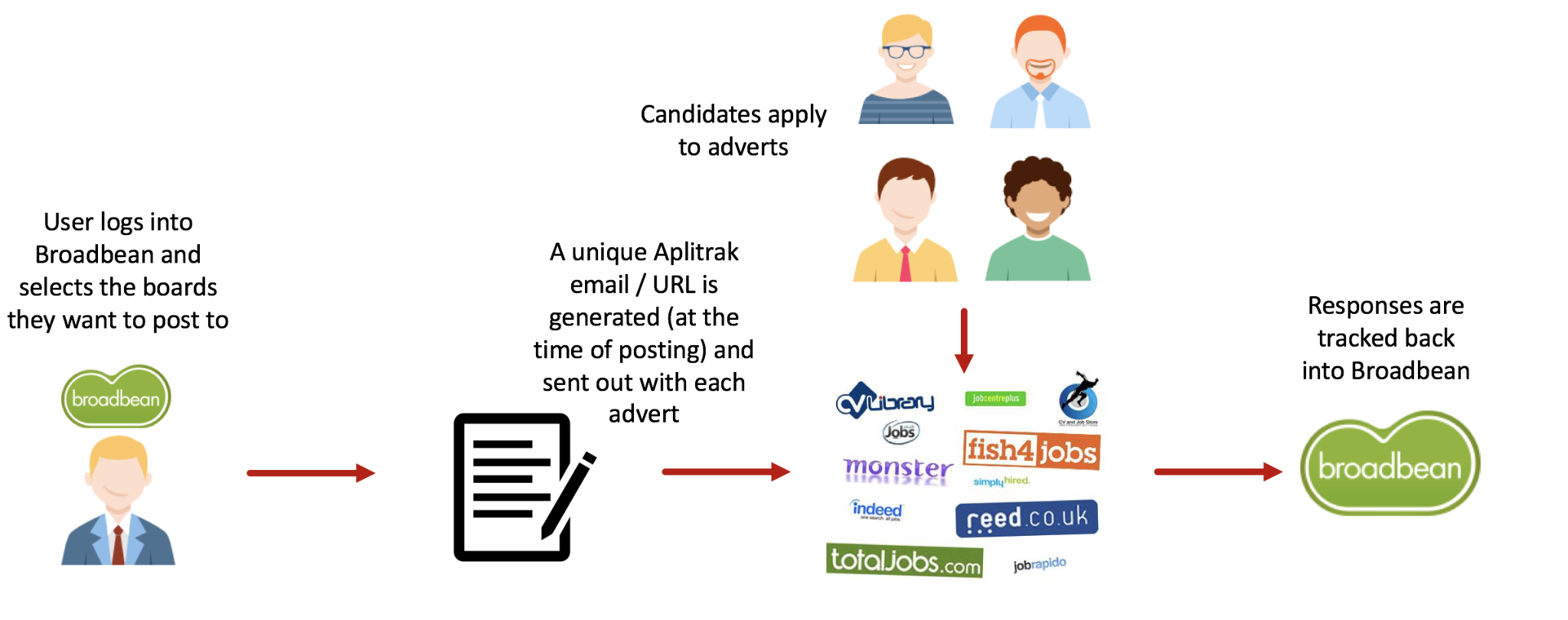
The integration operates in one direction for distribution (Loxo pushes job data to Broadbean) and in the reverse for candidate ingestion (Broadbean routes applications back into Loxo). A Broadbean account with active job board credits is required before the integration can go live.
1. One-Click Multi-Board Distribution.
From within a Loxo job pipeline, recruiters trigger a Broadbean posting in a single action, pushing the role to thousands of boards without re-entering the job description on each platform. Broadbean sends the job payload (title, location, description, salary range) to each connected board via its distribution network.
The recruiter does not need active accounts on each board; access is brokered through Broadbean's aggregator relationships.
2. Automatic Application Routing with Source Tagging.
Every application submitted through a Broadbean-distributed posting flows back into Loxo as a candidate record. Broadbean's Aplitrak mechanism assigns each distributed posting a unique tracking address and routes applications back through the Loxo integration.
Source: Broadbean
Each candidate arriving in Loxo carries a label indicating which board or channel generated the application, and duplicate applications from the same candidate are de-duplicated before reaching Loxo.
3. Channel Performance Analytics.
Because every application is tagged with its source board, recruiting teams can analyze which channels generate the most applicants for specific role types, geographies, or salary ranges over time.
This shifts job board investment decisions from habit to evidence, backed by Broadbean's 5 billion+ data points on recruitment advertising performance accumulated across 3,000+ clients.
Broadbean Pricing
Broadbean does not publish pricing publicly. All commercial engagement routes through a demo and quote process. The platform operates on custom contracts across 3,000+ clients globally. Job board credits are procured separately from the platform subscription.
Manual posting transactions for boards outside Broadbean's automated network are $2 per transaction (English) and $6 per transaction (non-English).
Who Should Use the Broadbean Integration?
Firms posting to more than three or four job boards simultaneously that currently log in to each platform separately, where one-click distribution from Loxo eliminates that manual overhead at scale
International recruiting firms needing geographic distribution across multiple countries without managing board relationships in each market independently
Teams that want application source attribution in Loxo candidate records from the moment candidates arrive, enabling data-driven job board spend decisions
7. Zapier: Best Loxo Integration for Connecting Your Recruiting Stack Through Automated Workflows
Source: Zapier
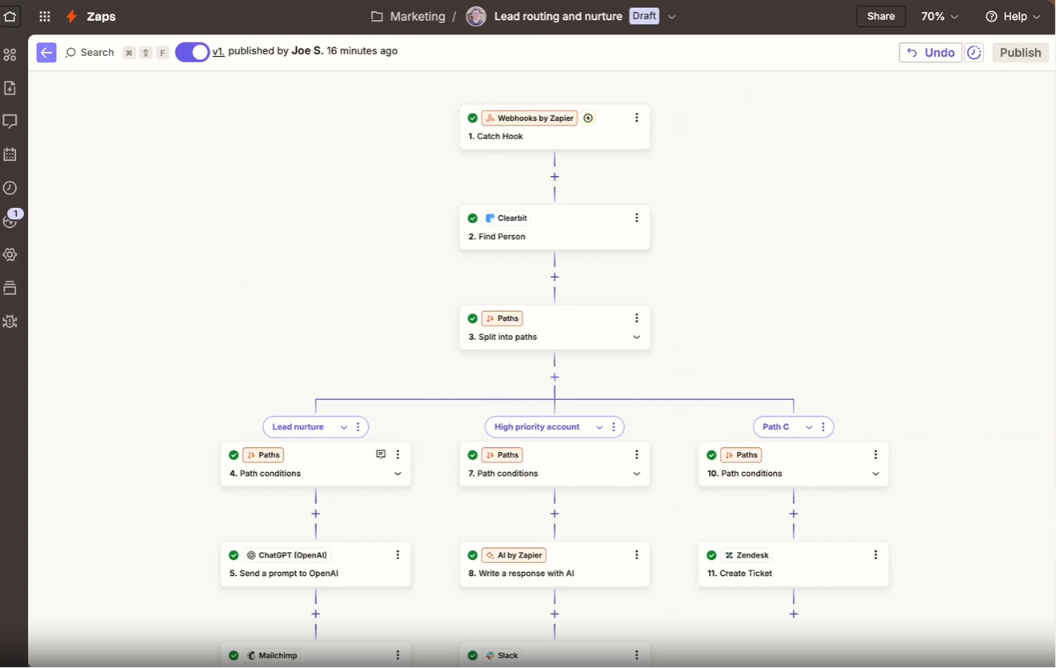
Zapier is a no-code workflow automation platform that integrates with Loxo through the Loxo Open API, letting recruiting firms build automated workflows that trigger on Loxo events and push or pull data across more than 8,000 connected applications without writing code.
Unlike the native Marketplace integrations above, this connection is API-driven: there is no pre-built Zapier app in either platform's marketplace, and setup requires a Loxo API key enabled by Loxo Support.
Key integration capabilities include:
Event-triggered automation from Loxo webhook events (new candidate, stage change, new deal, placement logged)
Syncing Loxo candidate and contact records to external tools automatically
Multi-step workflows chaining Loxo data with actions across any combination of Zapier's 8,000+ apps
Pipeline stage automations that extend Loxo's internal capabilities to external systems
How Zapier Integrates with Loxo
Loxo's Open API exposes candidates, jobs, people, companies, deals, and placements, with webhook support for real-time event notification.
Zapier consumes this API using a Bearer token generated in Loxo under Settings > API Keys. API access requires an active paid subscription and must be enabled by Loxo Support.
1. Event-Triggered Data Sync Across the Stack.
Loxo's webhook system supports ten object types, each triggerable on create, update, or destroy events. A new candidate added to a specific pipeline stage can be added to a Mailchimp email list.
A placement logged in Loxo can trigger a Slack notification and create a row in a Google Sheet tracking monthly placements. A deal created in Loxo's Sales CRM can fire a webhook that creates a corresponding record in HubSpot or Salesforce.
2. Pipeline Stage Automations to External Tools.
Loxo's native Stage Automations handle internal actions (enrolling candidates in outreach, fetching contact info).
Zapier extends that logic externally: a candidate reaching "Offer Extended" can trigger a background check request through an external provider's API, a confirmed placement can send data to a payroll system, or a closed deal can create an onboarding checklist in Asana or ClickUp.
3. Business Development Pipeline Sync.
For firms maintaining a dedicated sales CRM alongside Loxo, Zapier bridges the gap. New deals in Loxo's Sales CRM create corresponding records in HubSpot or Salesforce; new BD contacts sync to email marketing sequences in Mailchimp or ActiveCampaign; "Closed Won" deals trigger client onboarding workflows in project management tools.
Zapier Pricing
Zapier uses task-based pricing where each successful action step consumes one task:
Free: $0/month. 100 tasks/month, 2-step Zaps only, 15-minute polling interval. Not practical for production workflows.
Professional: Starts at $19.99/month billed annually for 750 tasks. Multi-step Zaps, webhooks, conditional logic, and data formatting.
Team: Starts at $69/month billed annually for 2,000 tasks. Shared workspace for up to 25 users, shared Loxo API connection, and SAML SSO.
Enterprise: Custom pricing. Unlimited users, custom data retention, and advanced admin controls.
Zapier's pay-per-task overage billing is set at 1.25x the plan's normal task cost, so high-frequency automations should be monitored carefully.
Who Should Use the Zapier Integration?
Firms using tools not natively integrated with Loxo (background check providers, payroll systems, custom internal tools) that need a no-code way to pass data between systems
Teams wanting Slack or Teams notifications when candidates reach specific pipeline stages, without relying on Loxo's native notification settings alone
Organizations building multi-system recruiting operations that need a universal automation layer to connect any combination of tools as the stack evolves
Also Worth Considering: ZoomInfo
ZoomInfo is a go-to-market platform built on a large B2B database: 500M contacts, 100M companies, 135M+ verified phone numbers, and 200M+ verified business email addresses.
Its GTM Context Graph processes 1.5B+ data points daily, combining CRM records and behavioral signals to show what's happening in your target accounts. While ZoomInfo and Loxo do not offer a direct integration, the two platforms serve overlapping audiences from different angles.
Loxo is built for recruiting teams: sourcing candidates, managing pipelines, and running outreach campaigns.
ZoomInfo is built for go-to-market teams: sales, marketing, and revenue operations. Where these worlds overlap is business development.
Recruiting firms that prospect for new clients, identify expanding companies, and run BD outreach against decision-makers at target accounts operate in the space where ZoomInfo's company data, buyer intent signals (tracking 210 million IP-to-Organization pairings and 6 trillion+ keyword-to-device pairings monthly), and technographic data (covering 30,000+ technologies across 200+ categories) fill gaps that Loxo's candidate-focused talent graph does not cover.
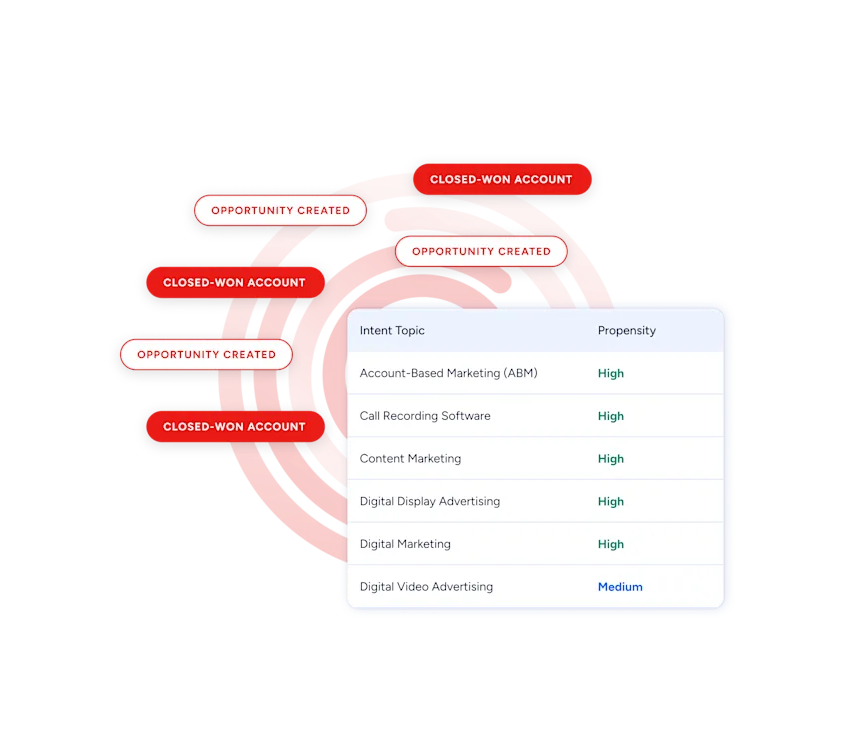
Source: ZoomInfo
Staffing and search firms running business development alongside recruiting may find ZoomInfo useful for identifying prospective clients, understanding their technology stacks, and finding the right decision-makers to contact.
ZoomInfo Lite is a free tier (no credit card, no time limit) with 10 monthly export credits, searches, and a Chrome extension, making it a practical way to test the data for BD use cases before committing to a paid plan.
Seismic's sales team attributed 39% of active pipeline to opportunities identified or influenced by ZoomInfo signals, reporting 54% productivity gains and saving 11.5 hours per week per seller. (Seismic Case Study)
Final Verdict
The best Loxo integrations close gaps your recruiting platform cannot fill on its own:
Ringover: communication layer that logs every call, SMS, and WhatsApp message to candidate profiles with transcripts and sentiment analysis
HubSpot: bidirectional contact sync with CRM and marketing automation for candidate nurture and client BD workflows
Workday: enterprise HCM handoff that eliminates manual data re-entry between ATS and HRIS on every placement
Metaview: interview intelligence with AI notes, transcripts, and scorecard evidence pushed into candidate records
Arrange: three-party scheduling automation that writes confirmed interview details back to Loxo without recruiter intervention
Broadbean: multi-board distribution across 7,000+ job boards with source-level application tracking flowing back into Loxo
Zapier: no-code automation bridging Loxo to 8,000+ apps where native connectors stop
These integrations compound. You might run Ringover for communication, HubSpot for BD marketing automation, Metaview for interview capture, and Arrange for scheduling on the same Loxo instance, each adding capability that makes the others more useful.
If your recruiting firm also runs business development, consider pairing Loxo's candidate platform with a go-to-market data source. ZoomInfo's free Lite tier provides company data, technographic profiles, and buyer intent signals that help identify which prospective clients are expanding, so your BD outreach reaches the right decision-makers at the right time.
Frequently Asked Questions
How many integrations does Loxo support?
The Loxo Marketplace lists pre-built integrations across categories including communication and VOIP, CRM and email marketing, scheduling and interviews, job boards, HCM and payroll, assessments, AI and productivity enrichment, and workflow automation.
Beyond the marketplace, Loxo's Open API with REST endpoints and webhook support for ten object types enables custom integrations with any platform that has an API. The marketplace is also open to new partners via a submission form.
Do Loxo integrations work on the free plan?
Loxo's free plan includes core ATS and CRM functionality but does not include outreach and communication tools, AI automations, platform customizations, or customer support. Most native marketplace integrations are available on Basic ($169/user/month annual) or higher plans.
The Workday HCM integration requires the Enterprise tier. API access for custom integrations (including Zapier workflows) must be enabled by Loxo Support and requires an active paid subscription.
Can I connect Loxo to tools that are not in the Marketplace?
Yes. Loxo's Open API supports GET, POST, PUT, and DELETE methods across candidates, jobs, people, companies, deals, and placements. Webhooks fire on create, update, and destroy events for ten object types, enabling real-time, event-driven connections.
For no-code solutions, Zapier connects Loxo to 8,000+ apps through API workflows, and the Unified API layer in the Loxo Marketplace provides a single integration abstraction for connecting multiple platforms at once.
Does Loxo have a native dialer, or do I need a VOIP integration?
Loxo supports calling through VOIP integrations rather than a built-in dialer. The platform integrates with Ringover, RingCentral, Twilio, and KrispCall for voice and messaging.
Ringover provides the deepest integration with AI transcription, topic detection, sentiment analysis, and automatic activity logging to candidate profiles.
RingCentral and Twilio offer call routing integrations, while KrispCall provides AI calling with local numbers in 100+ countries.
How does Loxo handle duplicate records from integrated tools?
Loxo includes built-in duplicate management tools within its CRM for identifying and merging duplicate profiles.
For integrations like HubSpot, the bidirectional sync uses field-level mapping to match records across platforms, though firms with large pre-existing contact pools in both systems should plan the initial configuration carefully to handle field conflict resolution.
Broadbean's application routing includes automatic de-duplication by candidate email address before records reach Loxo, preventing the same applicant from appearing twice when they apply through multiple job boards.
What is the best way to enrich B2B contact data for recruiting business development?
Recruiting firms that run business development alongside candidate sourcing need company intelligence that goes beyond what a talent-focused platform provides.
ZoomInfo's B2B data platform covers 500 million contacts, 100 million companies, 135 million verified phone numbers, and 200 million verified business email addresses, backed by 300+ human researchers.
For BD teams at staffing and search firms, ZoomInfo adds company data, technographic profiles covering 30,000+ technologies, and buyer intent signals showing which companies are researching topics relevant to your services.
This helps recruiting firms identify prospective clients, understand their tech stacks, and reach the right decision-makers, complementing the candidate data that Loxo's talent graph provides.
