

Magical is a browser-based productivity tool that automates repetitive typing, fills forms across web apps, and manages message templates without integrations or API setup. It has also expanded into healthcare, deploying AI agents that automate revenue cycle tasks like prior authorizations and referral management.
But a browser-confined text expander, however well-designed, cannot cover every productivity need. If your team works in desktop applications outside Chrome, needs cross-platform automation at scale, or wants a tool that tells you who to contact and when, Magical's architecture will leave gaps.
This guide covers Magical alternatives that fill those gaps. Here's what you might need:
Access B2B sales data and AI-powered go-to-market intelligence
Expand text across all desktop and mobile applications with enterprise compliance
Build programmable text automation with conditional logic on a budget
Automate workflows across thousands of business applications
Keep text expansion fully private and local with no subscription costs
Manage team canned responses with governance controls
Automate lead generation with AI-powered web scraping and enrichment
Some teams will use these tools alongside Magical's browser extension. Others will replace Magical entirely. Either way, the goal is fit, not superiority.
Let's look at each one.
The Best Magical Alternatives
Best Alternative for B2B Sales Intelligence & AI-Powered GTM We chose ZoomInfo because it provides the data sales teams need: 500M verified contacts, buyer intent signals, and AI-powered outreach, accessible through native tools or any application via API and MCP. | |
|---|---|
Best Alternative for Cross-Platform Text Expansion We chose TextExpander because it runs at the OS level across Mac, Windows, Chrome, iOS, and Android, expanding templates in over 1M applications (including desktop EHRs and thick clients) with SOC 2, HIPAA, and GDPR compliance at mid-market pricing. | |
Best Alternative for Affordable Programmable Text Automation We chose Text Blaze because its permanent free tier, programmable snippet logic with conditional rules and formulas, and native Data Blaze database make it the most cost-effective option for small teams needing repeatable automation. | |
Best Alternative for Cross-Platform Workflow Automation We chose Zapier because its 8,000+ app integrations, server-side execution, and built-in data layer (Tables, Forms, Interfaces) make it a complete automation environment that runs 24/7 without a browser open. | |
Best Alternative for Privacy-First, System-Wide Text Expansion We chose Espanso because it is free, runs at the OS level on Windows, macOS, and Linux, processes everything locally with no cloud dependency, and supports programmable shell script execution for technically proficient users. | |
Best Alternative for Team Canned Response Management We chose typedesk because its focus on canned responses, folder-level permission controls, and cross-platform coverage (Windows, Mac, Chrome, Brave, Firefox) make it the best fit for customer-facing teams that need governed message templates. | |
Best Alternative for AI-Powered Lead Generation & Web Scraping We chose Bardeen because its natural language workflow builder, web scraping templates for 100+ platforms, and integrated enrichment and AI qualification tools automate the full lead research pipeline without writing code. |
What is Magical?

Source: Magical
Magical runs two product lines under one brand.
The first is a Chrome and Edge browser extension that lets teams save message templates, automate data entry between web apps, and use AI to generate or transform text, all without integrations or APIs. The second is an AI platform built for healthcare operations, deploying AI agents that handle administrative workflows like prior authorizations, referral management, and payment posting.
Its key features include:
Message templates and text expansion triggered by typing // in any text field within Chrome or Edge
Autofill automations that move data between browser-based applications without API integrations
AI Transforms that process and reformat data using freeform prompts embedded in automations
Team workspaces with shared template libraries and team admin roles
Healthcare AI agents that run RCM workflows on virtual machines with 92-99% accuracy
HIPAA and SOC 2 Type II compliance on Enterprise plans
Magical's browser extension eliminates repetitive copy-paste work for support teams, sales reps, and recruiters. The extension reads data from other open browser tabs to auto-populate message placeholders, and its autofill automations move information between web apps with a one-time setup that generalizes across similar pages.
The extension works only within Chrome, Edge, and Slack, so desktop applications, native email clients, and non-Chromium browsers are unsupported. Paid-tier pricing isn't published publicly, which makes evaluation harder. And while the healthcare AI agents serve a specific vertical, teams in sales, marketing, or other functions may need more specialized tools.
Want verified B2B data to power your sales outreach? ZoomInfo covers 500M contacts with AI tools that tell you who to contact, when to engage, and what to say. Learn more about ZoomInfo.
How We Curated Our List of Magical Alternatives
After testing Magical's browser extension and surveying the market, we found that users often need more specialized tools. While Magical handles in-browser text expansion and data entry well, growing teams may need more power for:
Accessing verified B2B sales data and AI-powered intelligence to inform outreach strategy
Expanding text across desktop applications, native clients, and non-browser environments
Building programmable, logic-driven templates with formulas and conditional rules
Automating multi-step workflows across thousands of connected business applications
Keeping text expansion fully local and private with no cloud dependency
Governing team messaging with folder-level permissions and audit trails
Automating lead research, web scraping, and contact enrichment at scale
Each tool on this list leads in one of these areas. You might use them alongside Magical or replace it entirely.
DISCLAIMER: We aren't covering every single tool on the market! Our focus is on highlighting the best alternatives that address some of Magical's limitations for various use cases. The goal is to provide insights into tools that cater to specific business needs. |
|---|
1. ZoomInfo: Best Alternative for B2B Sales Intelligence & AI-Powered GTM

ZoomInfo is an AI GTM platform built on a large B2B data foundation. Rather than automating repetitive typing, ZoomInfo helps sales, marketing, and revenue operations teams find, engage, and close customers.
Its key features include:
B2B data: 500M contacts, 100M companies, 135M+ verified phone numbers, and 200M+ verified business email addresses with up to 95% accuracy on first-party data
GTM Context Graph: Processes 1.5B+ data points daily by combining third-party data with CRM records, conversation transcripts, and behavioral signals to show why deals move or stall
Buyer intent signals: Tracks signals from 210M IP-to-Organization pairings and 6 trillion+ keyword-to-device pairings monthly to identify in-market accounts
AI-powered outreach: GTM Workspace AI agents research accounts, draft personalized messages, and recommend next actions
Universal access: APIs and MCP feed data into any tool, plus native front-ends via GTM Workspace (for sellers) and GTM Studio (for marketers and RevOps)
For sales teams using Magical to speed up outreach with templates and autofill, ZoomInfo addresses a different problem. Instead of typing messages faster, ZoomInfo tells you which prospects are worth messaging, when they're likely to engage, and what to say based on buying signals and verified contact data.
Why Choose ZoomInfo Over Magical for Sales Intelligence
Magical automates the mechanical side of outreach (typing templates, filling CRM forms). ZoomInfo automates the strategic side: identifying the right prospects, understanding their buying context, and reaching them with the right message.
Here's where it delivers different value.
Verified B2B Data Intelligence: Find the Right Prospects Without Manual Research
Magical's autofill automations read data from open browser tabs and move it between web applications. That helps when you've already found a prospect and need to transfer their details into a CRM or template. But Magical doesn't help you find prospects, and its data is limited to whatever the page shows.
ZoomInfo operates at a different scale.
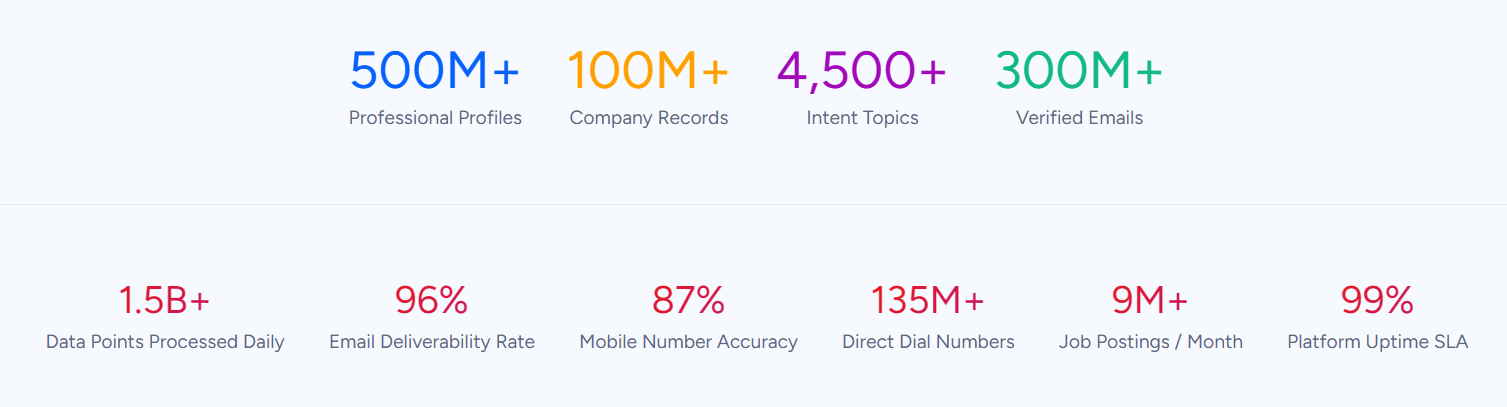
The platform covers 500M contacts and 100M companies, 120M direct-dial phone numbers, 200M+ verified business email addresses, and 300+ company attributes for segmentation. This data is verified through a multi-source pipeline: 300+ human researchers, automated ML scanning of 28 million site domains daily, and a community of 200,000+ ZoomInfo Lite users who share data back.
The quality difference is validated externally: in a Fortune 500 competitive RFP analyzing 25 million contacts across vendors, the independent consultant concluded that "no other competitor came even close." ZoomInfo has been named a Leader in Forrester's Wave for Intent Data Providers (Q1 2025) and a Leader in Gartner's Magic Quadrant for ABM Platforms (2024 & 2025).
Source: ZoomInfo
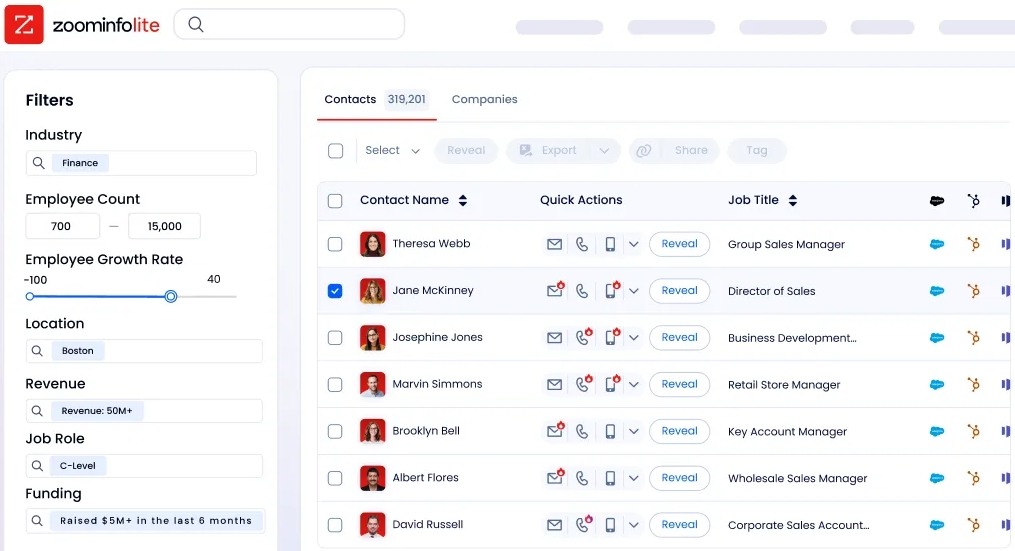
ZoomInfo in Action: Instead of browsing LinkedIn and copying prospect details into your CRM one at a time, ZoomInfo lets you search by industry, company size, technology stack, job title, and hundreds of other attributes to build a list of verified contacts with direct dials and business emails. Export to your CRM in one click. The emails land. The phone numbers ring.
"ZoomInfo gives us the information we need to execute. We don't have to go through and spend our time digging. It's already there, so we can be three steps ahead." (Vensure)
AI-Powered GTM Execution: From Template-Based Outreach to Contextual Engagement
Magical helps sales reps send messages faster through pre-written templates with placeholder variables. This works for high-volume, repetitive outreach. But templates cannot adapt to each prospect's situation: what challenges they face, what solutions they're evaluating, or why now is the right time to reach out.
ZoomInfo's GTM Workspace takes a different approach.
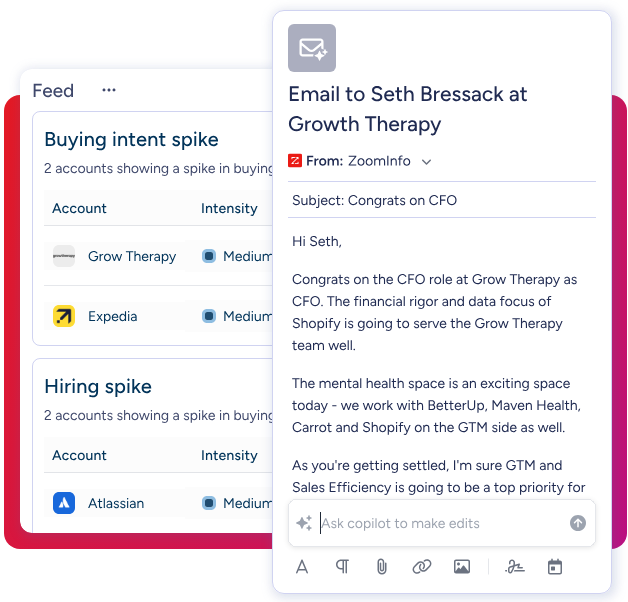
Built on Anthropic's Claude, its AI agents research accounts, analyze buying signals, and draft outreach that addresses the concerns and opportunities the data has surfaced. The GTM Context Graph records not just what happened in a deal, but why it happened. That lets the AI draft follow-up emails that reference the objection raised on the last call or the competitive research the prospect is running.
Key GTM Workspace capabilities include:
Full Book of Business view across CRM, ZoomInfo data, conversation history, and market intelligence
AI Assistant that generates one-click account briefs pulling CRM history, company news, and stakeholder context into a 10-second summary
Action Feed that shows in-market buyers with pre-drafted actions for each signal
AI-generated outreach personalized from full account context
Source: ZoomInfo
ZoomInfo in Action: When a target account's CFO joins your last sales call and asks about six-month ROI, ZoomInfo captures that signal. The next morning, your Action Feed shows a pre-drafted follow-up that addresses the CFO's concern, references their company's recent earnings call (pulled from ZoomInfo signals), and proposes a next step. You review, adjust, and send. No template could have written that message because no template has the context.
"That combination of our internal CRM data, external signals, and AI that's given all that context has helped us craft very specific account- and persona-based messages. And people have responded to them right away." (Seismic)
Buyer Intent Signals: Know When Prospects Are Ready to Buy
Magical has no way to identify when prospects are researching solutions. If you're using it for outreach, you're relying on manual timing or volume to catch prospects at the right moment.
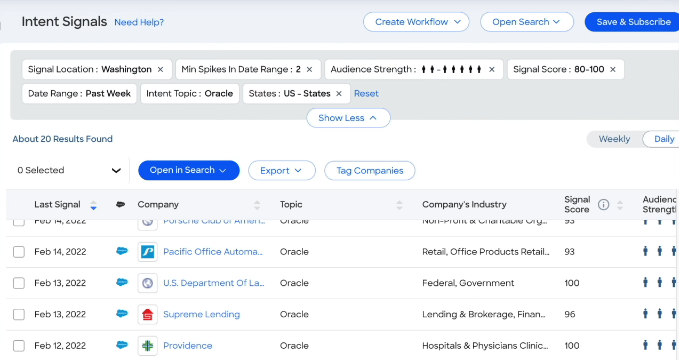
It tracks signals from 210 million IP-to-Organization pairings and 6 trillion+ keyword-to-device pairings sourced monthly to find companies researching topics relevant to your solution. Guided Intent, exclusive to ZoomInfo, identifies topics correlated with your past deal success instead of requiring manual topic selection.
Combined with WebSights (which matches anonymous website traffic to companies), ZoomInfo shows not just who your ideal prospects are, but which are actively buying right now.
Source: ZoomInfo
ZoomInfo in Action: Your team sells marketing automation software. Instead of sending the same template to 500 accounts, ZoomInfo shows the 30 accounts currently researching "marketing automation platforms" and "email deliverability tools." Three of those accounts also visited your pricing page this week. Your rep opens GTM Workspace, sees the prioritized list with AI-drafted messages tailored to each account's research patterns, and focuses on those first. The other 470 get engaged when their intent signals spike.
Universal Access: Your Data in Any Tool
Magical works only in Chrome and Edge. ZoomInfo's data, by contrast, goes everywhere.
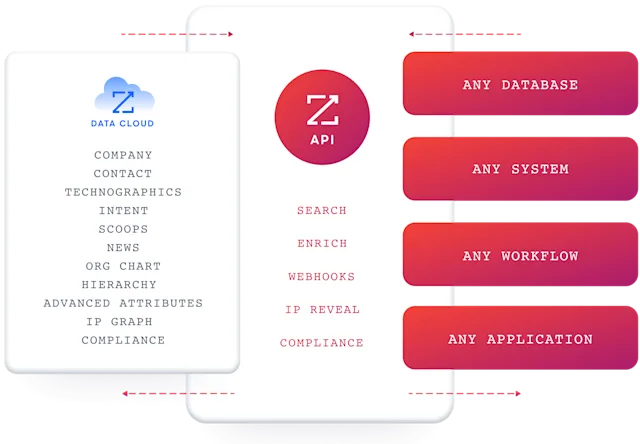
APIs and MCP expose ZoomInfo's data to any custom agent, internal tool, or partner platform. ZoomInfo MCP is listed in the Claude directory and supports Claude and ChatGPT. GTM Workspace serves sellers, while GTM Studio gives marketers and RevOps an orchestration workspace.
API access is included on all relevant plans. The platform integrates with Salesforce, HubSpot, Microsoft Dynamics, and 120+ other tools via the ZoomInfo App Marketplace.
Source: ZoomInfo
The point: whether you access ZoomInfo through its native products, your CRM, or a custom AI agent, you draw from the same data and the same GTM Context Graph.
"The plug-and-play aspect of the API means I can integrate it very easily into any process and get information at a moment's notice." (BDO Canada)
ZoomInfo Pricing
ZoomInfo uses consumption-based pricing with custom-quoted plans. Price scales with usage, users, monthly credit volume, features, and contract length.
ZoomInfo Lite is a permanent free tier (no credit card, no time limit) with access to ZoomInfo's B2B database, 10 monthly export credits, individual and company searches, the ReachOut Chrome Extension, WebSights Lite (up to 10 website visitor reveals per day), built-in email sending, and HubSpot integration.
Source: ZoomInfo
Paid plans are organized across Sales, Marketing, and Chorus product lines, each with tiered options (Professional, Advanced, Enterprise for Sales; Marketing Demand, ABM Lite, ABM Enterprise for Marketing). A 7-day free trial is also available with no credit card required.
The credit system is simple: 1 credit = 1 export of a professional or company profile. Searching and viewing data costs nothing; credits are consumed only when exporting to CSV, Excel, or CRM.
Who Should Use ZoomInfo?
Choose ZoomInfo if:
Your sales team has outgrown template-based outreach and needs verified prospect data, buyer intent signals, and AI to drive a more strategic go-to-market.
You need the largest B2B dataset for prospecting, territory planning, TAM analysis, or account-based marketing, with 500M contacts and 100M companies.
You want AI that understands your deals, not AI that inserts pre-written text. ZoomInfo's GTM Context Graph captures why deals move or stall, informing outreach and decisions with real context.
You need data accessible in any tool, from native ZoomInfo products to your CRM to custom AI agents, via API and MCP access.
Start with ZoomInfo Lite for free or request a demo to see the full platform.
2. TextExpander: Best Alternative for Cross-Platform Text Expansion
Source: TextExpander
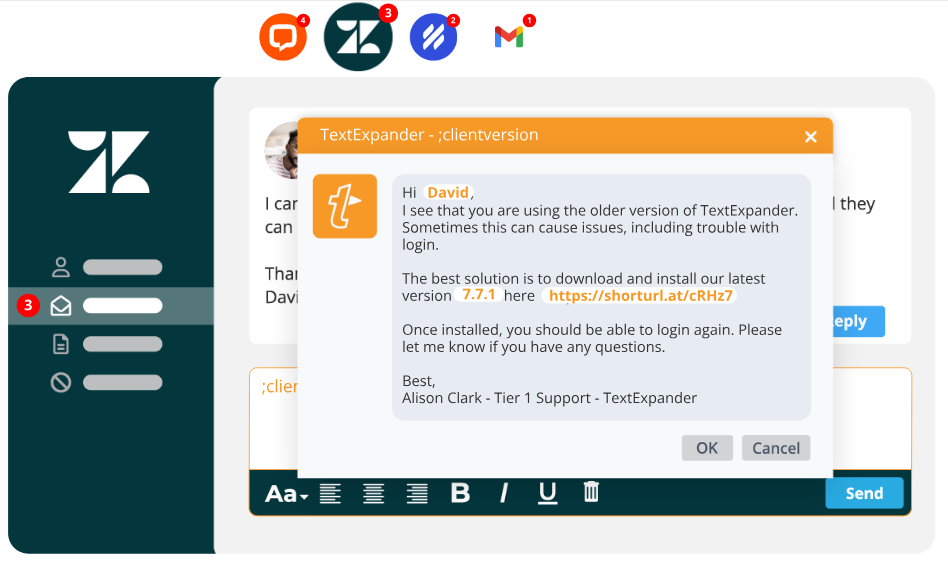
TextExpander is a text expansion platform that runs at the OS level across Mac, Windows, Chrome, iOS, and Android. Snippets expand in any application: desktop software, EHRs, native email clients, and proprietary internal tools.
Its key capabilities include:
System-wide expansion across 1M+ applications without API integrations, working at the OS level in any app that accepts keyboard input
Compliance with SOC 2, SOC 3, HIPAA, and GDPR certifications at mid-market pricing
Team analytics dashboard tracking snippet usage, time savings per user, and ROI metrics
Governance with organization-managed snippet groups, layered permissions, snippet activity audit trails, and a Requests workflow for proposing and reviewing content changes
30-day free trial across all tiers with no credit card required
Why Choose TextExpander Over Magical for Cross-Platform Text Expansion?
TextExpander stands out in the following areas:
System-Wide Native Expansion vs. Browser-Only Operation
TextExpander operates at the operating system level, meaning snippets expand in any application: desktop email clients like Outlook, code editors, EHR systems like Epic and Cerner, terminal windows, and any other software installed on the machine.
Magical is confined to Chrome, Edge, and Slack, excluding entire categories of desktop workflows. For healthcare organizations running thick-client EHRs, or legal practices producing documents in desktop word processors, TextExpander's native architecture is essential.

Source: TextExpander
Compliance Certifications at Mid-Market Pricing
TextExpander's Business plan ($8.33/user/month, annual billing) includes SOC 2, SOC 3, HIPAA, and GDPR compliance with the ability to sign a Business Associate Agreement. Magical puts HIPAA compliance behind its Enterprise plan, which has no published pricing and requires a sales conversation.
A 50-person healthcare team can deploy fully compliant text expansion on TextExpander for $416.50/month with self-service purchasing.
Governance and Audit Trails
TextExpander's Organization model treats snippet libraries as org-owned assets with layered permissions (organization, team, and snippet group levels), a Snippet Requests workflow for reviewing content changes before publishing, and a Snippet Activity audit trail logging every action. Enterprise plan customers retain unlimited history.
Magical's team sharing allows collaboration but doesn't offer the same depth of audit logging or version rollback.
NOTE: We also evaluated Text Blaze and PhraseExpress. While Text Blaze excels at affordable browser-based snippet expansion with programmable logic, and PhraseExpress offers a one-time purchase model, TextExpander offers the most complete platform for teams needing cross-platform native apps, compliance certifications at mid-market pricing, and audit trails.
TextExpander Pricing
TextExpander uses per-seat subscription pricing with annual billing saving 20%:
Individual: $3.33/user/month, unlimited snippets synced across up to 5 devices
Business: $8.33/user/month, organization-controlled snippet sharing, Snippet Requests workflow, usage-based billing
Growth: $10.83/user/month, adds organization statistics, usage analytics, and standard CAIQ security review
Enterprise: Custom pricing, adds unlimited snippet activity history, SSO via SAML, SCIM provisioning, and dedicated support
All paid plans include SOC 2, SOC 3, HIPAA, and GDPR compliance. A 30-day free trial is available.
Who Should Use TextExpander?
Choose TextExpander if:
Your team works across desktop applications, native clients, and thick-client software and needs text expansion that works system-wide, not just in the browser.
You operate in a regulated industry and need HIPAA, SOC 2, and GDPR compliance included at a transparent, mid-market price point.
You need governance and audit controls with permissions, version history, and a content review workflow.
3. Text Blaze: Best Alternative for Affordable Programmable Text Automation
Source: Text Blaze
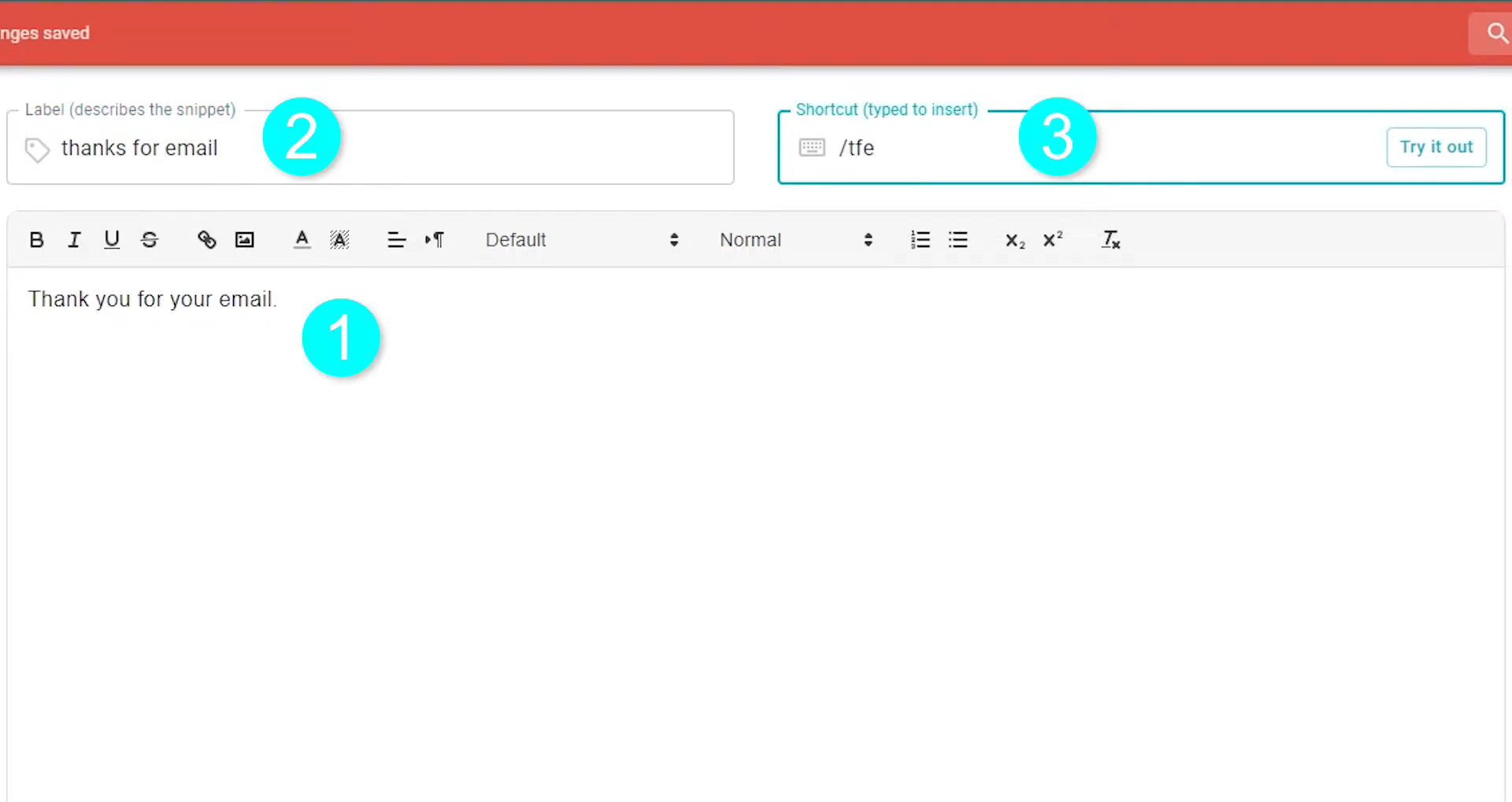
Text Blaze is a text expansion platform built around programmable snippet logic. It offers conditional rules, formulas, form fields, and a native database (Data Blaze) that turns static templates into data-driven workflows.
Its key capabilities include:
Permanent free tier with 20 active snippets and unlimited daily usage, no trial expiration
Programmable dynamic snippets with if/else conditional logic, form fields, date calculations, and the Blaze Formula Language
Data Blaze integration providing bi-directional read/write access to structured database tables from within snippets using BSQL query language
Chrome, Edge, Windows, and macOS support via browser extensions and native desktop apps
Pro plan at $2.99/month (annual billing) unlocking the full programmable toolkit
Why Choose Text Blaze Over Magical for Budget-Friendly Text Automation?
Text Blaze stands out in the following areas:
Transparent, Permanent Free Tier
Text Blaze's free plan is permanent: 20 active snippets with unlimited daily usage. Magical moved from free to paid plans, and pricing isn't published publicly. For budget-conscious teams, Text Blaze's pricing ($2.99/month Pro, $6.99/month Business) makes the decision easy.
Deterministic Programmable Logic
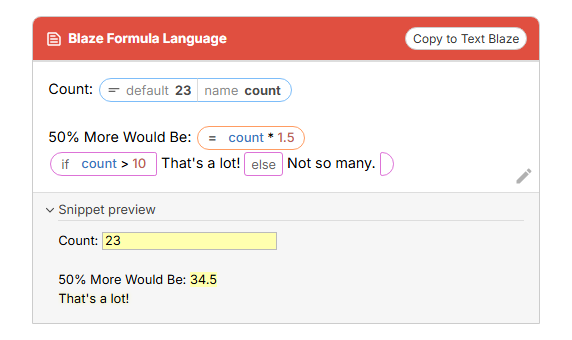
Text Blaze's dynamic commands system supports form fields, conditional if/then logic, looping, keyboard simulation, webpage reading, and HTTP API calls. The Blaze Formula Language supports numbers, booleans, text strings, lists, and functions.
Magical's AI Transforms generate output from freeform prompts, which introduces variability. Text Blaze's formula-driven approach produces the same output every time.
Source: Text Blaze
Native Data Layer (Data Blaze)
Data Blaze stores data in typed tables, and Connected Snippet commands let snippets both read from and write to tables at insertion time. A snippet can pull a customer's name and order history from a table, insert personalized content, and log the interaction back at the same time. Magical can push data to Google Sheets, but it can't read from a database at insertion time.
NOTE: We also evaluated FlyMSG and Auto Text Expander for Chrome. While FlyMSG offers a simple free text expansion experience and Auto Text Expander provides basic snippet functionality, Text Blaze offers the most compelling combination of permanent free access, programmable logic, and integrated data management.
Text Blaze Pricing
Free: $0/month (perpetual), 20 active snippets, unlimited usage
Pro: $2.99/user/month (annual), unlimited snippets, full form fields, conditional rules, formulas, API integrations
Business: $6.99/user/month (annual), centralized user management, teams, org-wide reporting, Data Blaze read/write
Enterprise: Custom pricing, SSO, SCIM, audit logs, dedicated support
Who Should Use Text Blaze?
Choose Text Blaze if:
You need affordable text automation with no upfront commitment and a permanent free tier.
You need programmable logic in templates rather than AI-generated variability, which matters for compliance-sensitive workflows.
You want a data layer built into your snippet workflow, replacing external spreadsheet dependencies.
4. Zapier: Best Alternative for Cross-Platform Workflow Automation
Source: Zapier
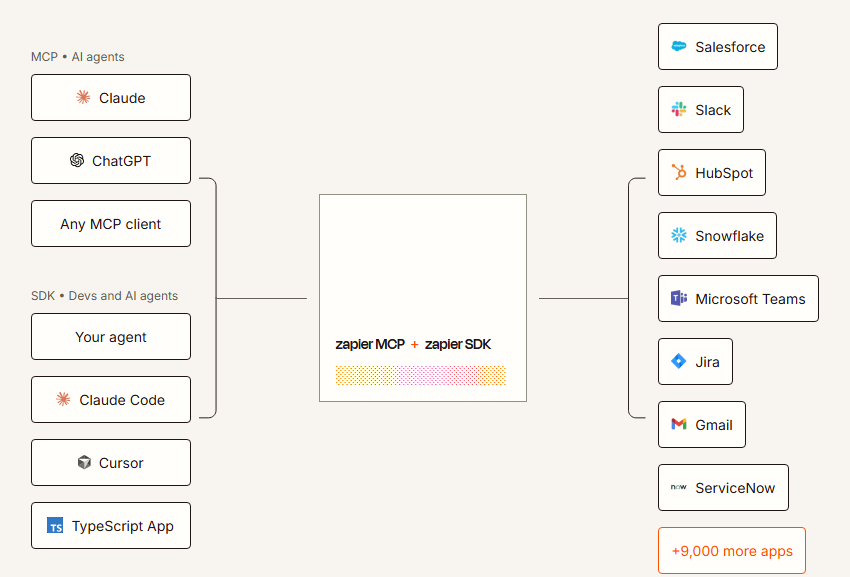
Zapier is a no-code automation platform that connects over 8,000 applications through API integrations. Workflows run server-side, 24/7, without a browser.
Its key capabilities include:
8,000+ app integrations with authenticated, bidirectional API connections
AI Agents and Copilot for building automations from plain-English descriptions
Built-in Tables, Forms, and Interfaces as a native data layer
Multi-step workflows with conditional logic, filters, and branching paths
Governance with SAML SSO, SCIM, audit logs, and admin controls
Why Choose Zapier Over Magical for Cross-Platform Workflow Automation?
Zapier stands out in the following areas:
Cross-Platform API Integration vs. Browser Tab Automation
Magical's autofill automations operate on data visible in open browser tabs, requiring a human to be present. Zapier's 8,000+ app integrations are authenticated API connections that read, write, and trigger actions across systems automatically.
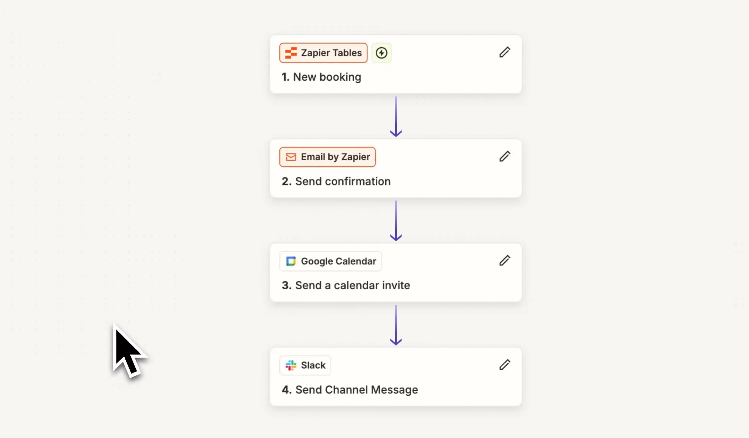
A single Zap can chain dozens of steps across CRM, marketing, support, and communication tools, all running server-side with no one logged in. For workflows running hundreds of times daily, Zapier scales in ways a browser-dependent tool cannot.
Built-In Data Layer
Zapier has built Tables into the platform as a relational database where workflows store, update, and query records as part of their logic. Tables actions do not count toward task consumption. Combined with Forms and Canvas, Zapier provides a full automation environment. Magical has no data storage. It pushes data to external destinations but offers no staging, lookup, or queuing.
Source: Zapier
Enterprise Governance
Zapier's Enterprise plan includes unlimited seats, SAML SSO, SCIM provisioning, role-based access controls, custom data retention, and real-time audit logs. SOC 2 Type II, SOC 3, GDPR, and CCPA certifications underpin the platform. Magical's browser-extension model means automations stop when a user closes their laptop. Zapier runs continuously on AWS.
NOTE: We also evaluated Make (formerly Integromat) and n8n. While Make excels at complex, multi-step workflows with affordable pricing for high-volume automation, and n8n is strong for self-hosted, open-source infrastructure, Zapier offers the broadest integration coverage (8,000+ apps) and most accessible no-code experience for growing teams.
Zapier Pricing
Zapier uses a task-based model where each successful action step counts as one task:
Free: $0/month, 100 tasks/month, 2-step Zaps only
Professional: $19.99/month (annual) for 750 tasks, multi-step Zaps, conditional logic
Team: $69/month (annual) for 2,000 tasks, up to 25 users, shared connections, SAML SSO
Enterprise: Custom pricing, unlimited seats, SCIM, advanced admin controls
Tables, Forms, and Zapier MCP are included on all plans at no extra cost.
Who Should Use Zapier?
Choose Zapier if:
Your team runs 10-30+ SaaS tools and needs them to communicate without custom integrations.
Your workflows need to run 24/7, triggered by events in other systems, without anyone needing to have a browser open.
You want a complete automation environment with data storage, form collection, and workflow orchestration in a single platform.
5. Espanso: Best Alternative for Privacy-First, System-Wide Text Expansion
Source: Espanso
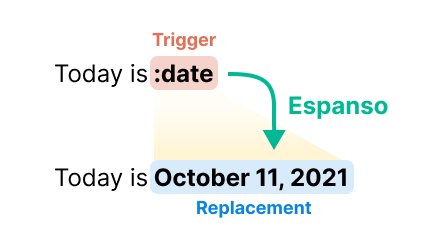
Espanso is an open-source text expander that runs at the OS level across Windows, macOS, and Linux. All storage, configuration, and processing happen on the user's device with no cloud dependency.
Its core capabilities include:
Free under GPL-3 open-source license, no subscriptions, no feature paywalls
System-wide text expansion at the OS input layer across all desktop applications
Local processing with no cloud account, no telemetry by default, and no data transmission
Cross-platform support for Windows, macOS, and Linux (including X11 and Wayland)
Shell script execution and dynamic variable support for programmable automation
Why Choose Espanso Over Magical for Privacy-First Text Expansion?
Espanso stands out in the following areas:
System-Wide Operation vs. Browser-Only
Espanso operates at the OS input level, intercepting keystrokes before they reach any individual application. A developer can expand snippets in VSCode, a support agent in a desktop email client, and a medical professional in an EHR thick client, all using the same trigger library. Magical is limited to Chrome, Edge, and Slack.
Zero-Cost, Open-Source Model
Espanso is free: no subscription, no seat pricing, no usage caps, no feature gating. The codebase is auditable on GitHub. Magical transitioned from free to paid plans, and pricing is not disclosed publicly.
Privacy-First Local Architecture
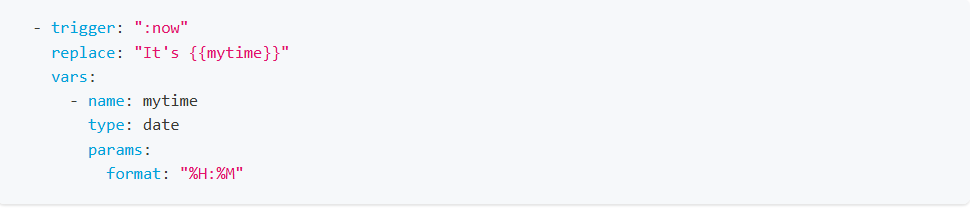
Espanso stores snippets as human-readable YAML files on disk with no cloud account required. For standard matches, only the last five characters are held in memory. Healthcare organizations bound by HIPAA, legal firms handling privileged communications, and any team with data sovereignty requirements benefit from this local approach.
Programmable Extensibility
Espanso's Shell Extension and Script Extension allow snippets to execute arbitrary shell commands and inject live output. Scripts can be written in Python, Ruby, Node.js, Bash, or any language, turning Espanso into a programmable macro engine.
Source: Espanso
NOTE: We also evaluated AutoHotkey and FastKeys. While AutoHotkey excels at Windows-specific scripting, it's Windows-only and requires learning a proprietary language. FastKeys offers a GUI-driven experience but is also Windows-exclusive. Espanso offers the best cross-platform, privacy-first text expansion at zero cost.
Espanso Pricing
Free (GPL-3 Open Source): Available at no cost on Windows, macOS, and Linux. All features included. Voluntary donations via PayPal are optional and confer no product benefits.
Who Should Use Espanso?
Choose Espanso if:
You need system-wide text expansion that works outside the browser, in desktop applications, IDEs, terminals, and proprietary enterprise software.
Your organization handles PHI, PII, or classified information where transmitting data to external cloud services is prohibited.
You work across Windows, macOS, and Linux and need portable, version-controllable configuration files.
You want zero-cost text expansion with no vendor relationship and the ability to audit, modify, and redistribute the tool.
6. typedesk: Best Alternative for Team Canned Response Management
Source: typedesk
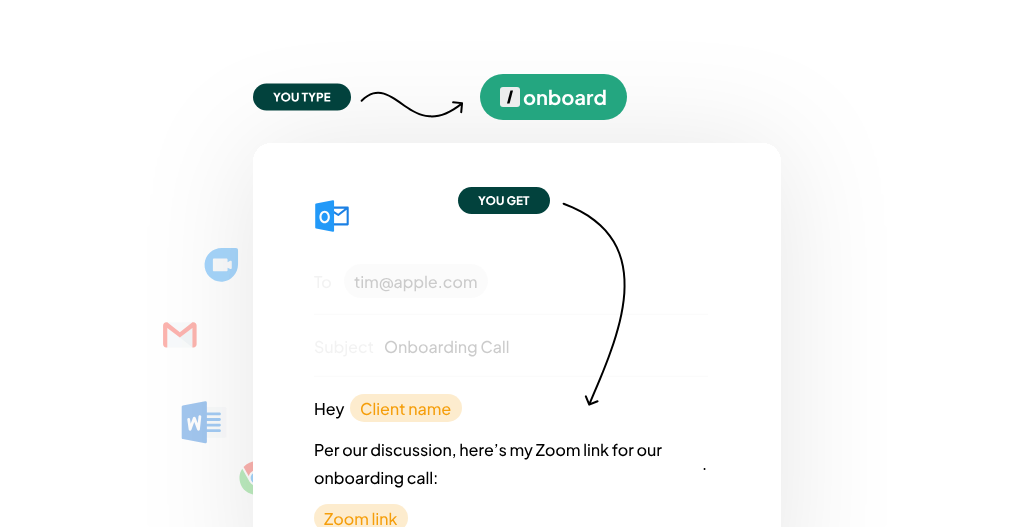
typedesk is a text expansion platform built for creating, organizing, and deploying team message templates with folder-level governance.
Its key capabilities include:
Built for canned responses with a focused feature set that avoids the complexity of broader automation platforms
Cross-platform coverage with native desktop apps for Windows and Mac, plus browser extensions for Chrome, Brave, and Firefox
Folder-level permissions with Viewer and Manager roles per folder, plus an activity feed for change tracking
ChatGPT integration for generating dynamic AI-assisted responses from custom prompts
Simple shortcut trigger system with a configurable trigger character and dynamic variable fill-ins
Why Choose typedesk Over Magical for Canned Response Management?
typedesk stands out in the following areas:
Cross-Platform Coverage Beyond Chrome and Edge
typedesk ships native desktop apps for Windows and Mac alongside browser extensions for Chrome, Brave, and Firefox. Its OS-level keystroke interception works across 10,000+ apps and websites. Magical is confined to Chrome and Edge, excluding organizations with Firefox users or teams that work in native desktop applications.
Folder-Level Permission Controls
typedesk's collaboration model uses shared folders with per-folder, per-user permission settings. Each folder can be assigned Viewer (read-only) or Manager (full edit) permissions, and an activity feed tracks template modifications. Magical's team admin roles operate at the workspace or team level, not the folder level, offering less governance for compliance-driven industries.
Focused Feature Set
typedesk is built for canned responses. It doesn't try to be a workflow automation platform. HighLevel's 300+ person team saves 330 hours per month, and IncQuery's 60-person team saves 160 hours per month by replacing fragmented internal wikis with a centralized template library. For teams that have solved their broader automation needs and just need governed message templates, typedesk's focus eliminates unnecessary complexity.
NOTE: We also evaluated Canned.me and FlyMSG. While Canned.me offers a lightweight, free-tier experience and FlyMSG positions itself as a productivity accelerator with LinkedIn integrations, typedesk offers the strongest combination of cross-platform coverage, folder-level permissions, and documented team-scale adoption.
typedesk Pricing
typedesk uses per-seat subscription pricing with annual billing saving 30%:
Free: Unlimited templates, 50 uses per week, single user only
Premium: Unlimited templates and uses, teams support, folder sharing with Viewer/Manager permissions (14-day free trial)
Premium +AI: Demo required; adds advanced AI integrations, AI Quick Reply, custom AI templates
Enterprise: Custom pricing; adds SSO, dedicated account manager, SLA guarantees, volume discounts starting at 15 users
Education/non-profit discount: 40% off yearly plan. 30-day money-back guarantee.
Who Should Use typedesk?
Choose typedesk if:
Your team's primary productivity bottleneck is repetitive message writing, not cross-app data movement or workflow automation.
You operate across multiple browsers or rely on native desktop applications and need template coverage beyond Chrome and Edge.
You need folder-level permission controls to govern approved messaging in compliance-driven industries.
7. Bardeen: Best Alternative for AI-Powered Lead Generation & Web Scraping
Source: Bardeen
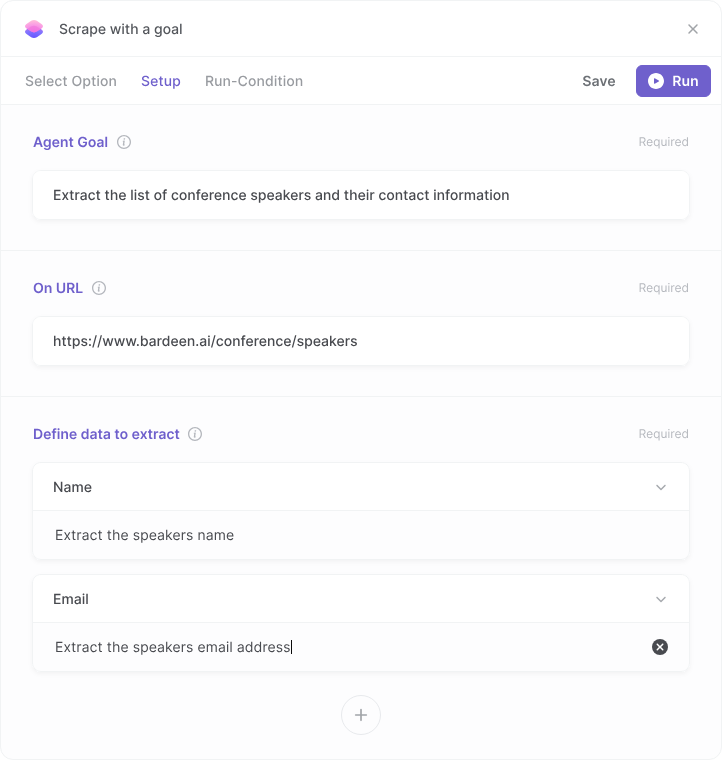
Bardeen is a browser-native AI automation platform that turns natural language descriptions into web scraping and lead generation workflows. Where Magical focuses on text expansion and healthcare, Bardeen targets sales teams, recruiters, and researchers who need to extract structured data from websites at scale and push it into CRMs and outreach tools.
Its key capabilities include:
Natural language AI workflow builder that generates complete automation playbooks from plain-English descriptions
Web scraping for 100+ platforms including LinkedIn, Crunchbase, GitHub, Zillow, and Indeed
Contact enrichment and AI qualification with integrated data provider queries and ICP-based scoring
CRM and productivity integrations with Salesforce, HubSpot, Google Sheets, Notion, and more
Free tier with 100 credits per month and paid plans starting at $10/month
Why Choose Bardeen Over Magical for Lead Generation?
Bardeen stands out in the following areas:
Multi-Step Lead Research Automation
Magical's autofill automates moving data between known sources and destinations in the browser. Bardeen automates full research pipelines: describe a prospecting goal in plain English, and Bardeen's AI generates a playbook that navigates websites, extracts data, enriches contacts, qualifies against your ICP, and exports results.
Web Scraping Infrastructure
Bardeen's web scraper extracts structured data from websites that don't offer APIs. In template mode, AI builds a scraper from the target page. In agent mode, it navigates across websites to reach stated goals, adapting extraction logic as page structures change. Magical has no scraping, enrichment, or AI qualification features.
GTM-Focused Product Strategy
Bardeen has evolved into a scraping-first GTM automation tool with a four-step pipeline: Web Scraper, Web Search, Enrichment, and AI Tools. Enterprise customers include Deel, Miro, WPP, and Kearney. For sales professionals who need to build qualified lead lists from scattered web sources, Bardeen solves a different problem than Magical's text expansion.

Source: Bardeen
NOTE: We also evaluated HARPA AI, Automa, and Browserflow. While HARPA AI excels at on-page AI assistance and Automa offers open-source browser automation, Bardeen offers the strongest integration of natural language workflow building, web scraping, and GTM-specific enrichment for teams automating lead research without developer involvement.
Bardeen Pricing
Bardeen uses a credit-based model where different actions consume different credit amounts (scraping: 1 credit/row, enrichment: 3 credits/row, AI qualification: 1 credit/row):
Basic: $10/month or $96/year, 100 credits/month, build-your-own scrapers
Premium: $50/month or $480/year, 1,000 credits/month, premium scraper templates, enrichment, AI tools, teams features
Enterprise: Custom pricing, custom credit allocation, premium support, SOC 2 Type II and GDPR certified
All users receive 100 free credits per month (restricted to non-commercial use per Terms of Service).
Who Should Use Bardeen?
Choose Bardeen if:
Your team spends hours each week building lead lists from LinkedIn, Crunchbase, or industry websites and needs to automate the pipeline from scraping to enrichment to qualification.
You need a browser-native automation tool that works across any website without API access, and your organization supports Chrome or Chromium-based browsers.
You're a solopreneur or small GTM team that needs lead generation and enrichment without enterprise contract minimums.
The Final Verdict
Magical serves well as a browser-based text expansion and data entry tool, but different workflows call for specialized solutions. Here are the best alternatives:
ZoomInfo for B2B sales intelligence, buyer intent signals, and AI-powered go-to-market
TextExpander for cross-platform text expansion with system-wide coverage and built-in compliance
Text Blaze for affordable, programmable text automation with conditional logic and a data layer
Zapier for workflow automation connecting 8,000+ apps with server-side execution
Espanso for privacy-first, free, system-wide text expansion with no cloud dependency
typedesk for team canned response management with folder-level governance
Bardeen for AI-powered lead generation, web scraping, and contact enrichment
You don't have to choose between Magical and these alternatives. Many teams use Magical's text expansion alongside specialized tools.
ZoomInfo provides verified data on 500M contacts and 100M companies, buyer intent signals, and AI tools that help your team find, engage, and close customers. Start with ZoomInfo Lite for free or request a demo to see the full platform.
Magical Alternatives FAQ
Why do people look for Magical alternatives?
Magical works well as a browser-based text expander, but users look for alternatives because of its Chrome/Edge-only limitation (no desktop app support), the shift from free to paid plans with undisclosed pricing, limited team governance and analytics, and no cross-platform coverage for organizations using Firefox, Safari, or native desktop applications. Teams needing workflow automation, verified B2B data, or local processing also seek specialized tools.
What is the best overall Magical alternative?
No single best alternative exists because Magical covers multiple functions for different audiences. ZoomInfo is the top choice for sales teams that need B2B data and AI-powered prospecting. TextExpander leads for enterprise teams needing cross-platform text expansion with compliance certifications. Zapier is the strongest option for organizations that need workflow automation across their SaaS stack.
Is there a free alternative to Magical?
Yes, several alternatives offer permanent free plans. Espanso is free and open source with no feature restrictions. Text Blaze offers a permanent free tier with 20 active snippets and unlimited daily usage. Zapier provides 100 free tasks per month. ZoomInfo Lite is a permanent free tier with access to the B2B database and 10 monthly export credits. Bardeen offers 100 free credits per month for non-commercial use.
Which Magical alternative is best for sales teams?
ZoomInfo is built for sales teams, providing verified contact data on 500M professionals, buyer intent signals that identify in-market accounts, and AI tools in GTM Workspace that research accounts and draft personalized outreach. For teams that need lead list building and web scraping, Bardeen automates the prospecting pipeline from data extraction to contact enrichment.
Which alternative works across all desktop applications, not just the browser?
TextExpander and Espanso both operate at the operating system level, expanding text in any application that accepts keyboard input. TextExpander supports Mac, Windows, Chrome, iOS, and Android with enterprise compliance and team analytics. Espanso supports Windows, macOS, and Linux with a privacy-first, fully local architecture. typedesk also offers native desktop apps for Windows and Mac alongside multi-browser extensions.
How does ZoomInfo compare to Magical for sales prospecting?
ZoomInfo and Magical address different parts of the sales workflow. Magical helps you type messages faster with templates and autofill forms between browser tabs. ZoomInfo tells you who to contact (500M verified contacts with direct dials), when to engage (buyer intent signals from 210M IP-to-Organization pairings), and what to say (AI-drafted outreach from the GTM Context Graph). ZoomInfo handles the strategic side of prospecting; Magical automates the mechanical side.
Which Magical alternative is best for customer support teams?
typedesk is built for customer-facing teams that need organized canned responses with team governance. Its folder-level permission controls, cross-platform coverage (Chrome, Brave, Firefox, Windows, Mac), and focused feature set make it ideal for support floors. Text Blaze is a strong budget alternative with programmable snippet logic that guides agents through response workflows using conditional rules.
Can I use Magical alongside these alternatives?
Yes. Many of these tools complement rather than replace Magical's browser extension.
For example, a sales team could use ZoomInfo to identify and prioritize prospects, then use Magical's text expansion to speed up outreach execution in the browser. Similarly, a support team might use typedesk for governed team templates while using Zapier to automate the broader workflow of routing tickets, updating CRMs, and triggering notifications across systems.
