

Mailmodo has staked its position in email marketing on one thesis: the click-out kills conversions. Every time a subscriber leaves the inbox to fill out a form, answer a survey, or register for an event, most don't bother. Mailmodo's answer is AMP-powered interactive emails that let recipients complete forms, spin discount wheels, book meetings, and browse product catalogs without clicking through to a landing page.
To write this Mailmodo review, we analyzed the platform in depth. We believe it's the right choice if:
You want to embed interactive elements (forms, surveys, quizzes, calendars) directly inside emails
Your subscriber base is mostly Gmail or Yahoo Mail users, where AMP renders natively
You prefer AI-assisted campaign creation that handles templates, journeys, and segmentation from text prompts
You need managed deliverability support rather than self-serve diagnostics
You're a non-technical marketer who wants interactive email without developer dependencies
However, Mailmodo might not be the best choice if:
Your audience skews toward Outlook, where AMP emails don't render at all
You need multi-branch automation logic with CRM-driven triggers
You're budget-sensitive and need a platform under $100/month for small lists
You require more template variety and mature reporting dashboards
Your primary need is B2B prospecting and you need verified contact data to fill your email lists
In that last case, the gap isn't about email design or delivery. It's about who you're sending to. If your biggest bottleneck is finding the right contacts with verified emails and direct dials, consider ZoomInfo: a B2B data and GTM platform built on 500M contacts, 100M companies, and 200M+ verified business email addresses. ZoomInfo doesn't compete with Mailmodo's email creation and delivery tools. It solves the upstream problem of building accurate, targeted contact lists that make every campaign you send through Mailmodo more effective.
We've included a look at ZoomInfo later in this review for B2B teams whose email marketing performance is limited by contact data quality rather than email design. If you're ready to explore it, you can start with ZoomInfo's free trial here.
What is Mailmodo?
Source: Mailmodo
Mailmodo is an email marketing platform founded in 2020 by Aquibur Rahman, Apurv Gupta, and Devyesh Tandon. The founding insight came from a direct experiment: when the team first tested AMP emails for a customer campaign, conversion rates increased 250%, and they replicated the result consistently. That convinced them to build a platform around AMP-powered interactive email.
The company joined Y Combinator's Summer 2021 batch and Sequoia Capital India's Surge program in the same year, an unusual double-backing that gave it credibility in both US and Indian startup ecosystems. Mailmodo is headquartered in San Francisco with engineering operations in Bangalore.
The platform's original thesis was narrow: most email platforms required a click-out to complete any action, and Mailmodo would eliminate that redirect using Google's AMP for Email framework. Since then, the platform has expanded.
In 2024, Mailmodo launched "Mailmodo 2.0", extending interactivity beyond Gmail to Apple Mail via CSS-based techniques. By 2025, Mailmodo added a full AI toolchain covering template generation, automation building, segmentation, campaign analysis, and marketing planning.
Mailmodo's strongest adoption is among Indian digital-native brands including Razorpay, bigbasket, BluSmart, and foundit. The platform targets non-technical marketers and small teams who want interactive email and automation without developer dependency.
Mailmodo Pros & Cons
Pros | Cons |
|---|---|
AMP-powered interactive emails with 50+ widget types | AMP only works in Gmail, Yahoo Mail, Mail.ru, and FairEmail |
AI tools for templates, journeys, segments, and analytics on all paid plans | Pricing starts at $149/month for just 500 contacts |
Managed deliverability with free expert audit | Automation limited to 1 active journey on Lite plan |
No-code drag-and-drop editor for interactive elements | Outlook has zero AMP support (static fallback only) |
Strong customer support with account-assigned reps | Reporting and analytics less mature than established ESPs |
Automatic HTML and plain-text fallbacks for unsupported clients | Template library narrower than Mailchimp or Klaviyo |
SOC 2 Type 2 certified with GDPR compliance | Lite plan includes Mailmodo branding on all outgoing emails |
Mailmodo Review: How It Works & Key Features
Interactive AMP Emails: Mailmodo turns the inbox into an action environment where recipients complete tasks without clicking out.
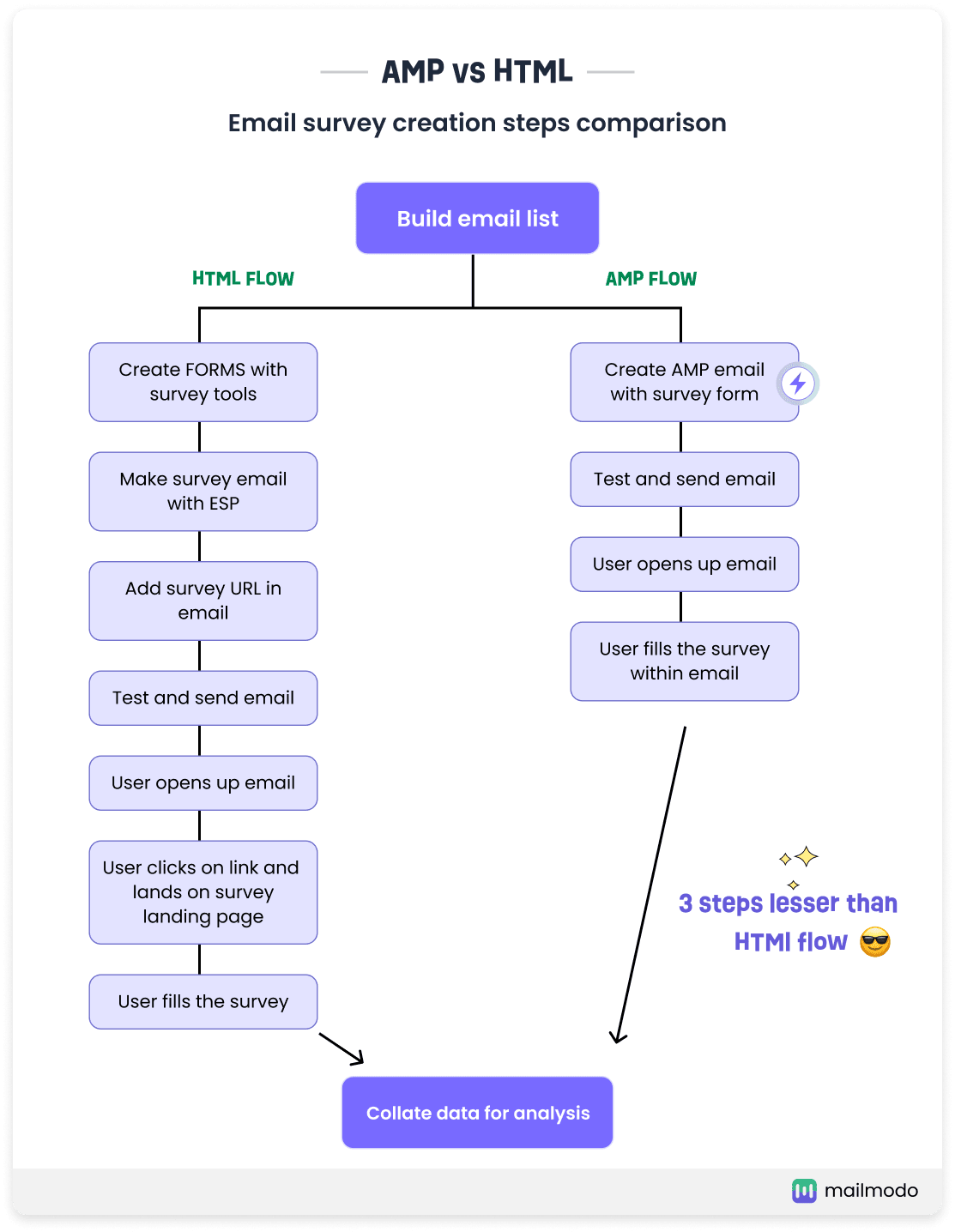
Standard email marketing follows a rigid sequence: open email, click button, land on external page, complete action. Each redirect adds friction, and friction kills conversion. Mailmodo's Interactive AMP Emails eliminate that redirect by embedding functional widgets inside the email body.
Source: Mailmodo
The platform offers a library of 50+ interactive elements spanning ten categories: forms, surveys, quizzes, polls, ratings (star, emoji, like/dislike), gamification (spin-the-wheel, scored quizzes), carousels, calculators, calendars, and e-commerce product catalogs.
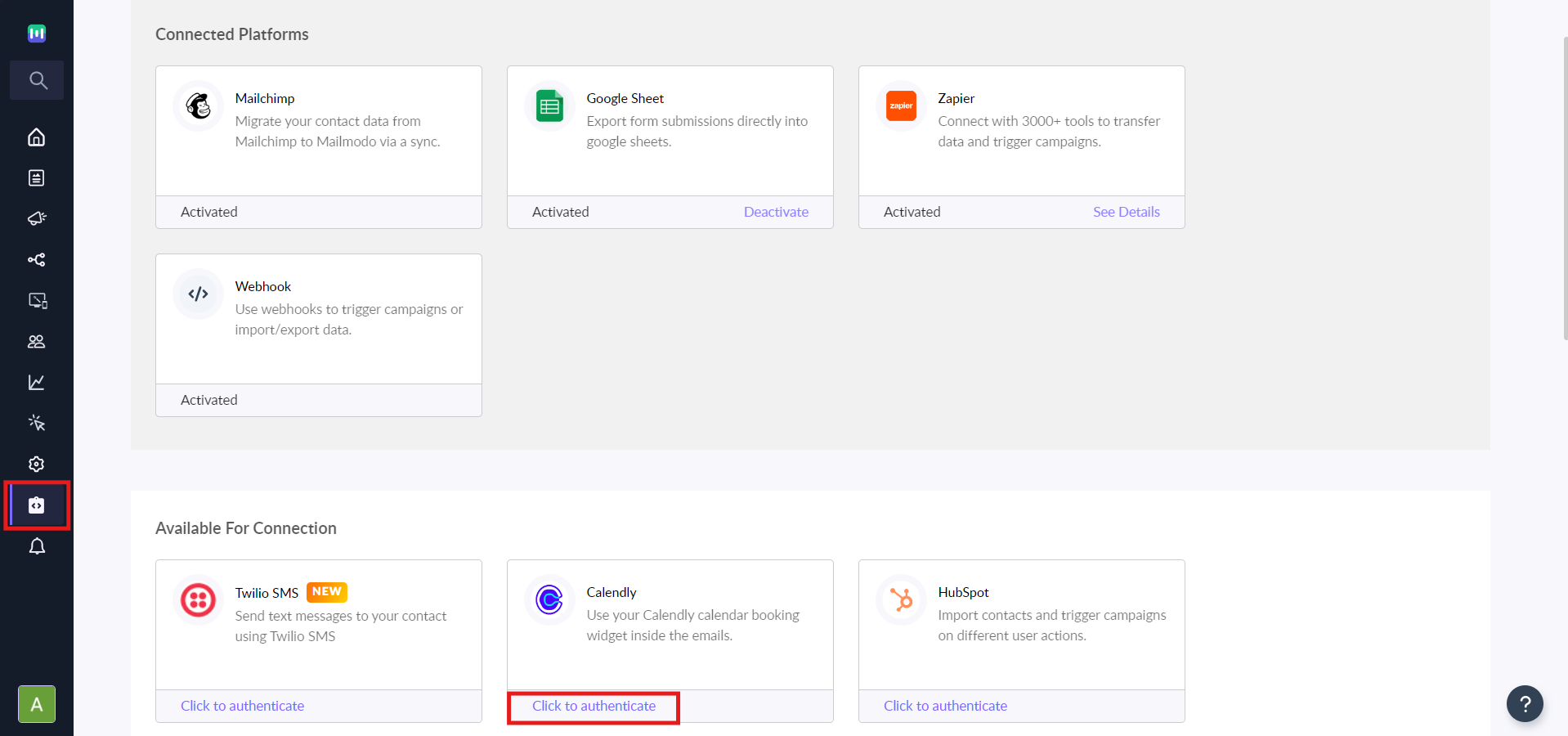
Recipients can submit a registration form, answer an NPS survey, book a meeting via Calendly embed, register for a Zoom webinar, or spin a discount wheel, all without leaving their inbox.
Source: Mailmodo
Building these emails requires no code. The drag-and-drop editor lets you insert and configure any widget from the library. Behind the scenes, Mailmodo generates three MIME parts automatically: the AMP version for supporting clients, an HTML fallback, and a plain-text fallback. You don't maintain parallel templates.
The catch is inbox coverage. AMP for Email is natively supported by Gmail, Yahoo Mail, Mail.ru, and FairEmail. Outlook does not support it at all. Mailmodo 2.0 extended coverage to Apple Mail through CSS-based interactivity, but recipients on Outlook and other unsupported clients see only the static HTML fallback.
For lists skewed toward Gmail (common in consumer tech and Indian markets), this limitation is minor. For enterprise B2B audiences with heavy Outlook usage, it's significant.
AI Features Suite: Mailmodo includes five AI tools covering the full campaign lifecycle, available on all paid plans.
Mailmodo's AI suite spans five tools that automate the path from strategy to analysis:
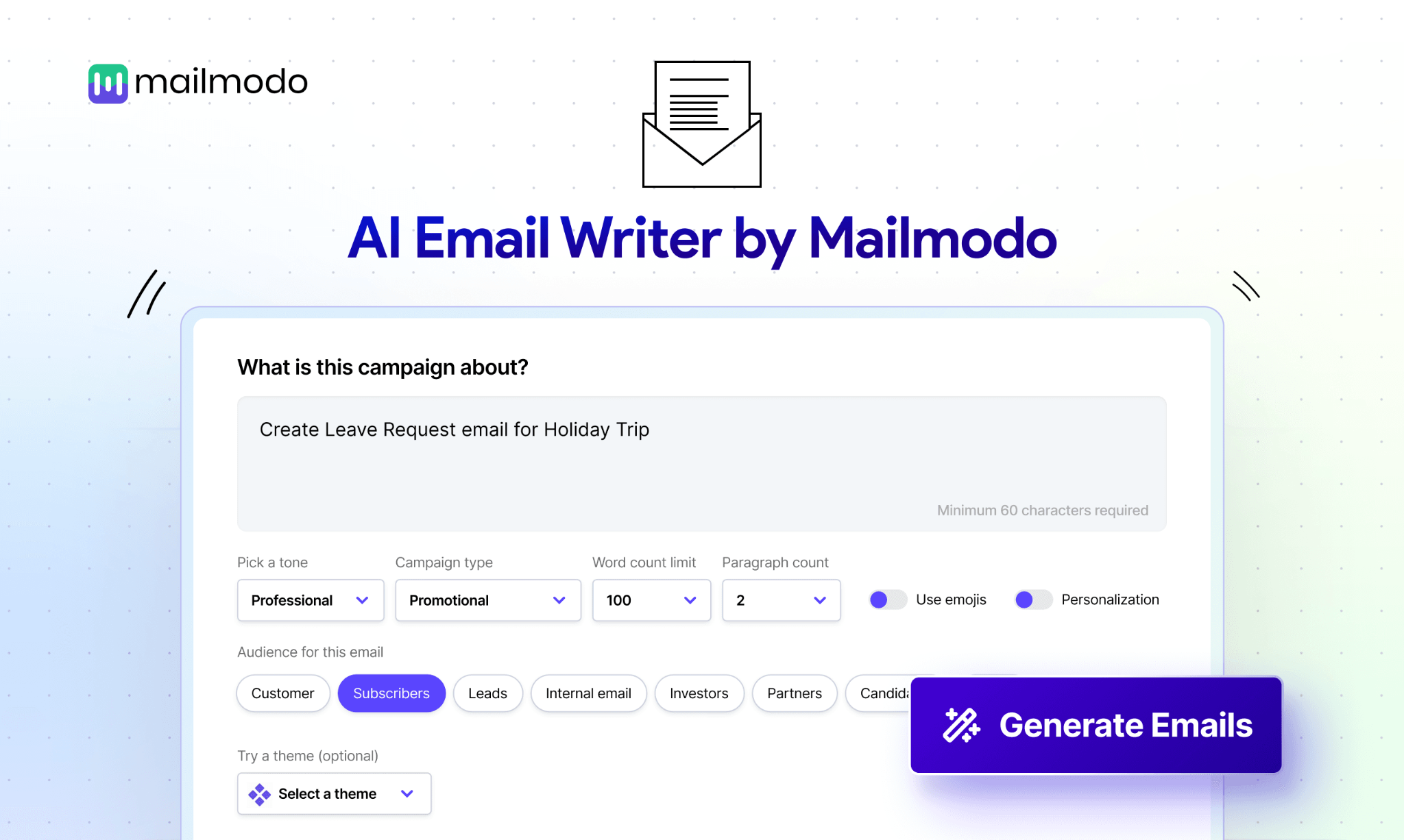
The AI Email Template Generator produces designed email templates from a text prompt. You describe the campaign goal, select an email type (welcome, newsletter, lead nurture), configure tone and language, and receive a ready-to-edit template. No design work upfront.
Source: Mailmodo
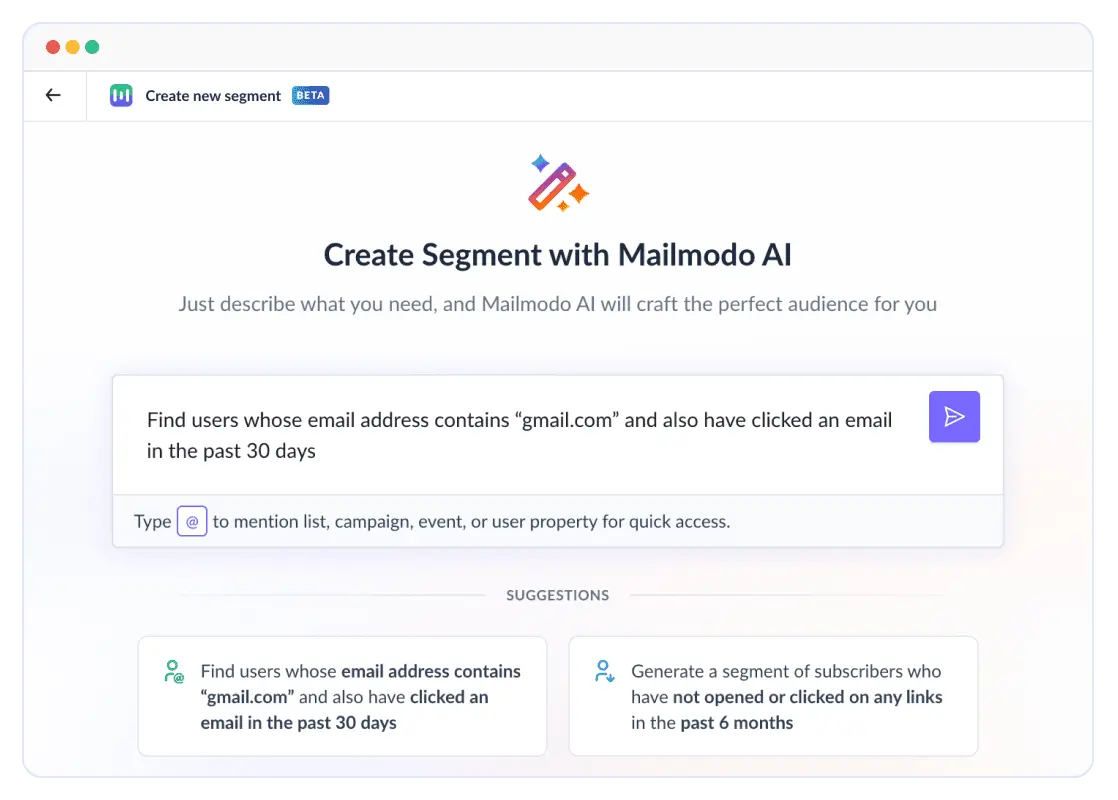
The AI Segment Generator lets you describe your target audience in plain language. Instead of dragging filters and chaining conditions, you type something like "customers who purchased in the last 30 days but haven't opened an email in two weeks."
Source: Mailmodo
The AI builds the segment, validates the logic, and shows a real-time contact count. You can refine with follow-up prompts or switch to manual mode for direct filter control.
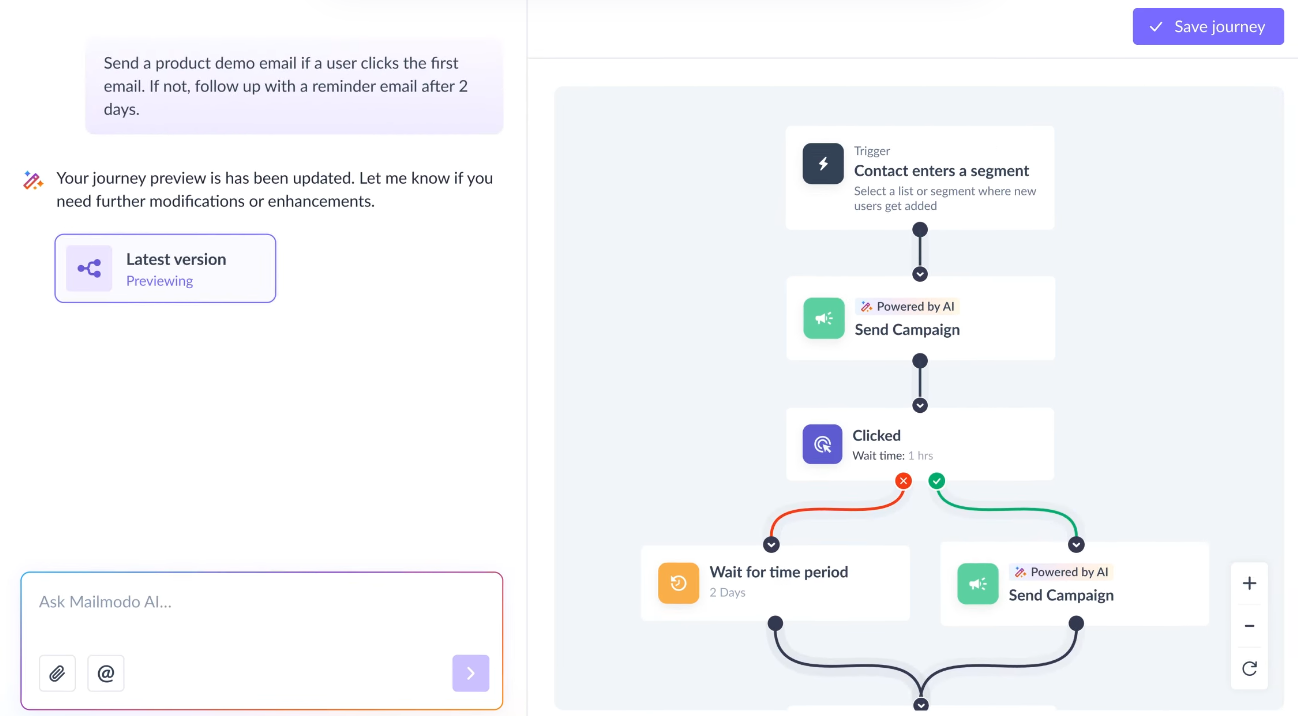
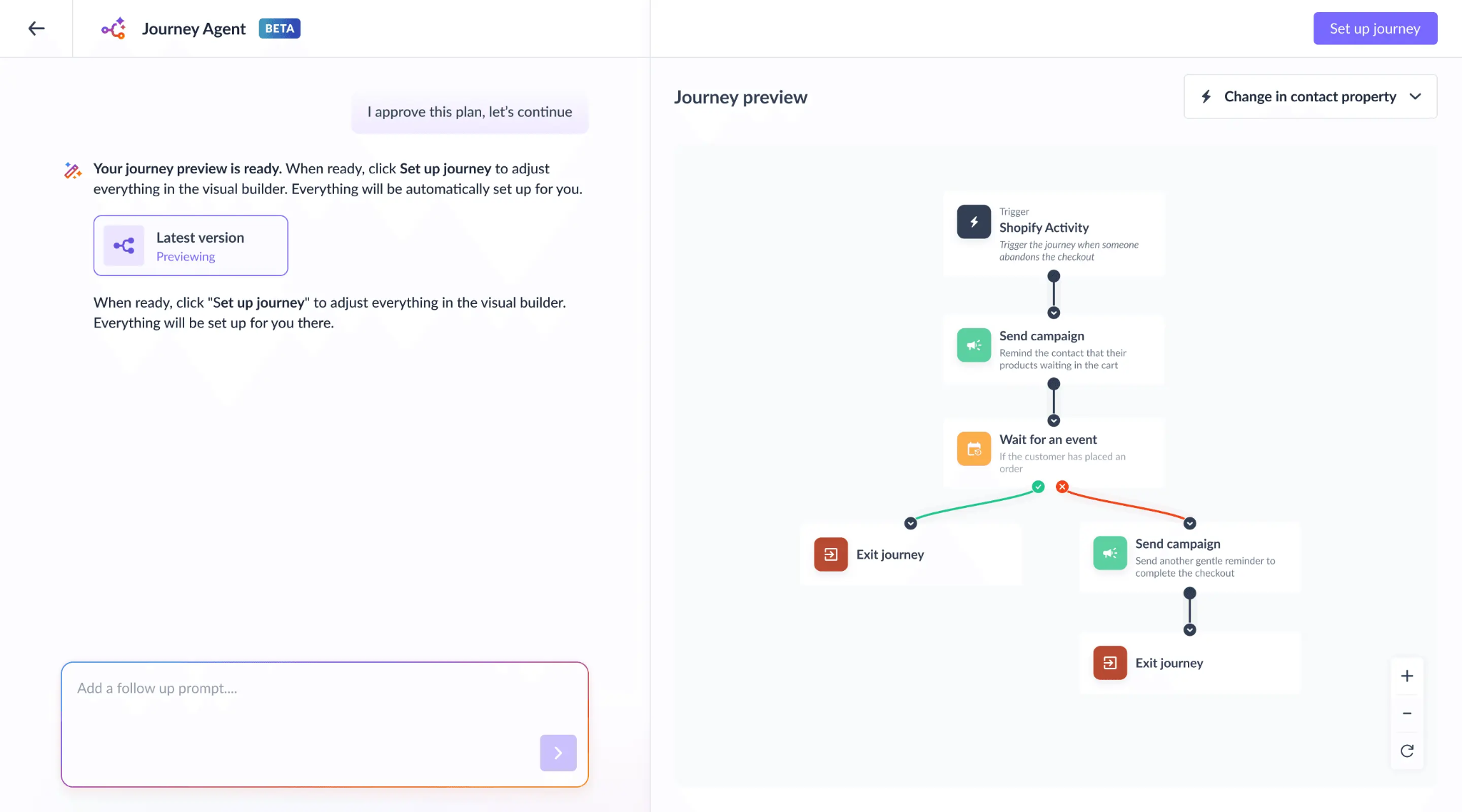
The AI Email Automation Builder generates complete journeys from a goal description. Describe what you want ("re-engage contacts who haven't opened in 60 days"), and the AI produces a workflow with trigger selection, email sequence, time delays, and conditional branching. Post-creation edits are also prompt-driven: you tell the AI to add a branch for users who click but don't convert, and it handles the logic.
Source: Mailmodo
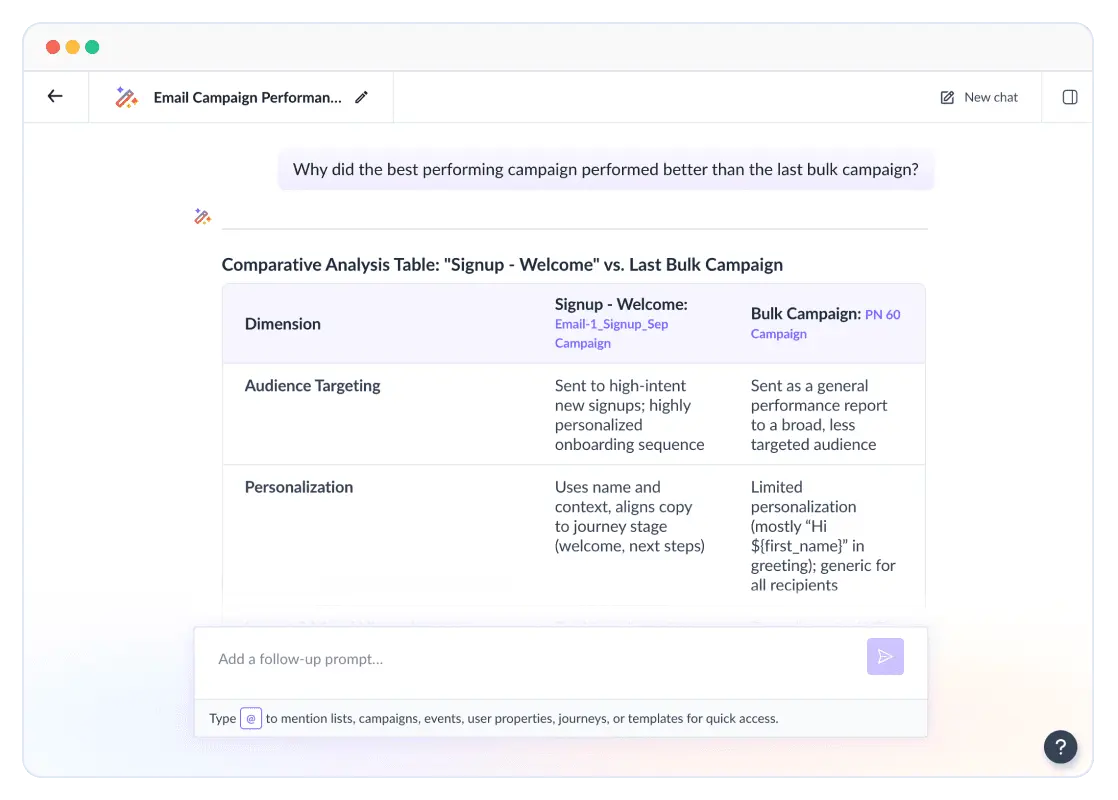
The AI Campaign Analyzer replaces traditional dashboards with a chat interface. You ask questions in natural language about specific campaigns, subject lines, CTAs, or time periods, and the AI returns answers. It can surface patterns from historical campaigns, identify trends, and recommend what to replicate or retire.
Source: Mailmodo
The fifth tool, the AI Email Marketing Planner, generates campaign strategies and content calendars from a prompt.
What makes the suite notable is accessibility. All five tools are included starting from the Lite plan, not gated to enterprise tiers. For small teams without dedicated email strategists or data analysts, this lowers the barrier to running sophisticated campaigns.
Automation Journeys: Mailmodo's journey builder combines AI-generated workflows with interactive email delivery.
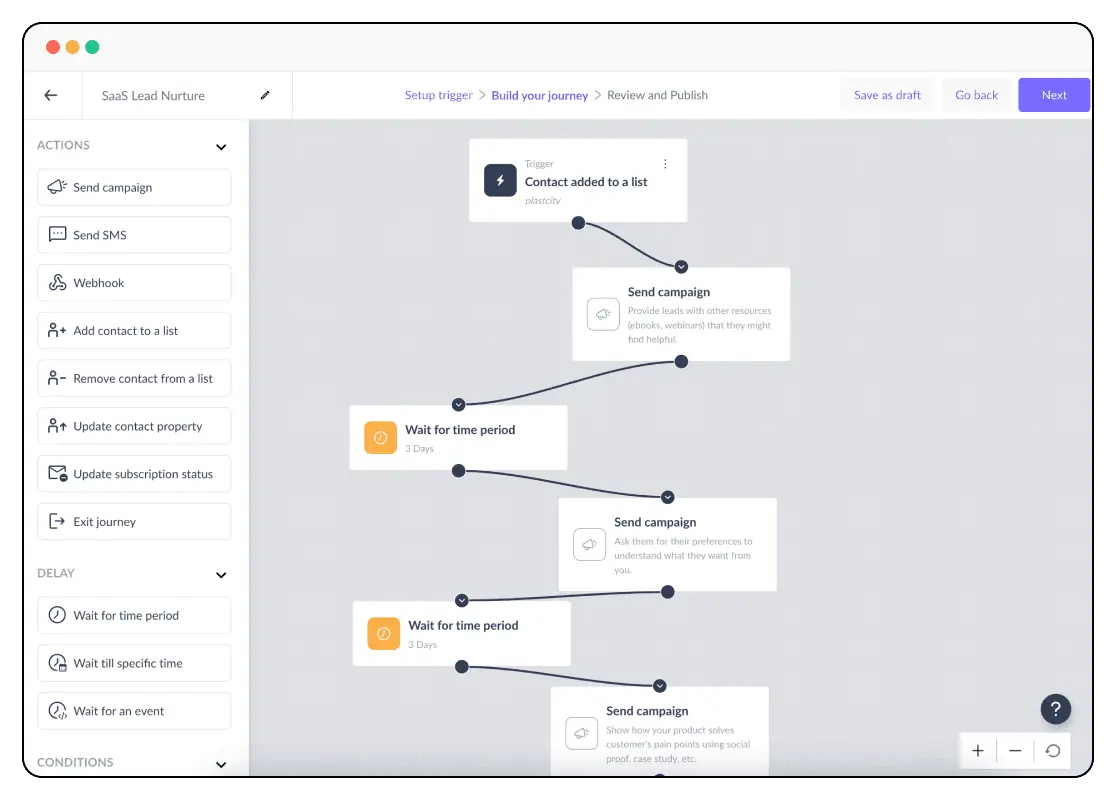
Mailmodo's automation engine, called Journeys, handles multi-step, behavior-triggered email sequences. The platform supports a range of trigger types: event occurrence, contact entering or leaving a segment, list additions, property changes, form submissions, date-based events, API calls, and manual enrollment.
Source: Mailmodo
Journeys also integrate with third-party form tools including Typeform, Jotform, Webflow, and GetResponse, so external form submissions can kick off email sequences. A library of 100+ pre-built journey templates covers onboarding, welcome series, birthday campaigns, referral flows, and re-engagement sequences.
The key differentiator: emails sent within a Journey can include Mailmodo's full interactive widget set. A welcome journey doesn't just send static emails. It can embed an onboarding survey in the first email, a preference selector in the second, and a calendar booking widget in the third, all completable without leaving the inbox.
Plan limits are worth noting. The Lite plan restricts you to 1 active Journey with 500 active contacts per journey. Pro expands to 10 active Journeys, and Max offers unlimited journeys with up to 100,000 active contacts per journey. For teams running multiple concurrent sequences, the Lite plan's single-journey limit is a real constraint.
Managed Deliverability: Mailmodo treats inbox placement as a service, not a self-serve checklist.
Most email platforms hand you documentation on SPF, DKIM, and DMARC records and leave you to sort out deliverability on your own. Mailmodo's Managed Deliverability takes a different approach, combining managed infrastructure with hands-on expert consultation.
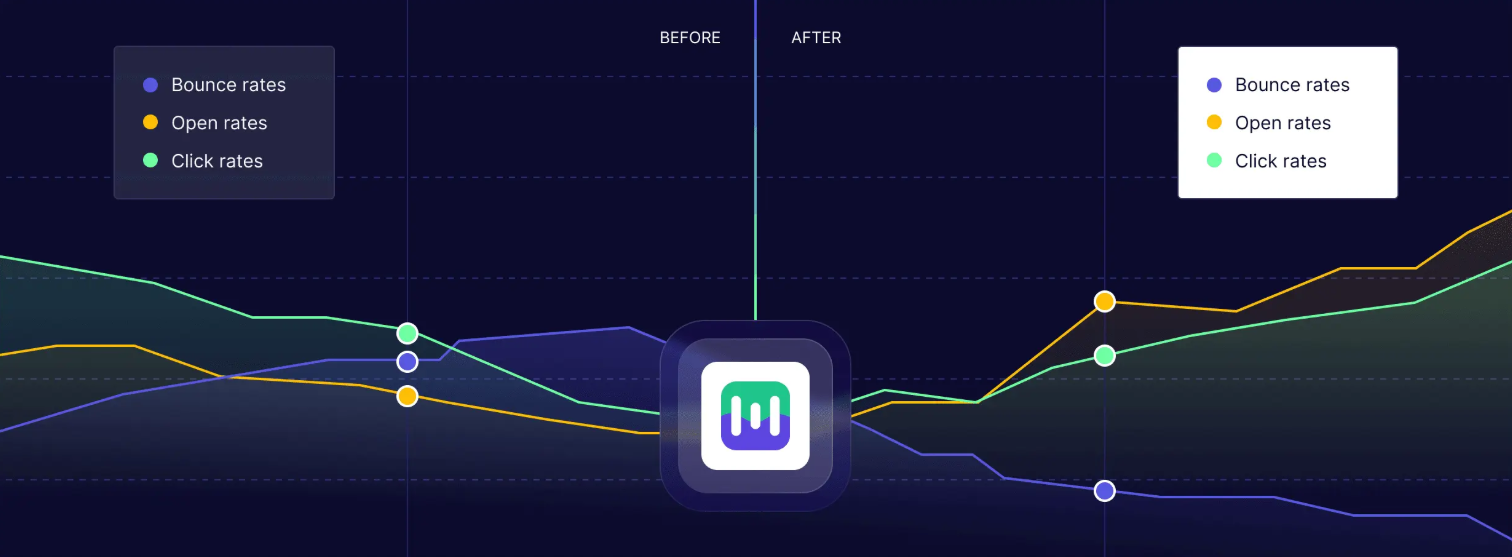
Source: Mailmodo
The entry point is a free deliverability audit. Mailmodo's in-house experts produce a full report on email health, performance, and domain reputation, then deliver fixes and help map out a safe volume scaling plan.
For new senders or those scaling volume, Fragmented Scheduling drips campaigns across up to seven days using a configurable multiplier. You set an initial batch volume and a growth factor (say 1.5x), and the platform compounds volume gradually while monitoring engagement and reputation signals.
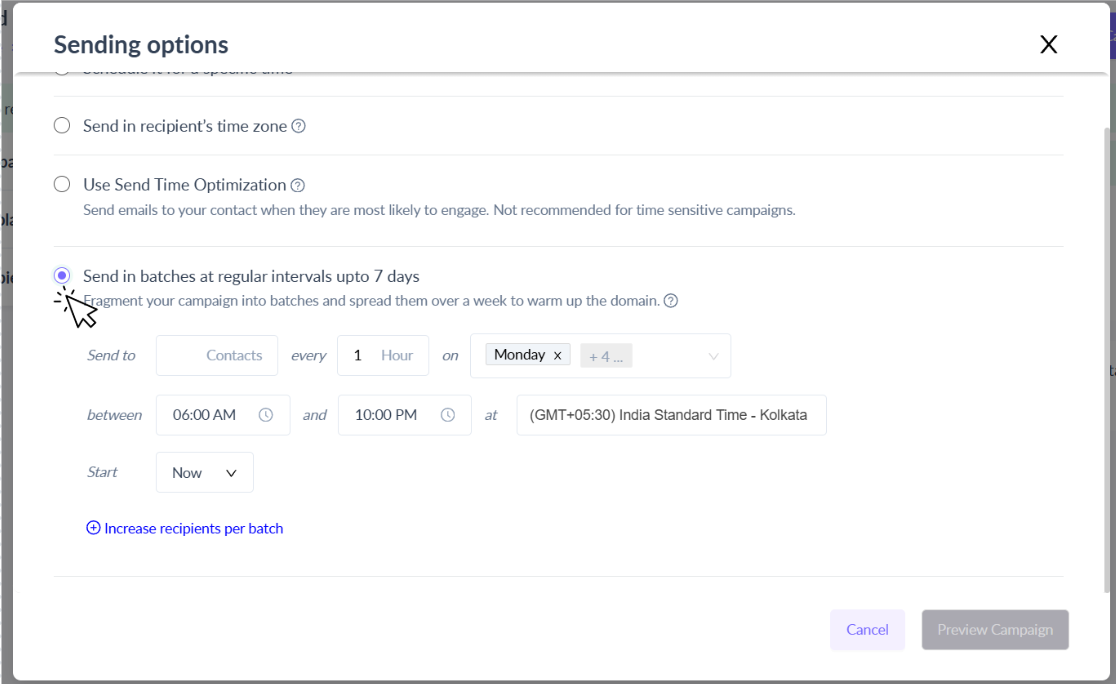
Source: Mailmodo
Infrastructure-level protections include proactive shared IP monitoring, IP pool management that separates bulk and transactional sends, automated bounce suppression (hard bounces permanently removed, soft bounces suppressed after seven repeats), and domain reputation monitoring via Google Postmaster integration.
Mailmodo also guides customers through BIMI implementation, which displays a verified brand logo in recipients' inboxes.
Where Mailmodo Falls Short
Mailmodo's interactive email approach is differentiated, but several limitations become apparent with regular use. These reflect a platform still maturing beyond its AMP-first niche into a full-suite email marketing tool.
AMP's Inbox Coverage Gap: The most structural limitation. AMP for Email works only in Gmail, Yahoo Mail, Mail.ru, and FairEmail. Outlook has zero support, and it's not on Microsoft's public roadmap. Mailmodo 2.0 added CSS-based interactivity for Apple Mail, which helps, but any list with significant Outlook representation means a material share of recipients see only a static HTML fallback.
The interactive advantage (Mailmodo's core value proposition) disappears for those subscribers. G2 reviewers consistently flag this as their primary complaint.
Pricing Relative to Contact Count: Entry at $149/month for 500 contacts on the Lite plan is steep compared to mainstream tools at similar contact volumes. The Lite plan also caps email sending credits at 2,000 per month, meaning an average of four emails per contact before hitting the limit. G2 reviewers note that pricing "may feel steep for small businesses or teams with basic email marketing needs."
For teams managing thousands of contacts, costs scale upward from there.
Automation Depth Ceiling: Users who need event-based triggers with multi-branch conditional logic or CRM-driven flows report hitting limits. As one G2 reviewer put it: "over 7 months I found myself hitting the ceiling when trying to build logic-based automations or pass advanced segmentation from my CRM." The Lite plan's single active journey restriction compounds this for smaller accounts.
Analytics and Reporting: Current analytics are described by G2 users as basic and slow to load. The AI Campaign Analyzer improves the query interface but doesn't add underlying data depth. Teams accustomed to the granular reporting of Klaviyo or ActiveCampaign may find the analytics insufficient.
Template Library and Western Market Presence: The template library is narrower than competitors like Mailchimp or Klaviyo. And while Mailmodo has a San Francisco address, its customer logos and case studies are overwhelmingly Indian companies. For North American or European buyers evaluating social proof, this skew limits credibility.
These limitations aren't failures. They reflect a platform that built something novel with interactive email and is now expanding into broader territory. But they create a clear gap for teams whose bottleneck isn't email design or interactivity, but the quality and accuracy of the contact data powering their campaigns.
For B2B Teams: When Better Data Matters More Than Better Emails
Mailmodo solves the problem of what happens inside the email. But for B2B marketing and sales teams, the more common bottleneck is what happens before the email is created: finding the right contacts, verifying their email addresses, and understanding which accounts are actually in-market.
This is a different problem, and it's where ZoomInfo fits.
ZoomInfo is a B2B data and GTM platform built on 500M contacts, 100M companies, 135M+ verified phone numbers, and 200M+ verified business email addresses. By combining this data with CRM records, conversation transcripts, and behavioral signals, ZoomInfo's GTM Context Graph (processing 1.5B+ data points daily) reveals not just who your buyers are, but when they're researching solutions and why deals move or stall.
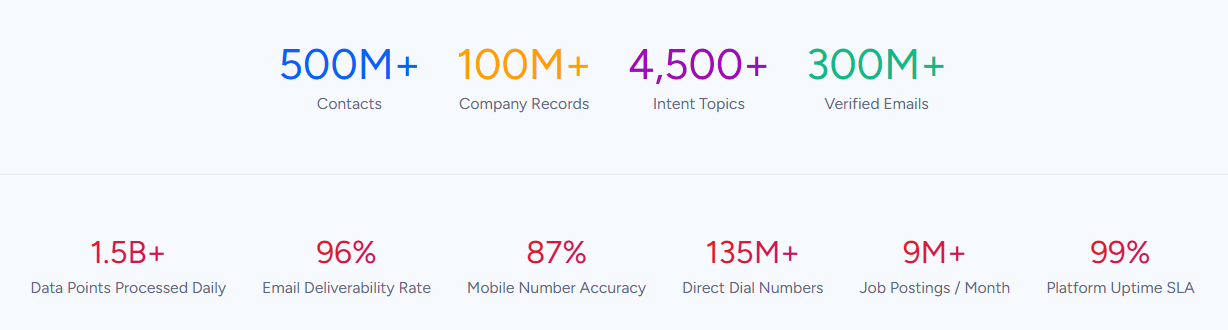
Comprehensive B2B Data: ZoomInfo provides verified contact and company data at a scale no other provider matches.
ZoomInfo's data spans three dimensions: identity data (who buyers are and how to reach them), company context (firmographics, org charts, technographics across 100M companies), and signals that reveal when accounts are in-market.
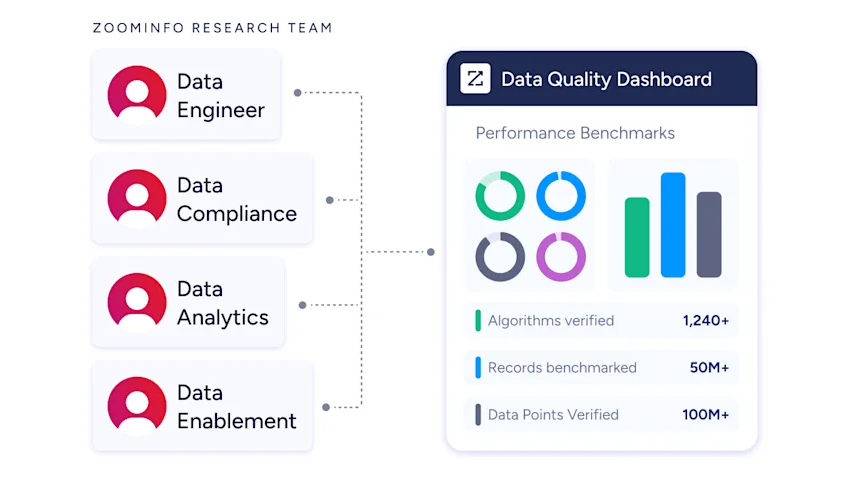
The data is verified through a multi-source pipeline backed by 300+ human researchers, achieving up to 95% accuracy on first-party data.
This matters for email marketing directly. When your contact data is accurate, bounce rates stay low, sender reputation stays high, and campaigns reach real inboxes. When it's not, you're burning send credits on addresses that bounce and damaging deliverability in the process.
In a Fortune 500 competitive RFP analyzing 25 million contacts across vendors, an independent consultant concluded that "no other competitor came even close." ZoomInfo has been named a Leader in the Forrester Wave for Intent Data, a Leader in Gartner's Magic Quadrant for ABM Platforms for two consecutive years, and earned 133 No. 1 rankings on G2.
"ZoomInfo gives us the information we need to execute. We don't have to spend our time digging. It's already there, so we can be three steps ahead." (Vensure)
Intent Signals and Account Prioritization: ZoomInfo identifies which accounts are actively researching before they reach out.
Beyond static contact records, ZoomInfo Intent tracks signals from 210 million IP-to-Organization pairings and 6 trillion+ keyword-to-device pairings sourced monthly.
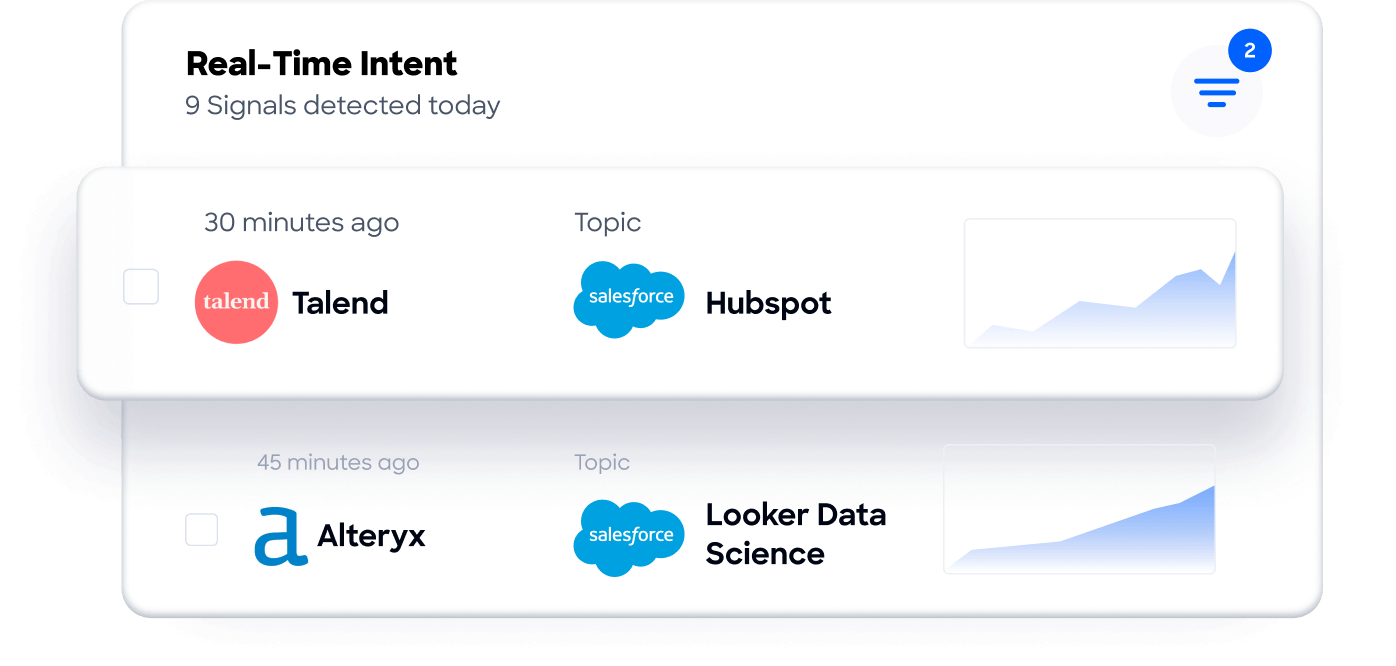
Guided Intent, exclusive to ZoomInfo, identifies topics historically correlated with deal success rather than requiring manual topic selection.
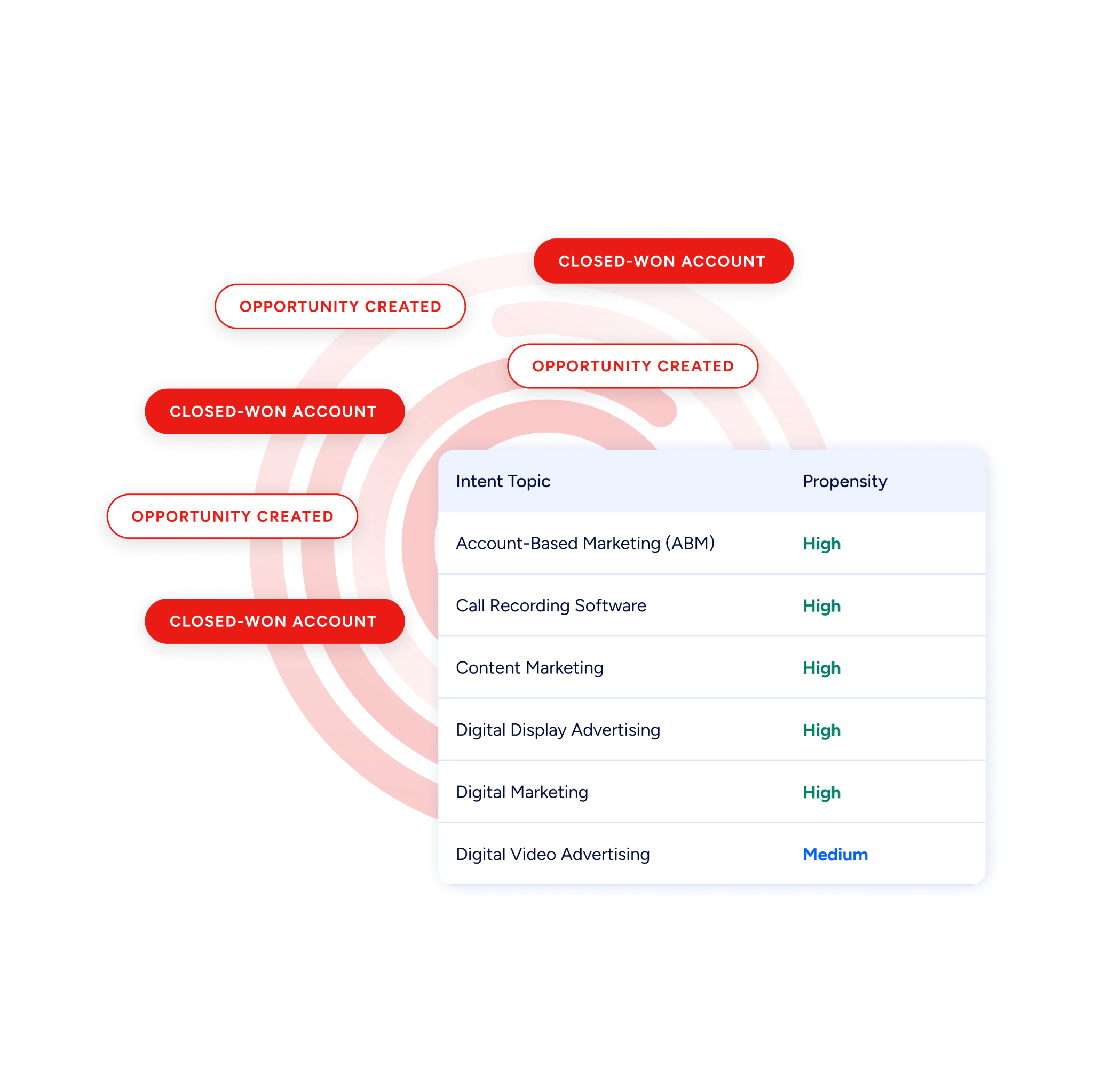
For email marketers, this means you can target campaigns at accounts showing active buying behavior rather than broadcasting to an entire list. The difference between sending a product email to 10,000 contacts and sending it to 500 accounts researching your category is the difference between a 0.5% response rate and a meaningful pipeline contribution.
"That combination of our internal CRM data, external signals, and AI that's given all that context has helped us craft very specific account- and persona-based messages. And people have responded to them right away." (Seismic)
Universal Access: ZoomInfo's intelligence works in any tool through APIs, MCP, GTM Workspace, and GTM Studio.
ZoomInfo delivers its intelligence through three channels. GTM Workspace gives sellers a single view where prioritized accounts, AI-drafted outreach, and deal execution converge.
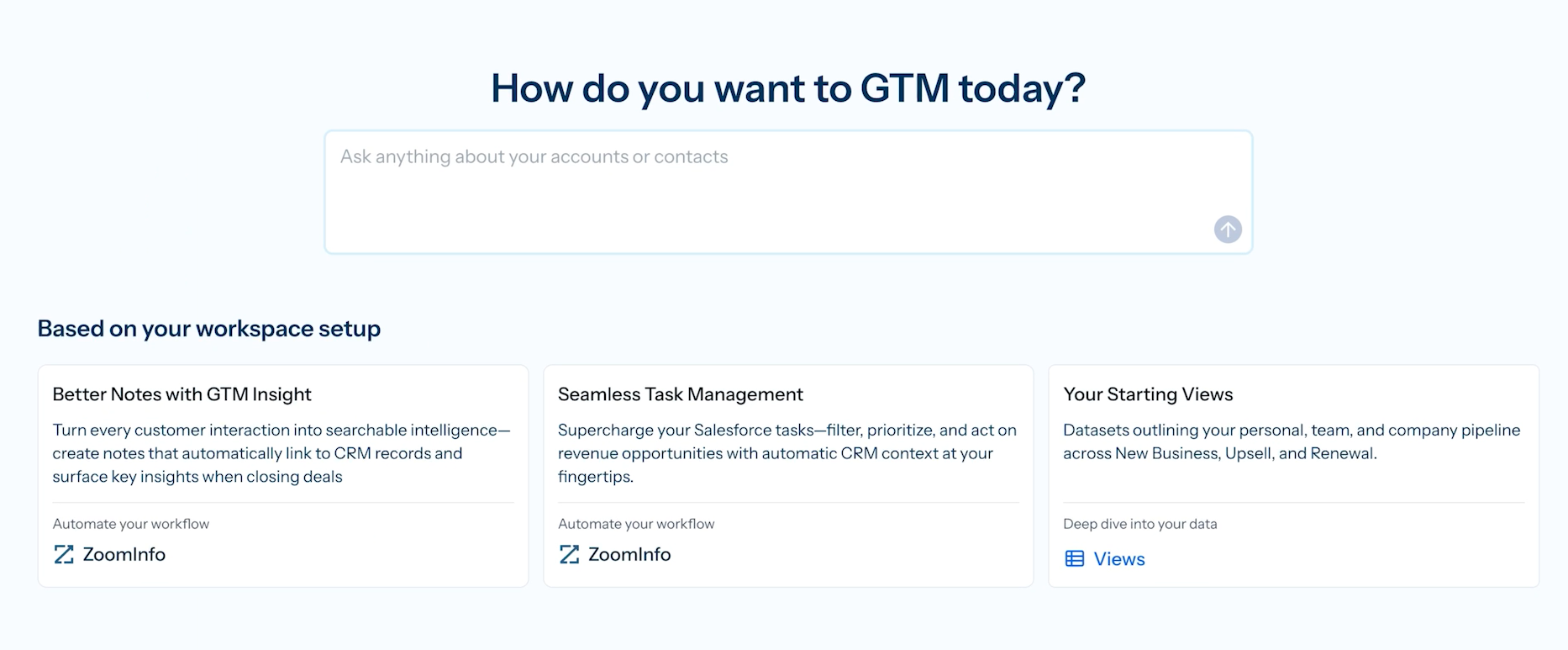
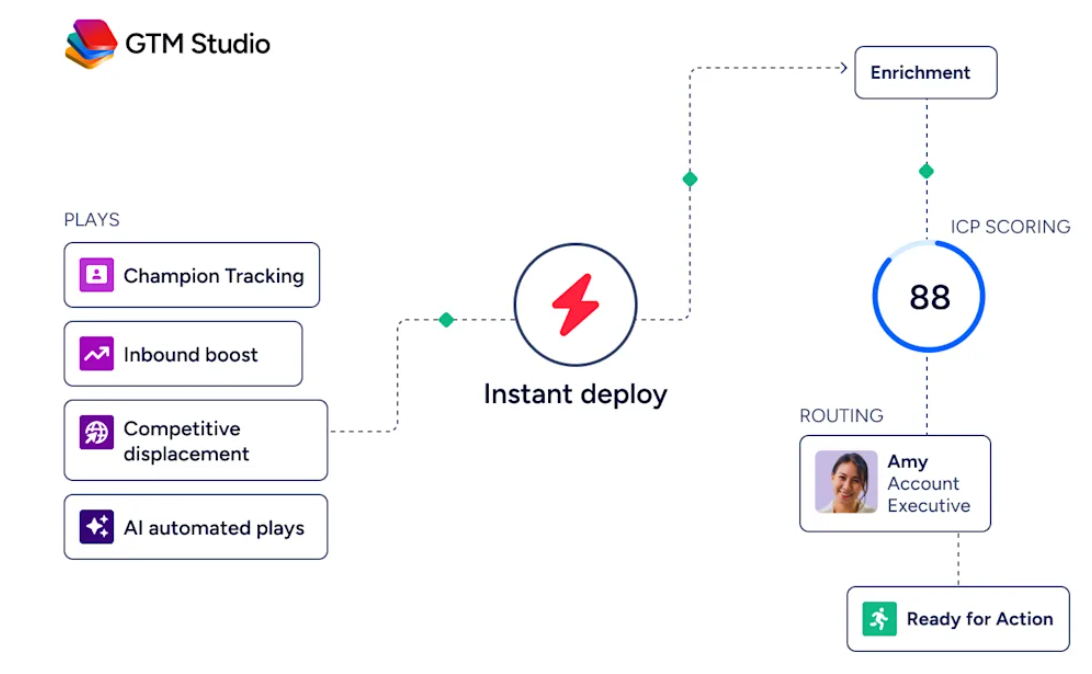
GTM Studio gives marketers and RevOps a builder for audience definition, campaign orchestration, and pipeline measurement in natural language.
And APIs and MCP expose the same intelligence to any custom agent, internal tool, or partner platform.
All three channels draw from one GTM Context Graph: the same data, the same intelligence, the same continuously updated insights.
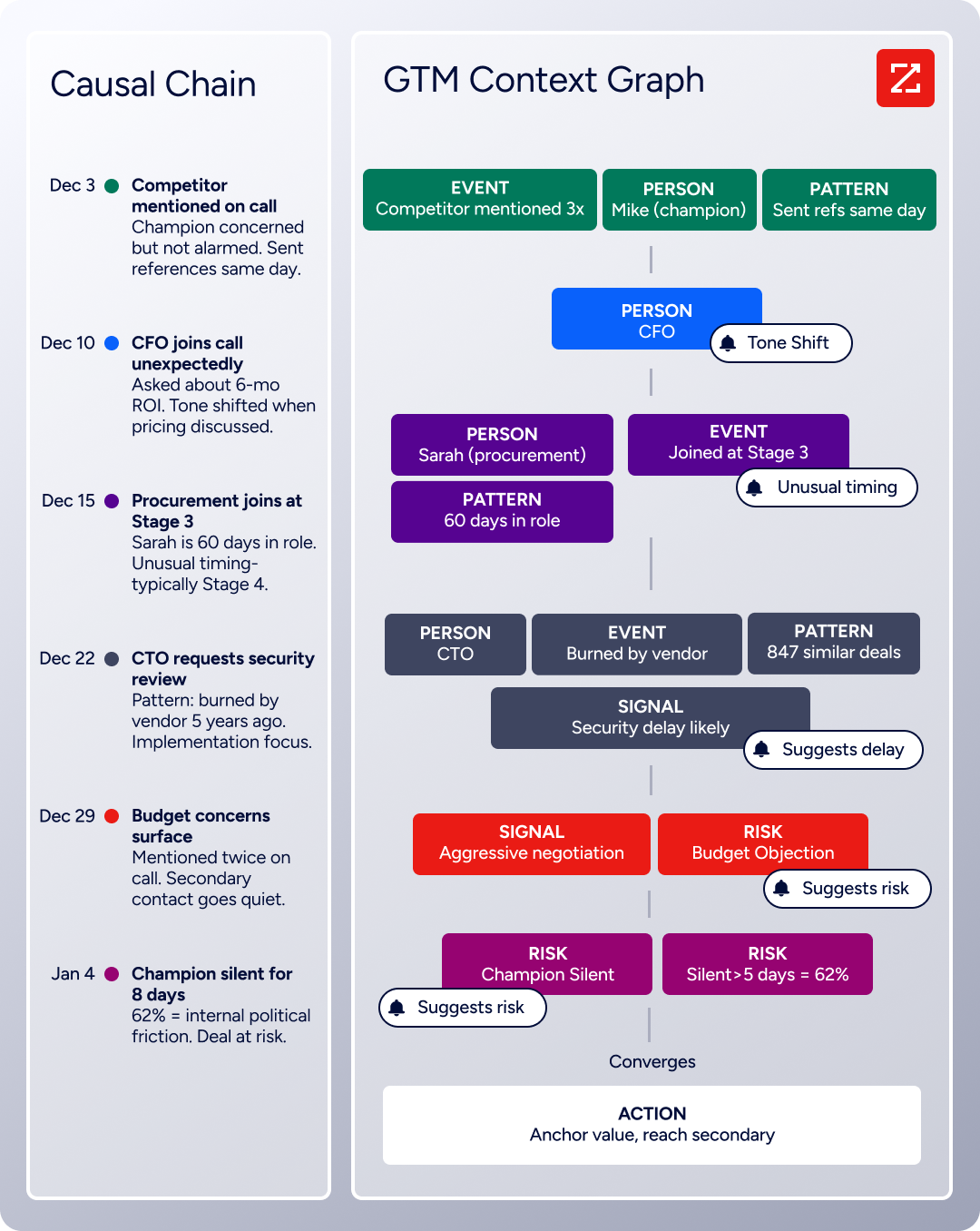
A B2B team could use ZoomInfo to build verified contact lists, identify in-market accounts through intent signals, and then send those contacts interactive campaigns through Mailmodo, combining ZoomInfo's data accuracy with Mailmodo's engagement mechanics.
"The plug-and-play aspect of the API means I can integrate it very easily into any process and get information at a moment's notice." (BDO Canada)
Pricing and Access: ZoomInfo offers a permanent free tier and custom enterprise pricing.
ZoomInfo uses a consumption-based pricing model with custom quotes for paid tiers. No dollar amounts are published; pricing scales based on usage patterns, seats, credit volume, and features. Paid plans span three tiers (Professional, Advanced, Enterprise) with increasing data access and AI capabilities.
For teams exploring the platform, ZoomInfo Lite is a permanent free tier (not a trial) that includes access to the B2B database, 10 monthly export credits, individual and company searches with advanced filters, the ReachOut Chrome Extension, and HubSpot integration.
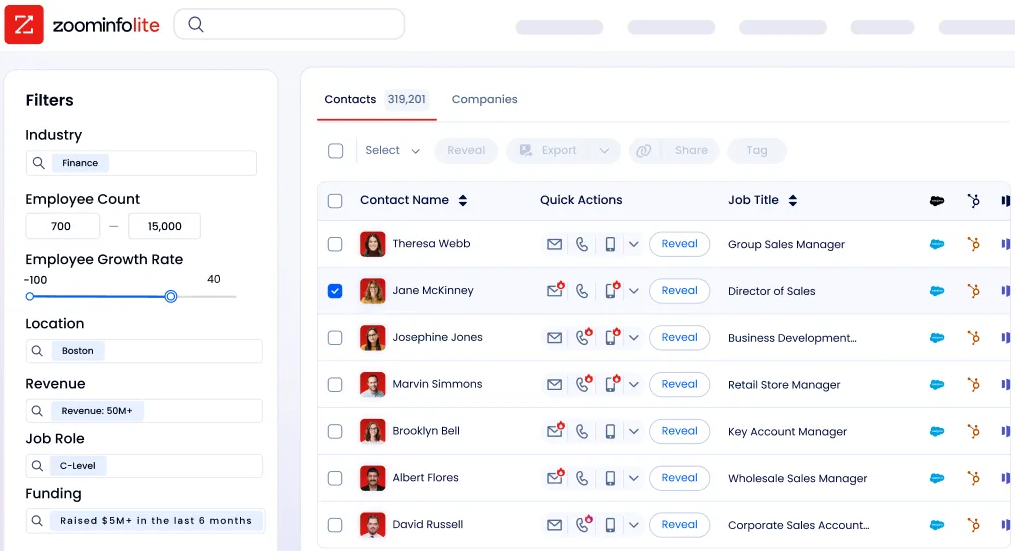
A separate 7-day free trial provides access to core paid features with no credit card required.
Mailmodo or ZoomInfo: Comparison Summary
Mailmodo | ZoomInfo | |
|---|---|---|
Primary purpose | Interactive email marketing and campaign automation | B2B data intelligence and go-to-market execution |
Core strength | AMP-powered interactive emails with 50+ widget types | 500M contacts, 200M+ verified emails, intent signals |
Target user | Non-technical email marketers and small teams | Sales, marketing, and RevOps teams at B2B companies |
AI capabilities | Template generation, journey building, segmentation, analytics | Account research, outreach drafting, signal monitoring, deal intelligence |
Free tier | Free trial (duration not disclosed) | Permanent free tier (ZoomInfo Lite) + 7-day trial |
Paid pricing | Starts at $149/month (500 contacts, annual billing) | Custom-quoted, consumption-based |
Deliverability | Managed service with free expert audit | N/A (data provider, not an email sender) |
Best for | Increasing email engagement and in-email conversion | Building accurate contact lists and identifying in-market accounts |
Relationship | Email creation and delivery platform | Upstream data source for contact discovery and verification |
Final Verdict
Mailmodo and ZoomInfo address different parts of the B2B marketing workflow. The choice is less about which is better and more about which problem you need to solve first.
Choose Mailmodo if your contact lists are healthy and your bottleneck is engagement. If subscribers open your emails but don't click through to landing pages, if survey response rates are low despite healthy open rates, or if you want to embed interactive experiences (forms, calendars, quizzes, gamification) directly inside the email, Mailmodo's AMP technology delivers measurable uplift.
It works particularly well for teams sending to Gmail-heavy audiences and for use cases like NPS surveys, event registrations, and product feedback collection where eliminating the redirect step directly increases completion rates.
Choose ZoomInfo if your bottleneck is upstream: finding the right people, verifying their contact information, and knowing which accounts are in-market. With verified data on 500M contacts and 100M companies, intent signals tracking research behavior, and a GTM Context Graph that captures why deals move or stall, ZoomInfo ensures your campaigns reach real buyers at the right time.
The intelligence is accessible through GTM Workspace for sellers, GTM Studio for marketers and RevOps, or APIs and MCP in any front-end.
Get started with ZoomInfo here.
For B2B teams serious about email performance, the highest-impact approach combines both: use ZoomInfo to build targeted, verified contact lists and identify accounts showing buying intent, then use Mailmodo to send those contacts interactive campaigns that convert inside the inbox. Good data makes good emails work harder.
Mailmodo FAQ
What types of interactive elements can you embed in Mailmodo emails?
Mailmodo offers a library of 50+ interactive widgets across ten categories, including registration forms, multi-step surveys, NPS scales, star and emoji ratings, spin-the-wheel games, scored quizzes, product catalogs with add-to-cart functionality, Calendly calendar embeds, Zoom webinar registration, carousels, calculators, and polls. All are insertable via a drag-and-drop editor with no coding required.
Does Mailmodo work with Outlook?
No. AMP for Email is not supported by Outlook, and Microsoft has not announced plans to add it. Recipients using Outlook see a static HTML fallback, which functions like a standard marketing email but without interactive elements. Mailmodo 2.0 added CSS-based interactivity for Apple Mail, but Outlook remains a gap. Teams with Outlook-heavy audiences should factor this into their evaluation.
How much does Mailmodo cost?
Mailmodo's Lite plan starts at $149/month (billed annually) for 500 contacts and 2,000 email sending credits per month. The Pro plan is $199/month for 500 contacts with 3,000 credits and unlocks A/B testing, send time optimization, and white-label sending. The Max plan is custom-priced with unlimited sending credits. All paid plans include the full AI features suite. Annual billing saves 20% compared to monthly.
Does Mailmodo have a free plan?
Mailmodo does not offer a permanent free plan. It provides a free trial with no credit card required, but the account is automatically cancelled at trial end if no paid plan is selected. The exact trial duration is not disclosed on the pricing page. ZoomInfo, by contrast, offers a permanent free tier (ZoomInfo Lite) with 10 monthly export credits, access to its B2B database, and a Chrome extension.
What AI features does Mailmodo include?
Mailmodo includes five AI tools on all paid plans: an AI Email Template Generator (creates designed templates from text prompts), an AI Segment Generator (builds audience segments from natural-language descriptions), an AI Email Automation Builder (generates complete journeys from goal descriptions), an AI Campaign Analyzer (replaces dashboards with a chat-based analytics interface), and an AI Email Marketing Planner (generates campaign strategies). No technical expertise is required for any of them.
How does Mailmodo handle email deliverability?
Mailmodo offers a Managed Deliverability service that includes a free deliverability audit by in-house experts, personalized remediation plans, automated bounce suppression, domain reputation monitoring via Google Postmaster integration, IP pool management separating bulk from transactional sends, and Fragmented Scheduling for gradual domain warm-up. BIMI implementation support is also available.
Can Mailmodo integrate with CRM and marketing tools?
Mailmodo integrates with 40+ tools including HubSpot, Salesforce (via integrations page), Shopify, Zapier, Make, Segment (bidirectional), MixPanel, Intercom, Zendesk, CleverTap, MoEngage, WebEngage, Google Sheets, Zoom, Google Calendar, and Twilio. The platform also offers a REST API for triggering transactional emails and journeys programmatically, with rate limits of 5 requests per second on Lite and 10 on Pro.
Who is Mailmodo best suited for?
Mailmodo is strongest for growth-stage companies and SMBs, particularly in India and Gmail-dominant markets, that want to increase email engagement without building landing pages. Ideal use cases include NPS surveys, event registrations, product feedback, gamification campaigns, and lead generation forms. Teams with heavy Outlook audiences, complex automation needs, or tight budgets may find better fits elsewhere.
B2B teams whose primary challenge is contact data quality rather than email design should evaluate ZoomInfo, which provides verified contact data and intent signals to power any email platform.
