

Choosing between Motion and Trello for managing your team's work comes down to these questions:
Do you want AI to decide what you should work on next, or do you prefer seeing everything on a visual board and choosing yourself?
Is automatic daily re-planning worth $19+/seat/month, or do you need a free tool your whole team can adopt today?
Are you managing deadline-driven projects with dependencies, or organizing flexible workflows that shift frequently?
Does your team want one platform replacing multiple tools, or a lightweight board that plugs into the stack you already have?
For B2B teams: is your biggest productivity gap in organizing work, or in knowing which accounts and contacts deserve your time?
In short, here's what we recommend:
Motion is the choice for teams that want AI to handle the logistics of getting work done. Its auto-scheduling engine builds a daily plan based on every team member's deadlines, priorities, and calendar commitments, then re-plans automatically when things shift.
For service businesses and project-driven teams running repeatable workflows, Motion claims projects complete 32% faster and users save 4 hours per project. However, Motion has no free plan, starts at $19/seat/month, and its integration ecosystem is limited compared to more established tools.
Trello is the choice for teams that want visual clarity without complexity. Its drag-and-drop Kanban boards let anyone organize work within minutes, and the free tier supports unlimited users with up to 10 boards per workspace at $0.
With 200+ Power-Ups and the Atlassian ecosystem behind it, Trello extends into almost any workflow.
The tradeoff: Trello doesn't think for you. There's no automatic scheduling, no AI prioritization, and advanced views like Timeline and Dashboard require the $10/user/month Premium plan.
Both platforms help your team organize and execute work. But for B2B sales and marketing teams, organized execution means nothing if it's aimed at the wrong targets. The gap isn't in how those teams manage their tasks. It's in the intelligence driving those tasks.
ZoomInfo is a GTM platform that gives your go-to-market team the intelligence it needs alongside whatever project management tool it chooses.
Built on a B2B dataset of 500M contacts, 100M companies, 135M+ verified phone numbers, and 200M+ verified business email addresses, ZoomInfo's GTM Context Graph processes 1.5B+ data points daily to show your team which accounts are in-market, which contacts to reach, and why deals are moving or stalling.
Sellers access it through GTM Workspace (a workspace that prioritizes accounts and drafts outreach), marketers through GTM Studio (a canvas for building audiences and launching plays in natural language), and developers through APIs and MCP in any tool.
If your B2B team's biggest challenge isn't organizing tasks but knowing which prospects to prioritize, see how ZoomInfo's intelligence works alongside your existing tools.
Motion vs. Trello vs. ZoomInfo at a glance
Motion | Trello | ZoomInfo | |
|---|---|---|---|
Core approach | AI auto-scheduling and project automation | Visual Kanban boards with flexible workflows | B2B intelligence and go-to-market execution |
AI capabilities | Native AI across scheduling, projects, docs, and meetings | AI writing and Quick Capture on Premium and Enterprise | GTM Context Graph, AI agents, intent signals |
Task management | Auto-prioritized daily schedule with re-optimization | Drag-and-drop cards on visual boards | Account and contact prioritization for GTM teams |
Calendar | AI calendar with automatic time-blocking | Planner with focus time scheduling (Standard+) | Not applicable |
Automation | AI-driven auto-progression and auto-scheduling | Butler no-code rules, buttons, and scheduled commands | Signal-triggered GTM workflows and plays |
Integrations | Google/Outlook calendars, Zoom, Slack, HubSpot, Salesforce, Zapier | 200+ Power-Ups, Jira, Confluence, Slack, Make, Zapier | 172+ marketplace apps, CRM integrations, Enterprise API, MCP |
Learning curve | Moderate (new paradigm plus feature depth) | Minimal (productive in minutes) | Moderate to steep (enterprise platform) |
Pricing model | Per seat, monthly or annual | Per user, monthly or annual | Custom-quoted, consumption-based |
Free plan | No (trial with $1 card hold) | Yes (unlimited users, up to 10 boards) | ZoomInfo Lite (free forever, limited credits) |
Starting price | $19/seat/month | $0 (Free), $5/user/month (Standard) | Custom pricing |
Best for | Service businesses wanting AI-driven project execution | Teams wanting visual, flexible task management at any budget | B2B teams needing account intelligence and GTM signals |
Two approaches: AI-driven planning vs. visual boards
Motion and Trello start from opposite assumptions about what slows teams down.
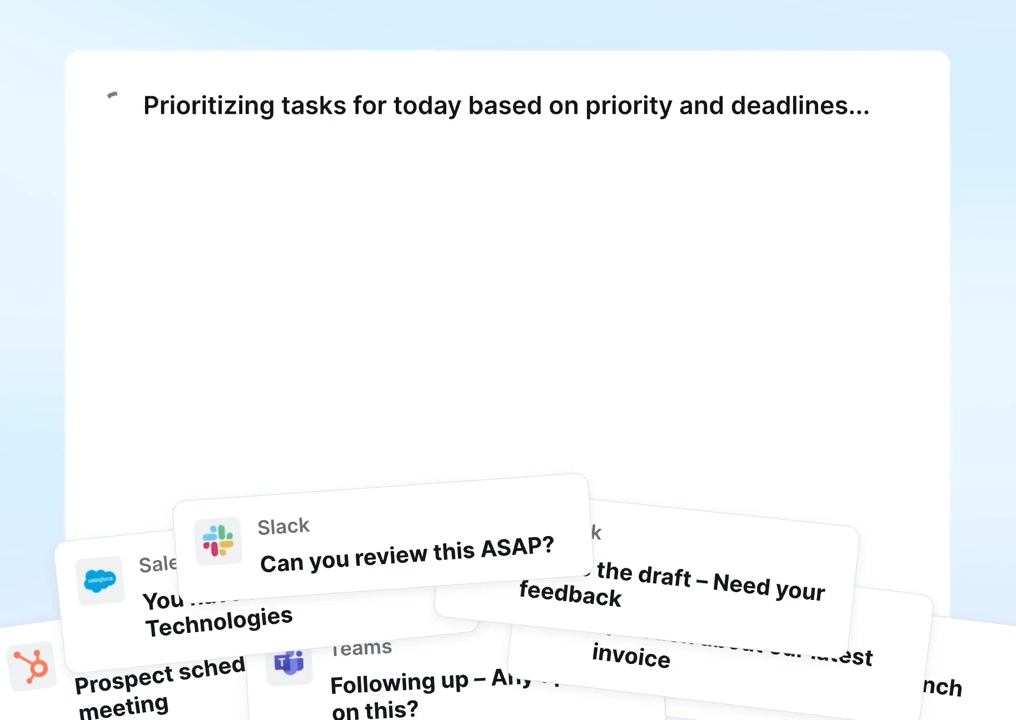
Motion assumes the biggest drag on productivity is the cognitive overhead of deciding what to work on and when. Its AI auto-scheduling engine takes your tasks, deadlines, priorities, and calendar commitments, then builds a daily plan, rescanning and rescheduling hundreds of times a day.
Source: Motion
When a meeting runs long or a deadline shifts, the entire week re-optimizes in seconds. You don't manage your calendar. It manages you.
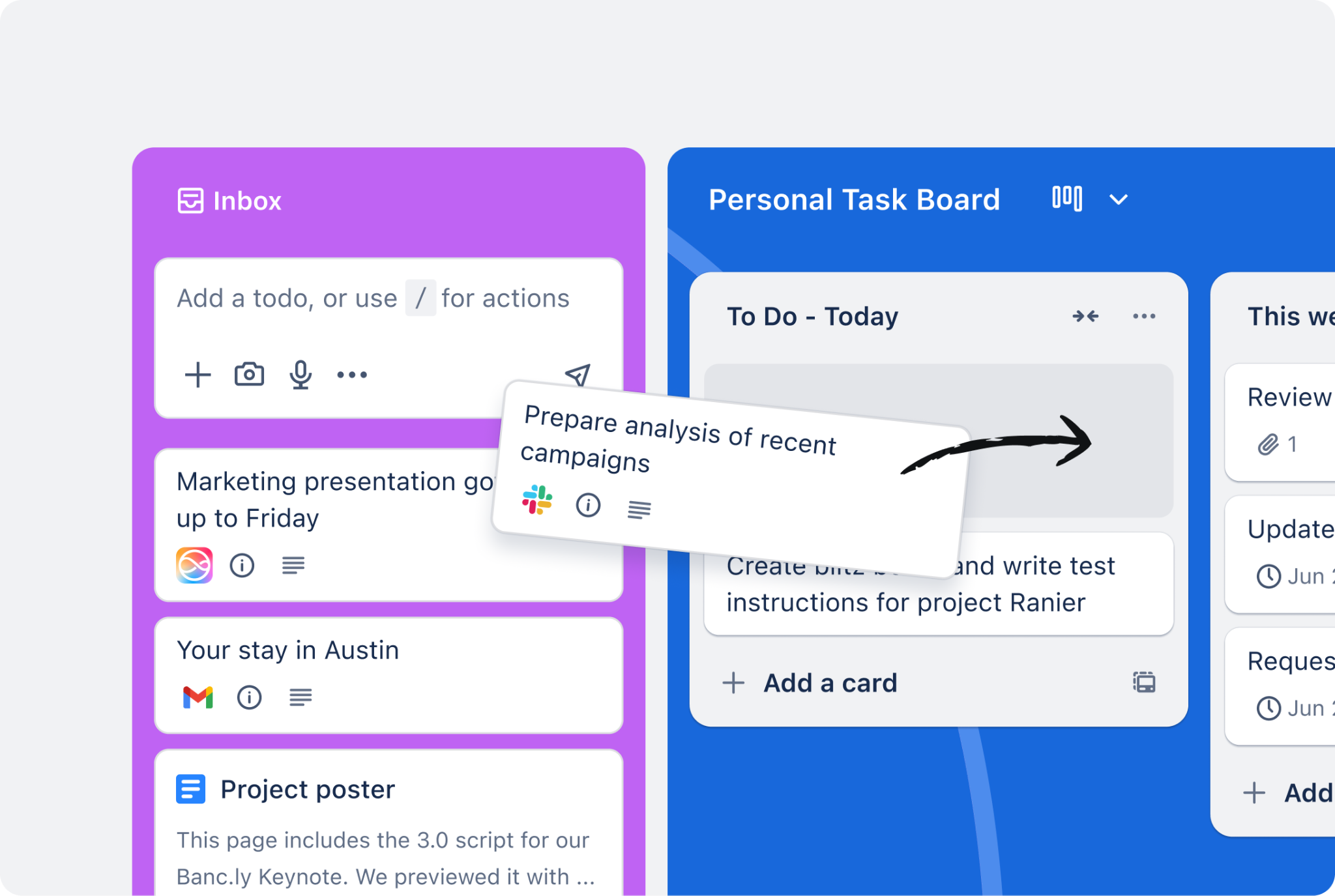
Trello assumes the biggest drag on productivity is not seeing the full picture. Its Kanban boards lay every task out visually: cards in columns, draggable between stages.
Source: Trello
The system is deliberately minimal. Create a board, add lists, drop in cards, and start moving them. No configuration cycle, no AI making decisions on your behalf.
This split touches everything. Motion's interface centers on a calendar view where tasks appear as scheduled blocks. Your day is a plan, not a list. Trello's interface centers on boards where tasks are cards. Your project is a visual map, not a timeline.
Neither approach is wrong. The right choice depends on whether your team's problem is deciding what to do next (Motion's strength) or seeing what everyone is doing (Trello's strength).
Motion wins on deadline-driven projects, Trello on flexibility
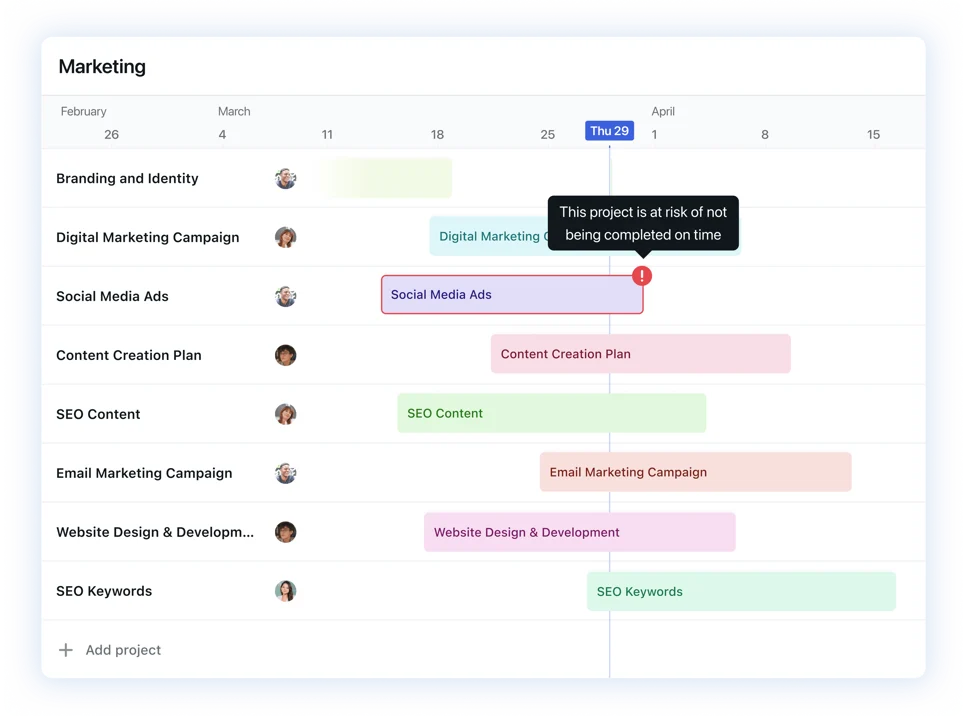
Motion's AI Project Manager is built for work with defined stages, dependencies, and deadlines. Describe a project in plain language or upload an SOP document, and Motion generates a complete project structure (stages, tasks, assignees, deadlines, and dependencies), claiming over 90% accuracy.
Source: Motion
When a blocking task completes, downstream tasks unlock and schedule automatically without anyone advancing the workflow by hand.
The capacity planning system (available on the Business AI plan) tracks workload across every team member and every active project.
Managers can see in real time whether the team can take on new work, when a project will finish, and where bottlenecks are forming, without building spreadsheets or running status meetings. If a task cannot fit within available time, Motion flags it with a "Can't Fit" alert rather than silently dropping it.
Trello handles projects differently. A Trello board is a flexible container: you define the workflow by creating lists, and cards move between them as work progresses.
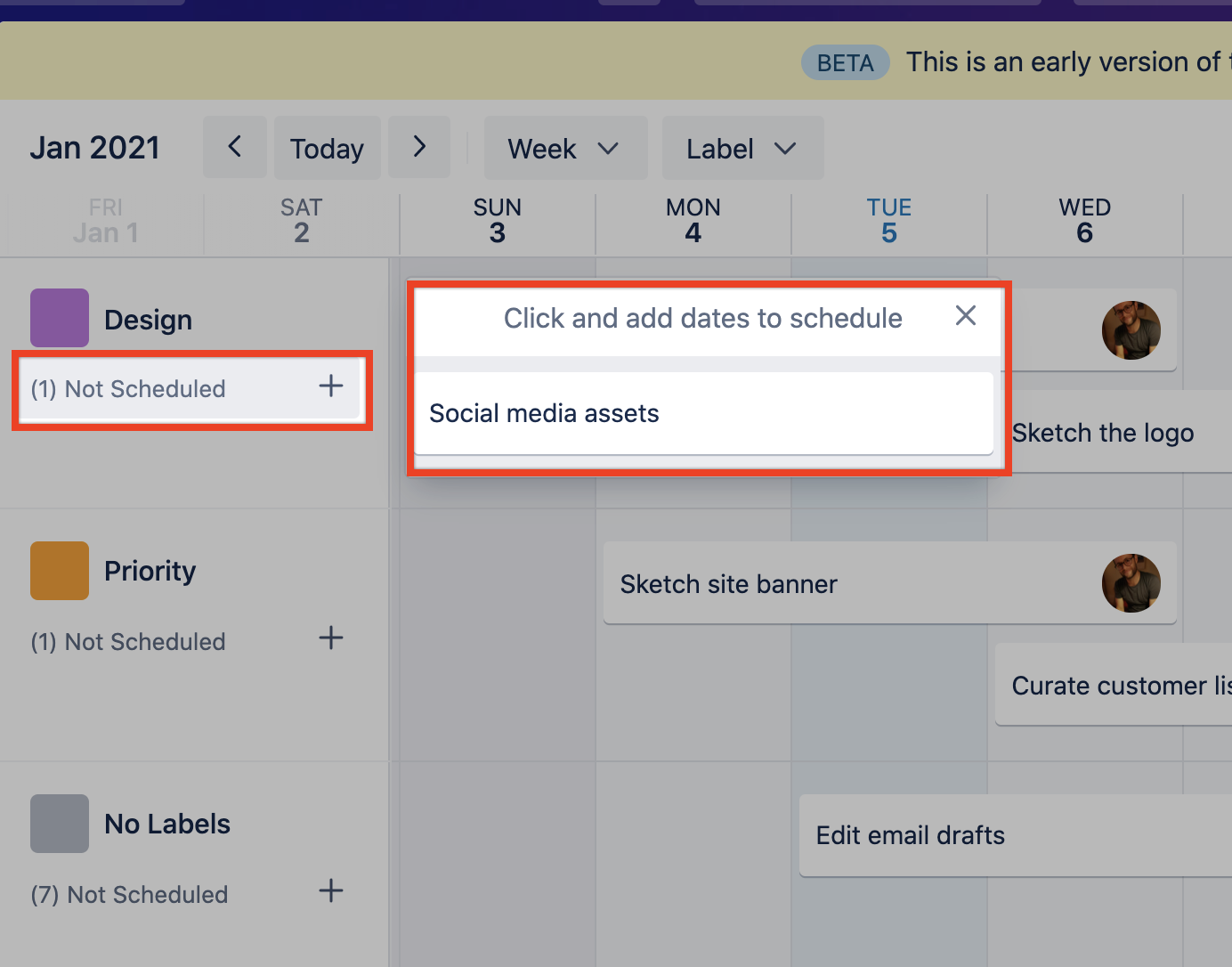
Cards support checklists, due dates, labels, member assignments, attachments, and Custom Fields (Standard+), giving teams structured metadata without rigid enforcement. On Premium, the Timeline view adds a Gantt-style display where cards appear as horizontal bars spanning their start and end dates.
Source: Trello
But Trello has no concept of automatic task progression or capacity-aware scheduling. Cards move when someone drags them.
For teams running repeatable project workflows with firm deadlines (agencies, IT service providers, consulting firms), Motion's automation removes real coordination overhead. For teams with fluid, varied workflows (marketing campaigns, design sprints, cross-functional planning), Trello's flexibility is the stronger fit.
Calendar and scheduling: automation vs. control
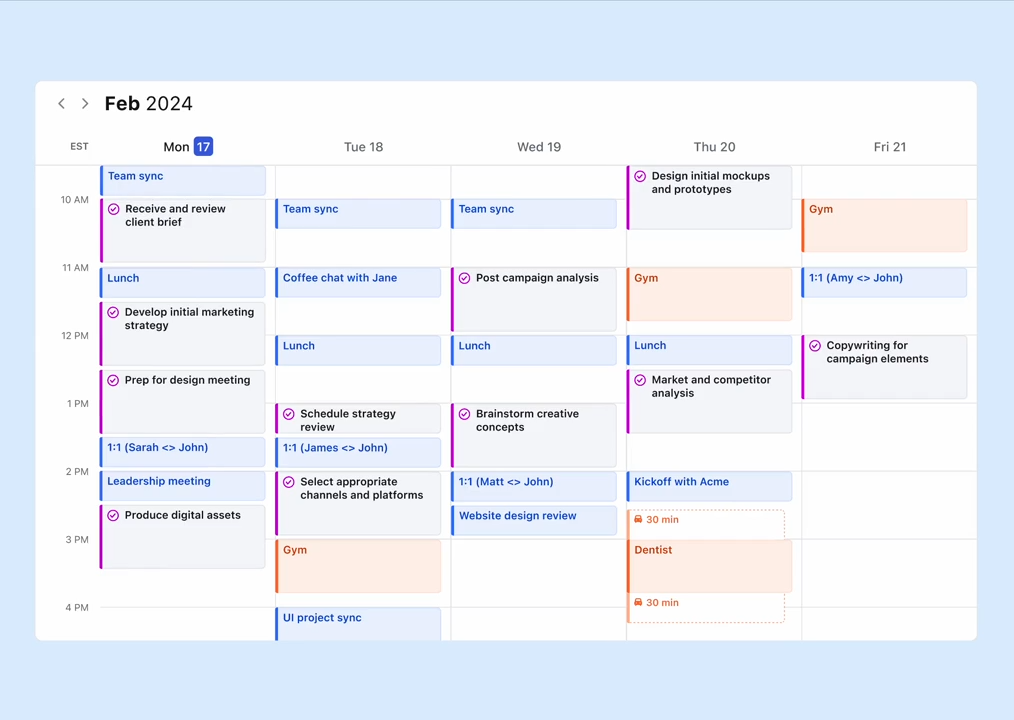
Motion's AI Calendar is central to the product. Every task appears as a time-blocked slot on the calendar, placed automatically based on deadlines, priorities, and existing meetings. When anything changes, the entire day and week reschedule in seconds.
Source: Motion
The calendar consolidates Google, Outlook, and iCloud in a single view, covering both work and personal accounts.
Motion also replaces standalone scheduling tools. Its booking links check real-time calendar availability, apply configured rules (buffer times, daily meeting limits, availability windows), and protect existing task blocks.
Unlike standalone schedulers that surface any open slot, Motion's links surface only slots that preserve focus time, a real difference for users who want to keep mornings meeting-free.
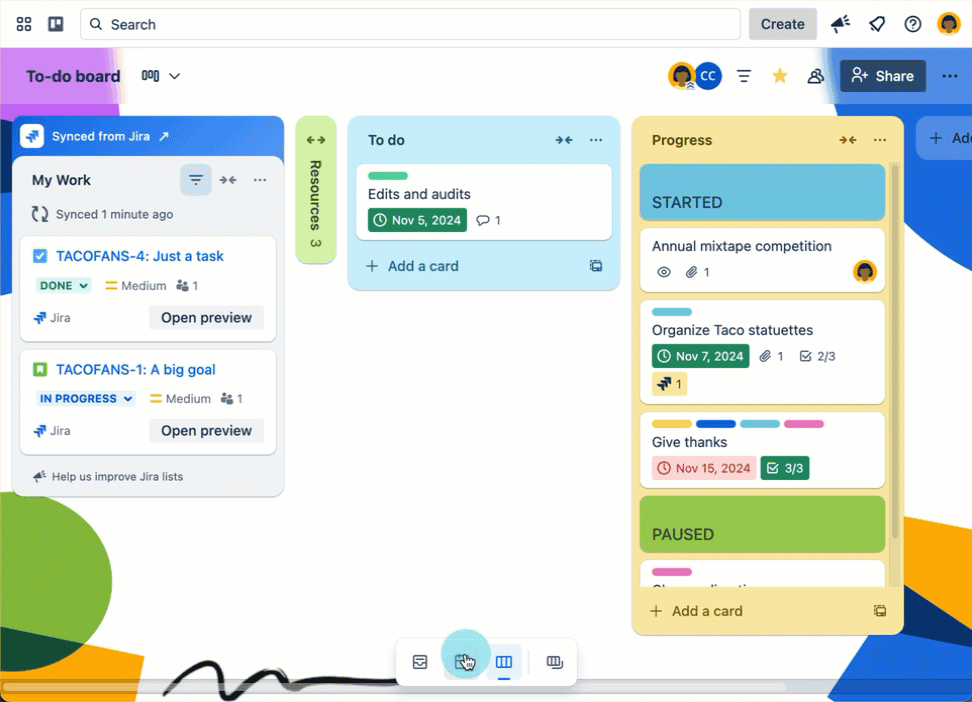
Trello's Planner is newer and more modest. It displays a personal calendar alongside Trello boards, letting users drag cards into time slots as focus time blocks.
Source: Trello
Calendar sync works with up to 10 Google or Microsoft Outlook accounts, and focus time events sync back to the connected calendar. An important design choice: scheduling a card to a focus time block does not change the card's due date. Planning when to work on a task and setting when it's due stay deliberately separate.
The Free plan gets view-only Planner access. Full Planner functionality, including drag-and-drop scheduling and AI-powered Quick Capture, requires Standard ($5/user/month) or higher.
For users who want an AI assistant planning their entire day, Motion is the clear choice. For users who want calendar visibility alongside their boards without ceding control, Trello's Planner is sufficient.
For B2B teams, organizing work is only half the battle
Motion and Trello both solve the problem of organizing tasks and projects. But for sales, marketing, and RevOps teams, the harder challenge is often knowing which work deserves their time.
A sales rep with a well-organized task list is still unproductive if those tasks target the wrong accounts. A marketing team with a clean Kanban workflow still wastes budget if campaigns reach companies that aren't in-market.
The gap isn't in how teams organize execution. It's in the intelligence driving that execution.
This is where ZoomInfo operates. ZoomInfo isn't a project management tool. It's the intelligence layer that tells go-to-market teams where to focus.
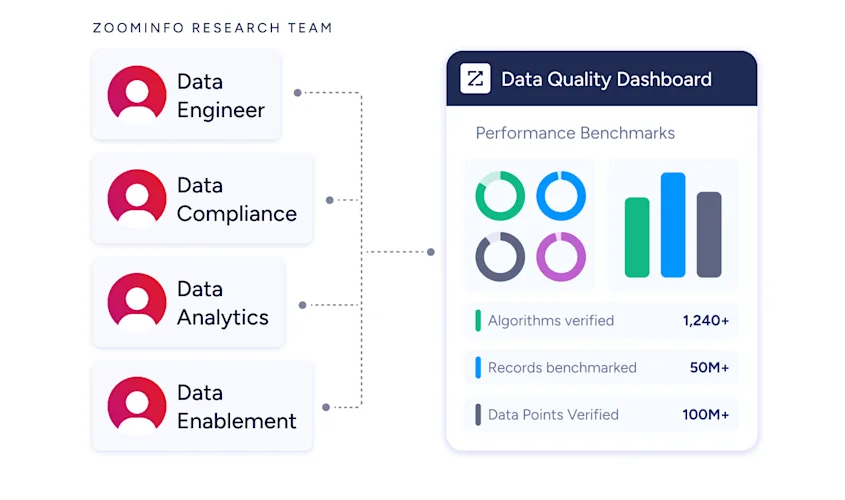
Its database spans 500M contacts, 100M companies, 135M+ verified phone numbers, and 200M+ verified business email addresses, maintained by a verification pipeline with 300+ human researchers and reaching up to 95% accuracy on first-party data.
Source: ZoomInfo
In a Fortune 500 competitive RFP analyzing 25 million contacts across vendors, the independent consultant concluded that "no other competitor came even close."
What makes this data actionable is the GTM Context Graph. It fuses ZoomInfo's B2B data with a customer's CRM records, conversation intelligence, and behavioral signals, processing 1.5B+ data points daily, to capture not just what happened in a deal but why it happened.
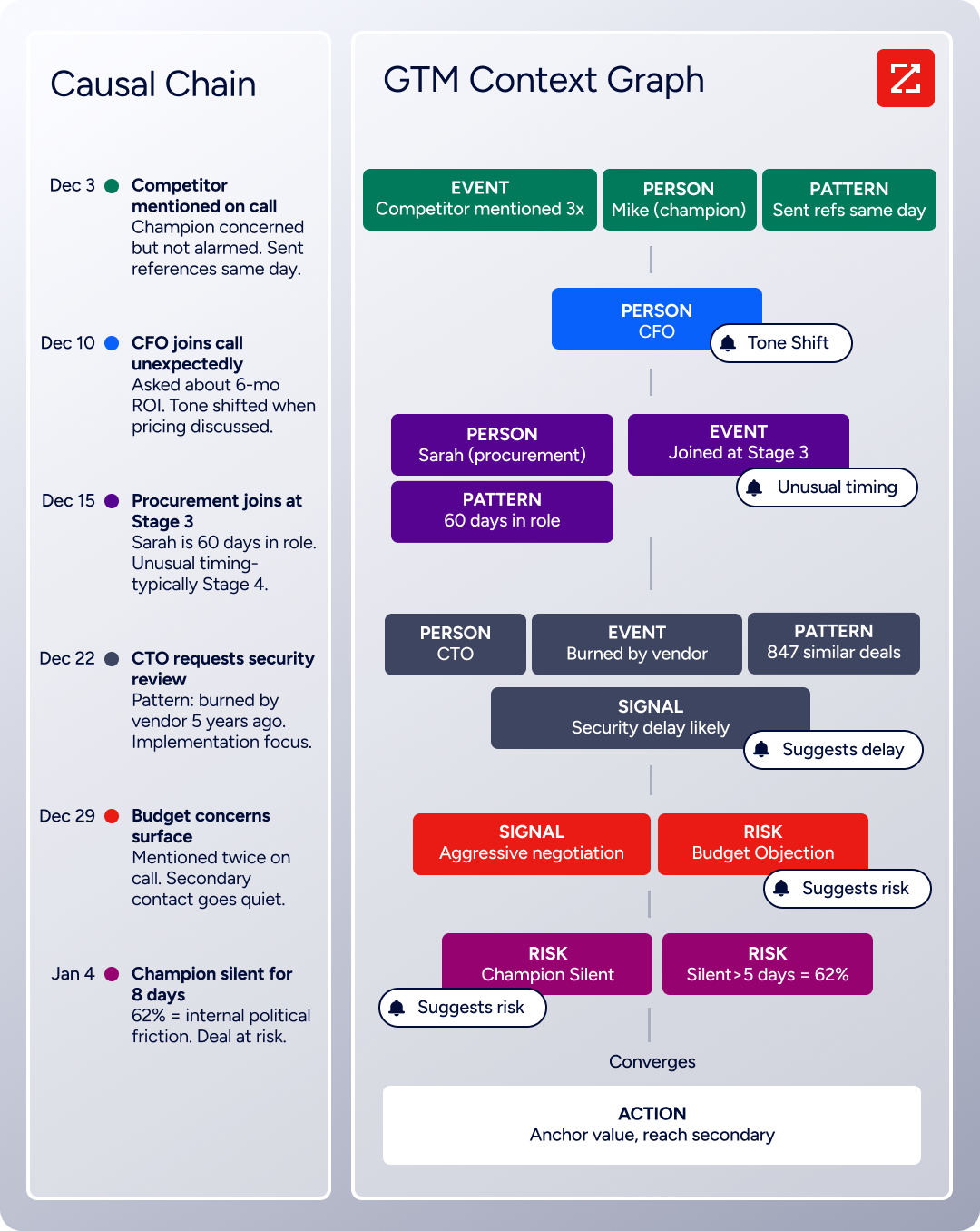
A CRM records that a deal moved to stage 4. The GTM Context Graph reveals that the CFO joined the last call and asked about six-month ROI, matching the pattern behind closed-won deals in the same segment.
That contextual reasoning flows into every downstream action: GTM Workspace surfaces prioritized accounts and AI-drafted outreach for sellers, GTM Studio lets marketers describe audiences in natural language and launch multi-channel plays, and APIs and MCP deliver the same intelligence into any external tool.
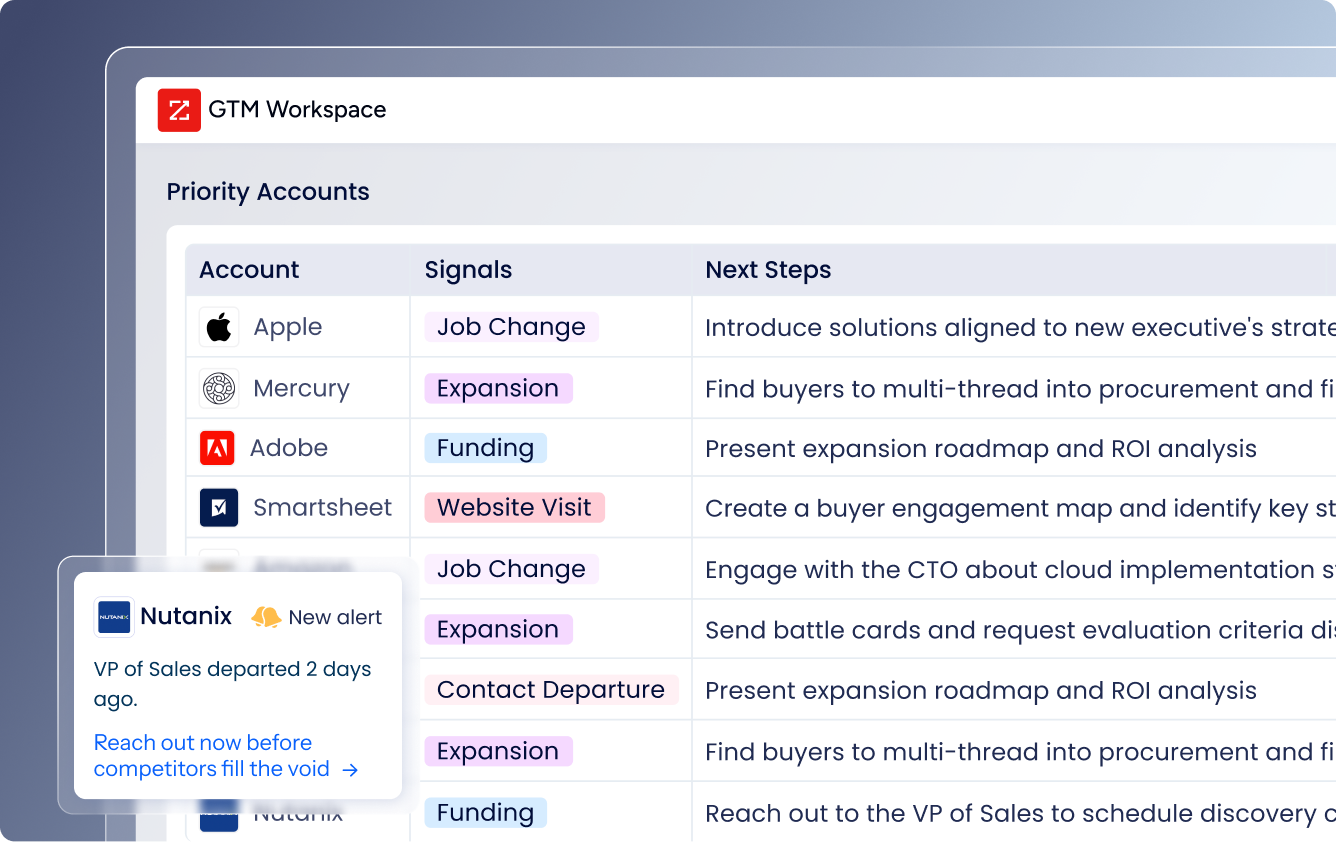
Source: ZoomInfo
For B2B teams, ZoomInfo and a PM tool aren't either/or choices. They solve different halves of the same problem: ZoomInfo tells you who to prioritize and why; Motion or Trello helps you organize the work of engaging them.
Seismic's sales team attributed 39% of active pipeline to opportunities identified or influenced by ZoomInfo signals and boosted productivity by 54%. "That combination of our internal CRM data, external signals, and AI that's given all that context has helped us craft very specific account- and persona-based messages. And people have responded to them right away," said Toby Carrington, Chief Business Officer. (Seismic)
Adoption: Trello's zero ramp-up vs. Motion's paradigm shift
Trello's defining advantage is that almost anyone can use it immediately. G2 reviewers score ease of use at 9.0 out of 10, one of the highest marks in the project management category.
The board-card-list metaphor needs no explanation. Trello's own getting-started documentation recommends beginning with just three lists: "Today," "This Week," and "Later."
This simplicity drives adoption from the bottom up. The Free plan supports unlimited users with up to 10 boards per workspace, enough for many small teams to run indefinitely without paying.
Over 30 million Android downloads tell the story: people adopt Trello on their own, then bring it into teams and organizations.
Atlassian's customer roster spans Google, Visa, Coinbase, John Deere, and Grand Hyatt, showing that Trello scales from solo entrepreneurs to global enterprises without industry-specific configuration.
Motion requires more upfront investment, both financial and cognitive. There is no free tier, and the shift from managing your own schedule to letting AI manage it takes adjustment.
Motion's auto-scheduling engine imposes structure: every task needs a deadline, duration, and priority for the algorithm to work. Users who thrive with this structure say it eliminates decision fatigue. Users who resist it can feel constrained.
The onboarding difference matters at the team level. Trello can be adopted by a department without a procurement decision. Motion requires a per-seat commitment, a credit card upfront (even for the trial, a $1 card hold is placed at signup), and buy-in from a team willing to trust the scheduling algorithm with their daily plans.
Pricing reflects what each platform values
The pricing structures reveal different philosophies about who the customer is.
Trello leads with accessibility. The Free plan gives unlimited users up to 10 boards with unlimited cards, unlimited Power-Ups, and 250 automation runs per month. Standard ($5/user/month billed annually) adds unlimited boards, advanced checklists, Custom Fields, card mirroring, and full Planner access.
Premium ($10/user/month) unlocks all views (Timeline, Calendar, Dashboard, Table, Map) and unlimited automation. Enterprise ($17.50/user/month billed annually) adds organization-wide permissions, SSO via Atlassian Guard at no additional cost, and 24/7 admin support.
A free 14-day Premium trial is available without a credit card.
Motion starts higher. Pro AI costs $29/seat/month ($19 billed annually), and Business AI costs $49/seat/month ($29 billed annually).
There is no free plan. Motion argues the higher per-seat cost is offset by replacing multiple subscriptions (task manager, calendar, scheduling tool, meeting notetaker, and docs platform in one).
Business AI adds capacity planning, Gantt charts, time tracking, advanced dashboards, and permissions over Pro AI. Both plans include AI credits (7,500/seat/month on Pro AI, 15,000 on Business AI), with overages billed per 100 credits.
ZoomInfo uses custom-quoted, consumption-based pricing with no publicly listed prices. Costs scale around seats, data credits, and AI activity.
ZoomInfo Lite provides a permanent free tier with 10 monthly export credits, access to the B2B database, the ReachOut Chrome extension, and HubSpot integration, with no credit card or time limit. A separate 7-day free trial offers broader feature access.
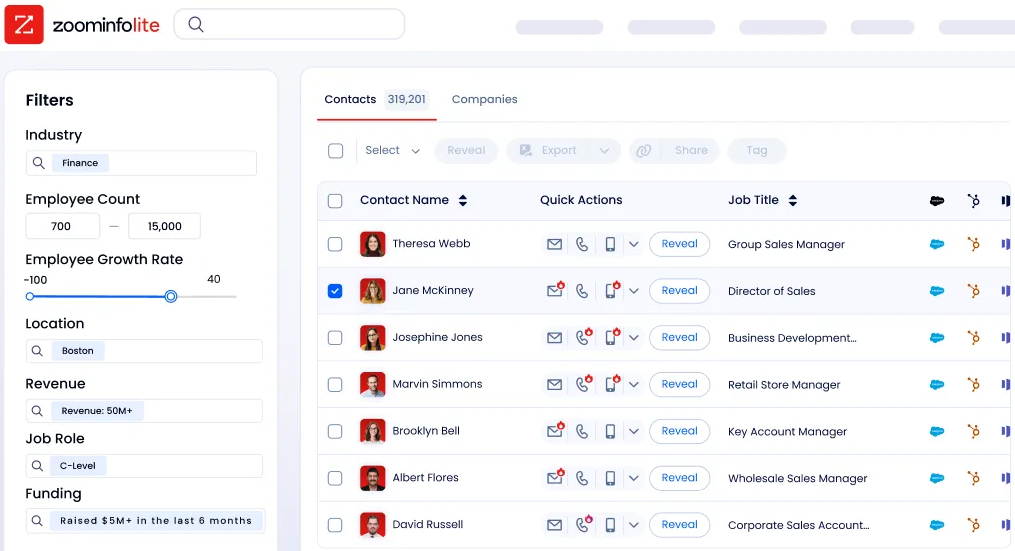
Source: ZoomInfo
One hidden cost with Trello: SAML SSO requires a separate Atlassian Guard subscription starting at $4.20/user/month on Standard and Premium plans. Only Enterprise includes Guard at no additional charge. Teams needing SSO enforcement may find the effective Premium price closer to $14/user/month.
Integration ecosystems reveal different strategies
Trello's 200+ Power-Ups connect it to Slack, Google Drive, GitHub, Salesforce, and hundreds of other tools, all available on every plan including Free. The Atlassian ecosystem gives Trello built-in bridges to Jira (with real-time issue progress on Trello cards) and Confluence for documentation.
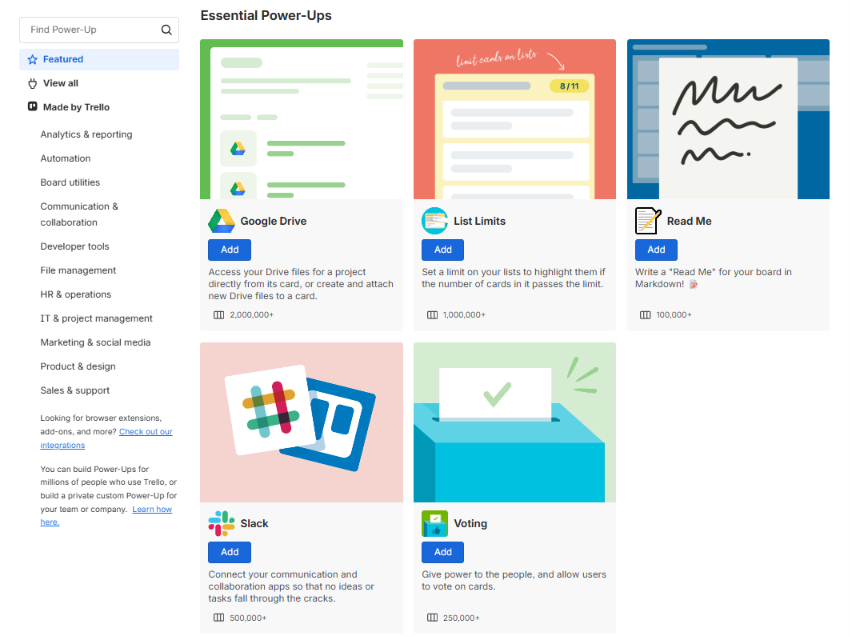
Source: Trello
Butler automation can notify a Slack channel, create a Jira ticket, and email stakeholders from a single card button. For iPaaS, Trello works with Make and Zapier, and its REST API supports webhooks with over 70 event types.
Motion's integration ecosystem is narrower by design. Native connections cover Google Calendar, Outlook 365, iCloud Calendar, Zoom, Google Meet, Microsoft Teams, Gmail, Slack, HubSpot, and Salesforce.
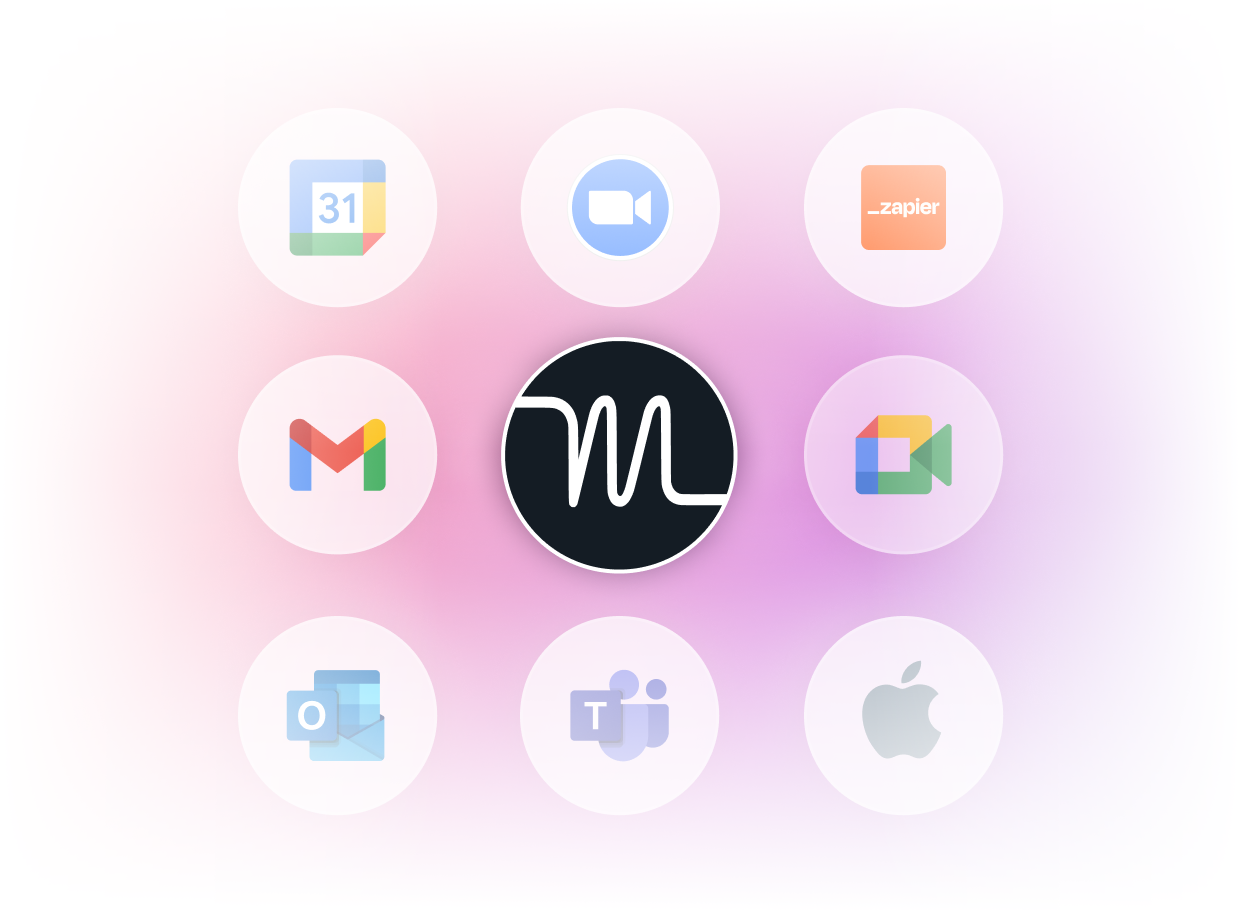
Source: Motion
For broader connectivity, Zapier is the only supported iPaaS, and Motion has stated there are no plans for native integrations with Notion, ClickUp, or Google Sheets. Motion's REST API covers tasks and projects but does not expose calendar or AI scheduling controls.
This is the cost of Motion's all-in-one strategy: the platform assumes you'll do most work inside Motion rather than connecting it to outside systems.
ZoomInfo's integration approach is different in kind. Its Marketplace lists 172+ integrations across CRM, marketing automation, cloud data platforms, and AI.
The Enterprise API provides programmatic access to ZoomInfo's full data layer, and the MCP server connects AI models directly to ZoomInfo's B2B data as a native tool.
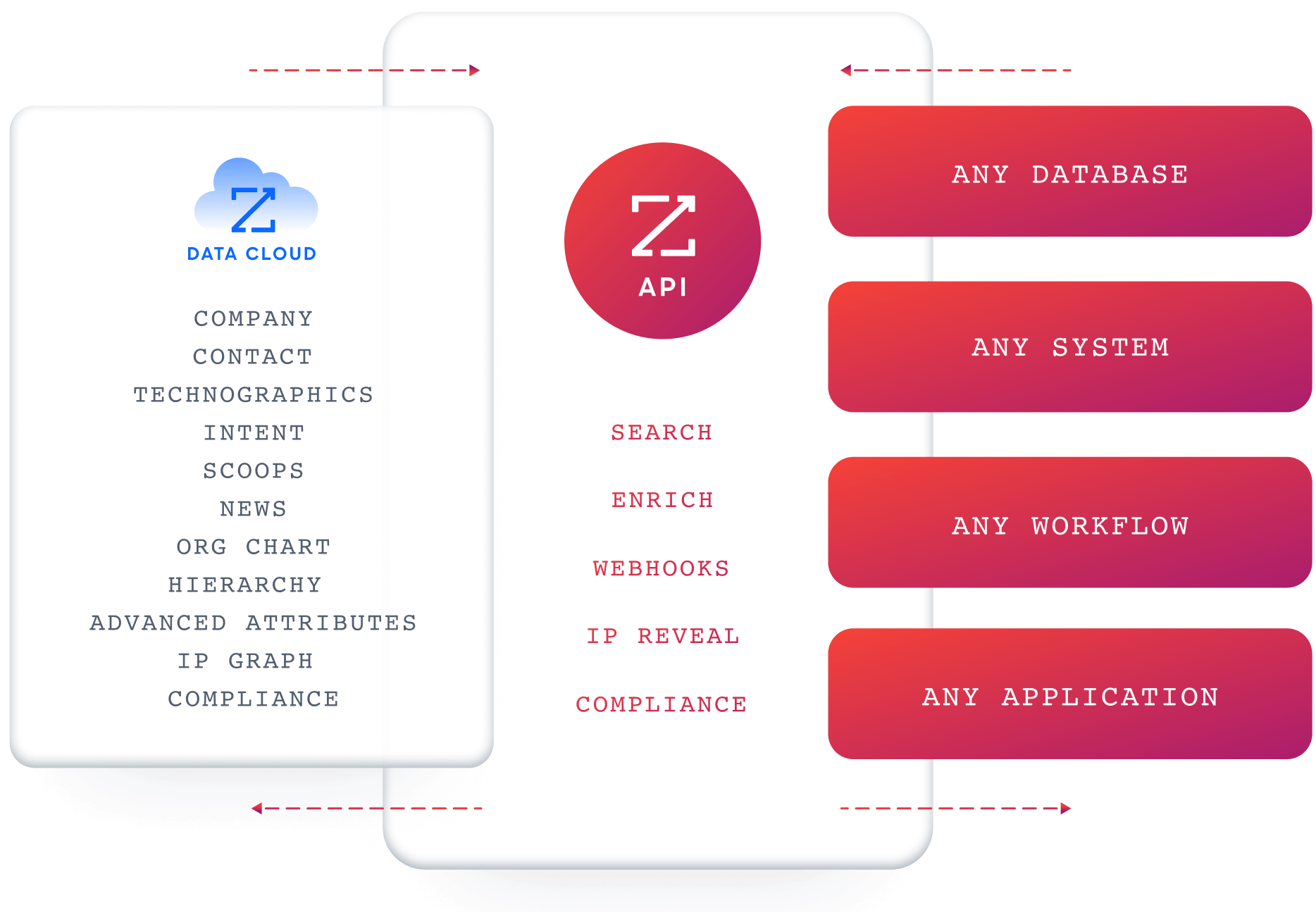
Source: ZoomInfo
Whether your team runs Salesforce, HubSpot, Snowflake, or a custom internal application, ZoomInfo's data and GTM Context Graph can feed it. API access is included in all relevant plans, making the intelligence available wherever your team works.
"Anything that minimizes our team's need to switch contexts is beneficial. ZoomInfo gives us a single view, eliminating the need to navigate between systems," said Ben Perceval, RevOps Manager at Spekit. (Spekit)
Motion vs. Trello vs. ZoomInfo: Which should you choose?
The choice between Motion and Trello depends on how your team prefers to work. The decision to add ZoomInfo depends on whether your team's work includes go-to-market execution.
Choose Motion if:
You run repeatable projects with deadlines and dependencies
You want AI to schedule your team's days automatically
You're willing to pay a premium to eliminate coordination meetings and manual re-planning
Your team is comfortable letting software make scheduling decisions
You want to replace multiple tools (calendar, scheduling, notetaker, docs) with one platform
Choose Trello if:
You need visual task management that anyone can adopt immediately
A free or low-cost plan is essential for team-wide adoption
Your workflows are flexible and vary across projects or departments
You want extensive integrations with your existing tool stack
You prefer controlling how you organize and schedule your own work
Choose ZoomInfo if:
Your B2B team's productivity depends on targeting the right accounts and contacts
You need verified B2B data, buyer intent signals, and GTM intelligence alongside your PM tool
You want AI-driven account prioritization and outreach for your sales team
You're building a go-to-market operation that spans sales, marketing, and RevOps
You need an intelligence layer that integrates with any tool in your stack
See how ZoomInfo's intelligence complements your team's workflow.
"ZoomInfo's not just a contact data company anymore. They've built a full system of execution. GTM Intelligence works the list, writes the outreach, triggers the play, and helps drive predictable growth," said Ian Brodie, CEO & Co-Founder of Levanta. (Levanta)
Motion and Trello represent two valid approaches to the same problem: one automates the planning, the other visualizes it. The better choice depends on your team's tolerance for AI-driven decisions versus manual control, your budget, and the structure of your projects.
For B2B teams, the answer may involve all three. Organizing tasks and managing projects is necessary, but knowing which accounts to target, which contacts to engage, and when to reach out is what turns organized effort into revenue. ZoomInfo provides that intelligence, regardless of which PM tool sits on top.
Motion vs. Trello vs. ZoomInfo FAQ
What is the main difference between Motion and Trello?
Motion uses AI to schedule tasks, plan projects, and manage your calendar automatically. It decides what you should work on and when, re-optimizing your day as things change.
Trello uses visual Kanban boards where you organize tasks as cards in columns and move them between stages yourself. Motion optimizes for eliminating scheduling overhead; Trello optimizes for visual clarity and flexibility.
Which platform is cheaper for a small team?
Trello is significantly cheaper. Its Free plan supports unlimited users with up to 10 boards at no cost, and paid plans start at $5/user/month.
Motion has no free plan and starts at $19/seat/month (annually). A 10-person team on Trello Premium pays $100/month; the same team on Motion Pro AI pays $190 to $290 per month, depending on the billing cycle.
Can Motion and Trello handle project dependencies?
Motion handles dependencies natively. When a blocking task completes, downstream tasks unlock and schedule automatically through its AI Project Manager.
Trello does not support native task dependency linking. Its Timeline view on the Premium plan provides a Gantt-style display for visualizing timelines, but creating blocking and blocked-by relationships between tasks requires workarounds or third-party Power-Ups.
Does Trello have AI features?
Yes. Atlassian Intelligence is available on Premium and Enterprise plans. It includes AI-assisted writing and editing on card descriptions and comments, plus AI-powered Quick Capture that extracts due dates, titles, and checklists from forwarded emails and Slack messages. Free and Standard users do not have access to AI features.
How does ZoomInfo fit alongside Motion or Trello?
ZoomInfo is not a project management tool. It is a B2B intelligence platform that provides sales, marketing, and RevOps teams with verified contact data, buyer intent signals, and AI-driven account insights.
It complements Motion or Trello by ensuring the work your team organizes is aimed at the right accounts and contacts. ZoomInfo integrates with CRM systems like Salesforce and HubSpot, and its data is accessible via APIs and MCP from any tool.
Which platform has the broadest integration ecosystem?
Trello has the most integrations with 200+ Power-Ups available on all plans including Free, plus native connections to Jira, Confluence, and other Atlassian products.
ZoomInfo has 172+ marketplace integrations focused on CRM, marketing automation, cloud data platforms, and AI tools, plus an Enterprise API and MCP server for custom integration.
Motion has the fewest native integrations, limited primarily to calendars, video conferencing, CRM, and messaging, with Zapier as the only supported iPaaS platform.
Which platform is best for remote teams?
Trello is the stronger choice for distributed teams across different roles and departments, thanks to visual boards that serve as an async collaboration layer, a free tier for easy adoption, and broad platform support.
Motion is strong for remote teams with structured project workflows, where its AI scheduling keeps everyone aligned without daily standups. Neither platform supports full offline access, as both require internet connectivity for core functionality.
Can I use Trello's Free plan for real work, or is it too limited?
Trello's Free plan is genuinely functional for small teams. It includes unlimited cards, unlimited Power-Ups, 250 automation runs per month, and up to 10 boards per workspace.
The main constraints are the 10-board cap, the 10 MB per file attachment limit, and the lack of advanced views (Timeline, Calendar, Dashboard). For teams that work primarily in Kanban-style boards without needing Gantt charts or portfolio-level reporting, the Free plan can serve as a long-term solution rather than just a trial.
