
You sit through five meetings a day and walk away with fragments: half-caught action items, a vague memory of who committed to what, and notes too thin to brief a colleague who missed the call.
Otter.ai is an AI meeting platform that joins your Zoom, Google Meet, and Microsoft Teams calls to transcribe, summarize, and extract action items in real time, then connects those insights to your CRM, project tools, and AI workflows.
With over 35 million users and more than one billion meetings transcribed, the platform has evolved from a transcription tool into what it calls an agentic AI platform where AI agents participate in meetings. This breakdown covers every feature, how it works, who it serves, and which plan unlocks it.
Otter.ai's feature set has you covered if:
You need real-time transcription and automated summaries across Zoom, Google Meet, and Microsoft Teams without switching between platform-specific tools
You run sales calls and want AI-generated insights (BANT, MEDDIC) synced to Salesforce or HubSpot
You want a voice-activated AI assistant that can answer questions, create action items, and draft follow-up emails during live meetings
You manage a team and need centralized, searchable meeting notes with speaker identification and shared channels
You want to automate post-meeting workflows, pushing action items into Jira, Asana, or Slack without manual re-entry
You need customizable meeting templates that extract different insights based on meeting type (sales call, interview, standup)
You'll reach the edges of its capabilities if:
You need a B2B contact and company database to identify who you should be meeting with in the first place
You want buyer intent signals showing which companies are researching your product category before any call is booked
You need to identify the specific person visiting your website and trigger outreach based on that visit
You require conversation intelligence that ties call insights to deal forecasting, pipeline health, and cross-deal pattern recognition
You want multi-channel sales execution (email sequences, phone, LinkedIn) orchestrated from the same platform that captures your call data
For those needs, the reference point is ZoomInfo: a go-to-market platform built on 500M contacts, 100M companies, and 135M+ verified phone numbers, a GTM Context Graph that combines B2B data with CRM records, conversation intelligence, and behavioral signals into a single intelligence layer, and access through APIs, MCP, GTM Workspace, and GTM Studio.
After the feature breakdown, this article covers where Otter.ai stops and how ZoomInfo fills those gaps.
Otter.ai Platform Overview
Otter.ai calls itself "the world's smartest AI Notetaker" and frames its offering around Otter Meeting Agents, voice-activated AI agents that participate in meetings rather than passively transcribe them. The platform targets sales teams, recruiters, educators, and media professionals, and counts enterprise customers including Salesforce, Harvard, NBC Universal, Amazon, IBM, and Mastercard.
The platform is organized around six capability areas:
Capability | What It Does | Plan Availability |
|---|---|---|
Real-time transcription, speaker identification, summaries, action items | All plans (300 min/mo on Basic) | |
Conversational AI for querying meetings, generating content, voice commands | All plans (query limits vary) | |
Customizable post-meeting automation and structured insight extraction | All plans (custom templates limited on lower tiers) | |
Pre-call briefs, live coaching, CRM sync, follow-up generation | Enterprise | |
Autonomous product demos and lead qualification on your website | Contact sales | |
Interview transcription, candidate insights, Greenhouse sync | Contact sales |
Otter.ai Transcription and AI Notetaker
The foundation of the platform is its cloud-based transcription system that converts speech into searchable, shareable notes. Otter runs entirely in the cloud on AI, with no human transcribers.
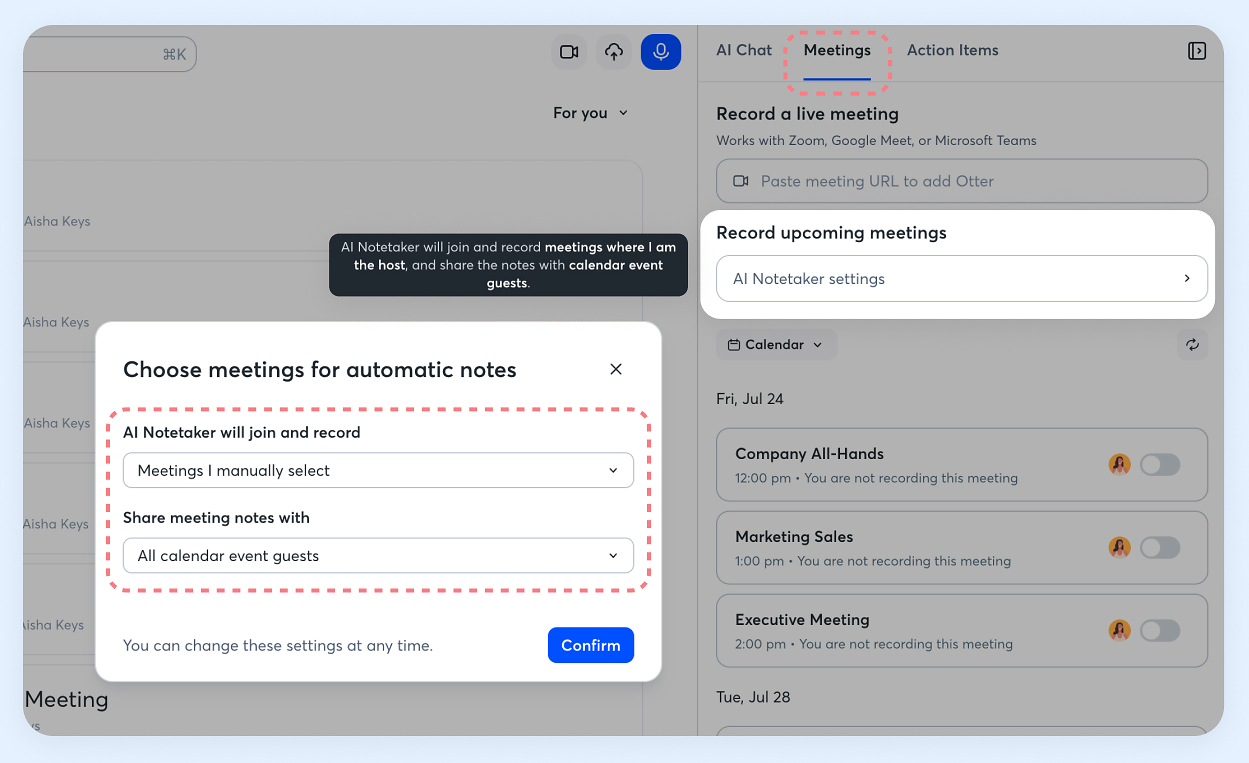
Otter Notetaker can automatically join Zoom, Google Meet, or Microsoft Teams meetings and transcribe in real time once you connect your Google or Microsoft calendar. Auto-join behavior is configurable with five settings: join all meetings with video links, only meetings where you are the host, only external meetings, only internal meetings, or manually selected meetings only.
Source: Otter.ai
For existing recordings, you can upload audio files in AAC, MP3, M4A, WAV, WMA, and OGG formats, or video files in AVI, MOV, MPEG, MP4, WMV, and other formats.
The speech-to-text engine transcribes in American English, British English, Spanish, and French, with Japanese added in November 2025. Otter's speech recognition achieves 85-95% accuracy for clear audio, though results vary with background noise, speaker accents, and conversation complexity.
Users can add custom vocabulary for industry-specific terms, and the system filters out filler words like "hmm," "um," and "uh."
Speaker identification uses machine learning that learns from a few tagged paragraphs per speaker. In Zoom meetings, the system tags speakers automatically based on participant names. The platform identifies speakers using existing voice profiles in the account and shared speakers in the Workspace, grouping paragraphs by speaker throughout the conversation.
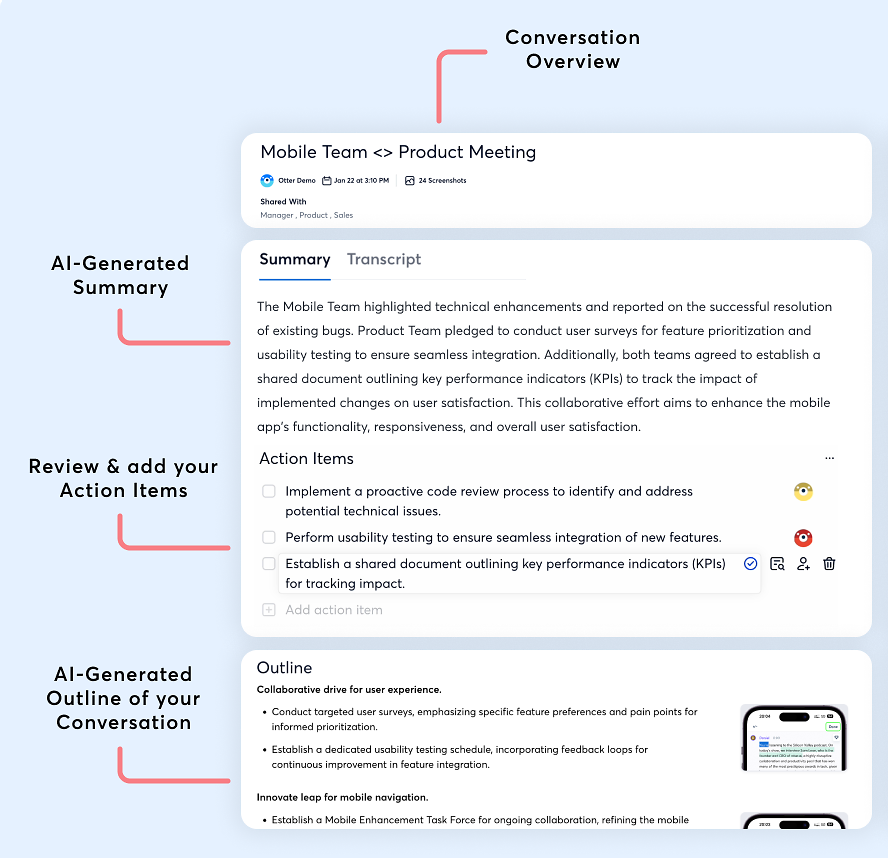
Every transcribed meeting generates AI summaries based on content during the live meeting or recording, identifies and assigns action items to team members, and creates live summaries displaying main topics in outline format as the meeting unfolds.
Source: Otter.ai
Users can edit transcripts, add highlights, comments, and notes, and share conversations with granular permissions controlling edit, comment, or view access. Finished transcripts can be exported as TXT, DOCX, PDF, or SRT files.
The platform works across web and mobile, with iOS and Android apps for recording, uploading, and editing on the go. A Desktop app for Windows and Mac records with headphones on and no bot in the meeting.
A Chrome extension captures impromptu Google Meet calls without a bot or transcribes media from websites. Transcription minutes are a shared pool across all recording types and do not roll over to the next month.
Otter.ai AI Chat
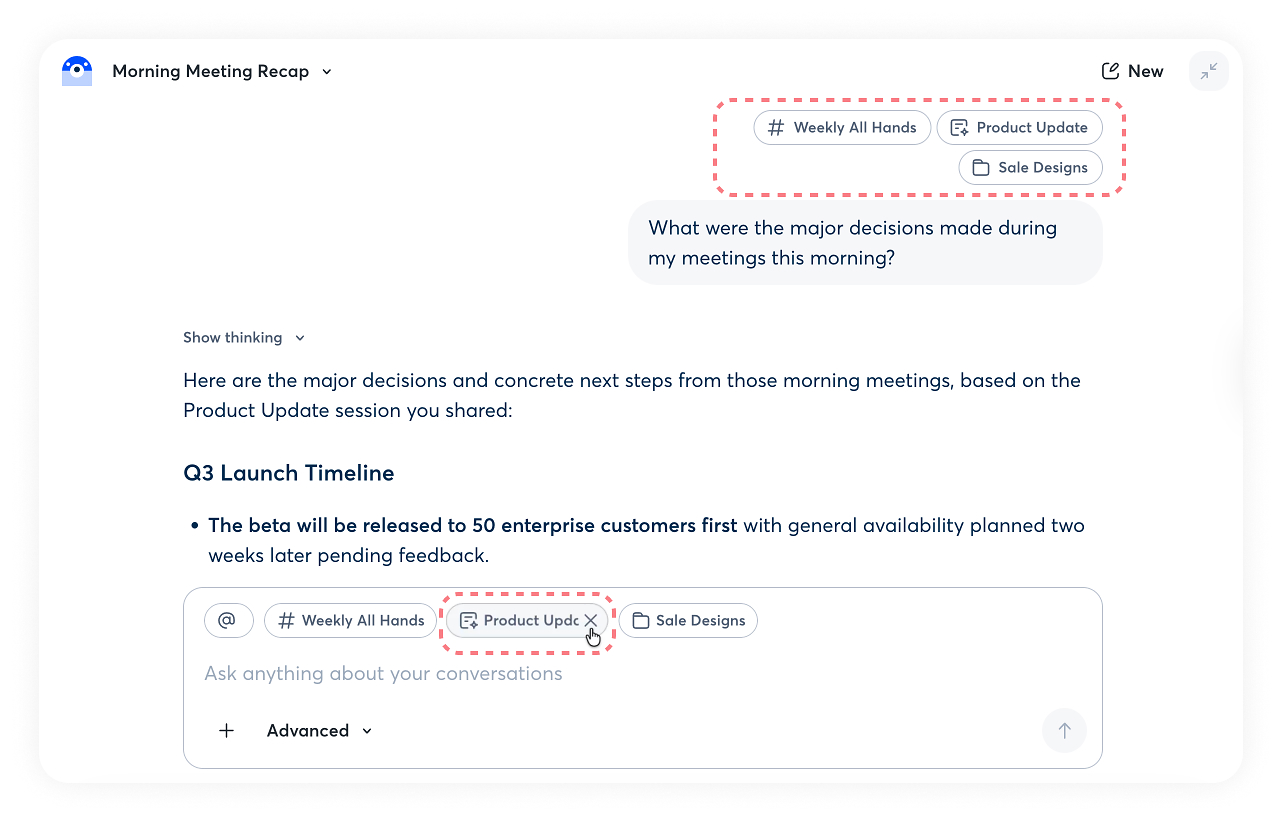
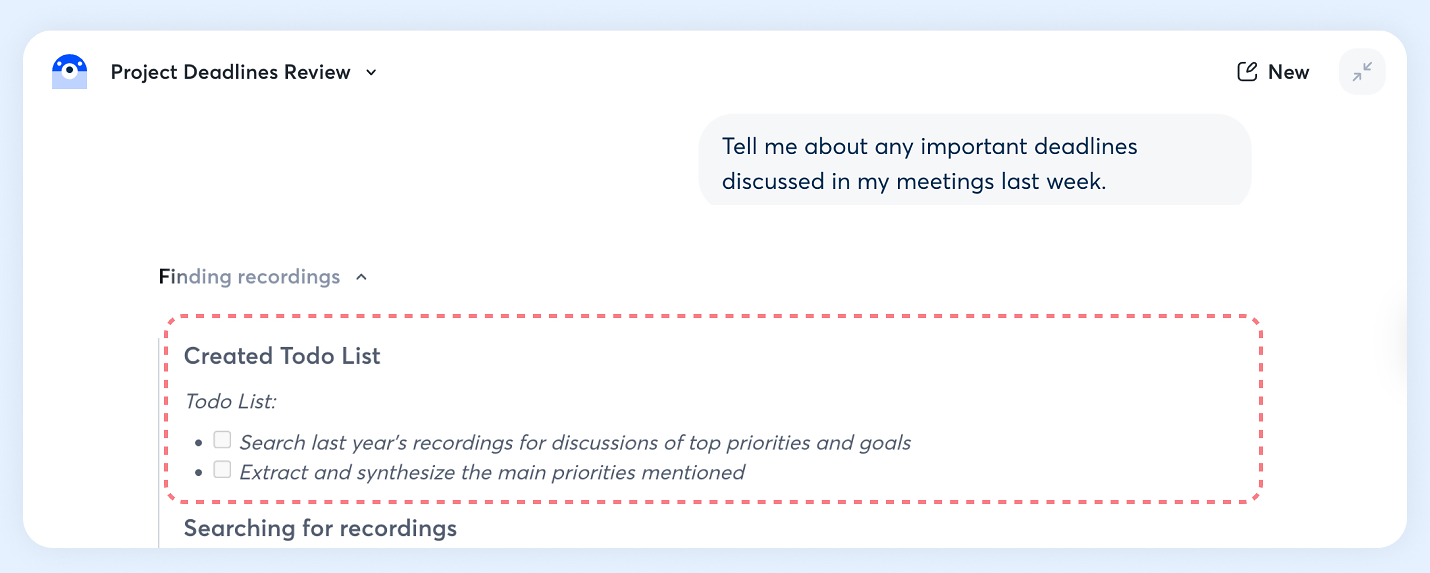
Otter AI Chat is the conversational interface layered on top of your meeting data. It lets you ask questions and generate summaries without manually searching transcripts. The core idea: you can query all your past meetings regardless of which conferencing platform they happened on.
Source: Otter.ai
AI Chat is accessible via panel view within conversations or expanded view from the left navigation menu. It works during live meetings and after meetings end.
During live Zoom meetings, participants can mention Otter using @otter, "Otter," or "Hey Otter" to ask questions out loud, and the AI responds in chronological order when multiple queries come in. Chat sessions are private by default, visible only to the user unless shared.
The feature offers two response modes: Express and Advanced. Express Mode prioritizes speed and short responses, focusing on real-time summarization.
Advanced Mode provides deeper reasoning and unlocks additional tools: search across transcripts and screenshots, email and calendar integration, action item creation and assignment, and recording controls. Advanced Mode also includes a "Show thinking" feature that reveals the AI's reasoning process.
Source: Otter.ai
Users can scope queries by adding specific conversations, channels, or folders as context using "@" or "#" filters. Every response displays sources with hyperlinks to conversation titles so you can click through to the original content.
The feature also enables content generation for emails, reports, and social media posts based on meeting content, and users can refine outputs with follow-up questions ("Make that shorter," "Add more detail about X," "Make the email more casual").
For voice interaction during Zoom calls, users can stop, pause, and resume meetings, create action items, create Google Calendar links, and send emails using voice commands. For Enterprise plan customers, Advanced Mode integrates with CRM systems such as Salesforce for lead and meeting data enrichment.
AI Chat query limits vary by plan:
Pro: 50 queries per user
Business: 200 queries per user
Enterprise: 200 queries per user
Otter.ai Workflows, Templates, and Automation
Otter's workflow system handles what happens after the meeting ends: the follow-ups, CRM updates, ticket creation, and action-item routing that eat hours of manual work. According to Otter, the average enterprise customer saves the equivalent workload of one full-time employee for every 20 users, a 10:1 return on investment.
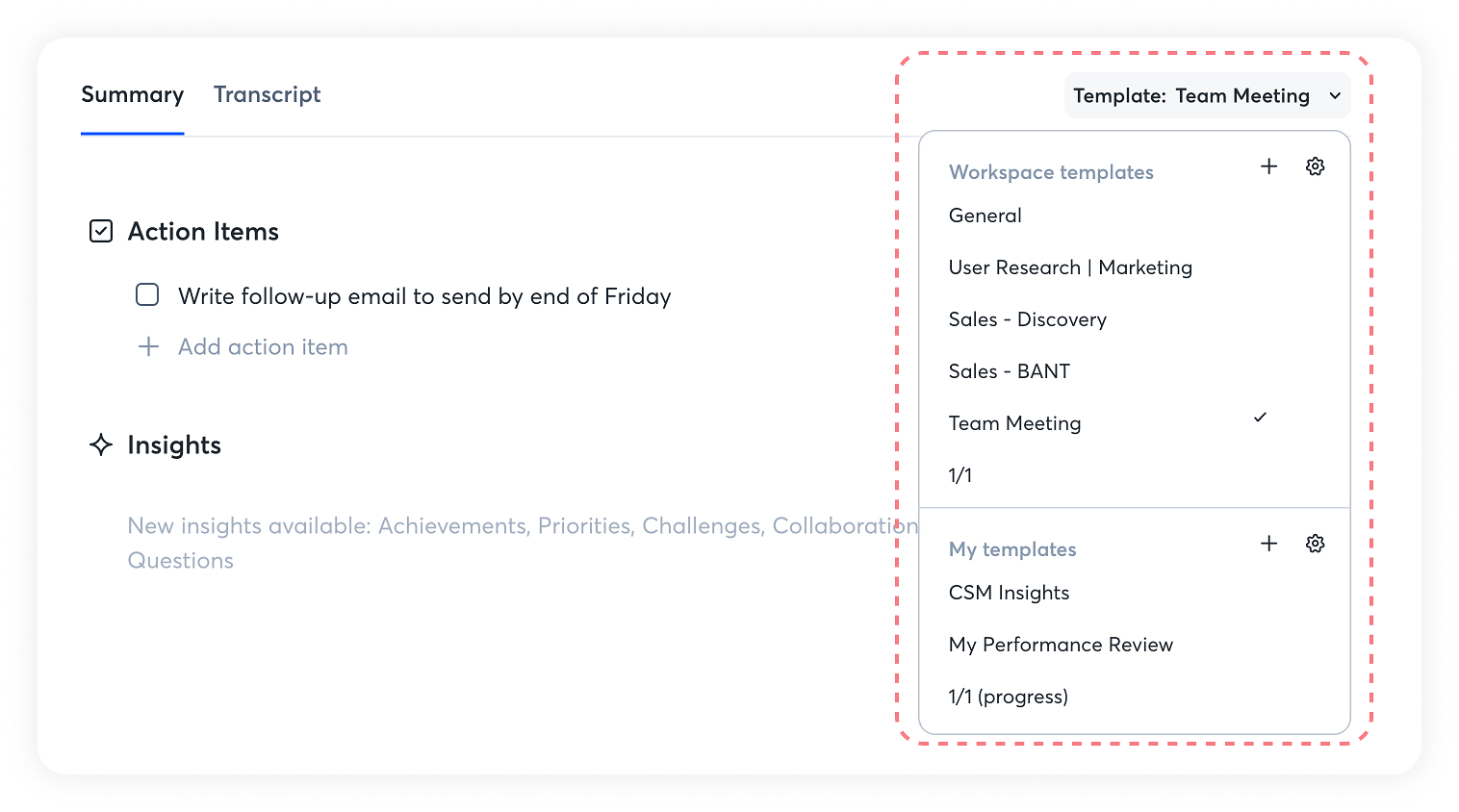
Custom Meeting Type Templates define how Otter analyzes and summarizes each meeting based on its type or purpose. Templates operate at two levels: workspace-level templates created by admins for organization-wide use, and personal templates for individual users.
Source: Otter.ai
Each template can include an Overview section for summaries, AI-detected Action Items that assign tasks to participants automatically, Insights that condense discussions into bullet points, an Outline providing structured overviews, and Custom Prompts for generating specific content types.
The automation layer connects templates to the right meetings through Rules that match based on AI classification (such as "Sales"), meeting title keywords, host email, or participant emails.
Content regenerates each time a template is applied, so summaries reflect the latest configuration. Users can create unlimited custom Insights with prompts limited to 128 characters, or use the Custom Prompt feature for longer outputs.
The downstream integrations turn meeting data into action across business systems:
CRM auto-updates trigger follow-ups for every meeting
Follow-up automation generates emails and next steps
Project tool syncing sends action items into Jira, Asana, ClickUp, and Monday.com
Automated support tickets turn meeting takeaways into tickets in Zendesk and ServiceNow
Template and workflow limits scale with pricing. Basic includes standard meeting templates and 5 custom templates per user. Pro adds AI workflows and 15 custom templates. Business provides custom AI workflows with unlimited access and 30 custom templates per user. Enterprise offers unlimited custom AI workflows and unlimited custom templates.
The MCP (Model Context Protocol) Server extends meeting intelligence beyond Otter, feeding meeting data into external AI tools like Anthropic's Claude. Otter also acts as an MCP client, pulling data from Gmail, Google Drive, Notion, Salesforce, Google Docs, Slack, and Jira into Otter AI Chat.
This two-way connection means meeting context flows outward to power external workflows, and external context flows inward to enrich meeting interactions.
Otter.ai Sales Agent and Sales Insights
Otter's Sales Agent turns the platform from a general meeting tool into a sales-specific assistant that operates across the full call lifecycle. Early customers report the tool has cut non-selling time by 33% (note-taking, CRM data entry, and similar tasks).
Source: Otter.ai
Before a call, the Sales Agent pulls data from CRM systems (Salesforce or HubSpot) to generate briefings that include the latest exchanges, deal value, and key decision-makers. It can suggest talking points based on past interactions and customer intent signals.
During live meetings, the Sales Agent provides real-time transcription and flags key moments: objections, competitor mentions, and pricing discussions. It offers live coaching tips for objection handling and tags action items by detecting commitments made during calls. The agent supports meetings across Zoom, Google Meet, and Microsoft Teams, plus Zoom Phone and Outreach integrations.
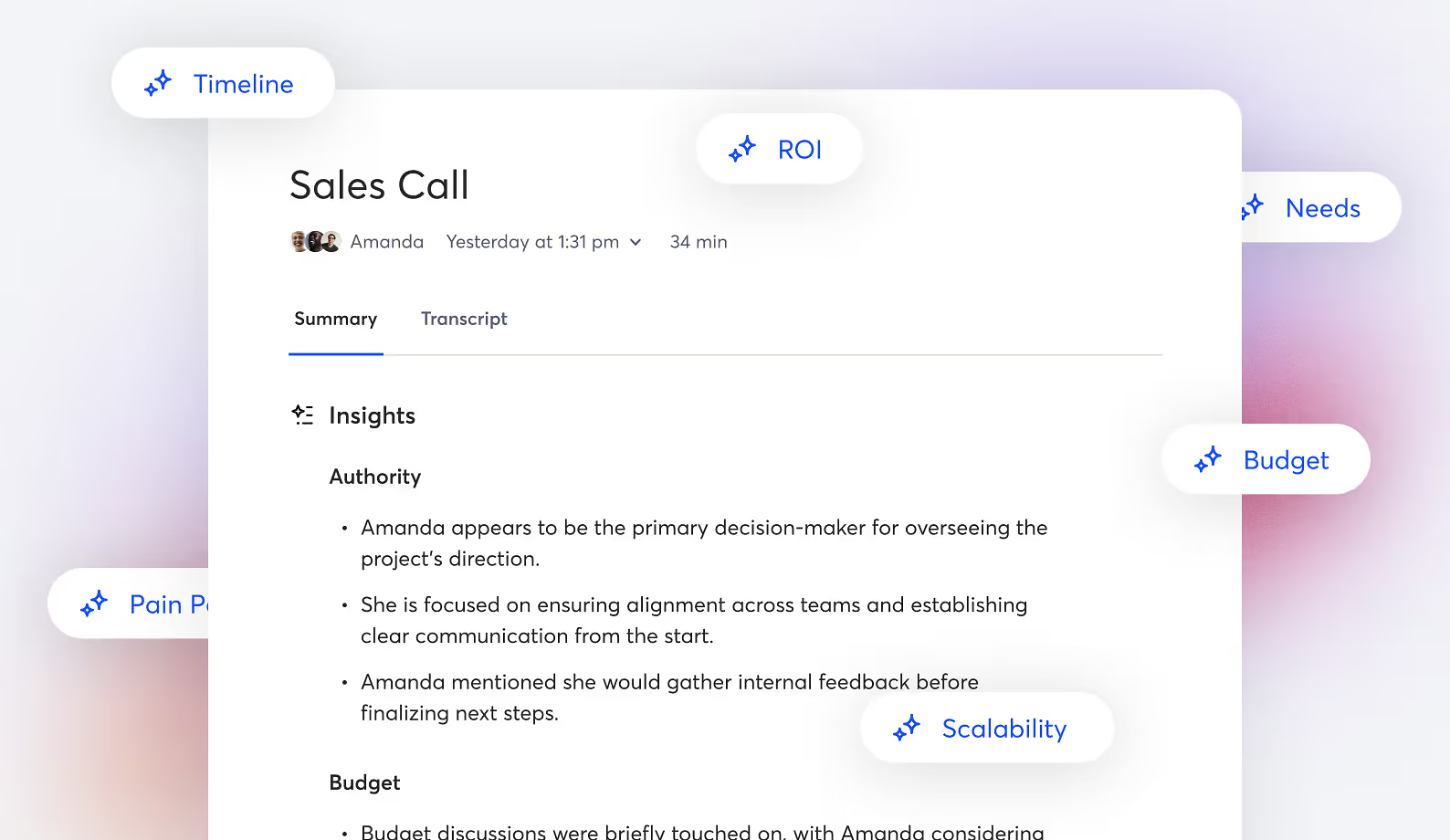
After calls, the system generates Sales Insights in the Summaries panel. Otter includes sales frameworks such as BANT (Budget, Authority, Need, Timeline) and MEDDIC by default. Teams can customize and add their own insights by typing detailed questions, adapting the system to their specific methodology. Each insight highlight includes links to the point in the conversation where the topic was discussed.
Sales Insights sync automatically to Salesforce Opportunity fields and HubSpot Deals, with support for custom field mappings. Microsoft Dynamics and Monday.com are also supported. Users can generate follow-up emails with one click from the Sales Insights tab, and sales teams can organize call notes into centralized channels accessible to the entire team.
The full Sales Agent feature set, including CRM integration and live coaching, is available only on the Enterprise plan.
Otter.ai SDR Agent and Recruiting Agent
Otter extends beyond meeting assistance with two autonomous agents that handle entire interactions without human involvement.
The SDR Agent is an autonomous SDR that conducts live product demos with prospects on its own. It embeds on your website and starts conversations with prospects through voice or chat. The agent identifies a prospect's role, goals, and pain points, then qualifies them against custom criteria.
For qualified leads, it delivers product walkthroughs tailored to the prospect's industry or use case, pulling relevant content and FAQs via Retrieval-Augmented Generation (RAG) and providing responses grounded in your best prior sales calls.
After demos, it stores meeting summaries in your Otter workspace, pushes insights into Salesforce or HubSpot, and integrates with Chili Piper or Calendly to schedule meetings on rep calendars. The SDR Agent is live on Otter.ai's own website.
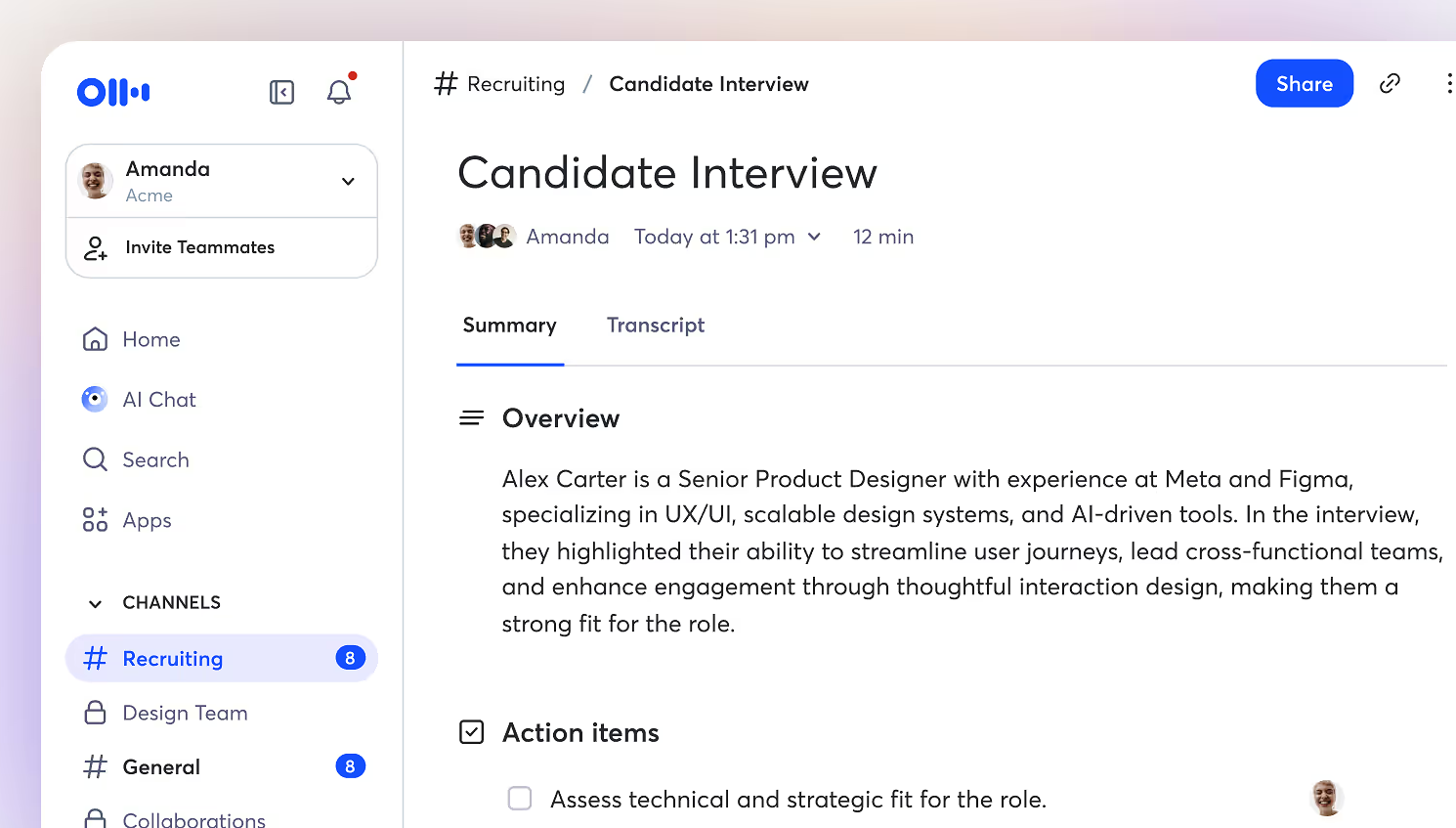
The Recruiting Agent automates the interview workflow end to end. Before interviews, it reads and summarizes resumes and LinkedIn profiles, analyzes job descriptions and highlights relevant qualifications, and generates interview questions.
Source: Otter.ai
During interviews, it provides real-time transcription alongside keyword detection for key phrases and skills, plus sentiment analysis of the candidate's tone. After interviews, it creates a summary of strengths, weaknesses, and concerns, syncs notes to Greenhouse via Zapier, and drafts feedback emails for candidates.
Otter.ai Integrations, API, and Platform Infrastructure
Otter.ai connects to the broader work stack through 50+ integrations spanning video conferencing, CRM, collaboration, storage, project management, and analytics.
Core integrations include:
Video conferencing: Zoom, Google Meet, Microsoft Teams, Zoom Phone
CRM: Salesforce (auto-syncs transcripts, summaries, and action items to Accounts, Opportunities, Contacts, and Leads), HubSpot, Zoho, Outreach
Sales engagement/dialers: Salesloft, RingCentral
Collaboration and storage: Slack, Notion, Google Drive, Microsoft OneDrive, SharePoint, Dropbox, Egnyte, Amazon S3
Project management: Asana, Jira, ClickUp, Monday.com
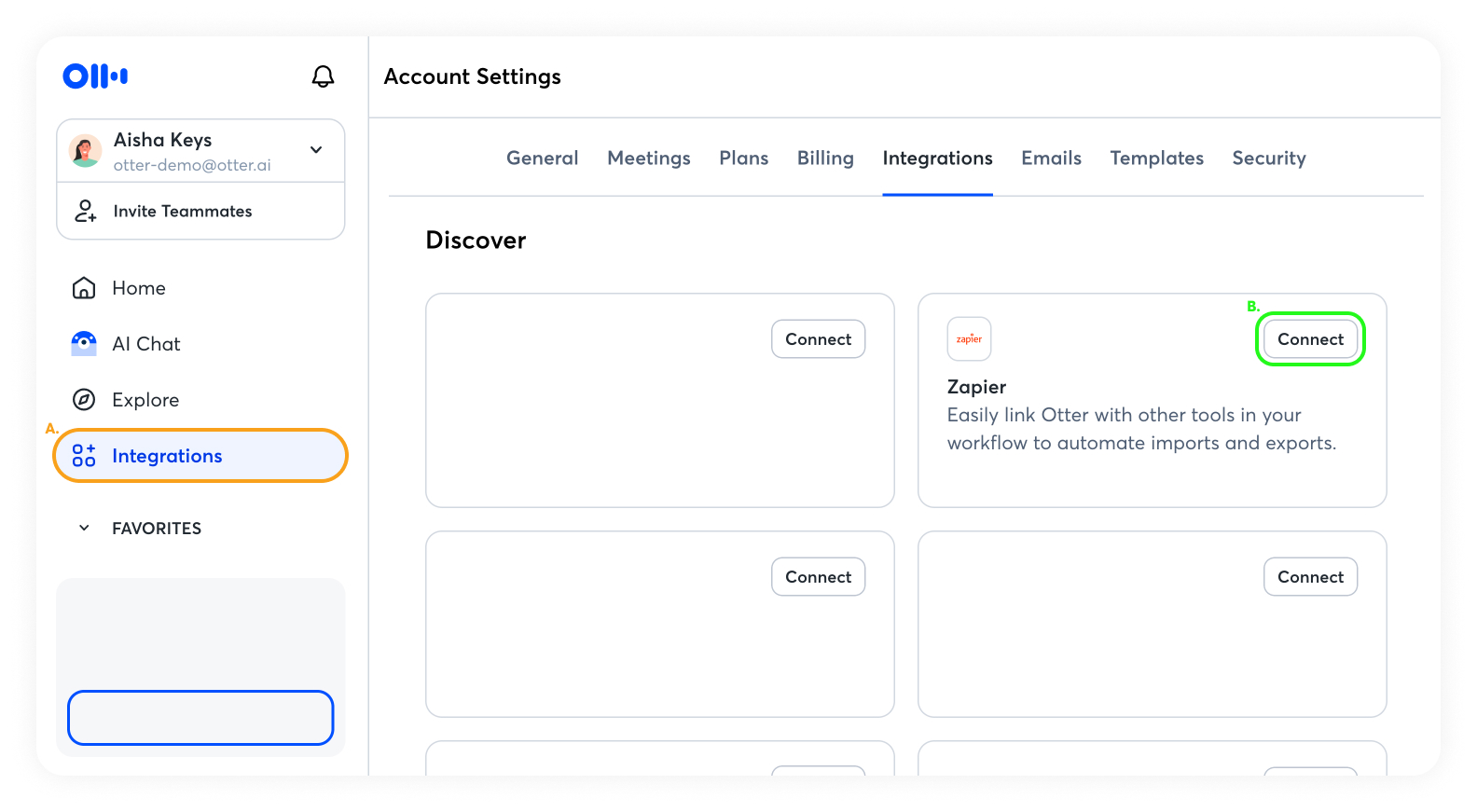
The Zapier integration connects Otter to thousands of additional apps, supporting two-way workflows (importing audio files for transcription, exporting transcripts and summaries to downstream tools). Zapier access requires Pro, Business, or Enterprise.
Source: Otter.ai
Otter.ai provides a REST-based Public API that gives developers programmatic access to conversation data: transcripts, summaries, action items, insights, and outlines. API access is gated to Enterprise workspaces only.
Authentication uses API key/Bearer token, with a limit of 2 API keys per user. Workspace Webhooks push real-time notifications when events occur (conversation completed, conversation shared), eliminating the need to poll for new data.
On security, Otter.ai holds SOC 2 Type II attestation and builds security policies based on ISO 27001/2. The platform is HIPAA compliant for Enterprise plan customers after signing a Business Associate Agreement, and maintains GDPR and CCPA compliance. Data is stored on AWS S3 with server-side encryption using 256-bit AES-256.
Enterprise features include two-factor authentication, Single Sign-On (SSO) supporting Okta, Azure, and Google, Directory Sync via SCIM for automated user provisioning, domain capture, and custom data retention policies.
Where Otter.ai Stops: The Gaps
Otter.ai is built around meeting intelligence: transcribing conversations, extracting insights, and routing those insights into downstream workflows. That focus shapes its strengths, but it also means the platform starts and ends with what happens during a meeting. Several capabilities a revenue team needs sit outside that boundary.
No B2B contact or company database. Otter.ai captures insights from meetings already happening. It does not include a database of contacts, companies, direct dials, or verified business emails to help you find who to meet with. Building a prospecting list, finding a champion's direct number, or enriching CRM records with company data requires a separate platform.
No buyer intent signals. The platform captures engagement signals from your own meetings (who attended, what was discussed, what actions were assigned), but it does not track which companies are researching your product category across the web before any meeting is booked. There is no way to identify in-market accounts or prioritize outreach based on third-party buying signals.
No website visitor identification. Otter's SDR Agent engages visitors who land on your website and start a conversation, but the platform does not identify anonymous visitors at the company or contact level. A prospect who visits your pricing page, reads three case studies, and leaves without engaging is invisible.
Conversation intelligence stops at extraction. Otter extracts Sales Insights (BANT, MEDDIC) from individual calls and syncs them to CRM fields. But it does not reason across deals: it does not predict win probability based on conversation patterns, detect deal risk by correlating call sentiment with pipeline stage, or identify which buying committee dynamics lead to closed-won outcomes.
Each call's insights exist in isolation rather than feeding a system that reasons about your entire pipeline.
No multi-channel sales execution. Otter captures what happens during calls but does not orchestrate what happens between them. There is no email sequencing, no phone dialer, no LinkedIn outreach automation, and no signal-triggered plays that move a prospect through a multi-step sales motion. Teams need a separate engagement platform for execution.
Limited language support. Otter transcribes in English, French, Spanish, and Japanese. Teams that conduct meetings in German, Portuguese, Mandarin, or other unsupported languages will find Otter unable to process those conversations.
How ZoomInfo Covers the Gaps
The gaps above share a common thread: Otter.ai captures meeting intelligence but does not supply the data, signals, or execution capabilities that surround meetings in a revenue workflow. ZoomInfo is a go-to-market platform that covers those layers, built on a data foundation and intelligence graph that starts where meeting transcription stops.
ZoomInfo's B2B Data Platform: The contact and company database that fuels the pipeline meetings draw from
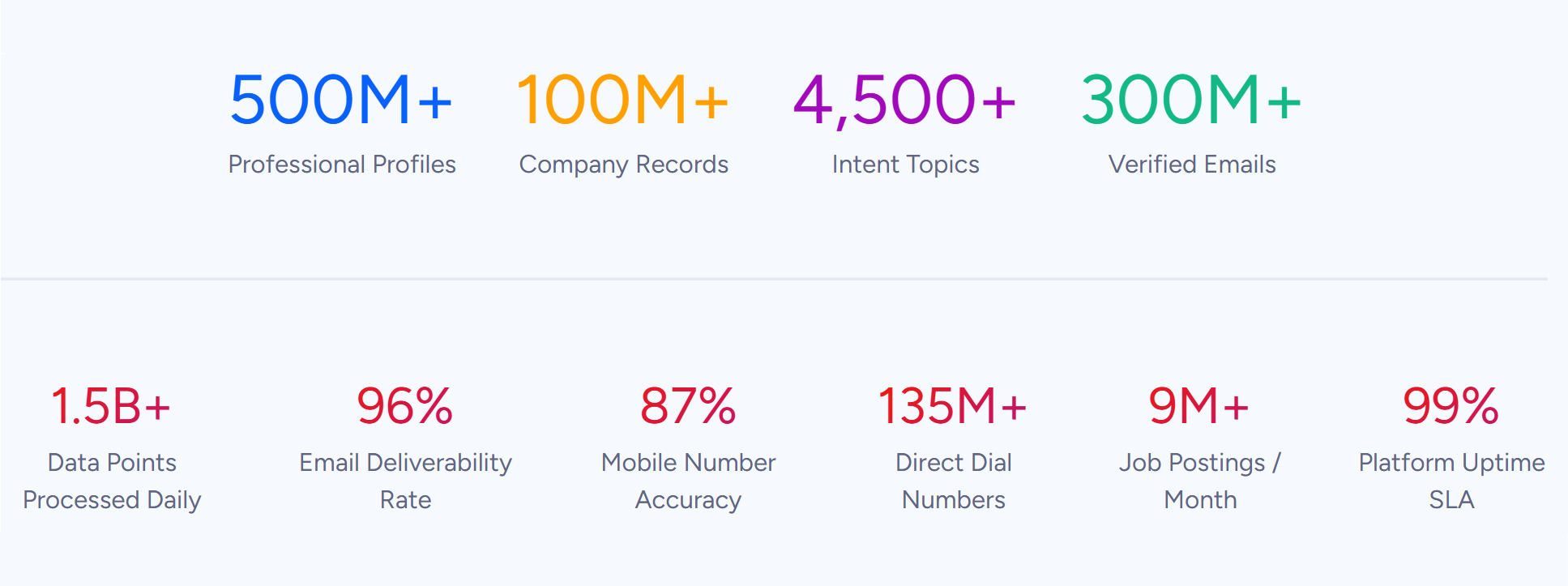
ZoomInfo runs the largest B2B data platform in the market: 500M contacts, 100M companies, 135M+ verified phone numbers, 120M direct dials, and 200M+ verified business email addresses. The data flows through a verification pipeline backed by 300+ human researchers and automated ML scanning of 28 million site domains daily, reaching up to 95% accuracy on first-party data.
Source: ZoomInfo
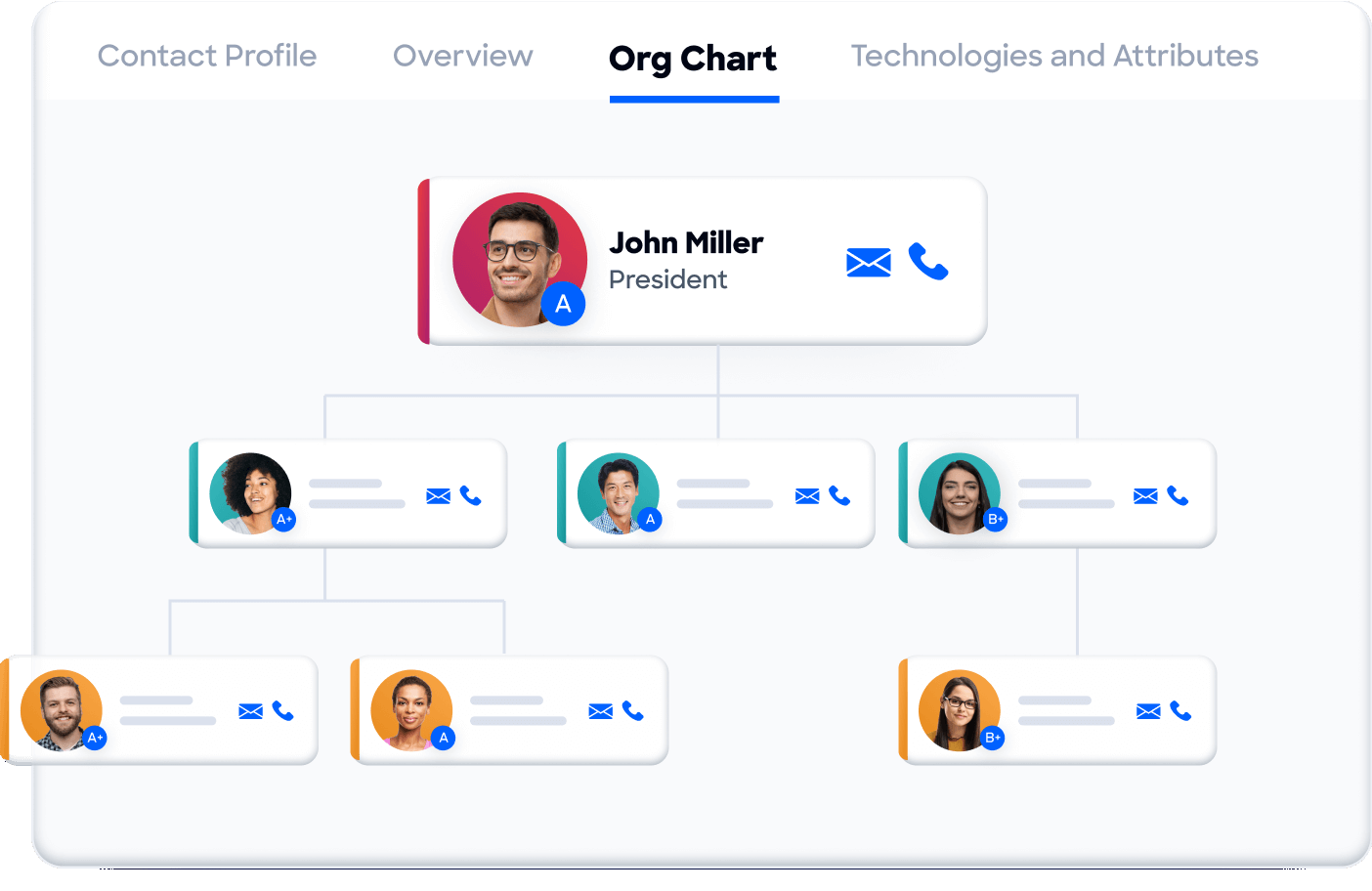
Where Otter captures insights from conversations already underway, ZoomInfo identifies the conversations worth having. The platform provides department org charts with decision-makers' direct dials and emails, 300+ company attributes for market segmentation, contact tracking with job-change alerts, and technographic profiles covering 30,000+ technologies across 200+ categories for 30+ million companies.
Source: ZoomInfo
In a Fortune 500 competitive RFP analyzing 25 million contacts across vendors, an independent consultant concluded that "no other competitor came even close."
ZoomInfo Intent and WebSights: Signals that identify in-market buyers before any meeting is booked
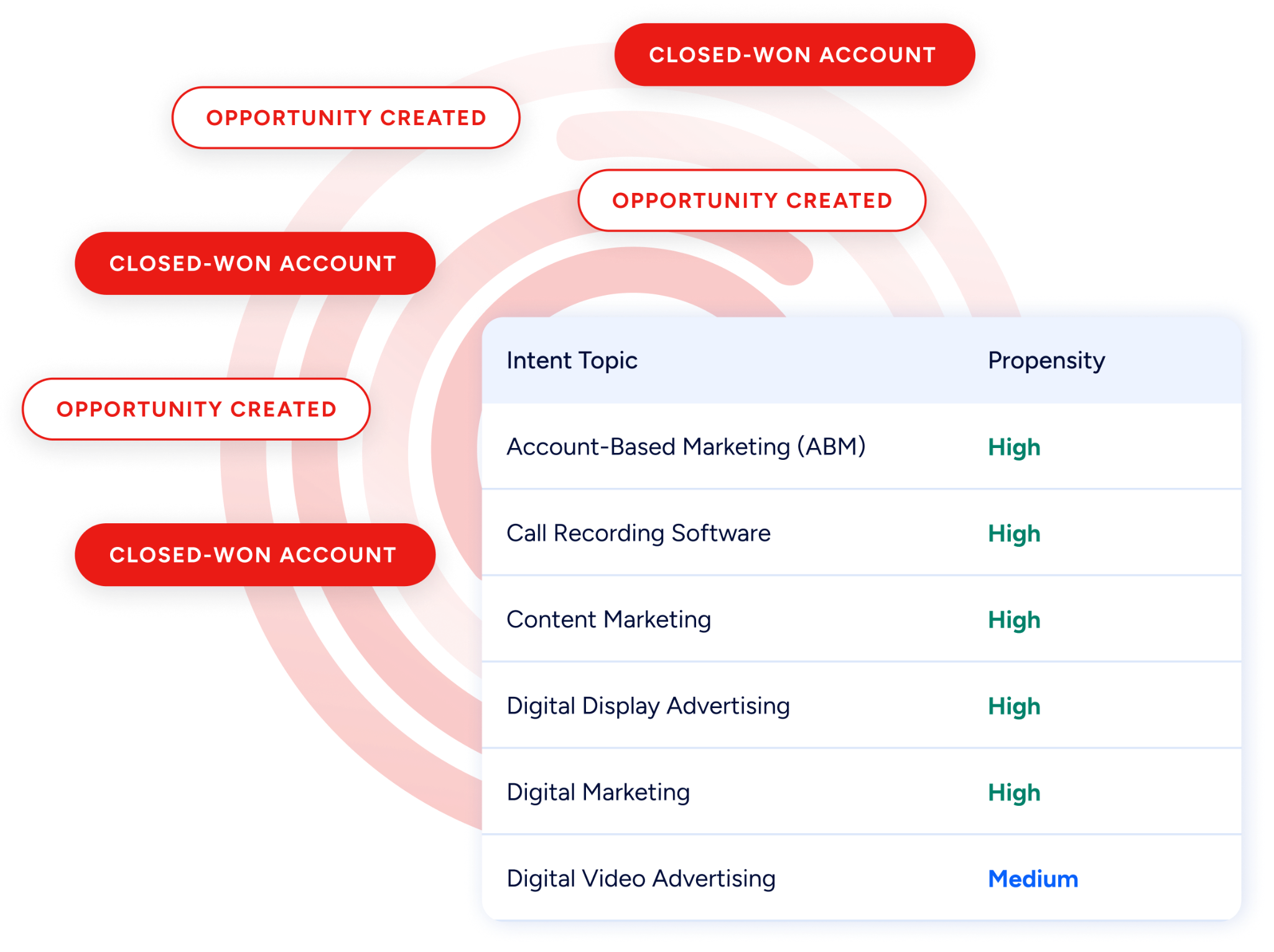
ZoomInfo Intent tracks signals from 210 million IP-to-Organization pairings and 6 trillion+ new keyword-to-device pairings sourced monthly. This reveals which companies are researching topics related to your product across the web, before you have spoken with them. Guided Intent, exclusive to ZoomInfo, identifies topics historically correlated with deal success rather than requiring manual topic selection.
Source: ZoomInfo
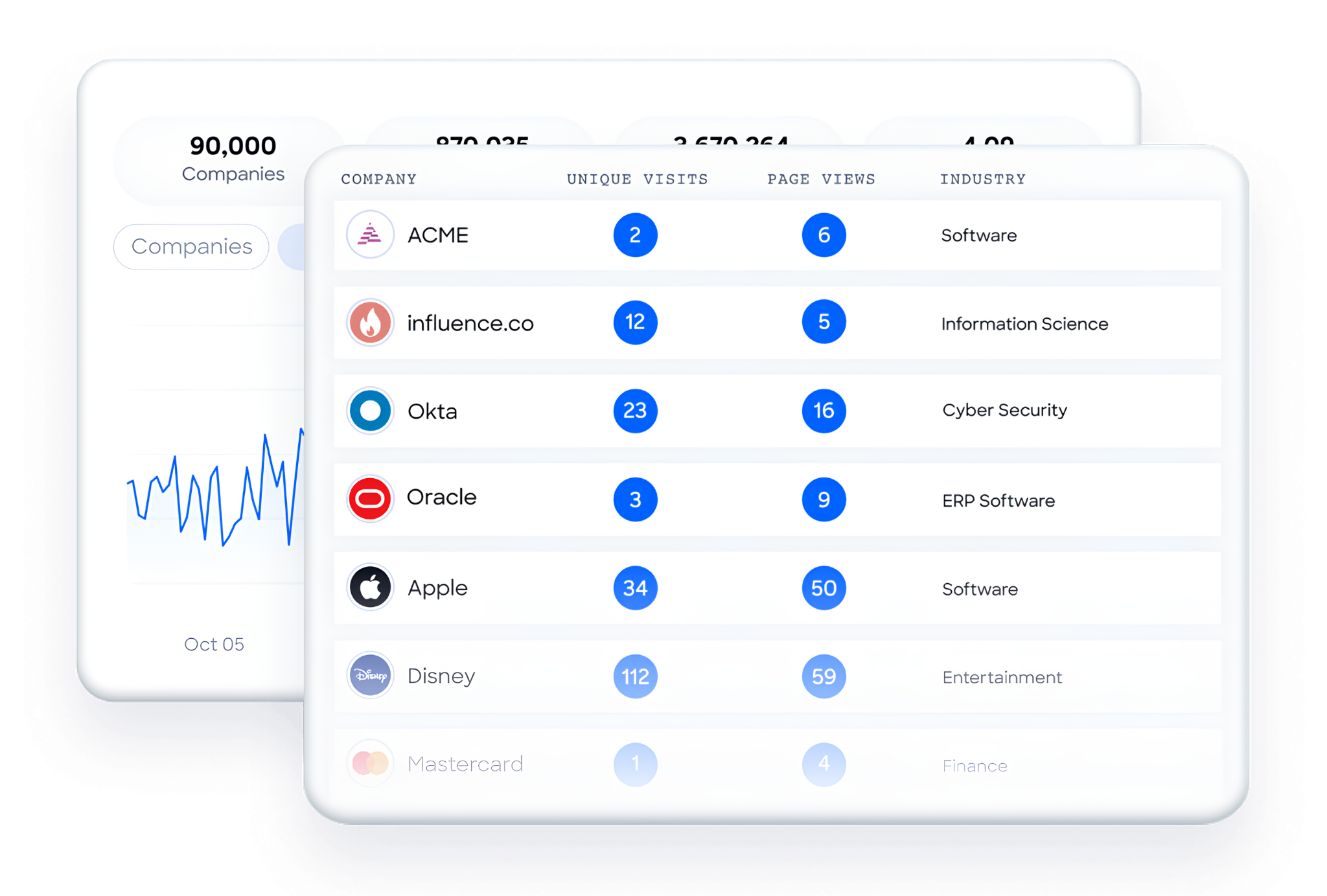
On the website side, WebSights resolves anonymous website traffic to companies with Automatic Traffic Filtering that separates real visitors from bots. ZoomInfo Marketing goes further with contact-level identification, showing who specifically visited, not just which company. Where Otter's SDR Agent engages visitors who start a conversation, ZoomInfo identifies the silent majority who browse and leave.
Source: ZoomInfo
ZoomInfo's GTM Context Graph and Chorus: Intelligence that reasons across deals, not just individual calls
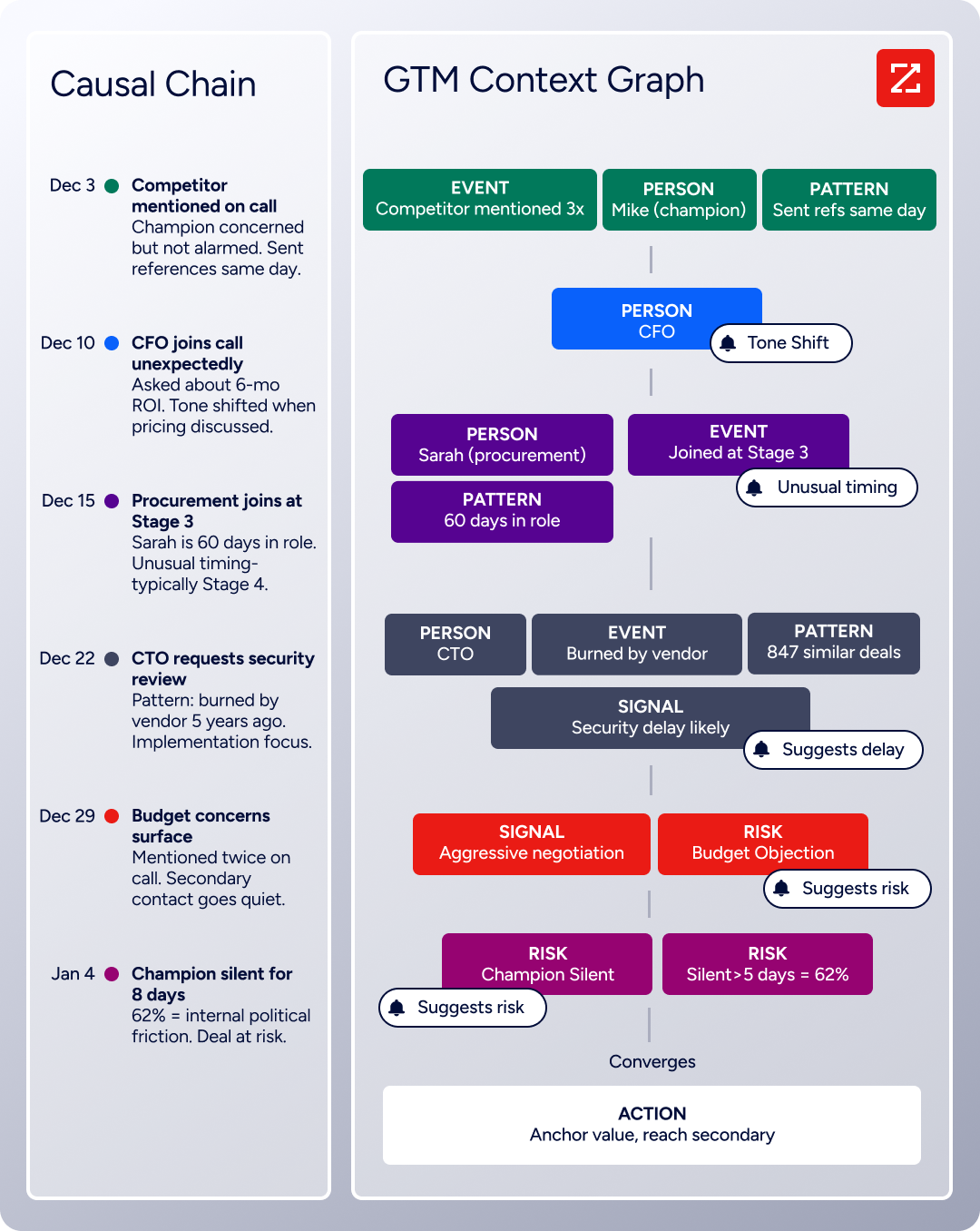
Otter.ai extracts insights from each call in isolation. ZoomInfo's GTM Context Graph connects those insights across your entire pipeline. Processing 1.5B + data points daily, it combines ZoomInfo's B2B data with a customer's CRM records, conversation intelligence from Chorus, email interactions, and behavioral signals into a single intelligence layer.
Source: ZoomInfo
Chorus, ZoomInfo's conversation intelligence engine backed by 14 technology patents, records and transcribes sales calls, surfaces AI-generated insights (talk ratios, sentiment, objection detection), auto-syncs deal intelligence to the CRM, and provides coaching scorecards and clip sharing.

Source: ZoomInfo
The difference from standalone transcription: Chorus feeds into the GTM Context Graph, which reasons about why a deal moved, not just that it moved. A CRM records a stage change; the GTM Context Graph connects the CFO joining the last call with ROI-focused questions to the pattern behind closed-won deals in your segment, then links that to third-party signals showing the company is hiring and researching a competitor.
Seismic's sales team attributed 39% of active pipeline to opportunities identified or influenced by ZoomInfo signals, boosted productivity by 54%, and saved 11.5 hours per week per seller. (Seismic Case Study)
ZoomInfo GTM Workspace and GTM Studio: Where the work between meetings gets done
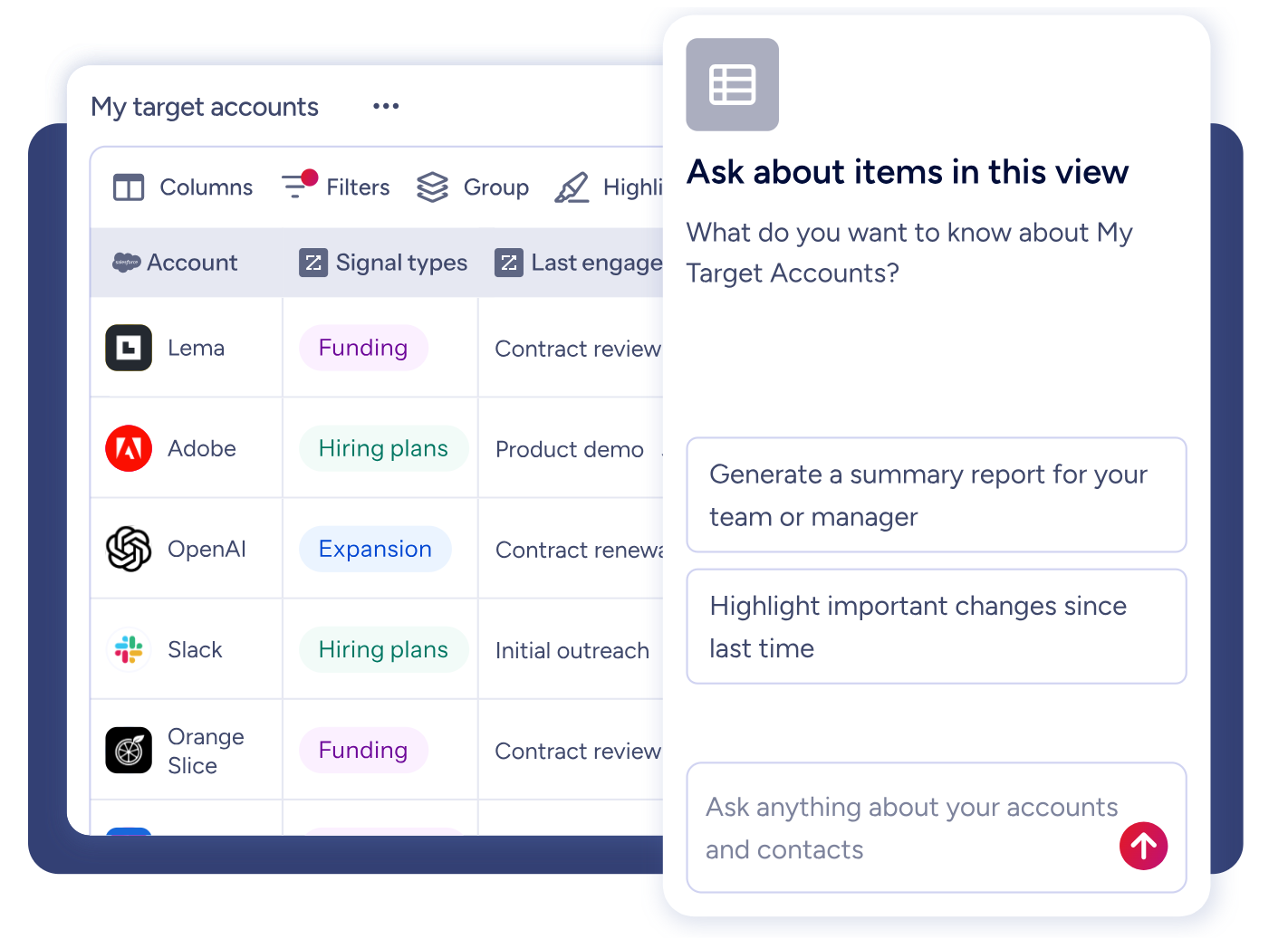
GTM Workspace is ZoomInfo's seller front-end, built on the GTM Context Graph.
It gives sellers a complete Book of Business view across CRM, ZoomInfo data, conversation history, and market intelligence, with AI agents that automate account research, outreach drafting, CRM updates, and signal monitoring. An Action Feed streams in-market buyers matched to target criteria with pre-drafted actions on every signal.
Source: ZoomInfo
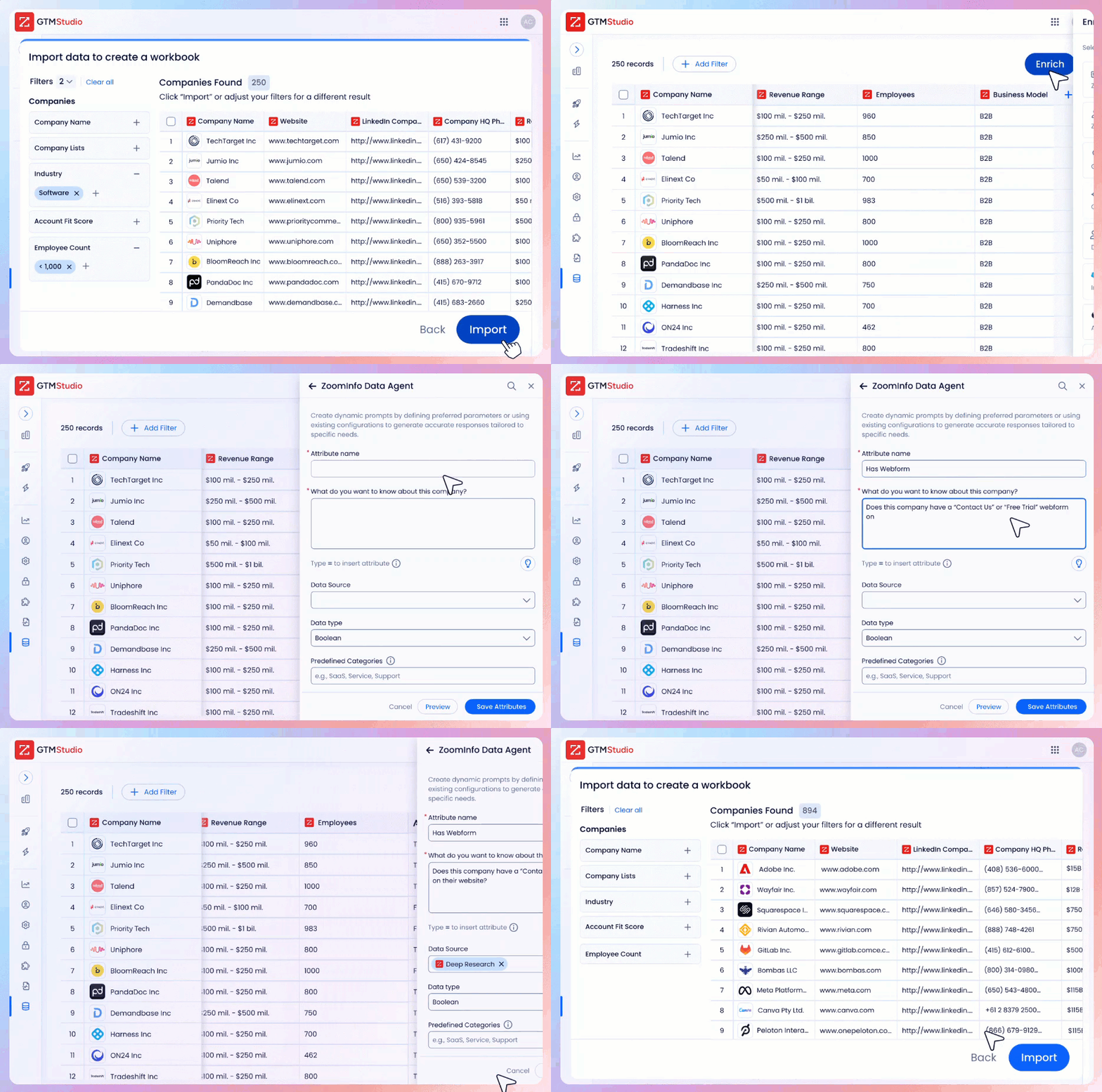
GTM Studio addresses the marketing orchestration and multi-channel execution gap. Marketers, RevOps teams, and GTM engineers can build audiences using natural language, enrich with first- and third-party data, define triggers, and activate plays across channels (email, calls, display ads, direct mail, LinkedIn, Meta, Connected TV) without engineering support.
Source: ZoomInfo
Pre-built GTM plays cover inbound acceleration, champion tracking, competitive displacement, and ICP targeting. Expansion plays that used to take 3 weeks now launch in 30 minutes.
ZoomInfo APIs and MCP: Intelligence access for any tool or AI agent
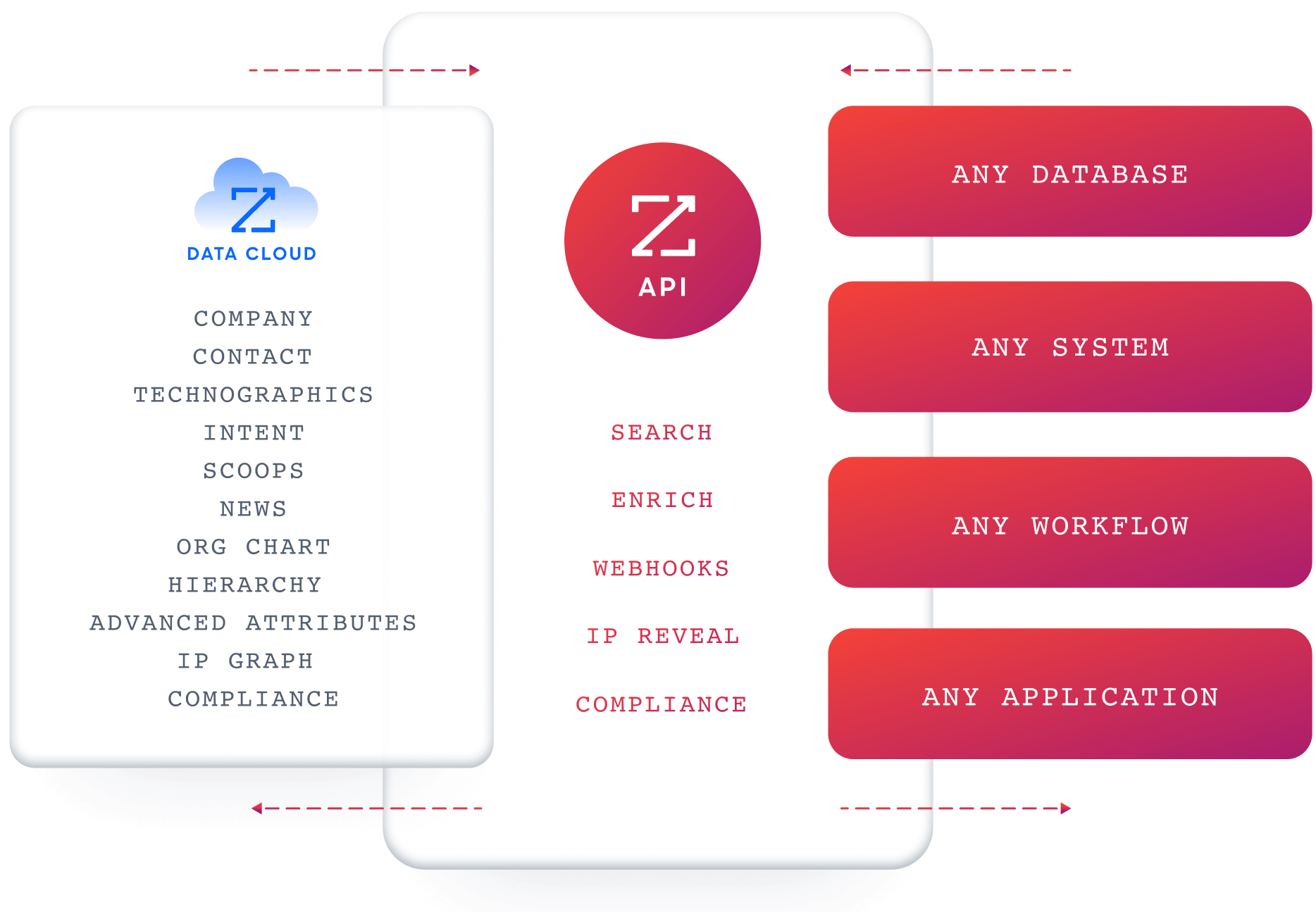
ZoomInfo delivers its intelligence through APIs and MCP (Model Context Protocol), so the same data and GTM Context Graph powering ZoomInfo's own products is accessible inside any third-party tool or custom AI agent. The MCP server connects AI models to ZoomInfo's B2B data as a native tool, currently supporting Claude and ChatGPT. API access is included in all relevant plans.
Source: ZoomInfo
ZoomInfo's Free Entry Points: A way into the platform without commitment
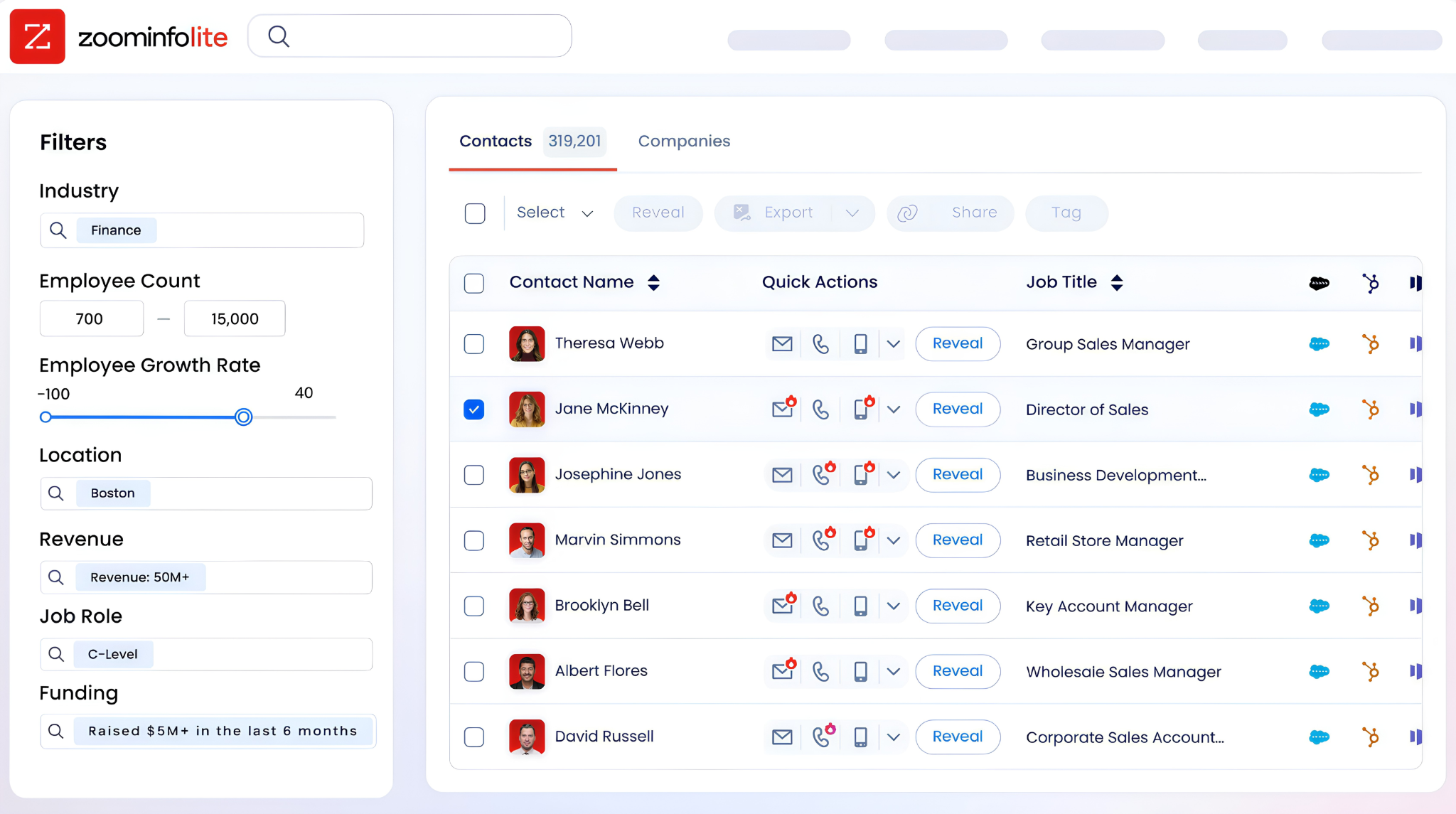
ZoomInfo Lite is a permanent free tier with access to ZoomInfo's B2B database, 10 monthly export credits, individual and company searches, a Chrome extension, and WebSights Lite with up to 10 website visitor reveals per day. A separate 7-day free trial provides broader access with no credit card required.
Source: ZoomInfo
Final Summary
Otter.ai is a strong toolkit for meeting intelligence: real-time transcription across Zoom, Google Meet, and Microsoft Teams, AI-generated summaries and action items, customizable meeting templates with automated downstream workflows, and specialized agents for sales coaching, autonomous demos, and recruiting.
Its cross-platform approach (one tool across all conferencing platforms) and voice-activated AI Chat give it a distinct identity in the meeting assistant category.
It is lighter on the layers that surround meetings: no B2B contact database, no buyer intent signals, no website visitor identification, no cross-deal conversation intelligence, and no multi-channel sales execution.
If your bottleneck sits upstream of the meeting (knowing who to meet with and which accounts are in-market now) or across meetings (understanding which conversation patterns predict deal outcomes and what signals to act on next), that is the ground ZoomInfo covers.
Its 500M-contact, 100M-company database provides the verified contacts and direct dials that fill a calendar. ZoomInfo Intent surfaces accounts researching your category from 6 trillion+ keyword-to-device pairings monthly. Chorus captures and reasons about conversations as part of a GTM Context Graph that ties call insights to deal outcomes, pipeline health, and predictive patterns.
And GTM Studio gives marketing teams multi-channel orchestration that turns meeting intelligence into coordinated execution. Otter.ai captures what happens in the meeting; ZoomInfo supplies who should be in it, why they are in-market, and what to do after it ends.
See what that intelligence layer adds to your revenue workflow: start with ZoomInfo Lite for free, or request a demo to see how intent signals and verified contacts connect to your meeting pipeline.
FAQ
Does Otter.ai support languages other than English?
Otter.ai transcribes in American English, British English, French, Spanish, and Japanese. The platform does not support German, Portuguese, Mandarin, Italian, or most other languages. Teams that regularly conduct meetings in unsupported languages will need an alternative tool for those conversations.
Which Otter.ai plan includes CRM integration?
Salesforce and HubSpot integrations are listed on the Pro tier and above, but the full Sales Agent (including pre-call briefs, live coaching, and automated CRM field syncing of Sales Insights) requires the Enterprise plan. Pro and Business plans support basic CRM connections through Zapier and native integrations, but the deeper sales workflow automation is Enterprise-only.
Can Otter.ai record video, not just audio?
Video replay is available only on the Enterprise plan for Zoom and Google Meet recordings. All other tiers capture audio and generate transcripts but do not include video recording or playback.
How many meetings can Otter.ai transcribe per month?
It depends on the plan. Basic allows 300 transcription minutes per month with a 30-minute-per-conversation cap. Pro provides 1,200 minutes with a 90-minute cap. Business includes unlimited meetings and in-app recordings with up to 4 hours per meeting.
Enterprise also offers unlimited transcription with up to 4 hours per meeting. Minutes are a shared pool across all recording types and do not roll over.
Does Otter.ai offer an API?
Yes, but only for Enterprise customers. The Public API provides access to transcripts, summaries, action items, insights, and outlines. Authentication uses API key/Bearer token with a limit of 2 keys per user. Workspace Webhooks push real-time notifications for conversation events. Lower-tier plans do not include API access; they rely on native integrations and Zapier instead.
Can Otter.ai identify website visitors?
Not passively. The SDR Agent engages website visitors who start a conversation through voice or chat, but Otter does not identify anonymous browsers who visit your site without interacting. ZoomInfo's WebSights resolves anonymous website traffic to companies and, with ZoomInfo Marketing, identifies specific contacts, giving visibility into the visitors who browse without engaging.
Does Otter.ai provide buyer intent data?
No. Otter.ai captures engagement data from your own meetings (attendance, discussion topics, action items) but does not track which companies are researching your product category across the web. It has no way to identify in-market accounts based on third-party intent signals.
ZoomInfo Intent tracks signals from 210 million IP-to-Organization pairings and 6 trillion+ keyword-to-device pairings sourced monthly, identifying accounts researching relevant topics before any outreach begins.
Does Otter.ai connect conversation insights to deal forecasting?
Otter.ai extracts Sales Insights from individual calls and syncs them to CRM fields, but it does not aggregate those insights across deals to predict outcomes or detect pipeline risk. Each call's insights exist independently.
ZoomInfo's GTM Context Graph, powered by Chorus conversation intelligence, reasons across all calls, CRM data, and behavioral signals to capture why deals move or stall, feeding that reasoning into forecasting and next-best-action recommendations.
