
PandaDoc has earned its reputation as one of the most popular document automation platforms on the market. Rated #1 by G2 in proposals, eSignature, and contract management, it combines document generation, eSignatures, CPQ, Deal Rooms, and workflow automations in a single platform built primarily for sales teams at SMB and mid-market companies.
But as your business grows, you may find that PandaDoc's generalist approach leaves gaps where they matter most. Its block-based editor can struggle with formatting on complex documents. Once a document is sent, edits typically require recreating and re-sending it. There's no native redlining for contract negotiation. And for enterprise teams in regulated industries, PandaDoc's compliance portfolio may not cover the certifications your security review requires.
That's where this guide comes in. Whether you're looking to:
Ensure enterprise compliance and full contract lifecycle management for regulated industries
Enforce proposal governance and gain close-rate intelligence across a scaling sales team
Close proposals faster with an affordable quote-to-cash workflow built for small businesses
Negotiate contracts natively with browser-based redlining and AI clause analysis
Deliver proposals as interactive web experiences that buyers engage with, not just read
Deploy a self-hostable eSignature solution with transparent pricing and full data sovereignty
Power your go-to-market engine with B2B data and AI-driven intelligence
We'll explore dedicated PandaDoc alternatives that excel in these specific areas.
Some teams might use these tools alongside PandaDoc to fill specific gaps, while others might replace PandaDoc entirely with a more specialized solution. This isn't about finding a "better" platform; it's about finding the right fit for your needs as your business evolves.
The Best PandaDoc Alternatives
Best Alternative for AI-Powered Go-to-Market Intelligence We chose ZoomInfo because it solves a different problem than PandaDoc: knowing who to send your proposals to, when to send them, and why they'll convert. Its GTM Context Graph and B2B data give revenue teams the intelligence that document tools alone cannot provide. |
|---|
Best Alternative for Enterprise Compliance and Contract Lifecycle Management We chose DocuSign because its FedRAMP authorization, 180+ country legal enforceability, and full CLM with AI contract intelligence address the compliance and post-signature gaps that PandaDoc cannot fill at enterprise scale. |
Best Alternative for Revenue-Team Proposal Governance and Close-Rate Intelligence We chose Proposify because its deal-threshold approval workflows, per-section buyer analytics, and per-rep performance dashboards give sales leaders the governance and coaching data that generalist document tools do not provide. |
Best Alternative for Small Businesses Needing Proposals, eSignatures, and Payments Without Enterprise Pricing We chose Better Proposals because it collapses the entire quote-to-cash workflow into a single browser session at a fraction of PandaDoc's per-seat cost, with live chat embedded directly inside the proposal. |
Best Alternative for Native Contract Redlining and AI-Powered Contract Intelligence We chose Juro because its browser-native collaborative editor and AI Review Agent solve PandaDoc's most cited limitation: the inability to negotiate contracts without exporting to Word and losing version control. |
Best Alternative for Interactive, Web-Native Proposal Experiences We chose Qwilr because it replaces the static document format with a live, interactive web page featuring embedded video, ROI calculators, and buyer engagement tracking at the content-block level. |
Best Alternative for Cost-Transparent, Self-Hostable eSignatures We chose DocuSeal because it offers a permanently free eSignature tier, full self-hosted deployment with data sovereignty, and an open-source codebase with SOC 2 Type II and ISO 27001 compliance for teams that cannot justify PandaDoc's per-seat pricing or cannot route documents through a third-party cloud. |
What is PandaDoc?
Source: PandaDoc
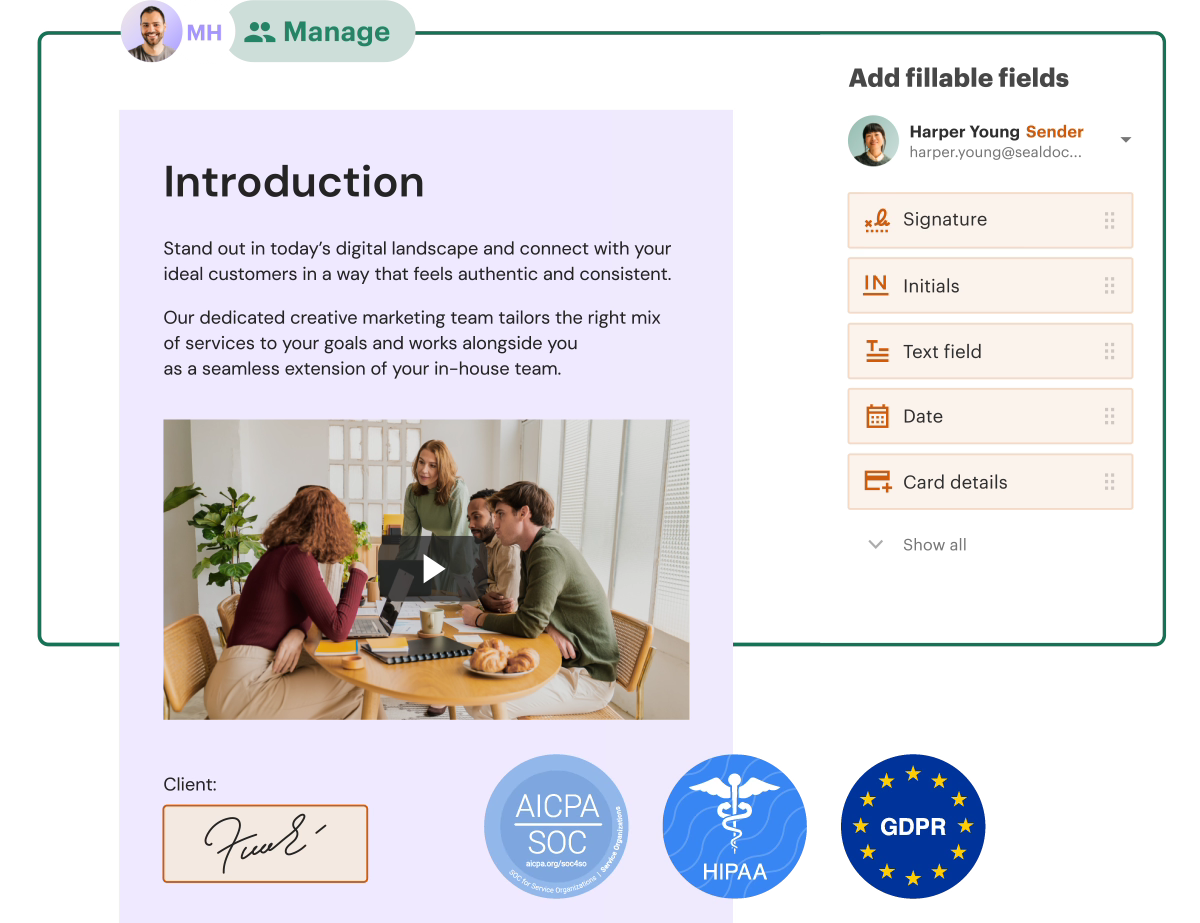
PandaDoc is a document management platform built to simplify the document lifecycle for sales teams. Founded in 2013, it serves over 68,000 customers worldwide and reached $100 million in ARR in 2024. Its tagline, "Create, Approve, Track & eSign Docs 40% Faster", captures the core promise: consolidating fragmented document processes into one platform.
Its key features include:
Document generation with a drag-and-drop editor, 1,000+ templates, and Smart Content for conditional logic
Legally binding eSignatures compliant with ESIGN, UETA, eIDAS, HIPAA, SOC 2, and GDPR, including Qualified Electronic Signatures (QES) for EU markets
CPQ (Configure, Price, Quote) with guided selling, rules-based pricing, and native integrations for Salesforce, HubSpot, and Pipedrive
Deal Rooms for collaborative, branded spaces that consolidate proposals, contracts, and mutual action plans
Workflow automations with approval routing, auto reminders, CRM deal stage updates, and cloud storage archiving
Integrated payment collection via Stripe, Square, and PayPal, including recurring billing
Document engagement analytics with page-by-page view tracking and Deal Rooms Insights
PandaDoc's strength is combining all of these capabilities in one workspace so sales teams can build a proposal, configure pricing, route approvals, collect signatures, and process payment without switching tools.
But as your needs grow more specific, PandaDoc's broad approach may not go deep enough. Enterprise teams may need compliance certifications PandaDoc doesn't carry. Legal teams may need native contract negotiation PandaDoc doesn't support. Revenue leaders may need per-rep proposal analytics PandaDoc's document tracking doesn't surface. And go-to-market teams may need the intelligence that tells them who to send those proposals to in the first place.
That's what this guide is for.
How We Curated Our List of PandaDoc Alternatives
After testing PandaDoc and researching the document automation market, we found that PandaDoc's all-in-one approach works well for many teams, but businesses with specific requirements often need specialized tools for:
Powering go-to-market intelligence with B2B data, buyer intent signals, and AI-driven outreach
Meeting enterprise compliance requirements like FedRAMP authorization and managing full post-signature contract lifecycles
Enforcing proposal governance with deal-threshold approvals and gaining per-rep close-rate analytics
Closing small-business proposals with integrated payments and live chat at an affordable price point
Negotiating contracts natively with browser-based redlining and AI clause analysis
Delivering proposals as interactive web experiences with content-block-level buyer engagement data
Deploying self-hostable eSignature solutions with transparent pricing and full data sovereignty
Each tool on this list leads in one of these areas. You might use them alongside PandaDoc to fill a specific gap, or switch entirely depending on which capability matters most to your workflow.
DISCLAIMER: We aren't covering every tool in the market! Our focus is on the best alternatives that address specific PandaDoc limitations for various use cases. |
|---|
1. ZoomInfo — Best Alternative for AI-Powered Go-to-Market Intelligence
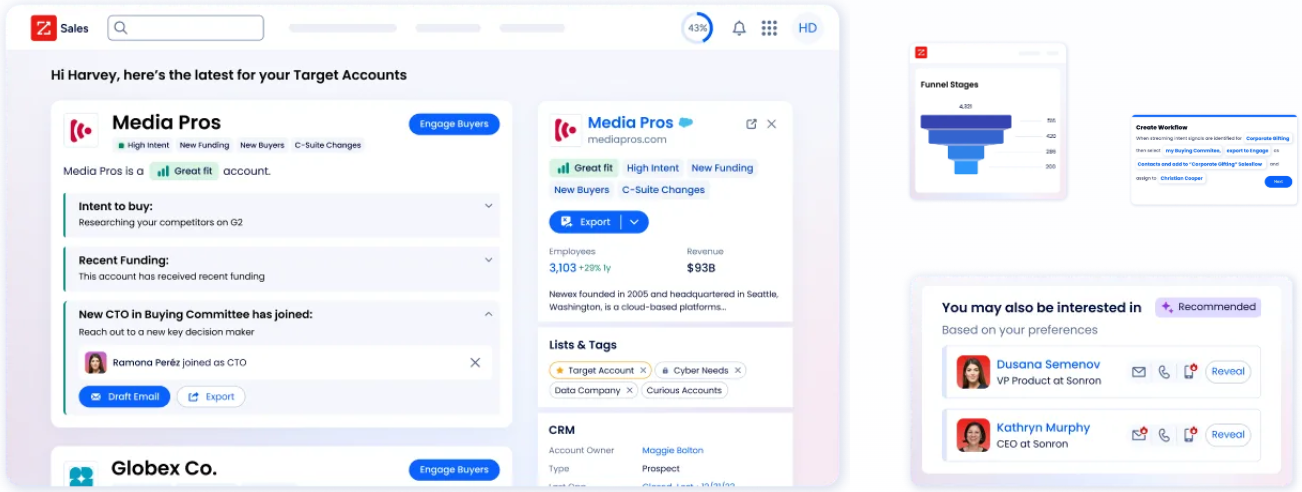
ZoomInfo is an all-in-one AI GTM platform that addresses a different problem than PandaDoc: knowing who your best prospects are, when they're ready to buy, and what message will resonate, before you ever create a proposal. PandaDoc helps you build and send documents. ZoomInfo tells you who those documents should reach. Its key features include:
B2B data: 500M contacts, 100M companies, 135M+ verified phone numbers, and 200M+ verified business email addresses with up to 95% accuracy on first-party data
GTM Context Graph: A single intelligence layer that processes 1.5B+ data points daily, combining ZoomInfo's B2B data with CRM records, conversation transcripts, and behavioral signals to capture why deals move or stall
Buyer Intent Data: Tracks buyer intent signals from 210 million IP-to-Organization pairings and 6 trillion+ new keyword-to-device pairings sourced monthly to identify accounts actively researching solutions like yours
Universal access: The same intelligence available through GTM Workspace for sellers, GTM Studio for marketers and RevOps, or APIs and MCP in any front-end
For revenue teams already using PandaDoc, ZoomInfo provides the intelligence that determines whether those proposals reach the right person at the right time with the right message.
Why Choose ZoomInfo Alongside PandaDoc for Go-to-Market Intelligence
PandaDoc excels at document creation and execution. ZoomInfo strengthens the go-to-market motion that happens before and around those documents. Here's where ZoomInfo adds capabilities that document tools cannot provide.
Comprehensive B2B Data: Know Who Should Receive Your Proposal
PandaDoc generates professional proposals and collects signatures. But it has no way to identify who your best prospects are, verify their contact information, or map the buying committee that will evaluate your proposal.
ZoomInfo operates the largest B2B data platform in the industry, spanning three dimensions: identity data (who buyers are and how to reach them), company context (100M companies with firmographics, org charts, and technographics), and dynamic signals that reveal when accounts are actively in-market. A multi-source pipeline backed by 300+ human researchers verifies this data at scale.
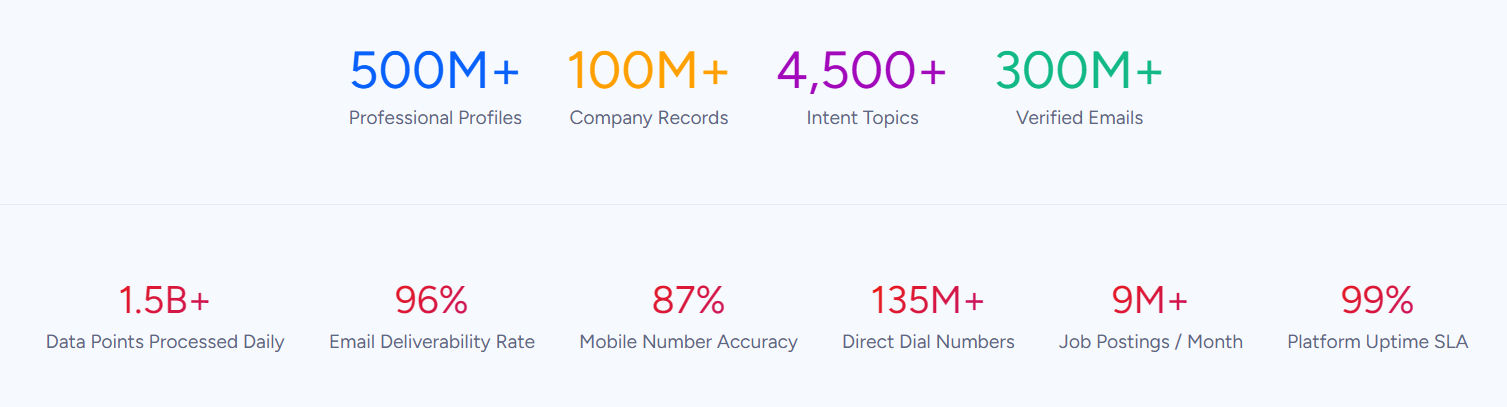
The practical impact for sales teams is direct: the email actually lands and the phone number actually rings. In a Fortune 500 competitive RFP analyzing 25 million contacts across vendors, an independent consultant concluded that "no other competitor came even close."
ZoomInfo in Action: Before building a proposal in PandaDoc, a sales rep opens ZoomInfo to identify every member of the buying committee at a target account, including direct-dial phone numbers and verified business emails. They see that the VP of Finance recently joined, the company is researching a competitor's solution, and three new VP hires suggest an expansion initiative. The rep builds a targeted proposal that addresses each stakeholder's concerns, rather than sending a generic document to a single contact and hoping it gets forwarded.
"ZoomInfo gives us the information we need to execute. We don't have to go through and spend our time digging. It's already there, so we can be three steps ahead." (Vensure)
The GTM Context Graph: Understand Why Deals Move, Not Just That They Moved
PandaDoc tracks document engagement: who opened your proposal, how long they spent on each page, and whether they signed. That's useful post-send visibility. But it cannot tell you why a deal is accelerating, why a champion went quiet, or which signal combinations predict a closed-won outcome in your market.
ZoomInfo's GTM Context Graph captures this decision context.
It combines ZoomInfo's B2B data with your CRM records, conversation intelligence from calls and meetings, email interactions, and behavioral signals into a single layer. CRMs record that a deal moved to Stage 3. Conversation intelligence transcribes what the VP of Finance said on the last call. The GTM Context Graph connects these to capture why the deal moved, then translates that context into every downstream action.
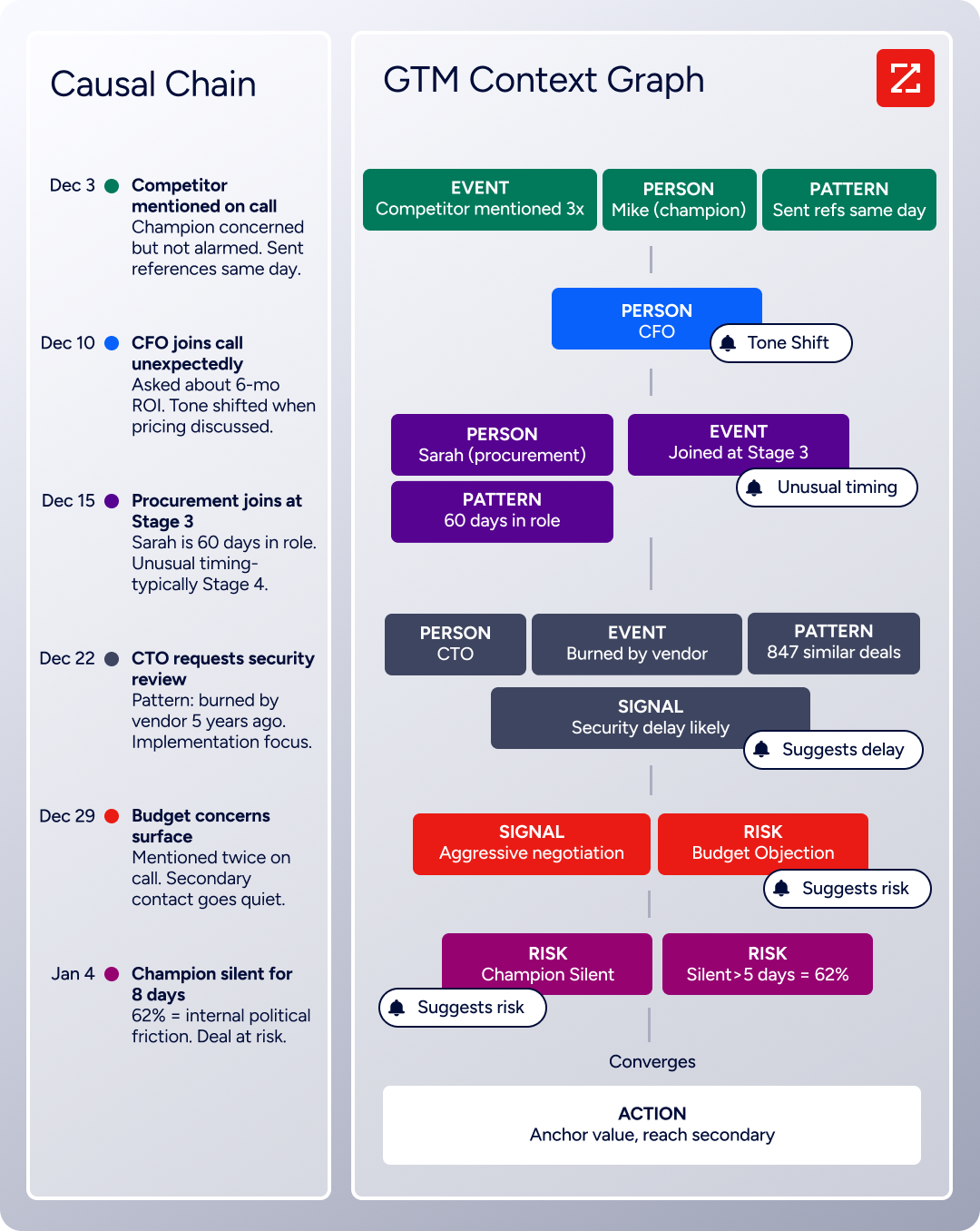
ZoomInfo in Action: A rep is about to send a renewal proposal through PandaDoc. ZoomInfo's GTM Context Graph surfaces a critical signal: the account's champion mentioned evaluating a competitor on their last call, the CFO who controls the budget just joined from a company that uses a different solution, and intent data shows the account researching alternative vendors. Instead of sending a standard renewal, the rep crafts a retention-focused proposal that addresses the competitor comparison head-on, includes relevant ROI data for the CFO's industry background, and involves the customer success team. The system identified the risk before the deal stalled.
"That combination of our internal CRM data, external signals, and AI that's given all that context has helped us craft very specific account- and persona-based messages. And people have responded to them right away." (Toby Carrington, Chief Business Officer, Seismic)
Universal Access: Intelligence in Any Tool, Any Workflow, Any AI Agent
PandaDoc integrates with CRMs like Salesforce and HubSpot to pull deal data into documents. ZoomInfo's intelligence goes further: it's accessible not just in ZoomInfo's own products, but in any tool your team uses.
GTM Workspace gives sellers a single surface where prioritized accounts, AI-drafted outreach, and deal execution converge without toggling between tools.
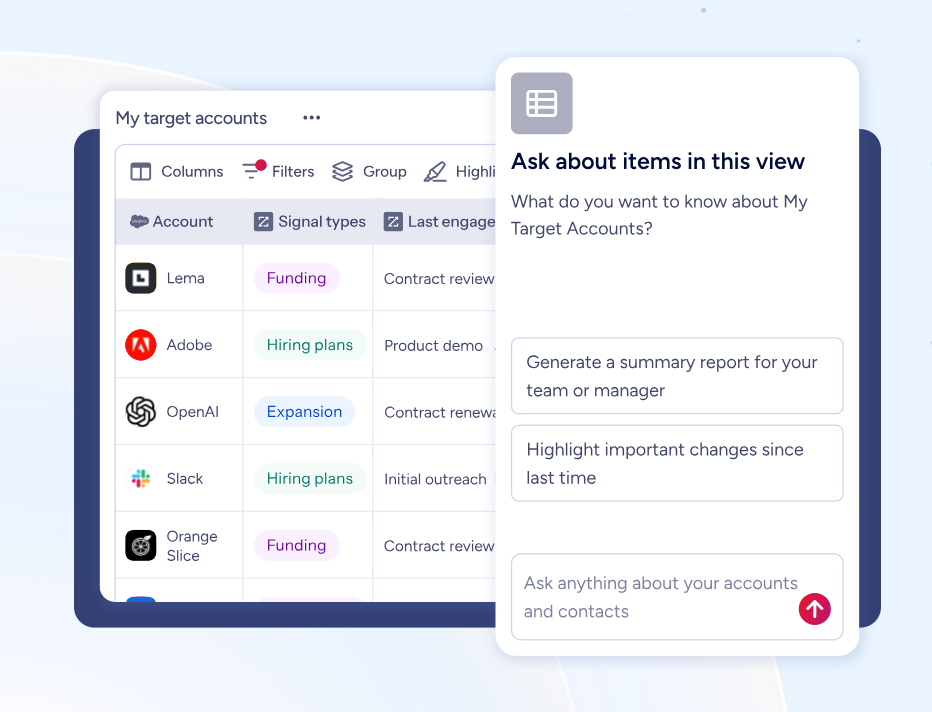
GTM Studio gives marketers and RevOps a builder where audience definition and campaign orchestration happen in natural language. For teams building beyond ZoomInfo's own products, APIs and MCP expose the same intelligence to any custom agent, internal tool, or partner platform.
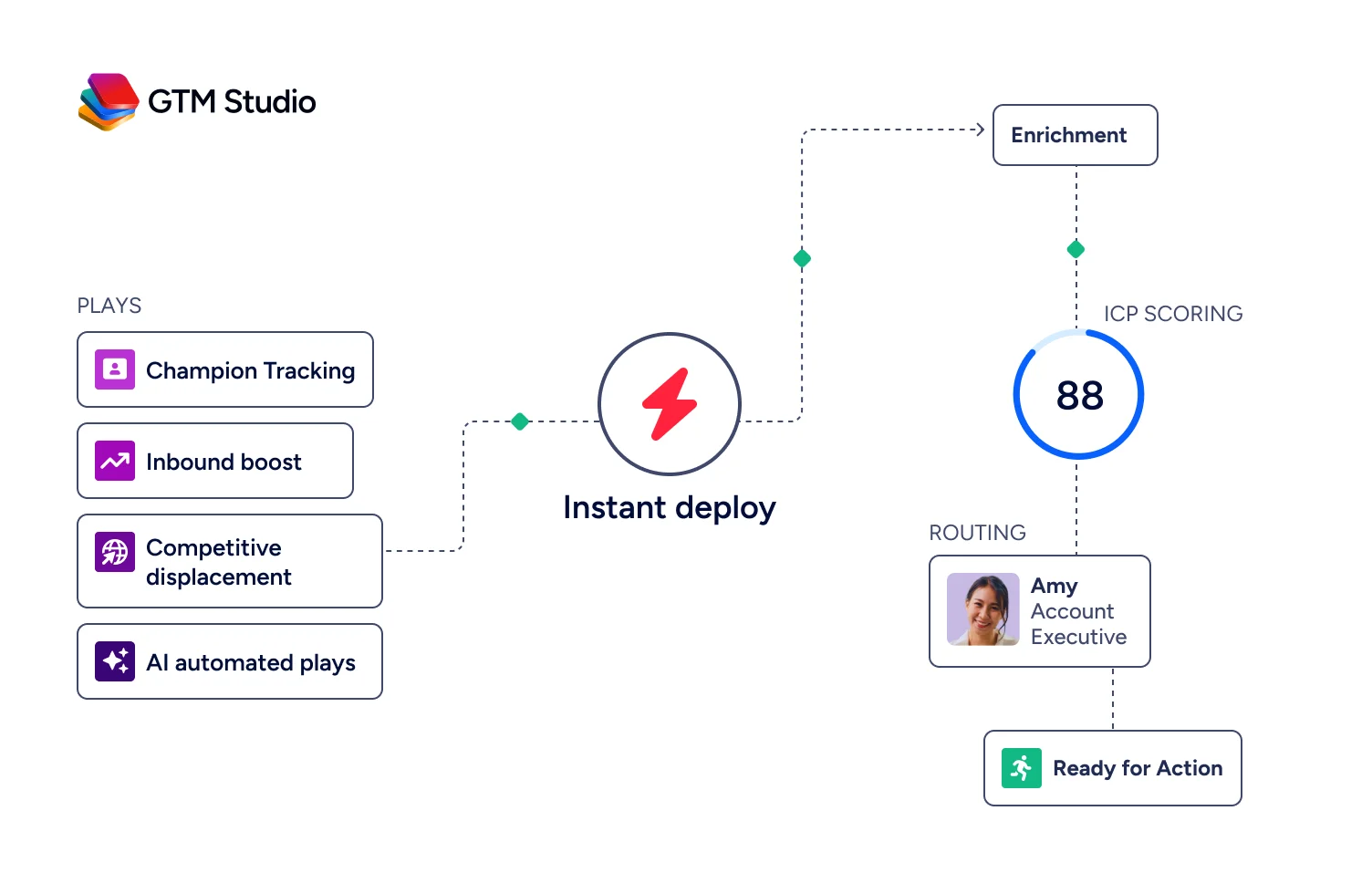
ZoomInfo in Action: A marketing team uses GTM Studio to describe an audience in plain language: "Show me mid-market SaaS companies in North America that are researching document automation solutions and have recently hired a VP of Sales." GTM Studio builds the audience, enriches it with verified contacts, and launches a multi-channel play targeting accounts whose signal combinations match the team's proven win patterns. When an account responds, it flows into GTM Workspace where a seller sees a prioritized feed with AI-drafted outreach that already addresses the concern the GTM Context Graph identified.
"ZoomInfo has literally changed the way we go to market." (Jeremy Melius, Sr. Director of Marketing Operations, Impartner)
NOTE: We considered other B2B intelligence platforms and found ZoomInfo's combination of data breadth, the GTM Context Graph, and universal access to stand apart. In a Fortune 500 competitive RFP analyzing 25 million contacts across vendors, the independent consultant concluded that "no other competitor came even close." ZoomInfo has been named a Leader in both the Gartner Magic Quadrant for ABM Platforms and the Forrester Wave for Intent Data Providers B2B, and holds 133 No. 1 rankings on G2 across Sales Intelligence, Buyer Intent, Data Quality, and related categories.
ZoomInfo Pricing
ZoomInfo uses a custom-quoted, consumption-based pricing model that scales with how your team uses the platform. The pricing structure spans three product lines.
Sales Plans ("Accelerate your entire sales process"):
Professional: Contact and company data, quick and advanced search, mobile numbers and business email, CRM integrations, Chrome extension, and AI email generation
Advanced: Adds target account prioritization, Buyer Intent signals, website visitor tracking, Champion Tracking, buying group filters, and automated outreach workflows
Enterprise: Adds real-time buyer intent, advanced company attributes, custom Intent signals, advanced workflows, and AI-generated account summaries
Marketing Plans ("Achieve more ROI"):
Marketing Demand: 75K credits, intent topics, dynamic audiences, CRM and MAP integrations, AI audience creation
ABM Lite: Adds ZoomInfo Display Network, Facebook/LinkedIn/Google advertising, AI-driven buying-group identification
ABM Enterprise: Adds 150K credits, unlimited intent topics, unlimited Display Network campaigns, AI-generated account summaries and lookalikes
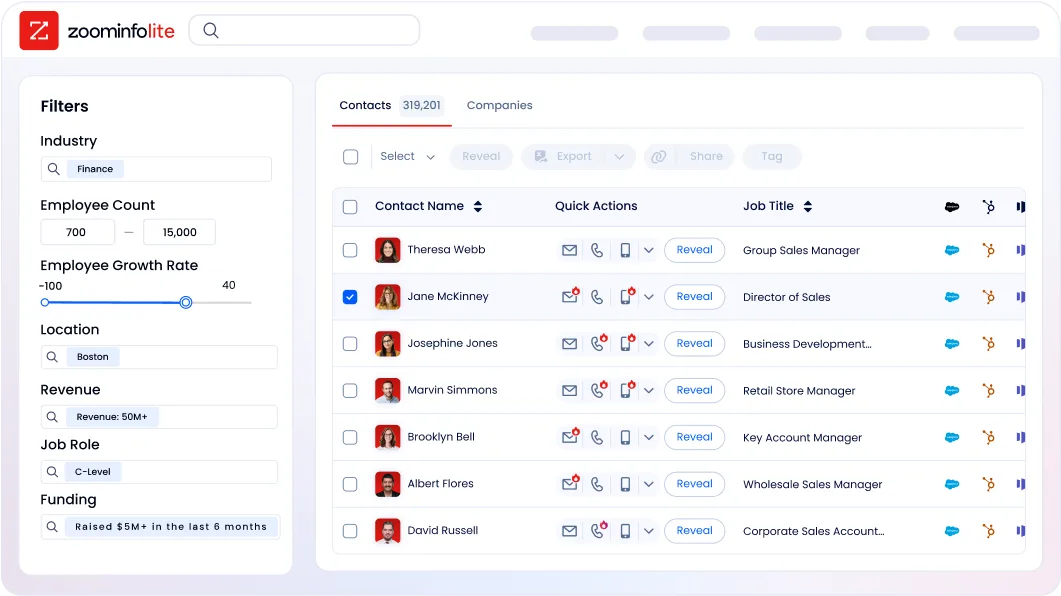
ZoomInfo also offers a permanent free tier, ZoomInfo Lite, with access to the B2B database, 10 monthly export credits, individual and company searches, and a Chrome extension. No credit card, no time limits. A 7-day free trial of the full platform is also available.
Who Should Use ZoomInfo?
Choose ZoomInfo if:
You're a B2B revenue team that sends proposals through PandaDoc (or any document tool) and needs to know who to send them to, when to engage, and what message will resonate, so every document you create is targeted rather than speculative.
You want to identify in-market buyers before they contact you, using intent signals and the GTM Context Graph to prioritize accounts whose signal combinations match your proven win patterns.
Your go-to-market motion spans sales, marketing, and RevOps, and you need a single intelligence platform that connects all three, accessible through native products, APIs, or MCP in any third-party tool your team already uses.
Want to know who your best prospects are before you open your document tool? Explore ZoomInfo and see exactly who's ready to buy, when to reach them, and what will resonate.
2. DocuSign — Best Alternative for Enterprise Compliance and Contract Lifecycle Management
Source: DocuSign
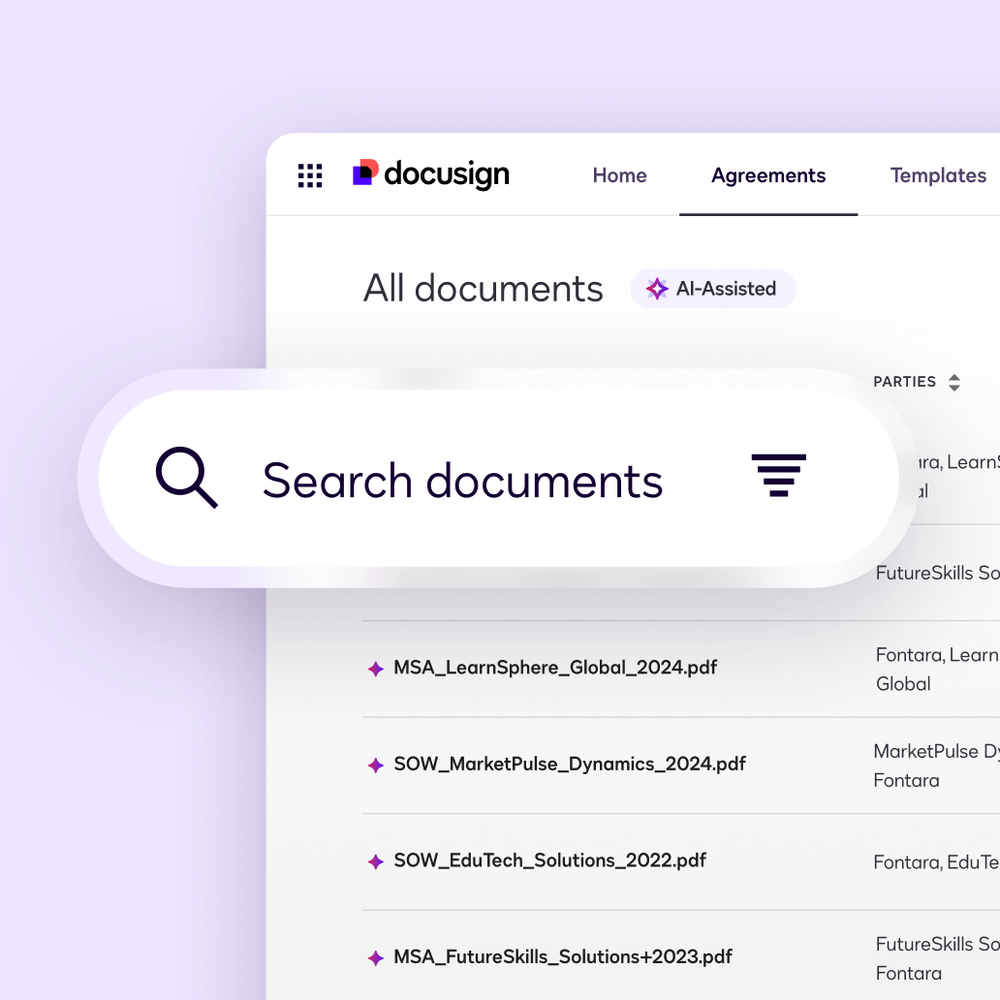
DocuSign is an electronic signature and Intelligent Agreement Management (IAM) platform that serves as the enterprise standard for compliance-sensitive, high-stakes agreements. PandaDoc covers core compliance requirements like SOC 2, HIPAA, and eIDAS. DocuSign provides the depth of compliance coverage, post-signature contract intelligence, and enterprise identity verification that regulated industries require. Its key capabilities include:
Broadest global compliance portfolio: FedRAMP Moderate authorization and DoD IL4 provisional authorization, HIPAA BAA, ISO 27001/27017/27018, SOC 2 Type II, 21 CFR Part 11, and legally enforceable eSignatures across 180+ countries
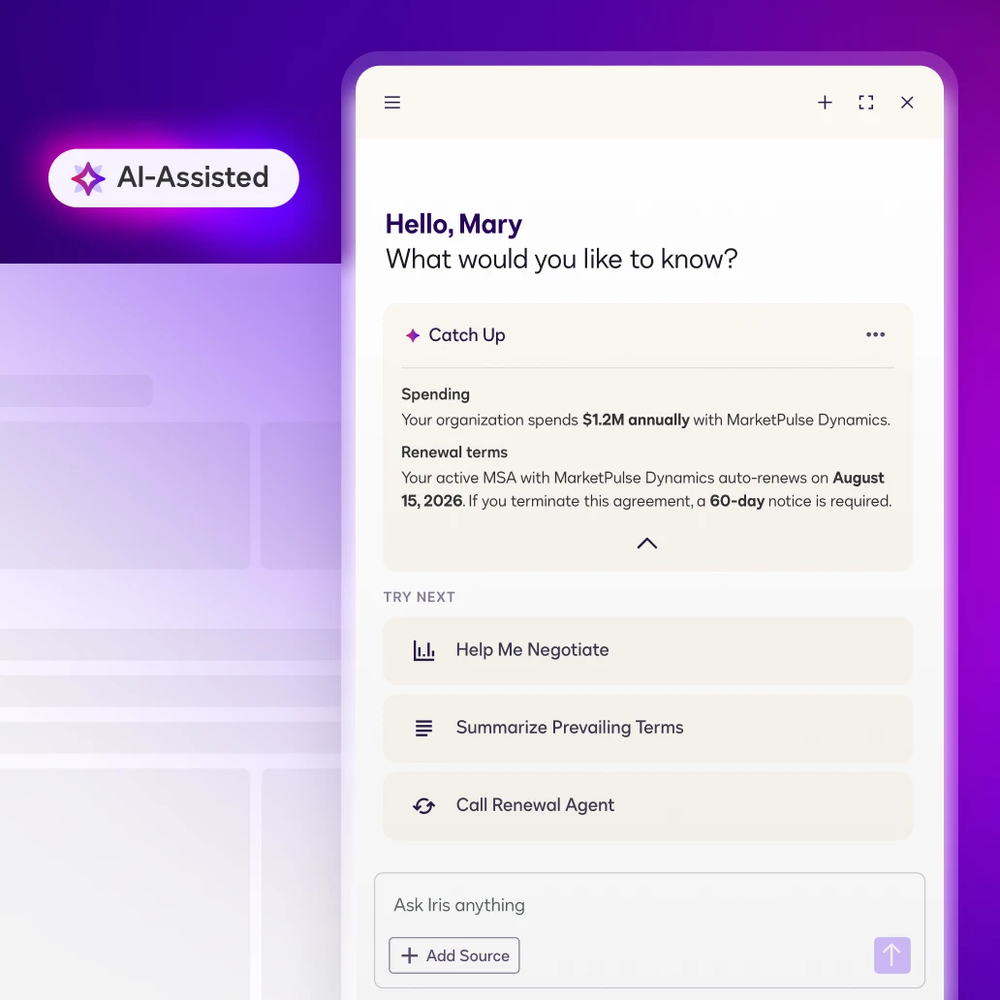
Intelligent Agreement Management with Docusign Iris AI: Full contract lifecycle from template generation through obligation tracking, renewal management, and AI clause analysis, trained on 200 million agreements
Advanced identity verification: AI-powered ID authentication, biometric liveness detection with deepfake resistance, and Risk-Based Verification that escalates security based on real-time risk signals
Native CRM integration: IAM for Sales embeds directly into Salesforce and Dynamics 365
Why Choose DocuSign Over PandaDoc for Enterprise Compliance and CLM
DocuSign stands out in the following areas:
A Compliance Portfolio That Clears Enterprise Security Review
The biggest differentiator in enterprise procurement is compliance depth. DocuSign holds FedRAMP Moderate authorization and DoD IL4 provisional authorization, both mandatory for U.S. federal agency deployments that PandaDoc cannot fulfill.
Beyond federal requirements, DocuSign's coverage spans ISO 27001:2022, ISO 27017, ISO 27018, PCI DSS v4.0, German BSI C5 Type II, Australian IRAP PROTECTED level, and Government of Canada Protected-B (full certifications). PandaDoc holds SOC 2, HIPAA, GDPR, eIDAS, and 21 CFR Part 11, which covers core requirements for most mid-market workflows.
But for multinational enterprises entering regulated U.S. federal contracts or global financial services firms needing German C5 alongside HIPAA, DocuSign's portfolio is categorically broader.
Post-Signature Contract Intelligence That Turns Executed Agreements Into Structured Data
PandaDoc's strength runs from document creation through signature collection. It doesn't provide a post-signature contract lifecycle. DocuSign CLM, integrated into the IAM platform, addresses this directly.
The Docusign Iris AI engine analyzes executed contracts to extract key obligations, flag non-standard clauses, and surface renewal dates proactively. Agreement Manager provides a centralized repository where all executed agreements land automatically.
Source: DocuSign
Enterprise Identity Verification With Risk-Based Escalation
PandaDoc offers five verification methods including KBA and government ID biometric check. DocuSign's Identify suite adds Risk-Based Verification (RBV), which adjusts verification burden based on real-time risk assessment. A routine NDA signer gets a frictionless experience, while a high-value financial instrument signer is automatically escalated to biometric liveness detection. DocuSign's liveness detection uses randomized facial movement challenges engineered to defeat deepfake spoofing, and supports IAL2 (Identity Assurance Level 2), the NIST standard required in federal and financial services procurement.
NOTE: We also evaluated Adobe Acrobat Sign as an enterprise alternative with comparable compliance credentials. While Adobe Acrobat Sign integrates well with the Adobe Document Cloud ecosystem, DocuSign holds FedRAMP Moderate Authorization (which Adobe Acrobat Sign does not), making DocuSign the decisive option for U.S. federal procurement. DocuSign also holds the largest enterprise ecosystem share and six consecutive years as a Gartner CLM Magic Quadrant Leader.
DocuSign Pricing
DocuSign uses a per-seat annual subscription model with two primary product tracks.
eSignature Plans:
Personal: $15/month (1 user, 5 envelopes/month); AI-assisted document summary, reusable templates, 1,000+ integrations
Standard: $45/user/month (up to 50 users, 100 envelopes/user/year); adds team templates, branding, Slack/Teams integration
Business Pro: $65/user/month; adds web forms, payment collection, bulk send, PowerForms
Enhanced: Contact sales; required for SSO, native Salesforce/Dynamics integration, FedRAMP, HIPAA BAA, 21 CFR Part 11
IAM Plans:
IAM Starter: $45/user/month; eSignature Standard features plus Iris AI search and Agreement Manager
IAM Standard: $50/user/month (3+ users); unlimited envelopes via web app, 3 Workflows included
IAM Professional: $80/user/month (3+ users); 10 Workflows, eSignature Business Pro features
IAM Enterprise: Contact sales; adds AI-Assisted Review and redlining, multi-brand email, signing groups
Important note: the compliance and CRM depth that differentiates DocuSign from PandaDoc (FedRAMP, HIPAA BAA, native Salesforce integration, SSO) is available only on Enhanced/Enterprise plans that require a sales conversation.
Who Should Use DocuSign?
Choose DocuSign if:
Your organization operates in a regulated industry where FedRAMP, HIPAA BAA, 21 CFR Part 11, or multinational eIDAS QES compliance are mandatory procurement gates
You need post-signature contract intelligence at scale: obligation tracking, renewal alerts, AI clause extraction, and a searchable agreement repository
Your revenue team's primary workflow lives inside Salesforce or Dynamics 365, and you need agreement generation and approval routing to happen natively within the CRM
3. Proposify — Best Alternative for Revenue-Team Proposal Governance and Close-Rate Intelligence
Source: Proposify
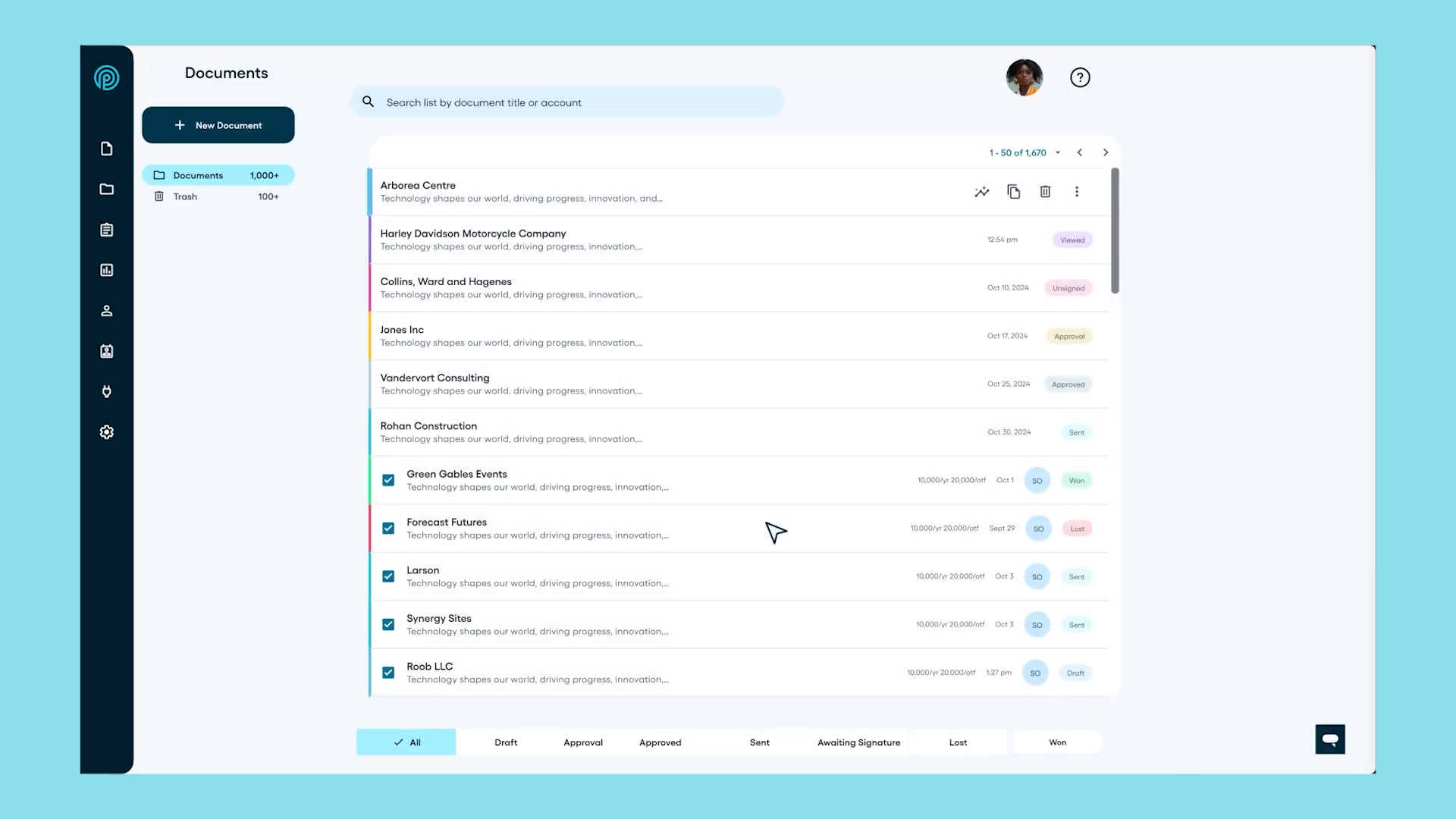
Proposify is a proposal management platform built around the closing moment in the B2B sales cycle. Where PandaDoc has evolved into a broad document automation platform spanning HR, legal, and general contract workflows, Proposify stays focused on giving sales leaders the control, visibility, and data they need to build a repeatable, measurable proposal process. Its key capabilities include:
Content locking with deal-threshold approval workflows
Per-section proposal analytics with named-stakeholder timeline views
CRM sync with HubSpot, Salesforce, Pipedrive, and Zoho CRM
Team performance dashboard with per-rep proposal volume, close rates, and engagement scores
Interactive pricing tables with buyer-selectable quantities and optional line items
Multi-workspace support for franchise and distributed-team environments
Why Choose Proposify Over PandaDoc for Revenue-Team Proposal Governance
Proposify stands out in the following areas:
Deal-Economics-Aware Approval Workflows
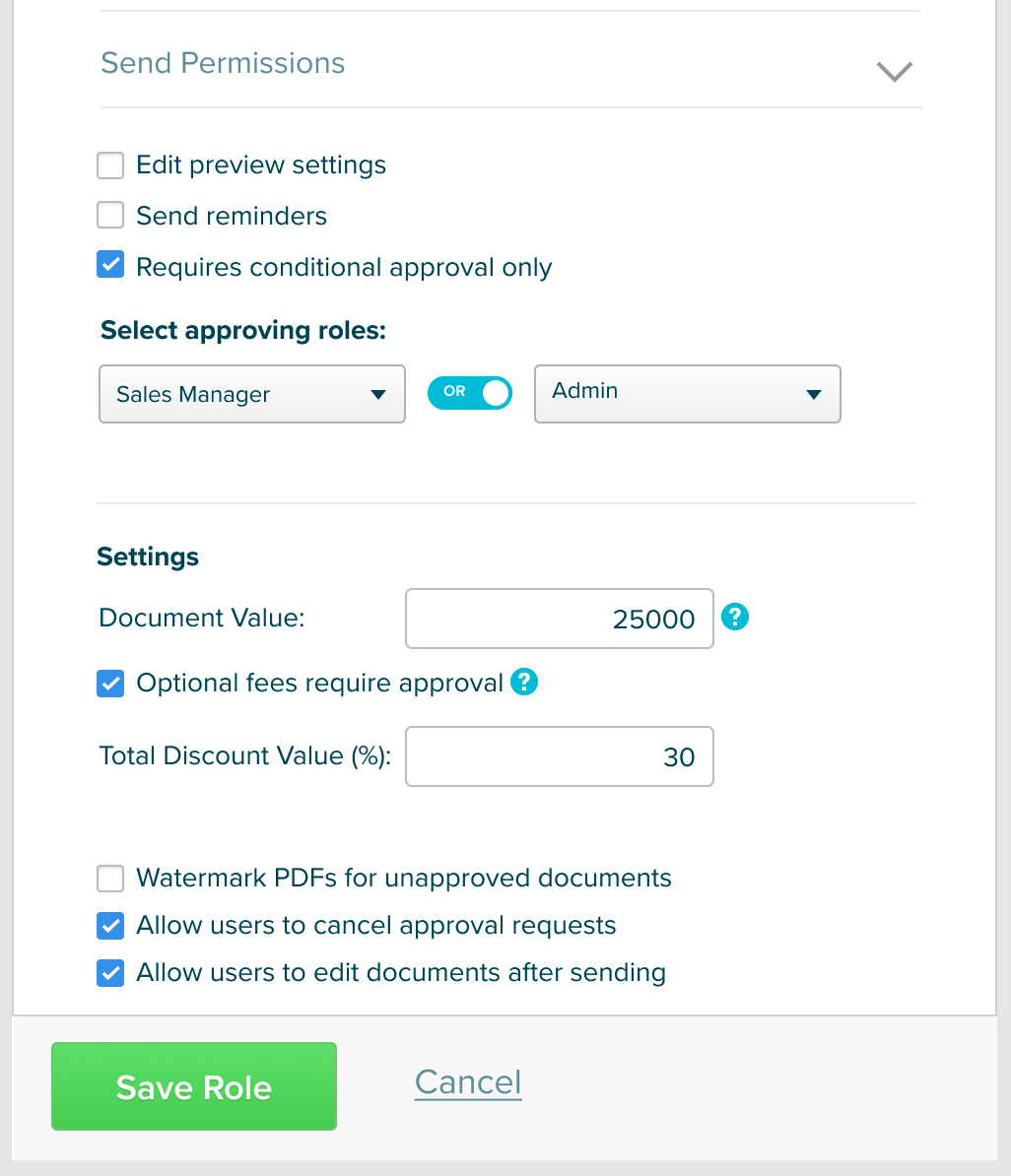
PandaDoc has conditional approval workflows on Business plans and above, but they focus on document status rather than deal economics.
Proposify's conditional approval engine ties locking logic directly to the financial parameters of the deal: a $15,000 proposal routes directly to the rep, while a $150,000 proposal with a 30% discount automatically routes to a sales manager before it leaves the platform. This directly addresses the scenario that most burns revenue operations teams: a field rep who applies a discretionary discount on a large deal that never gets reviewed.
Source: Proposify
Per-Section Analytics Built for Sales Coaching
PandaDoc provides page-by-page view time and audit trails. Proposify's section-level engagement tracking serves a different purpose: coaching underperforming reps. Proposify tracks how long each named recipient spent on every section, how many times they returned to specific pages, and whether the document was forwarded to internal stakeholders. The State of Proposals 2026 report, drawn from 742,137 real proposals representing over $3.06B in sales, produced a counterintuitive finding: winning proposals are viewed an average of 2.5 times, while unsuccessful proposals average 3.5 views. The aggregate manager dashboard surfaces per-rep proposal volume, close rates, and engagement scores for team-level coaching.
Interactive Pricing That Reduces Pre-Negotiation Rejection
Both PandaDoc and Proposify offer interactive pricing tables. Proposify frames its interactive pricing around buyer agency during review: prospects can deselect scope they can't afford, increase quantities, or choose between tiers, all without forcing the seller to recreate a document.
NOTE: We also evaluated GetAccept and Better Proposals. GetAccept excels at Digital Sales Room experiences with video messaging and deal-room mutual action plans. Better Proposals is a leaner, lower-cost option for smaller teams. Proposify offers the most concentrated focus on proposal governance and revenue-operations analytics for growing B2B sales organizations.
Proposify Pricing
Proposify uses a per-user, per-month model with the primary constraint being monthly document sends.
Basic: $29/user/month (monthly); approximately 10 document sends per month, legally binding e-signatures, document tracking. Excludes CRM integrations, per-section analytics, and approval workflows.
Team: $49/user/month (quarterly); unlimited document sends, per-section analytics, CRM integrations (HubSpot, Pipedrive, Zoho; Salesforce on Business), phone and Zoom support.
Business: Starts at $3,900/year; everything in Team plus user roles, conditional approval workflows, SSO, API access, multiple workspaces, and a dedicated Customer Success Manager. Salesforce managed package is an additional $9/user/month add-on.
Enterprise: Custom pricing and custom send volumes.
All plans include a 14-day free trial.
Who Should Use Proposify?
Choose Proposify if:
Your revenue operations team needs to enforce pricing and legal consistency across a distributed sales team, where rogue discounting or off-brand proposals are a real margin problem
You want section-level buyer engagement data and per-rep proposal performance reporting that feeds directly into sales coaching
Your company operates a franchise, multi-location, or distributed team structure that needs centralized proposal governance across regions
4. Better Proposals — Best Alternative for Small Businesses Needing Proposals, eSignatures, and Payments Without Enterprise Pricing
Source: Better Proposals
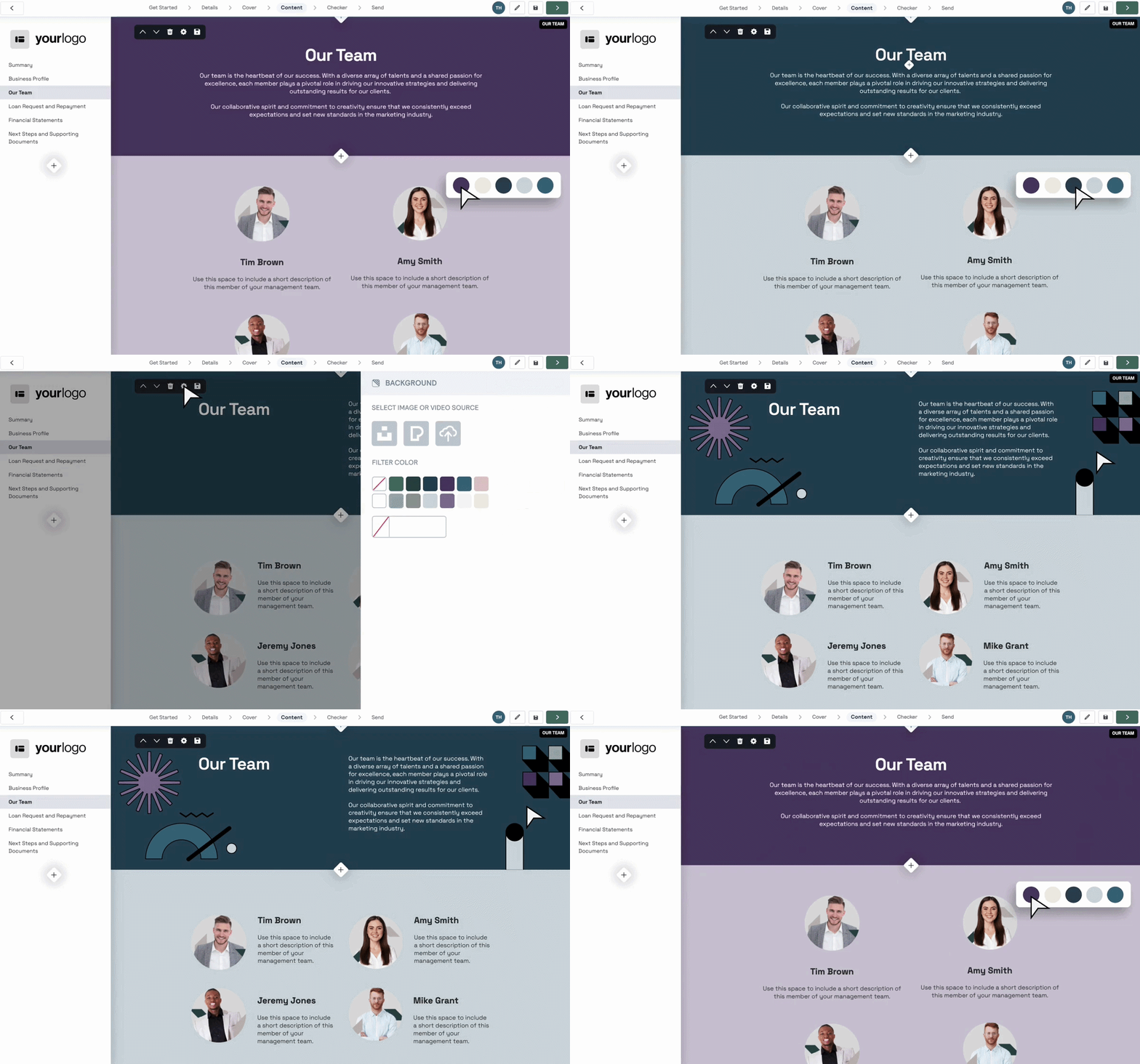
Better Proposals is a bootstrapped, independent proposal platform that covers the full quote-to-cash workflow at entry-level pricing, a fraction of what PandaDoc charges for comparable features. Its key capabilities include:
260+ professionally designed templates across proposals, contracts, quotes, and SOWs
Built-in eSignatures with legally binding acceptance blocks and full audit trail
Integrated payment collection via Stripe, GoCardless, and PayPal at the moment of signature
Live chat embed directly inside the proposal page (compatible with 16 tools including Drift, Intercom, and HubSpot Live Chat)
Nudge follow-up module with configurable time-sequenced email campaigns and automatic proposal expiry
Real-time per-page proposal tracking with section-level engagement data
Why Choose Better Proposals Over PandaDoc for SMB Proposal Workflows
Better Proposals stands out in the following areas:
Entry-Level Pricing Without a Business-Tier Budget
PandaDoc's Business plan, where custom quotes, CRM integrations, and approval workflows unlock, sits at $49/seat/month on annual billing. Better Proposals' Starter plan, which includes digital signatures, integrated payment collection, interactive pricing tables, and section-level tracking, costs $13/user/month on annual billing. The Premium tier at $21/user/month unlocks CRM integrations with 16 native connectors (including HubSpot, Salesforce, Pipedrive, and Zoho), API access, and auto-expiry dates, all features PandaDoc gates to its $49/seat Business plan.
Quote-to-Cash in a Single Browser Session
Better Proposals collapses proposal review, signing, and payment into one uninterrupted client session. A client clicks the proposal link, reads it in a browser, signs, and immediately enters a branded onboarding wizard that collects payment via Stripe, GoCardless, or PayPal before they close the tab.

Source: Better Proposals
76% of proposals sent through Better Proposals were paid through the same platform in 2022, with an average payment time of just over 5 hours after signing. The single-session flow also supports recurring billing and Calendly-integrated kick-off call booking.
Live Chat Embedded Inside the Proposal
While the client reads the proposal, Better Proposals surfaces a live chat window inside the proposal page itself. The client types a question without leaving the document, and the seller responds through whichever chat tool they already use. Better Proposals' data shows that live chat increases proposal conversion by 21%. PandaDoc does not embed live chat into its proposal delivery experience.
24/7 Human Support With a Two-Minute Response Time
Better Proposals maintains an explicit ban on AI-assisted customer support. Every response comes from a human with a stated average response time of 2 minutes via chat and email, available 24 hours a day including weekends. PandaDoc gates its fastest support tier to paid Premium Support add-ons and Enterprise plans.
NOTE: We also evaluated Qwilr, which targets SMBs with professional web-based proposal delivery and competitive entry-level pricing. Qwilr excels at interactive proposal pages, but Better Proposals offers a lower entry price at the Starter tier, includes direct payment collection and live chat that Qwilr does not, and ships a built-in onboarding flow covering the full post-signature client handoff.
Better Proposals Pricing
Starter: $19/user/month; 1 user seat, 10-document monthly send limit, includes digital signatures, payment collection, interactive pricing tables, and real-time tracking. CRM integrations and API are not included.
Premium: $29/user/month; unlimited users, 50-document monthly limit, adds custom domain, 16 native CRM integrations, API and Zapier access, and automatic document expiry.
Enterprise: $49/user/month; unlimited users and sends, adds content locking, simultaneous editing, inline commenting, and manager approvals.
Nudge add-on: $10/user/month on any plan for the follow-up campaign and daily action queue module.
All plans include a 14-day free trial, no credit card required.
Who Should Use Better Proposals?
Choose Better Proposals if:
Your team is a freelancer, independent consultant, or small agency that sends proposals as a core part of doing business and needs a professional alternative to PDF attachments without paying for enterprise document infrastructure
You want to collect payment at the moment of signature, collapsing proposal, sign, and invoice into a single browser session
Your follow-up discipline is inconsistent and you want structured, engagement-informed email campaigns that surface the right moment to reach out without requiring a CRM
5. Juro — Best Alternative for Native Contract Redlining and AI-Powered Contract Intelligence
Source: Juro
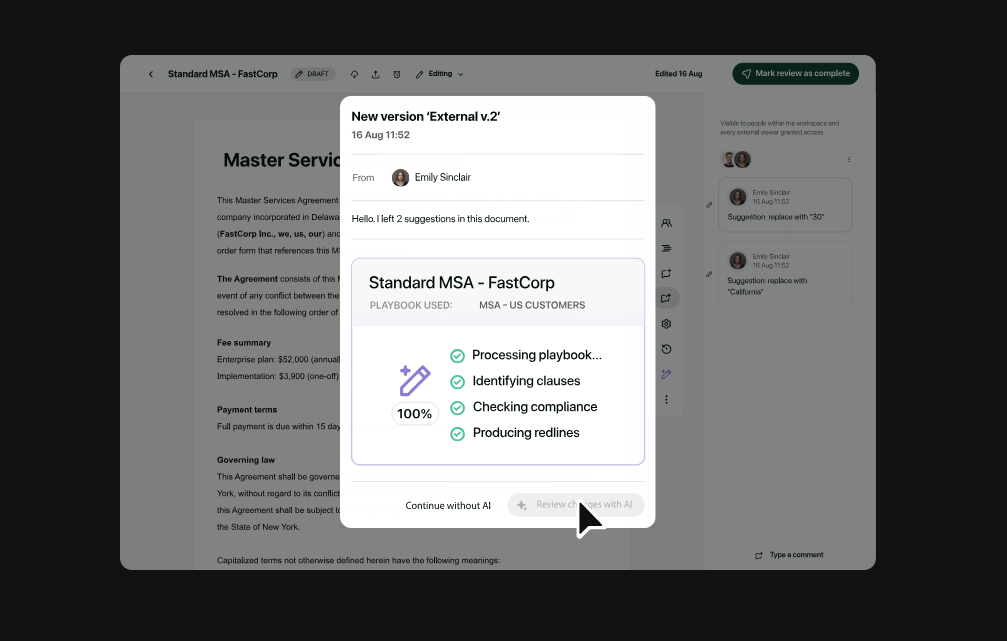
Juro is an AI-native contract lifecycle management platform that replaces PandaDoc's Word-export-and-reimport negotiation cycle with a browser-native editor where both parties can redline, comment, and negotiate directly. Its key capabilities include:
AI Review Agent that analyzes inbound counterparty contracts against your defined legal positions and applies suggested or automated redlines
Browser-native collaborative editor with real-time tracked changes, where both parties mark up contracts without Word export
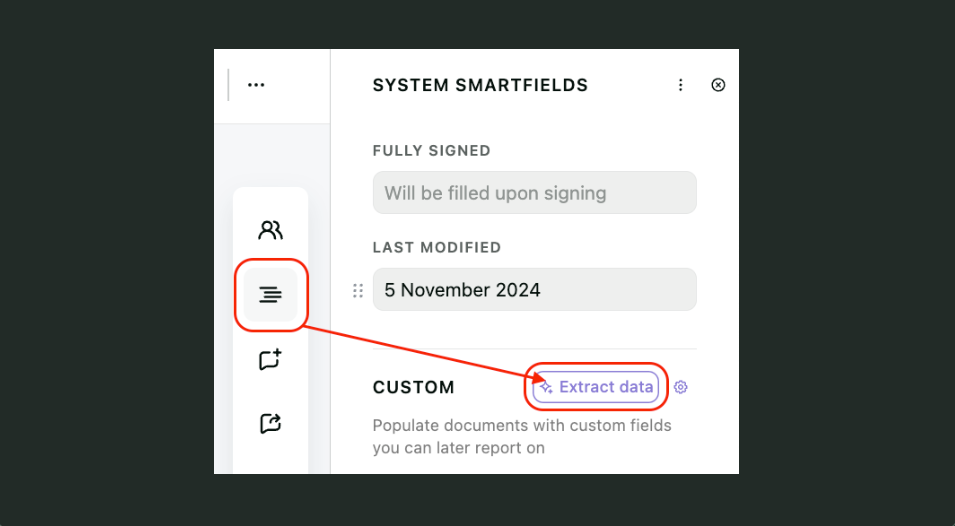
AI data extraction that captures renewal dates, payment terms, and liability caps from signed contracts into a searchable repository
Conditional approval routing based on contract type, deal value, or counterparty risk tier
Unlimited users on all plans with volume-based pricing (not per seat)
Why Choose Juro Over PandaDoc for Native Contract Redlining and CLM
Juro stands out in the following areas:
Native Redlining Without the Word Export Cycle
PandaDoc's most cited limitation on G2 and Capterra is that negotiating contract terms requires exporting to Word, exchanging DOCX attachments, reconciling tracked changes, and reimporting. This destroys version control, degrades formatting, and creates audit trail gaps. Juro's browser-native editor is the negotiation surface itself: both parties comment, suggest edits, and apply tracked changes directly within the same live document. Unresolved suggestions programmatically block the signing flow, preventing execution of a contested draft.
AI Review Agent That Enforces Legal Positions Without Manual Review
PandaDoc includes AI writing assistance but does not analyze inbound contracts or compare them against legal positions. Juro's AI Intake & Review module works on a playbook model: legal defines positions once (liability caps, governing law, SLA thresholds), and the AI agent enforces those positions every time a contract arrives. The underlying AI uses a multi-model pipeline: Gemini 2.5 Pro for playbook interpretation and Claude Sonnet 4.5 for contract analysis. This covers both first-party paper and third-party paper received from outside via the Juro Word plug-in.
Post-Signature Contract Intelligence at Production Scale
PandaDoc launched AI data extraction for its contract repository in beta. Juro's Intelligent Repository is production-grade.
Its AI Extract module pulls contract metadata from signed contracts into structured, queryable fields. Bulk extraction processes up to 300 documents in a single batch. Operator, launched May 2026, lets any team member query the full contract estate in plain language: "Show all supplier contracts with auto-renewals this quarter."
Source: Juro
NOTE: We also evaluated Ironclad and DocuSign CLM. Ironclad excels at Fortune 500-scale contract operations, and DocuSign CLM works well for organizations already in the DocuSign ecosystem. Juro offers the most accessible combination of AI-native redlining and mid-market pricing for teams whose primary pain with PandaDoc is the absence of native contract negotiation.
Juro Pricing
Juro prices by contract volume, not per seat. All plans include unlimited users, workflows, and templates.
Essentials: Unlimited users, workflows, and templates; Slack, Email, Google Drive, and Microsoft Word integrations. Custom pricing based on contract volume.
Growth: Everything in Essentials plus HubSpot, DocuSign, Greenhouse, Zapier, and Ashby integrations. Custom pricing.
Enterprise: Everything in Growth plus Salesforce, REST API, and Webhooks. Custom pricing.
Juro's per-volume model favors growing teams where per-seat CLM costs would otherwise balloon as commercial, HR, and procurement users join. The platform is best suited for organizations processing 10+ contracts per month. A $1 evaluation program is available in place of a traditional free trial.
Who Should Use Juro?
Choose Juro if:
Your team regularly receives counterparty paper that requires review, redlining, and negotiation before signature, and you're currently handling this via Word attachments and email
You have a lean legal team overwhelmed by routine contract requests and want business teams to self-serve on pre-approved templates while legal retains AI-enforced guardrails
You need post-signature contract intelligence with searchable renewal dates, liability caps, and payment terms extracted automatically by AI
Your company is in the 50 to 2,000 employee range and has outgrown Word-and-email contracting without yet needing the configurability of enterprise CLMs like Ironclad or Icertis
6. Qwilr — Best Alternative for Interactive, Web-Native Proposal Experiences
Source: Qwilr
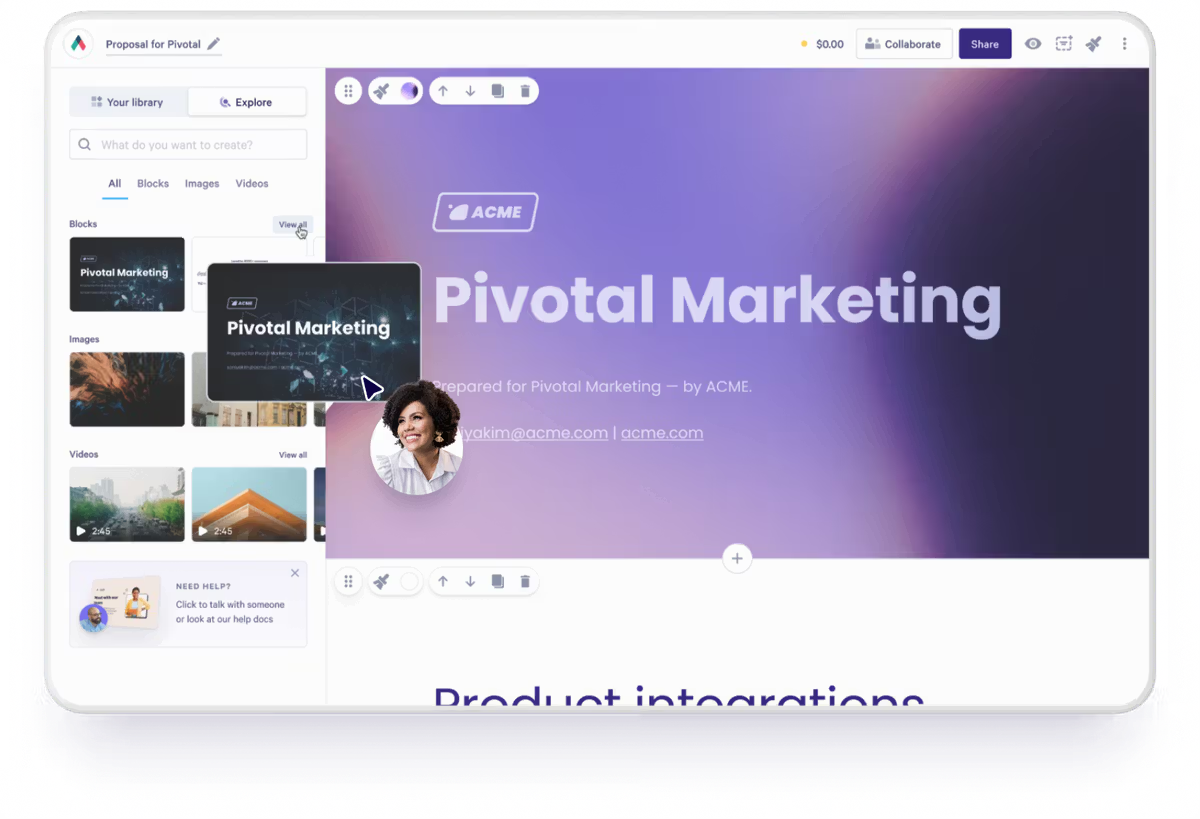
Qwilr replaces the static document format with an interactive web page, a different approach to how buyers receive and experience proposals. Its key capabilities include:
Web-native proposals that live at a persistent URL with embedded videos, ROI calculators, interactive pricing tables, and calendar booking links
Section-level engagement analytics tracking scroll depth, time per content block, pricing table hover behavior, and repeat visits
Dynamic content personalization that swaps content blocks based on prospect industry, deal size, or company segment
QwilrPay embedded payment with a 0.09% transaction fee (Business plan)
Active Viewers real-time presence showing which stakeholders are viewing the proposal at any given moment
Bidirectional CRM sync for HubSpot, Pipedrive, and Zoho CRM (Business), and Salesforce (Enterprise)
Why Choose Qwilr Over PandaDoc for Buyer Experience-Driven Proposals
Qwilr stands out in the following areas:
The Proposal Format Itself Is the Differentiator
PandaDoc builds proposals within a rich document editor that produces polished outputs, but they remain documents: static artifacts that, once sent, require recreating and re-sending for edits. Qwilr takes a different approach. Every proposal is a live URL that renders as an interactive web page. Edits made after sending appear immediately at the same link, with no resending and no version confusion. The format also enables interactions impossible in static documents: embedded video autoplay, live ROI calculators buyers configure themselves, and interactive pricing tables where they select packages and watch totals update in real time.
Content-Block-Level Buyer Engagement Data
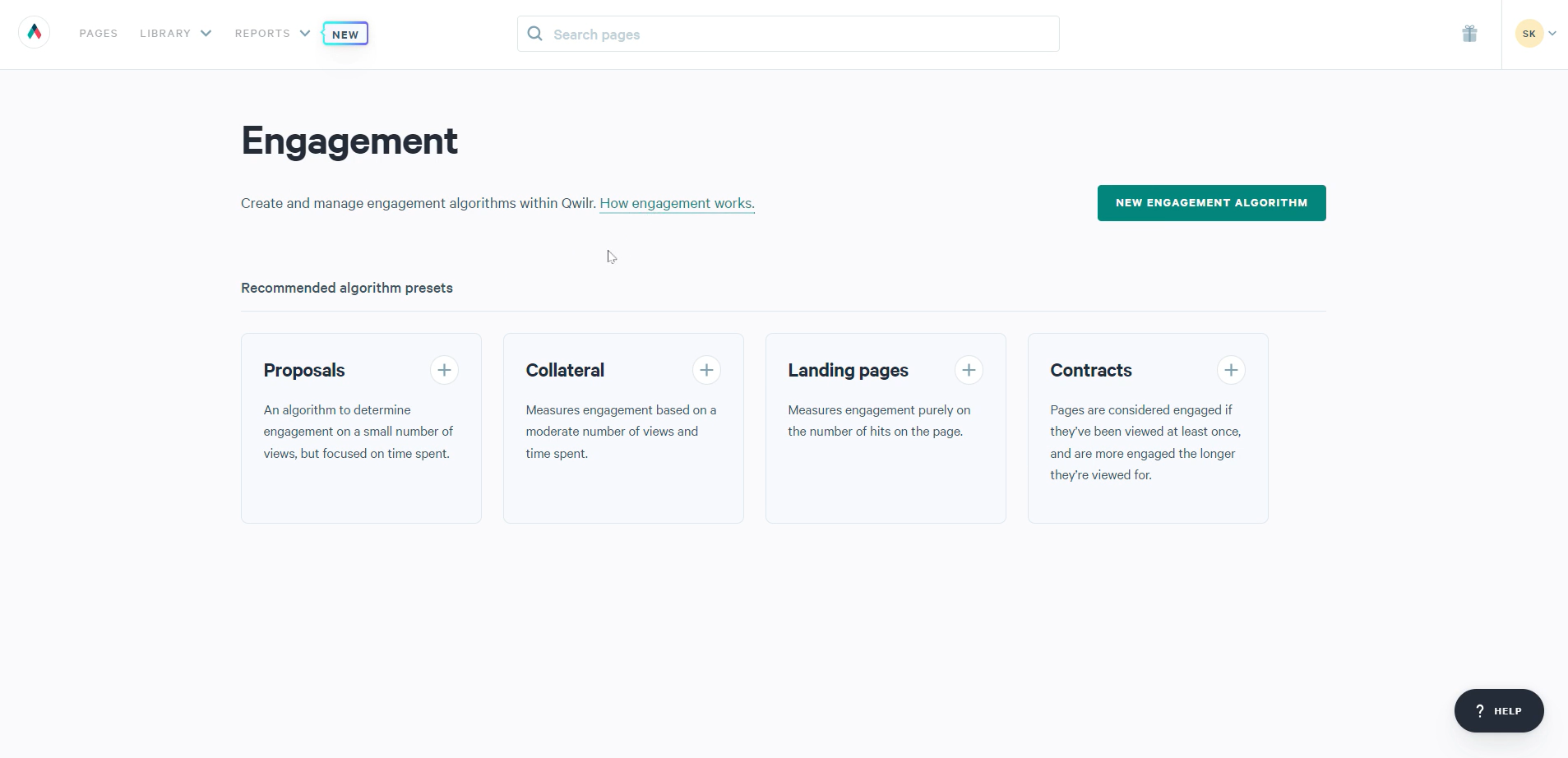
PandaDoc tracks page-by-page view time. Because Qwilr proposals are web pages, the platform instruments every individual content block: reps see how long a buyer spent on the pricing section versus the case study, whether they hovered over specific line items, and which accordion sections they opened.
Qwilr's Engagement Algorithm converts behavioral data into configurable scoring with Slack or email alerts that fire when a proposal crosses defined engagement thresholds. As Qwilr puts it: "No other proposal software gives you the level of detail Qwilr offers."
Source: Qwilr
Lower Price Point With Features PandaDoc Charges More For
PandaDoc's Business plan is $49/user/month on annual billing. Qwilr's Business plan is $35/user/month, 29% lower. Several capabilities Qwilr bundles into Business cost extra or require plan upgrades in PandaDoc: in-proposal payment collection, section-level buyer engagement scoring, and interactive pricing with buyer-configurable package selection. Qwilr cites G2 data showing it delivers ROI over two months faster than PandaDoc and reports a 20%+ increase in win rates and 75% reduction in proposal creation time across its customer base.
NOTE: We also evaluated GetAccept and Proposify. GetAccept excels at Digital Sales Room workflows with video messaging and deal-room action plans. Proposify offers strong template libraries with structured approval workflows. Qwilr offers the most differentiated proposal format for teams seeking to replace the static document experience.
Qwilr Pricing
Business: $35/user/month (annual) or $39/user/month (monthly); full editor, e-sign, QwilrPay (0.09% transaction fee), interactive quotes, page analytics, custom domain, CRM integrations with HubSpot, Pipedrive, and Zoho CRM. 120-day analytics data history. 14-day free trial, no credit card required.
Enterprise: $59/user/month (annual only, 10-user minimum); all Business features plus Salesforce integration, team permissions, identity verification, custom branding, QwilrPay at 0.05%, and 5-year analytics data history. Dedicated Customer Success Manager.
Onboarding packages (Essentials $999, Accelerator $1,499, White Glove $2,499) are available as paid add-ons. Salesforce integration is gated to the Enterprise plan, which Salesforce-centric teams should factor into their cost analysis.
Who Should Use Qwilr?
Choose Qwilr if:
Your sales team sends PDF or document-based proposals and loses deals because the proposal experience feels generic relative to what you're selling
You want to know which section of a proposal a buyer engaged with before your follow-up call, with real-time data across the full buying committee
Your primary CRM is HubSpot, Pipedrive, or Zoho and you want full proposal automation with bidirectional deal sync without the Salesforce Enterprise tier cost jump
Your team is in software, marketing agencies, or professional services where the visual quality of the proposal is itself a trust signal
7. DocuSeal — Best Alternative for Cost-Transparent, Self-Hostable eSignatures With Data Sovereignty
Source: DocuSeal
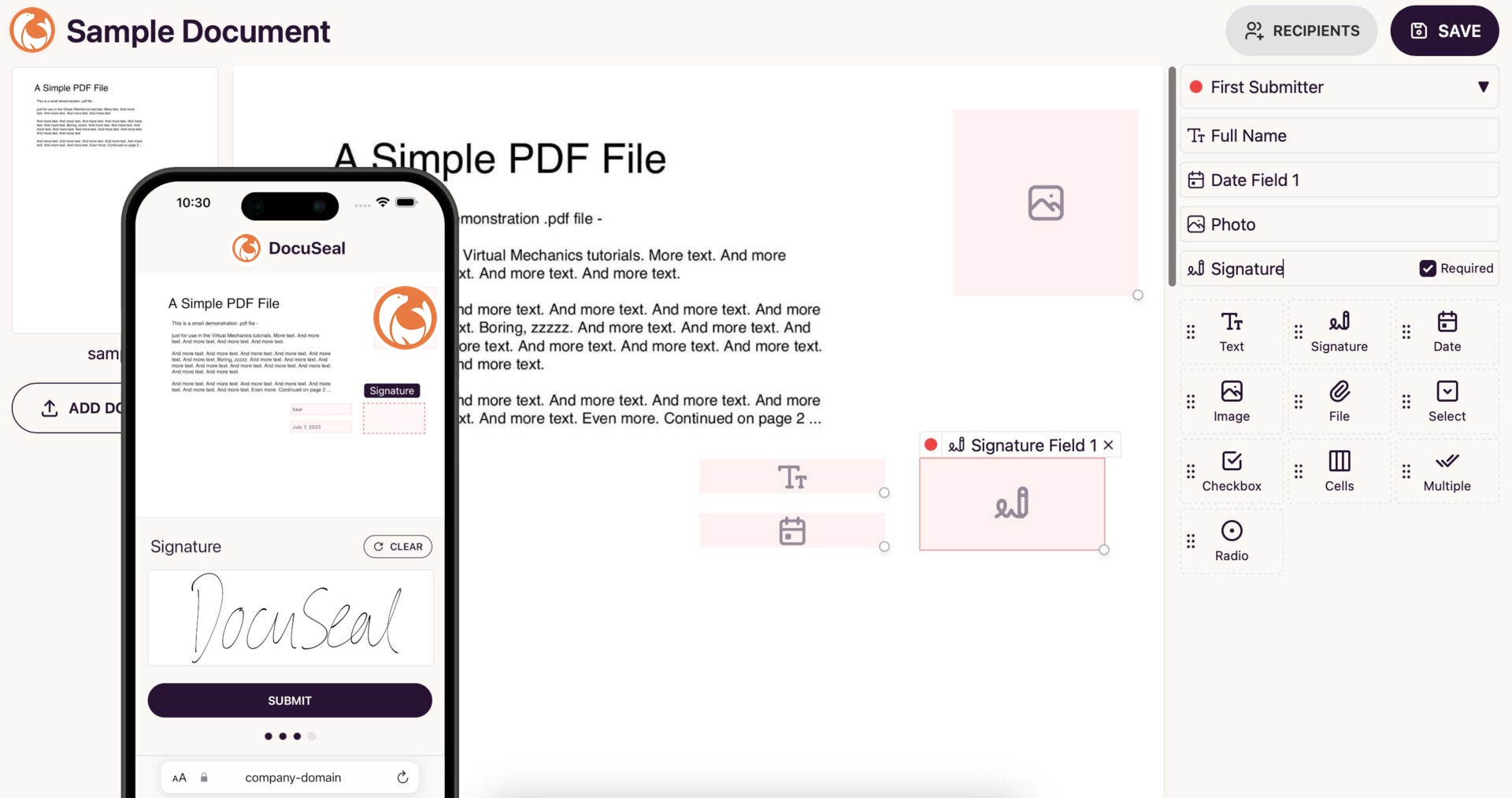
DocuSeal is an open-source eSignature platform built for organizations that cannot justify per-seat pricing at scale or cannot route signed documents through a third-party cloud. It serves 184,800+ businesses including Intuit, Lego, Capgemini, and Cambridge University. Its key capabilities include:
Permanently free Basic cloud tier with 10 signing requests per month and no trial expiration
Self-hosted open-source deployment via Docker with full data sovereignty through your own AWS S3, Google Cloud, or Azure Blob Storage
SOC 2 Type II, ISO 27001, and HIPAA compliance available across all plans, legally binding under ESIGN, UETA, and eIDAS
Embeddable signing components for React, Vue, Angular, Next.js, iOS, Android, React Native, and Flutter
REST API with white-label capability and $0.20 per completed document on Pro plans
MCP server enabling AI agents to trigger document signing workflows through natural language
Why Choose DocuSeal Over PandaDoc for Cost-Transparent eSignature
DocuSeal stands out in the following areas:
Pricing That Favors Both Ends of the Volume Spectrum
PandaDoc's Free plan caps at 60 documents per year with a two-recipient limit and no integrations. The Starter plan at $19/user/month carries overage fees of $2.00 per additional document on annual billing.
DocuSeal's free Basic cloud plan includes 10 signing requests per month with indefinite retention, unlimited templates, and no trial clock. The self-hosted Community edition is completely unlimited: an organization running DocuSeal on its own server processes as many documents as needed at zero marginal cost.
Source: DocuSeal
Self-Hosting and Data Sovereignty That PandaDoc Cannot Match
PandaDoc is cloud-only. US or EU data residency is available on Enterprise plans, but there is no self-hosted option. DocuSeal deploys via Docker in under three minutes, with signed documents stored in the operator's own AWS S3, Google Cloud Storage, or Azure Blob Storage, completely outside DocuSeal's infrastructure. DocuSeal also operates a GDPR-compliant EU Cloud at docuseal.eu with servers in Ireland.
Developer-First API for In-Product Integration
PandaDoc's API assumes a dashboard-centric workflow. DocuSeal provides native embedded signing components for eight frameworks and platforms. The <docuseal-form> web component renders the entire signing UI inside the host application with no redirect. White-labeling includes custom logo, background color, CSS overrides, and full UI text string replacement. The GitHub repository has accumulated 17,000+ stars, a signal of developer trust uncommon among commercial eSignature vendors.
NOTE: We also evaluated Verdocs (25 free production envelopes per month with full API access) and Signaturely (3 free documents per month). DocuSeal offers the only free alternative that combines unlimited self-hosted deployment, an open-source codebase for independent auditability, and SOC 2 Type II plus ISO 27001 certification without forcing a trade-off between cost and compliance.
DocuSeal Pricing
Cloud Plans:
Basic (Free): 10 signing requests per month, no trial expiration, indefinite document retention, unlimited templates, 10 field types, legally binding under ESIGN/UETA/eIDAS. No API or embedding access. Email support.
Pro ($20/user/month): Unlimited signing requests, white-label branding, custom SMTP, automated reminders, payment collection via Stripe, Zapier and Webhooks, SSO/SAML, bulk send, API and embedding access. API document completions billed at $0.20 per completed submission.
On-Premises Plans:
Open Source (Free): Full self-hosted deployment via Docker; complete API and webhook surface; four storage backends. Community support via GitHub Issues.
Pro On-Premises ($20/user/month): All Open Source features plus SSO/SAML, white-labeling, embedded signing, bulk send, and webhooks monitoring. Same $0.20/document API fee.
Enterprise (Custom pricing): HIPAA compliance with BAA, 21 CFR Part 11 support, SOC 2 Type II and ISO 27001 documentation, multitenant management, 24/7 dedicated support.
Additional metered costs: $2 per ID card verification, $2-$4 per EU Qualified Electronic Signature, $2 per Knowledge-Based Authentication event.
Who Should Use DocuSeal?
Choose DocuSeal if:
Your team needs a permanently free, production-grade eSignature environment and PandaDoc's 60-documents-per-year free cap or per-seat pricing does not fit your volume or budget
You operate in a regulated industry where routing signed documents through a third-party US cloud creates compliance exposure, and you need self-hosted deployment with full data sovereignty
You are a SaaS developer building document signing as a native feature inside your own product, needing embeddable white-label signing components and a developer-first REST API
Your organization processes high document volumes where per-envelope pricing becomes a significant cost driver
The Final Verdict
PandaDoc is a strong all-in-one document automation platform, but growing businesses often need specialized tools that go deeper in specific areas. Based on our research, here are the best alternatives:
ZoomInfo for the go-to-market intelligence that tells you who to send proposals to, when to engage, and why they'll convert
DocuSign for enterprise compliance (FedRAMP, HIPAA BAA, 21 CFR Part 11) and full post-signature contract lifecycle management with AI clause analysis
Proposify for revenue-team proposal governance with deal-threshold approvals and per-rep close-rate analytics
Better Proposals for small businesses that need proposals, eSignatures, and payments in a single browser session at a fraction of enterprise pricing
Juro for native contract redlining and AI-powered negotiation without ever exporting to Word
Qwilr for interactive, web-native proposals that buyers engage with rather than just read
DocuSeal for cost-transparent, self-hostable eSignatures with full data sovereignty and open-source auditability
You don't have to choose between PandaDoc and these alternatives exclusively. Many businesses use PandaDoc alongside specialized tools to build the workflow they need. Consider your specific requirements and growth trajectory when deciding which solution fits best.
Want the intelligence that makes every proposal you send more likely to convert? ZoomInfo gives your revenue team the B2B data, buyer intent signals, and AI-driven insights to reach the right prospects at the right time. Explore ZoomInfo today and see how the GTM Context Graph can sharpen your go-to-market motion.
PandaDoc Alternatives FAQ
Why do businesses look for PandaDoc alternatives?
PandaDoc works well as an all-in-one document automation platform, but businesses commonly outgrow it in specific areas. The most cited limitations include the inability to edit documents after sending (requiring recreation and re-sending), no native redlining for contract negotiation, formatting issues with the block-based editor, and compliance gaps for regulated industries needing certifications like FedRAMP or German BSI C5 that PandaDoc does not carry.
What is the best overall PandaDoc alternative?
There is no single best alternative because PandaDoc covers many different functions. DocuSign is strongest for enterprise compliance and contract lifecycle management. Proposify leads for revenue-team proposal governance. Juro is the top choice for native contract redlining and negotiation. Better Proposals is ideal for small businesses needing an affordable quote-to-cash workflow.
Is there a free alternative to PandaDoc?
DocuSeal offers the most capable free tier: a permanently free Basic cloud plan with 10 signing requests per month and no trial expiration, plus a completely free self-hosted open-source edition with unlimited document processing. PandaDoc's free plan caps at 60 documents per year with a two-recipient limit. Better Proposals, Proposify, and Qwilr all offer 14-day free trials.
Which PandaDoc alternative is best for contract negotiation?
Juro is built for contract negotiation, offering a browser-native collaborative editor where both parties can redline, comment, and apply tracked changes without exporting to Word. Its AI Review Agent analyzes inbound contracts against your defined legal positions and applies suggested redlines automatically. PandaDoc does not support native redlining, requiring external Word-based negotiation.
How does DocuSign compare to PandaDoc for enterprise use?
DocuSign provides broader compliance coverage than PandaDoc, including FedRAMP Moderate Authorization and DoD IL4 for federal procurement, ISO 27017 and 27018 for cloud-specific security, and German BSI C5 Type II. DocuSign also offers a full post-signature contract lifecycle management layer with AI clause analysis through Docusign Iris, which PandaDoc does not replicate. PandaDoc is typically the stronger choice for mid-market sales teams that prioritize ease of use and CPQ workflow.
Which PandaDoc alternative is cheapest for small teams?
Better Proposals starts at $13/user/month on annual billing with digital signatures, payment collection, and interactive pricing tables included. This is roughly one-quarter of PandaDoc's $49/seat/month Business plan, which is the tier where comparable features unlock. DocuSeal's free cloud tier and free self-hosted edition offer the lowest possible cost for teams focused on eSignatures.
Can ZoomInfo replace PandaDoc?
ZoomInfo and PandaDoc solve different problems and work best together. PandaDoc creates, sends, and tracks documents. ZoomInfo provides the go-to-market intelligence that determines who those documents should reach, based on B2B data, buyer intent signals, and AI-driven insights from the GTM Context Graph. Revenue teams get the most value when they combine ZoomInfo's prospect identification with PandaDoc's document execution.
Which alternative is best for self-hosted deployment?
DocuSeal is the only platform on this list offering full self-hosted deployment. Its open-source codebase deploys via Docker with document storage routed through your own AWS S3, Google Cloud Storage, or Azure Blob Storage infrastructure. The self-hosted edition includes the complete API, audit trails, and all core signing features at zero ongoing cost. PandaDoc is cloud-only with no self-hosted option on any plan tier.
