
Teams that run Pipedrive and Docusign side by side usually discover the same problems within a quarter:
contracts sent for signature from deal records never update the CRM when signed, so reps chase prospects who already closed,
signed document data lives in Docusign while deal stages live in Pipedrive, and no one knows which records are current,
and someone on the team is always toggling between two tabs to check whether a contract was viewed, signed, or declined.
However the two platforms ended up coexisting (a sales team that chose Pipedrive for pipeline management and adopted Docusign for contracts, or an ops team standardizing signature workflows across an existing CRM), the longer they operate without a connection, the wider the gap between deal status and agreement status grows.
Connecting Pipedrive and Docusign eliminates that gap.
Envelope events (sent, viewed, signed, declined) flow back into Pipedrive deal records so reps see contract status without leaving the CRM. Documents can be sent for signature from a deal, so the agreement workflow starts where the sales conversation already lives. When a contract is completed, the deal stage can update automatically, keeping pipeline reports accurate without manual work.
A native integration exists. Pipedrive offers a Docusign connector in its Marketplace that handles document sending and status sync from deal records. For teams that need more customized workflows, third-party automation tools (Zapier, Make) and custom API development offer additional options. Each method differs in setup complexity, sync direction, data coverage, and cost.
One problem no connection method solves: the integration moves contract data between the two platforms, but it does not verify or improve the contact and company data inside the deal records being sent for signature.
That is where ZoomInfo comes in. ZoomInfo integrates natively with both Pipedrive and Docusign, and offers API and MCP access that can feed verified, enriched contact and company data into either platform, so the records behind every contract are accurate and complete before the envelope is sent.
This article covers the full landscape of the Pipedrive-Docusign integration: which methods are available, what data each one handles, how to set them up, the use cases that justify connecting both platforms, and the limitations to plan for. It also covers how ZoomInfo fits into the picture as a data enrichment layer for both platforms.
Let's start with an overview of the integration.
Integration Overview
Does a native integration exist?
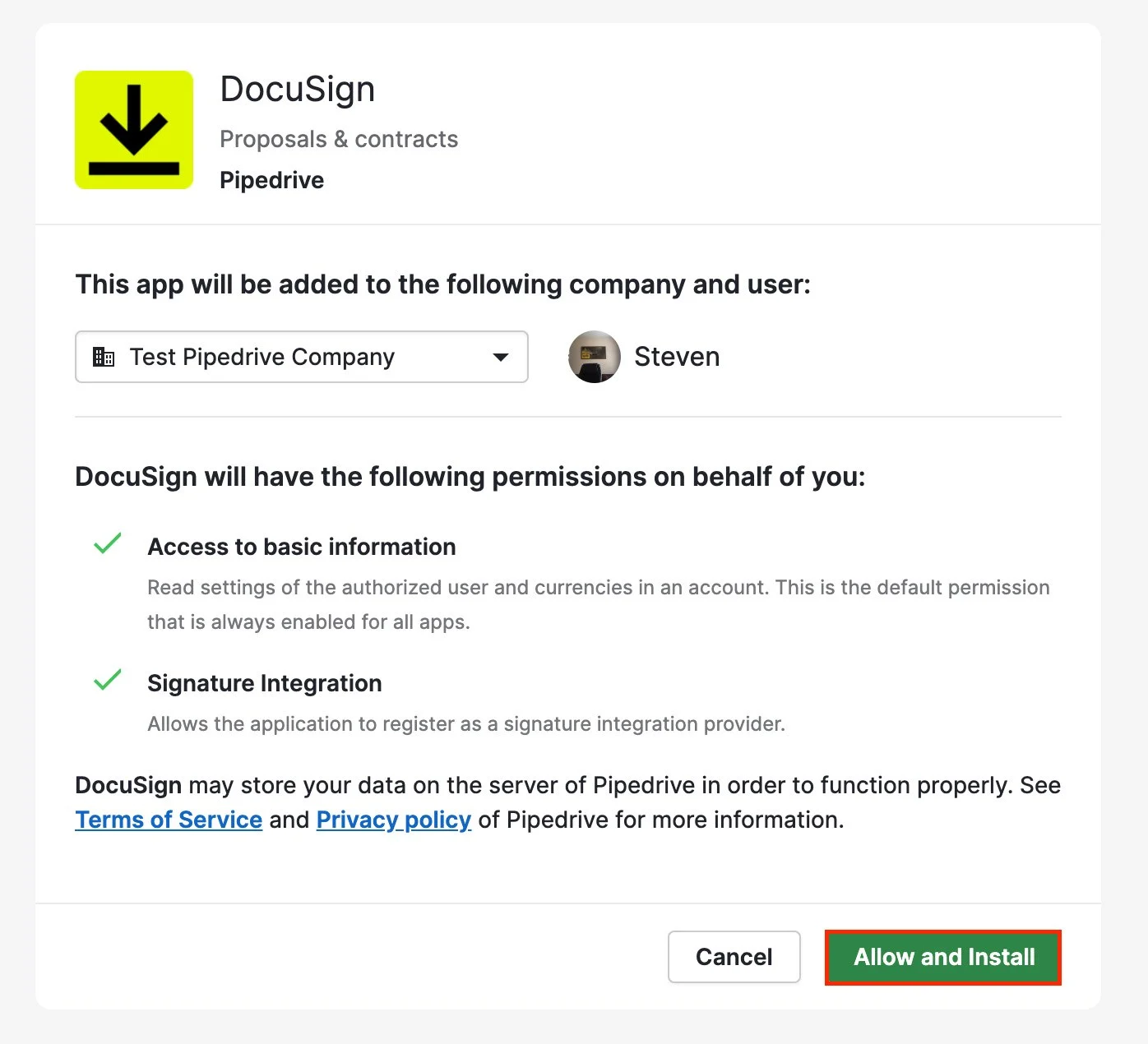
Yes. Pipedrive offers a native Docusign integration through the Pipedrive Marketplace. Users can send documents for signature from Pipedrive deal records, and envelope status updates (sent, viewed, signed, declined) sync back into the CRM. Pipedrive announced the Docusign integration alongside its Messaging Inbox launch.
Source: Pipedrive
What data can sync?
Envelope status events are the primary sync: whether a document was sent, delivered, viewed, signed, or declined. Documents can be generated and sent from Pipedrive deal records using Docusign, with deal and contact fields available for populating agreements. Signed documents are accessible from the deal record after completion.
Is the sync bidirectional?
Partially. Pipedrive sends documents to Docusign for signature, and Docusign sends status updates back to Pipedrive. The flow is bidirectional in function (actions go out, status comes back), but Docusign does not push new records or contacts into Pipedrive on its own. Third-party tools can create additional one-way flows for specific use cases.
Is it real-time or batch?
The native integration updates envelope status in near real-time as events occur in Docusign. Third-party tools like Zapier trigger within 1 to 15 minutes depending on plan tier.
What are the available methods?
Native Pipedrive-Docusign integration (via Marketplace), third-party automation (Zapier, Make), and custom API development.
Method | Setup Difficulty | Data Flow | Real-time? | Cost |
|---|---|---|---|---|
Native (Pipedrive Marketplace) | Low | Pipedrive to Docusign + status back | Near real-time | Included with Pipedrive (Docusign subscription required) |
Zapier | Medium | One-way per Zap | Near real-time (1-15 min) | From $19.99/mo |
Make | Medium | Configurable per scenario | Near real-time or scheduled | From $10.59/mo |
Custom API | High | Fully customizable | Real-time via webhooks | Developer time + hosting |
One distinction worth settling upfront: the native integration handles ongoing, real-time contract workflows tied to active deals.
Zapier and Make handle event-triggered automations with broader flexibility but narrower per-workflow scope. Custom API development is the only path for teams that need complex conditional logic, bulk operations, or integration patterns the native connector does not support.
Integration Methods
Native Pipedrive-Docusign Integration (Marketplace App)
How it works: The native Docusign integration connects Pipedrive to Docusign through Pipedrive's Marketplace. Once installed, users initiate signature requests from within deal records. The integration sends documents to Docusign and syncs envelope status updates back to the deal, so reps can track whether a contract has been sent, viewed, signed, or declined without leaving the CRM.
What it syncs: Document sending from deal records, envelope status updates (sent, delivered, viewed, signed, declined), and completed document access from within Pipedrive. Deal and contact data from Pipedrive can populate agreement fields before sending.
Fits: ongoing contract workflow tied to active deals; not a migration or bulk-processing tool.
Setup process:
Open the Pipedrive Marketplace and search for "Docusign." Install the Docusign integration app. Admin access in Pipedrive is required.
Authenticate your Docusign account via OAuth when prompted. You need an active Docusign subscription with sending permissions.
Navigate to a deal record in Pipedrive. Locate the Docusign panel or action button within the deal view.
Select or upload a document, map recipient fields using the deal's contact data, and configure signing order if multiple recipients are involved.
Send the document for signature. Envelope status will begin syncing back to the deal record automatically.
Verify by checking that status updates (viewed, signed) appear on the deal record after the recipient interacts with the document.
Strengths: First-party integration maintained and distributed through Pipedrive's Marketplace. No third-party connector to configure or pay for separately. Contract status lives alongside deal data, giving reps a single view of pipeline and agreement progress. Minimal setup, no engineering resources required.
Limitations: The integration covers deal-level document workflows only. It does not support bulk sending across multiple deals simultaneously. Advanced Docusign features (conditional routing, payment collection at signing, identity verification) may not be exposed through the Pipedrive interface.
The sync covers envelope status events only; full Docusign audit trail details and signer activity logs do not transfer into Pipedrive.
Best for: Sales teams using Pipedrive as their primary CRM that send contracts, proposals, or NDAs through Docusign as part of their deal-closing process. Teams that want envelope status visible inside deal records without switching tools.
Zapier
How it works: Zapier connects Pipedrive and Docusign through event-driven automations called Zaps. Each Zap pairs a trigger (an event in one app) with one or more actions (what happens in the other). Both platforms have well-supported Zapier connectors, covering the major use cases for CRM-to-signature workflows.
What it syncs: Depending on configuration, Zapier can trigger actions in Docusign when deal events occur in Pipedrive (e.g., deal reaches a specific stage), or update Pipedrive records when Docusign envelope events fire (e.g., document signed). Field mapping is manual and configurable. Each workflow direction requires its own Zap.
Fits: ongoing automation of specific CRM-to-signature workflows; not a replacement for the native integration's in-deal document sending.
Setup process:
Create a Zapier account and connect both your Pipedrive and Docusign accounts using OAuth.
Choose a trigger app and event. For example, select Pipedrive as the trigger with "Updated Deal Stage" as the event.
Choose the action app and event. For example, select Docusign with "Create Signature Request" as the action.
Map fields between the two platforms. Zapier displays available fields from the trigger step and lets you populate the action fields (recipient email, document template, signing order).
Test the Zap with a sample record to verify the field mapping produces the expected result.
Turn the Zap on. For bidirectional workflows (e.g., also updating Pipedrive when a Docusign envelope is completed), create a second Zap with the trigger and action apps reversed.
Strengths: Extends the integration beyond what the native connector supports. Can trigger signature requests based on specific deal conditions (stage changes, field values) rather than manual initiation. Supports workflows the native integration does not cover, such as creating Pipedrive activities or notes when documents are signed. Zapier's filter and formatting steps add conditional logic without code.
Limitations: Each Zap handles one trigger-action pair, so complex workflows spanning multiple events require multiple Zaps (each counting against your plan's task allocation). No in-deal document sending experience; Zapier runs in the background rather than providing a UI inside Pipedrive.
Historical events before the Zap was activated do not process. Zapier charges by task count, and high-volume workflows accumulate costs.
Best for: Teams that need conditional automation between the two platforms (e.g., automatically send a specific contract template when a deal enters "Proposal" stage) or teams that want Docusign events to trigger downstream actions in Pipedrive beyond status updates.
Make (Formerly Integromat)
How it works: Make uses a visual scenario builder where modules (app actions) connect in a flowchart. Scenarios can branch, filter, loop, and handle errors, offering more control than Zapier's linear Zap structure. Both Pipedrive and Docusign modules are available, covering the core objects and events.
What it syncs: The same event types as Zapier (deal events, envelope events), with more flexibility in how data transforms between platforms. Make supports iterators for batch processing, routers for conditional paths, and aggregators for combining records before writing.
This enables workflows like "when three deals in the same account reach Proposal stage, create one combined envelope in Docusign."
Fits: ongoing automation with conditional logic or multi-step processing; not a replacement for the native integration's in-deal experience.
Setup process:
Create a Make account and add Pipedrive and Docusign as connections via OAuth.
Build a new scenario. Drag the Pipedrive module onto the canvas and select a trigger (e.g., "Watch Deals" filtered to a specific stage).
Add a Docusign module and select an action (e.g., "Create and Send an Envelope").
Connect the two modules and map fields. Make provides functions for transforming data between platforms (e.g., formatting Pipedrive contact names into Docusign recipient fields, calculating dates for signing deadlines).
Add error-handling modules to catch failures (e.g., log to a spreadsheet or send a Slack notification if an envelope fails to send).
Set the scenario to run on every trigger event or on a time-based schedule.
Strengths: Fine control over data transformation and conditional routing. The visual builder makes complex multi-step workflows easier to follow than code. Batch operations and error handling are built in. Per-operation pricing is lower than Zapier at higher volumes.
Limitations: Steeper learning curve than Zapier's guided setup or the native integration's point-and-click experience. Both the Pipedrive and Docusign APIs impose rate limits, and high-volume scenarios may need throttling. No in-deal UI; all automation runs in the background.
Best for: Teams with conditional contract workflows (e.g., route different document templates based on deal value, product type, or territory) or teams whose automation volume makes Zapier's per-task pricing expensive.
Custom API Integration
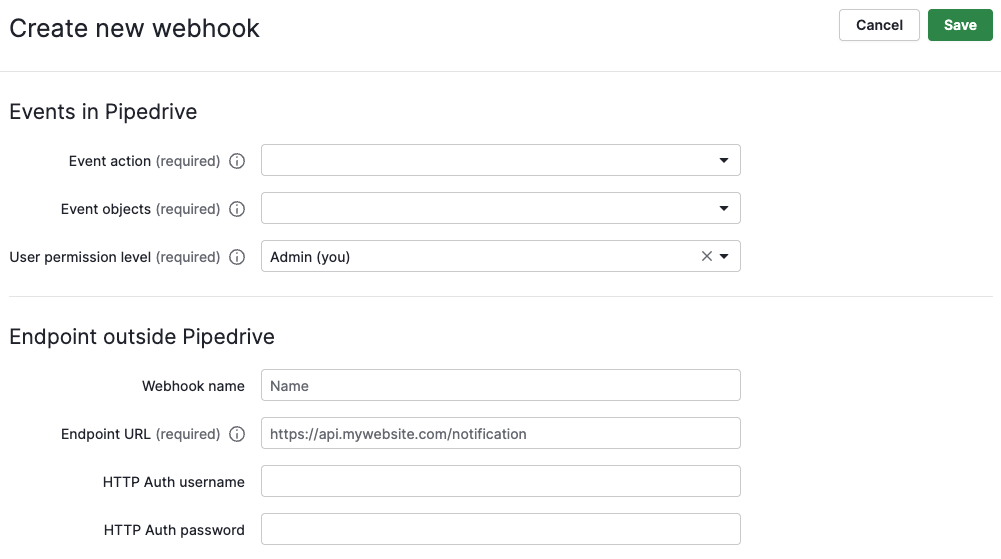
How it works: Both Pipedrive and Docusign provide REST APIs. Pipedrive's API covers deals, leads, persons, organizations, activities, products, notes, and pipelines, with webhook support for real-time event notifications.
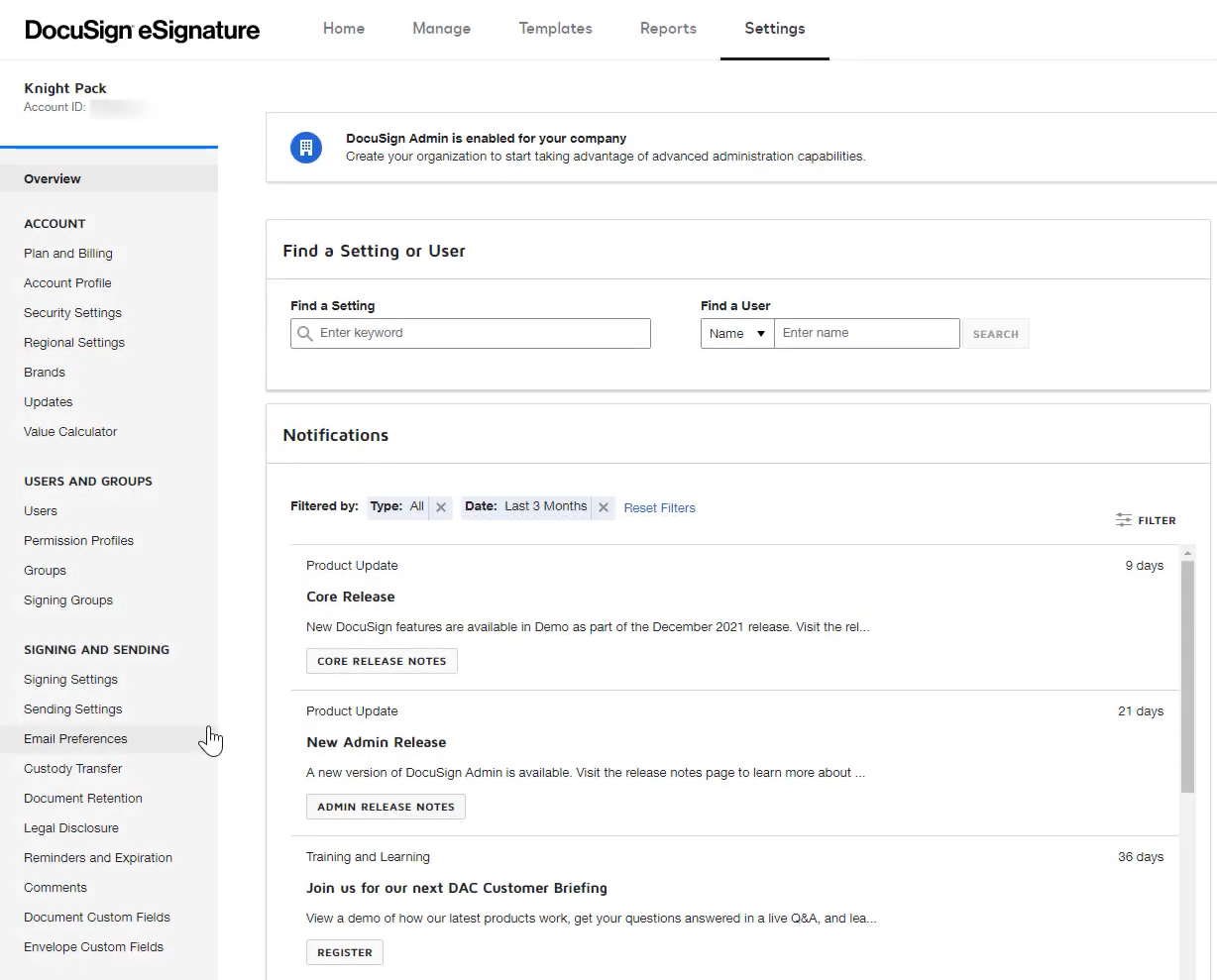
Docusign's eSignature REST API handles envelope creation, sending, status tracking, and document retrieval, with Docusign Connect providing webhooks for event-driven notifications. A custom integration connects these APIs directly, with your own middleware handling authentication, field mapping, transformation, and error recovery.
Source: Docusign
What it syncs: Anything both APIs expose. This is the only method that supports complex scenarios like auto-generating envelopes from Pipedrive deal data with conditional document selection, syncing signer activity (not just envelope status) back to custom fields in Pipedrive, or batch-processing multiple deals through a signing workflow.
Fits: either one-time migration of historical agreements or ongoing sync; the only method with no ceiling on either.
Setup process:
Register API credentials in both platforms: a Pipedrive API token or OAuth app, and a Docusign Connected App with OAuth 2.0 credentials.
Design the data mapping between Pipedrive deal and contact objects and Docusign envelope recipients, documents, and tabs (form fields).
Build the integration service: a server-side application that listens for webhooks from both platforms, transforms data according to the mapping, and writes changes to the other side.
Implement envelope creation logic: pulling deal data from Pipedrive, selecting the correct Docusign template, populating recipient fields, and sending.
Configure Docusign Connect to send webhook notifications on envelope events (sent, delivered, signed, declined, voided) to your middleware, which then updates the corresponding Pipedrive deal.
Add logging, error handling, and retry logic. Pipedrive's token-based rate limiting allocates a daily budget based on plan tier and seat count. Docusign's API rate limits default to 3,000 calls per hour with a 500-call burst limit per 30-second period.
Strengths: Full control over what syncs, when, and how. Real-time sync via webhooks on both sides. Can implement complex business logic (e.g., different document templates based on deal value thresholds, multi-party signing workflows triggered by deal stage sequences). No per-operation fees from a third-party connector.
Limitations: Requires development resources to build and maintain. You own the infrastructure, monitoring, and error recovery. API changes on either platform (Pipedrive released API v2; Docusign versions its API with each seasonal release) require ongoing maintenance. The initial build takes weeks, not hours.
Best for: Organizations with complex contract workflows that no off-the-shelf connector satisfies. Companies with in-house development teams, high deal volume requiring bulk envelope operations, or business logic that must be enforced during the signing process.
Key Use Cases
1. Sending Contracts Directly from Deal Records
A rep closes a verbal agreement and needs to get the contract signed. From within the Pipedrive deal record, they select the appropriate document template in Docusign, map the contact's email and name from the deal, and send it for signature. The envelope status syncs back to the deal, so the rep and their manager both see when the contract is viewed and signed without checking Docusign separately.
Best integration method: Native Pipedrive-Docusign integration.
2. Auto-Triggering Signature Requests at a Specific Deal Stage
When a deal moves to "Contract Sent" stage in Pipedrive, a Zapier Zap or Make scenario automatically creates and sends a Docusign envelope using a pre-configured template, populated with the deal's contact and company data. This removes the manual step of opening Docusign and ensures every deal that reaches that stage gets a contract without relying on the rep to initiate it.
Best integration method: Zapier or Make (event-triggered, one-directional).
3. Updating Deal Stage When a Contract Is Signed
When a Docusign envelope reaches "Completed" status, a Zapier Zap or Make scenario updates the corresponding Pipedrive deal to "Closed Won" (or a custom stage). This keeps pipeline reporting accurate in real time and eliminates the lag between a signed contract and a CRM update, which matters most for revenue forecasting.
Best integration method: Zapier or Make (event-triggered, Docusign to Pipedrive).
4. Logging Signature Activity as Deal Activities
Every Docusign event (envelope sent, viewed, signed, declined) creates a corresponding activity or note on the Pipedrive deal record. Sales managers reviewing deal history can see the full contract timeline alongside calls, emails, and meetings, giving them a complete picture of deal velocity without accessing Docusign.
Best integration method: Zapier or Make (one-directional, Docusign events to Pipedrive activities).
5. Multi-Party Contract Workflows for Complex Deals
Enterprise deals requiring multiple signers (legal, finance, executive) use a custom API integration to manage sequential or parallel signing workflows.
The integration pulls signer information from Pipedrive's contact and organization data, configures signing order in Docusign, and updates the Pipedrive deal with each signer's status individually, so the rep can see exactly where the contract is stalled.
Best integration method: Custom API (complex signing logic with per-signer status tracking).
Limitations and Considerations
Data That Doesn't Sync Easily
The native integration focuses on envelope-level status: sent, viewed, signed, declined. Signer-level activity (which pages were viewed, how long each signer spent reviewing, individual field values entered during signing) typically does not transfer into Pipedrive through the native connector.
Attachments, audit trail PDFs, and Docusign Certificates of Completion are accessible in Docusign but do not automatically appear as files on Pipedrive deal records.
Pipedrive's custom fields and Docusign's envelope custom fields operate on different data models. Mapping between them requires manual configuration in third-party tools or custom development.
Sync Conflicts
Because the integration is one-directional per event type (Pipedrive sends documents out, Docusign sends status back), true bidirectional conflicts are uncommon.
The more practical risk is timing: a rep voids an envelope in Docusign while simultaneously updating the deal in Pipedrive, creating a brief window where the CRM shows a deal stage that no longer matches the envelope state. Automation workflows should account for voided and declined envelopes, not just completed ones.
Pricing Implications
The native integration requires active subscriptions on both platforms.
Pipedrive plans start at $14/month per seat (Lite), and Docusign eSignature plans start at $10/month (Personal, limited to 5 envelopes/month). Teams with moderate contract volume will need at least Docusign Standard ($25/user/month, 100 envelopes/user/year) or Business Pro ($40/user/month).
Third-party automation tools carry their own costs. Zapier charges by the number of tasks (each synced event counts as a task). Make charges by operations. For teams processing hundreds of contracts monthly, these costs add up alongside the platform subscriptions.
Pipedrive's token-based API rate limiting scales by plan tier (Lite plans start at 30,000 base tokens per day; Ultimate plans offer 210,000 base tokens plus additional tokens per seat). Docusign's eSignature API hourly limit defaults to 3,000 calls per hour. Teams with high automation volume should confirm their plan tiers support the expected API traffic.
Permissions and Access
Setting up the native integration requires admin access in Pipedrive to install Marketplace apps and authorize the OAuth connection with Docusign.
On the Docusign side, the authenticating user must have sending permissions. For custom API integrations, Docusign requires System Administrator access to create Connected Apps, and Pipedrive requires account admin rights to generate API tokens.
Maintenance
Both platforms update their APIs independently. Pipedrive introduced Webhooks v2 as a breaking change and released API v2 alongside the existing v1.
Source: Pipedrive
Docusign versions its API with each seasonal release and regularly updates its webhook event model. Marketplace apps receive updates from their maintainers, but custom integrations and third-party automation workflows require periodic reviews to ensure continued compatibility.
What No Method Fixes: The Data Itself
Every method above connects Pipedrive deals to Docusign envelopes. None of them checks whether the contact data inside those deals is accurate, current, or complete.
A contract sent to an outdated email address bounces. An envelope addressed to someone who left the company three months ago sits unsigned. A deal with the wrong job title sends a contract to the right person with the wrong salutation. The integration delivers documents; it does not ensure the records behind those documents are right.
Where ZoomInfo Fits In
Every method in this guide connects Pipedrive deals to Docusign envelopes. None of them improves the contact data inside the deal records being sent for signature.
When the integration is live but contracts bounce because the email address is dead, or envelopes sit unsigned because the contact left the company, or proposals address the wrong decision-maker because the job title in the CRM is six months stale, the bottleneck is no longer the connector. That is the gap ZoomInfo closes.
ZoomInfo is an AI GTM platform built on 500M contacts, 100M companies, 135M+ verified phone numbers, and 200M+ verified business email addresses.
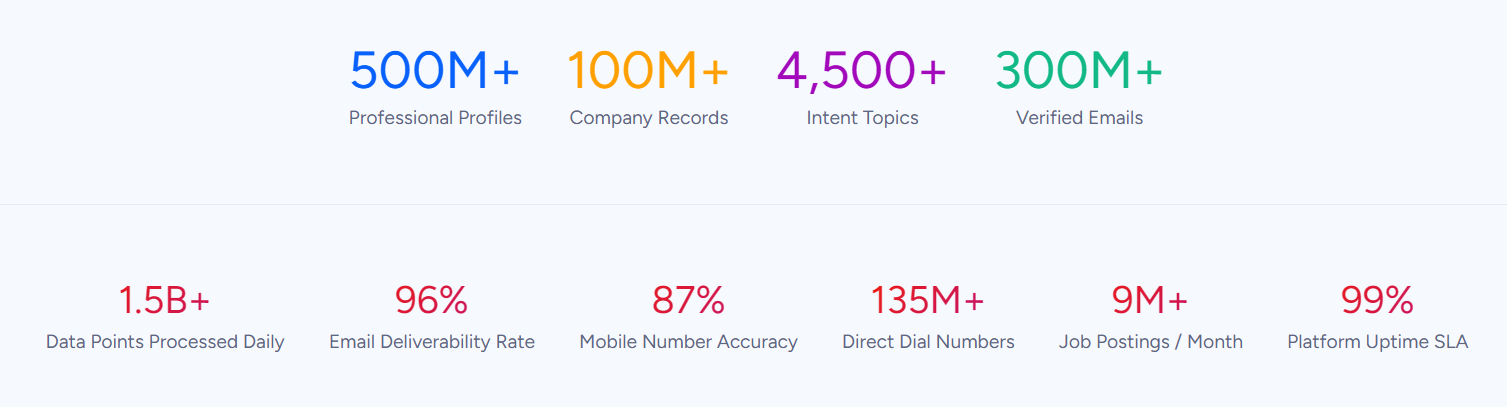
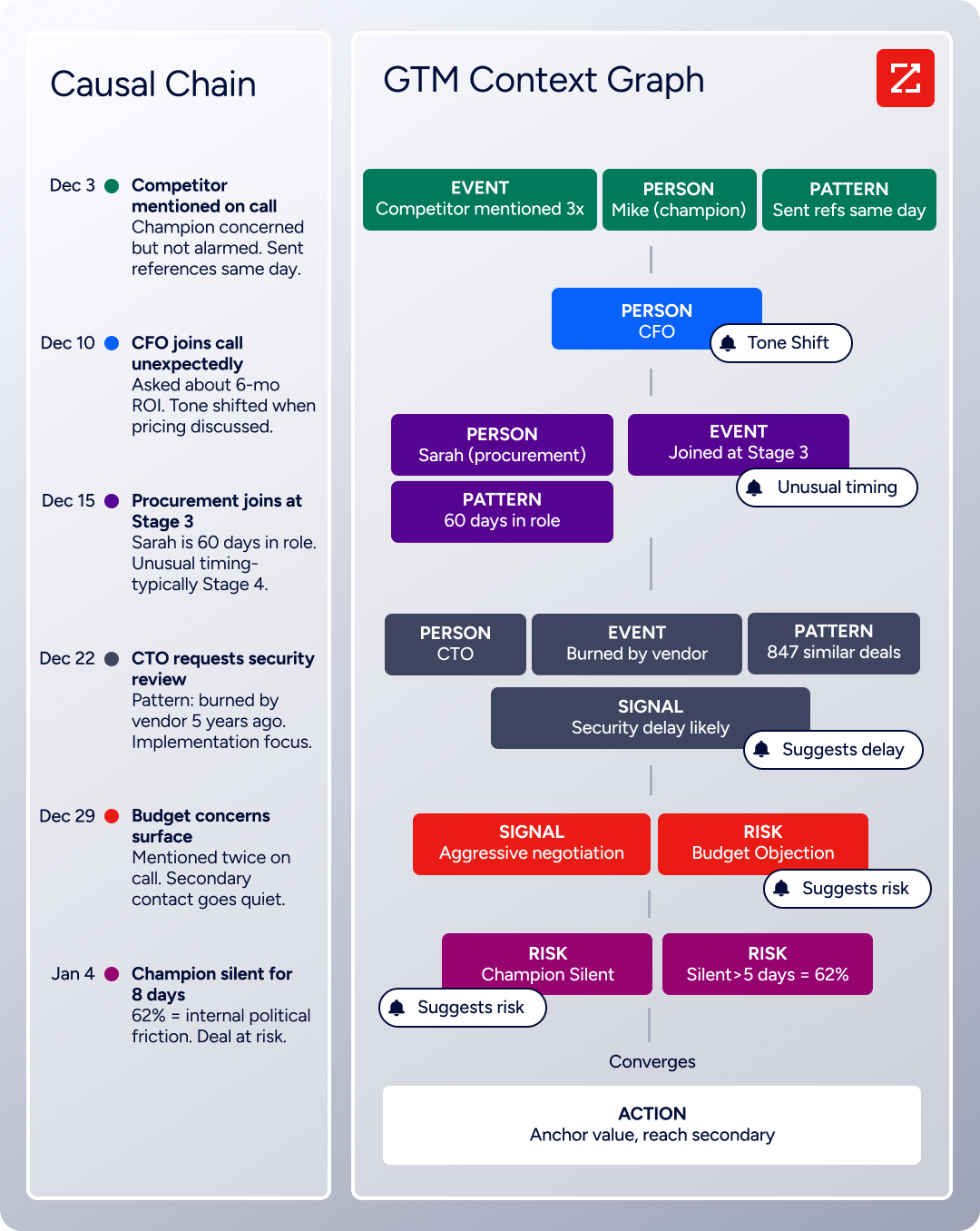
That data is verified through a proprietary collection system backed by 300+ human researchers and reaching up to 95% accuracy on first-party data. ZoomInfo's GTM Context Graph processes 1.5B+ data points daily, fusing verified data with your CRM records and behavioral signals to surface the full context behind your accounts.
For teams running a Pipedrive-Docusign contract workflow, ZoomInfo addresses the data quality layer that no connector handles.
ZoomInfo integrates natively with Pipedrive through its Marketplace, letting teams build targeted lists in ZoomInfo Sales and push enriched data into Pipedrive with built-in duplicate checking and field mapping.
ZoomInfo also integrates with Docusign, ingesting Docusign activity (shares, deliveries, signatures, declines) into ZoomInfo Sales on a nightly basis, so engagement signals from the signing process feed back into the GTM Context Graph. For programmatic access, ZoomInfo's Enterprise API and MCP server can push enriched data into any system or workflow.
In practice, a team using Pipedrive and Docusign can use ZoomInfo to enrich contact and company records before initiating any contract workflow. Verified emails mean Docusign envelopes reach real inboxes. Accurate job titles mean contracts address the right decision-maker. Current employment data means reps are not sending agreements to prospects who left the company last quarter.
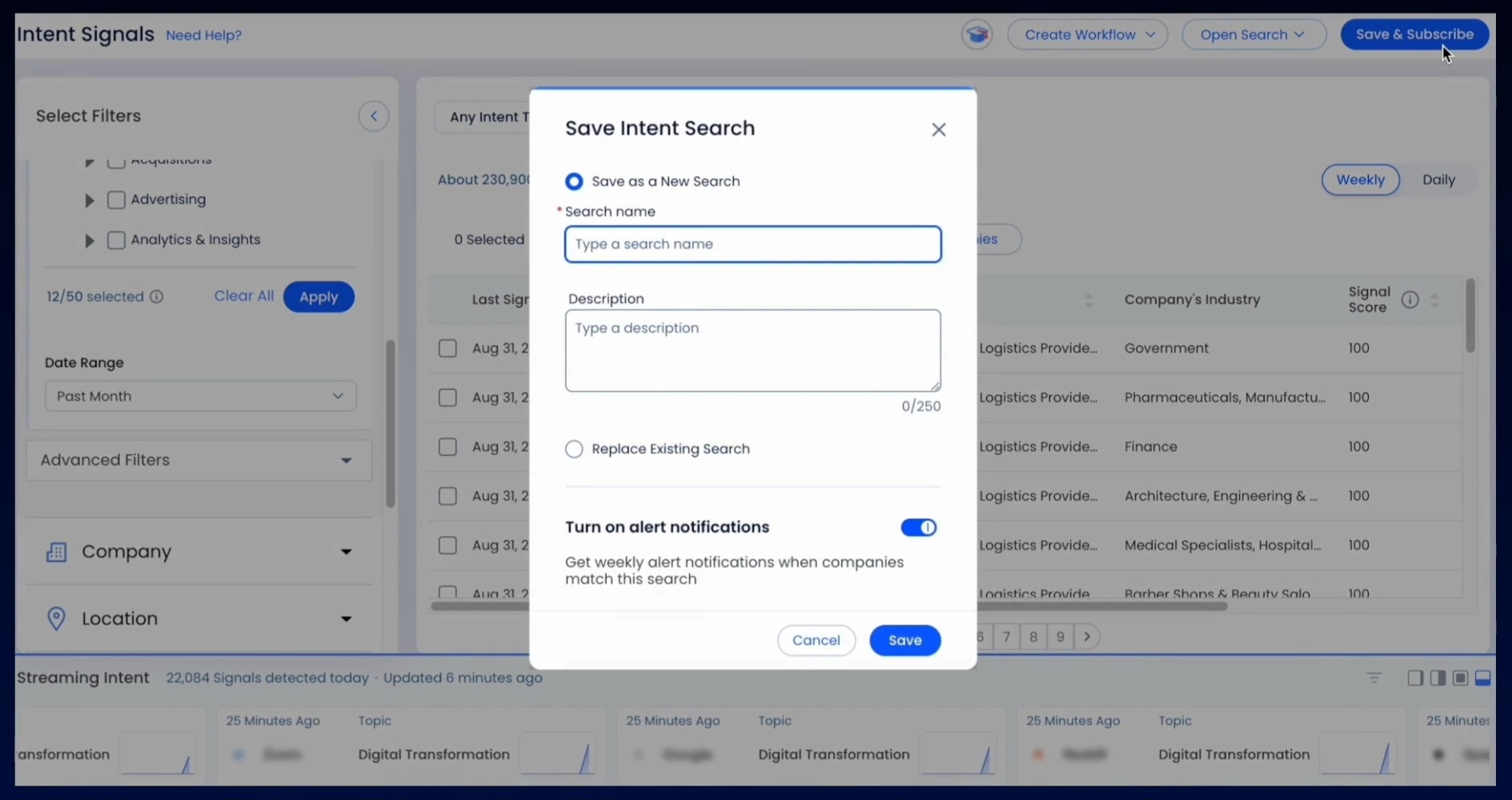
Buyer Intent data from ZoomInfo, tracking signals from 210 million IP-to-Organization pairings, can also help teams prioritize which deals to push toward contract stage, focusing signing effort on accounts that are actively researching relevant solutions rather than working through stale pipeline.
Source: ZoomInfo
Enriched records also make the contract workflow more reliable. Fewer bounced envelopes mean fewer voided contracts and re-sends (which consume Docusign's per-plan envelope allowance). Consistent, complete contact data reduces the manual corrections that slow deal cycles.
And when Docusign activity data flows back into ZoomInfo, signing engagement becomes another signal in the broader intelligence picture, informing follow-up timing and account prioritization.
Seismic's sales team attributed 39% of active pipeline to opportunities identified or influenced by ZoomInfo signals, while becoming 54% more productive. (Seismic)
Final Verdict
A native integration between Pipedrive and Docusign exists and covers the core contract workflow: sending documents for signature from deal records and syncing envelope status back to the CRM. For teams that need conditional logic or downstream automation, third-party tools extend what the native connector provides. The right choice depends on scale and complexity.
Small sales teams sending contracts from individual deal records should activate the native Pipedrive-Docusign integration. It requires no third-party tool, no engineering resources, and delivers envelope status inside the deal view where reps already work.
Teams that want contract workflows triggered automatically by deal stage changes, or that need Docusign events to update Pipedrive fields, create activities, or notify channels, should add Zapier or Make on top of the native integration.
Organizations with complex signing workflows (multi-party sequential signing, conditional template selection, bulk contract operations, or per-signer tracking in the CRM) should invest in a custom API integration.
Before committing to a method, clarify what the contract workflow needs to accomplish beyond getting a signature.
If the need is straightforward (send a document, track its status, close the deal), the native integration handles it with minimal setup. If the need extends into automation, conditional logic, or audit data inside the CRM, the investment in third-party tools or custom development pays for itself in reduced manual work and fewer missed signals.
Either way, the quality of the contact data inside Pipedrive determines whether contracts reach the right person at the right address on the first attempt. ZoomInfo, with native integrations for both Pipedrive and Docusign and API and MCP access for any workflow, is the data enrichment layer that ensures the records behind every envelope are accurate and complete.
FAQ
Does Pipedrive have a native integration with Docusign?
Yes. Pipedrive offers a Docusign integration through its Marketplace that lets users send documents for signature from deal records and automatically syncs envelope status updates (sent, viewed, signed, declined) back into the CRM. The integration requires active subscriptions on both platforms but does not require a third-party connector or custom development.
Can I automatically send a contract when a deal reaches a specific stage?
Not through the native integration alone, which requires manual initiation from the deal record. To automate contract sending based on deal stage changes, use Zapier or Make. A Zap or Make scenario can watch for deal stage updates in Pipedrive and automatically create and send a Docusign envelope using a pre-configured template populated with the deal's contact data.
What Docusign plan do I need for the Pipedrive integration?
The native Pipedrive-Docusign integration requires an active Docusign account with sending permissions. Docusign's Personal plan ($10/month) is limited to 5 envelopes per month and a single user.
Teams with regular contract volume should consider at least the Standard plan ($25/user/month, 100 envelopes/user/year) or Business Pro ($40/user/month) for access to features like bulk send and web forms.
Can signed documents be stored in Pipedrive?
Completed documents remain in Docusign and are accessible from within Pipedrive through the integration's deal-level panel. The native integration does not automatically download signed PDFs into Pipedrive's file storage.
Teams that need signed documents attached as files to deal records can use Zapier or Make to automate the download from Docusign and upload to Pipedrive, or retrieve them manually from Docusign.
What happens if a Docusign envelope is declined or voided?
The native integration syncs declined and voided status back to the Pipedrive deal record, so the rep sees that the contract was not completed. However, the integration does not automatically update the deal stage or trigger follow-up actions on its own.
Teams that want declined envelopes to automatically move deals back to a previous stage or create follow-up tasks should configure that logic in Zapier or Make.
Does the integration support Docusign templates?
Yes. When sending documents from a Pipedrive deal through the native integration, users can select from their Docusign template library. Templates with pre-configured signing fields, recipient roles, and routing order work within the integration.
Through Zapier or Make, specific templates can be triggered automatically based on deal conditions (value, product type, deal stage), with recipient fields populated from Pipedrive contact data.
How does ZoomInfo improve a Pipedrive-Docusign workflow?
ZoomInfo solves the data quality problem upstream of the contract itself. Before a rep sends a Docusign envelope from a Pipedrive deal, ZoomInfo ensures the contact record has a verified business email (so the envelope reaches a real inbox), an accurate job title (so the contract addresses the right person), and current employment details (so the rep is not sending agreements to someone who left).
ZoomInfo's native Pipedrive integration handles enrichment directly, and its Docusign integration feeds signing activity back into the GTM Context Graph. The result is fewer bounced envelopes, fewer voided contracts from incorrect recipients, and a cleaner pipeline where signed deals reflect accurate, verified data.
Can I use the Pipedrive-Docusign integration on any Pipedrive plan?
The native Docusign integration is available through the Pipedrive Marketplace and can be installed on any Pipedrive plan that supports Marketplace apps.
However, some Pipedrive features that complement the integration (such as Smart Docs with built-in eSignature, which also supports a Docusign connection) are only available on Premium and Ultimate plans. Check your Pipedrive plan's feature list to confirm which document and integration capabilities are included.
Other ways to integrate Pipedrive:
