
Teams that run Pipedrive and PandaDoc side by side discover the same problems within a quarter:
Deal data lives in Pipedrive while proposals and contracts live in PandaDoc, so reps toggle between tools to connect pipeline activity to document status.
Contact details entered in one platform drift out of sync with the other, and someone sends a proposal with yesterday's pricing or the wrong company address.
Closed-won deals sit in Pipedrive with no automatic link to the signed contract in PandaDoc, turning revenue reconciliation into a manual chore.
However, the two platforms ended up coexisting (a sales team that adopted Pipedrive for pipeline management and PandaDoc for document automation, or an ops leader standardizing the quote-to-close workflow), the longer both run without a connection, the wider the gap between deal data and document data grows.
Connecting Pipedrive and PandaDoc eliminates that gap.
Deal and contact data from Pipedrive flows into PandaDoc so proposals auto-populate with accurate names, company details, and pricing. Document status flows back into Pipedrive so reps can see whether a proposal was opened, signed, or stalled without leaving the CRM.
When a deal reaches a specific stage, a pre-built template can generate and send a document automatically, removing the manual handoff from pipeline to paperwork.
A native integration exists between the two platforms, available through the Pipedrive Marketplace and PandaDoc's integration catalog. PandaDoc also offers a CPQ solution for Pipedrive on its Enterprise plan. Beyond the native connector, teams can extend the integration through Zapier or custom API development. Each method differs in setup complexity, data coverage, sync direction, and cost.
One problem no connection method solves: the integration moves deal and contact data between the two platforms, but it does not verify whether that data is accurate, complete, or current.
That is where ZoomInfo comes in. ZoomInfo integrates with Pipedrive through a native connector, and its Enterprise API and MCP server can feed verified contact and company data into any system in the workflow, so the records flowing between Pipedrive and PandaDoc are accurate before a proposal is generated.
This article covers the Pipedrive-PandaDoc integration: which methods are available, what data each one handles, how to set them up, the use cases that justify connecting both platforms, and the limitations to plan for. It also covers how ZoomInfo fits in as a data enrichment layer that strengthens the records flowing between Pipedrive and PandaDoc.
Let's start with an overview.
Integration Overview

Source: Pipedrive
Does a native integration exist?
Yes. PandaDoc offers a native Pipedrive integration that connects the two platforms through a browser add-on and the Pipedrive Marketplace. PandaDoc also offers a CPQ solution for Pipedrive on its Enterprise plan for teams that need rules-based quoting.
What data can sync?
Contact details (names, email addresses, phone numbers, company information), deal data (deal value, stage, associated products), and document status. PandaDoc documents created from Pipedrive deals auto-populate with CRM fields. Document events (sent, viewed, completed, paid) can update Pipedrive deal stages and line items through PandaDoc's automation recipes.
Is the sync bidirectional?
Partially. Contact and deal data flows from Pipedrive into PandaDoc to populate documents. Document status and completion events flow back into Pipedrive through automations that update deal stages and line items. Full field-level bidirectional sync (where editing a contact in PandaDoc updates the Pipedrive record) is not part of the native integration.
Is it real-time or batch?
The native integration operates in near real-time. When a rep creates a document from a Pipedrive deal, contact and deal data populate immediately. Document status updates push back to Pipedrive as events occur. Zapier-based workflows trigger within 1 to 15 minutes depending on plan tier.
What are the available methods?
Native PandaDoc-Pipedrive integration (browser add-on), PandaDoc CPQ for Pipedrive (Enterprise), Zapier, and custom API development.
Method | Setup Difficulty | Data Flow | Real-time? | Cost |
|---|---|---|---|---|
Native Integration | Low | Pipedrive to PandaDoc (data); PandaDoc to Pipedrive (status) | Near real-time | Included with PandaDoc Business+ |
PandaDoc CPQ for Pipedrive | Medium | Bidirectional (deal data and quote data) | Near real-time | PandaDoc Enterprise (custom pricing) |
Zapier | Medium | One-way per Zap | Near real-time (1-15 min) | From $19.99/mo |
Custom API | High | Fully customizable | Depends on implementation | Developer time + hosting |
One distinction worth settling upfront: the native integration and CPQ handle ongoing, real-time document workflows tied to active deals. Zapier handles event-triggered flows with narrower data coverage. Custom API development offers flexibility for use cases the native connector does not cover, but requires engineering resources to build and maintain.
Integration Methods
Native PandaDoc-Pipedrive Integration
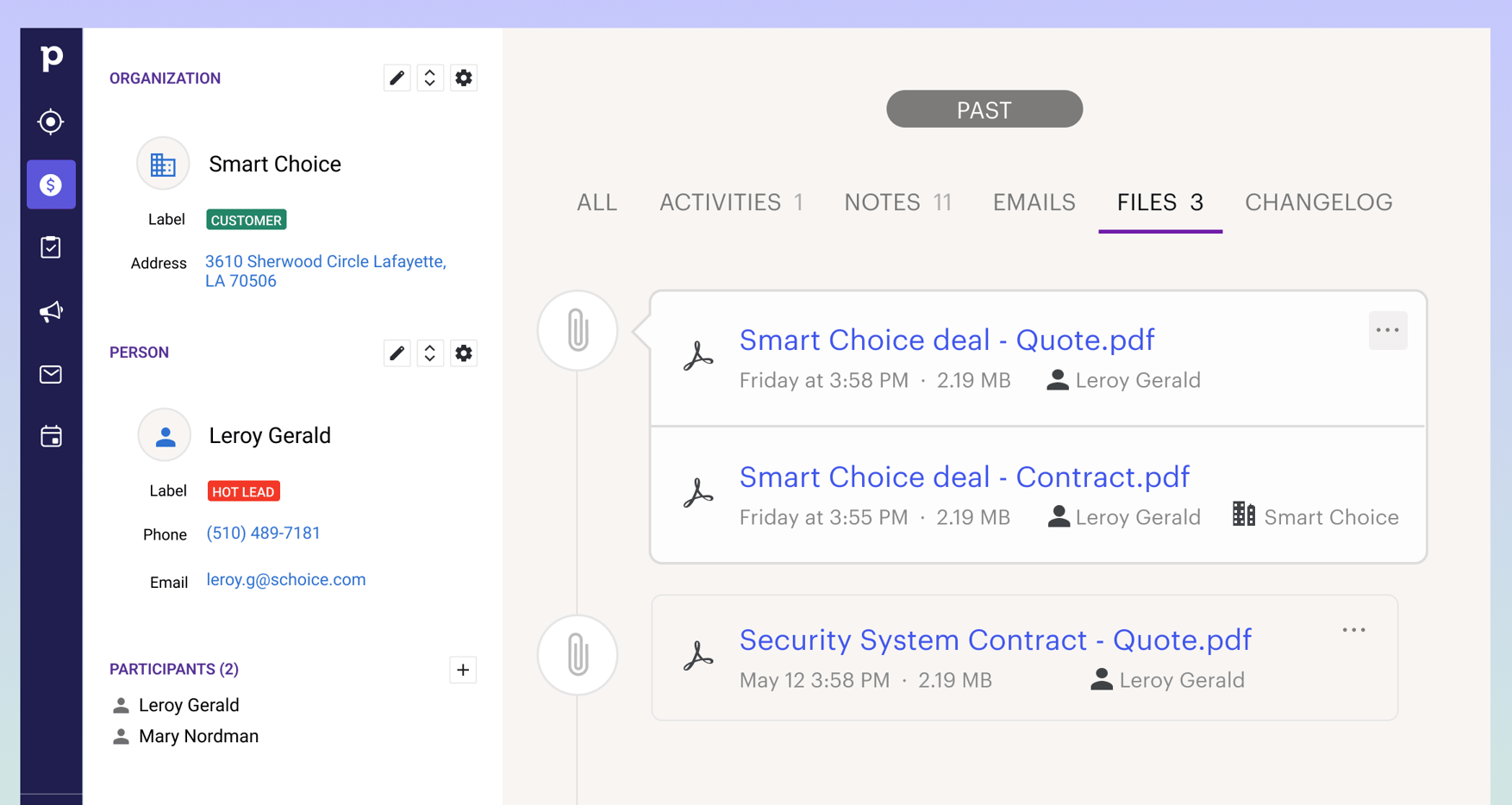
How it works: PandaDoc's native Pipedrive integration connects the two platforms through a browser add-on that embeds PandaDoc inside the Pipedrive interface. Reps can create, send, and track documents with eSignatures from within Pipedrive deals.
Source: Pipedrive
Contact and deal data from Pipedrive auto-populates PandaDoc templates using variables, so reps do not re-enter information. PandaDoc's automation recipes can update Pipedrive deal stages and line items when documents reach specific statuses (sent, completed, paid).
What it syncs: Contact fields (name, email, phone, company), deal fields (value, stage, products, custom fields), and document lifecycle events. PandaDoc pricing tables can pull from a product catalog synced with Pipedrive products. Document engagement data (views, time on page) is available inside PandaDoc's Document Insights but does not push individual analytics fields back to Pipedrive.
Fits: ongoing document creation and tracking tied to active Pipedrive deals; not a data migration tool.
Setup process:
In PandaDoc, navigate to Settings and find the Pipedrive integration under CRM integrations. Install the PandaDoc browser add-on if prompted.
Authenticate with your Pipedrive account using OAuth, granting PandaDoc access to read deal, contact, and product data.
Map Pipedrive fields to PandaDoc template variables so documents auto-populate with CRM data when created from a deal.
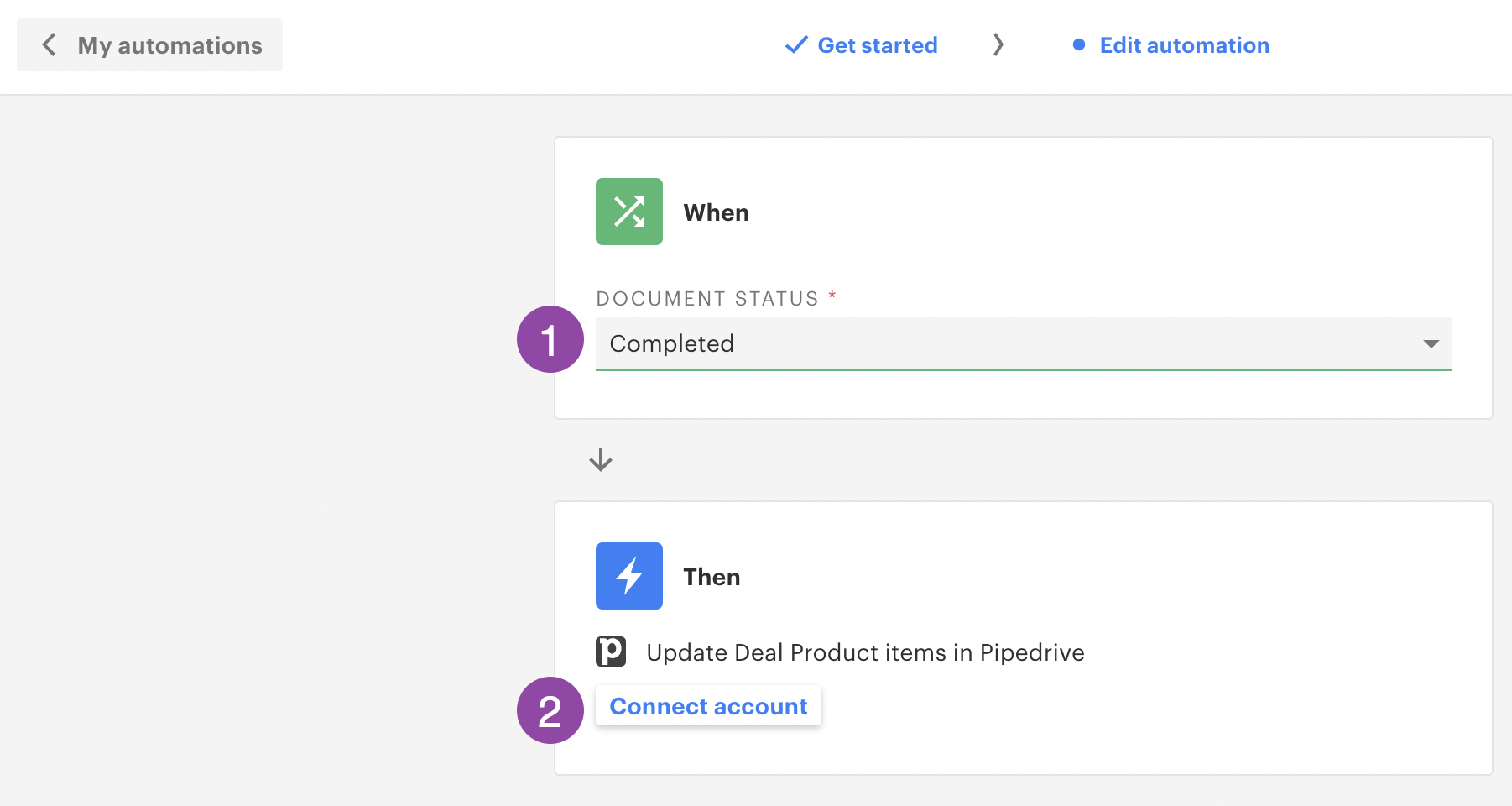
Configure automation recipes: select the trigger (e.g., document status changes to "Completed") and the action (e.g., update Pipedrive deal stage to "Won" or update line items).
Build or adapt a PandaDoc template with the mapped variables and any pricing tables connected to your product catalog.
Test by creating a document from an existing Pipedrive deal. Verify that fields auto-populate correctly and that the automation fires when the document reaches the target status.
Source: PandaDoc
Strengths: First-party integration maintained by PandaDoc. No third-party tool to configure or pay for. Documents inherit deal context automatically, reducing data entry errors. PandaDoc's document engagement analytics show reps whether a prospect opened the proposal and which sections they spent time on. The automation layer writes deal stage updates back to Pipedrive without manual intervention.
Limitations: Requires PandaDoc Business plan ($49/seat/month) or higher. The sync is Pipedrive-to-PandaDoc for data and PandaDoc-to-Pipedrive for document status; it is not a full bidirectional field sync.
Custom fields require manual mapping during setup, and complex field types may need formatting adjustments. The browser add-on is the primary access point, so the experience depends on browser compatibility.
Best for: Sales teams that use Pipedrive as their CRM and need to generate proposals, contracts, or quotes from deals with auto-populated data and automatic deal stage updates on document completion.
PandaDoc CPQ for Pipedrive
How it works: PandaDoc CPQ for Pipedrive is a configure-price-quote solution that sits inside the Pipedrive workflow.

Source: PandaDoc
It adds rules-based quoting on top of the standard integration: guided selling questionnaires, conditional pricing logic, automated discount approvals, and a product catalog with volume-based and recurring pricing models. CPQ generates quotes that inherit PandaDoc's document lifecycle capabilities (eSignature, tracking, payments).
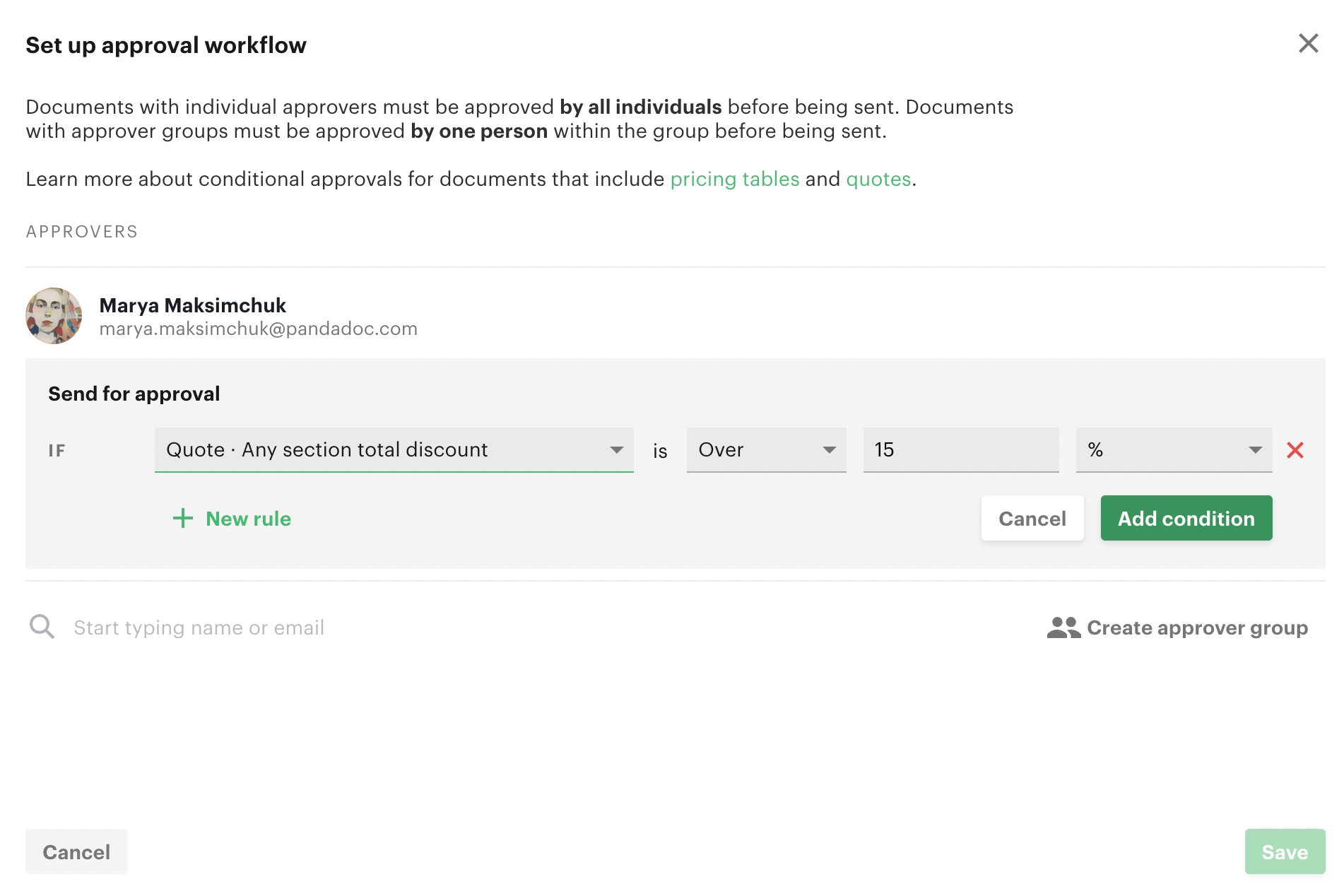
What it syncs: Everything the native integration syncs, plus CPQ-specific data: product configurations, pricing rules, discount approvals, and quote variables. The Quote Builder block supports up to 500 products per block. Conditional approval workflows trigger automatically when discount thresholds are exceeded.
Source: PandaDoc
Fits: ongoing quoting workflows for teams with complex or configurable products; not a one-time setup.
Setup process:
Confirm your PandaDoc workspace is on the Enterprise plan. CPQ is not available on Starter or Business tiers.
Connect the Pipedrive integration following the same steps as the native setup above.
Build your product catalog in PandaDoc with fixed, volume-based, or recurring pricing models. Import existing products via CSV if needed.
Create a CPQ workflow: define the guided selling questionnaire, configure the WHEN/THEN pricing rules, and set up conditional approval routing.
Link the CPQ workflow to a PandaDoc document template containing a Quote Builder block.
Test the full flow from a Pipedrive deal: answer the guided selling questions, verify the pricing rules produce the expected quote, trigger an approval if applicable, and confirm the document sends with accurate data.
Strengths: Eliminates manual quoting errors with rules-driven automation. Guided selling walks reps through product selection without requiring full catalog knowledge. Conditional approvals enforce discount limits without bottlenecking every quote. The quote flows into PandaDoc's document lifecycle (eSignature, payments, tracking), keeping the quote-to-close process in a single workflow.
Limitations: Requires PandaDoc Enterprise plan (custom pricing). Initial setup requires building the product catalog, pricing rules, and approval workflows, which takes more configuration time than the standard integration. CPQ seats are governed by assigned licenses, so not every PandaDoc user automatically gets CPQ access.
Best for: Sales teams with complex or configurable product catalogs that need pricing accuracy, discount limits, and guided selling built into their Pipedrive-to-contract workflow.
Zapier
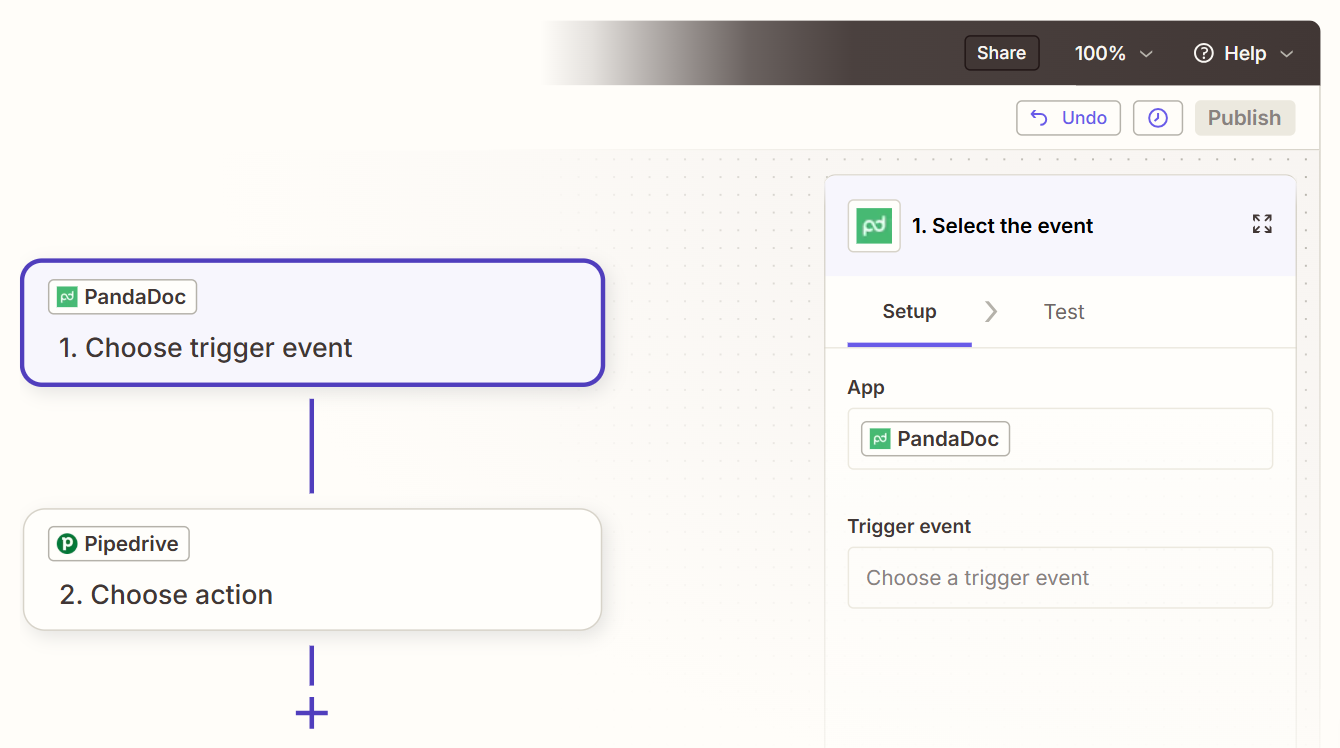
How it works: Zapier connects Pipedrive and PandaDoc through event-driven automations called Zaps. Each Zap pairs a trigger (an event in one app) with one or more actions (what happens in the other).
Source: Zapier
Both platforms have Zapier connectors, though PandaDoc's Zapier integration is the primary documented connector. Zapier handles workflows the native integration does not cover, such as triggering a PandaDoc document from a Pipedrive activity or creating a Pipedrive deal when a PandaDoc document is completed.
What it syncs: Depends on the Zap configuration. Common triggers include new or updated Pipedrive deals, new PandaDoc documents, and PandaDoc document status changes (sent, viewed, completed). Actions include creating PandaDoc documents from templates, creating or updating Pipedrive deals, and adding notes to Pipedrive records. Each data point requires explicit field mapping in the Zap setup.
Fits: ongoing event-triggered automations for workflows the native integration does not handle; not a data migration tool.
Setup process:
Create a Zapier account and connect both your Pipedrive and PandaDoc accounts using OAuth.
Choose a trigger app and event (e.g., Pipedrive "Updated Deal" when a deal moves to a specific stage).
Choose the action app and event (e.g., PandaDoc "Create Document" from a specified template).
Map fields from the trigger step into the action step. Zapier shows available fields from both platforms and lets you pull data across.
Test the Zap with a sample record to verify the field mapping and document generation work as expected.
Turn the Zap on. For bidirectional workflows, create a second Zap with the trigger and action reversed and add a filter to prevent infinite loops.
Strengths: Covers use cases the native integration does not support (e.g., triggering documents from specific activity types, creating deals from completed documents). No engineering resources required. Zapier's filter and formatting steps can add conditional logic. Available to teams on any PandaDoc paid plan, not just Enterprise.
Limitations: Each Zap handles one trigger-action pair, so multiple workflows require multiple Zaps, each counting against Zapier's task allocation. Does not replicate the native integration's embedded experience inside Pipedrive. No access to PandaDoc's document engagement analytics through Zapier.
Records created before the Zap was activated do not sync. Zapier charges by task count, and high-volume document creation accumulates costs.
Best for: Teams that need workflows beyond what the native integration supports (triggering documents from non-deal events, for example), or teams on PandaDoc Starter plans that cannot access the native CRM integration.
Custom API Integration
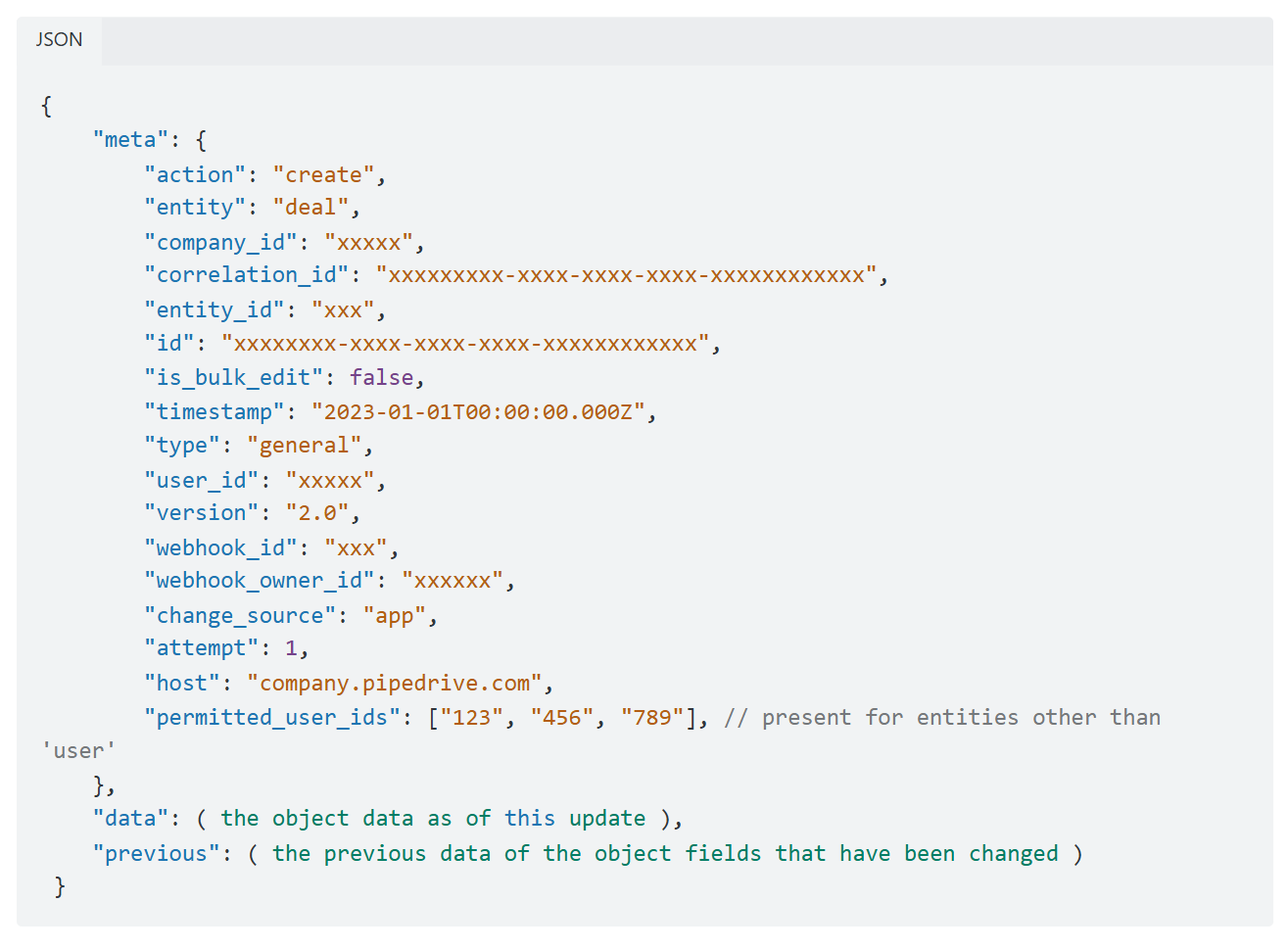
How it works: Both Pipedrive and PandaDoc provide full APIs. Pipedrive's REST API covers deals, leads, persons, organizations, activities, products, and pipelines, with webhook support for real-time event notifications.
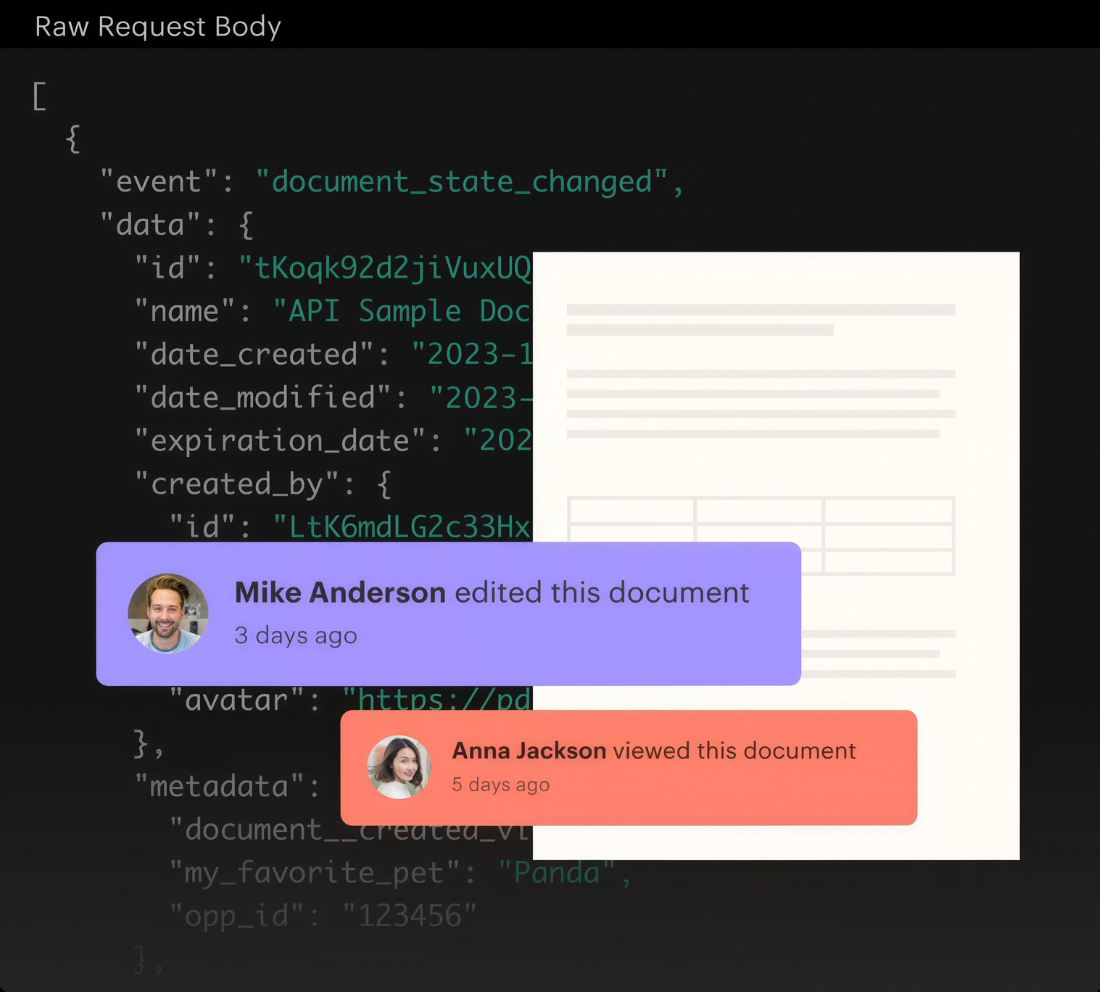
PandaDoc's REST API supports programmatic document creation from templates, document status management, field population, and sending for signature. PandaDoc also supports webhooks that fire on document lifecycle events. A custom integration connects these APIs, with your own middleware handling authentication, field mapping, document generation logic, and error recovery.
Source: PandaDoc
What it syncs: Anything both APIs expose. This is the only method that supports workflows like generating documents from custom Pipedrive objects, embedding PandaDoc editing inside a custom application using the embedded editing API, or bulk-generating documents from a batch of Pipedrive deals.
Fits: either specialized one-time workflows or ongoing automation; the only method with no ceiling on complexity.
Setup process:
Register API credentials in both platforms: a Pipedrive API token or OAuth app, and a PandaDoc API key from the Developer Dashboard.
Design the data model mapping between Pipedrive fields and PandaDoc template variables, including any field-level transformations.
Build the integration service: an application that listens for Pipedrive webhooks (e.g., deal stage change), constructs a PandaDoc document creation request with the mapped fields, and handles the asynchronous document creation process (PandaDoc's API returns immediately; polling or webhooks detect when the document is ready to send).
Implement error handling and retry logic. Pipedrive's token-based rate limiting allocates a daily budget based on plan tier and seat count. PandaDoc's rate limits cap document creation at 500 requests per minute.
Add PandaDoc webhook listeners to capture document events (viewed, completed, paid) and write status updates back to Pipedrive deals via the Pipedrive API.
Deploy, monitor, and maintain. Both platforms version their APIs (Pipedrive released API v2; PandaDoc maintains a changelog), so plan for periodic maintenance.
Strengths: Full control over what data flows, when, and how documents are generated. Can implement business logic no off-the-shelf connector supports. Real-time event handling via webhooks on both sides. No per-operation fees from a third-party connector.
Limitations: Requires development resources to build and maintain. You own the infrastructure, monitoring, and error recovery. PandaDoc's document creation is asynchronous, adding complexity to the integration flow. Both platforms' API changes require ongoing maintenance. The initial build takes weeks, not hours.
Best for: Teams with document generation requirements the native integration and Zapier cannot satisfy, or organizations embedding PandaDoc document workflows inside custom applications. Requires in-house development resources and a commitment to maintaining the integration over time.
Key Use Cases
1. Auto-Generated Proposals from Pipeline Deals
When a Pipedrive deal reaches the proposal stage, the native integration generates a PandaDoc document from a pre-built template, auto-populated with the contact's name, company, email, deal value, and associated products. The rep reviews, personalizes if needed, and sends for signature without re-entering data or switching tools.
Best integration method: Native PandaDoc-Pipedrive integration.
2. Automated Deal Stage Updates on Signature
When a prospect signs a PandaDoc document, an automation recipe updates the Pipedrive deal stage to "Won" and records the line items. Pipeline reports reflect the closed deal immediately, without a rep marking it complete by hand. This keeps revenue data accurate for forecasting.
Best integration method: Native PandaDoc-Pipedrive integration (automation recipes).
3. Rules-Based Quoting for Configurable Products
Sales teams with tiered pricing, volume discounts, or bundled products use PandaDoc CPQ to walk reps through a guided selling questionnaire inside the Pipedrive deal. The CPQ engine applies pricing rules, enforces discount limits, routes quotes for approval when thresholds are exceeded, and generates a branded document ready for eSignature and payment collection.
Best integration method: PandaDoc CPQ for Pipedrive (Enterprise plan).
4. Document Triggers from Non-Deal Events
A customer success team wants to send a renewal contract when a Pipedrive activity (a renewal call) is marked complete. The native integration triggers documents from deals, not activities, so a Zapier Zap bridges the gap: the activity completion in Pipedrive triggers PandaDoc document creation from a renewal template, with the associated contact data pulled from the deal.
Best integration method: Zapier.
5. Bulk Document Generation for Seasonal Campaigns
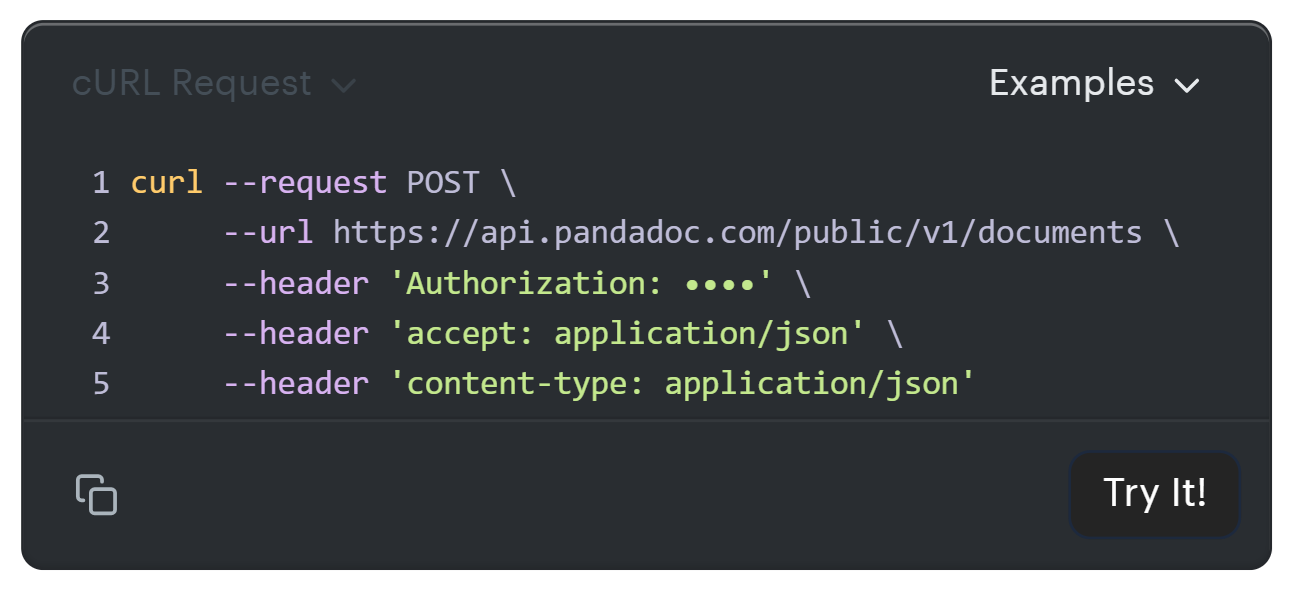
An operations team needs to generate and send 200 service agreements to contacts in a specific Pipedrive filter at the start of a quarter. A custom API integration reads the filtered contact list from Pipedrive, creates PandaDoc documents from a template for each contact using the document creation API, and sends them in batches, respecting rate limits.
Source: PandaDoc
Best integration method: Custom API integration.
Limitations and Considerations
Data That Doesn't Sync
The native integration maps standard contact and deal fields. Custom fields in Pipedrive require manual mapping to PandaDoc template variables during setup, and changes to the custom field schema (adding or renaming fields) require updating the mapping. Activity history, email threads, and notes attached to Pipedrive contacts do not transfer into PandaDoc documents.
PandaDoc's document engagement analytics (page-by-page view data, time spent per section) are visible inside PandaDoc but do not push individual metric fields back to Pipedrive records.
Sync Direction
The native integration is not fully bidirectional. Pipedrive is the source of truth for contact and deal data, which flows into PandaDoc at document creation time. PandaDoc is the source of truth for document status, which flows back to Pipedrive through automation recipes. If someone corrects a contact's email address in PandaDoc after creating a document, that correction does not update the Pipedrive record.
Pricing Implications
The native CRM integration requires PandaDoc's Business plan at minimum ($49/seat/month, annual billing). CPQ for Pipedrive requires the Enterprise plan (custom pricing).
On the Pipedrive side, the integration works across all paid plans, but API rate limits scale with plan tier: Lite plans start at 30,000 base tokens per day; Ultimate plans offer 210,000 base tokens per seat. PandaDoc gates API access behind paid plans, with the API Developer Plan at $40/month for custom builds.
Permissions and Access
Setting up the native integration requires admin access in both platforms. PandaDoc workspace admins enable the Pipedrive integration and configure automation recipes. Pipedrive account admins authorize the OAuth connection. PandaDoc's automation recipes (which update Pipedrive deal stages) require the External Automations extension, a paid add-on on Business and included on Enterprise.
Maintenance
Both platforms update independently. Pipedrive introduced Webhooks v2 as a breaking change and released API v2. PandaDoc is rebuilding its editor and maintains an active API changelog.
Source: Pipedrive
Custom fields added to Pipedrive after the initial setup will not appear in PandaDoc templates until someone updates the field mapping. Review the integration's configuration and automation recipes periodically to keep them accurate.
What No Method Fixes: The Data Itself
Every method above connects Pipedrive deal data to PandaDoc documents. None checks whether the contact data in Pipedrive is accurate, complete, or current.
A proposal auto-populated with a prospect's old job title, a dead phone number, or an outdated company address goes out just as smoothly as one with verified data. The integration ensures documents reflect what the CRM contains. It does not ensure the CRM is right.
Where ZoomInfo Fits In
Every method in this guide moves data between Pipedrive and PandaDoc. None improves the data being moved. When the integration is live but proposals go out with wrong titles, stale phone numbers, or missing company details, the bottleneck is no longer the connector.
That is the gap ZoomInfo closes.
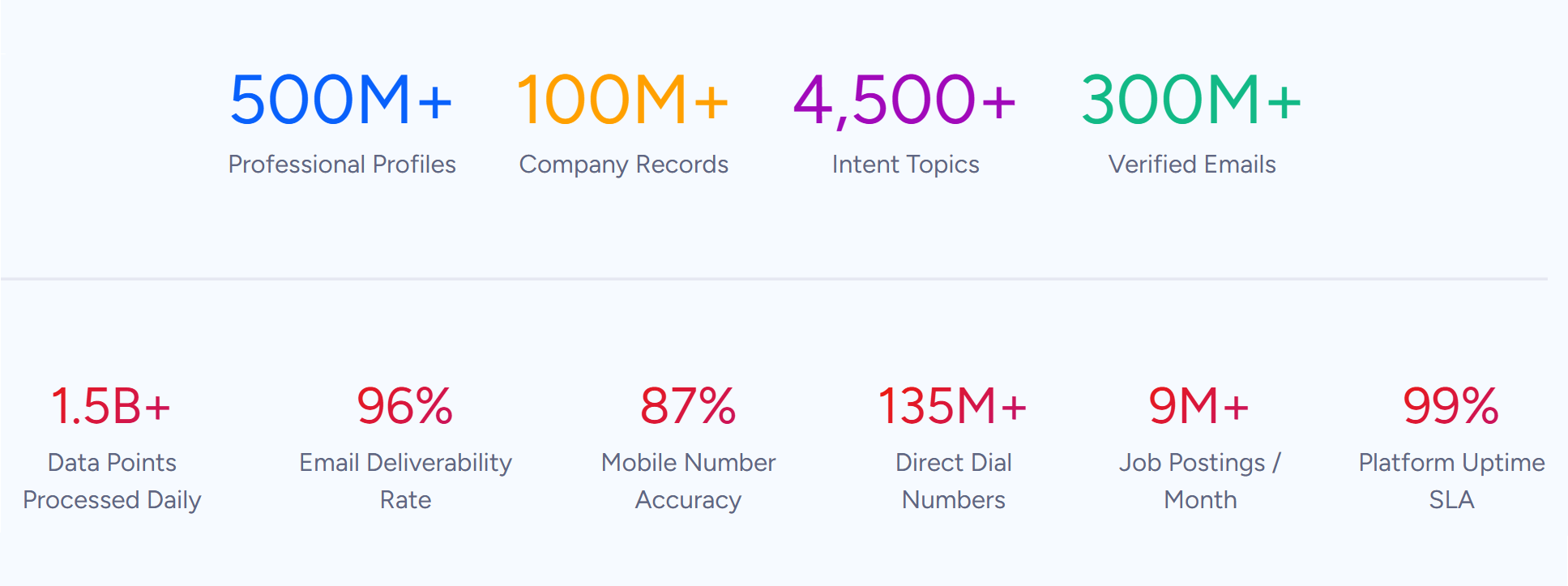
ZoomInfo is a B2B data and go-to-market platform built on a large dataset: 500M contacts, 100M companies, 135M+ verified phone numbers, and 200M+ verified business email addresses.
Source: ZoomInfo
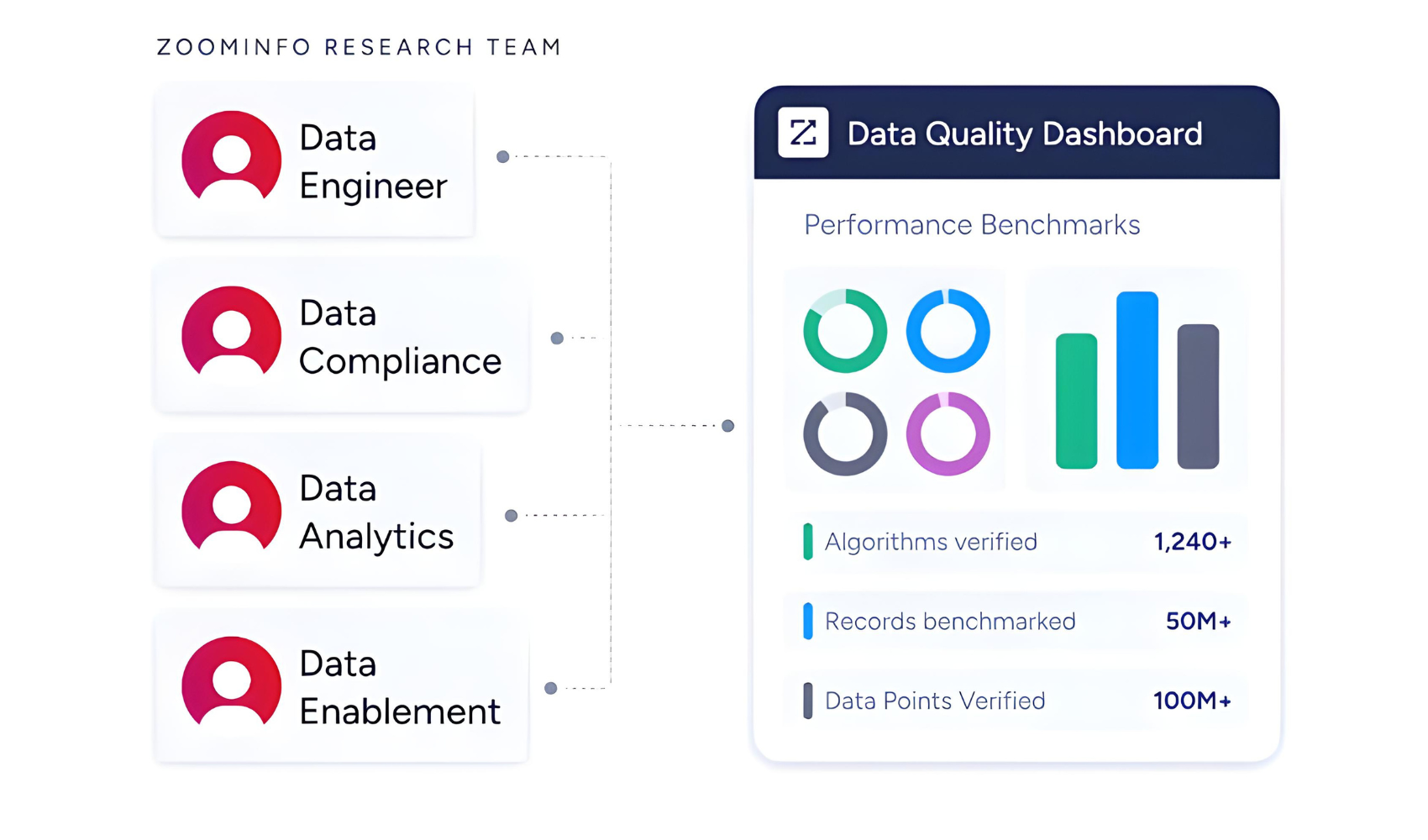
ZoomInfo verifies that data through a multi-source pipeline backed by 300+ human researchers, reaching up to 95% accuracy on first-party data. For teams running a Pipedrive-PandaDoc integration, ZoomInfo addresses the data quality layer that no document connector handles.
Source: ZoomInfo
ZoomInfo integrates with Pipedrive through a native connector on the ZoomInfo Marketplace, allowing teams to import verified contact data, direct dials, and company intelligence into Pipedrive records.
Once Pipedrive records are enriched, every PandaDoc document generated from a deal inherits that verified data automatically. Proposals go out with accurate job titles, current company names, and verified email addresses, because the source CRM records were cleaned before the document workflow started.
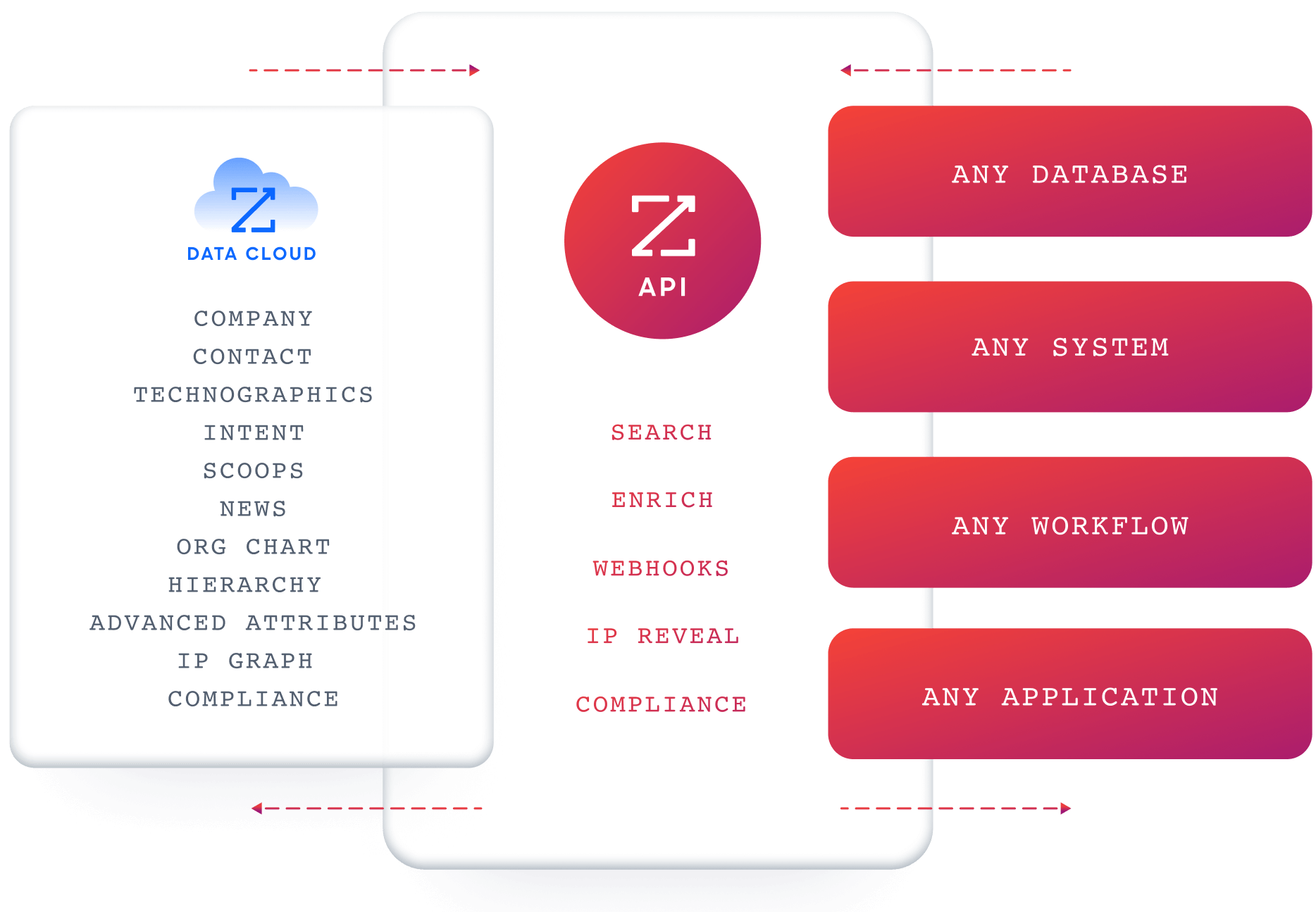
For teams that need programmatic access, ZoomInfo's Enterprise API and MCP server can feed the same verified data into any workflow or AI agent.
Source: ZoomInfo
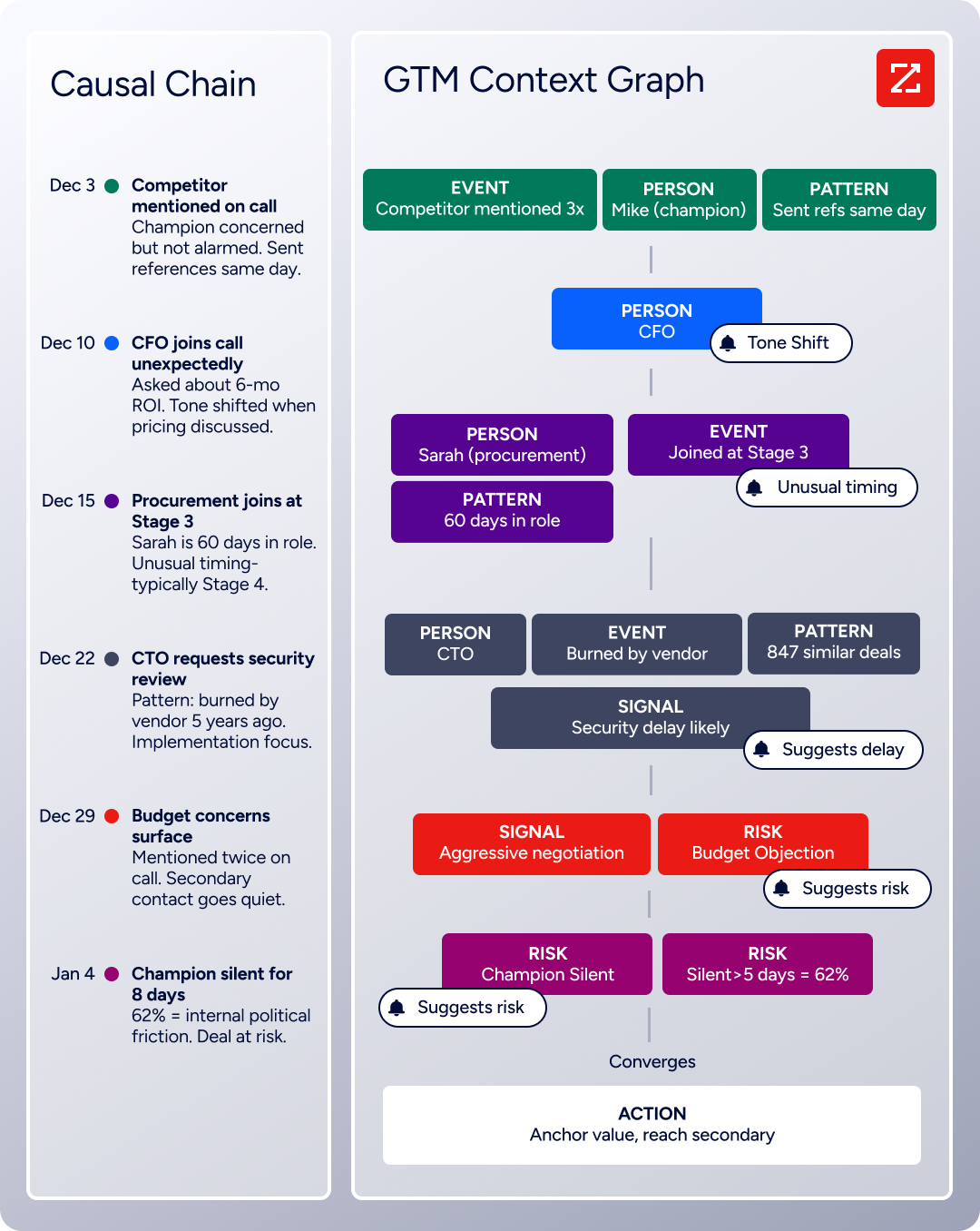
The same data feeds ZoomInfo's GTM Context Graph, an intelligence layer that processes 1.5B + data points daily by combining ZoomInfo's B2B data with your CRM records, conversation transcripts, and behavioral signals to surface not just what happened in a deal, but why.
Source: ZoomInfo
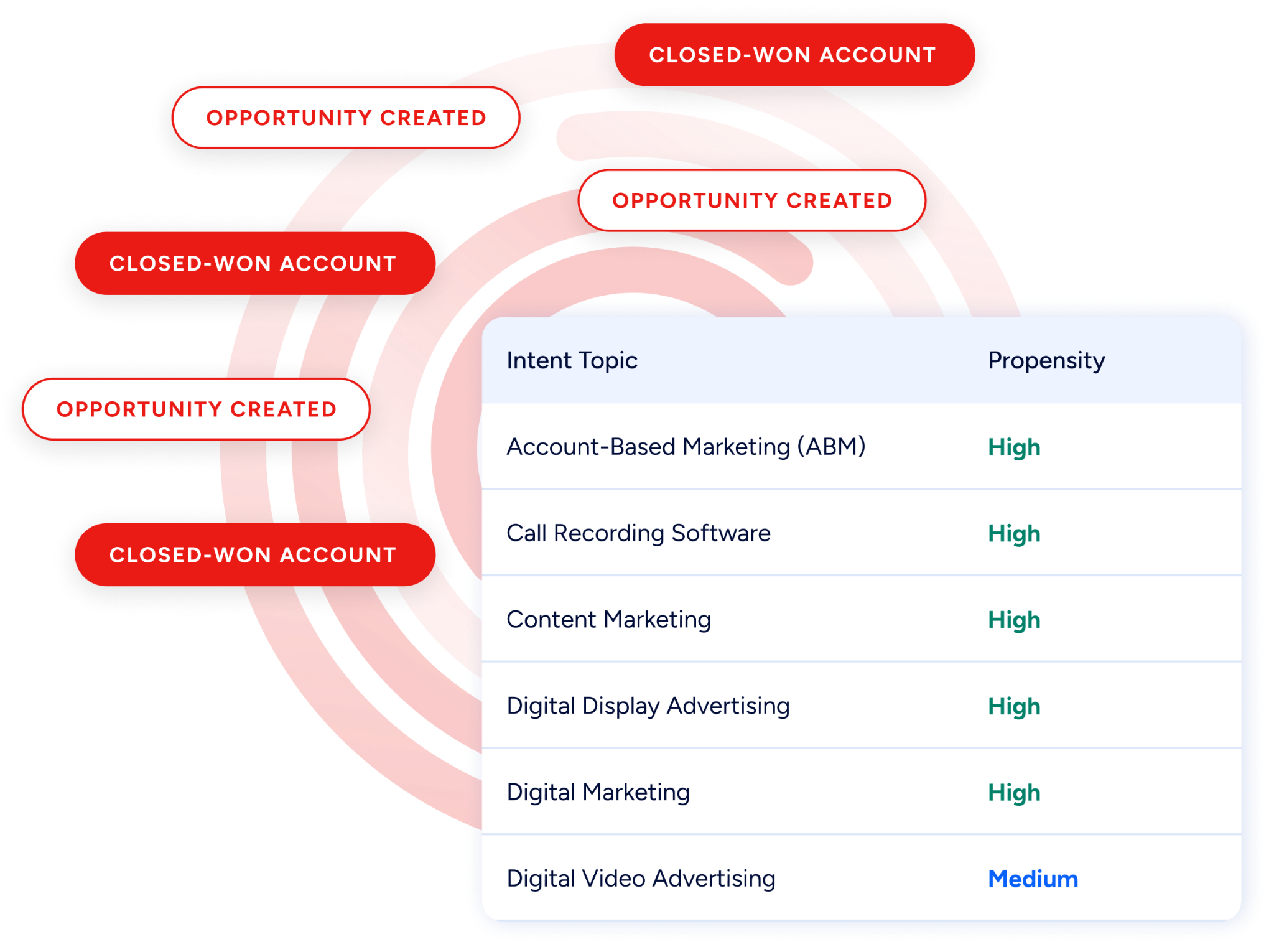
Buyer Intent data from ZoomInfo, tracking signals from 210 million IP-to-Organization pairings, can route into Pipedrive to prioritize which deals receive proposals first, so reps focus their document workflow on prospects actively researching relevant solutions.
Source: ZoomInfo
Enriched records also make the integration itself more reliable. Fewer blank fields mean fewer incomplete proposals. Consistent formatting across records reduces the manual cleanup reps do before sending a document.
And when PandaDoc's document engagement analytics show that a prospect viewed a proposal three times, the rep following up knows the contact details on the proposal are current and the person on the other end is reachable.
Seismic's sales team attributed 39% of active pipeline to opportunities identified or influenced by ZoomInfo signals, while boosting productivity by 54% and saving 11.5 hours per week. (Seismic)
Final Verdict
A native integration between Pipedrive and PandaDoc exists and covers the primary use case well: generating documents from deals, auto-populating them with CRM data, and writing document status back to the pipeline. For most teams, the right choice depends on the complexity of their quoting process and their PandaDoc plan tier.
Small teams that need proposals and contracts generated from Pipedrive deals should start with the native PandaDoc-Pipedrive integration on the Business plan. It covers document creation, eSignature, and deal stage updates with no third-party tool or engineering work.
Teams with complex pricing, configurable products, or discount requirements should evaluate PandaDoc CPQ for Pipedrive on the Enterprise plan. It adds guided selling, rules-based pricing, and conditional approval workflows to the standard document integration.
Teams that need workflows the native integration does not cover (triggers from activities, custom routing logic, or connections to other tools in the stack) should use Zapier to bridge the gaps.
Organizations with specific document generation requirements or custom application embedding needs should invest in a custom API integration using both platforms' developer tools.
Before committing to a method, clarify what the integration needs to accomplish.
If the goal is generating accurate proposals from pipeline deals and tracking their status, the native integration handles it. If the goal is complex quoting with pricing controls, CPQ is the right layer. Either way, the quality of the contact and deal data in Pipedrive determines whether the documents that reach prospects are accurate and professional.
ZoomInfo, with its native Pipedrive integration, API, and MCP access, is the data enrichment layer that ensures the CRM records behind every proposal are verified and complete before the first document is sent.
FAQ
Does PandaDoc integrate natively with Pipedrive?
Yes. PandaDoc offers a native Pipedrive integration through a browser add-on and the Pipedrive Marketplace. Reps can create, send, and track PandaDoc documents with eSignatures from Pipedrive deals, with contact and deal data auto-populating templates. The integration requires PandaDoc's Business plan or higher. PandaDoc also offers a CPQ solution for Pipedrive on its Enterprise plan.
What PandaDoc plan do I need for the Pipedrive integration?
CRM integrations, including Pipedrive, require the PandaDoc Business plan ($49/seat/month, annual billing) at minimum. CPQ for Pipedrive requires the Enterprise plan (custom-priced). PandaDoc's Free and Starter plans do not include CRM integrations.
Can I auto-update Pipedrive deal stages when a document is signed?
Yes. PandaDoc's automation recipes can trigger Pipedrive deal stage changes when a document reaches a specific status (sent, completed, or paid). This requires the External Automations extension in PandaDoc, a paid add-on on Business and included on Enterprise.
Does document engagement data sync back to Pipedrive?
PandaDoc tracks document engagement data: who viewed it, how long they spent on each page, and whether they shared it. This data is visible inside PandaDoc's Document Insights panel. Individual engagement metrics do not push as separate fields back to Pipedrive records through the native integration. Document status (sent, viewed, completed) does sync back.
Can I use PandaDoc CPQ inside Pipedrive?
Yes. PandaDoc launched CPQ for Pipedrive in June 2025, providing guided selling questionnaires, rules-based pricing, conditional approval workflows, and a product catalog with multiple pricing models. CPQ generates quotes that flow into PandaDoc's document lifecycle for eSignature and payment. It requires PandaDoc's Enterprise plan.
What happens if I add new custom fields in Pipedrive after setup?
Custom fields added after the initial integration setup will not automatically appear in PandaDoc templates. You need to update the field mapping in the integration settings and add corresponding variables to your PandaDoc templates. Existing documents created before the field was added are unaffected.
How does ZoomInfo improve a Pipedrive-PandaDoc workflow?
ZoomInfo solves the data quality problem upstream of document generation. Before a rep creates a proposal from a Pipedrive deal, ZoomInfo enriches the CRM record with verified contact data (accurate job titles, current email addresses, direct dials) and company intelligence (industry, headcount, technographics, org charts).
Its native Pipedrive integration handles enrichment inside the CRM, so every PandaDoc document auto-populated from that deal inherits verified data. The result: proposals go out with accurate, current information, reducing the cleanup and follow-up problems caused by stale CRM records.
Are there API rate limits I should know about?
Yes, on both sides. Pipedrive uses a token-based daily budget that scales with plan tier and seat count (Lite plans start at 30,000 base tokens per day). PandaDoc's API caps document creation at 500 requests per minute, with other endpoints having their own limits.
For teams using Zapier, each synced record counts as a task against your plan allocation. Custom API integrations should implement throttling and retry logic to stay within both platforms' limits.
See Pipedrive with your other tools:
