
If you are searching for a breakdown of Pipedrive's features, you are probably past the question of whether a CRM matters and into the question of whether this particular CRM does what you need. Pipedrive is a visual, pipeline-first sales CRM built for small and medium-sized businesses, used by 100,000+ companies in 179 countries. This breakdown covers every feature, how it works, who it serves, and which plan unlocks it.
Pipedrive's feature set has you covered if:
You want a visual, kanban-style pipeline where every deal's stage, value, and next action are visible at a glance
You need sales automation that triggers follow-ups, updates deal stages, and routes leads without manual work
You run email outreach directly from your CRM with open/click tracking, scheduling, and AI-drafted messages
You manage proposals, quotes, and contracts inside the same system where your deals live
You want AI that surfaces deal priorities, generates reports from natural-language prompts, and drafts personalized emails
You need a mobile CRM with offline access, in-app calling, and a nearby-clients feature for field selling
You'll reach the edges of its capabilities if:
You need a B2B contact and company database to source new leads at scale, beyond Pipedrive's 400-million-profile Prospector
You want buyer intent signals showing which companies are actively researching your category across the web before you contact them
You need conversation intelligence that records, transcribes, and coaches from sales calls
You require account-based marketing orchestration, display advertising, or multi-channel campaign management alongside sales execution
For those needs, the reference point is ZoomInfo: a GTM platform built on 500M contacts, 100M companies, 135M+ verified phone numbers, and 200M+ verified business email addresses, a GTM Context Graph that combines B2B data with CRM records, conversation intelligence, and behavioral signals into a single intelligence layer, and access through APIs, MCP, GTM Workspace, and GTM Studio.
After the feature breakdown, this article covers where Pipedrive stops and how ZoomInfo fills those gaps.
Pipedrive Platform Overview
Pipedrive targets salespeople and small revenue teams who find enterprise CRMs bloated or expensive. The product centers on a kanban-style pipeline view that Pipedrive claims to have pioneered in the CRM category. The design philosophy is activity-based selling: every deal has a next action, and the system surfaces what needs attention now. Customers span industries from real estate and SaaS to financial services and nonprofits, with ~100 million deals created per year across the platform.
The platform is organized around a core CRM and several add-on products:
Module | What It Does | Plan / SKU |
|---|---|---|
Visual kanban pipeline, deal management, activity scheduling, contact management | All plans (Lite through Ultimate) | |
Pre-pipeline Leads Inbox, lead scoring, labels, routing | All plans; LeadBooster add-on or included on Premium+ | |
Feed workspace, data enrichment, custom scoring, sequences | All plans (feed); enrichment credits on Premium+ | |
Trigger-action workflows with if/else branching, delays, cross-app notifications | Growth plan and above | |
Two-way email sync, templates, tracking, AI email writer, scheduling, calling, Smart Docs | Email sync from Growth; AI email on Premium+ | |
Dashboards, custom reports, goals, AI report generation, AI Sales Assistant | All plans; AI features and multiple dashboards on Premium+ | |
Email marketing with drag-and-drop builder, segmentation, marketing automation | Paid add-on on any plan | |
Website company identification and activity tracking | Paid add-on |
Pipedrive sells four plans (Lite, Growth, Premium, Ultimate), priced per seat per month with annual billing discounts up to 42%. Entry starts at $14/month per seat. Add-ons are billed per company, not per seat. A 14-day free trial is available with full access and no credit card required. With that structure in place, here is the full tour.
Pipedrive's Sales Pipeline and Deal Management
The pipeline is the product's center of gravity. When you log in, you see a kanban board where every deal sits in a named stage, showing its value, owner, and next scheduled activity. This is not a reporting view layered on top of a record system; it is the primary workspace.
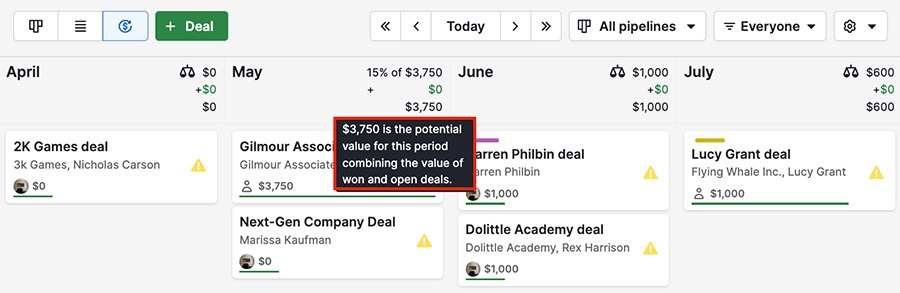
Pipeline customization starts with stages. You define as many pipelines as your sales motions require (unlimited on all plans), each with its own stages, and assign deals to the appropriate one. Deals move between stages by drag and drop. Three views are available: kanban (the default board), list view, and forecast view. The forecast view projects which deals are due to close in a given period and their aggregate value, useful for end-of-quarter planning.
Source: Pipedrive
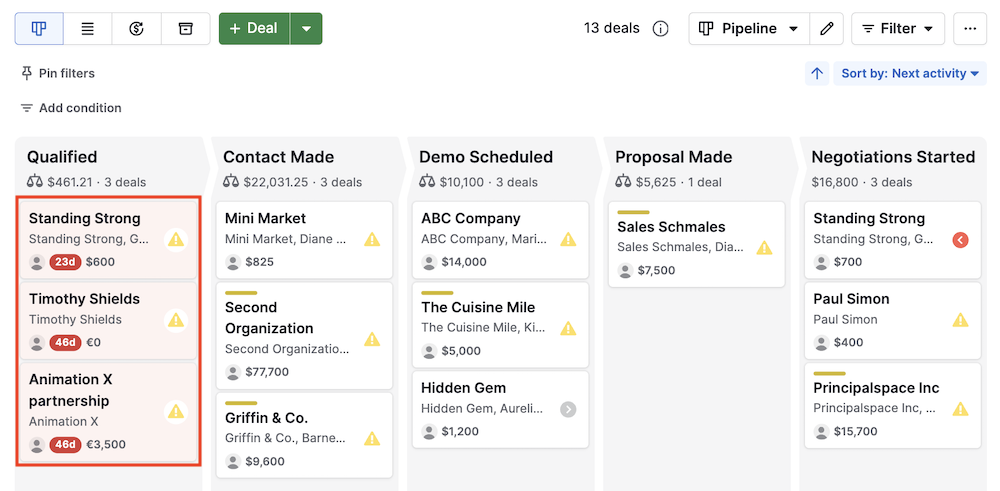
Deal rotting keeps the pipeline honest. When a deal sits idle beyond a threshold you define, Pipedrive marks it with a colored cue, signaling it needs attention before it goes cold. A quick scan of the board shows which deals are active and which are stalling.
Every deal card connects to an activity layer. You attach calls, meetings, emails, and tasks to deals, contacts, or organizations and schedule them in a built-in calendar. The pipeline view surfaces deals with no upcoming activity, so nothing sits unworked. Custom fields (single option, multiple options, numerical, monetary, date, text, and auto-calculated types) extend the data model to match your process. Feature modules can be toggled on and off so the interface shows only what your team uses.
Source: Pipedrive
Contact and organization records link to deals and to each other, with a full interaction history accessible in a single click. A contacts timeline visualizes all touchpoints over time. Recurring revenue tracking handles subscriptions and repeat business. Multi-currency support covers all major currencies plus custom currencies for barter or service exchanges.
Usage limits scale by plan. Lite allows 2,500 leads and deals per seat (max 300K across the account) with 30 custom fields. Growth raises that to 5,000 per seat with 100 custom fields. Premium reaches 15,000 per seat with 300 custom fields, and Ultimate tops out at 20,000 per seat with 500. Pipedrive does not delete data when limits are exceeded; it blocks new additions and notifies admins at 80% and 100% of capacity.
Pipedrive's Lead Management and Prospecting
Pipedrive draws a deliberate line between leads (unqualified potential) and deals (qualified pipeline). This separation prevents the kanban board from filling with contacts that are not ready for active selling.
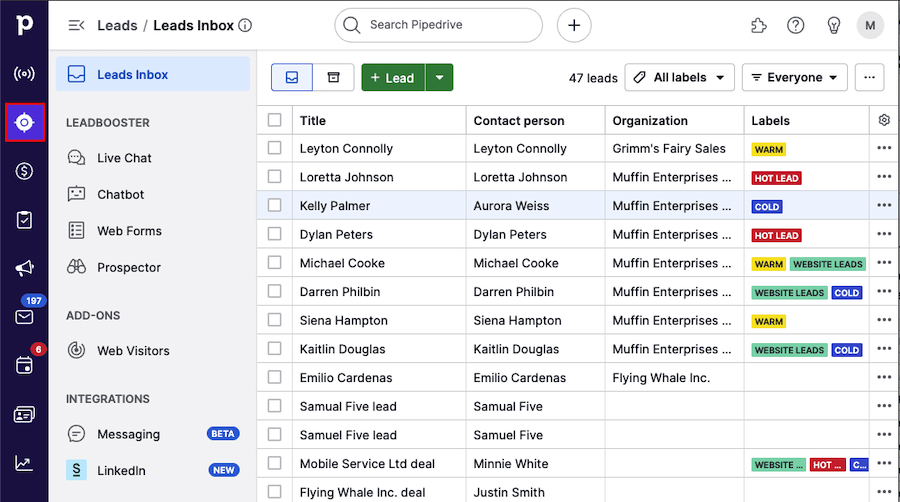
The Leads Inbox is the holding area. Incoming leads land here, where reps filter, sort, label (hot, warm, cold), and attach activities before deciding whether to convert to a deal. Conversion takes a single action and carries the lead's data into the pipeline. Automatic lead assignment distributes leads by territory, expertise, product line, or round-robin, available on Premium and above.
Source: Pipedrive
LeadBooster bundles four lead generation tools into one add-on ($32.50/company/month billed annually on Lite and Growth; included on Premium and Ultimate):
Chatbot: A customizable conversational popup that qualifies website visitors around the clock, with questions configurable per page.
Live Chat: Available reps pick up conversations started by Chatbot. If all reps are busy, Chatbot resumes.
Web Forms: Customizable forms embeddable on websites or shared via link. Submissions auto-import into the CRM.
Prospector: Outbound lead sourcing from a database of over 400 million profiles and 10 million companies. An AI engine verifies and updates up to 800,000 profiles daily. Credits reveal verified emails, direct-dial phones, and social profiles.
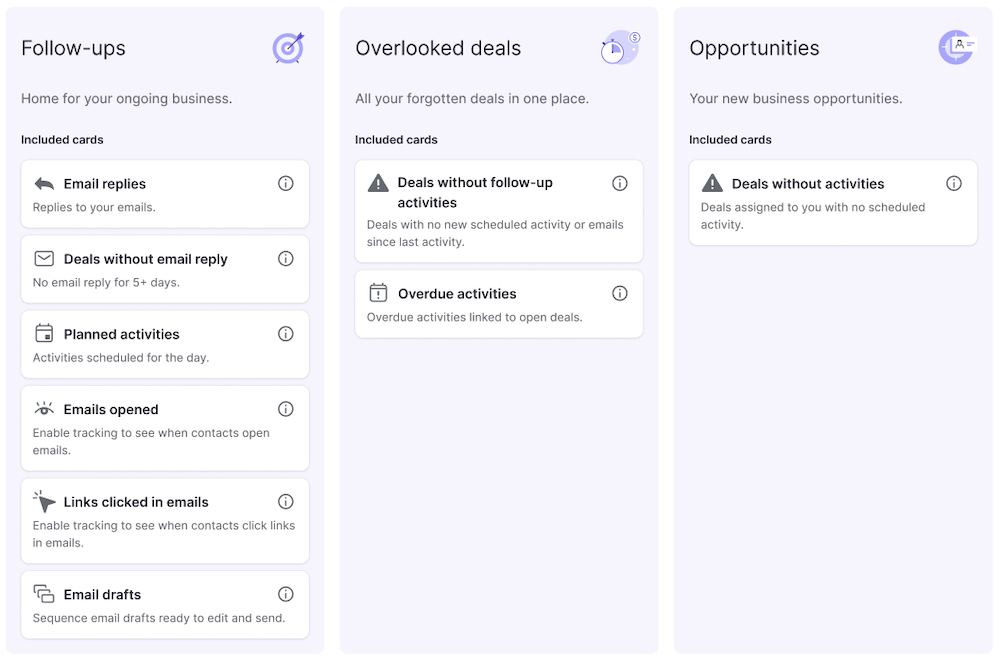
Pulse is Pipedrive's newer prospecting toolkit, available on all plans. The Pulse Feed workspace has three tabs: Follow-ups (leads that need attention), Overlooked Deals (pipeline entries going cold), and Opportunities (new leads matching your criteria). Data enrichment surfaces firmographic data (industry, website, revenue, LinkedIn, employee count) directly on lead records. Custom lead scoring lets you build scoring models fitted to your sales process, and Sequences automate multi-step follow-up flows of emails and tasks that pause when a lead engages.
Source: Pipedrive
Sequence limits scale with plan: 5 on Growth, 25 on Premium, 50 on Ultimate. Enrichment credits (100 on Premium, 500 on Ultimate) fuel data enrichment. Bulk contact list enrichment is noted as "coming soon."
The Web Visitors add-on identifies which companies visit your website and tracks their activity, priced by unique organizations per month. A Messaging Inbox connects Facebook Messenger conversations to the CRM.
Pipedrive's Sales Automation and Workflows
Pipedrive's automation engine lets teams define trigger-action rules that eliminate repetitive manual work. Available on Growth and above, automations follow a straightforward model: an event fires, conditions are evaluated, and one or more actions execute.
Triggers fall into two categories: event triggers (a deal is created, a contact is updated, an activity is completed) and date triggers (fire on, before, or after a date field value). Date-based triggers work well for contract renewals, trial expirations, and deadline-driven follow-ups.
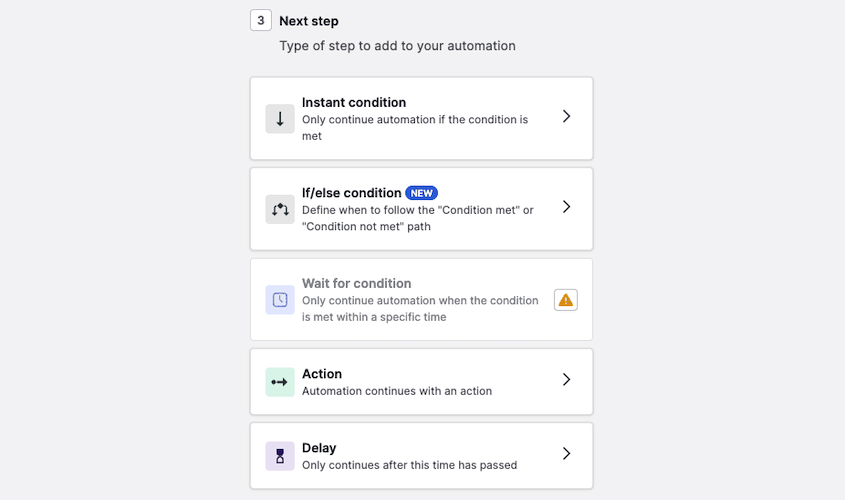
Conditions apply if/else branching to split automations into multiple paths based on field values, deal stages, or contact attributes. A "wait until event" condition holds the automation until a specific event occurs, and configurable delays schedule actions for the future.
Source: Pipedrive
Actions include: create, update, or delete records; send emails; add notes; trigger Campaigns; create Projects; fire webhooks; and send Slack, Microsoft Teams, Trello, or Asana notifications. Multiple actions chain in sequence within a single automation.
Practical applications span the sales process. You can create deals from qualified leads automatically, move deals between stages when an email gets a reply, queue follow-up activities after a meeting, and distribute new leads by territory. A library of pre-built workflow templates covers common patterns so teams do not start from scratch.
The native integrations inside the automation engine matter: Slack and Microsoft Teams notifications ship with pre-built templates, and Asana and Trello connections enable post-sale handoffs without a third-party automation platform. Webhook triggers push real-time CRM events to external endpoints for anything the native connectors do not cover.
Automation limits are plan-gated: 50 on Growth, 150 on Premium, 250 on Ultimate. Top-ups of 50 additional automations can be purchased in multiples of up to 10, available from Growth onward.
Pipedrive's Email, Communications, and Document Management
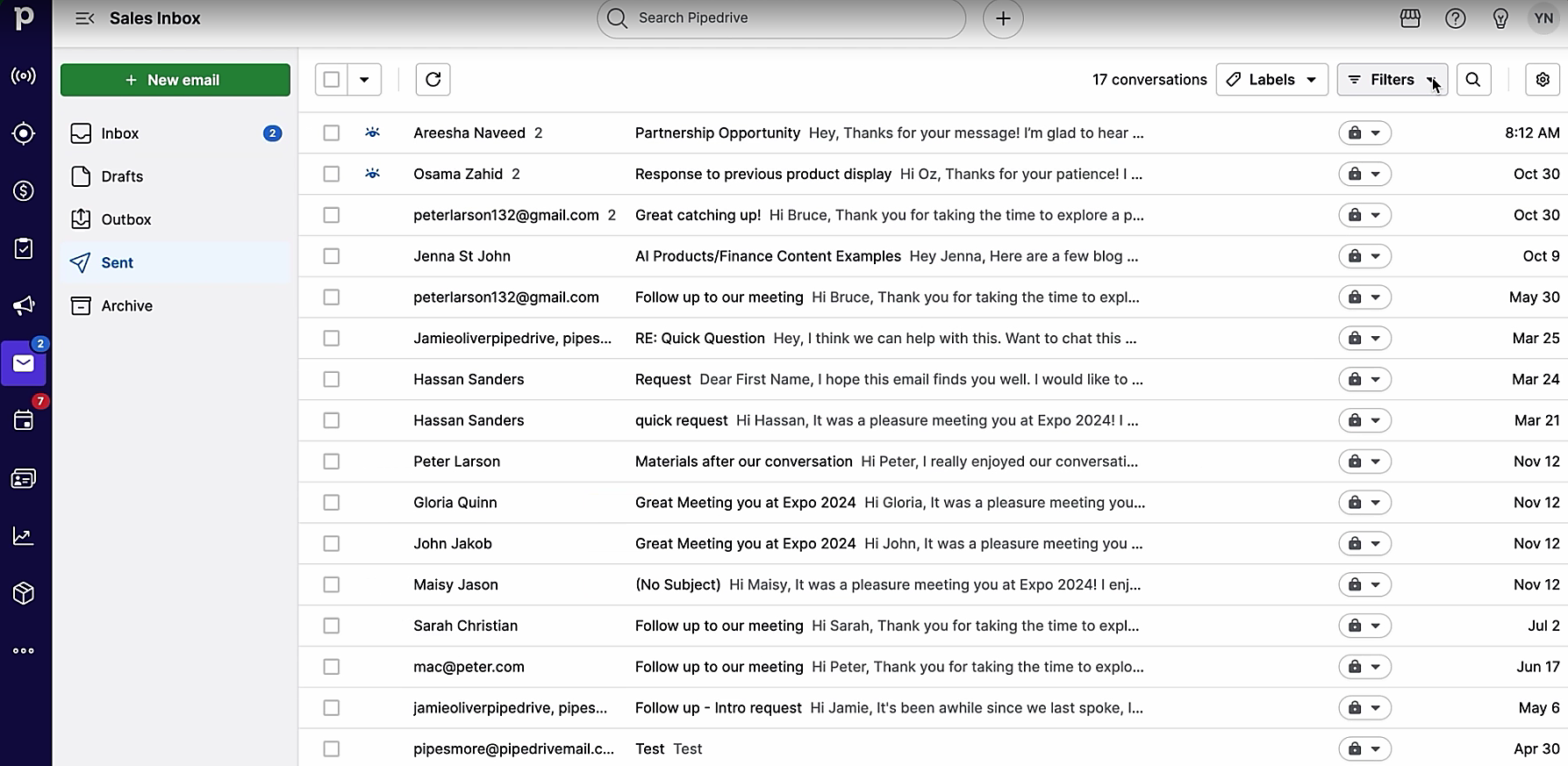
Pipedrive's email suite is built into the CRM so that every email sent, opened, clicked, or replied to is automatically associated with the correct deal, lead, or contact. The operational center is the Sales Inbox, a dedicated email client inside Pipedrive that connects Gmail, Outlook, Office 365, Microsoft Exchange, or any IMAP-compatible account. Emails are automatically linked to deals, leads, or projects. Both personal and team accounts are supported; team accounts give multiple users access to shared addresses like sales@yourcompany.com. Email sync is available from Growth onward (1 account per user on Growth, 3 on Premium, 5 on Ultimate). A Smart Email BCC option on Lite provides a lighter alternative.
Source: Pipedrive
Email templates let teams save and share customizable messages that auto-populate with contact and deal fields. Group email sends personalized messages to up to 100 contacts at once. Email scheduling queues messages for future send times, and email tracking delivers real-time open and click notifications, toggleable per email.
The AI email writer generates drafts from a prompt, with configurable type, tone (professional, friendly, or standard), and length. It detects the prompt's language and generates in that language. AI email summarization condenses long threads into summaries with key themes, sentiment, a readiness-to-buy score (1-10), and recommended actions. Both AI email features are available on Premium and above. The summarization feature is labeled BETA.
Scheduler lets reps set availability and generate a shareable booking link; prospects pick a slot, and the meeting appears in the CRM. It integrates with Zoom, Microsoft Teams, and Google Meet. Available from Growth onward.
Call tracking connects telephony integrations so reps make calls from the CRM with automatic logging and optional recordings. Pipedrive does not include a native power dialer; teams use third-party dialer integrations from the Marketplace.
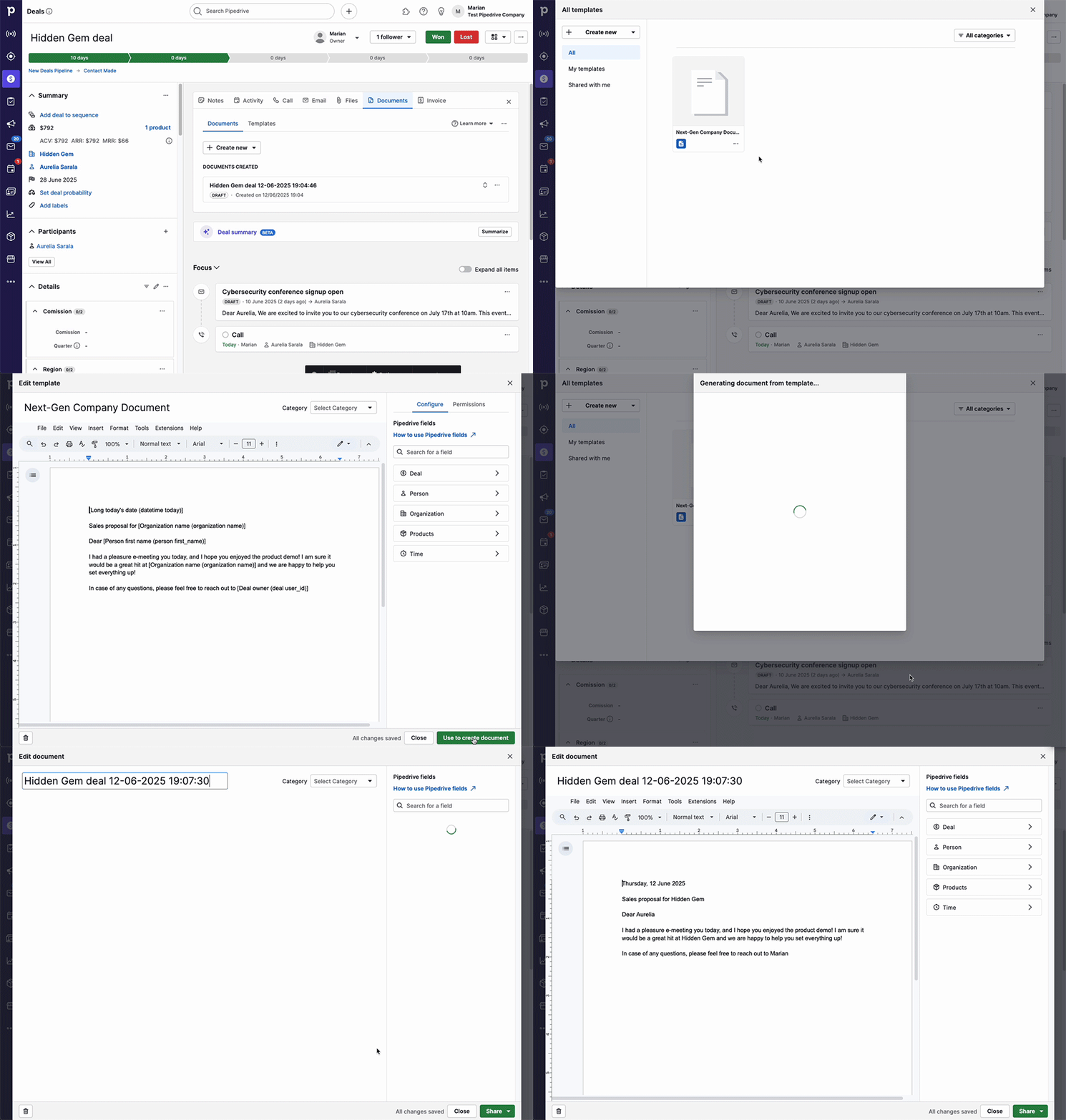
Smart Docs handles proposals, quotes, and contracts without leaving the CRM. You create, send, track, and sign documents using templates with merge fields that auto-populate from CRM data. Documents connect to Google Drive, OneDrive, or SharePoint. Trackable sharing links notify you when a recipient opens the document. Built-in eSignature requires no plugins, and a DocuSign integration is available for teams already on that platform. Smart Docs is included on Premium and Ultimate, available as a paid add-on on lower plans.
Source: Pipedrive
Pipedrive's Insights, Reports, and AI
Insights is Pipedrive's analytics layer, organized into three sections: Reports, Dashboards, and Goals.
Reports are customizable, tracking default or custom metrics. Built-in types cover revenue forecasts, performance reports, conversion reports, deal velocity, and team performance. The forecast view projects expected revenue using expected close dates, won dates, or custom date fields, available from Growth onward. Report limits scale: 15 per user on Lite, 50 on Growth, 250 on Premium, 500 on Ultimate.
AI report generation lets you type a natural-language request to generate reports without configuring filters. Powered by OpenAI, it is available on all plans. Ask "show me deals closing this month by stage" and the system builds the report.
Dashboards collect reports into a single view. They are shareable with anyone, including non-Pipedrive users, with a single click, eliminating static PDF exports for stakeholder reporting. Multiple dashboards are available on Premium and above.
Goals can be value-based (revenue target) or count-based (number of calls made, meetings set). Progress is tracked visually alongside forecast data, keeping individual and team performance visible in one place. Team goals are available on Premium and above.
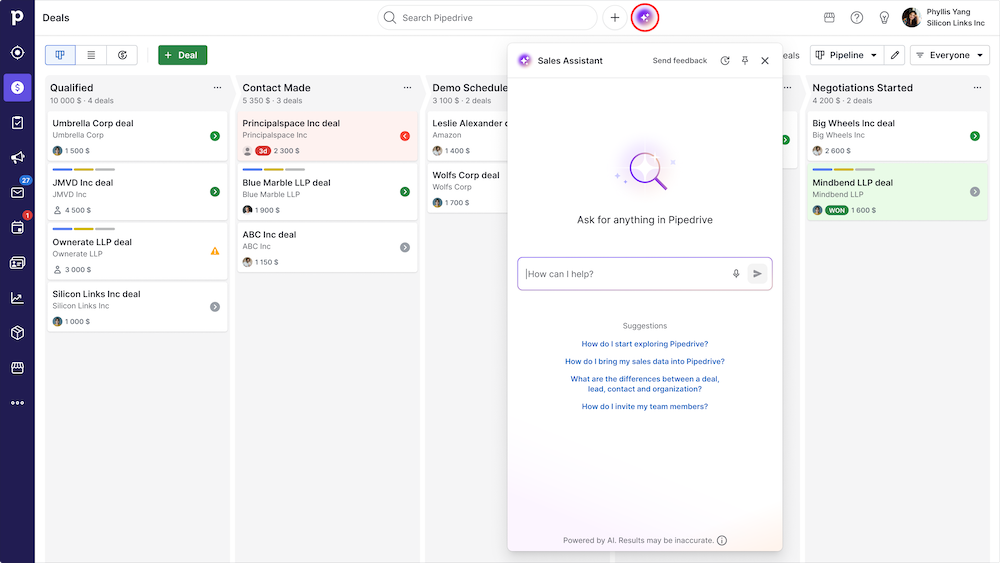
The AI Sales Assistant operates in two modes. Proactively, it surfaces win probability predictions, deal activity reminders, progress updates, and feature suggestions. Through prompt-based chat, it can summarize deals, analyze performance, identify winning patterns, track goals, analyze deal velocity, and surface valuable contacts.
Source: Pipedrive
An AI Marketplace Search uses natural-language queries to find relevant apps in Pipedrive's Marketplace. A ChatGPT integration launched in December 2025, letting reps query Pipedrive data directly inside ChatGPT (requires an OpenAI Business, Enterprise, Edu, or Pro plan; currently unavailable for EU data residency accounts).
Pipedrive has stated it does not permit third parties to use client data to train AI models, a meaningful detail for privacy-conscious buyers.
Pipedrive's Email Marketing (Campaigns)
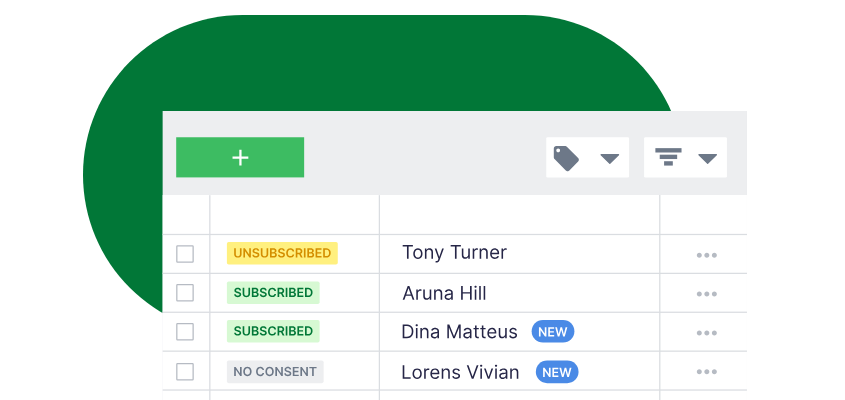
Campaigns is Pipedrive's email marketing add-on, sold separately on any plan. It reads directly from Pipedrive contacts and writes engagement data (opens, clicks, unsubscribes) back to each contact's record in real time, with no data export or import necessary.
The email builder is a drag-and-drop editor with pre-built templates, HTML block support, a custom template library, and device preview across mobile, tablet, and desktop. A mandatory GDPR-compliant unsubscribe footer is automatically included.
Segmentation draws from two sources: CRM person filters (deals, activities, products, custom fields) and campaign engagement filters (opens, clicks, bounces, subscription status). Both are combinable, and contacts can be explicitly excluded. Because segmentation draws from all CRM fields (including deal stage, product history, and assigned rep), marketing can target based on sales context without a separate data sync.
Source: Pipedrive
Email analytics track open rate, click rate, CTR, location, time series, link performance, delivery/bounce rate, and unsubscribes in real time. Engagement data flows back to each contact's detail view, so sales reps see campaign interactions alongside CRM history and email threads.
Marketing automation supports drip sequences, autoresponders, nurture campaigns, delay steps, and CRM-triggered sends, built using pre-built templates or a WYSIWYG workflow editor. Campaigns pricing scales by subscriber count with two tiers (Standard and Premium).
Pipedrive's Integrations, API, and Mobile App
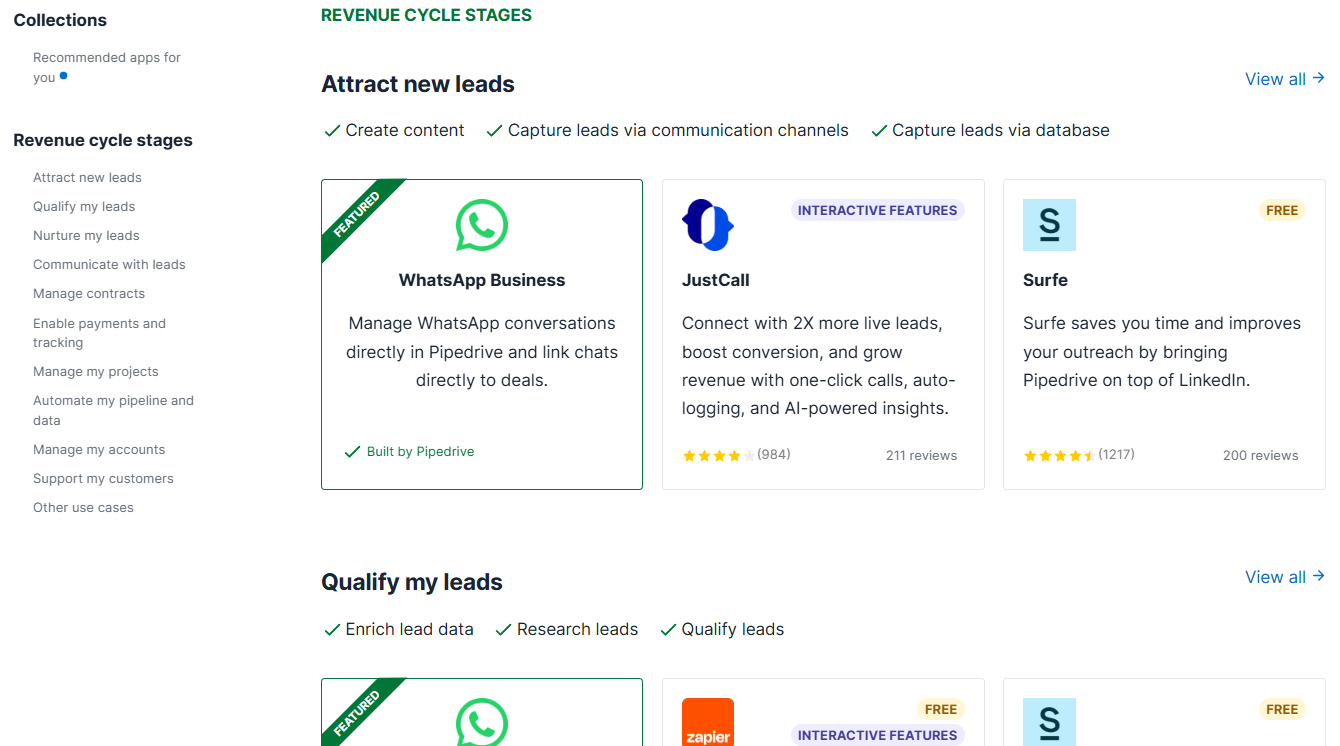
The Pipedrive Marketplace lists over 400 apps (product pages reference 500+ integrations). Pipedrive reports that companies with at least one app installed win 1.5x more deals, and the average company uses 4+ apps daily. Key integrations span Zapier and Make (automation), Google Meet and Microsoft Teams (video), Mailchimp (email marketing), PandaDoc and DocuSign (e-signatures), QuickBooks, Xero, and Stripe (accounting and invoicing), Slack (messaging), and JustCall (calling).
Source: Pipedrive
The API is RESTful, returns JSON, and is available on all plans. Authentication supports both API tokens and OAuth 2.0. API v2 is available alongside v1, with lower token costs per request. The API covers deals, leads, persons, organizations, activities, products, notes, pipelines, projects, and more. Webhooks v2 supports real-time event notifications (max 40 per user).
Rate limits use a token-based system: each request consumes tokens from a company-wide daily budget of 30,000 base tokens multiplied by a plan factor (1x for Lite, 2x for Growth, 5x for Premium, 7x for Ultimate) and number of seats. Top-ups of 250,000 additional API tokens are purchasable in multiples of up to 10, available from Growth onward.
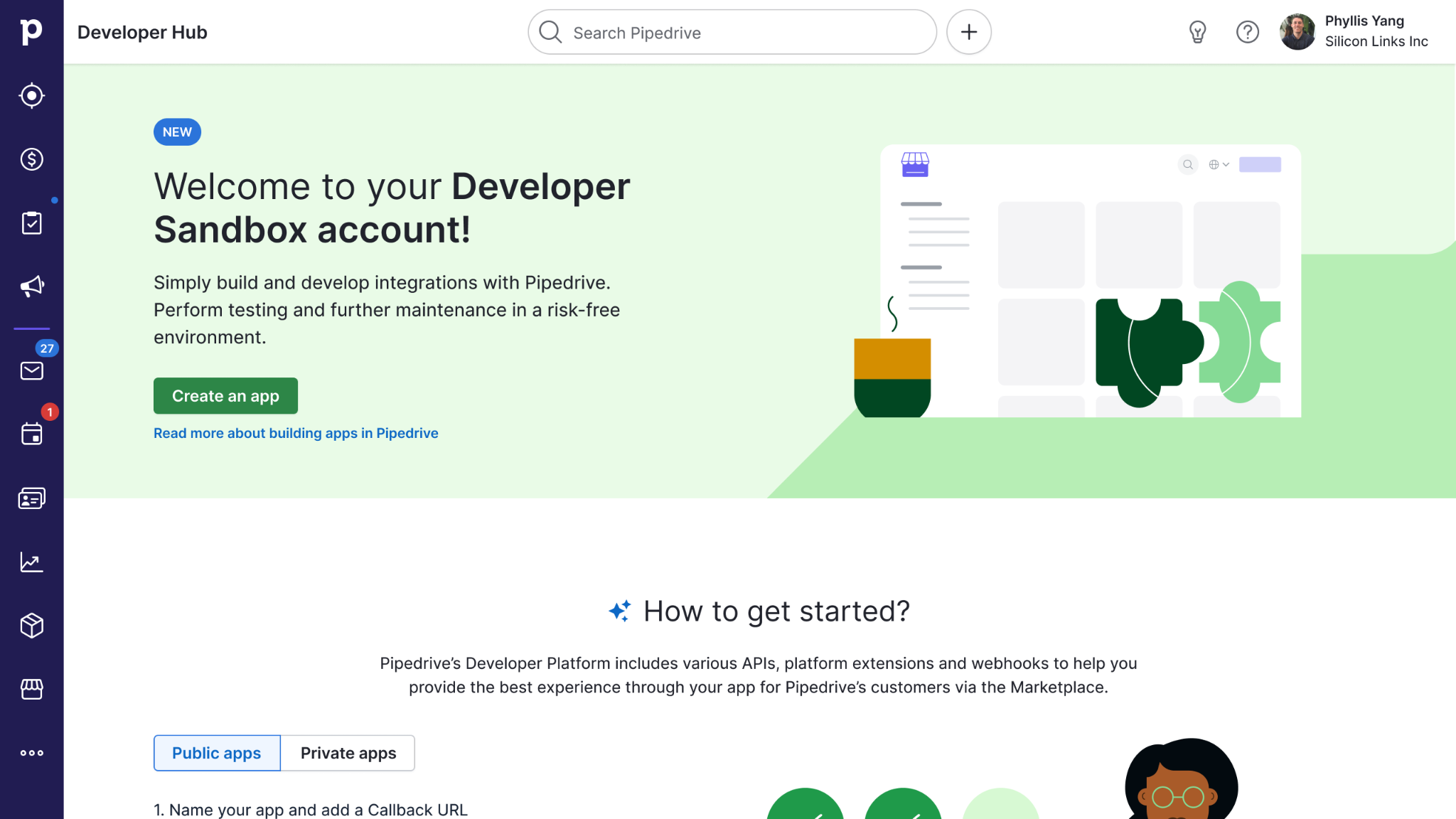
The Developer Hub provides full API reference, OpenAPI 3 spec files for both v1 and v2, a developer sandbox account, Postman/Insomnia collections, official clients for Node.js and PHP, tutorials, and an API changelog with breaking changes announced 1-3 months in advance. App Extensions let developers embed custom UI inside Pipedrive: floating windows, panels, modals, and video calling or messaging extensions. A Pipedrive MCP server is available in beta.
Source: Pipedrive
The mobile app for iOS and Android mirrors the core CRM: pipeline views, deal editing, calendar, in-app calling with automatic logging, two-way email sync, offline mode, business card scanner (iOS), audio notes, photo upload, a "Nearby" feature that shows geographically close clients, and push notifications. Minimum requirements: Android 10+, iOS 18+.
Pipedrive supports 24 languages natively and holds ISO/IEC 27001:2022, ISO/IEC 27701:2019, SOC 2 Type 2, and SOC 3 certifications. Data is hosted on AWS in Europe and US regions with separate databases per customer, AES-256 encryption, and daily backups going back three months. Access controls include SSO via SAML 2.0, two-factor authentication, visibility groups, permission sets, IP allowlisting, and a Security Center dashboard.
Where Pipedrive Stops: The Gaps
Pipedrive is built to help small sales teams manage deals and close revenue. That focus makes the product fast to adopt and simple to operate, but it also means the platform defers to external tools for several capabilities a growing revenue team eventually needs.
Prospector data depth and scale are limited compared to dedicated B2B intelligence platforms. Pipedrive's Prospector offers 400 million profiles and 10 million companies, but enrichment credits are finite (100 on Premium, 500 on Ultimate), and bulk contact list enrichment is still listed as "coming soon." Teams that need company org charts, technographic profiles, or continuously verified direct dials at enterprise scale will find Prospector a starting point, not a complete prospecting solution.
No native buyer intent signals. Pipedrive does not track which companies are researching specific topics across the web before you contact them. The Web Visitors add-on identifies companies visiting your website, and Pulse surfaces follow-up opportunities within your existing data, but neither provides third-party intent data that reveals in-market activity outside your own properties.
No conversation intelligence. Pipedrive integrates with third-party calling tools and logs calls automatically, but it does not record, transcribe, or analyze sales conversations. There is no built-in coaching, no objection detection, no talk-ratio analysis, and no AI-driven call scoring. Teams that advance deals over the phone need a separate tool to capture what was said and why it mattered.
No account-based marketing or multi-channel campaign orchestration. Campaigns handles email marketing with CRM segmentation, but there is no display advertising, audience management, LinkedIn or Meta ad targeting, or multi-channel orchestration. Marketing teams running demand generation alongside sales need a separate platform for anything beyond email.
No native customer-success or post-sale functionality. Pipedrive is a pre-sale pipeline tool. It does not include customer success management, ticketing, or service-desk features. The Projects feature handles basic post-sale task management, but unified pre- and post-sale relationship management requires third-party integrations.
How ZoomInfo Covers the Gaps
The gaps above share a common thread: Pipedrive optimizes for the small sales team managing deals and outreach but depends on external sources for the data, intelligence, and marketing orchestration that a scaling revenue operation requires. ZoomInfo is a GTM platform that supplies those layers.
ZoomInfo's B2B Data Platform: The contact and company intelligence Pipedrive's Prospector cannot match at scale
ZoomInfo operates a B2B data platform of 500M contacts, 100M companies, 135M+ verified phone numbers, 120M direct-dial phone numbers, and 200M+ verified business email addresses. The data flows through a verification pipeline backed by 300+ human researchers and automated ML scanning 28 million site domains daily, reaching up to 95% accuracy on first-party data.
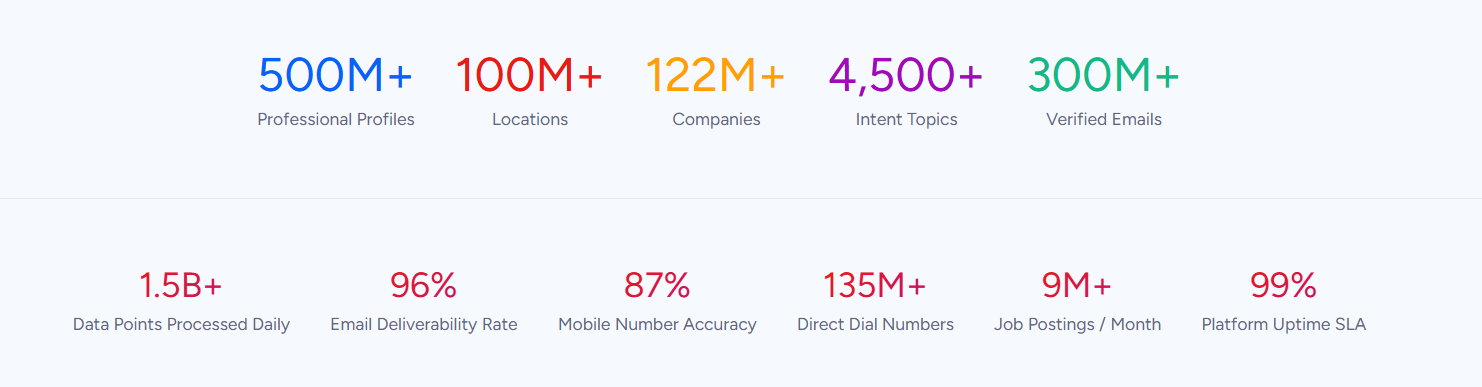
Where Pipedrive's Prospector provides 400 million profiles with credit-gated enrichment, ZoomInfo provides 300+ company attributes for segmentation, department org charts with decision-makers' direct dials and emails, contact tracking with job-change alerts, and technographic profiles covering 30,000+ technologies across 200+ categories for 30+ million companies. Global coverage extends to 34M+ company profiles outside North America, 200M+ professional profiles outside NA, and 45M+ mobile numbers outside NA.
In a Fortune 500 competitive RFP analyzing 25 million contacts across vendors, an independent consultant concluded that "no other competitor came even close."
ZoomInfo Intent and WebSights: Signals that reveal who is in-market before any outreach begins
ZoomInfo Intent tracks signals from 210 million IP-to-Organization pairings and 6 trillion+ new keyword-to-device pairings sourced monthly. Where Pipedrive's Pulse surfaces follow-up opportunities within your CRM data, ZoomInfo's intent data reveals which companies are researching topics related to your product across the web, before you have ever contacted them. Guided Intent, exclusive to ZoomInfo, identifies the topics historically correlated with deal success rather than requiring manual topic selection.
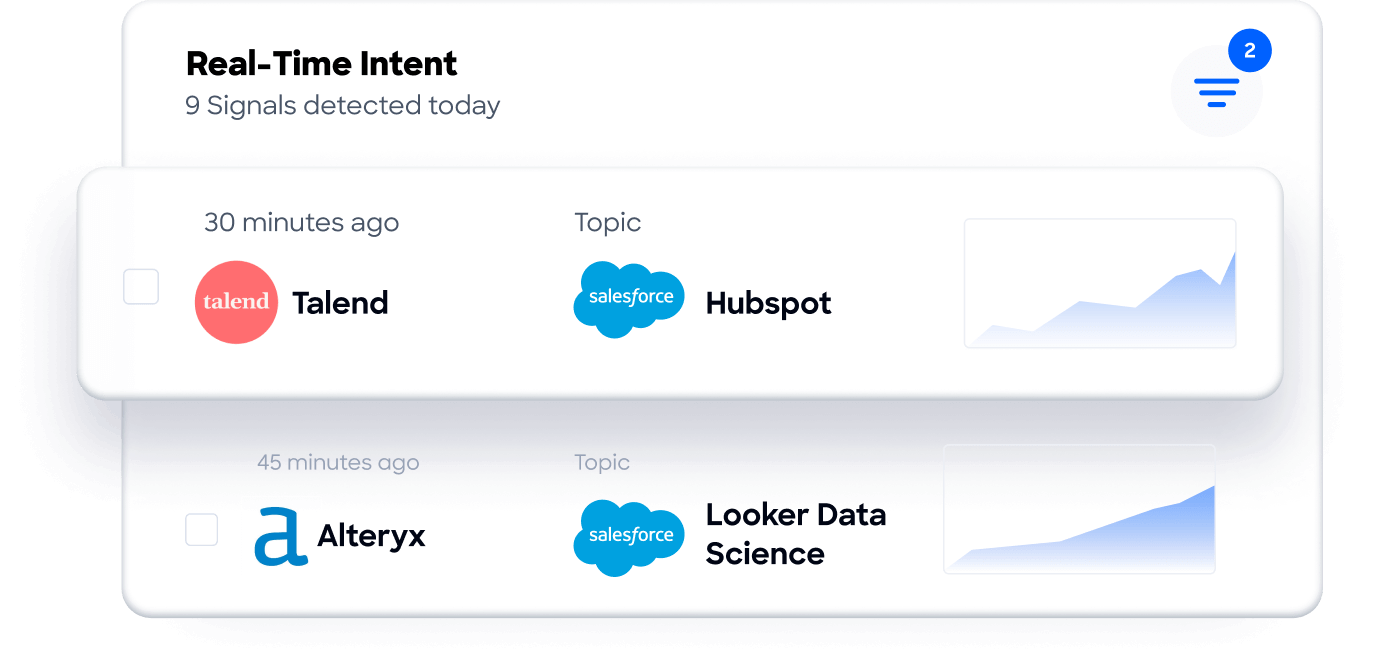
On the website side, WebSights resolves anonymous website traffic to companies with Automatic Traffic Filtering that distinguishes real visitors from bots. ZoomInfo Marketing goes further with contact-level site visitor identification, identifying who visited (not just which company) and triggering personalized outreach.
ZoomInfo's GTM Context Graph and Chorus: Intelligence from every conversation, not just email tracking
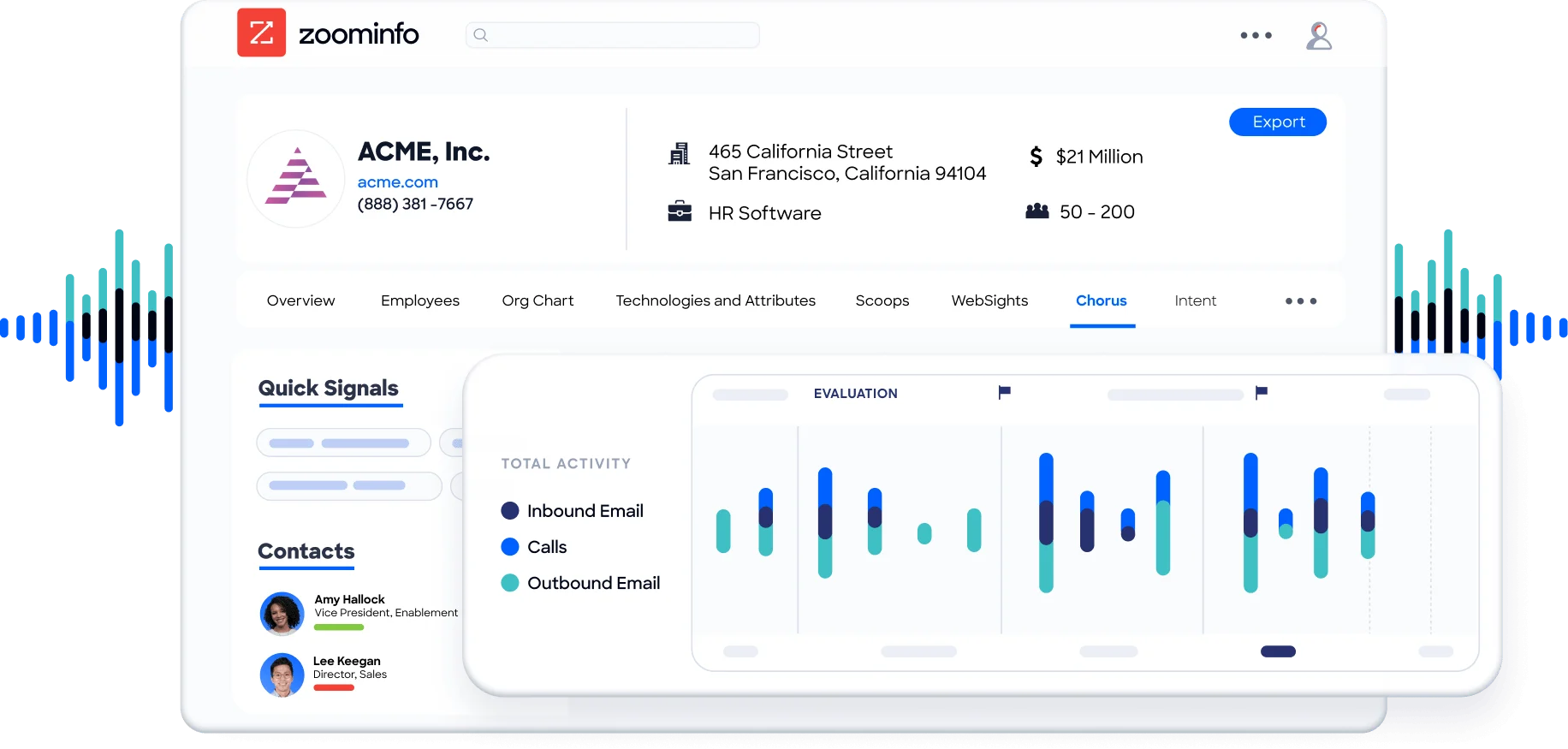
Pipedrive tracks email opens, clicks, and replies. ZoomInfo's GTM Context Graph captures why deals move or stall by processing 1.5B+ data points daily, combining B2B data with CRM records, conversation intelligence from Chorus, email interactions, and behavioral signals into a single intelligence layer.
Chorus, backed by 14 technology patents, records and transcribes sales calls, surfaces AI-generated insights (talk ratios, sentiment, objection detection), auto-syncs deal intelligence to the CRM, and provides coaching scorecards and clip sharing. It captures the context that email tracking misses: what was said on the call, which objection patterns predict closed-lost outcomes, and why a champion went quiet.
ZoomInfo GTM Studio: Marketing orchestration and ABM that email campaigns cannot provide
GTM Studio directly addresses the marketing orchestration gap. Marketers, RevOps teams, and GTM engineers can build audiences using natural language, enrich with first- and third-party data, define triggers, and activate plays across channels (email, calls, display ads, direct mail, LinkedIn, Meta, Connected TV) without engineering support. Pre-built GTM plays cover inbound acceleration, champion tracking, competitive displacement, and ICP targeting. Expansion plays that used to take three weeks now launch in 30 minutes.
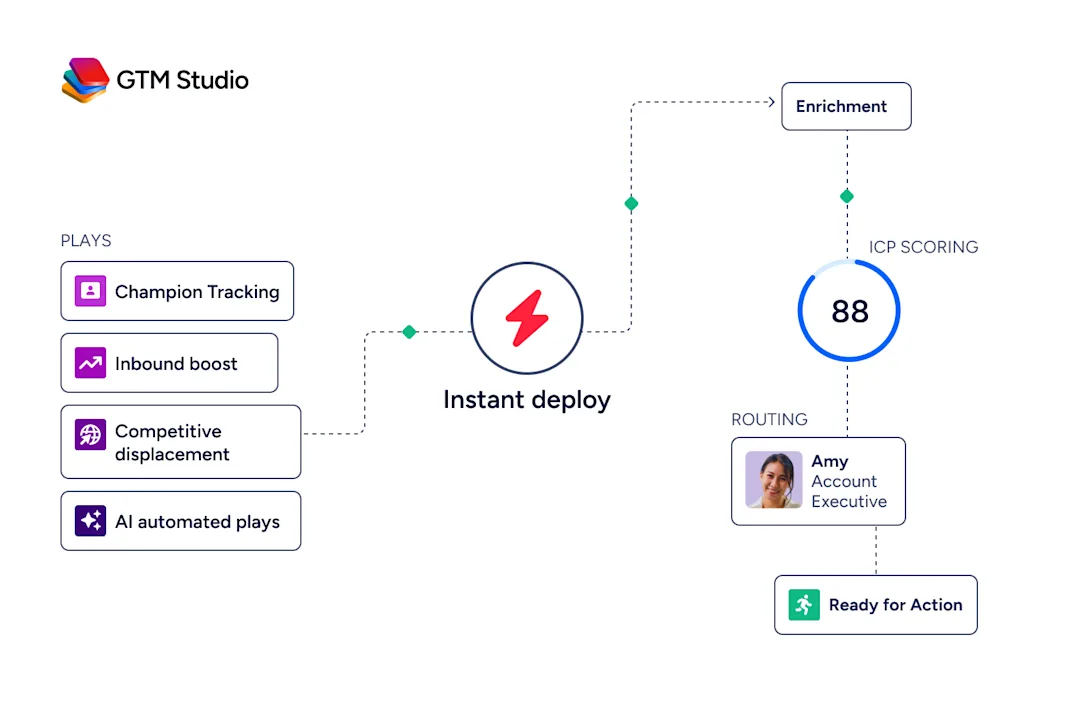
ZoomInfo Marketing includes a native Demand-Side Platform that deploys display ads based on 300+ company attributes, FormComplete (which reduces forms to a single field while auto-appending data), and Account Fit Scoring (predictive AI scoring 0-100 based on company attribute patterns).
ZoomInfo GTM Workspace: A seller workspace that grows with the team
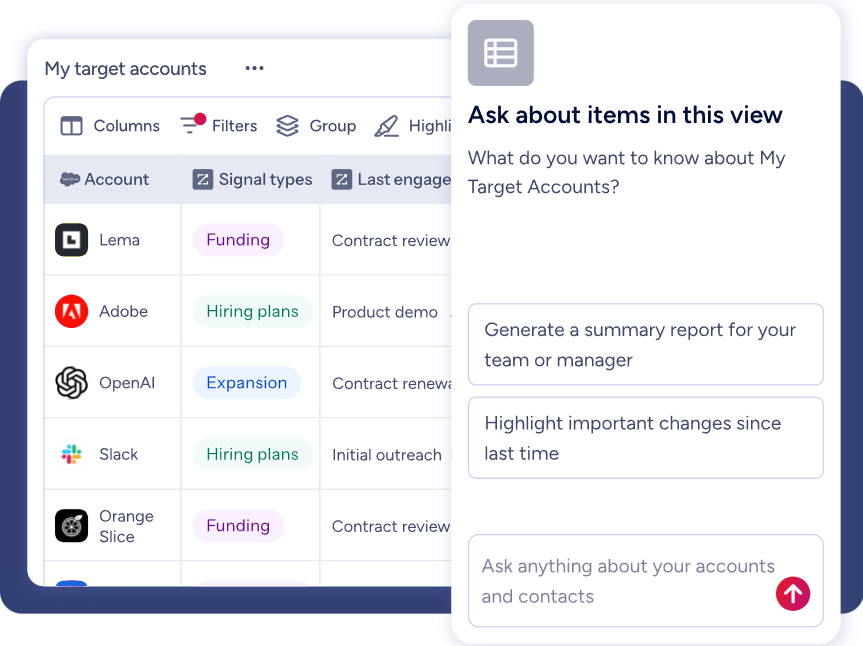
GTM Workspace is ZoomInfo's seller front-end, built on the GTM Context Graph. It provides a complete Book of Business view across CRM, ZoomInfo data, conversation history, and market intelligence, with AI agents that automate account research, outreach, CRM updates, and signal monitoring. An Action Feed streams in-market buyers matched to target criteria with pre-drafted actions on every signal. Where Pipedrive's AI Sales Assistant surfaces deal priorities from CRM data, GTM Workspace's agents reason across first-party CRM records, third-party intent signals, conversation transcripts, and ZoomInfo's 500M-contact database to generate recommendations grounded in why deals move, not just that they moved.
ZoomInfo's Free Entry Points: A way to evaluate the platform without commitment
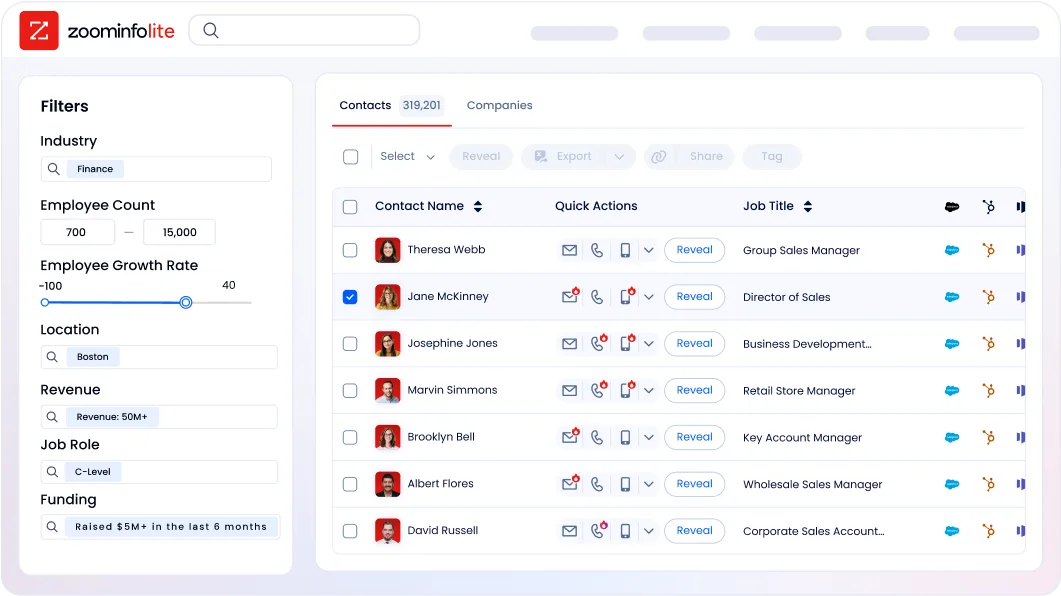
ZoomInfo Lite is a permanent free tier with access to ZoomInfo's B2B database, 10 monthly export credits, individual and company searches, a Chrome extension, and WebSights Lite with up to 10 website visitor reveals per day. A separate 7-day free trial provides broader access with no credit card required.
Seismic's sales team attributed 39% of active pipeline to opportunities identified or influenced by ZoomInfo signals, boosted productivity by 54%, and saved 11.5 hours per week per seller. (Seismic Case Study)
Final Summary
Pipedrive is a focused CRM for small and medium-sized sales teams: a visual pipeline that makes deal status obvious at a glance, activity-based selling that keeps reps taking action, automation that eliminates repetitive tasks, and an AI layer that drafts emails, generates reports from plain-language prompts, and surfaces deal priorities. It covers the sales workflow from lead qualification through document signing for teams that value simplicity and fast setup over enterprise breadth.
It is lighter on the layers around that workflow: a limited prospecting database compared to dedicated intelligence platforms, no buyer intent signals from outside your own properties, no conversation intelligence, and no multi-channel marketing orchestration.
If your bottleneck is upstream of the pipeline (knowing which companies are in-market before you reach out, sourcing verified contacts and direct dials at scale) or surrounding the deal itself (understanding what happened on the call, orchestrating marketing alongside sales), that is the ground ZoomInfo covers. Its 500M-contact, 100M-company database supplies the verified emails and direct dials your sequences run on.
ZoomInfo Intent surfaces the accounts researching your category from 6 trillion+ keyword-to-device pairings monthly. Chorus captures and analyzes every sales conversation. GTM Studio gives marketing teams multi-channel orchestration and ABM capabilities. And the GTM Context Graph combines all of it into a single intelligence layer that captures why deals move, not just that they moved. Pipedrive integrates with ZoomInfo through the Marketplace, so the two run together: ZoomInfo finds and qualifies the buyer, Pipedrive manages the deal.
See what that intelligence layer adds to your pipeline: start with ZoomInfo Lite for free, or request a demo to watch verified contacts and intent signals flow into your CRM.
FAQ
Does Pipedrive include a B2B contact database for prospecting?
Yes, through the Prospector tool inside the LeadBooster add-on. It draws from a database of over 400 million profiles and 10 million companies, with an AI engine verifying and updating up to 800,000 profiles daily. Enrichment credits reveal verified emails, direct-dial phones, and social profiles. The database is substantial for an SMB CRM, though teams needing enterprise-scale data depth (org charts, technographics, 120M+ direct dials) pair Pipedrive with a dedicated intelligence platform like ZoomInfo.
Which Pipedrive plan includes sales automation?
Sales automation is available on Growth and above. Growth includes 50 automations with if/else branching, delays, and cross-app notifications. Premium allows 150 automations and adds required fields, formula fields, and pipeline-specific fields. Ultimate provides 250 automations. The Lite plan does not include automations, email sync, sequences, or the meeting scheduler.
Can Pipedrive record and analyze sales calls?
Pipedrive supports call tracking through telephony integrations and logs calls automatically with optional recordings, but it does not include native conversation intelligence. There is no built-in transcription, coaching, talk-ratio analysis, or AI-driven call scoring. Teams that need conversation intelligence pair Pipedrive with a dedicated tool. ZoomInfo's Chorus records, transcribes, and analyzes every sales call with AI-generated insights, coaching scorecards, and deal intelligence that syncs back to the CRM.
How does Pipedrive's pricing compare to enterprise CRMs?
Pipedrive starts at $14/month per seat on the Lite plan, with annual billing discounts up to 42%. Features that enterprise CRMs often gate behind higher tiers are available across Pipedrive's plans: unlimited pipelines, product catalogs, customizable reports, and custom fields. Add-ons (LeadBooster, Campaigns, Web Visitors) are billed per company, not per seat. The trade-off is scope: Pipedrive covers sales pipeline management well but does not include the marketing automation, customer success, or service-desk capabilities that platforms like HubSpot or Salesforce bundle at higher price points.
Does Pipedrive offer buyer intent data?
Pipedrive does not include third-party buyer intent data. Pulse surfaces follow-up opportunities and overlooked deals within your existing CRM data, and the Web Visitors add-on identifies which companies visit your website, but neither tracks which companies are researching topics related to your product across the broader web. ZoomInfo Intent tracks signals from 210 million IP-to-Organization pairings and 6 trillion+ keyword-to-device pairings monthly, identifying in-market accounts before any outreach begins.
What integrations does Pipedrive support?
The Pipedrive Marketplace lists over 400 apps spanning automation (Zapier, Make), communication (Google Meet, Microsoft Teams, Slack), email marketing (Mailchimp), e-signatures (PandaDoc, DocuSign), accounting (QuickBooks, Xero, Stripe), and calling (JustCall). A free REST API is available on all plans with OAuth 2.0 support, and webhooks provide real-time event notifications. Official API clients exist for Node.js and PHP, with community libraries for Python, .NET, and Ruby.
Does Pipedrive have a free plan?
No permanent free plan exists. Pipedrive offers a 14-day free trial with full access and no credit card required. During the trial, users can explore Lite, Growth, and Premium features. If billing details are not entered at trial end, account access is restricted, with a 60-day window to retrieve data. ZoomInfo, by contrast, offers ZoomInfo Lite as a permanent free tier with 10 monthly export credits, a Chrome extension, and WebSights Lite.
Does Pipedrive include marketing automation?
Pipedrive's Campaigns add-on provides email marketing with a drag-and-drop builder, CRM-based segmentation, drip sequences, autoresponders, and real-time analytics. It covers email marketing well for small teams. It does not include display advertising, audience management for LinkedIn or Meta, account-based marketing, or multi-channel campaign orchestration. Teams needing full marketing orchestration alongside sales pair Pipedrive with a platform like ZoomInfo's GTM Studio, which supports audience building in natural language, multi-channel plays, and display advertising across a native Demand-Side Platform.
