
Pipedrive has earned a loyal following among small sales teams who want a CRM that stays out of their way. Salespeople built it because existing CRMs spent too much time on admin and too little on selling. It centers on a visual pipeline that shows every deal's status, value, and next step at a glance. Over 100,000 companies in 179 countries now run their sales through it.
To write this Pipedrive review, we analyzed the platform extensively. We believe it's the right choice if:
You want a visual, pipeline-first CRM that's ready to use in minutes
You run a small or mid-sized sales team that values simplicity over feature depth
You need affordable per-seat pricing with core features ungated at lower tiers
Your sales process follows a structured deal flow with clear stages
You prefer a self-serve tool that doesn't require a CRM administrator
However, Pipedrive might not be the right choice if:
You need B2B intelligence to identify and prioritize accounts before they enter your pipeline
Your team relies on buyer intent signals to time outreach
You want conversation intelligence that captures what happens on sales calls
You need account-based marketing, advertising, or multi-channel orchestration
Your GTM strategy requires a shared data layer across sales, marketing, and operations
In this case, you should consider ZoomInfo: an AI GTM platform that goes beyond pipeline management to provide the intelligence layer underneath your entire go-to-market motion.
Built on a B2B dataset covering 500M contacts, 100M companies, 135M+ verified phone numbers, and 200M+ verified business email addresses, ZoomInfo doesn't just track deals. It tells your team who to target, when accounts are ready to buy, and what to say, then delivers that intelligence through a seller workspace, a marketing orchestration canvas, or directly into any tool via API and MCP.
We've included a detailed look at ZoomInfo later in this Pipedrive review, as the platform that picks up where pipeline management ends. If you're ready to explore intelligence-driven selling, you can start with ZoomInfo's free trial here.
What is Pipedrive?
Pipedrive is a cloud-based sales CRM founded in 2010 in Tallinn, Estonia, by five co-founders who were themselves salespeople.
Timo Rein, Urmas Purde, Ragnar Sass, Martin Henk, and Martin Tajur built it out of frustration with CRMs designed for managers to monitor reps rather than for reps to close deals. Their founding insight: a CRM should serve the salesperson first.
Source: Pipedrive
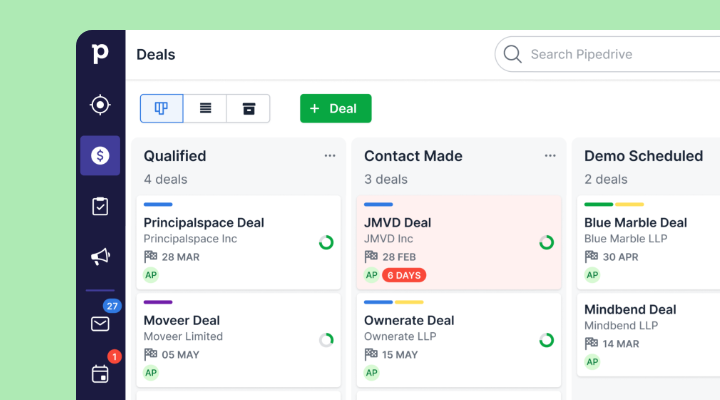
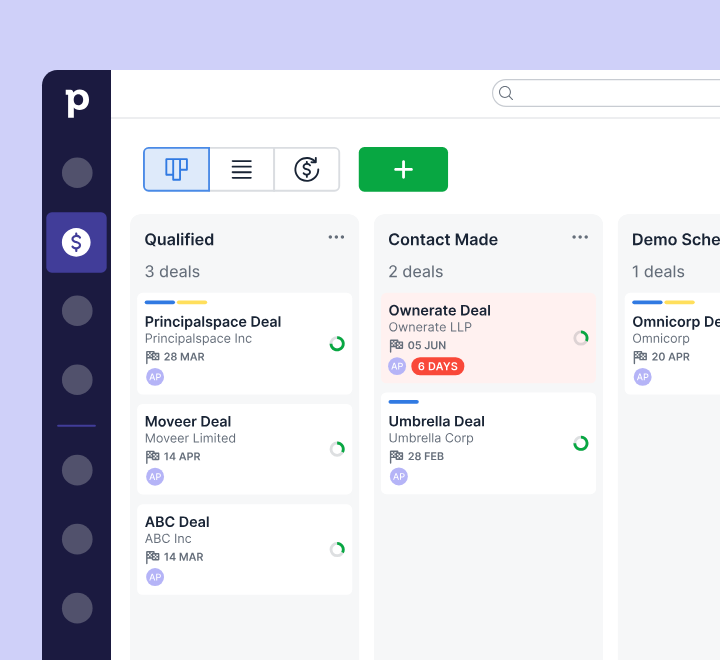
The product launched around a visual, pipeline-first interface that Pipedrive claims pioneered the kanban-style pipeline view in CRM software. That view remains the core experience: deals as cards, stages as columns, drag-and-drop to advance. Everything else (email, automation, reporting, prospecting) orbits around that pipeline.
Today, Pipedrive is headquartered in New York with 800+ employees across eight countries. Vista Equity Partners acquired a majority stake in November 2020, reaching unicorn status. The company serves 100,000+ companies and processes roughly 100 million deals each year, with a marketplace of 500+ integrations.
Under CEO Paulo Cunha (appointed May 2025), the company is pursuing "Pipedrive 3.0": an AI-native CRM that embeds intelligence into the core sales workflow. Recent additions include an AI Sales Assistant, AI email writer, AI-generated reports, and a ChatGPT integration.
The ideal Pipedrive user is a small or mid-sized business with an active sales process and discrete deals to track. The platform serves verticals from real estate and SaaS to consulting and insurance, but the common thread is a team that needs pipeline visibility without enterprise overhead.
Pipedrive Pros & Cons
Pros | Cons |
|---|---|
Visual, pipeline-first interface that salespeople actually use | No native customer success, ticketing, or post-sale tools |
Pricing starting at $14/month per seat | Limited marketing automation (Campaigns is a paid add-on) |
Unlimited pipelines and product catalogs on all plans | AI features still maturing (email summarization in beta) |
500+ marketplace integrations and free API on all plans | Free expert onboarding requires $1,000+/month spend |
Mobile app with offline mode, in-app calling, and nearby-client feature | No native B2B intelligence or buyer intent data |
22-language support for international teams | Usage limits on leads, deals, and automations per plan |
Strong security (ISO 27001, ISO 27701, SOC 2 Type 2) | ChatGPT integration unavailable for EU data residency accounts |
Pipedrive Review: How It Works & Key Features
Pipeline & Deal Management: Pipedrive's kanban board turns your sales process into a visual workspace built around action.
The pipeline is the first thing you see when you log in, and it's where Pipedrive's design philosophy shows most clearly.
Every deal sits as a card in a named stage. Colored cues flag deals going cold when they sit idle past a threshold you set (Pipedrive calls this "deal rotting"). Moving a deal forward is a drag-and-drop action.
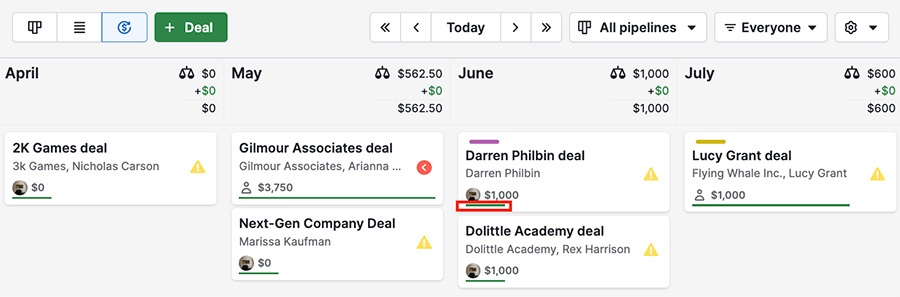
Pipedrive offers three pipeline views: kanban (the default board), list view, and forecast view. The forecast view shows deals due to close in a given period and their aggregate value, useful for weekly pipeline reviews. You can create multiple custom pipelines with their own stages, and custom fields across deals, contacts, and organizations (including auto-calculated types).
Source: Pipedrive
The system is built around activity-based selling: every activity (call, meeting, email, task) attaches to a deal, person, or organization and appears in a built-in calendar. The pipeline view highlights deals with no upcoming activity, so nothing slips through.
Contact management ties into the pipeline directly. Clicking a contact reveals a full interaction history in a single view, with a timeline of all touchpoints. The platform also supports recurring revenue tracking and multiple currencies including custom ones.
Lead Management & Prospecting: Pipedrive separates leads from deals to keep your pipeline clean, with optional tools for generating new leads.
Pipedrive draws a clear line between leads (unqualified) and deals (qualified).
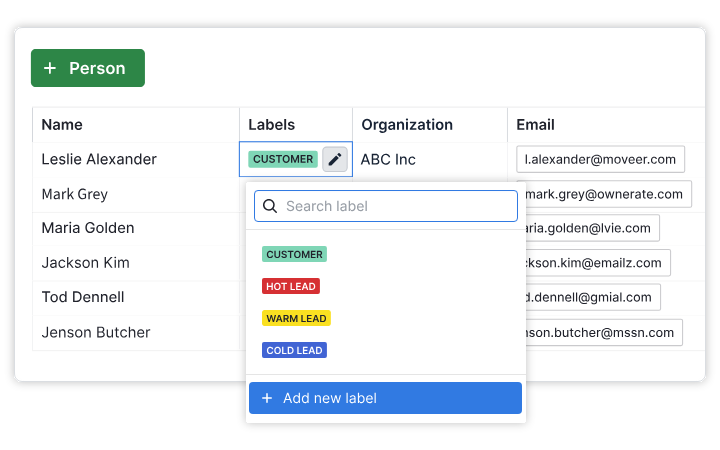
The Leads Inbox holds incoming leads until a rep qualifies them. Labels (hot, warm, cold) signal urgency. Converting a lead to a deal takes one click.
Source: Pipedrive
For lead generation, the optional LeadBooster add-on ($32.50/company/month billed annually) bundles four tools: a chatbot for qualifying website visitors, live chat with handoff from bot to rep, web forms that auto-import to the CRM, and Prospector, an outbound lead sourcing tool with a database of over 400 million profiles and 10 million companies.
Prospector's AI engine verifies and updates up to 800,000 profiles daily.
The newer Pulse prospecting toolkit adds a Feed workspace with tabs for follow-ups, overlooked deals, and opportunities. It includes data enrichment for firmographic details, custom lead scoring, and Sequences for automated multi-step follow-ups that pause on engagement signals.
Additional lead tools include a Web Visitors add-on that identifies which companies visit your site and automatic lead assignment by territory, expertise, or round-robin.
Sales Automation & Workflows: Pipedrive's automation engine eliminates manual tasks with trigger-action rules and conditional logic.
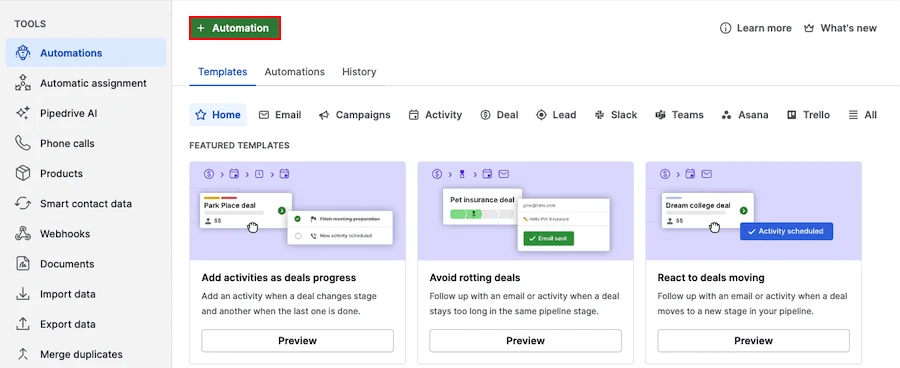
Automations are available on the Growth plan and above. Each automation pairs a trigger event with one or more actions. Triggers fire on events (deal created, contact updated, activity completed) or dates (before/after a field value). If/else branching splits automations into multiple paths, and a "wait until event" condition holds an automation until another event occurs.
Source: Pipedrive
Actions include record management, email sending, notes, Campaign triggers, webhooks, and Slack, Teams, Trello, or Asana notifications. Multiple actions chain in sequence with configurable delays.
Common use cases include creating deals from leads automatically, moving deals between stages on events, and queuing follow-up activities. Native Slack and Teams integrations through the automation engine reduce dependency on Zapier for team notifications. A library of pre-built templates covers standard scenarios.
According to Pipedrive's State of Sales and Marketing report, people who automate tasks are 16% more likely to hit their targets.
Usage limits apply by plan: Growth allows 50 automations, Premium 150, and Ultimate 250.
Email, Communications & Documents: Pipedrive embeds email, calling, scheduling, and document signing inside the CRM so reps don't switch tools.
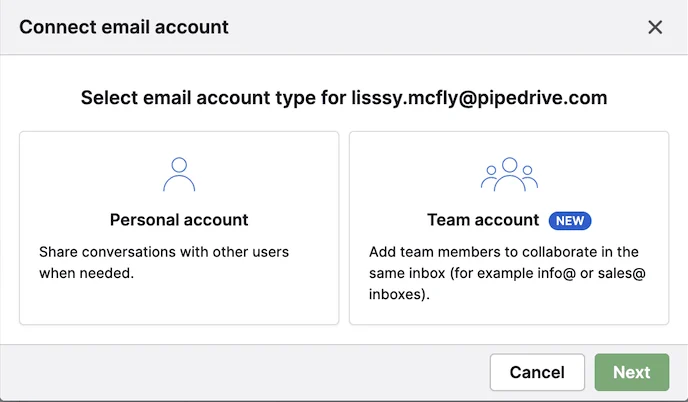
Email Sync connects Gmail, Outlook, Office 365, Microsoft Exchange, or any IMAP-compatible account to the Sales Inbox, a built-in email client. Emails automatically link to deals, leads, or projects. The system supports personal and team accounts (shared addresses like sales@yourcompany.com).
Source: Pipedrive
Email features include templates with auto-populated fields, group email to up to 100 contacts, scheduled sending, and open and click tracking.
The AI email writer generates drafts from a prompt with configurable type, tone, and length, detecting the prompt's language automatically. AI email summarization (currently in beta) condenses threads into summaries with key themes, sentiment, readiness-to-buy scores, and recommended actions.
The built-in Scheduler lets reps share a booking link that integrates with Zoom, Microsoft Teams, and Google Meet. Telephony integrations let reps call from the CRM with automatic logging and optional recordings.
Smart Docs rounds out the communications suite: create, send, track, and sign quotes, proposals, and contracts inside Pipedrive. Templates with merge fields auto-populate from CRM data. Built-in eSignature requires no plugins, and DocuSign integration is available for teams that need it.
Insights, Reports & AI: Pipedrive provides customizable analytics, revenue forecasting, and an AI assistant that answers pipeline questions in plain language.
Insights is organized into three sections: Reports, Dashboards, and Goals. Reports are customizable, tracking default or custom metrics across revenue forecasts, performance, conversion, deal velocity, and team performance.
The AI report generator lets you type a plain-language request to produce a report without configuring filters. It's powered by OpenAI and available on all plans. Dashboards collect reports into a single view and can be shared via link with anyone, Pipedrive user or not.
Goals can be value-based (revenue target) or count-based (number of calls). Revenue forecasting projects expected revenue using expected close dates, won dates, or custom date fields.
Source: Pipedrive
The AI Sales Assistant works in two modes. Proactively, it delivers win probability predictions, deal activity reminders, and progress updates. On demand, it can summarize deals and performance, identify winning patterns, track goals, analyze deal velocity, and surface valuable contacts.
Pricing: Pipedrive offers four tiers with per-seat pricing, monthly or annual billing, and paid add-ons for marketing and lead generation.
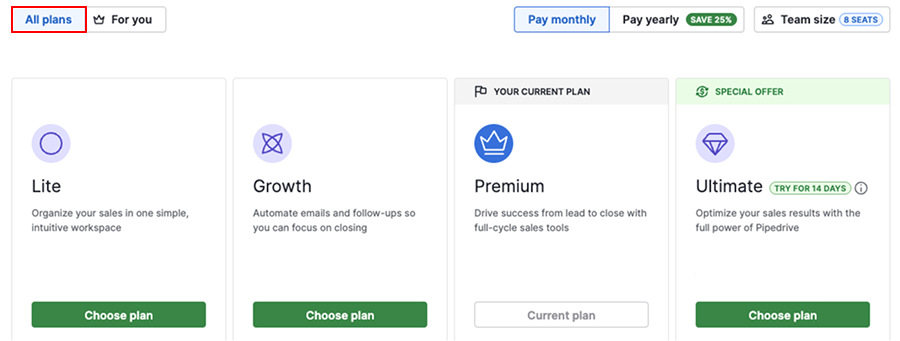
Pipedrive replaced its five-tier lineup in 2025 with four plans: Lite, Growth, Premium, and Ultimate. Entry price starts at $14/month per seat. Add-ons are billed per company, not per seat.
Source: Pipedrive
Lite includes customizable pipelines, deal rotting, Leads Inbox, Pulse feed, API access, AI-powered report creation, insights dashboards, SSO, 2FA, and mobile apps. Does not include email sync, automations, sequences, meeting scheduler, or forecast view. Usage limits: 2,500 leads+deals per seat, 30 custom fields, 15 reports.
Growth adds email sync (one account per user), email templates, open/click tracking, group emailing, meeting scheduler, automations with if/else conditions, live chat support, sequences, and forecast view. Usage limits: 5,000 leads+deals per seat, 100 custom fields, 50 automations, 5 sequences.
Premium adds Smart Docs, Projects, and LeadBooster included (not add-ons). Also: required fields, formula fields, three email accounts per user, AI email creation and summarization, multiple dashboards, phone support, and team features. Usage limits: 15,000 leads+deals per seat, 300 custom fields, 150 automations, 25 sequences, 100 enrichment credits.
Ultimate adds contact data enrichment, security alerts, and security rules. Highest limits: 20,000 leads+deals per seat, 500 custom fields, 250 automations, 50 sequences, 500 enrichment credits.
Annual billing offers up to a 42% discount over monthly. Monthly subscribers can cancel any time; annual subscribers pay upfront with no refunds. A 14-day free trial with full access and no credit card is available. There is no permanent free plan.
Key add-ons include Campaigns for email marketing (pricing scales by subscriber count) and Web Visitors for website company identification (priced by unique organizations per month). Top-ups let you increase specific usage limits (API tokens, leads+deals, reports, automations) without upgrading your plan.
Where Pipedrive Falls Short
Pipedrive's strengths (simplicity, visual pipeline, affordable pricing) are the direct result of choices about what to include and what to leave out.
Several of those trade-offs become visible as sales teams grow and their needs expand beyond pipeline management.
No B2B Intelligence Layer. Pipedrive manages deals once they exist but offers limited help identifying which companies to pursue. The Prospector database has 400 million profiles, but there are no buyer intent signals, no technographic data, and no way to see when target accounts are researching solutions. Teams that want to time outreach to buying activity need a separate intelligence tool.
Limited Marketing Capabilities. Email marketing is a paid add-on (Campaigns), not a native module. There is no account-based marketing, no digital advertising, no multi-channel campaign orchestration, and no marketing attribution built into the same data layer as sales. Teams that need sales and marketing to share a single view of accounts will find a structural gap.
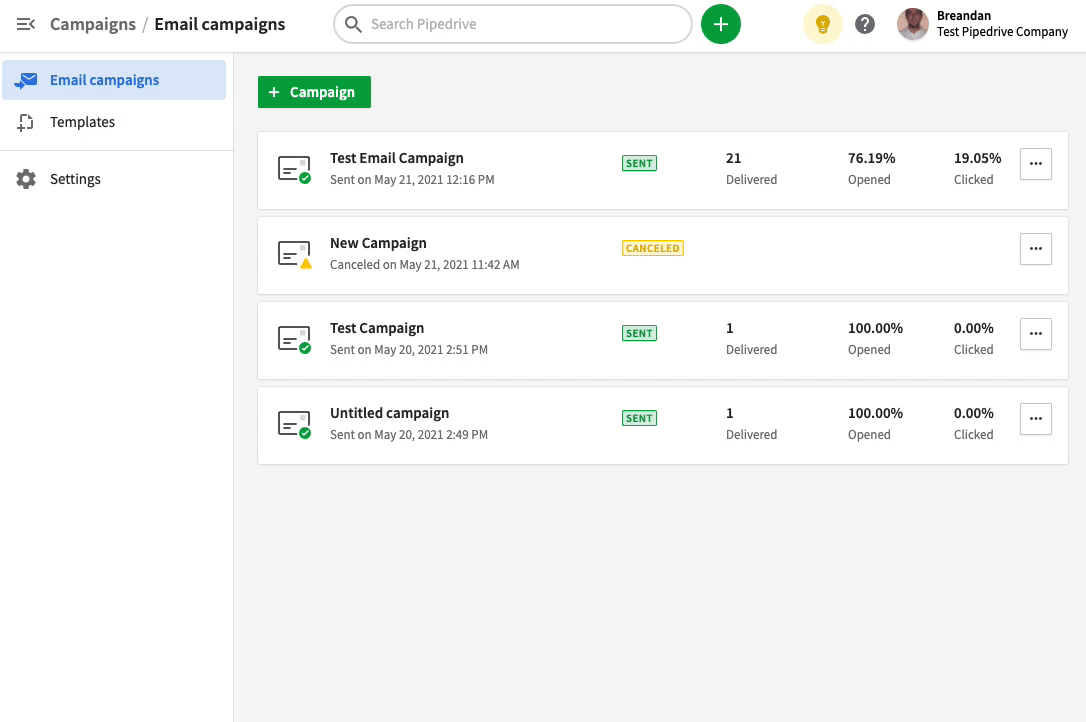
Source: Pipedrive
No Conversation Intelligence. Pipedrive logs calls and emails but does not record, transcribe, or analyze sales conversations. There's no way to extract competitive mentions, track talk ratios, identify winning behaviors, or coach reps based on actual call content. Teams that want to understand what happens during sales conversations (not just that they occurred) need a third-party tool.
Prospecting Data Lacks Depth. The Prospector database covers 400 million profiles but does not include org charts, departmental hierarchies, technographic profiles, company funding data, or job-change alerts at scale. The newer Pulse toolkit adds enrichment and scoring, but bulk contact list enrichment is still noted as "coming soon".
For teams that need verified direct dials, buying committee mapping, or company-level segmentation, the native data is thin.
SMB Ceiling. Pipedrive's architecture reflects its SMB roots. Usage limits cap leads+deals, automations, and custom fields per plan. There is no native customer success or support functionality.
Enterprise features like hierarchy management, multi-region compliance configurations, and complex organizational structures are not part of the design. Companies that outgrow the SMB tier will need a platform built for that scale.
These are not failures. They are the natural consequences of building a CRM for small-team pipeline management. But they create clear gaps for businesses whose go-to-market motion requires intelligence, scale, and cross-functional alignment beyond what a pipeline tool provides.
Beyond Pipeline Management: ZoomInfo
As an AI GTM platform, ZoomInfo fills the gaps Pipedrive leaves open by providing the intelligence layer underneath an entire go-to-market operation.
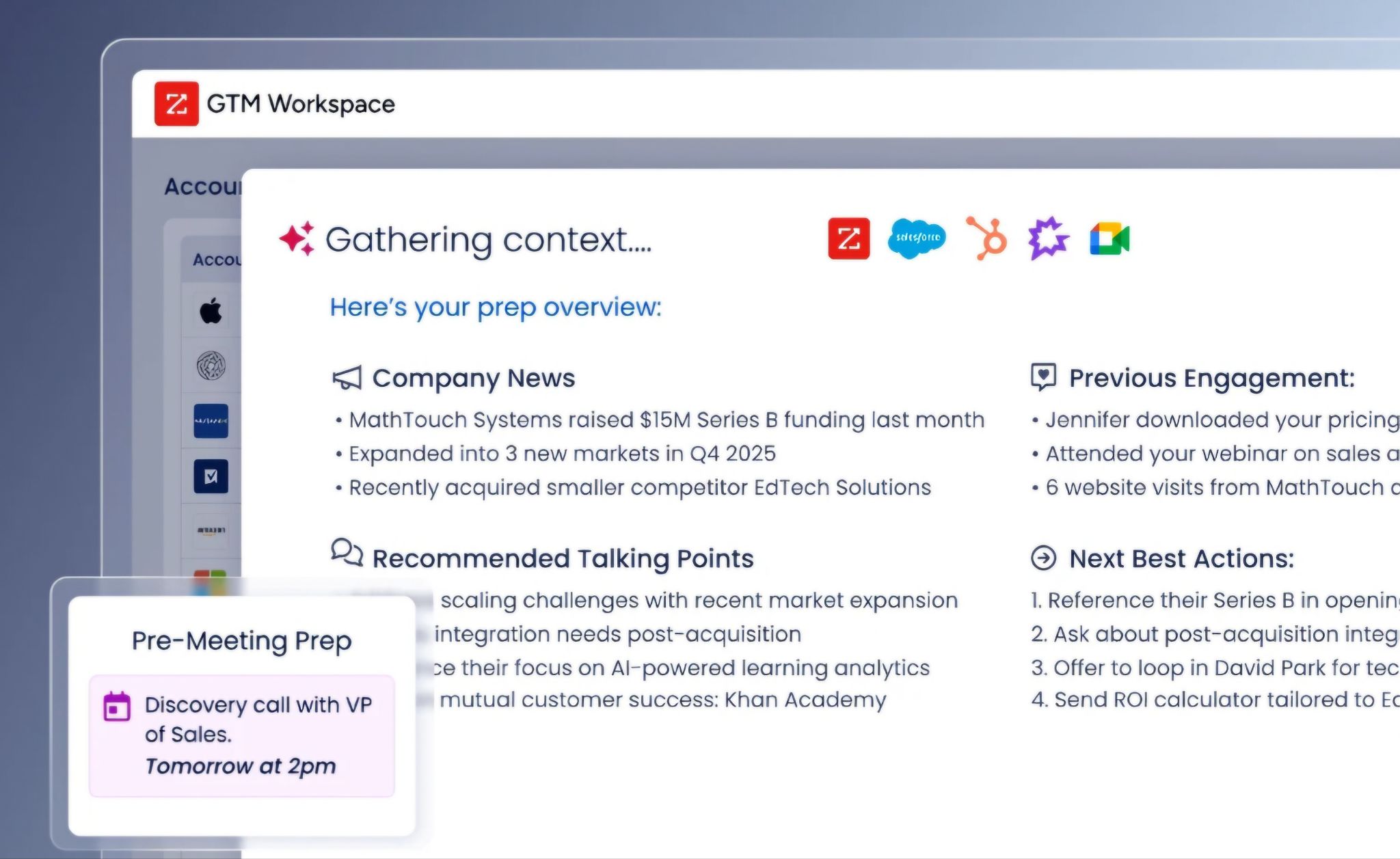
Source: ZoomInfo
Where Pipedrive manages deals after they enter your pipeline, ZoomInfo tells your team who to target, when they're ready to buy, and what to say, then executes across sales, marketing, and operations from a single platform.
Founded in 2007 by Henry Schuck, ZoomInfo is publicly traded (NASDAQ: GTM) and serves 35,000+ companies worldwide, with $1.25 billion in annual revenue. Named a Gartner and Forrester Leader for ABM Platforms and Intent Data, ZoomInfo holds 133 No. 1 rankings on G2 across Sales Intelligence, Buyer Intent, Data Quality, and related categories.
Comprehensive B2B Data: ZoomInfo's dataset gives your team accurate contact information and the context to target the right accounts.
Pipedrive's Prospector gives you 400 million profiles. ZoomInfo's data platform covers 500M contacts, 100M companies, 135M+ verified phone numbers, 120M direct-dial phone numbers, and 200M+ verified business email addresses. But the difference goes beyond volume.
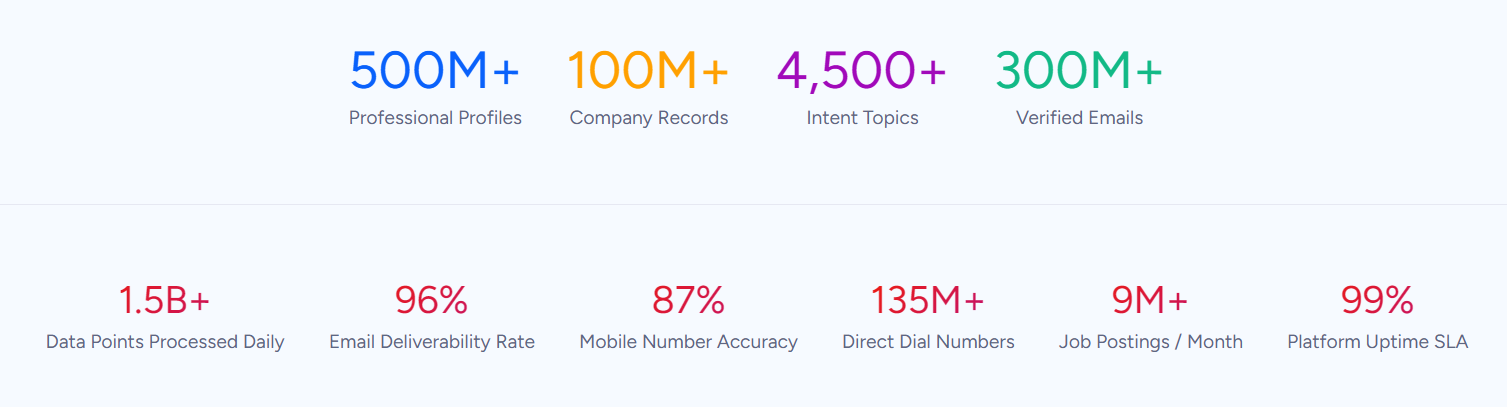
ZoomInfo's data spans three dimensions at once: identity data (who buyers are and how to reach them), company context (firmographics, org charts, technographic profiles of 30+ million companies), and dynamic signals (buyer intent data that shows when accounts are researching solutions).
ZoomInfo verifies data through a multi-source pipeline: automated ML scanning of 28 million site domains daily, third-party partner data covering 95 million businesses, a community of 200,000+ ZoomInfo Lite users who share data back, and an in-house Data Training Lab of 300+ human researchers. First-party data reaches up to 95% accuracy.
In practice, this means the direct dial rings and the email lands. For teams that have relied on Pipedrive's smaller contact database, higher reachability translates directly into more conversations and more pipeline.
Vensure's VP of Revenue Operations: "ZoomInfo gives us the information we need to execute. We don't have to go through and spend our time digging. It's already there, so we can be three steps ahead." (Vensure)
GTM Context Graph: ZoomInfo's intelligence layer captures not just what happened in a deal, but why, so AI can reason about your next move.
Pipedrive's AI Sales Assistant works from CRM data: deal stages, activity history, and pipeline metrics.
ZoomInfo's GTM Context Graph goes further by fusing ZoomInfo's third-party B2B data with a customer's own CRM records, conversation transcripts, email interactions, and behavioral signals into a single intelligence layer that processes 1.5B+ data points daily.
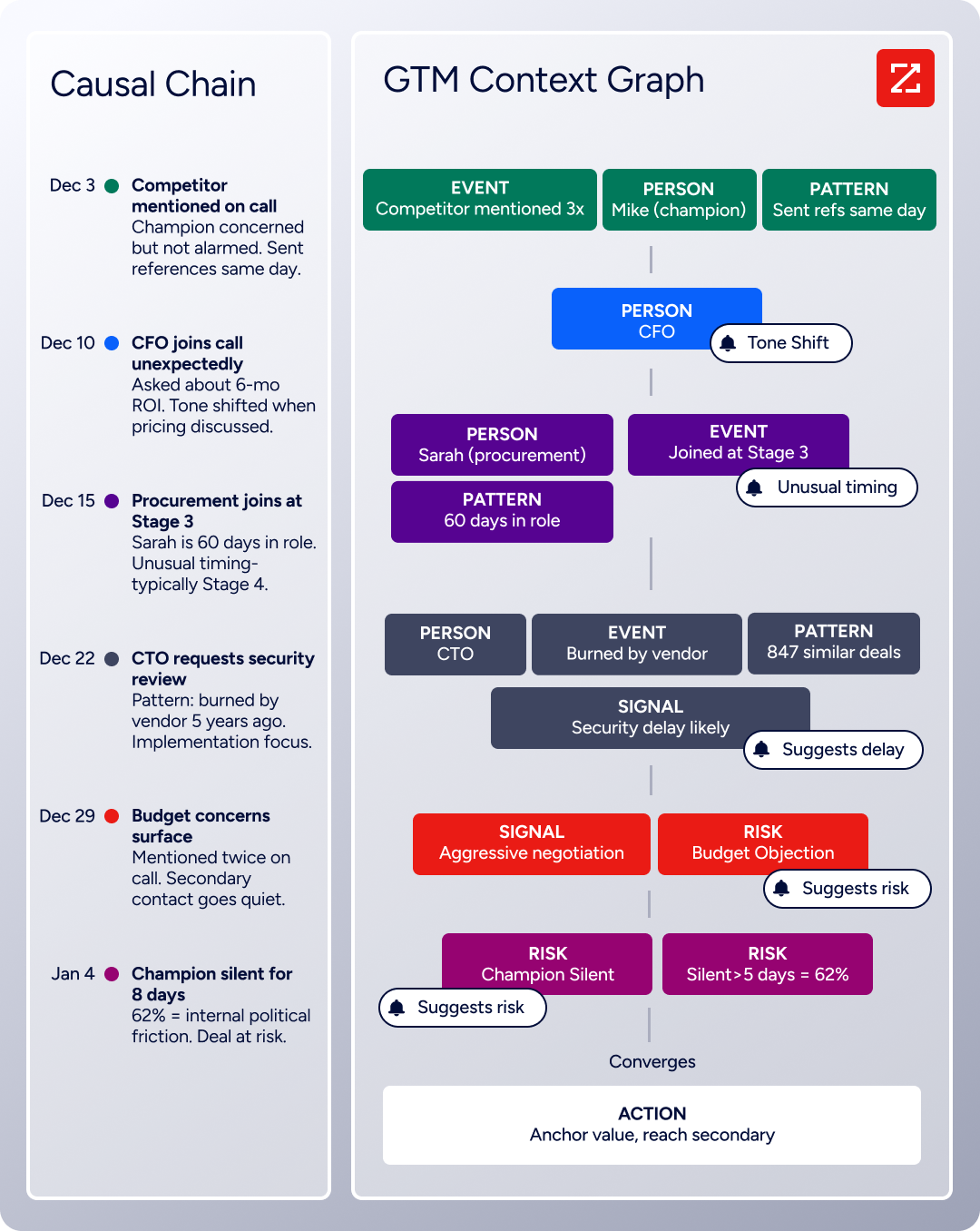
A CRM records that a deal moved from Stage 3 to Stage 4. The GTM Context Graph captures why it moved: the CFO joined the last call and asked about six-month ROI, the buying committee expanded to include procurement, and the company just posted three VP openings in a related department.
That reasoning flows into every downstream action, from the AI-drafted follow-up that addresses the CFO's specific concern to the forecast that weights deals by buying evidence rather than stage labels.
This is the difference between AI that has your data and AI that understands your deals. Guided Intent, exclusive to ZoomInfo, identifies topics historically correlated with deal success rather than requiring manual topic selection.
Buyer Intent data tracks signals from 210 million IP-to-Organization pairings and 6 trillion+ new keyword-to-device pairings sourced monthly. Together, they give your team a continuous read on which accounts are in-market and why.
Seismic attributed 39% of active pipeline to opportunities identified or influenced by ZoomInfo signals. Their Chief Business Officer: "That combination of our internal CRM data, external signals, and AI that's given all that context has helped us craft very specific account- and persona-based messages. And people have responded to them right away." (Seismic)
Universal Access: ZoomInfo delivers its intelligence through a seller workspace, a marketing orchestration canvas, or directly into any tool via API and MCP.
Pipedrive is a single application. ZoomInfo delivers its intelligence through three channels, so teams use it wherever they already work.
GTM Workspace is the native front-end for sellers: a single surface where prioritized accounts, AI-drafted outreach, deal context, and CRM updates converge. Its AI agents handle account research, outreach generation, signal monitoring, and CRM housekeeping, so reps spend time selling rather than switching tools.
GTM Studio gives marketers, RevOps, and GTM engineers an AI-powered canvas for building audiences in natural language, launching multi-channel plays, and measuring pipeline impact, with no engineering tickets required. For teams building beyond ZoomInfo's own products, APIs and MCP expose the same intelligence to any custom agent, internal tool, or third-party platform.
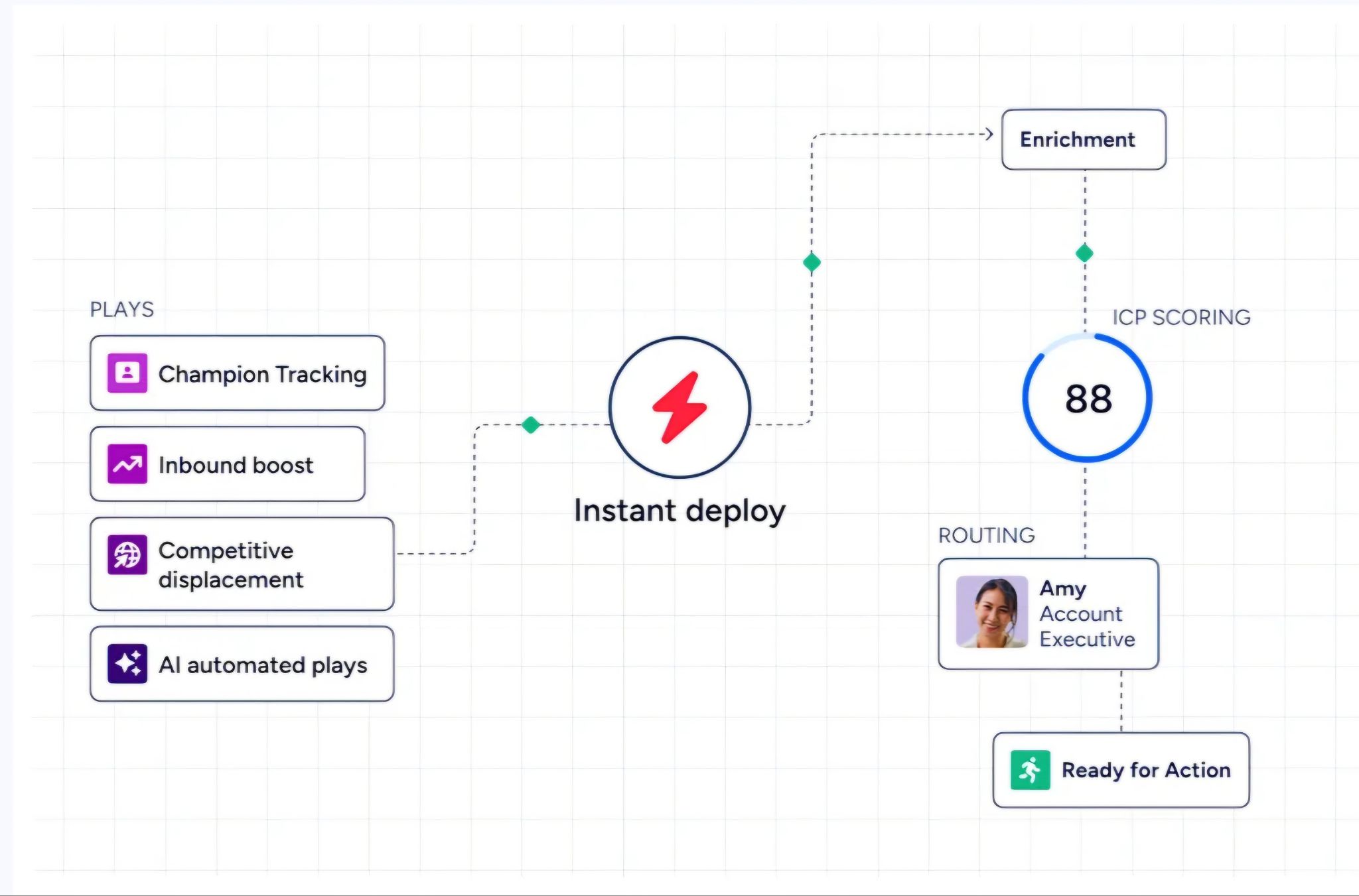
Source: ZoomInfo
API access is included in all relevant plans. The ZoomInfo MCP server connects AI models directly to ZoomInfo's B2B data as a native tool, supporting Claude and ChatGPT, with no custom coding beyond one-time server configuration.
All three channels draw from the same GTM Context Graph. The same data, the same reasoning, the same intelligence. Where you work never limits what intelligence is available.
Smartsheet's Senior Manager of Sales Technology Enablement: "ZoomInfo is our one source of truth for account data, and even more so for contact data. There's no other provider in the market that provides you with that level of detail." (Smartsheet)
Conversation Intelligence: ZoomInfo's Chorus captures and analyzes every sales interaction, turning calls into coaching opportunities and deal intelligence.
Pipedrive logs that a call happened. ZoomInfo's Chorus records, transcribes, and analyzes what was said.
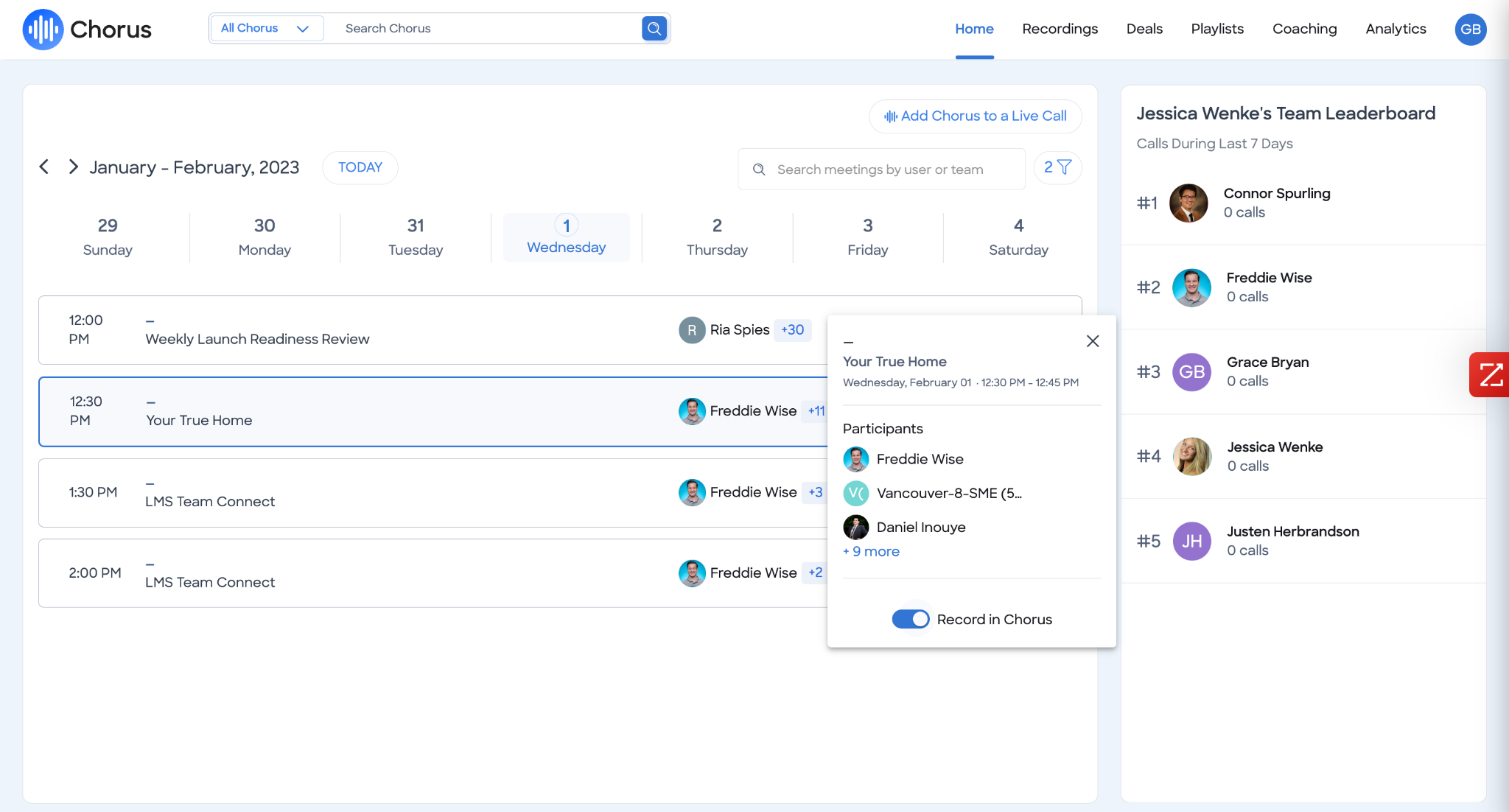
Source: ZoomInfo
Backed by 14 technology patents, Chorus uses proprietary ML to extract talk ratios, sentiment, objection patterns, competitive mentions, and deal momentum signals from every customer interaction.
Sales managers can identify winning behaviors, build coaching scorecards, and share specific call moments across the organization. Deal intelligence flows automatically into CRM records, and the conversation data feeds back into the GTM Context Graph, so the reasoning behind deal movements becomes machine-readable and actionable across the platform.
Pricing: ZoomInfo uses consumption-based pricing with a permanent free tier and custom enterprise packages.
ZoomInfo uses a consumption-based pricing model where costs scale with usage (seats, credits, API consumption, AI activity).
No dollar amounts are published; all paid plans are custom-quoted. The pricing page organizes plans into Sales (Professional, Advanced, Enterprise) and Marketing (Marketing Demand, ABM Lite, ABM Enterprise) tiers, each adding more intelligence, automation, and AI capabilities.
Two free entry points exist. ZoomInfo Lite is a permanent free tier (not a trial) with access to ZoomInfo's B2B database, 10 monthly export credits, individual and company search, the ReachOut Chrome Extension, WebSights Lite (up to 10 website visitor reveals per day), built-in email sending, and HubSpot integration. A separate 7-day free trial gives full access to core platform features with usage limits.
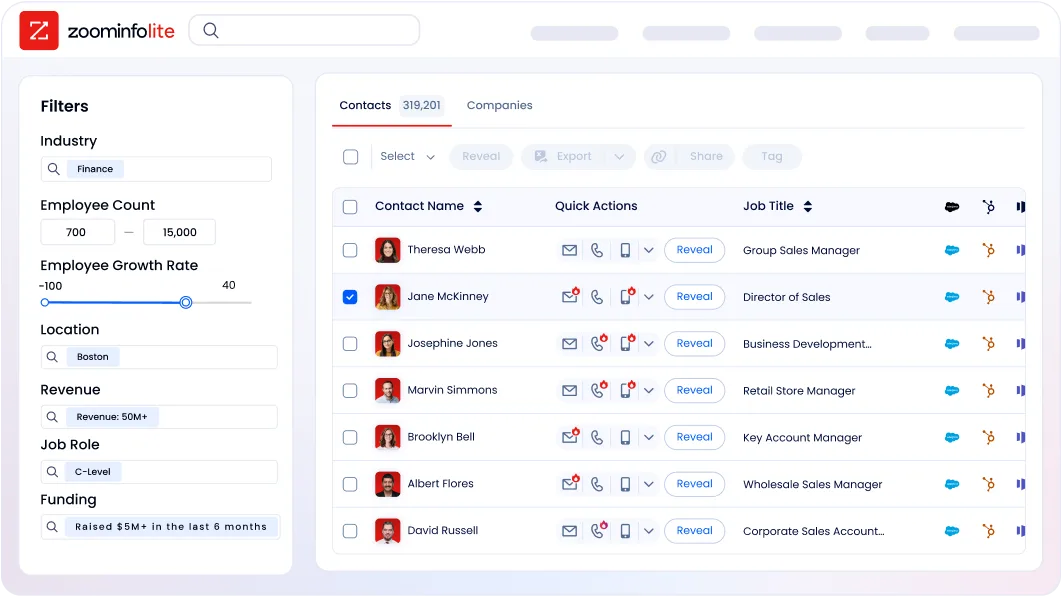
Credits work on a one-credit-per-export model: searching and viewing data within ZoomInfo costs nothing, and credits are charged only when data is exported to a CSV, Excel, CRM, or integration.
Pipedrive or ZoomInfo: Comparison Summary
Pipedrive | ZoomInfo | |
|---|---|---|
Primary focus | Sales pipeline management CRM | AI GTM platform |
Target audience | SMB sales teams | Enterprise and mid-market GTM teams |
Contact database | 400M+ profiles (via Prospector add-on) | 500M contacts, 135M+ verified phone numbers, 200M+ verified emails |
Buyer intent data | Not available | Native intent from 210M+ IP-Organization pairings |
Conversation intelligence | Call logging only | Full recording, transcription, and AI analysis (Chorus) |
Marketing capabilities | Email campaigns (paid add-on) | ABM, native DSP advertising, multi-channel orchestration |
AI capabilities | AI email writer, AI reports, AI Sales Assistant (maturing) | GTM Context Graph, GTM Workspace AI agents, AI-drafted outreach |
Pipeline management | Core strength (visual kanban) | Available through GTM Workspace with AI-driven prioritization |
Integrations | 500+ marketplace apps, free API | 120+ integrations, API, MCP, cloud partner connectors |
Security | ISO 27001, ISO 27701, SOC 2 Type 2 | ISO 27001, ISO 27701, SOC 2 Type II, GDPR/CCPA validated |
Free access | 14-day trial (no free plan) | Permanent free tier (ZoomInfo Lite) + 7-day trial |
Pricing model | Published per-seat pricing from $14/month | Custom-quoted, consumption-based |
Best for | Small teams needing simple, affordable pipeline management | Teams needing intelligence-driven GTM across sales, marketing, and ops |
Final Verdict
The choice between Pipedrive and ZoomInfo depends on where your sales operation stands and where it needs to go.
Choose Pipedrive if your team needs a straightforward CRM that makes pipeline management visual and intuitive. It fits small and mid-sized sales teams that run a structured deal process, want to start quickly without training overhead, and don't need intelligence or marketing capabilities built into the same platform.
Pipedrive's pricing, clean interface, and activity-based design make it an effective workspace for teams whose primary challenge is keeping deals organized and moving forward.
Choose ZoomInfo if your go-to-market motion has outgrown pipeline management and you need the intelligence layer that powers the entire revenue engine. ZoomInfo serves teams that need to know which accounts to target, when those accounts are ready to buy, and what message will move them, then execute across sales, marketing, and operations from a single data foundation.
The GTM Context Graph, B2B data, conversation intelligence, and access through APIs and MCP make ZoomInfo the platform for organizations that treat go-to-market as a coordinated, data-driven discipline rather than a collection of disconnected tools.
Get started with ZoomInfo here.
The distinction is one of scope. Pipedrive helps salespeople manage deals. ZoomInfo helps go-to-market teams create the conditions where deals happen in the first place, then carries that intelligence through every stage of the customer relationship.
Pipedrive FAQ
Does Pipedrive have a free plan?
No. Pipedrive offers a 14-day free trial with full access and no credit card required. If you don't enter billing details by trial end, account access is restricted, with a 60-day window to retrieve your data.
ZoomInfo offers a permanent free tier called ZoomInfo Lite with access to its B2B database, 10 monthly export credits, a Chrome extension, and website visitor identification, with no time limit or credit card required.
How much does Pipedrive cost?
Pipedrive offers four plans (Lite, Growth, Premium, Ultimate) with per-seat pricing starting at $14/month. Annual billing saves up to 42% compared to monthly.
Add-ons like LeadBooster ($32.50/company/month), Campaigns, and Web Visitors are billed separately per company. Usage limits on leads, deals, automations, and custom fields vary by tier and can be expanded with purchasable top-ups.
What CRM features does Pipedrive include?
Pipedrive covers pipeline management with visual kanban and forecast views, contact and organization management, email sync with tracking, AI email writing, automations with conditional logic, a meeting scheduler, Smart Docs with eSignature, mobile apps with offline support and in-app calling, customizable reports with AI-generated analytics, and a Leads Inbox for pre-pipeline qualification.
Email sync, automations, and the meeting scheduler are not available on the Lite plan.
Does Pipedrive offer buyer intent data or intelligence features?
No. Pipedrive does not provide buyer intent signals, technographic data, or account intelligence that reveals when target companies are researching solutions. The Prospector tool offers a contact database, and Pulse adds enrichment and scoring, but there is no equivalent to intent data that tracks in-market buying activity.
ZoomInfo tracks intent signals from 210 million IP-to-Organization pairings and 6 trillion+ new keyword-to-device pairings monthly, with Guided Intent identifying topics correlated with deal success.
Can Pipedrive handle marketing automation?
Pipedrive's marketing capabilities are limited to the Campaigns add-on, which provides an email builder, segmentation, and basic marketing automation. There is no native account-based marketing, digital advertising, multi-channel orchestration, or marketing attribution.
Teams needing unified sales and marketing execution from the same platform will find a gap compared to platforms that integrate these functions natively.
What integrations does Pipedrive support?
Pipedrive's marketplace includes 500+ integrations covering tools like Zapier, Make, Google Meet, Microsoft Teams, Slack, Mailchimp, PandaDoc, QuickBooks, and Xero. A free API is available on all plans, with webhooks for real-time event notifications. The API documentation covers deals, leads, persons, organizations, activities, products, and pipelines.
Is Pipedrive suitable for enterprise sales teams?
Pipedrive is designed for small and mid-sized businesses. The platform's usage limits, lack of native customer success or ticketing features, and SMB-oriented architecture make it less suited for enterprise sales operations with complex hierarchies, multi-region compliance requirements, or high-volume outreach.
ZoomInfo serves 35,000+ companies including enterprise customers like Adobe, Snowflake, and Thomson Reuters, with infrastructure built for that scale.
Does Pipedrive include conversation intelligence?
No. Pipedrive integrates with third-party telephony tools for call logging but does not natively record, transcribe, or analyze sales conversations. There are no features for extracting competitive mentions, coaching reps from call content, or feeding conversation data back into deal intelligence.
ZoomInfo's Chorus provides full conversation intelligence with AI-powered analysis backed by 14 technology patents.
