

Sales territory mapping decides whether your reps spend the day selling or fighting over accounts, and it is one of the biggest levers you have on quota attainment.
This guide walks through building a data-driven territory map step by step, the data that keeps it from decaying, and how to choose software that fits your motion.
What is sales territory mapping?
Sales territory mapping is the strategic process of dividing your addressable market into defined zones where specific sales reps own account relationships and revenue responsibility. Modern territory design goes beyond geographic boundaries: revenue teams segment their markets across industry verticals, ARR bands, account tiers, and customer lifecycle stages to match account ownership with rep capacity and expertise. A rep covering the Northeast doesn't just own a region anymore, two reps in the same metro might split it by segment, with one owning manufacturing accounts and the other owning SaaS accounts, each working a focused book of business that matches their experience.
Common territory dimensions include:
Geographic: Region, state, ZIP code, metro area
Vertical/Industry: Healthcare, financial services, technology
Account Tier: Enterprise, mid-market, SMB
Segment: Named accounts, strategic accounts, growth accounts
Customer Lifecycle: New business vs. expansion vs. renewal
Territory maps give managers a clear framework for evaluating sales performance and optimizing resources. They make quota more achievable by giving every rep a defined, workable book of business.
Why territory mapping drives quota attainment
Sales territory mapping directly determines whether your team hits quota. Good territory management starts before the first rep makes a call: balanced territories let reps focus on selling instead of fighting over accounts or scrambling to cover gaps. A clear book of business typically means faster ramp times, higher win rates, and lower turnover.
Balanced workloads prevent rep burnout
Uneven territory distribution leaves some reps overwhelmed while others are underutilized, and rep burnout follows close behind. This imbalance kills productivity and tanks quota attainment. Thoughtful territory mapping irons out workload issues before they become retention problems.
Full market coverage eliminates missed opportunities
Poor territory mapping leaves accounts untouched or creates confusion about ownership. One of the main reasons territory maps are built is to maximize company visibility to sales prospects. Better planning allows your team to flexibly adapt to new challenges and identify whitespace before competitors do, and intent signals can help surface that whitespace before a competitor gets there first.
Clear ownership drives accountability and results
Defined territories create clarity on who owns which accounts, reducing duplicate outreach and internal conflict. When reps know exactly which accounts they're responsible for, CRM hygiene improves and lead routing becomes predictable. Clear ownership means clear accountability.
How to build a data-driven sales territory map
Optimal sales territory mapping requires balance, alignment, and accurate intelligence. Every sales rep gets an equal prospect distribution in areas most productive to their experience and strengths.
Step 1: Define your total addressable market and revenue objectives
Territory planning starts with business goals. Before dividing accounts, clarify what success looks like.
Common objectives include:
Revenue targets: How much pipeline each territory needs to generate
Market expansion: New regions or verticals to enter
Account coverage: Ratio of accounts to reps that's sustainable
Tie territory design to these objectives. If you're prioritizing new logo acquisition, structure territories around untapped accounts. If expansion revenue is the goal, organize around your existing customer base.
Step 2: Choose your segmentation criteria
Divide your addressable market using a segmentation approach that matches your go-to-market motion. Not every team should segment the same way, the right criteria depend on where your best customers come from and how your reps sell.
Segmentation type | How it works | Best for |
|---|---|---|
Geographic | Territory boundaries by region, state, metro, or ZIP | Field sales, distributed teams, location-dependent products |
Firmographic | Segmentation by company size, revenue, industry, or headcount | Teams with distinct enterprise vs. SMB motions |
Behavioral | Segmentation by buying stage, intent signals, or engagement history | High-velocity inside sales, account-based programs |
Hybrid | Combines two or more criteria (e.g., industry + revenue band) | Complex GTM motions with multiple rep types |
Step 3: Gather and clean your account data
Data quality is the foundation of every territory decision downstream. If you build territories on stale firmographic data, wrong company sizes, outdated headcounts, contacts who changed roles months ago, you'll misallocate accounts from the start. Reps end up working the wrong accounts with the wrong contacts, and no amount of process fixes that problem mid-cycle. Establish a recurring enrichment cadence for both account and contact records before you draw a single boundary.
Step 4: Draw and balance territory boundaries
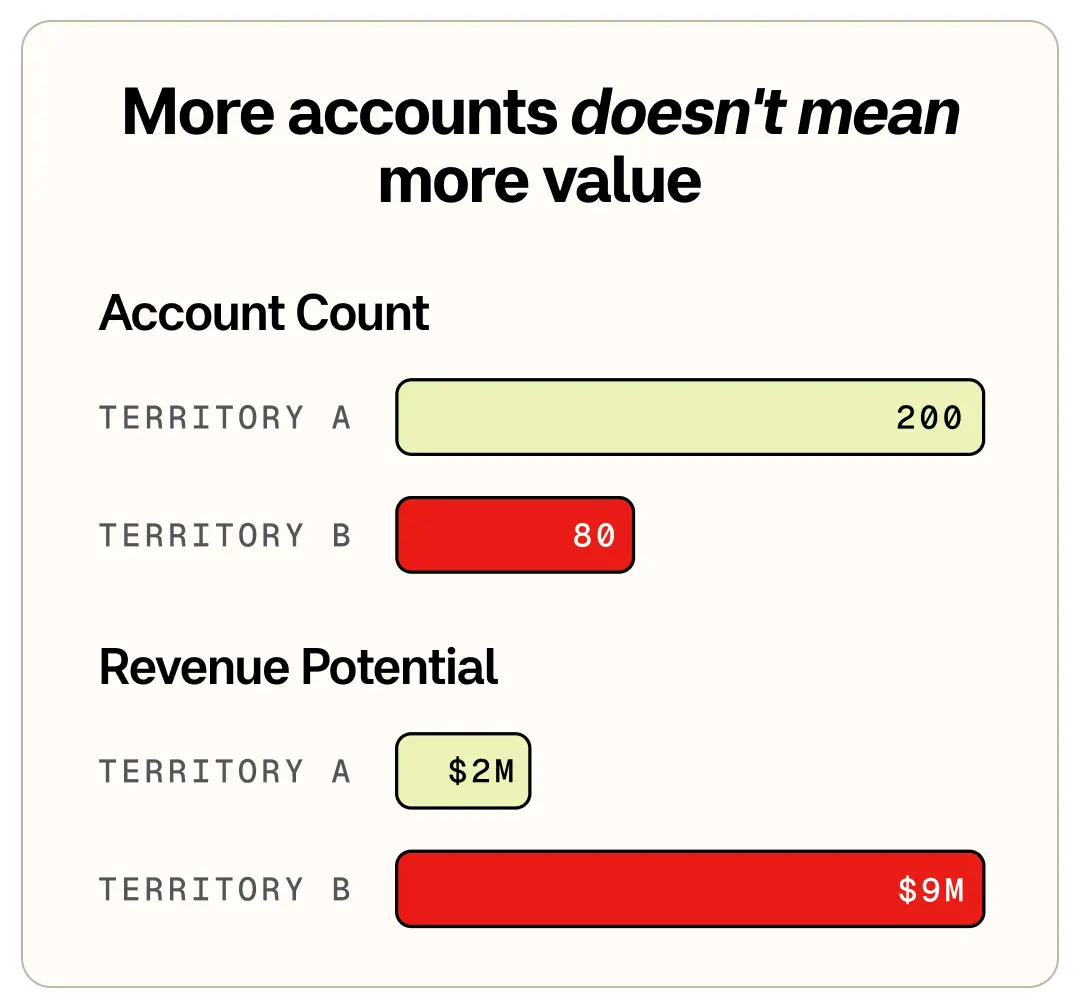
Once your segmentation criteria are set and your data is clean, assign accounts to territories using four balancing variables: account count, revenue potential, geographic travel burden (for outside sales teams), and historical close rate by segment. No single variable should dominate. A territory with 200 accounts and low revenue potential is not equivalent to one with 80 enterprise accounts and high average contract value, even if the account counts look balanced on paper.
Run a territory balance audit before finalizing assignments: calculate the revenue potential and account load for each proposed territory, identify outliers, and redistribute until the spread is defensible.
Step 5: Assign reps based on fit and workload
Match rep experience and skills to territory characteristics. A rep with healthcare expertise should own healthcare accounts. Account for existing relationships, if a rep has momentum with specific accounts, keep those assignments intact when possible.
Account scoring is a powerful tool here: it allocates accounts to the right reps by quantifying revenue potential and fit rather than relying on gut instinct.
Step 6: Document ownership rules and communicate changes
Territory boundaries only hold if ownership rules are explicit. Before you launch a new territory structure, document how parent/subsidiary relationships are handled, what happens when a rep leaves, and how inbound leads get routed when they fall near a boundary.
Run a three-step overlap audit: map current assignments to identify any shared accounts, apply explicit ownership rules (the parent company owns all subsidiaries is a common starting point), and update CRM routing logic to enforce the decision. Communicate changes to affected reps before they take effect, not after the first dispute surfaces.
Step 7: Set a review cadence and monitor performance metrics
Territory mapping is not one-and-done. Most teams review territories quarterly or semi-annually, with ad-hoc adjustments when reps join or leave or when market conditions shift significantly.
Use a Territory Health Check framework to diagnose problems before they compound. Ask four diagnostic questions on each review cycle:
Is win rate by territory tracking above or below the team average? (If below, is it a rep issue or a territory design problem?)
Is pipeline coverage ratio sufficient to hit quota in this territory, or is the account pool too thin?
Is rep capacity utilization balanced, or are some reps running at 150% while others have room to spare?
Have significant accounts changed status (acquired, contracted, churned) that would shift territory value?
If a territory consistently underperforms, investigate the territory design before assuming it's a rep performance issue.
Common sales territory mapping challenges (and how to fix them)
Even well-designed territories break down without the right systems and data. Common challenges include:
Data decay: Account information changes constantly, and territories built on stale data misallocate resources from day one. Fix: establish a recurring CRM enrichment cadence for both account and contact records, not just an initial import.
Coverage gaps: Accounts fall through the cracks when territory boundaries aren't defined clearly enough to assign every account to an owner. Fix: run a visual territory audit against your total addressable market to surface unowned accounts before the cycle begins.
Duplicate outreach: Multiple reps contact the same prospect, damaging credibility and creating internal friction. Fix: implement explicit account ownership rules in your CRM routing logic so every inbound lead resolves to a single owner automatically.
Ownership disputes: Unclear rules about who owns parent vs. subsidiary accounts create internal conflict that wastes selling time. Fix: document parent/subsidiary hierarchy rules before territory launch so disputes have a clear resolution path.
Scaling complexity: A territory structure that worked with 10 reps breaks down at 50 because the original design wasn't built to subdivide. Fix: use modular territory design from the start, with boundaries that can be subdivided cleanly as headcount grows without requiring a full redesign.
How ZoomInfo powers sales territory mapping
ZoomInfo is an all-in-one AI GTM Platform that makes territory decisions precise rather than directional. It runs on three layers: a verified B2B data foundation, the GTM Context Graph intelligence layer on top of it, and universal access to both from whichever tool your team already uses.
The data foundation supplies the firmographics, technographics, intent signals, and buying-committee data that accurate segmentation depends on, so you size market potential, spot whitespace, and keep records current instead of building territories on stale data.
The GTM Context Graph processes 1.5B+ data points a day, fusing that data with intent and behavioral context to surface not only which accounts sit in a territory, but which are in-market and why. When a rep has 300 accounts and no prioritization signal, they default to the accounts they already know. The Context Graph surfaces AI-prioritized signals like intent spikes, funding events, and personnel changes that tell them which accounts to engage today.
That intelligence reaches reps wherever they work. In GTM Workspace, account scoring routes high-potential accounts to the right reps, intent surfacing flags the accounts researching now, and CRM enrichment keeps routing logic working as accounts change, closing the gap between the territory a manager designs and the accounts a rep actually works. Seismic's teams saw a 54% productivity gain and 11.5 hours saved per rep per week, time that moves from research to selling. Teams can also wire the same verified data into their own agents through GTM.AI, the headless API and MCP option, or orchestrate in GTM Studio. ZoomInfo is free to start with consumption credits based on usage.
For territory mapping specifically, that comes down to a handful of capabilities:
Account scoring that routes high-potential accounts to the right reps automatically
Intent surfacing that flags which accounts in a territory are researching right now
CRM enrichment that keeps routing logic accurate as accounts change
Verified firmographic, technographic, and buying-committee data for accurate segmentation
AI-prioritized signals, intent spikes, funding events, and personnel changes, that tell reps which accounts to work today
Here's what that prioritization looks like when accounts are scored and monitored with ZoomInfo data.

"Once our APS system produces a score, we put it in front of field operations leads so they can allocate those accounts as efficiently as possible."
Sales territory mapping software compared
The right sales territory mapping software depends on your team's primary need. A field sales team optimizing routes needs something different from an inside sales team trying to identify which accounts in their territory are actively in-market. Before evaluating tools, decide whether your primary need is geographic visualization, data intelligence, or field route optimization, the answer determines which category of sales territory mapping app fits your motion.
Tool | Best for | Key strength | Free option? |
|---|---|---|---|
ZoomInfo | Data-driven territory intelligence | AI-prioritized account signals, intent data, CRM enrichment, account scoring | Free to start with consumption credits based on usage |
Salesforce Maps | Enterprise CRM-native territory visualization | Native Salesforce integration, geographic territory management at scale | No free tier |
Badger Maps | Field sales route optimization | Route planning, check-in tracking, map-based account visualization | Free trial available |
Google Maps | Basic geographic visualization | Familiar interface, zero cost, accessible to any team | Free |
Excel/Google Sheets | Manual territory tracking | Flexible, free, works for small teams with simple structures | Free |
For teams that need to draw lines on a map and track which rep owns which region, the visualization tools above do the job. For teams that need to know which accounts inside those lines are ready to buy, and want that intelligence to update automatically as accounts change, ZoomInfo's GTM Workspace is the option built for territory intelligence, not just territory visualization.
Build territories on data that doesn't decay
A territory map is only as good as the data underneath it. Visualization tools draw the lines and track who owns which region, and for simple, geography-first teams that's enough. But the moment your territories run on segments, hierarchies, and account tiers, the hard part isn't drawing the map, it's knowing which accounts inside each territory are in-market and keeping that picture current as accounts change.
That's the layer ZoomInfo adds: verified firmographic, technographic, and intent data, AI-prioritized account signals, and account scoring that routes the right accounts to the right reps, so the territory you designed on clean data stays accurate quarter after quarter.
Book a demo to see how revenue teams build territories on data that doesn't go stale.
Frequently asked questions about sales territory mapping
How often should you review and rebalance territories?
Most revenue teams review territories quarterly or semi-annually. Make ad-hoc adjustments when reps leave, new reps join, or market conditions shift significantly. A Territory Health Check, reviewing win rate by territory, pipeline coverage ratio, and rep capacity utilization, helps identify whether underperformance is a rep issue or a territory design problem before it costs a full quarter.
What data do you need to build effective sales territories?
At minimum, you need accurate firmographic data (company size, industry, location, revenue) for your addressable market, plus current contact information for the buyers within those accounts. Intent data and technographics add precision by identifying which accounts are actively researching and which have the right technology stack. Stale data is the single biggest cause of misallocated territory resources, territories built on outdated records misallocate accounts from the start.
How do you handle territory changes mid-cycle?
Document clear rules for account ownership transitions and communicate changes to affected reps before they take effect. Update your CRM routing logic immediately to prevent leads from going to the wrong owner. For rep departures, assign accounts to a temporary owner within 24 hours to prevent coverage gaps.
What is the best sales territory mapping software?
The best sales territory mapping software depends on your team's primary need. For geographic visualization and route optimization, tools like Salesforce Maps or Badger Maps are strong options. For teams that need territory intelligence, knowing which accounts inside their territories are actively in-market, not just where they are on a map, ZoomInfo's GTM Workspace surfaces AI-prioritized account signals and keeps territory data current as accounts change. ZoomInfo is free to start with consumption credits based on usage.
What are the benefits of sales territory mapping?
Sales territory mapping reduces missed opportunities by ensuring every account has a clear owner. It improves rep efficiency by giving sellers a focused book of business instead of an undifferentiated list of accounts. It enables fair workload distribution that reduces rep burnout and turnover. And it provides data-driven visibility into market coverage, so managers can identify whitespace before competitors do.
How do you resolve territory overlap and account ownership disputes?
Territory overlap typically occurs during rep onboarding, company acquisitions, or when territory boundaries are defined by geography alone without account-level ownership rules. Resolve it with a three-step audit: map current assignments to identify shared accounts, apply explicit ownership rules (for example, the parent company owns all subsidiaries), and update CRM routing logic to enforce the decision. Document the rules before the next territory cycle to prevent recurrence. Snowflake's account scoring shows how ZoomInfo-powered scores can allocate accounts efficiently and reduce ownership ambiguity at scale.