
Showpad has earned a strong reputation in sales enablement, especially among large enterprises with complex field sales operations. Following its October 2025 merger with Bigtincan, the platform now combines content management, sales coaching, buyer engagement, and analytics, serving 2,000+ sales organizations globally. For organizations whose sellers carry dense product catalogs into face-to-face meetings, Showpad aims to keep everyone prepared and aligned.
To write this Showpad review, we've analyzed it extensively. We believe it's the right choice if:
You run a large field sales organization with complex, multi-product selling motions
You need one platform for both sales content management and seller coaching
You operate in regulated industries where content compliance and version control matter
You want interactive digital sales rooms for complex deal cycles
Your sellers need offline access to presentations and product materials
However, Showpad might not be the best choice if:
You primarily need help identifying which accounts to target and when to engage them
Your biggest challenge is finding verified contact data and direct dials for decision-makers
You want buyer intent signals that show when prospects are actively researching solutions
You need to enrich your CRM with accurate company and contact data
Your team needs AI-driven prospecting and outreach
In this case, consider pairing Showpad with ZoomInfo: an AI GTM platform that picks up where Showpad leaves off. Showpad equips your sellers with the right content and coaching to run effective meetings. ZoomInfo identifies which accounts to pursue, surfaces buying signals that show when those accounts are in-market, and provides verified contact data to reach decision-makers. Together, they form a complete sales workflow: ZoomInfo tells your team who to talk to and when; Showpad ensures they show up prepared.
We've included a detailed look at ZoomInfo later in this review as the natural complement to Showpad's enablement capabilities. If you want to see how prospecting intelligence strengthens a sales enablement investment, you can start with ZoomInfo's free trial here.
What is Showpad?
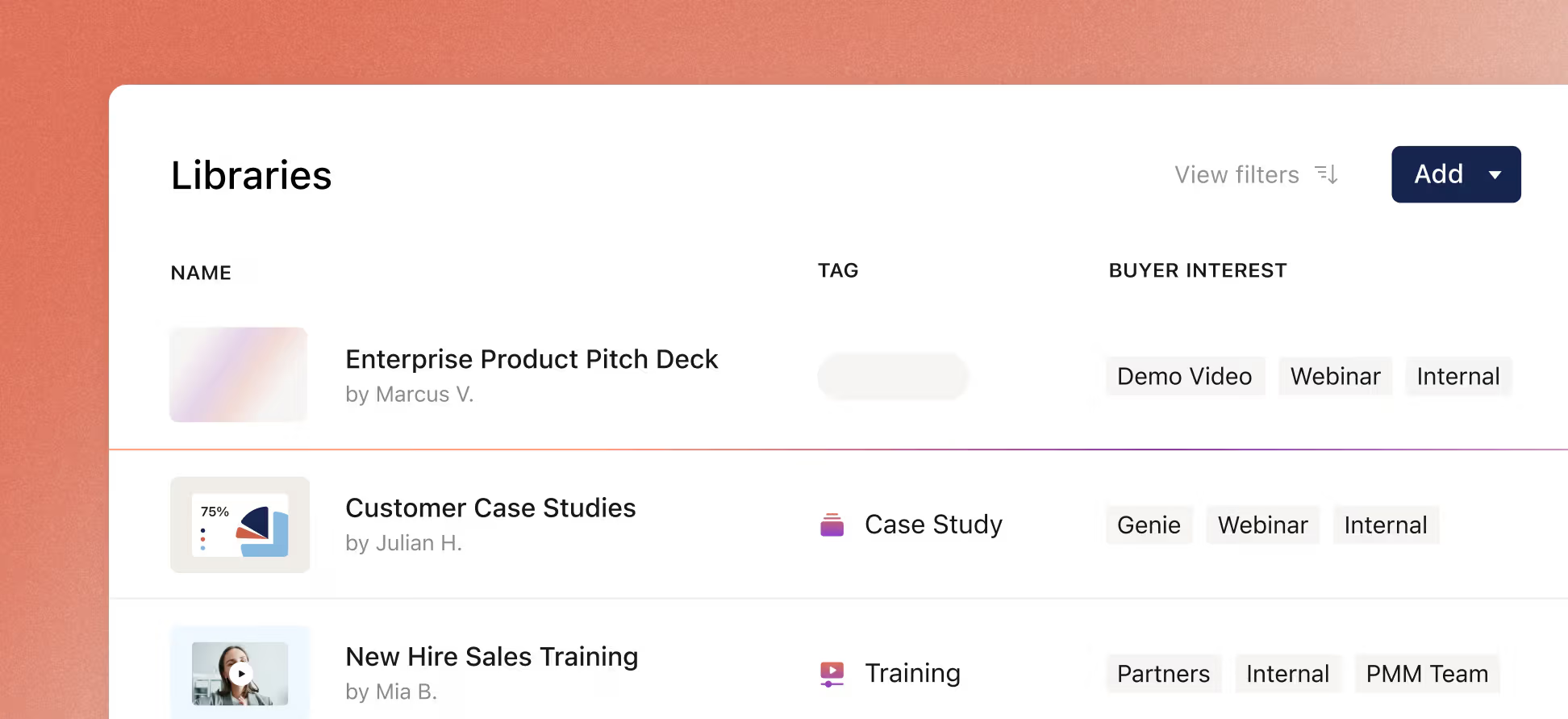
Source: Showpad
Showpad is an AI-powered sales enablement platform founded in 2011 in Ghent, Belgium by Pieterjan Bouten, Louis Jonckheere, and Peter Minne. The three founders met while working together at Netlog and launched Showpad as a mobile-first iOS app built for analytics-backed content distribution in field sales.
Since then, the platform has grown substantially. Through the 2018 acquisitions of LearnCore and VoiceFox, Showpad added sales training and coaching. In 2022, the company launched Showpad eOS (enablement operating system), combining content, readiness, engagement, and intelligence in one platform.
The biggest change came in October 2025, when Vector Capital completed its acquisition of Showpad and merged it with Bigtincan, creating what the company calls "a complete, AI-powered revenue effectiveness platform".
Today, Apratim Purakayastha leads the combined company as CEO, bringing over 25 years of software leadership experience, including roles at Skillsoft, SumTotal Systems, and IBM. Showpad operates from offices in Chicago, Ghent, Boston, London, Glasgow, Bucharest, Sydney, and Hobart.
Showpad's ideal customer is a large enterprise with field sales teams, complex product catalogs, and regulatory requirements. Major customers include Coca-Cola, Cisco, DuPont, IBM, Nike, and Johnson & Johnson.
Showpad Pros & Cons
Pros | Cons |
|---|---|
- Unified content management and sales coaching in one platform | - Premium pricing not suited for small businesses |
- Strong adoption rates (80-100% reported by customers) | - Backend bugs where changes don't always reflect in the app |
- 65+ pre-configured integrations including Salesforce | - Content discovery can be difficult without careful folder management |
- 3D models, 360° showrooms, and AR for product visualization | - Reporting and analytics not always intuitive |
- Offline mobile access for field sellers | - Limited customization options for non-admin users |
- AI features including RolePlay AI and Genie Assistant | - Mobile app reliability issues reported on iOS |
- Leader status across Forrester, Gartner, and IDC | - Some competitor features and integrations still missing |
Showpad Review: How it Works & Key Features
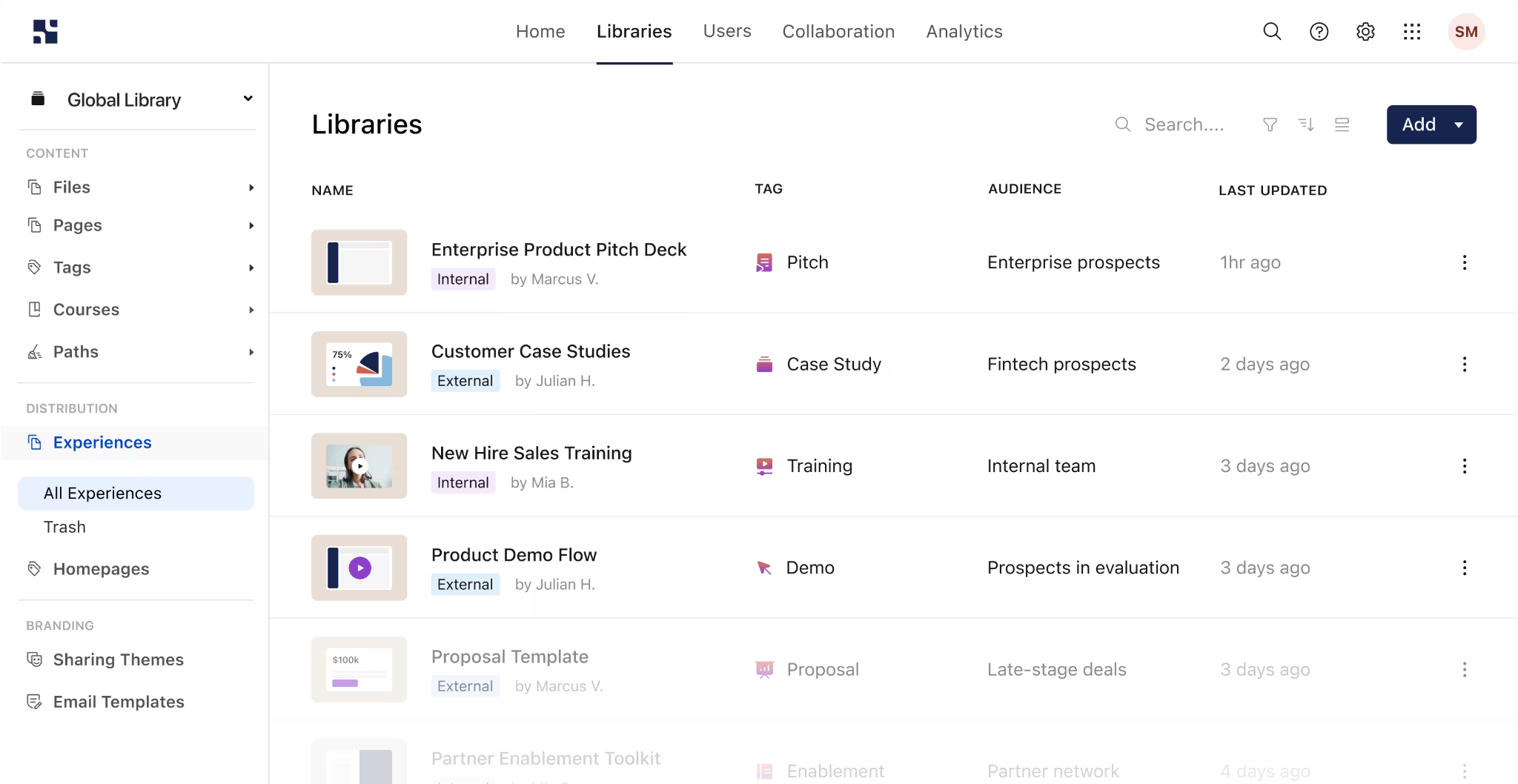
Content Management: Showpad centralizes all sales materials in a single, searchable library with AI-powered organization.
Showpad solves a persistent problem: sales content scattered across file servers, email chains, and shared drives. Showpad Content creates a single source of truth where marketing teams upload and distribute materials while sellers find what they need in seconds.
Source: Showpad
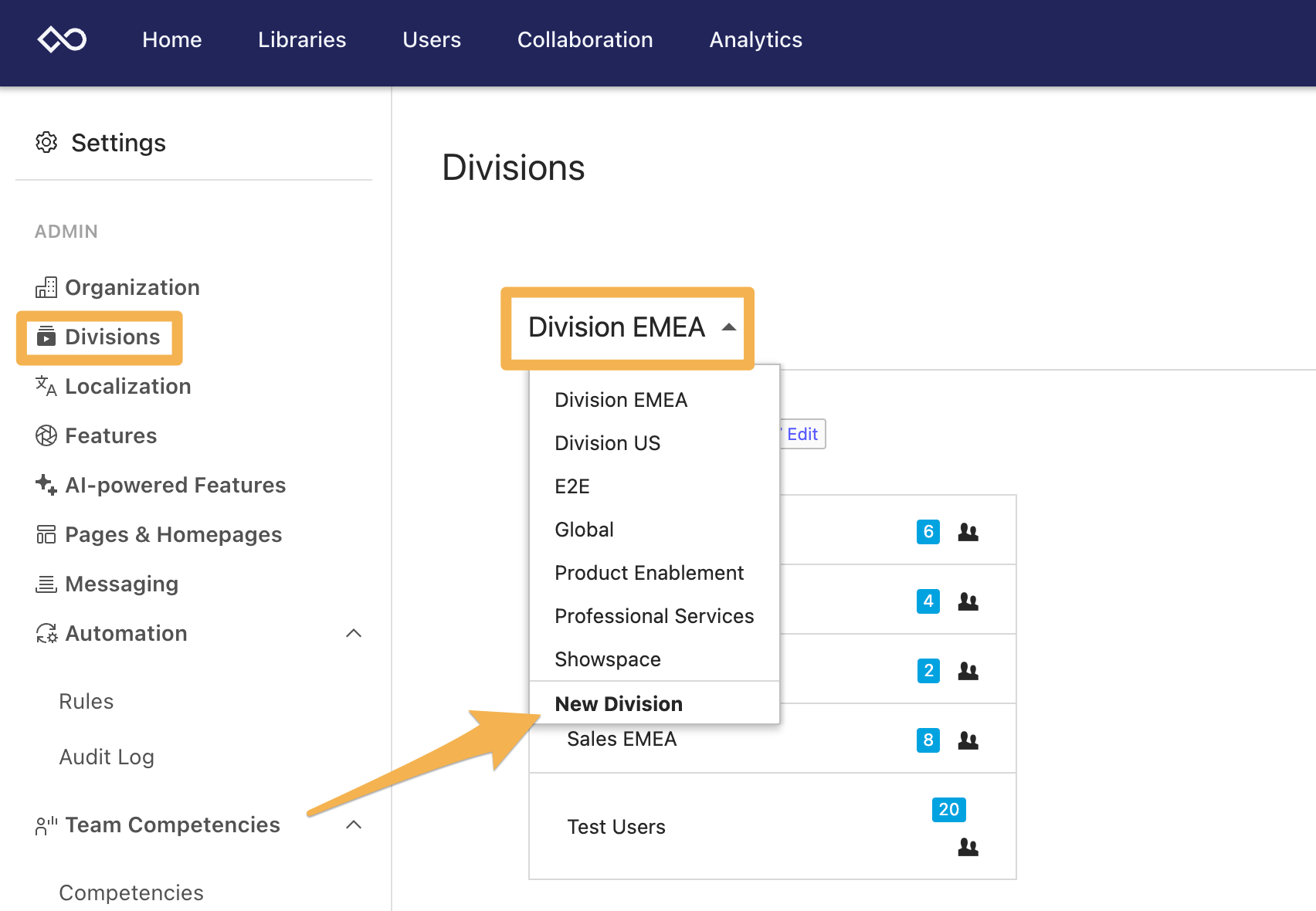
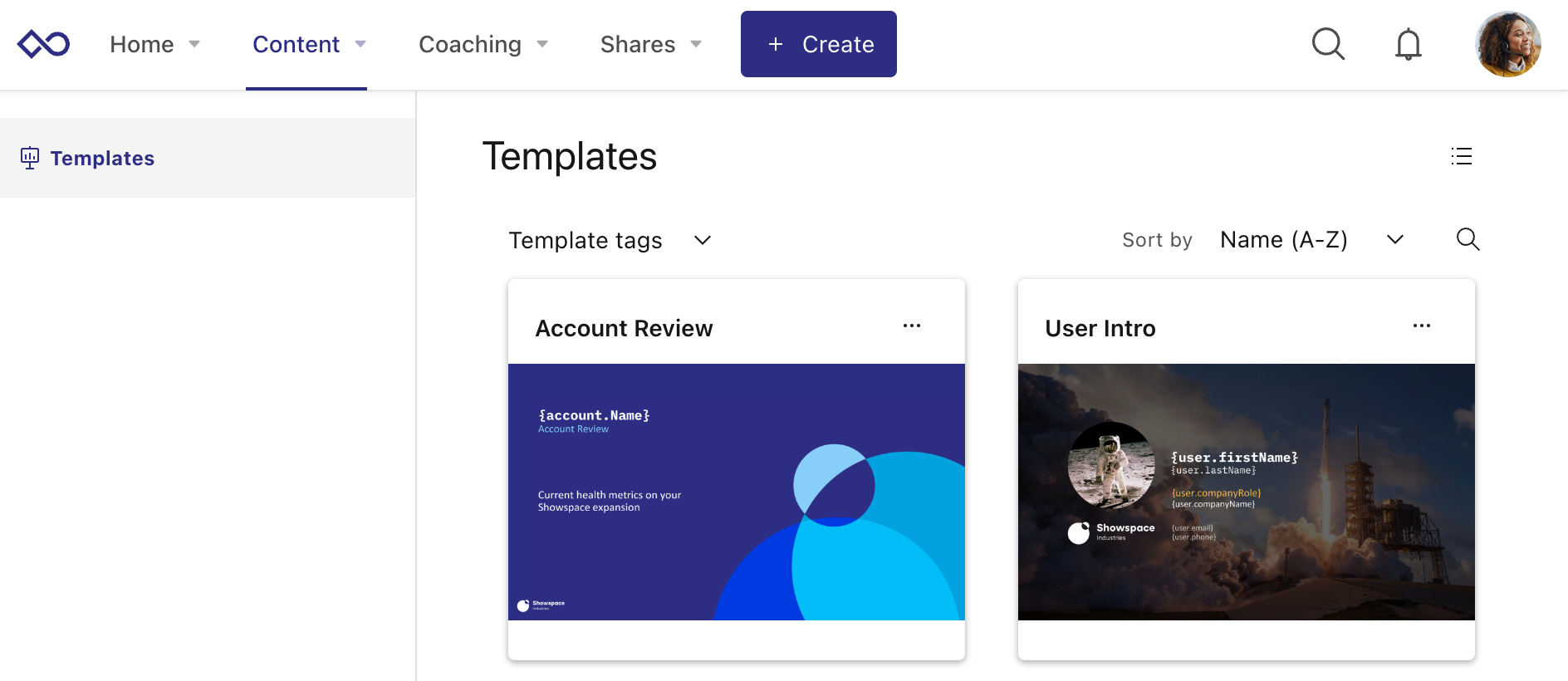
Content is organized through Divisions, which are independent content libraries with their own management rights. Within each Division, administrators build Experiences (curated collections that can be customized with brand elements and targeted to specific user groups).
Source: Showpad
The Automated Content Builder uses marketing-approved templates in PowerPoint or Word to generate personalized documents at scale.
Source: Showpad
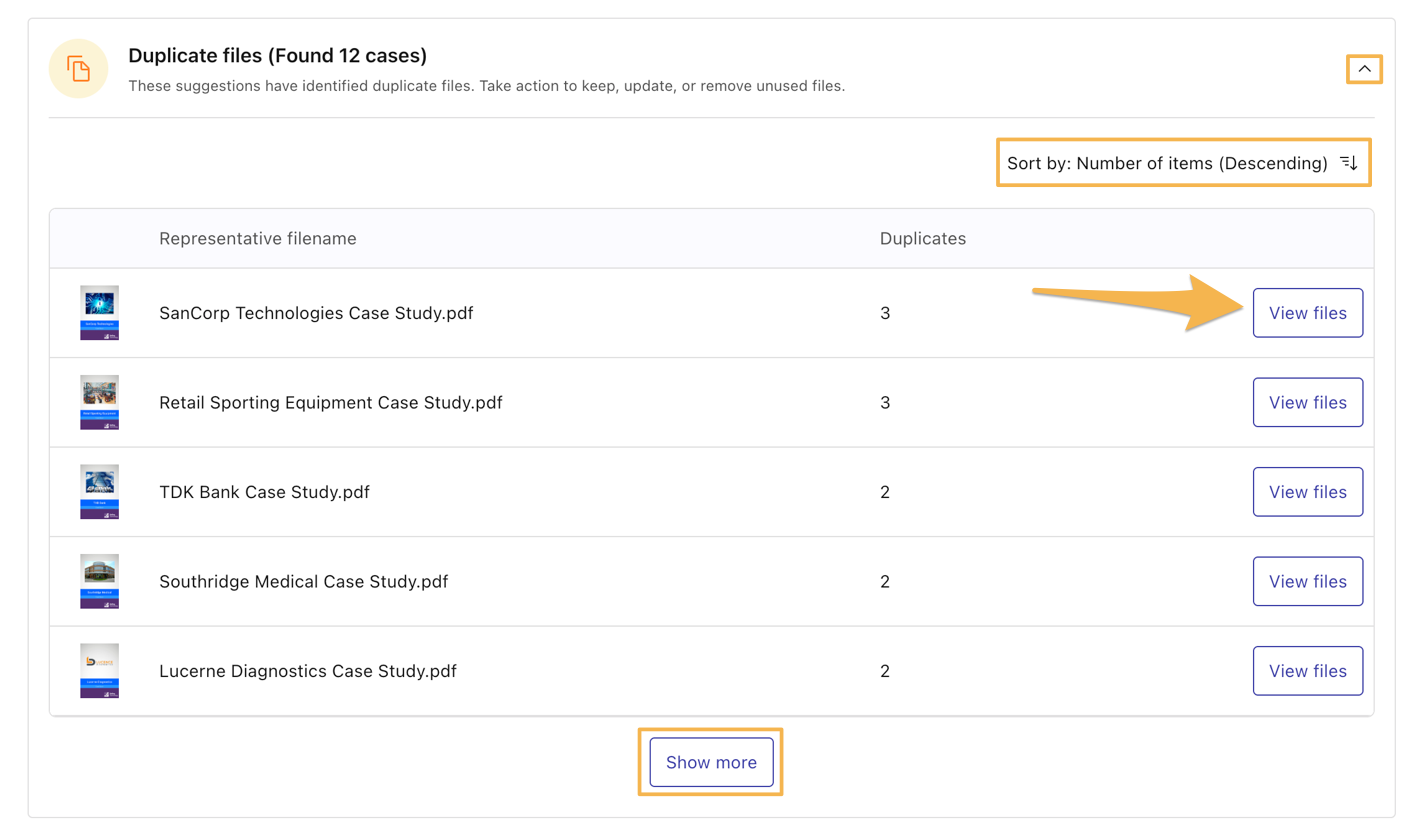
What sets the content library apart is LibraryIQ, an AI feature that monitors content health by spotting duplicate files, localized variants, and undefined languages. This helps marketing teams keep the library clean without manual audits.
Source: Showpad
For industries selling physical products, Showpad supports 3D models and 360° showrooms that turn product catalogs into interactive digital experiences. This matters most for medical device manufacturers and industrial companies whose sellers need to demonstrate equipment that can't travel to every meeting.
The platform connects content to business results through analytics that tie content usage to win rates and revenue.
Sales Coaching: Showpad Coach combines structured training paths with AI-powered practice to develop sellers at scale.
Showpad Coach addresses a common challenge: sales managers don't have time to run and review roleplays individually, and new sellers take too long to ramp.
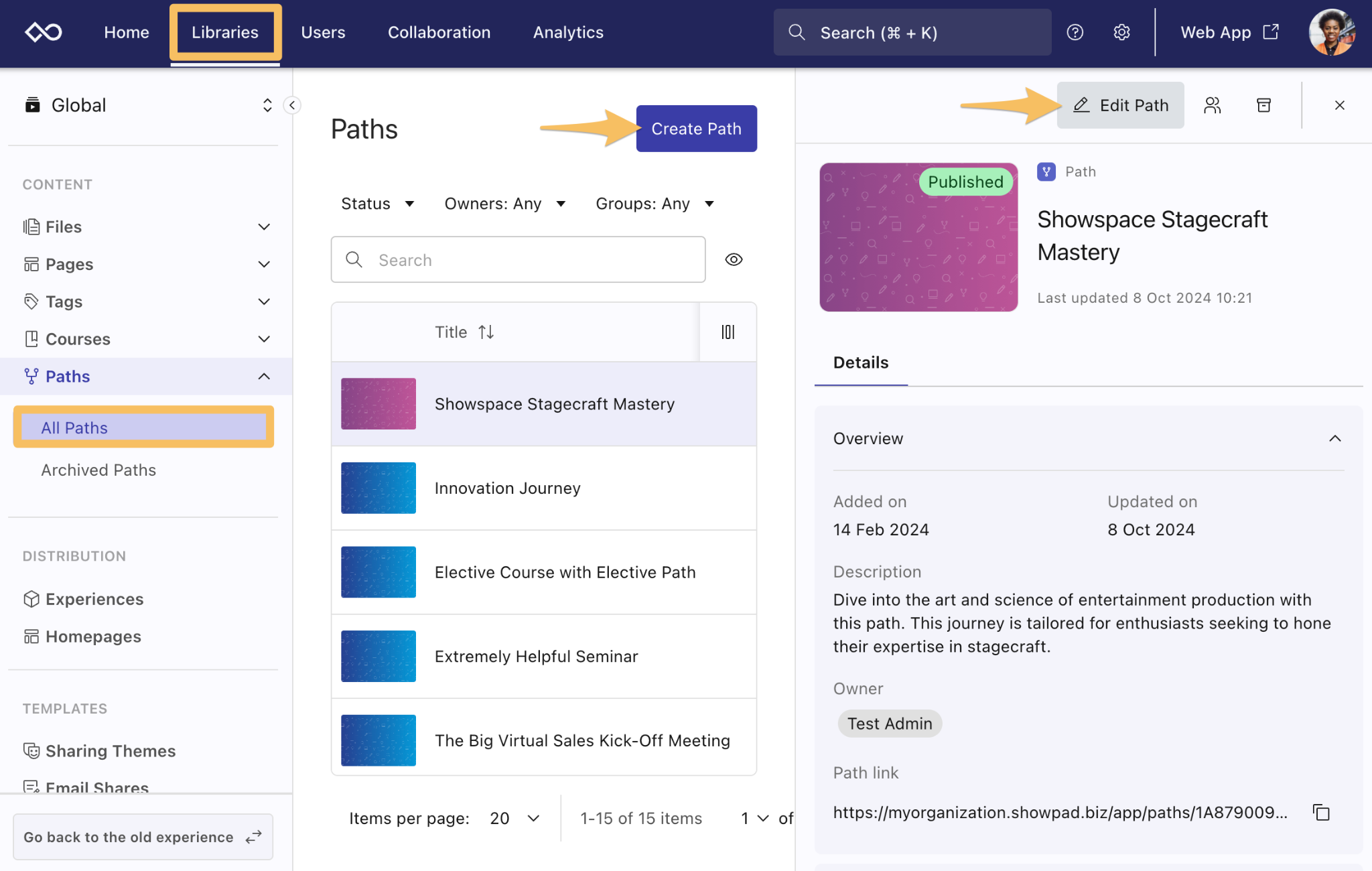
The platform provides structured learning through Paths, which combine live tasks, interactive courses, video recordings, and real-time leaderboards into guided certification programs.
Source: Showpad
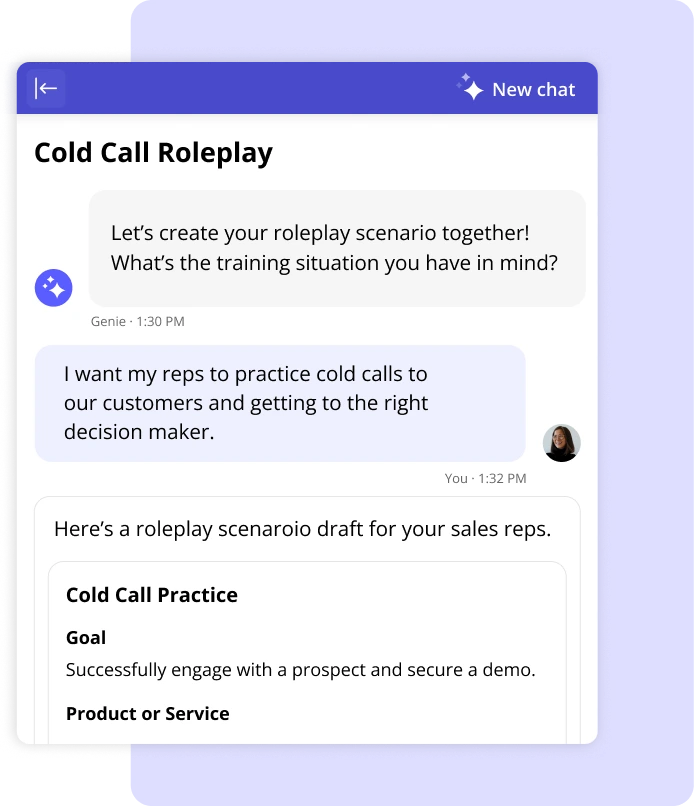
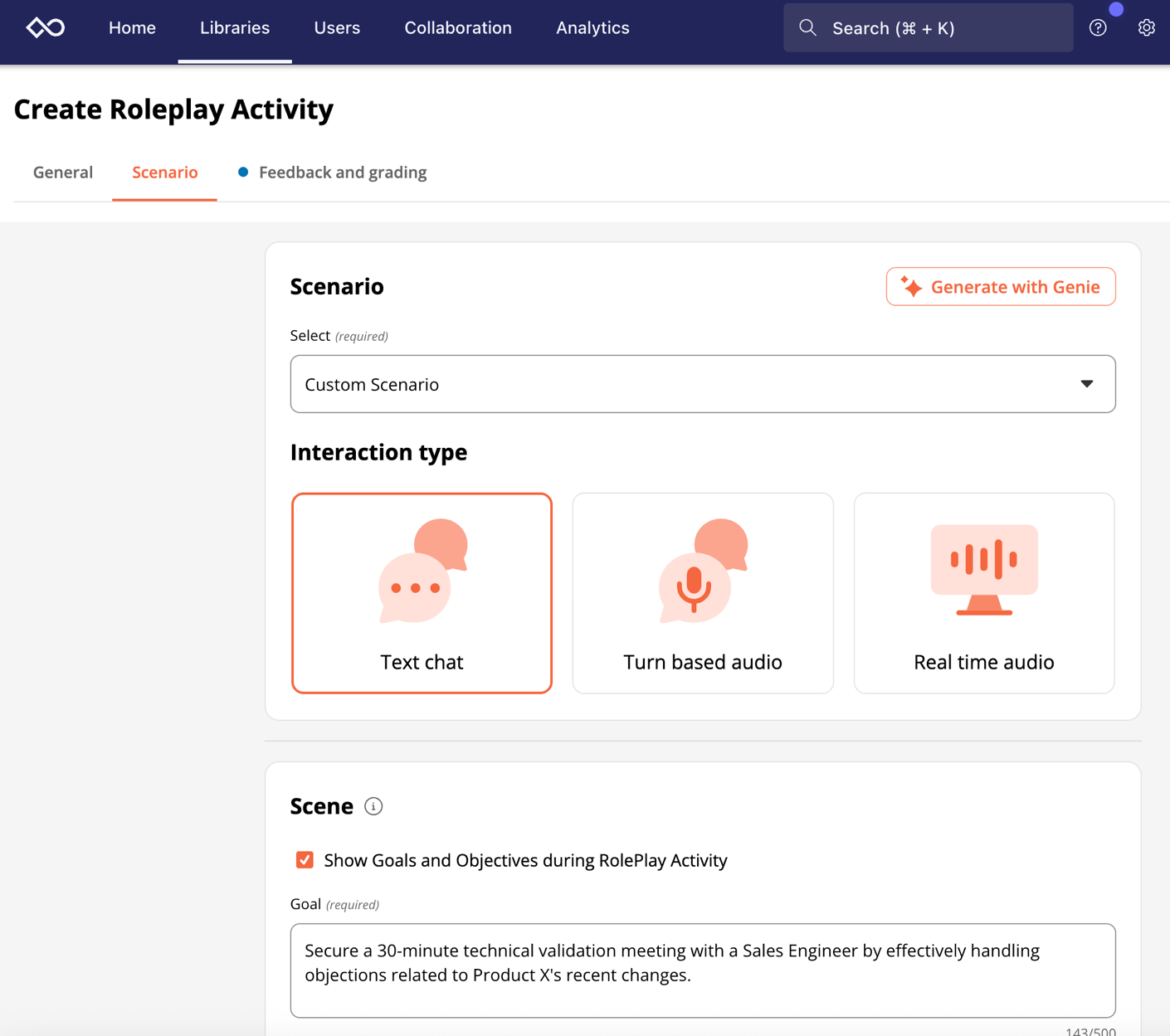
The standout feature is RolePlay AI, which simulates customer interactions so sellers can practice pitches without tying up a manager's time.
Source: Showpad
The AI partner supports text chat, turn-based audio, and real-time audio, with an AI Virtual Coach that gives feedback on language patterns, conversation structure, and technique.
Source: Showpad
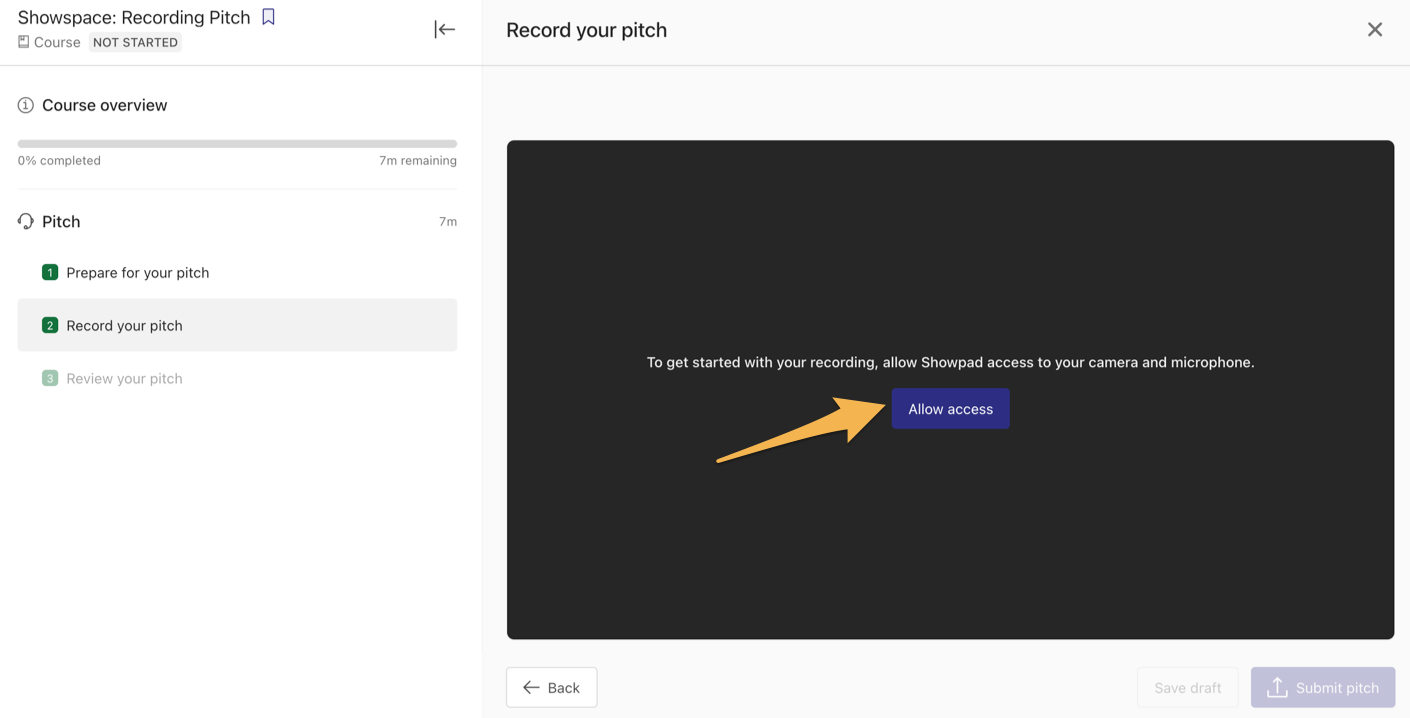
Coaching also includes PitchIQ, where sellers record and submit pitches for AI-assisted evaluation, and a competencies assessment framework that lets managers track team skill levels. The platform supports 12+ languages, making it viable for globally distributed teams.
Source: Showpad
Buyer Engagement: Shared Spaces create collaborative digital sales rooms for complex deal cycles.
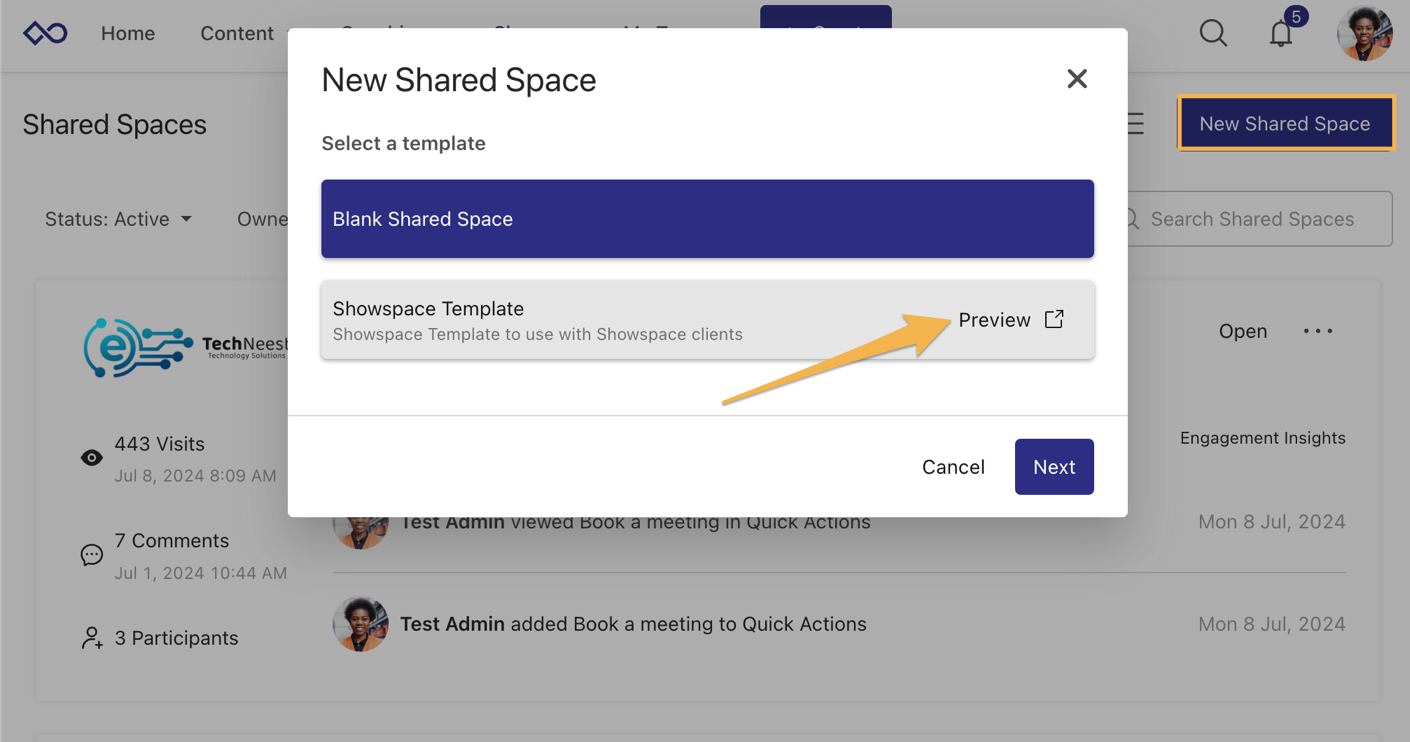
Shared Spaces are secure, branded microsites where sellers and buyers collaborate throughout a deal. Instead of sending email attachments that get buried in inboxes, sellers create a persistent workspace for each deal or account.
Source: Showpad
Within a Shared Space, sellers can add files, folders, and even individual pages from multi-page documents. Buyers can invite additional stakeholders, giving all decision-makers access. With the Collaborate+ add-on, external participants can upload their own documents.
Mutual Action Plans can be attached to Shared Spaces, giving both buyer and seller a structured way to track deal milestones without separate project management tools.
For automation, Shared Spaces can be created automatically when deals advance in the CRM through API integration. Shared Space Templates ensure consistency across the organization while still allowing personalization for individual deals.
The engagement data is where Shared Spaces prove most useful. Sellers gain visibility into buyer behavior (when clients open content, which items they spend time on), and can tailor follow-up conversations to what actually interests the buyer.
AI Capabilities: Showpad's AI suite spans content discovery, coaching, authoring, and field meeting support.
Showpad AI consists of four products working across the platform:
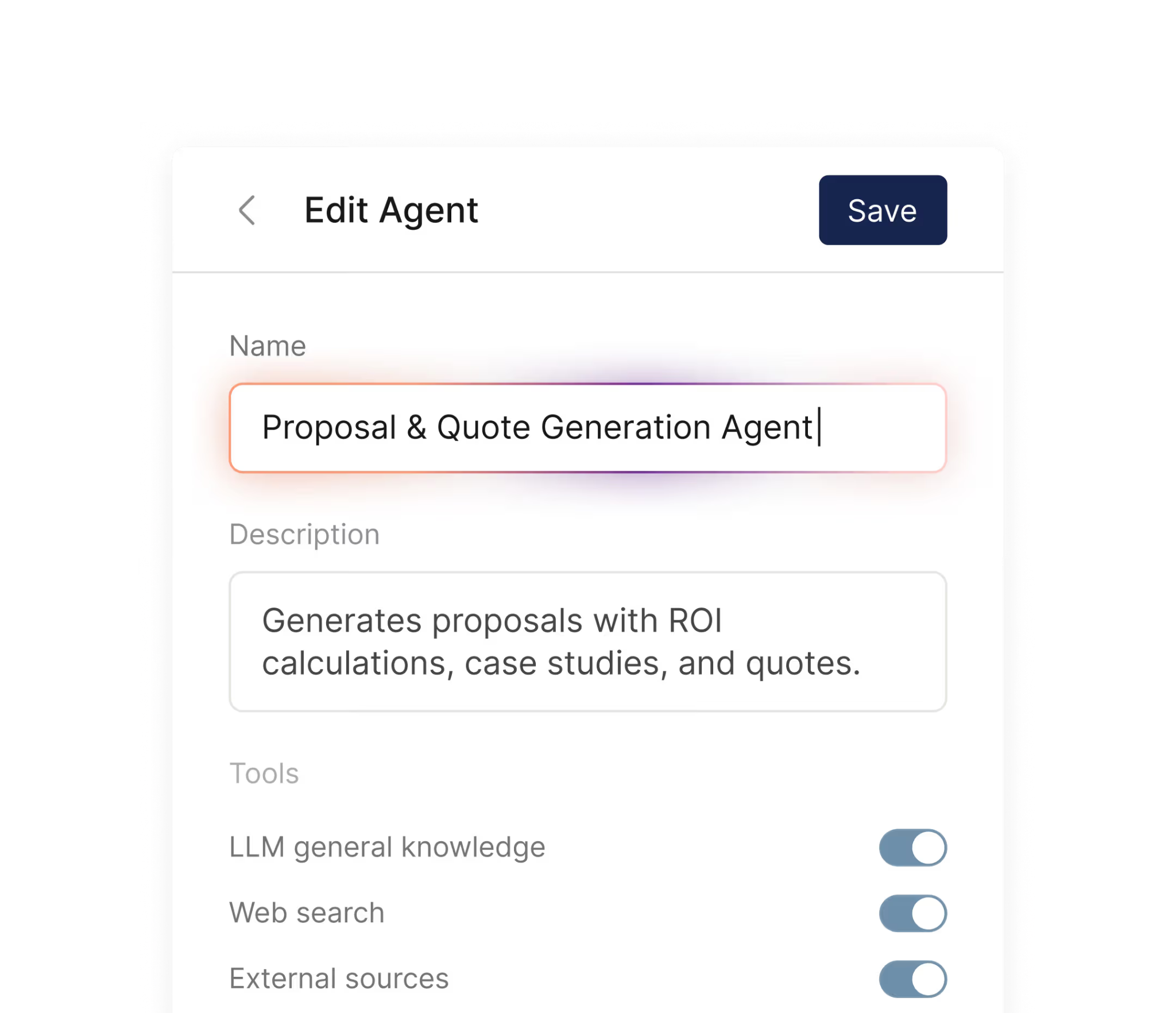
Genie Assistant answers questions through permission-based AI agents that draw from the organization's content library. Sellers can look up product knowledge, find content, handle objections, and draft communications. Administrators can create custom agents for specific teams.
Source: Showpad
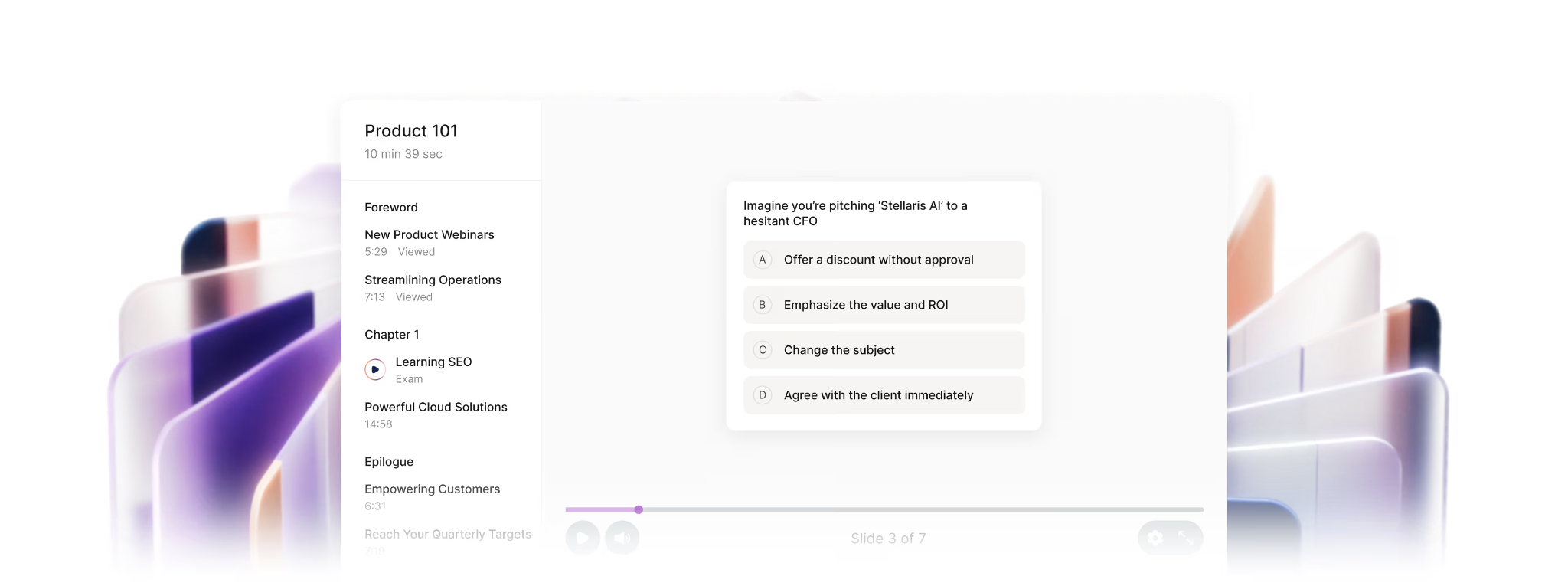
AuthoringAI converts existing slides into narrated training content, generating voiceovers from slide notes with automatic captions and translation into 30+ languages.
Source: Showpad
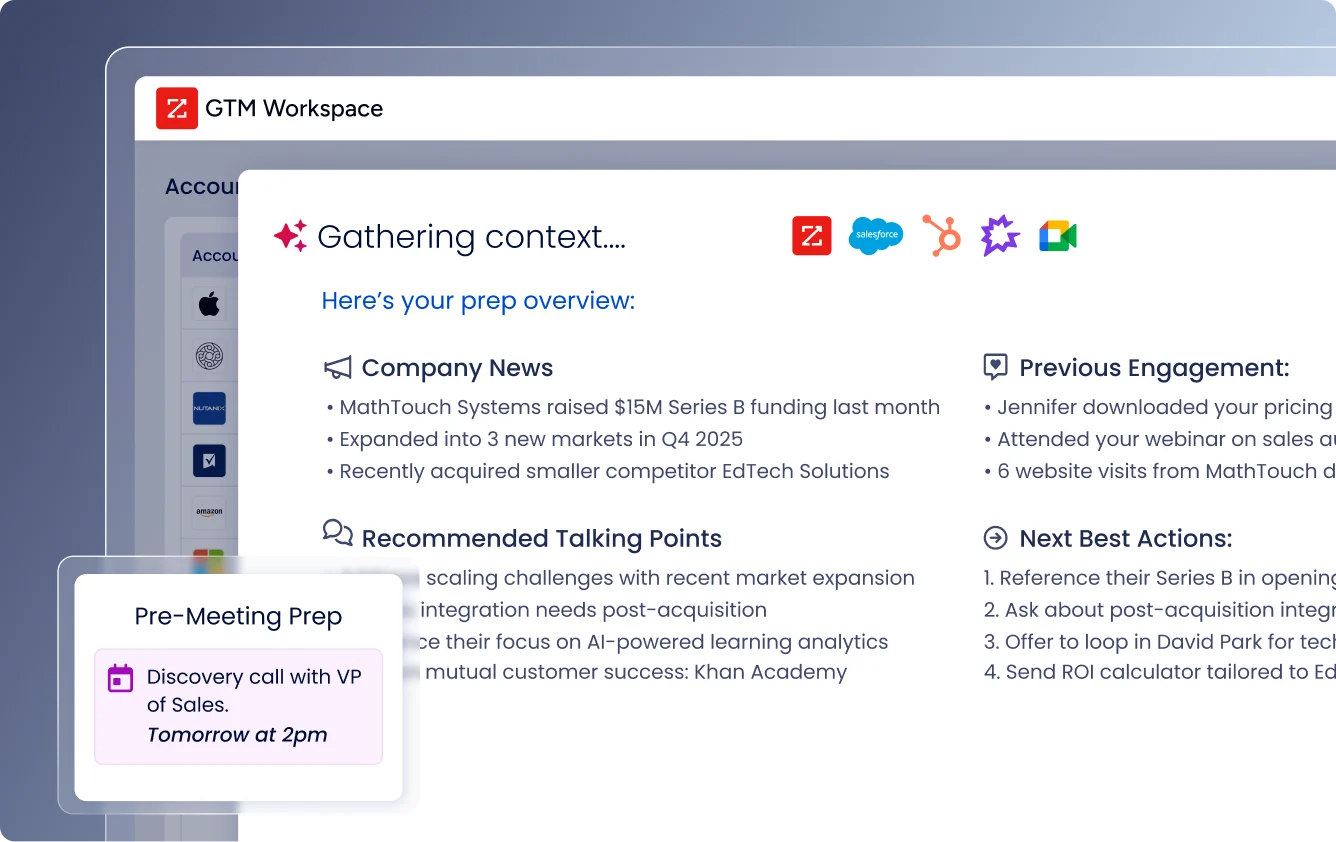
Field Meeting AI captures meeting insights, converts voice notes into structured CRM data, and drafts follow-up emails. It also provides pre-meeting briefings so sellers arrive prepared.

Source: Showpad
One notable architectural choice: Showpad stays independent from any single AI provider, using open-source models tailored to each use case within a secure AWS environment. Customer data is never shared with other customers and never used to train AI models.
Integrations and Security: Showpad offers 75+ integrations with enterprise-grade compliance.
Showpad is an open platform with 75+ pre-configured integrations including Salesforce, Google Drive, SharePoint, Marketo, Outlook, and Dynamics. The Salesforce integration provides automatic logging, content recommendations, and ROI tracking inside the CRM. Content can be automatically synced from storage systems like Box, Dropbox, and Google Drive.
For custom development, Showpad provides a RESTful API with full documentation, webhooks for event-driven integrations, and an SDK for building custom apps.
On security, Showpad holds ISO/IEC 27001:2013, ISO 27701:2019 (making it the first vendor in the enablement space to achieve this), and SOC 2 Type II. It is the only sales enablement platform covering all three third-party assurance reports. Identity management includes SAML 2.0 Single Sign-On with support for Okta, Ping Identity, Salesforce, and Microsoft ADFS.
Where Showpad Falls Short
Showpad excels at enabling sellers who are already engaged with prospects. But look at the full sales workflow, and several gaps appear. The platform is built for "how to sell," not "who to sell to."
No Prospecting or Account Intelligence: Showpad helps sellers present content and run meetings, but provides no tools for identifying which accounts to target, when those accounts are in-market, or who the key decision-makers are. Sales teams still need separate systems for buyer intent signals, contact data, company intelligence, and account prioritization.
Showpad assumes your sellers already know who to call; it doesn't help them figure that out.
No Contact Data or Verification: The platform has no B2B contact database. Sellers can't look up direct dials, verified emails, or org charts for target accounts within Showpad. Finding contact information for new prospects requires a separate tool, which means switching between systems before a seller can even begin using Showpad's enablement features.
Backend Stability Concerns: Capterra reviews report that the backend can be buggy, with admin changes not consistently reflecting in the web app. For a platform that enterprise teams rely on daily, these reliability gaps create friction.
Content Discovery Challenges: Despite AI investments, TrustRadius and G2 users consistently report difficulty finding content. The platform requires careful folder management and metadata discipline. Organizations that don't invest in content governance up front often find sellers struggling to locate the right materials.
Analytics That Require Work: Showpad tracks content usage and buyer engagement, but Capterra reviewers note that backend analytics are not intuitive. G2 users also flag reporting as an area needing improvement. The tiered analytics model locks some of the most useful features (like AnalyticsIQ and LibraryIQ) behind higher-priced plans.
Premium Pricing Without Transparency: Showpad does not publish prices on its website, requiring prospects to request a demo for details. G2 and Capterra reviews frequently mention the high cost. Contracts typically use annual billing on a per-user basis, with add-on bundles for features like Mutual Action Plans and PitchAI that increase the total spend.
These limitations aren't failures. They reflect a platform built for sales enablement, not sales intelligence. But they create a clear gap: your sellers may have the best content and coaching available, yet still waste time pursuing the wrong accounts or struggle to reach the right contacts. That's where a complementary intelligence tool becomes essential.
The Perfect Complement to Showpad: ZoomInfo
ZoomInfo is an AI GTM platform that fills the gap Showpad leaves open: knowing who to sell to, when to sell to them, and how to reach them. Showpad equips sellers for the meeting. ZoomInfo ensures they're walking into the right meetings in the first place.
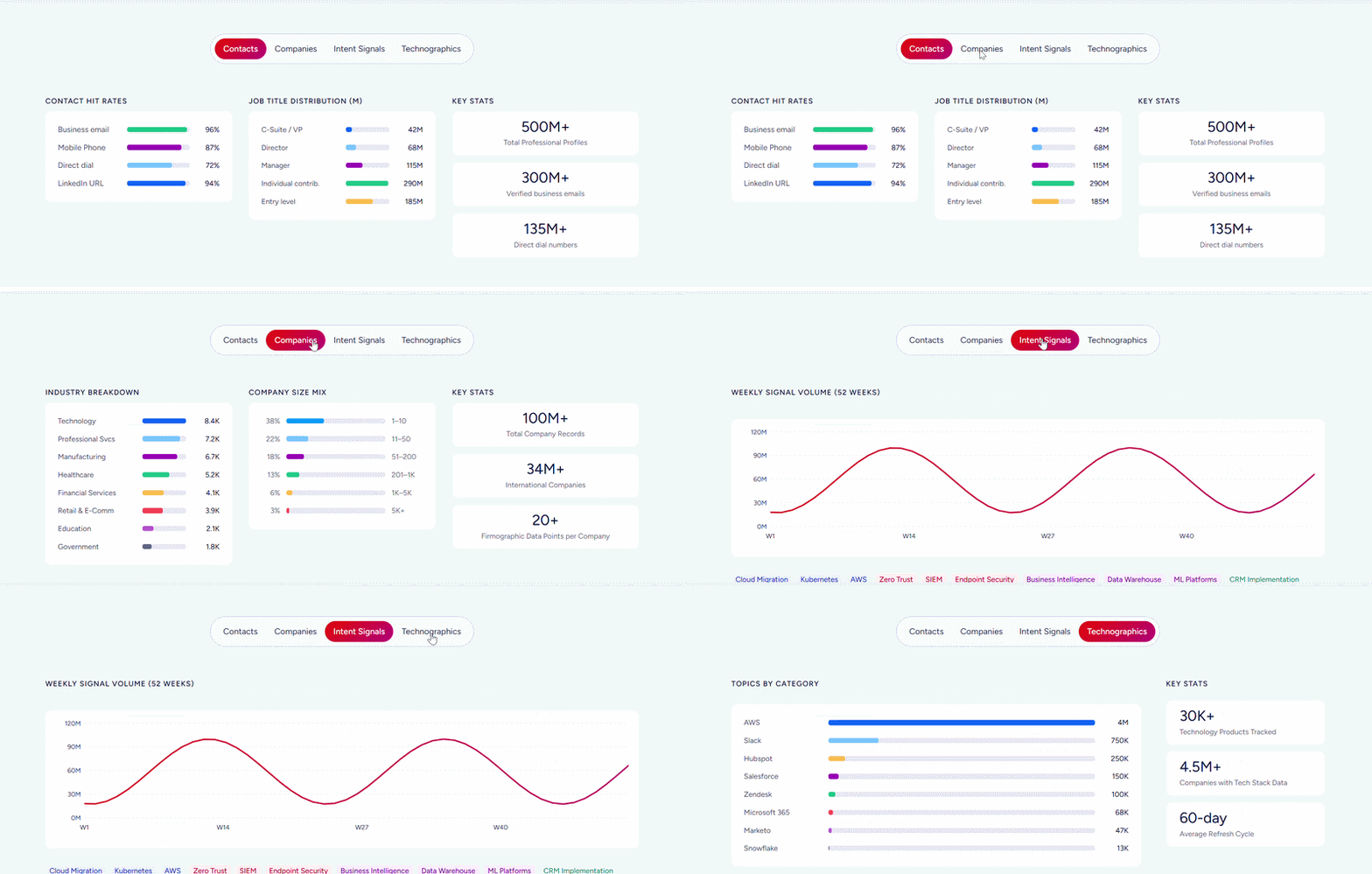
Built on B2B data covering 500M contacts, 100M companies, 135M+ verified phone numbers, and 200M+ verified business emails, its GTM Context Graph processes 1.5B+ data points daily. It combines this data with your CRM records, conversation transcripts, and behavioral signals to show not just what happened in a deal, but why it happened, and which actions to take next.
Teams access this intelligence through GTM Workspace for sellers, GTM Studio for marketers and RevOps, or APIs and MCP in any front-end.
Prospecting and Contact Data: ZoomInfo provides the verified identity data sellers need before they ever open Showpad.
Showpad assumes your sales team already has a list of accounts and contacts.
ZoomInfo builds that list.
Contact & Company Search gives access to 300+ company attributes for market segmentation, along with 120M direct-dial phone numbers and 200M+ verified business email addresses at up to 95% accuracy. Sellers can filter by job title, company size, industry, location, revenue, technology stack, and dozens of other criteria to build targeted prospect lists.
The data comes from multiple sources: automated ML scanning of 28 million site domains daily, third-party partner data covering 95 million businesses, a community of 200,000+ ZoomInfo Lite users who share data back, and an in-house Data Training Lab of 300+ human researchers. The quality has been externally validated: in a Fortune 500 competitive RFP analyzing 25 million contacts across vendors, an independent consultant concluded that "no other competitor came even close."
For teams using Showpad, this means sellers open their digital sales rooms already knowing the full buying committee: names, titles, direct dials, emails, and org chart positions. No more guessing who else needs to be in the Shared Space.
"ZoomInfo gives us the information we need to execute. We don't have to go through and spend our time digging. It's already there, so we can be three steps ahead," said William Kenimer, VP of Revenue Operations at Vensure. (Vensure)
Buyer Intent and Signals: ZoomInfo identifies when accounts are actively in-market, so sellers prioritize the right Showpad interactions.
Showpad tracks buyer engagement after content has been shared. ZoomInfo detects buying intent before sellers make first contact.
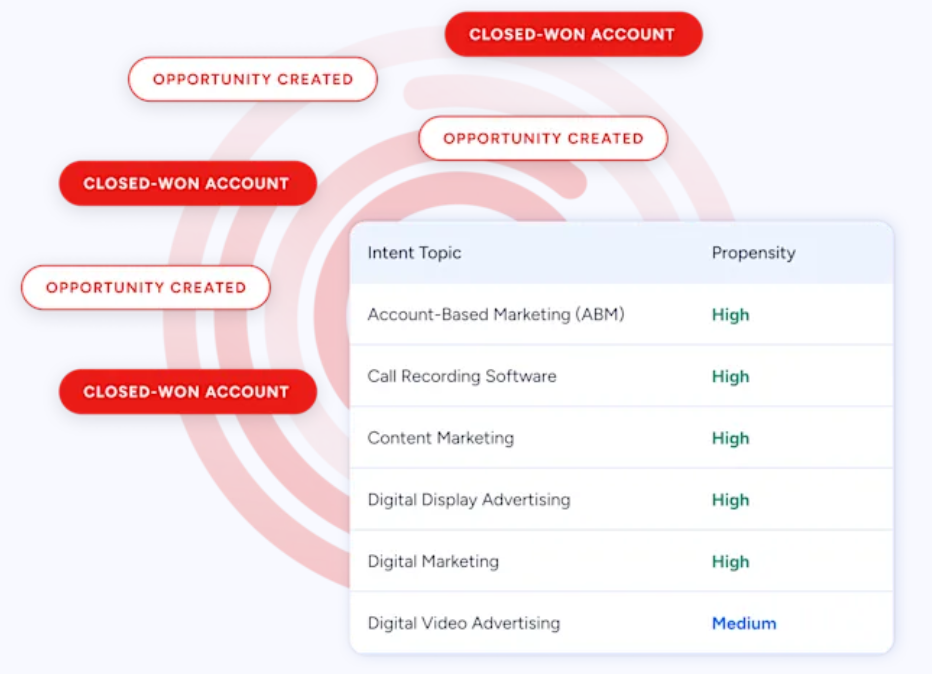
ZoomInfo Intent tracks signals from 210 million IP-to-Organization pairings and 6 trillion+ new keyword-to-device pairings sourced monthly.
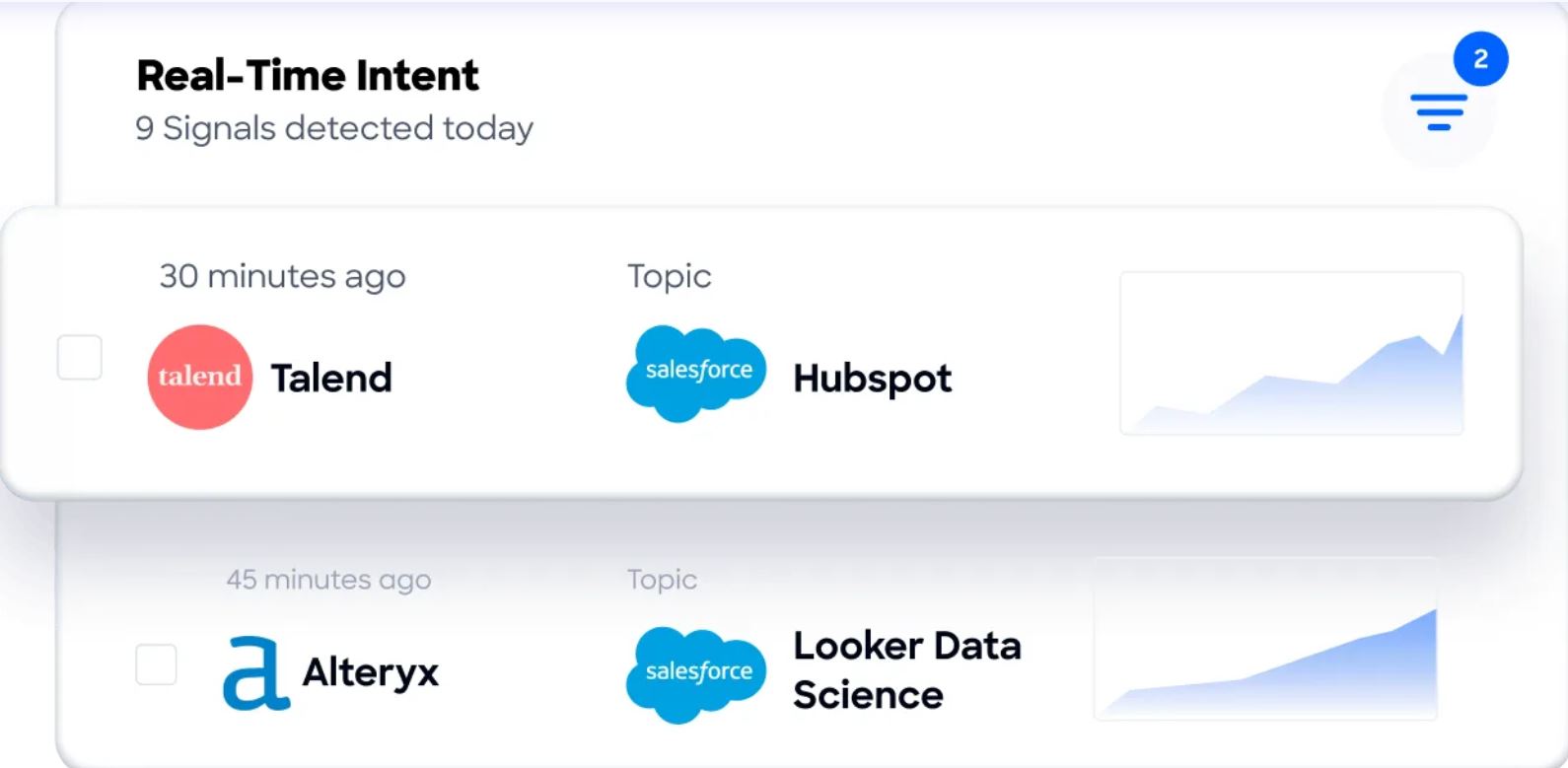
Guided Intent, exclusive to ZoomInfo, identifies topics historically correlated with deal success rather than requiring manual topic selection.
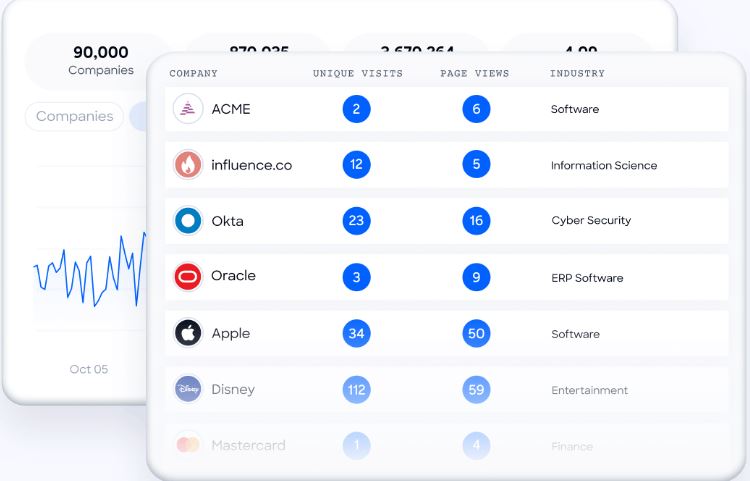
WebSights resolves anonymous website traffic to companies, identifying not just which organization visited but which specific buyers from that account. This includes Automatic Traffic Filtering to separate real human visits from bot traffic.
This intelligence directly enhances Showpad usage. When ZoomInfo surfaces that an account is actively researching your solution category, your sellers can proactively create a Shared Space with relevant content for that account. Intent data turns Showpad from a reactive tool (sharing content after a meeting is booked) into part of a proactive engagement strategy.
Seismic attributed 39% of active pipeline to ZoomInfo-influenced opportunities and reported 54% productivity gains. "That combination of our internal CRM data, external signals, and AI that's given all that context has helped us craft very specific account- and persona-based messages," said CBO Toby Carrington. (Seismic)
GTM Workspace and GTM Studio: ZoomInfo's products give sellers and marketers AI-driven workspaces.
ZoomInfo delivers its intelligence through three access points, each built for a specific team:
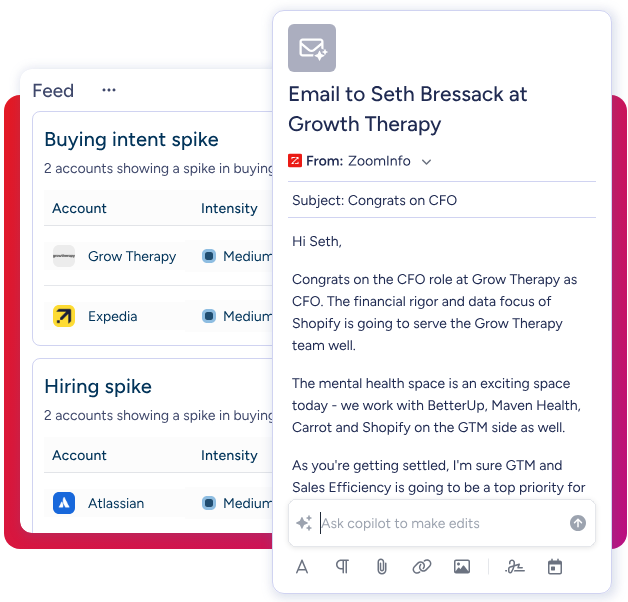
GTM Workspace is the seller's front-end. It consolidates a seller's complete book of business (CRM data, ZoomInfo signals, conversation history, and market intelligence) into a single view.
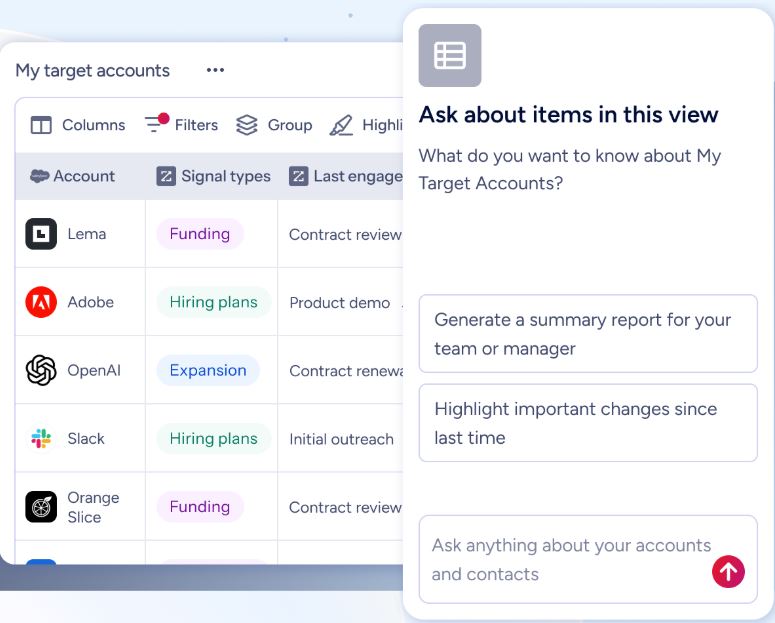
AI agents handle account research, outreach drafting, CRM updates, and signal monitoring.
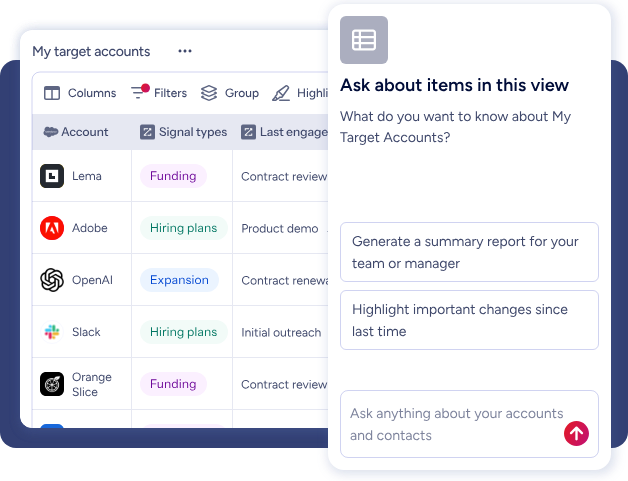
An Action Feed delivers a live stream of in-market buyers with pre-drafted actions on every signal.
GTM Studio is the ops and marketing front-end. Marketers and RevOps teams can describe audiences in natural language, enrich data, define triggers, and activate plays across channels without engineering support.
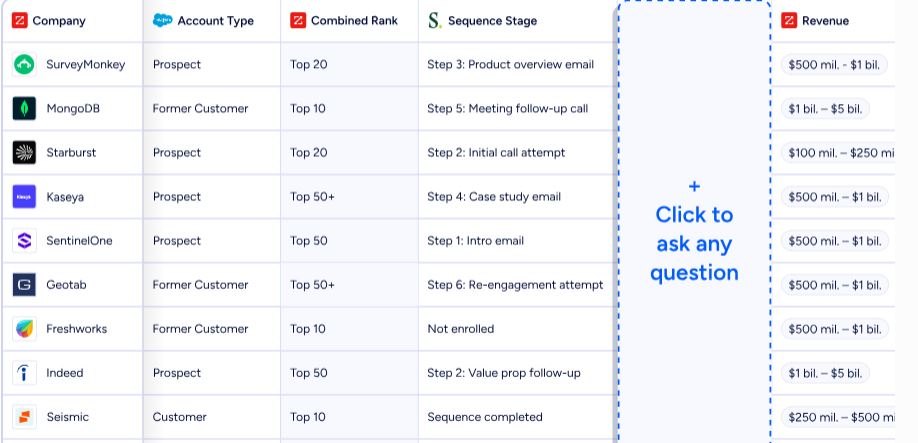
Pre-built GTM plays for inbound acceleration, champion tracking, competitive displacement, and ICP targeting launch in one click.
For teams building custom workflows, APIs and MCP expose the same intelligence to any tool or AI agent. All three access points draw from one GTM Context Graph, so intelligence quality stays consistent regardless of where your team works.
"Anything that minimizes our team's need to switch contexts is beneficial. ZoomInfo offers a unified view, eliminating the need to navigate between systems," said Ben Perceval, RevOps Manager at Spekit. (Spekit)
Pricing and Access: ZoomInfo offers a permanent free tier and custom enterprise pricing.
ZoomInfo's pricing is consumption-based, custom-quoted for each organization based on usage patterns, seat count, credit volume, and features needed. The platform is organized into Sales, Marketing, and Operations product lines, each with Professional, Advanced, and Enterprise tiers.
For teams that want to evaluate before committing, ZoomInfo offers two entry points:
ZoomInfo Lite (free, permanent): Access to ZoomInfo's B2B database with 10 monthly export credits, individual and company searches, the ReachOut Chrome Extension, WebSights Lite (up to 10 website visitor reveals per day), and HubSpot integration. No credit card or time limit.
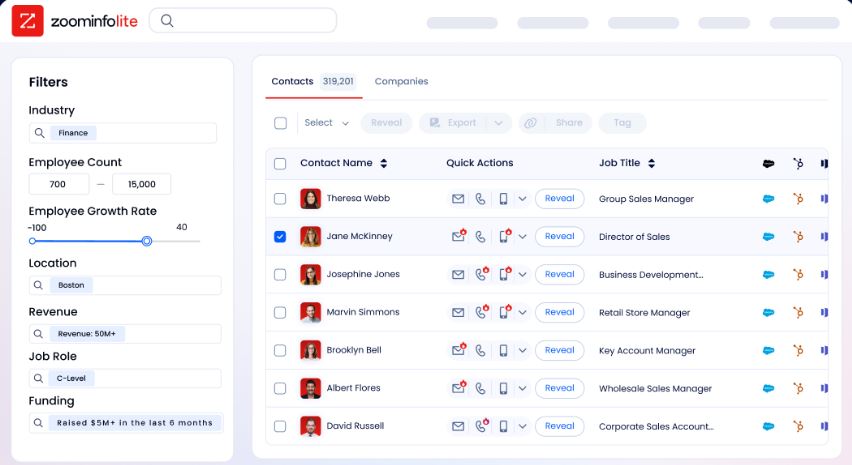
7-Day Free Trial: Access to core platform features including contact and company search, intent signals, and email outreach. No credit card required.
API access is included in all relevant plans. Annual contracts are standard, with multi-year commitments offering pricing advantages.
Showpad and ZoomInfo: Workflow Summary
Aspect | Showpad | ZoomInfo |
|---|---|---|
Primary purpose | Sales enablement (content, coaching, buyer engagement) | Sales intelligence (data, signals, prospecting, outreach) |
Workflow stage | During and after engagement (meetings, follow-ups, deal rooms) | Before engagement (targeting, prioritization, first contact) |
Core strength | Equipping sellers with the right content and skills | Identifying the right accounts, contacts, and timing |
Contact data | Not included | 500M contacts, 120M direct dials, 200M+ verified emails |
Buyer intent | Tracks engagement on shared content | Detects in-market research activity across the web |
AI capabilities | Content search, roleplay practice, authoring, meeting notes | Account intelligence, outreach drafting, signal prioritization |
CRM integration | Salesforce, Dynamics, and others (content logging) | Salesforce, HubSpot, Dynamics (data enrichment and signals) |
Free tier | Demo only | Permanent free tier (ZoomInfo Lite) + 7-day trial |
Best for | Enabling prepared, effective sales interactions | Finding and reaching the right buyers at the right time |
Final Verdict
Showpad and ZoomInfo address different parts of the same sales challenge. The question isn't which one to choose; it's understanding where each fits in your workflow.
Showpad is a strong choice for large enterprises with field sales teams, complex product catalogs, and the need to manage content, coaching, and buyer engagement in one platform. It combines content management with coaching and interactive digital sales rooms, making it well-suited for regulated industries like medical devices, manufacturing, and healthcare, where compliance, offline access, and version control are requirements, not preferences.
ZoomInfo fills the gap Showpad doesn't address: identifying who to sell to, when they're ready, and how to reach them. Built on 500M contacts, 100M companies, and 200M+ verified business emails, with a GTM Context Graph that captures why deals move or stall, ZoomInfo provides the intelligence foundation that makes every other sales tool more effective.
Whether your team accesses that intelligence through GTM Workspace for sellers, GTM Studio for marketing and RevOps, or APIs and MCP in any third-party tool, the data layer remains the same.
Get started with ZoomInfo here.
Together, these platforms create a complete sales workflow. ZoomInfo surfaces the accounts worth pursuing, the contacts who matter, and the signals that reveal buyer readiness. Showpad ensures sellers show up prepared with the right content, coaching, and collaboration tools to close the deal.
The enablement investment pays off when sellers spend their time on accounts that are actually ready to buy, and the intelligence investment pays off when sellers can convert that opportunity into a well-run deal.
Showpad FAQ
What is Showpad used for?
Showpad is a sales enablement platform that combines content management, sales coaching, buyer engagement, and analytics. Sales and marketing teams use it to centralize content in a searchable library, train sellers through AI-powered roleplays, share materials with buyers through digital sales rooms, and track which content contributes to closed deals.
It is built for large enterprise field sales teams in industries like manufacturing, healthcare, and technology.
How much does Showpad cost?
Showpad does not publish pricing on its website. The platform uses a per-user licensing model with three tiers (eOS Professional, eOS Advanced, and eOS Expert) plus optional add-on bundles for features like Mutual Action Plans, PitchAI, and the Automated Content Builder.
Contracts are typically annual. Interested buyers need to request a demo for specific pricing, and the company says pricing is customized to each organization's needs.
Does Showpad offer a free trial?
Showpad does not publicly advertise a free trial. The company offers personalized demos lasting about 30 minutes. Its online terms reference a "Demo License" that grants limited-time access. To use Showpad, you need a paid subscription. ZoomInfo, by contrast, offers both a permanent free tier (ZoomInfo Lite with 10 monthly export credits) and a 7-day free trial with no credit card required.
What integrations does Showpad support?
Showpad offers 75+ pre-configured integrations, including Salesforce, Google Drive, SharePoint, Marketo, Outlook, Gmail, and Dynamics. The platform syncs content automatically from storage systems like Box, Dropbox, and Google Drive.
For custom development, Showpad has a RESTful API, webhooks, and an SDK. However, it does not integrate with B2B intelligence or intent data providers, so teams need separate tools for prospecting and account targeting.
Is Showpad suitable for small businesses?
Showpad is built for large enterprises with complex field sales operations, dense product catalogs, and regulatory requirements. Its premium pricing, annual contracts, and feature depth make it a poor fit for small businesses or startups with simpler sales motions. Organizations without significant content management needs or field sales complexity may find the investment hard to justify.
What AI features does Showpad include?
Showpad's AI suite includes four products: Genie Assistant for content search and answer generation, RolePlay AI for practicing sales conversations with an AI partner, AuthoringAI for converting slides into narrated training content in 30+ languages, and Field Meeting AI for capturing meeting notes and drafting follow-ups.
Showpad stays independent from any single AI provider, using open-source models within a secure AWS environment. AI feature availability varies by pricing tier.
Does Showpad work offline?
Yes. Showpad supports offline functionality on its mobile app, which matters for field sellers who present in environments without reliable internet. Sellers can access previously synced content and complete Coach courses offline on iOS. However, some users have reported reliability issues with the iOS app, particularly when working offline.
How does Showpad compare to ZoomInfo?
Showpad and ZoomInfo serve different purposes in the sales workflow. Showpad is a sales enablement platform focused on content management, seller coaching, and buyer engagement. ZoomInfo is a sales intelligence platform focused on B2B data, buyer intent signals, and prospecting.
They complement rather than compete with each other: ZoomInfo helps teams identify and reach the right accounts, while Showpad helps sellers run effective interactions with those accounts. Together, they cover the full cycle from account identification to deal close.
