
SugarCRM serves 4,000+ customers across 1M+ users in 120+ countries with a product suite spanning sales automation, ERP-connected revenue intelligence, customer service, and marketing automation. Its strength is a CRM built for relationship-driven B2B sales in manufacturing, wholesale, and distribution, with 180+ ERP integrations and AI that surfaces cross-sell opportunities, flags at-risk deals, and recommends next steps.
But every CRM has limits.
SugarCRM tracks pipeline activity, deal stages, and customer relationships. On its own, it cannot verify whether a prospect's phone number still rings, detect which target accounts are researching your category this week, automate email campaigns from CRM data without manual exports, generate proposals that pull deal data into professional documents, or connect CRM events to the collaboration tools your team uses every day.
The right integrations close those gaps. They feed your CRM verified data it cannot generate on its own, automate workflows between disconnected tools, give cross-functional teams visibility into CRM activity without licenses, and connect deal data to document generation, accounting, and project tracking.
This guide covers the best integration for each of the jobs SugarCRM users most commonly need done:
Enrich and verify B2B contact data, and surface accounts that are actively in-market
Sync email marketing campaigns with CRM contact records and engagement data
Generate proposals, quotes, and contracts from CRM deal data with e-signature
Surface CRM events and meeting coordination in your team's collaboration hub
Give account managers financial visibility into invoice history and payment status
Track engineering tickets and customer-facing technical work inside CRM account records
Connect your CRM to thousands of apps through no-code workflow automation
Each section covers how the integration connects with SugarCRM, what data flows between platforms, pricing, and who benefits most.
Best SugarCRM Integrations at a Glance | |
|---|---|
Best SugarCRM Integration for B2B Data Enrichment and Go-to-Market Intelligence. Enriches SugarCRM records with verified contact data, buyer intent signals, and company intelligence from ZoomInfo's B2B database, giving your team accurate prospecting data and the signals to prioritize accounts that are in-market. | |
Best SugarCRM Integration for Email Marketing Automation. Maintains bidirectional sync between SugarCRM contact records and Mailchimp subscriber lists through the SugarChimp connector, so marketing campaigns draw from live CRM data and email engagement flows back to contact records for sales context. | |
Best SugarCRM Integration for Document Generation and E-Signature. Lets sales reps generate quotes, proposals, and contracts from SugarCRM opportunity data, send them for e-signature, and track recipient engagement from within the CRM record. | |
Best SugarCRM Integration for Real-Time CRM Notifications and Meeting Coordination. Pushes deal alerts, case escalations, and CRM events into Teams channels with configurable routing, and generates Teams meeting links from SugarCRM meeting records for calendar sync across participants. | |
Best SugarCRM Integration for Accounting and Financial Data Visibility. Syncs invoice history, payment status, and outstanding balances from QuickBooks into SugarCRM account records, giving account managers a financial picture of each customer before every conversation. | |
Best SugarCRM Integration for Engineering Ticket Visibility and Cross-Functional Coordination. Surfaces open engineering tickets, bug reports, and feature requests linked to SugarCRM accounts through a dedicated subpanel, so account teams know about technical issues before the customer calls to escalate. | |
Best SugarCRM Integration for No-Code Workflow Automation. Connects SugarCRM to 8,000+ apps with trigger-based automation, multi-step workflows, and conditional routing, filling the gaps in SugarCRM's native SaaS integration coverage without custom development. |
What Is SugarCRM?
Source: SugarCRM
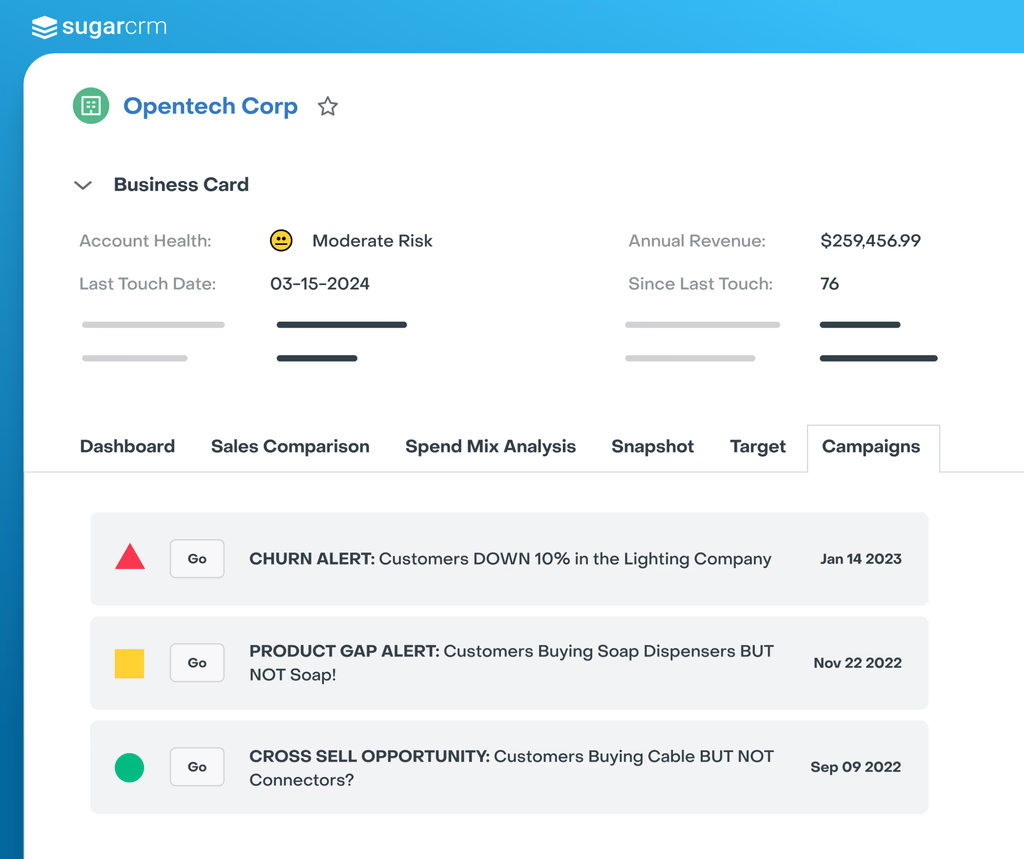
SugarCRM, now rebranding as SugarAI, is a B2B sales CRM built for companies in manufacturing, wholesale, and distribution.
The company positions itself as "CRM with AI for precision selling" with a product suite spanning four pillars: Sugar Sell for sales automation, Sugar sales-i for ERP-connected revenue intelligence, Sugar Serve for customer service, and Sugar Market for marketing automation.
Source: SugarCRM
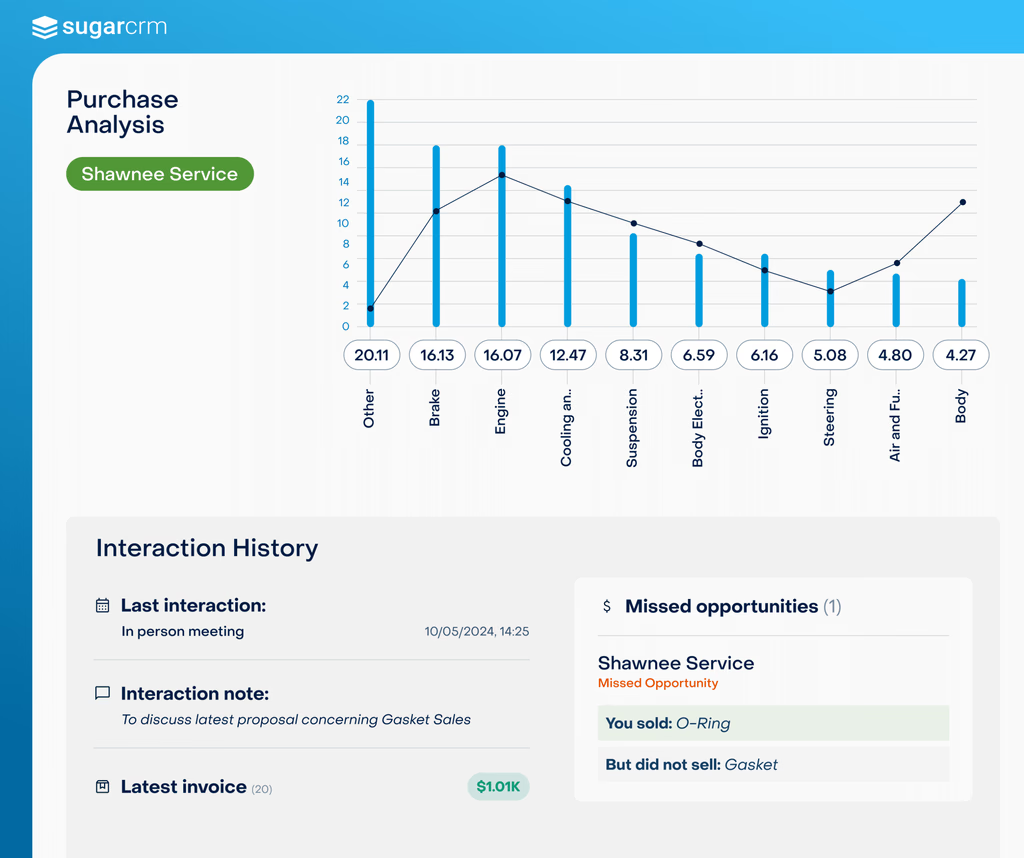
Its embedded AI surfaces cross-sell opportunities, flags at-risk deals, and recommends next steps inside seller workflows rather than on separate dashboards.
SugarCRM's integration ecosystem centers on ERP connectivity.
The platform supports 180+ ERP integrations connecting to systems like SAP, Oracle, NetSuite, Epicor, Sage, Syspro, and Acumatica, with the Sugar sales-i module built to surface buying patterns and gaps in purchasing from ERP transaction data inside the CRM.
Beyond ERP, the SugarAI Marketplace offers add-ons across telephony, marketing, reporting, project management, finance, AI, and CPQ categories.
SugarCRM also exposes a versioned REST API covering all standard CRM modules, with OAuth 2.0 authentication and Web Logic Hooks for event-driven automation. The platform supports both cloud (SugarCloud on AWS) and on-premises deployment.
The integration categories available to SugarCRM users include:
ERP and financial systems: SAP, Oracle, NetSuite, Epicor, Sage, Syspro, QuickBooks, Xero
Email marketing: Mailchimp (via SugarChimp), Sugar Market (native)
Document automation: PandaDoc, DocuSign
Team communication: Microsoft Teams, WhatsApp
Project management and issue tracking: Jira, Monday.com
Data enrichment and intelligence: ZoomInfo, Creditsafe, Loqate
Workflow automation: Zapier, Sugar Automate
Here are the seven integrations we selected as the best options for extending SugarCRM across the categories that matter most to B2B sales teams.
1. ZoomInfo: Best SugarCRM Integration for B2B Data Enrichment and Go-to-Market Intelligence
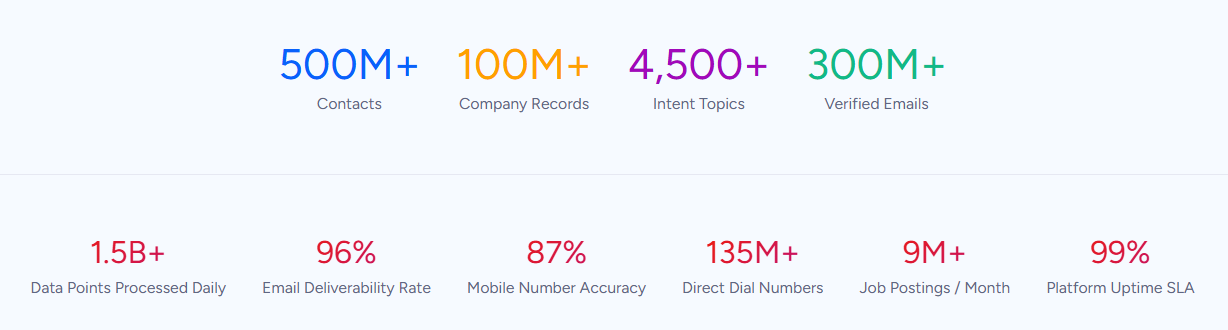
ZoomInfo is a B2B data and go-to-market platform built on 500M contacts, 100M companies, 135M+ verified phone numbers, and 200M+ verified business email addresses.
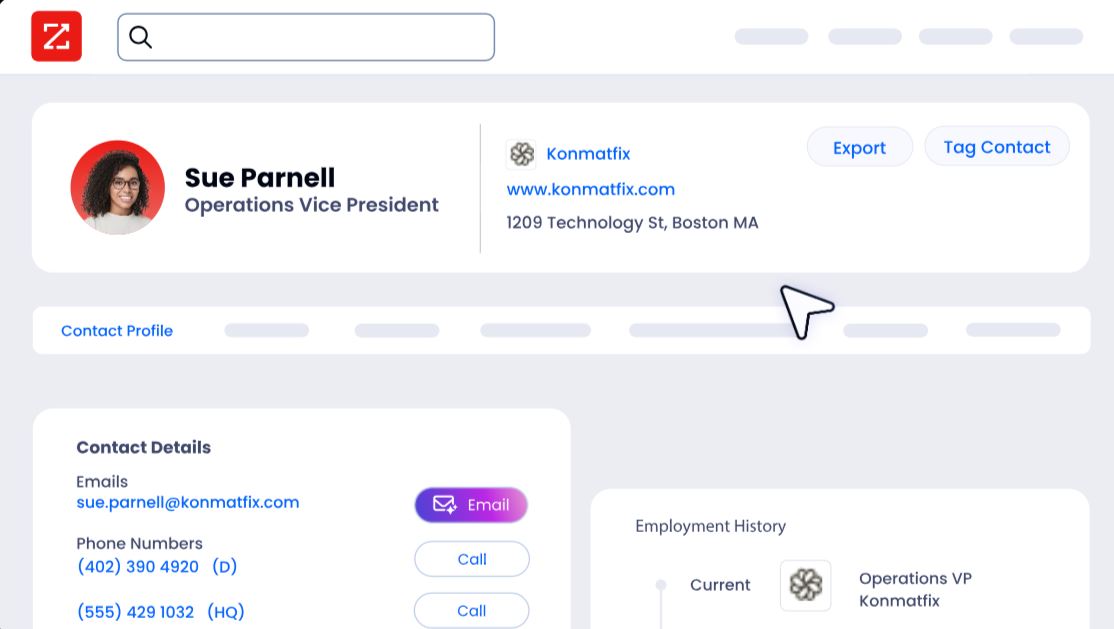
It integrates natively with SugarCRM through a dedicated connector in the ZoomInfo App Marketplace, letting users export targeted lists, leads, contacts, and accounts into SugarCRM with customizable field mapping. Connecting the two platforms unlocks:
A CRM that stays accurate on its own, with verified emails, direct dials, and company attributes appended to SugarCRM records automatically
Prioritization by buying signals, so reps work the accounts that are in-market this week instead of working through a static list
Territory planning and TAM analysis, with ZoomInfo attributes powering SugarCRM segmentation and account scoring
Pipeline from traffic you already have, by resolving anonymous website visitors into companies and buying teams
How ZoomInfo Integrates with SugarCRM
ZoomInfo connects to SugarCRM through a native connector available in the ZoomInfo App Marketplace, supporting Sugar Sell, Sugar Serve, Sugar Enterprise, and Sugar Professional. The integration enables data migration and enrichment with customizable field mapping, so ZoomInfo's verified B2B data flows into the specific SugarCRM fields your team relies on.
SugarCRM's SugarAI Marketplace also lists the connector, confirming compatibility from both sides. Because ZoomInfo builds and maintains the connector, it requires no middleware and stays current with both platforms' updates.
Contact and Company Data Enrichment: Fill the Gaps Your CRM Cannot Fill Independently
SugarCRM captures interaction data: calls logged, emails tracked, deals progressed.
What it cannot do on its own is verify whether a phone number still works, catch a job change, or reveal a company's technology stack.
When a new contact enters SugarCRM, ZoomInfo appends the verified business email, direct dial, title, department, and seniority, plus company attributes and technographic data covering 30,000+ technologies.
The enrichment runs through a verification pipeline backed by 300+ human researchers, reaching up to 95% accuracy on first-party data.
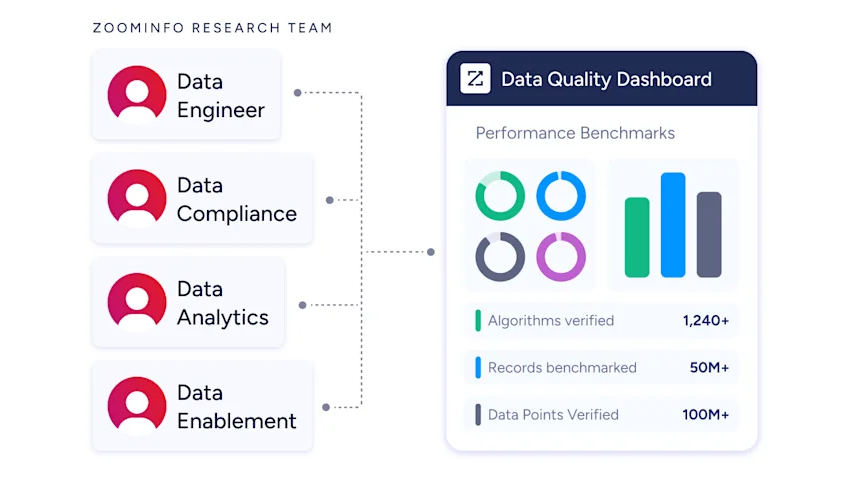
In a Fortune 500 competitive RFP analyzing 25 million contacts across vendors, the independent consultant concluded that "no other competitor came even close."
ZoomInfo in action: A manufacturing sales rep enters a new prospect into SugarCRM with just a company name and email.
ZoomInfo appends the contact's direct dial, current title, company profile (a 600-person industrial distributor running SAP and Epicor), and three other decision-makers in the procurement department. The rep multi-threads the account before the first call instead of spending 20 minutes researching it manually.
Buyer Intent Data: Identify Accounts That Are Actively In-Market
ZoomInfo's Buyer Intent tracks signals from 210 million IP-to-Organization pairings and 6 trillion+ new keyword-to-device pairings monthly, revealing which companies are researching topics relevant to your product.
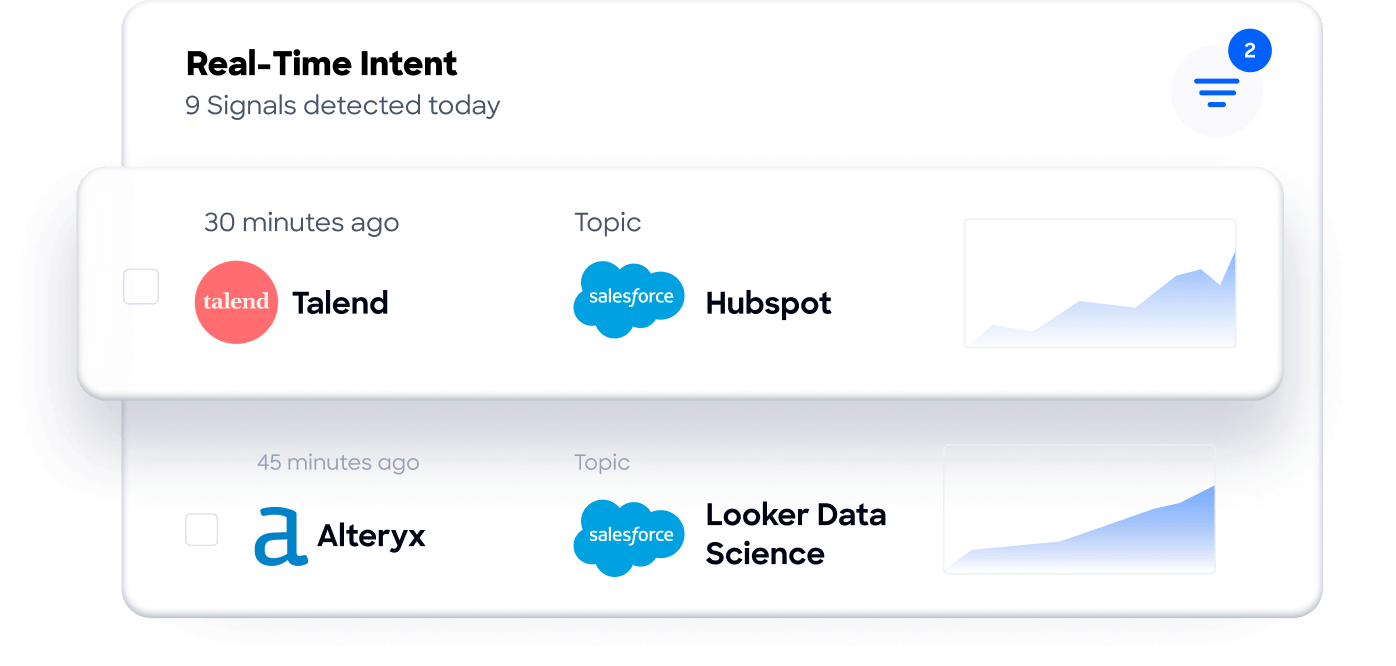
Those signals inform how your team prioritizes accounts in SugarCRM: reps focus on accounts showing active buying behavior rather than working through static lists sorted by company size alone.
Guided Intent, exclusive to ZoomInfo, identifies the research topics historically correlated with deal success in your business, so the signals are calibrated to your actual win patterns rather than generic keyword thresholds.
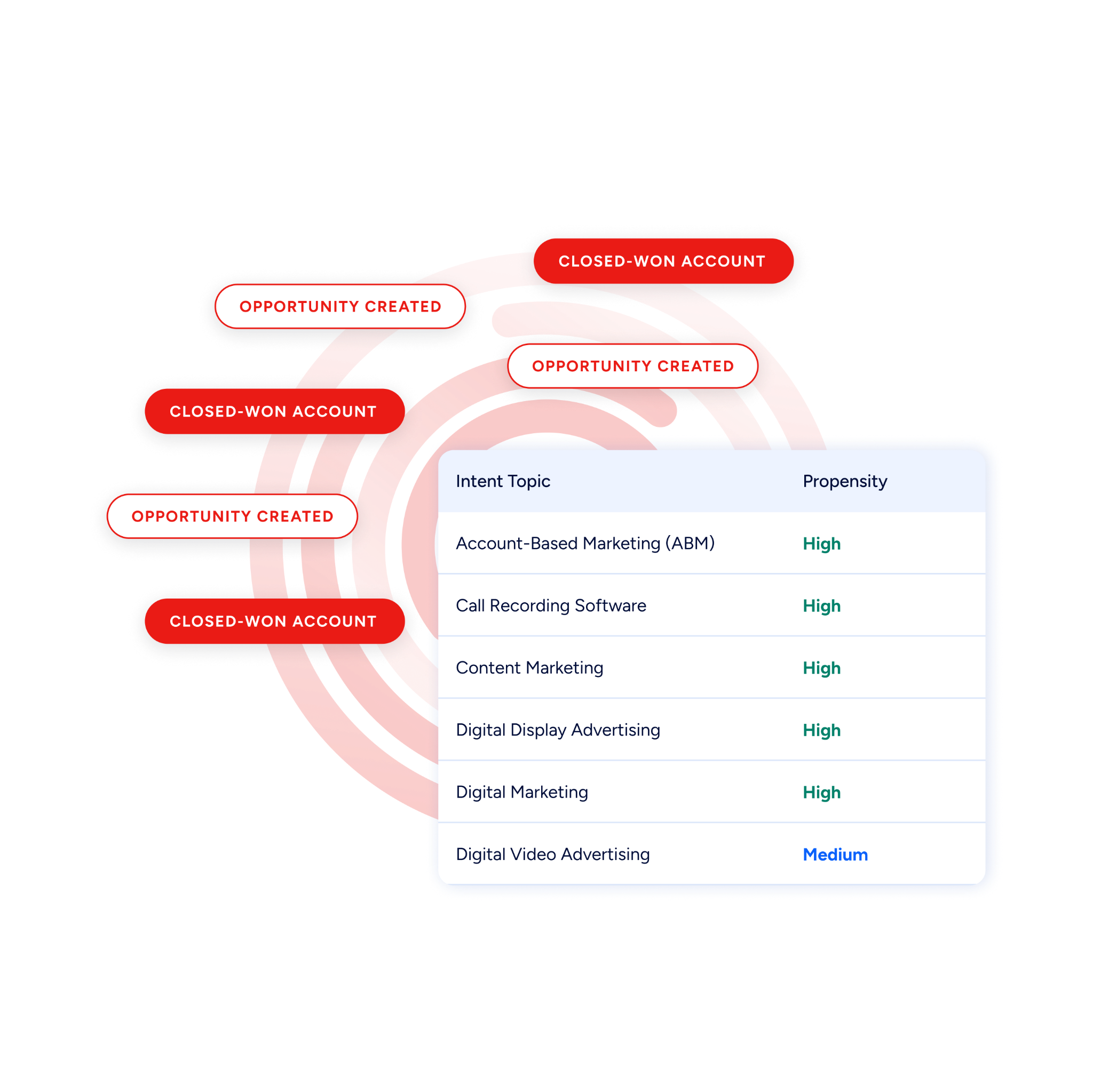
ZoomInfo in action: ZoomInfo detects a target account researching "CRM data migration" and "ERP integration" for two consecutive weeks. The signal surfaces the account as a high-priority target, and the assigned rep reaches out with a switching-focused approach while the buyer is still evaluating, before a competitor makes contact.
Website Visitor Identification: Convert Anonymous Traffic into Pipeline
ZoomInfo WebSights resolves anonymous website traffic to companies, including buying-team identification and contact information, with Automatic Traffic Filtering to separate genuine company visits from bots.
Companies visiting your site and the pages they viewed surface alongside your CRM data, so high-value visitors route to sales while the interest is live.
Workflow Automation and Lead Routing
ZoomInfo attributes (company size, industry, technology stack, revenue range) power lead routing and segmentation logic. A new contact enriched by ZoomInfo routes automatically to the enterprise team at 1,000+ employees or to the mid-market team below 500, with no manual triage. Scoring models gain company-level context alongside SugarCRM's behavioral signals.
Beyond the connector itself, the enrichment feeding your SugarCRM instance draws from a broader system: the GTM Context Graph processes 1.5B+ data points daily and combines ZoomInfo's B2B data with CRM records, conversations, and behavioral signals, while GTM Workspace, GTM Studio, APIs, and MCP expose the same data to any tool or AI agent.
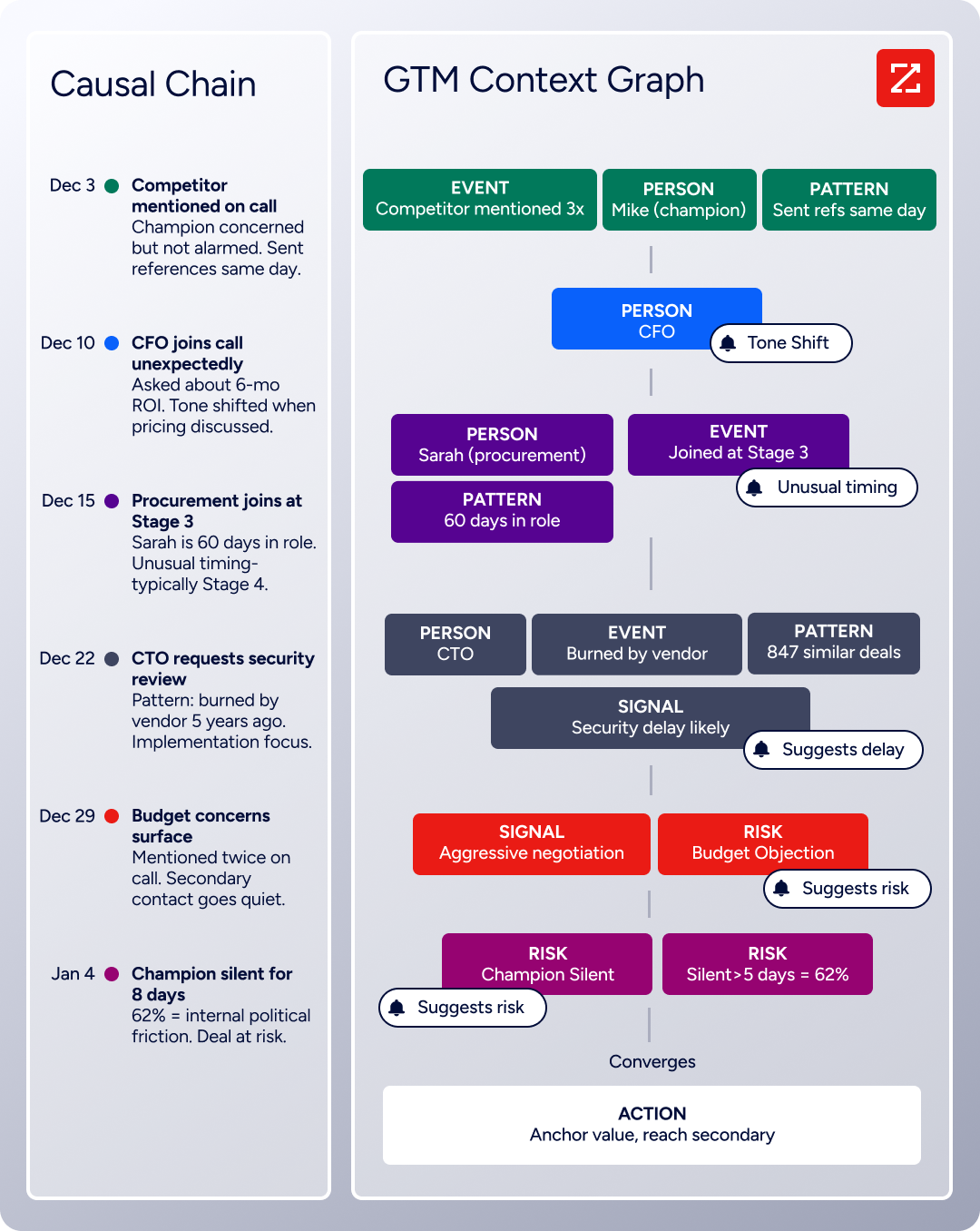
Seismic's sales team attributed 39% of active pipeline to opportunities identified or influenced by ZoomInfo signals, reporting 54% productivity gains and saving 11.5 hours per week per seller. (Seismic Case Study)
ZoomInfo Pricing
ZoomInfo uses a consumption-based pricing model with custom quotes based on usage, users, credit volume, and features.
It is organized into Sales, Marketing, and standalone product lines, each in Professional, Advanced, and Enterprise tiers. The native SugarCRM integration is included from Sales Professional up, with Advanced adding intent signals and website visitor tracking.
ZoomInfo Lite is a permanent free tier (no credit card, no time limit) with 10 monthly export credits, searches, the Chrome extension, and CRM integrations, which makes it a practical way to evaluate data quality before committing.
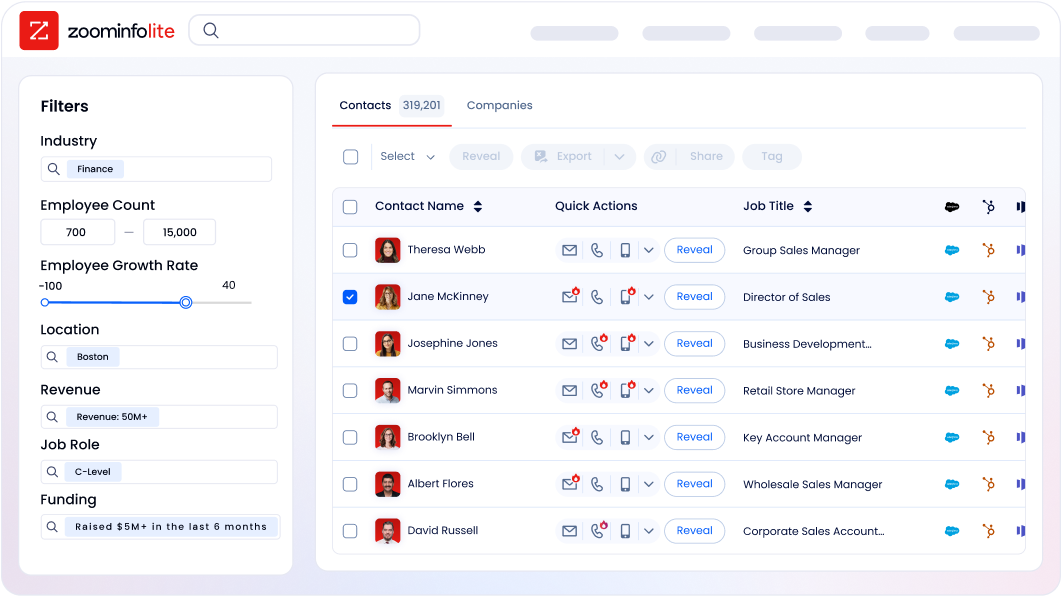
A separate 7-day free trial covers paid features.
Who Should Use the ZoomInfo Integration?
B2B sales teams whose pipeline depends on accurate contact data: enrichment is the difference between verified direct dials and a 30% bounce rate that damages sender reputation
Revenue operations teams that need firmographic, technographic, and intent data powering SugarCRM lead scoring, routing, and segmentation instead of behavioral signals alone
Manufacturing and distribution sales teams running account-based selling that need to identify which accounts are showing buying signals right now, not just which accounts fit the firmographic profile
2. Mailchimp: Best SugarCRM Integration for Email Marketing Automation
Source: Mailchimp
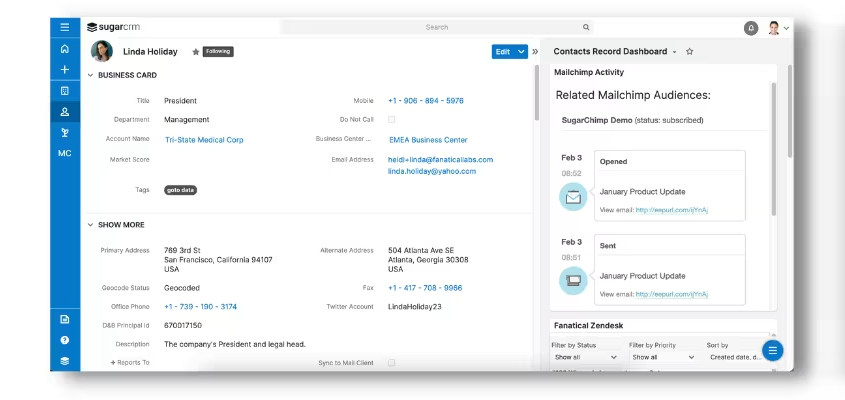
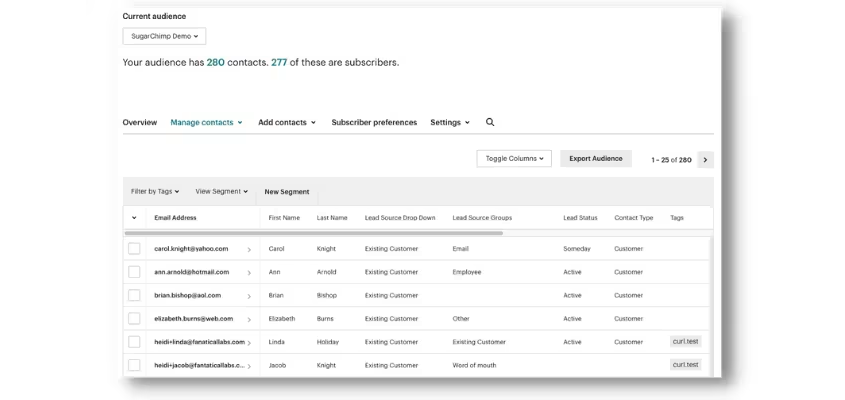
Mailchimp is an email and SMS marketing platform that integrates with SugarCRM through the SugarChimp connector on the SugarAI Marketplace, maintaining bidirectional sync between SugarCRM contact records and Mailchimp subscriber lists.
The integration eliminates the manual export-import cycle that causes stale audiences and missed sends.
Key integration capabilities include:
Bidirectional contact sync between SugarCRM Contacts, Leads, and Targets modules and Mailchimp subscriber lists
CRM field values driving Mailchimp segmentation, so account type, opportunity stage, industry, and geography from SugarCRM carry over as merge tags and segment filters
Email engagement history on SugarCRM contact records, with opens, clicks, bounces, and unsubscribes from Mailchimp campaigns visible on each contact record
Built-in deduplication across both platforms, reconciling records rather than creating duplicates during sync
How Mailchimp Integrates with SugarCRM
Source: Mailchimp
SugarChimp installs through the SugarAI Marketplace and handles SugarCRM's module structure, syncing Contacts, Leads, and Targets modules rather than a generic contact table. The connector manages bidirectional sync, field mapping, and deduplication as core features.
Teams can alternatively build custom integrations using Mailchimp's Marketing API v3.0 alongside SugarCRM's REST API, but for most SugarCRM deployments, SugarChimp is the practical starting point.
1. Always-On Bidirectional Contact Sync.
SugarChimp runs a continuous sync so records created or updated in either platform propagate to the other automatically. A new lead entered in SugarCRM by a sales rep appears in the appropriate Mailchimp audience without a marketing team member touching it.
Unsubscribes and bounces recorded in Mailchimp write back to SugarCRM, so contact records reflect current consent status. This matters for teams operating under GDPR or CAN-SPAM.
2. CRM Field Values as Mailchimp Segmentation Inputs.
The integration makes SugarCRM's field set available inside Mailchimp as merge tags and segment conditions. A campaign targeting contacts whose SugarCRM accounts are in "Negotiation" stage, in manufacturing, in a specific region, can be built in Mailchimp without manual list curation.
For mid-market manufacturers and distributors, account-level CRM attributes translate into different campaign types: re-engagement sequences for dormant accounts, upsell campaigns for accounts with specific buying patterns, or regional promotions.
3. Email Engagement History on SugarCRM Contact Records.
When Mailchimp sends a campaign, it writes engagement events (opens, clicks, bounces, unsubscribes) back to the corresponding SugarCRM contact records.
A sales rep preparing for an outreach call can see whether a prospect opened the last three email campaigns, clicked on a specific product announcement, or has not engaged with email in several months. This changes the quality of outreach: a rep who knows a contact just clicked a pricing email can start that conversation further along.
For teams using Sugar Sell's account context and customer snapshot features, Mailchimp engagement history becomes another signal available in the same CRM view, alongside ERP data and activity history.
4. Deduplication Logic Across Both Systems.
SugarChimp detects when a contact exists in both platforms and reconciles the records rather than creating duplicates. A contact who exists in SugarCRM as a Lead and subscribes to a Mailchimp form independently does not end up as two separate records.
For teams managing hundreds or thousands of accounts, this prevents inflated send counts, skewed engagement rates, and a contact database that grows harder to maintain over time.
Mailchimp Pricing
Mailchimp uses a contact-count-based subscription model. All plans except Free include SMS as a paid add-on:
Free: $0/month (up to 250 contacts, 500 emails/month, 1 audience)
Essentials: from $13/month at 500 contacts (up to 50,000 contacts, 10x monthly email send multiplier, A/B testing, basic automation)
Standard: from $20/month at 500 contacts (up to 100,000 contacts, 12x send multiplier, advanced segmentation, behavioral targeting, send time optimization)
Premium: from $350/month at 500 contacts (unlimited contacts and audiences, multivariate testing, phone and priority support)
SugarChimp is a separate Marketplace add-on. Budget for both the Mailchimp subscription and the SugarChimp license.
Who Should Use the Mailchimp Integration?
Marketing teams that already use Mailchimp for email campaigns and need SugarCRM contact records to stay in sync with subscriber lists without manual exports
Sales reps who want Mailchimp campaign engagement history (opens, clicks, bounces) visible on SugarCRM contact records as context for outreach
Mid-market B2B teams running email marketing without the budget or complexity of a platform like Marketo, who want a low-maintenance connector between their CRM and email tool
3. PandaDoc: Best SugarCRM Integration for Document Generation and E-Signature
Source: SugarAI
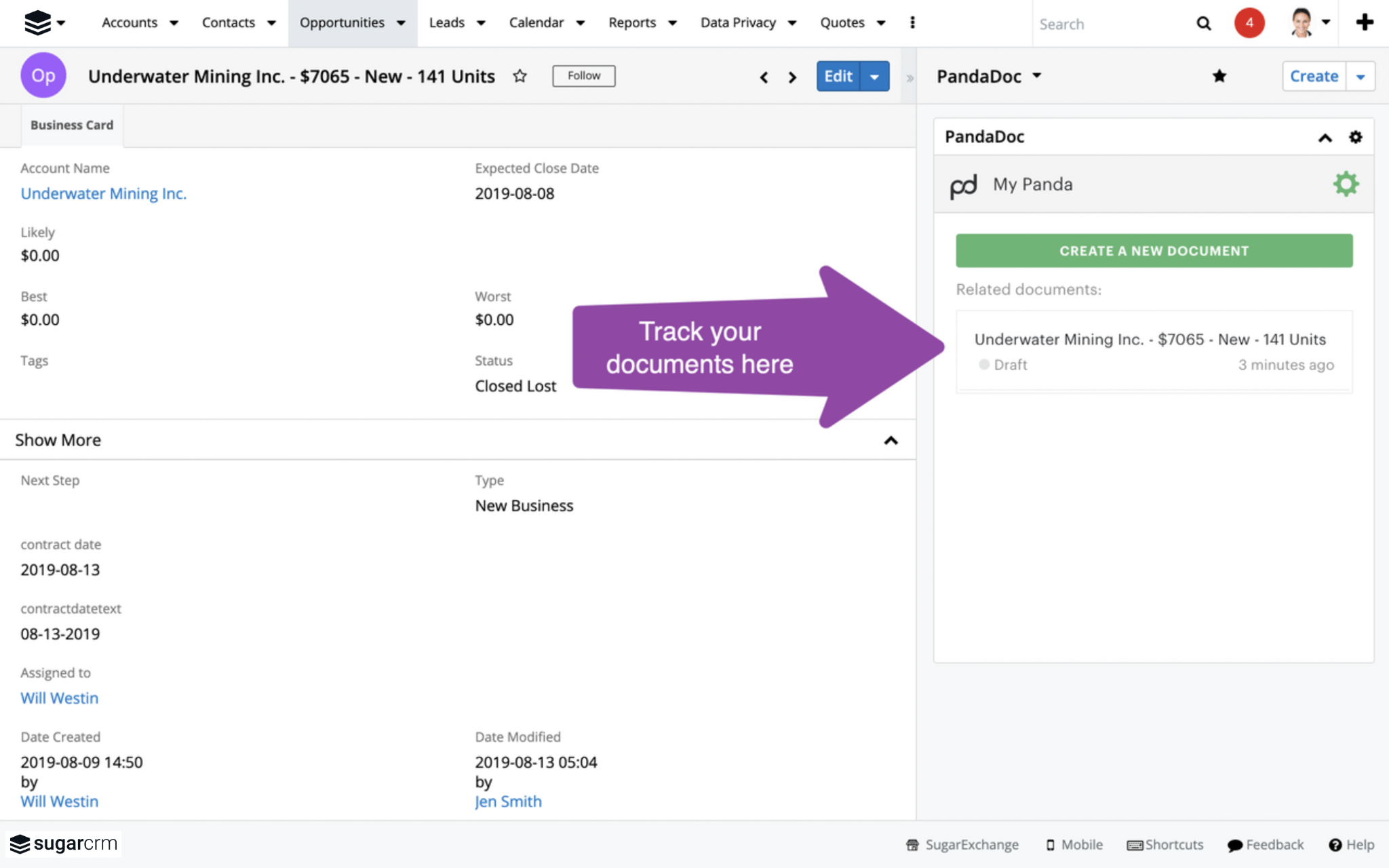
PandaDoc is a document automation and e-signature platform that integrates with SugarCRM through the SugarAI Marketplace, letting sales reps generate quotes, proposals, and contracts from opportunity data in the CRM, send them for e-signature, and receive completed documents back on the originating SugarCRM record.
Key integration capabilities include:
Auto-population of documents with SugarCRM opportunity data, including deal value, expected close date, product line items, and custom fields
Document engagement tracking (opens, views, time-on-page, signature status) visible from within SugarCRM records
A template library that supports SugarCRM merge fields for reusable proposal and contract templates
Signed document attachment to the originating SugarCRM account or opportunity record for audit and renewal purposes
Payment collection embedded at the point of signing through integrations with Stripe, Square, and PayPal
How PandaDoc Integrates with SugarCRM
Source: PandaDoc
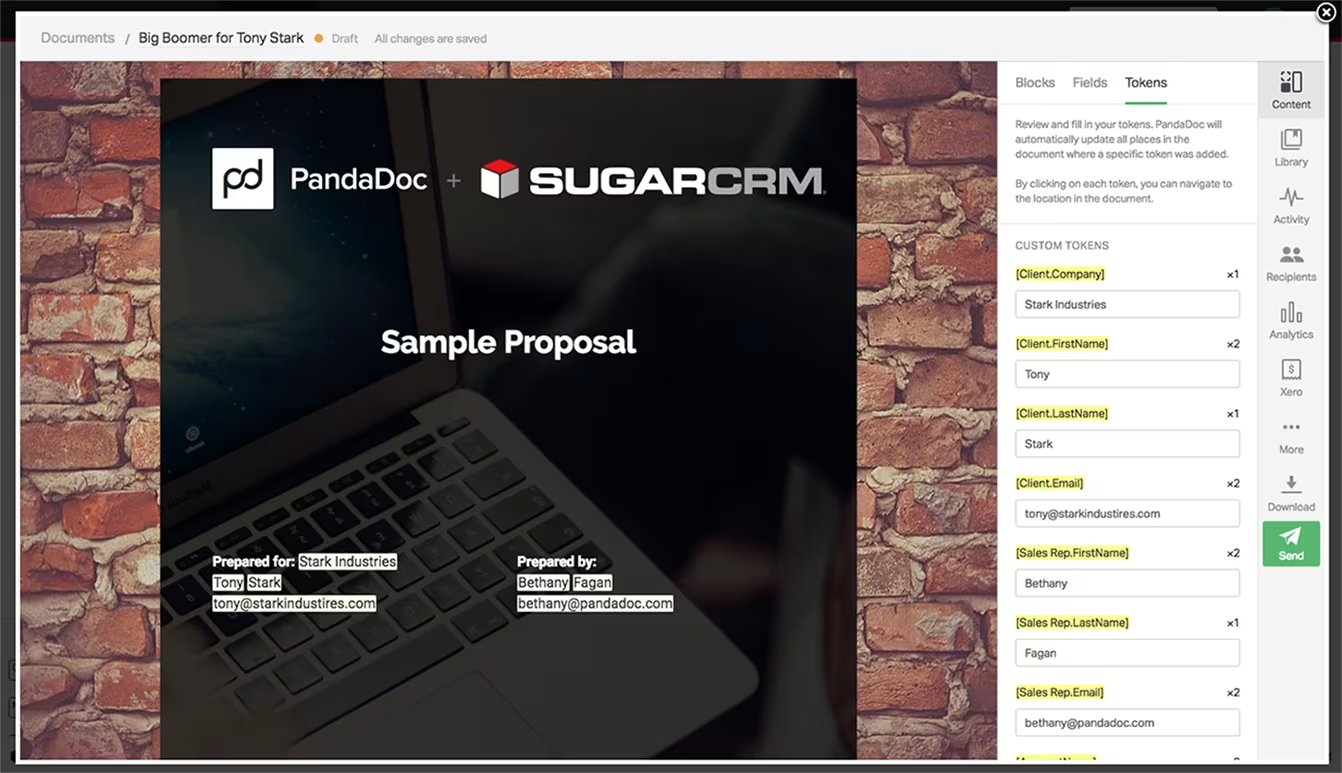
PandaDoc's SugarCRM integration is available on PandaDoc's integrations page and through the SugarAI Marketplace. The connector pulls CRM data into documents and writes document status back to CRM records. CRM integrations require at minimum PandaDoc's Business plan.
1. Auto-Population of Documents from SugarCRM Opportunity Data.
When a rep initiates a new quote or proposal from a SugarCRM opportunity, PandaDoc reads the opportunity record and pre-fills the document with the relevant fields: expected close date, deal value, product line items, and any mapped custom fields.
PandaDoc's pricing tables embed in documents and pull from a Product Catalog supporting fixed pricing, volume-based pricing, and recurring subscription pricing, accommodating the pricing structures common in wholesale and distribution.
2. Document Sending, Tracking, and E-Signature.
From the SugarCRM opportunity or account record, reps can see when the recipient opened the document, how long they spent on each page, and whether the signature is completed or stalled. PandaDoc's e-signature capability is legally binding across 35+ jurisdictions under ESIGN, UETA, eIDAS, and GDPR.
The audit trail captures every document interaction with timestamps and IP addresses. Recipients can sign on any device without creating a PandaDoc account.
3. CRM-Aware Template Library with SugarCRM Merge Fields.
PandaDoc's template system supports merge fields connected to CRM data, letting teams build a library where every instance auto-populates with account name, rep name, pricing data, and SugarCRM custom field values.
The Content Library stores reusable content blocks, legal clauses, and product descriptions. Content locking prevents reps from modifying pre-approved legal language or pricing guardrails, a safeguard for organizations where non-standard terms create problems at renewal.
4. Completed Documents Stored on SugarCRM Records with Payment at Signing.
When a document is signed, PandaDoc attaches the completed PDF to the originating SugarCRM record. Through integrations with Stripe, Square, and PayPal, a buyer can sign and pay the initial invoice in the same session. Recurring Stripe billing is also supported for subscription or retainer-based agreements.
PandaDoc Pricing
PandaDoc offers multiple tiers. CRM integrations, including the SugarCRM connection, require the Business plan or higher:
Free: $0 (unlimited e-signatures, document uploads, no CRM integration)
Starter: $19/seat/month billed annually (templates, document analytics, no CRM integration)
Business: $49/seat/month billed annually (CRM integrations including SugarCRM, approval workflows, bulk send, document analytics)
Enterprise: custom pricing (CPQ with guided selling, SSO with SAML 2.0, custom roles, data residency, Qualified Electronic Signature)
Who Should Use the PandaDoc Integration?
Sales teams that create custom proposals, quotes, or contracts as a routine part of the deal cycle and currently handle document creation and CRM data entry separately
Organizations that need document engagement visibility inside SugarCRM, knowing when prospects open documents and which pages they engage with, so reps can follow up at the right moment
Teams that want to collect payment at the point of contract signing, combining signature and first payment into a single session rather than two steps
4. Microsoft Teams: Best SugarCRM Integration for Real-Time CRM Notifications and Meeting Coordination
Source: SugarAI
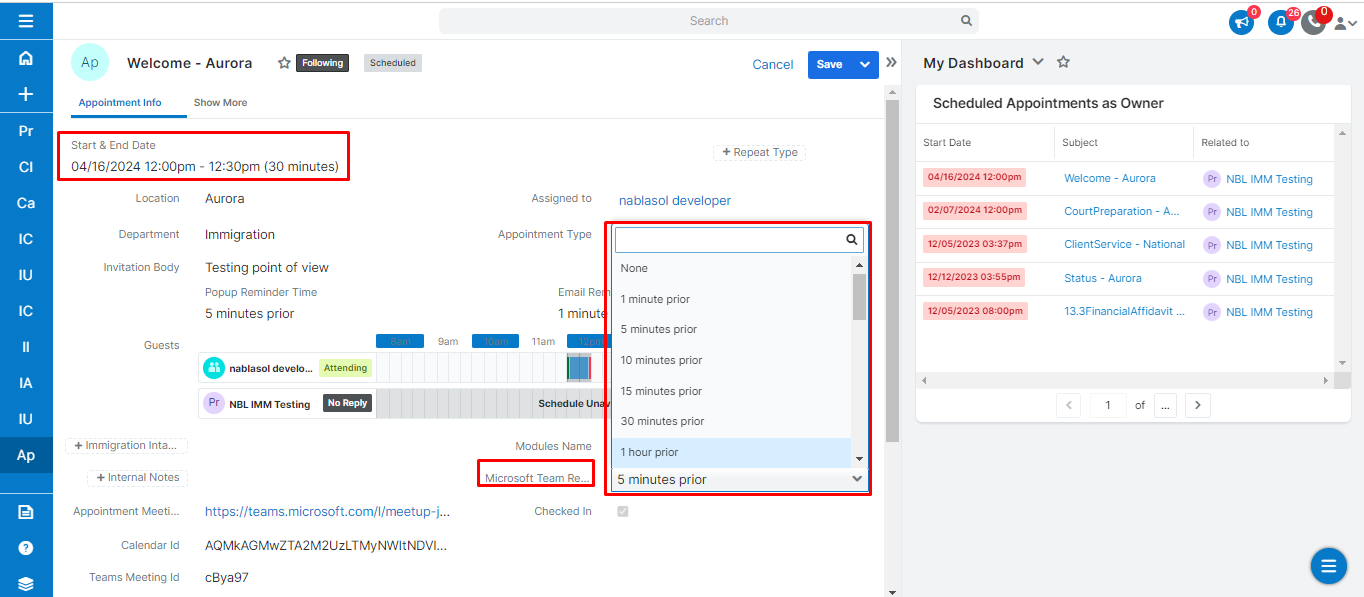
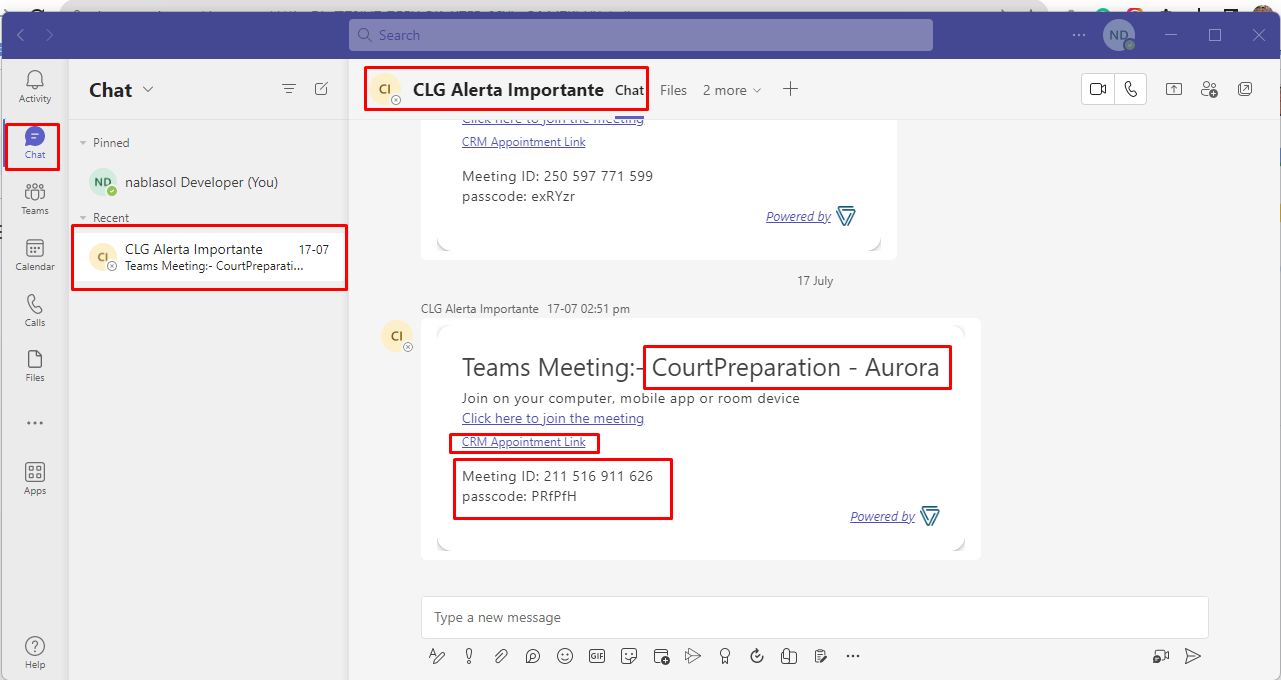
Microsoft Teams is a communications and collaboration platform that integrates with SugarCRM to deliver CRM record events, deal alerts, and meeting links into Teams channels. The integration uses the NBL MS Teams SugarCRM Connector from the SugarAI Marketplace.
Key integration capabilities include:
Real-time CRM event notifications pushed to designated Teams channels when configured SugarCRM triggers fire
Automatic Teams meeting link generation when meetings are scheduled inside SugarCRM
Calendar sync to Teams and Outlook for all invited meeting participants
Admin-configurable channel routing by SugarCRM module and field-level criteria
CRM visibility for team members who do not hold SugarCRM licenses
How Microsoft Teams Integrates with SugarCRM
Source: SugarAI
The NBL MS Teams SugarCRM Connector installs through Sugar's Module Loader and is configured via the SugarCRM admin panel. Administrators define which SugarCRM modules and field-level conditions trigger outbound notifications and which Teams channels receive them.
For meeting scheduling, the connector generates Microsoft Teams meeting links via the Microsoft Graph API and attaches them to SugarCRM meeting records, with calendar sync across participants.
1. Real-Time CRM Event Notifications in Teams Channels.
When a configured SugarCRM event fires (a new lead assigned, an opportunity advancing to proposal stage, a case flagged as escalated), a structured notification card posts to the designated Teams channel with the relevant record details.
A new lead above a score threshold routes to the sales leadership channel; a case flagged as escalated routes to the service team channel; an opportunity updated to "Closed Won" routes to a revenue channel visible to finance and operations.
This works well for cross-functional workflows in manufacturing organizations, where production, logistics, and finance teams need to stay aware of CRM events but work primarily in Microsoft 365.
A large order opportunity crossing a value threshold alerts production planning leads before the deal closes, enabling early capacity conversations without those teams needing SugarCRM licenses.
2. Automatic Teams Meeting Link Generation from SugarCRM.
When a rep schedules a meeting inside SugarCRM and selects Teams as the conferencing method, the connector generates a unique Teams meeting link, writes it to the SugarCRM meeting record, and syncs the meeting to participants' Teams and Outlook calendars.
This eliminates the two-step process of scheduling in SugarCRM, then creating a separate Teams call and copying the join link.
3. Configurable Channel Routing by Module and Criteria.
Administrators configure routing rules that determine which SugarCRM modules trigger notifications, which field conditions must be met, and which Teams channel receives the alert. New leads route to sales channels; escalated cases route to service channels; closed deals route to revenue channels.
This prevents the notification overload that generic CRM-to-chat integrations create, keeping each team informed about events relevant to their role.
Microsoft Teams Pricing
Microsoft Teams is available standalone or bundled within Microsoft 365 subscriptions:
Teams Free: $0/user/month (meetings up to 60 minutes, 100 participants, 5 GB storage)
Microsoft 365 Business Basic: ~$6/user/month annual (Teams with recording and transcription, Exchange email, 1 TB OneDrive)
Microsoft 365 Business Standard: ~$12.50/user/month annual (adds desktop Office apps and webinar hosting)
Microsoft 365 Business Premium: ~$22/user/month annual (adds advanced security and compliance features)
Microsoft 365 E3/E5: E3 ~$36/user/month, E5 ~$57/user/month (full enterprise feature set)
The NBL MS Teams SugarCRM Connector is a separate marketplace purchase; verify pricing through the SugarAI Marketplace listing.
Who Should Use the Microsoft Teams Integration?
Organizations already running on Microsoft 365 where Teams is the default collaboration platform, and sales managers need real-time CRM visibility without staying logged into SugarCRM throughout the day
Cross-functional teams in manufacturing and distribution where production, logistics, and finance need CRM awareness without CRM licenses, through channel-routed notifications in their existing Teams workflow
Teams that want to eliminate calendar duplication for customer meetings, generating Teams links and syncing calendars from a single SugarCRM meeting record
5. QuickBooks: Best SugarCRM Integration for Accounting and Financial Data Visibility
Source: SugarAI
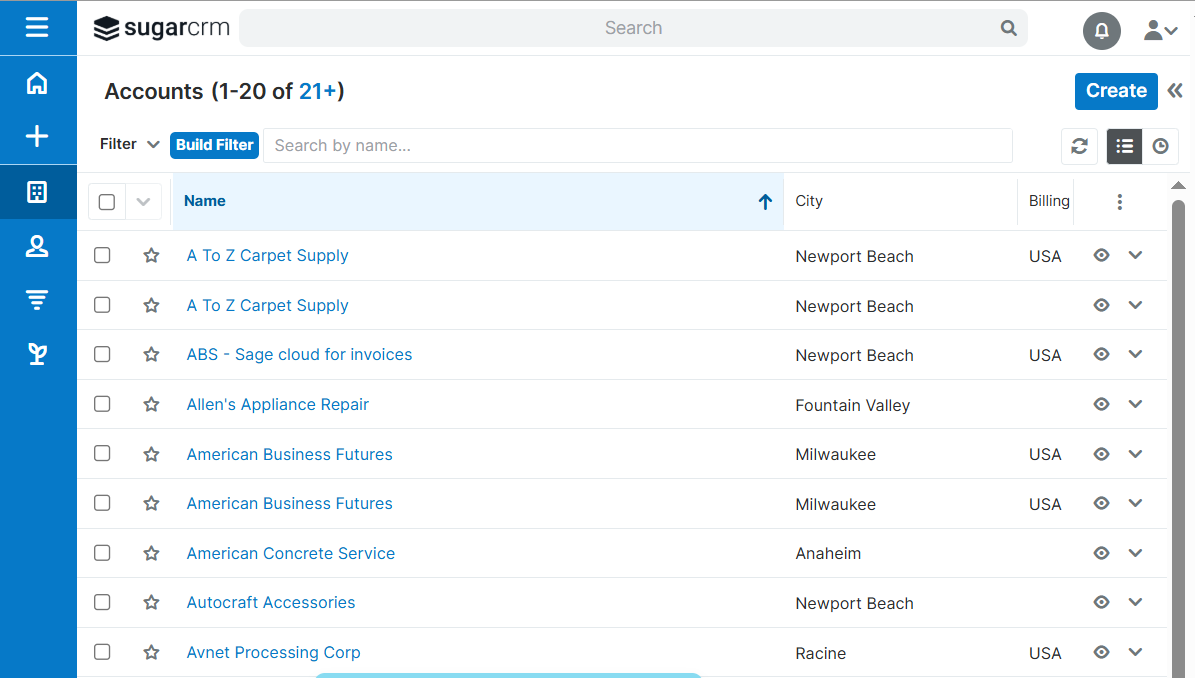
QuickBooks is Intuit's cloud-based accounting platform that integrates with SugarCRM through the QuickBooks Online connector by Faye, a third-party add-on listed in the SugarAI Marketplace. The connector syncs customer records bidirectionally and surfaces invoice, payment, and balance data inside SugarCRM account records.
Key integration capabilities include:
Bidirectional sync between QuickBooks Customer records and SugarCRM Account records, keeping company name, billing address, and contact details consistent across both platforms
Invoice and line item data pulled from QuickBooks into SugarCRM account records, showing what a customer purchased, at what price, and when
Payment status and outstanding balance information visible on SugarCRM account records, enabling account managers to identify overdue accounts before calling
Automated sync running approximately every 10 minutes, keeping financial data current without manual exports
How QuickBooks Integrates with SugarCRM
Faye's connector is a SugarAI Marketplace add-on supporting inventory items, sales receipts, and sales orders in addition to core invoice and payment objects.
Setup requires OAuth 2.0 authorization through Intuit's standard flow and is configured via the Marketplace add-on interface without custom development.
1. Bidirectional Customer and Account Record Sync.
When a customer's billing address changes in QuickBooks, that change propagates to the corresponding SugarCRM account record on the next sync cycle, and vice versa. For teams managing hundreds of accounts across an accounting system and the CRM, this eliminates mismatched addresses, outdated contact names, and duplicate company records.
2. Invoice and Line Item Visibility in SugarCRM.
The connector pulls QuickBooks invoices, including individual product line items, quantities, and dollar amounts, into SugarCRM account records. Instead of asking finance "what has this customer been buying?" before a quarterly check-in, a rep opens the SugarCRM account record and sees the invoice history.
Line item data is valuable in manufacturing and distribution, where a customer might be purchasing from one product category but not from related categories the rep could be cross-selling.
3. Payment Status and Outstanding Balance Tracking.
Payment records from QuickBooks (amount paid, payment date, method, and outstanding balance) appear on SugarCRM account records.
A rep initiating a renewal conversation with a customer carrying a 90-day overdue balance knows that context before the call, rather than discovering it mid-conversation. This also prevents offering pricing concessions or contract upgrades to accounts that have not resolved prior invoices.
4. Automated Scheduled Sync.
The connector runs approximately every 10 minutes, keeping financial data in SugarCRM current throughout the workday without manual exports or IT-triggered jobs. For most account management tasks (reviewing financial context before a call, checking outstanding balances during account planning), this cadence works.
QuickBooks Pricing
QuickBooks Online uses a flat-fee subscription model billed monthly, with no annual contract required:
Simple Start: $38/month (1 user + 2 accountants, invoicing, expense tracking)
Essentials: $75/month (3 users, adds accounts payable, time tracking, multi-currency)
Plus: $115/month (5 users, adds inventory tracking, purchase orders, project profitability)
Advanced: $275/month (25 users, adds custom reporting, automated workflows, batch invoicing)
The Faye QuickBooks Online connector is a separate Marketplace add-on with its own pricing. No specific QuickBooks plan tier is required by the connector; API access is available across all paid plans.
Who Should Use the QuickBooks Integration?
Account managers who regularly need to understand a customer's payment history and outstanding balances before renewal conversations or pricing discussions, and currently depend on finance to provide that context
Teams doing double data entry between QuickBooks and SugarCRM, maintaining customer details separately in each system
Wholesale and distribution businesses where invoice history and purchasing cadence are useful signals for cross-sell timing and account health assessment, and where QuickBooks is the primary accounting system
6. Jira: Best SugarCRM Integration for Engineering Ticket Visibility and Cross-Functional Coordination
Source: SugarAI
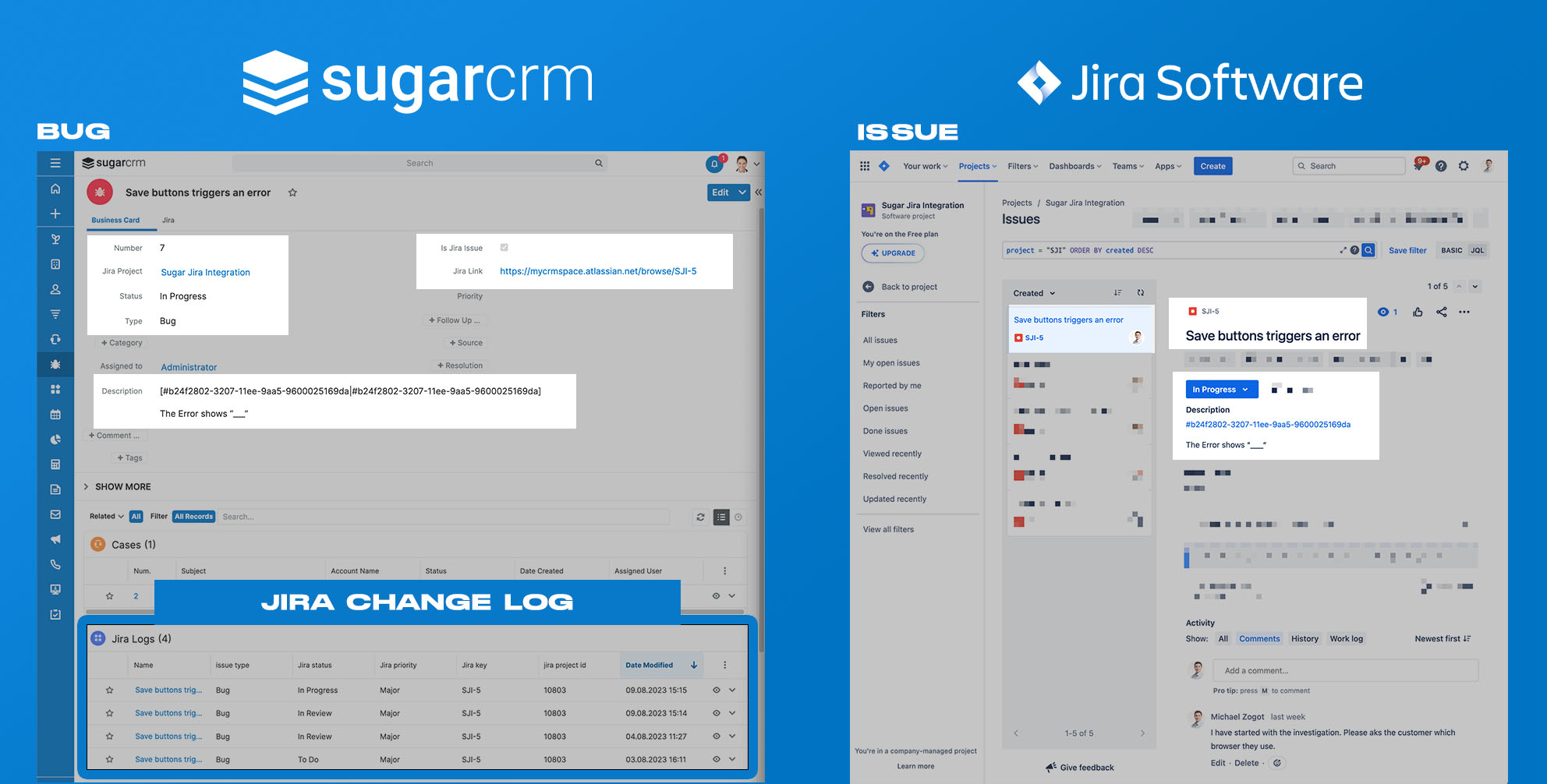
Jira is Atlassian's project management and issue tracking platform that integrates with SugarCRM through the Faye Jira Integration, a dedicated connector on the SugarAI Marketplace.
The integration gives sales reps, account managers, and support teams visibility into open engineering tickets linked to their accounts, without anyone logging into Jira.
Key integration capabilities include:
A dedicated Jira issue subpanel on SugarCRM Account and Case records, filterable by project, issue type, priority, assignee, and due date
New Jira issue creation from SugarCRM records, with automatic linking back to the CRM
A Critical Issues dashboard widget on the SugarCRM home screen surfacing Jira tickets approaching their due date
Bidirectional status synchronization keeping SugarCRM subpanel data current when Jira issue status, priority, or assignee changes
How Jira Integrates with SugarCRM
Source: Atlassian
The Faye Jira Integration 2.0 installs through SugarCRM's Module Loader and connects to Jira Cloud or Jira Server/Data Center via Jira's REST API. The connector reads from and writes to Jira's full issue model, including custom fields and workflow statuses.
1. Jira Issue Subpanel on SugarCRM Records.
A dedicated subpanel appears on SugarCRM Account and Case records showing all linked Jira issues. The subpanel is filterable by project, issue type, priority, assignee, and due date.
For a rep managing a customer with a complex ERP implementation, the view narrows to open bugs on that customer's integration project.
The subpanel pulls live data from Jira's API each time the account record opens, so ticket statuses reflect what engineers see in Jira right now.
2. Create Jira Issues Directly from SugarCRM Records.
From any SugarCRM Account or Case record, users can create a new Jira issue without leaving the CRM. The new issue links back to the SugarCRM record automatically.
A service agent fielding a call about a product defect can create the Jira bug ticket from the Case record, and engineering gets the ticket without a handoff through Slack or email.
3. Critical Issue Alerts on the SugarCRM Home Dashboard.
A dashboard widget monitors all Jira issues linked to SugarCRM accounts and flags those approaching their due date or exceeding budget. This surfaces the most urgent engineering tickets across the account base, giving early warning before unresolved tickets become customer escalations.
4. Bidirectional Status Synchronization.
When an engineer closes a bug in Jira, marks an issue as In Progress, or reassigns a ticket, that change reflects in the SugarCRM subpanel. Jira's webhook system supports event-driven notification on issue updates, keeping the SugarCRM subpanel current without polling delays.
Jira Pricing
Jira uses per-seat pricing across four tiers:
Free: $0 for up to 10 users (unlimited projects, community support only)
Standard: $7.91/user/month (user roles and permissions, 1,700 automation runs/month, 9/5 support)
Premium: $14.54/user/month (cross-team planning, unlimited storage, 24/7 support, 99.9% uptime SLA)
Enterprise: custom pricing (Atlassian Analytics, unlimited automation runs, 30-minute response SLA)
The Faye Jira Integration 2.0 is a separately purchased SugarAI Marketplace add-on; verify current pricing through the marketplace listing.
Who Should Use the Jira Integration?
B2B companies where an engineering or implementation team uses Jira to track customer-facing work (bug fixes, feature requests, custom ERP integration builds) and account managers currently have no visibility into those tickets without messaging engineering
SugarCRM users managing active customer implementations where ticket status affects the customer relationship: a stalled Jira ticket is a churn risk, and account teams need to see it in the CRM before the customer calls to escalate
Sugar Serve users who want service agents to create Jira engineering tickets from Case records, keeping the full problem trail linked and visible from either system
7. Zapier: Best SugarCRM Integration for No-Code Workflow Automation
Source: Zapier
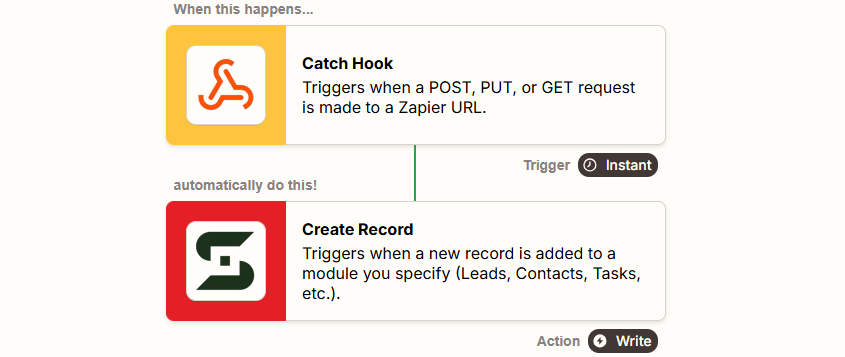
Zapier is a no-code workflow automation platform that integrates with SugarCRM to connect the CRM to over 8,000 external applications, letting sales ops and RevOps teams build multi-step workflows without custom development. The integration connects through the SugarCRM REST API via OAuth 2.0 authentication.
Key integration capabilities include:
Trigger-based automation firing when SugarCRM Leads, Contacts, Opportunities, Cases, or Tasks are created or updated
Bidirectional record creation from external apps (form submissions, webinar registrations, bookings) into SugarCRM
Multi-step Zap workflows chaining actions across multiple platforms from a single SugarCRM event
No-code Zap builder with drag-and-drop interface and AI-assisted workflow creation via Zapier Copilot
How Zapier Integrates with SugarCRM
Zapier connects via SugarCRM's REST API and monitors modules for new or updated records using polling-based triggers. The polling interval depends on the Zapier plan: every 15 minutes on Free, every 2 minutes on Professional, and every 1 minute on Team and Enterprise plans.
1. Trigger-Based Automation from SugarCRM Events.
When a record is created or updated in SugarCRM, Zapier fires any configured sequence of downstream actions.
When a SugarCRM Opportunity is marked Closed Won, a multi-step Zap can create a project in Asana or Jira, post a message to Microsoft Teams or Slack, add a row to a Google Sheet tracking revenue, and generate a draft invoice in QuickBooks. Every action happens automatically from the single CRM event.
2. Inbound Record Creation from External App Events.
Events originating outside SugarCRM can automatically create or update records inside it. A form submission on a marketing landing page, a webinar registration in Zoom, an e-commerce order, or a calendar booking in Calendly can each become a Zap trigger that creates a Lead or Contact in SugarCRM and populates standard and custom fields.
This fills the gap in SugarCRM's native integration coverage: any of Zapier's 8,000+ connected apps can feed leads into SugarCRM.
3. Multi-Step Zaps for Cross-Platform Process Automation.
Zapier's multi-step Zap builder (Professional plans and above) chains multiple actions with conditional logic through Paths, data transformation through the Formatter step, and timed staging through Delay steps. A SugarCRM Case escalation can trigger a Jira ticket for the product team, a notification to the account manager, and a logged entry in a tracking sheet, all conditional on the Case priority field.
4. No-Code Interface for Sales Ops Teams.
The Zap editor walks users through setup step by step, and Zapier Copilot generates suggested Zap structures from plain language descriptions. SugarCRM admins and RevOps analysts can build, modify, and troubleshoot workflows without developer involvement, an advantage given SugarCRM's learning curve for backend configuration.
Zapier Pricing
Zapier uses task-based pricing where each successful action step consumes one task:
Free: $0/month (100 tasks/month, single-step Zaps only, 15-minute polling)
Professional: starts at $19.99/month annually for 750 tasks (multi-step Zaps, 2-minute polling, conditional logic, webhooks)
Team: starts at $69/month annually for 2,000 tasks (shared workspaces, SAML SSO, 1-minute polling)
Enterprise: custom pricing (unlimited users, SCIM provisioning, advanced admin controls)
Estimate task consumption before committing: a 3-step Zap firing on 10,000 monthly contact updates burns 30,000 tasks. Zapier charges overages at 1.25x the plan's per-task cost.
Who Should Use the Zapier Integration?
Teams sourcing leads from multiple external platforms (paid media forms, webinars, booking tools) that need them flowing into SugarCRM automatically without manual data entry or custom API development
Sales operations teams whose deal process triggers downstream work in tools outside the CRM (project management, finance, communication) and want those handoffs automated rather than relying on manual coordination
RevOps teams running SugarCRM alongside modern SaaS tools that SugarCRM does not connect with natively, who need an automation layer that closes those gaps without per-tool custom integration work
Final Verdict
The best SugarCRM integrations close gaps your CRM cannot fill on its own:
ZoomInfo: verified B2B data, buyer intent, and go-to-market intelligence enriching every record; the first integration to add if your pipeline depends on data quality
Mailchimp: bidirectional email marketing sync keeping campaigns targeted from live CRM data and engagement visible to sales
PandaDoc: CRM-to-document automation with e-signature, engagement tracking, and payment at signing
Microsoft Teams: real-time CRM event notifications and meeting coordination in the platform your team already works in
QuickBooks: financial data visibility giving account managers invoice history and payment status without asking finance
Jira: engineering ticket visibility inside account records so customer-facing teams know about technical issues before escalation
Zapier: no-code reach into 8,000+ apps where native SugarCRM connectors stop
These integrations compound. You might run ZoomInfo for data enrichment, Mailchimp for email campaigns, Microsoft Teams for notifications, and Zapier for workflow automation on the same SugarCRM instance, each adding a layer that makes the others more useful.
If you connect just one, make it the data layer everything else depends on. ZoomInfo's native SugarCRM connector enriches your CRM with verified contacts, direct dials, and buyer intent signals from a database of 500M+ contacts and 100M+ companies. ZoomInfo Lite is a permanent free tier, so you can test the data and intent signals on your pipeline before spending anything.
Frequently Asked Questions
How many integrations does SugarCRM support?
SugarCRM's integration ecosystem spans 180+ ERP integrations alongside the SugarAI Marketplace of add-ons covering telephony, marketing, reporting, project management, finance, AI, and CPQ categories.
Beyond marketplace apps, SugarCRM's versioned REST API (covering all standard CRM modules) and Web Logic Hooks for event-driven automation support custom integrations with any platform that has an API. Workflow automation platforms like Zapier extend connectivity further to thousands of additional apps.
Do SugarCRM integrations work on all pricing tiers?
SugarCRM's REST API is included with all paid tiers (Standard, Advanced, and Premier), so API-based integrations function across all plans. However, some features that integrations benefit from (Revenue Intelligence, Generative AI, and Sentiment Analysis) are gated to Premier or require separate purchase.
SugarAI Marketplace add-ons carry their own licensing costs separate from the base SugarCRM subscription. Sugar Sell Essentials customers cannot install custom Module Loader packages, which restricts some marketplace connector installations.
Can SugarCRM integrate with ERP systems?
ERP integration is a strength of SugarCRM's platform. The company supports 180+ ERP integrations through its marketplace and partner ecosystem, including connectors for SAP ECC, SAP S/4 HANA, SAP Business One, Oracle E-Business Suite, NetSuite, Epicor, Sage, Acumatica, Syspro, and Microsoft Dynamics GP.
The Sugar sales-i module surfaces sales intelligence from ERP transaction data, analyzing order history to identify cross-sell, upsell, and churn-risk signals inside the CRM.
Does SugarCRM support on-premises deployment with integrations?
Yes. SugarCRM offers both cloud (SugarCloud on AWS) and on-premises deployment through Sugar Enterprise. On-premises instances expose the same REST API as cloud instances, so integrations that use the API function in either deployment mode.
However, SugarCloud instances enforce a rate limit of 20 requests per second, while on-premises limits depend on the customer's own infrastructure. Web Logic Hooks fire via a cron-based job scheduler in both deployment modes.
How does SugarCRM handle data sync with third-party tools?
SugarCRM provides multiple sync mechanisms depending on the integration type. Marketplace connectors like SugarChimp (Mailchimp) and the Faye QuickBooks connector handle bidirectional sync on automated schedules, typically every 10 minutes.
Web Logic Hooks support event-driven outbound notifications on record creation, update, deletion, and relationship changes, though they fire through SugarCRM's internal job scheduler rather than in true real-time.
For more complex workflows, Zapier connects to SugarCRM's REST API with polling intervals as short as 1 minute on Team plans.
What security certifications does SugarCRM hold for integration data?
SugarCRM maintains SOC 2 Type II, ISO/IEC 27001:2022, CSA STAR Registry, GDPR, CCPA, and Data Privacy Framework certifications. All data is encrypted in transit and at rest, with role-based access control configurable by the customer.
SugarCloud supports LDAP, SAML, and OIDC for single sign-on, and customers select their preferred AWS region (Australia, Germany, United Kingdom, or United States) at onboarding with data remaining within that region.
What is the best way to enrich SugarCRM contact data for B2B sales teams?
A dedicated B2B data platform provides the best enrichment. ZoomInfo's native SugarCRM connector enriches your CRM records with verified emails, direct-dial phone numbers, firmographic data, technographic profiles, and buyer intent signals from a database spanning 500 million contacts and 100 million companies.
The enrichment runs through a verification pipeline backed by 300+ human researchers, reaching up to 95% accuracy on first-party data. SugarCRM captures interaction and ERP transaction data; for teams whose pipeline depends on data accuracy, connecting a platform built for B2B intelligence closes the gap between what SugarCRM captures and what reps need.
