
WalkMe is a digital adoption platform that sits on top of your enterprise software and closes the gap between what you invested in and what your teams actually use.
It discovers every application in your tech stack, tracks how people interact with each one, layers in-app guidance and automation on top of workflows, delivers contextual AI assistance on any screen, and now includes an AI-native digital learning product. Following its September 2024 acquisition by SAP for approximately $1.5 billion, the platform operates as a wholly-owned SAP subsidiary with distribution across SAP's customer base. This breakdown covers every feature, how it works, who it serves, and which tier unlocks it.
WalkMe's feature set has you covered if:
You are rolling out SAP S/4HANA, Salesforce, Workday, or ServiceNow and need employees using the new system correctly from day one
You want to see exactly which applications your organization uses, how often, and where people get stuck in workflows
You need in-app guidance that adapts automatically when the underlying application updates its UI
You manage software licenses across hundreds of applications and want to identify unused seats before the next renewal
You are deploying enterprise AI tools and need visibility into adoption rates and governance across sanctioned and unsanctioned AI applications
You want a single platform to guide employees through multi-step workflows across CRM, ERP, and HRIS systems without writing code
You'll reach the edges of its capabilities if:
You need a B2B contact and company database to fuel the CRM and sales tools WalkMe guides users through
You want intent signals showing which companies are researching your category before they contact you
You need conversation intelligence that records, transcribes, and analyzes sales calls
You want to identify website visitors and route them into pipeline, not just track internal app usage
You need marketing orchestration, account-based advertising, or multi-channel campaign management
For those needs, the reference point is ZoomInfo: an AI GTM platform built on B2B data, a GTM Context Graph that combines that data with CRM records, conversation intelligence, and behavioral signals into a single intelligence layer, and access through APIs, MCP, GTM Workspace, and GTM Studio. ZoomInfo Agent Teams run complete GTM plays end to end: coordinated specialist agents share context, work from each account's current state, and act within the approvals and limits you set, running in GTM Studio and headless through GTM.AI. WalkMe ensures your team uses enterprise software correctly; ZoomInfo ensures the data inside that software is accurate and complete.
After the feature breakdown, this article covers where WalkMe stops and how ZoomInfo fills those gaps.
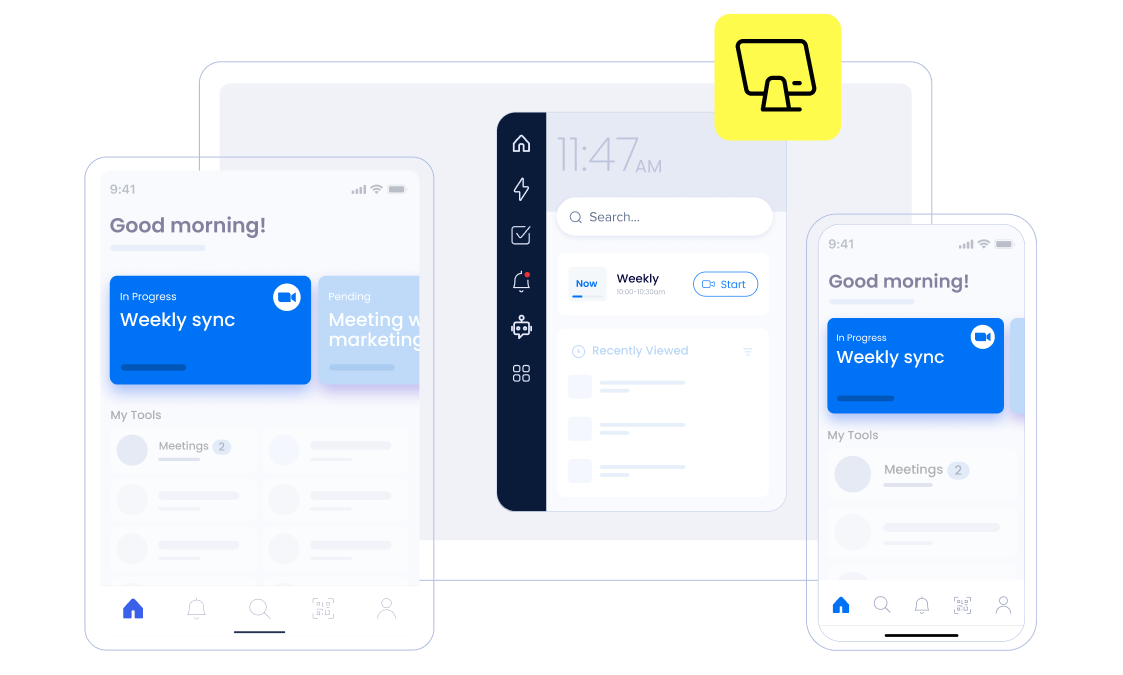
WalkMe Platform Overview
Source: WalkMe
WalkMe pioneered the Digital Adoption Platform (DAP) category, serving approximately 1,600 enterprises and 35 million users across 42+ countries, with 27% of the Fortune 500 among its customers. The platform targets IT leaders, CHROs, Sales Operations heads, and Change Management professionals at large organizations undergoing digital transformation, ERP implementation, or AI adoption.
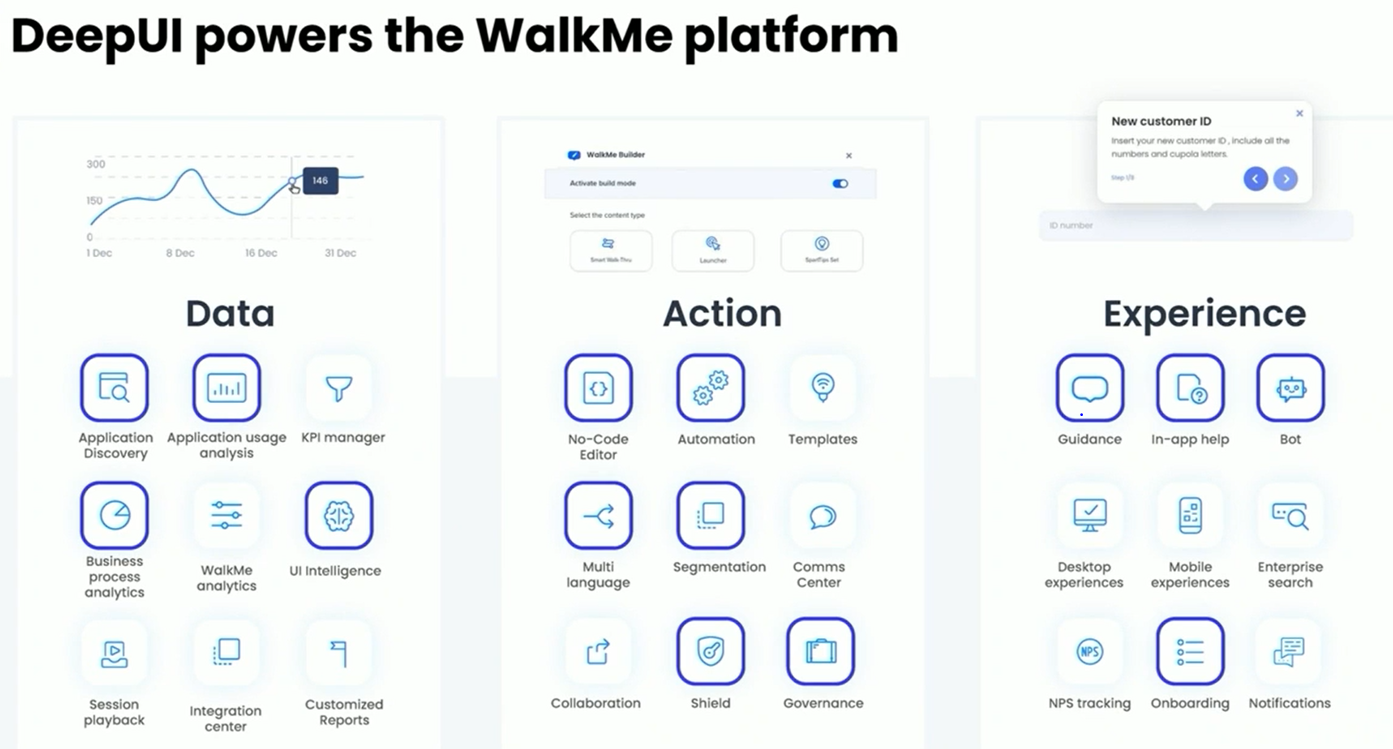
The platform is organized around three pillars (Data, Action, Experience) plus shared technology layers:
Module | What It Does | Availability |
|---|---|---|
Discovers all web apps in use, tracks usage by user, department, and role | Core platform | |
Workflow completion analysis, guidance performance tracking | Core platform | |
Field-level form interaction data, drop-off analysis | Core platform | |
Maps behavioral usage data against license spend | Core platform | |
Low-code guidance and automation builder | Builder license | |
Walk-Thrus, SmartTips, ShoutOuts, onboarding task lists | End User license | |
Natural language task execution across applications | End User license | |
Persistent access widget for AI, guidance, and knowledge | End User license | |
UI-layer automation of repetitive tasks | Core platform | |
Pre-built, role-specific solution packages | Core platform | |
Contextual AI assistance across any application | AI features; SAP AI Units | |
AI-native enterprise digital learning | Separate license | |
Proprietary AI that understands and adapts to any UI | Foundation under everything |
WalkMe does not publish pricing. The pricing page leads to a "Request a demo" form, and all commercial terms are set in a signed Ordering Document referencing the Master License and Services Agreement.
The model is subscription-based, priced around a negotiated number of End Users, Builders, and Target Applications. For SAP customers, a WalkMe Standard tier is included in SAP subscriptions with WalkMe Premium available for customization. AI feature consumption is metered via SAP AI Units. With that structure in place, here is the full tour.
WalkMe Analytics: Software Usage and Adoption Intelligence
Analytics gives enterprises a factual picture of how their software is actually being used. WalkMe states the problem plainly: organizations have no reliable way to see which applications employees use, whether they use them correctly, where they abandon processes, or how many licenses sit idle.
Vendor dashboards show shallow metrics like last login. WalkMe captures interaction data at the click and field level across every web-based application (SaaS, shadow IT, AI tools, and homegrown systems) without requiring per-app integrations.
All analytics features share a common data collection mechanism: WalkMe deploys as a browser extension across users' endpoints. Once deployed, it captures clicks, field entries, page visits, form completions, and session duration across every web-based application the user accesses. No per-app integrations are required.
The behavioral capture runs on DeepUI technology, which captures interaction data without collecting personally identifiable information or sensitive data.
Source: YouTube
App Discovery & Analytics aggregates this telemetry to show total application usage by user, department, and role.
It discovers all web-based applications in use (including those invisible to IT) without manual configuration or vendor integrations. Shadow IT and unsanctioned AI applications surface in the same view, enabling compliance risk identification.
WalkMe's State of Digital Adoption 2026 report identifies an average of 625 applications per enterprise; App Discovery is what makes that sprawl visible.
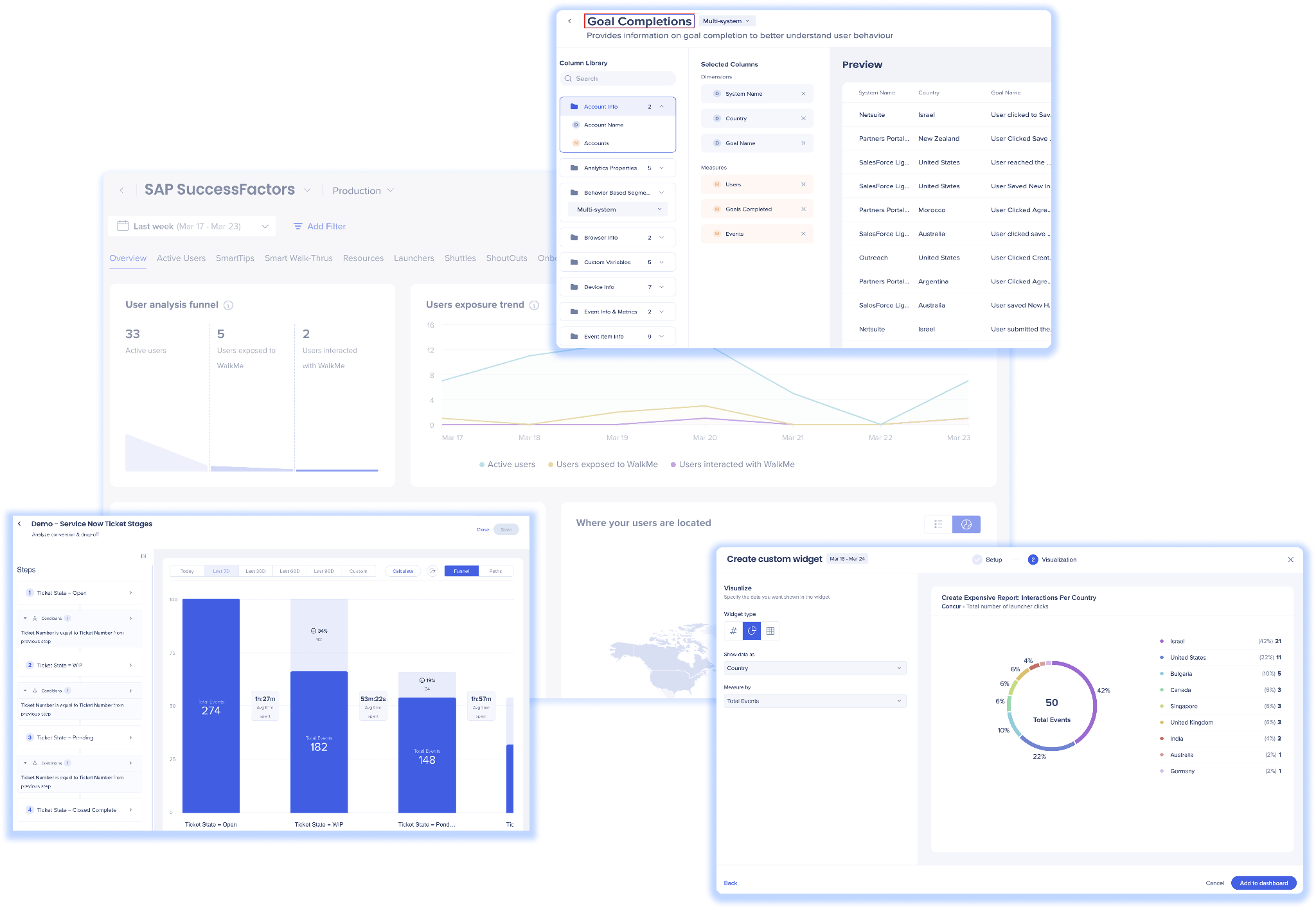
WalkMe Insights adds process-level intelligence on top of the raw usage data. It maps user interactions against defined workflows and identifies where people get stuck or make mistakes, and it tracks the performance of WalkMe's own in-app guidance to measure whether interventions produce the intended behavior change.
Source: WalkMe
Customizable dashboards and reports track adoption goals over time. The connection between analytics and guidance is structural: insights surface friction, and the same platform builds the fix.
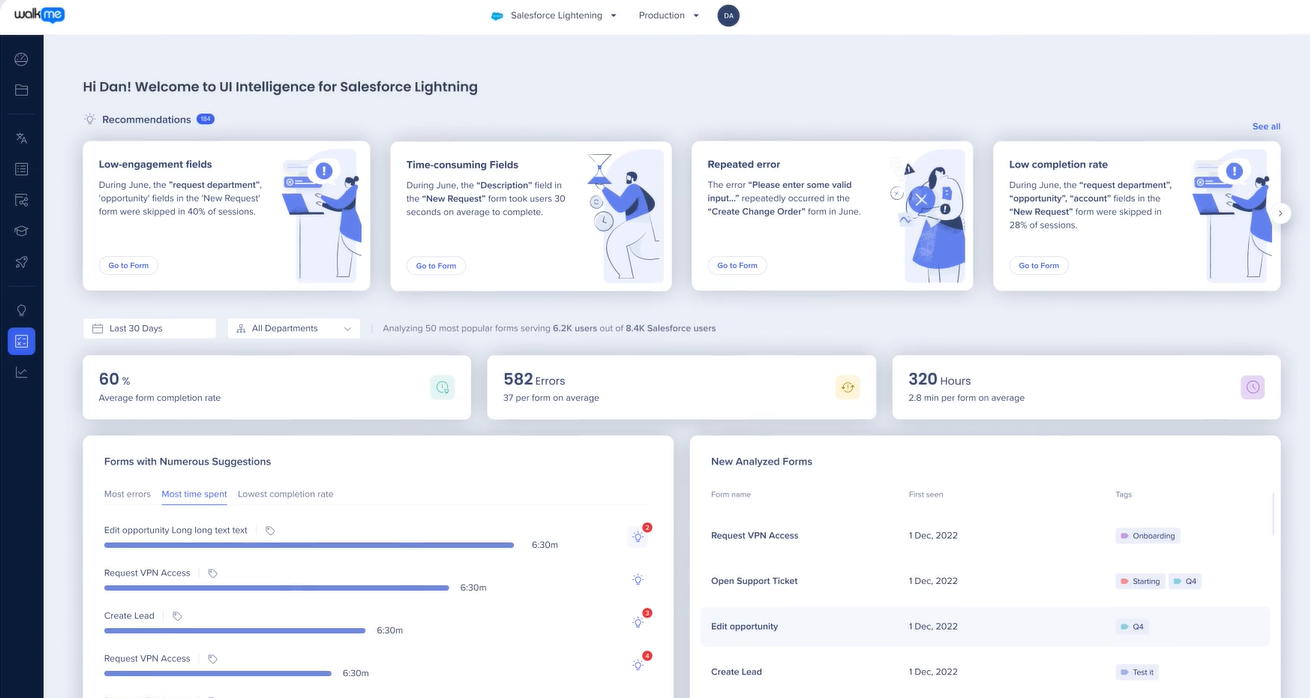
Form Analytics captures interaction at the individual field level: completion rates, time on field, errors, and drop-off points. It uses AI to recommend fixes for identified friction.
Source: WalkMe
For teams deploying Salesforce or ServiceNow at scale, this is the difference between knowing that a form has a low completion rate and knowing that the third field on the second tab is where 40% of users abandon the process.
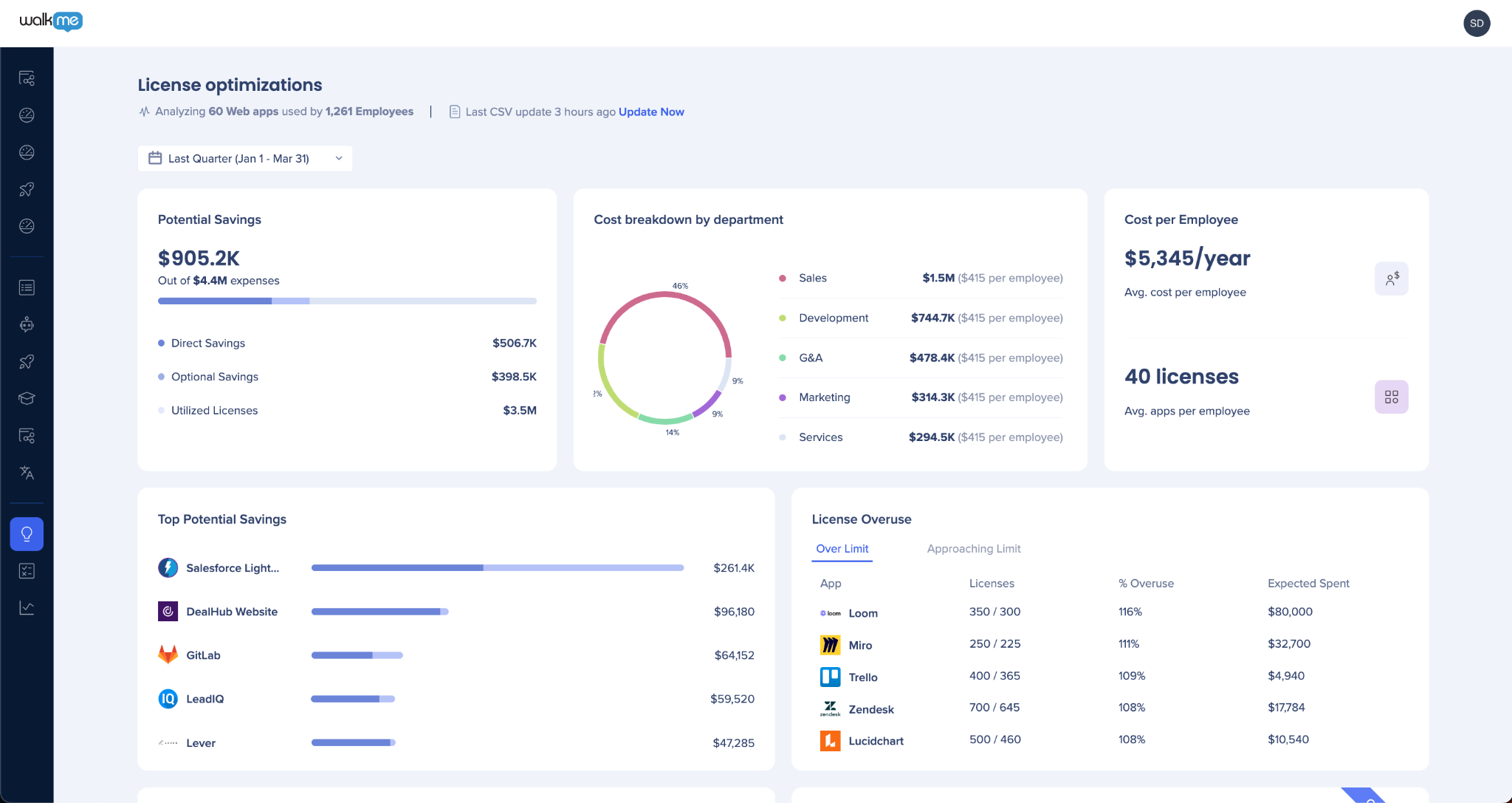
Discovery License Optimization overlays financial inputs (license counts, types, spend) on top of behavioral usage data to produce financial summary reports. The output is concrete: which licenses to reallocate, which to eliminate, and which to expand. This data is accessible to procurement, finance, and operations roles without IT involvement.
Source: WalkMe
Most SaaS management platforms depend on first-party application integrations for usage data, limiting them to shallow signals like last login; WalkMe captures click-by-click behavioral data through a single browser extension.
WalkMe Editor: Building Guidance and Automation
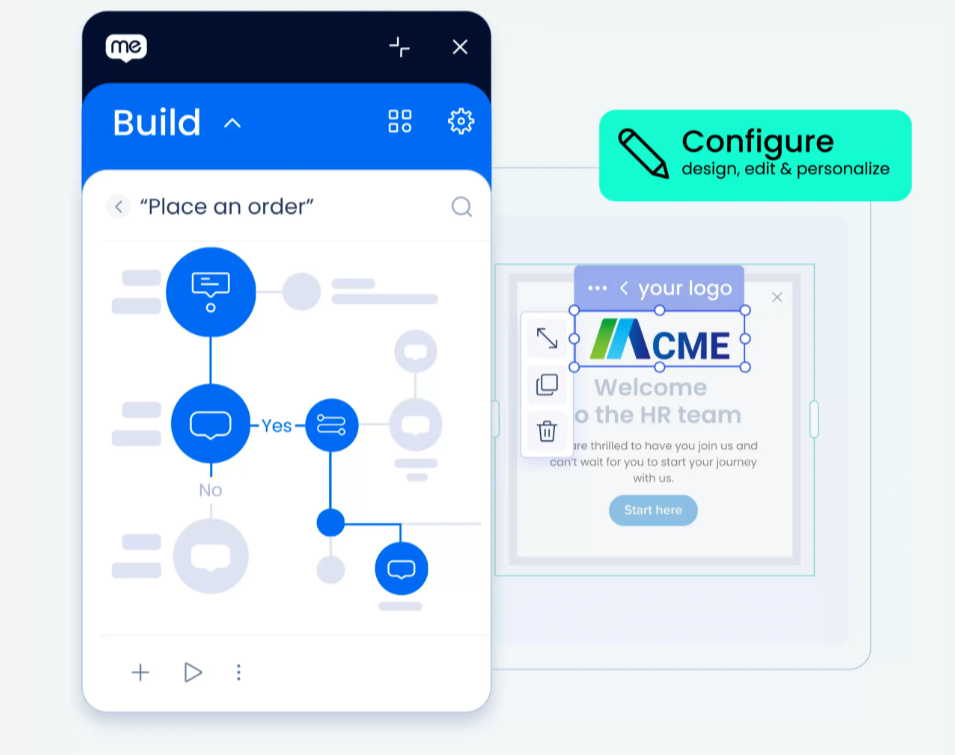
The WalkMe Editor is where builders create guidance, automation, and in-app content. It is an Electron-based desktop application (Windows and macOS) paired with a browser extension. Builders log in, open the target application in their browser, and point-and-click on UI elements to define guidance steps, triggers, and conditions.
Source: WalkMe
Most use cases require no coding. WalkMe's installation documentation is written for non-tech-savvy employees, and from version 5.0.0 onward, all future Editor updates install automatically.
The Editor produces three core content types.
Smart Walk-Thrus are step-by-step guided tours that walk users through a workflow one action at a time, with conditional branching and error-handling so the same guidance handles multiple user paths.
SmartTips are contextual tooltips attached to specific UI elements, surfacing information on demand without interrupting the workflow.
ShoutOuts are proactive in-app notifications for announcements, policy changes, or feature releases, tailored to brand and voice.
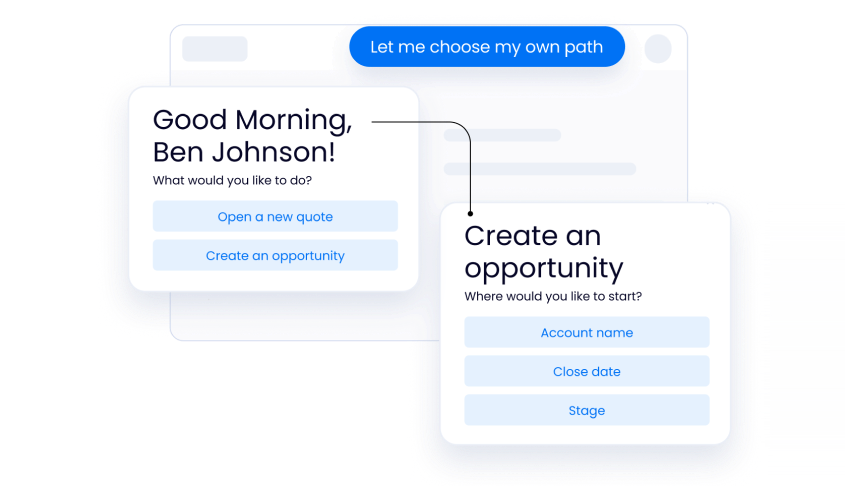
Guidance logic supports branches, splits, and user conditions for multi-path workflows, and segmentation rules control which content displays to which users based on role, department, location, language, or behavioral context.
Source: WalkMe
AI-assisted content building provides contextual recommendations inside the Editor, and data-driven prioritization uses workflow analytics to surface the friction points that need guidance first.
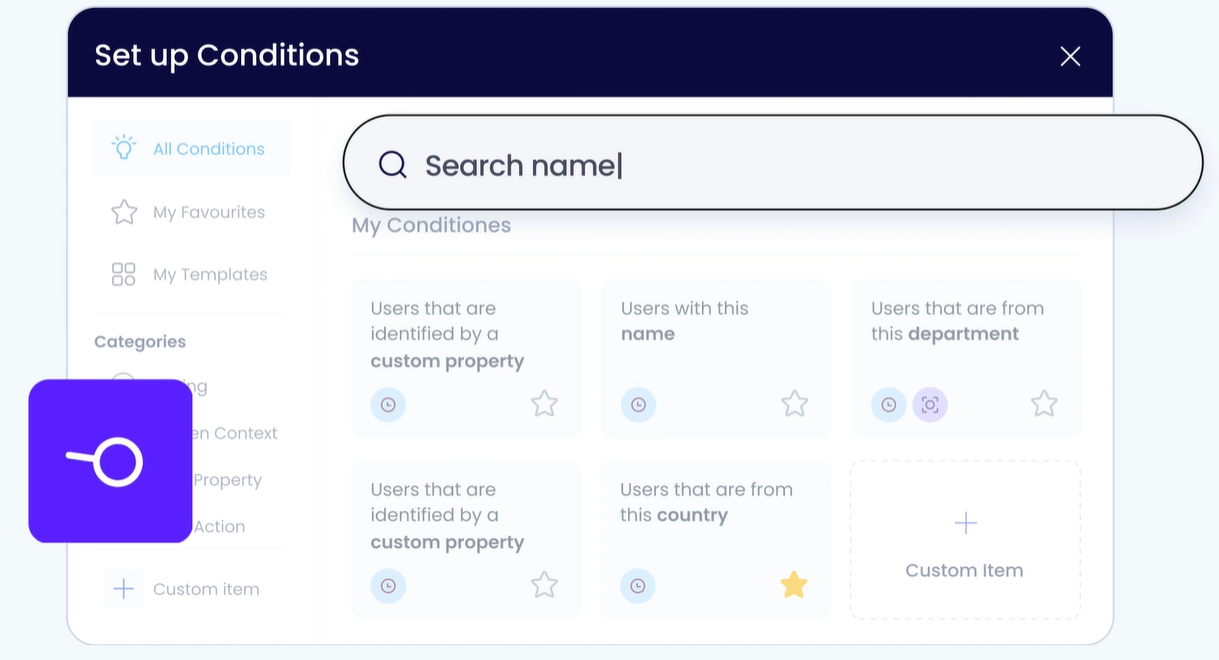
Source: WalkMe
The Editor connects directly to WalkMe's analytics layer. Teams can turn workflow and form analytics into targeted guidance within the same platform, closing the loop between identifying a problem and deploying the fix.
WalkMe describes the goal as creating experiences so integrated into applications that employees do not perceive them as WalkMe: guidance surfaces and disappears contextually without disrupting work.
In 2025, WalkMe introduced a redesigned left-hand navigation grouping console apps into four categories: Content, Tools, Admin, and Analytics. WalkMe added a Builder Assistant to speed up content creation. The learning curve for basic guidance is manageable, but advanced configurations involving complex selectors and dynamic elements require structured learning.
WalkMe recommends a Center of Excellence approach and provides formal training through the Digital Adoption Institute, offering WalkMe Fundamentals (30-minute self-paced), WalkMe Essentials (foundational online course), and Builder Basics Bootcamp (5-week cohort with weekly live instructor sessions).
WalkMe's In-App Experience: Guidance, Menus, and Conversational Interface
The in-app experience is the visible layer, what end users see and interact with on top of their applications. WalkMe delivers this across three surfaces: In-App Guidance (the interactive overlays), the WalkMe Menu (the persistent access point), and the Conversational Interface (natural language interaction).
In-App Guidance delivers Walk-Thrus, SmartTips, ShoutOuts, onboarding task lists, and validation safeguards on top of applications via WalkMe's DeepUI layer, without modifying the host application's source code.
The distinction from simpler tooltip tools is in the conditional logic: WalkMe's guidance contains conditional branching and error-handling at each step, handling multiple user paths through the same workflow. A Walk-Thru guiding a Salesforce opportunity update does not break when a user takes an unexpected path; it adapts.
Validation safeguards intercept and correct data before the user submits it, addressing a root cause of downstream CRM and ERP data integrity problems. Personalization targets content by user role, location, language, or behavioral context.
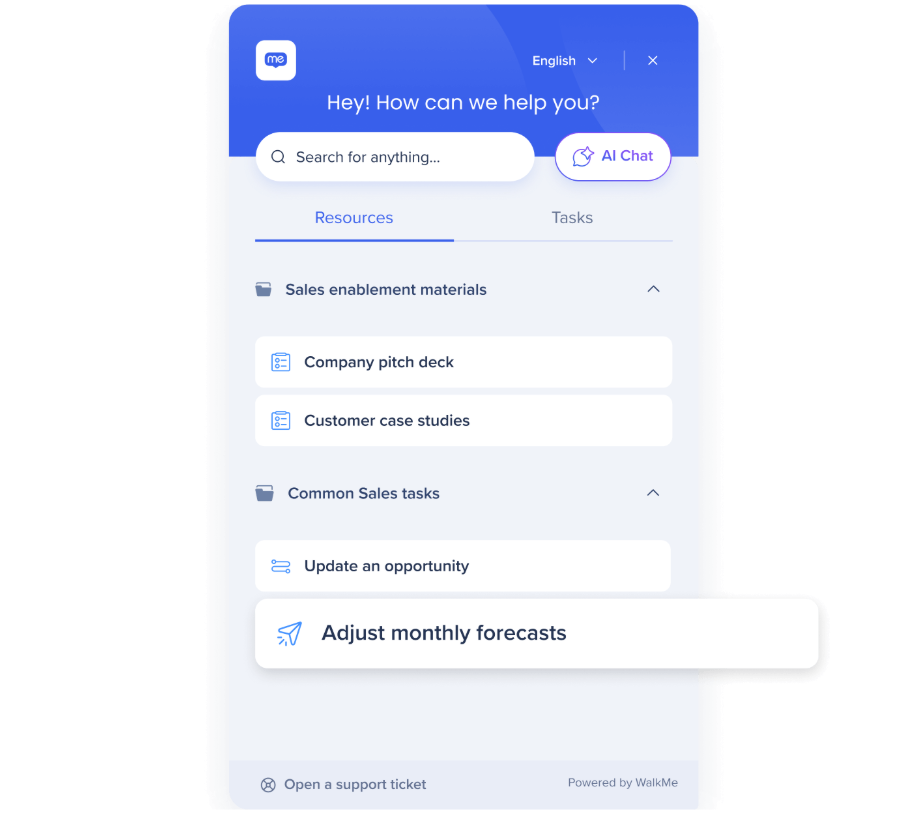
WalkMe Menu is a persistent widget that appears in every application across web, desktop, and mobile, providing a single access point to AI chat, in-app guidance, company knowledge, and task checklists.
Source: WalkMe
Menu supports either the customer's own enterprise AI or WalkMe's built-in offering, a real option for enterprises with existing AI investments. Logo, colors, and layout, resources, and AI choice are configurable.
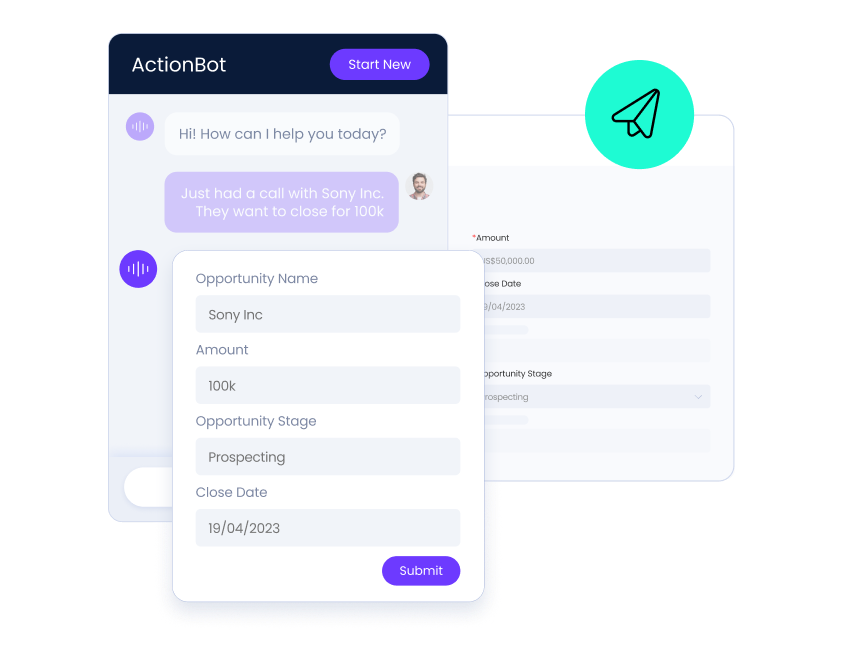
Conversational Interface accepts natural language inputs and maps them to WalkMe automations and knowledge resources. When a user types a request, the system interprets intent and either returns an automated response sourced from any connected knowledge resource or executes a workflow on the user's behalf.
Source: WalkMe
This includes multi-step workflows within and across applications, so a user can type a request in one system and have the platform execute actions that span multiple tools. The interface supports self-service for common tasks like opening tickets, filling forms, and retrieving information.
WalkMe Workflow Automation and Accelerators
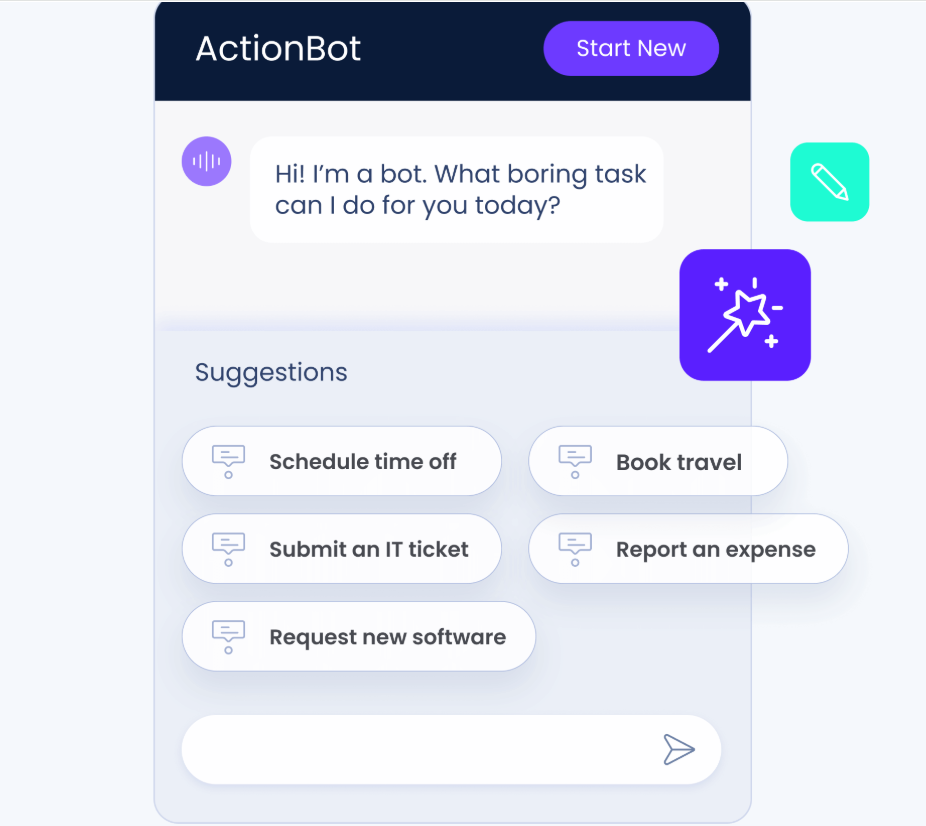
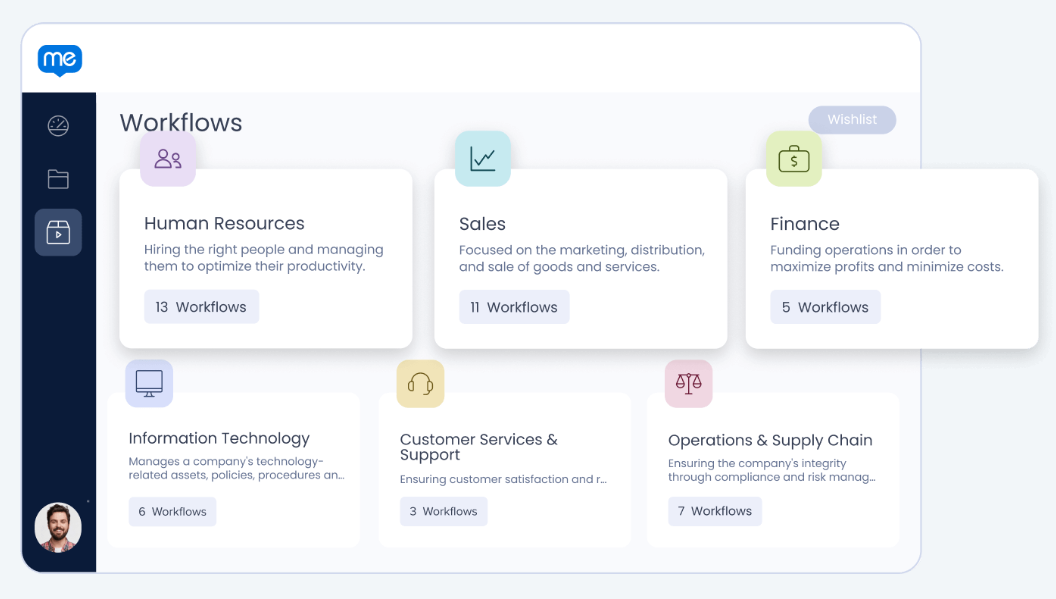
Workflow Automation operates at the UI layer, clicking buttons, selecting menus, and advancing screens inside target applications. This is a structural advantage: because WalkMe automates at the UI level rather than through APIs, it works regardless of whether the application exposes an API. That means automation on any web-based application, including legacy systems with no API surface.
Source: WalkMe
For common tasks, WalkMe presents a conversational interface that lets employees complete them by chatting rather than navigating multiple screens. Form and field autofill enforces data accuracy by pre-populating fields with validated information.
Source: WalkMe
Workflow Accelerators give customers a head start with pre-built, role-specific solutions drawn from more than 2,000 enterprise implementations. These are not templates in the conventional sense; they are pre-configured packages deployed directly into a customer's environment, customizable from a best-practice baseline.
Accelerators are available for Sales, HR, and IT workflows. For organizations deploying WalkMe on large SAP or Workday environments, accelerators compress the time between deployment and production-ready content, though setup work is still required for complex configurations.
WalkMe AI: Contextual Assistance Across Applications
WalkMe AI is a layer of AI capabilities delivered inside employees' existing applications and workflows without requiring them to switch tools or learn new prompting skills.
Source: WalkMe
WalkMe frames the problem directly: most enterprise generative AI tools use a "pull model" that demands users actively seek out help. Despite being "easy to use," GenAI requires learning new skills and integrating them into daily workflows, and few people will adopt them.
WalkMe AI shifts from pull to push: delivering assistance based on what is happening on the user's screen.
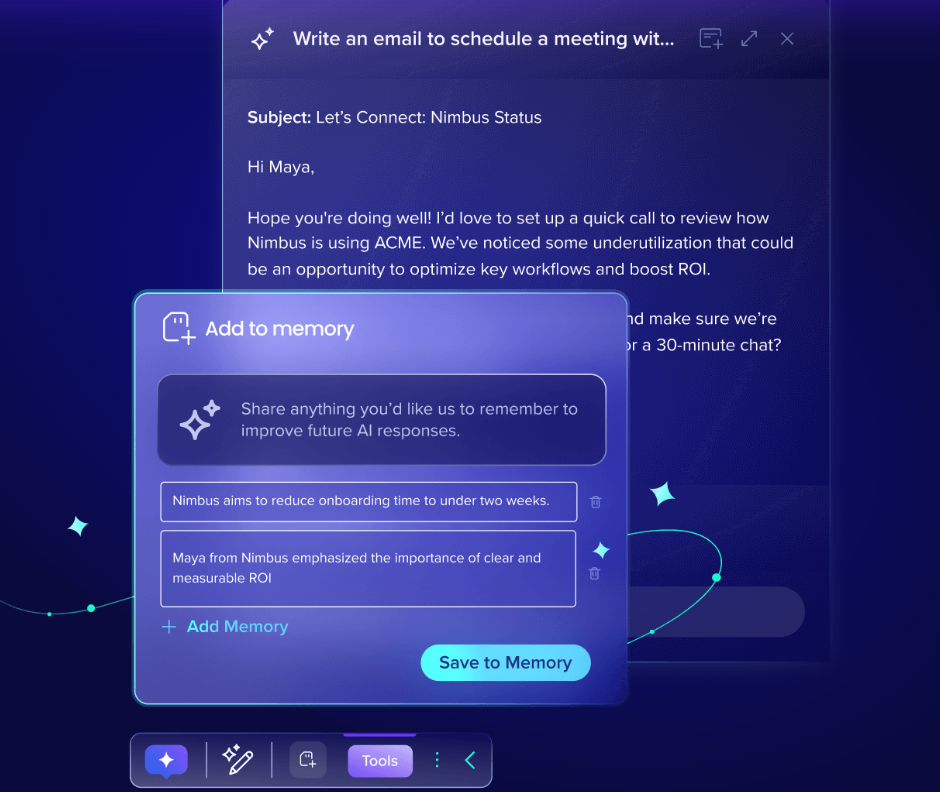
The AI combines three inputs to generate contextual assistance in real time: screen-based understanding (powered by DeepUI, reading what is visible across any web or desktop application), business knowledge (grounded in company-specific data and knowledge bases), and user memory that learns from actions and preferences (opt-in).
This combination allows WalkMe AI to determine five context dimensions: who the person is, what they are trying to do, where they came from, what workflow they are performing, and where they are going. The AI is built on over a decade of enterprise DAP data; WalkMe processes over 7 billion interactions between people and software every year.
WalkMe AI is composed of seven capability modules:
Next best actions: suggested actions based on the user's current screen; triggering conditions and offered actions are customizable
Memory: learns from user actions and preferences to produce better suggestions over time
Automations: natural language triggers multi-step workflows across HR, CRM, support, and other systems via front-end automation
Conversational chat: AI chat grounded in business data, available across any application
Input validation: embeds AI into open-text form fields to validate data quality in real time as users type
Reading assistance: when users highlight text, surfaces relevant actions (summarize, translate, reformat) in the flow of work
Writing assistance: generative AI writing inside any text field, including drafting, length adjustment, tone modification, and translation, delivered as a consistent cross-application experience
WalkMe AI works across any application and workflow, covering SAP, Salesforce, Workday, ServiceNow, Microsoft Dynamics, and custom-built tools, not just within a single vendor's ecosystem. And because it is built on the DAP, organizations get visibility into how AI initiatives are performing, including AI usage analytics across 1,000+ GenAI sites.
WalkMe Learning Arc: Enterprise Digital Learning
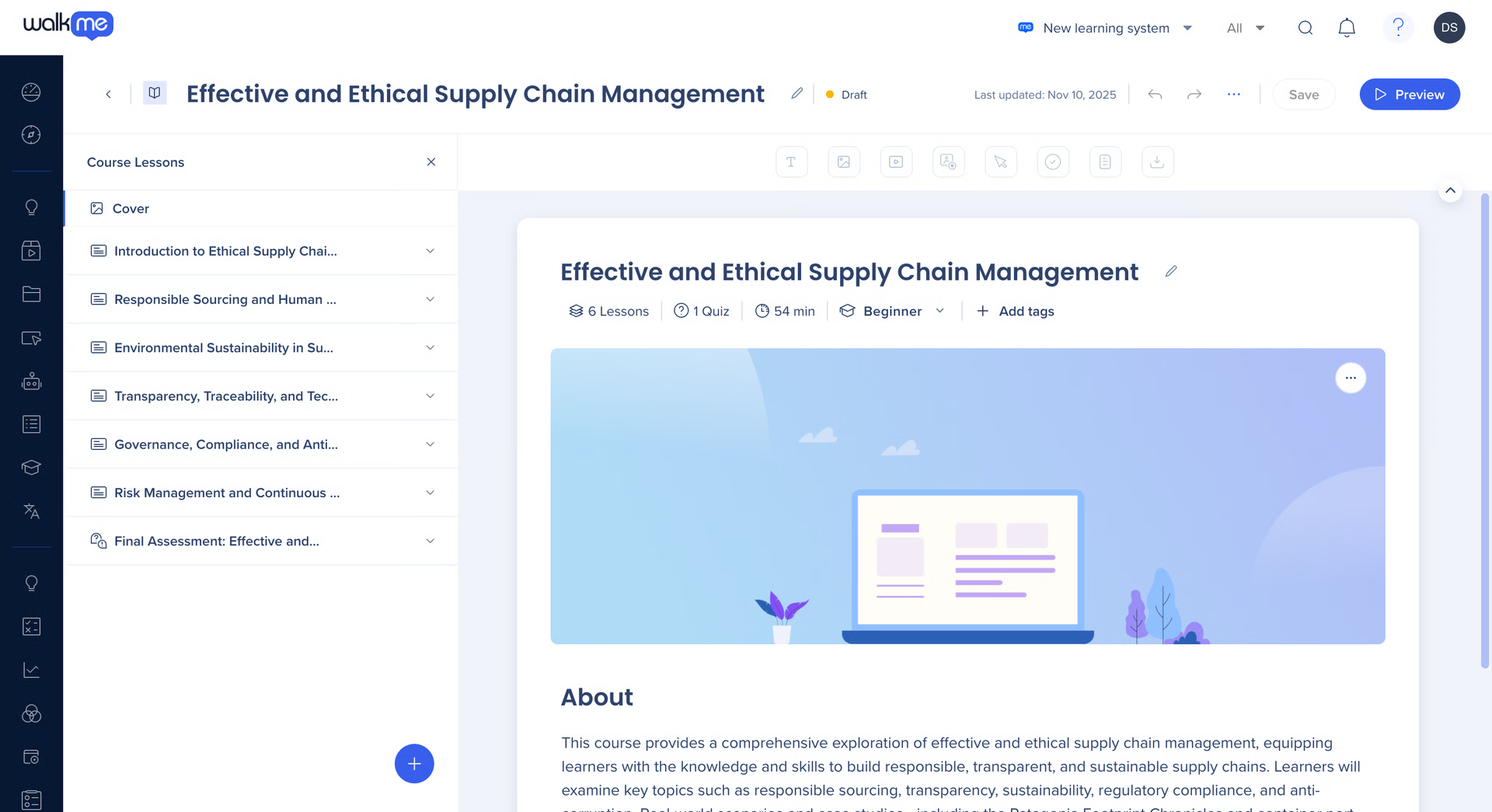
WalkMe Learning Arc is an AI-native digital learning product that delivers training directly inside enterprise applications, rather than pulling employees out to a separate LMS. It is the designated successor to SAP Enable Now (reaching end of maintenance November 30, 2030), which matters for SAP-centric enterprises with large libraries of existing learning content.
Source: WalkMe
The authoring experience uses AI-powered tools to turn prompts and uploaded files into ready-to-launch courses without coding or instructional design expertise. A simulation recording feature captures every click in a recorded web session and transforms it into an interactive simulation step, automating the most time-consuming part of training content creation.
The content library includes version tracking, SCORM integration, SAP integration, localization, and migration support from SAP Enable Now and other legacy platforms.
The platform delivers learning directly inside applications, triggered by behavior, role, or task context. A new hire opening Salesforce for the first time might see a guided onboarding module; a tenured rep encountering a new feature might see a targeted micro-lesson.
AI-curated learning portals provide progress tracking, certifications, and branded hubs. Learning Arc is designed to enhance, not replace, existing LMS systems, which avoids migration resistance while expanding WalkMe's footprint into L&D budgets. Learning Arc requires a separate license from the core WalkMe platform.
DeepUI: WalkMe's Technical Foundation
DeepUI is WalkMe's proprietary AI technology layer that enables the platform to understand, interact with, and adapt to any application's user interface, regardless of whether that application exposes APIs. WalkMe describes it as "AI that understands apps like humans".
The problem DeepUI solves is fundamental: when applications update, hardcoded UI element references break. Organizations previously had to test and repair every piece of guidance after each software update by hand.
DeepUI uses AI to interpret application UIs the way a human would, reading visual elements, layout structure, text, and interaction patterns to understand what an element is and what it does, rather than relying on brittle DOM paths or hardcoded element IDs.
When an application updates its UI, DeepUI re-identifies elements by their semantic meaning and visual context. The system continuously identifies UI changes and adapts guidance automatically.
DeepUI is not just a maintenance feature. It is the layer that makes WalkMe AI's cross-application contextual awareness possible: without DeepUI, WalkMe AI could only operate within natively integrated applications.
It also powers the privacy-safe behavioral capture that feeds WalkMe's analytics, capturing interaction data without collecting PII or sensitive information. DeepUI is listed under WalkMe AI's "Contextual by design" positioning as "Proprietary AI technology", distinct from generic computer-vision libraries.
WalkMe's Integration, Security, and Compliance Infrastructure
WalkMe connects to the broader enterprise stack through native integrations, webhooks, and APIs.
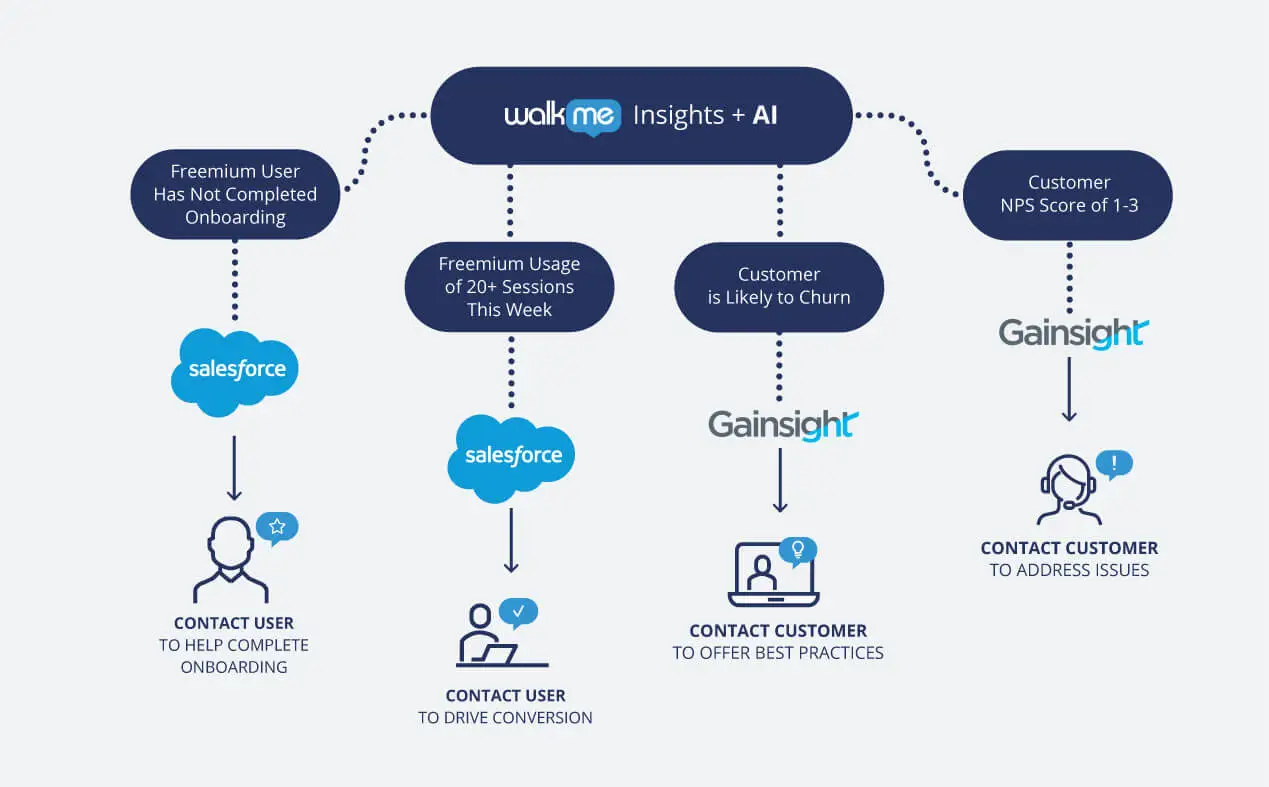
The Integration Center is a centralized hub for connecting business systems. Native integrations include Salesforce, Jira, ServiceNow, and Slack, with dozens of pre-built API integrations accessible from the console. Only admins and publishers can establish connections. Salesforce automations execute predefined API requests via authenticated connections without custom code or middleware.
Source: WalkMe
WalkMe's Data Integration Center supports outgoing webhook delivery of real-time WalkMe event data to any system that can receive HTTP requests, with documented destinations including Zendesk, Slack, Zapier, and Google Analytics.
WalkMe's DeepUI technology supports deployment across any web or desktop application without source code access, with certified support for SAP, Salesforce, Workday, Microsoft Dynamics 365, ServiceNow, SAP SuccessFactors, SAP Concur, and SAP Ariba.
Omnichannel DAP capability extends guidance across web, desktop, and mobile surfaces.
The REST API covers user provisioning (SCIM 2.0), analytics export, content management, and segmentation, with regional base URLs for US, EU, FedRAMP, Canada, and SAP-specific data center deployments. Authentication supports both short-lived JWTs (24-hour validity) and Personal Access Tokens (1-year validity).
The client-side JavaScript API (WalkMeAPI and WalkMeInsightsAPI) enables programmatic interaction with WalkMe content and custom event tracking from the browser. No official SDKs exist for any language; developers work with the REST API directly.
WalkMe's security and compliance certifications:
ISO certifications: ISO 27001:2022, ISO 27701:2019, ISO 27017:2015, ISO 27018:2019, ISO 27799 (Health), ISO 27032:2023, ISO 27036-2:2022, and ISO/IEC 20243:2018
SOC reports: SOC 2 Type II (available under NDA) and SOC 3 Type II (publicly available)
Cloud security: CSA STAR Certification, AWS Partner Network
Regulatory: GDPR (data processor), CCPA (service provider), FedRAMP Ready (first-to-market among DAPs), HIPAA/HITECH addressed via ISO 27799, WCAG 2.1 AA accessibility compliance
WalkMe does not collect PII beyond IP addresses in security logs. It assigns user behavior data to anonymous random GUIDs.
Where WalkMe Stops: The Gaps
WalkMe centers on the adoption and usage layer: understanding how enterprise software is used, guiding employees through it, automating repetitive tasks, and measuring whether interventions work. That focus defines its strength in digital adoption, but it also means the platform ends where the data and intelligence layer begins.
No B2B contact or company database. WalkMe can guide a sales rep through every field in Salesforce, but it cannot supply the contacts, company attributes, org charts, or direct dials that make those fields useful. The CRM needs accurate data before adoption guidance adds value. Teams deploying WalkMe on sales tools need a separate data platform for the prospecting and enrichment layer underneath.
No buyer intent signals. WalkMe's analytics track internal software usage (which apps employees open, where they get stuck, which features they ignore), but the platform does not track external buying signals showing which companies are researching specific topics across the web. Knowing that your team underuses Salesforce's pipeline view is different from knowing that a target account just started researching your competitor.
No conversation intelligence. WalkMe guides employees through call-center and CRM workflows, but it does not record, transcribe, or analyze the conversations themselves. When a rep finishes a sales call, WalkMe offers no AI-driven analysis of what was said, no objection detection, and no coaching scorecards. The insight stops at "the rep completed the post-call data entry steps."
No website visitor identification. WalkMe's analytics cover internal software usage through a browser extension. The platform does not identify anonymous website visitors, route them into pipeline, or connect web activity to contact records. Teams running demand generation alongside software adoption need a separate tool to capture and act on website traffic.
No marketing orchestration or ABM capabilities. WalkMe does not include display advertising, audience management, account-based marketing, or multi-channel campaign orchestration. Marketing teams running demand generation programs need a separate platform entirely.
No self-serve pricing or free trial. WalkMe does not publish pricing, does not offer a freemium tier, and does not provide a standard self-serve trial. All engagement requires contacting sales, and contracts are non-cancelable for the full commitment term with fees not conditioned on deployment or actual usage. Organizations wanting to evaluate before committing must negotiate a pilot arrangement.
How ZoomInfo Covers the Gaps
The gaps above share a common thread: WalkMe optimizes how people use enterprise software, but it does not supply the data, signals, or intelligence that make that software valuable to revenue teams in the first place. ZoomInfo is an AI GTM platform that provides those layers, built on a data foundation and intelligence graph that adoption tools do not include.
ZoomInfo's B2B Data Platform: The contact and company intelligence WalkMe does not include
ZoomInfo operates a B2B data platform covering 500M contacts, 100M companies, 135M+ verified phone numbers, 120M direct-dial phone numbers, and 200M+ verified business email addresses.
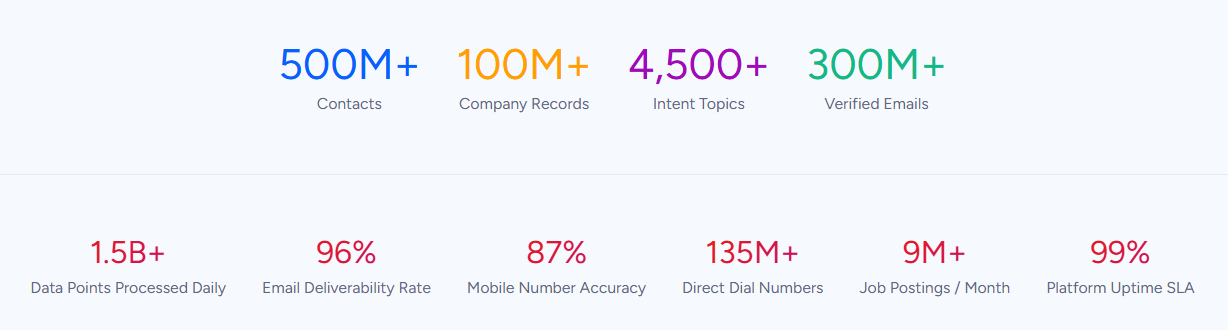
The data flows through a verification pipeline backed by 300+ human researchers and automated ML scanning of 28 million site domains daily, hitting up to 95% accuracy on first-party data.
For a team deploying WalkMe to drive CRM adoption, this fills the layer underneath. WalkMe can guide a rep through opportunity creation, enforce field completion, and validate data entry, but the CRM needs contacts to reach and companies to target before any of that guidance matters.
ZoomInfo provides department org charts with decision-makers' direct dials and emails, 300+ company attributes for segmentation, and contact tracking with job-change alerts. In a Fortune 500 competitive RFP analyzing 25 million contacts across vendors, an independent consultant concluded that "no other competitor came even close."
The data quality is externally validated: Leader in the Forrester Wave for Intent Data Providers, Q1 2025, Leader in the Gartner Magic Quadrant for ABM Platforms for the second consecutive year, and the only vendor positioned in the Gartner Customers' Choice quadrant with a 4.7/5.0 rating.
ZoomInfo Intent and WebSights: Signals that show who is in-market before outreach begins
WalkMe's analytics reveal how your team uses internal software.
ZoomInfo Intent reveals how your target market behaves externally, tracking signals from 210 million IP-to-Organization pairings and 6 trillion+ new keyword-to-device pairings sourced monthly.
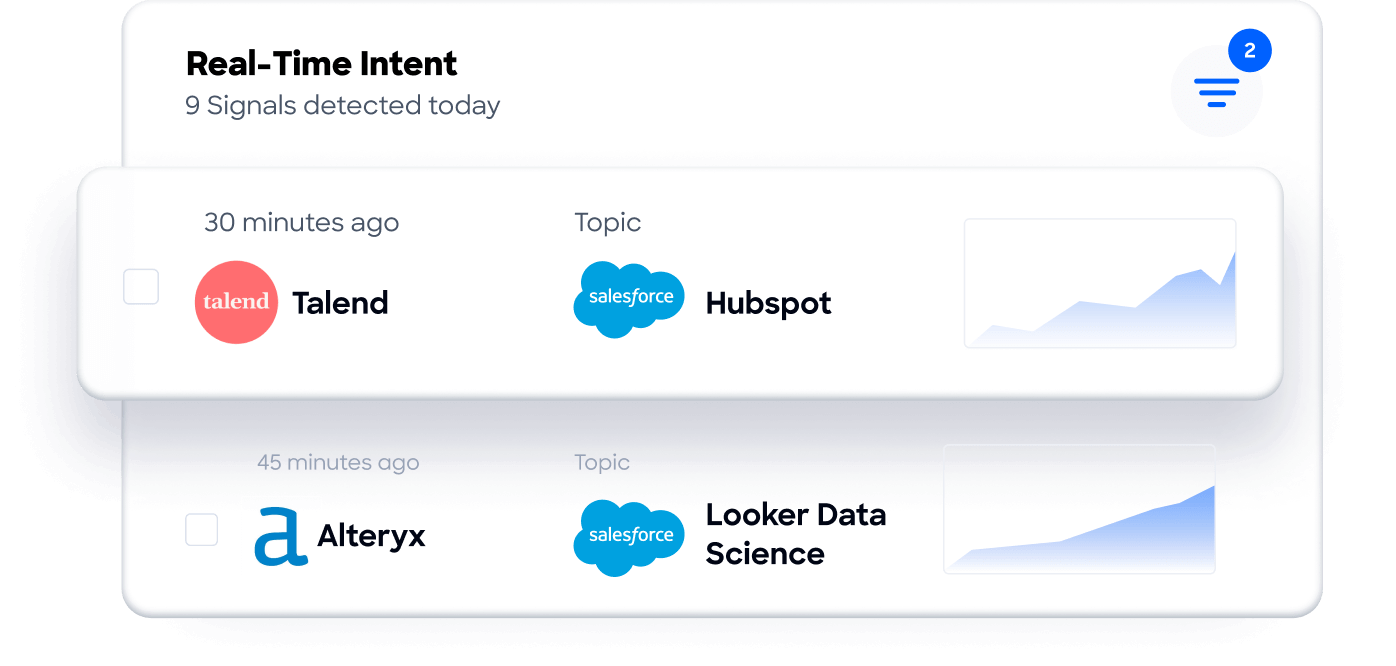
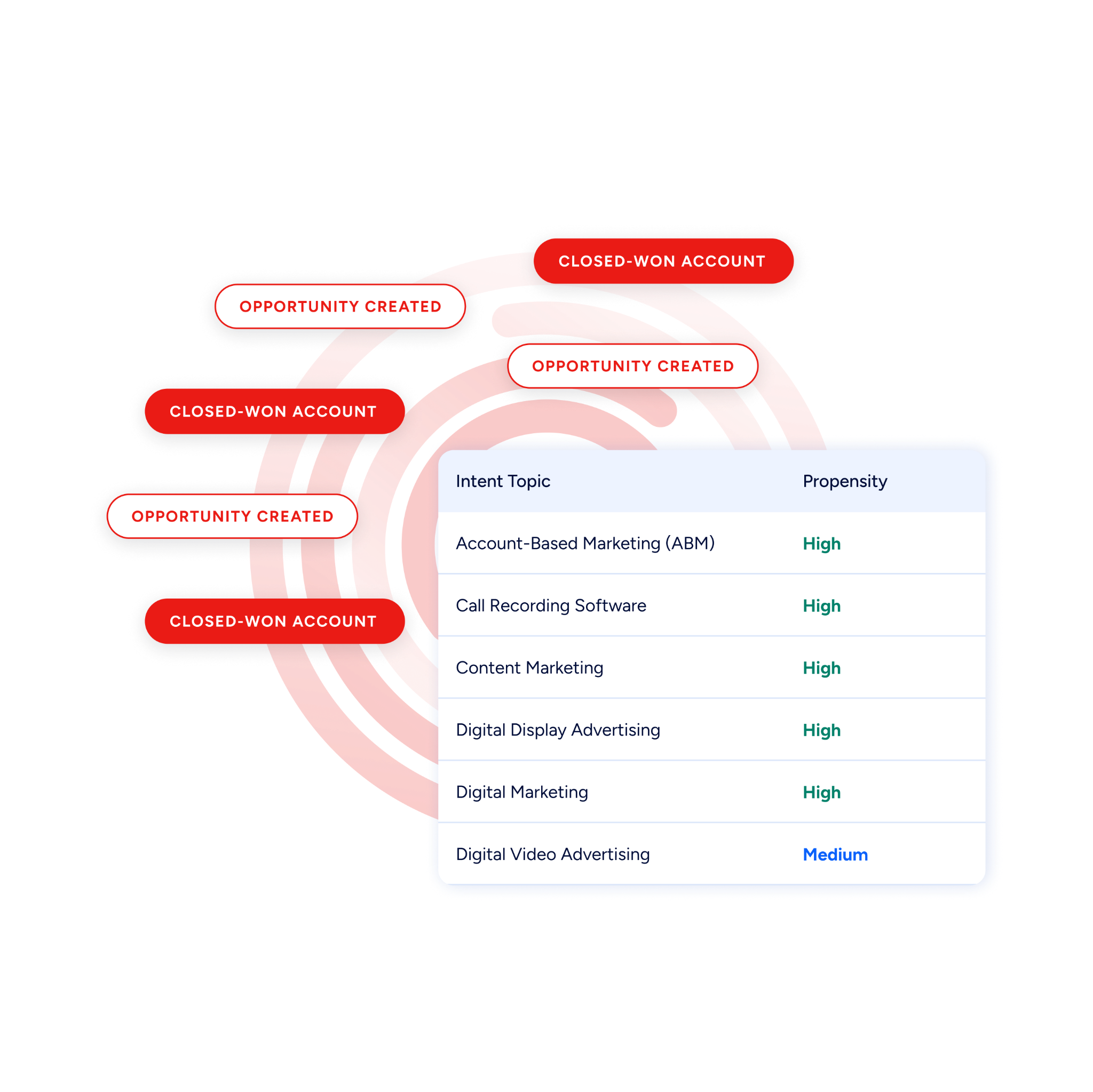
Guided Intent, exclusive to ZoomInfo, identifies the topics historically correlated with deal success rather than requiring manual topic selection.
On the website side, WebSights resolves anonymous website traffic to companies with Automatic Traffic Filtering that distinguishes real visitors from bots.
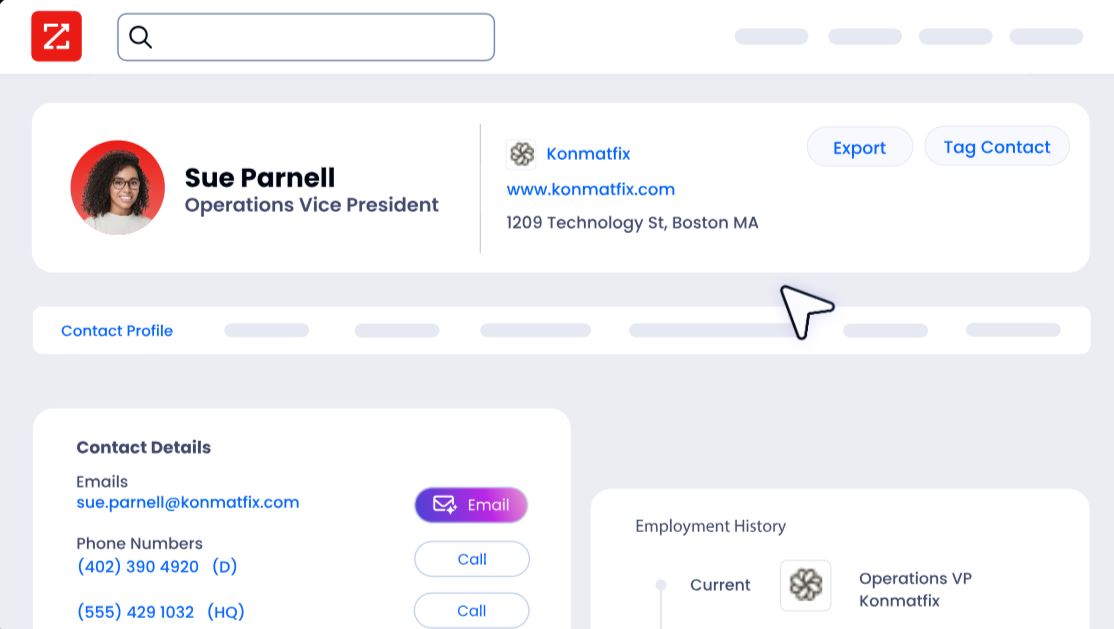
ZoomInfo Marketing goes further with contact-level visitor identification, identifying who specifically visited (not just which company) and triggering personalized outreach. Where WalkMe tracks which internal apps your employees open, ZoomInfo tracks which external prospects are visiting your website and researching your category.
ZoomInfo's GTM Context Graph and Chorus: Intelligence from conversations and deals
WalkMe captures workflow analytics (whether a rep completed the right steps in Salesforce).
ZoomInfo's GTM Context Graph captures why deals move or stall by processing 1.5B+ data points daily, combining B2B data with CRM records, conversation intelligence from Chorus, email interactions, and behavioral signals into a single intelligence layer.
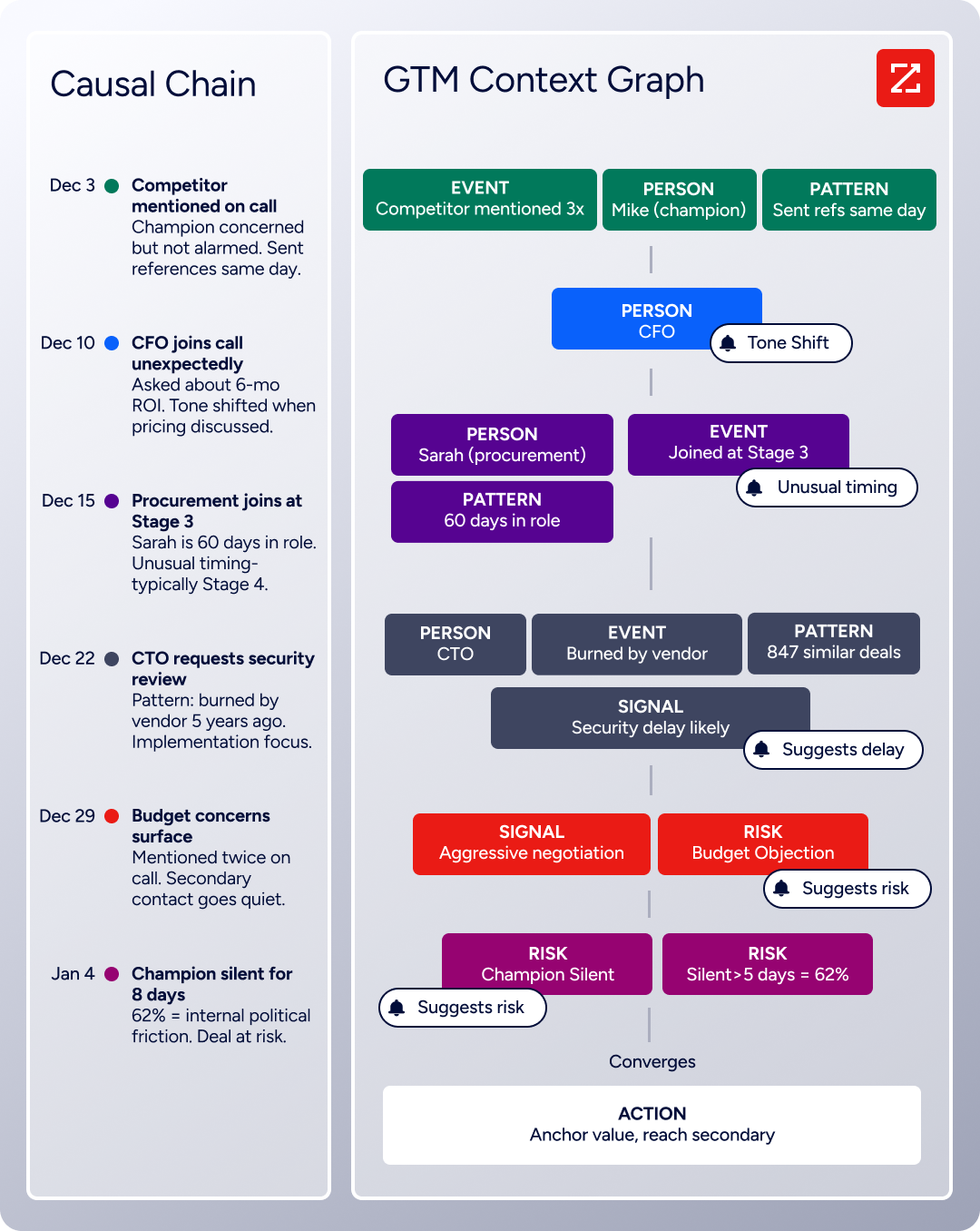
Chorus, ZoomInfo's conversation intelligence engine backed by 14 technology patents, records and transcribes sales calls, surfaces AI-generated insights (talk ratios, sentiment, objection detection), auto-syncs deal intelligence to the CRM, and provides coaching scorecards and clip sharing.
WalkMe can guide a rep through post-call data entry; Chorus captures and reasons about the call itself, extracting the context that CRM fields cannot hold: why a champion went quiet, what a competitive mention means for deal risk, and which objection patterns predict closed-lost outcomes.
Seismic's sales team attributed 39% of active pipeline to opportunities identified or influenced by ZoomInfo signals, boosted productivity by 54%, and saved 11.5 hours per week per seller. (Seismic Case Study)
ZoomInfo GTM Workspace and GTM Studio: Execution and orchestration surfaces for revenue teams
GTM Workspace is ZoomInfo's seller front-end, built on the GTM Context Graph. It provides a Book of Business view across CRM, ZoomInfo data, and market intelligence, with AI agents automating account research, outreach, CRM updates, and signal monitoring.
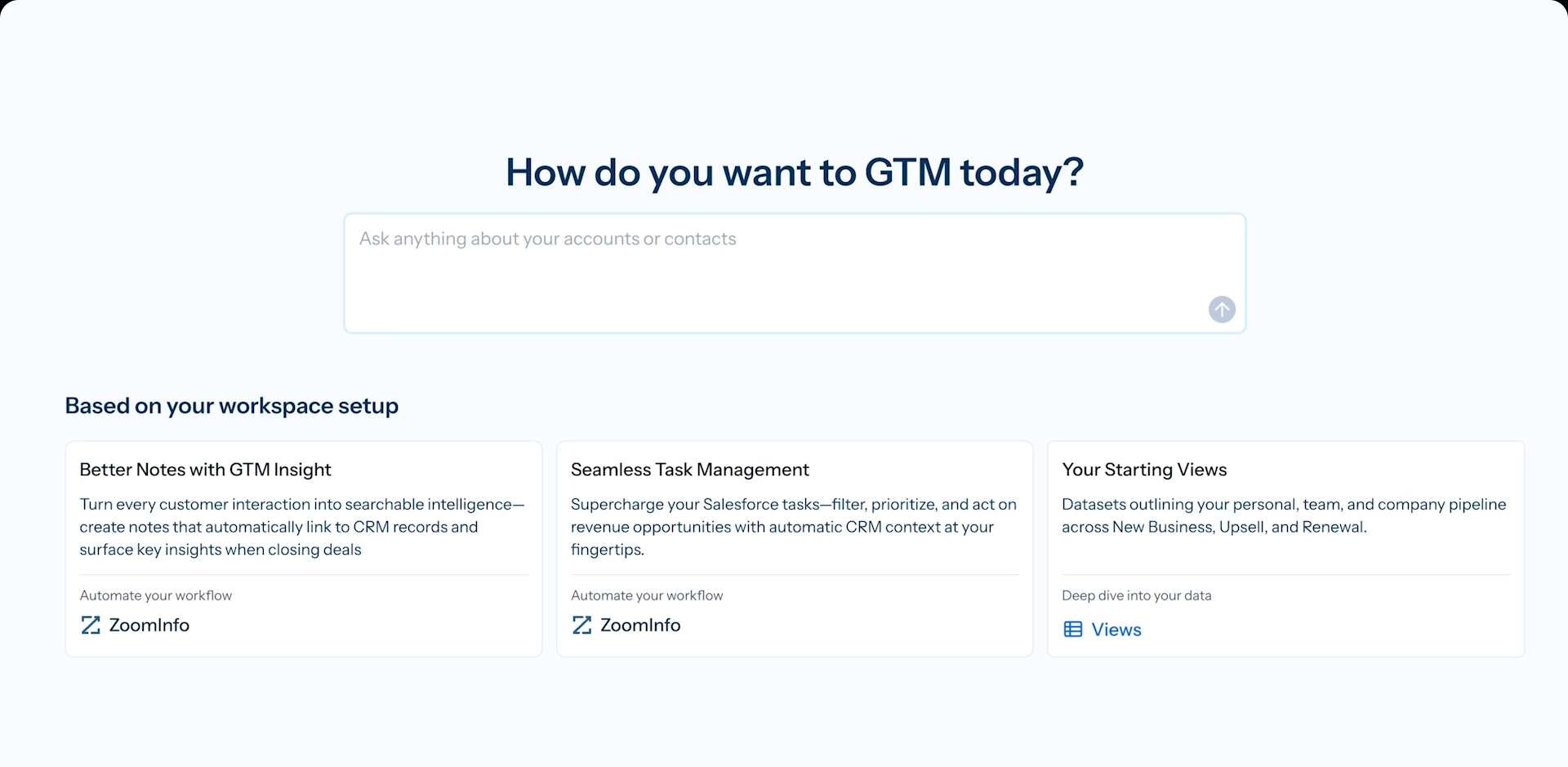
An Action Feed streams in-market buyers matched to target criteria with pre-drafted actions on every signal.
GTM Studio addresses the marketing orchestration gap. Marketers, RevOps teams, and GTM engineers can build audiences using natural language, enrich with first- and third-party data, define triggers, and activate plays across channels without engineering support.
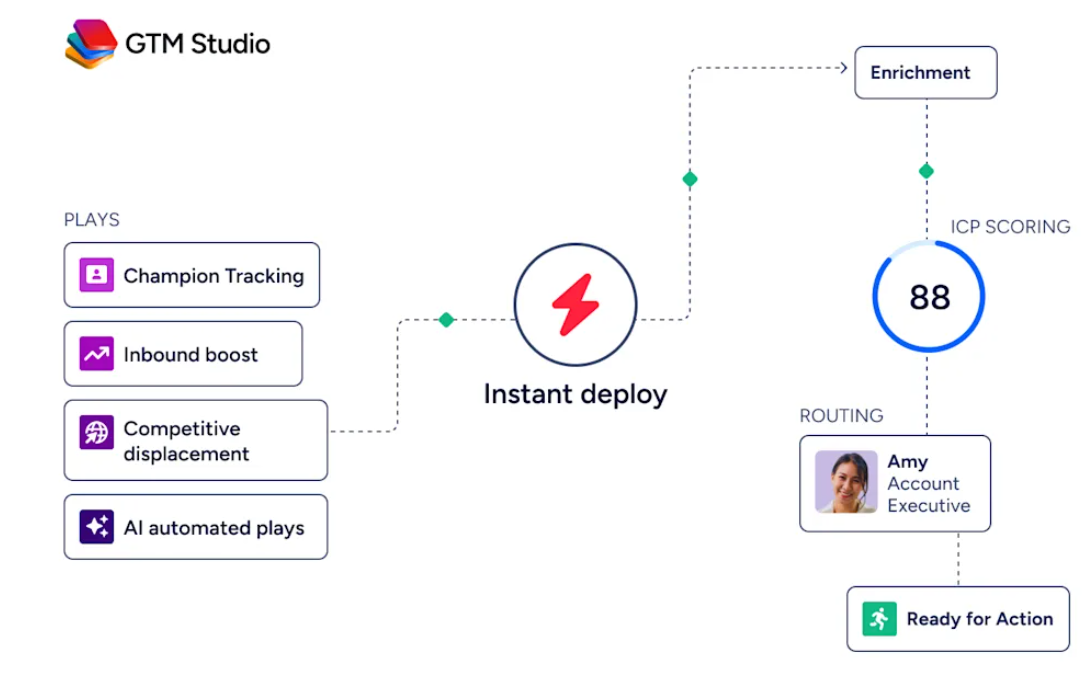
Pre-built GTM plays cover inbound acceleration, champion tracking, competitive displacement, and ICP targeting. Expansion playsthat used to take 3 weeks now launch in 30 minutes. ZoomInfo Agent Teams take this further, running complete GTM plays end to end: coordinated specialist agents share context, work from each account's current state, and act within the approvals and limits you set, in GTM Studio and headless through GTM.AI.
ZoomInfo's Free Entry Points: A way to evaluate before committing
ZoomInfo offers what WalkMe does not: a path into the platform without a sales conversation. ZoomInfo Lite is a permanent free tier with access to ZoomInfo's B2B database, 10 monthly export credits, individual and company searches, a Chrome extension, and WebSights Lite with up to 10 website visitor reveals per day.
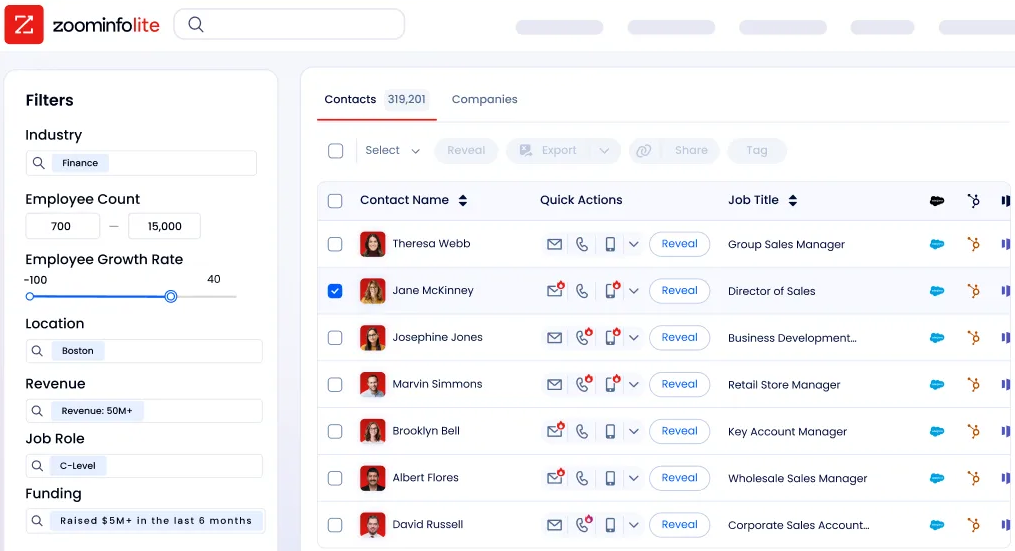
A separate 7-day free trial provides broader access with no credit card required.
Final Summary
WalkMe covers the full range of digital adoption: App Discovery maps the entire software landscape without per-app integrations, Insights and Form Analytics trace workflow friction down to the individual field, the Editor builds guidance that adapts to UI changes via DeepUI, WalkMe AI delivers contextual assistance on any screen, and Learning Arc brings training directly into the applications where work happens.
1It fits large enterprises deploying SAP, Salesforce, Workday, or ServiceNow at scale, with dedicated IT or digital adoption teams to build and maintain the program.
It does not extend into the data and intelligence layer underneath: no B2B contact database, no buyer intent signals, no conversation intelligence, no marketing orchestration, and no self-serve evaluation path.
If your adoption program sits on top of a revenue tech stack that needs accurate data, live buying signals, and conversation intelligence to function, that is the ground ZoomInfo covers.
Its 500M-contact, 100M-company database supplies the verified contacts that fill the CRM WalkMe guides users through. ZoomInfo Intent surfaces the accounts researching your category from 6 trillion+ keyword-to-device pairings monthly. Chorus captures and reasons about the sales conversations WalkMe cannot see.
And GTM Studio gives marketing teams the multi-channel orchestration and ABM capabilities that sit outside WalkMe's scope. WalkMe ensures your teams use the software; ZoomInfo ensures there is something worth using it for.
See what that data layer adds to your stack: start with ZoomInfo Lite for free, or get a demo to see verified contacts and live intent signals flow into the CRM your team already adopted.
FAQ
Does WalkMe work on any application?
WalkMe's DeepUI technology enables deployment across any web or desktop application without source code access or native integrations.
The platform has certified support for SAP, Salesforce, Workday, Microsoft Dynamics 365, ServiceNow, SAP SuccessFactors, SAP Concur, and SAP Ariba, and it extends to custom-built internal tools, SaaS applications, and legacy systems through its browser extension and desktop agent. Omnichannel DAP capability covers web, desktop, and mobile surfaces.
What is WalkMe's DeepUI technology?
DeepUI is WalkMe's proprietary AI layer that interprets application interfaces the way a human would, reading visual elements, layout structure, and interaction patterns rather than relying on brittle DOM paths or hardcoded element IDs.
When an application updates its UI, DeepUI re-identifies elements by their semantic meaning and visual context, so published guidance continues to function without manual testing or repair. It is the foundation that enables WalkMe's cross-application capabilities, including WalkMe AI's screen-reading and contextual awareness.
Does WalkMe offer a free trial or free plan?
No. WalkMe does not publish pricing, does not offer a freemium tier, and does not provide a standard self-serve trial. All engagement requires contacting sales. Contracts are non-cancelable for the full commitment term, fees are non-refundable except for WalkMe's material uncured breach, and the fee obligation is not conditioned on deployment or actual usage. Proof-of-concept engagements may be arranged through sales on a case-by-case basis.
ZoomInfo, by contrast, offers both ZoomInfo Lite (a permanent free tier) and a 7-day free trial with no credit card required.
How does WalkMe pricing work?
WalkMe uses a subscription license model based on a negotiated "Permitted Number" of End Users, Builders, and Target Applications. Pricing is not published; every engagement requires a signed Ordering Document referencing the Master License and Services Agreement. For SAP customers, a WalkMe Standard tier is included in SAP subscriptions, with WalkMe Premium available as an upgrade.
AI feature consumption is metered via SAP AI Units. Learning Arc requires a separate license. Overage fees apply if actual usage exceeds contracted limits.
Can WalkMe automate workflows without API access to the target application?
Yes. WalkMe's Workflow Automation operates at the UI layer, clicking buttons, selecting menus, and advancing screens inside target applications. Because it interacts with the user interface rather than through APIs, it works on any web-based application, including legacy systems with no API surface. This is distinct from traditional workflow automation tools that require native integrations or API access for each connected application.
Does WalkMe provide B2B contact data or buyer intent signals?
No. WalkMe is a digital adoption platform, not a data provider. Its analytics track internal software usage (which applications employees open, where they get stuck, which workflows they complete), but it does not include a B2B contact database, buyer intent signals, or website visitor identification. Teams using WalkMe to drive CRM adoption need a separate data platform for the contacts and intelligence that fuel those CRM workflows.
ZoomInfo's database of 500M contacts and 100M companies, combined with intent signals from 210 million IP-to-Organization pairings and 6 trillion+ keyword-to-device pairings sourced monthly, covers that layer.
What changed with the SAP acquisition?
SAP completed its acquisition of WalkMe in September 2024 for approximately $1.5 billion. WalkMe now operates as a wholly-owned SAP subsidiary with a WalkMe Standard tier embedded into SAP subscriptions. SAP stated that WalkMe's AI capabilities would "supercharge SAP's copilot Joule with context-aware and proactive help across workflows." WalkMe continues to support non-SAP applications (Salesforce, Workday, ServiceNow, Microsoft Dynamics), but product roadmap and go-to-market priority increasingly center on the SAP ecosystem. WalkMe Learning Arc is the designated successor to SAP Enable Now, reaching end of maintenance November 30, 2030.
Is WalkMe FedRAMP certified?
WalkMe holds FedRAMP Ready status, making it one of the first digital adoption platforms qualified for US federal government deployment. The platform also holds SOC 2 Type II, ISO 27001, ISO 27701, and multiple additional ISO certifications, along with GDPR, CCPA, HIPAA/HITECH compliance, and WCAG 2.1 AA accessibility compliance. A dedicated FedRAMP data center deployment is available with its own API endpoint.
