

You are rolling out Salesforce to 5,000 reps, migrating SAP, or trying to figure out why the Copilot licenses your organization bought six months ago show single-digit adoption. Whatfix is an AI-powered digital adoption platform that sits on top of enterprise applications to guide users through tasks in real time, track where adoption breaks down, and replicate live software for risk-free training. This breakdown covers every feature across Whatfix's three-product suite, how each works, who it serves, and which plan unlocks it.
Whatfix's feature set has you covered if:
You are onboarding large teams to complex enterprise software (Salesforce, SAP, Workday, ServiceNow) and need in-app guidance that replaces or supplements classroom training
You want to create interactive walkthroughs, tooltips, and self-help widgets without any engineering involvement
You need to track how users interact with applications, where they drop off in workflows, and which features go unused
You manage global deployments requiring localized guidance across multiple languages
You want a simulation environment where employees can practice workflows without touching production data
You need to support mixed environments: web apps, Windows and Mac desktop apps, mobile, and VDI/Citrix sessions
You'll reach the edges of its capabilities if:
You need verified B2B contact data, company intelligence, and org charts flowing into the CRM your team is being trained on
You want to identify which accounts are actively researching your product category before any rep reaches out
You need conversation intelligence that records, transcribes, and analyzes actual sales calls, not just whether reps completed a training flow
You want to orchestrate multi-channel outreach campaigns triggered by buyer signals rather than guide users through existing software
For those needs, the reference point is ZoomInfo: an AI GTM platform built on 500M contacts, 100M companies, and 135M+ verified phone numbers, with a GTM Context Graph that fuses B2B data with CRM records and conversation intelligence into a single layer that captures why deals move or stall.
After the feature breakdown, this article covers where Whatfix's scope ends and how ZoomInfo addresses the adjacent intelligence layer that makes enterprise software adoption pay off.
Whatfix Platform Overview
Source: Whatfix
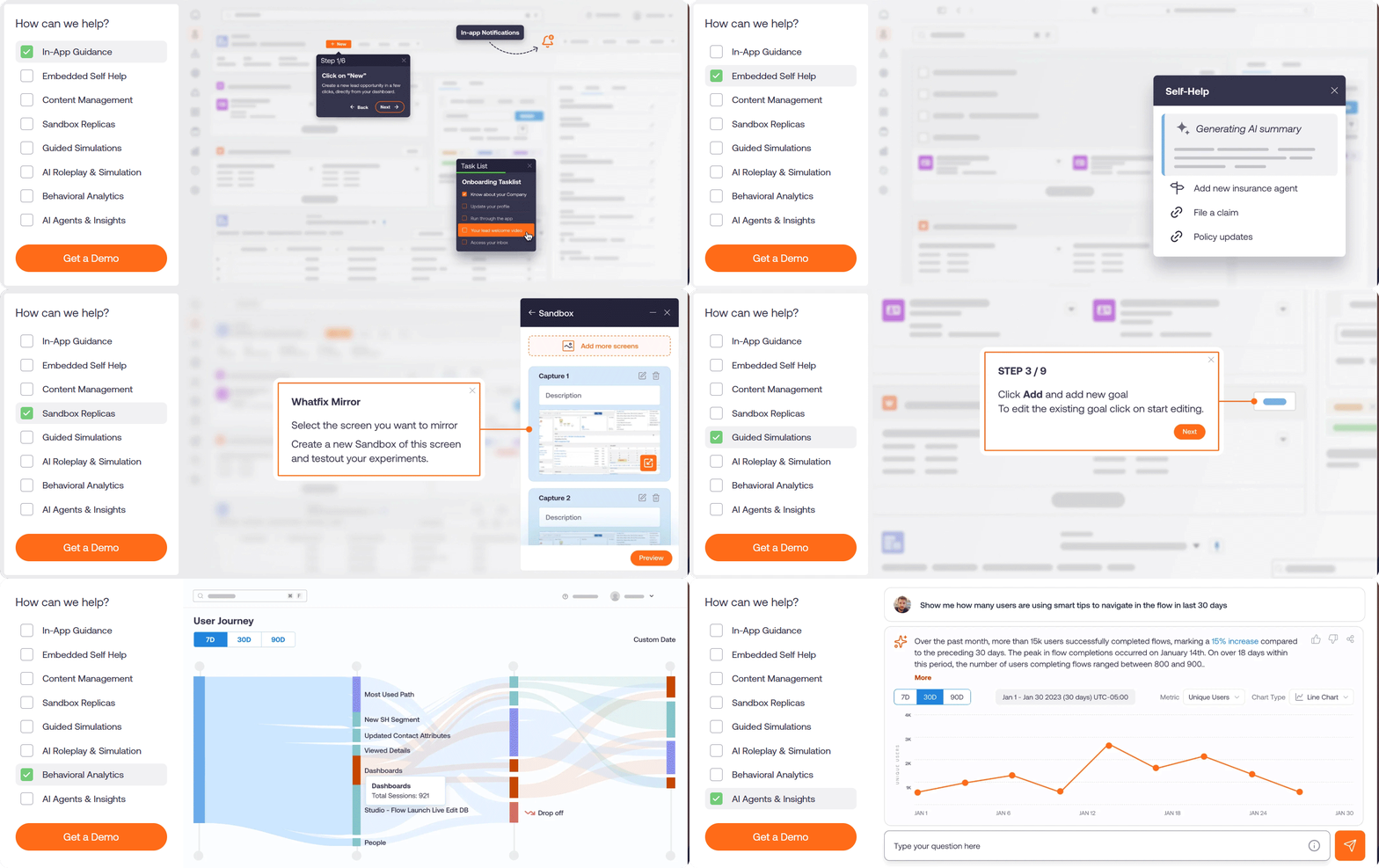
Whatfix positions itself as an enterprise software enablement platform, not just a training tool. Its stated mission is "Userization": the idea that technology should adapt to the user rather than the other way around. The platform targets L&D professionals, HR teams, sales enablement leaders, and product teams at large enterprises, with its strongest presence in banking, financial services, healthcare, insurance, and the public sector. Named customers include Experian, Mercedes-Benz, UPS, Cardinal Health, and ICICI Bank, with 700+ customers across 30+ countries, 80+ Fortune 500 clients, and a 99.5% CSAT score.
Analyst placements reinforce the market position: Leader in the Forrester Wave for Digital Adoption Platforms, Q4 2024 (highest score across 15 of 21 criteria), Gartner Customers' Choice for DAP for three consecutive years, and Everest Group PEAK Matrix Leader for six consecutive years.
The platform is organized around three products plus an AI layer:
Product | What It Does | Plan Structure |
|---|---|---|
In-app walkthroughs, tooltips, self-help, pop-ups, task lists, surveys | Standard, Premium, Enterprise | |
DAP (Mobile) | Guidance for mobile applications | Separate platform offering |
DAP (OS/Hub) | Desktop overlay for native OS applications | Separate platform offering |
Usage tracking, behavior analysis, friction identification | Standard (free with DAP Web), Premium, Enterprise | |
Application simulation, AI roleplay, and hands-on training | Standard, Premium, Enterprise | |
ScreenSense context engine and three AI Agents (Authoring, Guidance, Insights) | Integrated across all products |
Whatfix In-App Guidance and Content Authoring
The guidance suite is the feature most buyers encounter first, and it defines the platform. Whatfix operates as an overlay injected into the target application (no changes to the underlying app's source code required), surfacing step-by-step instructions, contextual tips, and searchable help inside the software a user is working in.
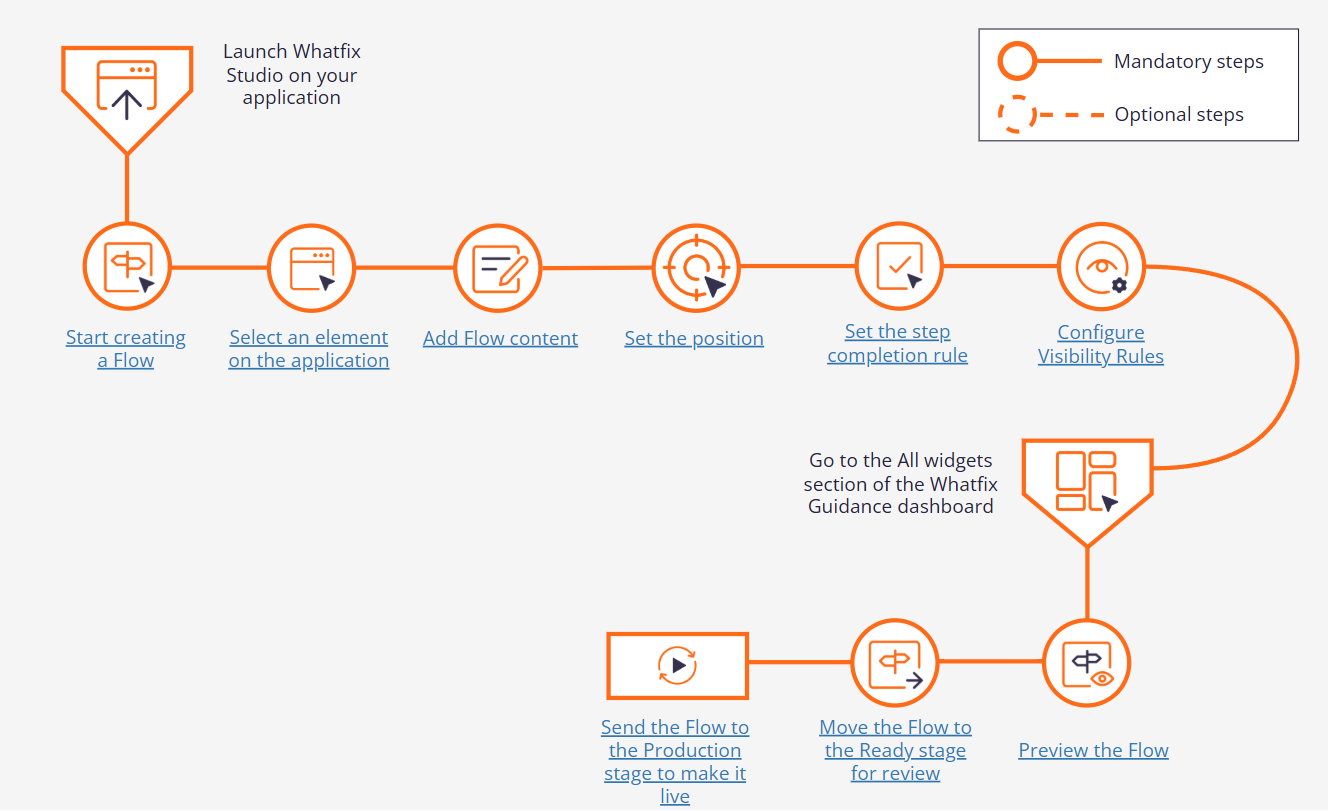
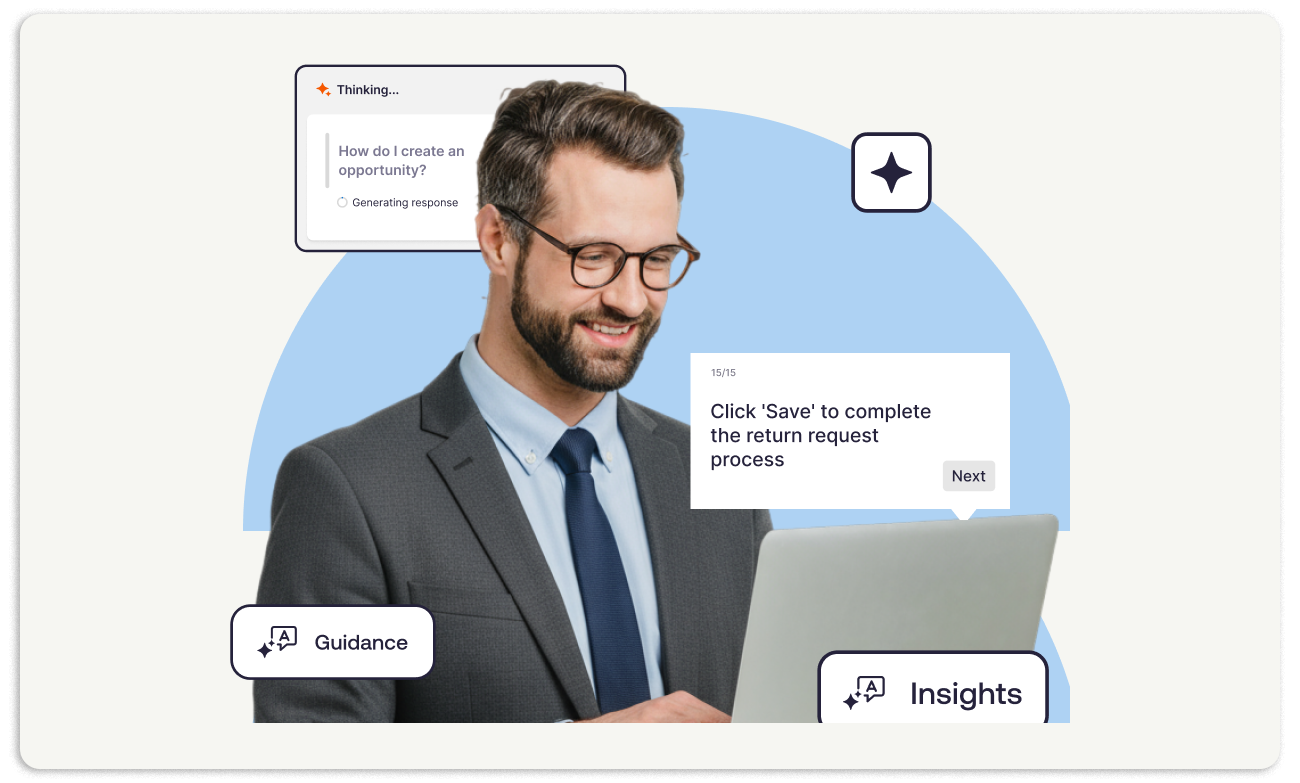
Flows are the core building block: interactive, step-by-step walkthroughs displayed as a layer over the application. Each Flow walks a user through a specific task (submitting a purchase order, updating a CRM record, configuring a report), highlighting each UI element in sequence with a spotlight and an instruction balloon.
Flows support branching paths, optional steps, linked sub-Flows, and automated triggering based on user actions. Users can launch them manually from the Self Help widget, or Whatfix can trigger them automatically when it detects a user on a relevant screen.
Source: Whatfix
The Self Help widget is the always-available search layer embedded inside the application.Users type a question in natural language, and Self Help returns matching Flows, knowledge base articles, links, and videos.
QuickRead, powered by the Guidance Agent, surfaces one-line AI-generated summaries in the widget so users can get an answer without launching a full walkthrough.The widget personalizes content based on each user's usage history and integrates with existing ticketing systems, live chat, and chatbots so users can escalate without leaving the application. Branding is configurable with light and dark modes, drag-and-drop repositioning, and custom styling.
Smart Context+ makes the guidance contextual rather than manual. It detects where a user is within an application and surfaces only the guidance relevant to that location and workflow. A user navigating to the Salesforce Opportunities page sees guidance about pipeline management, not about creating a contact.
This contextual matching runs on ScreenSense (covered in the next section) and is available on Premium plans and above.
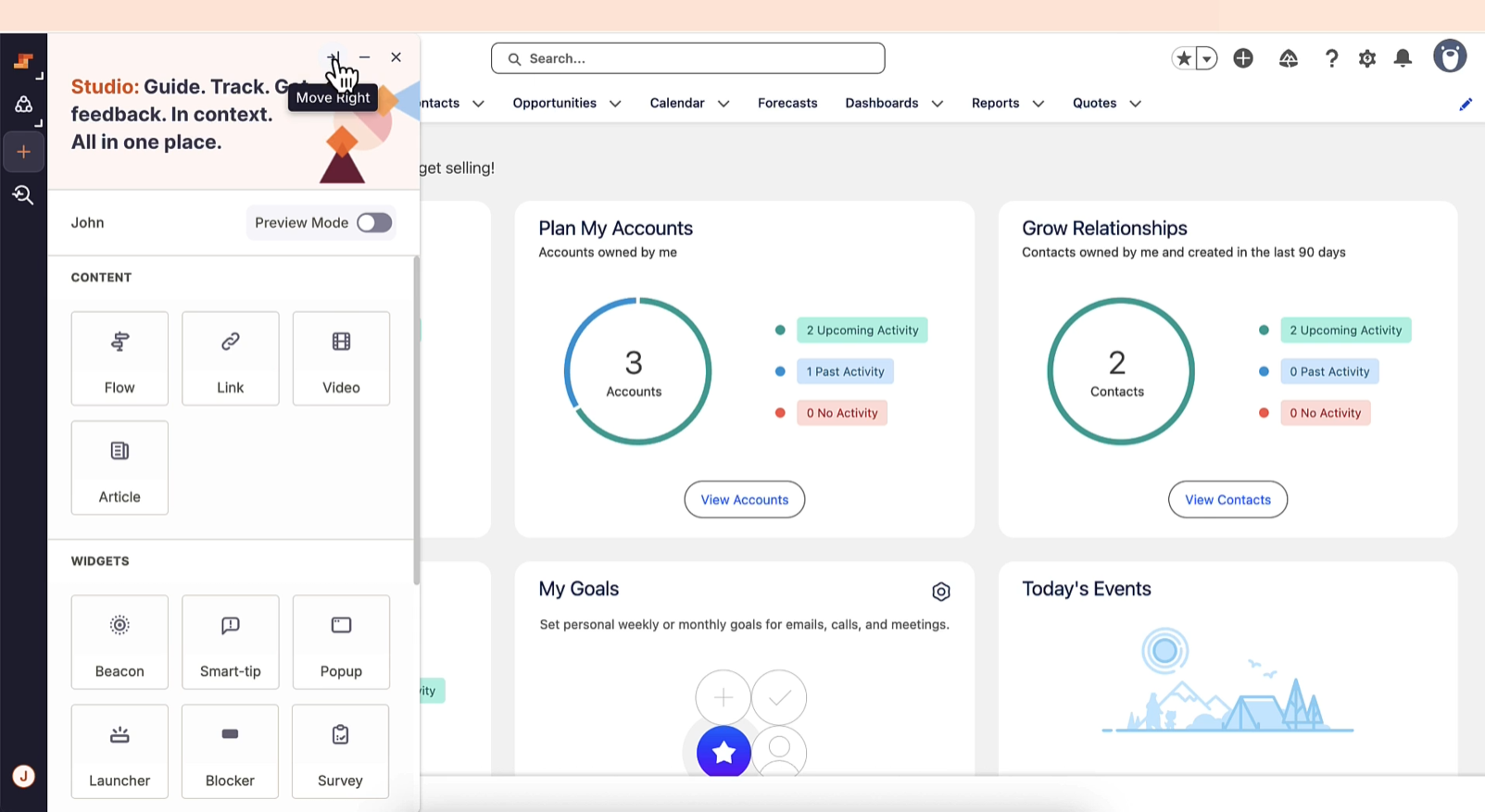
Content creation happens in Whatfix Studio, a no-code, browser-based editor. Authors build Flows by clicking through the live application, and Studio records each interaction as a step. The editor targets L&D professionals and business admins, not developers.
Source: Whatfix
Content Lifecycle Management adds the governance layer enterprises need: multi-level approval workflows, staging environments for testing before publication, automated testing of Flows against UI changes (Auto Testing+), one-click rollback, and change impact analysis. When an application's UI changes and a Flow breaks, Auto Testing+ detects the issue and sends email notifications with fix recommendations.
Adoption Everywhere solves a problem most DAPs ignore: content trapped inside the in-app overlay. With Adoption Everywhere, a single authoring session in Studio produces Flows that can also export as videos, slide decks, PDFs, ODT documents, and how-to articles. An L&D team building a CRM onboarding walkthrough gets the in-app Flow and the LMS-ready video from the same effort.
The guidance suite includes several additional content types. Smart Tips and Beacons provide contextual tooltips and hotspot markers on specific UI elements, offering inline explanations without launching a full Flow. Pop-Ups serve as announcement modals for release notes, policy updates, or feature promotions.
Launchers are customizable buttons that give users one-click access to Flows, Pop-Ups, and videos. Task Lists surface onboarding or workflow checklists that guide sequential task completion.
Surveys are delivered in-app during work: the Standard plan includes out-of-the-box NPS and usability surveys, while Premium adds custom survey creation. Content Aggregation pulls articles from existing knowledge repositories into the Self Help widget, with a 2,000-article cap on Standard and unlimited on Premium.
Language Translation supports global deployments with manual translation on Standard and auto-translation on Premium. Guidance Analytics tracks engagement with every piece of guidance content, including Flow completion rates, drop-off points, and behavioral data, giving authors the feedback loop to iterate.
Whatfix AI: ScreenSense and AI Agents
Whatfix's AI layer sits beneath all three products (DAP, Product Analytics, Mirror) rather than bolting onto one. It is organized around a proprietary context engine and three task-specific agents.
ScreenSense, unveiled in February 2025, is a patented context-and-intent engine built on a Computer Use model trained on graphical user interface interactions. It operates on three pillars: Context (identifies which screen a user is on and what they are interacting with, across any application or device), Intent (interprets behavioral signals to determine whether a user is stuck, exploring, or completing a task), and Action (triggers the appropriate guidance, search result, or AI tool call).
At the element level, ScreenSense uses LLMs to generate CSS selectors that identify even hard-to-target UI elements and automate interactions reliably. It also adapts to UI changes in position, language, and color, reducing manual maintenance when target applications update. ScreenSense maintains context continuity across different applications on any device, so a workflow that spans Salesforce and SAP does not lose track of the user.
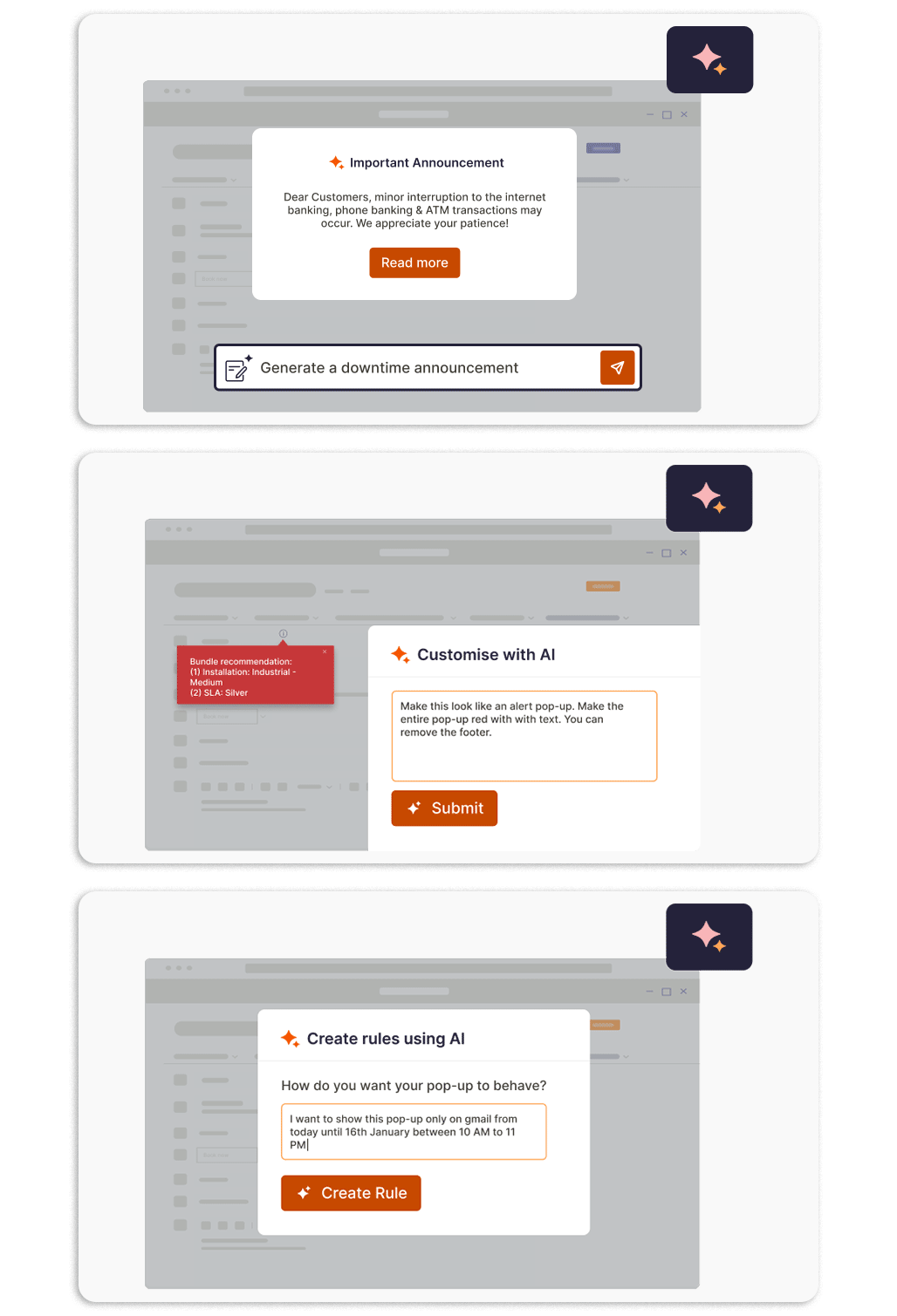
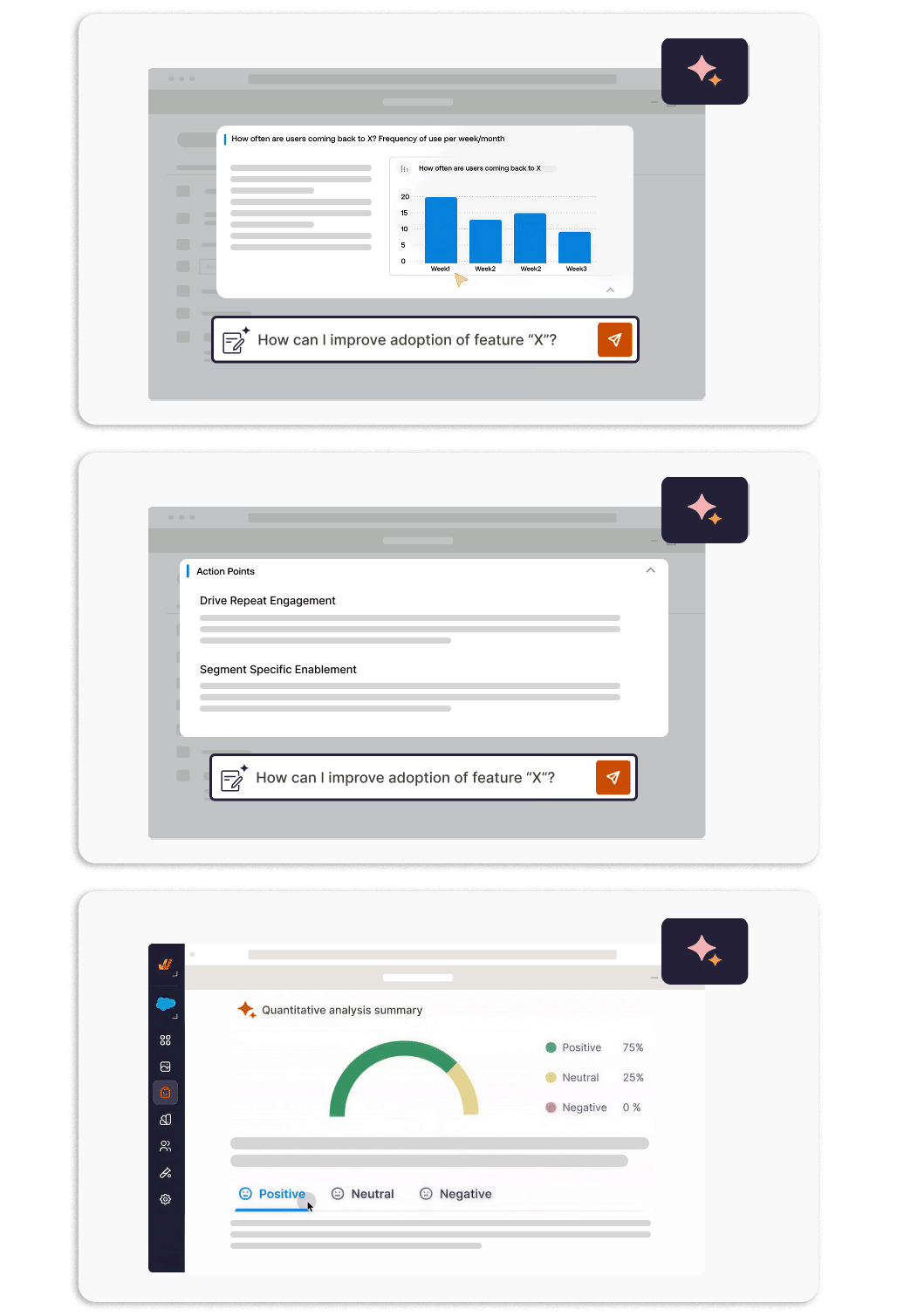
The three AI Agents, launched in September 2025, execute on the context ScreenSense provides. The Authoring Agent turns natural-language prompts into configured Whatfix content (Pop-ups, Flows, Visibility Rules) without technical expertise.
Source: Whatfix
Its Quick Capture Flows feature records each step as the author clicks through an application once, automatically building a complete Flow for review and editing. The agent also generates AI Pop-ups from a single prompt (brand-compliant, multi-template) and converts natural-language targeting descriptions into structured visibility logic across Smart Tips, Beacons, Launchers, Pop-ups, Surveys, and Task Lists, with PII scrubbed from prompts before submission to the LLM.
The Guidance Agent delivers contextual AI-generated answers within the user's active workflow. It powers the QuickRead feature inside the Self Help widget, summarizing documentation and guiding users step-by-step through back-office tasks without requiring them to leave the application or search external knowledge bases.
The Insights Agent accepts natural-language questions about behavioral analytics and translates them into visual charts and qualitative summaries. Its Deep Think capability interprets data and recommends next steps, functioning as a dedicated AI analyst accessible to non-technical stakeholders.
Source: Whatfix
The AI layer includes several additional capabilities. Intent Matching displays content based on the sentiment or intent a user expresses in a text field within the application. AI Voiceover adds narration to Flow video exports.
Qualitative Survey Analysis summarizes positive and negative user sentiment from survey responses automatically.
Whatfix Product Analytics: Usage Tracking and Behavior Analysis
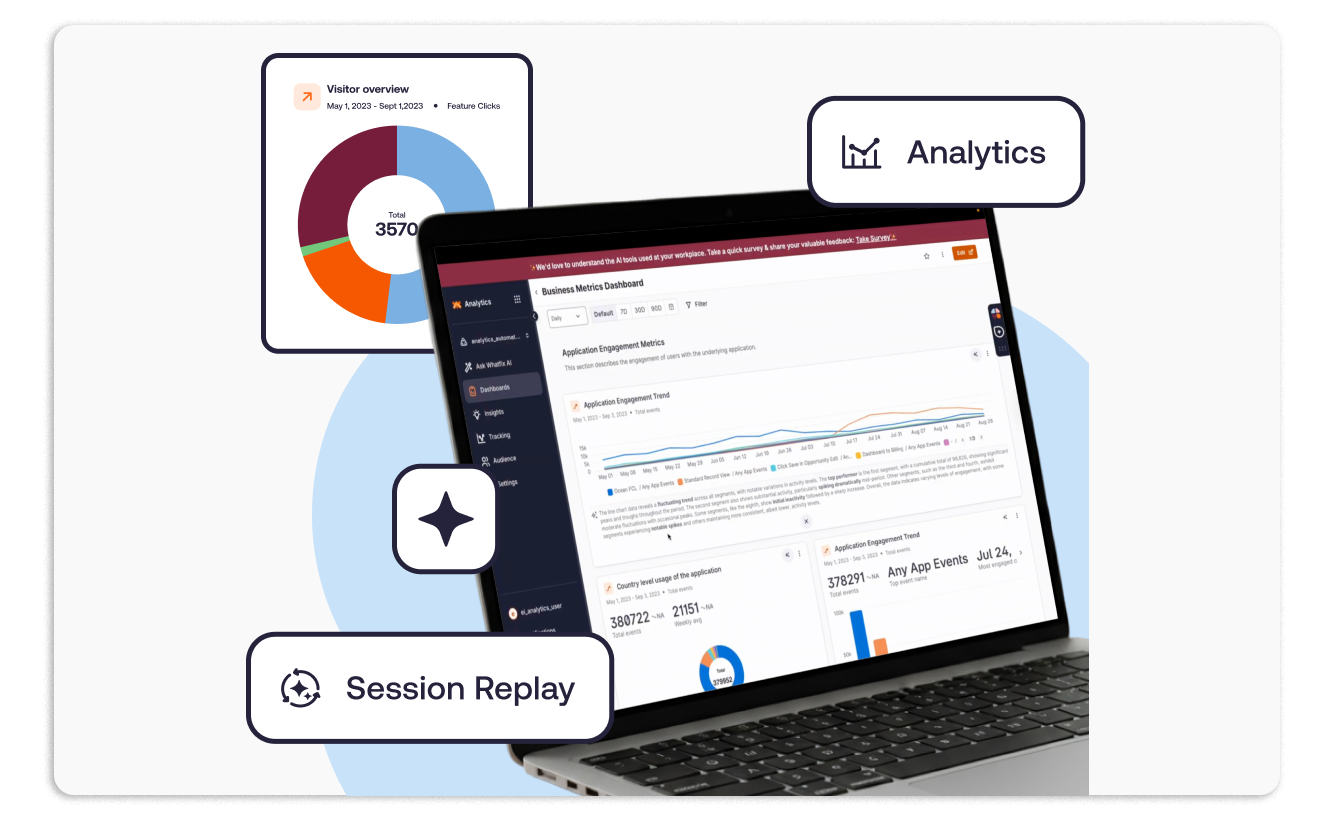
Whatfix Product Analytics answers a question the DAP alone cannot: not just whether users received guidance, but how they actually behave inside the application. It is structured around three modules (Track, Analyze, Act) that form a closed loop from data capture through diagnosis to intervention.
Source: Whatfix
AutoCapture is the foundation. It logs every user interaction (button clicks, hovers, navigation) without requiring developers to write event-tracking code. Teams define named User Actions for specific interactions, attach User Attributes (role, department, account type) to profiles, and append Event Attributes (page title, URL) to individual events for richer context, all without code. This removes the bottleneck where analytics depended on engineering to instrument events.
The Analyze layer turns raw interaction data into usable insight. Funnels trace user progression through key process steps (submitting a purchase order, completing an onboarding sequence) and identify where drop-offs occur. User Journey maps visualize how different user populations navigate through an application, revealing behavioral patterns that manual observation would miss.
Session Replay provides full visual playback of individual user sessions, so a training manager can watch where a new hire got stuck in a workflow. Cohorts group users by shared behavior or attributes into dynamic segments that can drive analysis and trigger differentiated in-app experiences (showing different guidance to power users than to first-week employees, for example).
Trend Insights convert raw engagement event data into time-series charts with minimal configuration. Customizable dashboards centralize KPIs across all product metrics and adoption health signals.
The Act module closes the loop. When Product Analytics identifies a drop-off in a funnel or an underused feature, teams can create Whatfix DAP guidance content (Flows, Smart Tips, Self Help entries) from within the analytics workflow, without switching tools. Behavioral data also feeds Feature Prioritization and Product Monitoring, giving application owners a structured method for deciding where to invest attention.
In-App Surveys with AI-powered qualitative analysis can blend with quantitative behavioral data in the same platform, so teams get both what users do and why they do it. The Standard Product Analytics plan is included free with any DAP Web & Desktop purchase; Premium and Enterprise add a named customer success manager and multi-app support.
Whatfix Mirror: Application Simulation and Training
Whatfix Mirror addresses an obstacle that enterprises with complex software stacks know well: giving employees a safe place to practice. Traditionally, this requires maintaining separate test environments with additional licenses, provisioned user accounts, permissions management, and dedicated infrastructure. Mirror eliminates that overhead.

Source: Whatfix
Mirror works by capturing a sequence of screens and actions from a live web application and connecting them to create an interactive replica. The captured sequence becomes a standalone simulation that runs independently from the live system, accessible through a shared link or an LMS integration. Learners navigate the simulation as if they were in the real application, completing workflows and making decisions without risk to production data. No training accounts need to be provisioned in the actual application.
The simulation environment also serves as a foundation for Whatfix DAP guidance. Training authors can overlay DAP content (Flows, Smart Tips, guided walkthroughs) on top of the simulated screens without affecting the live application. The same guidance content works in both the live app and the simulation, so organizations do not need to maintain two separate content libraries.
AI-powered Roleplay adds a conversational layer. Simulations combine with adaptive AI conversations so learners can rehearse real-world interactions (sales calls, customer support scenarios, HR interviews) inside the simulated environment. This targets use cases where the skill is not just navigating the software but handling the conversation that happens alongside it.
Assessments evaluate learner proficiency using interactive evaluations built on existing simulations. They track accuracy, completion rates, and time taken, delivered without assistance so teams can measure actual competency rather than guided completion.
Mirror Analytics tracks simulation usage, learner engagement, flow completion, and ROI metrics. Whatfix works with customers to define goals and measure key metrics before and after Mirror implementation, giving L&D teams a structured method to demonstrate training ROI. Simulations are distributed through any LMS or via shared links, and a centralized Mirror Dashboard manages all simulation content.
Whatfix Platform Coverage, Integrations, and Security
Whatfix is one of the few DAPs with native support across web applications, desktop applications (Windows and Mac), mobile, and VDI/Citrix environments under a single platform. Most DAPs cover web applications only, which leaves enterprises running legacy ERP clients, desktop-based financial tools, or Citrix-hosted environments without coverage. VDI and offline mode are Enterprise-tier-only features.
Source: Whatfix
The platform integrates with enterprise applications through its Integration Hub, which supports bidirectional data exchange with Salesforce, Workday, ServiceNow, SAP SuccessFactors, Oracle, Amplitude, FullStory, and Confluence. Analytics and BI integrations cover Google Analytics, Heap, Quantum Metric, Power BI, Microsoft Excel, and Google Sheets. The platform complies with SCORM 1.2 and xAPI 1.0, enabling export to any conformant LMS, with named LMS integrations including SAP Litmos, Docebo, and LearnUpon. The Standard plan limits integrations to two; Premium and Enterprise offer unlimited.
Source: Whatfix
Integration Hub setups require backend configuration by Whatfix and cannot be self-configured. No iPaaS connectors (Zapier, Make, Workato) are documented; integrations run through Whatfix's support team.
Whatfix exposes a REST API (Beta v1.0.0) covering content management (CRUD for Flows, Smart Tips, and other content types), user attribute management, enterprise integration attributes, analytics reports (engagement summaries, Flow completion rates, Self Help effectiveness), and audit logs.
The API uses a proprietary key-based authentication scheme with two required headers per request and supports three regional endpoints: US default, EU for data residency, and an alternative path. The API token feature must be enabled by Whatfix support before any credentials can be generated, and rate limiting is enforced with HTTP 429 responses on breach. No official SDKs are published; developers interact with the API via direct HTTP calls.
On security, Whatfix holds SOC 2 and ISO 27001:2013 certifications and maintains a VPAT/Section 508 certification (renewed annually) for US federal procurement. SSO, IP whitelisting, and data residency configuration are available on all plans. The platform adheres to WCAG 2.1 AA accessibility standards with support for JAWS, NVDA, and Apple VoiceOver. A Whatfix Trust Center provides centralized access to security policies and compliance documentation. Whatfix serves regulated industries including banking, healthcare, insurance, and the US federal sector.
Support runs 24x5 (weekdays) via Zendesk ticketing, live chat from inside Whatfix Studio, and email. A named customer success manager is included on Premium and Enterprise plans only. Self-paced training and certification are available through Whatfix University, included on all plans.
Where Whatfix Stops: The Gaps
Whatfix solves the adoption problem: getting enterprise users to use the software they have been given. It does that well. But adoption is one layer in a broader stack, and Whatfix's scope is deliberately bounded. The following capabilities sit outside its feature set, and each is a need that the same enterprise buyer investing in digital adoption will encounter.
No B2B contact data, company intelligence, or data enrichment. Whatfix guides users through CRM workflows, but it does not supply or verify the contact records, company data, org charts, or phone numbers those workflows depend on. An enterprise investing in Salesforce adoption still needs the data layer that makes Salesforce productive: verified emails that land, direct dials that connect, and company attributes that segment accurately. Whatfix measures whether reps use the CRM correctly; a separate platform must ensure the CRM contains data worth acting on.
No buyer intent or market signals. Product Analytics tracks how internal users interact with enterprise software. It does not track which external accounts are researching your product category across the web, which competitors they are evaluating, or when buying committees are forming. Internal adoption signals (Flow completion rates, feature usage, funnel drop-offs) and external market signals (intent data, website visitor identification, topic-level research activity) are different layers of intelligence.
No conversation intelligence. Whatfix can measure whether a rep completed an onboarding flow, used a specific feature, or followed a guided workflow. It cannot record, transcribe, or analyze an actual sales call to understand why a deal accelerated or why a champion went quiet. Training completion and selling effectiveness are measured differently, and the gap between them is where conversation intelligence sits.
No outreach orchestration or campaign management. Whatfix guides users through tools they already have. It does not send emails, sequence outreach, manage advertising audiences, or orchestrate multi-channel campaigns triggered by buyer signals. Enterprises that deploy Whatfix to improve adoption of their sales and marketing platforms still need the execution layer that turns intelligence into pipeline.
How ZoomInfo Covers the Gaps
Whatfix ensures your team can use enterprise software. ZoomInfo ensures the intelligence flowing through that software is comprehensive, verified, and actionable. The two platforms solve different problems for the same enterprise buyer, and each is stronger when the other is present.
ZoomInfo's B2B Data Platform: Verified contacts and company intelligence for the applications your team just learned to use
ZoomInfo operates a B2B data platform of 500M contacts, 100M companies, 135M+ verified phone numbers, 120M direct-dial phone numbers, and 200M+ verified business email addresses. The data flows through a verification pipeline backed by 300+ human researchers and automated ML scanning 28 million site domains daily, reaching up to 95% accuracy on first-party data.
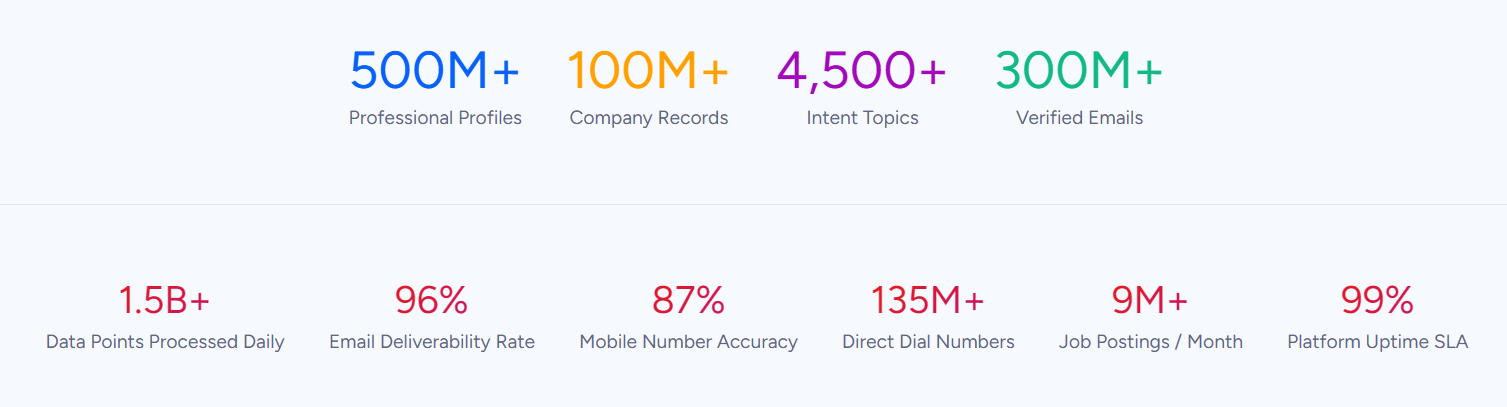
For an enterprise that has invested in CRM adoption, this fills the data layer. The best-trained Salesforce user still underperforms if their CRM holds stale emails, disconnected phone numbers, and incomplete company records. ZoomInfo provides 300+ company attributes for market segmentation, department org charts with decision-makers' direct dials, contact tracking with job-change alerts, and technographic profiles covering 30,000+ technologies across 200+ categories for 30+ million companies. In a Fortune 500 competitive RFP analyzing 25 million contacts across vendors, an independent consultant concluded that "no other competitor came even close."
ZoomInfo Intent and WebSights: Market signals that show who to reach before your reps open the CRM
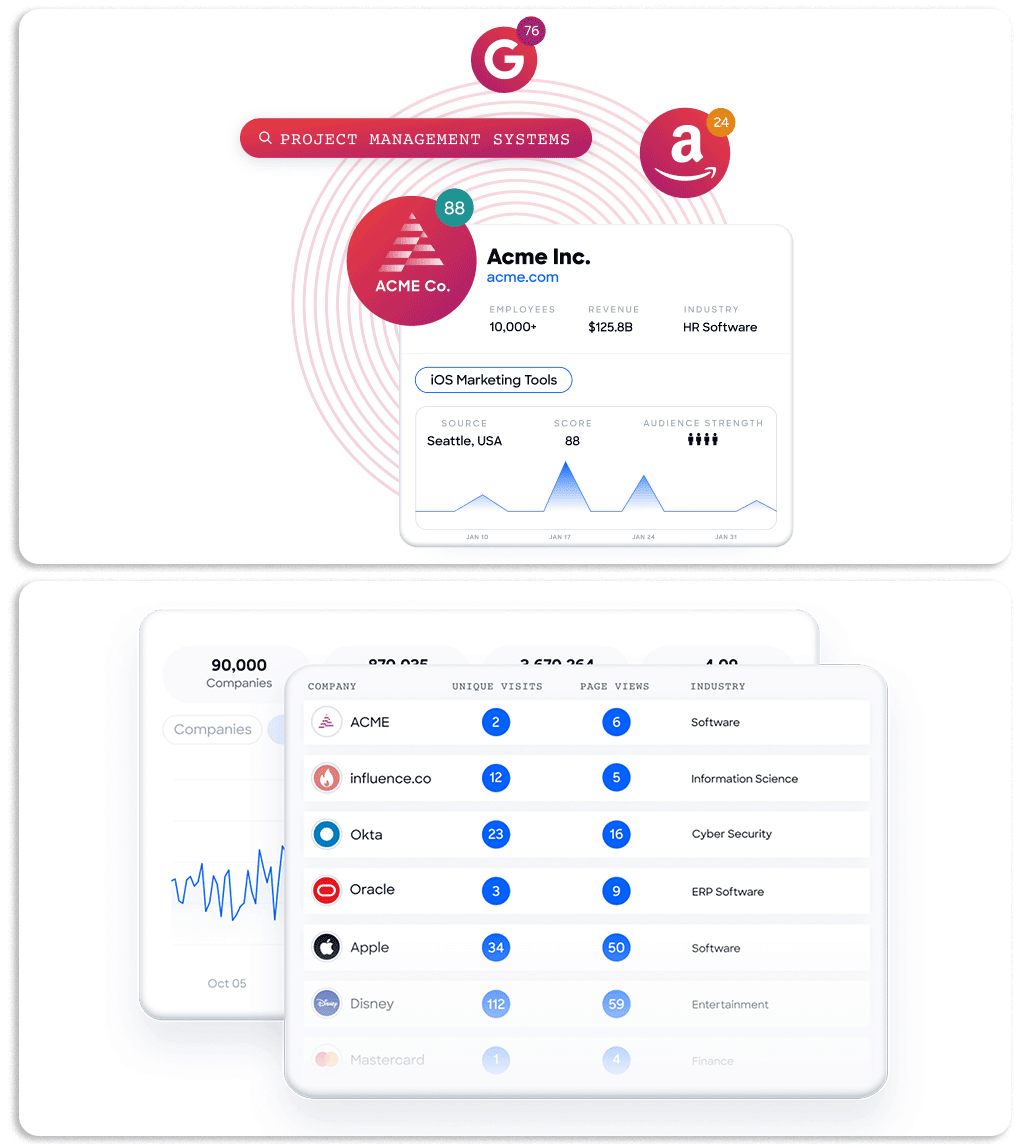
ZoomInfo Intent tracks signals from 210 million IP-to-Organization pairings and 6 trillion+ new keyword-to-device pairings sourced monthly, identifying which companies are researching topics related to your product across the web. Guided Intent, exclusive to ZoomInfo, identifies topics historically correlated with deal success rather than requiring manual topic selection. Where Whatfix's Product Analytics measures internal adoption (which features get used, where workflows break down), ZoomInfo Intent reveals external demand (which accounts are in-market, what they are researching, and how intensely).
WebSights resolves anonymous website traffic to companies with Automatic Traffic Filtering that distinguishes real visitors from bots. ZoomInfo Marketing extends this with contact-level identification, pinpointing who visited (not just which company) and triggering personalized outreach.
ZoomInfo's GTM Context Graph and Chorus: Intelligence that captures why deals move, not just whether reps completed training
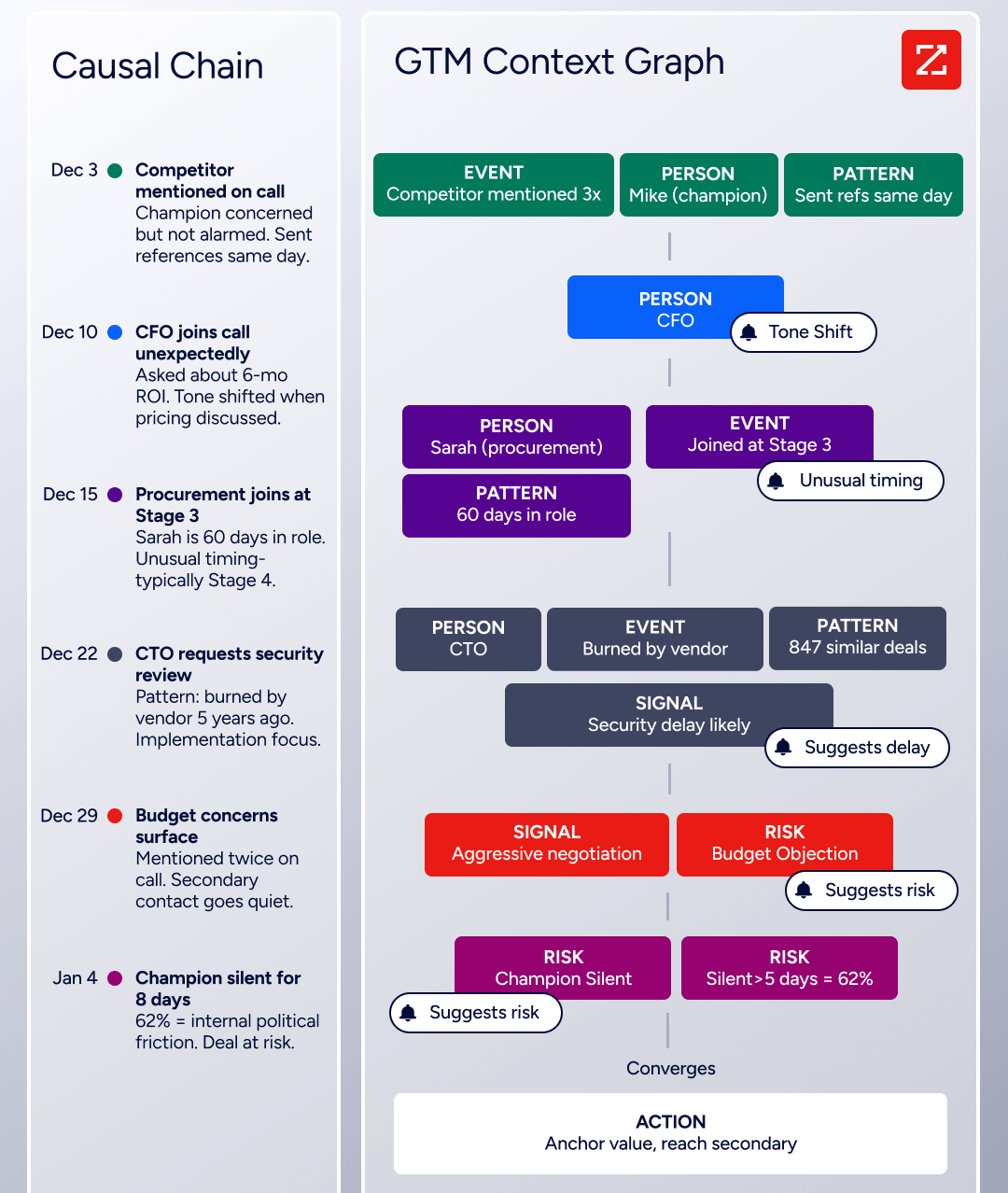
The GTM Context Graph processes 1.5B+ data points daily, fusing ZoomInfo's B2B data with a customer's CRM records, conversation intelligence from Chorus, email interactions, and behavioral signals into a single intelligence layer. Where Whatfix can confirm that a rep followed a guided workflow inside Salesforce, the GTM Context Graph captures whether the deal actually moved and why: connecting the CFO joining the last call with ROI-focused questions to the pattern behind closed-won deals in the same segment, then linking that to third-party signals showing the company is hiring and researching a competitor.
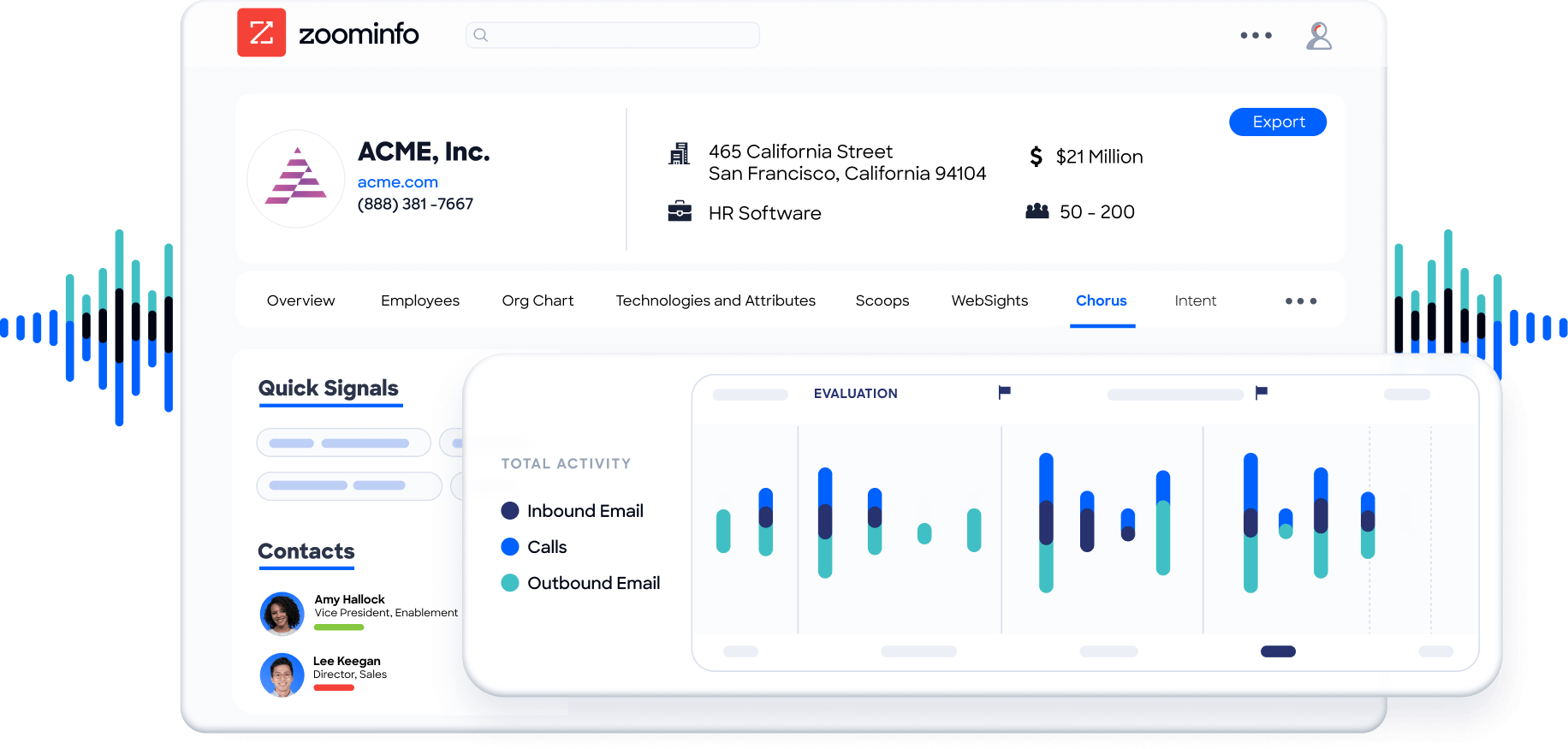
Chorus, backed by 14 technology patents, records and transcribes sales calls, surfaces AI-generated insights (talk ratios, sentiment, objection detection), auto-syncs deal intelligence to the CRM, and provides coaching scorecards. It captures the conversation-level context that training analytics cannot: why a champion went quiet, what a competitive mention means for deal risk, which objection patterns predict closed-lost outcomes.
ZoomInfo GTM Workspace and GTM Studio: Execution and orchestration for the intelligence
GTM Workspace is ZoomInfo's seller front-end, built on the GTM Context Graph. It provides a complete Book of Business view across CRM, ZoomInfo data, conversation history, and market intelligence, with AI agents that automate account research, outreach drafting, CRM updates, and signal monitoring. An Action Feed streams in-market buyers matched to target criteria with pre-drafted actions on every signal.
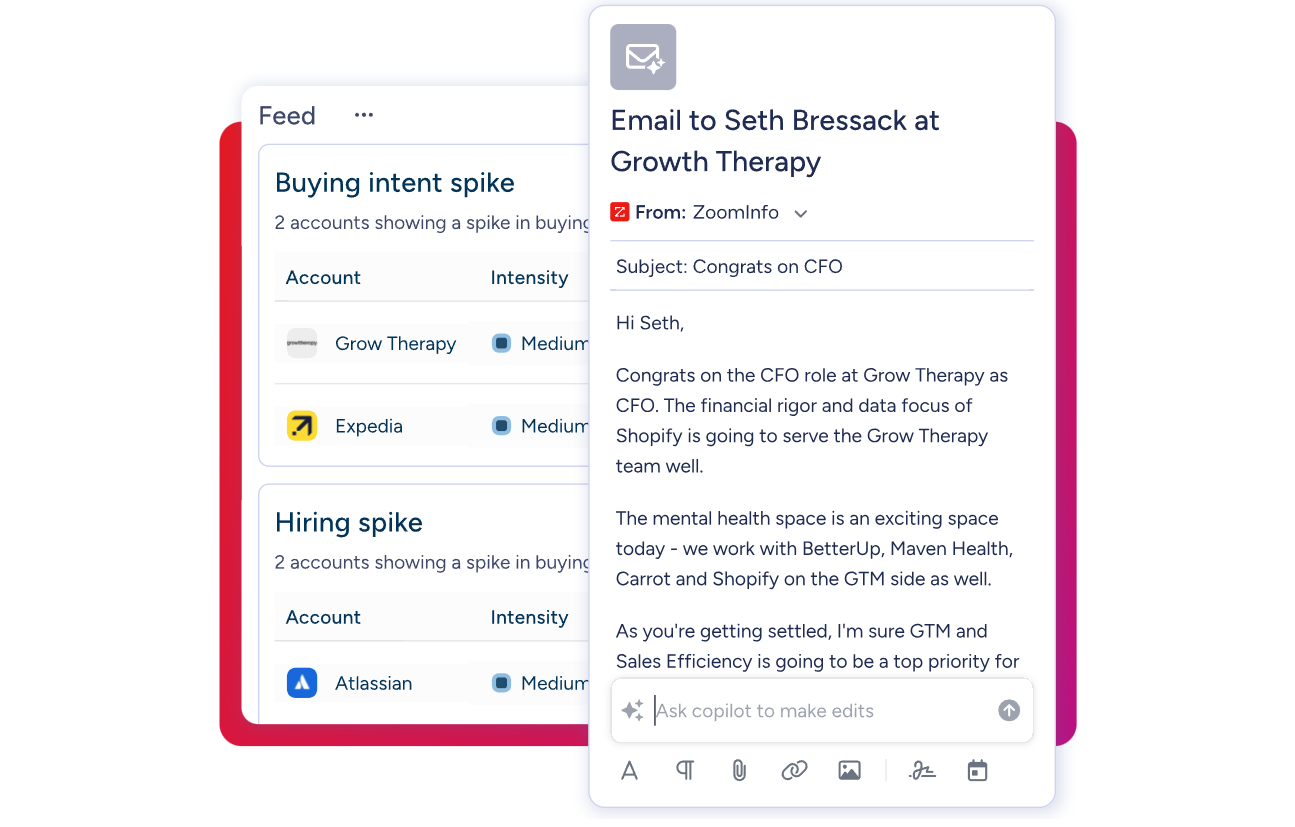
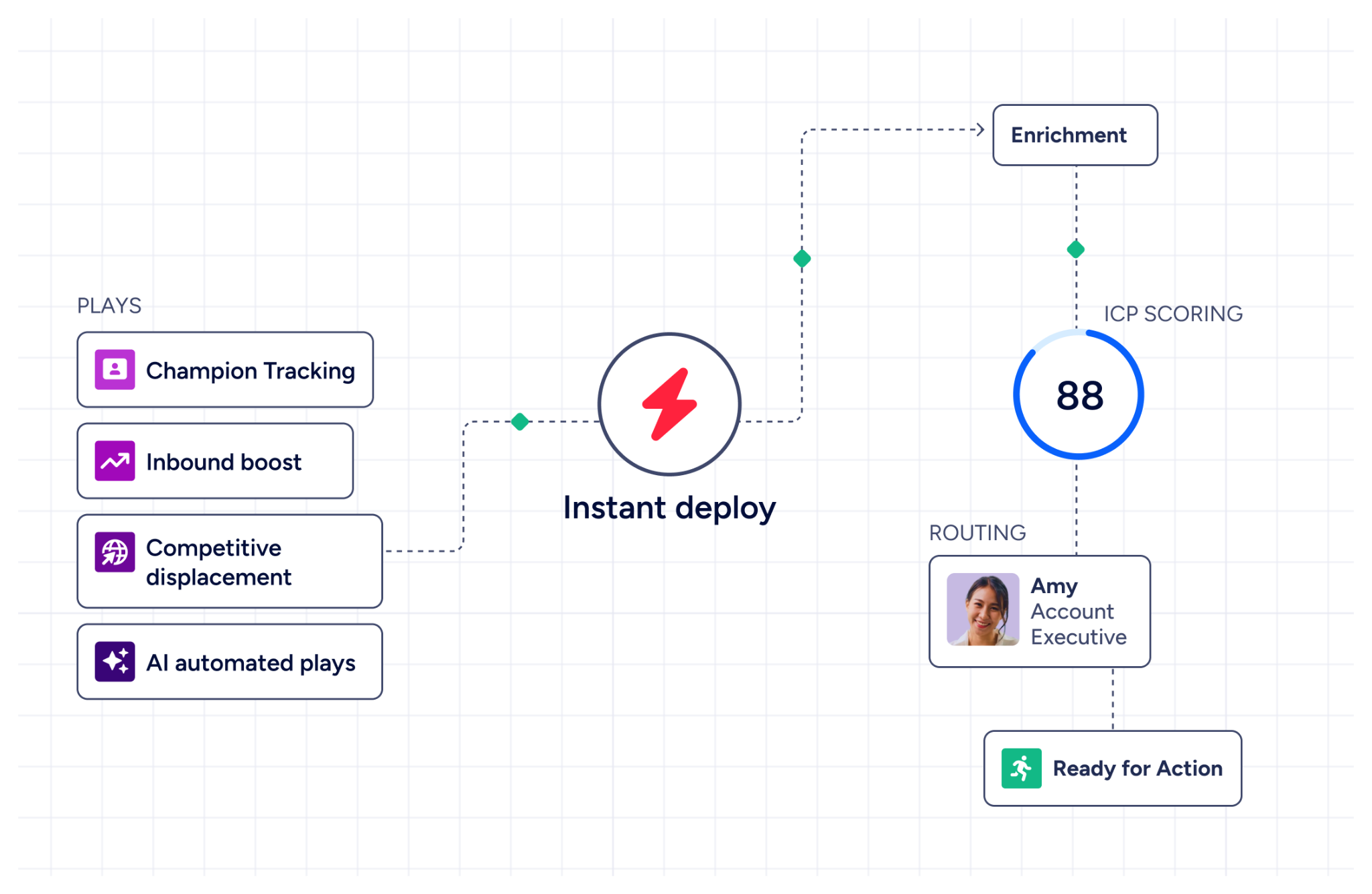
GTM Studio handles outreach orchestration. Marketers, RevOps teams, and GTM engineers can build audiences using natural language, enrich with first- and third-party data, define triggers, and activate plays across channels (email, calls, display ads, direct mail, LinkedIn, Meta, Connected TV) without engineering support. Pre-built GTM plays cover inbound acceleration, champion tracking, competitive displacement, and ICP targeting. Expansion plays that used to take 3 weeks now launch in 30 minutes.
ZoomInfo's Free Entry Points: Evaluate the intelligence layer before any commitment
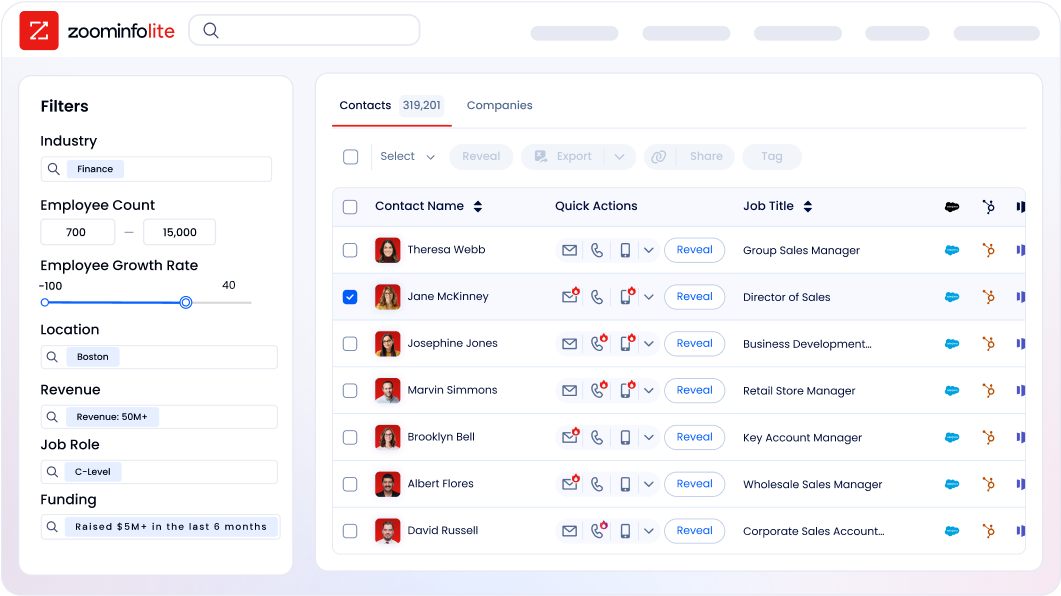
ZoomInfo Lite is a permanent free tier with access to ZoomInfo's B2B database, 10 monthly export credits, individual and company searches, a Chrome extension, and WebSights Lite with up to 10 website visitor reveals per day. A separate 7-day free trial provides broader access with no credit card required.
Seismic's sales team attributed 39% of active pipeline to opportunities identified or influenced by ZoomInfo signals, boosted productivity by 54%, and saved 11.5 hours per week per seller. (Seismic Case Study)
Final Summary
Whatfix is a well-integrated toolkit for enterprise software adoption: in-app walkthroughs and contextual self-help guide users through any web, desktop, mobile, or VDI application; ScreenSense and three AI Agents automate content creation, surface guidance at the right moment, and translate behavioral data into plain-language insights; Product Analytics captures where users struggle and closes the loop with targeted interventions; and Mirror replicates live applications for risk-free training and AI-powered roleplay. It fits enterprises managing large-scale software rollouts, ongoing change management, and workforce enablement across complex, multi-application environments.
Its scope is bounded to the adoption layer: driving effective use of the software an organization already has. It does not supply the B2B intelligence, buyer signals, or outreach orchestration that determine whether CRM and sales tool adoption translates into pipeline.
If your investment in software adoption needs the data layer underneath it (the verified contacts, company intelligence, intent signals, and conversation-level deal context that determine whether well-trained reps close business), that is the ground ZoomInfo covers. Its 500M-contact, 100M-company database supplies the verified emails and direct dials that CRM records depend on. ZoomInfo Intent surfaces the accounts researching your category from 6 trillion+ keyword-to-device pairings monthly. Chorus captures and analyzes every sales conversation. And the GTM Context Graph fuses all of it into an intelligence layer that reveals not just that a deal moved, but why.
See what that intelligence layer adds to your stack: start with ZoomInfo Lite for free, or request a demo to see verified contacts and intent signals in action.
FAQ
Does Whatfix work on desktop applications and VDI environments?
Yes, but only on the Enterprise tier. Whatfix supports web applications, Windows and Mac desktop applications, mobile, and VDI/Citrix environments (including Azure Virtual Desktop). Most DAPs cover only web applications; Whatfix's coverage across desktop and VDI is one of its main differentiators for enterprises running legacy or specialized software alongside modern web apps. The Standard and Premium plans cover web and desktop; VDI and offline mode require Enterprise.
Which Whatfix plan includes Product Analytics?
The Standard Product Analytics plan is included free with any DAP Web & Desktop purchase. It provides AutoCapture, Funnels, Trend Insights, User Journey maps, Cohorts, Session Replay, and customizable dashboards. Premium and Enterprise Product Analytics plans add a named customer success manager and multi-app support but are priced separately. Product Analytics is not bundled with the Mobile or OS/Hub DAP offerings.
Can Whatfix automatically adapt when an application's UI changes?
Whatfix uses two mechanisms to handle UI changes. ScreenSense's LLM-generated CSS selectors adapt to changes in element position, language, and color, reducing the likelihood of Flow breakage. Auto Testing+ (available on all plans) tests existing Flows against UI changes and sends email notifications with fix recommendations when it detects a broken step. These features reduce maintenance, though major UI redesigns may still require manual content updates.
Does Whatfix publish its pricing?
No. All plans use a hybrid flat-fee plus per-user license model, and every tier requires a sales conversation. User license fees are based on employee count for internal-facing applications or monthly active users for customer-facing applications. The Standard plan limits integrations to two and content aggregation to 2,000 articles. Premium adds unlimited integrations, auto-translation, and a named CSM. Enterprise adds multi-app support, VDI/Citrix, and offline mode.
What is the difference between Whatfix DAP and Whatfix Mirror?
DAP overlays guidance on a live application that users are working in. Mirror creates a standalone simulation of that application for training, where users can practice workflows without affecting real data. The two products are integrated: the same guidance content (Flows, Smart Tips) can be layered onto both the live application and the simulated environment. Mirror also includes AI Roleplay for conversational scenarios and Assessments for measuring proficiency. DAP and Mirror are priced as separate products, each with their own plan tiers.
How does Whatfix integrate with Salesforce, SAP, and other enterprise applications?
Whatfix integrates through its Integration Hub, which supports bidirectional data exchange with Salesforce (Lightning), SAP SuccessFactors, Workday, ServiceNow, Oracle, and other enterprise platforms. The Integration Hub pulls external data into Whatfix for content segmentation (for example, showing role-specific guidance based on Workday user data). All Integration Hub setups require backend configuration by Whatfix support and cannot be self-configured. The Standard plan limits total integrations to two; Premium and Enterprise offer unlimited.
Does Whatfix support conversation intelligence or sales call analysis?
No. Whatfix tracks how users interact with software applications (feature usage, workflow completion, navigation patterns) but does not record, transcribe, or analyze sales conversations. Training analytics and conversation intelligence serve different functions: Whatfix measures whether a rep followed a guided CRM workflow, while conversation intelligence captures what happened on the actual call and why the deal moved. For conversation capture and analysis, ZoomInfo's Chorus records sales calls, surfaces AI-generated insights including talk ratios and objection detection, auto-syncs deal intelligence to the CRM, and provides coaching scorecards, all feeding the GTM Context Graph's understanding of why deals move or stall.
Does Whatfix include B2B contact data or buyer intent signals?
No. Whatfix is a digital adoption platform; it guides users through enterprise software but does not supply B2B contact data, company intelligence, buyer intent signals, or website visitor identification for sales purposes. Its Product Analytics tracks internal user behavior within applications, not external market activity. For the B2B intelligence layer, ZoomInfo provides 500M contacts, 100M companies, 135M+ verified phone numbers, and intent data tracking 6 trillion+ keyword-to-device pairings monthly, along with website visitor identification through WebSights.
