

Anymail Finder does one thing well: it finds verified email addresses. Most tools in this space pull from static databases and hope for the best. Anymail Finder verifies every address in real time against the recipient's mail server before returning it. The result is a 4.8/5 Trustpilot rating and a billing model where you only pay for emails confirmed deliverable.
To write this Anymail Finder review, we analyzed the platform thoroughly. We think it's the right choice if:
You already have prospect lists and need verified email addresses appended at scale
You want to pay only for emails confirmed safe to send
You need an API-first tool to plug into existing enrichment workflows
Catch-all domain handling matters to your outbound campaigns
You value deliverability over feature breadth
However, Anymail Finder is not a good fit if:
You need a prospecting database with company filters, firmographics, and technographics
You want phone numbers, org charts, or buyer intent signals alongside email addresses
You need built-in outreach sequencing or campaign management
You require a Chrome extension for LinkedIn-based prospecting
You need one platform connecting sales, marketing, and operations
In that case, consider ZoomInfo: a GTM platform that covers 500M contacts, 100M companies, 135M+ verified phone numbers, and 200M+ verified business email addresses, plus buyer intent data, conversation intelligence, and execution tools that connect prospecting to closed deals.
We've included a detailed look at ZoomInfo later in this review for teams that need more than verified emails. To explore the platform, start with ZoomInfo's free trial here.
What is Anymail Finder?
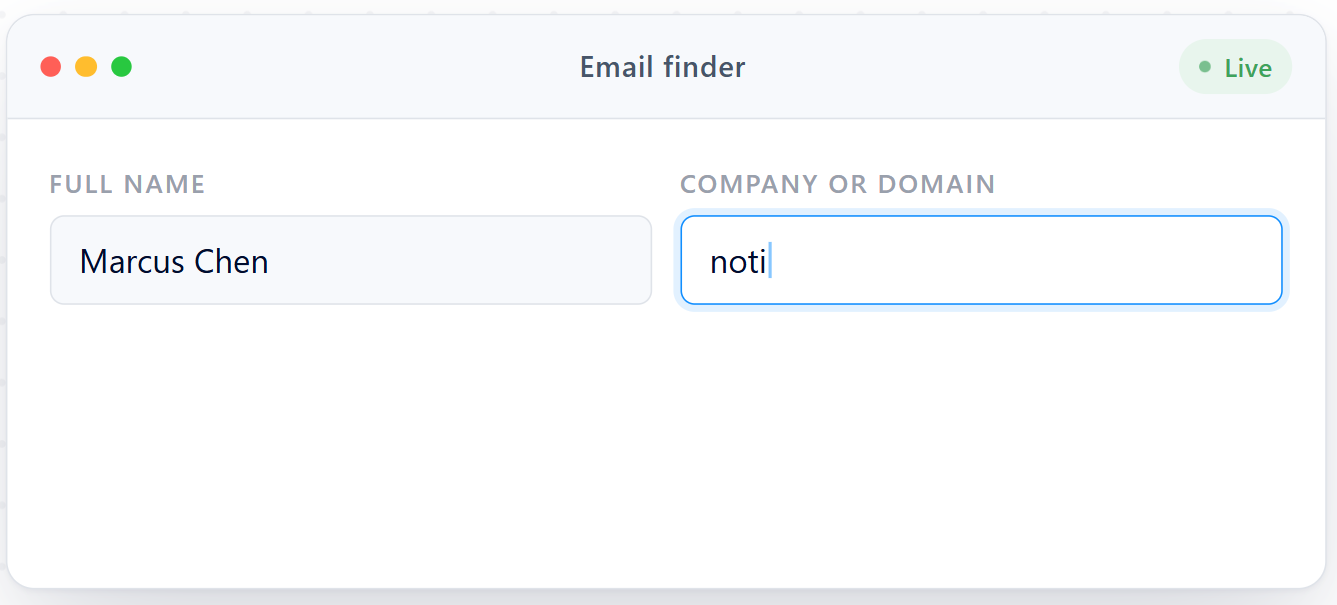
Anymail Finder is a B2B email finder and live verifier for sales teams, SDRs, recruiters, and growth teams who need deliverable email addresses at scale. Founded in 2015 in London and operated by AMF Internet Services Limited, it grew out of a side project called thrust.io, which creator Joe d'Elia built in a single week while running a digital agency.
Source: Anymail Finder
After a viral launch on Hacker News and Product Hunt exposed infrastructure problems, d'Elia rebuilt the product from scratch under the Anymail Finder name.
The core proposition is straightforward: Anymail Finder verifies every email address in real time against the mail server before showing it to you. Unlike database-first competitors that return cached results of unknown freshness, it performs live SMTP checks on every search.
The company claims this approach produces a 77.5% verified email rate compared to a 37.0% average for database-first tools, based on a self-published benchmark of 5,000 LinkedIn Sales Navigator contacts validated with ZeroBounce and BounceBan.
Source: Anymail Finder
The tool is deliberately narrow. It finds and verifies email addresses. It does not offer phone numbers, company firmographics, intent data, outreach sequencing, or a prospecting database. This focus keeps the product lean, the interface simple, and the team small (2-10 employees on LinkedIn).
Anymail Finder Pros & Cons
Pros | Cons |
|---|---|
Live verification on every search, not cached database results | No enrichment data beyond email (no phone numbers, titles, or firmographics) |
Pay only for verified, deliverable emails | No Chrome extension for LinkedIn prospecting |
Catch-all domain handling (up to 80% resolution) | Slower processing than some alternatives (9-15 min per 2,500 rows) |
Bulk uploads up to 100,000 rows per file | No built-in outreach sequencing or campaign tools |
Rate-limit-free API with 99.95% uptime | No prospecting database for list building or discovery |
97%+ accuracy guarantee with bounce refund policy | No permanent free plan (14-day trial with 100 credits) |
Five search modes including decision-maker lookup | Limited reporting and team management features |
Credits roll over while subscribed | Reportedly weaker coverage outside US/UK markets |
Anymail Finder Review: How it Works & Key Features
Email Finder: Five search modes covering name, domain, company, decision maker, and LinkedIn URL.
Anymail Finder's core product is its email finder, which offers five search modes for the different inputs sales teams work with.
Find by Name takes a person's full name paired with either a domain or company name and returns a verified email address.
Find by Domain retrieves up to 20 verified emails from a company domain for 1 credit.
Find by Company Name resolves a company name to its domain automatically, then runs the search. This is useful when working with LinkedIn Sales Navigator exports that often lack domain information.
Find by Decision Maker identifies the right contact for a given role category (CEO, CFO, Engineering, Marketing, and seven others) from a domain or company name alone, trying categories in order when multiple are specified.
Find by LinkedIn URL extracts public profile data from a LinkedIn URL and runs verification against the identified email.
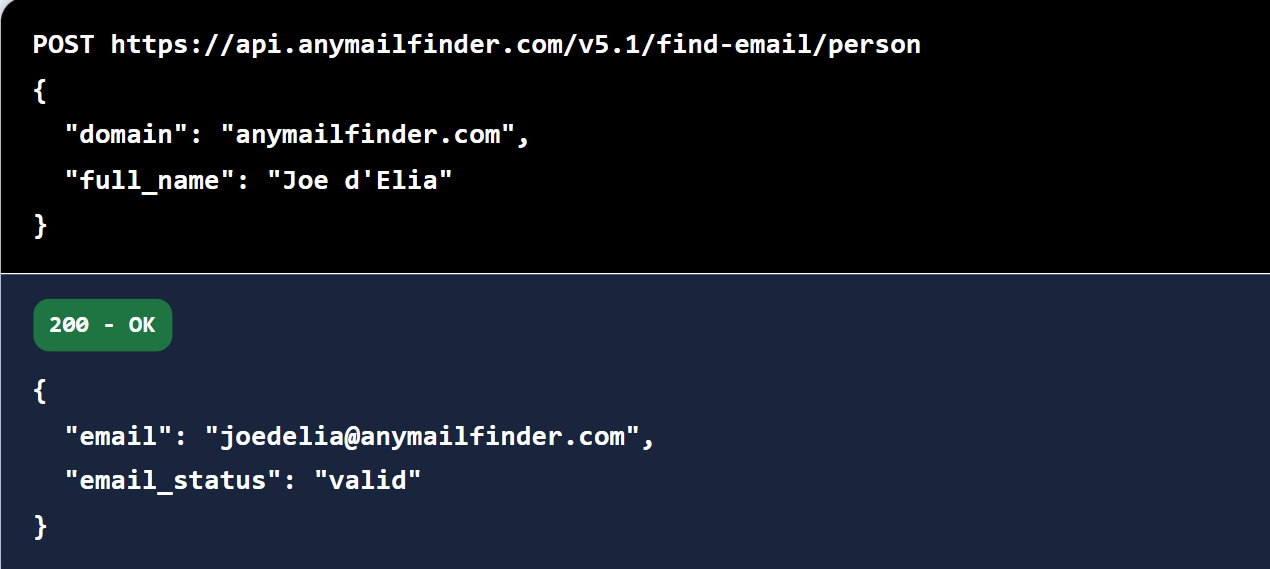
Every search runs in real time, using pattern detection, web scraping, and live SMTP checks. Response time varies from a couple of seconds to up to two minutes depending on the target mail server. Each result carries one of four statuses: valid (deliverable), risky (inconclusive), not_found, or blacklisted. You pay 1 credit for a valid result (2 credits for decision-maker searches). Risky and not-found results are free.
The Find Person Email and Find Decision Maker endpoints also return person_full_name, person_job_title, person_company_name, and person_linkedin_url alongside the email, giving some context beyond the raw address.
Bulk Email Finder: Process up to 100,000 rows in a single upload with verified-only billing.
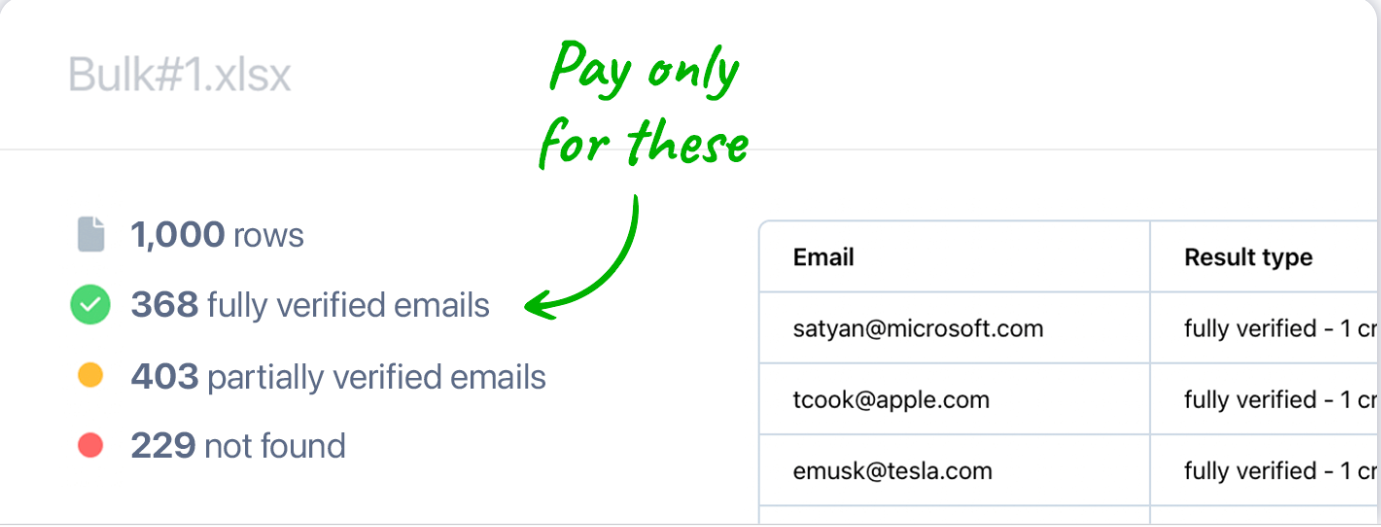
For teams working with large prospect lists, the Bulk Email Finder accepts CSV or Excel files with up to 100,000 rows per upload, the largest single-upload limit among comparable tools. The system processes roughly 1,000 rows every 5 minutes.
Source: Anymail Finder
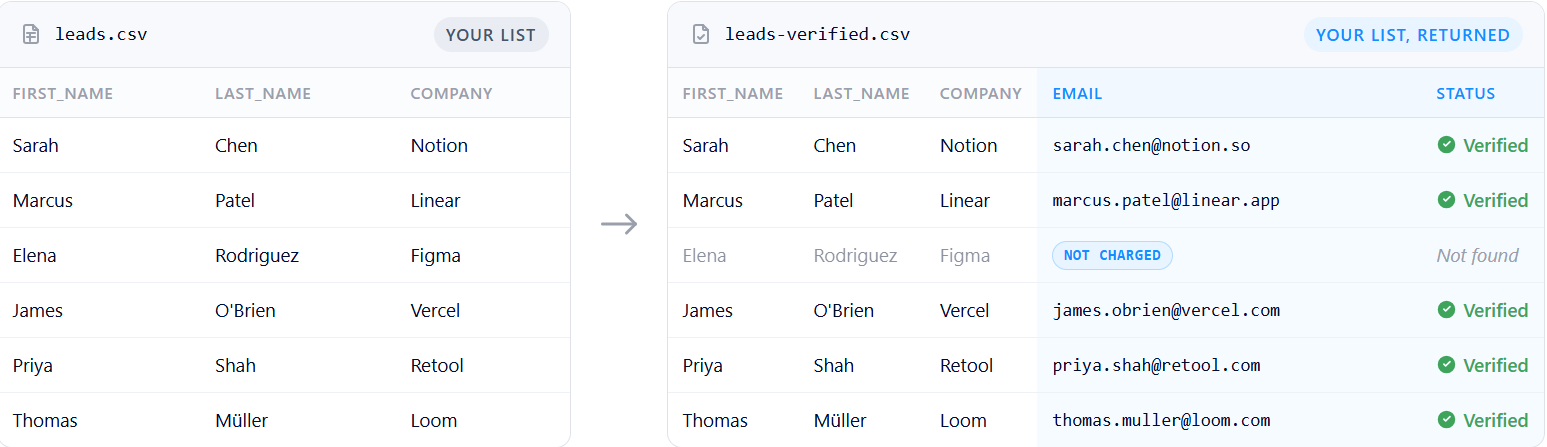
The bulk tool determines the search type automatically from column mapping. Providing a name and domain runs a person search; providing only a domain runs a company search; adding a job title category triggers a decision-maker search; including a LinkedIn URL column runs a LinkedIn-based lookup. All four search modes work from the same upload interface.
A billing detail worth noting: credits are only charged when results are downloaded, not when the job is submitted. The status response includes a credits_needed field, letting teams preview cost before committing. Duplicate searches within the same 30-day window are free.
Email Verifier: Multi-layer verification with catch-all resolution that goes beyond standard SMTP checks.
The standalone Email Verifier confirms whether an existing email address is active and can safely receive messages. It cleans lists sourced elsewhere or re-verifies older addresses before sending, since at least 28% of B2B email addresses go bad every year.
The verification pipeline runs through multiple layers: syntax validation, gibberish detection, domain existence checks, DNS and MX record validation, catch-all domain detection, SMTP authentication, and additional techniques for addresses behind security gateways like Proofpoint, Mimecast, Barracuda, Google Workspace, and Microsoft 365.
Catch-all handling is where Anymail Finder stands out most. 33.4% of B2B emails sit behind catch-all domains, and most verifiers label all of them "risky" without distinguishing deliverable inboxes from non-existent ones.
Anymail Finder applies additional verification signals to resolve up to 80% of those catch-all addresses as valid or invalid. In head-to-head testing, this produced a 2.1% catch-all bounce rate compared to Findymail's 18.0%.
Each verification costs 0.2 credits regardless of the result. The tool sorts results into three categories: valid (safe to send, 97%+ guarantee), risky (inconclusive), and invalid (remove from list).
API and Integrations: A rate-limit-free REST API with webhook support and no-code connectors.
The REST API (version 5.1) is central to Anymail Finder's value for technical buyers. It exposes all search modes, bulk operations, and verification as programmatic endpoints. The API has no rate limits, with infrastructure that auto-scales to match request volume. The company reports 99.95% uptime since 2015.
Source: Anymail Finder
All endpoints support webhook delivery via the x-webhook-url header, enabling asynchronous workflows. Authentication uses a Bearer API key from account settings. Data is AES-256 encrypted and transmitted over HTTPS.
The GeoLead Finder, a newer addition, discovers local businesses by geographic location (latitude, longitude, and radius) and retrieves verified emails in a single asynchronous job. This is useful for agencies and field sales teams targeting businesses in specific areas.
For no-code workflows, Anymail Finder integrates with Zapier, Make, n8n, and Clay. A Chrome extension is listed in the knowledge base, though it is not designed for LinkedIn prospecting like some competitors offer.
Pricing: Credit-based billing starting at $29/month, with verified-only charges and annual savings.
Anymail Finder uses a credit-based subscription model with no per-seat fees. All plans include the same feature set; the only difference between tiers is volume and unit cost.
Credits | Monthly Price | Cost per Credit |
|---|---|---|
400 | $29/mo | $0.073 |
1,000 | $49/mo | $0.049 |
2,000 | $89/mo | $0.045 |
5,000 | $149/mo | $0.030 |
10,000 | $199/mo | $0.020 |
25,000 | $299/mo | $0.012 |
50,000 | $499/mo | $0.010 |
100,000 | $799/mo | $0.008 |
Annual billing saves 33% and delivers the full year's credits upfront. All plans include unlimited team members sharing a single credit pool. An Enterprise tier covers 100,000 to 100M+ credits per month with a dedicated Slack channel and direct engineering access.
The free trial offers 100 credits over 14 days with a $1 card verification charge (automatically refunded). There is no permanent free plan. Subscriptions are month-to-month with no long-term commitment. Unused credits roll over while subscribed, and duplicate searches within the same month are free.
If a verified email bounces, a credit refund is available by reporting the bounce. A broader refund applies when bounce rate exceeds 3% with proof.
Where Anymail Finder Falls Short
Anymail Finder's strengths come from its narrow focus. That same focus creates gaps for teams whose needs extend beyond finding verified email addresses.
No Prospecting Database or Discovery Tools. Anymail Finder enriches lists you already have. It does not help you discover which companies or people to target. There are no filters for industry, company size, revenue, technology stack, or headcount.
Teams that need to build prospect lists from scratch must use a separate tool for list building, then bring those lists to Anymail Finder for email enrichment. This two-step workflow adds cost and complexity.
No Enrichment Beyond Email. The platform returns an email address and, in some cases, a name and job title. There are no phone numbers, company firmographics, org charts, technographics, or LinkedIn profiles bundled with results. The benchmark acknowledges this gap: "Anymail Finder isn't positioned as a database-first tool." Teams that need a complete contact profile must layer additional vendors on top.
No Intent Data or Buying Signals. Knowing someone's email is necessary for outreach, but not sufficient for prioritization. Anymail Finder provides no signals about whether a prospect is actively researching solutions, visiting competitor websites, or showing other buying behavior. Without intent data, teams guess which contacts to prioritize.
No Chrome Extension for LinkedIn Prospecting. Unlike several competitors including Skrapp, Snov.io, Hunter.io, and GetProspect, Anymail Finder does not offer a Chrome extension for capturing contacts while browsing LinkedIn profiles. Teams whose prospecting workflow happens inside LinkedIn must copy data manually or export through other tools first.
No Outreach or Sequencing Tools. Anymail Finder finds emails. It does not send them. There is no built-in email sequencing, campaign management, or outreach tracking. Teams must export verified emails to a separate tool (Instantly, Smartlead, Outreach, Salesloft) to use them. This handoff creates another break in the workflow.
Limited CRM and Tool Integrations. Beyond Zapier, Make, n8n, and Clay, Anymail Finder does not offer direct connectors to Salesforce, HubSpot, Outreach, or other major GTM platforms. API-first buyers can build integrations themselves, but non-technical teams depend on middleware to connect Anymail Finder to the rest of their stack.
These limitations follow naturally from building a focused email verification tool. But for teams ready to move beyond email-only enrichment, the gaps add up.
Top Anymail Finder Alternative: ZoomInfo
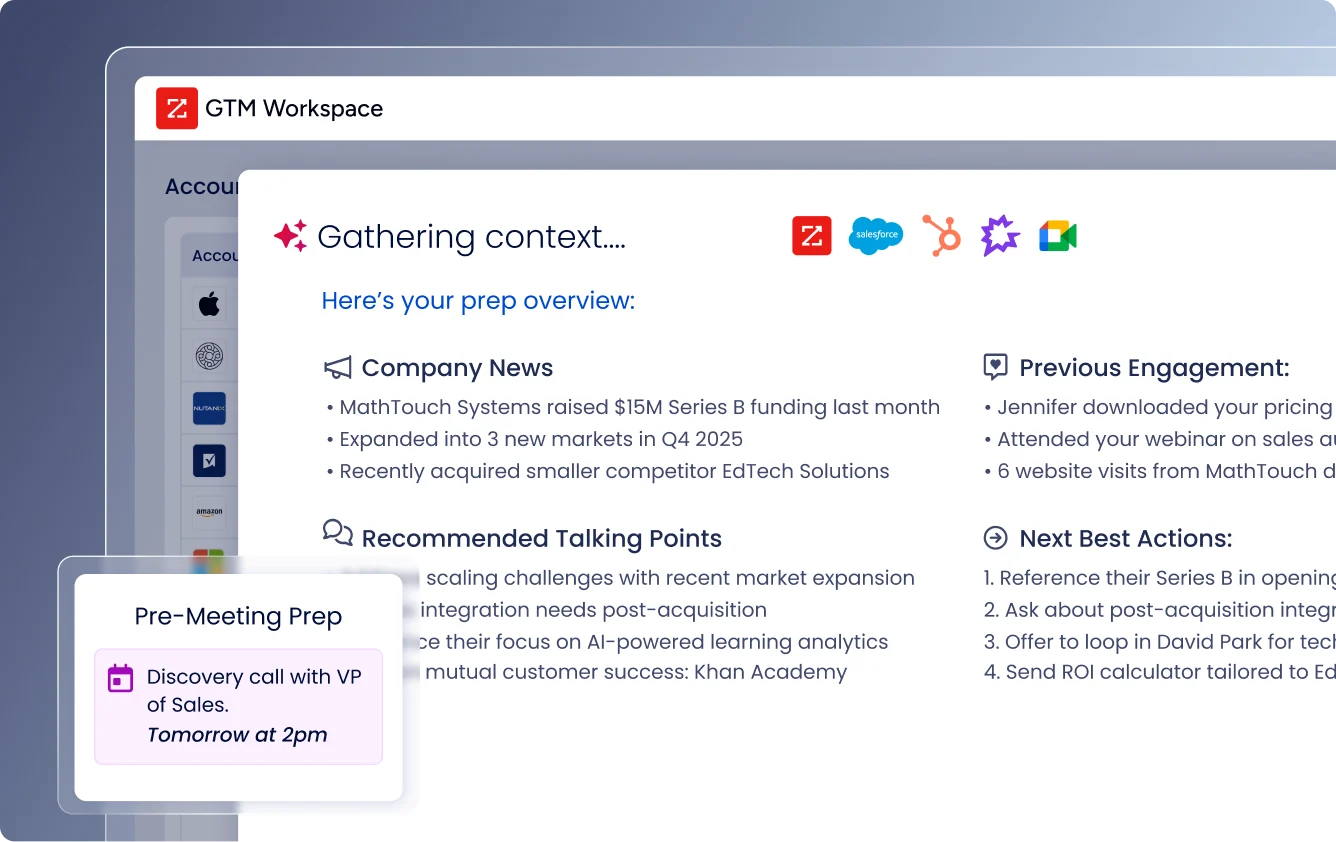
ZoomInfo addresses Anymail Finder's limitations by replacing email-only enrichment with a go-to-market system. It is a GTM platform backed by a broad B2B dataset, connected to the GTM Context Graph (an intelligence layer connecting data across accounts), and accessible through tools for sellers, marketers, and custom integrations.
B2B Data: ZoomInfo covers contacts, companies, phone numbers, emails, technographics, and intent signals in one platform.
Where Anymail Finder returns a verified email address, ZoomInfo delivers a complete profile. The platform spans 500M contacts, 100M companies, 135M+ verified phone numbers, 120M direct-dial phone numbers, and 200M+ verified business email addresses.
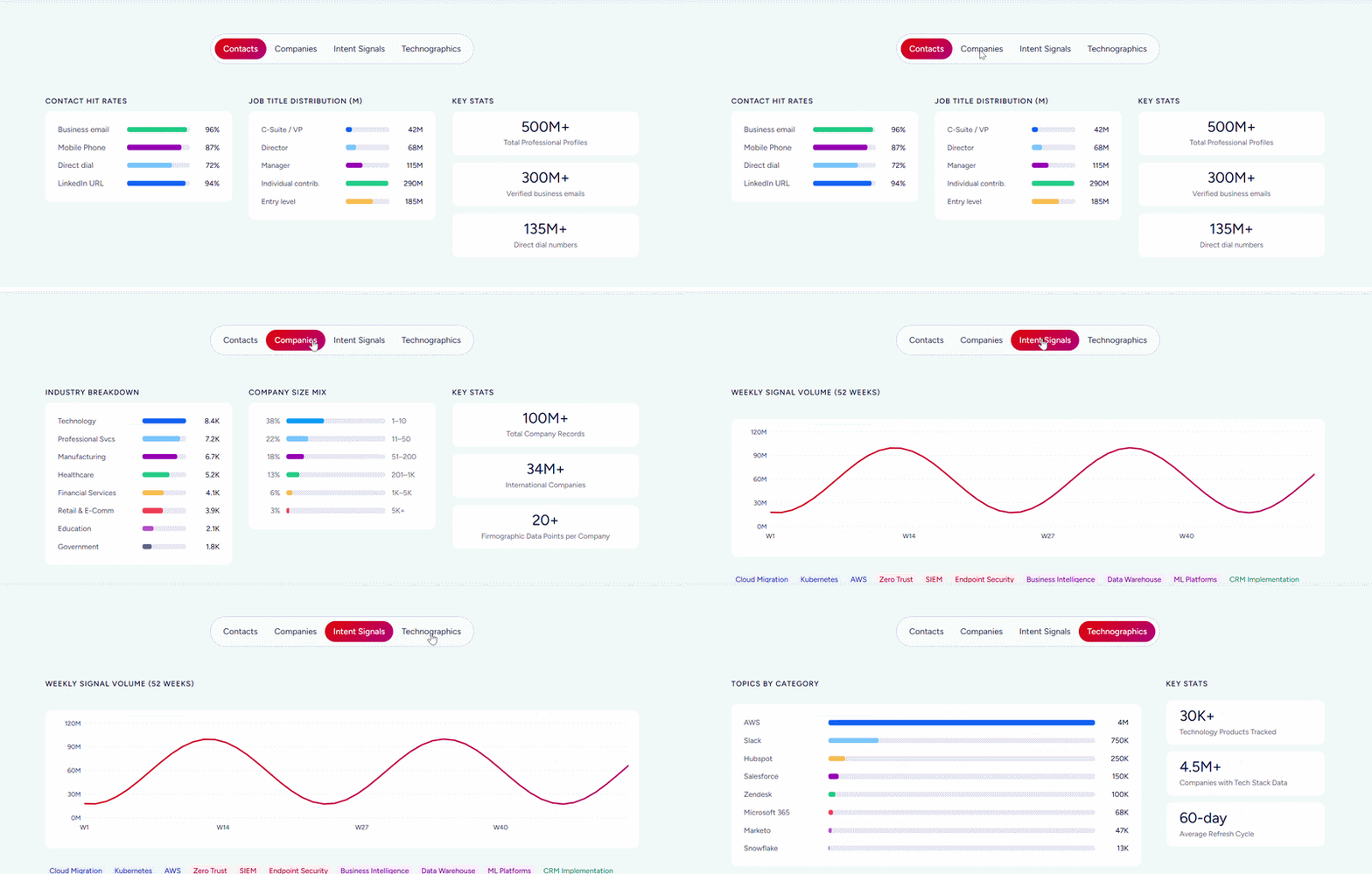
Beyond contact data, ZoomInfo includes firmographics, department org charts, technographic profiles covering 30,000+ technologies across 30M+ companies, and over 300 company attributes for market segmentation.
ZoomInfo maintains this data through a multi-source verification pipeline: automated ML scanning of 28 million site domains daily, third-party partner data covering 95 million businesses, a community of 200,000+ ZoomInfo Lite users who share data back, and an in-house Data Training Lab of 300+ human researchers. First-party data reaches up to 95% accuracy.
The data quality has external validation. In a Fortune 500 competitive RFP analyzing 25 million contacts across vendors, the independent consultant concluded that "no other competitor came even close."
ZoomInfo has been named a Leader in the Gartner Magic Quadrant for ABM Platforms for two consecutive years and Ranked #1 in 142 G2 Reports.
For teams currently using Anymail Finder for email addresses, ZoomInfo eliminates the need for separate tools for phone numbers, company data, org charts, and technographics. One platform replaces multiple point solutions.
Vensure scaled prospecting with ZoomInfo's data: "ZoomInfo gives us the information we need to execute. We don't have to go through and spend our time digging. It's already there, so we can be three steps ahead." (Vensure)
GTM Context Graph and Intent Data: ZoomInfo identifies which accounts are actively in-market, not just who they are.
Anymail Finder tells you how to reach a prospect. ZoomInfo tells you when to reach them and why they're worth reaching now.
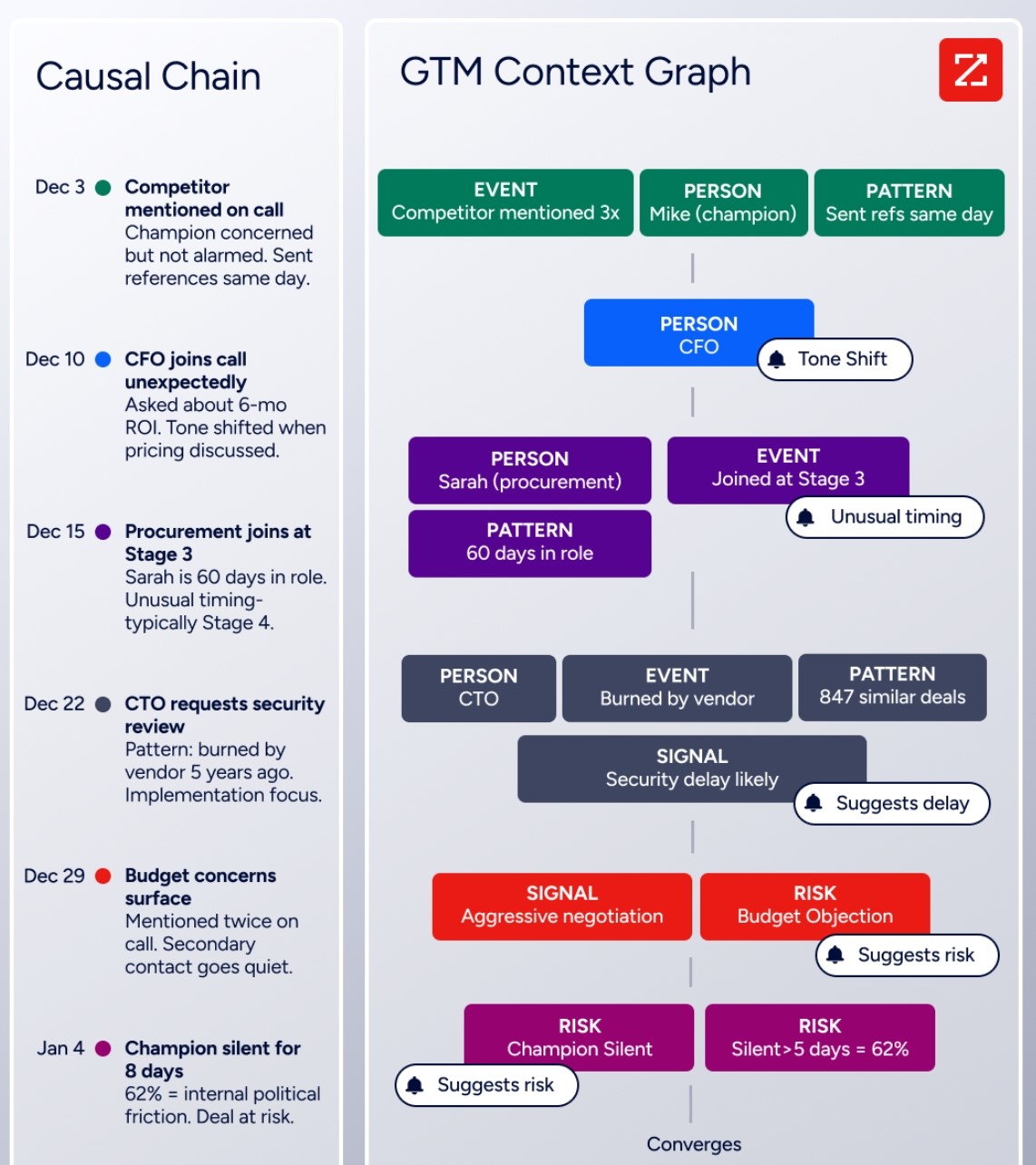
The GTM Context Graph fuses ZoomInfo's B2B data with a customer's CRM records, conversation transcripts, and behavioral signals into a layer that processes 1.5B+ data points daily. It captures not just what happened in a deal, but why it happened, connecting signals across accounts to surface patterns that predict which opportunities will close and which are at risk.
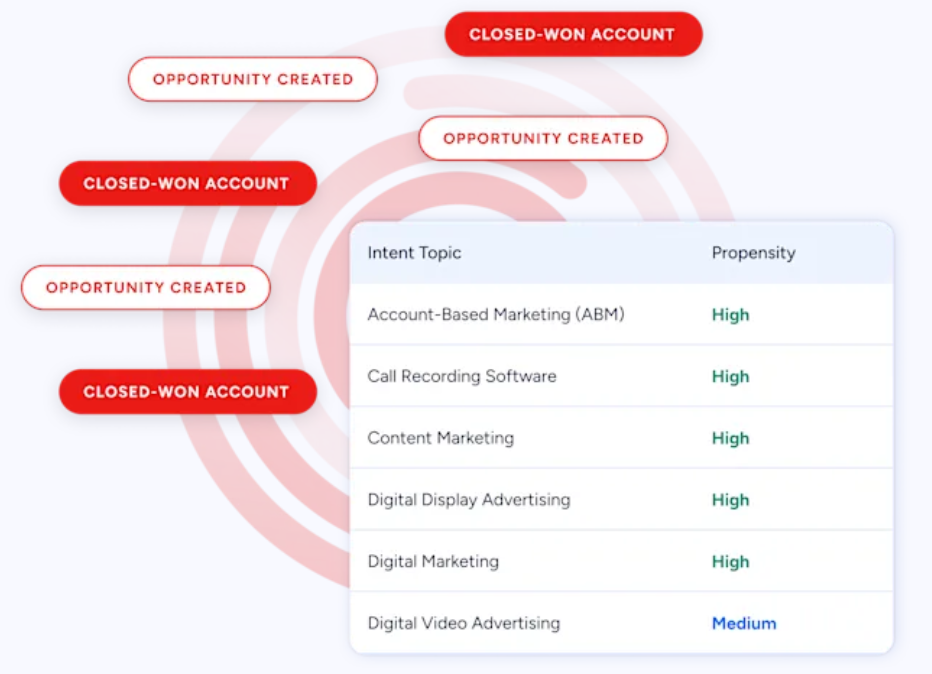
ZoomInfo Intent tracks signals from 210 million IP-to-Organization pairings and 6 trillion+ new keyword-to-device pairings sourced monthly.
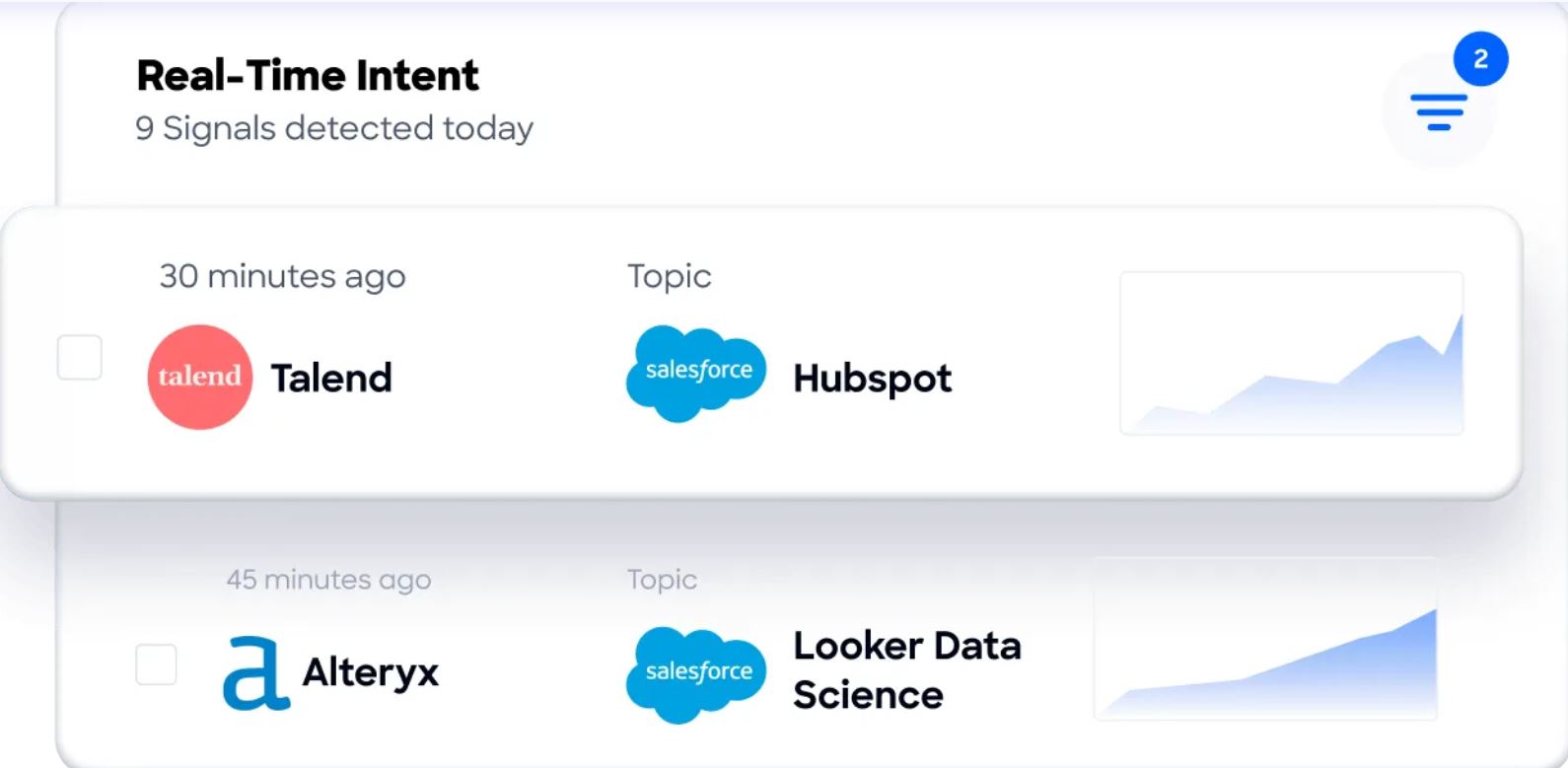
Guided Intent, exclusive to ZoomInfo, identifies topics historically correlated with deal success rather than requiring manual topic selection.
WebSights resolves anonymous website traffic to companies, including buying team identification with direct contact info.
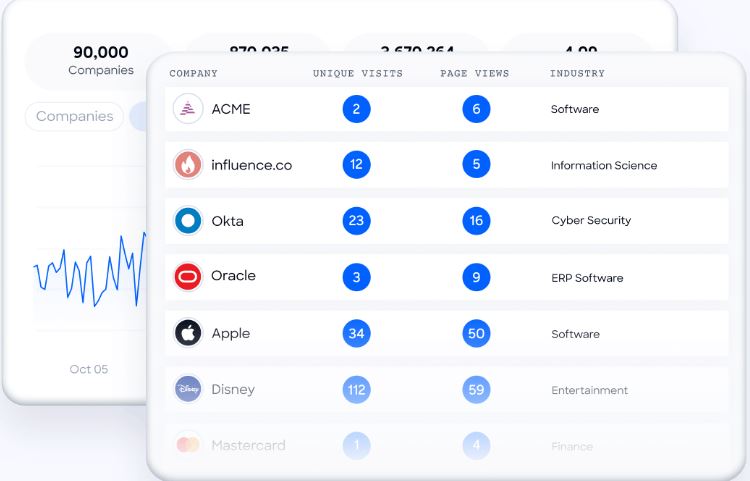
This layer means sales teams can prioritize accounts showing active buying signals rather than emailing every contact on a list.
Seismic attributed 39% of active pipeline to opportunities identified or influenced by ZoomInfo signals, with the sales team 54% more productive: "That combination of our internal CRM data, external signals, and AI that's given all that context has helped us craft very specific account- and persona-based messages." (Seismic)
Execution Tools: ZoomInfo connects data to action through GTM Workspace, GTM Studio, and API/MCP access.
Finding an email is the start of a workflow, not the end. ZoomInfo closes the gap between data and action through three channels.
GTM Workspace gives sellers a place where prioritized accounts, AI-drafted outreach, and deal execution converge. AI agents handle account research, CRM updates, signal monitoring, and outreach drafting.
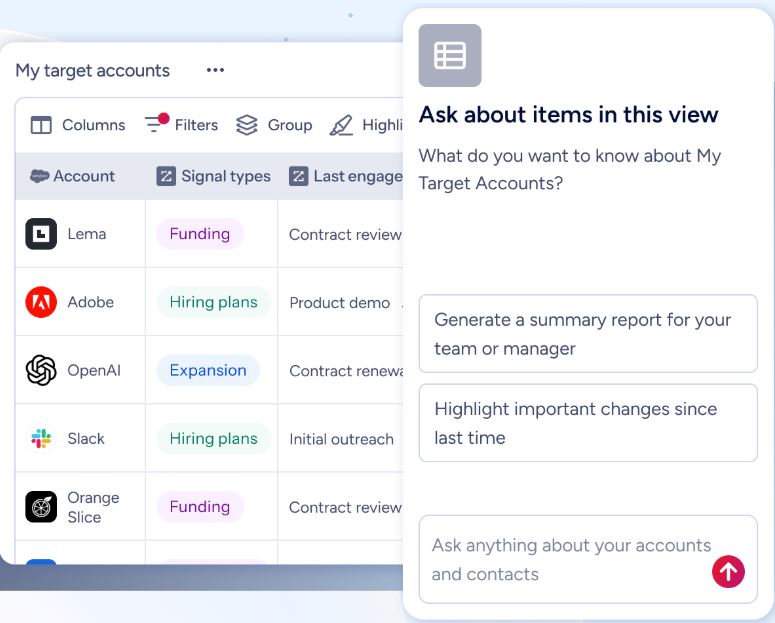
GTM Studio gives marketers, RevOps, and GTM engineers a building tool for defining audiences, running campaigns, and measuring pipeline using natural language.
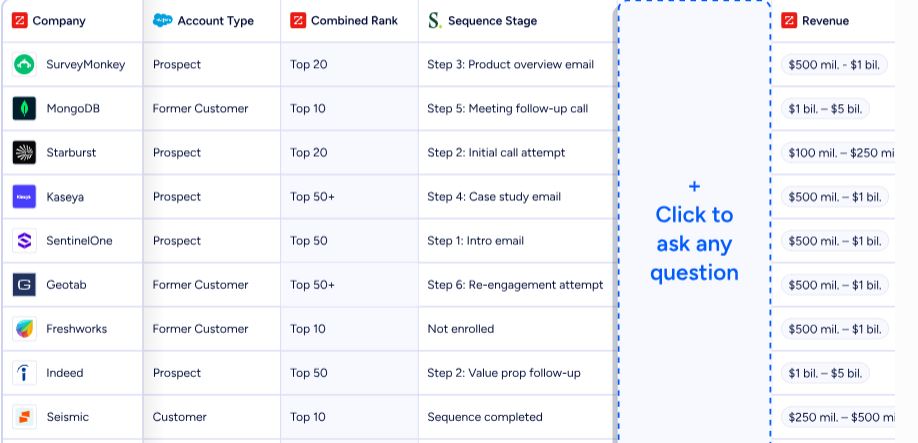
For teams building beyond ZoomInfo's own products, APIs and MCP expose the same data to any custom agent, internal tool, or partner platform.
ZoomInfo also connects to Salesforce, HubSpot, Microsoft Dynamics, and over 120 tools across CRM, marketing automation, sales engagement, and data warehouse categories.
The Enterprise API is documented at docs.zoominfo.com with interactive testing and OAuth 2.0 authentication.
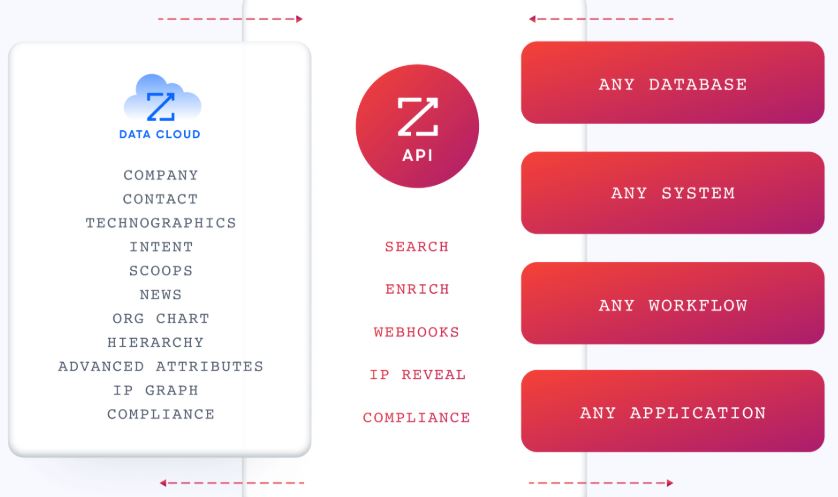
BDO Canada activated ZoomInfo data within internal systems: "The plug-and-play aspect of the API means I can integrate it very easily into any process and get information at a moment's notice," achieving an 87% reduction in time spent on internal data dashboard updates. (BDO Canada)
Pricing: Custom-quoted plans with a permanent free tier and 7-day trial.
ZoomInfo uses a consumption-based pricing model where costs depend on usage patterns, number of users, credit volume, and feature requirements. ZoomInfo does not publish prices; all paid plans require a custom quote.
The platform offers two free entry points. ZoomInfo Lite is a permanent free tier (not a trial) with access to ZoomInfo's B2B database, 10 monthly export credits, search filters, the ReachOut Chrome Extension, and WebSights Lite (up to 10 website visitor reveals per day). A separate 7-day free trial provides broader access to core platform features with no credit card required.
Paid plans are organized into Sales (Professional, Advanced, Enterprise), Marketing (Marketing Demand, ABM Lite, ABM Enterprise), and standalone products (Chorus, Chat). Annual contracts are standard. API access is included in all relevant plans.
Anymail Finder or ZoomInfo: Comparison Summary
Anymail Finder | ZoomInfo | |
|---|---|---|
Primary focus | Email finding and verification | GTM platform |
Contact data | Email addresses only | 500M contacts with emails, direct dials, and mobile numbers |
Company data | None | 100M companies with firmographics, technographics, and org charts |
Verified emails | 200M+ verified business emails via live check | 200M+ verified business email addresses |
Phone numbers | Not available | 135M+ verified phone numbers, 120M direct dials |
Intent data | Not available | Buyer intent from 210M IP-to-Org pairings, 6T+ keyword signals monthly |
Prospecting database | No list building; enriches existing lists | Database with 300+ company attributes and filters |
Outreach tools | None | AI-drafted outreach, workflows, and Salesloft partnership |
CRM integrations | Via Zapier, Make, n8n, Clay | Native Salesforce, HubSpot, Dynamics; 120+ marketplace integrations |
Chrome extension | Listed but not for LinkedIn prospecting | ReachOut extension for LinkedIn and web browsing |
AI capabilities | None | GTM Context Graph, GTM Workspace AI agents, Guided Intent |
Conversation intelligence | Not available | Chorus (recording, transcription, deal intelligence) |
Catch-all handling | Up to 80% resolution | Standard verification pipeline |
Billing model | Pay per verified email only | Consumption-based (credits consumed on export) |
Free tier | 14-day trial, 100 credits | Permanent free plan (ZoomInfo Lite) + 7-day trial |
Published pricing | $29-$799/month | Custom-quoted |
Best for | Teams with existing lists needing verified email enrichment | Teams needing GTM data and tools, from prospecting to pipeline |
Final Verdict
The choice between Anymail Finder and ZoomInfo depends on what role email plays in your go-to-market workflow.
Choose Anymail Finder if your team already has prospect lists from LinkedIn Sales Navigator, Apollo, or similar sources and needs a reliable, cost-efficient way to append verified email addresses before launching outbound campaigns. Its live verification, catch-all domain handling, and verified-only billing make it one of the more accurate email finders available.
The rate-limit-free API and 100,000-row bulk uploads serve technical teams building custom enrichment pipelines. For teams whose workflow is build list elsewhere, verify emails, export to sequencer, Anymail Finder does the middle step well and charges fairly for it.
Choose ZoomInfo if you need more than email addresses to run your go-to-market strategy. ZoomInfo replaces the patchwork of separate tools for email finding, phone numbers, company data, intent signals, and outreach by combining them in one platform.
The GTM Context Graph connects data to reasoning, so your team knows not just how to reach a prospect but when and why to reach them. For organizations where email enrichment is one piece of a larger pipeline, deal acceleration, or account-based marketing effort, ZoomInfo provides what single-purpose tools cannot.
Get started with ZoomInfo here.
Anymail Finder excels at its specialty: verified emails with high accuracy.
ZoomInfo excels at the full picture: turning data into pipeline across the go-to-market cycle.
If verified email is the job, Anymail Finder delivers. If the job is building, prioritizing, and executing an entire GTM strategy, the scope difference between the two platforms makes the decision clear.
Anymail Finder FAQ
Does Anymail Finder have a free plan?
No. Anymail Finder offers a 14-day free trial with 100 credits, requiring a $1 card verification charge (automatically refunded). There is no permanent free plan. After the trial, the lowest paid tier is $29/month for 400 credits.
ZoomInfo offers a permanent free tier called ZoomInfo Lite with 10 monthly export credits, access to the B2B database, search filters, and the ReachOut Chrome Extension, plus a separate 7-day free trial with no credit card required.
How does Anymail Finder's pricing work?
Anymail Finder uses credit-based subscriptions ranging from $29/month (400 credits) to $799/month (100,000 credits). You pay 1 credit per verified email found, 2 credits for decision-maker searches, and 0.2 credits per standalone verification.
Risky and not-found results are free. All plans include the same features with no per-seat fees and unlimited team members. Annual billing saves 33%. Unused credits roll over while subscribed.
What makes Anymail Finder different from database-first email finders?
Most email finders pull addresses from pre-built databases and return them whether or not they're currently deliverable. Anymail Finder verifies every address in real time against the recipient's mail server before returning it. In the company's self-published benchmark on 5,000 LinkedIn Sales Navigator contacts, this approach produced a 77.5% verified email rate compared to a 37.0% average for database-first tools.
The benchmark was validated with ZeroBounce and BounceBan, though Anymail Finder conducted it rather than an independent third party.
Can Anymail Finder find phone numbers or company data?
No. Anymail Finder returns email addresses and, in some cases, the contact's name, job title, company name, and LinkedIn URL. It does not provide phone numbers, company firmographics, technographics, org charts, or intent data. Teams needing this information must use a separate platform.
ZoomInfo provides 135M+ verified phone numbers, 120M direct dials, firmographics for 100M companies, technographic profiles, and buyer intent data alongside email addresses.
How does Anymail Finder handle catch-all domains?
Catch-all domains accept mail for any address regardless of whether the specific inbox exists, which causes most verifiers to label all such addresses as "risky." Anymail Finder applies additional verification signals beyond standard SMTP checks and claims to resolve up to 80% of those catch-all addresses as valid or invalid.
In head-to-head testing published by the company, this resulted in a 2.1% catch-all bounce rate compared to 18.0% for Findymail. Since 33.4% of B2B emails sit behind catch-all domains, this capability affects a significant portion of most prospect lists.
Does Anymail Finder integrate with CRMs like Salesforce or HubSpot?
Not directly. Anymail Finder connects to Zapier, Make, n8n, and Clay for no-code workflows, and offers a REST API for custom integrations. There are no native connectors to Salesforce, HubSpot, Outreach, or Salesloft. Technical teams can build integrations through the API, but non-technical users depend on middleware.
ZoomInfo offers native integrations with Salesforce, HubSpot, Microsoft Dynamics, and over 120 tools through its App Marketplace.
What is Anymail Finder's accuracy guarantee?
Anymail Finder guarantees over 97% delivery accuracy for all emails marked as valid. If a verified email bounces, you can report it through the dashboard or API to request a credit refund. A broader refund applies when your overall bounce rate exceeds 3% with proof. This guarantee covers only emails with a "valid" status; emails marked "risky" carry no deliverability guarantee and are provided free of charge.
Who should use Anymail Finder versus ZoomInfo?
Anymail Finder is built for teams that already know who to target and need verified email addresses appended at scale. It fits SDRs, outbound agencies, and technical users building enrichment workflows around its API.
ZoomInfo is built for teams that need the full go-to-market stack: discovering target accounts, identifying decision makers, prioritizing by buying signals, engaging across channels, and measuring pipeline impact. If your challenge is email deliverability on existing lists, Anymail Finder solves it efficiently. If your challenge is the broader question of who to sell to, when, and how, ZoomInfo covers the full workflow.
