
What are buying signals in sales?
Buying signals are words, actions or company events that suggest a prospect may be moving toward a purchase. A question about pricing on a discovery call is a buying signal. So is a second visit to your pricing page, a demo request, or a former champion starting a new job at an account you want.
Many signals don't announce themselves. A buyer who asks "how long does implementation usually take?" is telling you they've started picturing the rollout, and a rep who hears it as small talk misses the moment.
Buying signals and intent data overlap without being the same thing. Third-party intent data is one kind of buying signal: research activity on topics related to what you sell, measured across many websites. Buying signals also include what the buyer says to you, what they do on your own site, and changes at their company. ZoomInfo's guide to intent data signals covers intent signals in more depth.
Timing is why signals matter. A signal marks a window, and the window closes: a champion who changed jobs settles into new vendor relationships, and an account researching your category picks a shortlist. A rep who responds early, with a message that fits what the account is working on, has a better chance of making that shortlist.
Types of buying signals
Buying signals fall into four groups. The first two come from the conversation. The last two come from data.
Type | What it is | Examples | Where you see it |
|---|---|---|---|
Verbal | What the prospect says or writes to you | Questions about pricing, timelines, contracts and integrations | Calls, meetings, email replies |
Non-verbal | How the prospect behaves in the conversation | Nodding, leaning in, taking notes, bringing colleagues to the next call, sharing their screen to show the current process | Video calls, meetings |
Digital | What the prospect does online | Pricing page visits, demo requests, form fills, research on topics related to what you sell | Your website, marketing automation, intent data |
Trigger events | Changes at the prospect's company or in their career | Job changes, new executive hires, funding rounds, hiring surges, technology adopted or dropped | Data providers, news, CRM alerts |
Verbal buying signals
Verbal signals come straight from the buyer, but they're easy to talk past. They usually show up as questions that only matter to someone who plans to buy: what it costs, how long it takes to roll out, who else uses it, what the contract looks like, what the next steps would be. A buyer who describes what isn't working with their current tool is telling you what to solve. Specific objections count too. A buyer who says a security review could slow things down is working out how to get you approved.
Non-verbal buying signals
Non-verbal signals come from behavior in the meeting itself. The prospect nods or leans in when a feature lands, their tone picks up, they take notes, they bring their manager to the second call, or they share their screen to walk you through the current process. Body language and tone suggest the pitch is working. New attendees suggest the deal is moving inside their company, and a shared screen suggests they want you to see the problem up close.
Digital buying signals
Digital signals are the actions a buyer takes online, often before they've spoken to anyone at your company. Visits to pricing and product pages, demo and trial requests, content downloads and form fills happen on your own properties. Intent data adds the research a buying team does elsewhere, such as reading about your category on publisher sites.
Trigger events
Trigger events are changes at an account, or in a contact's career, that open a buying window. A champion moves to a new company. A new executive arrives with a mandate. A funding round closes, the company starts hiring for roles that use your product, or it adopts a technology that pairs with yours or starts replacing one that competes with it. None of these means the account is ready to buy today, but each one makes a conversation more likely to land.
15 examples of buying signals
Here are 15 buying signals to watch for. The first five come up in conversation, the next five happen online, and the last five are trigger events. Each one comes with what it usually means and how to respond.
1. Asking about pricing or contract terms
A prospect who asks what it costs, how billing works or whether you offer multi-year terms is weighing the purchase itself. Answer the question directly, then ask what budget they're working with and who signs off. Dodging a pricing question on a second call reads as a red flag to the buyer.
2. Asking how long implementation takes
Questions about rollout time, onboarding or a go-live date mean the buyer is picturing life after the purchase. If they mention a deadline, such as "we need this live before the new fiscal year," write it down and plan the deal around it. A real deadline is one of the strongest signals you'll get.
3. Asking about integrations or security
"Does it work with Salesforce?" and "Can you send your SOC 2 report?" are questions buyers ask when they're checking whether you'll survive their internal review. Send the documentation the same day and offer a call with someone technical. These questions often mean IT or security has joined the deal.
4. Raising a specific objection
A vague brush-off ("not a priority right now") usually isn't a buying signal. A specific objection often is. "Switching would mean retraining the whole team" or "How do we migrate our data?" tells you the buyer is working through what it would take to say yes. Treat it as a question and answer it with proof, such as a customer who made the same switch.
5. Bringing in other decision-makers
When your contact invites their manager, a finance lead or IT to the next call, the deal is moving inside their company. Ask who else will weigh in before a decision and what each person cares about. A deal with one contact is fragile, and a contact who widens the circle is working on your behalf.
6. Visiting your pricing page more than once
One pricing page visit can be curiosity. Repeat visits from the same account, especially from several people, suggest a buying team comparing options. If the account is in your ideal customer profile, reach out within the hour and reference what they're likely weighing, without telling them you watched their visits.
7. Requesting a demo or starting a trial
A demo request or trial signup is the clearest digital signal: the prospect has put their hand up. Speed matters most here. Respond within minutes if you can, confirm what problem they're trying to solve, and tailor the demo to it.
8. Filling out a form
A contact-us form, a pricing request or a gated download gives you a name and a company, and the page they converted on tells you why they came. A form on the pricing page warrants a sales call. A form on an early-stage guide warrants a helpful follow-up and a lighter ask.
9. Reading case studies, comparison pages or reviews
Buyers who read your case studies, your comparison pages or your profile on review sites are building a shortlist and looking for proof. Send a customer story from their industry or company size, and offer to connect them with a reference.
10. Researching your category across the web
An intent spike means an account is reading about topics related to what you sell more than it normally does, on sites you don't own. A spike from several people over several days carries more weight than one person reading one article. The account may not know your name yet. Lead with an insight on the problem they're researching, not a product pitch, and offer something useful such as a benchmark or a guide.
11. A champion changes jobs
When someone who bought or used your product moves to a new company, they arrive with a known preference and a fresh mandate. Reach out within 24 hours of the alert, congratulate them, and ask how their new team handles the problem you solved together. A former user who already trusts your product is one of the warmest leads you'll get. ZoomInfo's guide to job change alerts covers the plays in more depth.
12. A new executive takes over
A new VP or C-level leader in the buying seat often reviews the tools and vendors they've inherited. Their first few months are when they're most open to change. Reach out within 24 hours of the news with a point of view on the problem they were hired to fix.
13. The company raises funding
A funding round brings budget and growth targets, and growth targets bring new tools. Tie your outreach to what the money is likely for, such as expanding the sales team or entering a new market, rather than congratulating them and stopping there.
14. The company hires for roles you support
A run of job postings for roles that use your product, such as a batch of SDR openings for a sales tool, tells you a team is growing and may need what you sell. Frame your outreach around the business problem the new hires are meant to solve.
15. The company adopts or drops a related technology
A tool that pairs with yours means an integration pitch. Dropping or replacing a tool that competes with yours means the account is open to a change. A competitor that was just installed is usually settled until its contract comes up, so estimate when that will be and plan the displacement conversation around it. Reference the technology by name and explain how you connect to it or what you do better than the tool they're leaving.
How to recognize buying signals
Spotting signals is part listening, part data. A few habits make the difference:
Listen for questions about buying. "What does it cost?" and "Who else uses it?" are buying questions. "What does this button do?" usually isn't.
Ask open-ended questions that give buyers room to show their hand, such as "What would need to be true for this to go ahead this quarter?"
Watch activity at the account level. Three people from one company reading your pricing page is a stronger signal than one person reading three blog posts.
Check fit before urgency. A hot signal from an account outside your ideal customer profile is still a poor use of a rep's morning.
Look for signals that stack. A funding round plus a new CRO plus an intent spike at the same account is worth far more than any one of them alone.
Signal fatigue is one reason good signals get missed. When every alert looks urgent, reps stop reading them. Score signals by account fit, signal type and recency, send the top of the list to reps, and route low-fit or early-stage signals into nurture.
How fast to respond to a buying signal
Not every signal needs the same speed. The closer a signal is to a buying decision, or the faster it goes stale, the shorter the window.
Urgency | Signals | Respond within |
|---|---|---|
Act now | Demo or trial requests, repeat pricing page visits from target accounts, high-intent form fills, live chat | Minutes to one hour |
Within a day | Intent spikes, a champion changing jobs, a new executive in the buying seat, a reply to your outreach | 24 hours |
Within three days | Funding rounds, a complementary tool adopted or a competing tool dropped, hiring surges | 48 to 72 hours |
Buyers usually talk to more than one vendor, and a relevant message that arrives early gives you a chance to frame the problem before the others do.
How to respond to buying signals
A signal earns you a reason to reach out. The message still has to be specific to what the buyer is dealing with, or the advantage is gone. These outlines map common signals to the shape of the message:
Signal | Open with | Connect it to | Ask for |
|---|---|---|---|
Champion changes jobs | Congratulations on the new role and your shared history | A problem you solved together that they'll likely face again | A 15-minute catch-up, not a demo |
Intent spike | An insight on the topic they're researching | An outcome your product delivers on that topic | A resource or a short conversation |
Technology change | The complementary tool they adopted, or the competitor they're dropping | How you connect to it, or how you replace what they're dropping | A technical conversation |
Repeat pricing page visits or a high-intent form fill | The question they're most likely trying to answer | A customer like them and the result they got | A call with an account executive |
Funding or a new executive | What the round or the new leader is likely to prioritize | How teams at that stage tackle it | A short call to compare notes |
Three rules apply to every signal. Respond fast, because the window closes. Dig deeper before you pitch, by asking about the project or problem behind the interest, and if the signal came from a website visit or intent data, ask without pointing to the activity you tracked. And reinforce value with proof from a customer who looks like them.
Where buying signals come from
Many teams already collect more signals than they act on. They sit in different systems, owned by different teams. These are the main sources:
Source | Signals it captures |
|---|---|
Calls, meetings and email | Pricing questions, objections, new attendees and competitor mentions, flagged automatically by conversation intelligence tools. |
Your website and marketing automation | Page visits, form fills, content downloads, webinar attendance, email clicks, chat conversations |
Website visitor identification | The company behind an anonymous visit, matched to an account in your CRM |
Research on topics related to your category across sites you don't own | |
Company and contact data | Job changes, executive hires, funding rounds, hiring surges, technology installs |
Your CRM | Replies, meetings booked, stage changes, closed-won and closed-lost deals, renewal dates |
Review sites | Category and product research on software review sites |
The sources matter less than where the signals end up. A job-change alert that lands in an inbox nobody checks is worth nothing. The teams that get value from signals route them into the CRM, attach them to the right account, and send them to the rep who owns it.
How ZoomInfo surfaces buying signals
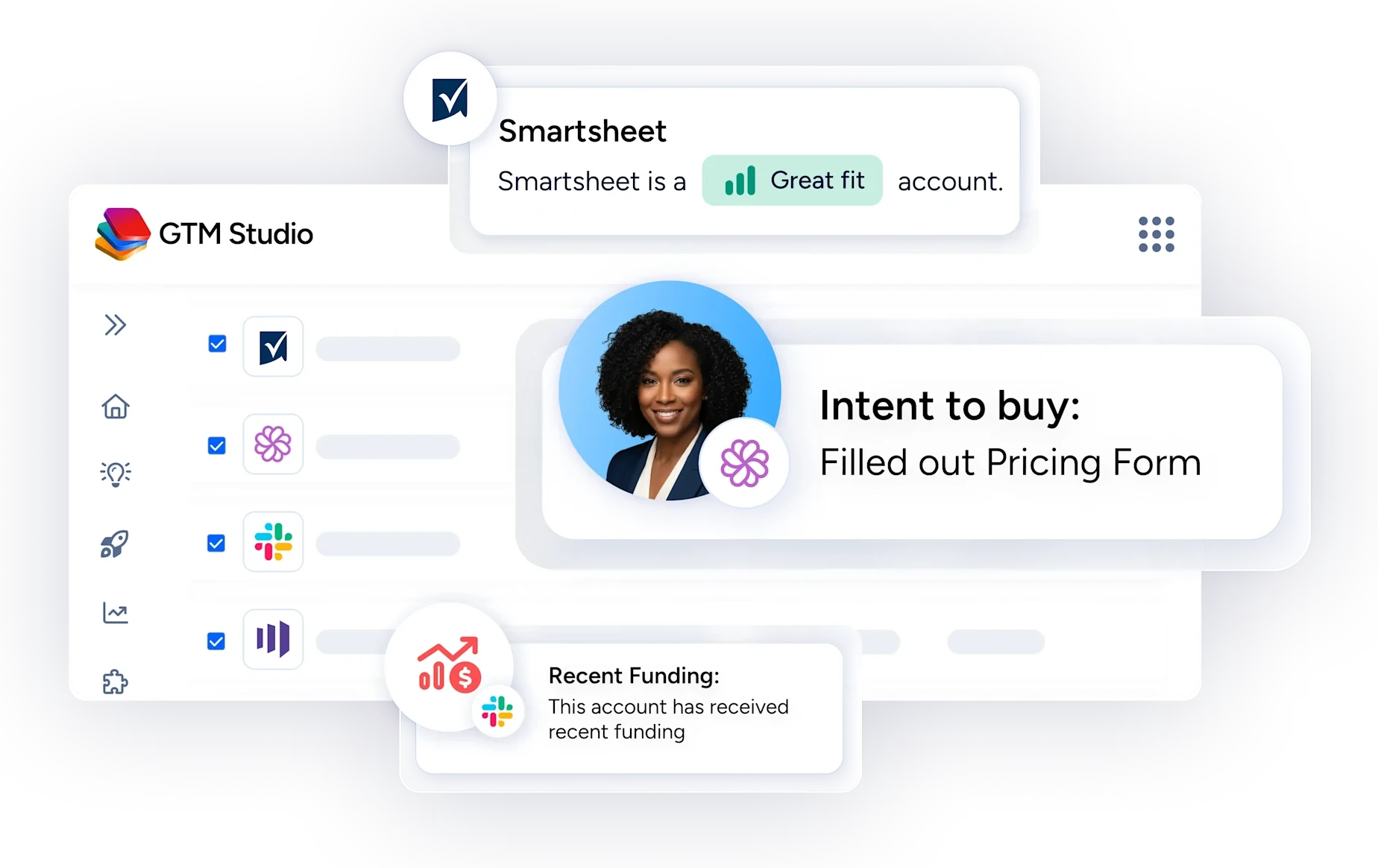
ZoomInfo pulls the data-driven signals into one place and connects them to your CRM, so reps don't have to check several tools to see what changed at an account.
Signal | ZoomInfo product | What it covers |
|---|---|---|
Intent | Weekly intent signals across 4,500+ topics, flagging companies with above-normal research activity. Person-Level Intent shows the contacts behind an account's intent, where available. | |
Job changes | ZoomInfo contact data and job change alerts | 15 to 20 million job change events processed every month |
Company events | Scoops | Funding rounds, M&A and leadership changes, monitored by human research teams |
Website visits | The companies and decision-makers exploring your site | |
Form fills | Single-field web forms enriched with ZoomInfo data, so a short form still gives sales a full record |
Sellers work these signals in the Pulse Feed in GTM Workspace, which surfaces up to 1,000 daily signals across 15+ signal types, including buying intent, job changes, funding, hiring activity and competitive research, grouped by account. RevOps teams build on the same signals in GTM Studio, where they add intent, technology and other signals to an Audience and act on it. The walkthrough on refining sales lists with buying signals in GTM Studio shows an example.
ZoomInfo case studies show what customers got from acting on signals:
Safety Services set up triggers on companies visiting its website and companies spiking on its custom intent topics, and increased MQLs by 200% in its first month of using ZoomInfo.
At NetSPI, teams use ZoomInfo Marketing to prioritize accounts by In-Market Score, which scores engagement tracked through website visits and intent searches, and a spike in intent triggers a Workflow that sends sellers a Slack message. NetSPI saw a 61% increase in opportunities created from demand generation channels in Q1.
Smartsheet added FormComplete to its forms. Its highest-volume demo form produced an 84% increase in MQLs sent to sales, a 26% increase in opportunity rate and a 59% increase in win rate.

"We use it to find mobile numbers, direct emails, job change signals, anything that helps us break through the noise."
Turn buying signals into Agent Teams plays
Signal programs often break at the handoff from alert to action. The alert fires, a task lands in the CRM that says "reach out," and the rep still has to research the account, check who owns it and write the message. High-intent signals wait hours for a response, and a busy rep may not get to some of them at all.
ZoomInfo Agent Teams closes that gap. It's built into GTM Studio and runs teams of AI agents that carry out a complete play, from the signal through research, routing, outreach and CRM updates. Each Agent Team starts with a trigger, and the trigger can be a buying signal.
Triggers include manual inputs, recurring schedules, webhooks, CRM events in Salesforce or HubSpot, and signal-based events such as website visits and completed meetings. Every trigger passes the full event context to the agents. Here's how four common signals map to triggers:
Signal | How it starts a play | What the Agent Team can do |
|---|---|---|
Job change | The Employment Change trigger fires when a tracked contact changes jobs, gets promoted or moves to a new company, with filters for seniority and target company. A recurring schedule against an Audience of past champions works too. | Researches the new role, finds the account owner, checks for an open opportunity, drafts outreach grounded in the old relationship and briefs the owner in Slack |
Form fill | A form-fill trigger, which you can filter by submission status. A form that creates a new lead in Salesforce or HubSpot can also start the play as a CRM event. | Enriches, scores and qualifies the buyer, then enrolls them in the right sequence in Salesloft or Outreach |
Intent spike | Bring intent into a play through a GTM Studio Audience. Add intent topics or an In-Market Score to the Audience, then run the play against it on a recurring schedule, or use an Audience trigger, which fires when a row is added or updated. | Researches the accounts showing intent and writes personalized outreach |
CRM event | A record is created or updated in Salesforce or HubSpot, such as a new lead or a deal moving stage. An Updated trigger can fire only when a field changes away from a set value, such as a deal leaving Negotiation. | Runs the play for that moment, such as packaging the deal history, stakeholders and commitments for a closed-won handoff |
Agent Teams can also trigger on 13 types of ZoomInfo Scoops, including product launches, M&A events, hiring plans and pain points. Any trigger can be scoped to the companies in a specific Audience, so a website-visit trigger fires only for accounts in your ideal customer profile, for example.
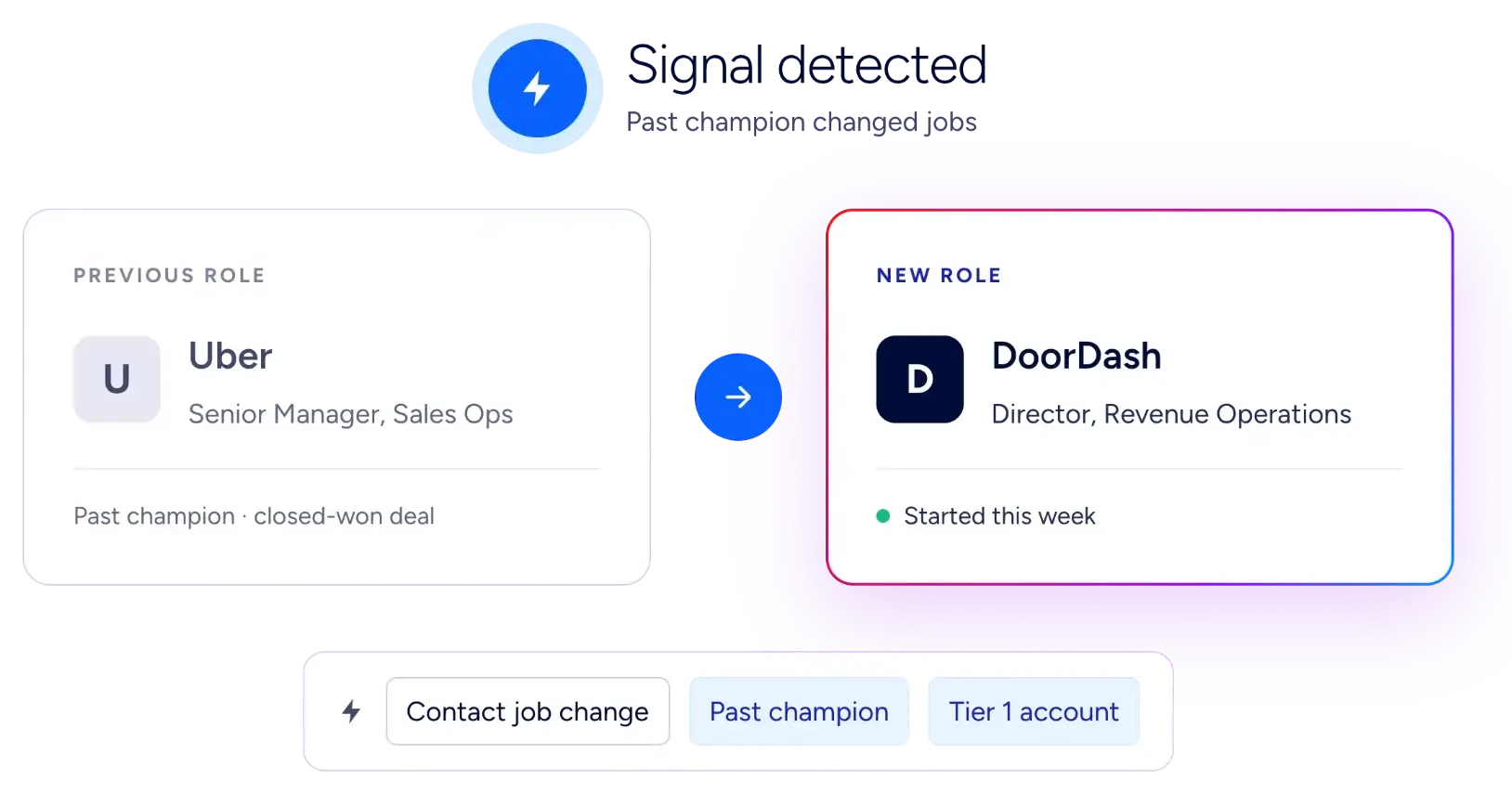
Signals also chain inside one play. In ZoomInfo's champion example, Jordan Ellis helped buy a product at Uber and later became Director of RevOps at DoorDash. A scheduled play against an Audience of past champions spots the move, reconstructs Jordan's role in the Uber deal and briefs the DoorDash account owner. When Jordan visits the pricing page two weeks later, a website-visit trigger passes the event to the Agent Team so the play keeps moving.
You don't have to build plays from scratch. Agent Teams includes templates such as Inbound Lead Activation and Outbound Prospecting, or you can describe a play in plain English and Agent Teams builds the workflow. Every step is written back to Salesforce or HubSpot. AI credit usage is estimated before you activate a play and tracked for each Agent Team, and admins control access through role management. Agent Teams is part of GTM Studio, with no new SKU or contract.
Want to see a signal play built on your own accounts? Talk to our team.
How to measure your buying signal program
Without measurement, a signal program becomes a stream of alerts that nobody trusts. Track these from the start:
Metric | What it tells you |
|---|---|
Time to first touch | How long it takes a rep to act on a signal |
Signal-to-meeting rate | The share of signal-triggered outreach that books a meeting |
Signal-sourced pipeline | Pipeline value from opportunities where a signal prompted the first outreach |
Win rate by signal type | Which signals turn into revenue and which are noise |
Job-change response rate | Reply rates on job-change outreach compared with cold outreach |
To make the numbers possible, add four fields to the contact and opportunity records and fill them at first outreach: signal type, signal date and time, signal source and hours to first touch. RevOps can then report signal-sourced pipeline every quarter, and managers can see which signals convert for which reps.
Frequently asked questions
What are buying signals in sales?
Buying signals are words, actions or company events that suggest a prospect may be moving toward a purchase. They include verbal signals such as pricing questions, non-verbal signals such as bringing a manager to the next call, digital signals such as demo requests and pricing page visits, and trigger events such as a champion changing jobs or a funding round.
What is the strongest buying signal?
A demo or trial request is the strongest digital signal, because the buyer has asked to see or try the product. In a live deal, the strongest signals are questions about pricing and contract terms and a named deadline, such as needing the tool live before a set date. Both show the buyer has moved from research to evaluating a purchase.
What is the difference between buying signals and intent signals?
The term intent signals is used two ways. Narrowly, intent signals are third-party research activity on topics related to what you sell, measured across many websites, which makes them one kind of buying signal. Some guides, including ZoomInfo's intent guide, use the term more broadly to include first-party activity such as pricing page visits and demo requests, and company events such as funding rounds and new executive hires. Either way, buying signals is the wider category: it also covers what buyers say and do in conversations with your team.
Are objections buying signals?
Specific objections often are. A buyer who worries about data migration or a security review is working out what it would take to say yes. A vague brush-off, such as saying it's not a priority right now, usually isn't a buying signal.
What are trigger events in sales?
Trigger events are changes at a company or in a person's career that open a buying window. Common examples are a champion changing jobs, a new executive hire, a funding round, a hiring surge and a new tool that pairs with yours. They don't mean an account is ready to buy today, but they make outreach more likely to land.
How do you interpret buying signals?
Read each signal in context. Check who it came from, whether the account fits your ideal customer profile, how close the signal sits to a buying decision, how recent it is, and whether other signals at the same account point the same way. A pricing question from a decision-maker at a target account outweighs a blog visit from someone outside it.
How quickly should you respond to a buying signal?
Match the speed to the signal. Respond to demo requests, repeat pricing page visits from target accounts and high-intent form fills within minutes to an hour. Respond to intent spikes, champion job changes and new executives within 24 hours, and to funding rounds and technology changes, such as a new tool that pairs with yours or a competitor being dropped, within two to three days.
Can AI agents act on buying signals?
Yes. ZoomInfo Agent Teams, built into GTM Studio, starts a play from a trigger such as a job change, a form fill, a CRM event in Salesforce or HubSpot, a website visit or a ZoomInfo Scoops signal. The agents then research the account, find the right owner, draft outreach or enroll the buyer in a sequence in Salesloft or Outreach, and write each step back to the CRM.
How do you track buying signals?
Pull signals from the places they already live: call recordings, your website and marketing automation, intent data, company and contact data, and your CRM. Route them to the account owner in the CRM, and log the signal type, date and source on each record you act on, so you can see which signals turn into pipeline.