

An inbound lead is a prospect who came to you, a demo request, a pricing-page visit, a form fill, so the intent is already there. The window to act on it is short: that same buyer is evaluating competitors, and contact rates drop sharply after the first five minutes.
Speed alone isn't enough, though. You have to reach the right leads with enough context to have a real conversation.
This guide covers how to qualify and route inbound leads, where response time breaks down, and how enrichment and intent data help reps respond in minutes with the context to convert
What are inbound leads (and how do they differ from outbound)?
Inbound leads are prospects who initiate contact with your business on their own, by filling out a demo request, downloading content, submitting a contact form, or engaging with your website, rather than being contacted first by a salesperson. The defining characteristic is intent: they came to you.
Consider a VP of Sales who finds your blog post via Google, reads your pricing page, and submits a demo request. That's an inbound lead. They've already done research, they're actively evaluating solutions, and they've raised their hand. The window to engage is narrow because that same intent that brought them to your site is driving them to three other vendors simultaneously.
Dimension | Inbound leads | Outbound leads |
|---|---|---|
Lead source | Prospect-initiated (form, demo request, chat) | Rep-initiated (cold call, cold email, LinkedIn outreach |
Intent level | High (self-selected) | Unknown (interrupted) |
Speed to first lead | Faster (lead arrives ready) | Slower (prospecting required) |
Cost per lead | Lower at scale | Higher (rep time per contact) |
Higher (intent already established) | Lower (requires intent development) |
Inbound leads require a different response strategy than outbound because the intent is already established. The window to engage is narrow, and every minute of delay is a minute a competitor is using to set the anchor for the evaluation.
Why lead response time determines whether inbound leads convert
Lead response time measures how quickly your sales team contacts an inbound prospect after they submit a form, request a demo, or signal buying interest. In B2B sales, this metric directly impacts conversion rates: the faster you respond, the higher your odds of connecting while the buyer is actively researching solutions.
Most teams measure this from form submission timestamp to first outreach attempt. But the real question isn't just how fast you respond. It's whether you're responding to the right leads with the right context.
Buyers don't wait around. When they submit a demo request, they're actively evaluating solutions alongside your competitors.
Why inbound lead response time determines conversion rates:
Buyer attention peaks at inquiry moment: They're on your site, thinking about your product, and ready to engage. Wait too long and they've moved on.
Competitors see the same signals: The first vendor to respond sets the anchor for the entire evaluation.
First response wins deal ownership: Early engagement builds rapport and signals that you're invested in solving their problem.
Speed drives conversion rates and pipeline velocity. But only if you're reaching out to qualified leads with the context to have a real conversation. That context (verified firmographic, technographic, and intent signals t ied to each inbound lead) is what the GTM Context Graph delivers to AI tools and agents so they can surface the right information before the first outreach attempt.
Lead response time benchmarks: what the data says
The data on response time is clear. Responding fast dramatically increases your odds of connecting with a prospect and moving them through your pipeline.
Key benchmarks from industry research:
Contact probability drops 400% after 5 minutes: Research from Harvard Business Review shows that response delays beyond 5 minutes dramatically reduce your odds of reaching prospects.
You're 100x more likely to connect within 5 minutes: InsideSales research found you are 100x more likely to connect within 5 minutes of a lead submitting a form.
These numbers tell a consistent story: the window for effective engagement is narrow. After 5 minutes, contact rates drop sharply. After an hour, you're fighting an uphill battle.
The 5-minute rule for lead response
The 5-minute benchmark isn't arbitrary. Research from Harvard Business Review and InsideSales consistently shows that this is the threshold where contact and qualification rates begin to collapse.
Why does the 5-minute window matter? Buyers are still in active research mode. They haven't closed the browser tab. They haven't moved on to the next vendor. They're waiting to see who responds first.
After 5 minutes, contact rates collapse:
Response Time | Impact on Conversion |
|---|---|
Under 5 minutes | Peak contact and qualification rates |
10 minutes | Contact probability drops significantly |
30 minutes | Qualification rates decline by orders of magnitude |
1 hour+ | Competing with vendors who already engaged |
The answer: within 5 minutes during business hours, and immediately via automated acknowledgment outside of business hours.
How to qualify inbound leads before your first outreach
Not all inbound leads deserve the same urgency. Qualification before outreach determines whether speed translates to pipeline. A rep who calls every form submission within 5 minutes without scoring first is fast but not effective. The goal is to be fast on the right leads.
Qualification criteria to score before outreach
Four dimensions tell you whether an inbound lead warrants immediate response:
ICP fit (firmographics): Does the company match your target profile on size, industry, and geography? A demo request from a 15-person startup when your ICP is 500+ employee enterprises belongs in nurture, not your immediate queue.
Behavioral signals: Did this lead visit your pricing page? View multiple pages in a single session? Download a bottom-of-funnel asset? High-engagement behavior signals active evaluation, not casual browsing.
Intent signals: Third-party intent data shows whether the account is researching your category across the broader web, not just your site. A lead who submitted a form AND whose company is spiking on relevant intent topics is a different conversation than a cold form fill.
Title and seniority: A VP of Sales or Head of Revenue Operations has decision authority. A coordinator or analyst may be researching on behalf of a buyer but can't move a deal. Route accordingly.
SLA tiers based on lead priority
Setting realistic targets depends on team capacity, lead volume, and coverage hours. Tier your SLAs based on lead priority:
Tier 1 (Demo requests, pricing inquiries): Respond within 5 minutes during business hours
Tier 2 (High-intent page visits, repeat visitors): Respond within 15 minutes
Tier 3 (Content downloads, newsletter signups): Respond within 2 hours or route to nurture
Document the SLA. Share it across Sales and Marketing. Review performance against it weekly. If you're consistently missing targets, diagnose whether it's a capacity issue, a routing issue, or a prioritization issue.
A note on data enrichment and qualification: when a lead arrives with only a work email, enrichment fills firmographic and contact data automatically, so reps can score and route without manual research. The lead's ICP fit is visible before the first call attempt.
How to calculate and track lead response time in your CRM
Measuring lead response time starts with a simple formula: time of first sales touch minus time of lead submission. But the details matter.
Your CRM should timestamp every form submission, demo request, and inbound inquiry. It should also log when a rep makes first contact. The difference between these two timestamps is your response time.
What to measure:
Form submission timestamp: When the lead hit submit on your website
First touch timestamp: When a rep made the first outreach attempt (call, email, or both)
Business hours vs. calendar hours: Decide whether you're measuring 24/7 or only during working hours
Average vs. median: Median response time often tells a more accurate story than average, as it filters out extreme outliers
Most CRMs can generate response time reports if your lead routing and activity logging are configured correctly. Pull this data weekly to identify bottlenecks and hold teams accountable.
Why inbound lead response breaks down (and how to fix it)
Slow response isn't a motivation problem. It's operational. Leads get stuck in handoffs, routing queues, and manual processes.
Where inbound lead response time breaks down:
Manual lead assignment: Leads sit in queues waiting for managers to route them
Unclear routing rules: Territory conflicts and missing assignment logic create delays
Marketing-Sales handoff friction: Vague MQL definitions and undocumented acceptance criteria cause leads to fall through cracks
Rep capacity constraints: Reps miss notifications while on calls or working other deals
Coverage gaps: Leads arrive outside business hours with no one available to respond
These aren't excuses. They're fixable problems. The first step is diagnosing where your process breaks down.
Lead routing and handoff delays
Leads get stuck between Marketing and Sales when MQL definitions are unclear, round-robin assignment creates queue delays, or territory disputes slow ownership decisions.
The handoff is the highest-risk moment. If accepting, reviewing, and deciding whether to engage takes 30 minutes, you've already missed the 5-minute window.
Fix this by automating lead assignment based on territory, ICP fit, and rep availability. Notify reps in real time. Make acceptance criteria explicit so there's no debate about lead qualification.
After-hours and coverage gaps
Leads don't respect business hours. They submit forms at 9 PM on a Friday or 6 AM on a Sunday. If no one responds until Monday morning, you're starting the conversation 48 hours late.
Coverage gaps kill response time metrics and conversion rates. Buyers expect fast responses regardless of when they reach out. If you can't staff 24/7 coverage, use automation to acknowledge receipt immediately and set expectations for when a human will follow up.
How to accelerate inbound lead response: prioritization, automation, and enrichment
Fixing slow response requires a combination of prioritization, automation, and process discipline. Start with the leads that matter most and build systems that route them to reps instantly.
Prioritize leads with scoring and intent signals
Not all inbound leads deserve the same urgency. A demo request from an enterprise prospect should get sub-5-minute outreach. A content download from an unqualified account goes to nurture.
Use lead scoring to identify which leads warrant immediate response. Combine ICP fit (firmographics, company size, industry) with intent signals (website behavior, content consumption, third-party data) to prioritize your queue.
Signals that indicate high-priority leads:
Visited pricing page
Matches ICP firmographics
Shows third-party intent on relevant topics
Decision-maker title
Multiple page visits in a short window
Route high-scoring leads directly to reps with real-time alerts. Send lower-priority leads to automated nurture sequences. This ensures your fastest response goes to the leads most likely to convert.
Automate email follow-up and scheduling
Automation speeds up your marketing operations. Set up email workflows that trigger when a lead fills out a form on your website.
The email should acknowledge your prospect's interest and offer them an opportunity to take the next step. It could be a link to your calendar, an invitation to reply with questions, or a piece of content they can download and consume in the meantime.
Embed scheduling into contact and demo forms
Integrating your calendar with your contact and demo forms lets your leads move the process forward themselves. This not only allows you to filter your qualified leads; it also increases the likelihood that your prospect will show up to the call. (Besides, it's now in their calendar too.)
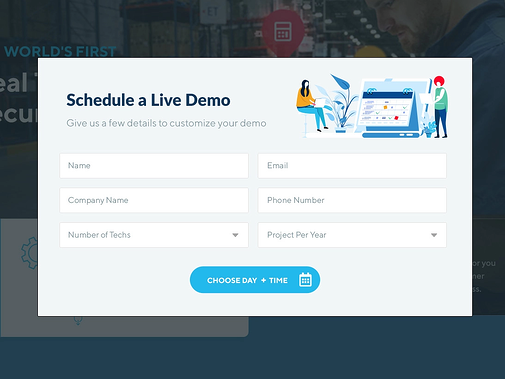
The downside of this approach is that you'll be exposing your AE's calendar to unqualified prospects, too, which could affect the overall efficiency of your sales and marketing engine.
In order to combat this, your tool should give you the ability to build different audiences, qualify the form submission in real-time, and provide calendars only for prospects with the highest engagement.
Or, offer up your AE's calendar for highly engaged visitors and your SDR's calendar for less engaged visitors. This method eliminates the huge inefficiency of setting up meetings through back and forth emails.
Chat with engaged buyers on your website
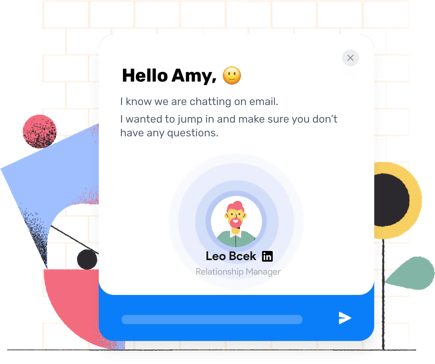
The moment your buyers are engaging with your high-value pages that detail your product or service, there's reason to believe there's some sort of buying intent.
This is where timing becomes crucial. The faster you can alert your sales team about qualified leads on your site, the faster they can engage them in real-time.
Enrich leads to reduce research time
Manually researching and qualifying leads takes up a lot of time. Even the act of finding basic contact information (phone number, industry, company type) can drag your reps through a tedious, slow process that ultimately takes them away from selling.
In other instances, marketers require prospects to fill out long lead forms to gain this information, which can add more friction and encourage bounce-offs.
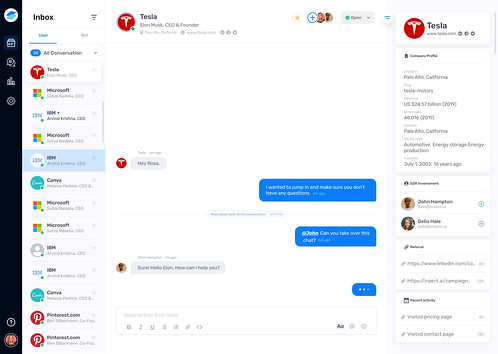
With data enrichment, the process becomes simpler and faster. As leads come in, they are screened and processed instantly, leading to automatic lead qualification.
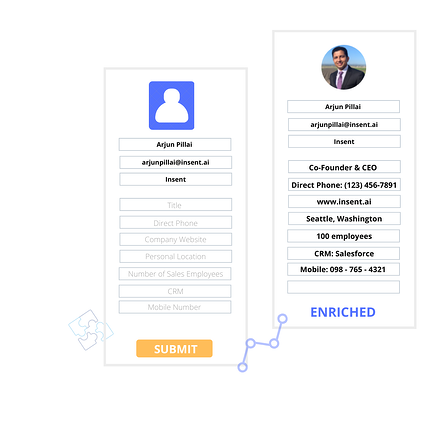
With just a work email, you can instantly fill firmographic and demographic data points. This way, your forms are short and to-the-point, and your SDRs are able to reach out sooner with less data entry in the way.
Data enrichment eliminates the research delay between lead arrival and first outreach. Reps can respond faster when they already have firmographic context, direct phone numbers, and org chart visibility. They're not scrambling to find contact information or qualify the account manually. For teams building AI-assisted workflows, the GTM Context Graph, ZoomInfo's intelligence layer, makes this enrichment available to any agent or AI tool through a single API, so the same verified contact and firmographic data flows into your stack without manual lookup.
What enrichment provides:
Verified email addresses
Company firmographics
Tech stack information
Org chart and reporting structure
Seismic's sales team saved 11.5 hours per week per seller and attributed 54% productivity gains to reduced manual research time with ZoomInfo data enrichment.
Momentive reduced speed-to-lead from 20 minutes to 60 seconds using ZoomInfo Operations enrichment.

"Thanks to ZoomInfo, we no longer have to question the source or reliability of the data in our systems."
Align sales and marketing on response SLAs
Fast response requires Sales and Marketing alignment. Without clear agreements on what constitutes a qualified lead, how fast Sales should respond, and what happens when leads don't meet criteria, handoffs break down.
Alignment checklist:
Shared MQL definition: Document what makes a lead qualified and ready for Sales outreach
Documented response time SLA: Set explicit targets for how fast Sales should respond to each lead tier
Regular feedback loop on lead quality: Sales reports back on which leads converted and which didn't meet criteria
Visibility into response time metrics: Both teams see the same dashboard and hold each other accountable
This isn't a one-time conversation. Review SLA performance weekly. Adjust definitions and targets as your ICP evolves and your team's capacity changes.
How data and intent signals accelerate inbound lead response
Responding fast means nothing if you're calling the wrong person. B2B intelligence makes speed possible by giving reps the context they need to engage immediately.
How data accelerates response:
Firmographics: Instant ICP qualification without manual research
Direct dials: Skip the gatekeeper, connect immediately
Intent signals: Prioritize leads actively researching your category
Org chart data: Identify decision-makers and influencers before first contact
Technographics: Understand the buyer's current stack and identify replacement opportunities
Snowflake saw 90% higher opportunity open rates and 2x customer conversion on ZoomInfo-scored accounts. That outcome reflects what happens when intent signals are used to prioritize inbound leads rather than treating every form fill as equal.
Speed plus context wins pipeline. Reps who have account intelligence at their fingertips respond faster and convert at higher rates.
Building the tech stack for fast inbound lead response
Fast response requires the right technology foundation. Your stack should capture leads, route them instantly, enrich them with context, and alert reps in real time.
Core technology categories:
CRM: Timestamp capture, lead routing, response time reporting
Marketing automation: Lead capture, scoring, workflow triggers
Sales engagement: Cadence execution, activity logging, rep notification
Data enrichment (ZoomInfo, an all-in-one AI GTM Platform): Instant qualification, contact discovery, account context
Notification systems: Real-time alerts to reps via Slack, SMS, or email
Your CRM is the system of record. It logs when leads arrive and when reps make first contact.
Marketing automation captures form submissions and scores leads based on ICP fit and behavior. Sales engagement platforms execute outreach cadences and log activity back to the CRM.
Data enrichment sits at the center. It fills in the gaps between form submission and rep outreach, providing the context reps need to engage immediately. Notification systems ensure reps see high-priority leads the moment they arrive.
Build your stack around speed and context. Every tool should either reduce time to first touch or improve the quality of that first conversation.
ZoomInfo brings all three layers to inbound lead response. Its comprehensive B2B data (500M contacts, 135M+ verified phone numbers, 200M+ verified business emails) qualifies leads the moment they arrive. The GTM Context Graph reasons across CRM data, behavioral signals, and intent to surface which inbound leads are ready to buy right now. And through GTM Workspace for sellers, GTM Studio for RevOps, and APIs and MCP for any tool or agent, that intelligence reaches every part of your stack without manual lookup.
Speed plus context wins pipeline
Response time matters. But responding fast with the right context matters more.
Reps who have account intelligence and buyer context at their fingertips can respond faster and more effectively. They're not wasting time on research. They're not guessing at contact information. They're engaging qualified inbound leads with relevant messaging while the buyer is still in active research mode.
Key actions to improve inbound lead response time:
Measure your baseline: Pull response time reports from your CRM and identify where your process breaks down.
Set clear SLAs: Document targets for each lead tier and hold teams accountable.
Prioritize with data: Use scoring and intent signals to route high-value leads instantly.
Equip reps with context: Give them firmographics, direct dials, and org chart visibility so they can engage immediately.
Speed wins. But speed plus context wins pipeline.
See how ZoomInfo's all-in-one AI GTM Platform accelerates inbound lead response, from verified direct dials and firmographic enrichment to the GTM Context Graph that surfaces which inbound leads are ready to buy right now. Request a demo, free to start with consumption credits based on usage.
Frequently asked questions
What is a good lead response time in B2B sales?
Under 5 minutes during business hours is the gold standard for inbound leads. Research from Harvard Business Review shows contact probability drops 400% after 5 minutes. For after-hours leads, an automated acknowledgment within seconds plus a human follow-up within the first hour of the next business day is the practical benchmark. The goal is to reach the buyer while they are still in active research mode.
How do you calculate lead response time in your CRM?
Lead response time equals the timestamp of the rep's first outreach attempt minus the timestamp of the lead's form submission. Your CRM must log both events. Pull the median (not average) response time weekly, median filters out outliers from after-hours submissions. Most CRMs generate this report if lead routing and activity logging are configured correctly.
Why does lead response time drop after 5 minutes?
Buyers are still in active research mode when they submit a form, they haven't closed the browser tab and haven't moved on to the next vendor. After 5 minutes, they're likely evaluating a competitor's demo request confirmation or have moved to a different task. The first vendor to respond sets the anchor for the entire evaluation. After 30 minutes, qualification rates decline by orders of magnitude.
How can I reduce inbound lead response time without hiring more reps?
Three levers that don't require headcount: (1) Automate lead routing so high-priority leads reach reps instantly without manager review. (2) Use data enrichment to pre-qualify leads at arrival, reps skip manual research and respond immediately with context. (3) Embed scheduling links in demo forms so qualified buyers can book directly. ZoomInfo's all-in-one AI GTM Platform automates enrichment and routing so reps engage inbound leads with verified firmographic and contact data already in hand. The GTM Context Graph surfaces which leads are ready to buy so your team focuses effort where it converts.
What is the difference between an inbound lead and an MQL?
An inbound lead is any prospect who initiates contact with your business, a form fill, demo request, or chat conversation. An MQL (Marketing Qualified Lead) is an inbound lead that has been scored against your ICP criteria and behavioral signals and deemed ready for sales outreach. Not all inbound leads are MQLs. The qualification step (firmographic fit, intent signals, title and seniority, engagement depth) is what converts a raw inbound lead into an MQL your sales team should prioritize.
How does data enrichment speed up inbound lead response?
When a lead arrives with only a work email, enrichment instantly appends firmographic data (company size, industry, tech stack), direct dial phone numbers, org chart context, and intent signals. Reps skip the 20 to 30 minutes of manual research that typically delays first outreach and respond immediately with the context needed for a relevant conversation. Seismic's sales team saved 11.5 hours per week per seller after implementing ZoomInfo data enrichment.