

Cvent is the leading event technology platform, managing venue sourcing across nearly 340,000 hotels and venues, registration, check-in, attendee engagement, and post-event analytics for over 24,000 customers worldwide. It has held Gartner Magic Quadrant Leader status for Event Marketing and Management Platforms three years running, ranked highest in Ability to Execute.
But an event platform only knows what happens inside the event.
Cvent captures who registered, who attended, which sessions they joined, and how they engaged. On its own, it cannot verify whether an attendee's phone number still works, detect which accounts at your conference are researching your product category this week, trigger a nurture sequence the moment someone registers, reconcile meeting travel budgets against actual expenses, or tell you which Google Ads keyword drove the registration in the first place.
The right integrations close those gaps. They feed your event platform data it cannot generate on its own, automate workflows across your marketing stack, connect event spend to expense systems, and link registration pages to the attribution model governing your digital campaigns.
This guide covers the strongest integration for each of the jobs Cvent users most commonly need done:
Enrich event leads with verified B2B contact data and buyer intelligence at the point of capture
Sync event registration and attendance data with your CRM for pipeline attribution
Trigger automated pre-event and post-event nurture programs from event activity
Route event data to tools outside Cvent's native marketplace without code
Close the loop between meetings planning and corporate travel and expense management
Track registration funnel performance and traffic attribution across your digital campaigns
Each section walks through how the integration connects with Cvent, what data flows between the platforms, pricing, and who benefits most.
Best Cvent Integrations at a Glance |
|---|
Best Cvent Integration for B2B Event Lead Enrichment and Buyer Intelligence Enriches leads captured at Cvent events with verified contact data, company intelligence, and buyer intent signals, turning badge scans into prospect records your sales team can act on immediately. |
Best Cvent Integration for Sales Pipeline Attribution and Field Marketing Coordination Connects event registration, attendance, and engagement data to Salesforce records with bidirectional field-level sync, so field marketing teams can manage invitations from the CRM and attribute event activity to pipeline without manual data transfer. |
Best Cvent Integration for Enterprise Event-Driven Marketing Automation Pipes Cvent registration, attendance, session, and survey signals into Marketo's Smart Campaign engine in real time, triggering personalized pre-event nurture and post-event follow-up sequences segmented by engagement depth. |
Best Cvent Integration for No-Code Multi-App Workflow Automation Extends Cvent's reach to 8,000+ apps with no-code automation, routing registration events and attendee data to tools that lack native Cvent connectors. |
Best Cvent Integration for Closing the Meetings Spend Management Loop Connects Cvent meeting approval workflows to corporate travel booking and expense reimbursement, giving finance teams full visibility into what each event actually cost. |
Best Cvent Integration for Registration Funnel Analytics and Traffic Attribution Brings standard digital marketing measurement to Cvent event pages, tracking traffic sources, registration conversion funnels, and channel-level revenue attribution using the same GA4 property that governs the rest of your campaigns. |
What Is Cvent?
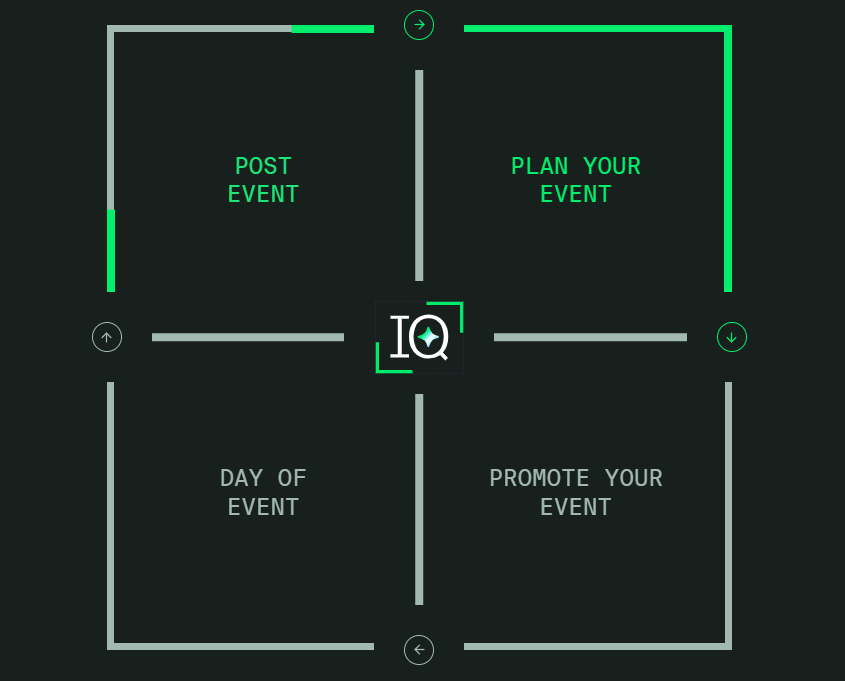
Cvent is an event technology platform that manages the full lifecycle of in-person, virtual, hybrid, and webinar events, from registration and venue sourcing through on-site engagement and post-event analytics.
Source: Cvent
The company serves approximately 30,000 customers globally, including 70% of the Fortune 500, with 5,500+ employees and more than $600M in revenue. The company positions events as a revenue channel, not a logistics function, codified in its Event-Led Growth For Dummies publication. CventIQ is Cvent's AI layer, covering content creation, attendee personalization, and performance insights across the platform.
Cvent's integration ecosystem is a core strength.
The Cvent App Marketplace houses native integrations across CRM, marketing automation, travel management, analytics, and virtual event tools. Cvent offers a REST API with OAuth 2.0 authentication, a webhooks system for event-driven notifications, official SDKs for TypeScript, .NET, and Java, and a Developer Hub with endpoint documentation and guided tutorials. Every Cvent account includes access to the Essentials API tier by default, with Standard and Premium tiers available for higher-volume integrations.
The integration categories available to Cvent users include:
CRM and sales: Salesforce, HubSpot, Microsoft Dynamics 365, SugarCRM, Veeva
Marketing automation: Marketo Engage, Oracle Eloqua, Salesforce Pardot
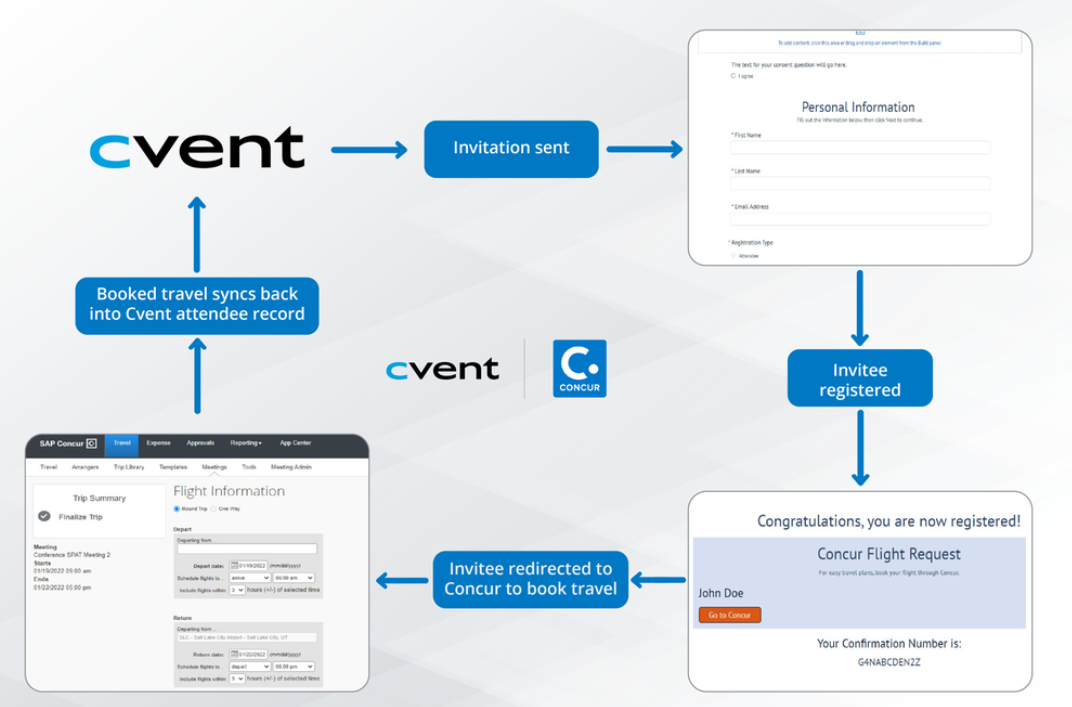
Budget and expense management: SAP Concur, American Express GTR, Citi Virtual Card
Travel and transportation: Amadeus, Sabre, Uber for Business
Web and virtual platforms: Zoom, Microsoft Teams, Cisco Webex
Data analytics: Google Analytics, Domo, Tableau
Workflow automation: Zapier
Source: Cvent
With that ecosystem as context, here are the six integrations we selected as the best options for extending Cvent's capabilities across the categories that matter most to event marketing teams.
1. ZoomInfo: Best Cvent Integration for B2B Event Lead Enrichment and Buyer Intelligence
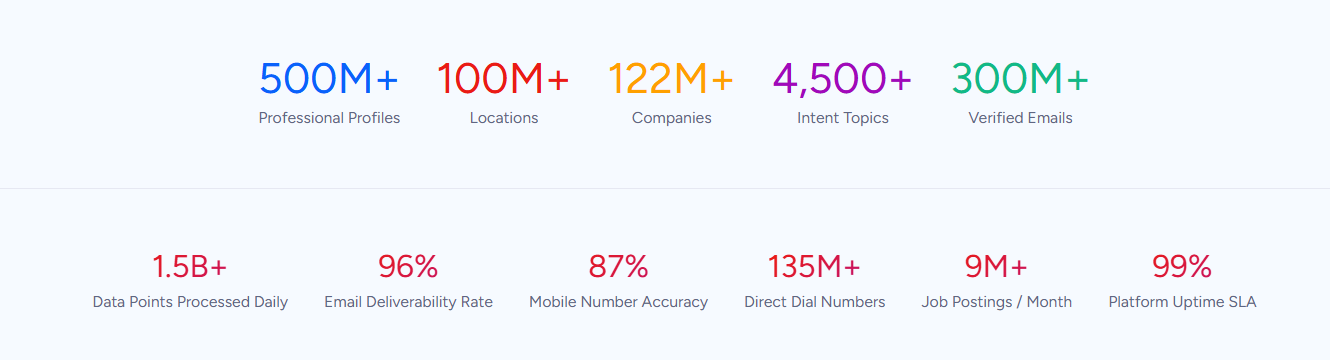
ZoomInfo is a B2B data and intelligence platform built on 500M contacts, 100M companies, 135M+ verified phone numbers, and 200M+ verified business email addresses. It integrates natively with Cvent through iCapture by Cvent, Cvent's event lead capture tool, to enrich leads captured at events with verified contact data, company intelligence, and buyer intent signals in real time.
Source: ZoomInfo
Connecting the two platforms unlocks:
Event leads that arrive in your CRM complete and verified, with direct dials, business emails, company attributes, and technographic data appended at the moment of capture rather than after days of manual research
Pre-event intelligence that identifies which registered accounts are researching your category, so your team prioritizes meetings and booth conversations accordingly
A single data handoff from event floor to sales pipeline, eliminating the gap between scanning a badge and having a contact your reps can reach and route
How ZoomInfo Integrates with Cvent
ZoomInfo connects to Cvent through iCapture by Cvent, Cvent's native event lead capture tool, powered by ZoomInfo's GTM.AI platform. When field marketers scan attendee badges or business cards at Cvent-hosted trade shows and conferences, ZoomInfo enriches each lead in real time with verified B2B data, then routes the enriched records to CRM or marketing automation platforms.
Source: ZoomInfo
Every lead captured through iCapture at a Cvent event gets the same data quality ZoomInfo delivers through its direct CRM integrations. The data flows through a verification pipeline backed by 300+ human researchers, reaching up to 95% accuracy on first-party data.
Real-Time Lead Enrichment: Turn Every Badge Scan into a Verified Prospect Record
When a sales rep or booth staffer scans a badge at a Cvent-hosted trade show, the typical result is a name, a company, and an email address. ZoomInfo's enrichment adds what the badge cannot carry: a verified direct-dial phone number, current job title and seniority level, department, company attributes (revenue, headcount, industry, headquarters), technographic data covering 30,000+ technologies, and parent-child corporate hierarchy.
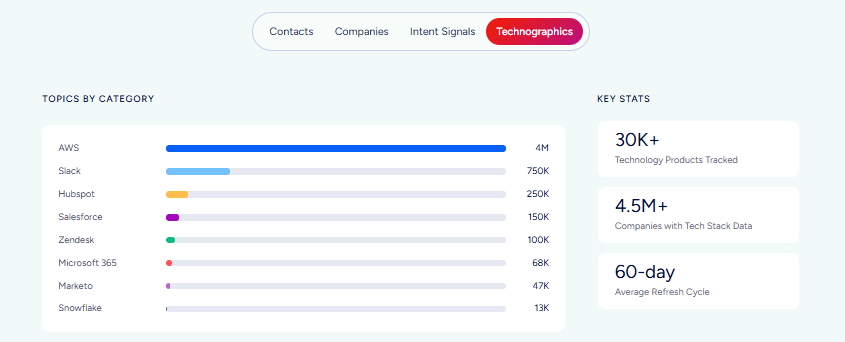
This enrichment happens at the point of capture. The rep scanning badges at 2 PM has enriched, verified records in CRM by the time the booth closes, instead of waiting for a post-event cleanup process that takes days or weeks.
For trade shows where hundreds of leads are captured in a single day, the difference between same-day enrichment and manual research determines whether follow-up happens while the conversation is fresh or after the prospect has moved on.
ZoomInfo in action: Your team scans 300 badges at a three-day industry conference. ZoomInfo enriches each lead with a verified business email, direct-dial phone number, company profile (including revenue range, employee count, and technology stack), and the names of three other decision-makers in the same department. Your SDRs begin multi-threaded outreach the morning after the event while competitors are still sorting through incomplete spreadsheets.
Buyer Intent Signals: Identify Which Event Attendees Are Actively In-Market
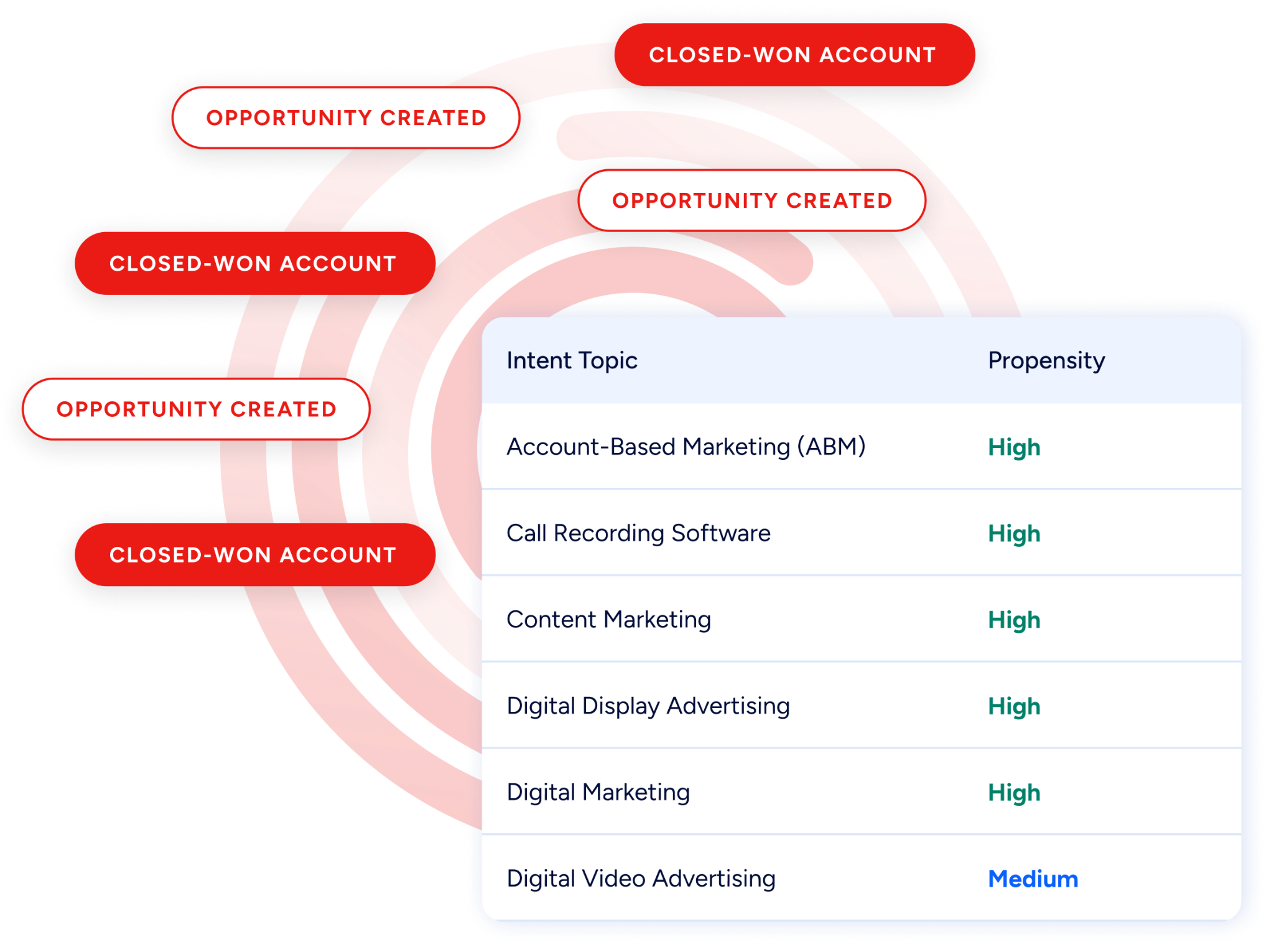
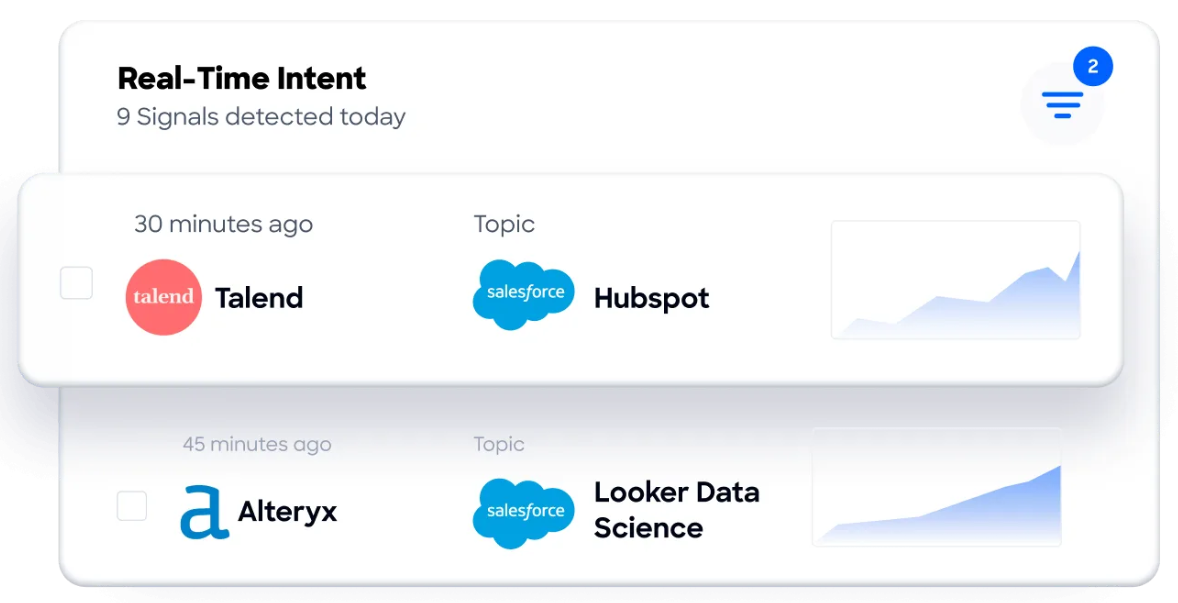
ZoomInfo's Buyer Intent tracks signals from 210 million IP-to-Organization pairings and 6 trillion+ new keyword-to-device pairings monthly, revealing which companies are researching topics relevant to your product.
Source: ZoomInfo
When layered onto your Cvent event attendee list, intent data answers a question that registration data alone cannot: which of the 2,000 people at your conference are from accounts evaluating solutions in your category right now?
Guided Intent, exclusive to ZoomInfo, identifies research topics historically correlated with deal success in your business, so the signals are calibrated to your actual win patterns rather than generic keyword thresholds.
Source: ZoomInfo
Before the event, intent data prioritizes which registered accounts to target for 1:1 meetings. During the event, it helps booth teams identify walk-ups from high-intent accounts. After the event, it ensures follow-up sequences reach the contacts whose accounts show the strongest buying signals.
ZoomInfo in action: Two weeks before your annual user conference, ZoomInfo intent data surfaces 45 registered accounts researching "event marketing platforms" and "marketing attribution."
Your team uses Cvent's Jifflenow to schedule executive meetings with contacts at those accounts, and booth staff flag their badges for priority follow-up. Post-event, the 45 accounts enter an accelerated nurture track while the remaining attendees receive a standard follow-up sequence.
Post-Event Data Quality: Verified Information from Event Floor to CRM
The most common failure in event marketing is the data gap between lead capture and CRM action. Badge scans collect what the event organizer printed: a name, a company, and sometimes an email.
That data is often incomplete, occasionally outdated (attendees change jobs, use personal emails for registration), and always missing the context sellers need to prioritize follow-up.
ZoomInfo closes this gap by appending verified, current data to every lead at the point of capture. The enrichment covers contact data and company intelligence: company attributes for scoring and routing, technographic profiles for relevance, and org chart data for multi-threading into the buying committee.
Because the enrichment runs against ZoomInfo's continuously verified database (where nearly 90% of active pairings are refreshed within three months), the data arriving in CRM reflects the prospect's current role and company.
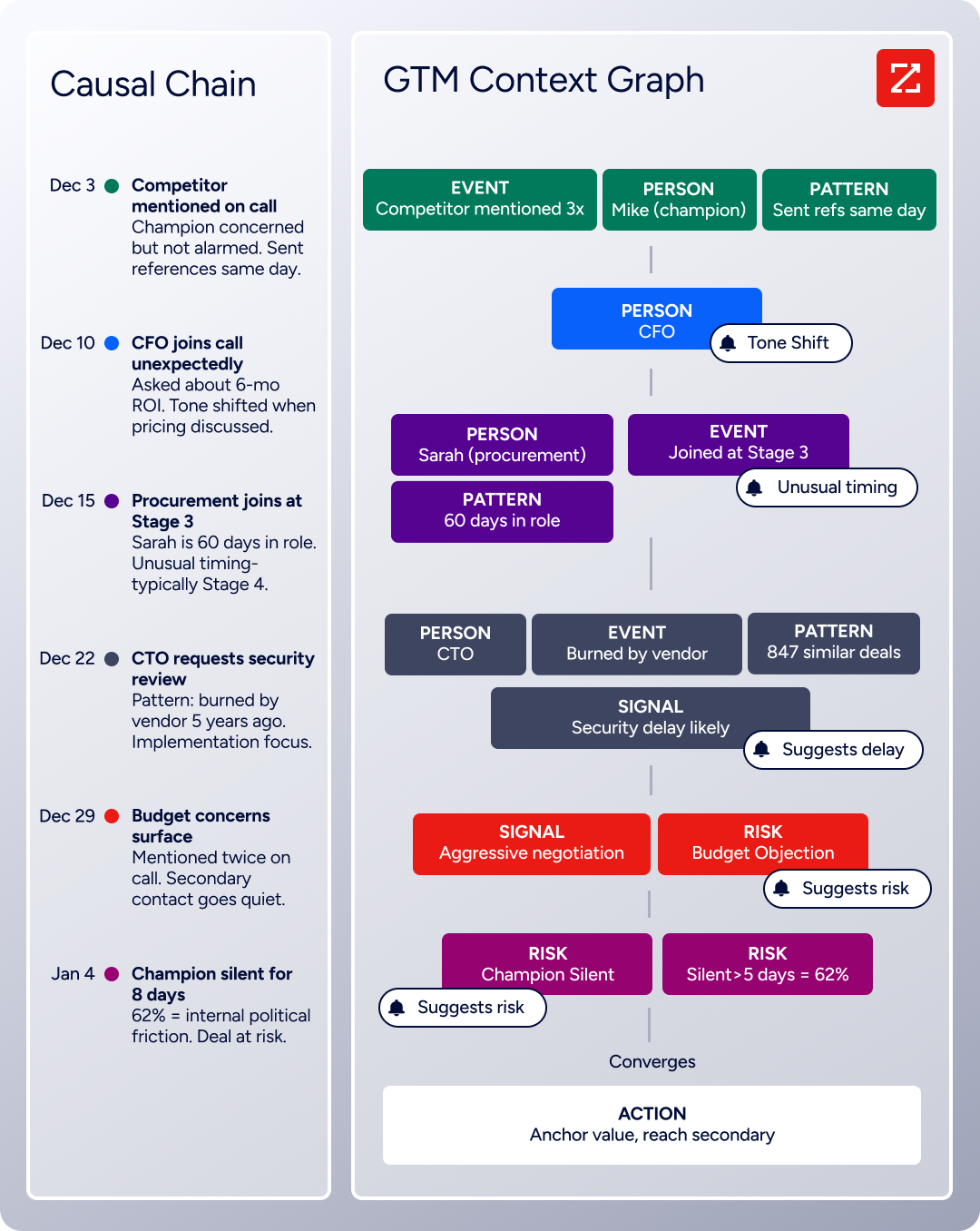
Beyond iCapture, the enrichment feeding your event lead pipeline connects to a broader data system: the GTM Context Graph processes 1.5B+ data points daily and combines ZoomInfo's B2B data with CRM records, conversations, and behavioral signals, while GTM Studio, APIs, and MCP expose the same intelligence to any tool or AI agent in your stack.
Source: ZoomInfo
Seismic's sales team attributed 39% of active pipeline to opportunities identified or influenced by ZoomInfo signals, reporting 54% productivity gains and saving 11.5 hours per week per seller. (Seismic Case Study)
ZoomInfo Pricing
ZoomInfo uses a consumption-based pricing model with custom quotes based on usage, users, credit volume, and features.
It is organized into Sales, Marketing, and standalone product lines, each in Professional, Advanced, and Enterprise tiers. The iCapture integration and CRM connections are included in the platform; enrichment capabilities and intent data features vary by tier, with Advanced adding intent signals and website visitor tracking.
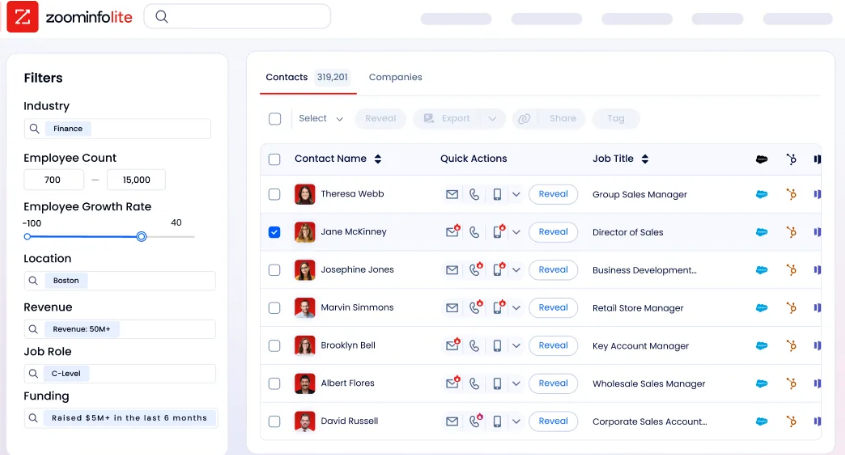
ZoomInfo Lite is a permanent free tier (no credit card, no time limit) with 10 monthly export credits, searches, the Chrome extension, and CRM integrations, making it a practical way to evaluate the data quality before committing. A separate 7-day free trial covers paid features including intent data and AI capabilities.
Source: ZoomInfo
Who Should Use the ZoomInfo Integration?
Field marketing teams capturing hundreds of leads per event that need those leads enriched with verified direct dials, business emails, and company intelligence before the follow-up window closes, instead of spending days on manual data research
Revenue operations teams that need company attribute, technographic, and intent data attached to event leads at the point of capture, so CRM routing, scoring, and segmentation work immediately rather than after a data cleanup cycle
Sales teams running 1:1 meeting programs at conferences that need to identify which registered attendees are from accounts showing buying signals, prioritizing face time with the accounts most likely to convert
2. Salesforce: Best Cvent Integration for Sales Pipeline Attribution and Field Marketing Coordination
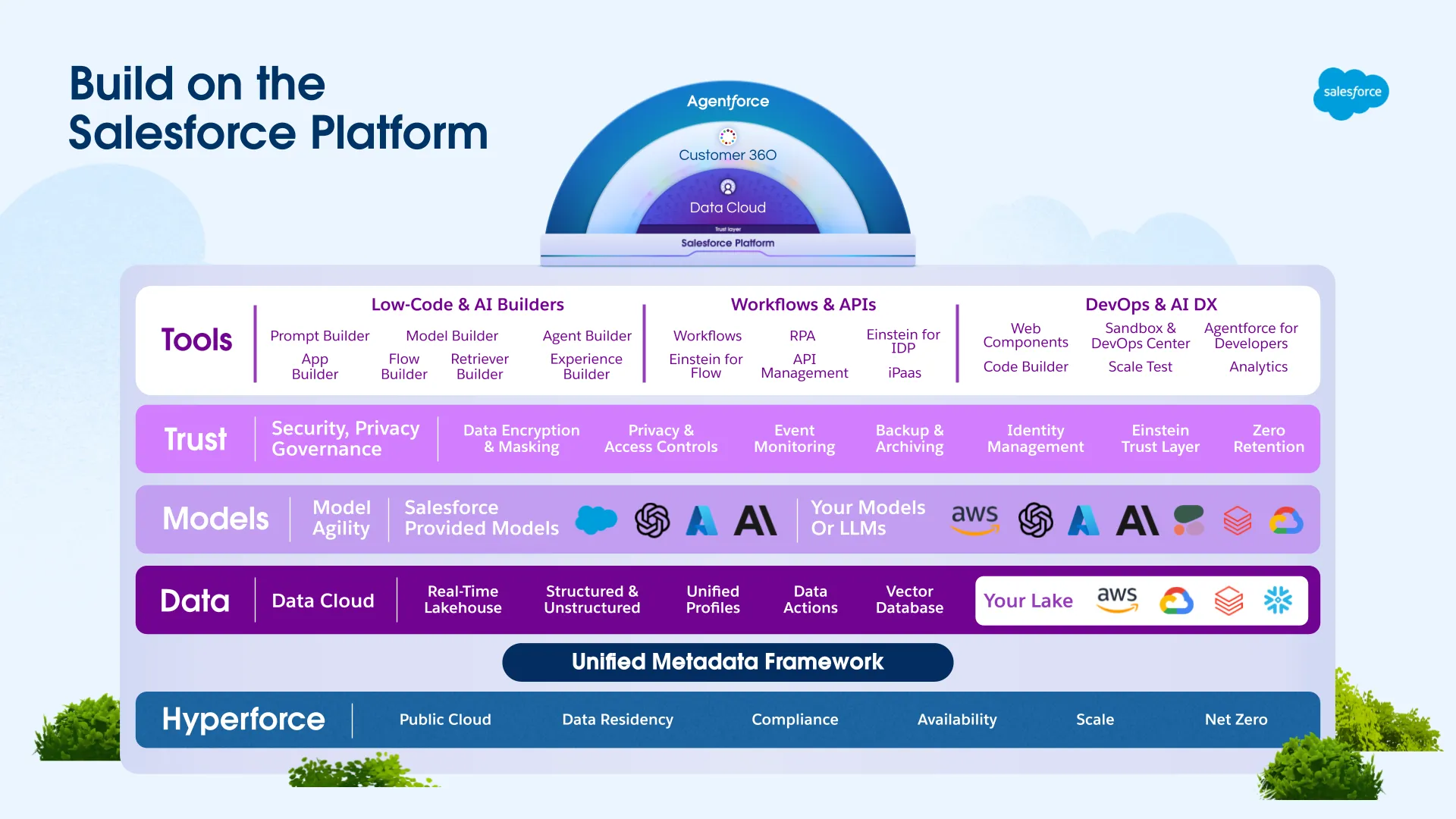
Salesforce is the #1 CRM by IDC market share. Its Cvent integration connects event registration and attendance data to sales pipeline records, letting field marketing teams manage event invitations, track revenue influence, and update opportunities without leaving the CRM. The connector is a native first-party app available through the Cvent Salesforce App.
Source: Salesforce
Key integration capabilities include:
Contact-driven invitation management from inside Salesforce, pulling CRM contacts into Cvent invitation lists and triggering campaigns without switching platforms
Registration form pre-population from Salesforce records, reducing attendee friction for known contacts
Bidirectional field-level sync with administrator-controlled data directionality, so authoritative CRM fields are never overwritten unintentionally
Automatic Salesforce record creation from event activity, including contacts, leads, tasks, campaign member statuses, and opportunities
How Salesforce Integrates with Cvent
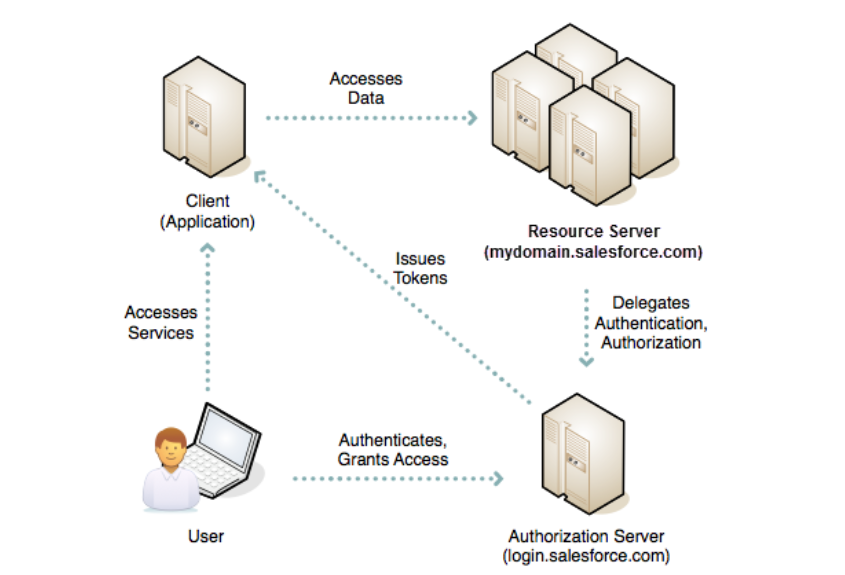
The integration runs through the Cvent Salesforce App, a native connector requiring no third-party middleware. Setup involves installing the app, establishing an OAuth 2.0 connection, and mapping individual fields through Cvent's field mapping interface. On the Cvent side, full API-level sync access is a Cvent Enterprise plan feature.
1. Contact-Driven Invitation Management and CRM-Side Campaign Control.
Using the Cvent Salesforce App, sales reps and field marketers pull Salesforce contacts into Cvent invitation lists and trigger invitation campaigns from within the CRM. When an invited Salesforce contact clicks through a personalized registration link, Cvent fetches their CRM record and pre-fills the registration form with verified data, improving completion rates for events targeting existing customers and prospects.
2. Bidirectional Field Mapping with Directional Control.
Each synced field is configured individually to push Salesforce-to-Cvent, Cvent-to-Salesforce, or bidirectionally. This granularity prevents event platform data from overwriting CRM fields that a data operations team has carefully maintained, a particular risk when Salesforce records carry enriched or governance-controlled attributes.
3. Automatic Post-Event Record Creation.
Registration, attendance, and engagement data from Cvent flows back into Salesforce as new contacts, leads, tasks, and campaign member status updates, including cancellation updates that fire when a registrant withdraws. Account executives reviewing their Salesforce records after a major conference find the full event interaction already logged without manual data transfer from the events team.
4. Real-Time Attendee Status Push via OAuth.
With OAuth authentication configured, attendee status changes in Cvent (check-in at the registration desk, session scan, badge tap) push to Salesforce immediately rather than waiting for the standard scheduled sync. Sales managers tracking live attendance at flagship events see up-to-the-minute check-in data in Salesforce dashboards during the event itself.
Source: Salesforce
Salesforce Pricing
Salesforce uses a per-user, per-month subscription model billed annually:
Starter Suite: $25/user/month
Pro Suite: $100/user/month (includes API access needed for the Cvent integration)
Enterprise: $175/user/month (recommended for teams running high event volumes due to higher API call allocations)
Unlimited: $350/user/month
Agentforce 1: $550/user/month
The Cvent Salesforce App does not require a specific tier beyond Pro Suite for API access, but enterprise field marketing teams will hit API request limits faster on lower tiers. Enterprise at $175/user/month is the practical floor for teams treating this integration as a core pipeline data layer.
Who Should Use the Salesforce Integration?
Organizations standardized on Salesforce as their CRM of record that want event registration, attendance, and engagement data to appear as native Salesforce records without manual post-event data transfer
Field marketing teams that manage event invitations from Salesforce and need to trigger Cvent campaigns from CRM account and contact views rather than operating two separate platforms
Revenue operations teams using Salesforce campaign member statuses to trigger downstream workflows (nurture enrollment, sales outreach queues, opportunity creation) that need Cvent registration and attendance events, including cancellations, to feed those workflows automatically
3. Marketo Engage: Best Cvent Integration for Enterprise Event-Driven Marketing Automation
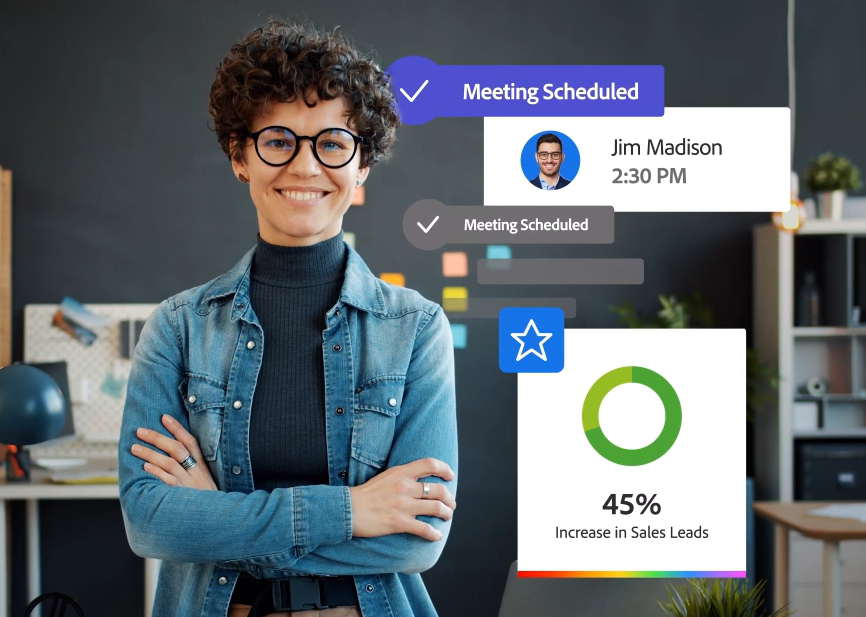
Marketo Engage is an enterprise B2B marketing automation platform. Its Cvent integration closes the loop between event registration data and automated multi-touch nurture programs, piping Cvent's registration, attendance, session, and survey signals into Marketo's Smart Campaign engine in real time.
Marketing operations teams can trigger personalized pre-event and post-event sequences without manual list management. The connector is listed natively on the Cvent App Marketplace.
Source: Adobe
Key integration capabilities include:
Event token emails with personalized registration links and conditional restriction codes routing each recipient to a specific Cvent registration path based on their Marketo record attributes
Real-time activity sync pushing registrations, check-ins, session attendance, cancellations, no-shows, and survey responses as they occur
Automated pre-event nurture enrollment triggered the moment a Cvent registration confirmation arrives in Marketo
Post-event follow-up routing segmented by engagement depth using session attendance duration, survey completion, and Cvent engagement scores
How Marketo Engage Integrates with Cvent
The integration operates at the program level, connecting Cvent event programs to Marketo programs bidirectionally. Setup requires a Marketo LaunchPoint service generating a Client ID and Client Secret via the standard OAuth 2.0 credential flow.
Cvent pulls contact records from Marketo to power dynamic registration logic and form pre-population; Marketo receives activity data from Cvent as lead record events that feed Smart Lists, scoring models, and Smart Campaign triggers immediately.
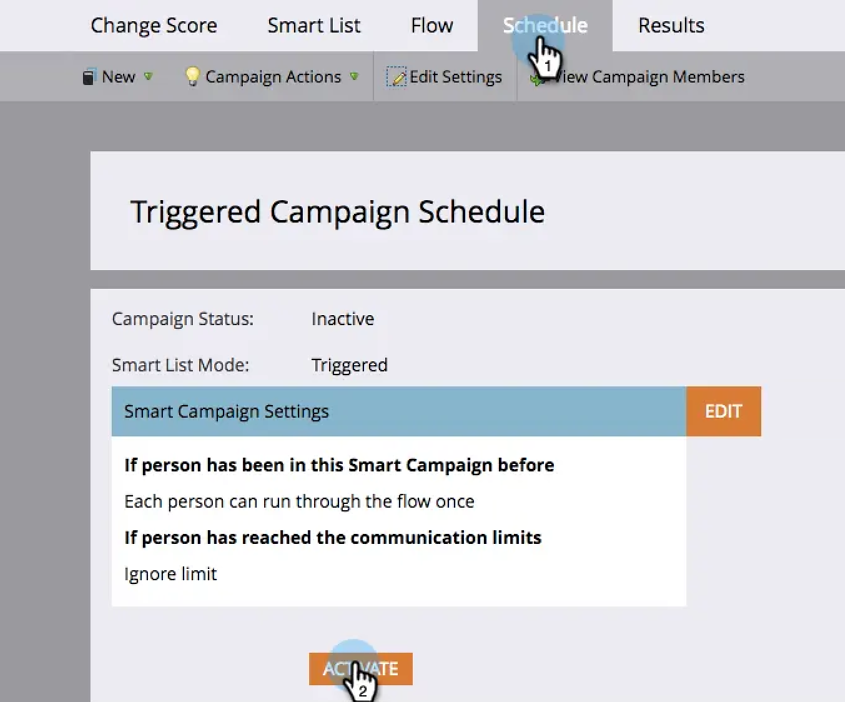
Source: Adobe
1. Event Token Emails with Personalized Registration Paths.
When Marketo sends invitation emails for Cvent-hosted events, Cvent event tokens populate the message with personalized registration links and conditional restriction codes. Each email recipient gets a link that routes them to a specific registration path based on their Marketo record attributes: VIP contacts enter a priority path, standard prospects see an open registration form.
The Marketo team builds and sends the invitation using their existing program structure; Cvent supplies the token values that make the destination dynamic.
2. Real-Time Activity Sync to Marketo.
The integration pushes Cvent activity records into Marketo as they occur. Registrations, check-ins, individual session attendance records, cancellations, no-shows, and survey responses all become Marketo activity data on the lead record immediately, not on a nightly batch schedule.
A contact who attends a high-value product session at a morning event can have their Marketo lead score updated and a sales alert triggered by midday rather than the following morning.
3. Automated Pre-Event Nurture Enrollment.
As Cvent registration confirmations arrive in Marketo, Smart Campaign triggers immediately enroll the newly registered contact into pre-configured nurture programs delivering session reminders, logistics details, and agenda previews at scheduled intervals.
Without the integration, marketing operations teams must export a registration list from Cvent, import it manually into Marketo, and then enroll registrants by hand, meaning contacts who registered close to the event date often miss early nurture steps entirely.
4. Post-Event Follow-Up Routing by Engagement Depth.
Marketo uses session attendance duration, survey completion records, and engagement scores from Cvent to separate high-intent attendees from casual participants. A contact who attended three sessions and completed the post-event survey registers differently in Marketo's lead scoring model than a contact who checked in and left after 20 minutes.
High-engagement attendees who cross a score threshold route to sales as MQLs automatically; moderate-engagement attendees enter a multi-step nurture sequence; no-shows enter a re-engagement track.
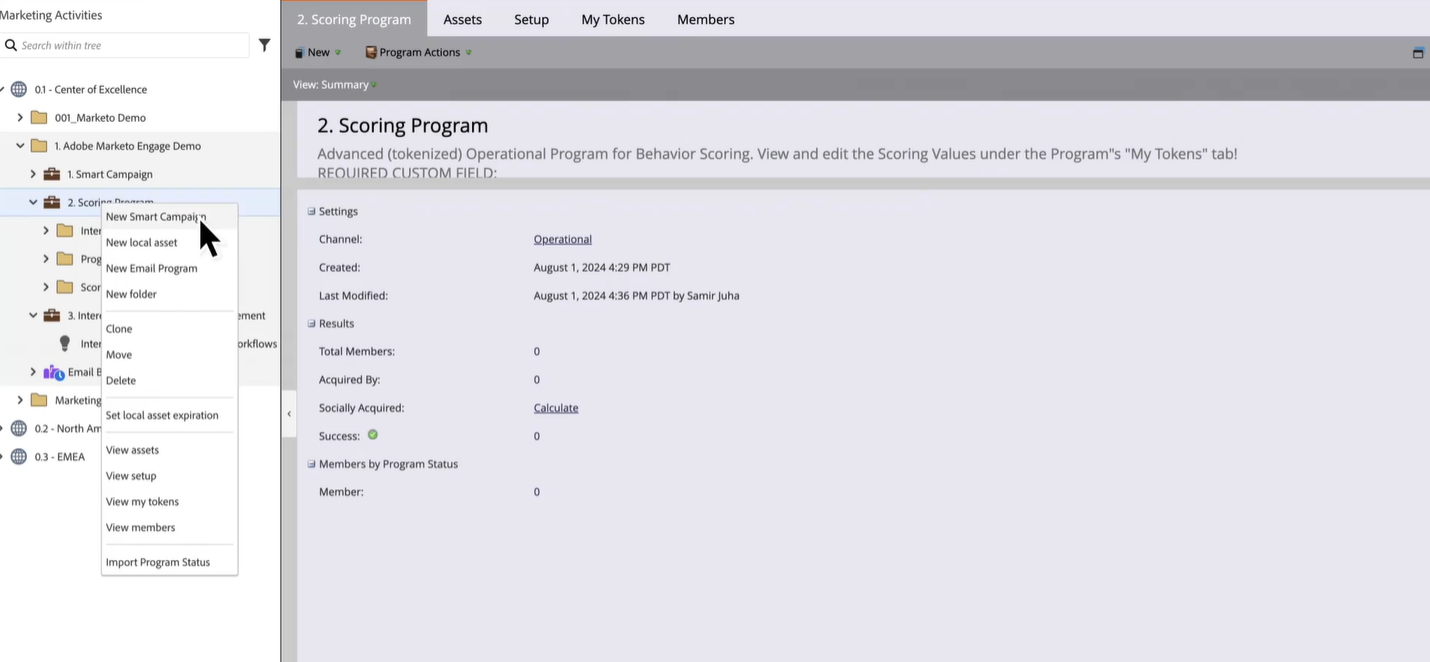
Source: Adobe
Marketo Engage Pricing
Adobe Marketo Engage uses a contact-volume, quote-only pricing model with no public prices. Licensing scales per 1,000 contacts across four tiers:
Growth: 10 users, 20,000 API calls/day; core campaign automation, CRM integration, and email marketing
Select: 25 users, 50,000 API calls/day; adds event and webinar marketing, interactive webinars, Dynamic Chat Standard, and attribution dashboards
Prime: 25 users, 50,000 API calls/day; adds predictive audiences, journey analytics, and sandbox environments
Ultimate: 25 users, 50,000 API calls/day; adds Marketo Measure for full multi-touch revenue attribution
For teams running high-volume Cvent event programs, the Growth tier's 20,000 daily API calls may constrain real-time sync during peak registration periods. Select and above provide 50,000 calls/day as the base, with Performance add-ons available for up to 800,000 calls/day.
Who Should Use the Marketo Engage Integration?
Marketing operations teams already running Marketo as their primary automation platform that need event registration and attendance data to trigger nurture enrollment, lead score updates, and sales routing automatically without manual list management
Organizations sending invitation emails from Marketo that need those emails to carry personalized Cvent registration links routing each recipient to a specific path based on their profile and segment membership
Teams running a programmatic event calendar with multiple events per quarter that need pre-event nurture programs to enroll registrants automatically the moment registration is confirmed
4. Zapier: Best Cvent Integration for No-Code Multi-App Workflow Automation
Zapier is a no-code workflow automation platform that connects Cvent registration events and attendee data to the broader marketing and operations tech stack, routing information to tools that lack a native connector in the Cvent App Marketplace. It is a native marketplace connector recognized as a supported workflow automation path on Cvent's event marketing platform page.
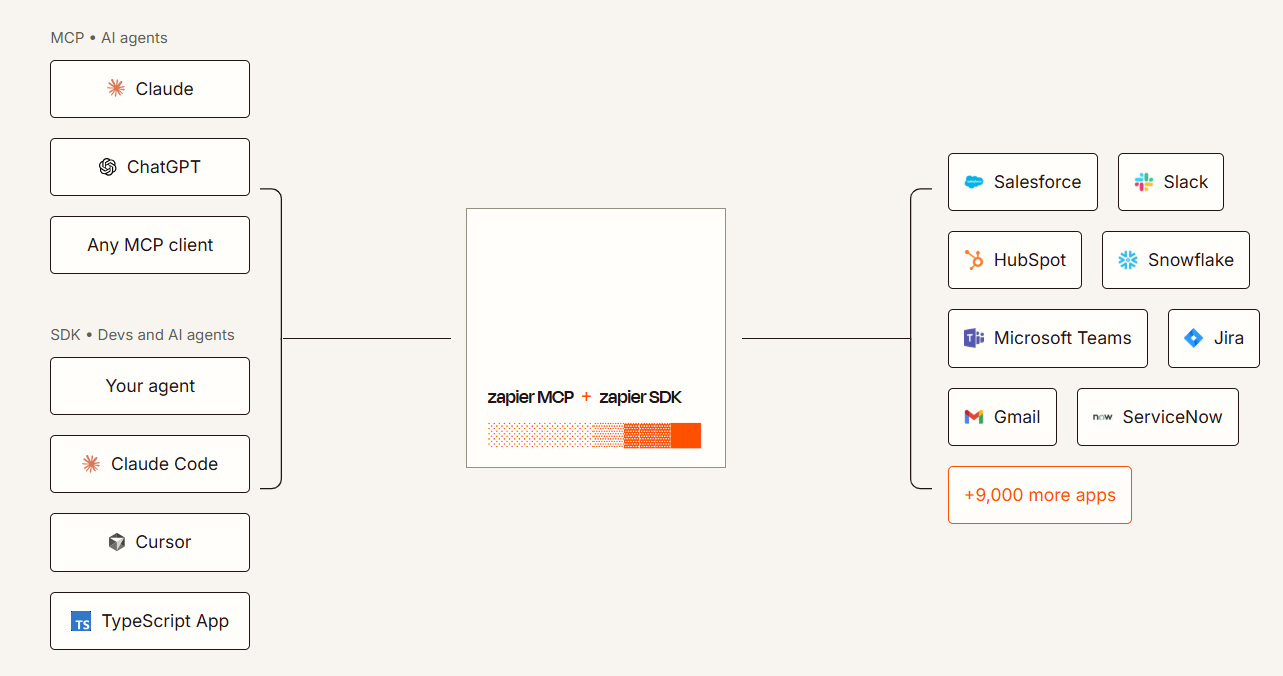
Source: Zapier
Key integration capabilities include:
Trigger-based automation fired by Cvent registration activity, where new registrations, cancellations, and updates kick off downstream actions in connected apps
No-code connectivity between Cvent and 8,000+ applications that don't have native Cvent integrations
Inbound record creation in Cvent from external triggers, so CRM activity, form submissions, or tag changes in email platforms can create or update attendee records automatically
Multi-step Zap chains executing sequences across multiple platforms from a single Cvent trigger event
How Zapier Integrates with Cvent
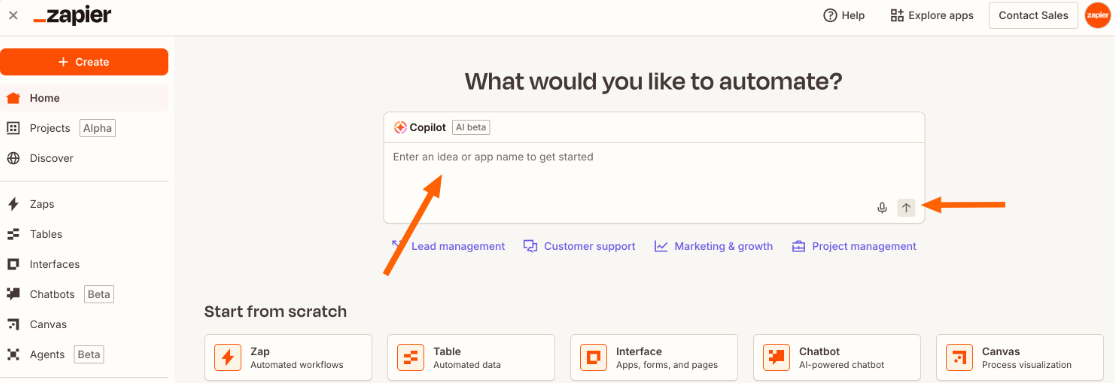
Zapier connects to Cvent through its Cvent listing in the Zapier app directory, accessible from the Cvent App Marketplace. Setup follows Zapier's standard no-code Zap builder: authenticate your Cvent account, select a trigger event, and add one or more action steps connecting to other apps.
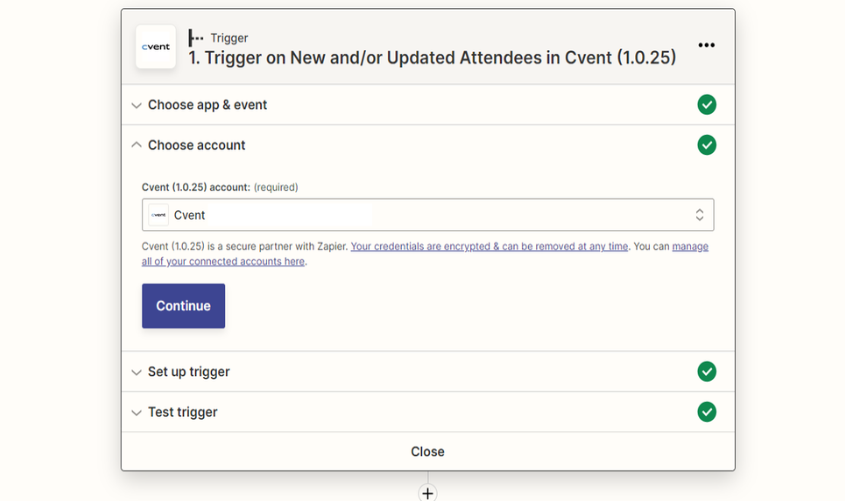
Source: Cvent
1. Trigger-Based Automation from Registration Events.
When a registration event occurs in Cvent (a new attendee registers, a registration is cancelled, or a registrant updates their information), Zapier detects that event and executes a configured chain of actions.
A new Cvent registration can simultaneously add the contact to an email list, create a row in a shared team spreadsheet, post a notification to a Slack channel, and create a task in a project management tool. Without Zapier, each of these actions would require either a native Cvent integration or manual work.
2. No-Code Connectivity Beyond the Cvent Marketplace.
The Cvent App Marketplace supports an established set of native integrations, but most marketing and operations teams use tools beyond that list: Airtable, ClickUp, Typeform, Notion, or niche SaaS products. Zapier bridges this gap through its 8,000+ app library.
A marketing operations manager can build a working integration between Cvent and a non-native tool in under an hour without writing code. Zapier Copilot also lets users describe their desired workflow in plain language and have the Zap structure generated automatically.
3. Inbound Record Creation in Cvent from External Triggers.
Zapier can write back into Cvent: events in external systems (a new CRM contact, a form submission, a deal reaching a specific stage) can create or update attendee records in Cvent automatically.
A marketing team using a Typeform survey as a pre-qualification step before sending a Cvent registration invite can connect the two with Zapier so qualified respondents automatically appear in Cvent's registration list without a manual import.
4. Conditional Filtering and Multi-Step Orchestration.
Paths route records by Cvent registration properties, the Formatter tool fixes data mismatches between systems without code, and Webhooks by Zapier reaches systems with no pre-built integration. Filters restrict which Cvent events fire downstream automations, preventing unnecessary data movement for registration activity that doesn't meet qualification criteria.
Source: Zapier
Zapier Pricing
Zapier uses task-based pricing where each action step counts as one task:
Free: 100 tasks/month, 2-step Zaps only, 15-minute polling interval
Professional: starts at $19.99/month (annual) for 750 tasks, multi-step Zaps, conditional logic, 2-minute polling
Team: starts at $69/month for 2,000 tasks, shared workspace for up to 25 users, SAML SSO
Enterprise: custom pricing, unlimited seats, SCIM provisioning, SLA options
Project your task consumption first: a 3-step Zap firing on 250 registrations per month uses 750 tasks, exactly hitting the Professional starting tier. Higher-volume events will need a higher task allocation. Zapier allows overages at 1.25x the plan's per-task cost.
Who Should Use the Zapier Integration?
Teams using tools that aren't in the Cvent App Marketplace (project management platforms, lightweight databases, niche communication tools) that need registration data to flow into those tools without custom development
Non-technical marketing or event operations teams that need to build and modify Cvent automations without engineering tickets or API knowledge
Organizations running Cvent alongside a broader stack where registration events must cascade into multiple systems simultaneously, such as notifying Slack, updating a spreadsheet, and creating a follow-up task from a single registration
5. SAP Concur: Best Cvent Integration for Closing the Meetings Spend Management Loop
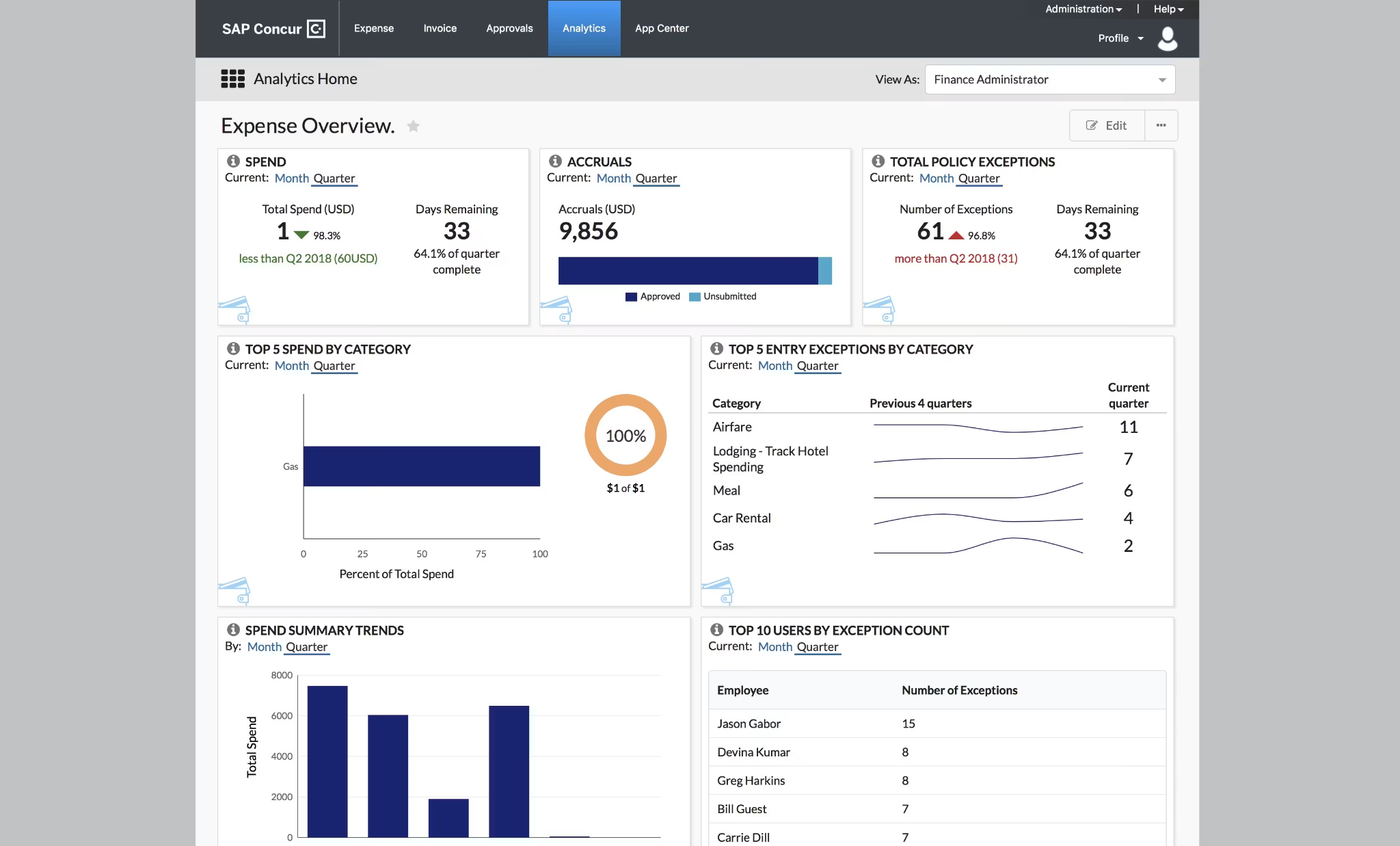
SAP Concur is the largest travel and expense management platform, holding 49.6% T&E market share in 2023 according to IDC. Its Cvent integration connects meeting approval workflows to corporate travel booking and expense reimbursement, giving finance teams full visibility into what any given event actually cost. It is a native connector available in the Cvent App Marketplace.
Source: SoftwareAdvice
Key integration capabilities include:
Automatic travel booking in Concur Travel triggered by approved Cvent Meeting Request Forms, eliminating re-entry of trip details
Bidirectional expense linkage connecting Concur Expense submissions back to the originating Cvent meeting record for consolidated per-event cost visibility
Corporate travel policy enforcement applied automatically to meeting-driven travel bookings through Concur Travel's compliance rules
How SAP Concur Integrates with Cvent
The integration bridges Cvent's Spend and Workflow Solutions (Meeting Request Forms, budget approvals, spend tracking) and SAP Concur's Concur Travel and Concur Expense modules.
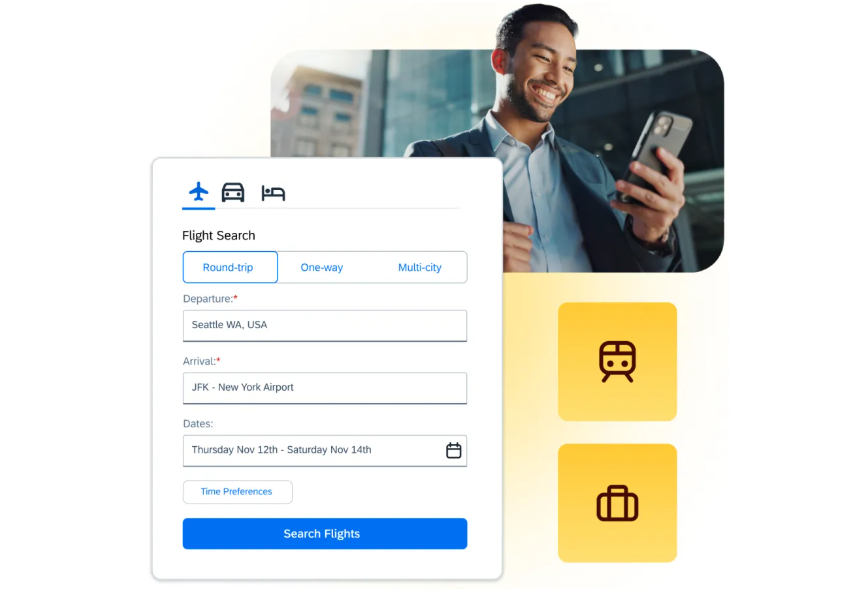
The handoff point is the approved Cvent Meeting Request Form: once a meeting's travel requirements are confirmed and approved in Cvent, that structured data feeds into Concur rather than requiring planners to re-enter trip details into a separate booking system.
Source: Concur
1. Meeting Request to Concur Travel Booking.
When an approved Cvent Meeting Request Form moves into travel arrangement, the trip details already captured and approved in Cvent feed into Concur Travel as the starting point for hotel, rental car, and airfare bookings.
Travelers don't need to reconstruct the trip from memory, and planners don't need to translate Cvent approval data into a separate booking form. Because meeting-related travel flows through Concur Travel, the organization's existing corporate travel compliance rules, preferred supplier lists, and pre-trip approval workflows apply automatically.
2. Expense Capture and Reconciliation Without Double Entry.
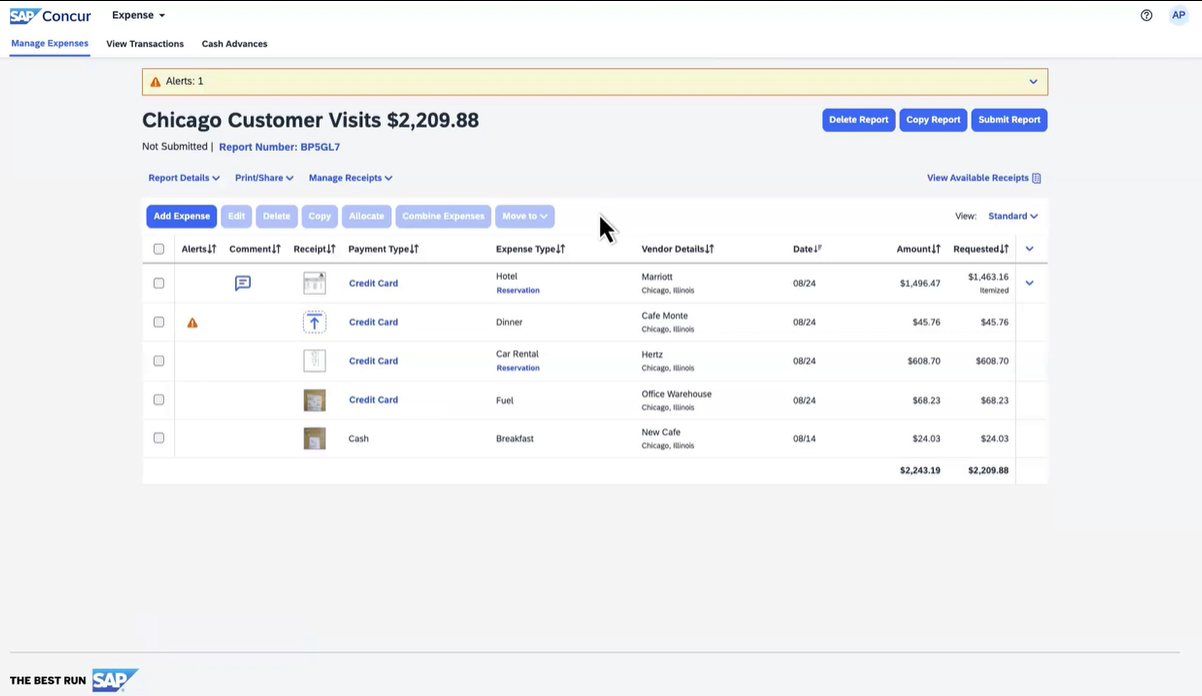
After the event, the integration links event-related Concur Expense submissions back to the originating Cvent meeting record. When an attendee submits expenses for meals, ground transportation, or other out-of-pocket costs tied to a Cvent-registered meeting, those expenses are attributed to the meeting record rather than floating as unattributed employee expenses.
SAP Concur's ExpenseIt mobile receipt capture and Bank Card Feeds reduce manual data entry on the attendee side, accelerating the path from cost incurred to cost visible in the reconciled meeting view.
3. Full Trip Cost Visibility Across Planning, Travel, and Expense.
Cvent captures vendor invoices, hotel room block spend, AV costs, and production fees. Concur captures attendee airfare, hotel incidentals, ground transportation, and out-of-pocket meals.
The integration merges both into a single per-event cost picture, answering "how much did this meeting cost in total, including every flight, hotel stay, and expensed meal per attendee?" SAP Concur's Analytics and Intelligence layer extends this further, surfacing spending trends and cost outliers across the meeting portfolio.
Source: Concur
SAP Concur Pricing
SAP Concur uses a per-report, transaction-based pricing model with unlimited users across all tiers:
Base: approximately $7 per report; core Concur Expense functionality with policy compliance enforcement
Plus: approximately $11 per report; adds ExpenseIt and User Support Desk
Premium: custom pricing; adds Concur Travel, Intelligence, 24/7 expert support, and direct travel supplier booking
The integration's most significant feature (routing approved Meeting Request Form travel requirements into Concur Travel) requires the Premium tier since Concur Travel is a Premium-only inclusion.
Who Should Use the SAP Concur Integration?
Organizations with significant attendee travel spend across corporate events that need meeting-related travel booked through the corporate travel program rather than arranged informally outside policy controls
Finance teams that lack visibility into total per-meeting cost because attendee T&E costs are tracked separately from event vendor expenses in Cvent
Companies already running SAP ERP or other SAP products that want to extend the SAP ecosystem's native integration depth into their event management stack
6. Google Analytics: Best Cvent Integration for Registration Funnel Analytics and Traffic Attribution
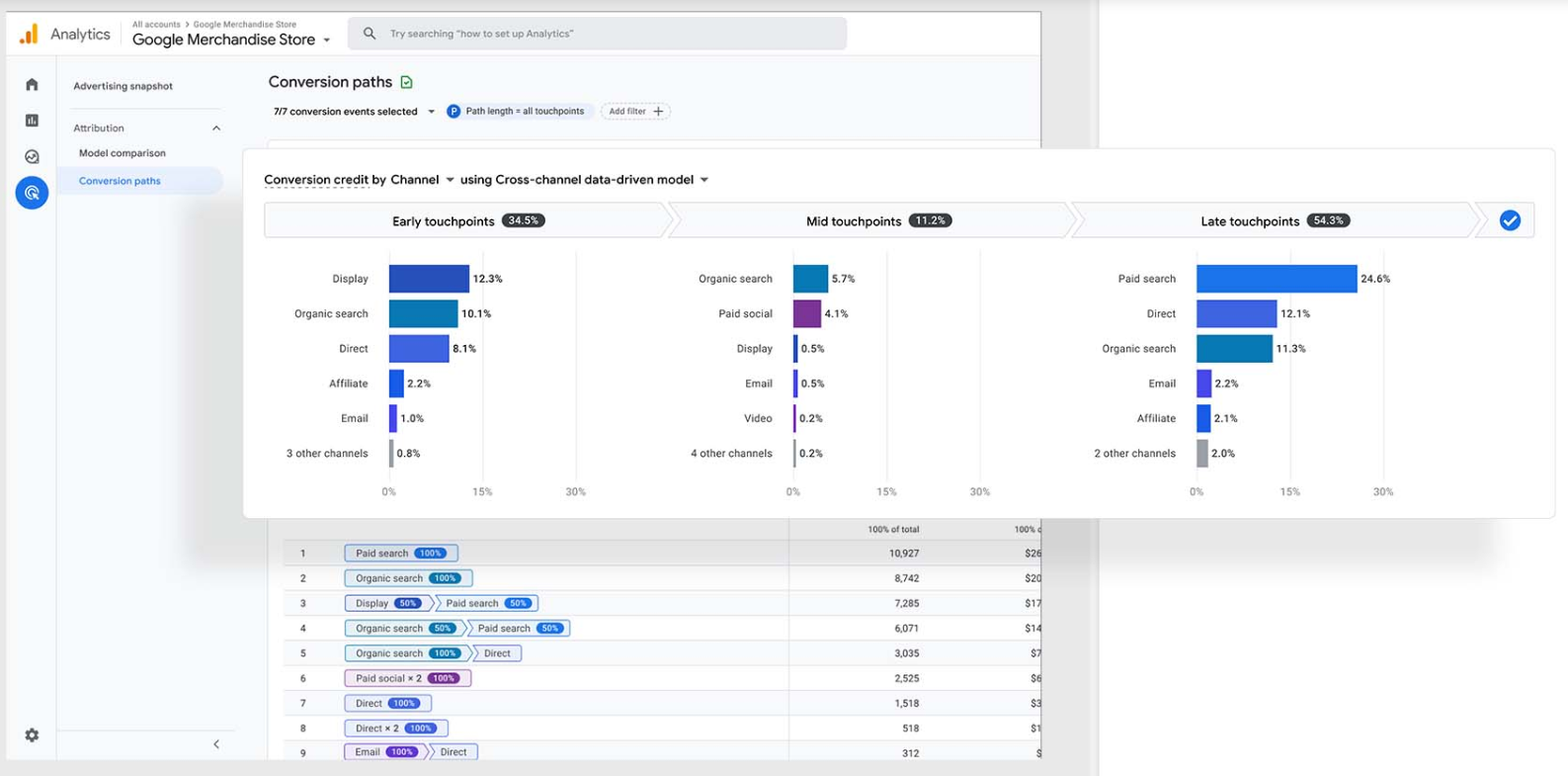
Google Analytics (GA4) is a free analytics platform for web and app measurement. Its Cvent integration brings standard digital marketing measurement to your event registration pages and Cvent-hosted event websites.
Source: Google
Where Cvent's own reporting surfaces event-level metrics (check-ins, session attendance, survey responses), the GA4 integration extends measurement to the pre-registration journey: how prospects found your event page, which channels drove the most completed registrations, and where in the registration flow you're losing attendees before they confirm. It is a native, no-code connection available through the Cvent App Marketplace.
Key integration capabilities include:
Event page traffic tracking routed into GA4, giving marketing teams a channel and geographic breakdown using the same analytics property applied to the rest of their digital campaigns
Registration conversion events sent to GA4 as eCommerce transactions, enabling channel-by-channel registration revenue attribution
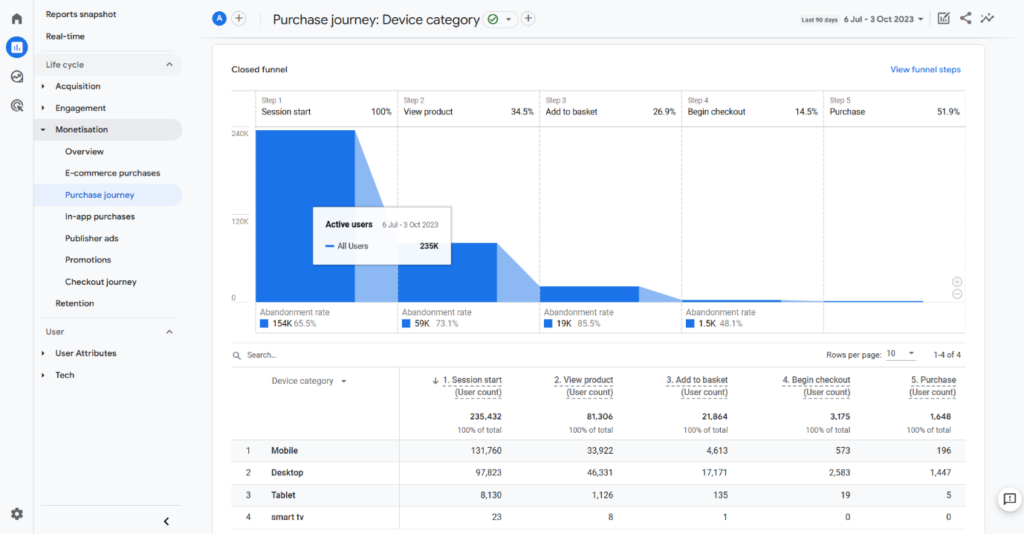
Funnel drop-off analysis across each step of the Cvent registration flow
Audience-building from registration page behavior for remarketing to abandoned registrants across Google Ads and other advertising channels
How Google Analytics Integrates with Cvent
A Cvent administrator enters their GA4 Measurement ID (the G-XXXXXX property identifier) inside Cvent's analytics configuration, and Cvent injects the Google tag (gtag.js) into all event pages and registration forms hosted on the platform.
No custom development or API credential setup is required. For teams using Google Tag Manager, Cvent supports GTM as a named integration, enabling custom event triggers, enhanced eCommerce data layer pushes, and consent mode configurations.
1. Event Page Traffic Tracking in GA4.
Once connected, all Cvent-hosted event website pages (landing pages, agenda pages, speaker pages, and each registration step) fire standard GA4 pageview and session events. Traffic acquisition reports break down sessions by channel group (organic search, paid search, email, social, referral), device category, and geographic location.
A multi-event annual calendar can be tracked within a single GA4 property and filtered by event URL or UTM parameters tied to each event's promotional campaign.
2. Registration Conversion and eCommerce Transaction Tracking.
Cvent sends completed registrations and payment transactions to GA4 as eCommerce conversion events. Whether the registration is a paid conference ticket, a free webinar signup, or a comped executive pass, Cvent fires the GA4 purchase event with transaction-level data.
In GA4's monetization and acquisition reports, a demand generation manager can see that email campaigns drove 340 registrations worth $68,000 while paid LinkedIn drove 87 registrations at a higher average ticket value but lower conversion rate.
3. Registration Funnel Analysis and Drop-Off Identification.
GA4's Funnel Exploration technique can visualize each step of the Cvent registration flow as a distinct funnel stage, revealing exactly where registrants abandon: the attendee details page, session selection, or payment confirmation.
For large conferences where even a 5% improvement in registration completion translates into meaningfully more attendees, this funnel-level insight enables optimization that aggregate registration counts in Cvent's dashboard cannot provide.
Source: EasyInsights
Google Analytics Pricing
Google Analytics operates on a two-tier model with a permanent free entry point that covers the core Cvent integration:
Google Analytics (GA4): free of charge, no trial period or expiration; includes all standard eCommerce and conversion tracking, up to 30 key events, 50 event-scoped custom dimensions, data retention of up to 14 months, and BigQuery daily export of up to 1 million events per day
Analytics 360: enterprise pricing (contact Google Sales); adds unsampled Explorations, continuous intraday data freshness, extended data retention up to 50 months, and sub-properties for multi-brand event programs
For most Cvent customers, the free GA4 tier covers what the integration needs. Analytics 360 becomes relevant for organizations managing dozens of simultaneous large-scale events where daily traffic would trigger sampling in custom Explore reports.
Who Should Use the Google Analytics Integration?
Marketing teams already using GA4 to measure campaign performance across their website that want event registration pages to report into the same attribution model rather than creating a separate analytics blind spot
Teams running paid media campaigns that drive traffic to Cvent registration pages and need channel-level attribution data to evaluate cost-per-registration by source
Organizations managing a mix of paid, comped, and free registrations that want consistent eCommerce-style reporting assigning values across all registration types in one place
Final Verdict
The best Cvent integrations close gaps your event platform cannot fill on its own:
ZoomInfo: verified B2B data, buyer intent, and company intelligence enriching every event lead at the point of capture; the strongest integration on this list if your pipeline depends on event lead quality
Salesforce: bidirectional CRM sync with field-level control, enabling pipeline attribution and field marketing coordination from inside the CRM
Marketo Engage: real-time event activity powering automated nurture programs, lead scoring, and engagement-based follow-up routing
Zapier: no-code reach into 8,000+ apps where native Cvent connectors don't exist
SAP Concur: meeting approval workflows connected to corporate travel booking and expense reconciliation for full per-event cost visibility
Google Analytics: registration funnel measurement and channel attribution using the same analytics property governing the rest of your digital campaigns
These integrations also compound: you might run ZoomInfo for lead enrichment and intent, Salesforce for CRM attribution, Marketo for nurture automation, and Google Analytics for funnel optimization simultaneously on the same Cvent event program, each adding a layer of intelligence or automation that makes the others more valuable.
If you connect just one, make it the data layer your event follow-up depends on. ZoomInfo's integration with Cvent through iCapture turns every badge scan into a verified, enriched prospect record, and ZoomInfo Lite is a permanent free tier so you can test what verified data and buyer intent signals do for your event pipeline before spending anything.
Frequently Asked Questions
How many integrations does Cvent support?
The Cvent App Marketplace houses native integrations across seven categories: Sales and Marketing, Association Management, Budget and Expenses, Travel and Transportation, Web and Virtual Solutions, Networking Tools, and Data Analytics.
Named integrations include Salesforce, HubSpot, Microsoft Dynamics 365, Marketo, Eloqua, SAP Concur, Zoom, Microsoft Teams, Google Analytics, and many more. Beyond the marketplace, Cvent's REST API, webhooks, and Zapier connector extend connectivity to any platform with an API.
Do Cvent integrations work on the free or PayGo plan?
Cvent offers a PayGo entry point for event registration, but full API-level integration access is an Enterprise plan feature not included on the Professional plan. Every Cvent account includes access to the Essentials API tier (1,000 daily calls, 2 calls per second) by default, with Standard and Premium tiers available for higher-volume integrations.
Teams running bidirectional CRM sync or real-time event data flows typically need Cvent Enterprise for sufficient API throughput.
How does Cvent's webhook system work for real-time data sync?
Cvent's webhooks system pushes event-driven notifications to a developer-supplied HTTPS endpoint. Webhooks can be configured per object type (attendees, sessions, speakers, meeting request forms), routing different data streams to different URLs.
Endpoints must be SSL-secured, and Cvent validates each endpoint with a GET request before activating the configuration. Documented event types include attendee registration, session registration, session creation, and meeting request form submissions.
Can I connect Cvent to tools that are not in the App Marketplace?
Yes. Cvent's REST API supports custom integrations with any system that can make HTTP requests. For no-code solutions, Zapier connects Cvent to 8,000+ apps. Cvent also references Tray.ai as a supported workflow automation option for more complex integration scenarios. Official SDKs for TypeScript, .NET, and Java are available for teams building custom integrations.
How do I measure whether a Cvent integration is delivering value?
For CRM integrations like Salesforce, track event-influenced pipeline and the time between event attendance and first sales touch. For marketing automation integrations like Marketo, measure registration-to-MQL conversion rates and nurture program engagement by event source.
For spend management integrations like SAP Concur, compare per-event total cost visibility before and after integration. For analytics integrations like GA4, track registration funnel completion rates and channel-level cost-per-registration.
Are Cvent integrations secure?
Cvent uses OAuth 2.0 for API authentication and holds SOC 1 Type II, SOC 2 Type II, ISO/IEC 27001, ISO/IEC 27701, and PCI DSS certifications. Data is encrypted at rest (AES-256) and in transit (TLS v1.2), with regional data residency in AWS (US-East/West and EU Frankfurt/Dublin). CventIQ AI data is not used to train models, and AI features can be toggled off at the admin level.
How does event data flow between Cvent and CRM platforms?
Cvent's CRM integrations (Salesforce, HubSpot, Microsoft Dynamics 365) support bidirectional data sync with configurable field mapping. Registration, attendance, session participation, and survey responses can create or update CRM records automatically, including contacts, leads, tasks, campaign members, and opportunities.
The Salesforce integration supports real-time push via OAuth, while other CRM connectors typically use scheduled sync intervals. Cancellation updates propagate automatically.
What is the best way to enrich event leads captured in Cvent?
Integrate a dedicated B2B data platform. ZoomInfo's integration with Cvent through iCapture enriches leads captured at events in real time with data from 500 million contacts, 100 million companies, 135 million verified phone numbers, and 200 million verified business email addresses, backed by a verification pipeline with 300+ human researchers.
For teams where post-event follow-up speed and contact data accuracy determine event ROI, connecting a platform built for B2B intelligence closes the gap between scanning a badge and having a prospect your sales team can reach and qualify.
