

GMass does something no other tool replicates: it turns Gmail into an email campaign platform. Install a Chrome extension, connect a Google Sheet, and you're sending personalized cold emails or newsletters from the same compose window you use every day. For Gmail users who want outreach without learning new software, the appeal is clear.
To write this GMass review, we analyzed the platform in detail. We believe it's the right choice if:
You already live in Gmail and want campaigns without leaving your inbox
You need affordable email outreach for a solo operation or small team
You value fast setup over feature depth
Your contact lists live in Google Sheets
You send moderate volumes (hundreds to a few hundred thousand recipients)
However, GMass might not be enough if:
You need verified B2B contact data to build your prospect lists
You require buyer intent signals to know which accounts are in-market
You want AI-driven account prioritization and deal intelligence
You need multi-channel orchestration across email, ads, phone, and chat
You're scaling a revenue team that needs prospecting, engagement, and analytics in one place
In this case, consider ZoomInfo: a go-to-market platform that starts where tools like GMass end.
While GMass handles the sending, ZoomInfo provides the intelligence underneath, with 500M contacts, 100M companies, 135M+ verified phone numbers, and 200M+ verified business email addresses, buyer intent signals that reveal when accounts are actively researching solutions, and AI execution through GTM Workspace and GTM Studio that handle everything from prospecting to pipeline management.
We've included a detailed look at ZoomInfo later in this review, as the next step for teams that need more than an email sending tool. If you're ready to explore a go-to-market platform, you can start with ZoomInfo's free trial here.
What is GMass?
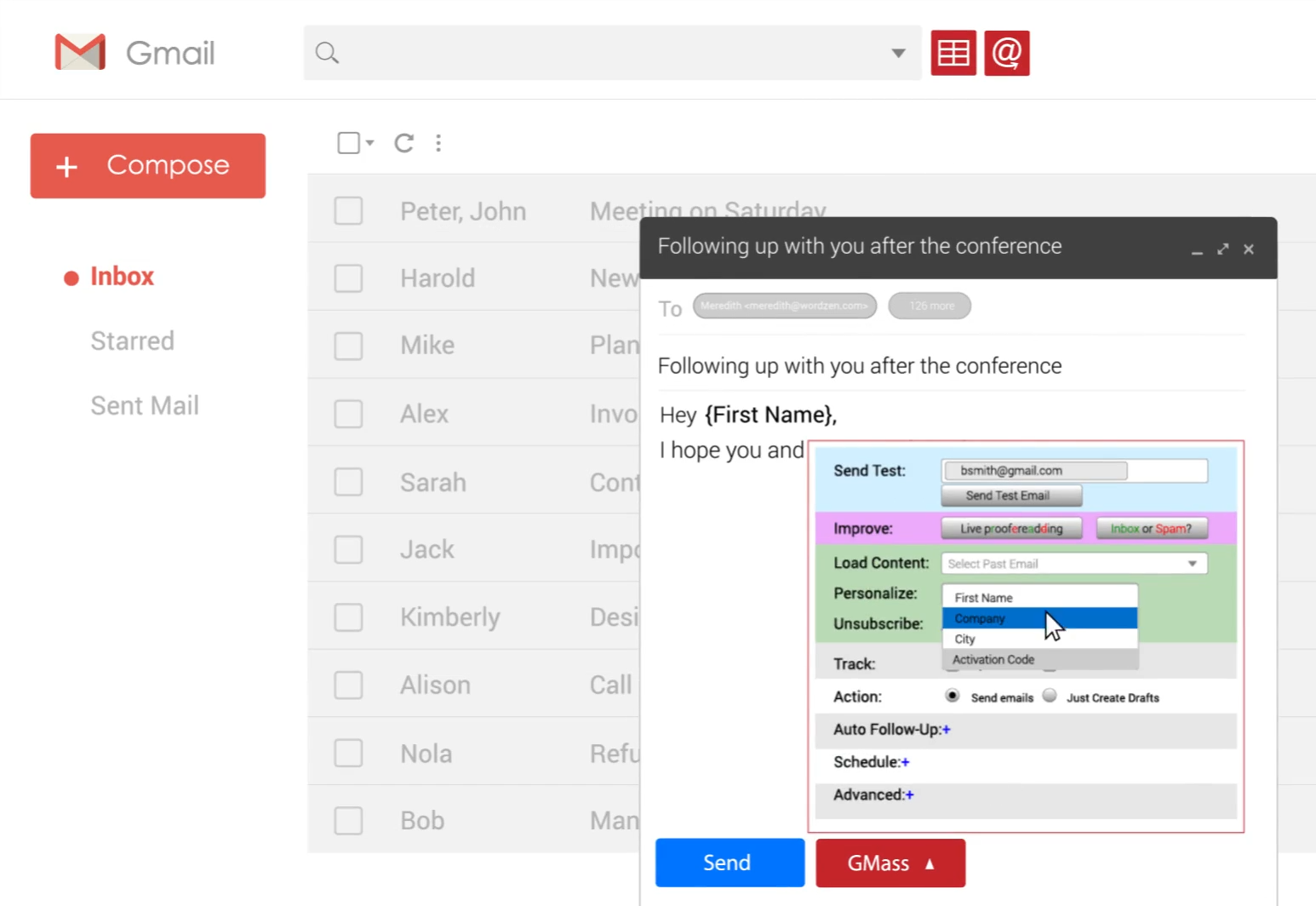
GMass is a Gmail-native email platform that turns Gmail into an email marketing and cold email tool.
Source: GMass
Ajay Goel founded it in 2015 out of a simple frustration: he needed to send personalized mass emails to about 20 people, and no native Gmail solution existed. He built one himself, shared it, and GMass took off.
Goel was not a first-time email founder. He had built JangoMail in 2002, a web-based email marketing platform comparable to Mailchimp, which he ran for over a decade and sold in 2013. The proceeds funded GMass's early years, and the company has operated without outside funding ever since.
The product ships as a Chrome extension that adds a GMass send button next to Gmail's compose window. From that single interface, users run mail merges from Google Sheets, send cold email sequences with automated follow-ups, verify lists, test deliverability, and track opens, clicks, and replies.
GMass positions itself as the only platform that spans email marketing and cold email, serving both newsletter senders and cold outreach professionals without requiring them to leave Gmail. To date, users have sent more than 9 billion emails through the platform.
GMass Pros & Cons
Pros | Cons |
|---|---|
Lives inside Gmail with no new interface to learn | Requires Gmail/Chrome; no Outlook, Safari, or Firefox support |
Google Sheets integration for contact management | No visual drag-and-drop email builder |
Unlimited follow-up stages with auto-stop on reply | No native CRM integrations (Salesforce, HubSpot) |
Built-in deliverability tools (Spam Solver, email verification) | Gmail daily sending limits require workarounds at scale |
Affordable pricing starting at $29.95/month | No phone or live chat support |
AI features (SpinMax, ChatGPT campaign generation) included | No built-in contact database for finding new prospects |
400,000+ users with 9,000+ five-star Chrome Web Store reviews | Interface can feel cluttered compared to dedicated email tools |
GMass Review: How It Works & Key Features
Mail Merge and Google Sheets Integration: GMass turns any Google Sheet into a live campaign list without leaving Gmail.
GMass is built on its Google Sheets integration.
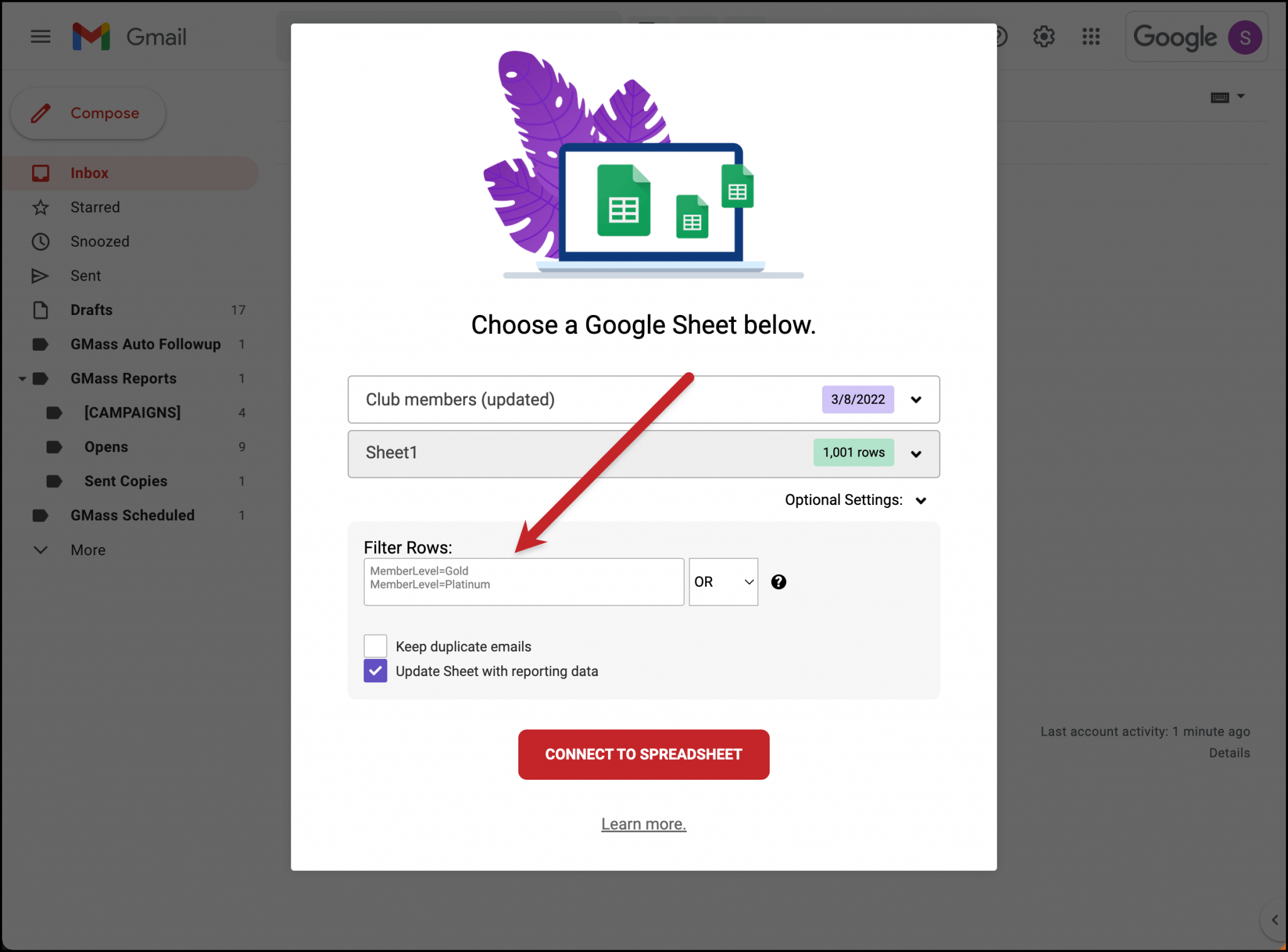
Users click a spreadsheet icon in the Gmail compose toolbar, select their Sheet, and every column becomes a merge field. Typing a left curly bracket { triggers a dropdown of available columns, preventing merge field typos.
Source: GMass
What lifts this above a basic mail merge is the automation. Users can set the "Repeat" option to "new rows," and GMass checks the spreadsheet on a schedule and sends to any new contacts added since the last run. Row filtering uses ColumnName=Value notation with comparison and "contains" operators, letting users target segments without altering the underlying spreadsheet.
After sending, GMass writes performance data back to the Google Sheet, appending columns for Opened, Clicked, Replied, and Bounced. The spreadsheet becomes a live outreach tracker.
Dynamic lists go further. Adding "-dynamic" to a campaign alias means any contact additions or deletions to the Sheet after setup are reflected in the recipient list, including for follow-up sequences. Removing someone from a dynamic Sheet stops them from receiving further follow-ups.
Personalization and AI Features: GMass layers merge fields, conditional logic, and AI-generated variation to make mass email feel individual.
GMass offers personalization at several levels.
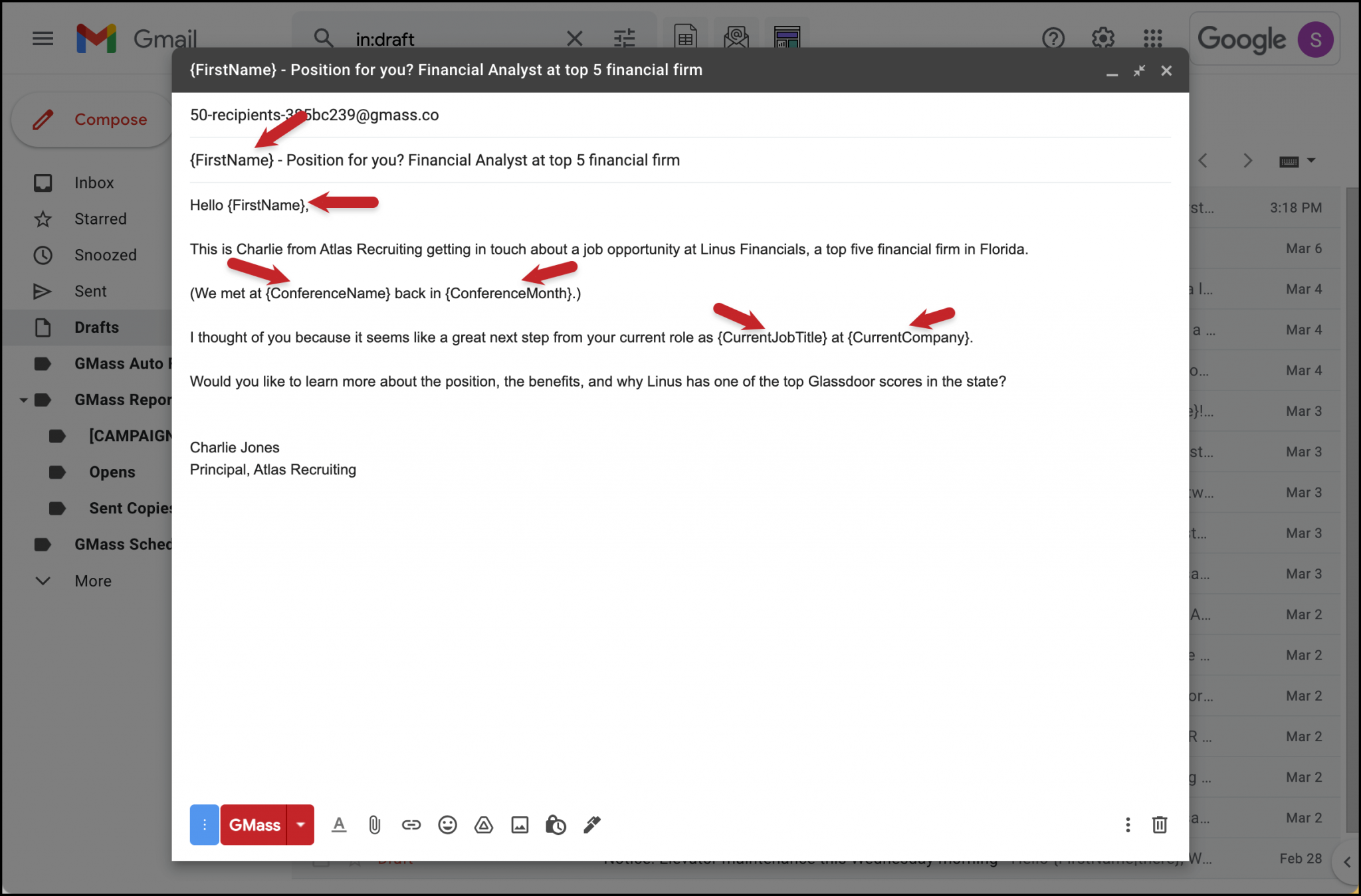
Basic merge fields pull from Google Sheet columns. Fallback values prevent blank fields when data is missing (e.g., {FirstName|there}). Conditional if/then logic changes message sections based on contact attributes. GMass also supports personalized attachments and images per recipient via URLs stored in the spreadsheet.
Source: GMass
When no name column exists, GMass analyzes email address patterns to detect the contact's first name algorithmically, running locally without external API calls.
The AI layer adds three capabilities.
SpinMax generates wording variations across every email in a campaign from a single checkbox, producing messages that look individually written while preserving merge tags and conditional content.
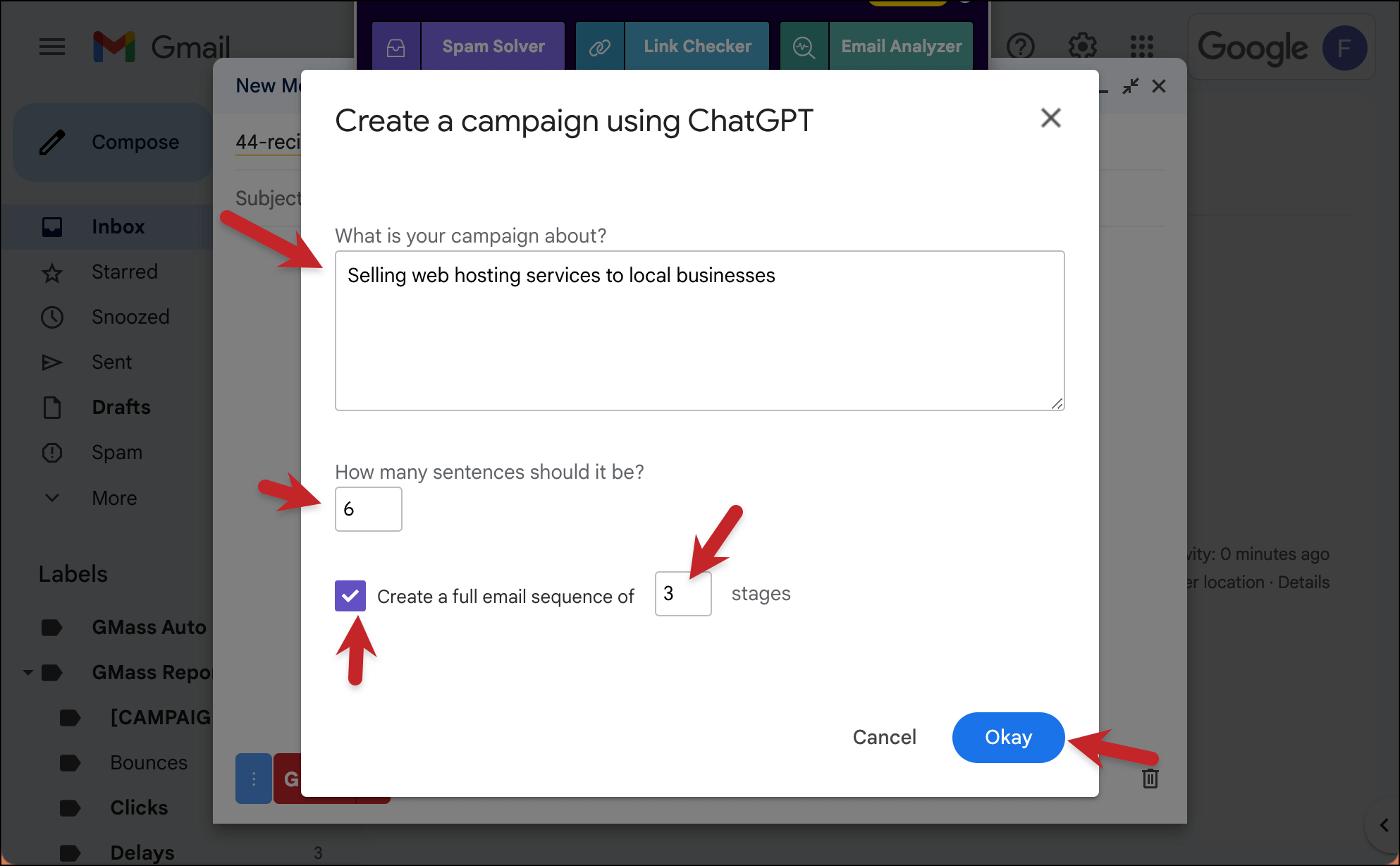
ChatGPT campaign generation lets users describe a campaign in one sentence and receive a complete sequence with subject lines, body copy, and follow-up emails.
Source: GMass
A ChatGPT reply assistant drafts responses to incoming campaign replies. All AI features are included in every plan with no API key required.
Deliverability Tools: GMass provides pre-send diagnostics and reputation protection inside Gmail.
GMass's deliverability suite tackles inbox placement.
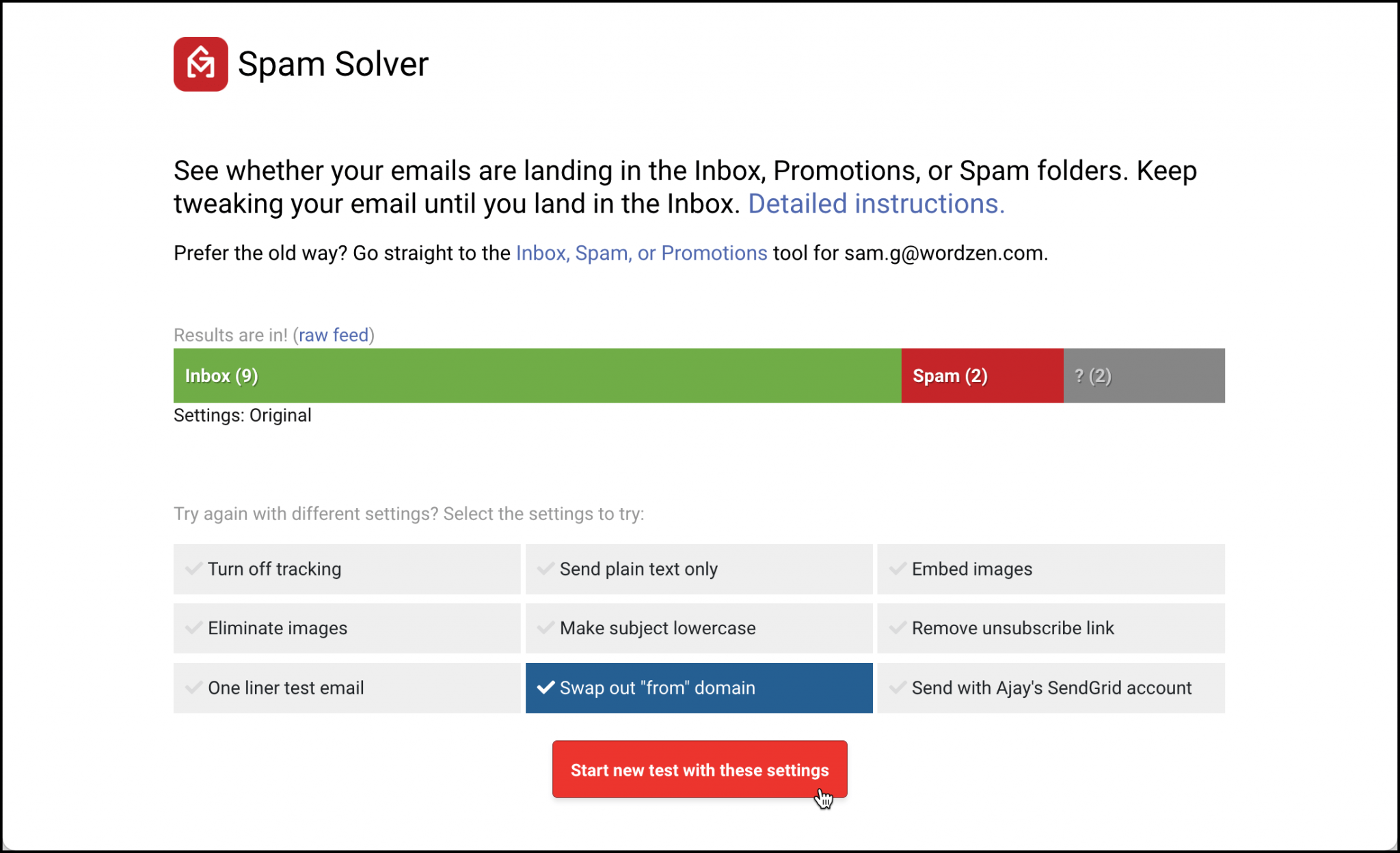
The centerpiece is Spam Solver, which sends test versions to 20 Gmail and Google Workspace seed accounts (including accounts protected by enterprise filters from Barracuda, Sophos, and ProofPoint) and reports placement across nine test variations.
Source: GMass
Each variation isolates a different root cause: tracking settings, image handling, SMTP routing, "from" domain reputation, and more. As of May 2025, Spam Solver generates AI-driven suggestions that identify specific content and configuration issues.
Email verification validates recipient addresses before sending through syntax checking and SMTP-level validation, handling up to 5,000 addresses per hour. Bounce management categorizes undelivered mail and suppresses bad addresses from future campaigns.
GMass also distinguishes bounces from blocks, giving senders the information to diagnose sender-side problems rather than just suppressing addresses.
Delivery routes let senders adjust sending method and tracking settings on a domain-by-domain basis. A free Email Analyzer checks SPF, DKIM, DMARC, and blacklist status for any email.
Sending Limits and SMTP Integration: GMass offers multiple paths to exceed Gmail's daily caps.
Gmail imposes hard daily sending caps: 500 for free and 2,000 for Workspace accounts.
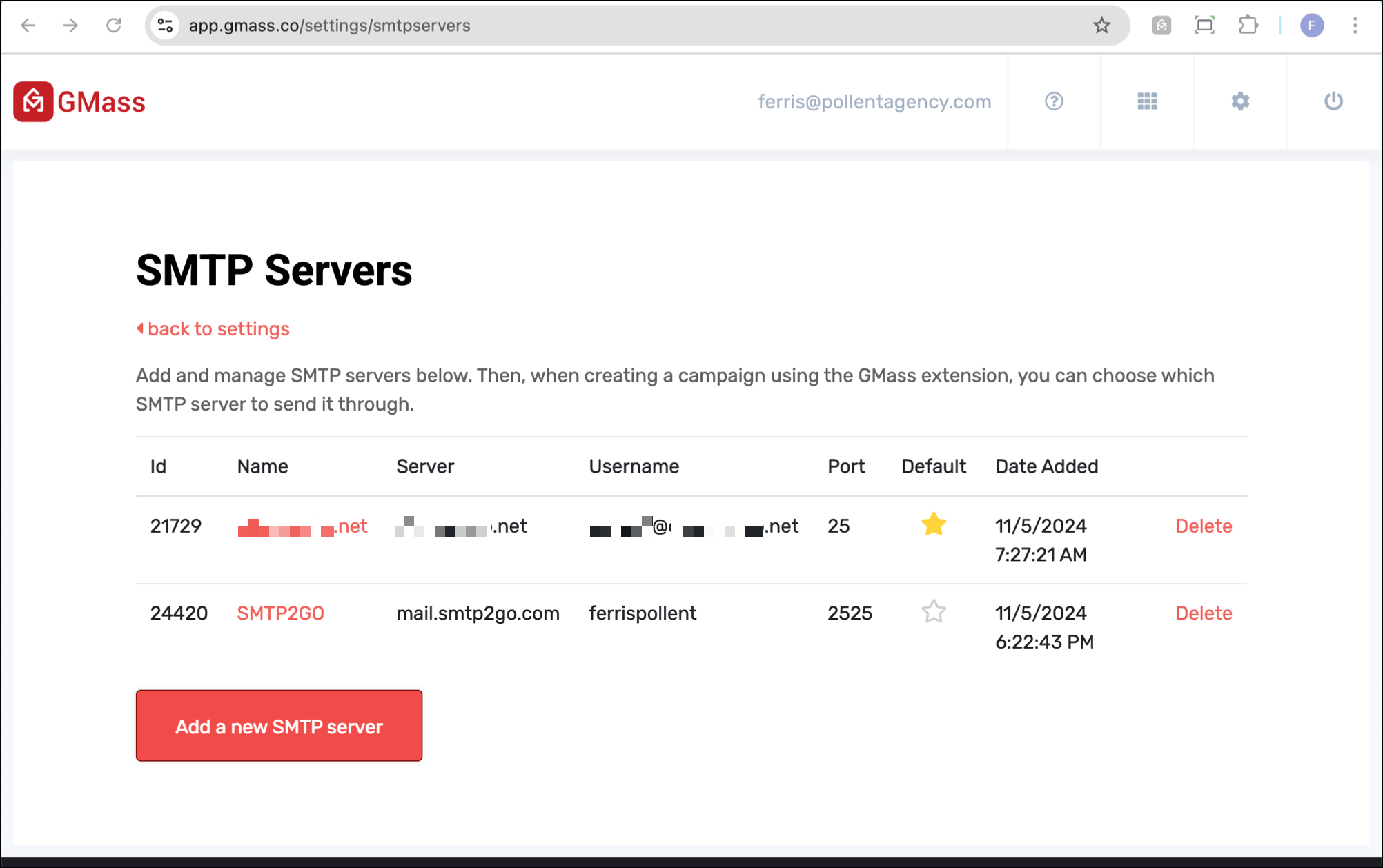
GMass provides seven mechanisms to exceed these limits, from distributing sends over multiple days to SMTP rerouting through third-party services (SendGrid, Mailgun, Amazon SES) or GMass's own servers.
Instant SMTP approval, launched in October 2025, uses AI to evaluate an account's sending history and issue an immediate decision when a campaign hits Gmail limits mid-send. Users who lack DKIM authentication get automatic from-address replacement using GMass's own authenticated domain.
Source: GMass
For cold email at high volumes, ColdSMTP (launched December 2024) provides a pre-warmed server that eliminates the need to purchase multiple domains, run warmup sequences, or manage inbox rotation. MultiSend distributes a single campaign across multiple Gmail accounts, multiplying daily capacity.
Follow-Up Sequences and Scheduling: GMass automates multi-stage sequences with fine-grained timing controls.
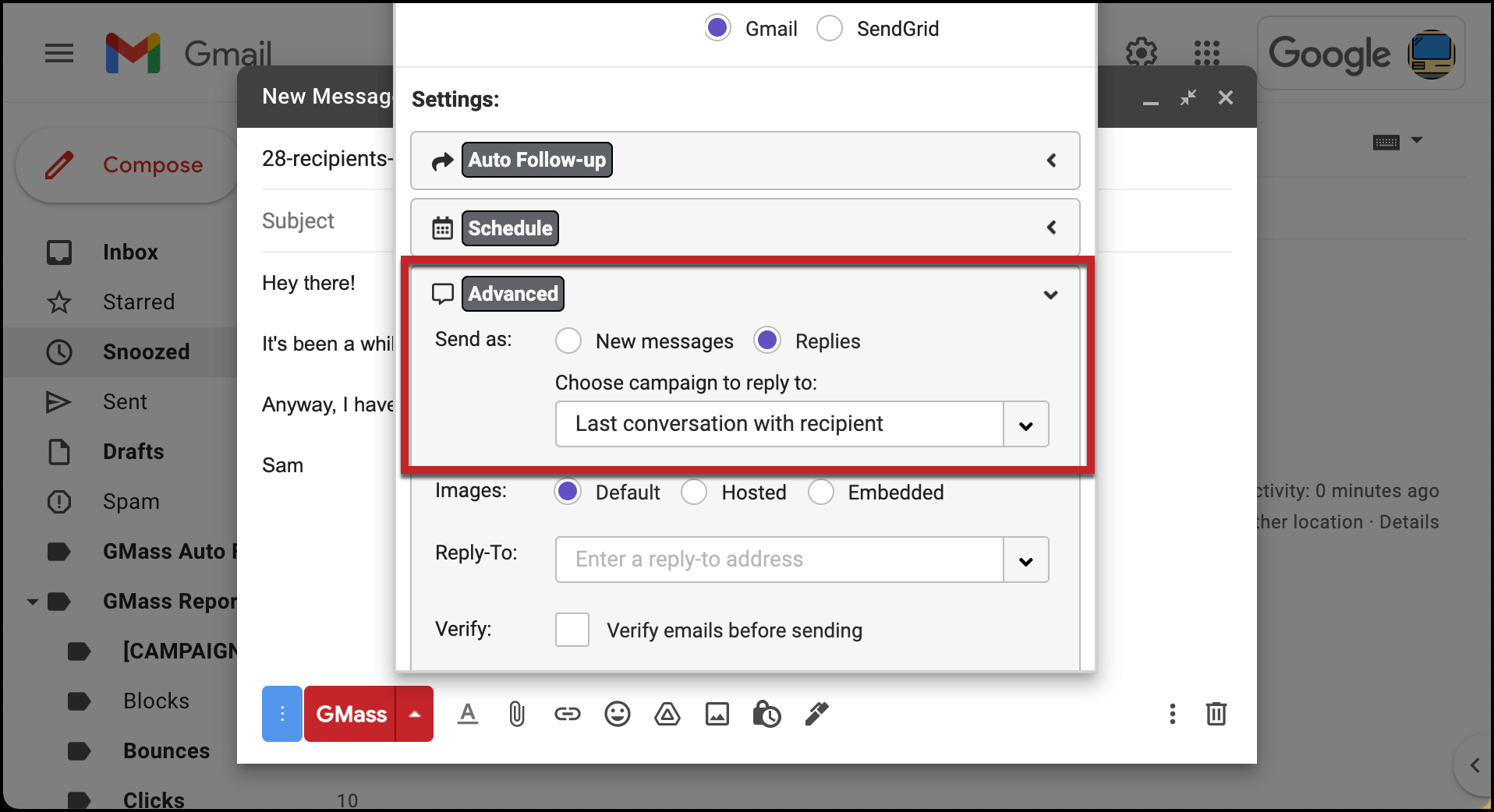
Follow-up sequences are configured in the GMass settings box.
Users write each stage with a time delay and stopping condition (reply, open, click, or none for drip campaigns). As of July 2025, GMass supports unlimited follow-up stages in a single sequence.
A useful feature is domain-level stopping: if one person at a company replies, all contacts at that domain are removed from remaining stages automatically. Follow-ups appear in the same email thread as the original message, mimicking natural conversation.
Source: GMass
Scheduling controls include recurring campaigns on hourly, daily, weekly, or monthly cadences, a daily end time that restricts sending to business hours, a skip weekends option, and per-recipient time zone sending that delivers emails at the same local time for each contact.
Triggered emails (available on Premium plans and higher) fire a personalized follow-up immediately when a prospect opens, clicks, or replies, catching contacts while they're still in their inbox.
Campaign Analytics and Reply Management: GMass tracks engagement and categorizes replies automatically.
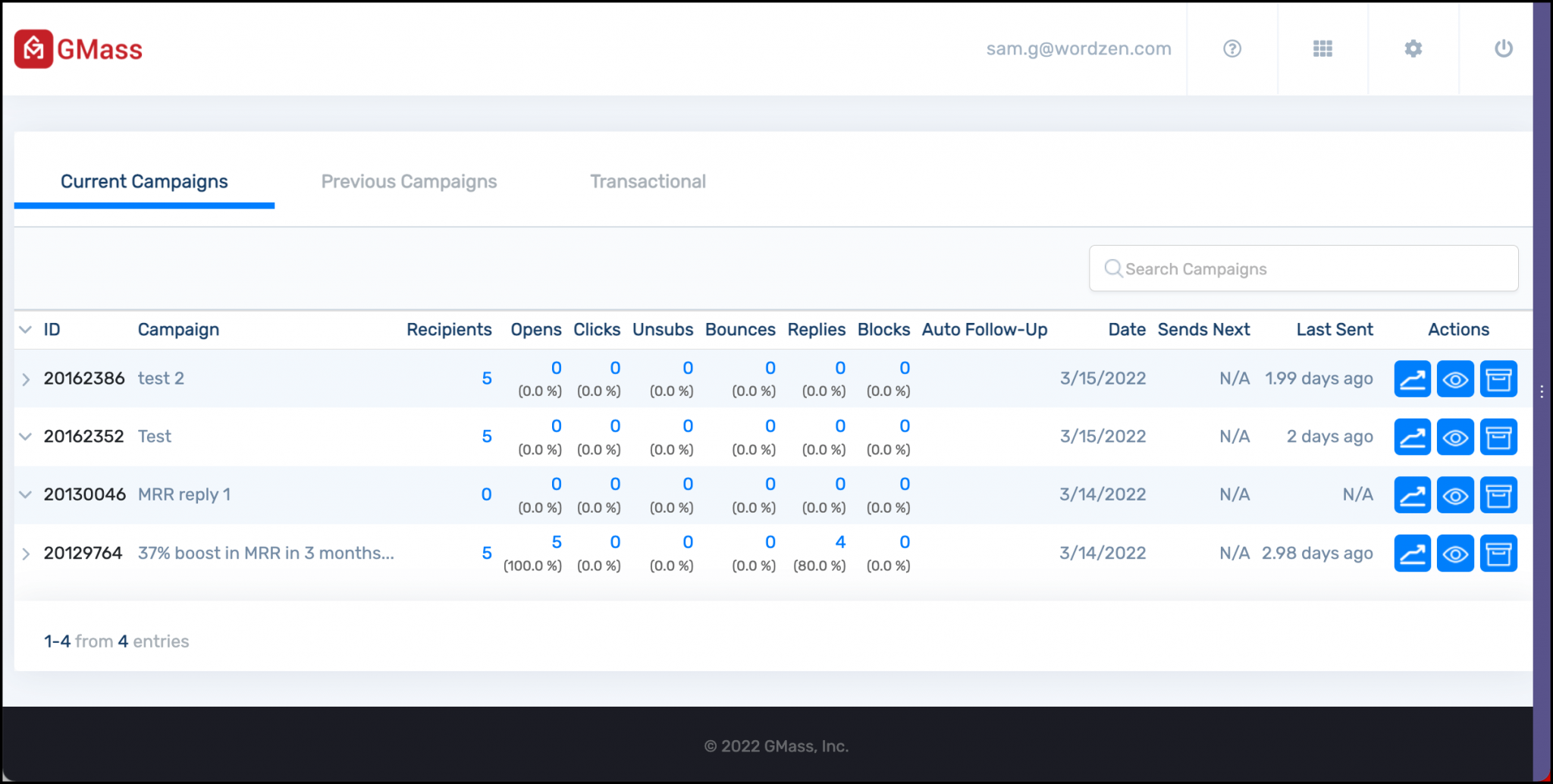
Every campaign generates reports across nine metrics: total recipients, unique opens, non-opens, unique clicks, replies, unsubscribes, bounces, Gmail sending-limit rejections, and spam blocks.
Reports appear inside Gmail as labeled emails, in the GMass dashboard, and as shareable web reports that update in real time and require no login to view.
Source: GMass
GMass improves open rate accuracy through machine learning bot detection that filters automated opens from real engagement. A companion Tracker Blocker extension prevents senders from triggering their own tracking pixels.
Reply management is automatic. GMass categorizes incoming messages into five labels (replies, bounces, delays, over-limit, blocks) using proprietary algorithms, with sentiment analysis via Amazon Comprehend scoring each reply as positive, negative, or neutral.
The Reply Project, a free companion tool, displays all campaign replies on a single screen with inline ChatGPT draft generation for quick responses.
Additional tools include A/B testing using spintax syntax within a single draft, email polling with clickable survey links, and a Gmail search-based list builder that converts any Gmail search into a mailing list.
Pricing Structure: GMass uses flat-fee per-seat pricing with both monthly and annual options.
GMass offers three individual tiers and team plans for groups up to 100 users:
Individual Plans (monthly billing):
Plan | Price |
|---|---|
Standard | |
Premium | |
Professional |
Individual Plans (annual billing):
Plan | Effective Monthly | Annual Total |
|---|---|---|
Standard | $249 | |
Premium | $349 | |
Professional | $599 |
All plans include unlimited emails, contacts, and campaigns. Volume is constrained by Gmail/Google Workspace account limits, not by GMass billing. Sending through SMTP (third-party or GMass's servers) includes the first 10,000 emails per billing period free, then $5 per 10,000 additional emails.
Team plans range from 5 users ($35/user/month) to 100 users ($22/user/month), with annual billing discounts. Team plans include all Professional features plus high-priority support and shared unsubscribe/bounce lists.
A free plan is available without a credit card, though with limited functionality. The January 2026 pricing update was only the third price increase in GMass's 10-year history.
Where GMass Falls Short
GMass excels at sending personalized email from Gmail. But that narrow focus creates limitations that grow sharper as outreach needs become more complex.
No Prospect Data or Intelligence. GMass sends emails, but it doesn't help you figure out who to email. There is no contact database, no company intelligence, and no intent signals. Users must build their own lists from scratch or buy data from another provider.
For sales teams, this means the hardest part of outreach (identifying the right prospects, finding verified contact information, and determining which accounts are in-market) happens entirely outside the tool.
Gmail and Chrome Lock-In. GMass requires Gmail or Google Workspace and the Chrome browser. This is a hard constraint. Organizations using Outlook, Apple Mail, or non-Chromium browsers cannot use GMass. Enterprise environments on Microsoft stacks are excluded entirely.
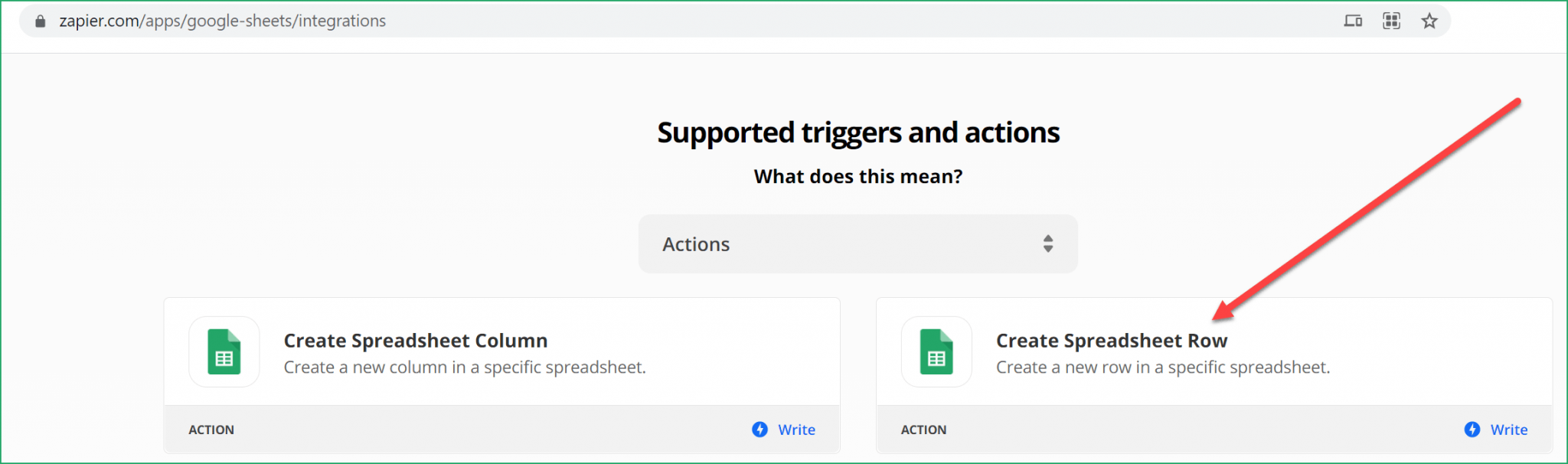
No Native CRM Integrations. GMass acknowledges it is still working on integrations with Salesforce and HubSpot. Users rely on Zapier or manual Google Sheets workflows to bridge the gap. For teams that need outreach activity logged in their CRM automatically, this creates friction and data gaps.
Source: GMass
Interface Complexity at Scale. While Gmail familiarity lowers the initial learning curve, the interface becomes cluttered as features accumulate. Settings for SMTP routing, follow-up sequences, A/B testing, and delivery routes all surface through overlaid panels in the compose window. Users who prefer guided, step-by-step workflows find this disorienting.
Single-Channel Limitation. GMass is email-only. The January 2026 launch of text.email (an email-to-SMS alert service) is a first step toward multi-channel, but it's a notification tool, not a campaign platform. Teams that need coordinated outreach across phone, social, display ads, and email must assemble separate tools.
Support Constraints. With a 7-person distributed team, GMass operates as a self-service system with no phone or live chat support. The company states it does not answer all support requests. For teams that depend on outreach for revenue, limited access to help during critical moments is a real risk.
These limitations reflect GMass's deliberate focus on Gmail-based email simplicity. But they create a clear ceiling for teams ready to move beyond "send emails from my inbox" toward a complete go-to-market strategy.
Top GMass Alternative for Growing Sales Teams: ZoomInfo
ZoomInfo addresses GMass's limitations by operating at a different level of the go-to-market stack.
Where GMass handles the last mile (sending the email), ZoomInfo handles everything upstream and downstream: identifying the right prospects, determining when they're ready to buy, and executing across every channel.
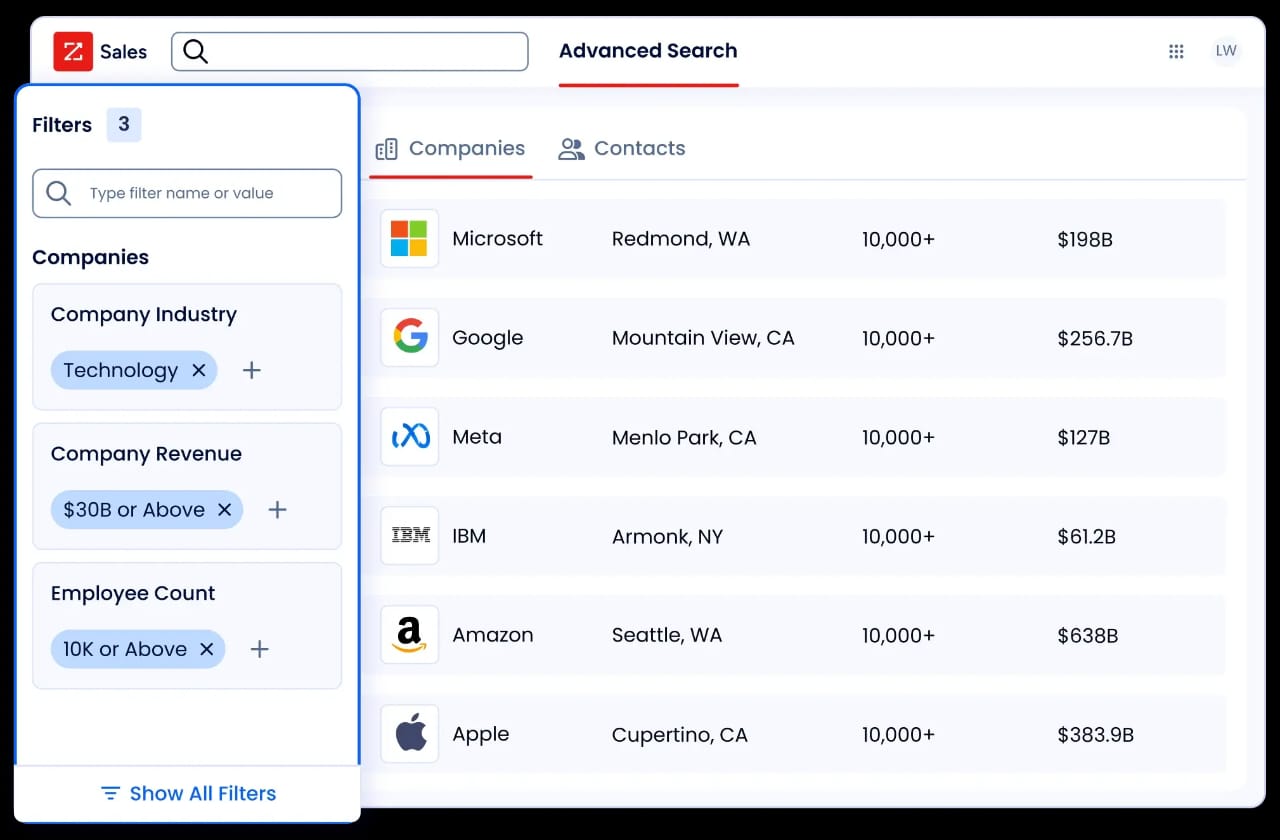
ZoomInfo is a go-to-market platform built on a large B2B data foundation: 500M contacts, 100M companies, 135M+ verified phone numbers, and 200M+ verified business email addresses. Its GTM Context Graph, which processes 1.5B+ data points daily, combines this data with your CRM records, conversation transcripts, and behavioral signals to show the full context of your accounts.
That context fuels AI that shows not just what happened, but why, and what to do next. Teams access this intelligence through GTM Workspace for sellers, GTM Studio for marketers and RevOps, or API and MCP in any external tool.
Verified B2B Data at Scale: ZoomInfo provides the contacts, companies, and signals that GMass users must source elsewhere.
GMass's biggest structural gap is that it assumes you already know who to email. ZoomInfo closes that gap.
The platform provides access to 300+ company attributes for market segmentation, including department org charts with decision-makers' direct dials and verified emails, firmographics, technographics profiling the tech stacks of 30+ million companies, and contact tracking with job-change alerts.
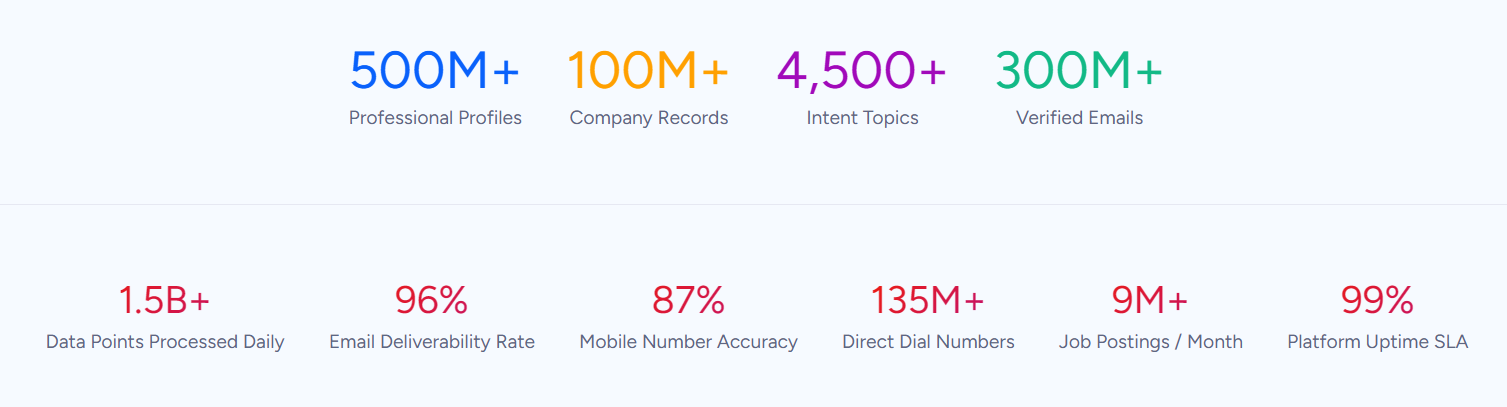
ZoomInfo verifies this data through a multi-source pipeline backed by 300+ human researchers, achieving up to 95% accuracy on first-party data. In a Fortune 500 competitive RFP analyzing 25 million contacts across vendors, an independent consultant concluded that "no other competitor came even close."
For a GMass user who spends hours building prospect lists from LinkedIn profiles and public directories, ZoomInfo replaces that manual work with a searchable database of verified direct dials, business emails, and org chart context.
"ZoomInfo gives us the information we need to execute. We don't have to spend our time digging. It's already there, so we can be three steps ahead." (Vensure)
Buyer Intent and Signal Intelligence: ZoomInfo surfaces which accounts are actively researching, not just who exists.
Cold email tools like GMass treat every contact the same: you send, they open or they don't.
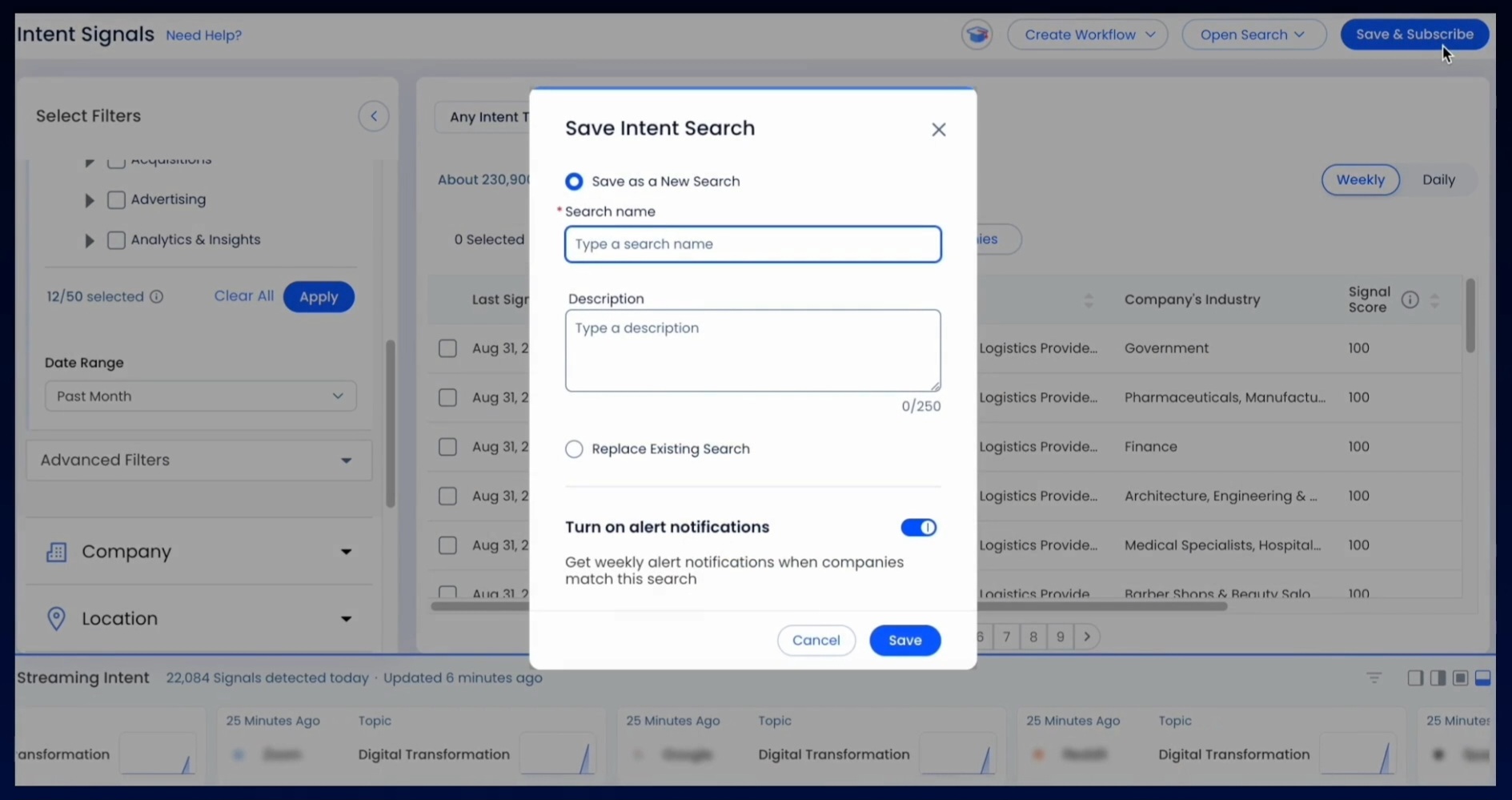
ZoomInfo adds a signal layer that distinguishes warm accounts from cold ones before you send anything. ZoomInfo Intent tracks signals from 210 million IP-to-Organization pairings and 6 trillion+ keyword-to-device pairings sourced monthly, identifying companies actively researching solutions in your category.
Guided Intent, exclusive to ZoomInfo, identifies topics correlated with deal success rather than requiring manual topic selection. WebSights resolves anonymous website traffic to specific companies, with Automatic Traffic Filtering distinguishing real visitors from bots.
Source: ZoomInfo
These signals feed account prioritization so outreach targets accounts showing buying behavior, rather than blasting the same message to a static list.
Seismic's sales team attributed 39% of active pipeline to opportunities identified or influenced by ZoomInfo signals, while boosting productivity by 54%. (Seismic)
AI-Powered Execution: ZoomInfo's GTM Workspace gives sellers a workspace that goes beyond email sending.
Where GMass automates email sequences, ZoomInfo’s GTM Workspace automates the entire selling workflow. Built on Anthropic's Claude, AI agents inside Workspace handle account research, outreach generation, CRM updates, and signal monitoring from a single screen.
The Action Feed delivers a live stream of in-market buyers matched to target criteria, with pre-drafted actions on every signal (G2 comparisons, funding events, executive hires).
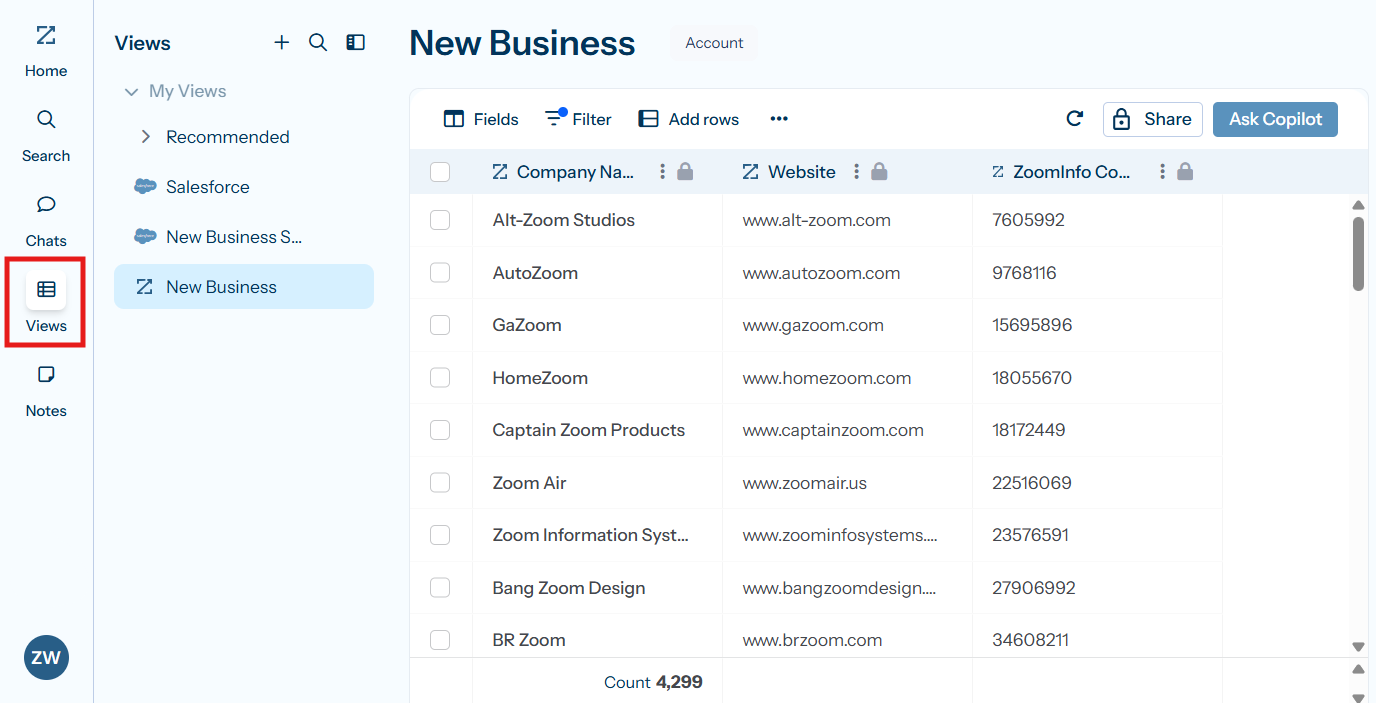
The AI Assistant generates account briefs in seconds, pulling CRM history, company news, ZoomInfo signals, and stakeholder context into one summary. Views combine CRM data with real-time buying signals in spreadsheet-style interfaces, with filters for intent spikes, technology changes, and personnel movements.
Source: ZoomInfo
This is different from GMass's approach. GMass helps you write and send emails from Gmail. GTM Workspace tells you which accounts to prioritize, why they matter now, what to say, and then handles the CRM update after you engage.
"Anything that minimizes our team's need to switch contexts is beneficial. ZoomInfo offers a single view, eliminating the need to navigate between systems." (Spekit)
Multi-Channel Orchestration: ZoomInfo coordinates outreach across email, ads, phone, and chat from one platform.
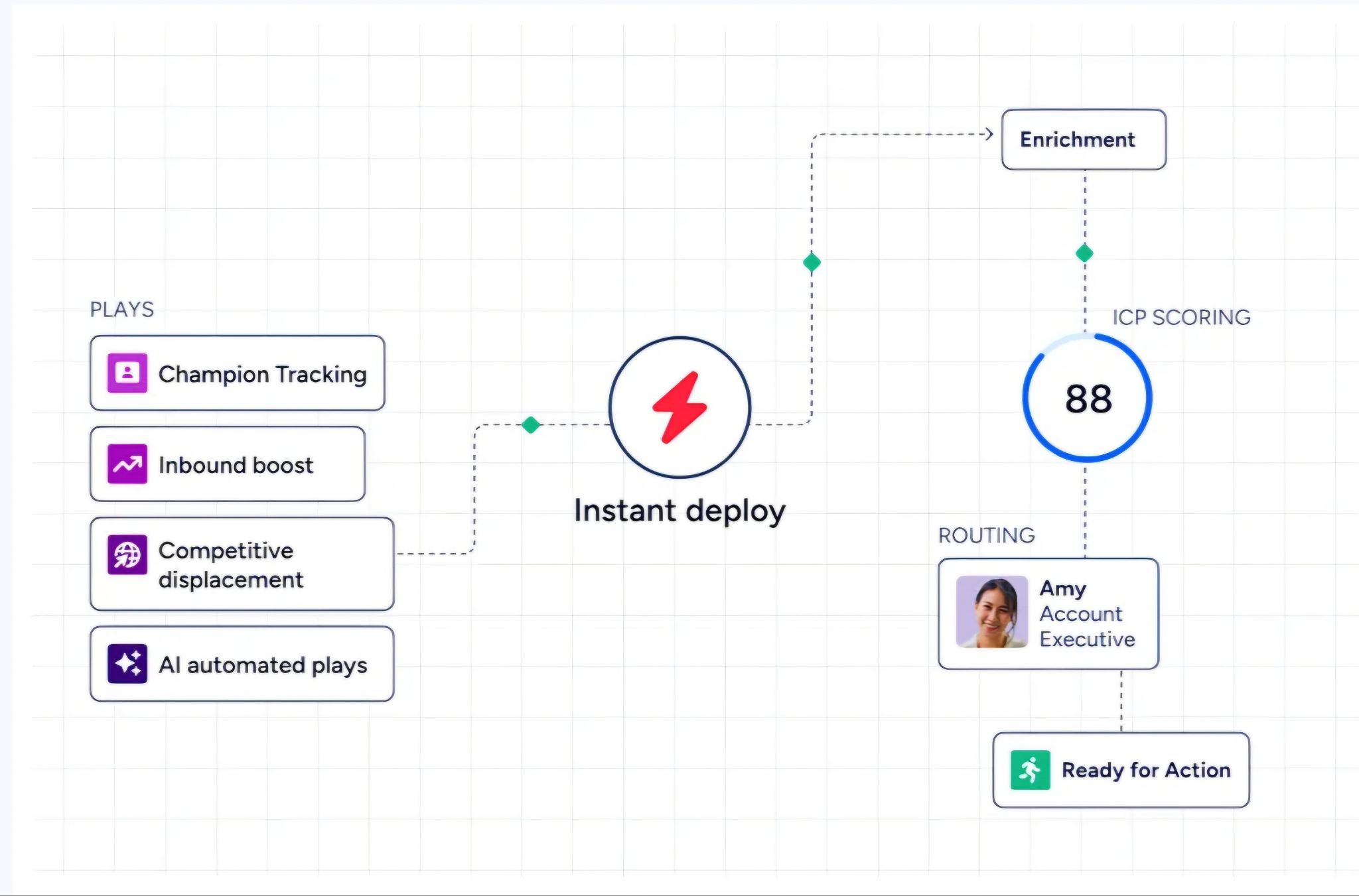
GMass is limited to email. ZoomInfo's GTM Studio lets marketers and RevOps teams design plays that coordinate email, calls, ads, and direct mail triggered by buyer behavior.
Source: ZoomInfo
A native demand-side platform deploys display ads based on 300+ company attributes. ZoomInfo Chat identifies website visitors by company before they self-identify, triggering tailored experiences.
GTM Studio operates through natural language: marketers describe audiences in plain English, and the platform segments, enriches, and activates campaigns. Pre-built GTM plays covering inbound acceleration, champion tracking, and competitive displacement launch in one click. Expansion plays that used to take 3 weeks now launch in 30 minutes.
Enterprise-Grade Integration and Security: ZoomInfo connects natively to CRM, marketing, and data warehouse systems.
Where GMass acknowledges it is still working on CRM integrations, ZoomInfo's App Marketplace lists 120 partner integrations across CRM (Salesforce, HubSpot, Microsoft Dynamics), marketing automation, sales engagement, data warehouses (Snowflake, Databricks), and more.
API and MCP deliver ZoomInfo's intelligence into any custom tool or AI agent.

Source: ZoomInfo
On security, ZoomInfo maintains ISO 27001, ISO 27701, SOC 2 Type II, TRUSTe GDPR, and TRUSTe CCPA certifications, all renewed annually. GMass does not publicly disclose third-party security certifications.
GMass or ZoomInfo: Comparison Summary
Aspect | GMass | ZoomInfo |
|---|---|---|
Primary focus | Gmail-based email campaigns | Go-to-market platform with AI |
Contact database | None; users supply their own lists | 500M contacts, 200M+ verified emails, 135M+ verified phones |
Buyer intent signals | Not available | 210M IP-to-org pairings, Guided Intent, website visitor tracking |
Email sending | Native Gmail sending with SMTP overflow | AI-drafted outreach through GTM Workspace |
Outreach channels | Email only | Email, phone, display ads, chat, direct mail |
CRM integration | In development; Zapier workaround | Salesforce, HubSpot, Dynamics + 120 integrations |
AI capabilities | SpinMax, ChatGPT campaign generation | GTM Context Graph, AI agents, account intelligence |
Follow-up automation | Unlimited stages in Gmail | Signal-triggered multi-channel sequences |
Analytics | Opens, clicks, replies, bounces | Pipeline attribution, deal intelligence, predictive scoring |
Team size | Solo to 100 users | Enterprise-scale (35,000+ customers) |
Pricing | $29.95-$59.95/month per user | Custom-quoted; free tier (ZoomInfo Lite) available |
Security certifications | Not publicly disclosed | ISO 27001, ISO 27701, SOC 2 Type II, GDPR/CCPA validated |
Best for | Gmail users sending affordable email campaigns | Revenue teams needing data, intelligence, and multi-channel execution |
Final Verdict
The choice between GMass and ZoomInfo depends on where you are in your go-to-market maturity and what problem you're solving.
Choose GMass if you're a Gmail user who already knows who to email and needs an affordable, fast way to send personalized campaigns at moderate volume. It's built for solo operators, freelancers, and small teams whose outreach starts with a Google Sheet of contacts and ends with inbox replies.
The sub-$30/month price, near-zero setup time, and Gmail-native experience make it practical for anyone who values simplicity in the sending layer and doesn't need prospecting data, intent signals, or multi-channel coordination.
Choose ZoomInfo if your challenge isn't just sending emails but figuring out who to contact, when to engage, and how to coordinate that effort across your team and channels.
With verified data on 500M contacts, buyer intent signals that surface accounts in-market, and AI execution through GTM Workspace and GTM Studio, ZoomInfo provides the intelligence and infrastructure that growing revenue teams need to move from email-only outreach to a complete go-to-market operation.
It's the platform for teams that have outgrown the "compose and send" workflow and need outreach driven by real data and signals.
Get started with ZoomInfo here.
The distinction is simple: GMass optimizes how you send. ZoomInfo changes what you know before you send, who you target, and how you engage across every channel.
GMass FAQ
Does GMass have a free plan?
GMass offers a free plan that installs without a credit card, though its functionality is limited. The extension installs in about 30 seconds from the Chrome Web Store. Paid plans start at $29.95/month for the Standard tier or $20.75/month with annual billing.
ZoomInfo also offers a permanent free tier called ZoomInfo Lite, which provides access to its B2B database with 10 monthly export credits, website visitor tracking, and HubSpot integration, with no time limit or credit card required.
Can GMass work with Outlook or non-Gmail email?
No. GMass requires a Gmail or Google Workspace account and the Chrome browser. Users on Outlook, Apple Mail, or non-Chromium browsers cannot use it. This is a hard platform constraint.
ZoomInfo is browser-agnostic and integrates natively with Salesforce, HubSpot, Microsoft Dynamics, and other platforms regardless of which email client a team uses.
Does GMass include a contact database for prospecting?
No. GMass is a sending tool, not a data provider. Users must build or purchase their own contact lists before using GMass to email them.
ZoomInfo provides access to 500M contacts, 100M companies, 200M+ verified business email addresses, and 135M+ verified phone numbers, with up to 95% accuracy on first-party data and buyer intent signals showing which accounts are in-market.
What are GMass's sending limits?
Gmail caps sending at 500 emails per day for free accounts and 2,000 per day for Google Workspace accounts.
GMass provides seven mechanisms to exceed these limits, including multi-day distribution, SMTP rerouting through third-party services or GMass's own servers, MultiSend inbox rotation across multiple Gmail accounts, and ColdSMTP for cold email at high volumes. SMTP sending beyond the first 10,000 emails per billing period costs $5 per 10,000 additional emails.
Does GMass integrate with Salesforce or HubSpot?
Not natively. GMass acknowledges it is still working on direct CRM integrations with Salesforce and HubSpot. Users currently rely on Zapier connections or manual Google Sheets workflows to bridge outreach data with their CRM.
ZoomInfo offers native integrations with Salesforce, HubSpot, and Microsoft Dynamics, plus 120 additional integrations through its App Marketplace and programmatic access through API and MCP.
What AI features does GMass include?
GMass includes SpinMax (AI-generated wording variations across every email in a campaign), ChatGPT campaign generation from a one-sentence prompt, a ChatGPT spintax generator for manual variation, a ChatGPT reply assistant for drafting responses, AI deliverability analysis through Spam Solver, and sentiment analysis on incoming replies. All AI features are included in every plan with no API key required.
How does GMass handle email deliverability?
GMass provides Spam Solver (testing against 20 seed accounts with enterprise filter coverage), email verification via syntax and SMTP validation, automatic bounce management and suppression, delivery routes for per-domain sending configuration, and a free Email Analyzer for SPF/DKIM/DMARC checking.
Emails send through Google's own servers by default, which GMass cites as a deliverability advantage. However, heavy senders have reported that Google can throttle or flag accounts it deems abusive.
Is GMass suitable for large sales teams?
GMass supports team plans for up to 100 users, with shared unsubscribe and bounce lists, template sharing, and team-level campaign management. However, the lack of native CRM integration, the absence of a contact database, and the Gmail/Chrome dependency create friction for larger organizations with standardized tech stacks.
ZoomInfo serves 35,000+ companies including enterprise teams at Adobe, Snowflake, and Thomson Reuters, with dedicated onboarding, role-based access, and native integration with the tools large sales organizations already use.
More GMass comparisons and alternatives:
