
Choosing between GMass and Mailmeteor for email outreach comes down to five questions:
Do you need workarounds for Gmail's sending limits, or do you prefer a tool that stays within them?
Is cold email your primary use case, or are you mostly sending to people who already know you?
Do you work exclusively in Gmail, or do you also need Outlook and Excel support?
How much do you care about privacy and the permissions your email tools request?
Are you spending more time figuring out who to email than writing and sending campaigns?
In short, here's what we recommend:
GMass is built for power users who run Gmail-based email outreach. It turns Gmail's compose window into a campaign engine with automated follow-up sequences, Google Sheets integration, and multiple ways to bypass Gmail's daily sending limits through SMTP routing and inbox rotation. Features like SpinMax (automatic per-email wording variation) and a Spam Solver that tests inbox placement across 20 seed accounts give cold emailers granular control over deliverability. The tradeoff: it only works in Gmail and Chrome, the interface can feel cluttered, and there's no phone or chat support.
Mailmeteor is the privacy-conscious option for individuals and small teams who want to send personalized campaigns without complexity. Recommended by Google for two consecutive years, it works across Gmail, Outlook, Google Sheets, Excel, and Google Docs, requesting only minimal permissions that never include reading your inbox. Newer features, including an AI Email Assistant for inbox triage, email warm-up, and BounceShield verification, round out the platform. But it stays within Gmail's 2,000 emails/day limit with no bypass options, and its analytics and segmentation remain basic compared to dedicated outreach tools.
Both platforms handle the sending side of email outreach well. But neither answers the prior question: who should you be emailing? A well-crafted campaign sent to the wrong contacts, or at the wrong time, is just well-formatted noise. That's where contact intelligence changes the equation.
ZoomInfo is a go-to-market platform that provides data and intelligence before any email tool enters the picture. Its B2B database covers 500M contacts, 100M companies, 135M+ verified phone numbers, and 200M+ verified business email addresses, verified by 300+ human researchers at up to 95% accuracy. Beyond contact records, ZoomInfo's GTM Context Graph combines this data with your CRM records, conversation transcripts, and behavioral signals to show not just who to contact, but why the timing is right. For teams that need both intelligence and execution, ZoomInfo's GTM Workspace includes AI-drafted outreach and signal-triggered workflows, GTM Studio lets marketers and RevOps teams build multi-channel plays, and APIs and MCP feed that intelligence into any tool you already use.
If building campaigns on verified, intent-driven contact data sounds like the missing piece in your outreach, see how ZoomInfo works.
GMass vs. Mailmeteor vs. ZoomInfo at a glance
GMass | Mailmeteor | ZoomInfo | |
|---|---|---|---|
Primary function | Gmail-native email campaigns & cold outreach | Multi-platform mail merge & email productivity | B2B data intelligence & go-to-market execution |
Works in | Gmail + Chrome only | Gmail, Outlook, Google Sheets, Excel, Google Docs | GTM Workspace, GTM Studio, APIs/MCP, Chrome extension |
Contact data | Uses your existing lists | Uses your existing lists | 500M contacts, 200M+ verified emails |
Sending limits | Bypasses Gmail limits via SMTP/MultiSend | Stays within Gmail's 2,000/day cap | Signal-triggered outreach via GTM Workspace |
Follow-up sequences | Unlimited stages, behavior-based stops | Conditional triggers (6 conditions) | AI-drafted, signal-triggered sequences |
AI features | SpinMax, ChatGPT campaigns, AI Spam Solver | AI Email Assistant, AI email writer | GTM Context Graph, AI account research, AI outreach drafting |
Deliverability tools | Spam Solver (20 seed accounts), email verification, delivery routes | BounceShield, email warm-up (35,000+ inbox network), Autopilot | Verified contact data reduces bounces at the source |
CRM integration | Zapier only (no native Salesforce/HubSpot) | BCC logging to major CRMs, Zapier | Native Salesforce, HubSpot, Dynamics 365, 120+ integrations |
Starting price | Free (ZoomInfo Lite); paid plans custom-quoted |
GMass and Mailmeteor both excel at sending, but solve different problems
GMass and Mailmeteor start from the same premise: your contacts live in a spreadsheet, and you need to send personalized emails from your own inbox. From there, they diverge.
GMass is built for volume and control.
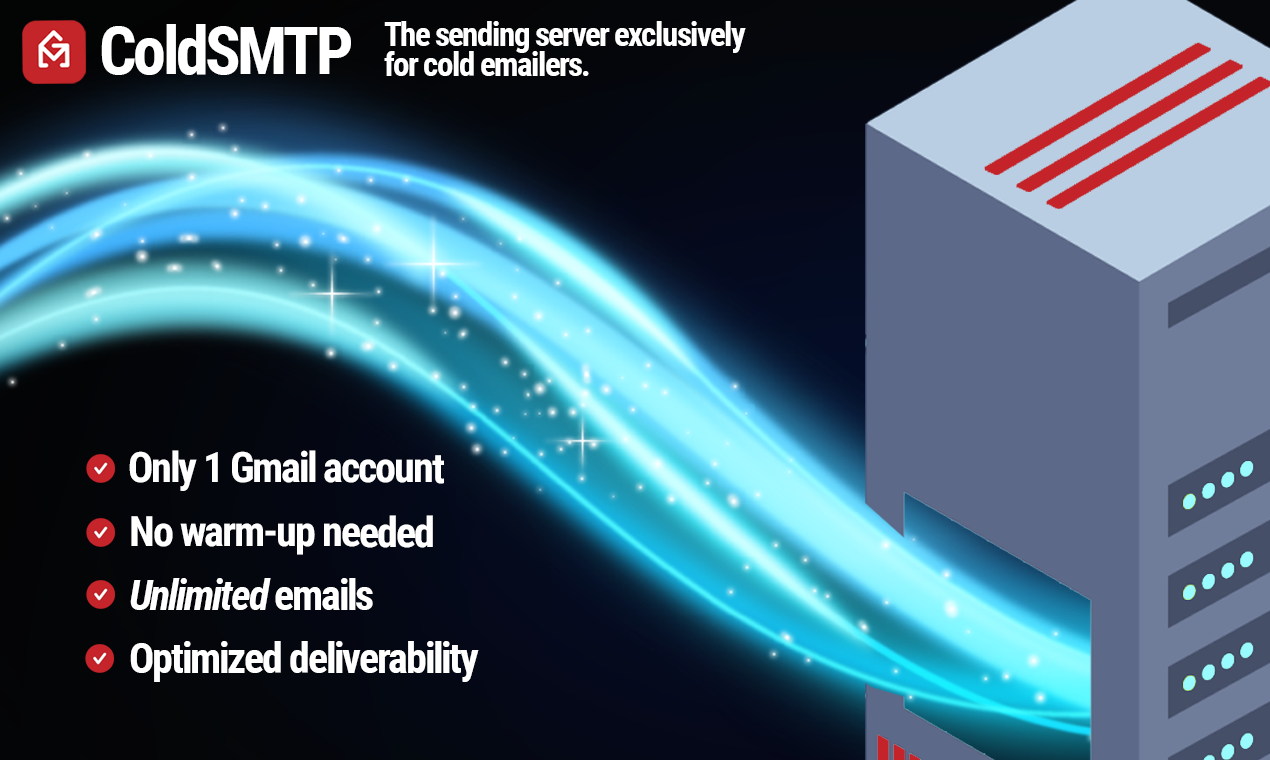
Ajay Goel founded it in 2015 after building and selling JangoMail (a Mailchimp-era ESP). That background shows. GMass offers seven methods to exceed Gmail's daily sending limits, from automatic multi-day distribution to ColdSMTP (a pre-warmed sending server designed for cold email) to MultiSend inbox rotation across multiple Gmail accounts. If your campaigns regularly exceed 2,000 emails per day, GMass has a workaround.
Source: GMass
Mailmeteor takes the opposite approach.
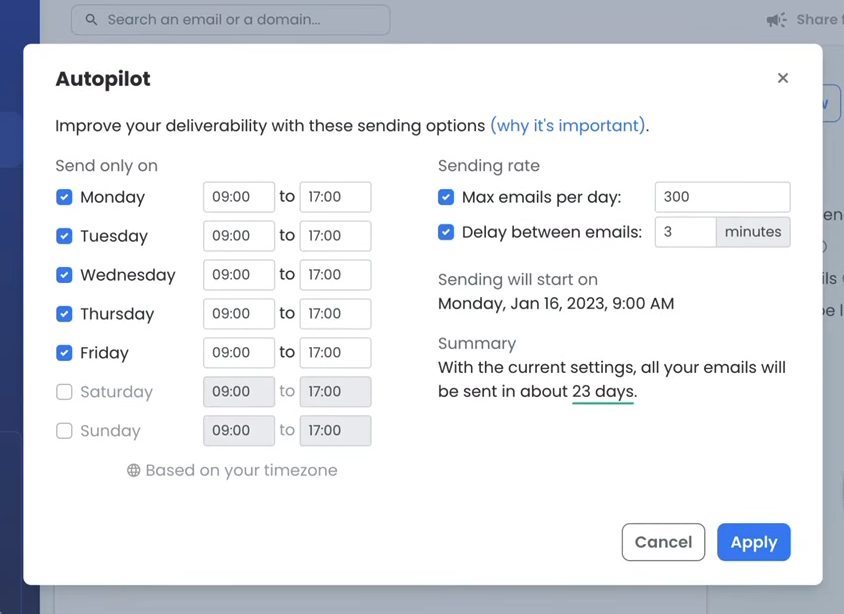
Founded in 2018 in Paris by Corentin Brossault and Jean Dubrulle, it grew from a frustration: no affordable, privacy-respecting tool existed for sending personalized emails at moderate scale. Mailmeteor treats Gmail's sending limits as a feature, not a limitation. Its Autopilot throttles campaigns to mimic natural sending patterns, and daily caps are enforced at the plan level (50 to 2,000 emails/day depending on tier). The philosophy: protect your sender reputation by working within the system rather than around it.
Source: Mailmeteor
For cold emailers sending thousands of messages daily, GMass provides the infrastructure. For professionals sending hundreds of personalized emails from their own inbox and prioritizing reputation over volume, Mailmeteor's guardrails are a genuine advantage.
The privacy and permissions gap matters more than you think
Mailmeteor's strongest differentiator against GMass isn't a feature. It's what Mailmeteor doesn't ask for.
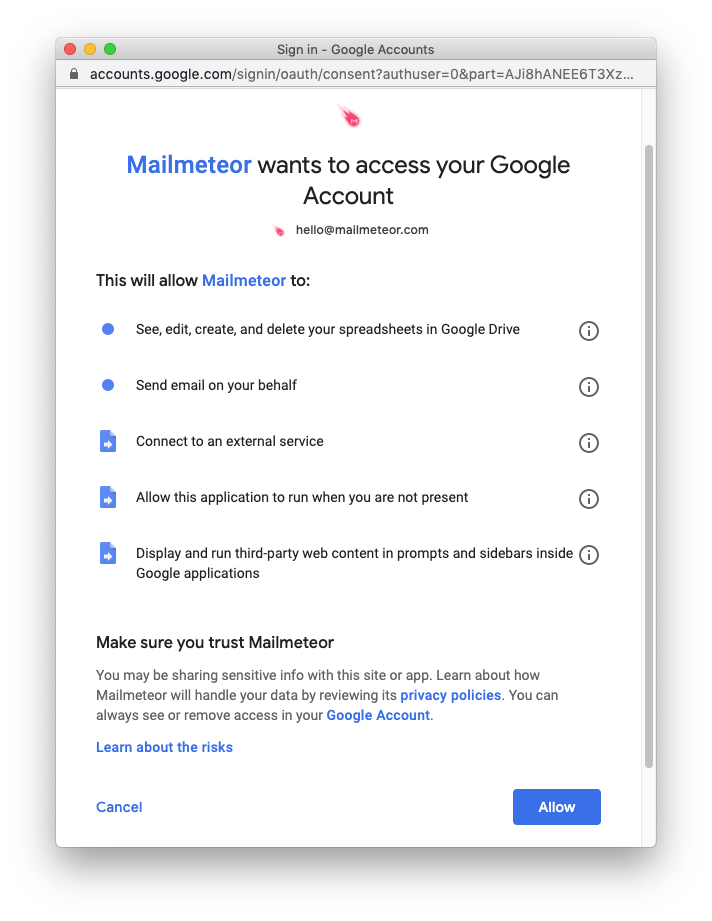
Mailmeteor requests only four permissions: spreadsheet access, send-email-on-behalf, Firebase connectivity, and sidebar display. It does not request permission to read, modify, or delete existing emails. This minimal-permission model earned Mailmeteor annual CASA Tier 3 security assessments, the highest tier in Google's App Defense Alliance framework, which requires penetration testing by an approved lab.
Source: Mailmeteor
GMass requires deeper Gmail access to power features like reply detection, bounce management, and The Reply Project. This is a legitimate technical requirement, but it means GMass stores recipient email addresses on its servers and processes email content for tracking injection. GMass does not publish SOC 2 or ISO 27001 certifications.
For individual users and small teams, the practical risk is low either way. But for regulated industries, enterprise procurement, or anyone uncomfortable granting a Chrome extension full inbox access, Mailmeteor's approach removes a real objection.
Follow-up sequences: depth vs. simplicity
Automated follow-ups are where outreach campaigns succeed or fail. Both platforms offer them, but at different levels of sophistication.
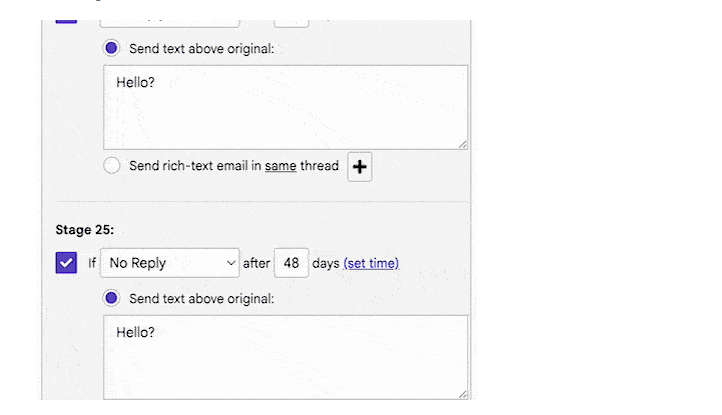
GMass supports unlimited follow-up stages per sequence (increased from a cap of eight in July 2025).
Each stage has its own timing, content, and stopping condition: stop on reply, open, click, or a combination. A standout capability is domain-level stopping: if anyone at a company replies, GMass removes all contacts at that domain from remaining stages. For B2B outreach where multiple people at the same company sit in a sequence, this prevents the awkward situation where one person responds and another keeps getting follow-ups.
Source: GMass
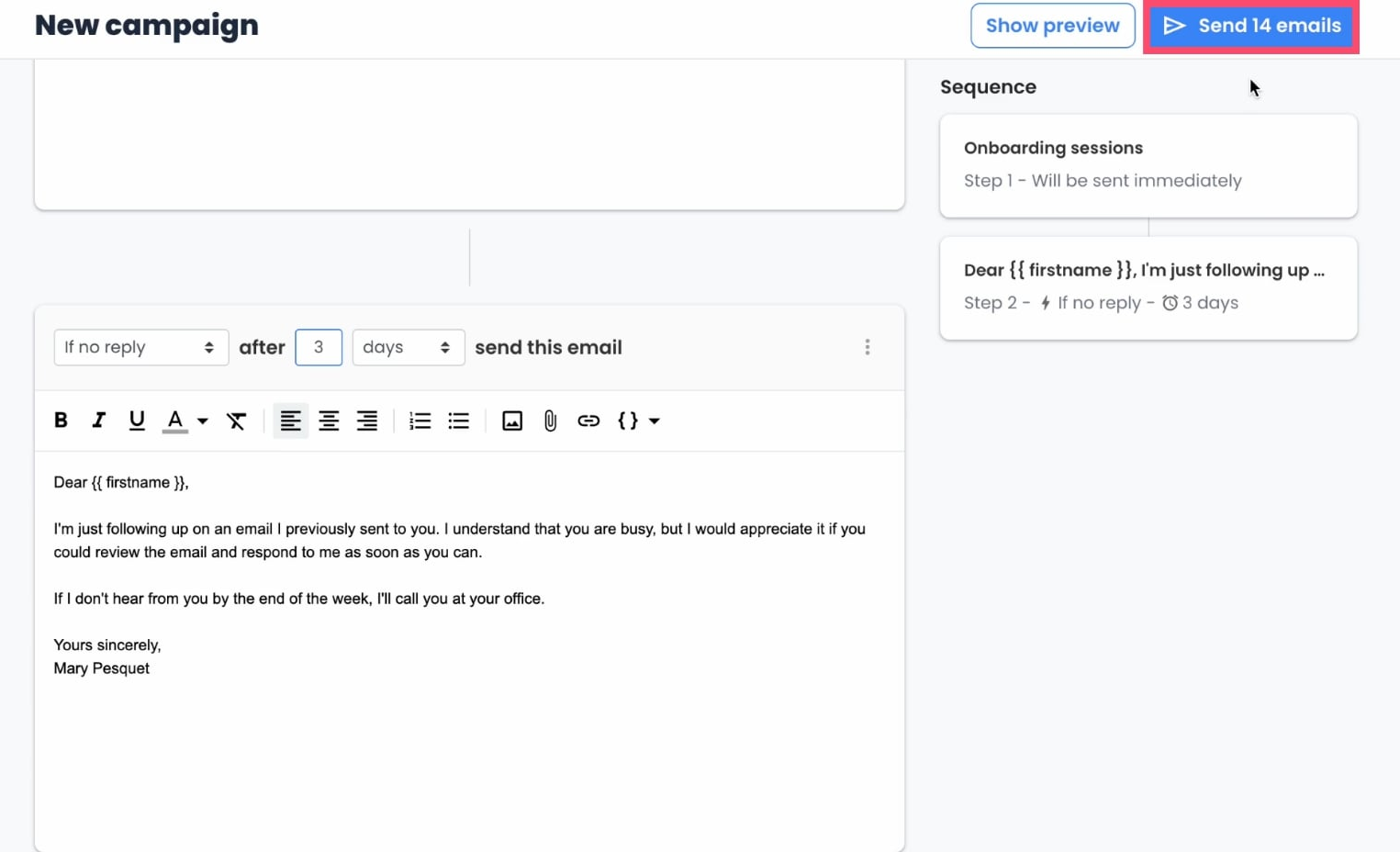
Mailmeteor's follow-up system offers six conditional triggers (no reply, no open, no click, clicked, opened, or unconditional) with no hard limit on steps, though the platform recommends seven or fewer.
Follow-ups thread within the same Gmail conversation by default and cancel if Gmail's undo-send triggers. The system handles common cases well but lacks GMass's domain-level logic and behavior-based segmentation.
Source: Mailmeteor
For long-cycle B2B sequences with 10 to 20+ touchpoints across buying committees, GMass is more capable. For standard follow-up chains of three to five steps to individual contacts, Mailmeteor covers the workflow with less configuration.
The data problem neither tool solves
Here is the gap upstream of both GMass and Mailmeteor: neither platform helps you find the right people to email.
Both assume you arrive with a contact list in hand (a Google Sheet, a CSV, or your Gmail contacts). They handle personalization, sequencing, and delivery. But every campaign's quality depends on the quality of that starting list.
Send to outdated email addresses and your bounce rate climbs, damaging your sender reputation. Send to the wrong decision-makers and your reply rate drops regardless of how well you write. Send before the prospect is evaluating solutions and your message gets buried.
This is the problem ZoomInfo was built to solve.
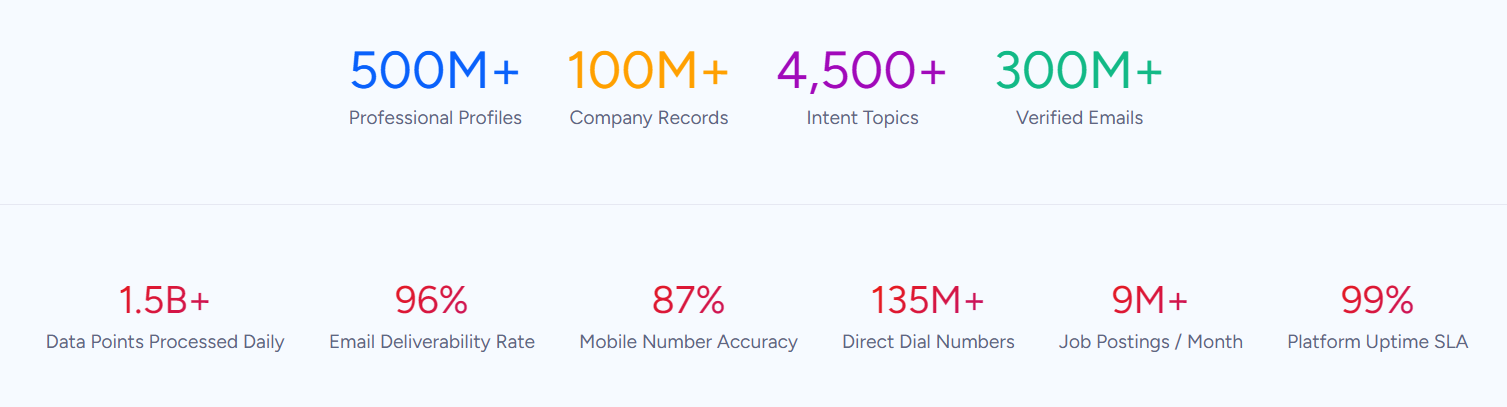
ZoomInfo's database of 500M contacts and 100M companies gives outreach teams verified, current contact data rather than lists scraped from LinkedIn or purchased databases of unknown freshness. 300+ human researchers maintain the data, and a multi-source verification pipeline achieves up to 95% accuracy on first-party data.
In a Fortune 500 competitive RFP analyzing 25 million contacts across vendors, the independent consultant concluded that "no other competitor came even close."
Source: ZoomInfo
For email outreach, the impact is direct: 200M+ verified business email addresses means fewer bounces, better sender reputation, and more emails reaching the inbox. You can spend hours tuning subject lines and spam filters, or you can start with verified data and avoid the problem at its source.
"ZoomInfo gives us the information we need to execute. We don't have to go through and spend our time digging. It's already there, so we can be three steps ahead." (Vensure)
Intent data turns cold outreach into warm timing
GMass and Mailmeteor both offer tools to improve deliverability after you hit send.
ZoomInfo improves results before you compose the first draft by telling you when prospects are in-market.
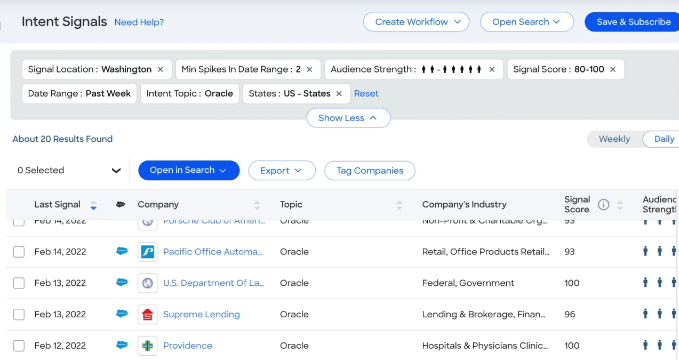
ZoomInfo Intent tracks buying signals from 210 million IP-to-Organization pairings and 6 trillion+ new keyword-to-device pairings sourced monthly. When a company starts researching topics relevant to your solution, ZoomInfo surfaces that signal. Guided Intent, exclusive to ZoomInfo, goes further: instead of requiring you to select topic keywords manually, it identifies which topics historically correlate with closed deals in your segment.
This changes the math of outreach.
The GMass cold email guide benchmarks a 1 to 5% reply rate for cold email. That rate assumes you're contacting a mix of interested and uninterested prospects. Layer intent data underneath and you filter for companies already in a buying cycle, compressing the time between first touch and first conversation.
Neither GMass nor Mailmeteor offers intent signals, buyer identification, or account-level intelligence. They can't, because their scope starts at the compose window.
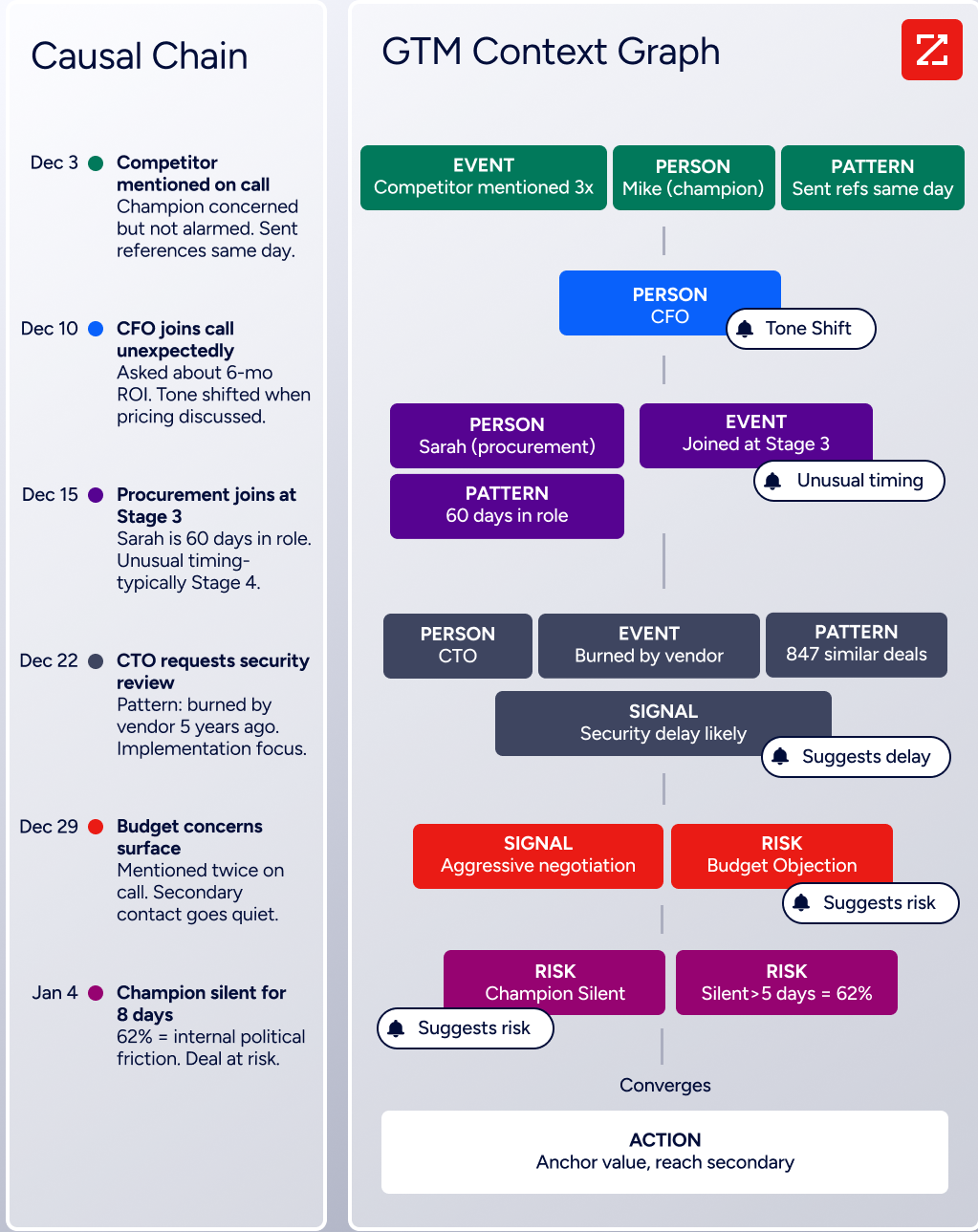
ZoomInfo's GTM Context Graph combines buying signals, CRM data, and conversation intelligence to show not just which accounts are active, but why deals move or stall. That intelligence flows into every recommendation, from which accounts to prioritize to what message to lead with.
"That combination of our internal CRM data, external signals, and AI that's given all that context has helped us craft very specific account- and persona-based messages. And people have responded to them right away." (Seismic)
Deliverability comparison: different layers of the same problem
All three platforms address deliverability, but at different points in the chain.
GMass tackles deliverability at the technical layer.
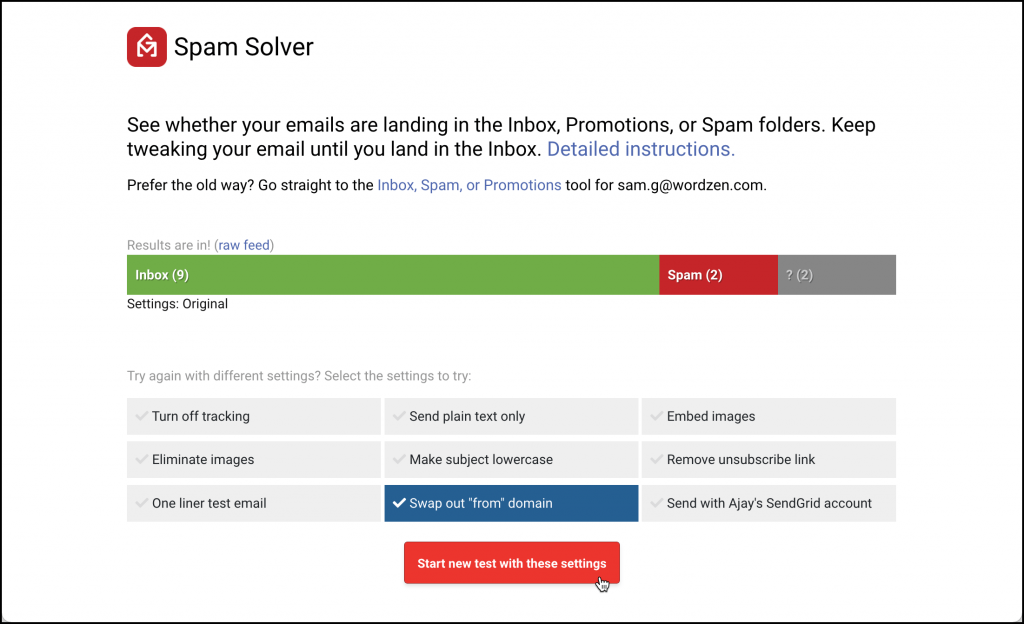
Its Spam Solver sends test versions to 20 Gmail and Google Workspace seed accounts protected by filters from Barracuda, Sophos, and ProofPoint, then reports Inbox, Promotions, or Spam placement for each. Nine test variations isolate specific causes: tracking links, images, sender domain reputation, or content formatting.
An AI layer suggests fixes. GMass also offers email verification (syntax and SMTP-level checks), delivery routes for per-domain sending configuration, and custom tracking domains with free SSL.
Source: GMass
Mailmeteor approaches deliverability through reputation building.
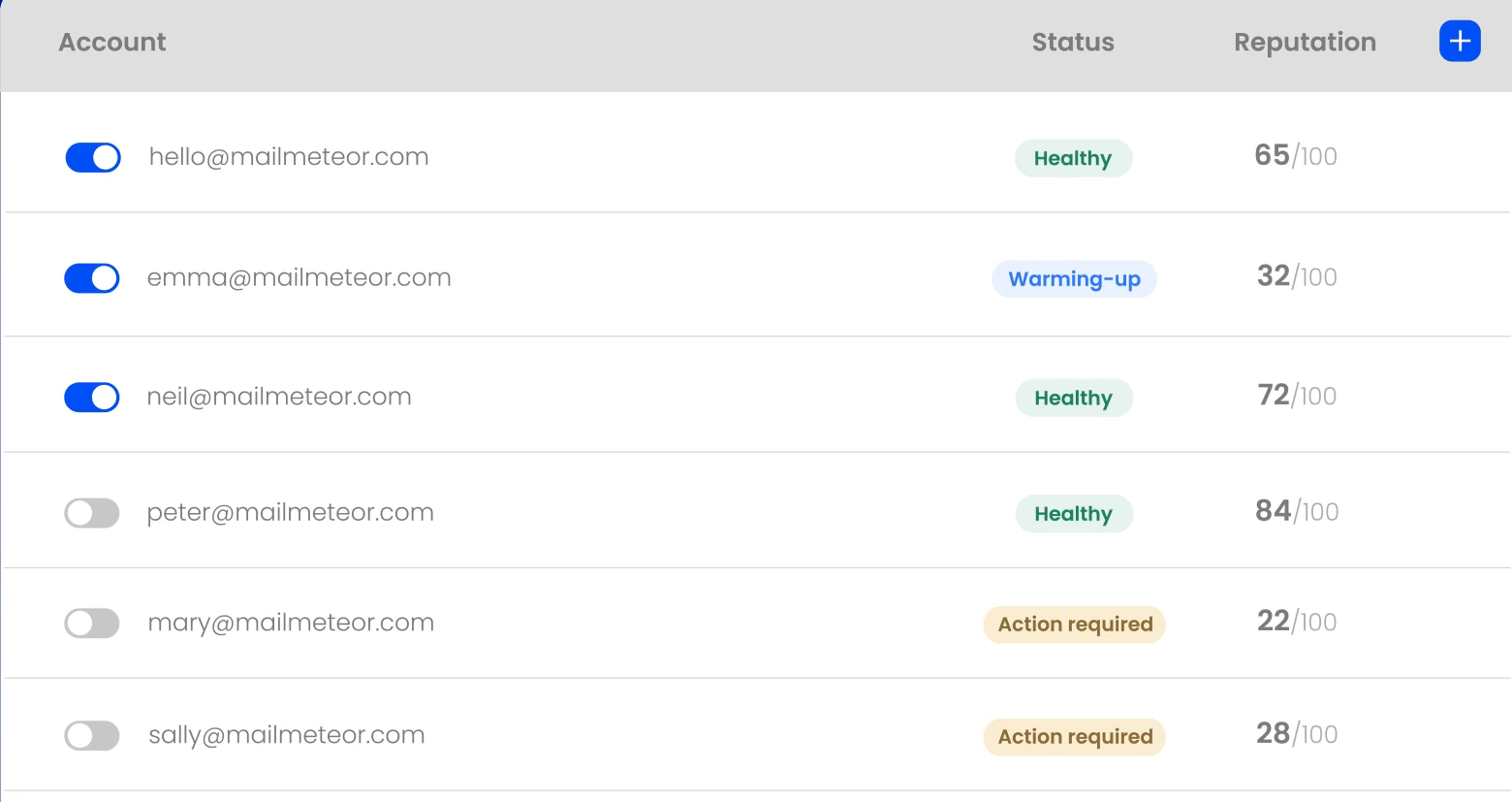
Its email warm-up gradually sends emails to a network of 35,000+ trusted inboxes, generating real engagement signals (opens, replies, forwards) that train spam filters to trust the sender. Autopilot enforces human-like sending patterns with configurable intervals and daily caps. BounceShield runs 15+ validation checks per address and claims 99% deliverability on verified addresses.
Source: Mailmeteor
ZoomInfo addresses deliverability at the data layer.
When your contact list starts with 200M+ verified business email addresses that are continuously monitored and updated, the bounce rate problem shrinks before you apply any sending-side fix. ZoomInfo acquired NeverBounce to add email verification to its data quality pipeline.
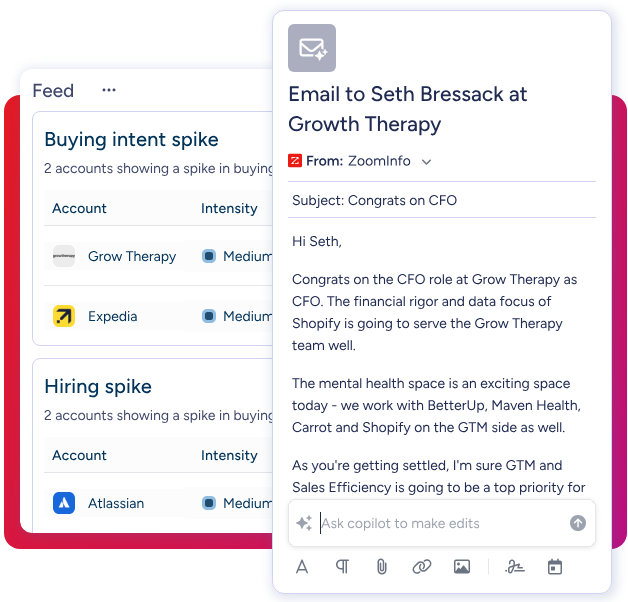
For teams using ZoomInfo's GTM Workspace for outreach, the deliverability advantage is structural: you send to verified contacts identified by intent signals, using AI-drafted messages tailored to the account context.
Source: ZoomInfo
These three layers aren't mutually exclusive. A team could use ZoomInfo for verified contacts and intent-driven targeting, then run campaigns through GMass or Mailmeteor for the sending mechanics. The question is whether your deliverability problems come from how you send (a GMass/Mailmeteor problem) or who you send to (a ZoomInfo problem).
AI features serve different goals
All three platforms now include AI, but apply it to different parts of the workflow.
GMass focuses AI on content variation and deliverability.
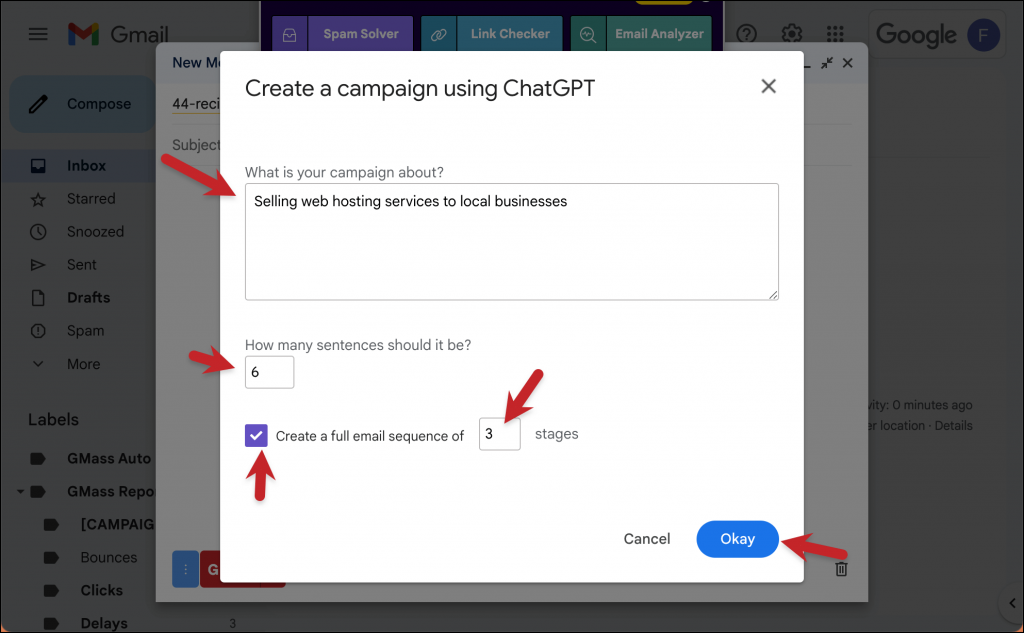
SpinMax generates wording variations across every email in a campaign with a single checkbox, reducing the spam signal that identical messages create. ChatGPT integration generates campaigns from a one-sentence prompt, creates spintax variations, drafts replies to incoming responses, and powers AI deliverability analysis inside Spam Solver. GMass absorbs the OpenAI API cost for all AI features on every plan.
Source: GMass
Mailmeteor applies AI to inbox management.
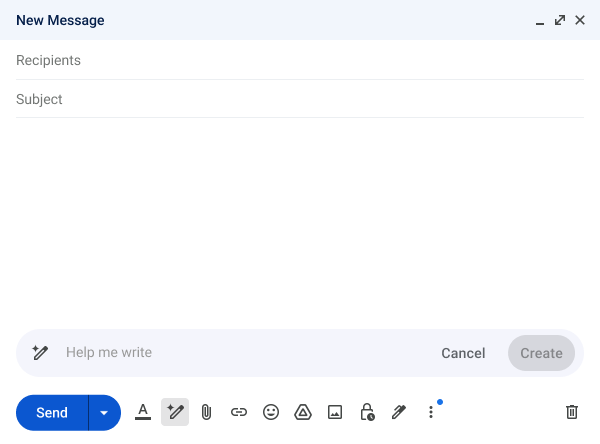
The AI Email Assistant categorizes incoming emails with seven labels (to respond, FYI, notification, agenda, to follow-up, done, marketing) and generates draft replies that match the user's writing style. An email writer toolbar handles grammar fixes, text shortening, and tone adjustments inline. Mailmeteor commits that user emails are not used to train AI models.
Source: Mailmeteor
ZoomInfo applies AI to account intelligence and execution.
The GTM Context Graph processes 1.5B+ data points daily to surface why deals progress or stall, not just record that they did. Inside GTM Workspace, AI agents handle account research, generate personalized outreach from account context, monitor signals, and update CRM fields. GTM Studio lets marketers and RevOps teams describe audiences in natural language and launch multi-channel plays targeting accounts that match proven win patterns.
The AI doesn't just write better emails; it identifies which accounts to email, which contacts matter, and what message will resonate based on patterns across thousands of similar deals.
Source: ZoomInfo
"ZoomInfo's not just a contact data company anymore. They've built a full system of execution. GTM Intelligence actually works the list, writes the outreach, triggers the play, and helps drive predictable growth." (Levanta)
Pricing reflects what each platform is selling
GMass uses flat-fee per-seat pricing with no email volume charges.
The Standard plan at $29.95/month includes unlimited emails, contacts, and campaigns. Premium at $39.95/month and Professional at $59.95/month add features. Annual billing drops the rate to $20.75 to $49.92/month.
Team plans range from $22 to $35 per user per month depending on team size. SMTP-routed emails beyond the first 10,000 per billing period cost $5 per 10,000. No free plan exists, but the extension installs with no credit card required for a limited trial.
Mailmeteor undercuts GMass at every tier.
The free Hobby plan includes 50 emails/day and 500/month permanently, no credit card required. Starter at $4.99/month unlocks 250 emails/day and BounceShield verification. The Premium plan at $12.99/month adds follow-up sequences, AI auto labels, AI auto drafts, email warm-up, and custom tracking domains. Professional at $29.99/month reaches the 2,000 emails/day ceiling and adds inbox rotation and dedicated onboarding.
A 30-day, no-questions-asked refund policy lowers the risk of trying paid tiers.
ZoomInfo operates on a different pricing model, reflecting a different category.
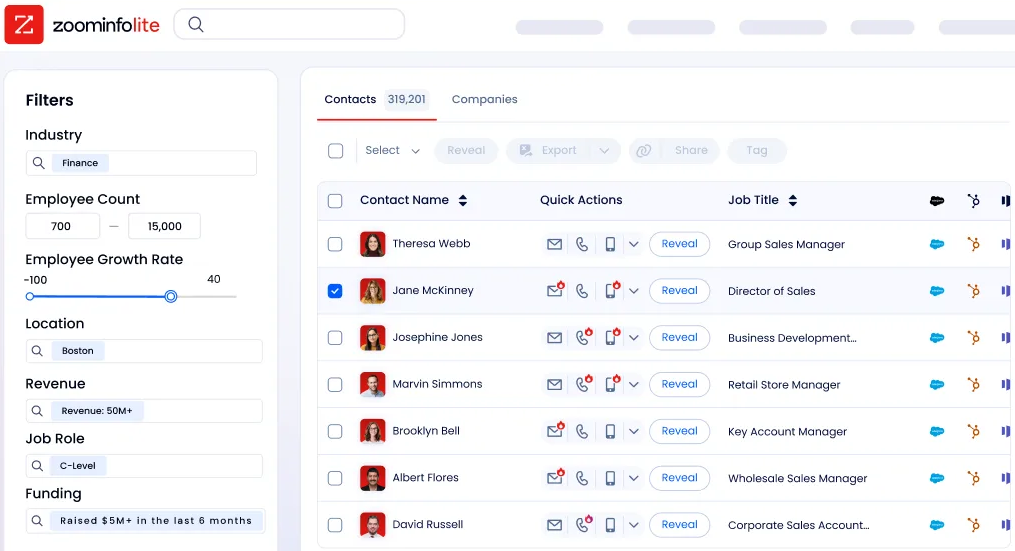
ZoomInfo Lite is a permanent free tier with access to the B2B database, 10 monthly export credits, individual and company search, the Chrome extension, and HubSpot integration. Paid plans use consumption-based pricing scaled by seats, credit volume, features, and contract length.
Comparing its cost to a $30/month email tool misses the point; the evaluation should weigh the return on verified data and intent-driven targeting against the cost of sending campaigns to unverified lists. Seismic attributed 39% of active pipeline to opportunities identified or influenced by ZoomInfo signals.
Source: ZoomInfo
Integration ecosystems show where each tool fits
The integrations reveal where each platform sits in a tech stack.
GMass integrates tightly with Google's ecosystem: Gmail for sending, Google Sheets for contact data (with bi-directional sync that writes campaign stats back to the sheet), and Google Contacts as an alternative list source.
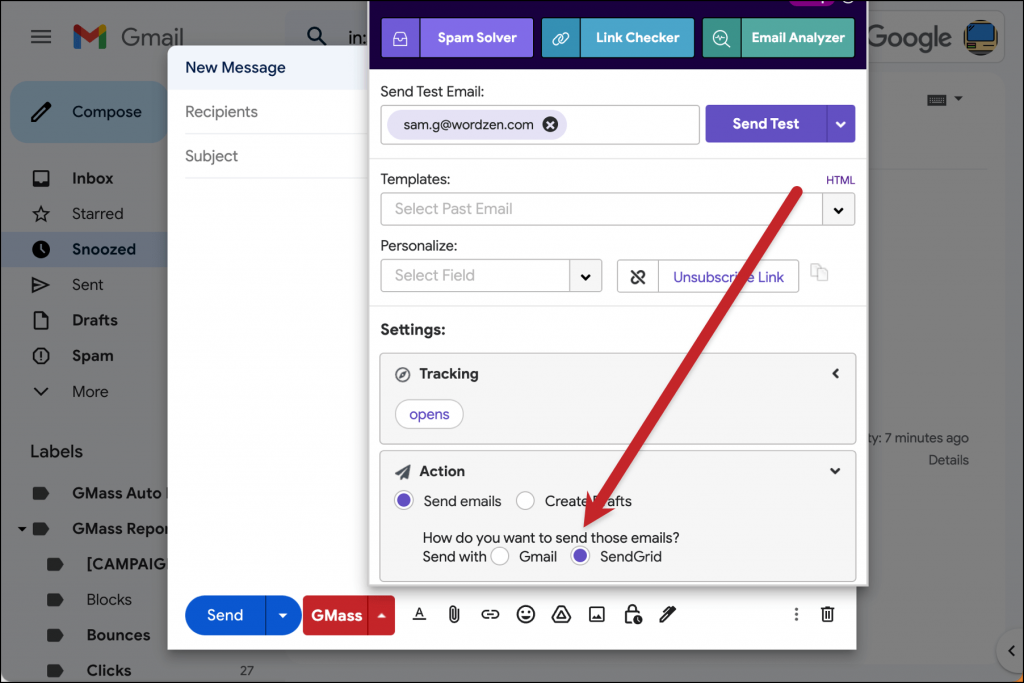
Beyond Google, it connects to third-party SMTP services (SendGrid, Mailgun, Amazon SES) and offers a REST API and Zapier integration with six triggers and three actions. Native CRM integrations with Salesforce and HubSpot are still in development.
Source: GMass
Mailmeteor spans the Google and Microsoft ecosystems: Gmail, Outlook, Google Sheets, Excel, Google Docs, and Zoho Mail.
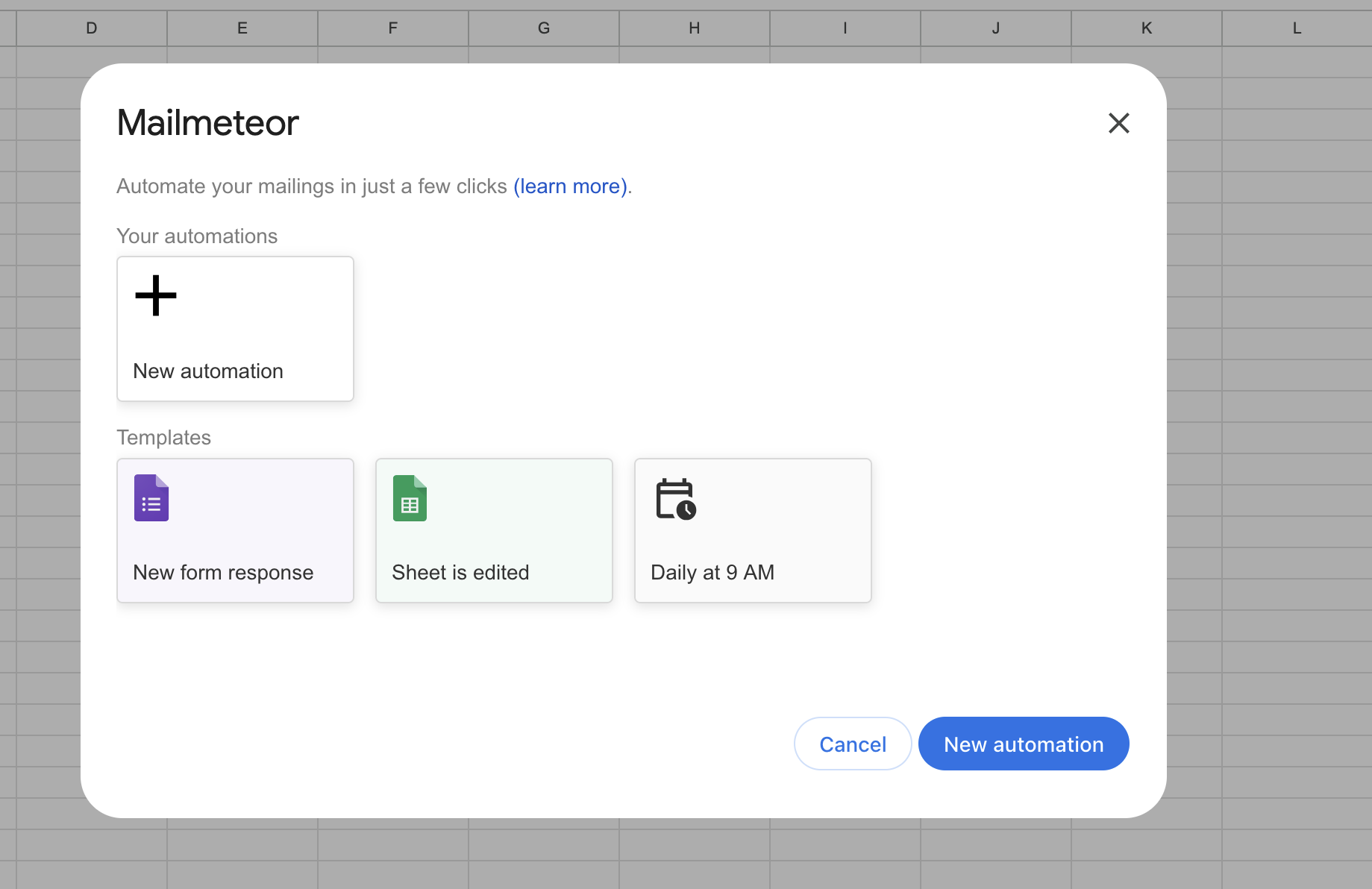
CRM integration works through BCC email logging, compatible with HubSpot, Salesforce, Copper, Zoho CRM, Pipedrive, and others. Zapier connects to broader workflows. Sheet Automations trigger campaigns directly from Google Forms submissions or spreadsheet edits. No public API is documented; technical extensibility routes through Zapier.
Source: Mailmeteor
ZoomInfo connects to everything a go-to-market team touches.
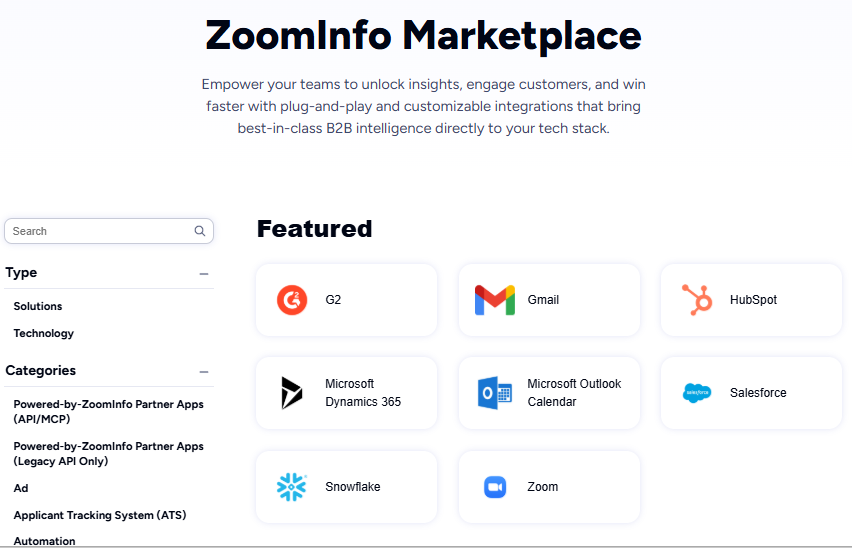
The App Marketplace lists 120+ partner integrations spanning CRM (Salesforce, HubSpot, Microsoft Dynamics 365), marketing automation (Marketo, Eloqua), sales engagement (Salesloft, Outreach), data warehouses (Snowflake, Databricks), and communication tools (Gmail, Slack, Zoom). The Enterprise API and MCP server feed ZoomInfo intelligence into any custom agent or third-party platform. API access is included in all relevant plans.
Source: ZoomInfo
The practical implication: GMass and Mailmeteor are endpoints in an outreach workflow. ZoomInfo is infrastructure that feeds intelligence into those endpoints (and dozens of others) simultaneously.
"The plug-and-play aspect of the API means I can integrate it very easily into any process and get information at a moment's notice." (BDO Canada)
GMass vs. Mailmeteor vs. ZoomInfo: Which should you choose?
The right choice depends on where your outreach breaks down.
Choose GMass if:
You send cold email campaigns at volumes that exceed Gmail's daily limits
You need follow-up sequences with domain-level stopping and unlimited stages
Google Sheets integration and bi-directional campaign tracking matter to your workflow
You want deliverability diagnostics (Spam Solver, delivery routes, custom tracking domains)
You're comfortable with a Gmail-and-Chrome-only tool
Choose Mailmeteor if:
You send moderate-volume personalized emails and prefer to stay within Gmail's sending limits
Privacy and minimal permissions are priorities for you or your organization
You need cross-platform support (Gmail, Outlook, Google Sheets, Excel, Google Docs)
You want a free tier to start and affordable paid plans that scale gradually
Inbox productivity features (AI labels, auto-drafted replies) appeal to you alongside campaign sending
Choose ZoomInfo if:
Your outreach problem is finding the right contacts and timing, not just sending emails
You need verified B2B contact data at scale (500M contacts, 200M+ verified emails)
Buyer intent signals would help you prioritize which accounts to target and when
You want AI account intelligence that informs what to say, not just how to send
Your team needs a platform that connects data, intelligence, and execution across CRM, marketing, and sales tools
Explore ZoomInfo and see how verified data and intent signals change your outreach results.
GMass and Mailmeteor are both capable campaign execution tools, each with a clear strength (power vs. simplicity). But for B2B teams where the difference between a 2% and a 15% reply rate determines pipeline, the bottleneck is rarely the sending tool. It's knowing who to reach, when they're ready, and what they care about.
That intelligence is what ZoomInfo provides, and it works whether you execute through ZoomInfo's own GTM Workspace, through GMass, through Mailmeteor, or through any other tool in your stack.
GMass vs. Mailmeteor vs. ZoomInfo FAQ
What is the core difference between GMass, Mailmeteor, and ZoomInfo?
GMass is a Gmail Chrome extension that turns Gmail into a campaign platform with features for bypassing sending limits, running multi-stage follow-up sequences, and testing deliverability.
Mailmeteor is a privacy-focused mail merge and email productivity tool that works across Gmail, Outlook, Google Sheets, Excel, and Google Docs.
ZoomInfo is a B2B data intelligence and go-to-market platform that provides verified contact data, buyer intent signals, and AI account intelligence, addressing who to email and when rather than how to send.
Which platform is cheapest to get started with?
Mailmeteor offers the most accessible entry point with a permanent free plan (50 emails/day, 500/month) and paid plans starting at $4.99/month. GMass has no free plan but starts at $29.95/month for unlimited emails and campaigns. ZoomInfo Lite is a permanent free tier with access to its B2B database and 10 monthly export credits; paid plans are custom-quoted.
Can I use ZoomInfo with GMass or Mailmeteor?
Yes. ZoomInfo provides verified contact data and intent signals that feed into any outreach tool.
You can export targeted, verified contact lists from ZoomInfo into Google Sheets, then use GMass or Mailmeteor to run campaigns against those lists. ZoomInfo's API and MCP server also allow programmatic data access for automated workflows. The platforms serve different parts of the outreach pipeline: ZoomInfo handles the intelligence, GMass or Mailmeteor handles the sending.
Which platform has better deliverability tools?
Each addresses deliverability at a different level.
GMass offers the most sophisticated sending-side diagnostics, including Spam Solver testing across 20 seed accounts with filters from Barracuda, Sophos, and ProofPoint, plus nine variation modes to isolate causes. Mailmeteor focuses on reputation protection through email warm-up with a 35,000+ inbox network, Autopilot throttling, and BounceShield verification.
ZoomInfo reduces deliverability problems at the source by providing verified email addresses maintained by 300+ human researchers, so fewer emails bounce in the first place.
Does GMass work with Outlook or only Gmail?
GMass works exclusively with Gmail and the Chrome browser. There is no Outlook, Firefox, or Safari support. Mailmeteor supports both Gmail and Outlook, as well as Google Sheets, Excel, Google Docs, and Zoho Mail. ZoomInfo's GTM Workspace and Chrome extension work independently of the user's email provider, and its API delivers data to any system.
Which platform is best for cold email outreach?
For sending cold email campaigns: GMass is the most capable, with Gmail limit bypass options (ColdSMTP, MultiSend, SMTP routing), unlimited follow-up stages, SpinMax AI variation, and Spam Solver diagnostics.
For identifying who to cold-email and when: ZoomInfo provides verified contact data, buyer intent signals from 210 million IP-to-Organization pairings, and AI account prioritization. The strongest cold email workflow uses ZoomInfo for targeting and GMass for execution.
How do the AI features compare across the three platforms?
GMass applies AI to email content (SpinMax automatic variation, ChatGPT campaign generation, AI deliverability analysis). Mailmeteor applies AI to inbox management (auto-labeling incoming emails, drafting context-aware replies, inline grammar and tone adjustments).
ZoomInfo applies AI to account intelligence and go-to-market execution, with a GTM Context Graph that processes 1.5B+ data points daily to identify which accounts to prioritize, surface buying signals, and generate personalized outreach informed by deal-level patterns.
Which platform handles team collaboration best?
ZoomInfo provides the most complete team collaboration, with shared account intelligence across sales, marketing, and RevOps through GTM Workspace and GTM Studio, plus native CRM integrations with Salesforce, HubSpot, and Dynamics 365.
GMass offers team plans (up to 100 users) with shared templates, global unsubscribe/bounce lists, and team-level campaign visibility. Mailmeteor supports shared templates and multi-sender management, with team analytics listed as coming soon on the Professional plan.
More GMass comparisons and alternatives:
