
Highspot is one of the leading sales enablement platforms on the market, serving 300 enterprise customers with over 20 million users and earning recognition as a Leader in the 2025 Gartner Magic Quadrant for Revenue Enablement Platforms. Its platform combines content management, sales training, coaching, buyer engagement, and analytics, all powered by the Nexus AI engine.
But an enablement platform only captures what happens inside it.
Highspot tracks content usage, training completion, Digital Sales Room engagement, and coaching progress. On its own, it cannot verify whether the contact data behind a deal is accurate, capture conversation signals from live sales calls, execute multi-step outreach cadences, keep your CRM records enriched with current buyer intelligence, or surface enablement content inside the communication tools where reps spend their day.
The right integrations close those gaps. They feed your enablement platform verified data it cannot generate on its own, capture activity across your go-to-market stack, activate content inside the workflows where reps already operate, and connect enablement actions to revenue outcomes.
This guide covers the strongest integration for each of the jobs Highspot users most commonly need done:
Enrich your CRM and enablement workflows with verified B2B contact data and buyer intent signals
Execute deals and deliver enablement content directly inside your CRM
Access content, AI guidance, and buyer engagement tracking across your enterprise productivity suite
Turn real sales conversations into training content and correlate talk tracks with deal outcomes
Activate enablement content inside multi-step cadences with signal-driven follow-up
Share and search enablement content in real time within team communication channels
Extend content tracking and brand governance into LinkedIn social selling outreach
Each section walks through how the integration connects with Highspot, what data flows between the platforms, pricing, and who benefits most.
Best Highspot Integrations at a Glance |
|---|
Best Highspot Integration for B2B Data Enrichment and Go-to-Market Intelligence. Enriches Highspot-connected CRM records with verified contact data, buyer intent signals, and company intelligence from ZoomInfo's B2B database, giving your revenue team accurate data to prospect with and the signals to prioritize accounts that are actively in-market. |
Best Highspot Integration for In-CRM Deal Execution and Enablement. Embeds Highspot's content recommendations, sales plays, buyer engagement tracking, and AI deal guidance directly on Salesforce opportunity records, so reps access the right enablement materials without leaving the CRM. |
Best Highspot Integration for Enterprise Teams on the Microsoft Stack. Surfaces Highspot content, Digital Sales Rooms, and Nexus AI guidance across five Microsoft connection points (Teams, Outlook, Dynamics 365, SharePoint/OneDrive, and Copilot for Sales), embedding enablement into the productivity suite enterprise reps use all day. |
Best Highspot Integration for Conversation Intelligence-Driven Enablement. Connects live customer conversations and enablement content by embedding Gong call recordings into Highspot training and sales plays, while routing Highspot content-sharing events into Gong's deal-level activity timeline. |
Best Highspot Integration for Signal-Driven Sales Engagement and Cadence Execution. Brings Highspot's content library and AI recommendations into Salesloft cadence workflows, with buyer engagement signals flowing into the Rhythm AI engine to prioritize follow-up when buyer attention peaks. |
Best Highspot Integration for Real-Time Enablement Collaboration. Makes Highspot's content library, Digital Sales Rooms, and AI guidance accessible via slash command inside Slack channels, with real-time buyer engagement notifications delivered where distributed teams already coordinate on deals. |
Best Highspot Integration for Social Selling Content Governance. Extends Highspot's content tracking and brand governance into LinkedIn InMail and direct messages through the Highspot Chrome extension, so engagement data from social selling feeds into the same analytics as email and Digital Sales Room outreach. |
What Is Highspot?
Source: Highspot
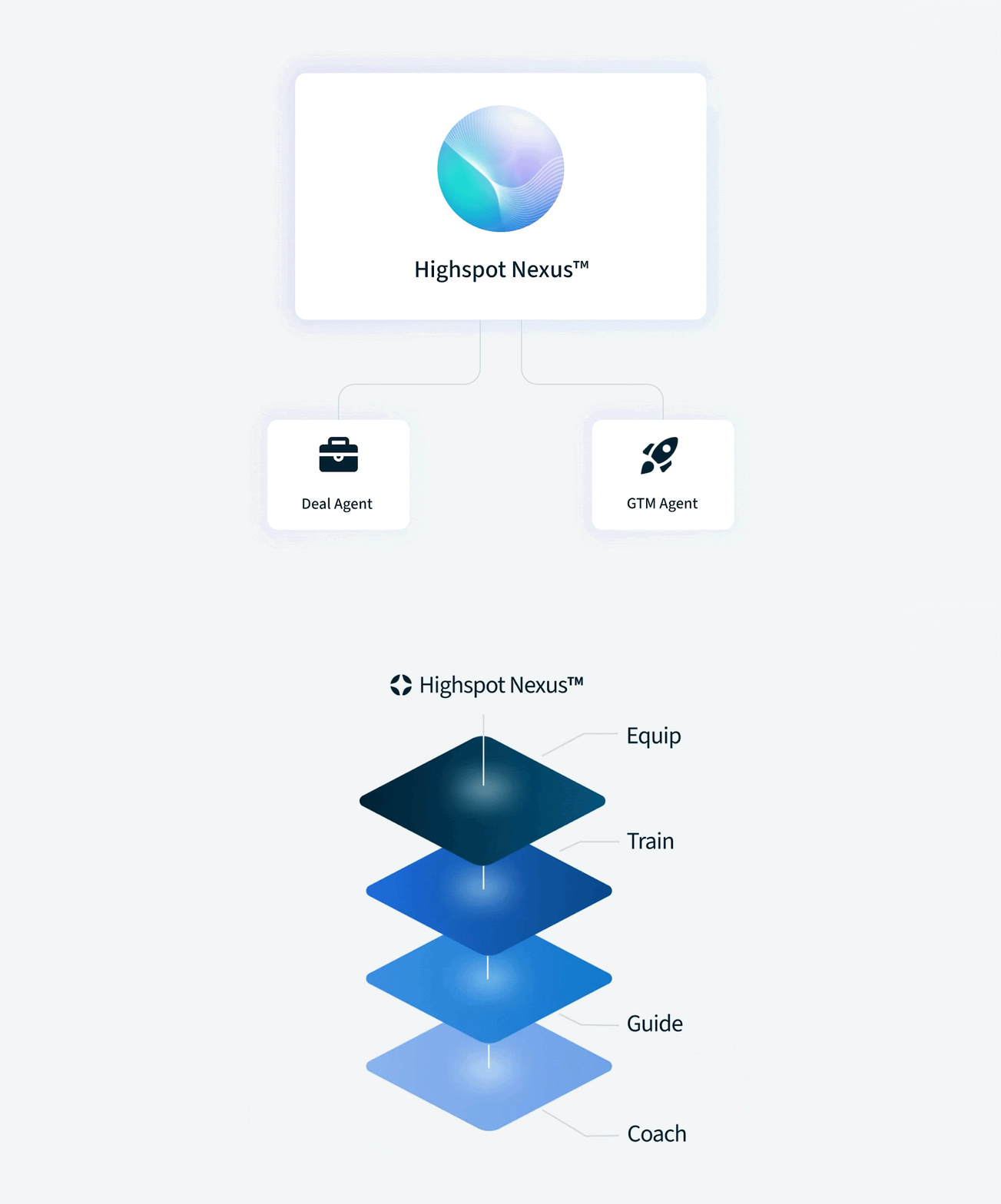
Highspot is a sales enablement platform that brings content management, sales training, coaching, buyer engagement, and analytics into a single system, powered by the Nexus AI and analytics engine.
The company calls itself "the only agentic platform for go-to-market teams" and serves enterprise customers including Uber, Siemens, Vodafone, Visa, Nvidia, Samsung, AWS, OpenAI, MetLife, HSBC, and FedEx. Three former Microsoft executives founded Highspot in 2012. The company has raised $648 million in total funding at a $3.5 billion valuation and generates $450 million in annual revenue.
Highspot's integration ecosystem is a defining strength.
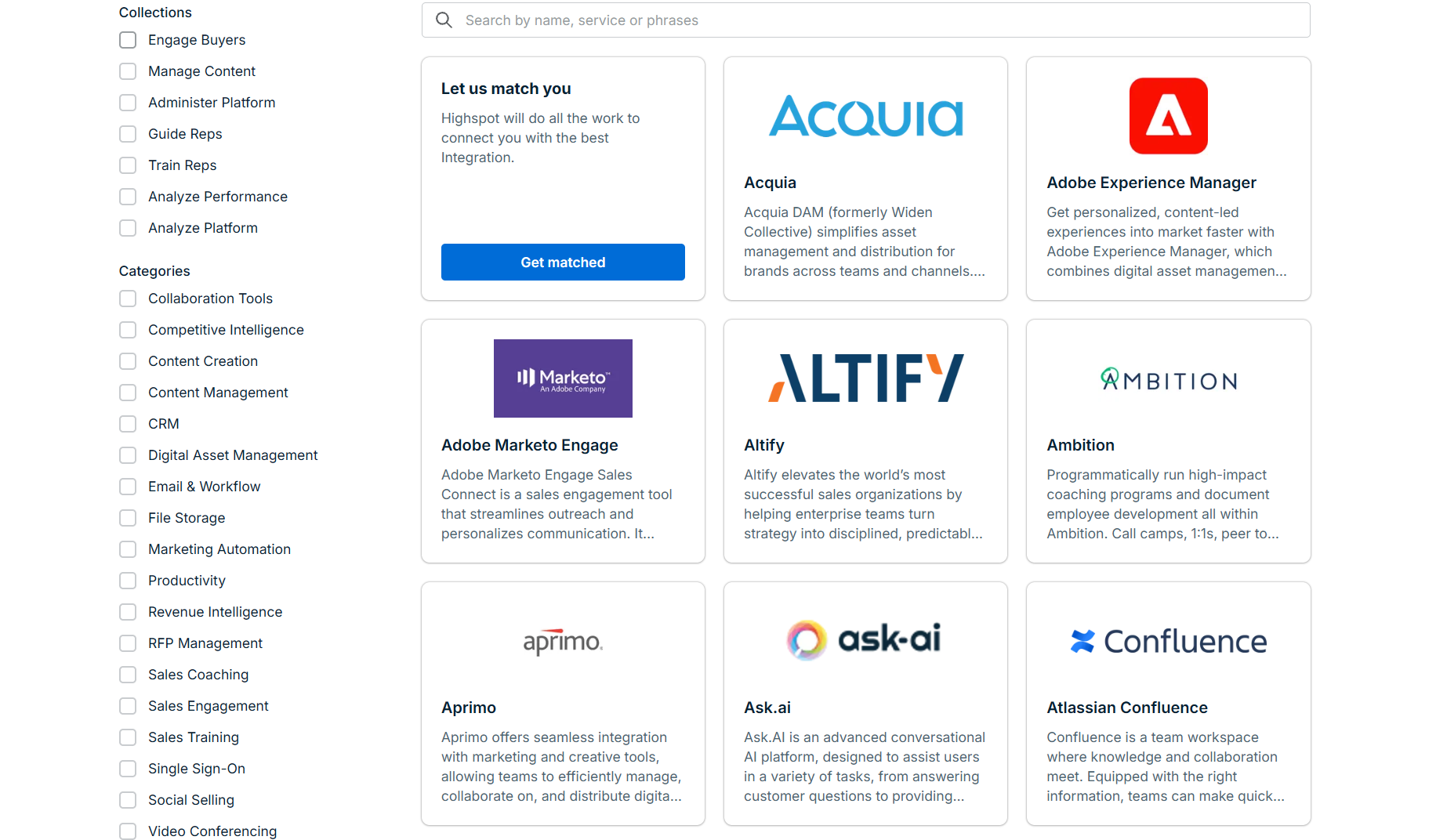
The Highspot Integration Exchange houses 100+ integrations spanning CRM, collaboration tools, content management, sales engagement, revenue intelligence, digital asset management, and marketing automation. On the technical side, Highspot offers APIs including an MCP Server and Insights Layer APIs for enterprise customers, plus a developer portal at developer.highspot.com for programmatic access. The platform recently launched support for Model Context Protocol (MCP), enabling external AI agents from OpenAI, Anthropic, and Microsoft Copilot to connect.
Source: Highspot
The integration categories available to Highspot users include:
CRM and deal execution: Salesforce (Sales Cloud, Agentforce, Sales Programs), Microsoft Dynamics 365, HubSpot
Enterprise productivity: Microsoft Teams, Outlook, SharePoint, OneDrive, Microsoft Copilot for Sales
Sales engagement: Salesloft, Outreach, cadence and sequence tools
Conversation intelligence: Gong, meeting recording and call analysis
Team communication: Slack, Microsoft Teams, real-time notifications and content sharing
Social selling: LinkedIn Sales Navigator, content tracking via Chrome extension
B2B data and intelligence: ZoomInfo, contact enrichment and buyer intent signals
Content management: Google Drive, Box, Dropbox, Adobe Experience Manager, SharePoint
With that ecosystem as context, here are the seven integrations we selected as the best options for extending Highspot across the categories that matter most to go-to-market teams.
1. ZoomInfo: Best Highspot Integration for B2B Data Enrichment and Go-to-Market Intelligence
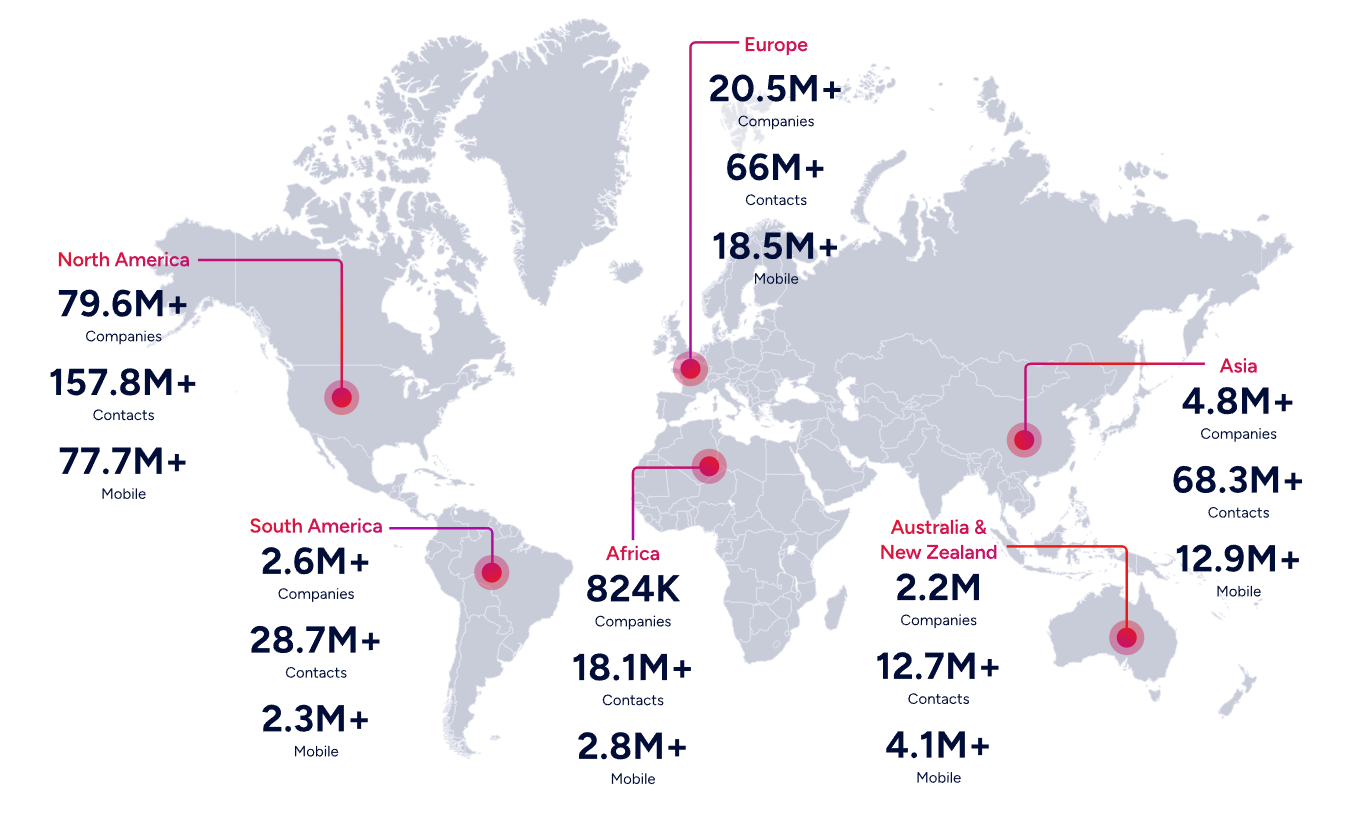
ZoomInfo is an AI-powered go-to-market platform built on the largest B2B data foundation in the industry: 500M contacts, 100M companies, 135M+ verified phone numbers, and 200M+ verified business email addresses. It integrates with Highspot through the Highspot Integration Exchange, combining Highspot's sales enablement and content management with ZoomInfo's contact data, market intelligence, and buyer intent signals.
Connecting the two platforms unlocks:
A CRM that stays accurate on its own, with verified emails, direct dials, and company attributes appended and refreshed automatically, so the deal data driving Highspot's content recommendations and Deal Intelligence rests on verified information
Prioritization by real buying signals, so reps focus their Highspot-powered outreach on accounts actively in-market this week rather than a static list
Smarter enablement through enriched data: ZoomInfo attributes (company size, industry, technology stack, intent score) feed the CRM fields that Highspot uses to match content recommendations and sales plays to deal context
Pipeline from traffic you already have, by resolving anonymous website visitors into companies and buying teams
How ZoomInfo Integrates with Highspot
ZoomInfo connects to Highspot through the Highspot Integration Exchange, with ZoomInfo's API-based data access layer powering the data flow between platforms. ZoomInfo has added API Access to all relevant plans and launched an MCP server, enabling its intelligence to flow into any connected tool in the go-to-market stack.
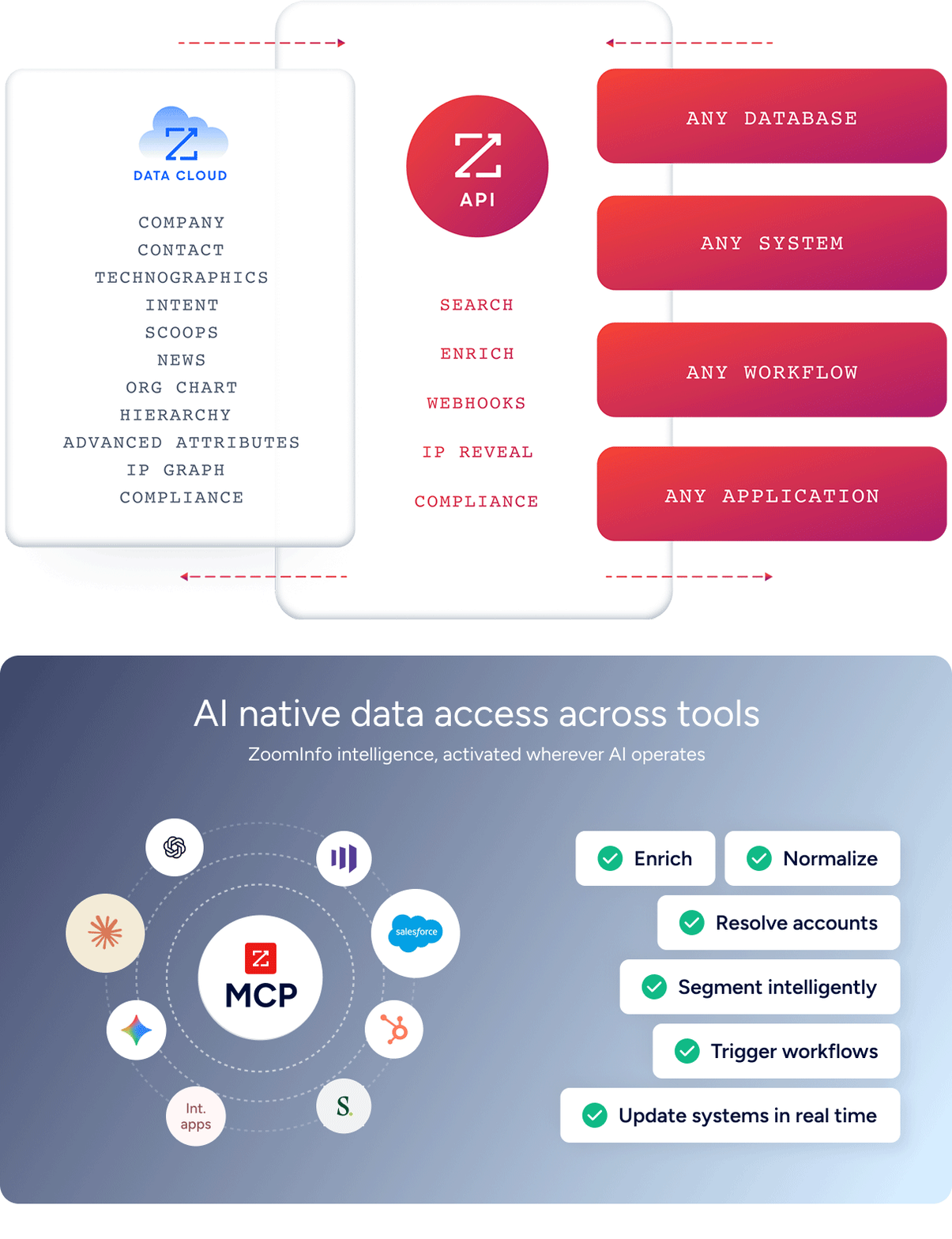
The integration works through the shared CRM layer: ZoomInfo enriches CRM records (Salesforce, HubSpot, Microsoft Dynamics) with verified data and buying signals, and Highspot reads those enriched records to power contextual content recommendations, sales play matching, and Deal Intelligence. The intelligence ZoomInfo delivers compounds inside Highspot's enablement workflows.
Contact and Company Data Enrichment: Give Highspot Accurate Data to Work With
Highspot's content recommendations and Deal Intelligence are only as good as the CRM data they draw from. When deal records carry incomplete or outdated contact information, Highspot's AI engine recommends content against a partial picture.
ZoomInfo closes that gap. When a new contact enters the CRM, ZoomInfo automatically appends the verified business email, direct dial, title, department, and seniority, plus company-level firmographics and technographic data covering 30,000+ technologies. The enrichment runs continuously through a verification pipeline backed by 300+ human researchers, reaching up to 95% accuracy on first-party data.
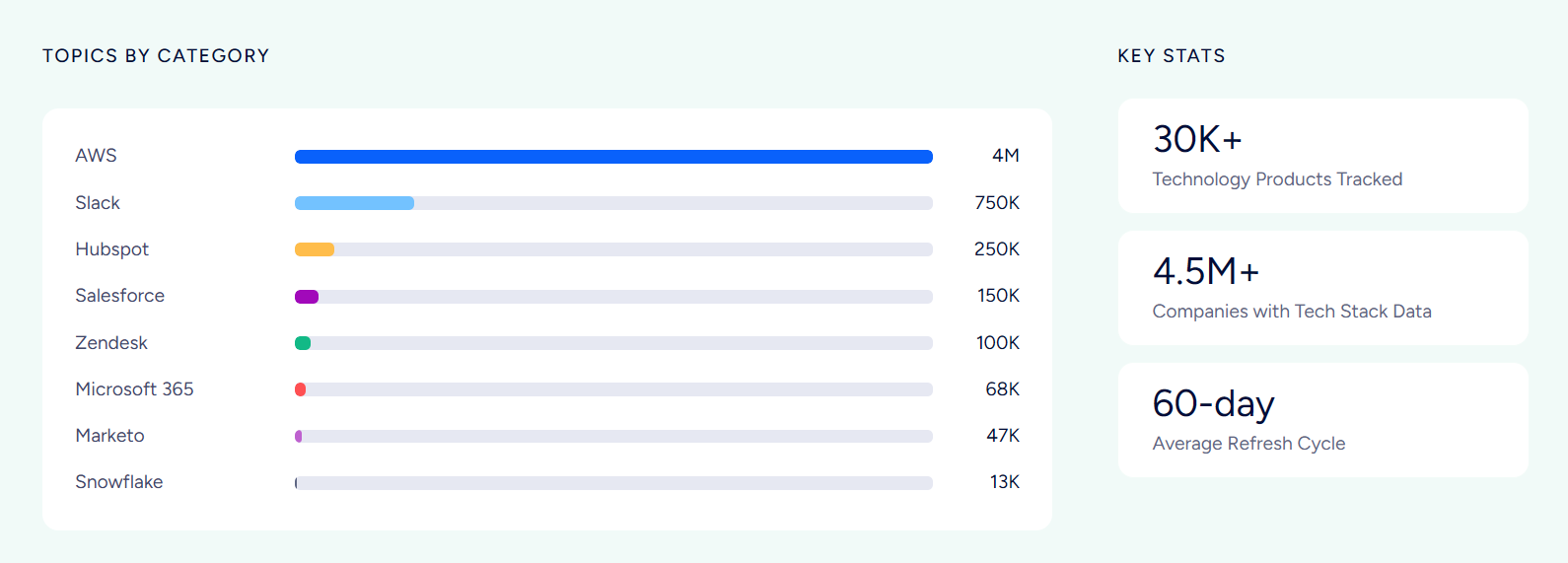
That verified data flows into the CRM fields Highspot reads when matching content to deals. A Highspot sales play targeting enterprise financial services buyers works only if the CRM accurately reflects each account's industry, size, and decision-maker titles. ZoomInfo provides that foundation.
ZoomInfo in action: A prospect fills out a form and enters the CRM with only a name and work email. ZoomInfo appends their direct dial, current title (VP of Sales Operations), company profile (a 2,000-person SaaS company running Salesforce and Outreach), and three other decision-makers in the buying committee. Highspot's Deal Intelligence now has the full buying group context to recommend the right competitive battlecard and multi-threaded messaging for that account.
Buyer Intent Data: Prioritize Which Accounts Get Your Best Enablement
ZoomInfo's Buyer Intent tracks signals from 210 million IP-to-Organization pairings and 6 trillion+ new keyword-to-device pairings monthly, revealing which companies are actively researching topics relevant to your product.
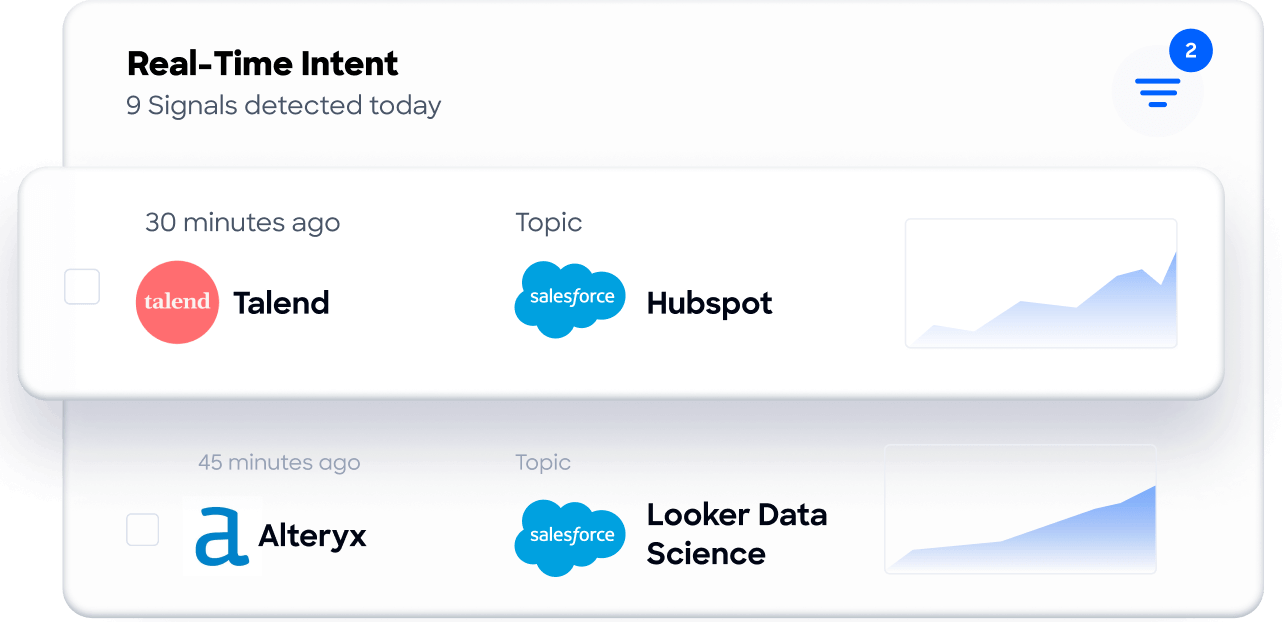
Those signals flow into CRM records, where they inform Highspot's content recommendations and deal prioritization. When a target account is researching "sales enablement platforms" or "CRM data migration," that intent signal enriches the CRM record Highspot reads, so the rep sees the most relevant competitive displacement play or migration-focused content when they open that opportunity.
Guided Intent, exclusive to ZoomInfo, identifies the research topics historically correlated with deal success in your business. The signals are calibrated to your actual win patterns rather than generic keyword thresholds, so the accounts Highspot surfaces as high-priority are the ones whose buying behavior matches how your best customers behaved before they closed.
ZoomInfo in action: ZoomInfo detects a target account researching "sales content management" for two weeks. The intent signal syncs to the CRM, raises the account's score, and triggers a notification. When the assigned rep opens the opportunity in Salesforce, Highspot's integration surfaces the competitive displacement play and the ROI calculator most relevant to that buying signal, so the rep walks into the call with the right materials.
Website Visitor Identification: Convert Anonymous Traffic into Enablement Opportunities
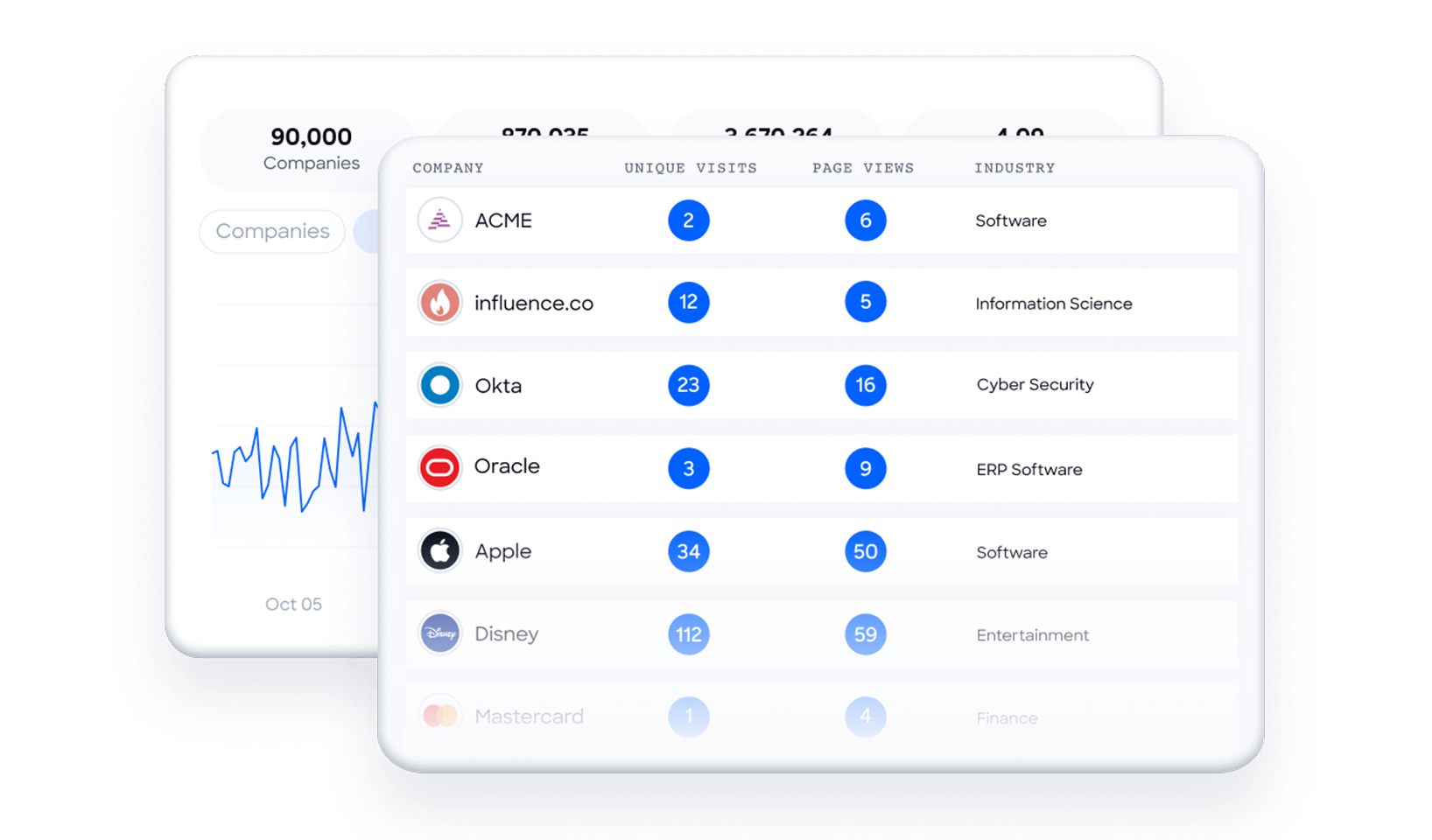
ZoomInfo WebSights resolves anonymous website traffic to companies, including buying-team identification and contact information, with Automatic Traffic Filtering separating genuine company visits from bots. When those identified companies and contacts enter the CRM, Highspot's content recommendations activate immediately, so the rep reaching out to a website visitor who spent time on the pricing page already has the pricing-stage content surfaced in their workflow.
GTM Context Graph: Intelligence That Compounds Across Your Stack
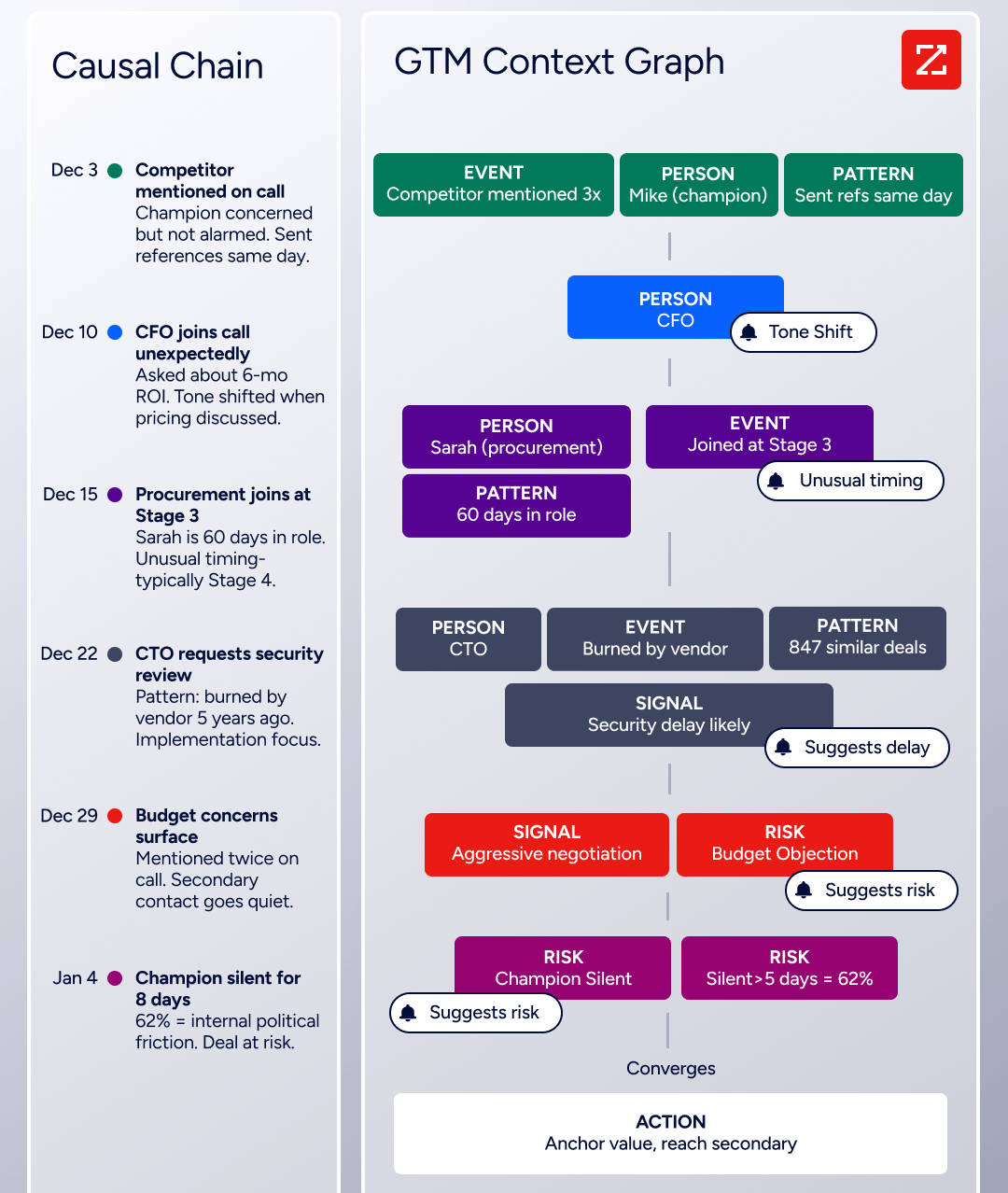
Beyond the connector itself, the enrichment feeding your Highspot-connected CRM is part of a wider intelligence layer: the GTM Context Graph processes 1.5B+ data points daily and fuses ZoomInfo's B2B data with CRM records, conversations, and behavioral signals. GTM Workspace for sellers, GTM Studio for marketers and RevOps, and APIs and MCP expose the same intelligence to any tool or AI agent in your stack, making ZoomInfo infrastructure-grade data for the entire go-to-market motion that Highspot enables.
Seismic's sales team attributed 39% of active pipeline to opportunities identified or influenced by ZoomInfo signals, reporting 54% productivity gains and saving 11.5 hours per week per seller. (Seismic Case Study)
ZoomInfo Pricing
ZoomInfo uses a consumption-based pricing model with custom quotes based on usage, users, credit volume, and features.
It is organized into Sales, Marketing, and standalone product lines, each in Professional, Advanced, and Enterprise tiers. The Advanced tier adds buyer intent signals and website visitor tracking; Enterprise includes real-time intent, custom integrations, and AI-generated account summaries.
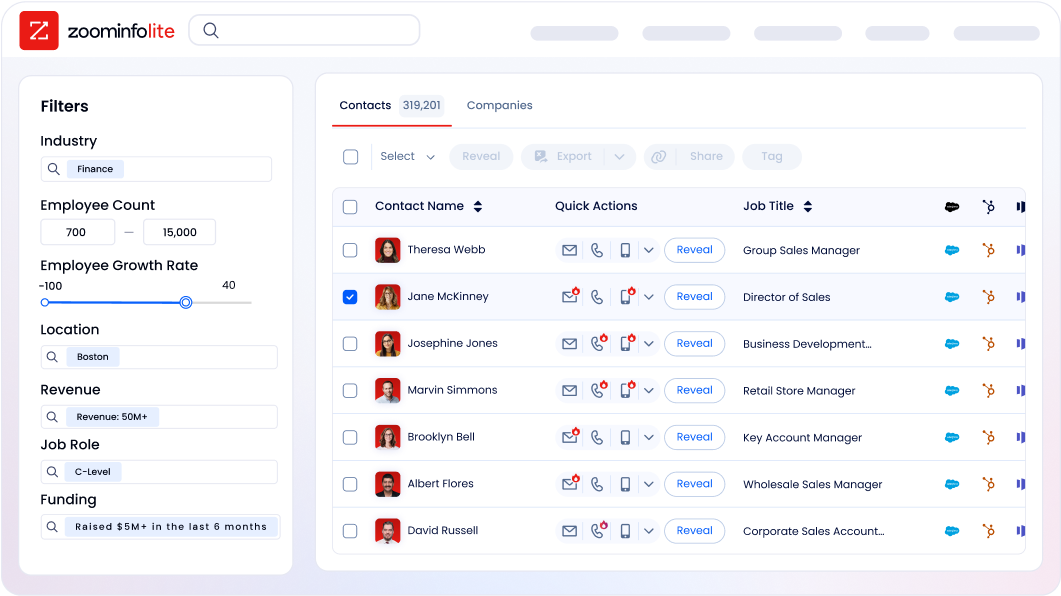
ZoomInfo Lite is a permanent free tier (no credit card, no time limit) with 10 monthly export credits, searches, the Chrome extension, and CRM integrations, making it a practical way to evaluate the data quality before committing. A separate 7-day free trial covers paid features.
Who Should Use the ZoomInfo Integration?
B2B sales teams whose Highspot content recommendations depend on accurate CRM data: ZoomInfo's enrichment ensures the contact, company, and intent data behind every deal is verified, so Highspot's AI matches the right content to the right opportunity.
Revenue operations teams that need firmographic, technographic, and intent data enriching the CRM records Highspot reads for lead scoring, routing, segmentation, and Deal Intelligence.
Marketing teams running account-based campaigns through Highspot that need live signals showing which accounts are in-market this week, not static firmographic lists.
2. Salesforce: Best Highspot Integration for In-CRM Deal Execution and Enablement
Source: Salesforce
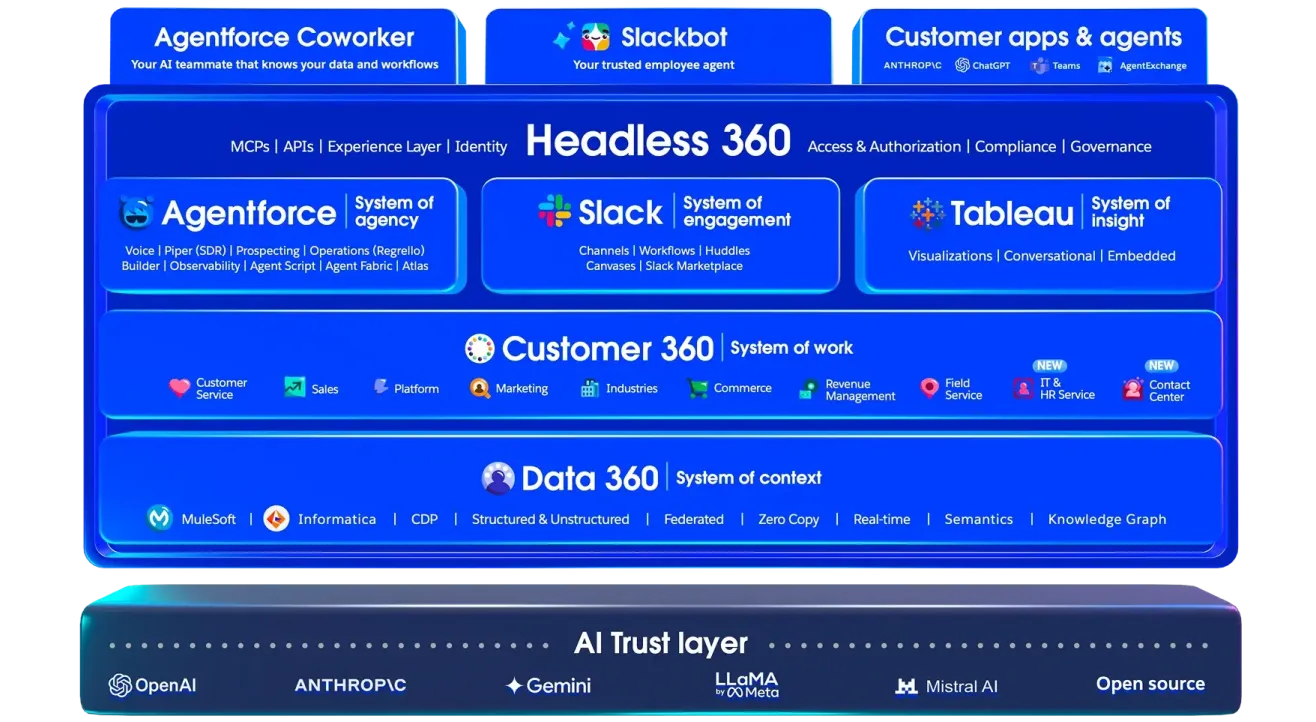
Salesforce is the world's #1 CRM by IDC revenue market share, and its integration with Highspot turns it into an embedded enablement environment where reps get contextual content recommendations, AI-guided deal coaching, and auto-generated proposals without leaving the Salesforce record they already work in. The integration is a native, first-party connector covering Sales Cloud, Agentforce, Sales Programs, Salesforce Communities, and Service Cloud.
Key integration capabilities include:
Content and sales play recommendations surfaced on Salesforce opportunity, account, and contact records, matched to deal stage, persona, and industry
Buyer engagement data from Digital Sales Rooms and shared content auto-written back to the Salesforce record with no manual logging
AutoDocs document generation triggered from within Salesforce, pulling live CRM field data into marketing-approved templates
Bidirectional deal context exchange between Highspot's Deal Intelligence agents and Salesforce Agentforce
Coverage across Sales Cloud, Service Cloud, Salesforce Communities, and Sales Programs
How Salesforce Integrates with Highspot
Highspot embeds directly into the Salesforce Lightning interface via a managed package or sidebar component. CRM integrations are included at no extra charge in all Highspot subscription tiers. Enterprise teams running more than one Salesforce org can connect all instances under a single Highspot account.
Source: Highspot
1. Contextual Content and Sales Play Recommendations on CRM Records.
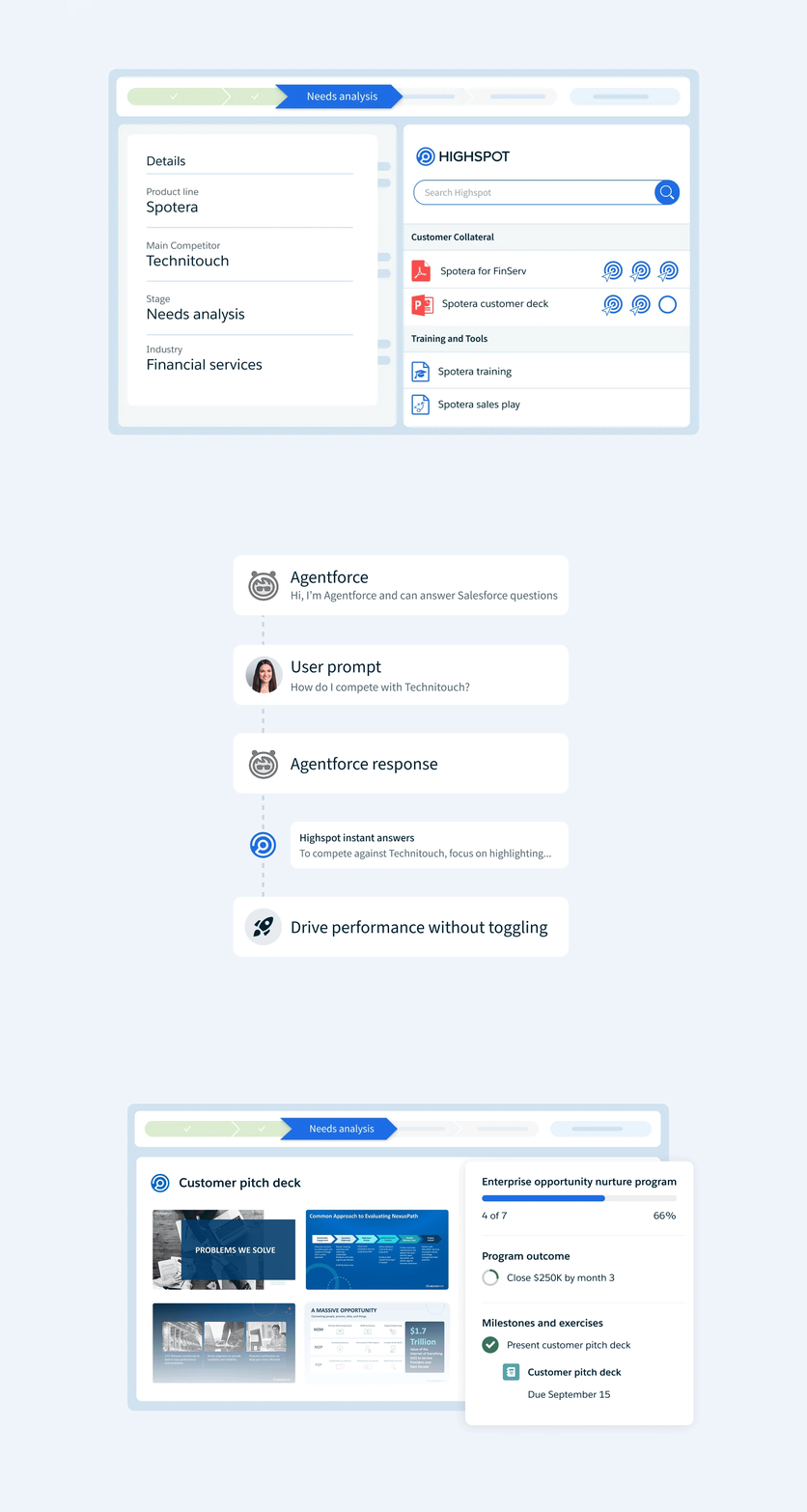
When a rep opens a Salesforce opportunity, Highspot reads the deal's attributes (stage, industry, persona, account history) and surfaces the most relevant content and sales play guidance on the record. Highspot's Nexus AI engine processes signals from content usage patterns, buyer engagement history, and sales play performance to rank relevance. Reps do not need to open a separate Highspot interface or run a manual search.
2. Automatic Buyer Engagement Sync to Salesforce Records.
When a rep shares a Digital Sales Room or individual content item from within Salesforce, Highspot automatically writes buyer engagement data back to the CRM record. The data logged includes content views, time-on-slide, downloads, forwarding events, and Digital Sales Room interactions. Sales managers reviewing pipeline in Salesforce see buyer engagement alongside deal stage, ARR, and close date, grounding risk assessment in actual buyer behavior rather than rep-reported status. The sync runs automatically with no rep action required.
3. AutoDocs: On-Brand Proposals Generated from Live Salesforce Data.
Highspot's AutoDocs, triggered from within Salesforce, pulls live CRM field values (account name, deal size, stage, contact names) into marketing-approved document templates to generate personalized proposals and pitch decks without manual data entry. Marketing's templates govern the output, so generated documents are both accurate to the deal and on-brand. AutoDocs is available as an enterprise add-on within Highspot's pricing structure.
4. Bidirectional Deal Guidance via Salesforce Agentforce.
Highspot's Deal Intelligence agents and Salesforce Agentforce exchange deal context bidirectionally. A rep working inside Agentforce's guided selling environment can access Highspot-sourced content recommendations without switching applications. Highspot is available as a native component inside Agentforce, requiring no custom integration work.
5. Multi-Cloud, Multi-Org Coverage.
The integration spans Sales Cloud, Service Cloud, Salesforce Communities, and Sales Programs. Enterprise teams running multiple Salesforce orgs across business units or regions connect all instances under a single Highspot environment for consistent enablement programming and usage reporting.
Salesforce Pricing
Salesforce uses per-user annual contracts:
Enterprise: $175/user/month (pipeline AI, workflow automation, the CRM foundation for the Highspot integration)
Unlimited: $350/user/month (full AI suite, conversation intelligence, Premier Success)
Agentforce 1: $550/user/month (unmetered Agentforce, Tableau Next, Slack Enterprise+)
Agentforce consumption (required for the bidirectional AI integration) is priced separately via Flex Credits at $0.10/action or $2/conversation. Teams using only content embedding and buyer engagement sync can operate on Enterprise Sales Cloud without Agentforce licensing.
Who Should Use the Salesforce Integration?
Sales teams that manage their full pipeline inside Salesforce and want content recommendations, play guidance, and buyer engagement tracking on the same records they already manage.
Organizations with Salesforce Agentforce deployed that want Highspot's Deal Intelligence to exchange deal context with Agentforce, giving reps AI guidance in one workflow.
Teams producing high volumes of personalized proposals that want to automate document production using live Salesforce field data through AutoDocs.
3. Microsoft 365: Best Highspot Integration for Enterprise Teams on the Microsoft Stack
Source: Microsoft 365
Microsoft 365 is an enterprise productivity and collaboration suite that integrates with Highspot to embed the platform's content library, Nexus AI guidance, and Digital Sales Rooms inside the tools enterprise reps already use. The integration spans five connection points: Teams, Outlook, Dynamics 365, SharePoint/OneDrive, and Microsoft Copilot for Sales. It is a native, first-party integration built by Highspot.
Key integration capabilities include:
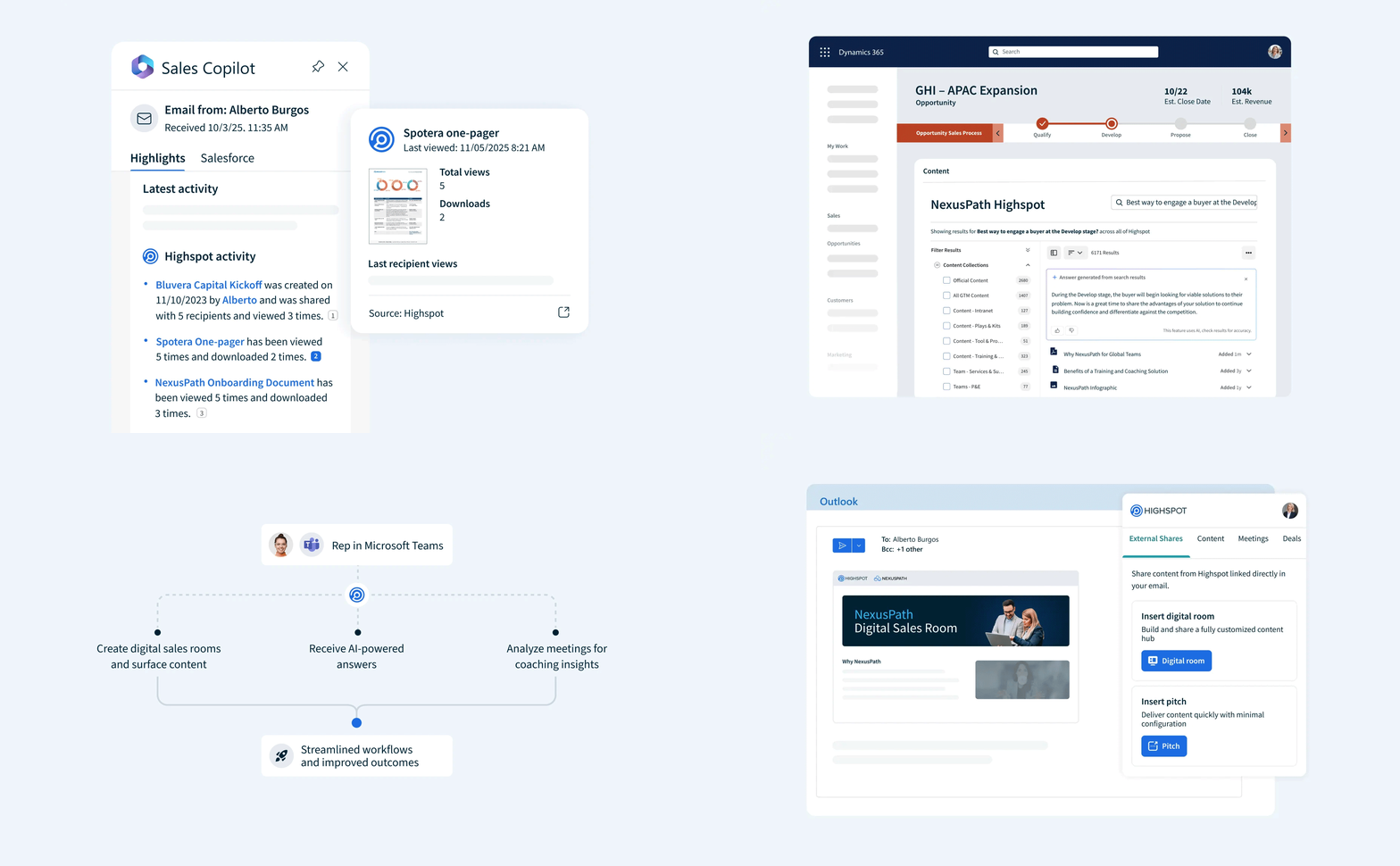
Highspot content search, Digital Sales Room sharing, and Nexus AI answers surfaced inline inside Microsoft Teams channels and Outlook compose windows
Buyer engagement tracking on Outlook-sent content with real-time alerts pushed back to the sending rep
Automatic writeback of buyer engagement events and content usage data from Highspot into Microsoft Dynamics 365 records
Bidirectional content sync between SharePoint sites and OneDrive folders and Highspot's content engine
Highspot play guidance and content recommendations embedded within Microsoft Copilot for Sales (requires Highspot's "Coach and Reinforce" tier)
How Microsoft 365 Integrates with Highspot
Each of the five connection points operates independently, so an organization can activate Teams and Outlook surfaces without deploying the Dynamics 365 writeback, and add SharePoint sync regardless of Copilot for Sales usage. OAuth-based authentication against Microsoft Entra ID governs access, inheriting each user's existing Microsoft 365 permissions.
Source: Highspot
1. Teams and Outlook Content Access with Nexus AI.
Reps can search Highspot's content library, share Digital Sales Rooms, and query Highspot's Nexus AI without opening a separate browser tab. Inside a Teams channel, a rep can ask Nexus a natural-language question and receive an answer drawn from Highspot's content and play libraries inline. In Outlook, a compose-window panel surfaces recommended assets for the deal context, letting reps attach approved content or a Digital Sales Room link while writing an email.
2. Buyer Engagement Tracking Through Outlook.
When a rep shares content through the Highspot panel in Outlook, buyer engagement tracking activates automatically. The integration captures opens, page views, downloads, and time-on-page in real time, then pushes a notification back to the rep when a buyer engages. The same interface used to send the content also receives the signal that a follow-up is warranted.
3. Dynamics 365 CRM Writeback.
For organizations running Microsoft Dynamics 365 as their CRM, Highspot writes buyer engagement events, content usage data, and deal recommendations back to Dynamics records automatically. Sales managers reviewing a Dynamics pipeline see which content has been sent and whether buyers have engaged with it, alongside standard CRM fields.
4. SharePoint and OneDrive Content Sync.
Highspot's content management integration imports published files from designated SharePoint sites or OneDrive folders, applies semantic search indexing, and syncs version updates automatically. When marketing publishes a revised deck to SharePoint, the new version appears in Highspot search results without a separate upload step. The sync respects SharePoint's existing permission model.
5. Microsoft Copilot for Sales Integration.
At Highspot's highest pricing tier ("Coach and Reinforce"), Highspot surfaces play guidance, content recommendations, and Digital Sales Room creation within Microsoft Copilot for Sales. Rather than acting as a panel within Teams or Outlook, Highspot's AI guidance becomes embedded in Microsoft's own AI layer.
Microsoft 365 Pricing
Microsoft 365 uses per-seat pricing:
Business Standard with Copilot: $23.50/user/month (full desktop apps, Teams, 1 TB OneDrive, Copilot built in)
E3: $39.00/user/month (enterprise, Copilot available as $30 add-on)
E5: $60.00/user/month (advanced security, compliance, Power BI Pro)
E7 "Frontier Suite": $99.00/user/month (bundles E5 + Copilot + Agent 365)
The Highspot integration with Teams, Outlook, SharePoint, and OneDrive works with Business Standard and above. Dynamics 365 requires a separate Sales subscription. Microsoft Copilot for Sales requires separate licensing. On the Highspot side, Teams, Outlook, SharePoint, and Dynamics surfaces are available at the base "Equip and Engage" tier; the Copilot for Sales integration requires Highspot's "Coach and Reinforce" tier.
Who Should Use the Microsoft 365 Integration?
Sales teams that live in Teams and Outlook and will not consistently switch to a standalone enablement interface for content and AI guidance.
Organizations running Microsoft Dynamics 365 that need Highspot's buyer engagement signals and content usage data written back to Dynamics records automatically.
Enterprises with content libraries in SharePoint or OneDrive that need those assets indexed and searchable inside Highspot without manual re-uploads.
4. Gong: Best Highspot Integration for Conversation Intelligence-Driven Enablement
Source: Gong
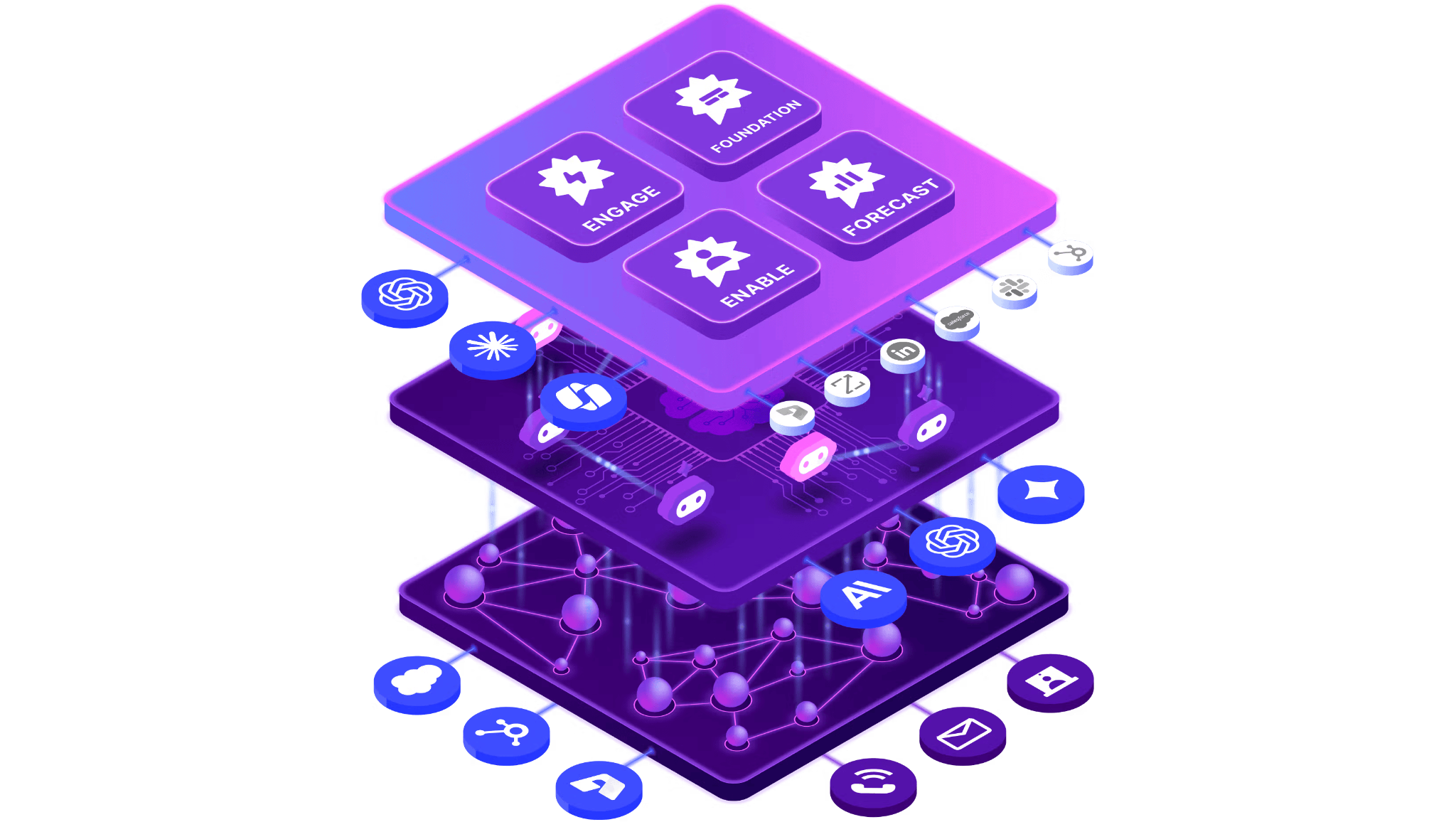
Gong is a revenue AI platform that integrates with Highspot to bridge live customer conversations and the enablement content that coaches revenue teams. Winning behaviors captured in recorded calls flow directly into Highspot sales plays and training courses, while Highspot content-sharing events surface inside Gong's deal-level activity timeline. The integration is a native connector requiring no third-party middleware.
Key integration capabilities include:
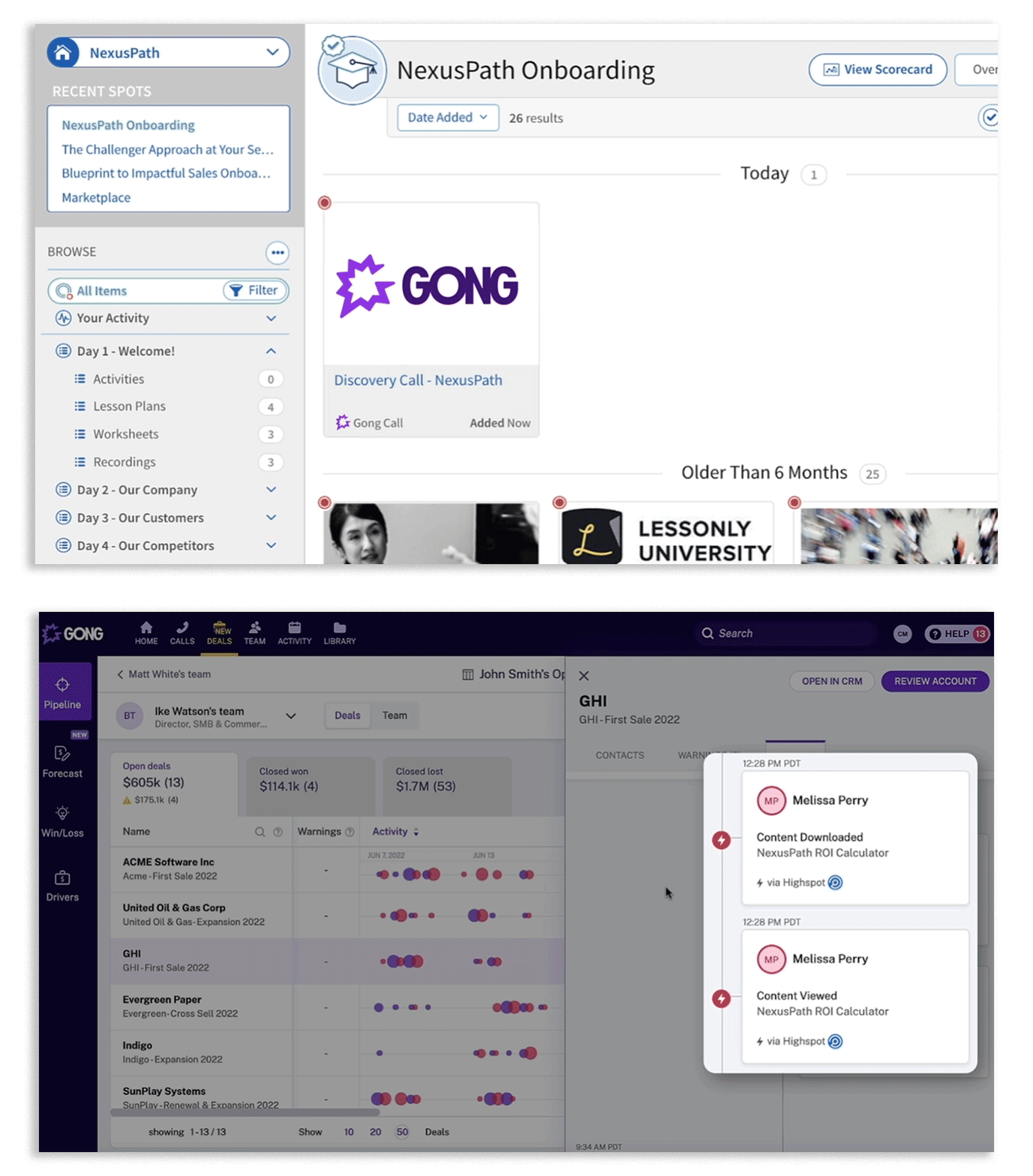
Gong call recordings embedded into Highspot training courses and sales plays as real-world coaching examples
Highspot content-sharing events appearing on Gong's Deals Page and Activity Timeline alongside calls and emails
Cross-referencing Gong's conversation analytics with Highspot's content engagement data to identify which assets correlate with closed-won deals
A native connection through each platform's settings using OAuth-based authorization
How Gong Integrates with Highspot
Administrators connect the two platforms through each platform's settings UI using a standard OAuth flow. Once connected, data flows bidirectionally: Highspot's content-sharing activity surfaces inside Gong's deal context, and Gong's call recordings become available for embedding into Highspot's content library.
Source: Highspot
1. Embedding Gong Call Recordings in Highspot Training and Sales Plays.
Enablement managers can upload Gong call recordings into Highspot training content and sales plays. Those recordings remain searchable inside Highspot using the platform's AI-powered content search, so reps preparing for calls can surface relevant conversation examples by deal stage, persona, or objection type. Gong's AI Transcriber and AI Call Reviewer have already processed these recordings, flagging coachable moments (where a rep navigated a pricing objection, handled a competitive mention, or ran an effective discovery question), and those markers travel with the recording into Highspot.
2. Highspot Content-Sharing Events on Gong's Deals Page.
When a rep shares a Highspot asset with a buyer (a pitch, a Digital Sales Room, a deck), that event appears on the Gong Deals Page and Activity Timeline alongside call recordings, email threads, and meeting data. The signals that surface in Gong include content views, downloads, time-on-slide metrics, and Digital Sales Room activity. A manager reviewing an active deal in Gong can see in a single timeline that the rep shared a competitive battlecard on Monday, held a call Tuesday where a competitor came up, and the buyer spent significant time on a specific pricing slide.
3. Cross-Referencing Analytics to Identify What Wins Deals.
Revenue teams can overlay Gong's conversation-level signals against Highspot's content performance data to identify which assets and plays appear most often in the activity timelines of closed-won deals. Gong's AI Theme Spotter and Smart Trackers add a further layer: enablement teams can track whether specific Highspot plays are being executed in the field and correlate play adoption with deal outcomes, closing the loop between enablement content and measured revenue impact.
Gong Pricing
Gong uses a quote-based pricing model customized to team size and selected applications. Pricing includes per-user license fees, a platform fee scaled to user count, and modular add-on applications layered on a core Gong Foundation license.
The Highspot integration is available with the core Gong Foundation license at no additional cost. Gong Agents (15+ specialized AI agents) are included with any Gong license. Teams wanting the full analytical benefit should confirm access to Gong's premium AI analysis features.
Who Should Use the Gong Integration?
Enablement teams that manage Gong call recordings and Highspot training in parallel and want to eliminate the manual export-upload workflow, making Gong recordings directly embeddable in Highspot plays and courses.
Managers who want a single deal-level activity timeline that includes calls, emails, Highspot content-sharing events, and buyer engagement signals.
Organizations analyzing which Highspot content correlates with closed-won deals and want Gong's conversation-level signals as part of that analysis.
5. Salesloft: Best Highspot Integration for Signal-Driven Sales Engagement and Cadence Execution
Source: Salesloft
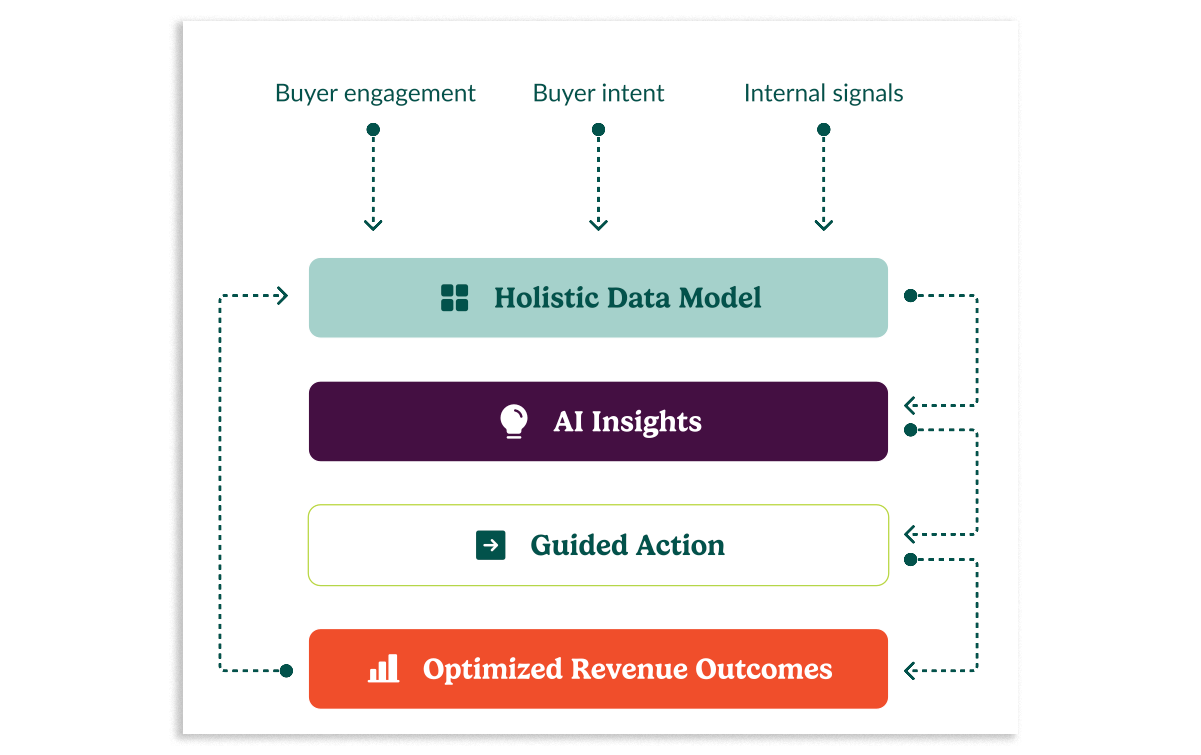
Salesloft is a revenue orchestration platform that integrates with Highspot to bring the enablement platform's content library, AI content recommendations, and buyer engagement analytics into sales reps' cadence workflows. The integration is native and bidirectional, with Highspot listed as the only native sales enablement integration built into Salesloft's platform.
Key integration capabilities include:
Highspot content searchable and insertable inside Salesloft email templates, snippets, and cadence steps
Buyer engagement events (opens, downloads, content shares) flowing into Salesloft's Rhythm AI engine as prioritized follow-up signals
Salesloft Plays that fire automatically when a buyer opens or downloads a Highspot Pitch
Slide-level and page-level Highspot content analytics surfaced inside the Salesloft interface
How Salesloft Integrates with Highspot
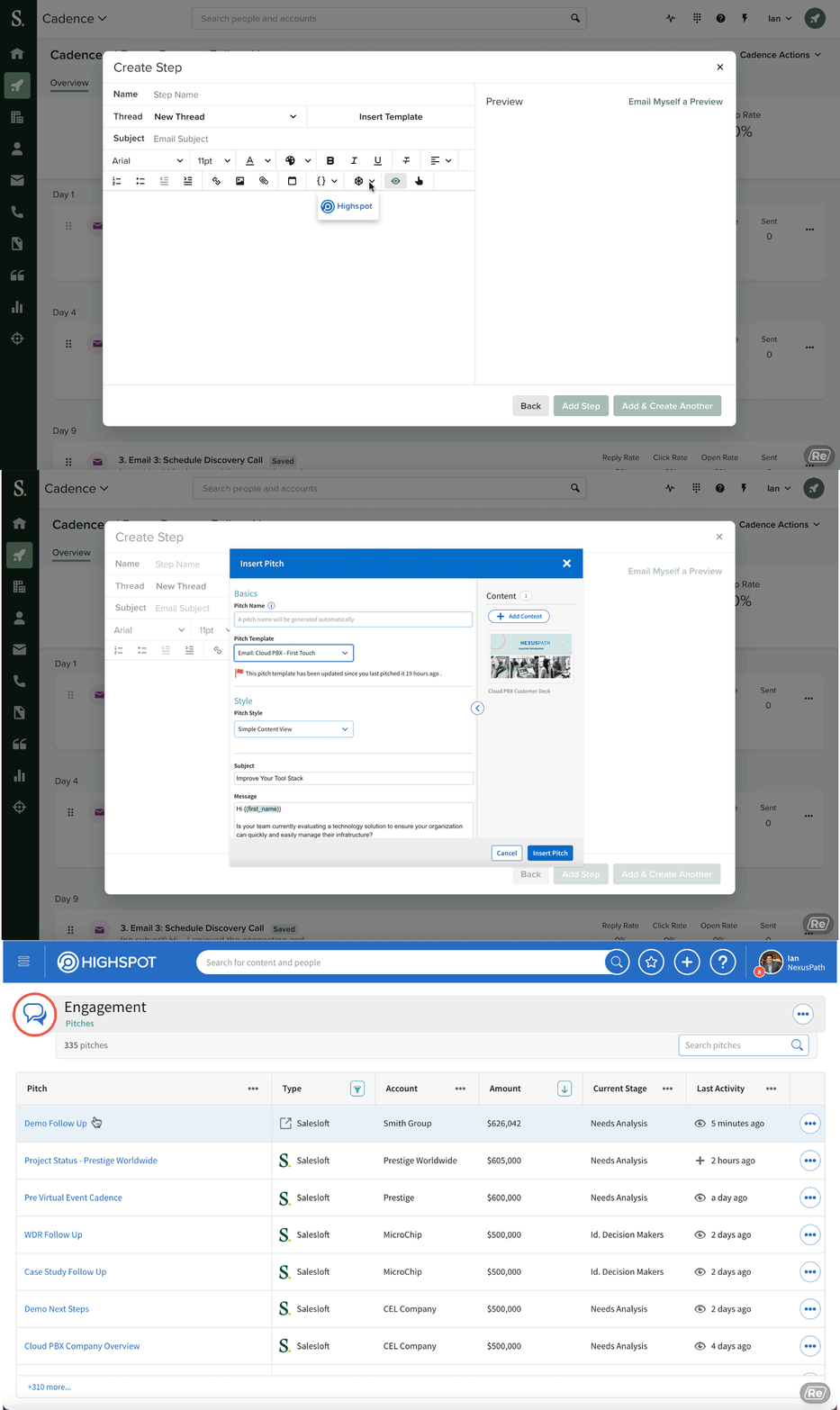
Highspot connects to Salesloft through OAuth-based frontend and signal integrations. The content insertion side surfaces Highspot's content library inside Salesloft's email composer and cadence step builder. The signal side registers Highspot as a buyer-intent signal source in Salesloft's Rhythm AI engine.
Source: Salesloft
1. Content Insertion Inside Salesloft Cadences.
When a rep composes an email or configures a cadence step, they can search Highspot's library, which surfaces content matched to the cadence stage, buyer persona, and industry by Highspot's Nexus AI engine. Content inserted into Salesloft emails carries Highspot's tracking layer, enabling the downstream signal flow.
2. Buyer Engagement Signals Flowing into Rhythm.
When a buyer opens, downloads, or shares Highspot content sent through a Salesloft cadence step, that event reaches Rhythm's Conductor AI. Conductor scores the signal against the rep's full book of business, then elevates the contact in the rep's task queue with context: "Follow up with [Buyer] because they viewed [Content Title]." Salesloft's Rhythm research documented 39% fewer activities required to schedule a buyer meeting when signal-driven tasks replaced fixed-schedule follow-up.
3. Signal-Triggered Plays.
Salesloft Plays fire when a Highspot Pitch is opened or a document is downloaded. The triggered Play either surfaces a task to the rep or fires an immediate sequence step such as a follow-up email. Follow-up is triggered by buyer readiness rather than fixed cadence timing.
4. Slide-Level Engagement Inside Salesloft.
Highspot's content analytics track time spent on individual slides and pages within a shared asset. Through the integration, these engagement metrics surface inside Salesloft's interface, so a rep following up on a sent deck can see not just "opened," but "spent 4 minutes on slide 6 (pricing comparison) and 12 seconds on slide 2 (product overview)." This changes follow-up from generic to specific.
Salesloft Pricing
Salesloft operates on a seat-licensed subscription model with two tiers, both quote-only:
Advanced: Core pipeline generation workflows including Cadence, Rhythm, Conversations, and Deals; Highspot integration available at this tier
Elite: Expanded governance controls, multi-team management, and additional AI agent access
Additional cost considerations include Account Agent overages (100 AI research agent runs per user per month included), per-minute dialer fees, and separately purchased professional services.
Who Should Use the Salesloft Integration?
Sales teams running structured multi-step cadences that want Highspot's content recommendations inside the email composer at execution time, not as a separate research step.
Revenue Operations teams that want signal-triggered Plays so re-engagement happens the moment a buyer acts on sent content, rather than on a fixed schedule.
Account-based teams that need slide-level content engagement data (which pages a buyer viewed, for how long) to inform the angle of follow-up calls and emails.
6. Slack: Best Highspot Integration for Real-Time Enablement Collaboration
Source: Slack
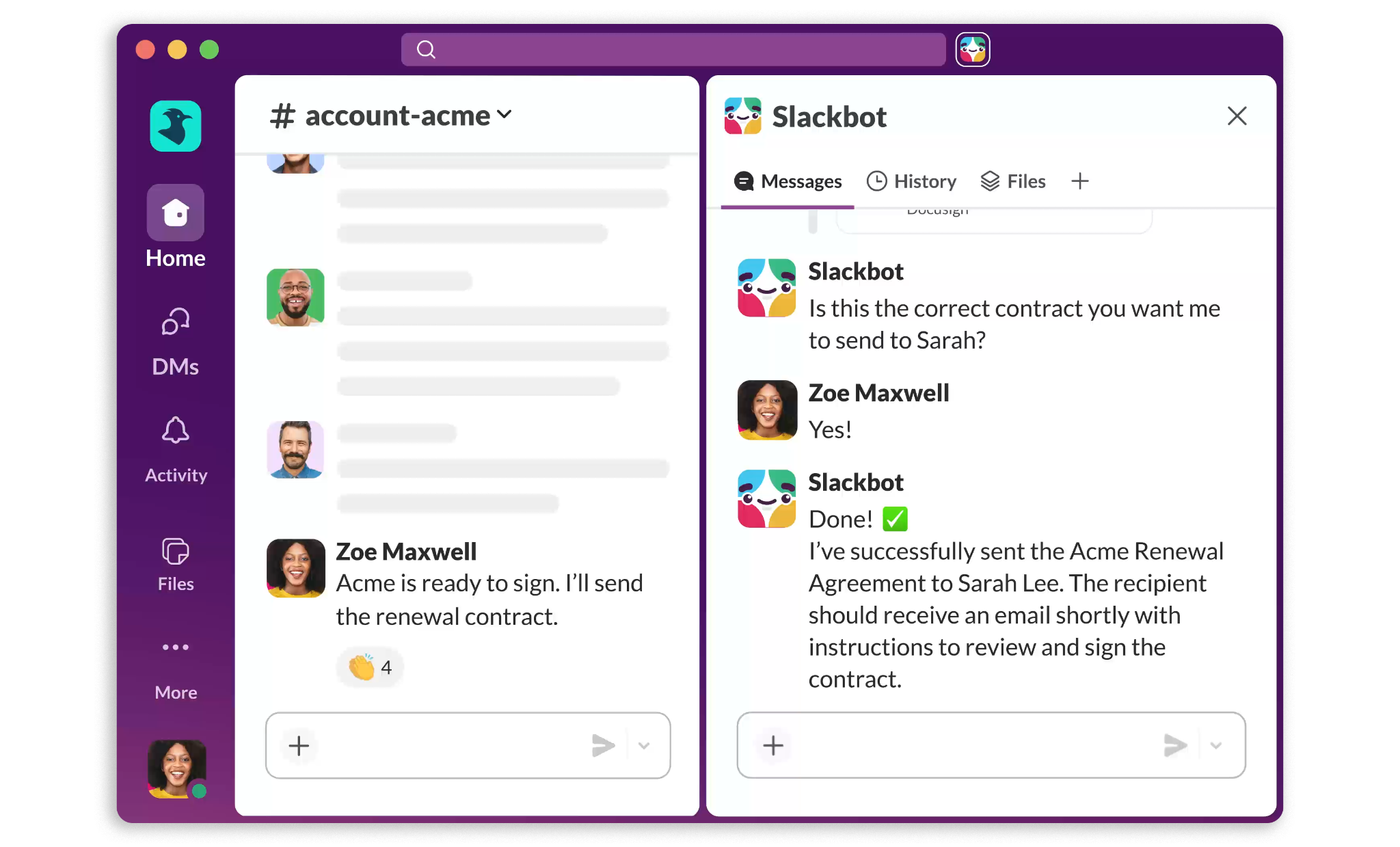
Slack is a workplace communication platform that integrates with Highspot to make the Highspot content library, Digital Sales Rooms, and AI guidance accessible within the channels where distributed revenue teams already communicate. The integration is delivered through a native Slack Marketplace app with standard OAuth-based authorization.
Key integration capabilities include:
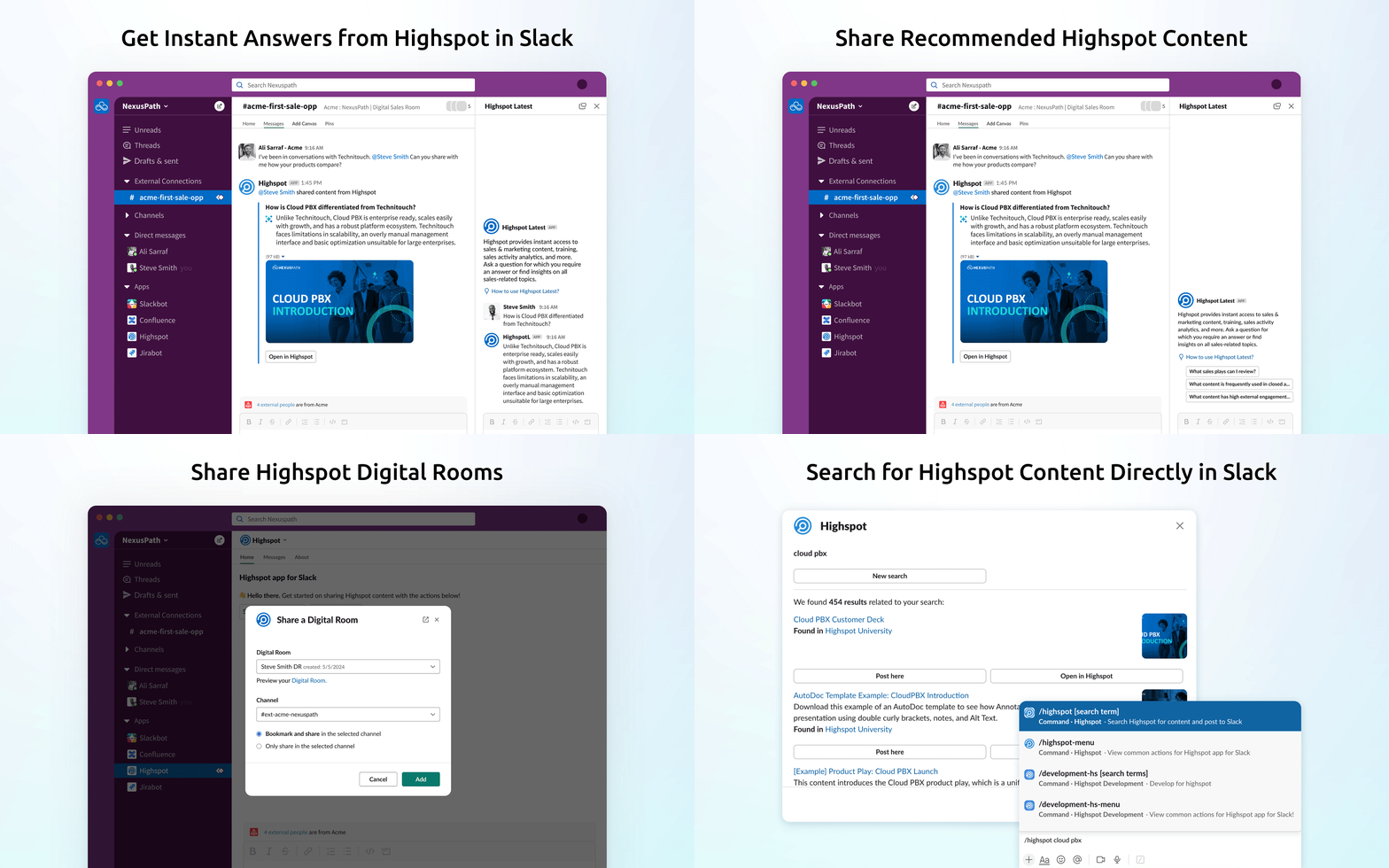
Highspot content search and Digital Sales Room sharing via a native /highspot slash command in any Slack channel or direct message
Real-time buyer engagement alerts delivered as Slack notifications when prospects open, view, or download shared content
Highspot Copilot AI accessible from within Slack for content-grounded answers (requires Highspot's "Coach and Reinforce" tier)
Inline content previews showing Highspot asset metadata (title, description, star rating, thumbnail) within Slack threads
How Slack Integrates with Highspot
The Highspot Slack app installs through a standard OAuth-based authorization sequence. No API keys, custom webhook configuration, or middleware are required.
Source: Slack
1. Content and Digital Sales Room Sharing via Slash Command.
Typing /highspot in any Slack channel or direct message triggers a search interface that queries the full Highspot content library. When the rep selects an asset or Digital Sales Room, Highspot pushes a rich card into the Slack thread with the asset's title, description, star rating, and thumbnail. Digital Sales Rooms shared through the slash command carry the full DSR structure. For reps in pre-call preparation channels, the slash command turns Slack into a lightweight Highspot search surface, putting content where the conversation is happening.
2. Real-Time Buyer Engagement Notifications.
When content or a Digital Sales Room distributed through Highspot is opened, viewed, downloaded, or forwarded by a prospect, Highspot pushes an alert into the configured Slack channel or direct message. In multi-stakeholder enterprise deals where the rep, solutions engineer, and manager share a deal channel, every team member receives the engagement signal at the same time. Notifications go beyond a simple "opened" flag: they include which assets received views and the depth of engagement.
3. Highspot AI (Copilot) in Slack.
Available on Highspot's "Coach and Reinforce" tier, this feature brings Highspot's Copilot AI into Slack. Team members can ask deal questions, request content recommendations, or pull sales play guidance within a Slack channel and receive permission-aware, role-specific responses grounded in Highspot's content library and active plays.
Slack Pricing
Slack uses per-seat pricing with a Fair Billing Policy that credits inactive users:
Free: $0 (90-day message history, 10-app limit)
Pro: $7.25/user/month (annual) (unlimited history and apps)
Business+: $15/user/month (annual) (SAML SSO, custom retention, full Slack AI suite)
Enterprise+: Custom pricing (multi-workspace, DLP, HIPAA compliance)
The Highspot Slack app works on all paid tiers. On the Highspot side, content sharing and engagement notifications are available from the base "Equip and Engage" tier; "Highspot for Slack AI" (Copilot in Slack) requires the "Coach and Reinforce" tier.
Who Should Use the Slack Integration?
Revenue teams that coordinate deals in Slack and want Highspot content sharing and buyer engagement signals to appear inside existing channels without requiring reps to leave Slack.
Organizations distributing Digital Sales Rooms that want real-time open, view, and download notifications delivered to deal channels where AEs, SEs, and managers are already coordinating.
Teams on Highspot's "Coach and Reinforce" tier that want AI content recommendations and play guidance accessible mid-conversation in Slack.
7. LinkedIn Sales Navigator: Best Highspot Integration for Social Selling Content Governance
Source: LinkedIn Sales Navigator
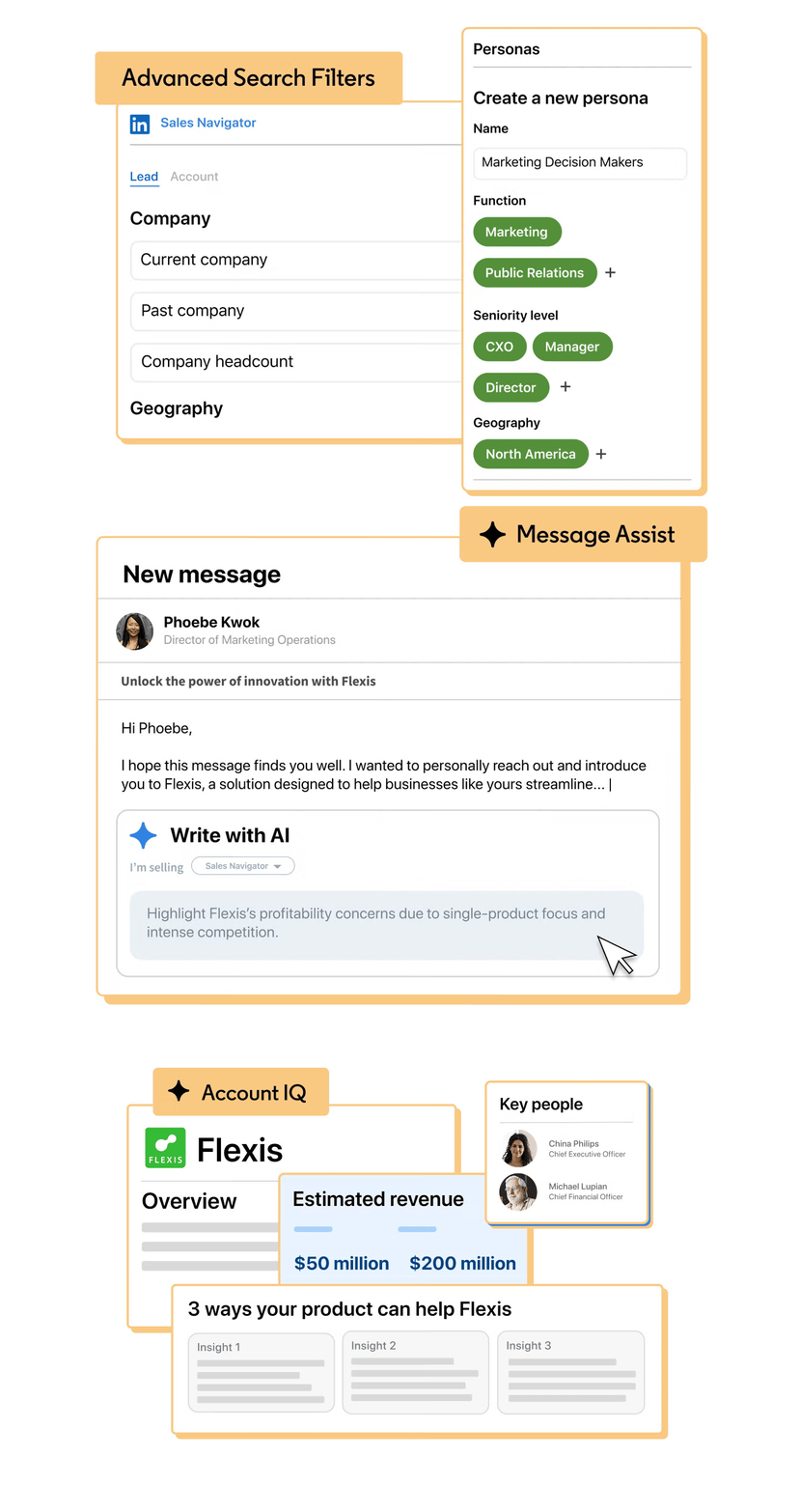
LinkedIn Sales Navigator is a B2B social selling platform built on LinkedIn's network of 1.3+ billion members that integrates with Highspot to extend content tracking and brand governance into LinkedIn-based outreach. The integration is delivered through the Highspot for Chrome extension, which works within the LinkedIn browser interface.
Key integration capabilities include:
Reps access Highspot's governed content library while composing LinkedIn Sales Navigator messages and InMail, inserting assets as Highspot-tracked links
Engagement events from LinkedIn-distributed content (opens, downloads, time-on-page) flow back into Highspot's analytics alongside email and Digital Sales Room data
Highspot's brand governance layer ensures reps can only access marketing-approved, current content through the extension
Content performance reporting consolidates LinkedIn-sent asset data with all other channel data
How LinkedIn Sales Navigator Integrates with Highspot
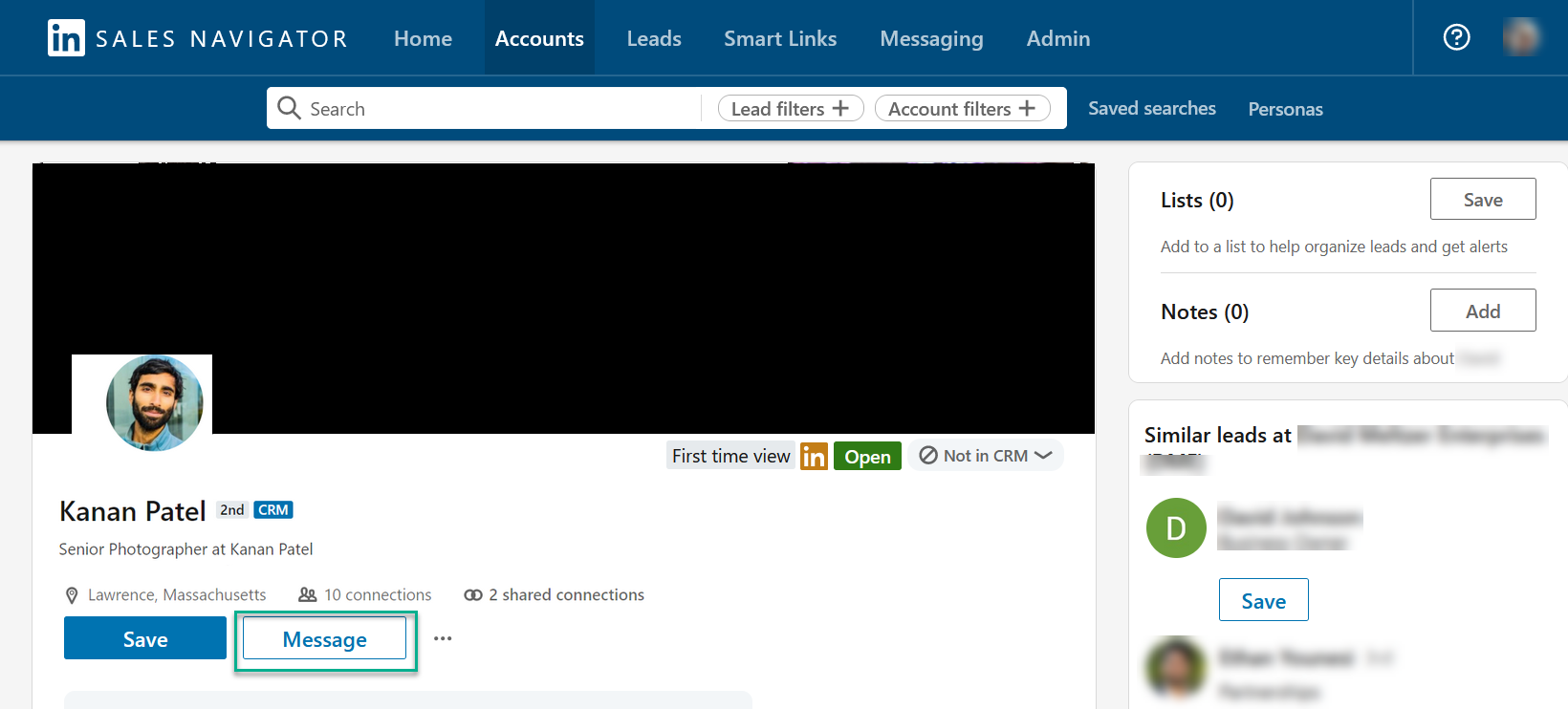
The integration operates through the Highspot for Chrome extension within the LinkedIn browser interface. Setup is simple: reps install the extension, authenticate with their Highspot account, and the content library becomes accessible from within LinkedIn's composer.
Source: LinkedIn Sales Navigator
1. Highspot Asset Insertion into InMail and LinkedIn Messages.
When a rep composes an InMail or drafts a direct message, the Chrome extension surfaces the Highspot content library in the composer. Reps can search for, preview, and insert any asset as a Highspot-tracked link without leaving the conversation. The inserted link captures engagement data when the recipient clicks through, solving a blind spot in social selling analytics where InMail goes to LinkedIn's inbox rather than email, making standard tracking tools invisible.
LinkedIn Sales Navigator allocates 50 InMail credits per month across all plans, and additional credits cannot be purchased. When the monthly InMail budget is fixed and finite, knowing whether attached content was engaged with directly informs how a rep allocates the next month's credits.
2. Brand Governance Across LinkedIn-Distributed Content.
Only content in Highspot's live, marketing-approved library is accessible through the Chrome extension. This prevents a rep composing an InMail from reaching into a local downloads folder for an outdated product one-pager. Marketing teams using Highspot's automated governance workflows see those governance decisions automatically respected in LinkedIn outreach without any additional enforcement layer.
3. Unified Content Performance Reporting.
LinkedIn-sent content feeds into the same content performance analytics as email and Digital Sales Room outreach. An asset that generated strong prospect engagement through InMail appears with its full performance data alongside all other channels, so content managers evaluating what works have a complete picture.
LinkedIn Sales Navigator Pricing
LinkedIn Sales Navigator uses a per-seat subscription model:
Core: $119.99/month or $1,079.88/year per seat (50 InMail credits/month, 50+ advanced search filters, Relationship Explorer)
Advanced: $159.99/month or $1,799.88/year per seat (adds Account IQ, Lead IQ, Message Assist, TeamLink, Smart Links, Buyer Intent; 2 seat minimum)
Advanced Plus: Contact sales; 10 seat minimum (adds bidirectional CRM sync, Embedded Experiences inside Salesforce/HubSpot/Dynamics 365)
The Highspot Chrome extension works with all Sales Navigator plans. Note that LinkedIn's own Smart Links feature (Advanced and above) operates independently of Highspot's tracking; for consolidated content analytics inside Highspot, the Chrome extension tracked links are the relevant mechanism.
Who Should Use the LinkedIn Sales Navigator Integration?
Sales teams conducting significant outreach through LinkedIn and InMail that currently lack visibility into whether content included in those messages is being opened and engaged with by prospects.
Organizations where marketing governance is a priority and want the same content controls that apply to email and Digital Sales Room outreach to extend into LinkedIn-based selling.
Teams that want unified content performance reporting including LinkedIn-sent assets in the same Highspot analytics view as all other channels.
Final Verdict
The best Highspot integrations extend your enablement platform into the tools where your go-to-market team actually works:
ZoomInfo: verified B2B data, buyer intent, and go-to-market intelligence enriching the CRM records Highspot depends on for content matching and Deal Intelligence; the highest-impact integration on this list if your pipeline depends on data quality
Salesforce: in-CRM enablement with content recommendations, buyer engagement tracking, AutoDocs proposal generation, and Agentforce bidirectional AI exchange
Microsoft 365: five connection points (Teams, Outlook, Dynamics 365, SharePoint/OneDrive, Copilot for Sales) embedding Highspot into the enterprise Microsoft stack
Gong: call recordings flowing into Highspot training while content-sharing events surface in Gong's deal timelines, closing the loop between conversations and enablement
Salesloft: signal-driven follow-up where buyer content engagement triggers Rhythm AI tasks and Plays when buyer attention peaks
Slack: content sharing, engagement notifications, and AI guidance inside the channels where distributed teams already coordinate deals
LinkedIn Sales Navigator: content tracking and brand governance extended into social selling outreach through the Chrome extension
These integrations also compound: you might run ZoomInfo for CRM enrichment and intent, Salesforce for in-CRM enablement, Gong for conversation intelligence, and Slack for real-time notifications on the same Highspot instance, each adding a layer of data or distribution that makes the others more effective.
If you connect just one, start with the data layer everything else depends on. ZoomInfo's integration with Highspot through the Integration Exchange enriches the CRM records that power every content recommendation, deal intelligence insight, and sales play match Highspot delivers. ZoomInfo Lite is a permanent free tier, so you can see what verified data and live intent signals do for your enablement workflows before spending anything.
Frequently Asked Questions
How many integrations does Highspot support?
Highspot's Integration Exchange houses over 100 integrations spanning CRM, collaboration tools, content management, sales engagement, revenue intelligence, digital asset management, and marketing automation. Beyond the marketplace, Highspot offers APIs including an MCP Server and Insights Layer APIs for enterprise customers, and a developer portal at developer.highspot.com for custom integrations.
Do Highspot integrations work on all pricing tiers?
CRM integrations (Salesforce, Microsoft Dynamics 365) are included at no extra charge in all Highspot subscription tiers, including the entry-level "Equip and Engage" plan. However, advanced capabilities like the Microsoft Copilot for Sales integration, Highspot for Slack AI, Highspot for Agentforce, MCP Server, and Insights Layer APIs require the "Coach and Reinforce" (Best) tier. Check each integration's tier requirements before evaluating.
How does Highspot's buyer engagement tracking work across integrations?
When a rep shares content or a Digital Sales Room through Highspot (whether via Salesforce, Outlook, Slack, LinkedIn, or Salesloft), Highspot generates a tracked link that captures engagement data: opens, page views, time-on-slide, downloads, and forwarding events. These signals flow back into Highspot's analytics and, through the relevant CRM integration, write back to deal records automatically. Buyer engagement from every distribution channel feeds into a single analytics view.
Can I connect Highspot to tools outside the Integration Exchange?
Yes. Highspot's APIs, MCP Server, and Insights Layer APIs (available on enterprise plans) enable custom integrations with systems that lack pre-built connectors. The MCP Server connects Highspot to external AI agents from OpenAI, Anthropic, and Microsoft Copilot environments. For workflow automation, Workato has a community connector for Highspot that extends connectivity further.
Does Highspot support multiple CRM instances?
Yes. Enterprise teams running multiple Salesforce orgs across business units or geographic regions can connect all instances under a single Highspot account for consistent enablement programming and usage reporting. The Microsoft Dynamics 365 integration similarly supports Dynamics-based organizations. Multi-CRM support is listed as an enterprise capability on Highspot's pricing page.
How does Highspot's content governance work across distribution channels?
Highspot's governance ensures that only marketing-approved, current content is accessible to reps, regardless of how they share it. Whether a rep is inserting content into a Salesloft cadence, sharing via Slack's slash command, sending through Outlook, or composing a LinkedIn InMail, the integration surfaces only what marketing has published and not expired in Highspot. Automated governance workflows archive outdated assets, reassign owners, and enforce publishing rules across all channels.
What is the best way to enrich the CRM data that powers Highspot's content recommendations?
A dedicated B2B data platform provides the most accurate enrichment for the CRM records Highspot reads. ZoomInfo's integration with Highspot through the Integration Exchange enriches CRM records with verified emails, direct-dial phone numbers, firmographic data, technographic profiles, and buyer intent signals from a database covering 500 million contacts and 100 million companies. Because Highspot's content recommendations, Deal Intelligence, and sales play matching all depend on accurate CRM data, enrichment quality directly impacts enablement quality. ZoomInfo Lite is a permanent free tier, so teams can evaluate the data quality before committing to a subscription.
