
Why most sales teams are leaving deals on the table
Most sales reps aren't losing deals because they can't sell. They're losing them because they spend the first two hours of every day doing work that has nothing to do with selling.
Manual prospecting burns time that belongs in discovery calls. Parsing unfiltered company lists, verifying contacts on LinkedIn, checking Google for trigger events, it all adds up. And while that clock runs, quota doesn't pause.
Here's what the numbers actually show when you compare a team using ZoomInfo, an all-in-one AI GTM Platform, against a team using basic contact-scraping software: the ZoomInfo team closes more than twice as many deals with the same headcount, spending a fraction of the time on prospecting tasks. That gap isn't a feature difference. It's a quota difference.
Three quick wins covered in this article:
Replace manual list-building with ICP-filtered searches that take minutes, not hours
Use event-based triggers to surface in-market accounts automatically, so every first touch is timed to a real buying signal
Fix contact data quality at the source to stop bounced emails from eroding your domain reputation and wasted calls from killing your call blocks
To make this concrete, we'll follow two companies through the same prospecting workflow:
Company A uses ZoomInfo
Company B uses basic contact-scraping software
Each company has 10 sales reps working eight hours per day, with two hours dedicated to prospecting: one hour finding companies, one hour finding contacts. The sales engagement platform they use to run outreach is the same. What changes is everything that happens before the first touch.
What separates ZoomInfo from basic contact-scraping tools
Before walking through the workflow comparison, it helps to understand why the gap exists at all.
ZoomInfo is an all-in-one AI GTM Platform built on three capabilities that basic scraping tools cannot replicate. The first is verified data at scale: 500M contacts, 135M+ verified phone numbers, and 200M+ verified business emails, continuously refreshed by 300+ human researchers and multi-source verification. The second is the GTM Context Graph, the intelligence layer that processes 1.5B+ data points daily, fusing contact and company data with behavioral signals, org changes, and buying triggers into a unified reasoning layer. The third is universal access: the same verified data and intelligence available through GTM Workspace for sellers, GTM Studio for marketers and RevOps, and APIs & MCP for teams building custom workflows and AI agents.
A basic scraping tool gives you a list. ZoomInfo gives you a prioritized, verified, signal-enriched pipeline.
Company A (ZoomInfo) can target companies based on:
Funding round
Industry
Company size and growth rate
Hiring and layoff signals
Recent hires and internal structure
Department size and growth
Expansions and M&A activity
Technology in use (technographics)
How long a company has been using a competitor
News and internal initiatives (ZoomInfo Scoops)
Company B can target:
Industry
Contact info
Company size
Publicly available company information (no department-level filters, no technographics, no event-based triggers)
Building your TAM and finding decision-makers: the numbers
Both companies are selling sales enablement software to software companies with 50-1,000 employees, segmented by sales rep headcount: SMB (10+ reps), mid-market (30+ reps), and enterprise (100+ reps). Targets are CEOs, VPs of Sales, Sales Directors, and Sales Managers.
Every hour a rep spends parsing an unfiltered list is an hour not spent in a discovery call or closing conversation. Here's what the ICP-filter gap costs in practice.
Building the TAM list
Company A ran a ZoomInfo search using ICP filters and found 3,958 qualified companies in five minutes.
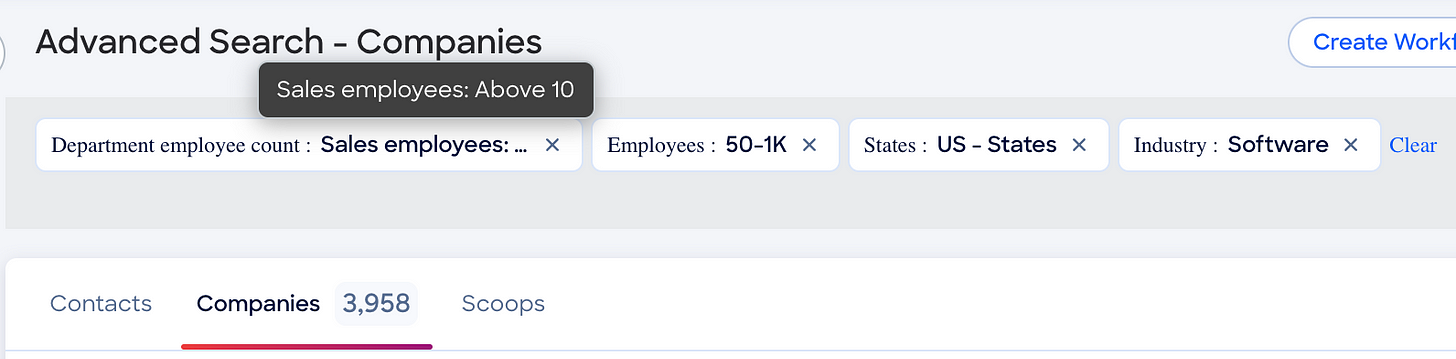
Company B's contact-scraping software returned 10,000 companies, but many are unqualified: inaccurate industry classifications, software consulting firms that don't fit the ICP, and no way to filter for department size. Reps have to manually parse the list to find qualified prospects.
At two minutes per company across 10,000 companies, that's 333 hours just to build a usable TAM list. Company A did it in five minutes.
Segmenting by department size
Company A used ZoomInfo's department-size filters to segment the 3,958 companies in under two minutes per market:
SMB (10-29 sales reps): 2,215 companies
Mid-market (30-99 sales reps): 1,396 companies
Enterprise (100+ sales reps): 397 companies
Company B can't filter for department size. Reps have to manually call sales managers, VPs, and CEOs to verify fit, or find the information online. At 10 minutes per company across 10,000 companies, that's 1,666 hours just to qualify the list. Company A did it in six minutes total.
Finding the decision-makers
Company A used ZoomInfo's contact filters to identify 57,947 decision-makers across the full TAM, segmented in about two minutes per market:
SMB: 17,839 contacts from 2,215 companies
Mid-market: 23,700 contacts from 1,396 companies
Enterprise: 16,408 contacts from 397 companies
Company B found 50,000 contacts, but approximately 35% of the data is out of date. Reps have to verify each contact on LinkedIn to confirm they still hold the role. At five seconds per contact across 50,000 records, that's nearly 70 hours, a task Company A completed in six minutes.
The sales-specific terminology matters here: Company A is doing decision-maker mapping with verified direct dials and ICP filters. Company B is doing manual contact verification with no confidence in the underlying data.
Event-based triggers: how ZoomInfo puts prospecting on autopilot
Company A is notified the moment a target company raises a new funding round, expands into a new market, hires or fires staff, adds new technology, or announces new initiatives. Setting up all trigger types and combinations is a one-time investment of roughly five hours.
Instead of spending time researching whether a prospect just raised a Series B or hired a new VP of Sales, ZoomInfo surfaces that signal automatically, so the rep's first touch is timed to a real buying moment, not a cold guess. ZoomInfo Scoops, the named feature that tracks internal initiatives and org changes, is one of the most valuable trigger types for timing outreach to decision-makers mid-transition.
Company B can only track trigger events via Google. Each time a rep reaches out to a company, they manually search the web for relevant news or set up Google alerts one by one. At seven minutes per company across 3,958 companies, that's 461 hours, and that labor has to be repeated every time they want updated information.
Company A spent five hours once. The triggers keep delivering signals indefinitely.
That 456-hour gap is selling time recovered. For a 10-rep team, it compounds quickly.
Data quality is the foundation, and the GTM Workspace is where it comes to life
Not all data is created equal. ZoomInfo's foundational data layer, one pillar of its all-in-one AI GTM Platform, delivers verified contact accuracy that competing scraping tools cannot match.
Many contact-scraping tools report accuracy rates well below ZoomInfo's verified standard. ZoomInfo's data reaches up to 95% accuracy on first-party data (zoominfo.com/data), while scraping-based tools often lack the continuous verification infrastructure to maintain comparable rates. That same verified data foundation is also available to AI tools and agents through APIs and MCP, so teams building prospecting agents or custom workflows can build on the same high-accuracy B2B intelligence instead of relying on data that degrades quickly.
Company A achieves up to 95% accuracy using ZoomInfo's verified data (zoominfo.com/data).
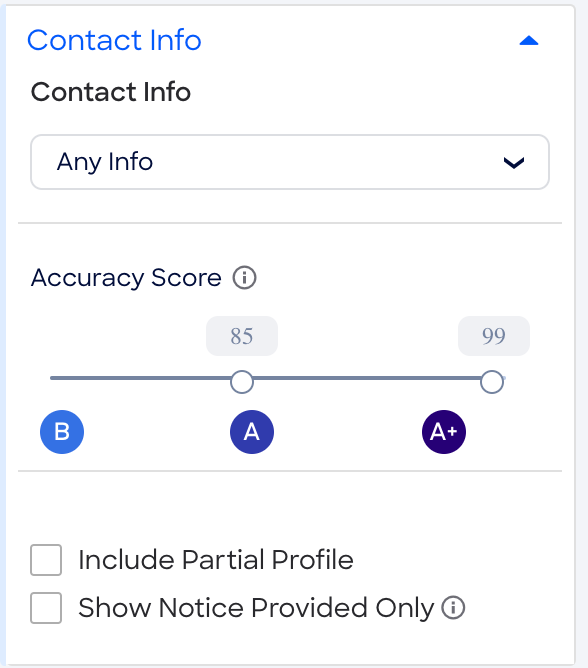
For this example, we assume Company B's contact-scraping tool achieves roughly 35% accuracy, a figure consistent with commonly reported benchmarks for unverified scraping tools, though actual rates vary by vendor.
Cold email breakdown
Company A pulls 57,947 contacts, and 85% of the contact info is accurate. That leaves them with 49,254 good contacts.
Company B pulls 50,000 contacts, but just 35% of the contact info is accurate. That results in just 17,500 good contacts.
If your contact accuracy is more like Company B's, you're not just wasting time, you're wasting money by sending emails to a list that is mostly inaccurate, which increases the likelihood of being flagged for spam and damages your sender domain reputation. Here's a breakdown of how this impacts closed deals:
Cold calling breakdown
Since the only way to verify a number's accuracy is by calling it, Company B has no way to know if numbers are good before dialing. Company A uses ZoomInfo, which uses multiple data points to find the most likely number.
For this comparison:
Company A: Out of 49,254 contacts, ZoomInfo found 20,431 mobile and direct phone numbers (41.5%). This number is an illustrative assumption based on the example scenario, actual ZoomInfo mobile and direct phone coverage varies by market and ICP.
Company B: Out of 17,500 contacts, they found 6,125 phone numbers (35% of contacts). They cannot filter for mobile and direct numbers.
Company A, using ZoomInfo, has an 85% accuracy rate on those numbers: 17,366 valid phone numbers.
Company B has a 35% accuracy rate: 2,143 valid phone numbers.
That's seven times more potential conversations for Company A, plus a significant amount of selling time recovered from call blocks that would have gone to wrong numbers and disconnected lines.
GTM Workspace puts this verified contact intelligence directly in the seller's workflow, so reps spend time selling, not verifying. Instead of toggling between a data tool, a CRM, and a sequencing platform to stitch together enough context for a single outreach, the rep has everything in one place.
Seven sales strategies to close more deals with the same team
The ZoomInfo vs. scraper comparison above shows what better data does for prospecting efficiency. But data quality is one lever. Here are seven sales strategies that compound the effect.
1. Audit your ICP before optimizing your process
If your pipeline is stalling, the problem is often upstream of your process. ICP misalignment means reps are working hard on the wrong accounts. Before optimizing cadences or adding tools, run this three-question diagnostic: Who is your best current customer, the one that closed fastest, expanded most, and churned least? What specific problem do you solve for them that no one else solves as well? Where do they congregate, which communities, events, and publications do they trust? The answers should define your ICP filters, not the other way around.
2. Re-engage lapsed accounts before chasing net-new logos
The cost of acquiring a new customer is significantly higher than re-engaging a former one. Lapsed accounts already know your product, have been through at least part of a buying process, and represent a shorter path to revenue than cold net-new outreach. The challenge is knowing when to reach back out. ZoomInfo event-based triggers identify when a lapsed account shows renewed buying signals, a new budget cycle, a leadership change, a technology addition, so the re-engagement is timed to a real moment rather than an arbitrary follow-up interval.
3. Use AI agents in GTM Workspace for faster, more consistent outreach
The "do more with less" mandate is real, and generic AI tools don't solve it, they add another tab to toggle. AI agents in GTM Workspace draft personalized outreach based on verified account signals: recent funding, new hires, technology changes, and intent data. The output isn't a generic template with a name swapped in. It's outreach grounded in what's actually happening at the account right now. That specificity is what drives replies.
4. Build a multi-touch follow-up cadence and stick to it
Most deals don't close on the first touch, and most reps give up too early. A consistent multi-touch cadence keeps you in front of the right person without being noise. A simple framework that works: Day 1 email (value prop tied to a specific trigger or pain), Day 3 call (reference the email, ask one qualifying question), Day 7 value-add email (a relevant case study, insight, or resource, not another pitch), Day 14 breakup message (clear, low-pressure, leaves the door open). Consistency matters more than creativity here.
5. Prioritize accounts showing buying signals, not just familiar names
Reps default to working accounts they already know. It's human nature. But familiarity is not the same as intent. ZoomInfo intent data identifies which accounts in your territory are actively researching solutions like yours right now, visiting relevant content, comparing vendors, showing increased engagement. Working those accounts first means your effort goes where the probability is highest, not where the comfort level is highest.
6. Upsell and cross-sell existing accounts before hunting net-new
Your existing customers are your fastest path to incremental revenue. Upsell means moving a customer to a higher tier or expanded contract. Cross-sell means introducing an adjacent product or capability they aren't currently using. Both require knowing what's changing in the account: new headcount, new departments, new strategic initiatives. ZoomInfo account intelligence signals surface those changes automatically, so you can bring the right conversation to the right person at the right time, before a competitor does.
7. Deploy social proof at the right stage, not just on your website
Social proof works differently depending on where the buyer is in their process. Testimonials (emotional, peer-to-peer) work early, when a prospect is still deciding whether to engage. Case studies (logical, outcome-driven) work in the middle, when they're evaluating whether your solution actually delivers. Data-backed proof points (credibility signals like analyst rankings or benchmark outcomes) work late, when procurement or legal needs external validation. Matching the proof type to the buying stage is what makes social proof persuasive rather than decorative.
The real cost of bad data: what the numbers say
Bad contact information is one of the most costly mistakes a sales organization can make. Most companies don't run emails through verification software, so they're not even aware of the true quality of their data.
Since each contact pulled typically costs a platform-use credit, you're paying the same price for good data and useless data alike. Company B in our example actually pays a 65% premium on good data because 65% of their data is bad. Company A pays more upfront, but with transparent costs and minimal time wasted on bad outreach.
The cost isn't just the credit. It's the opportunity cost of lost deals, the blow to rep morale when call blocks go nowhere, and the downstream damage to email deliverability when bounces accumulate.
These outcomes aren't hypothetical, they're what happens when a sales team stops wasting hours on unverified data and starts spending that time selling. Thomson Reuters closed 40% more deals and hit 115% average monthly quota attainment after deploying ZoomInfo GTM Workspace. Seismic saved 11.5 hours per rep weekly, a 54% productivity gain, with 39% of pipeline attributed to ZoomInfo signals.
See how ZoomInfo's verified data and GTM Workspace can recover selling time for your team, request a demo.
What the daily workflow looks like when your data works
When we look at the daily workflow of reps for both companies, the efficiency gap becomes concrete.
The rep for Company A opens GTM Workspace and sees 10 new qualified companies automatically surfaced by event-based triggers, funding rounds, new hires, technology changes, with verified contact information already attached. The rep's research time per qualified lead drops from hours to minutes. That recovered time goes directly into discovery calls, follow-up sequences, and closing conversations, the activities that actually move quota.
The rep for Company B, meanwhile, logs into their prospecting software and checks potential companies to contact, searches online to determine the number of sales reps they have, and disqualifies companies that don't fit. The qualified companies are added to a lead list, and then the rep has to find contact information, research the company for recent events, and finally reach out.
The GTM Context Graph's event-trigger intelligence is what makes the Company A workflow possible. It's not just retrieving data, it's reasoning across funding signals, hiring patterns, technology changes, and behavioral data to surface the accounts most likely to be in a buying moment, with the right contacts already identified.
Results: what the efficiency gap means for your quota
So what does it look like when you compare the two approaches side by side?
Organization-wide, Company B spends 151,560 minutes total, while Company A, using ZoomInfo, spends only 312 minutes.
On a rep-by-rep basis, Company B spends 252 hours per rep to accomplish what Company A does with ZoomInfo in 31 minutes.
Company A closes more than twice as many deals with the same headcount. That gap is not a feature difference, it is a quota difference.
Cost in wasted labor
The average account executive makes just under $60,000 per year, and the average sales development rep makes just under $50,000. With 2,080 working hours per year, that works out to roughly $29 per hour for the AE and $24 per hour for the SDR.
Since Company B spends 252 hours per rep doing the same thing ZoomInfo does in 5.2 hours, the wasted labor cost compounds quickly across a 10-rep team.
Both companies have an eight-hour workday with two hours per day dedicated to prospecting. Here's how many deals each company will close based on those numbers:
Company A has 23 more deals than Company B. That's more than twice as many deals with the same number of sales reps.
These estimates are conservative; actual scraping-tool accuracy and manual research time vary widely by vendor and team. The underlying data scale makes the case: ZoomInfo covers 500M contacts, 135M+ verified phone numbers, and processes 1.5B+ data points daily (zoominfo.com/data).
Frequently asked questions about supercharging sales performance
What is the fastest way to supercharge sales performance?
The fastest lever is fixing data quality at the source. Reps working from verified direct dials and verified emails spend time selling instead of verifying. Pair that with event-based triggers that surface in-market accounts automatically, and the first two hours of every prospecting block become productive instead of wasted. The Company A vs. Company B comparison in this article quantifies this: the same 10-rep team closes more than twice as many deals when they stop manually parsing unqualified lists. Seismic saved 11.5 hours per rep weekly after deploying ZoomInfo, a real-world proof point for what fixing the data layer does to rep productivity and overall sales performance.
What is the 3-3-3 rule in sales?
The 3-3-3 rule is a prospecting discipline framework: contact 3 prospects per day, follow up 3 times per prospect, across 3 different channels (email, phone, LinkedIn). It is a discipline framework, not a technology prescription, but it only works when the underlying contact data is accurate. A rep following the 3-3-3 rule with 35% data accuracy wastes two of every three attempts on bad numbers and bounced emails, which also erodes sender domain reputation over time. The framework assumes your data is good; if it isn't, the cadence amplifies the problem rather than solving it.
What are the 5 C's of sales?
The 5 C's of sales are: Connect (reach the right person), Convince (make a compelling case), Collaborate (align on the buyer's problem), Commit (advance to next steps), and Close (convert to revenue). Each stage depends on the quality of information the rep has going in. Connect rates collapse without verified direct dials. Convince and Collaborate require account intelligence, recent news, org changes, technology signals, that manual research cannot deliver at scale. The 5 C's are a useful framework for diagnosing where a rep's pipeline is stalling, because each stage has a different data and signal requirement.
How much time can ZoomInfo save a sales rep per week?
The analysis in this article shows Company B reps spend 252 hours per rep on tasks that Company A completes in 5.2 hours using ZoomInfo, a difference of nearly 247 hours per rep on prospecting and list-building alone. In practice, Seismic saved 11.5 hours per rep weekly after deploying ZoomInfo, a figure that reflects real-world conditions across a full sales team. The exact number depends on team size, territory complexity, and current data quality, but the efficiency gap between verified data and manual scraping is consistent across organizations.
Does ZoomInfo integrate with sales engagement platforms like Outreach or Salesloft?
Yes. ZoomInfo integrates with major sales engagement platforms including Outreach, Salesloft, HubSpot, and Salesforce. Contacts and accounts can be exported directly from ZoomInfo into your sequencing tool, eliminating the manual copy-paste step that fragments the prospecting workflow. GTM Workspace takes this further by unifying prospecting, account intelligence, and outreach in a single seller interface, reducing the number of tools a rep needs to toggle between during a prospecting block.