
HubSpot is the agentic customer platform for scaling companies, serving 288,706 customers across 135+ countries with a suite spanning marketing automation, sales pipeline management, customer service, content creation, commerce, and data operations, all sharing a single Smart CRM.
But a CRM only knows what happens inside it.
HubSpot tracks the emails your reps send, the deals in your pipeline, the tickets your service team resolves, and the campaigns your marketers launch. On its own, it cannot verify whether a prospect's phone number still connects, tell you which target accounts are researching your product category this week, capture sales activity in Gmail and Google Calendar, or connect your CRM to hundreds of niche tools that lack native HubSpot connectors.
The right integrations close those gaps. They feed your CRM verified data it cannot generate on its own, surface deal activity in the communication tools your team already uses, automate workflows across disconnected systems, and connect ad spend to closed revenue.
This guide covers the strongest integration for each of the jobs HubSpot users most commonly need done:
Enrich and verify B2B contact data, and surface accounts that are in-market
Capture email and calendar activity automatically from Gmail and Google Calendar
Surface CRM updates and deal activity in your team's primary communication workspace
Sync e-commerce customers, orders, and abandoned carts into your CRM
Close the loop between ad clicks and pipeline revenue
Connect the rest of your stack without writing code
Each section walks through how the integration connects with HubSpot, what data flows between the platforms, pricing, and who benefits most.
Best HubSpot Integrations at a Glance
Best HubSpot Integration for B2B Data Enrichment and Go-to-Market Intelligence. Enriches HubSpot records with verified contact data, buyer intent signals, technographic intelligence, and company attributes from ZoomInfo's B2B database, giving your team accurate prospecting data and signals to prioritize accounts that are in-market. |
|---|
Best HubSpot Integration for Automatic Email and Calendar Activity Capture. Logs every Gmail conversation to the matching HubSpot contact record automatically, syncs Google Calendar bidirectionally with availability checks, and surfaces CRM context beside each email thread so reps never leave their inbox to update the CRM. |
Best HubSpot Integration for Real-Time Team Collaboration and Deal Visibility. Pushes deal stage changes, form submissions, and customer interactions into Slack channels automatically, with workflow-triggered action buttons that let teams update CRM records, create tasks, and approve deals without opening HubSpot. |
Best HubSpot Integration for E-commerce Marketing Automation. Syncs customers, products, orders, and abandoned carts bidirectionally and writes purchase behavior into HubSpot's CRM for behavioral segmentation, abandoned cart recovery sequences, and lifecycle campaigns built from live transactional data. |
Best HubSpot Integration for Closing the Loop Between Ad Clicks and Pipeline Revenue. Pushes HubSpot lifecycle stage events back to Google Ads as offline conversions, enabling Smart Bidding to optimize toward qualified pipeline and closed revenue rather than lead volume, with GCLID-based attribution tying every deal back to the exact keyword that started the relationship. |
Best HubSpot Integration for Connecting Your Stack Without Code. Extends HubSpot's reach to 8,000+ applications with no-code automation, supporting bidirectional data sync, multi-step workflows, and conditional routing between your CRM and tools that lack native HubSpot connectors. |
What Is HubSpot?
Source: HubSpot
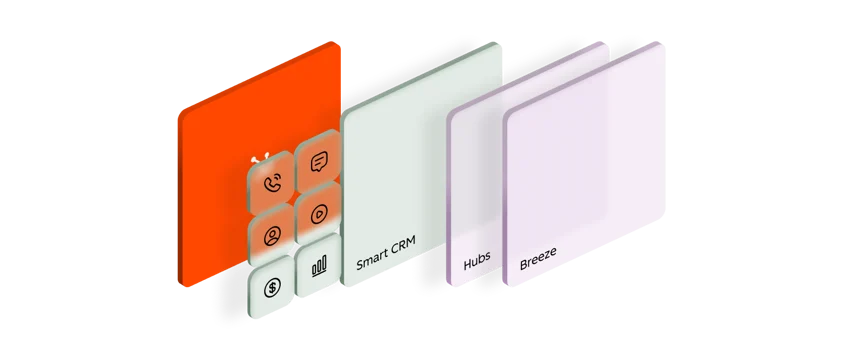
HubSpot is a customer platform that unifies marketing, sales, service, content, data operations, and commerce teams on a single Smart CRM. The company describes itself as "the agentic customer platform" for scaling companies, with a core pitch that "disconnected tools and data slow you down. HubSpot connects everything, and everyone, in one place."
Its suite includes Marketing Hub, Sales Hub, Service Hub, Content Hub, Data Hub, Commerce Hub, and the Smart CRM, all sharing a unified data layer. Breeze, HubSpot's AI layer, runs across every hub with agents for customer service, prospecting, data queries, and content creation. Notable customers include eBay, DoorDash, Reddit, TripAdvisor, and Eventbrite.
HubSpot's integration ecosystem is one of the platform's defining strengths.
The HubSpot App Marketplace hosts over 2,000 app integrations with 2.5 million active installs, and HubSpot added 110+ new apps in Q1 2026 alone. On the technical side, HubSpot offers a REST API covering the full CRM data model, a GraphQL API for CMS data queries, date-based API versioning with 18-month support windows, and official SDKs in six languages (PHP, Java, Ruby, Go, TypeScript, Python).
A Remote HubSpot MCP server became generally available in April 2026, giving MCP-compatible AI agents read/write access to HubSpot CRM data. The Data Hub provides programmable automation with JavaScript and Python code actions inside HubSpot's workflow engine, and Data Sync connects to 100+ apps with bidirectional, real-time sync out of the box.
The integration categories available to HubSpot users include:
B2B data enrichment: contact intelligence, company attributes, buyer intent signals, technographics
Email and calendar: Gmail, Outlook, Google Calendar, meeting scheduling and activity logging
Team communication: Slack, Microsoft Teams, real-time CRM notifications and deal collaboration
E-commerce: Shopify, BigCommerce, WooCommerce, customer and order data sync
Paid advertising: Google Ads, LinkedIn Ads, Meta Ads, offline conversion tracking and audience sync
Workflow automation: Zapier, Make, Workato, custom webhooks and no-code orchestration
Business intelligence: Power BI, Amplitude, custom reporting dashboards
Productivity and project management: Jira, Asana, Monday.com, cross-system task coordination
With that ecosystem as context, here are the six integrations we selected as the best options for extending HubSpot across the categories that matter most to go-to-market teams.
1. ZoomInfo: Best HubSpot Integration for B2B Data Enrichment and Go-to-Market Intelligence

ZoomInfo is a go-to-market platform built on a B2B database of 500M contacts, 100M companies, 135M+ verified phone numbers, and 200M+ verified business email addresses. It integrates natively with HubSpot through ZoomInfo Inbound Enrich, a connector app in the HubSpot App Marketplace that automatically enriches and updates HubSpot CRM records with verified ZoomInfo contact and company data in real time.
Connecting the two platforms unlocks:
A CRM that stays accurate on its own, with verified emails, direct dials, and company attributes appended and refreshed automatically as new contacts enter HubSpot
Prioritization by buying signals, so reps work accounts that are in-market this week instead of a static list
Pipeline from traffic you already have, by resolving anonymous website visitors into companies and buying teams
Smarter routing and scoring, with ZoomInfo attributes powering HubSpot workflow logic for lead assignment, lifecycle stage transitions, and segmentation
How ZoomInfo Integrates with HubSpot
ZoomInfo connects to HubSpot through a native connector app available in both the ZoomInfo App Marketplace and the HubSpot App Marketplace, configured via OAuth with bidirectional data flow. The integration is included in ZoomInfo Sales Professional and above.
Because ZoomInfo builds and maintains the connector as a first-party integration, it requires no middleware and stays current with platform updates on both sides. ZoomInfo's GTM Workspace, a workspace for sellers, includes the same native HubSpot connection, and the ReachOut Chrome Extension exports verified data directly into HubSpot records from any web page.
Contact and Company Data Enrichment: Fill the Gaps Your CRM Cannot Fill on Its Own
HubSpot's Smart CRM captures interaction data: emails sent, forms submitted, deals moved through pipeline stages, and meetings booked.
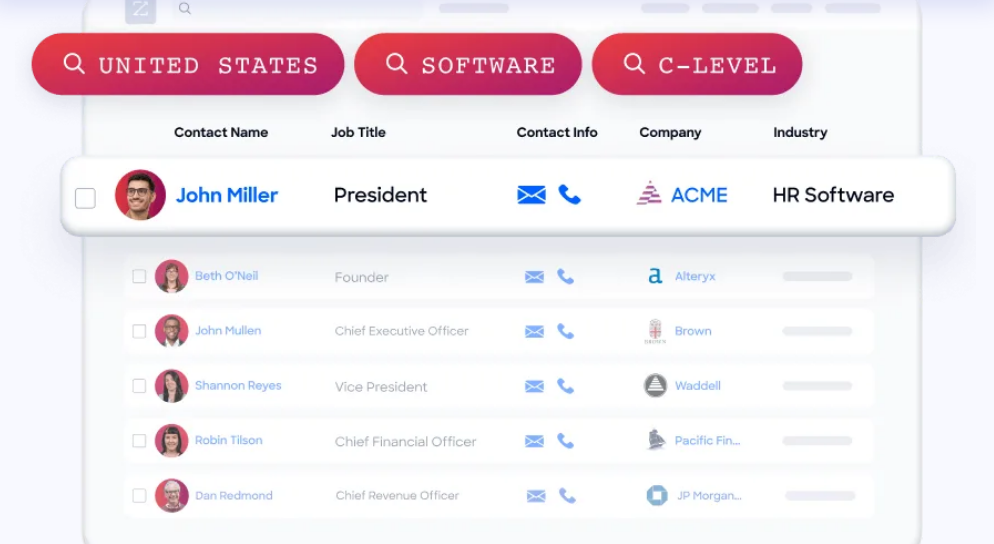
What it cannot do on its own is verify whether a phone number still works, catch a job change, or reveal a company's technology stack. When a new contact enters HubSpot, ZoomInfo automatically appends the verified business email, direct dial, title, department, and seniority, plus company-level attributes and technographic data covering 30,000+ technologies.
The enrichment runs continuously through a verification pipeline backed by 300+ human researchers, reaching up to 95% accuracy on first-party data.
Source: ZoomInfo
ZoomInfo in action: A prospect fills out a HubSpot form with only a name and work email. ZoomInfo appends their direct dial, current title, company profile (a 400-person fintech running Salesforce and Marketo), and three other decision-makers in their department. Your SDR multi-threads the account before the first call instead of spending 20 minutes researching it.
Buyer Intent Data: Identify Accounts That Are In-Market
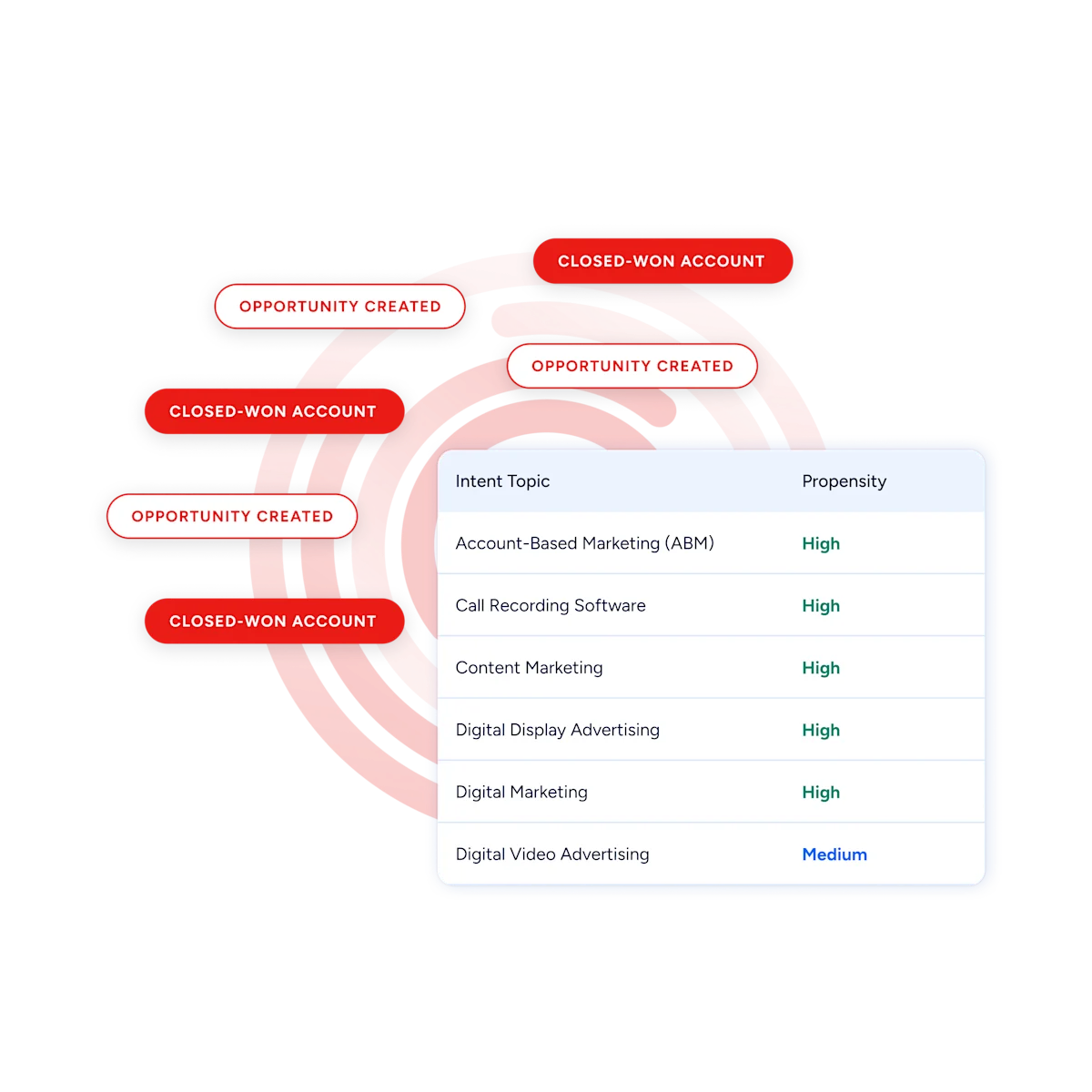
ZoomInfo's Buyer Intent tracks signals from 210 million IP-to-Organization pairings and 6 trillion+ new keyword-to-device pairings monthly, revealing which companies are researching topics relevant to your product.
Those signals flow into HubSpot records, where they trigger workflows, update lead scores, and surface priority accounts. Guided Intent, exclusive to ZoomInfo, identifies the research topics historically correlated with deal success in your business, so the signals calibrate to your actual win patterns rather than generic keyword thresholds.
Source: ZoomInfo
ZoomInfo in action: ZoomInfo detects a target account researching "CRM data migration" for two weeks. The signal syncs to HubSpot, raises the account's score, notifies the assigned rep, and enrolls the primary contact in a switching-focused nurture sequence, all while the buyer is still evaluating.
Website Visitor Identification: Convert Anonymous Traffic into Pipeline
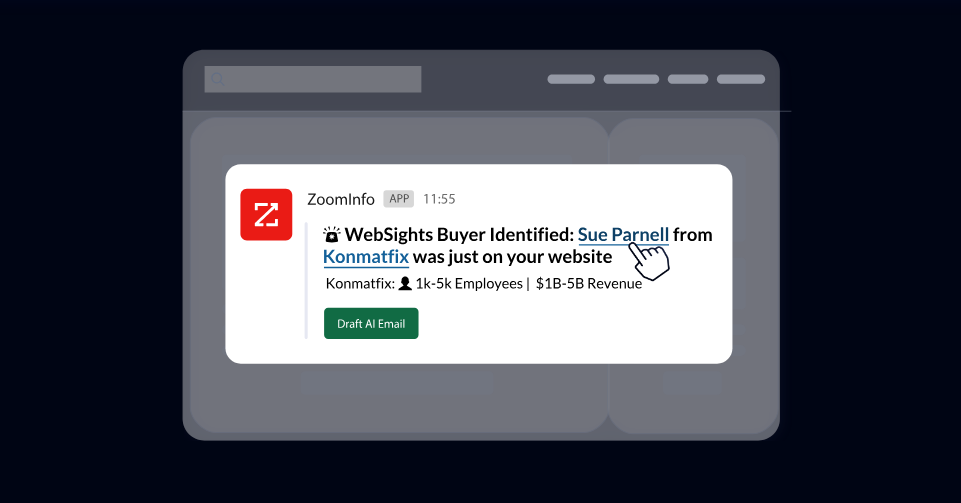
ZoomInfo WebSights resolves anonymous website traffic to companies, including buying-team identification and contact information, with Automatic Traffic Filtering separating genuine company visits from bots.
Connected to HubSpot, the companies visiting your site (and the pages they viewed) surface alongside your CRM data, so high-value visitors route to sales while the interest is live.
Source: ZoomInfo
Workflow Automation and Lead Routing
ZoomInfo attributes (company size, industry, technology stack, intent score) power HubSpot workflow logic for routing, scoring, and segmentation.
A new contact enriched by ZoomInfo routes automatically to the enterprise team at 1,000+ employees or to SMB below 100, with no manual triage. Scoring models gain company-level context alongside HubSpot's behavioral signals.
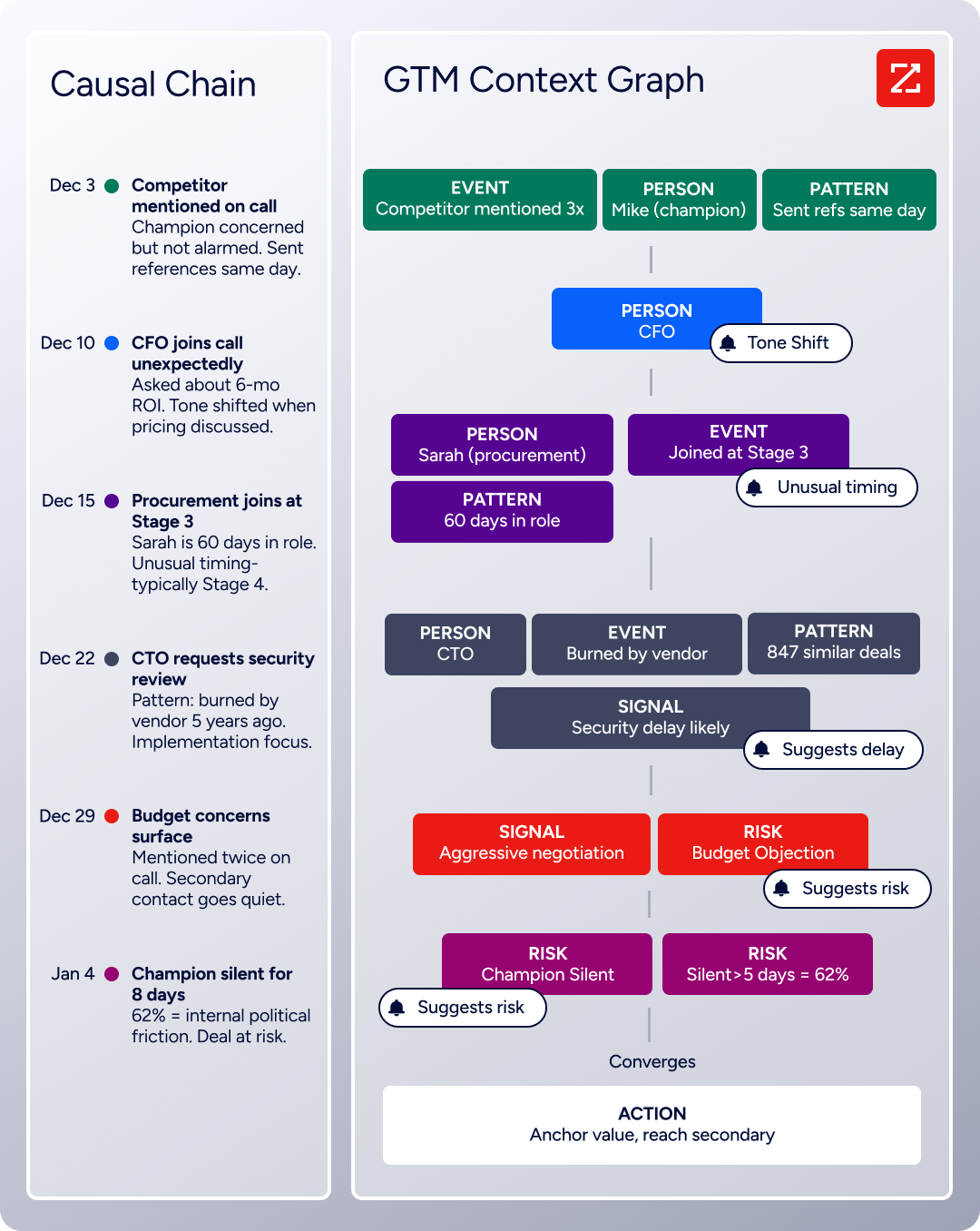
Beyond the connector itself, the enrichment feeding your HubSpot instance draws from a wider intelligence layer: the GTM Context Graph processes 1.5B+ data points daily and combines ZoomInfo's B2B data with CRM records, conversations, and behavioral signals, while GTM Studio, APIs, and MCP expose the same intelligence to any tool or AI agent.
Seismic's sales team attributed 39% of active pipeline to opportunities identified or influenced by ZoomInfo signals, reporting 54% productivity gains. (Seismic Case Study)
ZoomInfo Pricing
ZoomInfo uses a consumption-based pricing model with custom quotes based on usage, users, credit volume, and features.
It is organized into Sales, Marketing, and standalone product lines, each in Professional, Advanced, and Enterprise tiers. The native HubSpot integration is included from Sales Professional up, with Advanced adding intent signals and website visitor tracking.
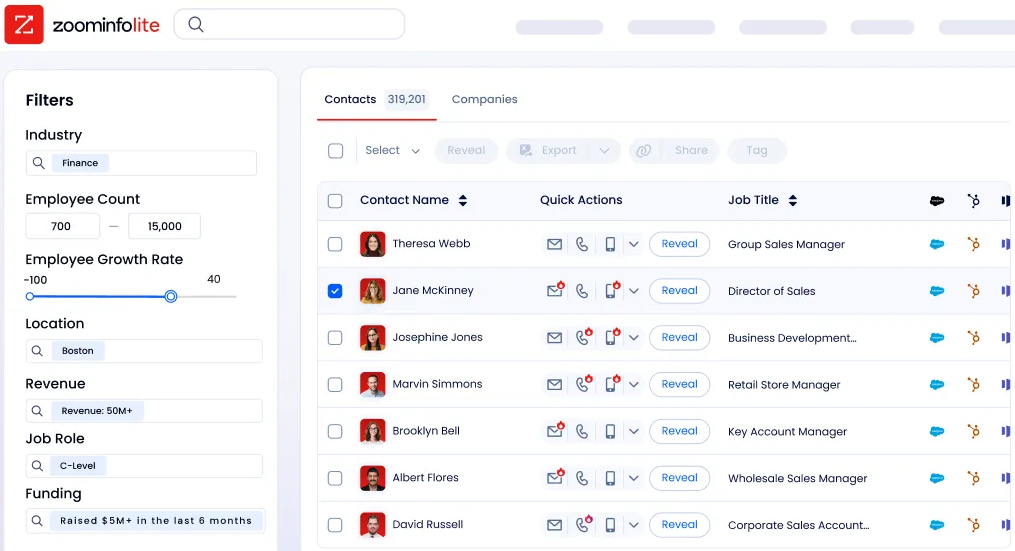
ZoomInfo Lite is a permanent free tier (no credit card, no time limit) with 10 monthly export credits, searches, the Chrome extension, and CRM integrations including HubSpot, making it a practical way to evaluate data quality before committing. A separate 7-day free trial covers paid features.
Source: ZoomInfo
Who Should Use the ZoomInfo Integration?
B2B sales teams whose pipeline depends on accurate contact data: enrichment is the difference between verified direct dials and a 30% bounce rate that damages sender reputation
Revenue operations teams that need company attributes, technographic, and intent data powering HubSpot lead scoring, routing, and segmentation instead of behavioral signals alone
Marketing teams running account-based campaigns that need dynamic lists of accounts showing buying signals now, not static company attribute lists
2. Google Workspace: Best HubSpot Integration for Automatic Email and Calendar Activity Capture
Source: Google
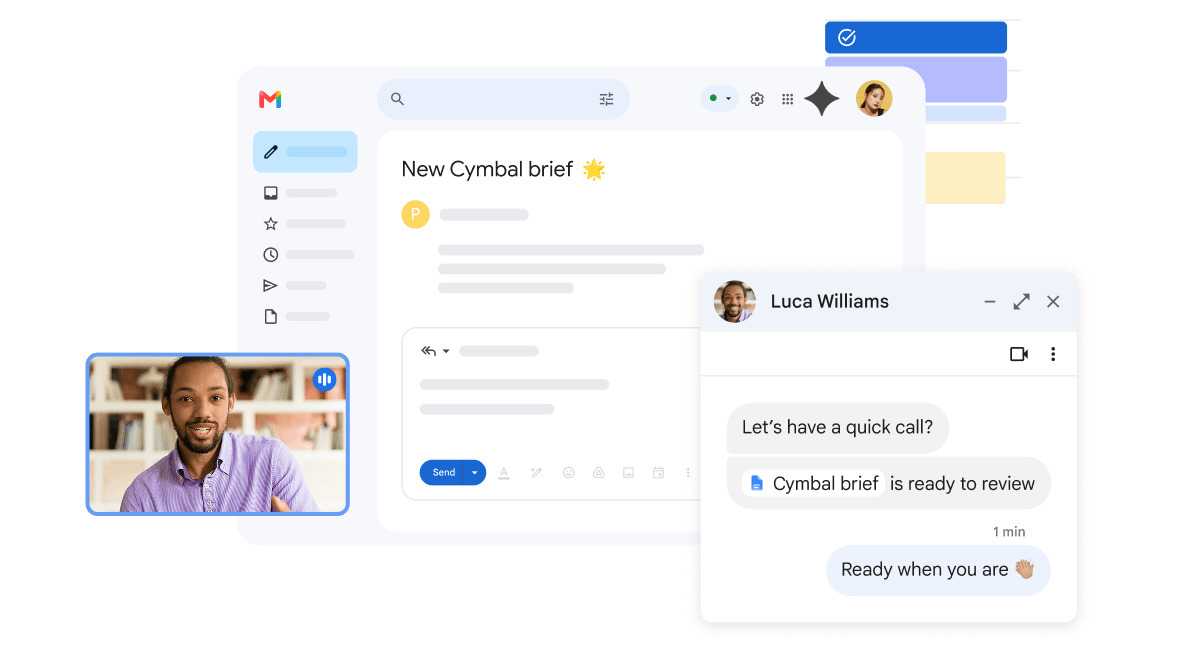
Google Workspace is a cloud productivity and collaboration platform that integrates with HubSpot to eliminate the manual work of logging sales and marketing communications. The integration connects through the HubSpot Sales Chrome extension, HubSpot's native Google Calendar sync, and OAuth-based email connections for server-side automation.
Key integration capabilities include:
Automatic email logging and open tracking where every Gmail conversation logs to the matching HubSpot contact record in real time, with open and click tracking surfacing in both Gmail and the CRM timeline
HubSpot templates, snippets, and sequences accessible inside Gmail's compose window, auto-filling CRM contact tokens so reps personalize outreach without switching tabs
Bidirectional Google Calendar sync with availability checks that prevent double-booking and automatic logging of every calendar event to the HubSpot contact timeline
Full HubSpot CRM context beside each email thread, showing the contact record, associated company, open deals, and recent activity history in a collapsible sidebar
How Google Workspace Integrates with HubSpot
The integration operates through three connection methods: the HubSpot Sales Chrome extension for Gmail (the primary interface for sales teams), HubSpot's native Google Calendar sync (configured in HubSpot account settings), and OAuth-based email connections for automation workflows.
The Chrome extension installs from the Chrome Web Store and requires a one-time OAuth authentication linking the user's Gmail account to their HubSpot user record. The extension works across HubSpot's free CRM tier and all paid tiers, though sequences require Sales Hub Professional or Enterprise.
1. One-Click Email Logging and Real-Time Open Tracking
When the Chrome extension is active, every email a rep sends from Gmail automatically creates an activity record on the corresponding HubSpot contact, company, and deal records.
The extension identifies the recipient's email address, matches it against HubSpot's contact database, and writes the email body, subject line, timestamp, and recipient list into the CRM timeline. If the recipient's domain matches a company record but no contact exists, HubSpot can optionally create a new contact.
Open and click tracking embed a transparent pixel and rewrite hyperlinks to pass through HubSpot's tracking server, surfacing engagement data in both Gmail ("Opened 3 times, last opened 2 hours ago") and HubSpot's CRM timeline simultaneously.
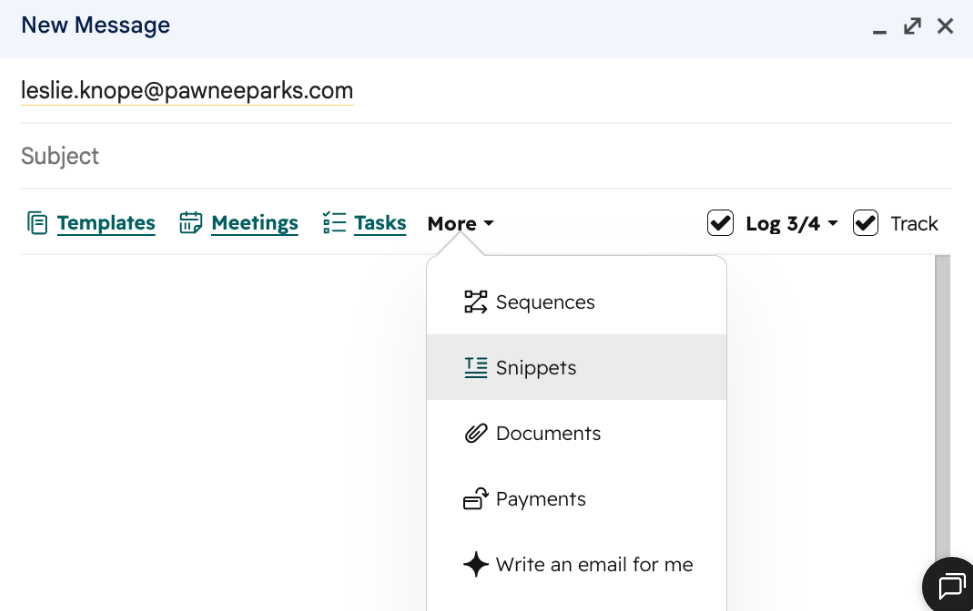
2. HubSpot Templates, Snippets, and Sequences Inside Gmail.
The Chrome extension adds a toolbar in Gmail's compose window that surfaces HubSpot's library of email templates, text snippets, and multi-touch sequences.
Selecting a template inserts the email body with personalization tokens (first name, company name, deal amount, lifecycle stage, custom properties) replaced with the recipient's actual CRM data. Text snippets expand inline via shortcut codes, and sequences enroll contacts in multi-step cadences that auto-send follow-ups on a schedule while unenrolling on reply. Sequences require Sales Hub Professional or Enterprise; templates and snippets are available on the free CRM.
Source: HubSpot
3. Bidirectional Google Calendar Sync with Conflict Prevention.
Meetings created in HubSpot's meeting scheduler appear on Google Calendar and vice versa, with changes propagating within seconds.
When a prospect visits a rep's HubSpot booking page, they see availability pulled from Google Calendar, preventing double-booking. Meetings booked outside HubSpot (a prospect who sends a calendar invite directly) are detected and logged to the matching HubSpot contact record automatically. If the rep's Google Workspace account includes Google Meet, HubSpot can add a Meet link to every booked meeting.
4. CRM Context Sidebar in Gmail.
The Chrome extension adds a collapsible sidebar in Gmail showing the HubSpot contact record for each email thread: associated company details, open deals, recent activity history, lifecycle stage, and custom properties. Reps see customer context without leaving their inbox, which eliminates the tab-switching that causes reps to work from email rather than logging into the CRM.
Google Workspace Pricing
Google Workspace uses per-seat pricing with annual or monthly billing:
Business Starter at $7/user/month (annual): Gmail with custom domain, Google Drive (30 GB pooled), Meet (100 participants), Calendar, Docs, Sheets, Slides, Chat, and Gemini AI assistant; up to 300 users
Business Standard at $14/user/month (annual): 2 TB pooled storage, Gemini AI across apps, Meet recording and noise cancellation (150 participants), appointment booking pages, eSignature
Business Plus at $22/user/month (annual): 5 TB pooled storage, eDiscovery, Google Vault for data retention, enhanced endpoint management; up to 300 users
Enterprise at custom pricing: no user cap, DLP, enterprise data regions, AI Classification for Google Drive
The HubSpot integration works identically across all Google Workspace tiers and with free personal Gmail accounts, so pick your tier based on storage, compliance, and organizational needs rather than integration capabilities.
Who Should Use the Google Workspace Integration?
Sales and service teams that live in Gmail and want CRM data in the same interface where they read and send emails, with activity logged automatically and no behavior change required
Teams booking 10+ prospect or customer meetings per week that need availability syncing between Google Calendar and HubSpot's meeting scheduler to prevent double-booking and ensure every meeting logs to the correct CRM records
Organizations whose biggest CRM adoption challenge is reps not updating HubSpot: automatic email logging with zero manual steps means 100% of communication activity gets captured, giving managers full visibility without requiring end-of-day data entry
3. Slack: Best HubSpot Integration for Real-Time Team Collaboration and Deal Visibility
Source: Slack
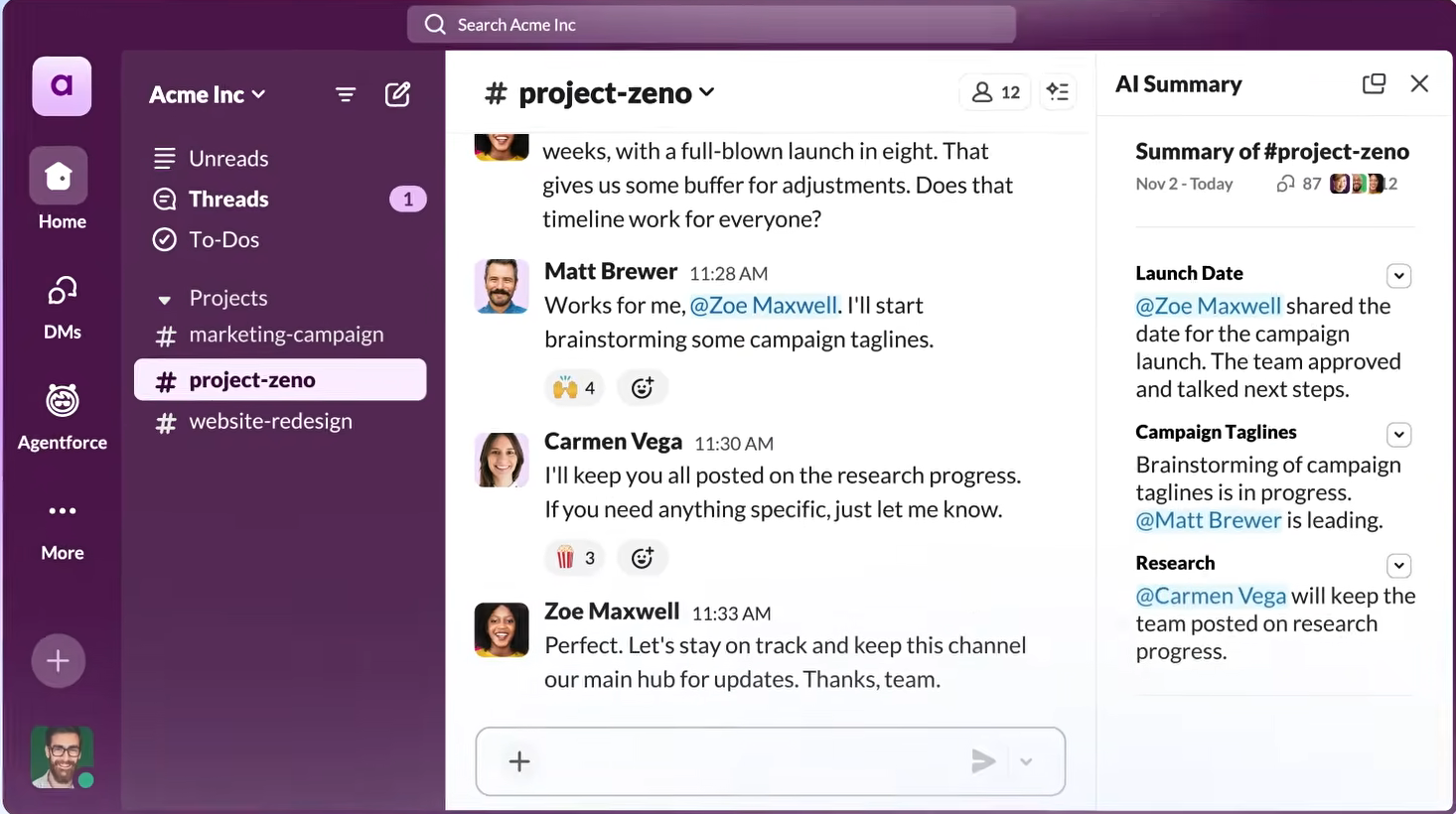
Slack is a team communication platform that integrates with HubSpot to surface CRM activity, deal updates, form submissions, and customer interactions inside the channels where your go-to-market teams already work. The integration is a native, bidirectional connection built and maintained jointly by HubSpot and Slack, requiring no third-party middleware.
Key integration capabilities include:
HubSpot event notifications to Slack posting deal stage changes, form submissions, task due dates, and live chat messages into designated channels or direct messages automatically
Workflow-triggered messages with action buttons that let recipients create tasks, log activities, or update record properties without opening HubSpot
Create HubSpot records from Slack by converting any message into a note or task and associating it with a contact, company, or deal
Deal room channels that automatically associate a Slack channel with a HubSpot deal or company record, keeping the sales conversation linked to the CRM
How Slack Integrates with HubSpot
Setup follows an OAuth-based authorization flow from HubSpot's App Marketplace. Administrators select which Slack workspace to connect and configure notification routing rules through HubSpot's workflow builder. The integration supports multiple Slack workspaces for enterprises running separate workspaces by region or business unit. All interaction patterns respect HubSpot's existing user permissions.
1. Event Notifications: Real-Time Pipeline Visibility Without Dashboard Monitoring.
When a tracked event occurs in HubSpot (a deal moves to the next stage, a high-value form is submitted, a task becomes overdue), HubSpot posts a structured notification to a designated Slack channel or sends it as a direct message.
Notifications carry CRM context: the contact name, company, deal value, and a direct link back to the HubSpot record. The most common deployment model is channel-based routing: deal notifications go to #sales-pipeline, ticket escalations go to #customer-success, and marketing-qualified lead alerts go to #new-leads.
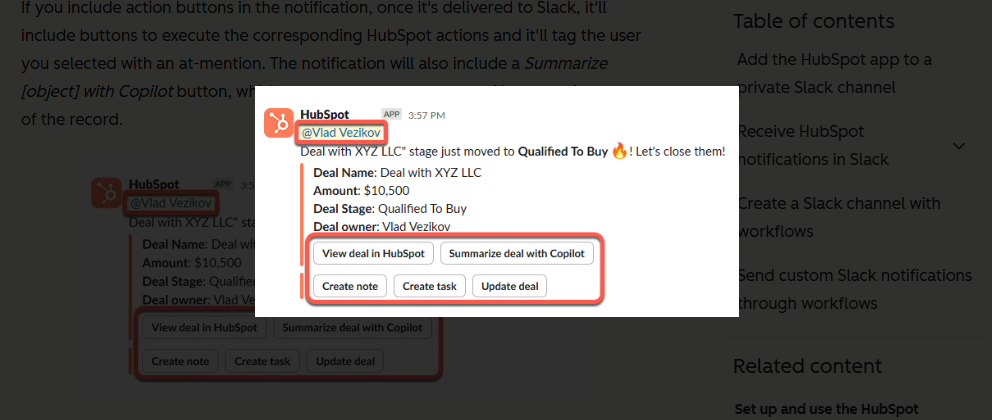
2. Workflow-Triggered Messages with Action Buttons.
Using HubSpot's Workflow Builder, teams design automation sequences that send Slack messages with inline action buttons at specific trigger points.
When a deal moves to "Closed Won," a workflow sends a Slack message to the finance team's channel with the deal name, amount, and payment terms, along with "Approve Contract" and "Request Revision" buttons. Clicking a button writes the approval status back to HubSpot, triggers follow-up tasks, and sends confirmation, all without anyone opening the CRM.
Customer success teams use the same pattern for account health score changes, with buttons like "Schedule Check-In Call" or "Escalate to Account Manager" that each trigger different downstream workflows.
Source: HubSpot
3. Create HubSpot Records from Slack.
Using Slack's message actions menu, users convert any message into a HubSpot note, task, or ticket and associate it with an existing contact, company, or deal.
A customer's feature request posted in a shared Slack Connect channel becomes a HubSpot ticket associated with that customer's company record, without asking the customer to re-submit it through a support form. Sales teams log deal notes from internal Slack discussions to the deal record, preserving the full context of how a deal was won for future account owners.
4. Deal Room Channels.
HubSpot workflows automatically create a Slack channel when a deal reaches a specific stage, invite relevant stakeholders based on deal properties, and link the channel bidirectionally to the HubSpot deal record. All HubSpot activity related to that deal (call logs, document uploads, stage changes, task completions) posts to the channel automatically. Messages and decisions made in the deal room can be logged back to HubSpot using the message action menu.
Slack Pricing
Slack uses per-seat pricing:
Pro at $7.25/user/month (annual): unlimited message history, unlimited app integrations, full HubSpot integration including event notifications, workflow-triggered messages, and record creation
Business+ at $15/user/month (annual): adds SAML SSO, SCIM provisioning, conditional workflow branching, custom retention policies, and priority support with 4-hour first response SLA
Enterprise+ at custom pricing: multi-workspace management, native DLP, legal holds, HIPAA compliance, Enterprise Key Management
The HubSpot integration has no additional cost beyond the Slack subscription. Slack's Fair Billing Policy credits inactive seats automatically.
Who Should Use the Slack Integration?
Go-to-market teams that already live in Slack and want CRM activity surfaced where they spend their day, reducing context-switching and ensuring critical events get seen and acted on immediately
Teams running complex, multi-stakeholder deals that need one channel for cross-functional deal coordination with live CRM data embedded in the conversation
Organizations that want to reduce approval cycle times by embedding actions in notifications, collapsing the gap between "I see this needs attention" and "I've handled it" from minutes to seconds
4. Shopify: Best HubSpot Integration for E-commerce Marketing Automation
Source: Shopify
Shopify is a cloud-based commerce platform that integrates with HubSpot to unify online store data with your marketing automation and CRM workflows. The integration is delivered through a native app available in both the Shopify App Store and the HubSpot App Marketplace, maintained by HubSpot.
Key integration capabilities include:
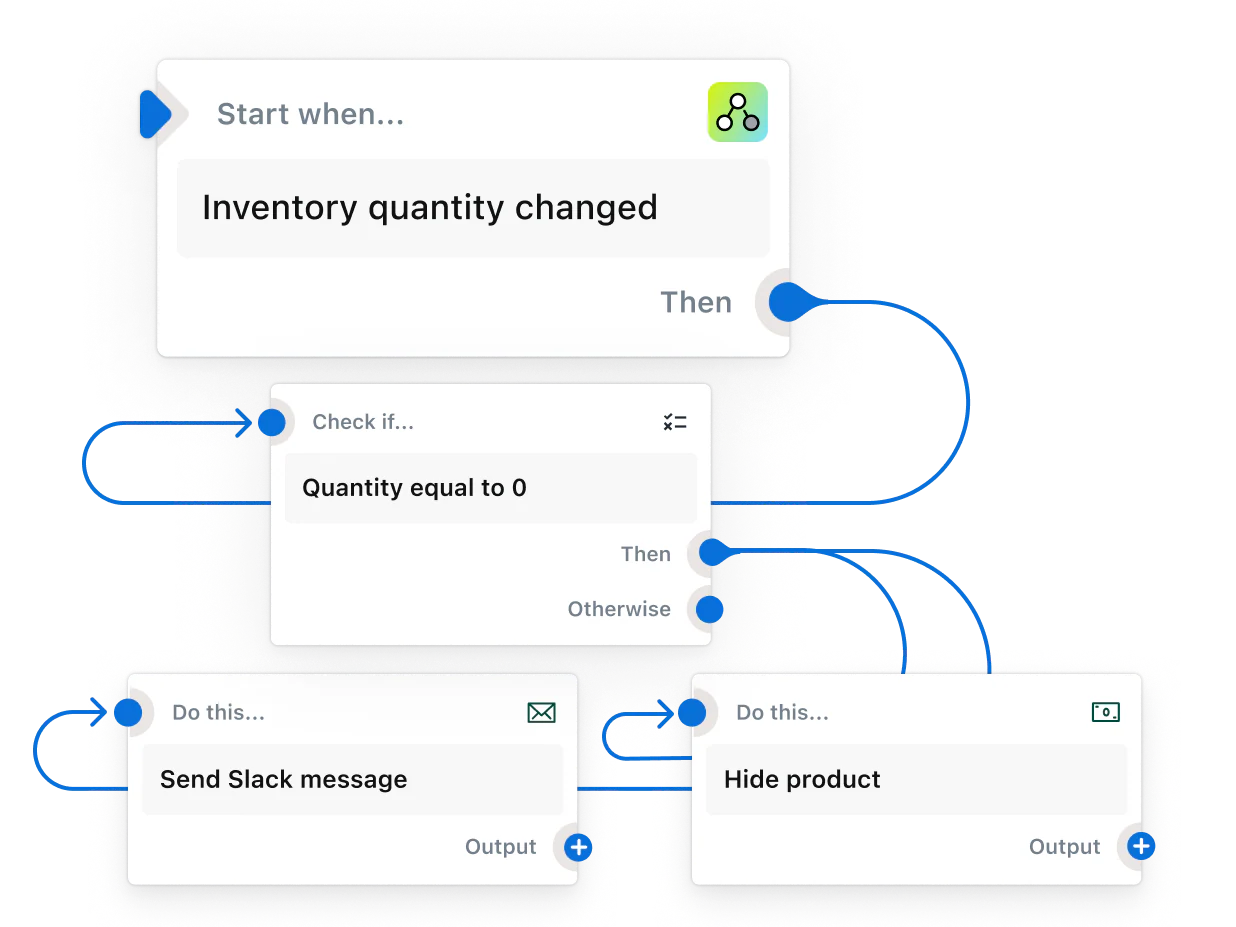
Two-way customer and product sync with email-based deduplication, keeping contact data aligned across both systems
Orders flowing into HubSpot's Orders object with subtotal, discounts, tax, total, and fulfillment status, linked to the matching contact and cart records
Abandoned cart triggers that fire HubSpot workflow automation within minutes of a shopper leaving without completing purchase
Behavioral segmentation on purchase history, lifetime value, product purchased, and purchase frequency
Near-real-time sync cadence with changes propagating approximately every ten minutes after the initial historical import
How Shopify Integrates with HubSpot
The native connector uses OAuth authentication to establish a secure connection. During setup, you authorize HubSpot to access Shopify store data, select which Shopify location to sync (for multi-location stores), and configure sync preferences.
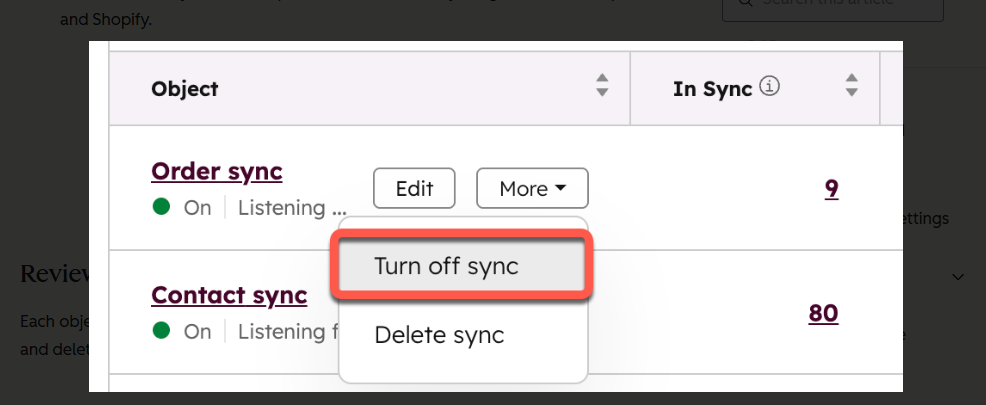
The initial sync can take several hours depending on catalog size, after which ongoing changes propagate approximately every ten minutes.
1. Bidirectional Customer and Product Data Sync.
When a customer places an order, their contact record (name, email, phone, addresses, tags) syncs to HubSpot with the email address as the deduplication key. If a contact with that email already exists from a blog subscription or gated content download, the Shopify data merges into the existing record rather than creating a duplicate.
Changes in HubSpot (updated phone numbers, lifecycle stage tags) sync back to the corresponding Shopify customer record. Product data flows one-way from Shopify into HubSpot's product library with title, description, price, images, and SKU.
Source: Shopify
2. Order Tracking in HubSpot's Orders Object.
Orders sync one-way into HubSpot's Orders object and associate automatically with the corresponding contact and, if applicable, cart records. Marketers can segment on "last order date more than 90 days ago" or "total order value greater than $200" to target high-value lapsed customers, and reps reviewing a contact record see the entire purchase history inline.
3. Abandoned Cart Recovery Workflows.
When a shopper enters Shopify's checkout, provides an email, and leaves without purchasing, the abandoned checkout syncs into HubSpot's Carts object and triggers workflow automation. Cart records include line-item details, quantities, prices, and total value, enabling segmentation: high-value carts might trigger a personalized email from a sales rep, while lower-value carts receive a standard automated sequence.
4. Behavioral Segmentation and Personalization.
Synced order and product data becomes immediately available for list building, workflow triggers, and email personalization. HubSpot's Smart CRM automatically calculates properties like "total revenue" and "number of orders" per contact, updating as new orders sync. Email personalization tokens pull from Shopify data, and product recommendation blocks populate dynamically based on previous purchases.
Shopify Pricing
The Shopify-HubSpot integration app is free to install. Both platforms charge for their respective subscriptions. Prices below are from Shopify's pricing page (US rates, monthly billing; annual billing is roughly 25% cheaper).
Basic at $39/month: unlimited products, 2 staff accounts, 2.9% + 30¢ online card rate, all core e-commerce features needed for the HubSpot integration
Shopify at $105/month: 5 staff accounts, standard reports, 2.6% + 30¢ card rate
Advanced at $399/month: 15 staff accounts, custom report builder, carrier-calculated shipping rates, 2.4% + 30¢ card rate
Plus from $2,300/month (typically a 1-year contract): Checkout Extensibility, B2B, expansion stores, and increased API rate limits
All Shopify plans support the full HubSpot integration feature set. To unlock the full value of synced e-commerce data (workflow automation for abandoned cart recovery, advanced list segmentation), businesses typically need HubSpot Marketing Hub Professional ($800/month annual) or Enterprise ($3,600/month).
Who Should Use the Shopify Integration?
E-commerce businesses that rely on content marketing and inbound campaigns to drive traffic, where connecting the journey from first blog visit through purchase in a single contact record enables attribution and retention campaigns
Businesses where post-purchase engagement drives retention and upsells (subscription products, consumables, recurring purchases), so order data flowing into HubSpot triggers automated onboarding sequences, replenishment reminders, and win-back campaigns
Teams that need abandoned cart recovery personalized beyond generic "you left something" emails, using HubSpot's broader engagement data to reference blog posts read, webinars attended, or lifecycle stage for higher-converting sequences
5. Google Ads: Best HubSpot Integration for Closing the Loop Between Ad Clicks and Pipeline Revenue
Source: Google Ads
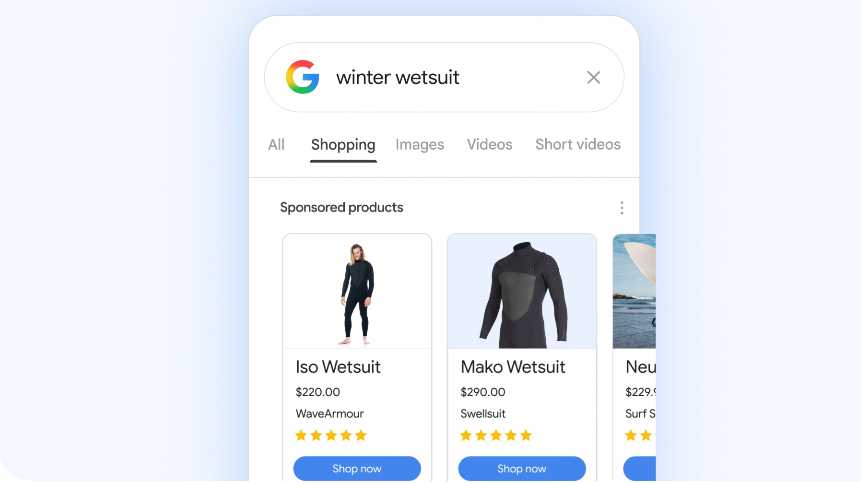
Google Ads is Google's advertising platform that integrates with HubSpot to connect ad spend to pipeline generation and closed revenue.
The integration connects through a native connector that pushes HubSpot lifecycle stage events back to Google Ads as offline conversions, enabling Smart Bidding to optimize for business outcomes rather than top-of-funnel metrics.
Key integration capabilities include:
Offline conversion and lifecycle sync pushing MQL, SQL, Opportunity, and Customer events back to Google Ads so Smart Bidding optimizes toward pipeline, not form fills
Click-to-deal attribution with Google Click IDs (GCLIDs) tying every contact, deal, and customer back to the exact campaign, ad group, keyword, and search query
Closed-loop ROI reporting in HubSpot's attribution dashboards, revealing which keywords produce paying customers and where to reallocate spend
Audience sync from HubSpot contact lists to Google Ads Customer Match audiences for retargeting and lookalike expansion (requires Marketing Hub Professional or Enterprise)
How Google Ads Integrates with HubSpot
The native integration connects through a one-time OAuth authorization flow, after which HubSpot automatically appends GCLIDs to landing page URLs for visitors arriving from Google Ads campaigns.
These GCLIDs are captured on form submission, associating the contact record permanently with the specific ad click that brought them to your site. The integration supports both HubSpot's ads management tools and Google's reporting API.
1. Offline Conversion Sync and Smart Bidding Optimization.
HubSpot creates conversion actions in Google Ads for each lifecycle stage you configure (typically MQL, SQL, Opportunity, Customer) and automatically fires those conversions back to Google whenever an ad-sourced contact reaches one of those stages.
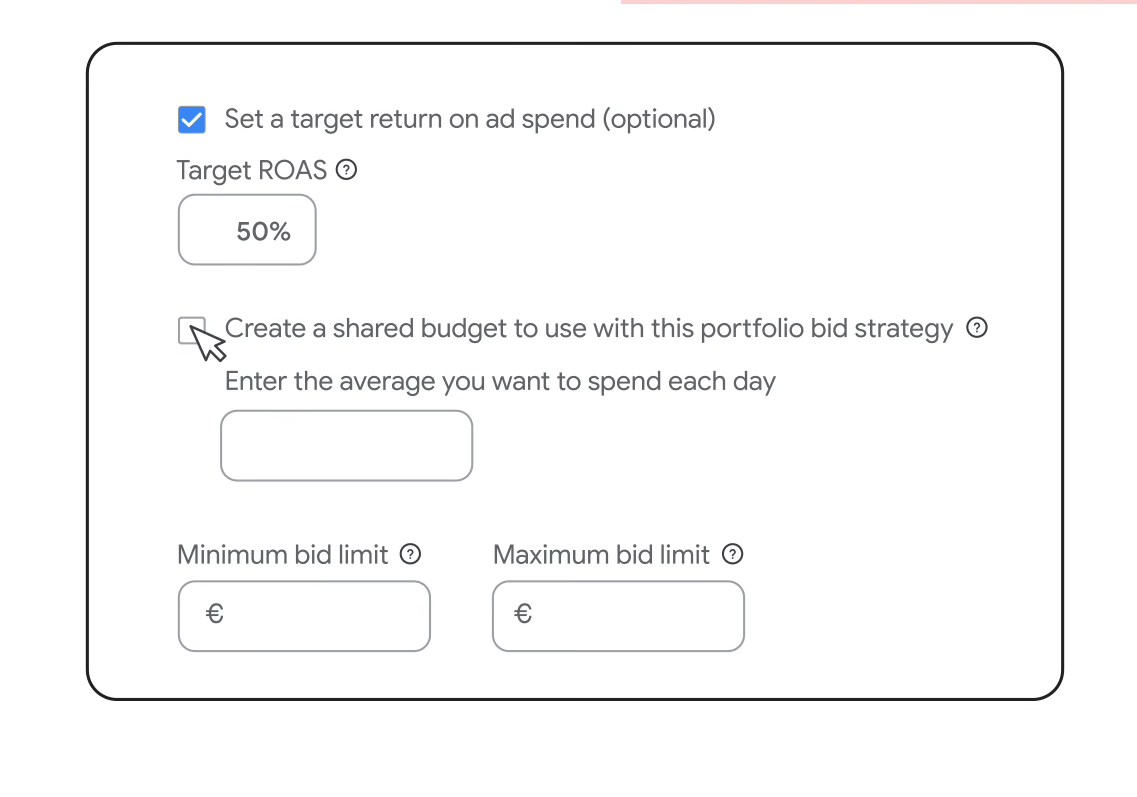
Smart Bidding strategies like Target CPA and Target ROAS then optimize bids using these pipeline signals instead of form fills. Over time (typically after 30-50 offline conversions per campaign), the algorithm identifies which keyword themes, audience segments, and placements produce qualified pipeline and shifts spend accordingly.
Source: Google Ads
2. GCLID-Based Attribution and Click-to-Customer Tracking.
HubSpot's tracking code captures the unique Google Click ID for every ad-sourced visitor and stores it as a contact property. Every downstream revenue event tied to that contact (deal creation, deal stage progression, closed-won) carries an attribution trail back to the originating ad.
HubSpot supports multi-touch attribution models (first-touch, last-touch, linear, time-decay, U-shaped) so Google Ads clicks receive appropriate credit alongside organic, email, and direct touchpoints.
3. Closed-Loop ROI Reporting.
HubSpot pulls cost data from Google Ads nightly and joins it against contact records using the GCLID. The Ads Dashboard displays each campaign alongside total spend, contacts generated, customers generated, revenue attributed, and calculated ROI, sliceable by time range, attribution model, and campaign hierarchy.
A campaign generating 500 leads at $40 CPL but only 2 customers can be paused, while a campaign generating 50 leads at $120 CPL but 10 customers gets scaled, and those decisions happen within the same week.
4. CRM Audience Sync.
HubSpot contact lists sync to Google Ads as Customer Match audiences for retargeting engaged prospects who haven't converted, excluding existing customers from acquisition campaigns, and building lookalike audiences from your highest-value closed-won customers. This requires Marketing Hub Professional or Enterprise.
Google Ads Pricing
Google Ads operates on a real-time auction model with no subscription fees, no seat licenses, and no minimum spend. Advertisers compete for placement on every search query through an auction combining bid amount, ad quality score, and contextual signals. Available bid strategies include:
Manual CPC: set maximum bids per keyword, charged only on clicks
Target CPA: Smart Bidding targeting a specific cost per conversion (recommended 30+ conversions/month)
Target ROAS: Smart Bidding targeting a specific return ratio on ad spend
Maximize Conversions / Maximize Conversion Value: automated strategies spending the full budget to maximize volume or value
Google Ads charges based on daily budgets, with monthly spend capped at 30.4x your daily budget. There are no platform fees or SaaS subscriptions.
Who Should Use the Google Ads Integration?
B2B marketers who need Smart Bidding to optimize toward qualified pipeline, not lead volume, so the algorithm learns which queries and audiences produce leads that sales accepts and converts rather than high-volume inquiries that never progress
Teams that need to prove which Google Ads keywords generate customers, not just clicks, with closed-loop attribution tying every deal to the specific campaign and keyword that started the relationship
Organizations running retargeting and exclusion campaigns that need CRM segments as Google Ads audiences to exclude existing customers, retarget engaged prospects, and build lookalikes from highest-value customers
6. Zapier: Best HubSpot Integration for Connecting Your Stack Without Code
Source: Zapier
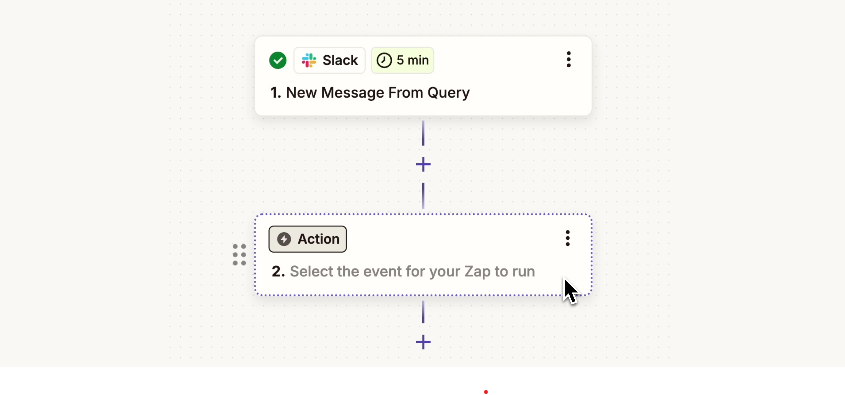
Zapier is a no-code automation platform that integrates with HubSpot to extend your CRM's reach across 8,000+ applications that either lack native HubSpot connectors or whose native integrations don't support the specific workflow you need. The integration works bidirectionally through a native, pre-built connector using OAuth authentication with no API key management required.
Key integration capabilities include:
HubSpot events triggering actions in external tools: a new contact, deal stage change, or form submission fires downstream actions in Slack, Google Sheets, Asana, QuickBooks, or any of 8,000+ connected apps
External activity creating or updating HubSpot records: Typeform submissions, Stripe payments, Calendly bookings, and Zoom webinar attendance automatically create contacts, deals, or tasks in HubSpot
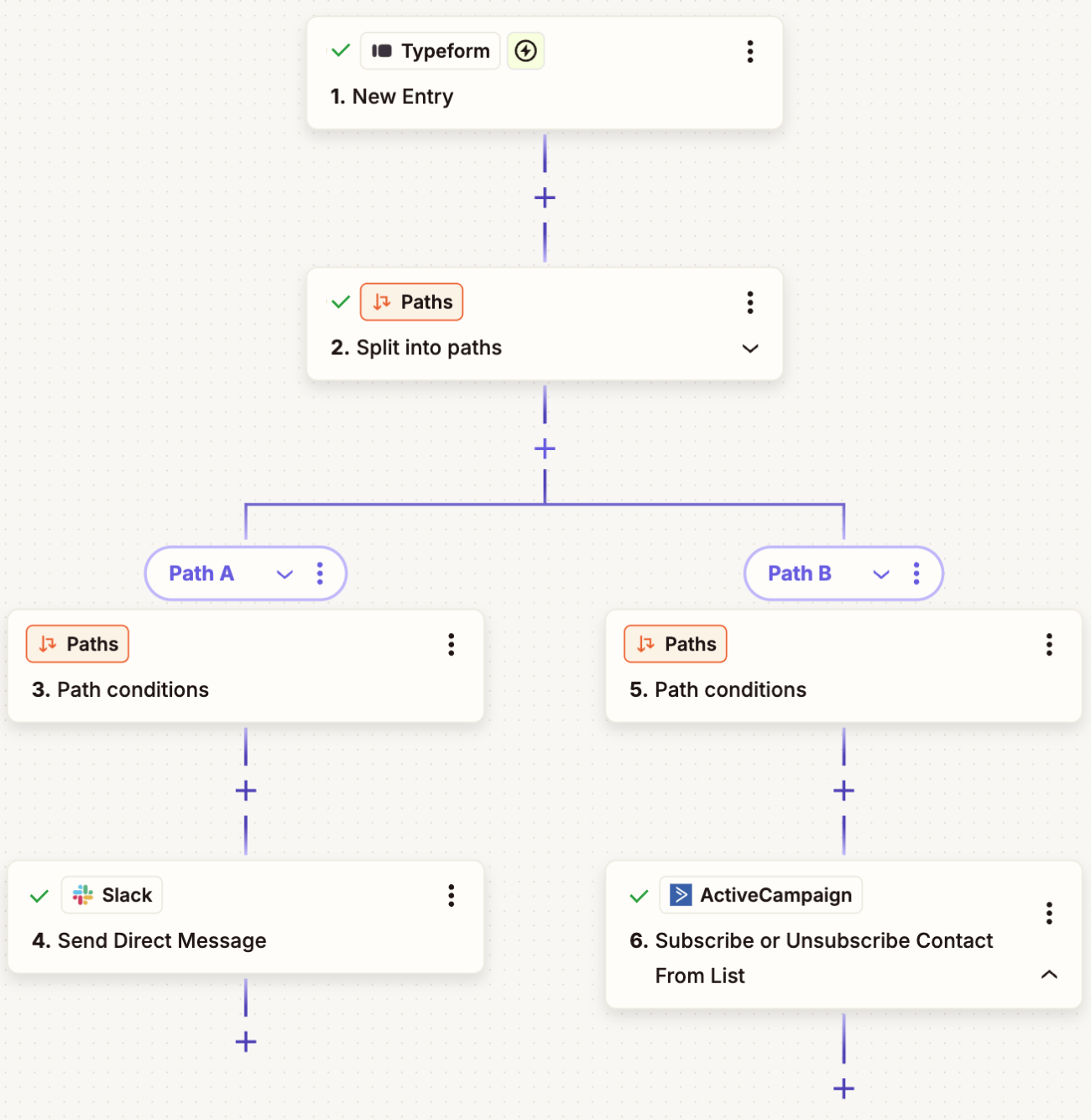
Multi-step Zaps with conditional logic: chain up to 100 steps per Zap with Paths routing records by field values and Filters stopping execution on records that don't meet criteria
Webhooks extending the integration surface: connect HubSpot to proprietary internal tools, legacy systems, or custom applications with HTTP endpoints
How Zapier Integrates with HubSpot
Zapier connects through standard OAuth 2.0 authorization. The integration supports both polling triggers (checking HubSpot for changes at intervals) and instant triggers via webhooks.
For teams running HubSpot on Professional or Enterprise tiers, Zapier interacts with custom objects, custom properties, and complex deal pipelines.
1. Trigger-Based Workflow Automation.
The core pattern is event-driven: a HubSpot event fires a workflow that updates other systems. A deal closing in HubSpot triggers a Zap that creates a project in Asana, sends a Slack notification, logs deal details into a Google Sheet, and generates an invoice in QuickBooks.
The reverse works too: a Calendly meeting booked, a Typeform survey completed, or a Stripe payment received creates a new HubSpot contact, updates lifecycle stage, or enrolls the contact in a workflow. This makes HubSpot a centralized system of record that aggregates customer interactions across your entire tech stack.
2. Contact and Deal Sync Across Disconnected Systems.
Zapier maintains parity between HubSpot and external databases or SaaS tools. A contact updated in HubSpot propagates to a mirrored record in Airtable, a Google Sheet, or a separate CRM used by another business unit.
The reverse flow works identically. For deal pipeline management, a deal reaching "Closed Won" in HubSpot triggers project creation in Monday.com, customer provisioning, folder creation in Dropbox, and formatted deal summaries posted to Slack.
3. Multi-App Orchestration with Conditional Logic.
Paths route records by field values: enterprise leads go to a high-touch workflow with immediate notifications, SMB leads get enrolled in automated nurture, and unqualified leads get tagged for long-term content marketing. Looping handles deals with multiple line items that each need separate processing. The Webhooks step connects HubSpot to systems without pre-built Zapier integrations, and the Formatter tool handles data transformation mismatches between systems.
Source: Zapier
4. Form and Lead Capture Extensions.
Submissions from specialized form tools (Typeform, Jotform, Gravity Forms) flow into HubSpot as new contacts. Conversational lead capture tools like Intercom or Chili Piper feed qualified leads back into HubSpot deal management workflows. Zapier Forms can act as a lightweight lead capture tool writing to HubSpot for campaigns or events where building a full HubSpot landing page is unnecessary.
Zapier Pricing
Zapier uses task-based pricing where each successful action step counts as one task (trigger steps, Filters, and Paths do not count):
Free at $0/month: 100 tasks/month, 2-step Zaps only, 15-minute polling
Professional starting at $19.99/month (annual) for 750 tasks: multi-step Zaps, 1-minute polling, conditional logic, automatic replay on failure
Team starting at $69/month (annual) for 2,000 tasks: up to 25 users, shared app connections, SAML SSO
Enterprise at custom pricing: unlimited seats, SCIM provisioning, advanced admin controls
Project task consumption before choosing a plan: a 5-step Zap processing 1,000 new HubSpot contacts per month consumes 4,000 tasks (the trigger step is free, but each of the 4 action steps counts). Zapier's pay-per-task overage billing is available at 1.25x the plan's per-task rate.
Who Should Use the Zapier Integration?
Teams using niche or specialized tools without native HubSpot connectors that still need them synchronized with the CRM, including industry-specific platforms, legacy enterprise systems, or proprietary internal tools
Non-technical RevOps or marketing ops teams that need to build and modify CRM automations without engineering tickets or custom API scripts
Organizations where a deal closure must cascade through project management, billing, file storage, and communication tools automatically, with HubSpot as one node in a longer automation chain
Final Verdict
The best HubSpot integrations close gaps your CRM cannot fill on its own:
ZoomInfo: verified B2B data, buyer intent, and go-to-market intelligence enriching every record; the highest-impact integration on this list if your pipeline depends on data quality
Google Workspace: email and calendar activity captured automatically from Gmail, with CRM context beside every email thread and bidirectional calendar sync
Slack: CRM events turned into actionable Slack notifications with inline buttons that update records, create tasks, and approve deals
Shopify: e-commerce customers, orders, and abandoned carts flowing into HubSpot for behavioral segmentation and lifecycle marketing
Google Ads: ad spend tied to pipeline revenue through offline conversion sync, giving Smart Bidding the signals to optimize toward customers rather than clicks
Zapier: no-code reach into 8,000+ apps where native HubSpot connectors stop
These integrations also compound: you might run ZoomInfo for enrichment and intent, Google Workspace for email capture, Slack for deal coordination, and Google Ads for pipeline attribution on the same HubSpot instance, each adding a layer of intelligence or automation that makes the others more valuable.
If you connect just one, make it the data layer everything else depends on. ZoomInfo's native HubSpot integration enriches your CRM with verified contact data, buyer intent signals, and company intelligence from a B2B database of 500M+ contacts. ZoomInfo Lite is a permanent free tier that includes HubSpot connectivity, so you can see what verified data and intent signals do for your pipeline before spending anything.
Frequently Asked Questions
How many integrations does HubSpot support?
HubSpot's App Marketplace hosts over 2,000 app integrations with more than 2.5 million active installs, spanning CRM, marketing automation, analytics, communication, e-commerce, advertising, and data enrichment categories.
Beyond the marketplace, HubSpot's REST API covers the full CRM data model and supports custom integrations with any system that has an API. Official SDKs are available in six languages (PHP, Java, Ruby, Go, TypeScript, Python), and a Remote MCP server enables AI agents to read and write HubSpot CRM data directly.
Do HubSpot integrations work on all plan tiers?
Many marketplace apps work with HubSpot's free CRM, but advanced integration features depend on your subscription tier.
API access comes bundled with all plans, with daily call limits: 250,000 calls/day on Free and Starter, 650,000 on Professional, and 1,000,000 on Enterprise. Features like workflow automation, custom objects, and advanced list segmentation require Professional or Enterprise tiers. Check each integration's documentation for tier-specific requirements.
How does HubSpot's API rate limiting affect integrations?
HubSpot enforces rate limits based on app type and account tier.
Privately distributed apps get 100-190 requests per 10 seconds depending on tier, with daily limits ranging from 250,000 to 1,000,000 calls. Publicly distributed marketplace apps are capped at 110 requests per 10 seconds per installed account.
High-volume integrations can purchase an API Limit Increase add-on ($500/month) for an additional 1,000,000 calls/day and a higher per-second rate. Teams approaching limits should consider batch operations, event-driven webhooks instead of polling, or consolidating redundant API calls.
Can I connect HubSpot to tools that are not in the App Marketplace?
Yes. HubSpot's public REST API covers the full CRM data model and supports custom integrations with any system that can make HTTP requests.
For no-code solutions, Zapier connects HubSpot to 8,000+ apps, and Make provides visual multi-step automation. HubSpot's native Data Sync connects to 100+ apps with bidirectional sync out of the box, and Programmable Automation lets developers run custom JavaScript or Python code inside HubSpot workflows without external middleware.
Are HubSpot integrations secure?
HubSpot uses OAuth 2.0 for third-party app authentication, so integrations never require sharing your HubSpot password. The platform holds SOC 2 Type II, SOC 3, and HIPAA attestations, with GDPR and CCPA compliance built in. Data is encrypted at rest (AES-256) and in transit (TLS 1.2/1.3). An EU Data Center is available for customers requiring EU data localization.
Each marketplace app undergoes a security review, and enterprises can use SSO, two-factor authentication, IP allowlisting, and centralized audit logs that track actions by humans, automations, and AI agents.
What is the difference between HubSpot's native integrations and Zapier?
HubSpot's native integrations (marketplace apps) connect directly between HubSpot and a specific tool, offering deeper functionality, real-time sync, and tighter data model support. Zapier connects HubSpot to 8,000+ tools with no-code automation, including many tools without native HubSpot connectors, but operates on a polling interval (1-15 minutes depending on plan) and charges per task.
Use native integrations for core tools in your stack (CRM enrichment, email, team communication) and Zapier for connecting niche, legacy, or specialized tools that lack native connectors.
How do I measure whether a HubSpot integration is delivering value?
HubSpot's reporting tools support multi-touch attribution that tracks the impact of integrated tools across the customer journey.
For data enrichment integrations, track data completeness scores, lead-to-MQL conversion rates, and sales cycle length before and after activation. For advertising integrations like Google Ads, measure cost-per-MQL and cost-per-customer rather than cost-per-lead. For workflow automation, measure time saved on manual tasks and the volume of automated actions processed monthly.
What is the best way to enrich HubSpot contact data for B2B teams?
Integrating a dedicated B2B data platform provides the most accurate enrichment. ZoomInfo's native HubSpot integration automatically appends verified emails, direct-dial phone numbers, company attributes, technographic profiles, and buyer intent signals to your CRM records. The enrichment runs continuously through a verification pipeline backed by 300+ human researchers, covering 500 million contacts and 100 million companies.
HubSpot's Smart CRM includes AI-powered enrichment from email threads and web data, but for teams whose pipeline depends on data accuracy and buying signal detection, connecting a platform built for B2B intelligence closes the gap between what HubSpot captures and what your reps need to act on.
