

Your HubSpot CRM probably has one recurring problem: records come in thin. A form submission gives you a name and a work email. Maybe a company name. Everything else — job title, company size, tech stack, buying intent — either isn't there or was typed in by a rep who may have guessed.
Data enrichment fills that gap. HubSpot's native enrichment handles the basics well, but it has real coverage limits that quietly affect scoring, routing, and outbound long before anyone traces a missed number back to the data.
What Is HubSpot Data Enrichment?
HubSpot data enrichment is the automatic process of appending missing firmographic, contact, and behavioral data to records in your CRM. When a new contact or company record is created, HubSpot queries external data sources and populates fields your team didn't manually enter: company size, industry, revenue range, job title, LinkedIn URL, and more.
The practical effect is that a record created from a form submission with just a name and work email can arrive in HubSpot already populated with the company's employee count, industry vertical, and the contact's seniority level. That's the starting point for scoring, segmentation, and routing.
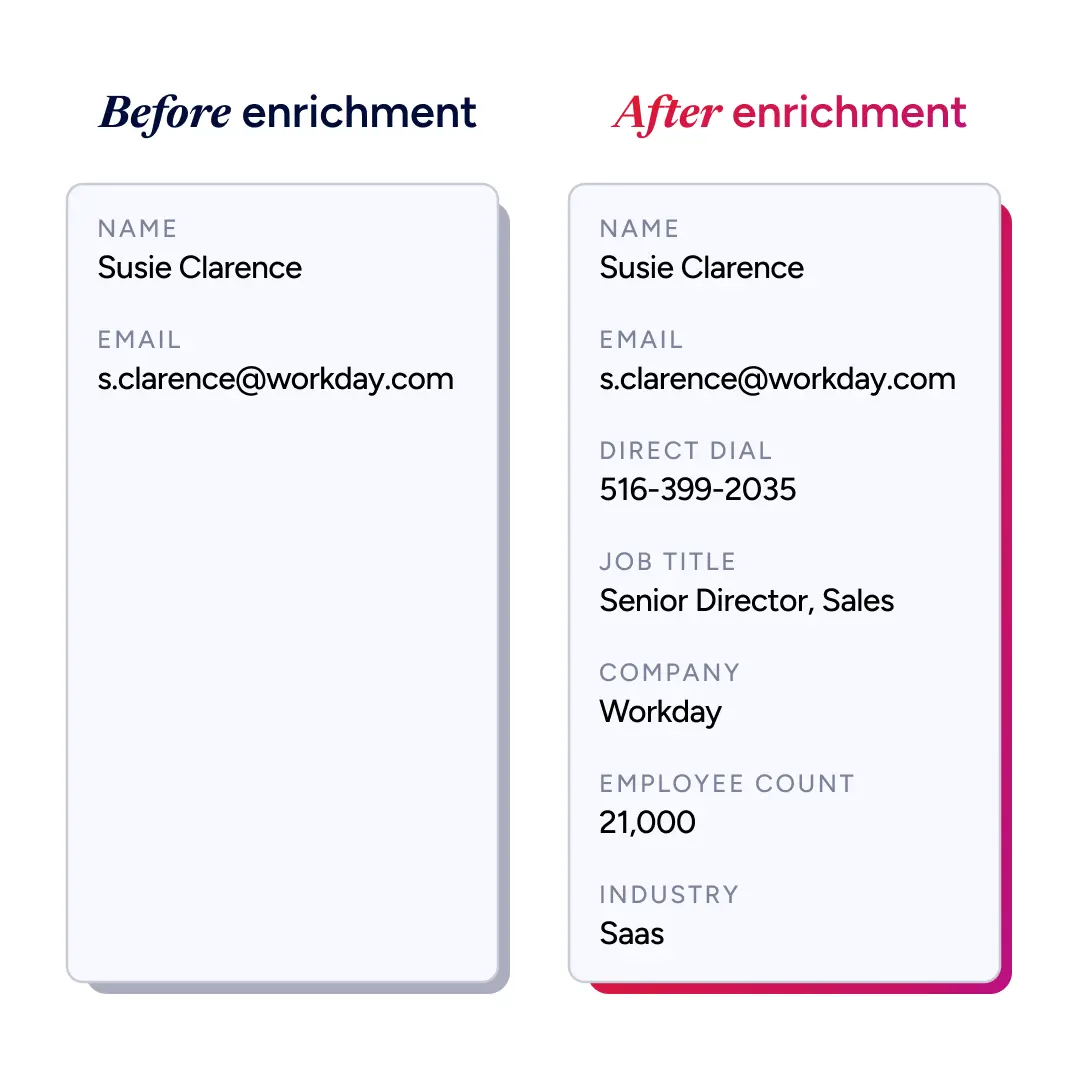
How HubSpot's Native Enrichment Works
HubSpot's enrichment product is called Breeze Intelligence. It uses AI and large language models to build contact and company profiles by pulling from public sources, third-party data vendors, and signals collected across HubSpot's own platform.
There are three ways records get enriched inside HubSpot:
Automatic enrichment: New records are enriched at the moment of creation, no manual action needed.
Continuous enrichment: Existing records are refreshed monthly as new data becomes available. This runs without consuming credits.
Manual enrichment: A single record or a batch of up to 100 records can be enriched on demand.
All three run inside HubSpot's own interface and workflows. There is no standalone HubSpot data enrichment API to call. Enriching programmatically means pairing HubSpot's CRM Contacts and Companies APIs with a provider's enrichment API, or calling a provider from a custom-coded workflow action, a choice we break down in MCP versus API for data enrichment.
What Fields Get Populated
Standard enrichment is included in paid HubSpot plans and requires no credits. It covers:
Job title, seniority level, and department
LinkedIn profile URL
Company name, industry, and sub-industry
Employee count and revenue range
Company location (HQ and regional offices)
Web technologies in use
Social media handles
What Costs Credits
Advanced AI actions do cost credits. Buyer Intent consumes credits when you add net-new companies to your CRM, and Smart Properties consume credits on every run. Plans include a credit allowance; beyond that, you add credit packs or pay as you go. HubSpot lists exact per-action costs in its Product & Services Catalog.
Where HubSpot's Native Enrichment Hits Its Ceiling
HubSpot's enrichment gets baseline firmographics into your CRM without manual work. For teams in the early stages of building a data infrastructure, it's a meaningful starting point.
That ceiling shows up fast for teams running outbound, account-based strategy, or intent-driven scoring.
Coverage Gaps by Data Type
Data Type | HubSpot Native | What's Missing |
Firmographics | Yes (revenue range, employee count, industry) | Precise headcount tiers, funding rounds, growth rate |
Contact data | Basic (title, LinkedIn) | Verified direct dials, mobile numbers |
Technographics | Limited | Full tech stack, recent installs/removals, renewal timing |
Intent signals | Buyer intent via credits | Topic-level research signals, third-party content consumption |
Buying committee | No | Role mapping across an account |
Match Rate Limitations
HubSpot's native enrichment match rates vary significantly by market. Coverage is strongest for US-based mid-market and enterprise companies.
For international accounts, SMB-heavy pipelines, or niche verticals, it drops considerably. When a meaningful portion of your records don't match, the scoring inputs built on top of them become unreliable, and that problem compounds the further down the funnel those records go.
Third-party enrichment tools using waterfall methodology consistently return higher match rates than single-source lookups by querying multiple data sources simultaneously and returning the highest-confidence match across all of them.
Refresh Latency
HubSpot's continuous enrichment cycle runs monthly. B2B contact data decays constantly as people change jobs, companies, and phone numbers. For a rep reaching out to a contact who changed jobs six weeks ago, monthly enrichment offers no protection.
The Scoring Problem It Creates
Lead scoring models score what they can see. When technographic and intent fields are missing, the model falls back on whatever firmographic signals are available and produces scores that look plausible but consistently misrank accounts.
High-value ICP accounts without full data score the same as weak fits with complete data. Reps notice the routing feels off. Nobody can easily trace it back to incomplete enrichment.
How to Enrich HubSpot Records with ZoomInfo
ZoomInfo is an all-in-one AI GTM Platform. Its verified B2B data already powers HubSpot's own Breeze Prospecting Agent, the AI inside HubSpot that handles account identification, contact sourcing, and personalized outreach.
HubSpot selected ZoomInfo's verified B2B intelligence to ground that agent's decisions in real-time data. That same data infrastructure enriches your CRM records in real time, writing directly into standard HubSpot contact and company properties so enriched fields are immediately available for workflows, scoring, and sequences.
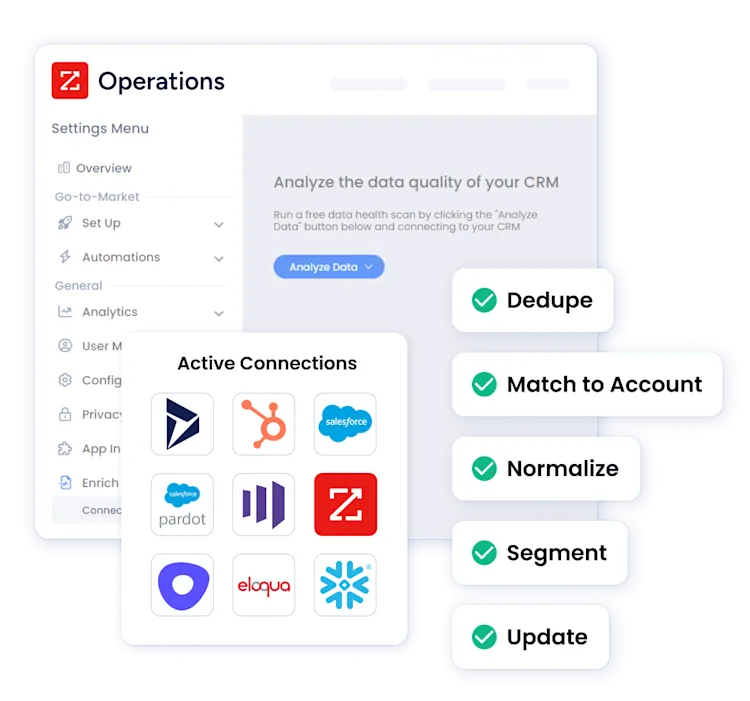
What ZoomInfo Adds on Top of Native HubSpot Enrichment
This is where the coverage gaps above get closed. Five additions matter most for teams running outbound, ABM, or intent-driven scoring:
Verified contact data. ZoomInfo maintains more than 200 million verified business email addresses and 135 million direct dial phone numbers, re-verified continuously. Where HubSpot gives you a LinkedIn URL and a job title, ZoomInfo gives you a confirmed direct dial and a mobile number.
Full technographic coverage. ZoomInfo's technographic database covers thousands of software categories. For each account, you can see which tools they're running, when they installed them, and when contracts are likely up for renewal. This is the data that makes displacement campaigns and trigger-based outreach sequences worth building.
Intent signals. ZoomInfo's intent data tracks topic-level research activity across millions of web properties. When an account starts actively researching a category you compete in, that signal surfaces in HubSpot and can trigger a workflow, alert a rep, or adjust a score before the account ever fills out a form.
Waterfall enrichment. ZoomInfo's GTM Studio queries 25 or more data sources simultaneously and returns the highest-confidence match across all of them. Coverage gaps that any single-source lookup would leave open get closed.
Buying committee data. For accounts being worked in HubSpot, ZoomInfo can populate the full buying committee: who the economic buyer is, which contacts map to champion and influencer roles, and which decision-makers aren't yet in your CRM.
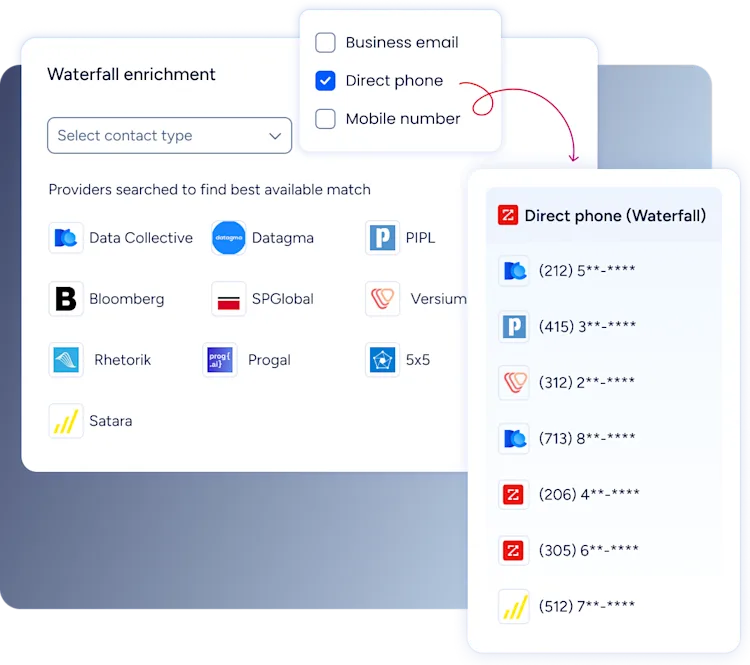
Setting Up the ZoomInfo-HubSpot Integration
Setup runs entirely through ZoomInfo's Admin Portal and takes five steps:
Connect ZoomInfo to HubSpot through the native integration in ZoomInfo's Admin Portal. It uses a service account connection approved on the HubSpot side, no custom API work required.
Configure export preferences for contacts and companies: which objects export, record limits, and create/update rules.
Map ZoomInfo fields to your HubSpot contact and company properties, setting update logic per field — "Complete if Missing" to fill empty fields only, or "Overwrite" when ZoomInfo has higher confidence.
Enable import sync for two-way data flow. HubSpot record indicators surface back in ZoomInfo and power advanced search filtering.
Validate your setup with the Test Mapping feature before going live, and resolve any API errors it flags.
That covers the no-code route. To enrich programmatically, ZoomInfo's API can be called from a HubSpot custom-coded workflow action.
Building an Enrichment Workflow in HubSpot
Enrichment data that sits in a field without triggering anything downstream is just storage. The goal is for enrichment to feed action automatically.
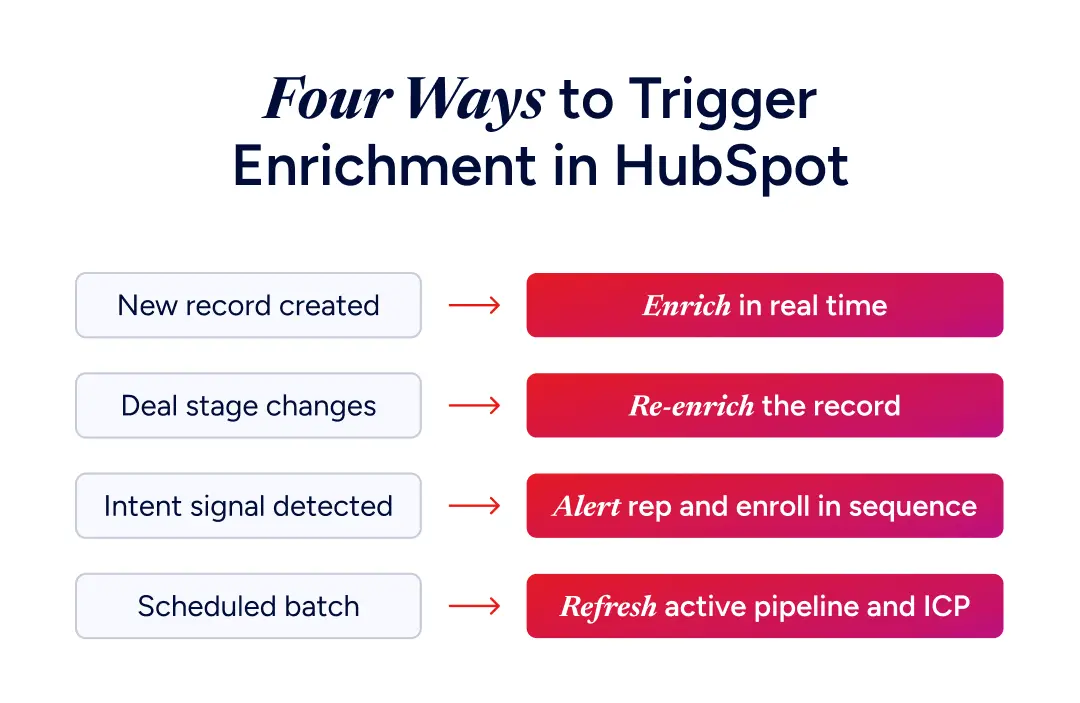
On Record Creation
Trigger: a new contact or company enters HubSpot via form, import, or sequence reply.
Fire enrichment immediately. ZoomInfo's integration supports real-time enrichment at the point of record creation, so the record arrives in your queue already complete rather than requiring a manual pass before it can be scored or routed.
On Deal Stage Change
Trigger: a deal advances to a qualification stage.
Run a re-enrichment pass to catch data that changed since initial record creation. A contact who joined the deal three months after the first touch may have changed roles, companies, or phone numbers since the record was first populated.
On Intent Signal
Trigger: ZoomInfo detects a target account researching a relevant topic.
Fire a HubSpot workflow that alerts the account owner, adjusts the account score, and enrolls buying-committee contacts in a high-priority sequence. That way a rep is reaching out while the research is still active, not weeks later once the moment has passed.
Scheduled Re-Enrichment
Run a monthly re-enrichment batch for active pipeline and ICP accounts to catch job changes before they affect rep conversations. Cold segments can run quarterly.
HubSpot Data Enrichment Best Practices
Getting enrichment running is the easy part. Getting consistent value out of it comes down to a few habits that separate teams whose data actually drives pipeline from teams who just have fuller records.
Tier your enrichment investment. Not every record needs deep enrichment. Target accounts, active pipeline, and high-intent inbound justify real-time ZoomInfo enrichment. Cold or unqualified records can run on HubSpot's native cycle until they show buying activity.
Use technographic data to build trigger sequences. The most underused enrichment data in HubSpot is technographic. If a target account installs a competitor's product, a workflow that fires within 48 hours of that signal consistently outperforms static outbound lists.
Verify before you send. Even with ZoomInfo's continuous re-verification, run a deliverability check before any large outbound campaign. Enrichment adds context; verification confirms the address is still live. Both matter for protecting sender reputation.
Measure field completeness, not just match rate. Most teams track whether enrichment is running. Fewer track whether the fields feeding their scoring model are consistently populated. Pull a completeness report by segment quarterly. If technographic fields are empty on 40% of your ICP accounts, that's a scoring reliability problem, not just a data gap.
Get Complete Enrichment Inside HubSpot
HubSpot's native enrichment gets your CRM past empty fields. It won't get you to the data coverage that outbound, ABM, and intent-driven scoring require. Once ZoomInfo is running inside HubSpot, new records arrive complete, intent signals trigger workflows before a prospect raises their hand, and scoring reflects what accounts are actually doing rather than what fields happened to get filled in.
As Thor Sanderson, Senior Manager of Sales Technology Enablement at Smartsheet, put it:
"ZoomInfo is our one source of truth for account data, and even more so for contact data. There's no other provider in the market that provides you with that level of detail."
Book a demo to see what complete enrichment does for your HubSpot CRM.
Frequently Asked Questions
Does HubSpot data enrichment work automatically?
Yes. With automatic enrichment enabled, new contact and company records are enriched at creation without manual action. Continuous enrichment runs monthly to refresh existing records. Both modes are available on paid HubSpot plans at no additional credit cost for standard firmographic and contact fields.
What are HubSpot enrichment credits?
HubSpot Credits pay for advanced AI actions, not standard enrichment — contact and company enrichment is free on paid plans. Credits cover things like adding net-new companies from Buyer Intent and running Smart Properties. Plans include an allowance; beyond that, you add credit packs or pay as you go.
Why use ZoomInfo with HubSpot instead of just Breeze Intelligence?
Breeze covers basic firmographics well, but match rates drop for international, SMB, and niche accounts. ZoomInfo adds verified direct dials, technographics, intent signals, and buying committee data — the coverage outbound and ABM teams need for accurate scoring.
Is HubSpot data enrichment GDPR compliant?
HubSpot includes opt-out mechanisms and updates the "Enrichment opt-out" property automatically when a contact opts out of its commercial dataset. Teams selling into the EU should verify their specific implementation with their legal team rather than relying solely on platform certifications.
How often does HubSpot refresh enriched data?
Standard continuous enrichment runs monthly. This is adequate for stable, slower-moving accounts but insufficient for fast-changing pipelines or outbound-heavy teams. ZoomInfo's integration supports real-time enrichment at record creation and can be configured on custom cadences for active pipeline segments.
Does HubSpot have a data enrichment API?
Not as a standalone endpoint. HubSpot enriches records natively through Breeze Intelligence inside the app and workflows. To enrich through an API, you combine HubSpot's CRM Contacts and Companies APIs with a provider's enrichment API, run a custom-coded workflow action that calls a provider on record creation, or use a native integration like ZoomInfo's that writes enriched fields straight into HubSpot properties.
