
Revenue operations (RevOps) professionals are an increasingly important voice on go-to-market teams. Gartner predicted that 75% of the highest-growth companies would deploy a RevOps model by 2025, and the function has only become more central since.
The reasons are clear. RevOps pros are the experts in streamlined processes and consistent, sustainable growth. And one of the clearest ways to deliver that value is through evaluation of a company's go-to-market technology stack, what most teams call a RevOps tech stack, or revenue operations tech stack.
This guide walks through how to build one that scales:
The core categories, and the outcome each drives
Why data quality sits under every layer
A framework for building around business goals
The pitfalls that create a Frankenstack, and how to audit them out
Example stacks by stage, and where AI fits
What is a RevOps tech stack?
A RevOps tech stack (also called a revenue operations tech stack or revenue tech stack) is the unified collection of software tools that align sales, marketing, and customer success around a single revenue engine. It includes CRM systems, marketing automation platforms, sales engagement tools, B2B intelligence platforms, conversation intelligence software, and BI reporting tools.
You'll also hear it called a revenue tech stack, revenue operations software, or RevOps tools. Whatever the label, the idea is the same. The stack functions as an interconnected system, not a list of point solutions, designed to eliminate data silos and create a single source of truth for GTM workflows.
When built right, it turns operational alignment into predictable growth. When built wrong, it creates friction, duplicate records, and revenue leakage.
Why your tech stack determines revenue outcomes
Most RevOps gaps are process gaps, not technology gaps. Adding software to a broken process makes the process faster and more broken. That framing matters before you evaluate a single vendor.
Your tech stack determines whether your revenue engine runs on unified data or breaks down from fragmented systems. A connected stack delivers pipeline visibility and forecast accuracy. A disconnected one costs you deals you never see slipping away.
RevOps leaders work to align business outcomes and behaviors with processes and systems, with powerful growth opportunities hanging in the balance.
For Tessa Whittaker, who led revenue operations at ZoomInfo as VP of RevOps from 2023 to 2026, that work has to start with the business strategy long before diving into a list of tools and vendors. She defines the outcome and the behavior she wants first, then evaluates whether the systems in place can deliver it.
Fragmented tools create problems that compound across the revenue lifecycle:
Broken handoffs: When tools don't talk, deals slip through the cracks between marketing, sales, and customer success teams.
Forecasting gaps: Disconnected data means unreliable pipeline projections and missed revenue targets.
Revenue leakage: Manual workarounds and duplicate records cost deals you should have won.
The right stack enables data-driven decisions across the revenue lifecycle. The wrong stack creates tech debt that slows down every GTM motion.
Core categories of a RevOps tech stack
Every RevOps tech stack is built on a foundation of core categories. Think of them less as individual tools and more as operational layers that power targeting, execution, and measurement across the entire revenue cycle.
The categories below represent where RevOps tools deliver the most impact. Focus here first:
CRM as the system of record
The CRM (Salesforce, HubSpot) is the central hub where all customer data lives. RevOps owns CRM hygiene, field standardization, and ensuring other tools sync cleanly.
A poorly governed CRM becomes a liability, not an asset. If your CRM is messy, every downstream tool inherits that mess.
Marketing automation
Marketing automation platforms (HubSpot, Marketo) are the engine for lead generation, lead scoring, nurturing sequences, and campaign execution. RevOps ensures marketing automation syncs cleanly with CRM and sales engagement tools so leads don't leak between systems. When the handoff breaks, qualified leads sit in limbo.
Sales engagement
Sales engagement platforms (Outreach, Salesloft/Clari) are the execution layer for SDR and AE prospecting. RevOps configures sequences, templates, and reporting to ensure consistent messaging and activity tracking.
Engagement data needs to flow back into CRM so the full picture of seller activity is visible.
B2B data and enrichment
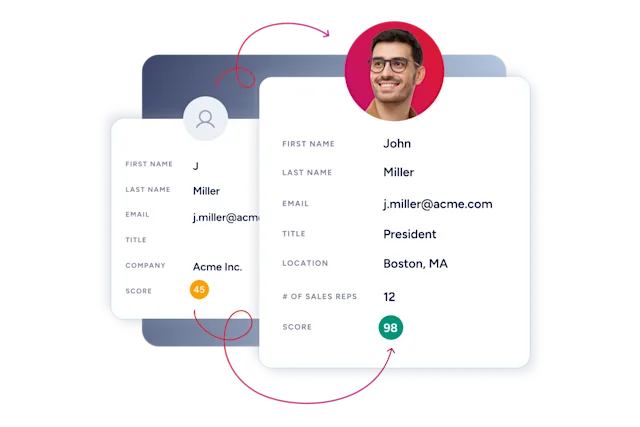
B2B data and enrichment tools provide the contact, firmographic, technographic, and intent data that powers targeting, segmentation, and prioritization. Accurate data is the fuel every other layer runs on, and there's no configuration fix for a bad-data problem.
Data enrichment automates the manual research sellers would otherwise do.
Buyer intent signals surface which accounts are actively researching solutions. Platforms like ZoomInfo, an all-in-one AI GTM Platform, serve as the data backbone that keeps the rest of the stack accurate and actionable. Teams that want to wire that same B2B intelligence directly into their own AI tools and agents can do so through GTM AI, ZoomInfo's context layer for AI tools, which connects ZoomInfo's contact, firmographic, technographic, and intent data to any agent via MCP or one API.
ZoomInfo's GTM Context Graph processes 1.5B+ data points daily, fusing contact and company data with intent signals, CRM records, and conversation intelligence to surface why accounts are behaving as they are, giving RevOps teams an intelligence layer that compounds across every workflow.
Conversation intelligence
Conversation intelligence platforms (Gong, Chorus) record and analyze sales calls. RevOps uses conversation intelligence for deal visibility, coaching insights, and understanding what's happening in the pipeline in real time. The recordings and transcripts reveal patterns that dashboards can't.
Customer success platforms
Customer success tools (Gainsight, ChurnZero) manage the post-sale side of the revenue lifecycle. Core capabilities include:
Health scoring: Track product adoption and engagement to spot accounts at risk.
Churn signals: Flag declining usage or sentiment before renewal conversations start.
Renewal and expansion management: Surface upsell opportunities and keep renewal dates visible to the right owner.
Revenue operations covers the full customer journey, not just net-new pipeline. When customer success teams work from the same data as sales and marketing, handoffs at the close stay clean. Retained and expanded revenue is still revenue, and the RevOps function owns the systems behind it.
Involve CS ops early in stack decisions. CS teams that purchase tools independently of RevOps create the exact silos RevOps is designed to eliminate.
BI and reporting
BI and reporting tools (Tableau, Looker, native CRM dashboards) are the visibility layer. RevOps builds dashboards that track pipeline velocity, conversion rates, and forecast accuracy. RevOps reporting is only as good as the underlying data. If your CRM is dirty, your dashboards lie.
Supporting categories
Beyond the core layers, several categories earn a place in the stack as revenue complexity grows:
CPQ: Configure-price-quote software streamlines quoting and approvals for companies with complex pricing or packaging. Wait to implement CPQ until pricing and packaging are settled.
Billing and revenue recognition: Automates invoicing, subscription management, and recurring payments so finance and GTM work from the same numbers.
Contract lifecycle management: Stores, tracks, and surfaces contract terms so renewal dates and commitments never live in someone's personal drive.
Middleware and workflow automation: Tools like Workato and Zapier handle data orchestration between systems that lack clean native integrations, improving lead routing, deduplication, and lead-to-account matching.
Here's how these categories map to RevOps outcomes:
Category | Primary Function | RevOps Outcome |
|---|---|---|
CRM | System of record | Single source of truth |
Marketing Automation | Lead gen and nurturing | Qualified pipeline |
Sales Engagement | Outbound execution | Consistent prospecting |
B2B Data & Enrichment | Contact and company intelligence | Accurate targeting |
Conversation Intelligence | Call analysis | Deal visibility |
Customer Success | Post-sale lifecycle | Retention and expansion |
BI & Reporting | Dashboards and analytics | Forecast accuracy |
Workflow Automation | Cross-system orchestration | Clean data flow |
Why data quality is the foundation of every RevOps stack
Data quality determines whether your RevOps tech stack delivers insights or amplifies errors. Bad data (duplicates, stale records, missing fields, inconsistent formatting) compounds across every system, breaking routing, wasting seller effort, and corrupting forecasts.
Forbes estimates 91% of CRM data is incomplete, and every enrichment, routing, and automation workflow built on top of that foundation inherits the same gaps.
Data decays fast. Contacts change jobs, companies get acquired, and phone numbers go stale. Without continuous enrichment, your CRM becomes a graveyard of outdated records.
When your data is wrong, everything downstream breaks:
Routing misfires: Leads go to the wrong reps or fall through the cracks.
Wasted outreach: Sellers contact people who left the company months ago.
Forecasting errors: Pipeline reports based on duplicate or stale opportunities.
Segmentation gaps: Campaigns target the wrong accounts because firmographics are outdated.
Duplicate records compound the problem. Reps create new accounts when they cannot find the correct existing record, triggering internal territory conflicts and broken routing logic.
Data hygiene works as an ongoing discipline, never a one-time project. Record enrichment automates what would otherwise be manual cleanup.
Lead-to-account matching ensures contacts roll up to the right company records. Normalization standardizes fields so reporting works.
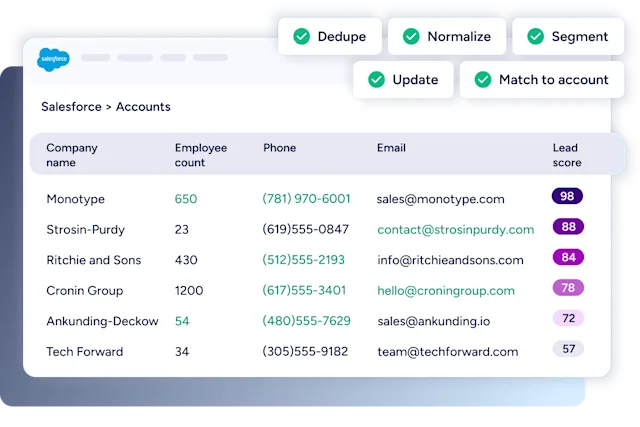
This is where continuous enrichment delivers measurable impact. Momentive cut speed-to-lead from 20 minutes to 60 seconds after implementing automated routing and enrichment. Intent signals surface which accounts are actively researching. Technographics reveal what tools prospects already use. Without this data layer, the rest of your stack operates blind.
That data foundation also determines how you sequence the tools you add next, which is exactly what the tier framework below addresses.
Tiered RevOps stack: what you need, what helps, and what to skip
Not every tool category belongs in your stack at the same time. The most effective RevOps stacks are built in tiers, starting with the non-negotiable core, adding conditional layers as the business scales, and explicitly skipping categories that create more overhead than value at your current stage.
Tier 1: Non-Negotiable Core covers the tools every RevOps stack needs from day one: CRM, B2B Data and Enrichment, Sales Engagement, and BI/Reporting. These four categories form the data and execution foundation everything else depends on.
Tier 2: Add When You Scale covers tools that deliver clear value once your GTM motion has matured: Marketing Automation, Conversation Intelligence, Customer Success Platform, and Workflow Automation/Middleware. Adding these before the core is clean creates integration debt faster than it creates leverage.
Tier 3: Skip Until Ready covers categories that generate more overhead than value until specific business conditions are met: CPQ (until pricing is settled), Billing/Revenue Recognition (until finance and GTM are aligned), and Contract Lifecycle Management (until renewals are a recurring operational burden).
Tool Category | Tier | When to Promote | Estimated Monthly Cost Range |
|---|---|---|---|
CRM | 1 – Core | Day one | $2,000–$6,000 (50-seat team) |
B2B Data & Enrichment | 1 – Core | Day one | $1,500–$5,000 |
Sales Engagement | 1 – Core | Day one | $1,000–$3,000 |
BI / Reporting | 1 – Core | Day one | $500–$2,000 |
Marketing Automation | 2 – Scale | When pipeline volume justifies lifecycle workflows | $1,500–$10,000+ |
Conversation Intelligence | 2 – Scale | When deal coaching and forecast inspection are priorities | Included in some platforms |
Customer Success Platform | 2 – Scale | When post-sale retention is a dedicated motion | Varies by seat count |
Workflow Automation / Middleware | 2 – Scale | When native integrations between core tools break down | $500–$2,000+ |
CPQ | 3 – Skip Until Ready | When pricing and packaging are finalized | Varies |
Billing / Revenue Recognition | 3 – Skip Until Ready | When finance and GTM need shared revenue data | Varies |
Contract Lifecycle Management | 3 – Skip Until Ready | When renewals are a recurring operational burden | Varies |
Cost ranges above are based on agency benchmarks for a 50-seat team and are illustrative. Actual costs vary by vendor, contract structure, and seat count.
One structural anti-pattern to avoid: running both Salesforce and HubSpot simultaneously, Salesforce for sales, HubSpot for marketing, creates the exact data integration problem RevOps is supposed to solve. Pick one system of record and route all data through it. Consolidation is harder to execute than it sounds, but the alternative is a permanent integration tax on every workflow you build.
On the skip list for many teams: Pardot. Despite being a Salesforce product, practitioners consistently flag its Salesforce integration as unreliable for lead scoring and campaign attribution, a counterintuitive caution worth heeding before committing to it.
For teams managing Tier 1 and Tier 2 tools without a dedicated engineering team, GTM Studio's codeless interface is worth noting here, it lets RevOps build enrichment workflows, routing, and audience segments without opening a change management ticket.
How to build a RevOps tech stack that scales
Build a scalable RevOps tech stack by starting with business goals, auditing your current systems for gaps and overlaps, prioritizing tools that integrate with your CRM, and phasing rollouts around renewal periods. Call it the Stack Build Framework. Tool selection follows strategy at every step.
Buying the newest tools won't get you there. The perfect RevOps tech stack is the one that aligns systems with business outcomes.
Three questions to answer in order before adding any tool:
Is this a process gap or a tool gap? If the process is broken, the tool will make it faster and more broken.
Can our team actually operate this? License cost is the smallest line item, admin burden and training time are the real cost.
Does it integrate cleanly with the CRM, or does it create a new silo?
Here's the framework:
Start with business goals: What outcomes are you trying to drive? What behaviors do you need from GTM teams?
Audit the current stack: Map what you have, what's used, and what's coming up for renewal.
Prioritize integration: A tool that doesn't connect to your CRM creates more problems than it solves.
Phase the rollout: Tie changes to renewal periods and build in time for change management.
Establish governance before you scale: Define ownership, document integrations, set audit cadences, and require an integration review before any new vendor is approved.
Start with business goals
The tech stack should serve the strategy, not the other way around. Before evaluating vendors, define the business outcomes you're trying to drive and the behaviors you need from GTM teams.
"What is the business outcome I'm trying to drive? What is the business behavior I want to see?" Whittaker says. "I can evaluate whether the system we have is the right system or if we need a new system, but I need the requirements first."
Skip this step and you end up with tools that don't solve the actual problem.
Prioritize integration over features
A flashy tool that doesn't integrate with your CRM or other core systems creates more friction than value. RevOps should evaluate tools based on native connectors, API quality, and bidirectional sync capabilities.
If the data doesn't flow cleanly between systems, you've just added another silo. GTM teams need shared systems with unified data to fuel their strategies.
Weigh full-suite platforms against point solutions
Every RevOps team faces the same architectural decision. Consolidate on a platform that covers multiple categories, or assemble point solutions for each layer.
Each approach comes with tradeoffs:
Full-suite platforms reduce integration overhead, simplify vendor management, and keep data unified by default.
Point solutions offer deeper functionality in their specialty, but every additional vendor adds another integration to maintain, another contract to govern, and another place for data to fragment.
Based on what we consistently see in RevOps audits, the trend is toward consolidation. Every tool in the stack carries an integration tax, and RevOps teams increasingly favor platforms that natively combine data, engagement, and intelligence over stitching together a dozen point solutions. The practical answer for many organizations is a hybrid: a consolidated core for data and execution, with specialist tools only where they deliver clear, differentiated value.
Plan for total cost of ownership
License fees are just the visible part of the bill. The total cost of ownership includes:
Implementation and integration: Configuration, data migration, and connecting the tool to the rest of the stack.
Administration: Ongoing maintenance, permissions, and troubleshooting, whether that's a dedicated admin or a slice of the RevOps team's week.
Training and enablement: Onboarding, documentation, and the productivity dip during rollout.
Switching costs: Data migration and retraining if you replace the tool later.
A cheap tool that requires a full-time admin to maintain costs more than an expensive tool that runs itself. Factor in the exit path before you sign, since switching costs are where "affordable" tools get expensive.
Establish governance before you scale
Governance is the step most teams skip until tool sprawl forces the conversation. Assign data ownership for each CRM object. Document every integration with its sync direction, field mappings, and failure alert. Set a quarterly audit cadence for utilization and renewals. Create a change management process for adding new tools, including a required integration review before any new vendor is approved.
Without governance, every new tool request becomes a silent tax on the RevOps challenges you're already managing.
Integration architecture: where RevOps stacks break down
The most common RevOps stack failure mode is integration failure rather than tool selection. Data sync lag, field mapping errors, and bidirectional sync conflicts corrupt the CRM silently, and the damage compounds before anyone notices.
Three integration failure modes account for most of the damage:
Enrichment running after routing is the most expensive sequencing error. When enrichment runs after routing, leads go to the wrong rep. A 14-day enrichment lag means territory assignments are made on data that is two weeks stale. By the time the rep gets the notification, the routing decision has already been made on incomplete records.
MAP-CRM structural incompatibility is a less visible but equally damaging problem. Marketing automation platforms and CRMs have fundamentally different data structures. Orchestrating data between them requires careful field mapping and sync sequencing, not just a native connector. A native connector tells you the systems are connected; it does not tell you the data is flowing correctly.
Bidirectional sync conflicts occur when both systems update the same field simultaneously. Define a master field ownership rule before enabling bidirectional sync. Without it, the last system to write wins, and that is rarely the right answer.
The recommended integration sequencing order:
CRM first (system of record)
Then data enrichment (feeds the CRM)
Then MAP (reads from CRM)
Then sales engagement (reads from CRM and MAP)
Then BI (reads from all)
Each layer depends on the one below it being clean. Skipping the sequence creates cascading failures that are difficult to trace back to their source.
Integration red flags to audit:
Enrichment running after lead routing
Bidirectional sync without field ownership rules
No alerting on sync failures
MAP and CRM contact records not deduplicated on a shared key
Middleware tools with no documented failure handling
GTM Studio handles enrichment sequencing, field mapping, and routing logic without requiring engineering tickets, a direct fix for the integration failures described above.
Avoiding the Frankenstack: common RevOps tech stack pitfalls
Where integration failures are technical, wrong sequencing, broken field mappings, sync conflicts, Frankenstack problems are organizational: too many tools approved without a review process, overlapping functionality no one noticed, and licenses that auto-renewed long after the use case disappeared. The audit below addresses both, but the organizational discipline is what keeps the technical problems from coming back.
With your goalposts defined, you can evaluate the stack and spot gaps and overlaps across the GTM operation. Understanding the most common RevOps challenges and how to solve them sharpens that audit by revealing where fragmented systems break down.
The audit comes down to three checks:
Duplication: Where do tools overlap in functionality?
Utilization: Which licenses and features are teams using, and which sit idle?
Renewals: What's coming up for renewal, and when?
That mapping shows where tech can be consolidated and where an upgrade would pay off. It also lets RevOps make objective recommendations instead of defending tools by preference, and it surfaces gaps where needs aren't being met.
"Of the systems that I have, are those the right systems out there, or are there other things I should start looking at?" Whittaker says. "You have to come up with a strong point of view of what a strong tech stack looks like."
Watch for the common pitfalls that create revenue operations tech debt:
Tool sprawl: Point solutions for every problem create overlapping functionality and integration nightmares.
No governance: Without a review process, new tools sneak in and create data silos.
Low adoption: Expensive tools sit unused because reps stick with workarounds.
Renewal surprises: Auto-renewals lock you into tools you've already replaced.
Vendor lock-in: Over-reliance on one closed ecosystem makes it painful to adapt.
Scalability ceilings: Tools that fit a team of 10 buckle under a team of 100, forcing disruptive mid-growth migrations.
GTM Studio's codeless interface lets RevOps teams build and launch enrichment workflows, audience segments, and routing rules without writing a single query or opening a change management ticket, compressing what used to be a two-week engineering cycle to an afternoon.
Governance councils, a cross-functional group that reviews new tool requests before approval, are the most effective structural defense against tool sprawl creeping back in. This is the same governance discipline introduced in the Stack Build Framework above, now applied as an ongoing operating model rather than a one-time setup step.
Once the stack is mapped, build a roadmap tied to renewal periods and leave room for change management, since transitions disrupt operations short-term.
"You might not rip and replace or consolidate your tech all at once, but having that perspective of your long-term roadmap is really important," Whittaker says.
Migration also needs aligned GTM leadership, enablement partners involved early, and champions across the business so people understand the why behind each change. Then track whether it's landing.
"Whenever you're pushing anything out, what is your communication strategy week over week showing the adoption?" she says. "You can't just release something and hope it works."
RevOps tech stack examples by company stage
The right stack depends on revenue complexity, team size, and sales-process maturity. Here's what one looks like at three stages.
Startup stack (under $10M ARR or under 20 sales reps)
Early-stage revenue teams need speed and simplicity:
CRM: HubSpot as the all-in-one core for pipeline, contacts, and basic automation
Data and enrichment: ZoomInfo (all-in-one AI GTM Platform) for accurate contact data, TAM definition, and ICP targeting
Sales engagement: Lightweight sequencing, often native to the CRM
Reporting: Native CRM dashboards covering pipeline, conversion, and velocity
At this stage, success comes from disciplined CRM usage and clean data. Keep the stack lean so the team can iterate as the sales motion takes shape.
Mid-market stack ($10M–$100M ARR)
More segments, longer sales cycles, and larger teams demand deeper automation and governance. The baseline stays, but the CRM gains custom objects, multiple pipelines, and defined ownership, and several layers get added on top:
Marketing automation: Marketo or HubSpot with lifecycle-stage workflows and attribution
Conversation intelligence and forecasting: Chorus or Gong over clean pipeline data, plus a revenue intelligence platform for forecast inspection
Customer success: Health scoring and renewal management tied to the same account records
BI: Tableau or Looker for cross-system revenue analytics
The difference between the startup and mid-market stacks is less about tool count and more about governance. Mid-market teams need consistency, visibility, and control that a startup can defer.
Enterprise stack ($100M+ ARR)
Enterprise stacks build on the mid-market foundation with dedicated infrastructure for scale and orchestration:
RevOps engineering function: A dedicated team managing CRM architecture, integration health, and data pipeline governance
GTM Studio: Codeless play orchestration and territory management, enabling RevOps to build and launch GTM plays without engineering tickets
Advanced attribution modeling: Multi-touch attribution across paid, organic, and outbound channels to close the loop between marketing spend and closed revenue
Data-as-a-Service API layer: Custom AI agent workflows built on ZoomInfo's verified contact and firmographic data, enabling proprietary scoring models and internal tooling at scale
At this stage, the primary RevOps focus shifts from building the stack to governing it, ensuring data quality, integration health, and adoption hold as the GTM motion grows in complexity.
Stage | Core Tools | Key Additions | Primary RevOps Focus |
|---|---|---|---|
Startup (under $10M ARR) | CRM, Data/Enrichment, Sales Engagement, BI | None, keep it lean | Clean data, disciplined CRM usage |
Mid-Market ($10M–$100M ARR) | Above + Marketing Automation, Conversation Intelligence | Customer Success Platform, Revenue Intelligence | Governance, lifecycle automation, attribution |
Enterprise ($100M+ ARR) | Above + dedicated RevOps engineering | GTM Studio, DaaS API layer, advanced attribution | Stack governance, AI agent workflows, territory management |
AI in the modern RevOps stack
AI in modern revenue operations works as a layer across your existing tools rather than a standalone product bolted onto one corner of the stack. It shows up everywhere from predictive analytics to automated account summaries to meeting prep.
In 2026, that layer increasingly means agents. RevOps and GTM engineers are building AI-first workflows where agents handle account research, list building, and data orchestration directly. The quality of those workflows depends entirely on the data grounding them.
Building a revops tech stack with AI capabilities means more than adding an AI tool, it means grounding every AI workflow in the same verified data layer the rest of the stack runs on.
What AI handles across the stack
AI in RevOps tends to earn its place in three areas teams feel right away:
Automated research: AI summarizes account insights so sellers don't start from scratch.
Smarter prioritization: AI surfaces high-intent accounts based on real buying signals, so reps spend their time where intent is highest.
Personalized messaging at scale: AI drafts automated emails that sellers can tailor before they send.
Grounding agents in trusted data
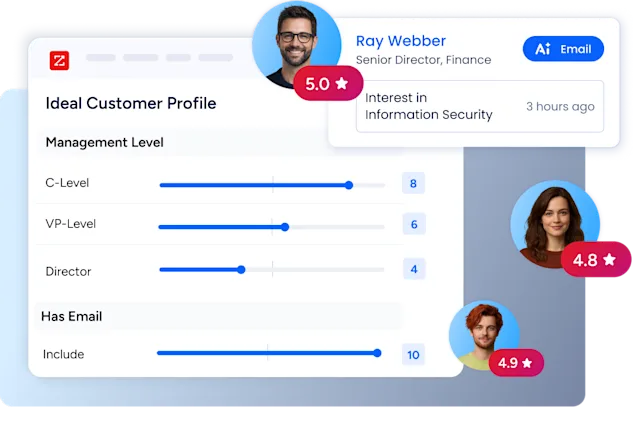
GTM Workspace helps by aligning sales and marketing teams and boosting frontline productivity, with AI account summaries that surface target-account insights in seconds and high-quality automated emails reps can customize. Seismic saved 11.5 hours per rep per week and attributed 39% of active pipeline to ZoomInfo signals after adopting GTM Workspace.
"GTM Workspace gives you the ability to look at your target accounts and understand the right data at the right time," Whittaker says.
Teams that prefer to compose their own workflows can reach the same B2B intelligence through GTM AI, the agent-native context layer that connects verified data to Claude, ChatGPT, or any internal agent via MCP or one API. Either way, agents run on the same trusted data as the rest of the stack instead of hallucinating their way through account research.
One caution applies across every use case. AI amplifies whatever it's built on. Applied on top of clean, connected data, it compounds your advantage. Applied on top of a Frankenstack, it automates the mess faster.
How to measure whether your RevOps stack is working
RevOps tech stack optimization starts with knowing what to measure. Track forecast accuracy, sales cycle length, customer acquisition cost, tool adoption rates, and pipeline visibility before and after changes. Improvement across these metrics shows the stack is doing its job.
Separate your metrics into two layers. Leading indicators, data completeness %, speed-to-lead, adoption rate, pipeline velocity, tell you whether the stack is operating correctly. Lagging indicators, revenue growth, CAC, NRR, forecast accuracy, tell you whether it is delivering business value. Track both. A stack that improves leading indicators but does not move lagging indicators has an adoption or process problem, not a tool problem.
A stack that works shows up in the numbers:
Forecast accuracy: Are projections landing closer to actuals quarter over quarter?
Sales cycle length: Are deals moving through the pipeline faster?
Customer acquisition cost: Is the cost of winning each new customer trending down?
Lead handoff speed: How quickly do qualified leads reach a rep, and how many leak in between?
Adoption rates: Are teams using the tools you're paying for? Licenses that sit idle are a consolidation signal.
Data completeness: What percentage of records have accurate, current contact and firmographic data?
Sendoso reduced inaccurate data by 70% after implementing ZoomInfo enrichment, a direct measure of data quality improvement that flows through to every routing, scoring, and forecasting workflow downstream.
A simple measurement cadence keeps the stack accountable:
Before rollout: Baseline every metric you expect the tool to move.
At 90 days: Review adoption and early metric movement, and course-correct enablement if usage lags.
At renewal: Compare against the baseline and decide whether the tool earns its line item.
Efficiency gains like reduced manual work matter too, but tie them back to revenue outcomes so the stack investment stays accountable to growth, not just convenience.
Building for revenue, not just efficiency
Efficiency alone was never the point. A RevOps tech stack earns its keep by delivering predictable revenue growth.
A well-built stack eliminates guesswork, aligns teams around shared data, and lets sellers focus on selling instead of researching. That's what turns operational alignment into a competitive advantage.
Start with business outcomes. Audit for gaps and overlaps. Prioritize integration and data quality. Phase the rollout. Build governance to prevent future sprawl. Then measure relentlessly.
The stack you build today determines the revenue you deliver tomorrow.
Explore GTM AI to give every tool and agent in your stack the same trusted B2B data layer.
Ready to see how ZoomInfo's data and intelligence layer fits your stack? Request a demo to walk through the architecture with our team.
Frequently asked questions
What is the difference between a RevOps tech stack and a sales tech stack?
A sales tech stack serves one team's execution. A RevOps tech stack connects sales, marketing, and customer success into a single system with shared data, unified reporting, and consistent processes across the full revenue lifecycle, from first touch through renewal and expansion.
How much does a RevOps tech stack cost?
Costs vary widely by company size and complexity, from a few hundred dollars per month for a lean startup stack to six or seven figures annually at the enterprise level. Evaluate total cost of ownership, including implementation, integration, admin time, and training, rather than license fees alone.
What is the most important tool in a RevOps stack?
The CRM, because it's the system of record every other tool depends on. Data quality runs a close second. Even a perfectly configured CRM delivers unreliable routing, reporting, and forecasting if the records inside it are stale, duplicated, or incomplete. Momentive cut speed-to-lead from 20 minutes to 60 seconds after implementing automated routing and enrichment, a direct example of what clean data infrastructure delivers.
Is a RevOps tech stack only for large enterprises?
No. Startups benefit from RevOps discipline early, often with just a CRM, a data provider, and native reporting. Starting lean with clean data and clear processes prevents the tech debt that makes stacks expensive to fix later.
How do you build a RevOps tech stack from scratch?
Start with process gaps, not tool categories. Audit what your GTM teams actually need to do, then evaluate whether existing tools cover it. The build sequence: CRM as the system of record, B2B data and enrichment to keep it accurate, sales engagement for outbound execution, BI for visibility, then add marketing automation and conversation intelligence as the team scales. Governance and documentation from day one prevent the tech debt that makes stacks expensive to fix later. For a deeper walkthrough, see how to build a sales tech stack with the right sequencing and tradeoffs.
How should customer success teams be included in RevOps stack planning?
Involve CS ops early, before the stack is built, not after. CS teams that purchase tools independently of RevOps create the exact data silos RevOps is designed to eliminate. Include CS in the initial stack audit, define shared account data ownership between sales and CS, and ensure the customer success platform syncs to the same CRM records as the rest of the stack. Health scoring and renewal signals are only actionable when they share a data layer with sales and marketing. A well-integrated CS platform also surfaces expansion strategy opportunities that would otherwise stay invisible until renewal.