

monday.com is a work platform that organizes projects, sales pipelines, software sprints, service tickets, and marketing campaigns in one system. Five products share a data layer, and an AI suite handles tasks from drafting emails to building custom apps from a plain-English prompt.
This breakdown covers every feature, how it works, who it serves, and which plan unlocks it.
monday.com's feature set has you covered if:
You manage cross-functional projects and need Gantt charts, Kanban boards, portfolio dashboards, and resource allocation in one workspace
You want a CRM with built-in email sequences, mass emails, deal tracking, and AI lead management without switching platforms
You run agile sprints and need velocity charts, burndown tracking, GitHub/GitLab sync, and backlog management alongside your product roadmap
You handle internal service requests and want automated ticket routing, SLA tracking, and a self-service customer portal
You need a no-code automation engine to replace manual handoffs, assignments, and status updates across 850+ connected tools
You want AI agents and a personal AI assistant that can update boards, generate content, build apps, and execute tasks from natural language
You'll reach the edges of its capabilities if:
You need a B2B contact and company database with verified direct dials, business emails, and org charts for outbound prospecting
You want buyer intent signals showing which companies are researching your category across the web
You need conversation intelligence that records, transcribes, and coaches from sales calls
You want to identify specific people visiting your website, not just track project or deal activity within the platform
You require account-based marketing orchestration with display advertising, audience management, and multi-channel campaign activation
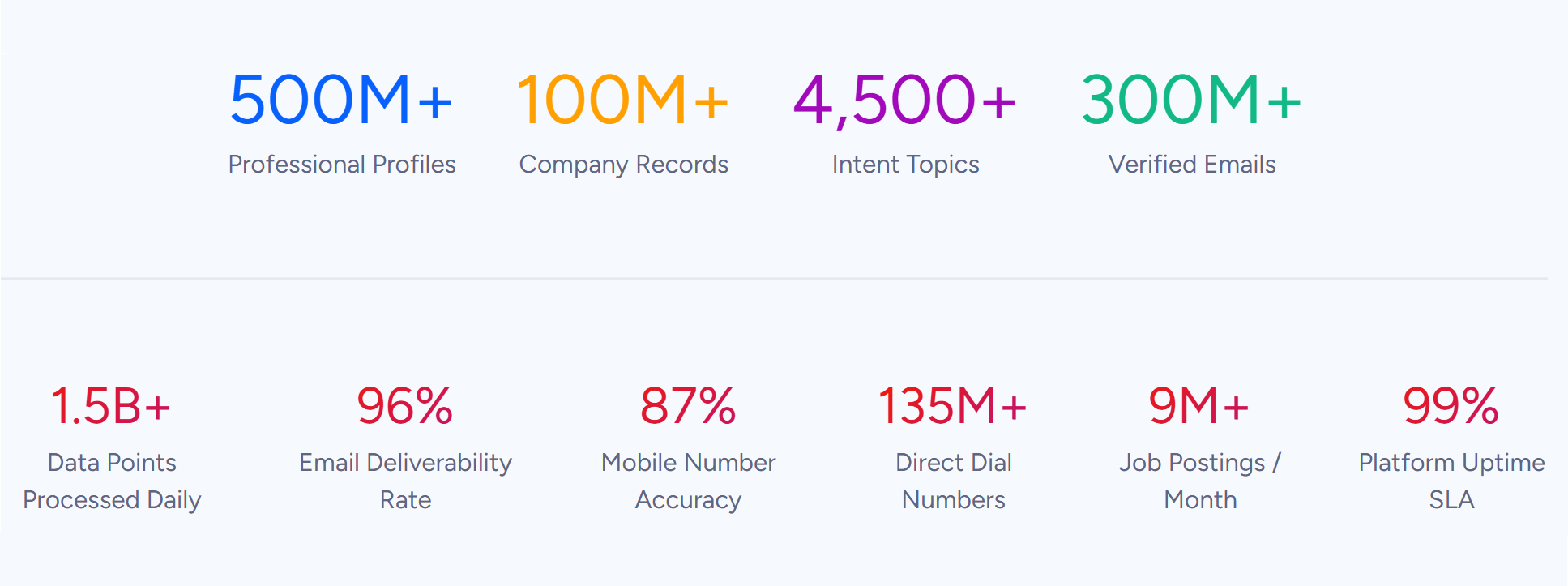
For those needs, the reference point is ZoomInfo: an AI GTM platform built on a B2B database of 500M contacts, 100M companies, 135M+ verified phone numbers, and 200M+ verified business emails.
A GTM Context Graph processes 1.5B + data points daily, fusing that data with CRM records, conversation intelligence, and behavioral signals into a single intelligence layer. Access runs through APIs, MCP, GTM Workspace, and GTM Studio.
After the feature breakdown, this article covers exactly where monday.com stops and how ZoomInfo fills those gaps.
monday.com Platform Overview
monday.com serves over 250,000 customers worldwide, including Coca-Cola, Canva, Lionsgate, Carrefour, NASDAQ, and Citizens Bank. The company crossed $1.232 billion in revenue in 2025 and holds Leader positions in three 2025 Gartner Magic Quadrant reports: Collaborative Work Management, Adaptive Project Management and Reporting, and Marketing Work Management Platforms.
The platform is organized around five products and an AI layer that spans all of them:
Product | What It Does | Plan Structure |
|---|---|---|
Projects, portfolios, goals, resource management, dashboards | Free, Basic ($9/seat/mo), Standard ($12), Pro ($19), Enterprise | |
Leads, contacts, deals, email sequences, sales forecasting | Basic, Standard, Pro, Ultimate, Enterprise | |
Sprint management, backlog, bug tracking, GitHub/GitLab sync | Basic, Standard, Pro, Enterprise | |
Ticketing, SLA tracking, customer portal, AI service agents | Standard and above | |
Email marketing (launched September 2025) | Separate product | |
AI suite (sidekick, agents, vibe, workflows) | Personal AI assistant, autonomous agents, no-code app builder, AI automations | Available across products; full bundle at Enterprise |
Pricing uses a per-seat model with bucket pricing: seats sell in groups starting at 3, then in multiples of 5. Annual billing saves 18% over monthly. A permanent free plan covers up to 2 seats on work management only, and every new signup gets a 14-day Pro trial with no credit card required. With that structure in place, here is the full tour.
monday.com Work Management: Projects, Portfolios, and Goals
Work management is the original product and the one most buyers encounter first. It covers 200+ use cases across 190 industries and supports teams from marketing and PMO to HR and operations. A Forrester study reports a payback period under four months.
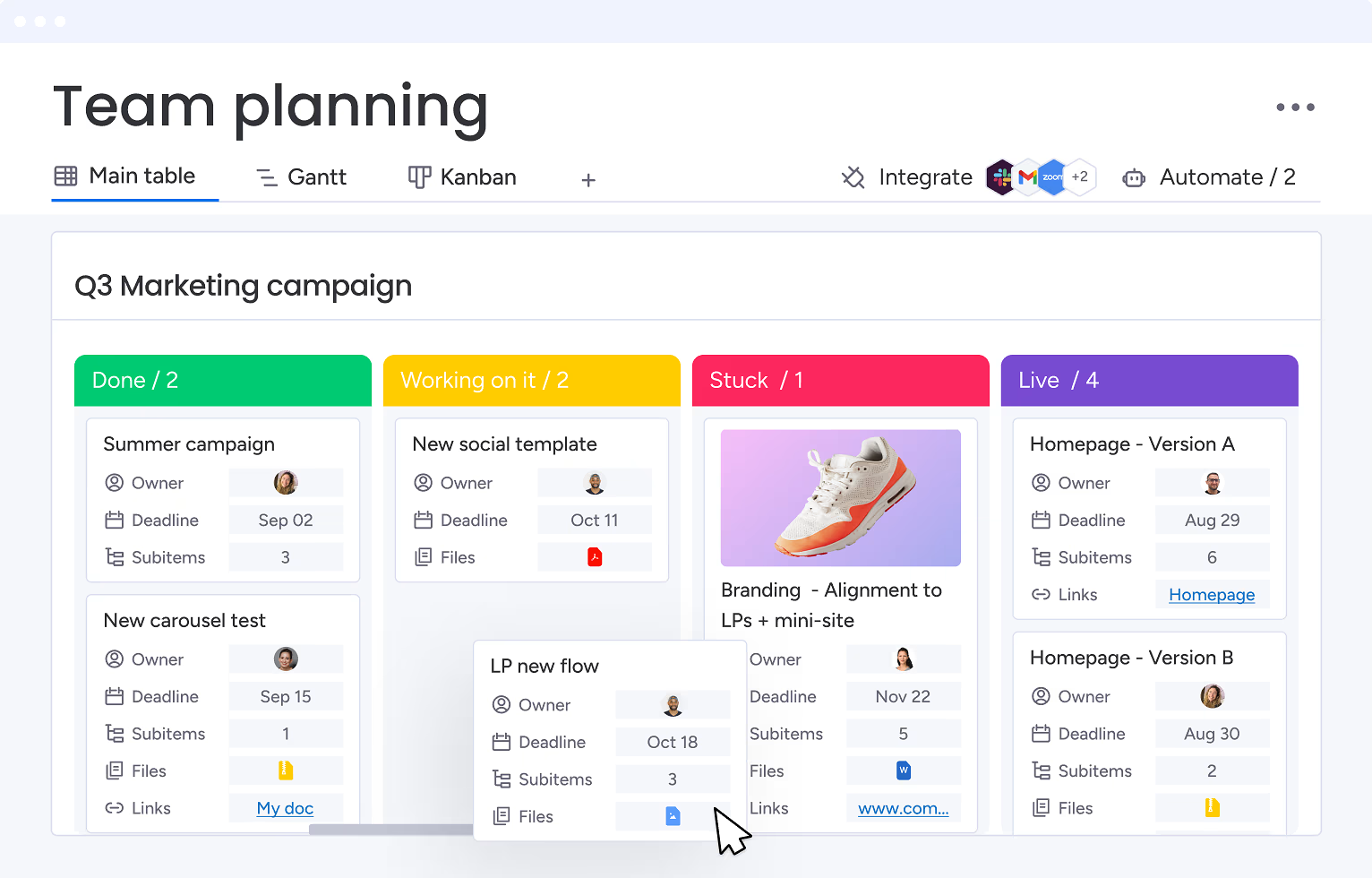
Everything rests on a board-and-column architecture. Work lives in boards containing groups of items (individual tasks), each tracked across customizable columns: status, owner, date, priority, numbers, formulas, and dozens more. Teams switch between Gantt, Kanban, Timeline, Workload, Calendar, and Map views without changing the underlying data.
The Gantt view includes drag-and-drop task bars, milestone markers, task dependencies, critical path overlays, and baselines for comparing planned versus actual schedules. Kanban boards use configurable status columns with drag-and-drop task cards for managing work in progress.
Source: monday.com
Portfolio management aggregates multiple projects into one executive view, with health summaries, resource allocation, and cross-project dependency tracking. Workload views show individual and team capacity, with monday.com reporting a 46% improvement in headcount planning accuracy and 3,564 hours saved yearly through resource allocation. Portfolio management requires the Enterprise plan.
Goals and OKRs connect company-level objectives to individual projects within the same workspace. An executive can trace from a quarterly goal down to a specific task without leaving the platform. This native link between strategic objectives and daily execution differentiates monday.com from tools that require a separate OKR platform. The enterprise page foregrounds OKR dashboards as a governance capability.
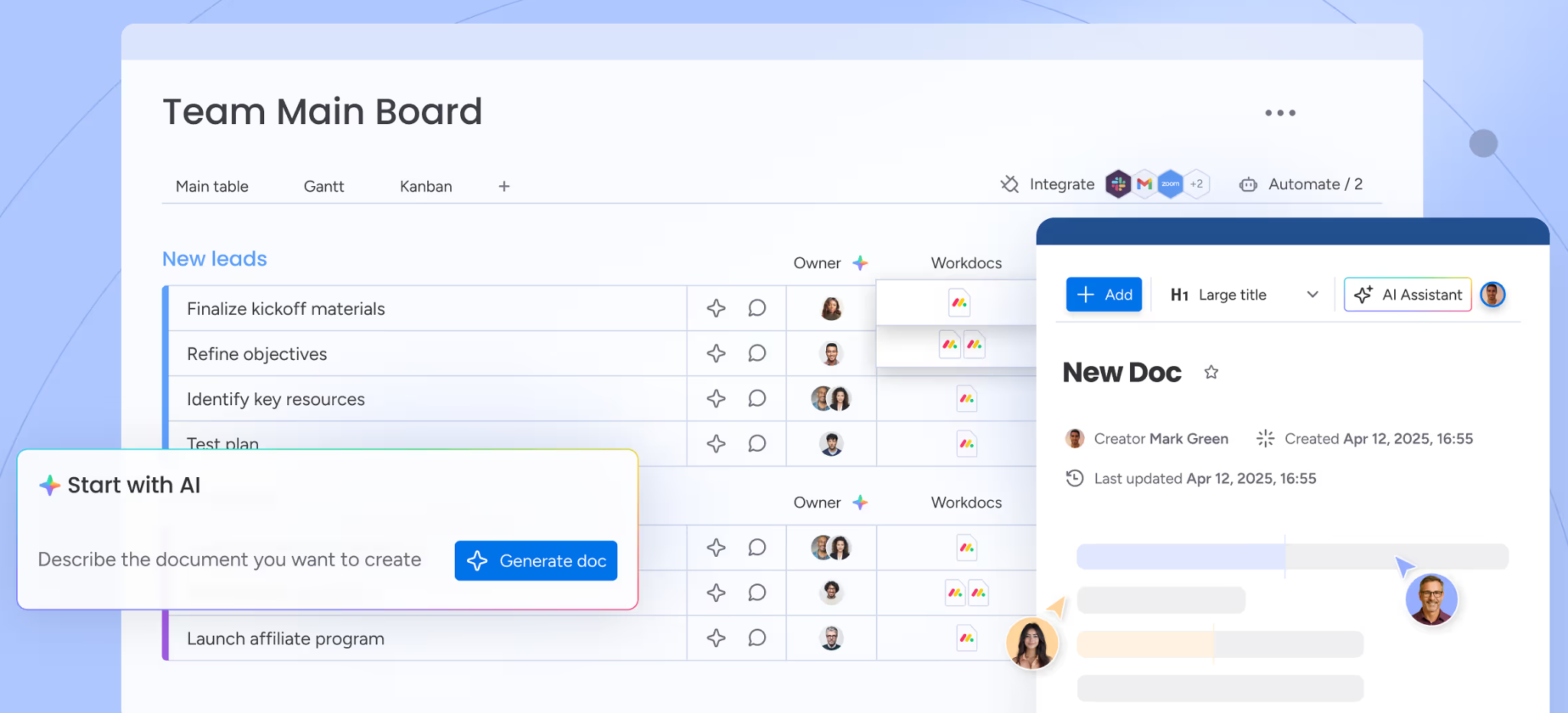
Workdocs are collaborative documents that live inside the workspace and connect directly to board data. A project brief can embed live item statuses, assigned owners, and timelines that update automatically. Documents support AI writing assistance and real-time co-editing, so meeting notes and planning artifacts stay linked to the work items they reference rather than sitting in a separate documentation tool.
Source: monday.com
Time tracking logs time per task at the item level for project estimation and resource billing. The time tracking column is available on the Pro plan and above. For teams with heavy timesheeting needs (billable hours, client invoicing), this covers basic logging but falls short of dedicated tools like Harvest or Toggl.
The platform also includes project intake forms that route incoming requests through structured approval workflows, and cross-board dashboards that aggregate data via widgets for budgets, workload, timelines, and goal tracking. Teams can share dashboards with external stakeholders as live reports. Dashboard board limits scale by plan: 1 board on Basic, 5 on Standard, 20 on Pro, and 50 on Enterprise.
monday.com Automations, Integrations, and Dashboards
The automation and integration layer turns monday.com from a project tracker into an operational platform.
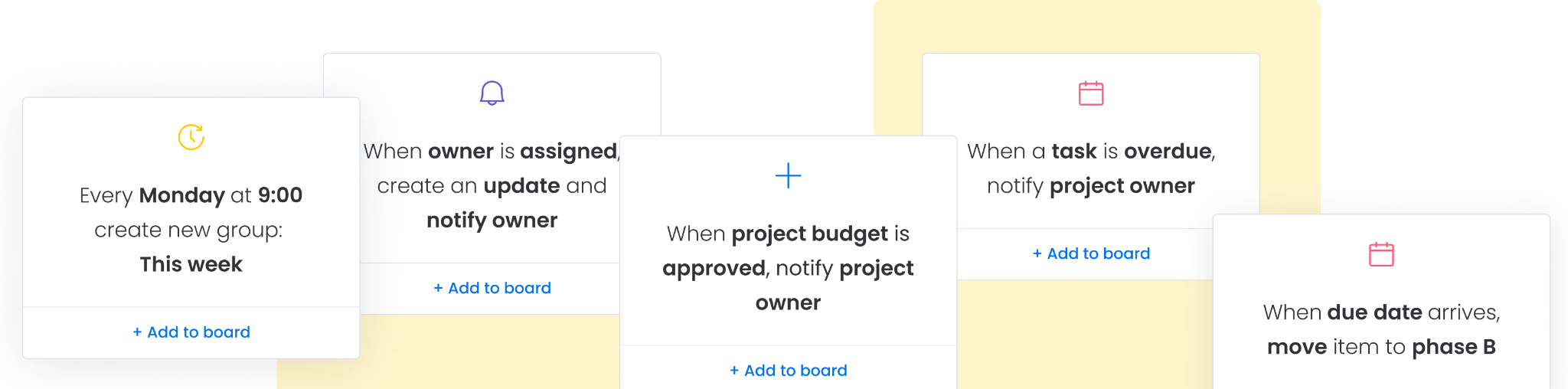
Automations follow a trigger, condition, action model that requires no code. A trigger fires when an event occurs (a status changes, a date arrives, an item is created). A condition filters which triggers proceed.
Source: monday.com
An action executes the result: sending a notification, reassigning a task, creating an item on another board, moving items between groups, or starting an approval workflow. Users build automations from scratch in a visual builder or pick from pre-made templates. Monthly action limits scale steeply by plan:
Standard: 250 automation actions/month
Enterprise: 250,000 automation actions/month
When the monthly limit runs out, automations stop. Email notifications go to admins at 50%, 75%, and 100% of usage. There are no overage charges; the only resolution is upgrading. Basic plans have no automations at all.
The Autopilot hub is a command center showing the health, usage, and connection status of every automation, integration, and workflow across an account. For large teams where automation sprawl creates risk, this single-pane view of all active automations is a governance tool worth having.
Integrations connect monday.com to 850+ external tools through the App Marketplace. Named integrations include Slack, Microsoft Teams, Jira, GitLab, GitHub, Zoom, Outlook, OneDrive, Salesforce, HubSpot, Dropbox, LinkedIn, Trello, Stripe, Typeform, and Twilio.
For tools like Jira, GitHub, and Salesforce, two-way syncs push changes from monday.com to the external tool and pull changes back at the same time, so an engineer updating a Jira issue and a project manager working in monday.com both see current data. Integration actions share the same monthly limits as automations. Zapier and Make extend connectivity to tools without native integrations.
The marketplace has reached 1.6 million app installs, with 49% of all monday.com accounts and 87% of enterprise accounts having installed at least one app.
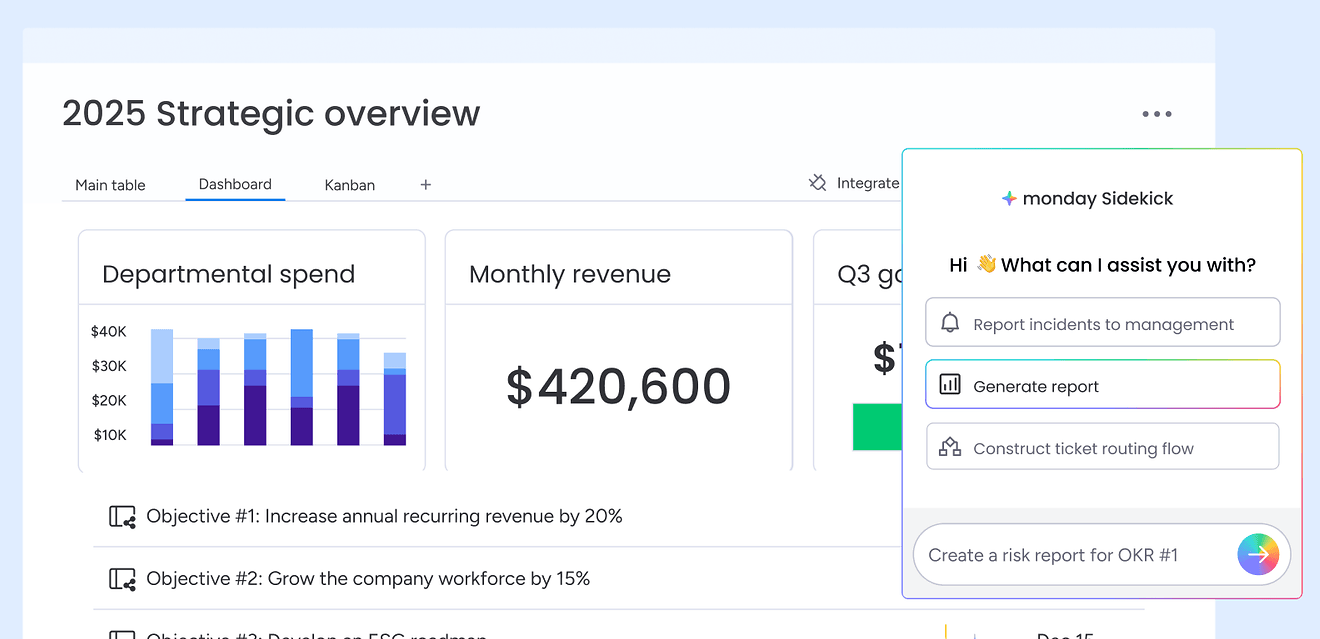
Dashboards assemble widgets that pull live data from one or more boards: charts, battery views, number summaries, Gantt timelines, workload visualizations, and more. AI analysis runs in the background to surface alerts and generate executive summary reports without manual compilation. Leaders can download and customize reports per audience. Dashboards provide live analysis, not static reporting.
Source: monday.com
WorkCanvas is monday.com's collaborative digital whiteboard, supporting brainstorming, process flowcharts, retrospectives, and workshop planning on an infinite canvas with real-time multiplayer collaboration. Canvases integrate directly with monday.com boards so board items appear live on the canvas, and finished canvases export as PNG, PDF, or presentation slides.
monday.com CRM: Sales Pipeline and Customer Management
monday CRM is the sales product. It reached $100M ARR in roughly three years (as of August 2025).
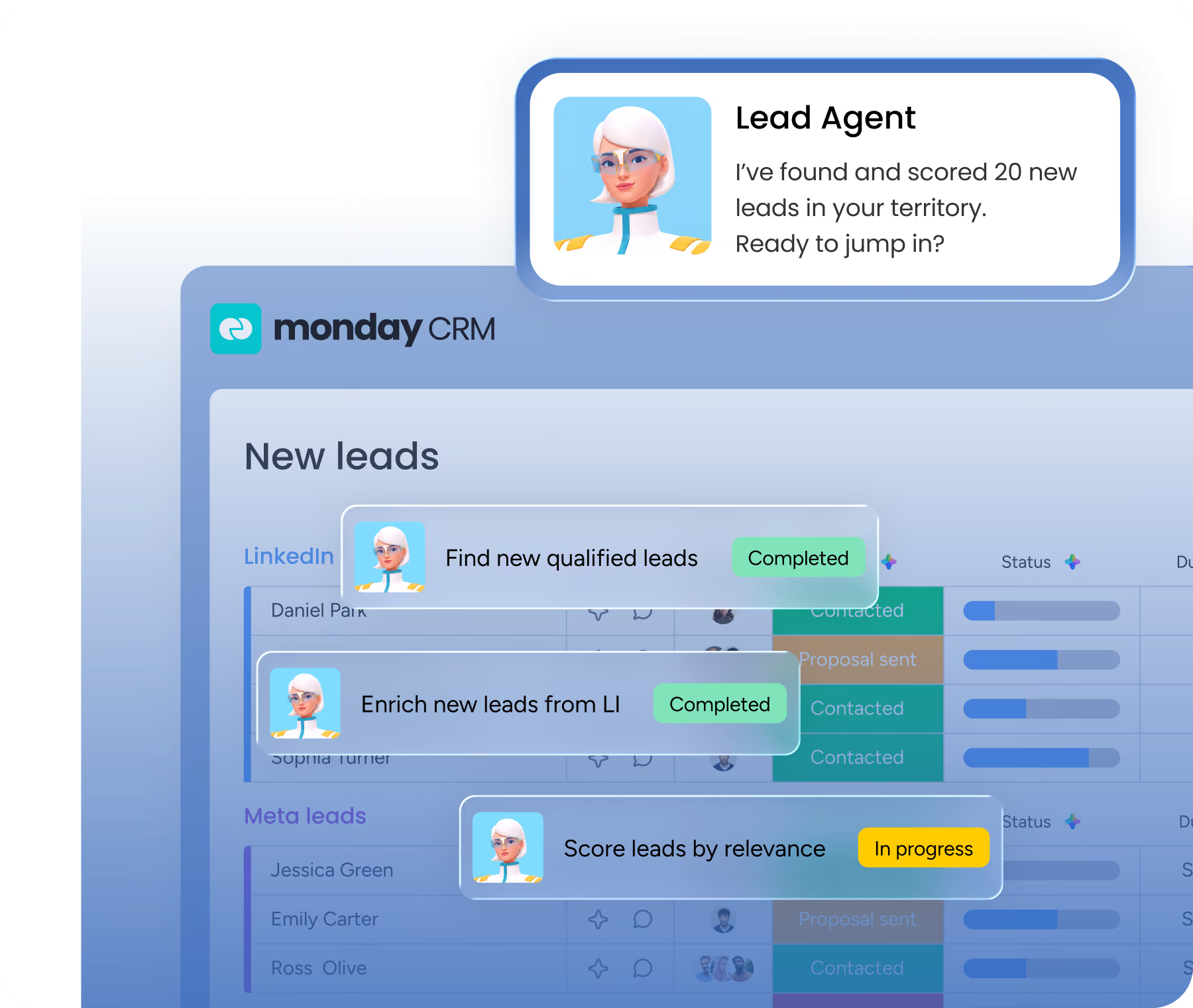
The CRM is structured around four core boards: Leads, Contacts, Accounts, and Deals, interconnected via Connect Boards columns. Leads enter manually, via monday WorkForms, through Excel/Google Sheets import, or through direct integrations with Facebook Ads, HubSpot, or Pipedrive.
Source: monday.com
When a rep qualifies a lead and changes its status, an automation can move it to the Contacts board. The Account association feature automatically links contacts to accounts when email domains match. Connected deals move through pipeline stages on the Deals board.
Emails and Activities lets teams send and receive emails directly from any deal or contact record, with full activity history (calls, meetings, notes) logged in one place. This is unique to monday CRM and eliminates the need for a separate email tool for deal communication. A shared email inbox lets multiple team members manage deals together.
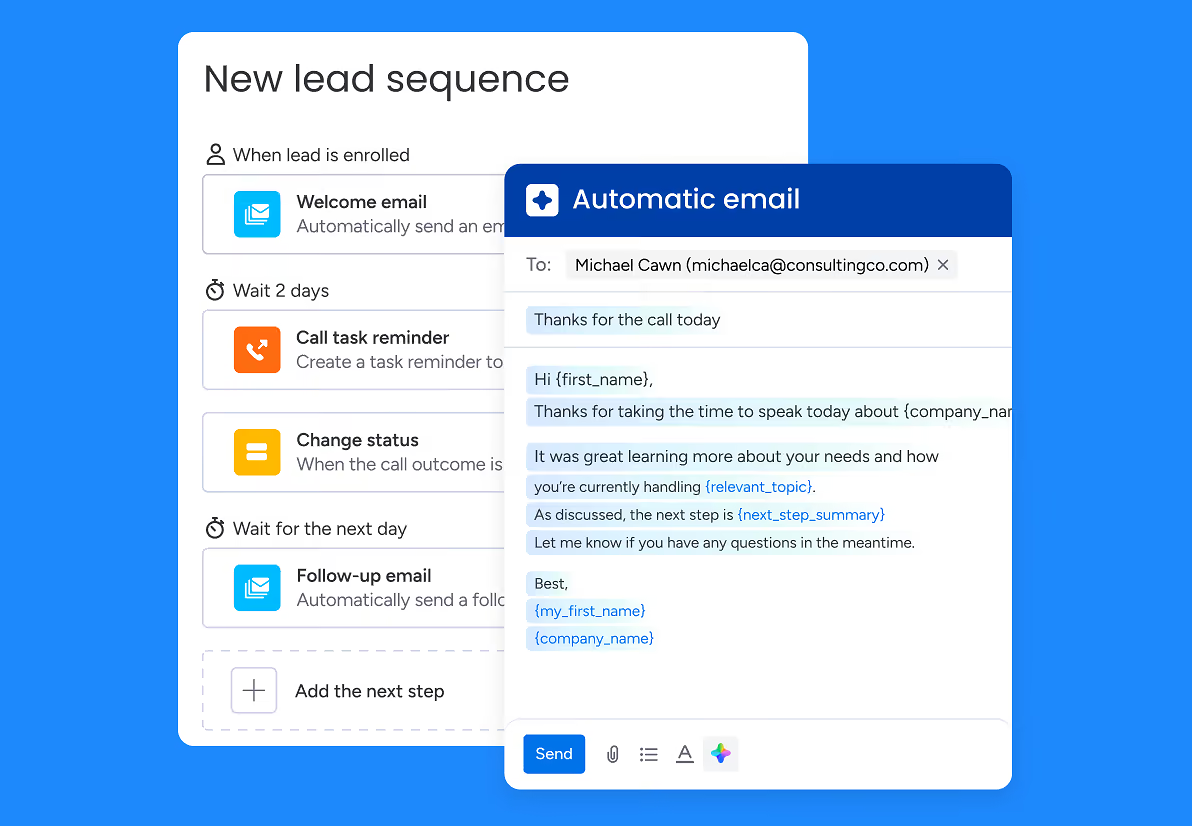
Sequences automate multi-step email follow-ups with task reminders for lead nurturing. Mass emails send personalized bulk messages with open and click tracking and analytics. AI-assisted email composition writes, rephrases, and suggests templates, and the monday AI Notetaker records and summarizes meetings, capturing action items tied directly to CRM records.
Source: monday.com
The Sales Pipeline View shows deals by stage in a visual, interactive layout exclusive to CRM boards. CRM-specific dashboard widgets include a Funnel Chart, Deal Stages, Deal Insights, Leaderboard, Sales Gauge, and Activity Tracker. Sales forecasting sets deal value and close probability and tracks forecast versus actual sales by month and rep. Quotes and invoices can be generated directly from the CRM.
Two dedicated AI agents automate CRM workflows: the AI Lead Agent and AI Sales Agent handle lead management and sales workflow automation. Round-robin automations assign new leads to sales reps in rotation. Duplicate management alerts users to and merges duplicate leads, contacts, or accounts.
Conditional status changes (Ultimate plan only) enforce required field completion before a deal or lead status can change, preventing reps from advancing deals without filling in qualification data. CRM data enrichment with Crunchbase enriches contact and account data within the platform.
Native integrations cover QuickBooks, Zoom, Google Calendar, Outlook Calendar, Facebook Ads, HubSpot, and Pipedrive.
monday.com Dev: Product and Software Development
monday dev is the product management and software development platform, built for developers, product managers, and designers to manage development from ideation to launch. It connects dev, product design, and business teams in one workspace spanning planning, building, revising, and launching products.
Source: monday.com
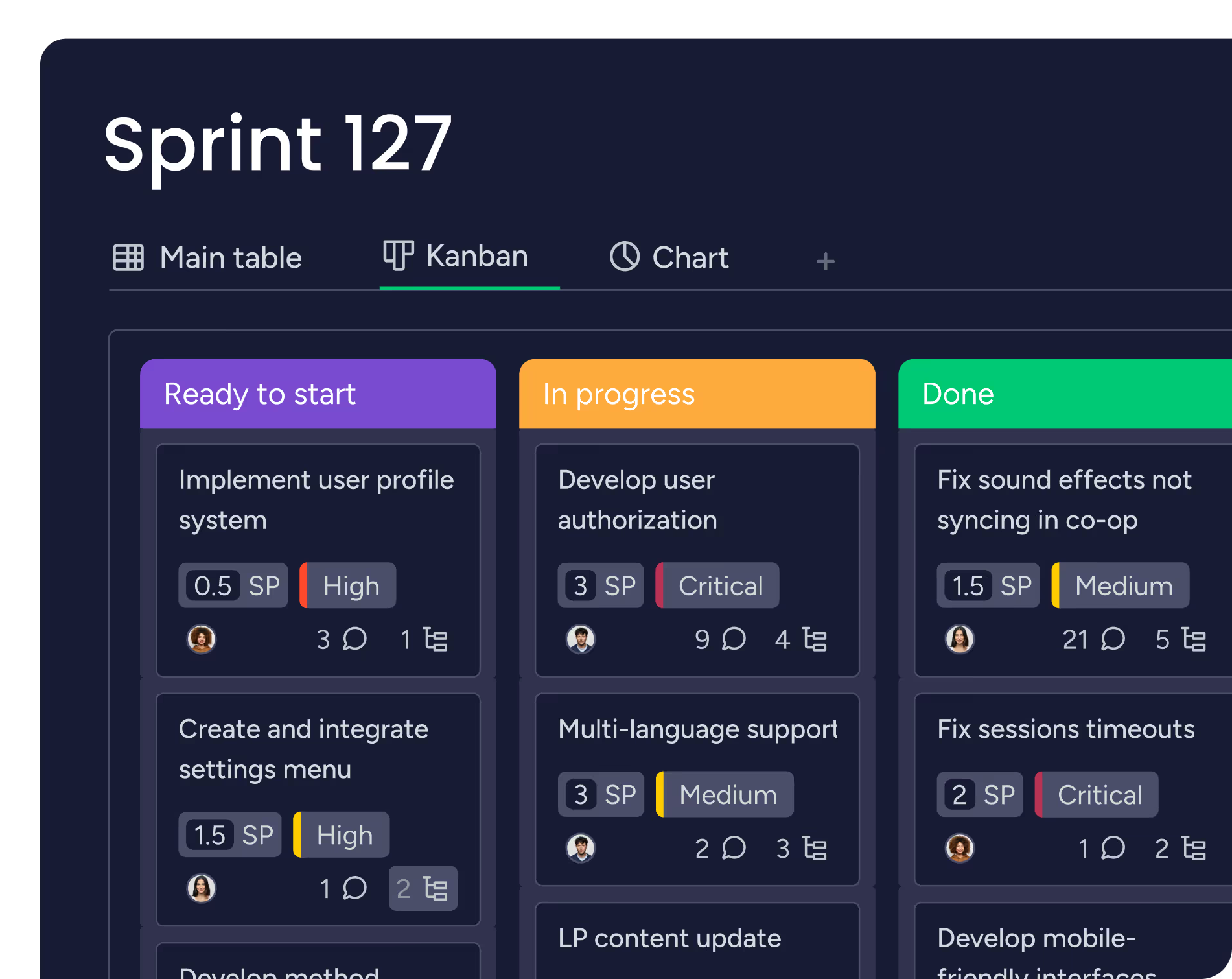
The product centers on boards designed for agile workflows. The Tasks board is the sprint board, added automatically when the product is installed, with board groups representing individual sprints plus a backlog group.
Key columns include Owner, Estimated Story Points, Actual SP, Status, Priority, Type, Epic (via Connect Boards), GitHub link, Unplanned, and Item ID. Several of these columns are protected and cannot be deleted, enforcing structural consistency across sprints.
Sprint creation defines a name, start and end dates, and goals. Sprint start and completion can be automated via Sprint setup: monday dev starts the next sprint, closes the current one, and generates a sprint summary.
The Agile Insights board view provides three built-in charts: a velocity chart (completed work per sprint), a planned versus unplanned chart (ratio of planned to reactive work), and a burndown chart (auto-generated effort graph tracking sprint progress).
GitHub connects via a one-time installation, syncing branches, commits, and pull requests directly to monday dev items with bidirectional status updates. GitLab and CircleCI are also natively supported. The Engineering Performance Dashboard combines GitHub integration data with sprint tracking to surface real-time PR metrics alongside sprint tickets.
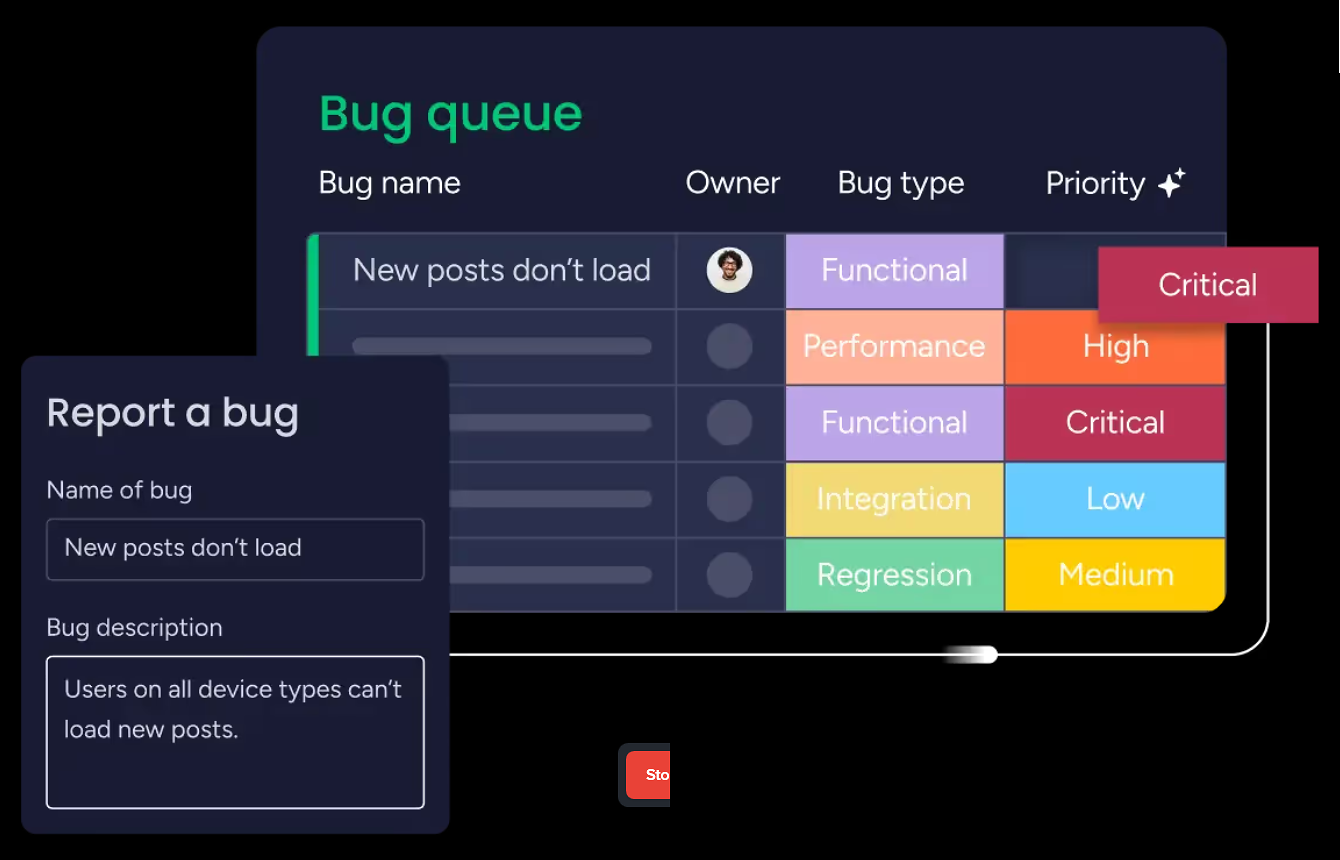
The Kanban view supports WIP (Work in Progress) limits per status column to prevent overload. A dedicated Bugs Queue board handles triage, prioritization, and resolution tracking.
Source: monday.com
A Roadmap tracker lets product managers organize planned epics and features by quarter, visible to business stakeholders. The Epic breakdown feature centralizes all tasks with dependencies tied to a single epic, showing every related item across boards.
Teams can send tasks directly to Cursor from monday dev, connecting planning items to the AI code editor. An AI Daily Standup surfaces insights from board data automatically. A dedicated retrospectives board supports team retrospectives throughout and after each sprint.
Because monday dev sits on the same platform as monday work management and CRM, product teams can surface roadmap boards to business stakeholders and link sprints to customer requests without requiring those stakeholders to adopt a separate developer tool.
monday.com Service: Ticketing and Enterprise Service Management
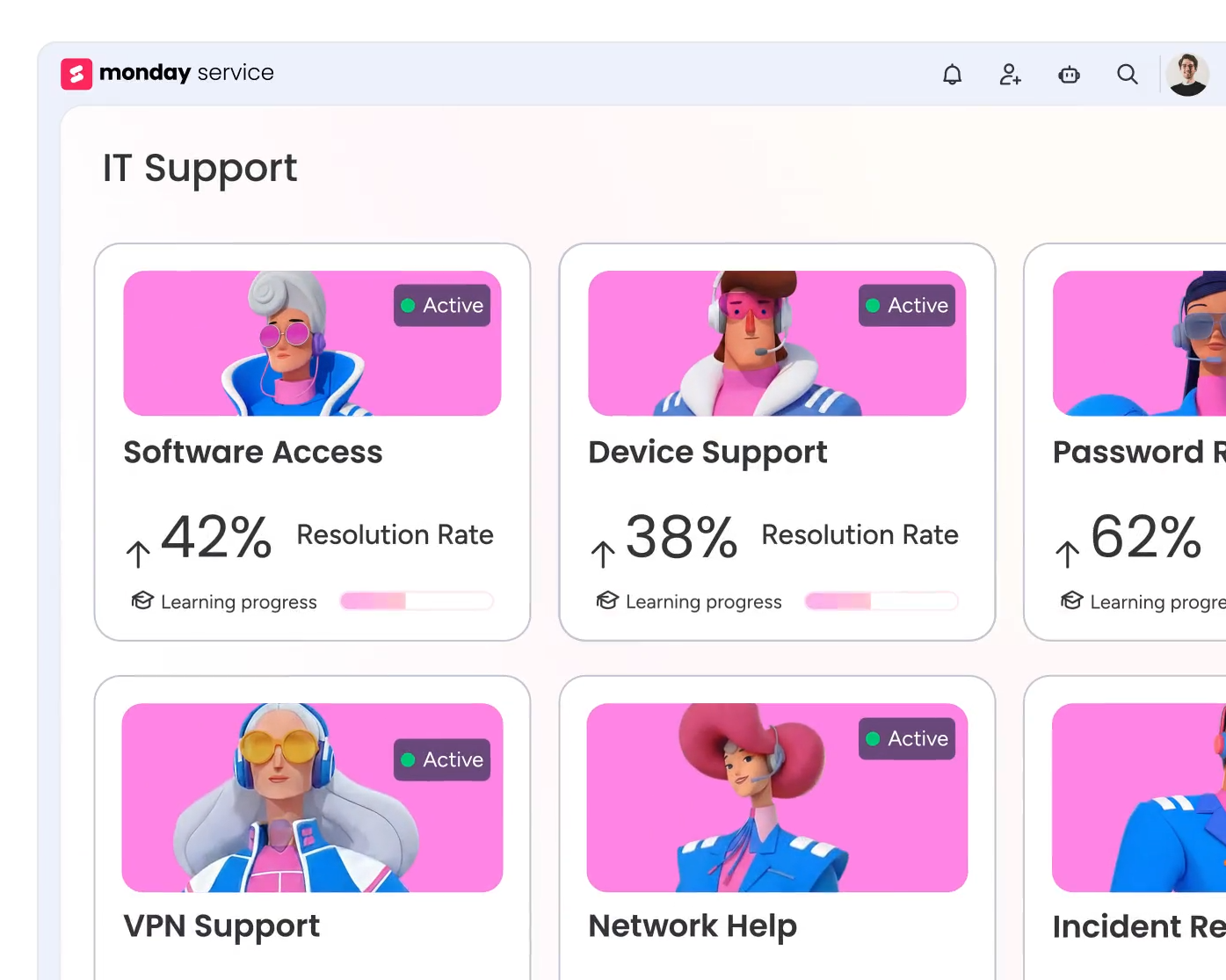
monday service is an AI-powered Enterprise Service Management platform for any team that manages incoming requests: IT, HR, Finance, Legal, Facilities, Marketing, and Operations.
Source: monday.com
The system centers on a Tickets board where each incoming request becomes an item. Tickets enter through connected channels: Gmail, Outlook, a custom monday Inbox (a unique email address managed inside the platform), or a WorkForm (a structured submission form). On Enterprise plans, Outlook also supports connecting a Microsoft 365 shared mailbox.
When a ticket arrives via email, the board populates the item name from the subject, the description from the body, the customer name from the sender, and CC'd recipients in the Participants column.
Tickets move through dynamic groups: Unassigned, Open tickets, Waiting for response, and Resolved tickets. Pre-configured automations drive these transitions as statuses change. A dedicated SLA column tracks time-to-first-response and time-to-resolution with live timers and breach indicators, so agents and managers see at a glance which tickets are approaching or have exceeded their service-level targets.
The Customer Portal is a branded self-service hub where requesters submit forms, read knowledge articles, track ticket status, and close resolved tickets themselves, all without a monday.com account. Multiple portals can run simultaneously for different teams or audiences.
The AI layer includes auto-categorization, smart routing, AI suggestions for agents, and AI service agents that connect to a knowledge base and past tickets to resolve repetitive requests automatically. AI auto-reply handles common questions without human intervention. When duplicate tickets appear for the same request, agents can merge them into a single primary ticket.
monday service starts at the Standard plan (no free or Basic tier). Because it runs on the same platform, service teams can connect tickets to work management boards, CRM records, or dev sprint items without switching tools.
monday.com AI: Sidekick, Agents, Vibe, and Workflows
The AI suite is the newest and fastest-moving part of the platform. It spans every monday.com product through a shared architecture of AI blocks, credits, and governance controls.
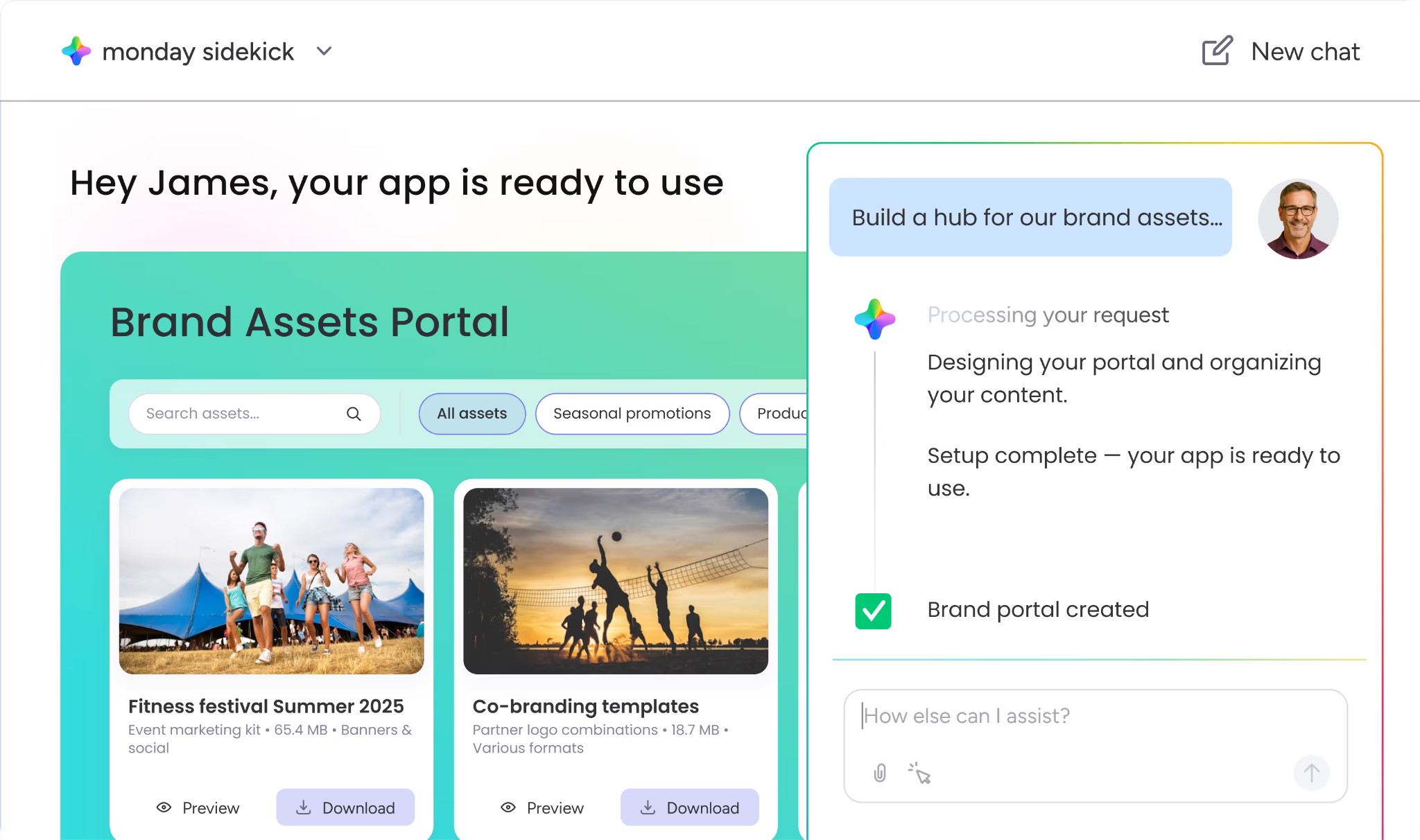
monday sidekick (Beta) is a personal AI assistant embedded in the workspace. It combines three inputs: AI models, the user's live work data (boards, docs, items, timelines), and connected external apps including Slack, Gmail, and Google Calendar.
Source: monday.com
Unlike standalone AI assistants, sidekick sees your boards, active items, deadlines, teammates, and connected tools. It respects the user's existing permission structure, never accessing data the user cannot see.
What sidekick can do: summarize updates, conversations, and project status from across the workspace; create documents, project plans with owners and deadlines, reports, presentation decks, and visuals; update tasks, timelines, and item data on boards from a prompt; notify teammates and trigger workflows; build boards, automations, dashboards, and forms from a natural language request; analyze data across boards for leadership insights; and research online without leaving the platform.
It has a dedicated mobile app with voice interaction. Available on all plans with no setup required.
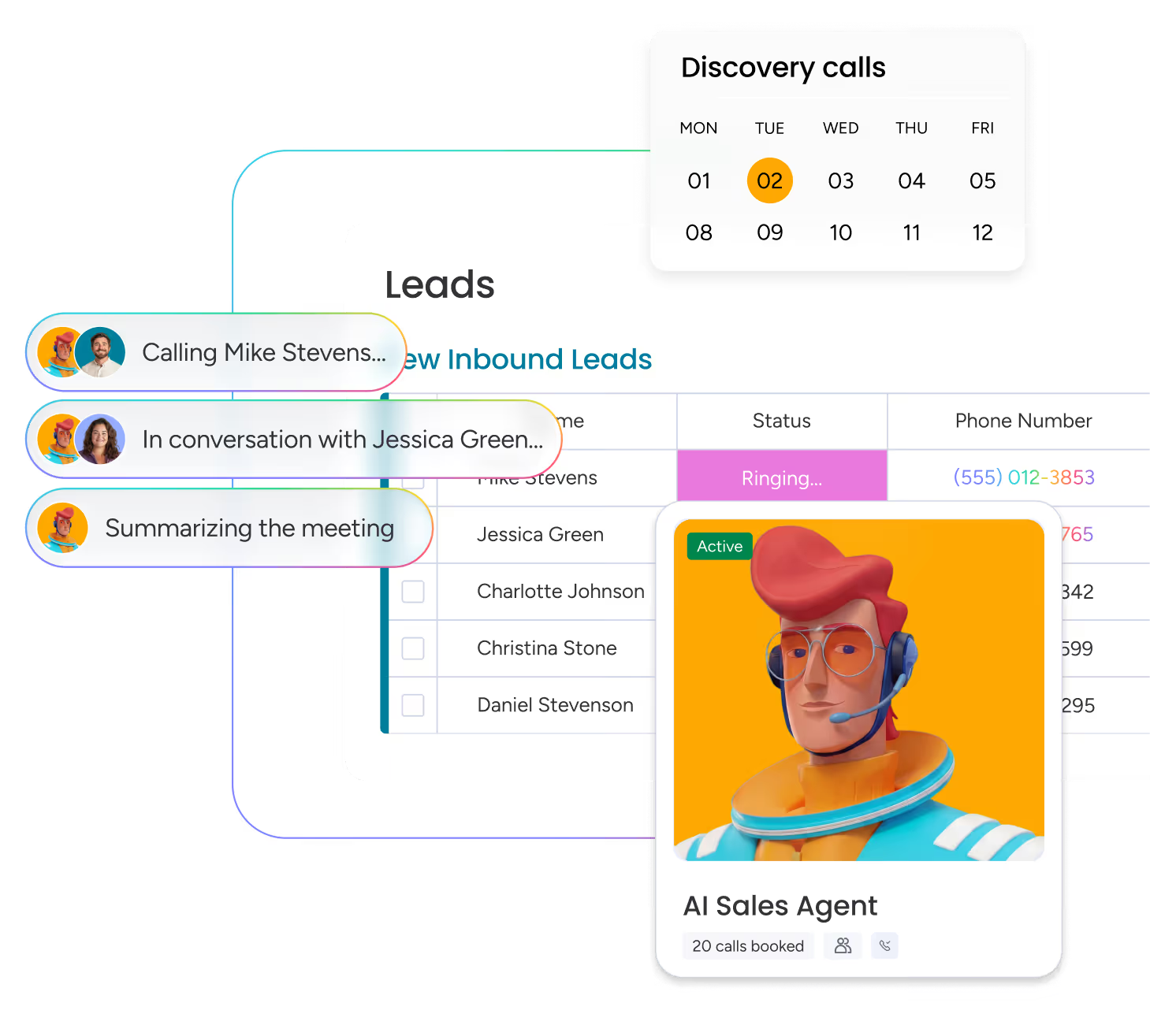
monday agents (Early Access) are role-specific AI agents that run autonomously around the clock, handling repeatable workflows across the platform and connected tools.
Source: monday.com
They operate on four layers: Knowledge (agents use docs, PDFs, and boards as context), Actions (agents execute tasks across all aspects of work), Integrations (agents pull context and push updates across connected tools), and 24/7 Autonomy (agents work without time, volume, or language constraints).
Administrators set Guardrails with explicit permissions and transparency logs so every agent action is visible and auditable. Pre-built agents include Ticket Assignment, Lead Scorer, Sentiment Detector, Reference Collector, and agents for Sales, Operations, and Product/Engineering workflows.
The Agent Factory is a no-code builder for creating custom AI agents from templates or from scratch. Pre-built templates include a Dev Stand-up Coordinator, Meeting Prep Specialist, RSVP agent, Appointment Coordinator, Trends Analyst, SDR Expert, and Support Specialist. Agents built with Agent Factory can make outbound calls, send emails, log progress, and escalate issues.
monday vibe (Beta) accepts a natural language description and generates a working custom app within the workspace, pulling from the user's board data.
Use cases include inventory management, recruiting apps, time tracking, event portals, OKR monitoring, and sales forecasting. monday vibe surpassed $1M ARR within 2.5 months of its pricing launch in October 2025, the fastest any monday.com product has reached that milestone.
AI-powered columns (available across boards) extend AI into everyday data work.
Options include: writing assistant (drafts text with configurable tone and length), extract information with AI (pulls structured data from invoices, resumes, contracts, images, or linked web pages into board columns), auto-categorization, sentiment detection, summarization, translation, custom prompts, and an AI formula builder that translates plain-language descriptions into formula column logic.
monday MCP enables any AI agent or app to connect to monday.com boards through the Model Context Protocol. External AI tools including Claude, Cursor, Mistral, and Microsoft Copilot Studio can authenticate via OAuth, read account data, and take actions within existing permissions at no additional cost.
The MCP server covers 50+ tools including board management, item operations, workspace management, form management, automation management, sprint data, search, and asset management.
AI features are governed by an AI Permissions and Governance framework, toggled at the account level, and all actions consume AI credits tracked per account. The AI Trust Center documents that customer data is encrypted by default and AI operates within existing account permissions.
monday.com API and Developer Platform
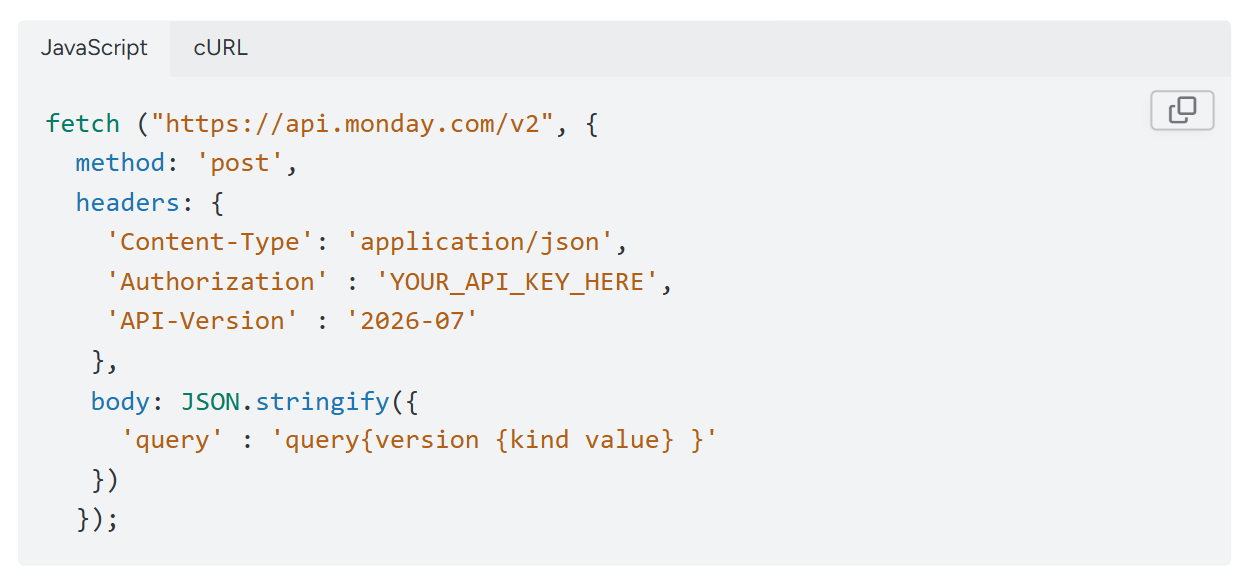
monday.com exposes a GraphQL API through a single endpoint (https://api.monday.com/v2), supporting queries (reads) and mutations (creates, updates, deletes) that can be batched in one request. The API is versioned quarterly, with three versions coexisting at any time: Release Candidate, Current, and Maintenance. Callers pin a version via the API-Version request header.
Source: monday.com
Authentication uses personal V2 API tokens that carry the same permissions as the user in the UI. Apps built on the monday apps framework use OAuth 2.0 with configurable permission scopes.
The API covers boards, items, groups, columns (30+ types), workspaces, users and teams, updates (comment threads), assets (file uploads), automations and workflows, dashboards, WorkDocs, forms, and webhooks. Board-level event webhooks fire via POST to any HTTPS endpoint, and marketplace apps can subscribe to 13 lifecycle events covering installation and subscription state changes.
Rate limits enforce complexity scoring per query (5M points per individual query) alongside daily call limits that scale by plan:
Free / Basic / Standard: 1,000 calls/day
Pro: 10,000 calls/day (soft limit)
Enterprise: 25,000 calls/day (soft limit)
Official SDKs exist in JavaScript/TypeScript (via npm, with full TypeScript types generated from the live API schema) and Python. A CLI tool handles scaffolding, deploying, and managing marketplace apps.
The developer portal at developer.monday.com includes an API playground, a developer AI assistant, and an llms.txt index for AI-agent-readable documentation. The monday code hosting service lets developers deploy app backend logic within monday.com's infrastructure, with built-in JavaScript and Python runtimes, BLOB storage, and cron scheduling.
monday.com Security and Compliance
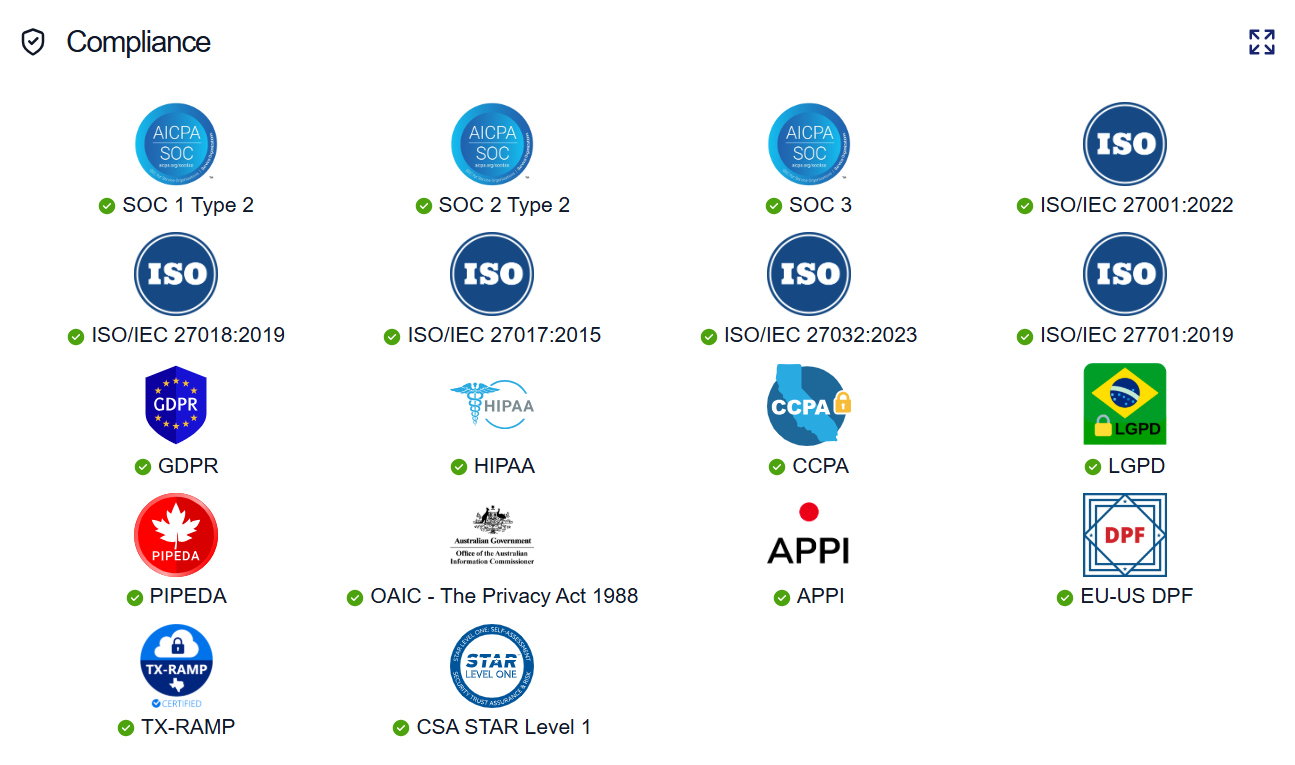
monday.com maintains a broad certification stack documented at trust.monday.com:
SOC 1 Type 2, SOC 2 Type 2, and SOC 3
ISO/IEC 27001:2022, ISO/IEC 27018:2019 (cloud privacy), ISO/IEC 27017:2015 (cloud security), ISO/IEC 27032:2023 (cybersecurity), ISO/IEC 27701:2019 (privacy information management)
CSA STAR Level 1
Source: monday.com
Regulatory compliance covers GDPR, HIPAA, CCPA, LGPD (Brazil), PIPEDA (Canada), OAIC Privacy Act 1988 (Australia), APPI (Japan), EU-US Data Privacy Framework (DPF), and TX-RAMP (Texas state).
Security controls include encryption at rest, access monitoring, data deletion capabilities, multi-factor authentication, audit logging, application penetration testing, code analysis, SIEM, IDS, DLP, anti-malware, disk encryption, endpoint detection and response, and firewall. The platform runs on AWS with separate architecture for US and EU/AUS regions.
Where monday.com Stops: The Gaps
monday.com centers on work execution: managing projects, pipelines, sprints, tickets, and automating handoffs between them. That focus shapes the product's strengths, but it also means the platform depends on external sources for several capabilities a go-to-market team needs.
No native B2B contact or company database. monday.com does not include a database of contacts, companies, direct-dial phone numbers, or verified business emails.
The CRM tracks contacts that sales teams enter manually, import from files, or pull from integrations (Facebook Ads, HubSpot, Pipedrive). Crunchbase enrichment adds company context, but the platform does not supply prospecting data. A team using monday CRM without a separate data provider must source every contact externally.
No native buyer intent signals. monday.com surfaces activity within its own boards (deal updates, ticket responses, campaign metrics), but the platform does not track which companies are researching specific topics across the web.
There is no proprietary intent data showing who is in-market before they enter your pipeline. Engagement signals tell you who is active in your CRM; intent signals tell you who is researching your category before you reach out.
No conversation intelligence. monday.com's AI Notetaker records and summarizes meetings with action items, but the platform does not include conversation intelligence in the Chorus or Gong sense: no AI call analysis with talk ratios, sentiment detection, objection tracking, competitive mention alerts, or coaching scorecards built from call patterns.
Teams that advance deals from email to phone need a separate tool to capture conversation context.
No website visitor identification. monday.com does not identify anonymous website visitors. There is no pixel, no reverse IP lookup, no visitor-to-company resolution. Teams that want to know which companies (or which people) visit their website need a separate tool.
No marketing orchestration or ABM capabilities. monday campaigns covers email marketing, and monday work management handles creative production workflows. But the platform does not include display advertising, audience management, demand-side platform capabilities, contact-level site visitor identification, or multi-channel account-based marketing orchestration.
CRM data depth limited for enterprise prospecting. monday CRM enriches via Crunchbase, but Crunchbase covers primarily tech, venture-backed, and startup ecosystems. For teams selling into the broad enterprise market, the enrichment does not provide the depth of company attributes, technographics, org charts, or verified contact data that dedicated B2B data platforms deliver.
How ZoomInfo Covers the Gaps
The gaps above share a common thread: monday.com manages what happens after contacts and opportunities exist, but it depends on external sources for the intelligence that identifies, qualifies, and prioritizes those opportunities. ZoomInfo supplies that intelligence, the data underneath it, and the marketing orchestration monday.com lacks.
ZoomInfo's B2B Data Platform: The contact and company database monday.com does not include
ZoomInfo operates a B2B data platform of 500M contacts, 100M companies, 135M+ verified phone numbers, 120M direct-dial phone numbers, and 200M+ verified business email addresses. The data flows through a verification process run by 300+ human researchers and automated ML scanning 28 million site domains daily, with up to 95% accuracy on first-party data.
Source: ZoomInfo
For a team using monday CRM, this fills the prospecting gap. monday.com can track deals and automate follow-ups once contacts exist, but it cannot supply the contacts themselves.
ZoomInfo provides department org charts with decision-makers' direct dials and emails, 300+ company attributes for segmentation, contact tracking with job-change alerts, and technographic profiles covering 30,000+ technologies across 200+ categories for 30+ million companies.
Global coverage extends to 34M+ company profiles outside North America, 200M+ professional profiles outside NA, and 45M+ mobile numbers outside NA.
In a Fortune 500 competitive RFP analyzing 25 million contacts across vendors, an independent consultant concluded that "no other competitor came even close."
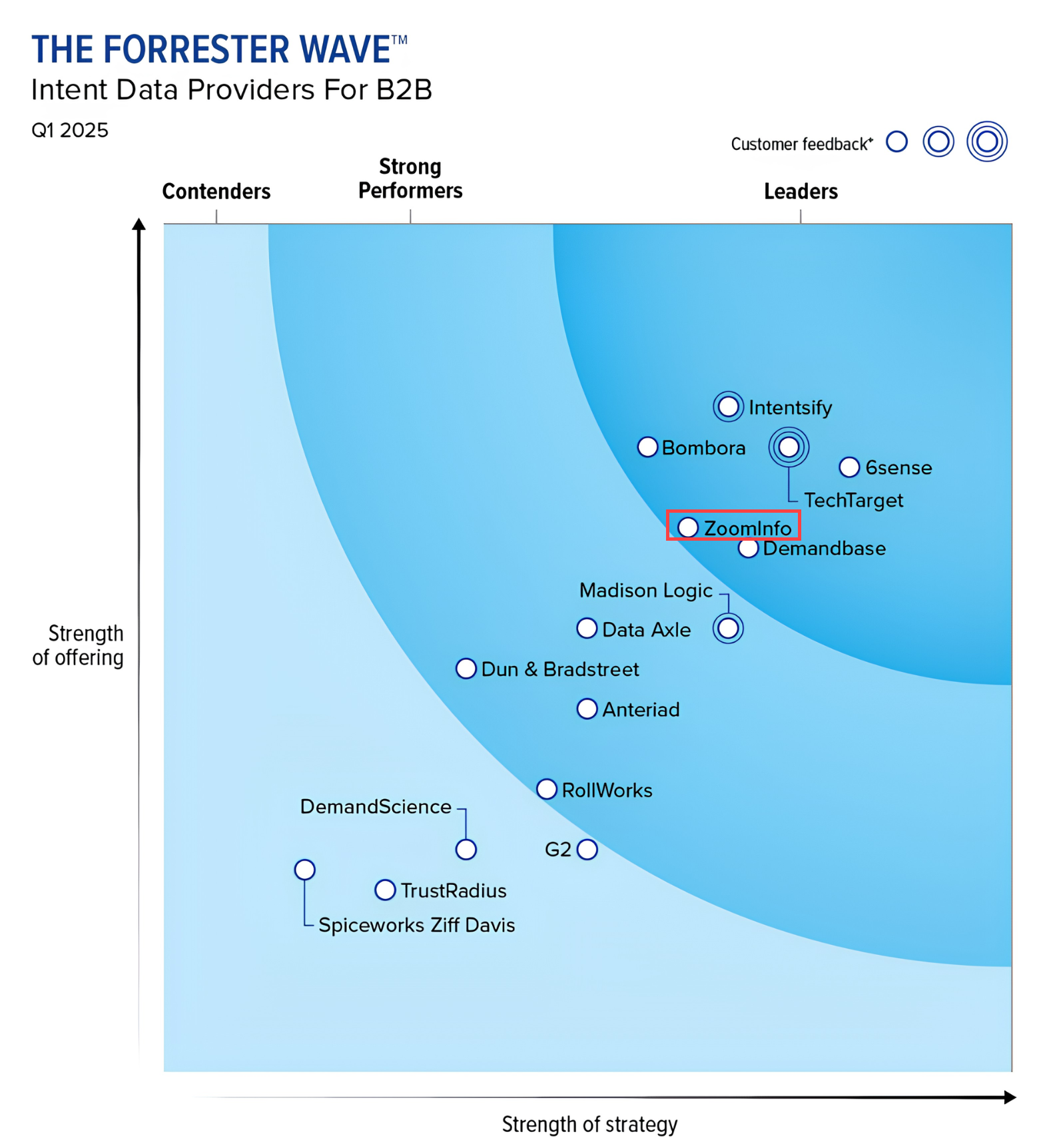
Third-party analysts confirm the quality: Leader in the Forrester Wave for Intent Data Providers, Q1 2025, Leader in the Gartner MQ for ABM Platforms for the second consecutive year, and the only Customers' Choice vendor in the Gartner Voice of the Customer quadrant with a 4.7/5.0 rating.
Source: ZoomInfo
ZoomInfo Intent and Website Visitor Tracking: Signals that show who is in-market before outreach begins
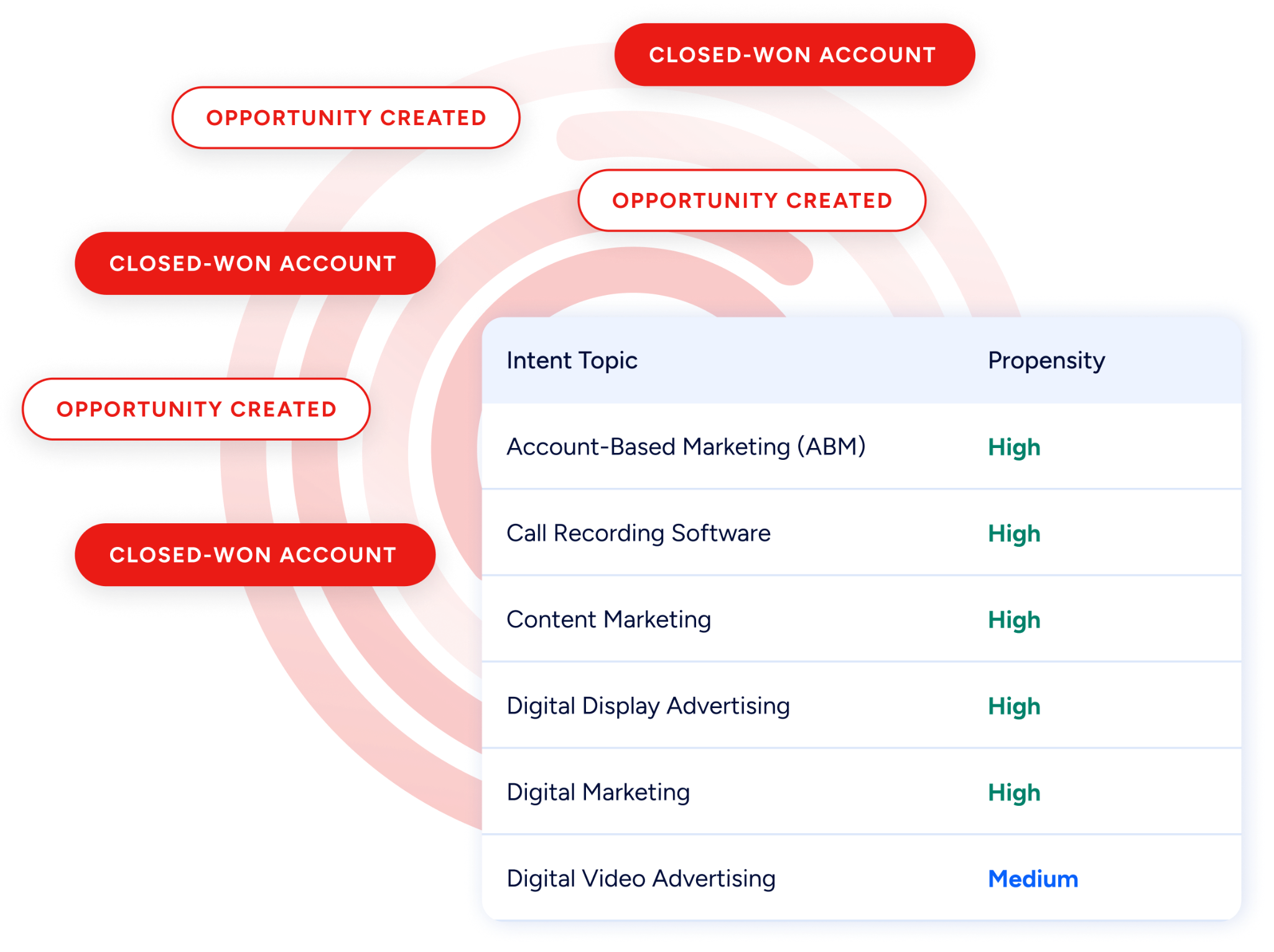
ZoomInfo Intent tracks signals from 210 million IP-to-Organization pairings and 6 trillion+ new keyword-to-device pairings sourced monthly.
Source: ZoomInfo
Where monday.com's CRM shows activity inside your pipeline, ZoomInfo's intent data reveals which companies are researching topics related to your product across the web, before you have contacted them. Guided Intent, exclusive to ZoomInfo, identifies topics historically correlated with deal success rather than requiring manual topic selection.
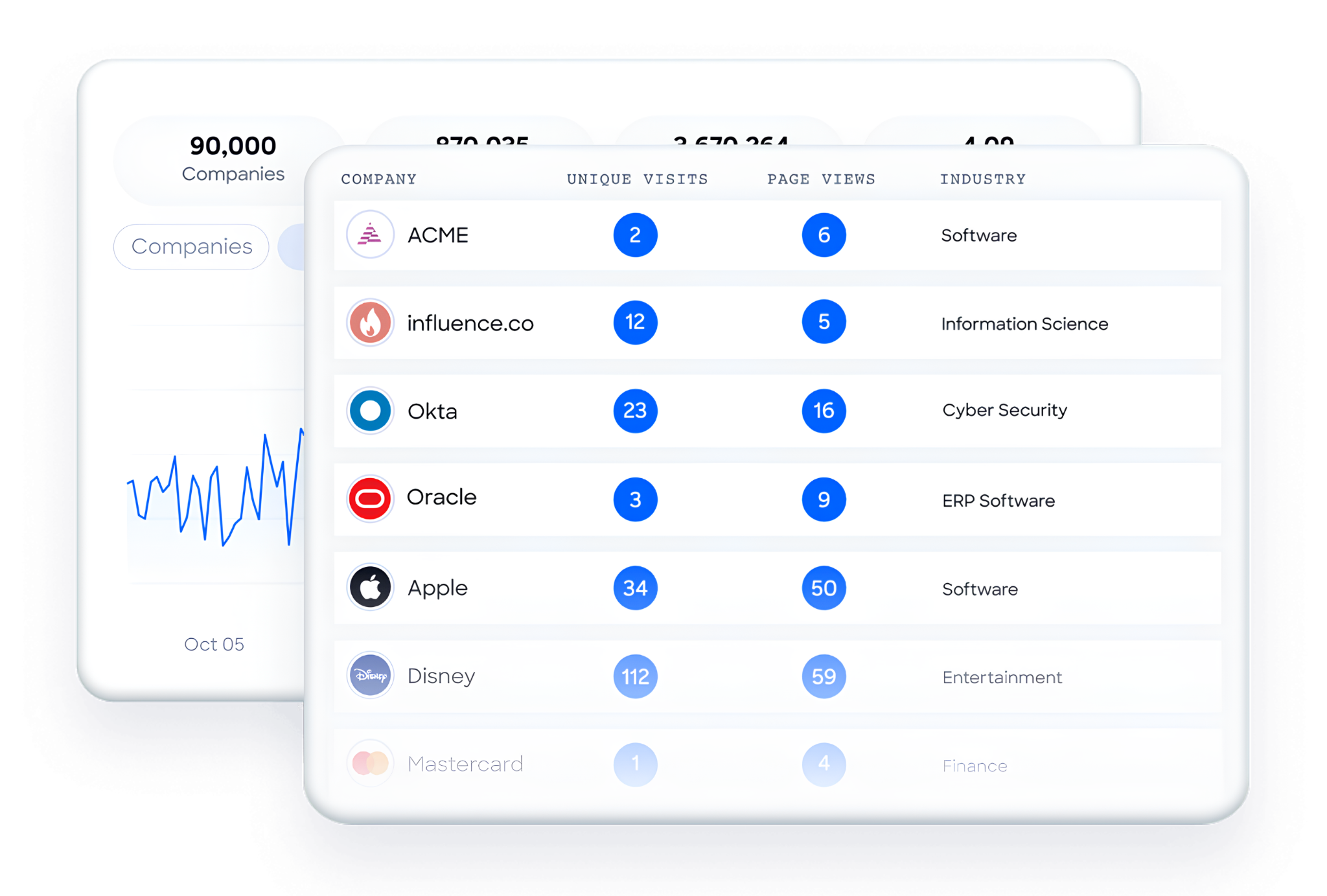
On the website side, WebSights resolves anonymous website traffic to companies and includes Automatic Traffic Filtering to distinguish real visitors from bots.
Source: ZoomInfo
ZoomInfo Marketing goes further with contact-level site visitor identification, showing who specifically visited (not just which company) and triggering personalized outreach. monday.com has no website visitor identification; ZoomInfo provides it at both the company and individual level.
ZoomInfo's GTM Context Graph and Chorus: Intelligence from conversations, not just board updates
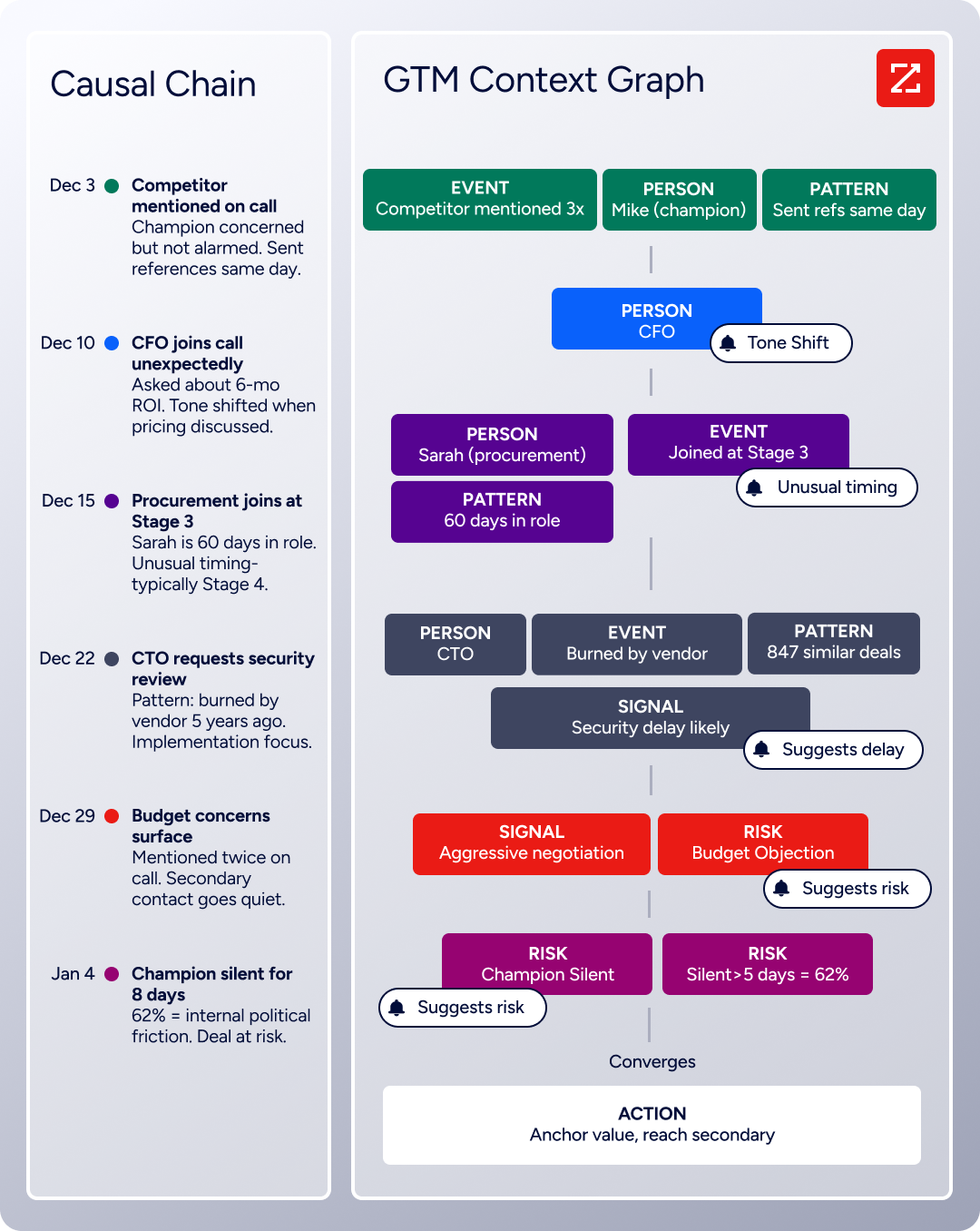
monday.com captures what happens in boards: task completions, deal stage changes, ticket resolutions. ZoomInfo's GTM Context Graph captures why deals move or stall by processing 1.5B + data points daily, fusing B2B data with CRM records, conversation intelligence from Chorus, email interactions, and behavioral signals into a single intelligence layer.
Source: ZoomInfo
Chorus, ZoomInfo's conversation intelligence engine backed by 14 technology patents, records and transcribes sales calls, surfaces AI-generated insights (talk ratios, sentiment, objection detection), auto-syncs deal intelligence to the CRM, and provides coaching scorecards and clip sharing.

Source: ZoomInfo
A CRM records that a deal's stage moved; the GTM Context Graph reasons about why: connecting the CFO joining the last call with ROI-focused questions to the pattern behind closed-won deals in the same segment, then linking that to third-party signals showing the company is hiring and researching a competitor.
ZoomInfo GTM Studio: Marketing orchestration and ABM the work platform cannot provide
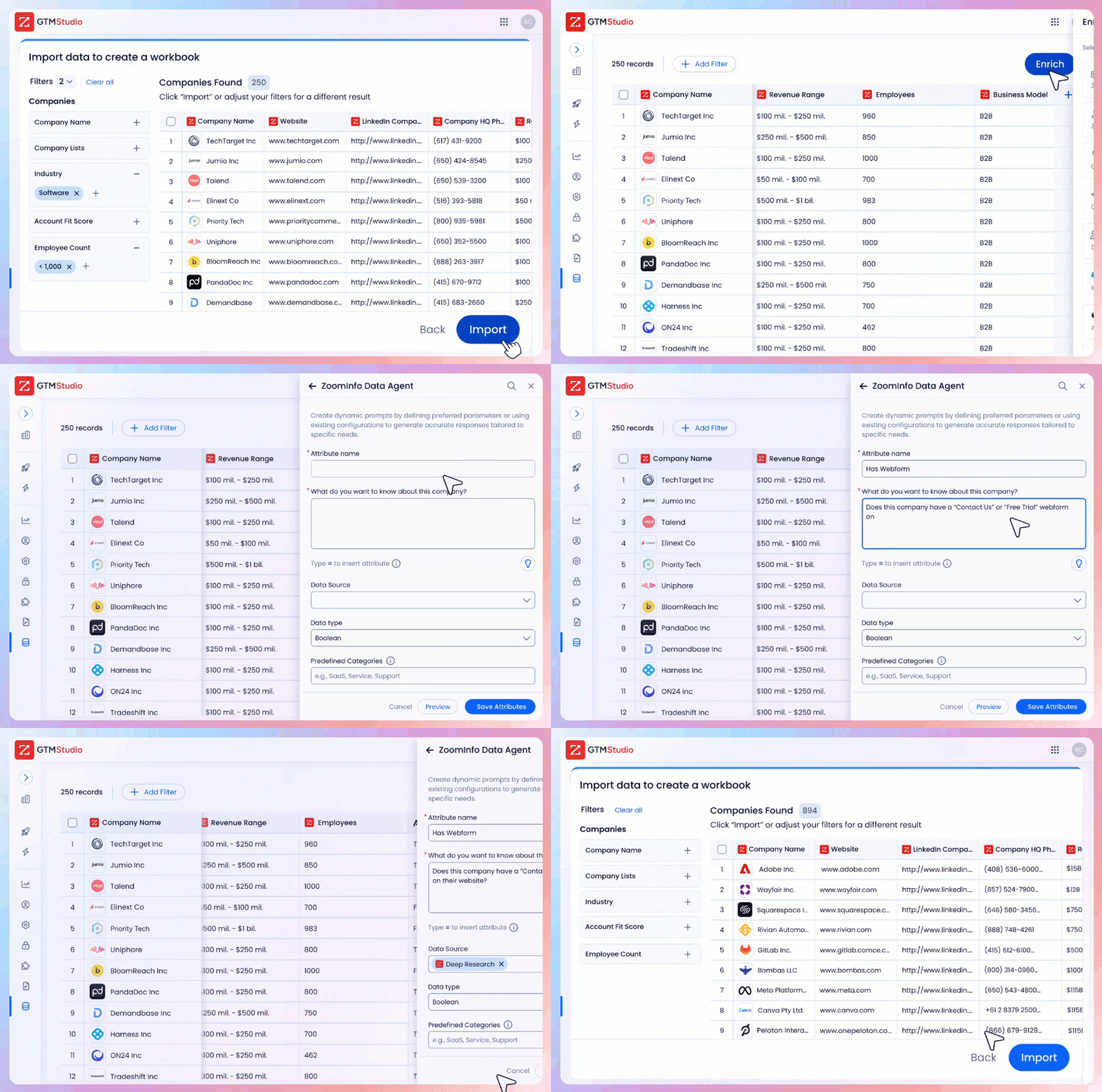
ZoomInfo’s GTM Studio addresses the marketing orchestration gap directly. Marketers, RevOps teams, and GTM engineers can build audiences using natural language, enrich with first- and third-party data, define triggers, and activate plays across channels (email, calls, display ads, direct mail, LinkedIn, Meta, Connected TV) without engineering support.
Source: ZoomInfo
Pre-built GTM plays cover inbound acceleration, champion tracking, competitive displacement, and ICP targeting. Expansion plays that used to take 3 weeks now launch in 30 minutes.
ZoomInfo Marketing includes a native Demand-Side Platform deploying display ads based on 300+ company attributes, FormComplete (reducing forms to a single field while auto-appending data), and Account Fit Scoring (predictive AI scoring 0-100 based on company attribute patterns).
ZoomInfo GTM Workspace: A seller execution surface powered by the GTM Context Graph
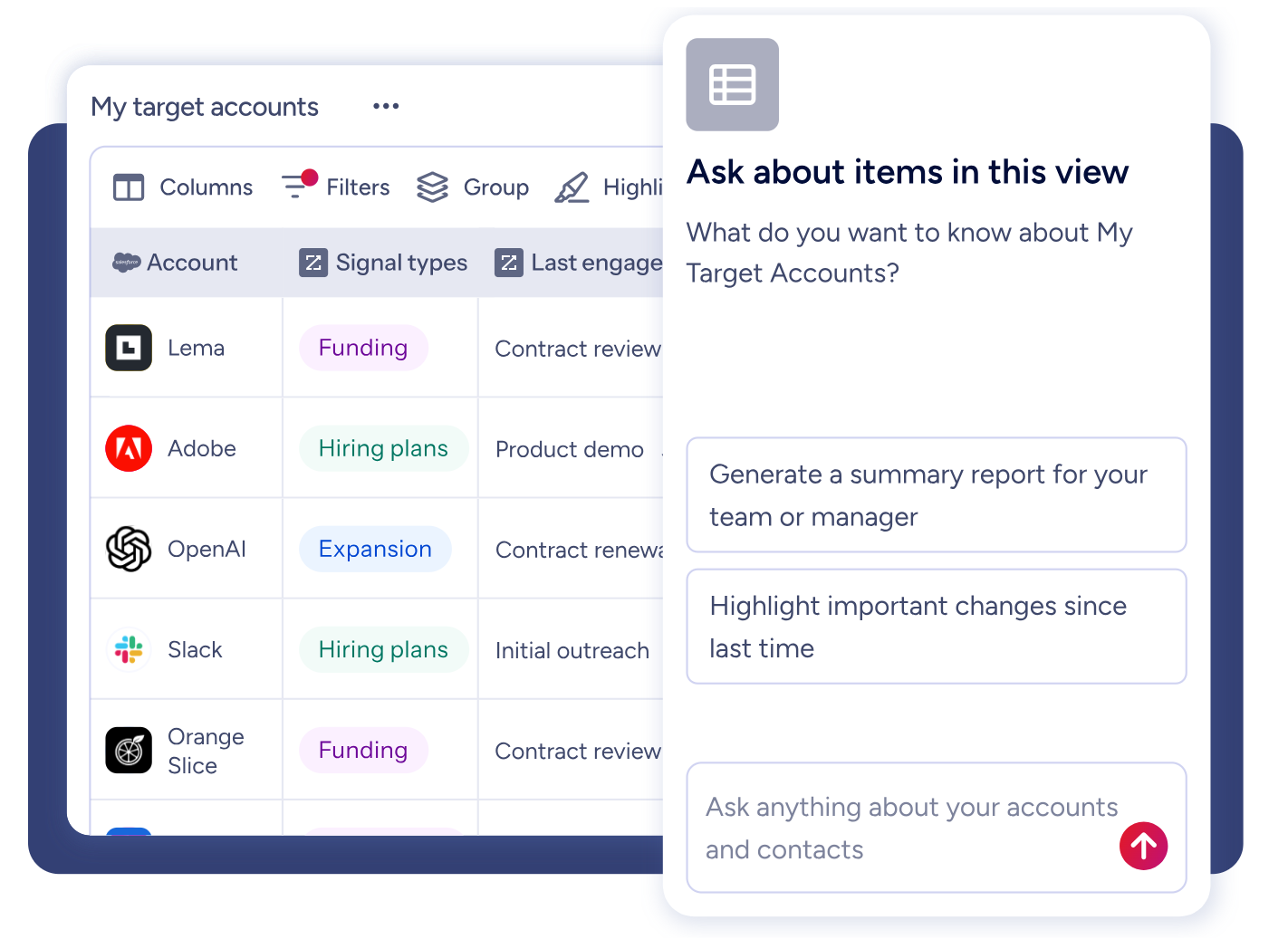
GTM Workspace is ZoomInfo's seller front-end, built on the GTM Context Graph. It provides a Book of Business view across CRM, ZoomInfo data, conversation history, and market intelligence, with AI agents automating account research, outreach, CRM updates, and signal monitoring.
Source: ZoomInfo
An Action Feed streams in-market buyers matched to target criteria with pre-drafted actions on every signal. Where monday CRM manages the deal workflow, GTM Workspace powers the intelligence and action layer upstream of it.
ZoomInfo APIs and MCP: Universal data access for any tool or AI agent
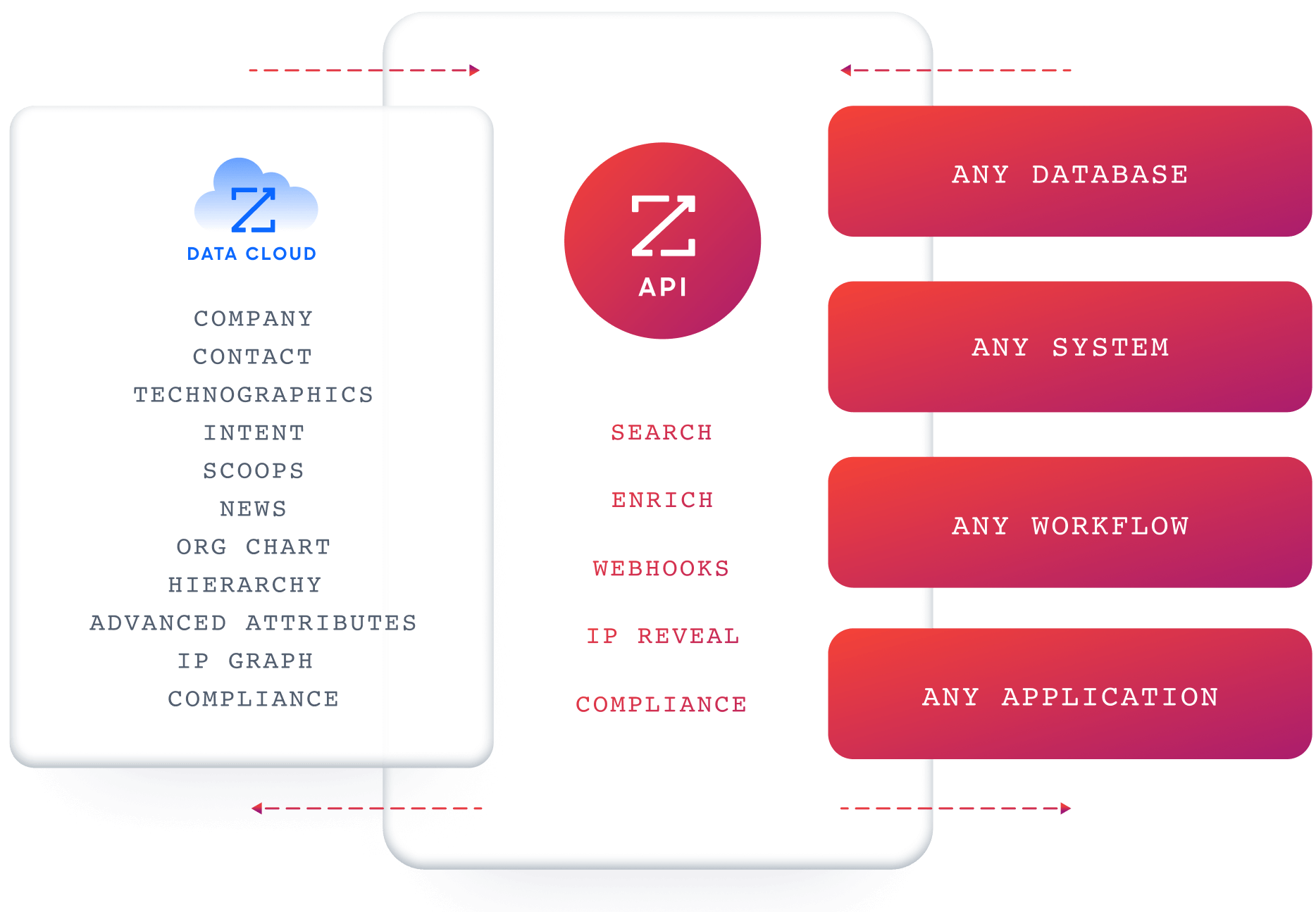
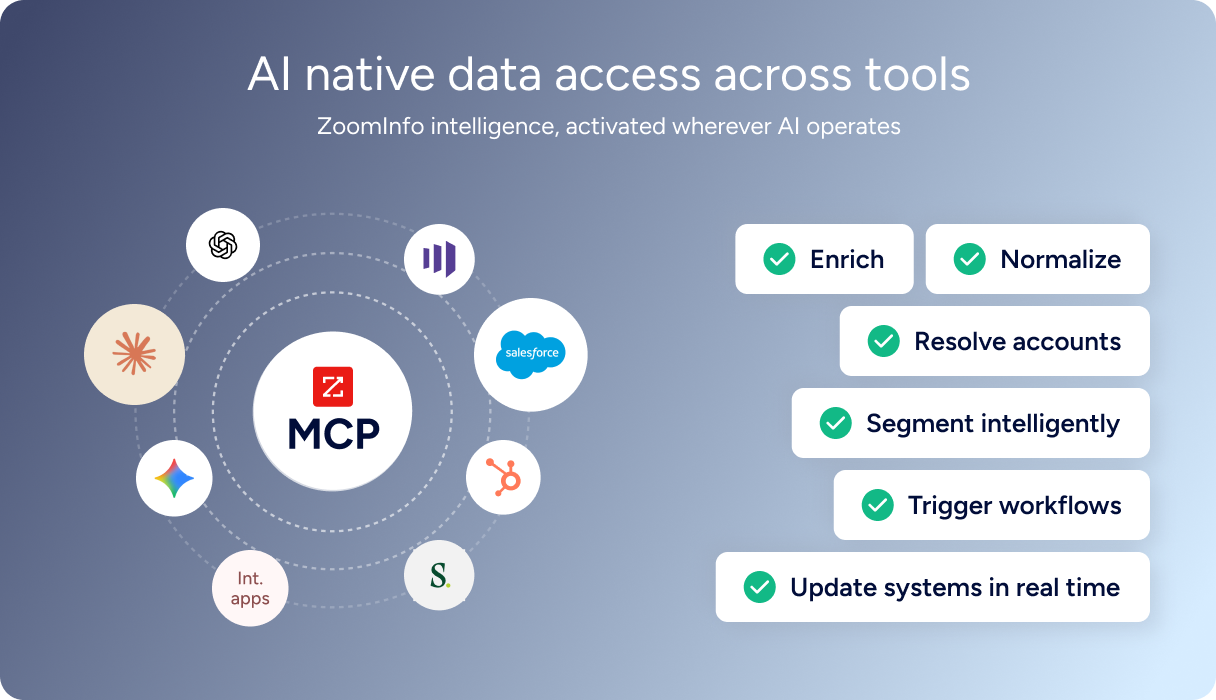
ZoomInfo delivers its intelligence through APIs and MCP (Model Context Protocol), so the same data and GTM Context Graph powering ZoomInfo's own products is accessible inside any third-party tool or custom AI agent.
Source: ZoomInfo
The MCP server connects AI models directly to ZoomInfo's B2B data as a native tool, currently supporting Claude and ChatGPT. API access is included in all plans.
Source: ZoomInfo
For teams using monday.com as their work execution layer, ZoomInfo's API and MCP can feed verified contacts, intent signals, and account intelligence into monday.com boards through integrations and automations.
ZoomInfo's Free Entry Points: A way to evaluate the platform without commitment
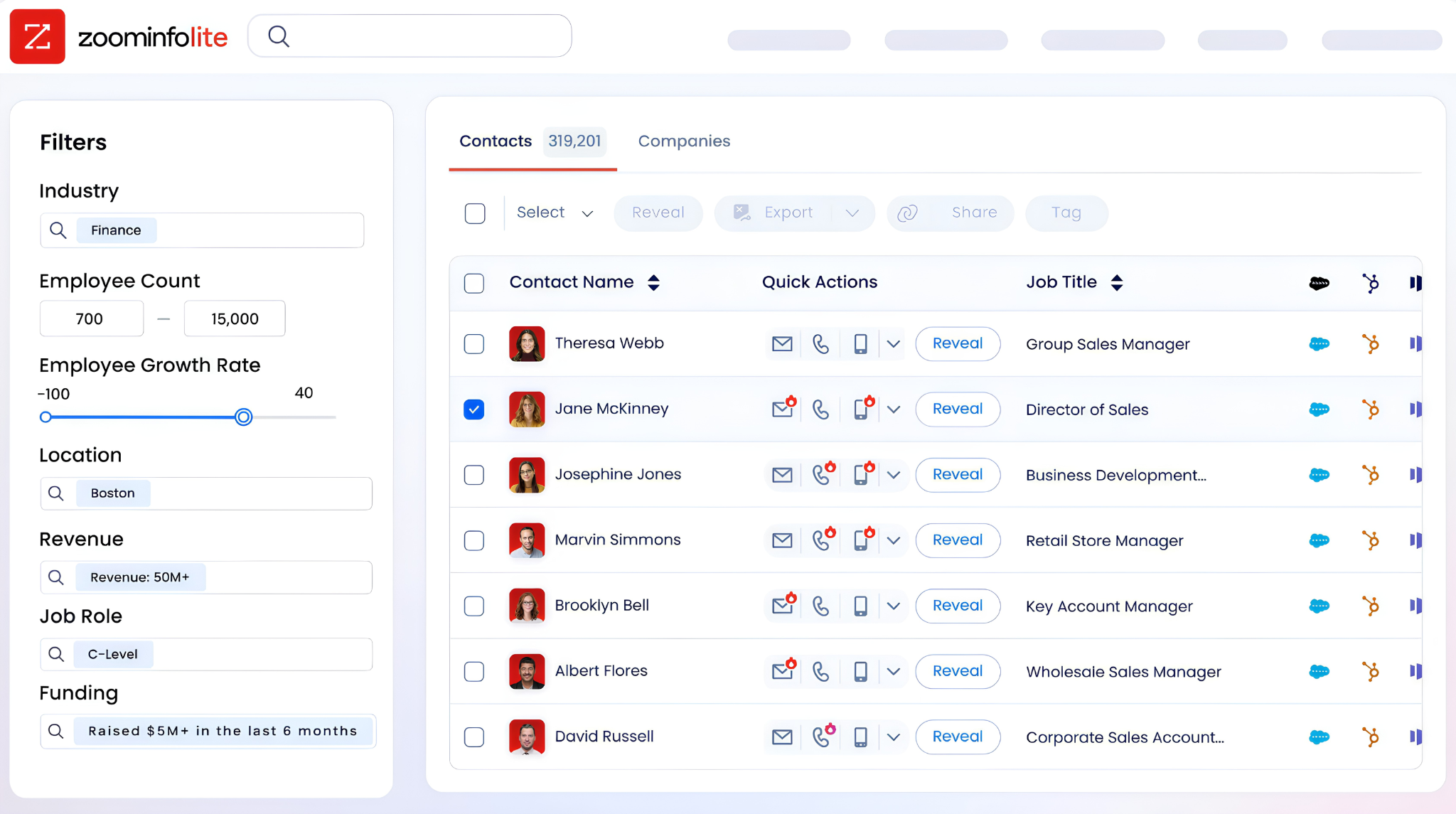
ZoomInfo Lite is a permanent free tier with access to ZoomInfo's B2B database, 10 monthly export credits, individual and company searches, a Chrome extension, and WebSights Lite with up to 10 website visitor reveals per day. A separate 7-day free trial provides broader access with no credit card required.
Source: ZoomInfo
Seismic's sales team attributed 39% of active pipeline to opportunities identified or influenced by ZoomInfo signals, boosted productivity by 54%, and saved 11.5 hours per week per seller. (Seismic Case Study)
Final Summary
monday.com is a flexible toolkit for cross-functional work execution: project and portfolio management with Gantt, Kanban, and workload views; a CRM with built-in email sequences and sales forecasting; agile sprint management with GitHub and GitLab sync; enterprise service management with SLA tracking and self-service portals; and an expanding AI layer that builds custom apps from plain English, runs autonomous agents around the clock, and acts on boards from natural conversation.
It fits teams from 3 to 3,000+ who want one platform for managing work across departments, with no-code flexibility to customize workflows without engineering support.
It is lighter on the layer underneath execution: no native B2B database, no buyer intent signals, no conversation intelligence, no website visitor identification, and no marketing orchestration or ABM capabilities.
If your bottleneck is upstream of the pipeline (knowing which companies are in-market before they enter your CRM, reaching decision-makers with verified direct dials, understanding why deals move from actual conversation data), that is the ground ZoomInfo covers.
Its 500M-contact, 100M-company database supplies the verified emails and direct dials that CRM records need. ZoomInfo Intent surfaces accounts researching your category from 6 trillion+ keyword-to-device pairings monthly. Chorus captures and reasons about every sales conversation.
GTM Studio gives marketing teams multi-channel orchestration and ABM capabilities. And the GTM Context Graph fuses all of it into a single intelligence layer that captures why deals move, not just that they moved. For teams using monday.com as their work execution layer, ZoomInfo is the data engine that powers what flows into it.
Start with ZoomInfo Lite for free, or request a demo to see verified contacts and intent signals flow into your CRM.
FAQ
Does monday.com include a B2B contact database for prospecting?
No. monday CRM tracks contacts that teams enter manually, import from files, or pull from integrations like HubSpot and Pipedrive, but the platform does not include its own database of contacts, companies, direct-dial phone numbers, or verified business emails. CRM data enrichment is available via Crunchbase, which covers primarily tech and venture-backed companies.
Teams that need a B2B contact database pair monday.com with a data platform like ZoomInfo, whose 500M contacts, 100M companies, and 120M direct dials supply the prospecting data the CRM runs on.
How many automations can you run on monday.com?
Automation and integration actions share monthly limits that scale by plan: 250 on Standard, 25,000 on Pro, and 250,000 on Enterprise. Basic plans have no automations. When the limit runs out, automations stop until the next billing cycle. There are no overage charges, and the only way to restore capacity mid-cycle is to upgrade. Free and Basic plans do not include automations or integrations at all.
Can monday.com record and analyze sales calls?
monday.com's AI Notetaker records and summarizes meetings with action items tied to CRM records, but this is meeting transcription, not conversation intelligence. The platform does not include AI call analysis with talk ratios, sentiment detection, objection tracking, competitive mention alerts, or coaching scorecards built from call patterns.
Teams that need conversation intelligence use a separate tool like ZoomInfo's Chorus, which records calls, surfaces AI-generated insights, and feeds that context into the GTM Context Graph.
What is monday vibe?
monday vibe is a natural language AI app builder (currently in Beta) that turns a plain-English description into a working custom app within the monday.com workspace.
It connects to the user's board data and covers use cases including inventory management, recruiting apps, time tracking, event portals, OKR monitoring, and sales forecasting. It surpassed $1M ARR within 2.5 months of its pricing launch in October 2025, the fastest any monday.com product has reached that milestone.
Which monday.com plan should a mid-size team start with?
Pro ($19/seat/month billed annually) is labeled "Most Popular" and is the first plan that includes private boards, Chart view, time tracking, formula columns, and 25,000 monthly automation actions.
Standard ($12/seat/month) includes timeline and Gantt views plus guest access but caps automation actions at 250 per month, which most active teams will exhaust quickly. Enterprise (contact sales) is required for portfolio management, resource management, multi-level permissions, enterprise security and governance, and the full AI bundle.
Does monday.com support buyer intent data?
No. monday.com surfaces activity within its own boards and CRM (deal updates, email opens, task completions), but the platform does not include buyer intent data showing which companies are researching specific topics across the web. Intent signals that reveal in-market accounts before outreach begins require an external platform.
ZoomInfo Intent tracks signals from 210 million IP-to-Organization pairings and 6 trillion+ keyword-to-device pairings sourced monthly, identifying in-market accounts before you reach out.
Can external AI agents work inside monday.com?
Yes. monday.com's MCP (Model Context Protocol) server enables external AI agents (Claude, Cursor, Mistral, Microsoft Copilot Studio) to authenticate via OAuth and operate directly within monday.com boards, reading account data and taking actions within existing permissions.
In March 2026, monday.com launched infrastructure allowing external AI agents to sign up, authenticate, and operate inside the platform with free API access. ZoomInfo also offers an MCP server, meaning both platforms can serve as context providers for AI agents working across tools.
Does monday.com identify website visitors?
No. monday.com does not include website visitor identification of any kind. There is no pixel, no reverse IP lookup, and no visitor-to-company or visitor-to-contact resolution. Teams that need to know which companies or people visit their website pair monday.com with a dedicated tool.
ZoomInfo's WebSights resolves anonymous website traffic to companies, and ZoomInfo Marketing provides contact-level site visitor identification, revealing who specifically visited and triggering personalized outreach.
