
Teams that run RingCentral for business communications and HubSpot as their CRM usually discover the same problems within a quarter:
call activity lives in RingCentral while deal records live in HubSpot, so reps toggle between platforms to connect conversations to pipeline,
contact details fall out of sync as updates happen in one system but not the other,
and someone on the team is always working from an outdated phone number or missing context from yesterday's call.
However the two platforms ended up coexisting (a sales team choosing RingCentral for its telephony reliability while the org standardized on HubSpot, different departments adopting tools independently, or a scaling company layering communications onto an existing CRM), the longer both run without a connection, the wider the gap between what was said on the phone and what the CRM knows about it.
Connecting RingCentral and HubSpot closes that gap.
Calls made or received in RingCentral log automatically to the matching HubSpot contact record, so reps no longer enter activity by hand. SMS messages sync alongside call data, putting the full communication timeline in one place.
Contact details flow between the two systems: a phone number updated in HubSpot is available when a rep dials from RingCentral, and a new lead captured through a RingCentral interaction can appear in HubSpot without manual entry.
RingCentral offers native HubSpot integrations covering its core product lines: RingEX for unified calling and messaging, RingCX for contact center operations, and RingCentral Events for event management.
Third-party automation tools like Zapier and Workato can extend the connection with custom workflows, and both platforms expose APIs for teams that need something none of the pre-built options cover. Each method differs in setup complexity, data coverage, sync direction, and cost.
One problem no connection method solves: the integration logs calls and syncs records, but it does not verify whether the contact data behind those records is accurate, complete, or current.
That is where ZoomInfo comes in. ZoomInfo integrates natively with both HubSpot and RingCentral, and its Enterprise API and MCP server can feed verified, enriched contact and company data into any system in the stack, so the records behind every call and every deal are accurate before the first dial.
This article covers the full landscape of the RingCentral-HubSpot integration: which methods are available, what data each one handles, how to set them up, the use cases that justify connecting both platforms, and the limitations to plan for. It also covers how ZoomInfo fits in as a data enrichment layer that strengthens the records flowing between RingCentral and HubSpot.
Let's start with an overview of the integration.
Integration Overview
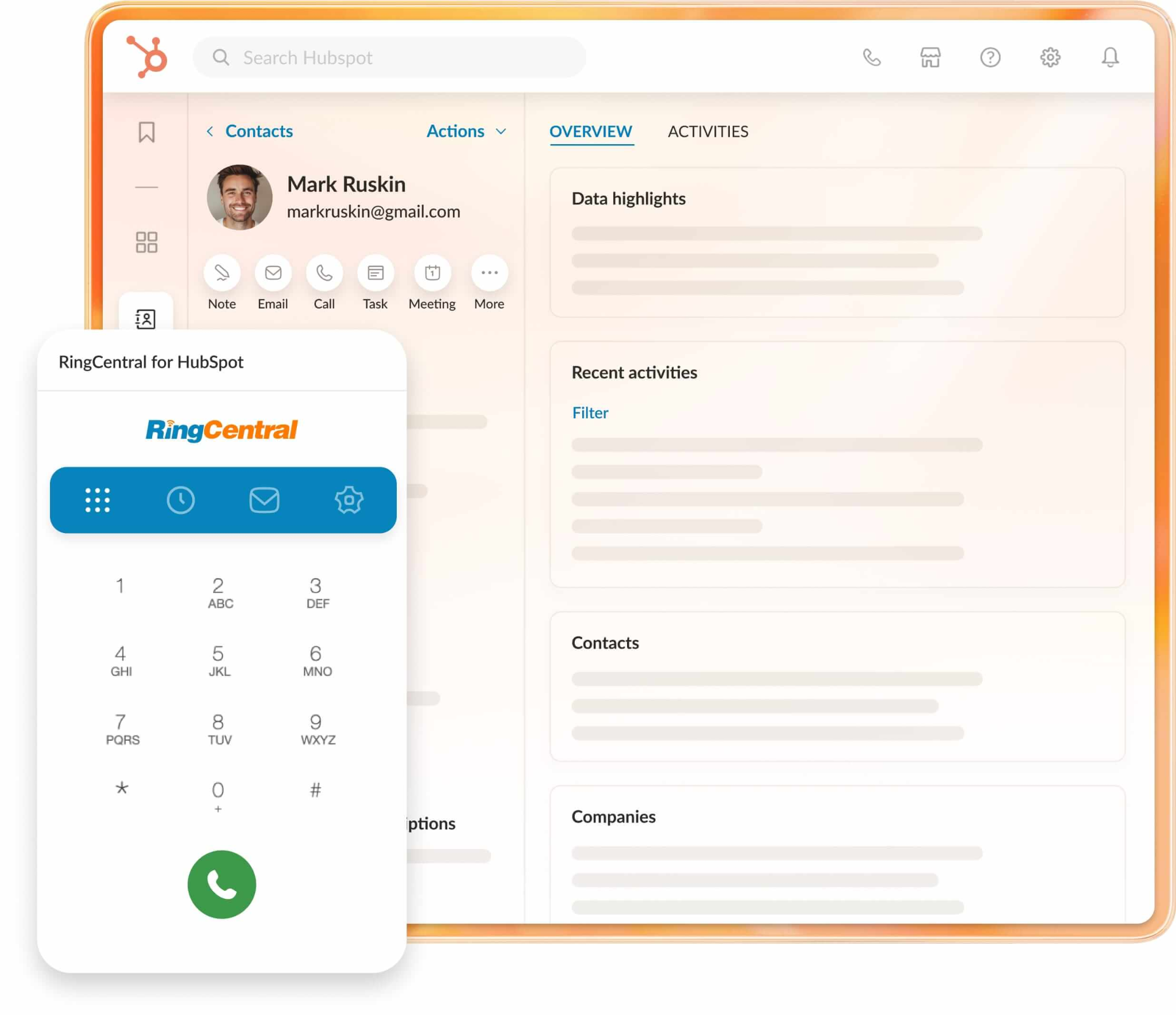
Source: RingCentral
Does a native integration exist?
Yes. RingCentral offers multiple native HubSpot integrations through the HubSpot Marketplace, including RingEX for HubSpot (unified calling, messaging, and SMS), RingCX for HubSpot (contact center), and RingCentral Events for HubSpot (event management). Each connector covers a different RingCentral product line.
What data can sync?
Call logs (inbound, outbound, missed), SMS/MMS messages, voicemails, call recordings, call dispositions, and contact records. The RingEX integration handles communication activity logging and contact synchronization. The RingCX integration adds contact center data, including agent interactions across digital channels.
Is the sync bidirectional?
Partially. Call activity flows one way: from RingCentral into HubSpot. Contact data can sync bidirectionally through the RingCentral Data Sync connector, keeping contact records aligned between both platforms.
Is it real-time or batch?
The native integration logs call activity in near real-time: when a call ends in RingCentral, the activity appears on the HubSpot contact record within moments. Contact data sync runs on a schedule. Third-party tools like Zapier trigger within 1 to 15 minutes depending on plan tier.
What are the available methods?
Native RingCentral-HubSpot integrations (RingEX, RingCX, Events), third-party automation (Zapier, Workato), and custom API development.
Method | Setup Difficulty | Data Flow | Real-time? | Cost |
|---|---|---|---|---|
Native (RingEX for HubSpot) | Low | Activity: RingCentral to HubSpot; Contacts: Bidirectional | Near real-time | Included with RingEX subscription |
Native (RingCX for HubSpot) | Low | RingCentral to HubSpot | Near real-time | Included with RingCX subscription |
Zapier | Medium | One-way per Zap | Near real-time (1-15 min) | From $19.99/mo |
Workato | Medium | Configurable per recipe | Near real-time or scheduled | Custom pricing |
Custom API | High | Fully customizable | Real-time via webhooks | Developer time + hosting |
One distinction worth settling upfront: the native integrations handle ongoing, automatic sync of communication activity and contact data as part of daily workflows.
Zapier and Workato handle event-triggered flows with broader customization, connecting RingCentral events to HubSpot actions (or vice versa) that the native connectors don't cover. Custom API development offers full control but requires engineering resources to build and maintain.
Integration Methods
Native RingEX for HubSpot Integration
How it works: The RingEX for HubSpot integration connects RingCentral's unified communications platform to HubSpot's CRM.
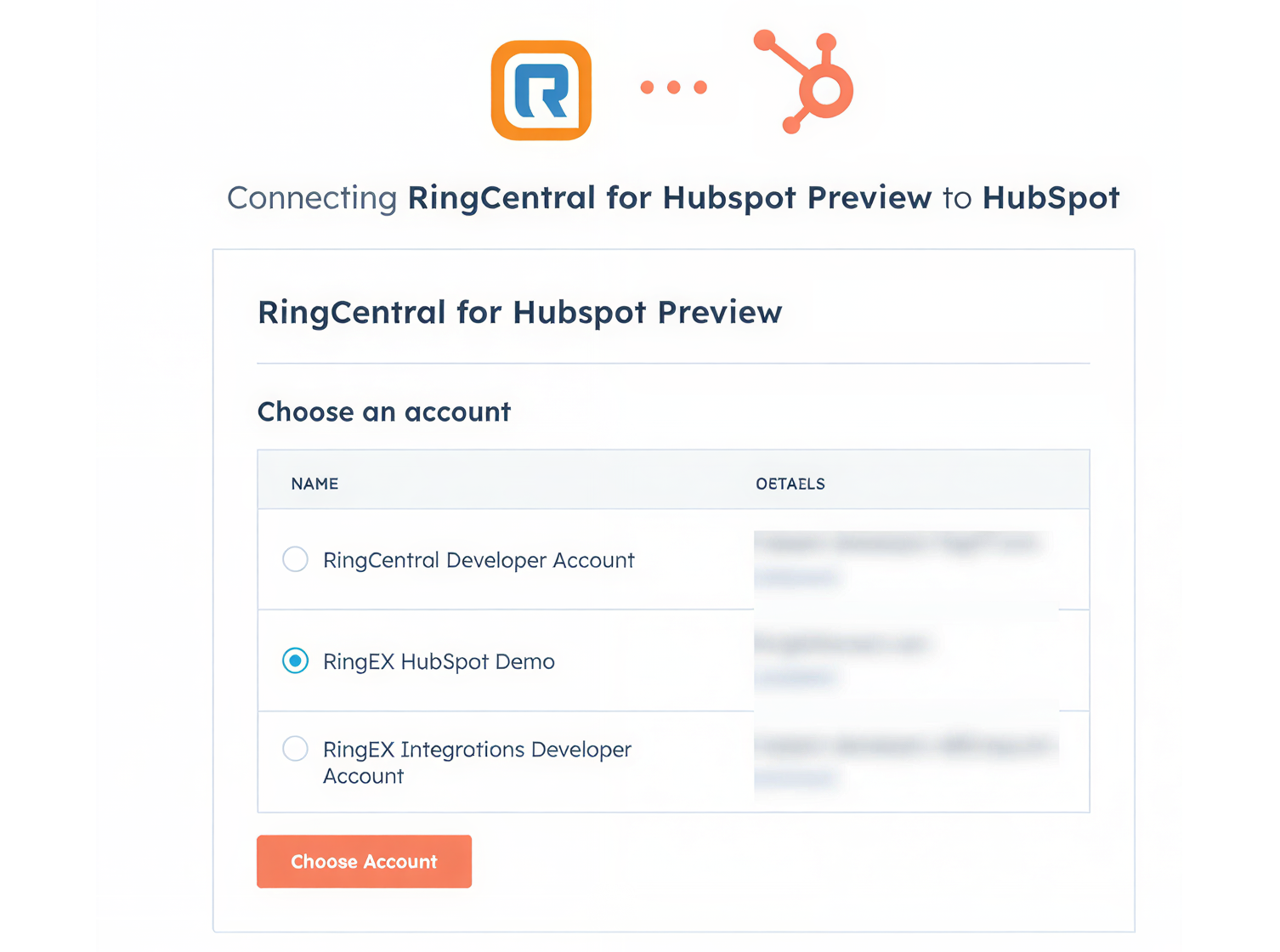
Source: RingCentral
When a rep makes or receives a call through RingCentral, the integration logs the call as an activity on the matching HubSpot contact record. Reps can click-to-dial from HubSpot contact records, and incoming calls display HubSpot contact information as a screen pop so the rep has context before answering.
What it syncs: Inbound and outbound call logs (with duration, time, outcome), SMS/MMS messages, voicemail notifications, call recordings, and call dispositions. Contact records sync bidirectionally through the data sync connector, keeping phone numbers, names, and other contact details aligned between both platforms.
Fits: ongoing sync of communication activity into HubSpot as part of daily sales and service workflows; not a migration tool.
Setup process:
Confirm your RingCentral account is on a RingEX plan (Core, Advanced, or Ultra) and your HubSpot account has an active subscription. Admin access is required on both sides.
Go to the HubSpot App Marketplace and search for "RingCentral." Install the RingEX for HubSpot connector, granting the requested permissions.
In RingCentral's admin portal, find the HubSpot integration under Settings > Integrations. Authenticate with your HubSpot account using OAuth.
Configure which call events should log in HubSpot (inbound calls, outbound calls, missed calls, SMS, voicemail) and set default call dispositions.
Map RingCentral users to HubSpot users so call activity logs under the correct rep's name in the CRM.
Test by placing a call through RingCentral to a known HubSpot contact and verifying the call activity appears on their contact timeline.
Strengths: First-party integration maintained by RingCentral. No third-party tool to configure or pay for separately. Click-to-dial from HubSpot and screen pop on incoming calls cut context switching. Automatic call logging eliminates manual activity entry, keeping CRM records complete without relying on rep discipline. Included with a RingEX subscription at no extra cost.
Limitations: Call activity flows from RingCentral into HubSpot; HubSpot deal or pipeline data does not flow back into RingCentral. The integration covers RingEX communication data (calls, SMS, voicemail) but does not sync video meeting data or team messaging content. Setup requires admin access on both platforms.
Best for: Sales and service teams that use RingCentral RingEX as their primary phone system and HubSpot as their CRM. Teams that want automatic call logging without manual entry and need click-to-dial inside the CRM.
Native RingCX for HubSpot Integration
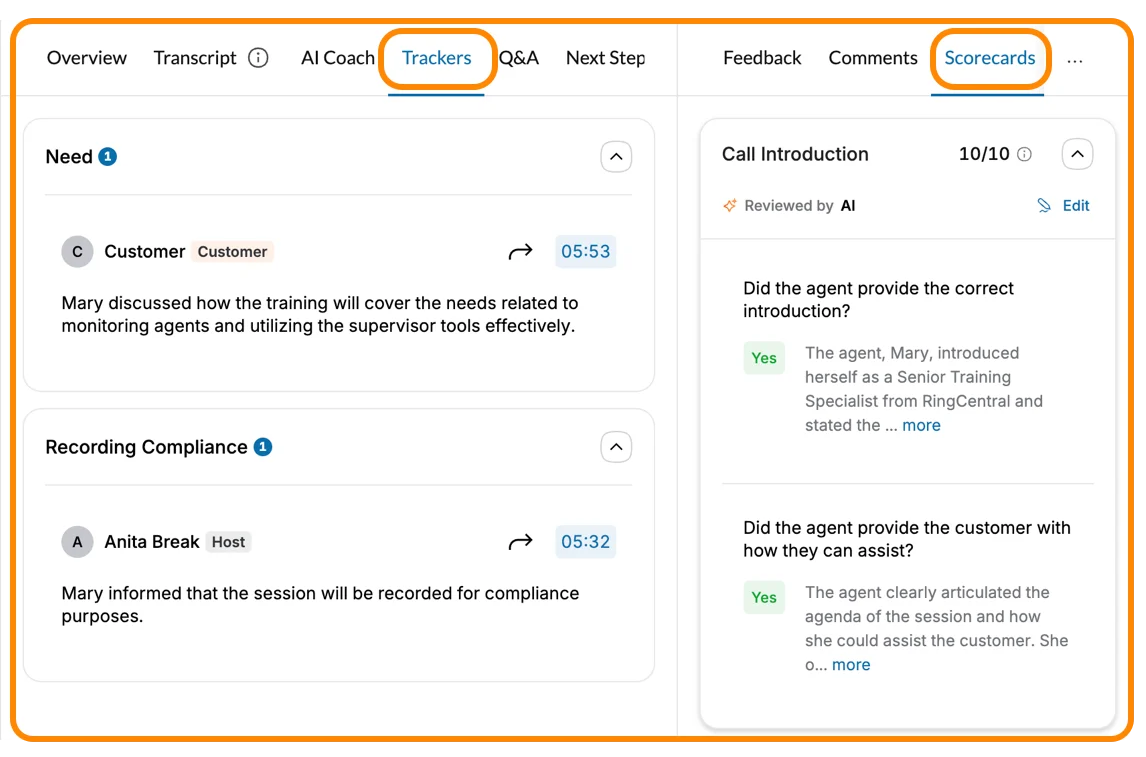
How it works: The RingCX for HubSpot integration connects RingCentral's contact center platform to HubSpot. It serves teams running a formal contact center operation (support queues, agent routing, quality management) rather than standard business calling. When an agent handles an interaction through RingCX, the activity syncs to the matching HubSpot record.
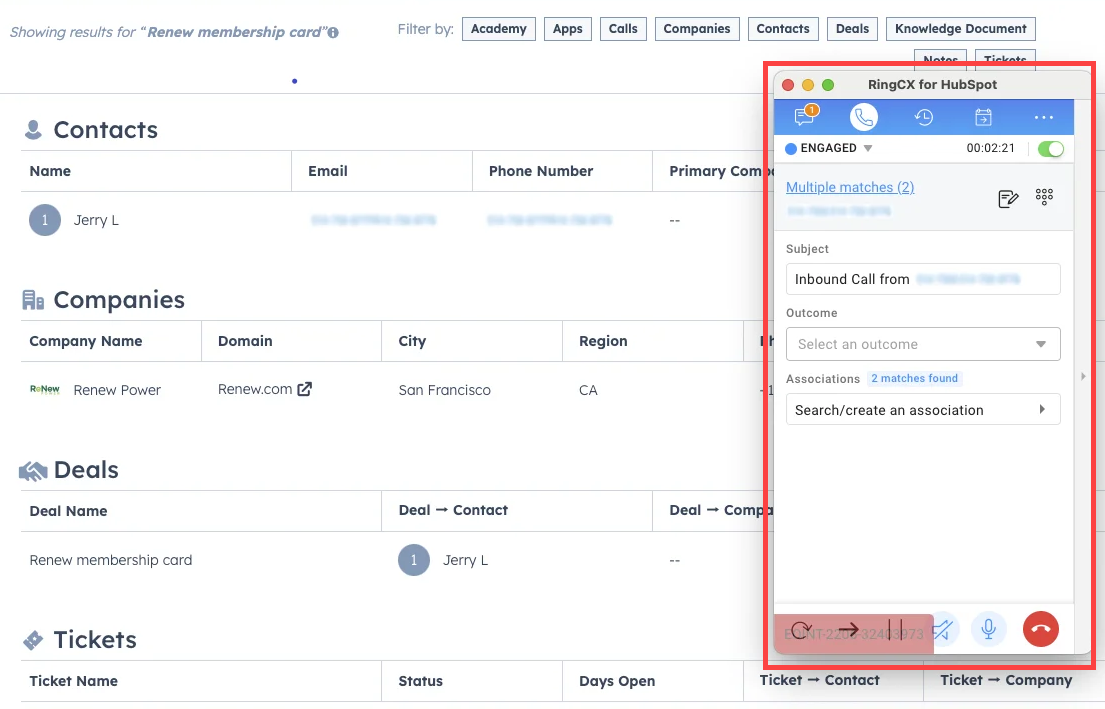
Source: RingCentral
What it syncs: Contact center interactions across voice and digital channels, agent activity data, call dispositions, and contact records. RingCX's omnichannel capabilities mean interactions from voice and 20+ digital channels can be captured and tied to HubSpot records.
Fits: ongoing sync of contact center activity into HubSpot for teams running formal support or sales queues.
Setup process:
Confirm your RingCentral account includes a RingCX subscription (Standard, Professional, Elite, or Enterprise) and your HubSpot account has an active CRM subscription.
In the HubSpot App Marketplace, search for "RingCentral" and install the RingCX for HubSpot connector.
Authenticate with both platforms via OAuth, granting the requested permissions for contact and activity data.
Configure which interaction types (voice, chat, email, social) should log to HubSpot and map agent identities to HubSpot users.
Set up contact matching rules to determine how RingCX interactions associate with existing HubSpot contact records.
Test by handling a sample interaction through a RingCX queue and verifying the activity appears on the matching HubSpot contact timeline.
Strengths: Connects formal contact center operations to CRM records. Covers voice and digital channel interactions in a single integration. Agents and supervisors see CRM context during interactions without switching tools. AI Quality Management insights from RingCX can inform HubSpot-based workflows.
Source: RingCentral
Limitations: Requires a RingCX subscription starting at $65/user/month (annual billing), a significant cost beyond the base RingEX plan. Useful mainly for teams with structured contact center operations; standard business calling is better served by the RingEX integration.
Best for: Customer service teams and inbound sales teams running formal queues through RingCX that need contact center interactions logged in HubSpot alongside marketing and sales data.
Zapier
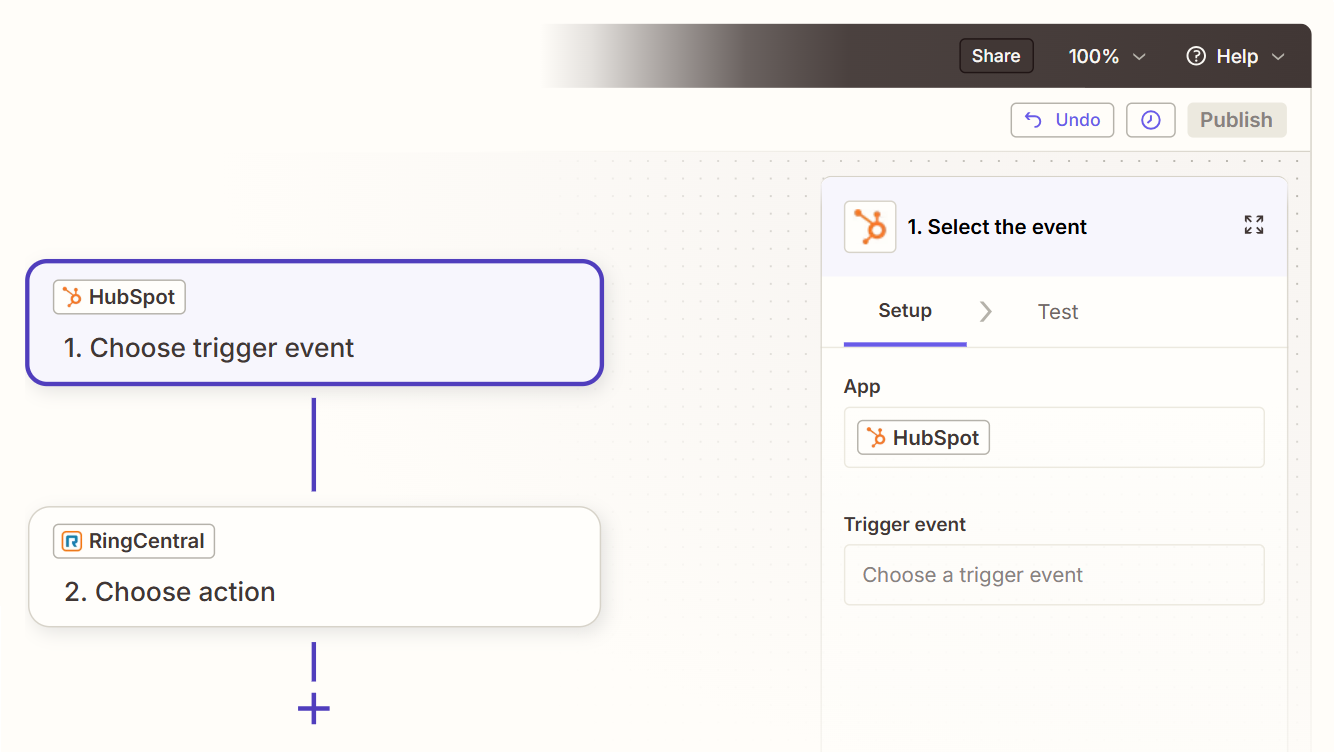
How it works: Zapier connects RingCentral and HubSpot through event-driven automations called Zaps. Each Zap pairs a trigger (an event in one app) with one or more actions (what happens in the other). RingCentral's Zapier integration supports triggers for missed calls, new SMS messages, and call recordings. HubSpot is one of Zapier's most popular connectors with broad trigger and action coverage.
Source: Zapier
What it syncs: That depends on the Zap configuration. Common patterns include creating HubSpot contacts from RingCentral SMS senders, logging missed calls as HubSpot tasks, storing call recordings in HubSpot notes, and triggering RingCentral SMS messages from HubSpot workflow events. Each use case requires its own Zap. Custom fields can be mapped manually in the setup flow.
Fits: ongoing event-triggered workflows that extend beyond what the native integrations cover; not a replacement for native call logging.
Setup process:
Create a Zapier account and connect both your RingCentral and HubSpot accounts using OAuth.
Choose a trigger app and event. For example, select RingCentral as the trigger and "New SMS Received" as the trigger event.
Choose the action app and event. For example, select HubSpot and "Create Contact" as the action.
Map fields between the two platforms. Zapier displays available fields from the trigger step and lets you place them into the action fields (e.g., map the SMS sender's phone number to the HubSpot contact's phone field).
Test the Zap with a sample record to verify the field mapping produces the expected result in HubSpot.
Turn the Zap on. For bidirectional workflows, create a second Zap with trigger and action apps reversed, adding a filter to prevent infinite loops.
Strengths: Extends the integration beyond what the native connectors cover. Connects RingCentral events to HubSpot actions (and vice versa) with conditional logic, formatting steps, and multi-step workflows. No engineering resources required. Zapier's template library includes pre-built RingCentral-HubSpot workflows for common use cases.
Limitations: Does not replace the native integration's automatic call logging and click-to-dial. Each Zap handles one trigger-action pair, so multiple workflows require multiple Zaps (each counting against your plan's task allocation). Events created before the Zap was activated do not sync. Zapier charges by task count, and high-volume call environments can accumulate costs quickly.
Best for: Teams that already have the native RingEX-HubSpot integration active and want to extend it with custom workflows (e.g., send an SMS via RingCentral when a HubSpot deal reaches a specific stage, or create a HubSpot task from a missed RingCentral call). Also useful for teams that need specific event-driven automations the native connector does not support.
Workato
How it works: Workato is an enterprise iPaaS that connects RingCentral and HubSpot through configurable "recipes." Each recipe defines triggers, actions, and conditional logic in a no-code drag-and-drop interface.
Workato's RingCentral connector supports call logging automation, post-call workflows, and CRM data synchronization, while the HubSpot connector covers the full CRM object model.
What it syncs: Call events, SMS messages, contact records, and custom data flows. Workato recipes can implement multi-step logic: when a RingCentral call ends, look up the caller in HubSpot, update the contact record, log the call, and trigger a follow-up task if the call lasted longer than five minutes.
The platform connects RingCentral and HubSpot with 1,000+ other apps, enabling broader workflow orchestration.
Fits: ongoing sync with conditional logic and multi-step workflows; suited to teams whose automation requirements go beyond what Zapier handles.
Setup process:
Create a Workato account and add RingCentral and HubSpot as connections via OAuth.
Build a new recipe. Select a RingCentral trigger (e.g., "New call log entry") from the connector library.
Add HubSpot actions in sequence (e.g., "Search contacts," then "Update contact," then "Create engagement").
Configure conditional logic and data transformations between steps (e.g., only log calls longer than 30 seconds, format phone numbers to match HubSpot's expected format).
Add error handling steps to catch failures (e.g., notify a Slack channel if a contact lookup fails).
Activate the recipe. Workato processes events as they occur, with configurable batching for high-volume environments.
Strengths: More sophisticated conditional logic than Zapier. Multi-step recipes can orchestrate complex workflows across RingCentral, HubSpot, and other tools in a single automation. Built-in error handling and retry logic. Better suited for high-volume environments where Zapier's per-task pricing becomes expensive.
Limitations: Custom pricing (not publicly listed), typically higher than Zapier for comparable use cases. Steeper learning curve for teams without iPaaS experience. Can be overkill for simple call-logging needs the native integration already covers.
Best for: Mid-market and enterprise teams that need complex, multi-step workflows connecting RingCentral and HubSpot with other tools in their stack. Organizations with a RevOps or marketing ops team that already uses (or plans to use) an iPaaS platform.
Custom API Integration
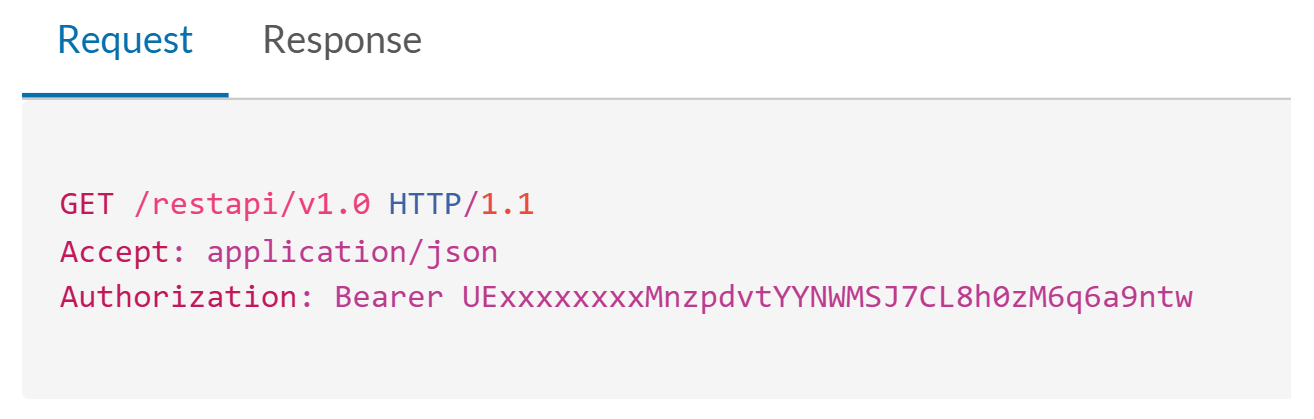
How it works: Both RingCentral and HubSpot provide comprehensive APIs. RingCentral's REST API covers voice, SMS, team messaging, video, and call log data, with webhook support for real-time event notifications.
Source: RingCentral
HubSpot's REST API covers all CRM objects (contacts, companies, deals, tickets, activities) with webhooks for event-driven sync. A custom integration connects these APIs directly, with your own middleware handling authentication, data mapping, transformation, and error recovery.
What it syncs: Anything both APIs expose. This is the only method that supports scenarios like syncing RingCentral video meeting data into HubSpot, implementing custom call scoring logic, building real-time dashboards from combined call and deal data, or creating bidirectional workflows that no pre-built connector supports.
Fits: either one-time data migration or ongoing sync; the only method with no ceiling on data coverage or business logic.
Setup process:
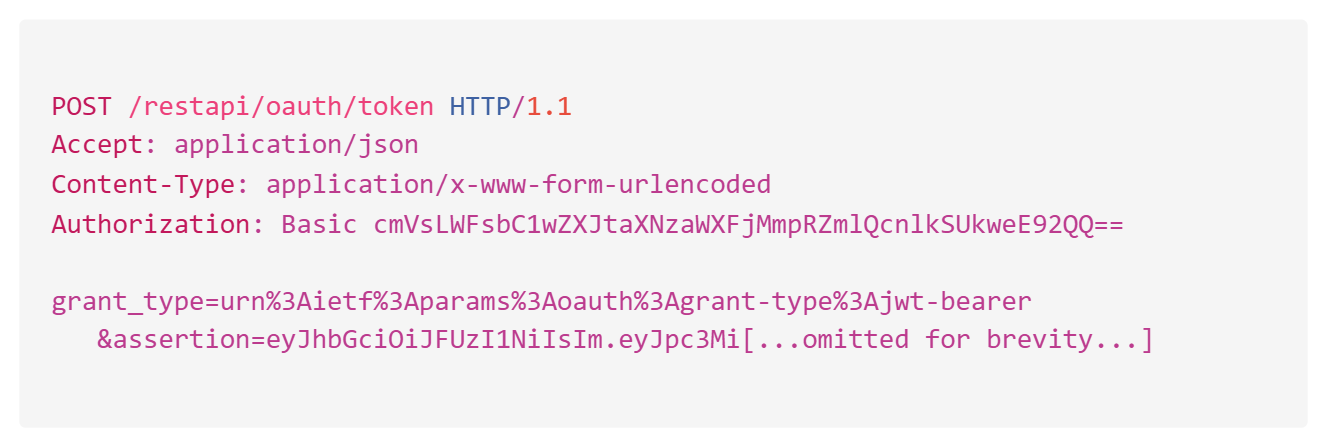
Register API credentials in both platforms. For RingCentral, create an application in the Developer Console and obtain OAuth 2.0 credentials or a JWT credential for server-to-server access. For HubSpot, create a private app in your HubSpot account settings and generate an access token with the required scopes.
Design the data model mapping between RingCentral call log objects and HubSpot engagement objects, including field-level transformations and a cross-reference table for matching record IDs.
Build the sync service: a server-side application that listens for RingCentral webhooks (call events, SMS events) and writes corresponding activities to HubSpot via the Engagements API.
Implement contact matching logic to associate RingCentral phone numbers with HubSpot contact records, handling cases where no match exists (create new contact, skip, or queue for review).
Add logging, error handling, and retry logic. RingCentral enforces rate limits by tier (Light: 50 req/min, Medium: 40 req/min, Heavy: 10 req/min). HubSpot enforces 100-190 requests per 10 seconds depending on plan.
Deploy, monitor, and maintain the integration over time.
Source: RingCentral
Strengths: Full control over what syncs, when, and how. Real-time sync via webhooks on both sides. Can implement arbitrarily complex business logic (custom call scoring, conditional routing, multi-system orchestration). No per-record or per-operation fees from a third-party connector.
RingCentral's developer ecosystem includes eight official SDKs (JavaScript, Java, .NET, PHP, Python, Ruby, Swift, WebRTC) and an OpenAPI specification. HubSpot maintains official SDKs for six languages (PHP, Java, Ruby, Go, TypeScript, Python).
Limitations: Requires development resources to build and maintain. You own the infrastructure, monitoring, and error recovery. API changes on either platform require ongoing maintenance (RingCentral publishes an API changelog; HubSpot releases date-based API versions twice per year). The initial build takes weeks, not hours.
Best for: Teams with unique sync requirements that no native connector or iPaaS tool satisfies. Organizations with in-house development teams and a long-term commitment to running both platforms. Companies with complex call-routing logic, custom scoring models, or multi-system orchestration needs.
Key Use Cases
1. Automatic Sales Call Logging
Sales reps make outbound calls through RingCentral and need every call logged in HubSpot without manual entry. The native RingEX integration creates a call activity on the matching HubSpot contact record when a call ends, capturing duration, time, direction, and outcome. Reps spend their time selling instead of typing call notes into the CRM.
Best integration method: Native RingEX for HubSpot integration.
2. Click-to-Dial from HubSpot with Screen Pop
Reps working a prospecting list in HubSpot click a phone number to dial through RingCentral without switching applications. On incoming calls, the integration displays the HubSpot contact record as a screen pop so the rep has deal context, recent activity, and company details before answering.
Best integration method: Native RingEX for HubSpot integration.
3. SMS Follow-Up Triggered by Deal Stage
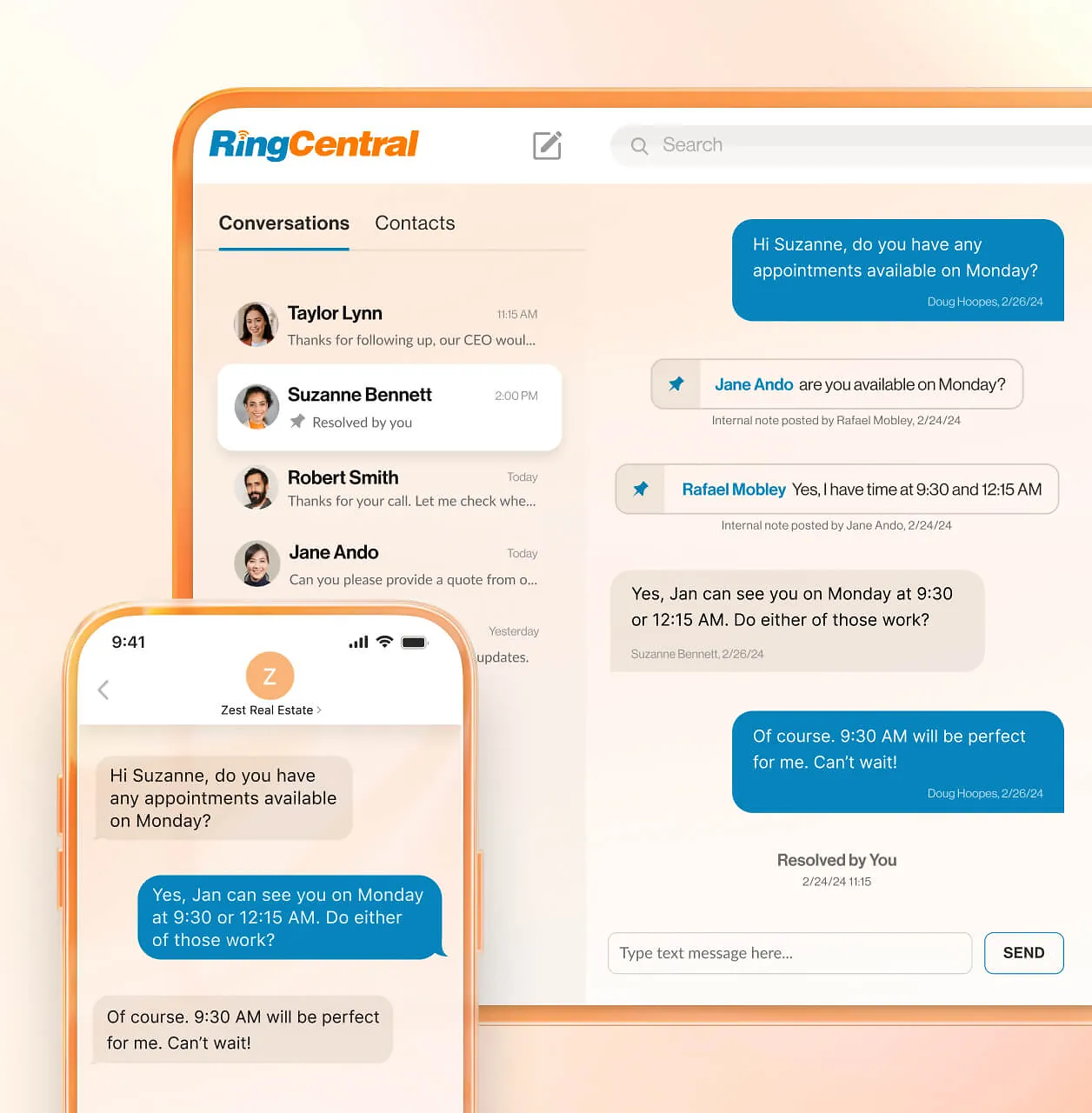
When a HubSpot deal moves to a specific stage (e.g., "Proposal Sent"), an automated workflow sends an SMS via RingCentral to the associated contact. RingCentral's business SMS sees 98% open rates and 7x more engagement than email, making it a high-impact channel for time-sensitive deal communications.
Source: RingCentral
Best integration method: Zapier or Workato (HubSpot deal stage change triggers RingCentral SMS action).
4. Contact Center Activity in the CRM
A customer service team running RingCX handles support interactions across voice and digital channels. Each interaction logs in HubSpot's Service Hub alongside the customer's full history (marketing touches, sales deals, prior tickets), giving agents and managers a complete view of the customer relationship without maintaining separate reporting systems.
Best integration method: Native RingCX for HubSpot integration.
5. Missed Call Recovery Workflow
When a high-value prospect's call goes unanswered in RingCentral, a Zapier Zap creates a follow-up task in HubSpot assigned to the account owner, ensuring the callback happens within the hour. The task includes the caller's HubSpot contact details so the rep has full context when returning the call.
Best integration method: Zapier (RingCentral missed call trigger creates HubSpot task).
Limitations and Considerations
Data That Doesn't Sync Easily
The native RingEX integration focuses on call activity and contact records. Video meeting data from RingCentral (meeting recordings, attendance, AI-generated summaries from RingCentral's AI Assistant) does not flow into HubSpot automatically.
Team messaging content from RingCentral's chat channels stays within the RingCentral environment. Full call recording files may link from HubSpot activity records but are stored and played back in RingCentral, not embedded in HubSpot.
Sync Direction Constraints
Call activity logging flows from RingCentral into HubSpot. HubSpot deal data, pipeline stages, and marketing engagement history do not flow back into RingCentral.
A rep looking at a contact in RingCentral will not see the latest HubSpot deal stage or recent marketing touches unless they switch to the CRM. Contact data can sync bidirectionally through the data sync connector, but the integration is not a full two-way mirror of all CRM data.
Pricing Implications
The native RingEX-HubSpot integration is included with RingEX subscriptions at no additional cost. But RingCentral's RingEX plans are priced per user per month, and HubSpot's CRM subscriptions carry their own per-seat costs.
Teams connecting RingCX to HubSpot need a RingCX subscription starting at $65/user/month (annually), on top of existing HubSpot and RingEX costs. Third-party tools add their own layer: Zapier charges by task count (starting at $19.99/month), and Workato uses custom enterprise pricing.
Both platforms impose API rate limits. RingCentral enforces tier-based limits (50 requests/minute for Light, 10 requests/minute for Heavy operations). HubSpot enforces 100-190 requests per 10 seconds depending on subscription tier. High-volume call environments may need to account for these limits when designing custom integrations.
Permissions and Access
Setting up the native integration requires admin access on both platforms. In RingCentral, you need admin rights to authorize the HubSpot connection and configure integration settings. In HubSpot, you need Super Admin or integration-specific permissions to install the connector from the App Marketplace.
If your HubSpot org uses field-level security or teams-based permissions, the integration user's access must cover the contact and activity objects where call data will be logged.
Maintenance
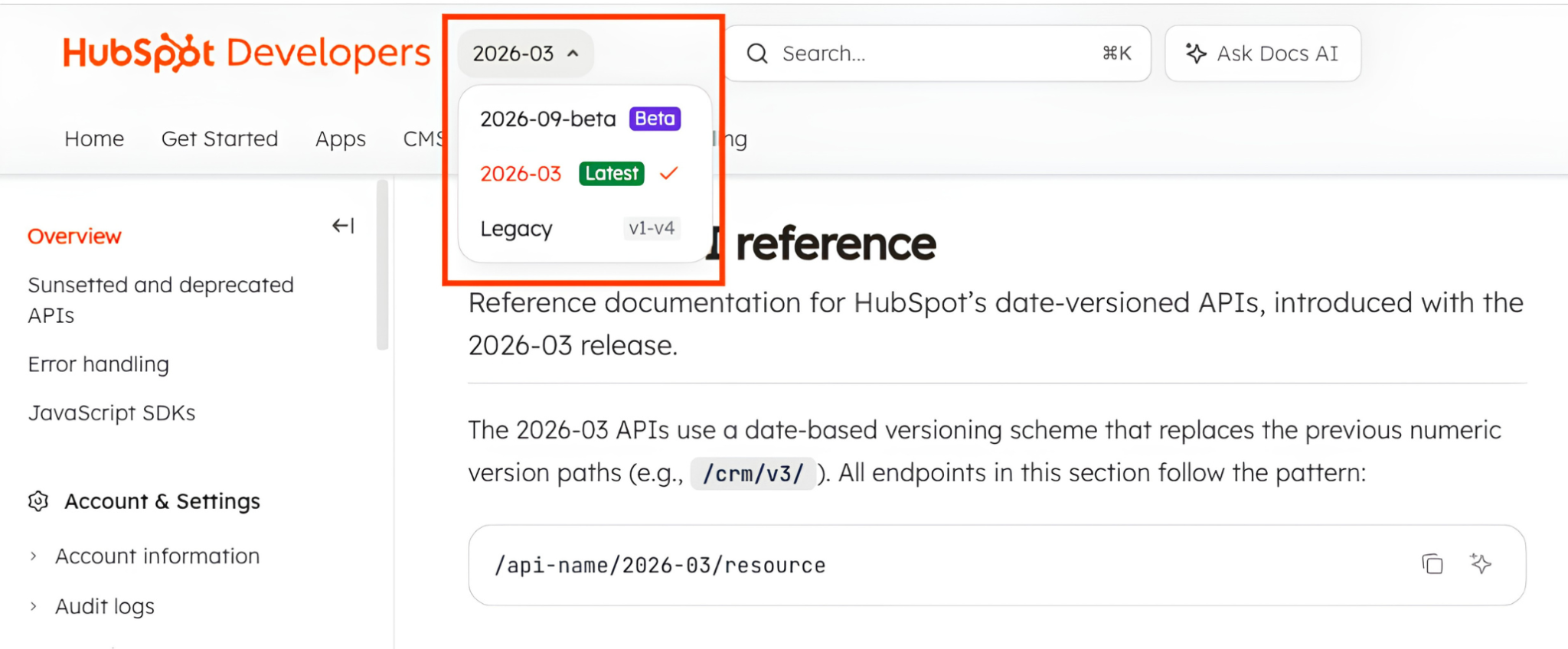
Both platforms evolve independently. RingCentral maintains an API changelog documenting breaking changes, and HubSpot releases date-based API versions twice per year (March and September).
Source: HubSpot
RingCentral maintains the native integrations, so updates are handled on the vendor side. Third-party automations (Zapier, Workato) may need reconfiguration if either platform changes its authentication flow, field structure, or connector behavior. Custom API builds require ongoing monitoring and adaptation to API changes on both sides.
What No Method Fixes: The Data Itself
Every method above moves communication activity from RingCentral into HubSpot and keeps contact records synchronized. None of them checks whether those contact records are accurate, complete, or current.
A rep dials a number from HubSpot that has been disconnected for months. An SMS follow-up goes to a contact who left the company last quarter. The integration faithfully logs the call attempt on a record that was wrong before the phone ever rang.
Where ZoomInfo Fits In
Every method in this guide connects RingCentral and HubSpot so that call activity logs automatically and contact records stay synchronized. None of them improves the data those records contain.
When the integration is live but reps are dialing dead numbers, emailing former employees, or calling contacts whose titles no longer match the deal they are working, the bottleneck is no longer the connector. That is the gap ZoomInfo closes.
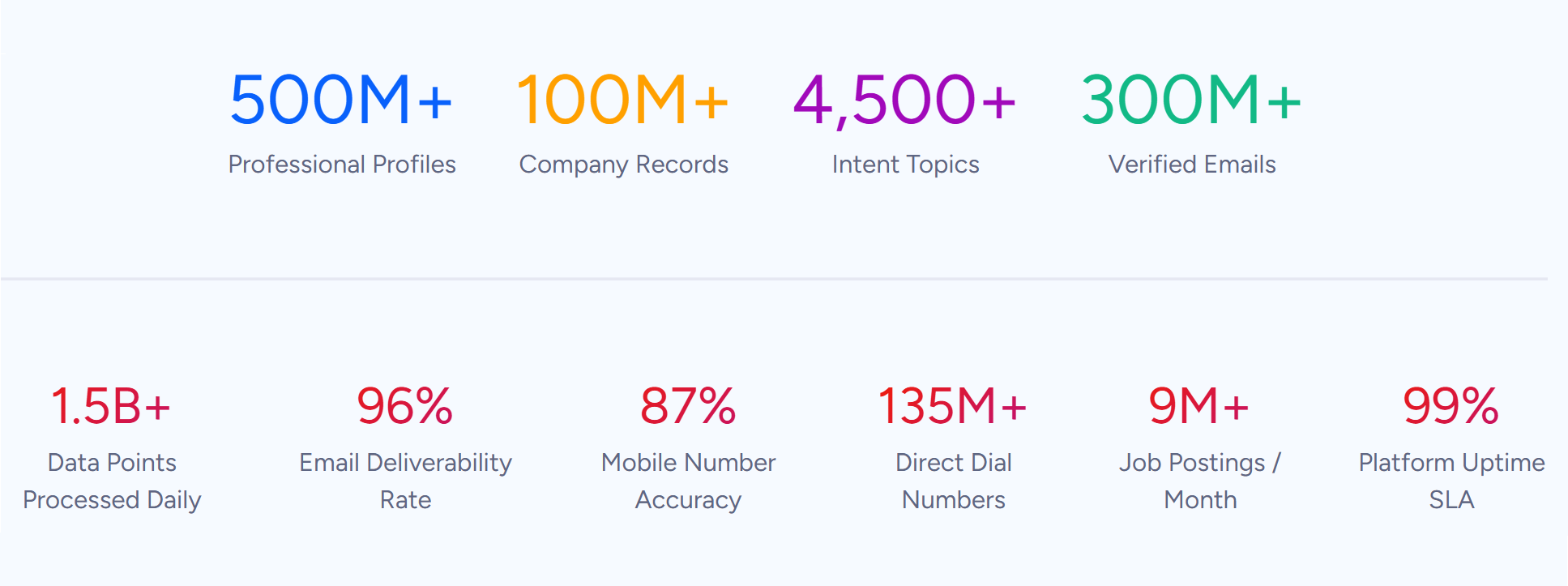
ZoomInfo is a B2B data and go-to-market platform built on 500M contacts, 100M companies, 135M+ verified phone numbers, and 200M+ verified business emails.
Source: ZoomInfo
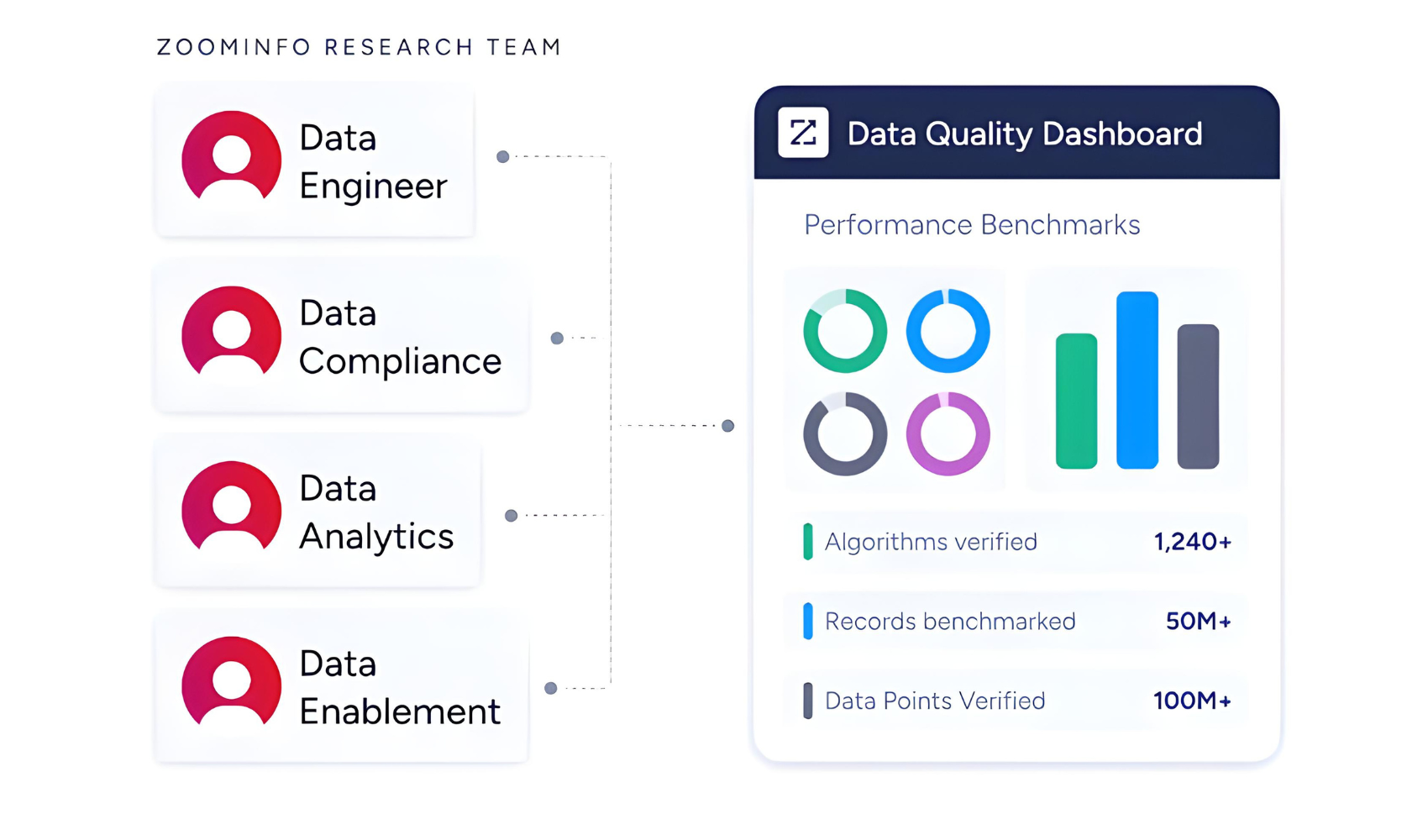
That data is verified through a multi-source pipeline backed by 300+ human researchers and reaching up to 95% accuracy on first-party data. For teams running RingCentral calls through HubSpot, ZoomInfo addresses the data quality layer that no call-logging connector handles.
Source: ZoomInfo
ZoomInfo integrates natively with HubSpot through the HubSpot Marketplace, providing real-time contact enrichment, scheduled database refresh, and lead intelligence within HubSpot.
Before a rep picks up the phone in RingCentral, ZoomInfo ensures the HubSpot contact record has a verified direct dial (so the call connects), an accurate job title (so the conversation is relevant), and current company details (so the rep is not pitching someone who left).
ZoomInfo also integrates with RingCentral through its App Marketplace and automation platforms like Workato, enabling data sync and workflow automation between the two systems.
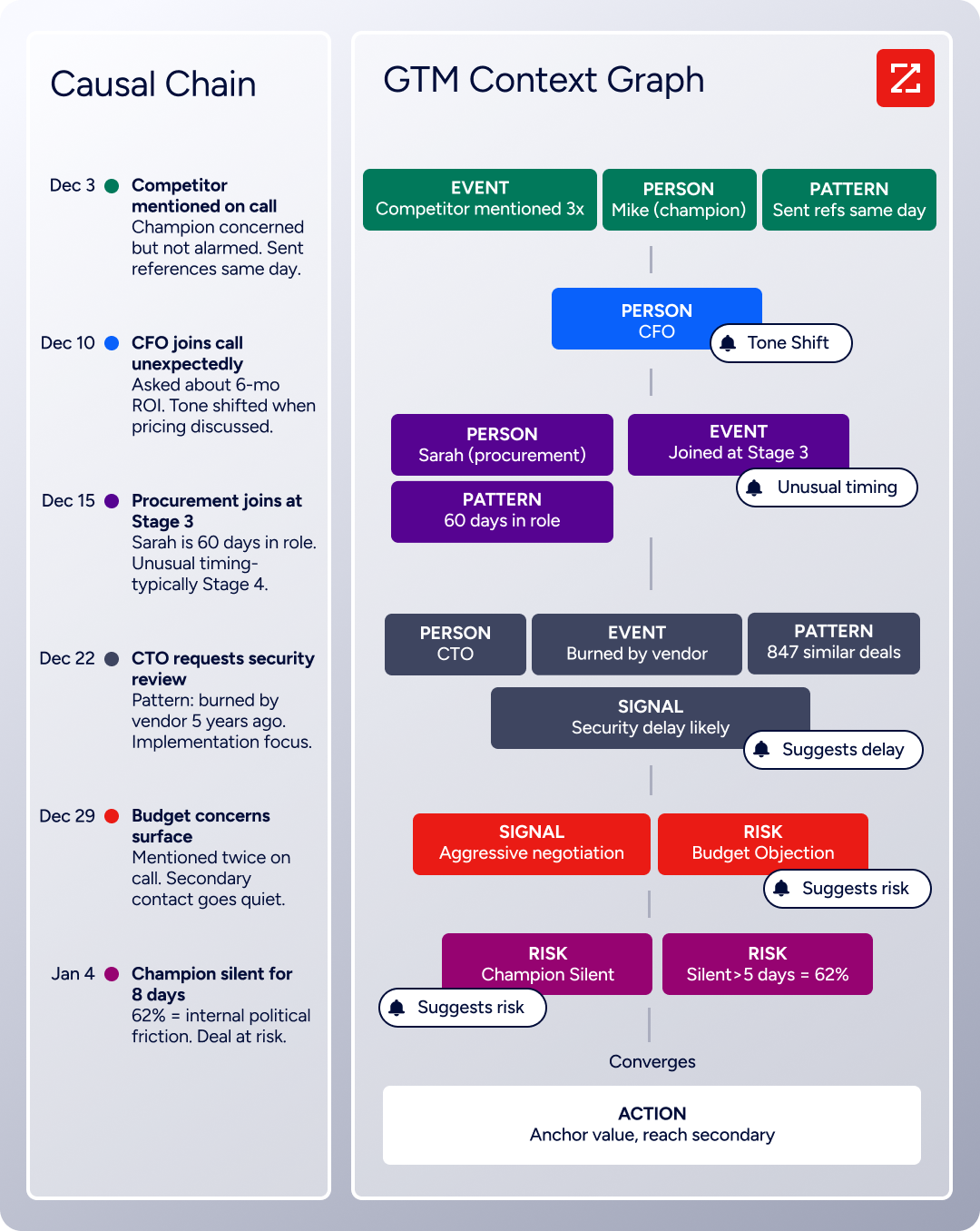
The same data feeds ZoomInfo's GTM Context Graph, an intelligence layer that processes 1.5B + data points daily by combining ZoomInfo's B2B data with your CRM records, conversation transcripts, and behavioral signals to surface not just what happened in a deal, but why.
Source: ZoomInfo
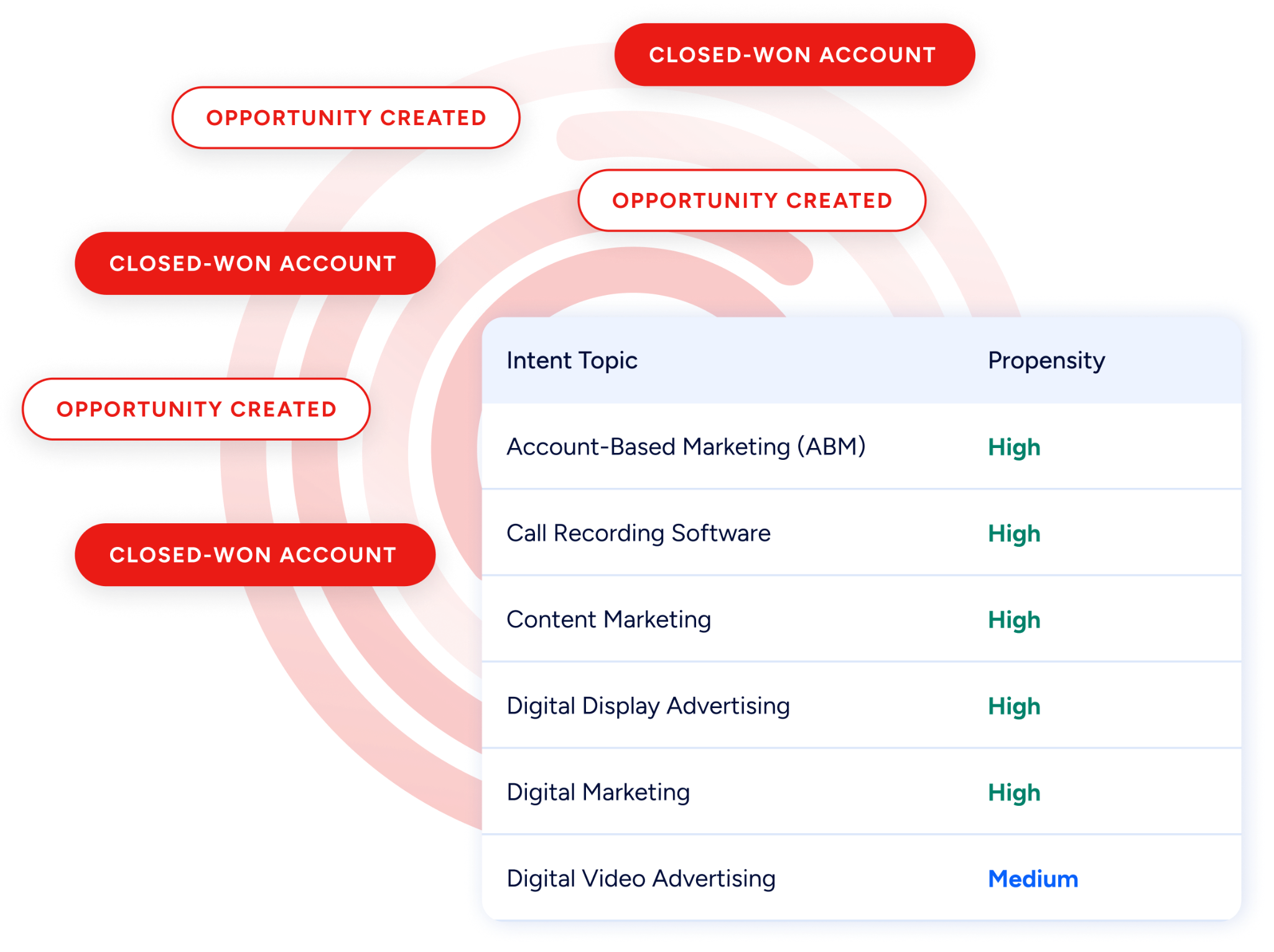
Buyer Intent data from ZoomInfo, tracking signals from 210 million IP-to-Organization pairings, can prioritize which contacts should receive outbound calls, so reps spend their RingCentral minutes on prospects who are actively researching relevant solutions rather than dialing through a stale list.
Source: ZoomInfo
Enriched records also make the RingCentral-HubSpot integration more reliable. When a rep dials from HubSpot using click-to-dial, a verified direct dial means the call connects to the right person. When call activity logs back into HubSpot, it attaches to a record with accurate job title and company attributes, so pipeline reports and activity metrics reflect reality.
Fewer blank fields mean fewer orphaned call logs, and consistent contact data reduces the duplicate records that accumulate when the same person appears under different phone numbers or email addresses.
Seismic's sales team attributed 39% of active pipeline to opportunities identified or influenced by ZoomInfo signals, while boosting productivity by 54% and saving 11.5 hours per week. (Seismic)
Final Verdict
RingCentral and HubSpot integrate natively through multiple connectors covering unified communications (RingEX), contact center (RingCX), and event management. Third-party tools extend the connection with custom workflows, and both platforms offer mature APIs for custom builds.
For most teams, the right choice depends on which RingCentral products they use and how complex their workflow requirements are.
Sales teams using RingEX for daily calling should activate the native HubSpot integration immediately. It handles automatic call logging, click-to-dial, and screen pop with no additional cost or engineering resources.
Teams running a contact center on RingCX should add the RingCX for HubSpot connector to get omnichannel interaction data into the CRM alongside marketing and sales records.
Teams that need custom event-triggered workflows (SMS on deal stage changes, task creation on missed calls, multi-step automations across additional tools) should layer Zapier or Workato on top of the native integration.
Organizations with complex data models, custom call scoring logic, or multi-system orchestration needs should invest in a custom API integration using both platforms' developer tools.
Before committing to a method, clarify what value the connection needs to deliver.
If the goal is getting call activity into the CRM so managers have visibility and reps stop logging calls manually, the native RingEX integration solves that in an afternoon.
If the goal is orchestrating multi-channel workflows across calls, SMS, email, and deal stages, an iPaaS tool gives you the flexibility to build what you need. Either way, the quality of the contact data in HubSpot determines whether the calls made through RingCentral reach the right people with the right message.
ZoomInfo, with its native HubSpot integration, RingCentral integration, API, and MCP access, is the data enrichment layer that keeps both systems accurate while the connector keeps them aligned.
FAQ
Does RingCentral integrate natively with HubSpot?
Yes. RingCentral offers multiple native HubSpot integrations through the HubSpot App Marketplace. The RingEX for HubSpot connector handles unified calling, messaging, and SMS with automatic call logging and click-to-dial.
The RingCX for HubSpot connector covers contact center interactions. RingCentral Events for HubSpot handles event management data. Each connector serves a different RingCentral product line and can be installed independently.
What RingCentral plan do I need for the HubSpot integration?
The native RingEX for HubSpot integration is included with RingEX subscriptions (Core, Advanced, and Ultra tiers). No additional fee is required for the integration itself. For the RingCX for HubSpot integration, you need a RingCX contact center subscription, which starts at $65/user/month on annual billing. The RingCentral Events connector requires a RingCentral Events subscription.
Can I send SMS from HubSpot through RingCentral?
Not through the native integration's default configuration. The native connector focuses on logging RingCentral communication activity into HubSpot. To trigger RingCentral SMS messages from HubSpot events (such as a deal stage change or form submission), use a third-party automation tool like Zapier or Workato. Both support RingCentral SMS as an action triggered by HubSpot events.
Does call recording data sync to HubSpot?
Call recordings are referenced in the HubSpot activity log, but the audio files themselves are stored in RingCentral. The HubSpot activity record may include a link to the recording that opens in RingCentral for playback. Full audio file transfers into HubSpot's native storage are not part of the standard native integration.
What happens if a caller has no matching contact in HubSpot?
That depends on the integration configuration. The native connector can create a new HubSpot contact when an unmatched phone number is detected, or log the call without associating it to a contact record. Teams with strict data hygiene standards may prefer the latter to avoid creating incomplete records from unknown callers.
Can I use the RingCentral-HubSpot integration with HubSpot's free CRM?
The native RingCentral-HubSpot integration requires an active HubSpot subscription and a RingCentral subscription.
HubSpot's free CRM includes basic integration capabilities, but specific features of the RingCentral connector (such as advanced call logging configurations and bidirectional contact sync) may require a paid HubSpot tier. Check both platforms' current documentation for exact tier requirements, as these can change with product updates.
How does ZoomInfo improve a RingCentral-HubSpot workflow?
ZoomInfo solves the data quality problem that no call-logging connector addresses. Contact records in CRMs decay as people change jobs, phone numbers go inactive, and company details shift. ZoomInfo enriches HubSpot records with verified direct dials, business emails, job titles, and company attributes through its native HubSpot integration.
The result: when a rep clicks to dial from HubSpot through RingCentral, the number connects to the right person. When call activity logs back into HubSpot, it attaches to a record that accurately represents who the rep spoke with and why it matters to the deal.
Is real-time call logging possible between RingCentral and HubSpot?
Yes. The native RingEX for HubSpot integration logs call activity in near real-time. When a call ends in RingCentral, the activity record appears on the HubSpot contact timeline within moments.
Third-party tools like Zapier process triggers within 1 to 15 minutes depending on plan tier. Custom API integrations using RingCentral webhooks can achieve sub-minute sync by listening for call events and writing to HubSpot immediately.
See what else plugs into HubSpot:
