

Teams that run Aircall for calling and HubSpot as their CRM usually hit the same problems within a quarter:
call activity lives in Aircall while deal and contact records live in HubSpot, so reps toggle between platforms to connect conversations to pipeline,
new contacts captured during calls never reach the CRM without manual entry,
and when a prospect calls back about a proposal, the rep answering has no context on the deal history because the phone system and the CRM don't share data.
However the two platforms ended up coexisting (a sales team adopting Aircall for outbound dialing while the org runs on HubSpot, a support team handling inbound calls for accounts tracked in HubSpot, or separate departments choosing tools independently), the longer they run without a connection, the more call data goes unlogged and the harder it becomes to act on every customer interaction.
Connecting Aircall and HubSpot closes that gap.
Inbound and outbound calls log automatically to HubSpot contacts, deals, and tickets, so reps never copy activity data by hand.
Call recordings and transcriptions attach to CRM records so anyone on the team can review what was said without leaving HubSpot. Contact details sync between the two platforms so a number updated in HubSpot appears in Aircall (and vice versa), keeping both systems current.
Aircall offers a native HubSpot integration that ranks among the most complete in its marketplace. Aircall is a HubSpot Premier Technology Partner with a strategic investment from HubSpot Ventures, and the integration has over 8,000 installs.
For teams that need automation beyond what the native connector provides, Zapier can extend the data flow, and both platforms expose APIs for custom development. Each method differs in setup complexity, sync direction, data coverage, and cost.
There is also one problem no connection method solves: the integration logs call activity and syncs contact records, but it does not verify whether the phone numbers, emails, and company details in those records are accurate or current.
And that is where ZoomInfo comes in. ZoomInfo integrates natively with both HubSpot and Aircall (via Chorus, ZoomInfo's conversation intelligence platform), and offers API and MCP access that can feed verified, enriched contact and company data into any workflow, so both systems operate on records that are accurate and complete.
This article covers the Aircall-HubSpot integration: which methods are available, what data each one handles, how to set them up, the use cases that justify connecting both platforms, and the limitations to plan for.
At the end, it also covers how ZoomInfo fits into the picture as a data enrichment and conversation intelligence layer for teams running Aircall and HubSpot together.
Let's start with an overview of the integration.
Integration Overview

Source: Aircall
Does a native integration exist?
Yes. Aircall offers a native HubSpot integration available through both the Aircall App Marketplace and the HubSpot Marketplace. Aircall is a HubSpot Premier Technology Partner with a strategic investment from HubSpot Ventures, and the connector has over 8,000 installs.
What data can sync?
Call activity (inbound, outbound, missed calls, voicemails), call recordings, call transcriptions, SMS/MMS messages, contact details, call tags, and call notes. Activity logs automatically to HubSpot contacts, companies, deals, and tickets.
Is the sync bidirectional?
Partially. Contact data syncs both ways: contacts created or updated in one platform appear in the other. Call activity flows one direction, from Aircall to HubSpot, since Aircall is the system of record for telephony events.
Is it real-time or batch?
The native integration operates in near real-time. Call events, recordings, and contact updates push into HubSpot as they occur. Zapier-based automations trigger within 1 to 15 minutes depending on plan tier.
What are the available methods?
Native Aircall-HubSpot integration (included on all Aircall plans with HubSpot), third-party automation (Zapier), and custom API development using both platforms' REST APIs.
Method | Setup Difficulty | Data Flow | Real-time? | Cost |
|---|---|---|---|---|
Native Integration | Low | Bidirectional (contacts); Aircall to HubSpot (call activity) | Near real-time | Included with Aircall plans |
Zapier | Medium | One-way per Zap | Near real-time (1-15 min) | From $19.99/mo |
Custom API | High | Fully customizable | Real-time via webhooks | Developer time + hosting |
One distinction worth settling upfront: the native integration handles both ongoing sync and retroactive logging of call history, making it suitable for teams activating the connection mid-lifecycle.
Zapier handles event-triggered automation for workflows the native connector doesn't cover (such as triggering actions in third-party tools based on Aircall events). Custom API builds offer more flexibility but require development resources and ongoing maintenance.
Integration Methods
Native Aircall-HubSpot Integration
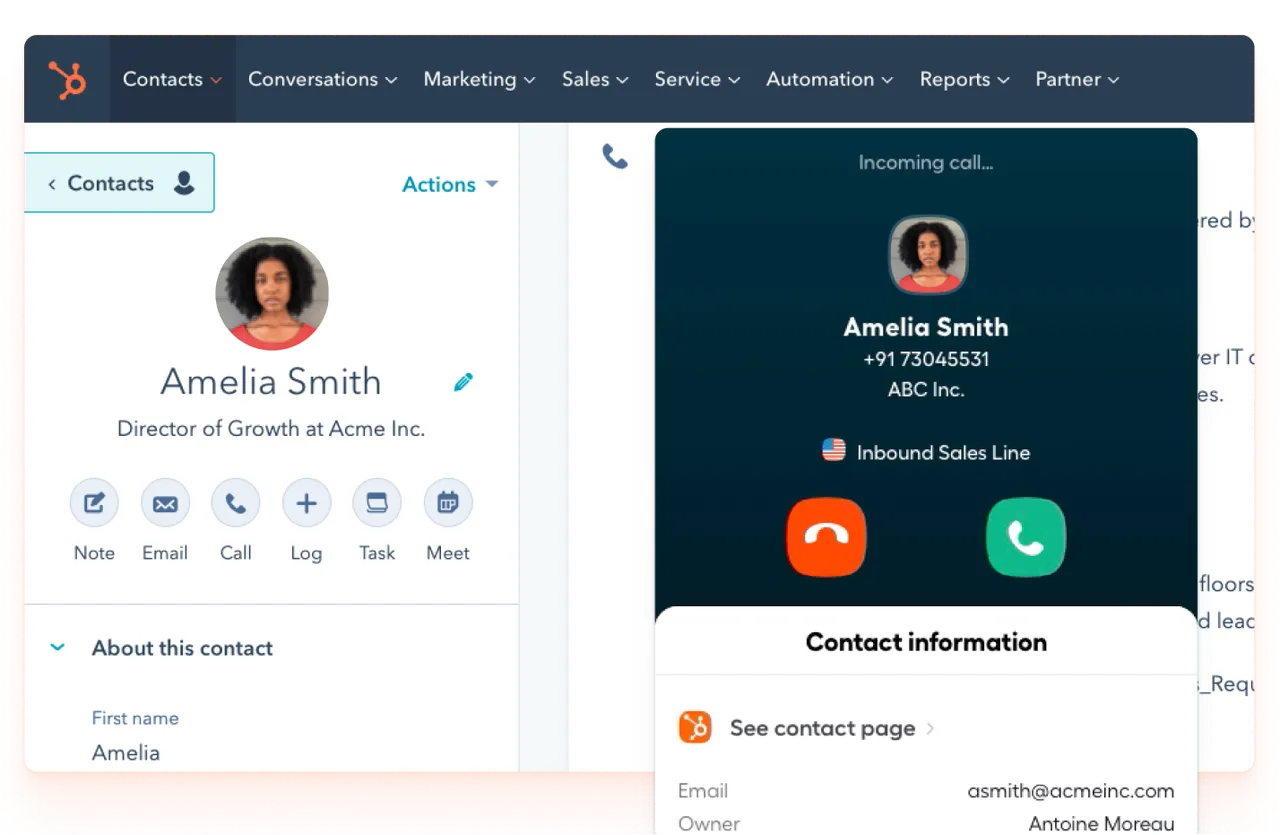
How it works: Aircall's native HubSpot integration connects the two platforms through a first-party connector. When a call is made, received, or missed in Aircall, the integration logs the activity to the matching HubSpot contact, deal, or ticket record.
Source: Aircall
Contact data syncs both ways, so a new contact created during a call in Aircall appears in HubSpot, and contact details updated in HubSpot reflect in Aircall's interface.
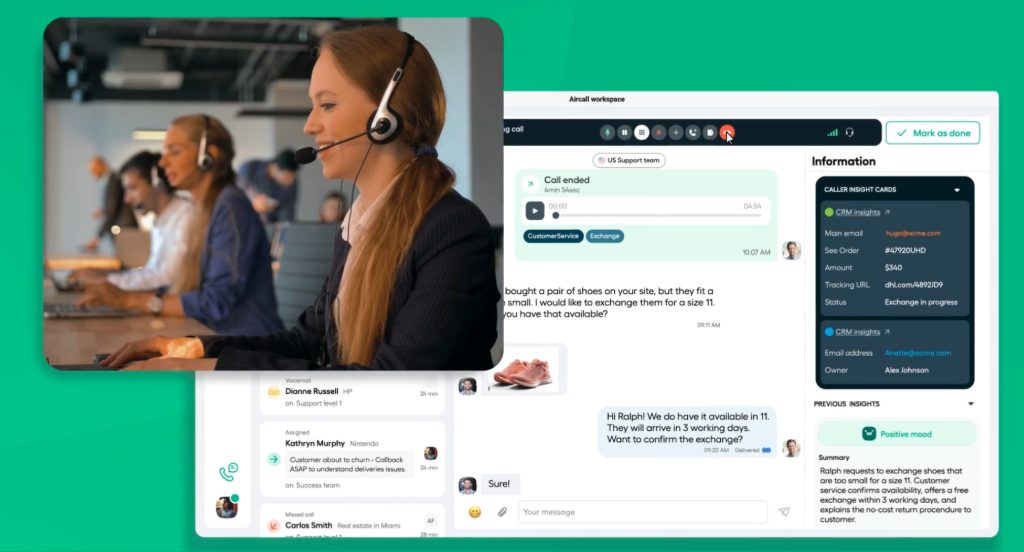
The integration uses Aircall's Insight Cards to show HubSpot contact and deal context inside the Aircall phone interface during live calls.
What it syncs: All call types (inbound, outbound, missed), voicemails, call recordings, AI-generated call transcriptions, call tags and disposition codes, call notes and comments, SMS/MMS messages, and contact details. Call activity creates engagement records on HubSpot contacts, companies, deals, and tickets.
Source: Aircall
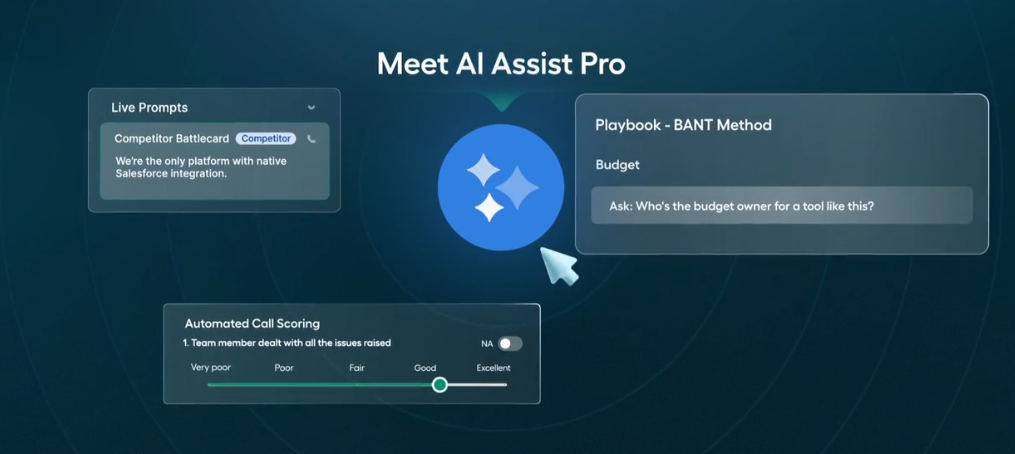
AI Assist call summaries, key topics, and sentiment data also appear in the activity log when AI Assist is enabled.
Fits: ongoing bidirectional sync of contacts and one-directional logging of all call activity; suitable for both new deployments and mid-lifecycle activation.
Setup process:
In the Aircall Dashboard, navigate to Integrations and search for HubSpot. Click Install and authenticate with your HubSpot account using OAuth. Admin access is required on both platforms.
Select which Aircall numbers should sync activity to HubSpot. Each number can be individually enabled or disabled.
Configure contact matching rules: choose whether Aircall should match incoming callers to existing HubSpot contacts by phone number, and whether unmatched callers should create new contact records automatically.
Set call logging preferences: select which call types to log (inbound, outbound, missed, voicemails), whether to attach recordings and transcriptions, and which HubSpot object types (contacts, deals, tickets) should receive activity records.
Configure Insight Cards to display HubSpot contact details, deal information, and recent activity inside the Aircall phone interface during live calls.
Test by placing a call to a known HubSpot contact and verifying that the call activity, recording, and any tags appear on the contact's timeline in HubSpot.
Strengths: First-party integration maintained by Aircall as a Premier HubSpot Technology Partner. No third-party tool to configure or pay for separately. Covers the full range of call activity (calls, SMS, voicemails, recordings, transcriptions). B
idirectional contact sync eliminates manual data entry. Insight Cards give reps HubSpot context without leaving the phone interface. Included on all Aircall plans that support integrations.
Limitations: Call activity flows one direction (Aircall to HubSpot); HubSpot deal stage changes or workflow triggers do not push data back into Aircall. Custom fields beyond standard call properties may require additional configuration.
The integration relies on phone number matching for contact association, which can miss matches if numbers are formatted inconsistently between the two platforms. Exact UI steps and available configuration options may vary by Aircall plan tier.
Best for: Any team using both Aircall and HubSpot. The native integration is the recommended starting point for all use cases, covering sales call logging, support ticket tracking, and contact synchronization with minimal setup.
Zapier
Source: HubSpot
How it works: Zapier connects Aircall and HubSpot through event-driven automations called Zaps. Each Zap pairs a trigger (an event in one app) with one or more actions (what happens in the other).
While the native integration handles core call logging and contact sync, Zapier extends it by enabling custom workflows the native connector does not support, such as triggering actions in third-party tools when specific call events occur or creating conditional logic based on call outcomes.
What it syncs: Zapier can capture Aircall events (new calls, missed calls, new contacts, call tags applied) and create or update HubSpot records (contacts, deals, tickets, tasks, notes). Each trigger-action pair handles one workflow. Custom field mapping is available in the Zap configuration.
Fits: ongoing automation of custom workflows that extend beyond the native integration; not a replacement for the native connector's core functionality.
Setup process:
Create a Zapier account and connect both your Aircall and HubSpot accounts using OAuth.
Choose Aircall as the trigger app and select a trigger event (e.g., "Call Ended," "New Contact," or "Tag Applied to Call").
Choose HubSpot as the action app and select an action (e.g., "Create Task," "Update Contact," or "Create Deal").
Map fields between the Aircall trigger data and the HubSpot action fields. Zapier displays all available properties from both sides.
Test the Zap with a sample record to verify the field mapping and data flow.
Turn the Zap on. For bidirectional workflows, create a second Zap with the trigger and action apps reversed, and add a filter to prevent infinite loops.
Strengths: Enables custom workflows the native integration doesn't cover. No code required. Zapier's filter and formatting steps allow conditional logic (e.g., only create a deal in HubSpot when a call is tagged "qualified").
Can bridge Aircall and HubSpot with other tools in the same Zap (e.g., send a Slack notification when a missed call creates a HubSpot task).
Limitations: Adds cost on top of both platform subscriptions (Zapier plans start at $19.99/month). Each Zap handles one trigger-action pair, so complex workflows require multiple Zaps, each counting against task limits. Triggers fire within 1 to 15 minutes depending on plan tier.
Historical events before the Zap was activated do not sync. Not a substitute for the native integration's real-time call logging and recording attachment.
Best for: Teams that already use the native integration but need additional automation, such as creating HubSpot deals based on specific call outcomes, routing missed calls to particular team members, or triggering cross-platform notifications.
Custom API Integration
How it works: Both Aircall and HubSpot provide APIs for building custom integrations.
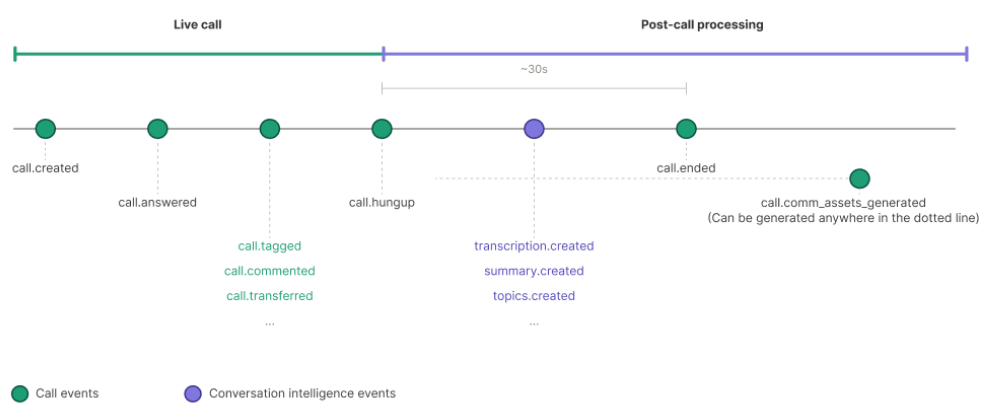
Aircall's REST API covers users, calls, contacts, tags, messages, and dialer campaigns, with a webhook system that fires POST requests on call events, contact changes, and message activity.
Source: Aircall
HubSpot's REST API covers all CRM objects (contacts, companies, deals, tickets, custom objects) with webhook subscriptions for event-driven automation. A custom integration connects these APIs directly, with middleware handling authentication, field mapping, transformation, and error recovery.
What it syncs: Anything both APIs expose. This is the only method that supports complex scenarios like syncing custom objects, enforcing business logic during call-to-deal conversion, routing calls based on HubSpot deal stage, or integrating call data with other internal systems in the same pipeline.
Fits: both ongoing sync and one-time data migration; the only method with no ceiling on customization.
Setup process:
Generate API credentials on both platforms: an API token or OAuth app in Aircall (from Company Settings in the Aircall Dashboard) and a private app access token or Connected App in HubSpot.
Design the data model mapping between Aircall and HubSpot objects, including field-level transformations and a cross-reference table for matching record IDs.
Build the sync service: a server-side application that listens for Aircall webhooks (call events, contact changes) and writes corresponding records to HubSpot via its API.
Implement any HubSpot-to-Aircall flows needed (e.g., syncing contact updates back to Aircall via its Contacts API).
Add logging, error handling, and retry logic. Aircall webhooks time out after 5 seconds and are disabled after 10 consecutive failures. HubSpot enforces rate limits based on plan tier (100-190 requests per 10 seconds for private apps).
Deploy, monitor, and maintain the integration over time. Both platforms version their APIs (HubSpot introduced date-based API versioning in 2026; Aircall maintains v1 and v2 endpoints).
Strengths: Full control over what syncs, when, and how. Real-time sync via webhooks on both sides. Can implement complex business logic (e.g., auto-create a deal when a call with a specific tag exceeds a certain duration). No per-operation fees from a third-party connector.
Limitations: Requires development resources to build and maintain. You own the infrastructure, monitoring, and error recovery. API changes on either platform require ongoing maintenance. The initial build takes weeks, not hours. Both platforms impose rate limits that must be respected at scale.
Best for: Teams with sync requirements that neither the native integration nor Zapier can satisfy. Organizations with in-house development teams and a need for complex call-to-CRM logic, multi-system data pipelines, or custom reporting that spans both platforms.
Key Use Cases
1. Automatic Sales Call Logging with Deal Context
Sales reps make outbound calls through Aircall and need every call logged to the correct HubSpot contact and deal without manual data entry.
The native integration creates engagement records on the contact's timeline, attaches the recording and transcription, and associates the activity with the open deal. Managers can review call history on any deal record to understand the full conversation arc without asking reps for updates.
Best integration method: Native Aircall-HubSpot integration.
2. Missed Call Follow-Up Workflows
When a prospect calls and no one answers, the missed call needs to trigger a follow-up task in HubSpot assigned to the right rep. The native integration logs the missed call to the contact record.
A Zapier Zap (or HubSpot workflow triggered by the logged activity) can then create a task with a due date and notify the rep via Slack or email, so no inbound lead falls through the cracks.
Best integration method: Native integration (for logging) combined with Zapier or HubSpot workflows (for task creation and notification).
3. Support Ticket Call Tracking
Customer support teams handle inbound calls in Aircall for issues tracked as HubSpot tickets. The native integration logs each call to the associated ticket, so support managers can see the full interaction history (calls, emails, chat) in one place.
Call recordings attached to the ticket give QA teams direct access to review how the issue was handled.
Best integration method: Native Aircall-HubSpot integration.
4. Lead Qualification Through Call Tagging
SDRs qualify leads during calls and apply Aircall tags (e.g., "Qualified," "Not Interested," "Follow Up") at the end of each conversation.
The native integration syncs these tags to HubSpot, where workflows can update the contact's lifecycle stage, move them to a different pipeline stage, or trigger a nurture sequence based on the tag applied.
Best integration method: Native integration (for tag sync) combined with HubSpot workflows (for lifecycle automation).
5. Real-Time Caller Context via Insight Cards
When an inbound call arrives, reps need to know who is calling and where they stand in the pipeline before answering.
Source: Aircall
The native integration's Insight Cards show HubSpot contact details, recent deal activity, and open tickets inside the Aircall phone interface, so the rep picks up the phone already informed and can reference the caller's history immediately.
Best integration method: Native Aircall-HubSpot integration.
Limitations and Considerations
One-Directional Call Activity Flow
The native integration pushes call data from Aircall to HubSpot, not the other way around. HubSpot deal stage changes, contact property updates triggered by workflows, or lifecycle stage transitions do not push data back into Aircall. If a rep needs to see HubSpot deal status inside Aircall, the Insight Cards provide a read-only view during calls, but Aircall does not store or act on HubSpot workflow outputs independently.
Phone Number Format Matching
Contact matching relies on phone numbers. If a contact's number is stored in different formats between Aircall and HubSpot (e.g., "+1 (555) 123-4567" vs. "5551234567"), the integration may fail to match the records automatically, creating duplicate contacts or orphaned call logs. Standardizing phone number formatting in both systems before activating the integration reduces this risk.
Plan-Dependent Feature Access
Some Aircall features that enhance the integration are gated by plan tier. AI Assist features that add call summaries and sentiment data to HubSpot activity logs require a $9/user/month add-on on the Essentials plan or are included on Professional. AI Assist Pro with live transcription and playbooks costs $49/user/month.
Aircall's Essentials plan starts at $30/user/month and Professional at $50/user/month, both with a minimum of 3 users. On HubSpot's side, advanced workflow automation and custom objects require Professional or Enterprise tiers.
API Rate Limits
Both platforms impose rate limits that affect high-volume custom integrations. Aircall's webhook system times out after 5 seconds per request and disables webhooks after 10 consecutive failures. HubSpot's API enforces 100-190 requests per 10 seconds depending on plan tier, with daily caps ranging from 250,000 (Free/Starter) to 1,000,000 (Enterprise).
Teams syncing thousands of call records daily through custom builds need to account for these limits.
Permissions and Access
Setting up the native integration requires admin access on both platforms. In Aircall, you need account admin rights to install integrations and configure which numbers sync. In HubSpot, admin or super admin access is required to authorize the OAuth connection and configure which object types receive call activity data.
If your HubSpot org uses field-level security or sharing rules, the integration user's profile must have write access to every field that receives call data.
Maintenance
Both platforms update their products independently. Aircall releases product updates on a regular cadence (recent additions include AI Voice Agent, WhatsApp integration, and AI Assist Pro). HubSpot versions its API with date-based releases twice per year.
Custom fields or new HubSpot objects added after the initial setup will not receive call data unless the integration configuration is updated. Review the integration's health and accuracy periodically.
What No Method Fixes: The Data Itself
Every method above moves call activity from Aircall into HubSpot and keeps contact records in sync. None of them checks whether those contact records are accurate, complete, or current.
A call logged to a contact with an outdated job title, a dead email address, or missing company data is faithfully recorded on a record that may already be wrong. The integration ensures both systems agree; it does not ensure they are right.
Where ZoomInfo Fits In
Every method in this guide moves call data between Aircall and HubSpot and keeps contacts in sync. None of them improves the data underneath.
When the integration is live but outbound calls go to disconnected numbers, prospect records carry outdated titles, and the CRM has no company data to route or score leads against, the bottleneck is no longer the connector.
That is the gap ZoomInfo closes.
ZoomInfo is a B2B data and GTM platform built on 500M contacts, 100M companies, 135M+ verified phone numbers, and 200M+ verified business email addresses. That data is verified through a multi-source pipeline backed by 300+ human researchers, reaching up to 95% accuracy on first-party data.
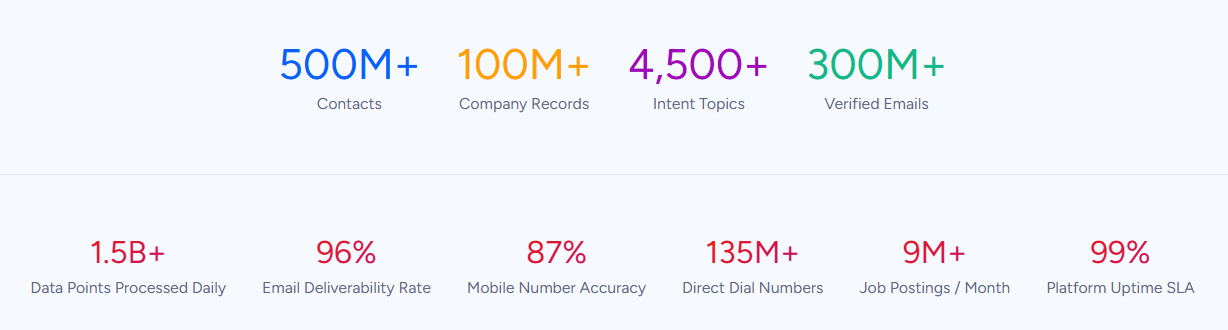
For teams running an Aircall-HubSpot integration, ZoomInfo addresses both the data quality problem and the conversation intelligence gap that no call-logging connector handles.
ZoomInfo integrates natively with HubSpot through its marketplace, providing CRM enrichment, automated data import, and real-time updates inside HubSpot records.
Before a rep picks up the phone in Aircall, ZoomInfo ensures the HubSpot contact has a verified direct dial (so outbound calls connect), an accurate job title (so the conversation is relevant), and current company details (so the rep is not pitching someone who left).
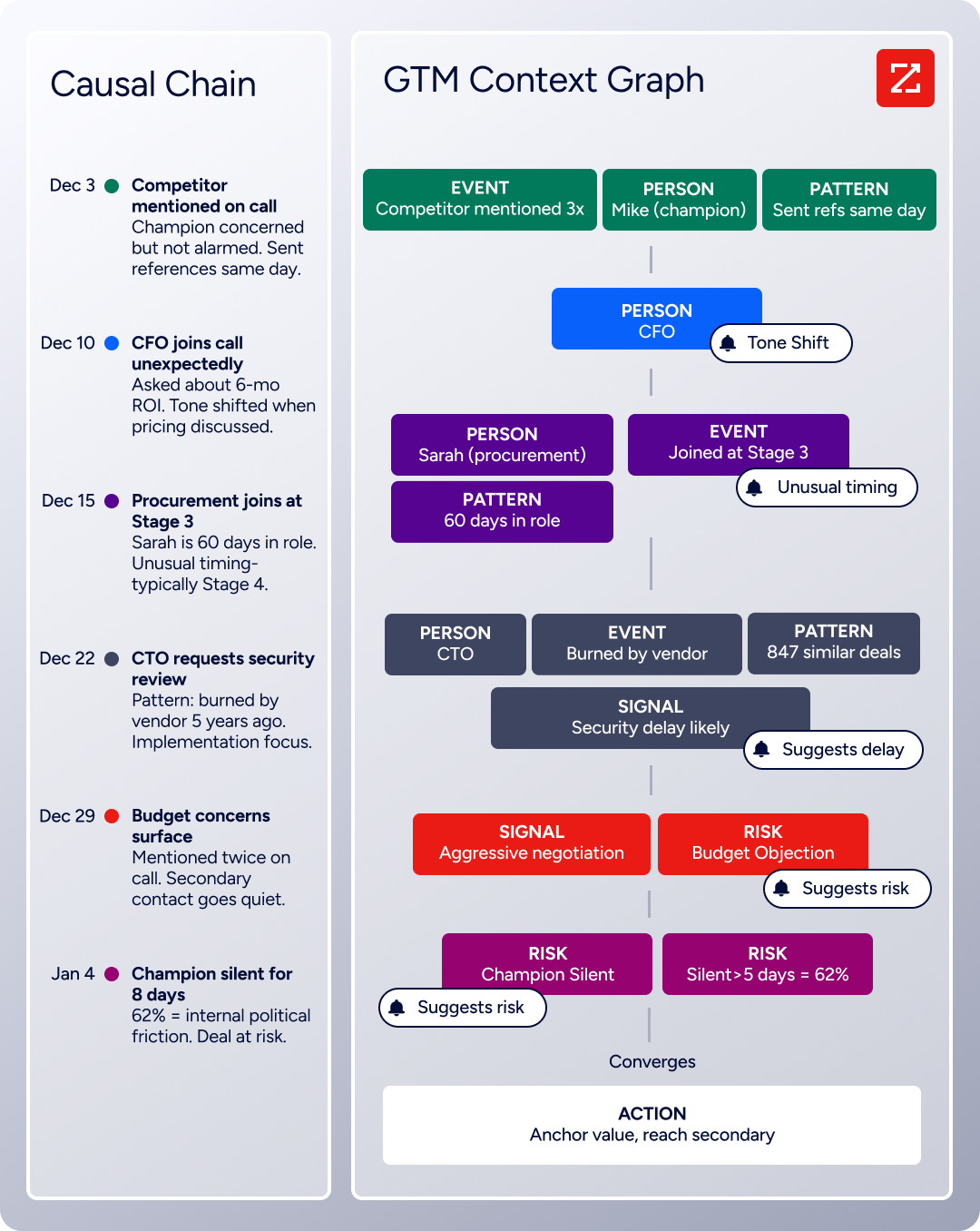
The same data feeds ZoomInfo's GTM Context Graph, which processes 1.5B+ data points daily and combines third-party intelligence with CRM records, conversation transcripts, and behavioral signals to surface not just what happened in a deal, but why.
For a full breakdown of how ZoomInfo and HubSpot compare across data, features, and use cases, see our HubSpot vs ZoomInfo guide.
ZoomInfo also connects with Aircall through Chorus, its conversation intelligence platform. Chorus imports call recordings from Aircall and applies automatic transcription, theme detection, and call analysis, turning raw call data into structured insights: competitive mentions, objection patterns, talk ratios, and deal risk signals.
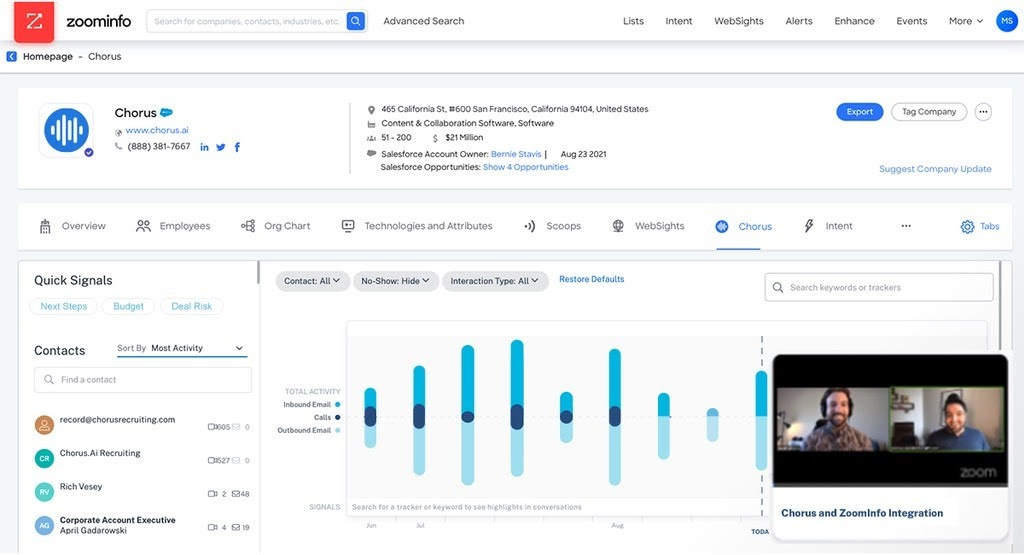
These insights feed the GTM Context Graph and are accessible through ZoomInfo's GTM Workspace, giving reps AI-powered account briefs and next-best-action recommendations informed by both CRM data and actual call conversations.
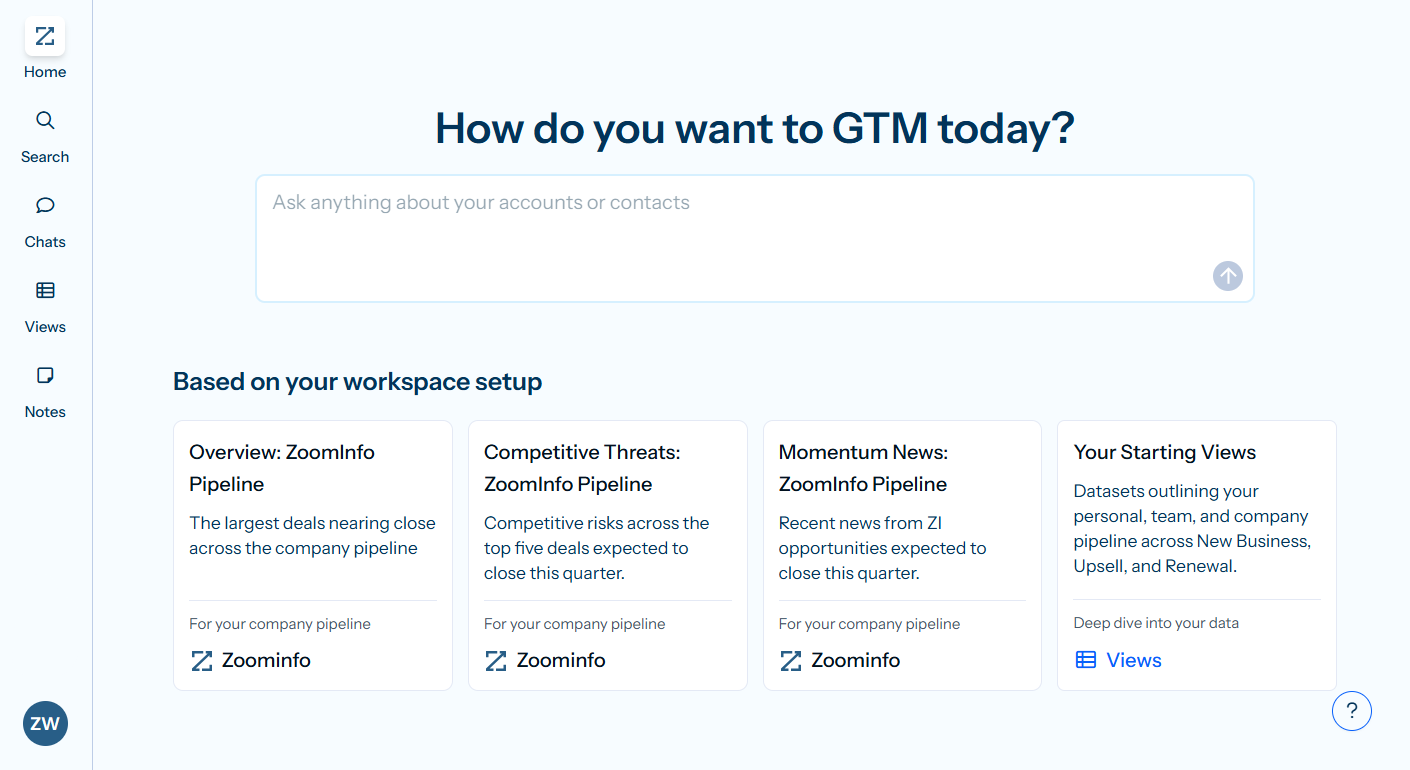
In practice, a team running Aircall and HubSpot can use ZoomInfo to enrich HubSpot records before any call happens (verified direct dials, accurate company data, updated org charts), then feed completed call recordings into Chorus for analysis that goes beyond what Aircall's built-in analytics provide.
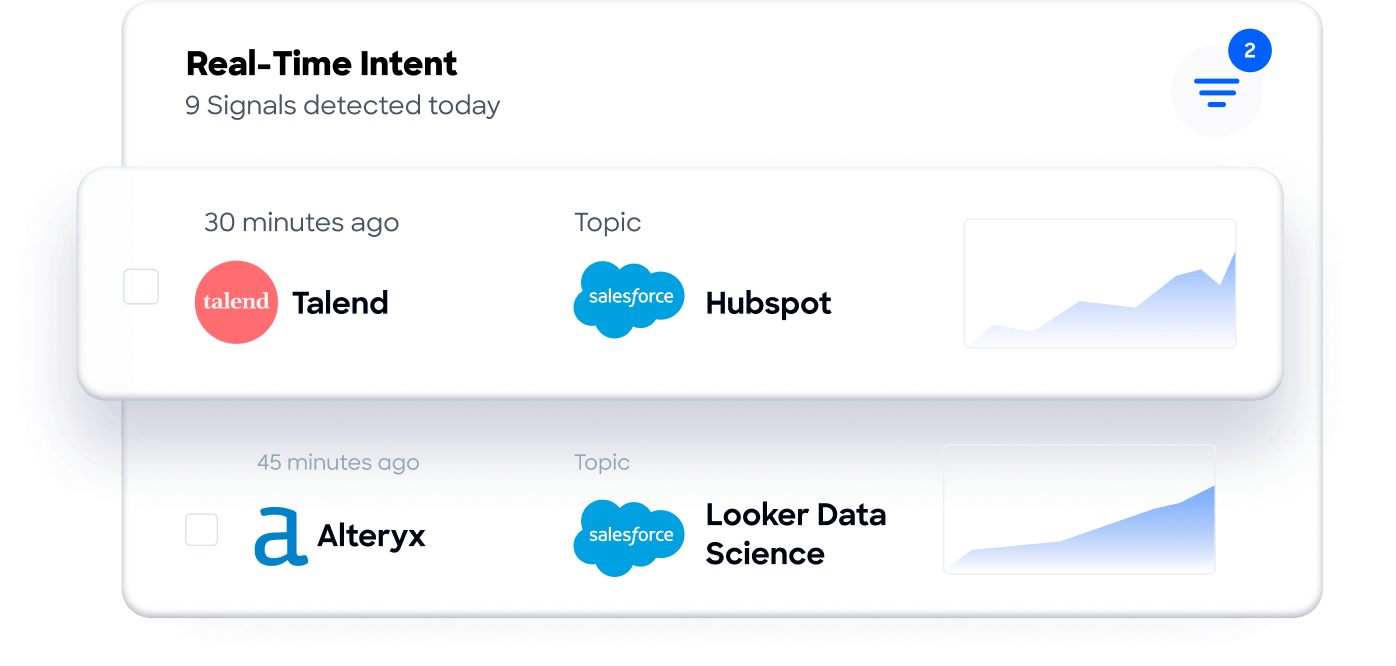
Buyer Intent data from ZoomInfo, tracking signals from 210 million IP-to-Organization pairings, can prioritize which accounts should receive outbound calls through Aircall, so reps spend dialing time on prospects who are actively researching relevant solutions rather than working through a stale list.
Enriched records also make the Aircall-HubSpot integration itself more reliable. Standardized phone number formatting reduces contact matching failures. Complete company data enables more accurate lead routing through HubSpot workflows. And verified emails mean follow-up sequences triggered after calls reach real inboxes.
Seismic's sales team attributed 39% of active pipeline to opportunities identified or influenced by ZoomInfo signals, while boosting productivity by 54% and saving 11.5 hours per week. (Seismic)
Final Verdict
A native Aircall-HubSpot integration exists, and it is one of the strongest phone-to-CRM connectors available: real-time call logging, bidirectional contact sync, recording and transcription attachment, and Insight Cards that surface CRM context during live calls, all from a Premier HubSpot Technology Partner. For most teams, the right choice depends on what they need beyond the native connector.
Teams of any size using Aircall and HubSpot together should activate the native integration immediately. It covers call logging, contact sync, recording attachment, and tag synchronization with minimal setup and no additional cost.
Teams that need custom automation beyond call logging (creating deals from specific call outcomes, routing missed calls to Slack, triggering multi-step workflows based on call tags) should layer Zapier or HubSpot's native workflow engine on top of the native integration.
Organizations with complex data models, multi-system pipelines, or business logic that must be enforced during call-to-CRM conversion should invest in a custom API integration using both platforms' REST APIs and webhook systems.
Before building complexity beyond the native integration, clarify what gap you are trying to fill.
If the gap is call logging and contact sync, the native integration already solves it. If the gap is workflow automation triggered by call outcomes, HubSpot workflows (activated by logged call activity) or a Zapier layer will handle it.
If the gap is data quality (outdated phone numbers, missing company data, stale contact records), that is a different problem, and one that ZoomInfo solves.
With native integrations into both HubSpot and Aircall (via Chorus), plus API and MCP access for any workflow, ZoomInfo is the data enrichment and conversation intelligence layer that ensures the records flowing between both platforms are accurate, complete, and actionable.
FAQ
Does Aircall integrate natively with HubSpot?
Yes. Aircall offers a native HubSpot integration that logs all call activity (inbound, outbound, missed calls, voicemails, SMS) to HubSpot contacts, deals, and tickets in near real-time.
The integration includes bidirectional contact sync, call recording and transcription attachment, tag synchronization, and Insight Cards that display HubSpot contact and deal data inside the Aircall phone interface during live calls.
It is included with Aircall plans that support integrations and requires no third-party tool.
What Aircall plan do I need for the HubSpot integration?
The native HubSpot integration is available on Aircall's Essentials plan ($30/user/month, annual billing) and above. AI Assist features that add call summaries and sentiment data to HubSpot activity logs require an additional $9/user/month add-on on Essentials, or are included on Professional ($50/user/month).
AI Assist Pro with live transcription and playbooks costs $49/user/month on any plan. Both Essentials and Professional require a minimum of 3 users.
Can call recordings and transcriptions sync to HubSpot?
Yes. The native integration attaches call recordings to the corresponding HubSpot contact, deal, or ticket timeline as engagement records. When AI Assist or AI Assist Pro is enabled, AI-generated call transcriptions, summaries, key topics, and sentiment data also sync to HubSpot. These appear in the activity timeline so any team member can review what was discussed without leaving the CRM.
Does the integration support bidirectional sync?
Partially. Contact data syncs both ways: contacts created or updated in either platform appear in the other. Call activity flows one direction only, from Aircall to HubSpot, since Aircall is the system of record for telephony events.
HubSpot deal stage changes, workflow triggers, and lifecycle stage transitions do not push data back into Aircall, though Insight Cards provide a read-only view of HubSpot data inside the Aircall interface during calls.
How do I avoid duplicate contacts when connecting the two platforms?
The integration matches contacts by phone number. Before activating the connection, standardize phone number formatting in both systems (consistent country codes, no special characters) to minimize false mismatches. Configure whether the integration should automatically create new HubSpot contacts for unmatched callers or skip them.
For existing duplicates, HubSpot's built-in duplicate management tools and ZoomInfo's data quality capabilities can identify and merge duplicate records.
Can I trigger HubSpot workflows based on Aircall call data?
Yes. When the native integration logs a call to a HubSpot contact or deal record, that engagement event can trigger HubSpot workflows. For example, a workflow can update a contact's lifecycle stage when a call tagged "Qualified" is logged, or create a follow-up task when a missed call is recorded. The triggering logic runs on HubSpot's side using the data the integration pushes in.
What does a Zapier integration add beyond the native connector?
Zapier extends the integration by enabling custom workflows the native connector does not handle, such as creating a HubSpot deal automatically when a specific Aircall call tag is applied, sending a Slack notification when a call exceeds a certain duration, or logging Aircall activity to a third-party tool alongside HubSpot.
Zapier supplements the native integration; it does not replace its core call logging and contact sync.
How does ZoomInfo improve an Aircall-HubSpot setup?
ZoomInfo addresses two layers that no call-logging integration touches. First, it enriches HubSpot contact records with verified direct dials, accurate job titles, company data, and intent signals before reps pick up the phone, so outbound calls connect and conversations are relevant.
Second, through Chorus (its conversation intelligence platform, which integrates with Aircall), ZoomInfo analyzes call recordings for competitive mentions, objection patterns, deal risk signals, and coaching insights that go beyond basic call metrics.
The result: better data going into calls and deeper intelligence coming out of them.
Other tools that connect to HubSpot:
