
ZoomInfo Mobile App: GTM intelligence in your pocket
The ZoomInfo Mobile App puts the full power of ZoomInfo's AI GTM Platform in your back pocket: verified contact data, direct dials, company intelligence, and real-time buying signals. Whether you're in a rideshare between meetings, waiting at an airport gate, or stepping out of a coffee shop before a discovery call, your deal intelligence travels with you.
For field reps, AEs, and SDRs, the gap between a great meeting and a missed opportunity often comes down to preparation time. The ZoomInfo Mobile App collapses research-to-outreach from 20 minutes to seconds, wherever you are.
This article covers what the app does, how it surfaces real-time buying signals, how it connects to your CRM, and how to download it on iOS and Android.
What you can do with the ZoomInfo Mobile App
Access contact and company intelligence on the go
With the ZoomInfo Mobile App, you can quickly and easily access the power of ZoomInfo's AI GTM Platform from your smartphone or iPad. Pull direct-dial phone numbers and verified email addresses right from your hand: ZoomInfo covers 120M+ direct-dial phone numbers and 200M+ verified business emails, so the contact you need is almost always there.
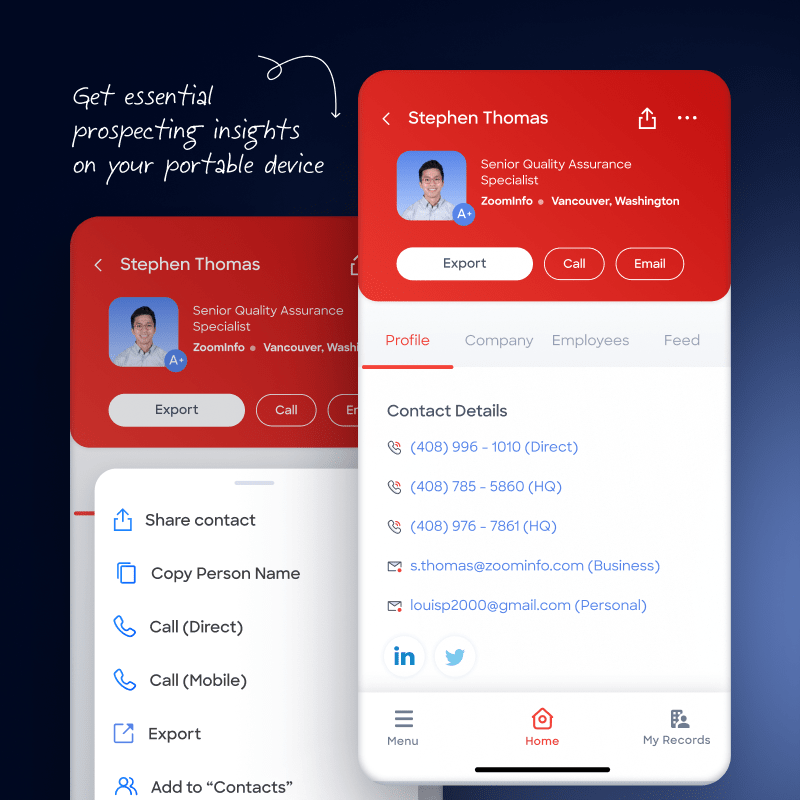
At the individual level, you can review a prospect's employment history, icebreaker talking points, and recent web mentions. At the company level, you can explore corporate news, funding history, employee counts, department budgets, technology stack, and a list of similar accounts worth targeting.
Prepare for calls and meetings from anywhere
As you grab your pre-meeting coffee, the ZoomInfo Mobile App makes it easy to browse detailed briefs of attendees and dial in with accurate, highly personalized information on the people you're about to meet.
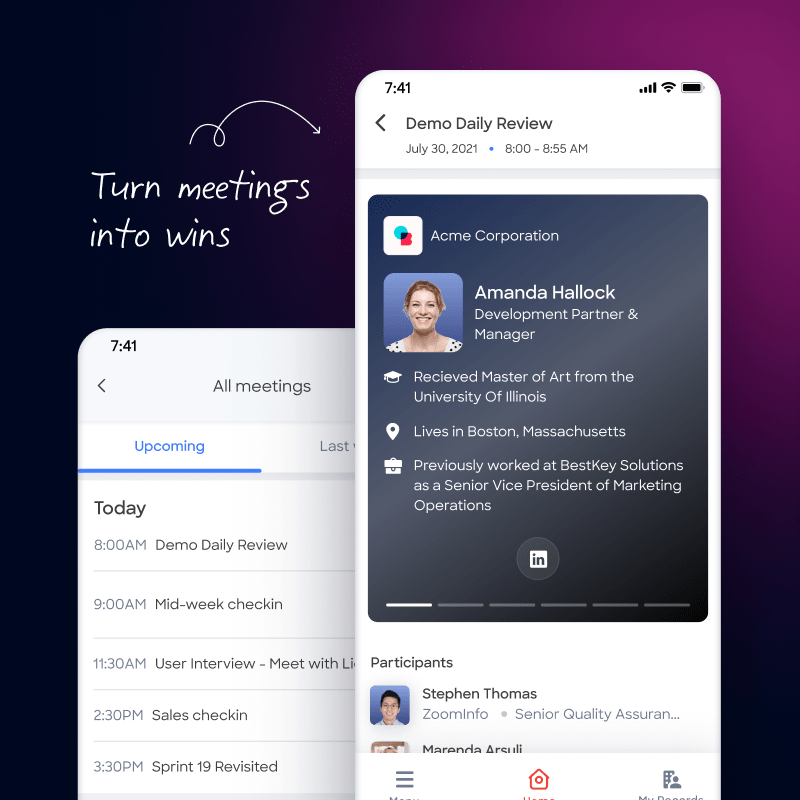
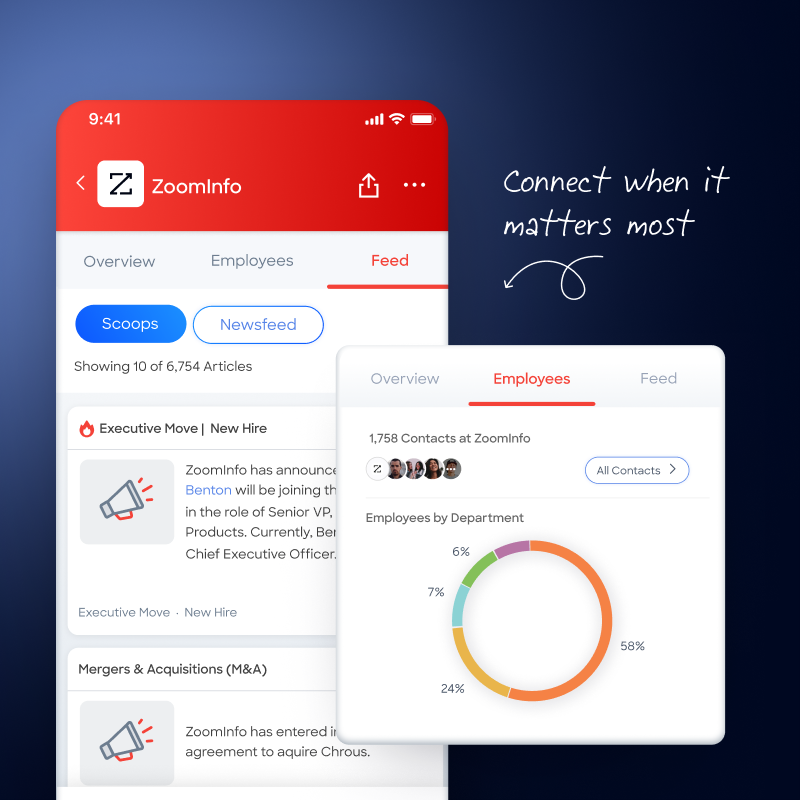
The app's interface is designed to keep you current on accounts and prospects with a scrollable, real-time feed covering projects, news, funding, leadership changes, buyer intent, and more.
Christopher Claunch, Vice President, Solutions Division at Cri Advantage, says: "I'll use the ZoomInfo Mobile App when I'm on the go or even at my desk because it's great when you can multitask, especially to prepare ahead of a big meeting. Plus, the UX is extraordinary. It helps me find someone's contact and company details really quick."
Prospect and export to CRM without your laptop
If you're on your way to an offsite and need to access contact or company data, you can use your portable device without pulling out your laptop. You can also initiate a call or send an email to a prospect directly from the ZoomInfo Mobile App.
If you're not ready to make the call, export contact and company information to your CRM, like Salesforce, so you can access all of your important information when you get back to your desk. Building and managing your prospecting list from the field is as straightforward as it is from a desktop.
For reps running hybrid or remote motions, the ZoomInfo Mobile App means verified direct dials, real-time account signals, and CRM export are always within reach.
How the app surfaces real-time buying signals
That scrollable feed of funding events, leadership changes, and intent signals is powered by ZoomInfo's GTM Context Graph, which processes 1.5B+ data points daily to surface the signals that matter most to your accounts.
Scoops are ZoomInfo's proprietary intelligence events: hiring surges, tech stack changes, expansion signals, and executive moves that ZoomInfo's research team and AI surface before they appear in public news. They're not scraped headlines. They're structured intelligence events designed to tell you something actionable about an account's current situation.
Here's a concrete example: you're in a rideshare on the way to a meeting, you open the app, and you see a Scoop that your prospect's company just raised a Series B. You open the call with a congratulations and a relevant use case tied to their new growth stage. That's the difference between a cold opener and a warm one.
The same account briefs and buying signals available in GTM Workspace are accessible from the mobile app, so your intelligence travels with you.
CRM integration and data sync from your phone
The ZoomInfo Mobile App connects directly to your CRM, with confirmed integrations for Salesforce and Dynamics 365. You don't need to be at your desk to keep your pipeline data current.
From the app, you can export contact and company records, log calls, and push account updates back to your CRM in real time. The contact synced includes the verified direct dial, email address, title, and company details, so there's no manual re-entry when you get back to your desk.
Export a contact directly from the app to Salesforce in two taps: no laptop required, no data entry backlog when you return to your desk. For RevOps and sales managers, this means pipeline visibility stays intact even when the entire team is in the field.
Day in the life: how field reps use the app before, during, and after a meeting
The ZoomInfo Mobile App isn't just a lookup tool. For AEs running a full-day schedule away from their desk, it covers the full meeting cycle.
Before the meeting
You're in transit. You open the app, pull the pre-meeting brief on the prospect, and review any newly added stakeholders that appeared since you last looked at the account. A Scoop surfaced last night: the company just promoted a new VP of Operations. You add a talking point and adjust your opening. By the time you walk in, you know who's in the room and why they care.
During the meeting
A stakeholder name comes up that you haven't seen before. You look them up in the app in under a minute, pull their direct dial, and note them as a follow-up contact. No fumbling with a laptop, no "I'll send that over later" delay.
After the meeting
You export the new contact to Salesforce from the app, log a call note while the details are fresh, and check the account's intent signal feed to see which topics they're researching next. Your next steps are prioritized before you've left the parking lot.
The same AI-assisted account briefs available in GTM Workspace are accessible from the app, so your preparation is as strong in a coffee shop as it is at your desk. Teams using ZoomInfo's always-on intelligence, like Seismic, which saved 11.5 hours weekly per rep, report meaningful reductions in pre-call research time, with 39% of pipeline attributed to ZoomInfo signals.
Download the ZoomInfo Mobile App: iOS and Android
The ZoomInfo Mobile App is available for download on both iOS (via the App Store) and Android (via Google Play). Search "ZoomInfo" in either store to find the app. There's no separate ZoomInfo app download page: the App Store and Google Play listings are the official sources.
Existing ZoomInfo customers log in with their ZoomInfo credentials or SSO. If your organization uses single sign-on, the mobile login flow mirrors your desktop experience. As a first-use tip: enable push notifications for Scoops and intent alerts so you get real-time signals without having to open the app manually.
The ZoomInfo mobile app for iPhone currently holds a 4.6-star rating from over 1,000 App Store reviews. The Android app is available on Google Play with active development ongoing.
Not a ZoomInfo customer yet? Request a demo to see the full platform, including the mobile app, in action.
Data privacy, permissions, and security
The ZoomInfo Mobile App requests only the permissions it needs to function. Network access is required for data retrieval. Contacts access is optional and used only if you choose to sync with your device's address book for CRM workflows. Camera access may be requested if business card scanning is supported on your device. Each permission serves a specific business purpose: none are required beyond what your workflow actually uses.
All data transmitted through the app uses encrypted connections. ZoomInfo holds SOC 2 Type II, ISO 27001, ISO 27701, and TRUSTe GDPR/CCPA certifications, which means the security and privacy controls have been independently audited to enterprise standards.
For professionals whose data appears in ZoomInfo's platform: ZoomInfo maintains a privacy center where anyone can request removal of their information. The opt-out process is accessible directly through ZoomInfo's privacy center.
Frequently asked questions about the ZoomInfo Mobile App
Does ZoomInfo have a mobile app for sales reps?
Yes. The ZoomInfo Mobile App is available for iOS (App Store) and Android (Google Play) for all ZoomInfo customers. It gives sales reps access to contact data, direct dials, company intelligence, Scoops, and buying signals from any device. Existing customers log in with their ZoomInfo credentials or SSO.
Can I export contacts to Salesforce from the ZoomInfo mobile app?
Yes. You can export contact and company records directly from the ZoomInfo Mobile App to Salesforce and other integrated CRM platforms. The export syncs the contact's verified direct dial, email, title, and company details. No laptop or desktop session required. For more on building and managing records once they're exported, see how the app fits into a broader prospecting list workflow.
What buying signals and intent data can I see in the ZoomInfo mobile app?
The app surfaces ZoomInfo's Scoops: proprietary intelligence events like hiring surges, tech stack changes, funding announcements, and executive moves. Alongside Scoops, you'll see buyer intent signals showing which accounts are actively researching solutions like yours. These signals are powered by the GTM Context Graph, which processes 1.5B+ data points daily.
Can I use ZoomInfo for free?
ZoomInfo is free to start with consumption credits based on usage. The mobile app is available to all ZoomInfo customers as part of their subscription. Non-customers can request a demo to see the full platform, including the mobile app, in action.
Is the ZoomInfo mobile app available on iPhone and Android?
Yes. The ZoomInfo Mobile App is available on both iPhone (iOS via the App Store) and Android (via Google Play). The iOS version holds a 4.6-star rating from over 1,000 reviews. Both versions support contact lookup, Scoops, buying signals, and CRM export.