
Dock built something unusual in B2B sales: a workspace both sellers and buyers want to use. Most sales tools serve internal teams. Dock creates shared digital spaces where vendors and customers collaborate through the whole relationship, from first deal to renewal. With a 4.7/5 rating on G2 across 436+ reviews, the platform has earned its reputation for ease of use and buyer adoption.
To create this Dock review, we analyzed the platform thoroughly. We believe it's the right choice if:
You run multi-stakeholder B2B deals and need a structured way to manage buyer collaboration
You want a single platform covering sales deal rooms, onboarding, and client portals
You need to standardize rep follow-up with templates while allowing personalization
Your team is on HubSpot or Salesforce and wants CRM-connected workspace automation
You value buyer-facing presentation over internal-only tooling
Dock excels at managing the buyer experience during deals, but it doesn't help you find prospects, identify when they're ready to buy, or decide which accounts deserve a deal room.
This is where ZoomInfo enters the picture: an AI GTM platform built on a B2B data foundation of 500M+ contacts, providing prospecting intelligence, buyer intent signals, and verified contact data that feed the top of the pipeline Dock manages downstream.
We've included a detailed look at ZoomInfo later in this Dock review as the natural complement for teams that need both intelligence to find deals and a workspace to close them. If you're ready to explore ZoomInfo, you can start with a free trial here.
What is Dock?
Dock is an AI revenue enablement platform founded in 2021 by Alex Kracov, Victor Kmita, and Luc Chaissac, three former Lattice employees.
Kracov, the third employee and VP of Marketing at Lattice, watched enterprise buyers make decisions based on digital information rather than rep-led conversations. The sales team had no coherent way to curate that information for champions.
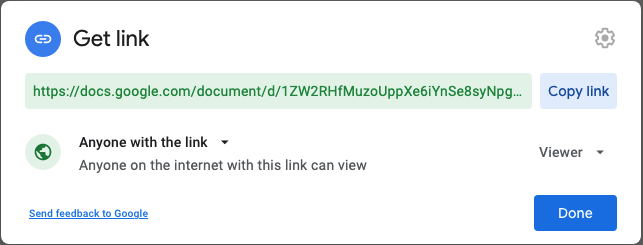
That insight led to a prototype: Kracov and Chaissac built a partner portal in Webflow that Lattice's sales team used for more than 600 deals before Dock existed as a product. The problem was concrete: teams were "hacking together Google Docs, PowerPoint, Asana Projects, Notion Pages, and Slack Channels" to collaborate with customers.
Source: Dock
Today Dock serves 300+ paying customers including Lattice, Loom, BrightHire, and Zip. The platform organizes around three pillars: Collaboration (deal rooms, onboarding workspaces, client portals), Content (content management, slides, AI documents), and Learning (courses, playbooks, an AI enablement agent).
Dock Pros & Cons
Pros | Cons |
|---|---|
- Single workspace for the full customer lifecycle (sales, onboarding, renewal) | - Steep price jump from Free ($0) to Standard ($350/month) |
- Buyers interact without needing a Dock account | - Most advanced features gated to Enterprise tier |
- CRM automation with HubSpot and Salesforce | - Limited CRM support beyond HubSpot and Salesforce |
- AI-generated business cases and proposals from call data | - Order forms limited for complex, multi-tier quoting |
- Template system with dynamic variables and synced sections | - Mobile experience needs improvement |
- Generous free plan (50 workspaces, no time limit) | - No prospecting, contact data, or buyer intent capabilities |
- High rep adoption praised in G2 reviews | - Annual billing required on Premium plan |
Dock Review: How It Works & Key Features
Client Workspaces: A shared digital space that follows the customer from first deal to renewal.
Workspaces are Dock's core object.
Each workspace is a private, branded space shared between a vendor's team and a client's buying committee. The same infrastructure powers three use cases: Sales Deal Rooms for consolidating everything a buyer needs during evaluation, Customer Onboarding for replacing implementation spreadsheets with self-serve resource hubs, and Client Portals for managing ongoing relationships.
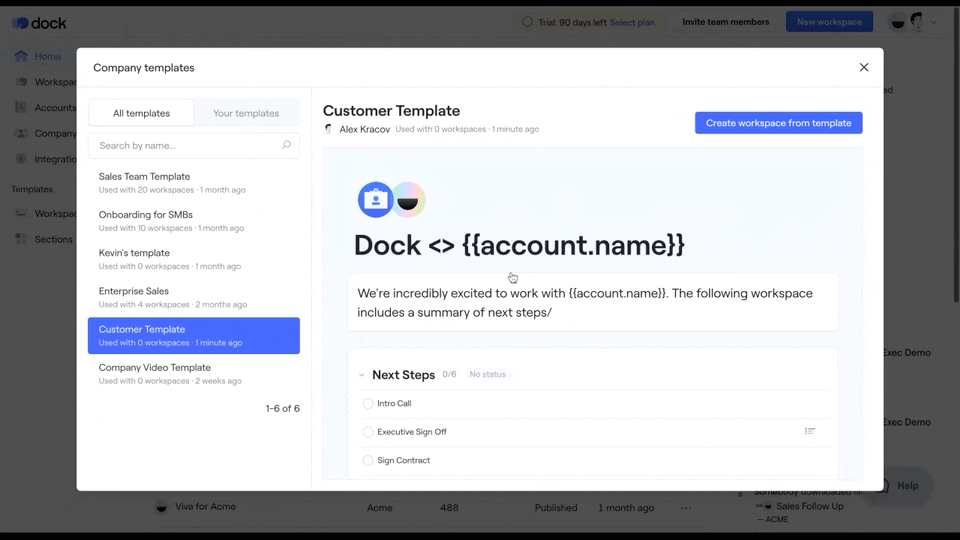
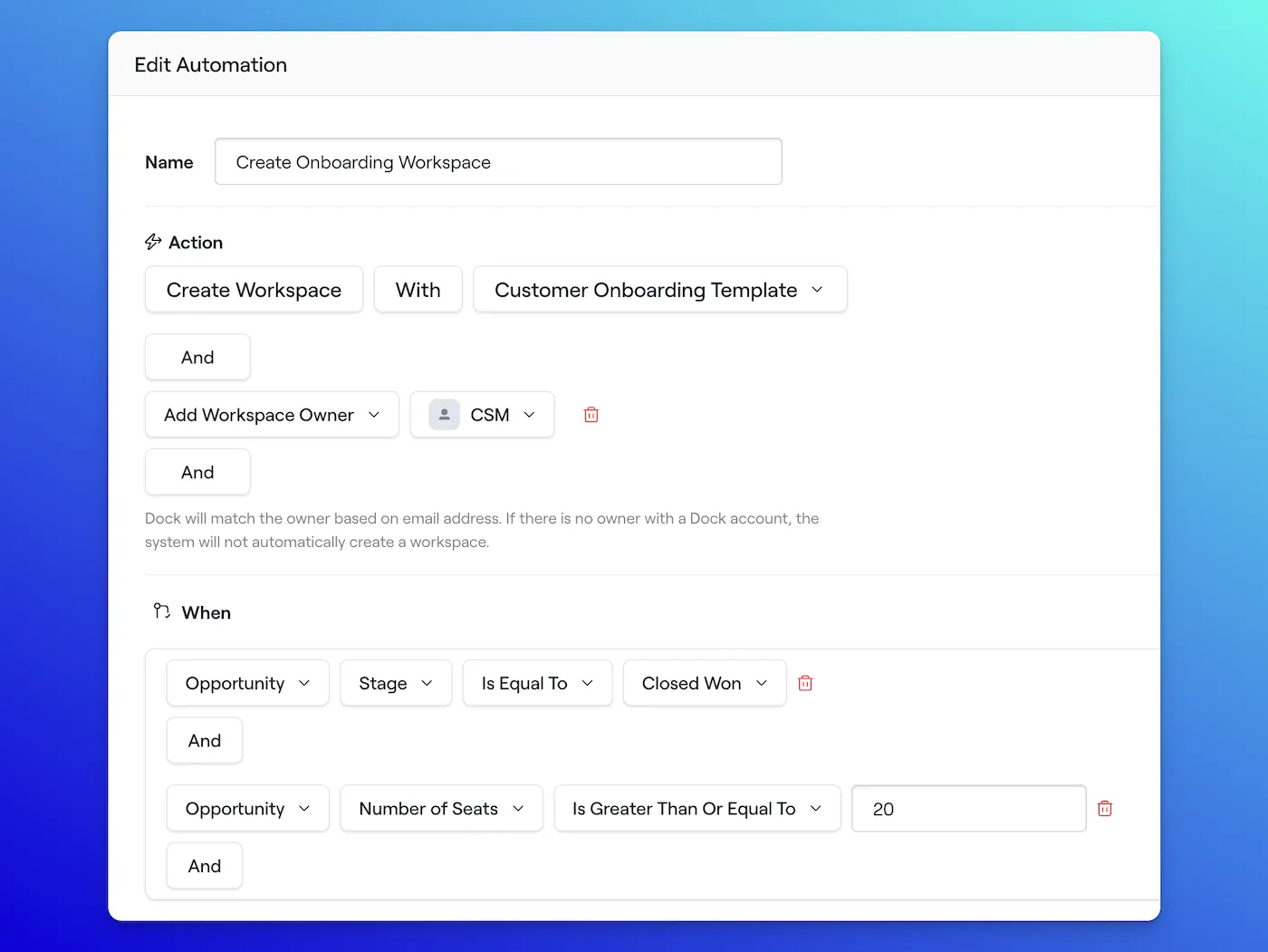
Workspace creation starts with templates. Admins build a master template once; when a rep creates a new workspace, dynamic variables like {{account.name}}, {{owner.calendarlink}}, and any custom CRM field auto-populate throughout the space. A rep goes from CRM deal stage change to a personalized deal room in a few clicks rather than minutes of copy-pasting.
Source: Dock
What makes this practical for buyers: they interact without creating a Dock account. They can check off tasks in a mutual action plan, leave comments, upload files, and tag teammates, all from a single shared link. Access controls range from open link (with email capture) to domain restriction, magic link verification, and Google/Microsoft SSO.
Connected Workspaces (Premium and Enterprise) link multiple workspaces for the same account under one URL. A client navigates from their deal room to their onboarding portal to their renewal workspace without switching links.
The Sales-to-CS handoff (a common friction point) happens inside the workspace rather than through a separate meeting and fresh set of links. Merge built exactly this workflow, transitioning buyers from deal room to onboarding hub without creating a new link.
Content Management & Slides: A centralized content library with governed presentations that reps can personalize but not break.
Dock's Content Management replaces scattered Google Drive folders and email attachments with a centralized library organized by Boards and Tags rather than nested folder hierarchies.
When a new asset is uploaded, Dock automatically tags it and writes a description. Reps find content by asking Dock AI in plain language rather than navigating folders.
The library supports multiple file formats including PDFs (up to 500MB), videos, images, audio, links, iframes, Google Docs, and Microsoft Office files. Content can be imported from Google Drive or Microsoft SharePoint through folder sync. When an asset needs updating, admins replace it in two clicks and Dock pushes the new version everywhere it's shared without breaking links.
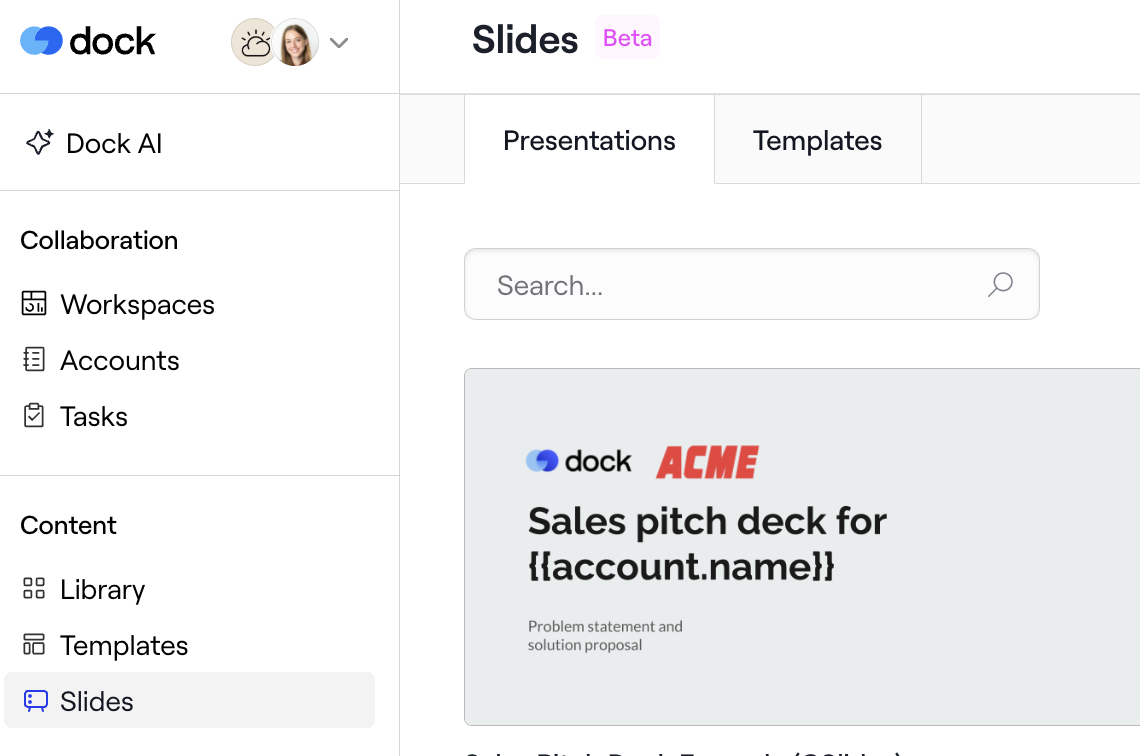
Slides addresses a specific problem: reps copying pitch decks, editing them ad hoc, and sending outdated or off-brand versions to prospects.
Dock's approach puts governance first. Admins create templates from Google Slides, PowerPoint, or PDF, then define exactly which fields and images reps can customize. Everything else stays locked. When admins update a template, changes flow automatically into all active rep presentations.
Source: Dock
Slides is not a slide editor. You can't move layouts around or redesign content. This is a deliberate trade-off: marketing and enablement teams control what goes out, while reps get a consistent, on-brand presentation. Teams accustomed to full creative control may find this restrictive.
The Content Influence Report connects engagement data to Salesforce or HubSpot, showing which assets influence pipeline and closed-won revenue. PDFs show time spent per page and drop-off per page; self-hosted videos show average watch time.
Dock AI: AI that generates documents from live deal data, not generic templates.
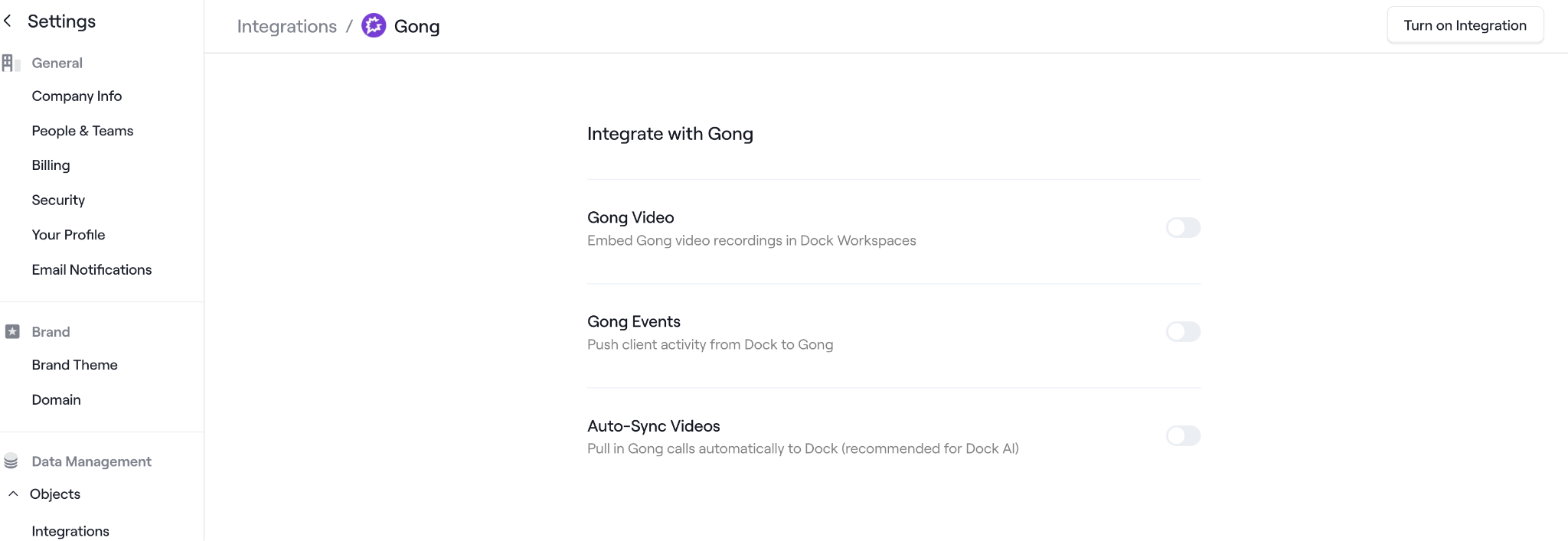
Dock AI connects to a team's CRM, call recordings (Gong, Fathom, Chorus, Zoom), content library, and knowledge bases (Notion, Confluence) to provide AI assistance grounded in actual customer conversations and deal data.
Source: Dock
The AI Enablement Agent is a chat interface where reps ask product questions, find assets, review deals, summarize meetings, compare competitors, and draft follow-up emails. Pre-built Dock Agents cover common tasks (Email Generator, Business Case Writer, Competitor Comparison, Deal Review), and admins can build custom Agents with specific instructions and data sources.
The system draws from the team's own content library, CRM data, and call recordings rather than generic training data.
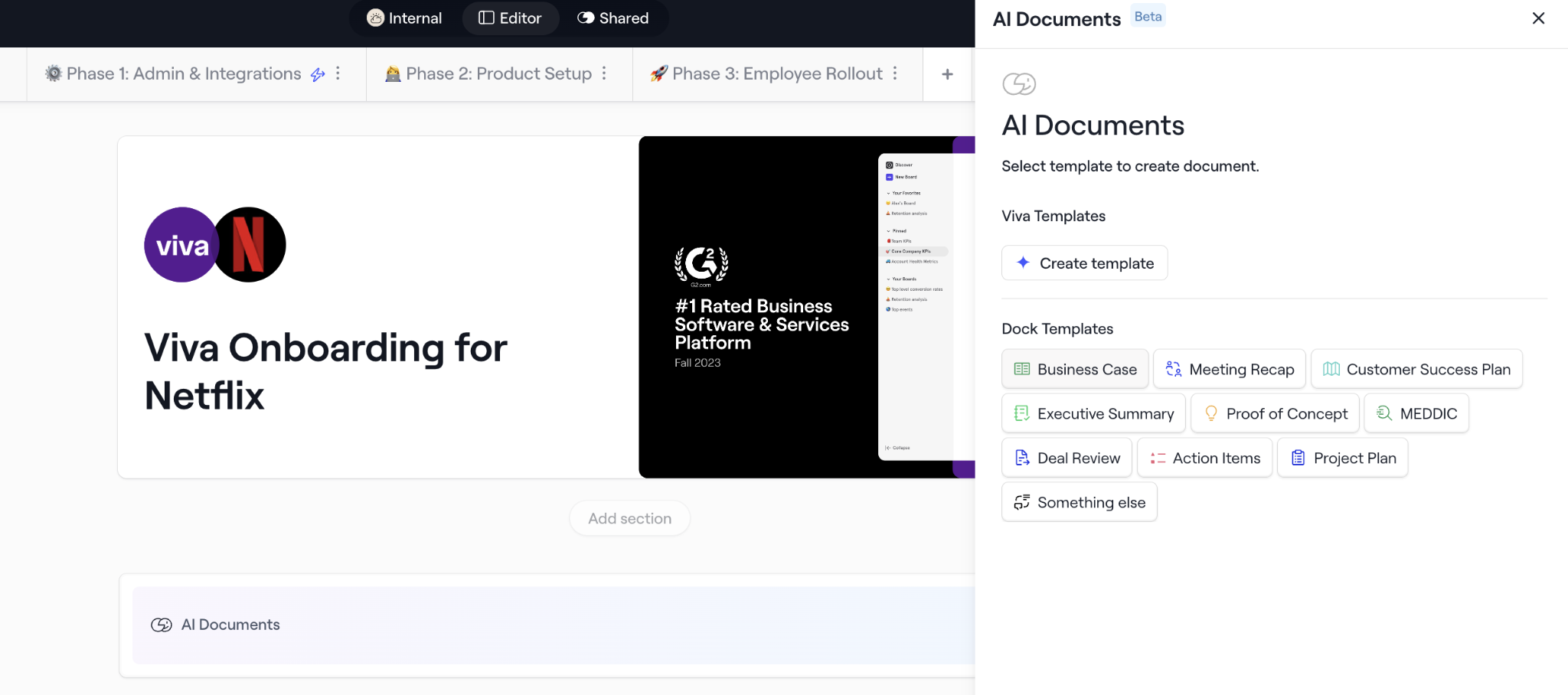
AI Documents generate business cases, meeting recaps, customer success plans, and proposals from call transcripts, uploaded files, or call recordings. The output lives inside the buyer-facing workspace, not in a separate tool.
Source: Dock
A useful design choice: empty sections in AI-generated documents flag missing discovery inputs, showing reps exactly what information they still need to gather. Dock states that it "never trains AI models on customer data."
AI Documents are available on all plans including Free. The full AI Enablement Agent is gated to Premium and Enterprise.
Learning & Enablement: Training embedded in the same platform reps use for deals, not a separate LMS.
Dock's Courses and Playbooks address a persistent problem: sales training that lives in slide decks no one opens, wikis that go stale, and LMS platforms that require separate logins.
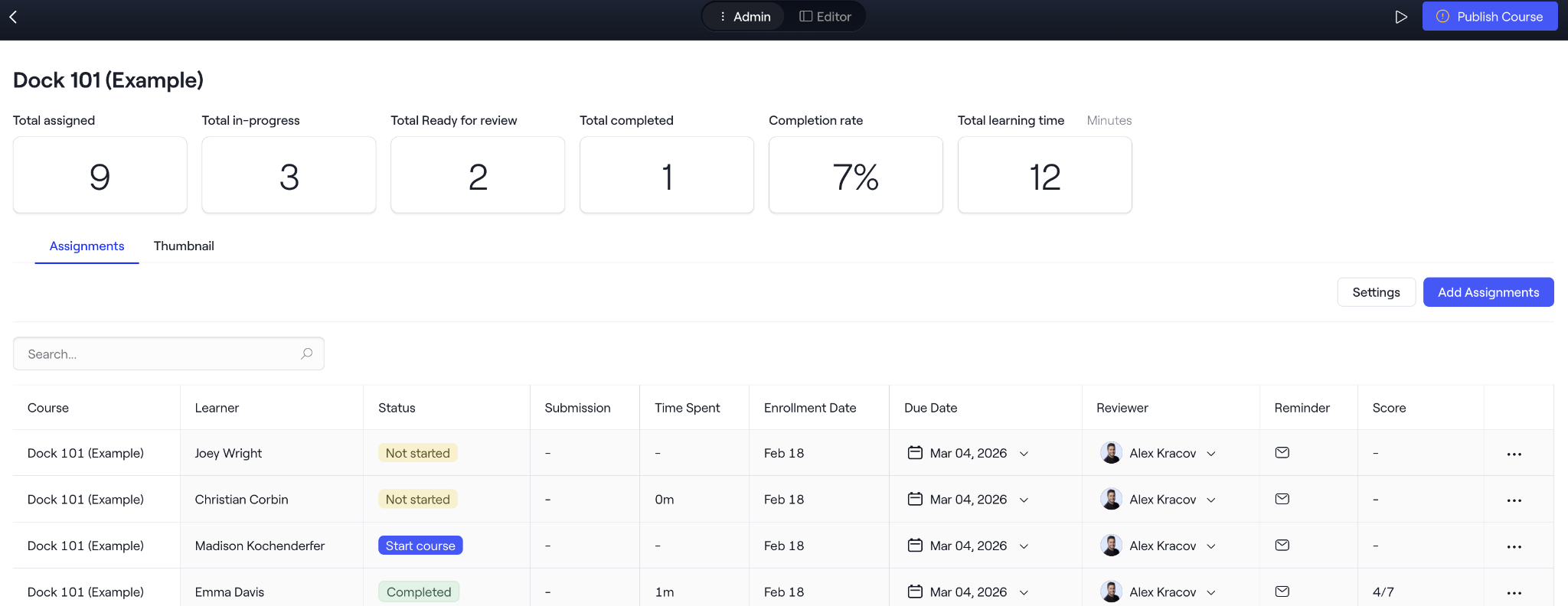
Courses use the same drag-and-drop editor reps know from building client workspaces. Modules are completed sequentially, and each can include videos, slides, content library assets, quizzes, and flashcards.
Managers can assign role-plays and exercises, then review and coach inside the course without leaving Dock. Course analytics track enrollment numbers, completion rates, viewing time, and quiz scores at both course and individual rep levels.
Source: Dock
Playbooks are internal-facing workspaces built with the same editor, serving as current reference materials for sales plays, battlecards, and process documentation. The URL stays the same even when content changes, so bookmarks always point to current information. Dock positions Playbooks as "more useful than a wiki, less setup than an LMS."
One distinct capability: admins can embed Courses into customer-facing client portals for external onboarding and product education. The same course can train an internal rep and a customer's end-users. Courses are Enterprise-only.
Order Forms & Mutual Action Plans: Deal execution tools embedded in the buyer's workspace.
Dock's Order Forms handle quoting and contracting without a separate CPQ or e-signature tool.
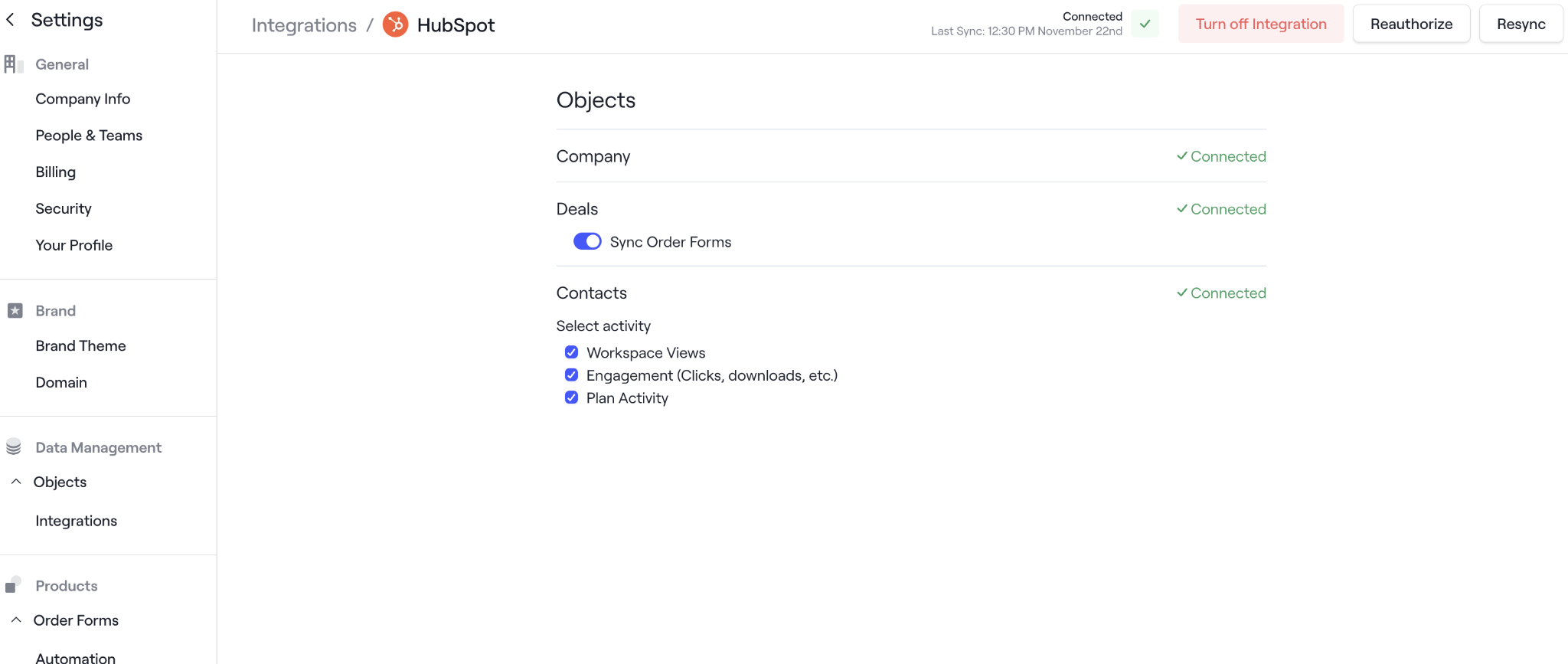
Sales Ops configures a product library with four pricing models (Per Unit, Flat Fee, Tiered, Volume) and approval rules. Reps build quotes from the library, route them for internal approval if needed, and generate a signable order form that buyers complete inside the workspace. Completed order forms sync back to HubSpot or Salesforce with signed PDF, billing details, and line items.
Source: Dock
For standard deals, this eliminates the need for both a CPQ tool and a separate e-signature platform. But reviewers note the pricing proposal section is limited for complex or customized quotes. Teams with multi-tier configurator-style pricing will still need a dedicated CPQ.
Mutual Action Plans give sellers and buyers a shared, interactive checklist with tasks, assignees, due dates, and automated reminders. Buyers check off tasks and leave comments without creating a Dock account. Tasks can be marked internal-only to hide them from the client view.
The same infrastructure powers Client Project Plans post-sale, with list, timeline, and Kanban views and relative dates that auto-adjust when a project's start date shifts.
Pricing: A generous free tier with a steep jump to paid plans.
Dock uses a per-seat, tiered model where external collaborators access workspaces at no cost.
Free ($0/month): Up to 50 workspaces, basic integrations (Slack, Loom, PandaDoc), AI Documents, no time limit.
Standard ($350/month): 5 seats, unlimited workspaces, Salesforce and HubSpot integration, Gong and Chorus connections.
Premium ($1,000/month, billed annually): 10 seats, content management, playbooks, order forms, connected workspaces, Dock branding removed, webhooks, priority support.
Enterprise (custom pricing): Courses/LMS, custom domain, API, workspace automation, SSO, dedicated customer success, managed implementation.
Additional seats cost $50/month on Standard and Premium plans. The free plan is permanent with no forced upgrades. Dock's rationale: "every time you share a Dock workspace, you introduce a new company to Dock."
The gap between Free and Standard is the most common pricing concern in G2 reviews. There is no $49 to $149/month tier for solo reps or teams of two to three people.
Where Dock Falls Short
Dock excels at what happens inside a deal. But it has clear boundaries, and those boundaries create gaps for teams that need deal execution connected to broader go-to-market intelligence.
No Prospecting or Lead Discovery. Dock helps you manage the deals you already have. It does not help you find new ones. There is no contact database, no company search, no way to build prospect lists or identify target accounts. Before a rep can create a deal room, they need to have already identified and qualified the prospect through other tools.
No Buyer Intent or Signal Detection. Dock tracks buyer engagement within its own workspaces (who viewed what, which pages, for how long), but it cannot tell you which companies are researching solutions before they engage.
There is no way to detect in-market accounts, track competitive research activity, or identify buying signals happening outside the deal room. By the time a prospect enters a Dock workspace, the buying process is already underway.
No Contact Data Enrichment. When a rep builds a deal room, they need to manually populate contact information or pull it from their CRM. Dock doesn't provide verified emails, direct dials, org charts, or technographic data. If the CRM record is incomplete, the deal room inherits those gaps.
Pricing Gap. The jump from $0/month to $350/month leaves small teams and solo reps without a practical paid option. A team of two or three that has outgrown the 50-workspace limit faces paying $350/month for capacity they don't fully use.
Enterprise Feature Gating. The features that most differentiate Dock from simpler tools (workspace automation, custom domains, courses, SSO, and API access) all require the Enterprise plan. This puts the most compelling capabilities behind the highest tier, making the ROI case harder at Standard or Premium.
Source: Dock
These gaps aren't design failures. They reflect Dock's focus on buyer collaboration rather than intelligence. But they highlight a need for an upstream platform that answers the questions Dock doesn't: which accounts should get a deal room, who sits on the buying committee, and when to engage.
The Natural Upstream Complement to Dock: ZoomInfo
ZoomInfo is an AI GTM platform built on a large B2B data foundation: 500M contacts, 100M companies, 135M+ verified phone numbers, and 200M+ verified business email addresses.
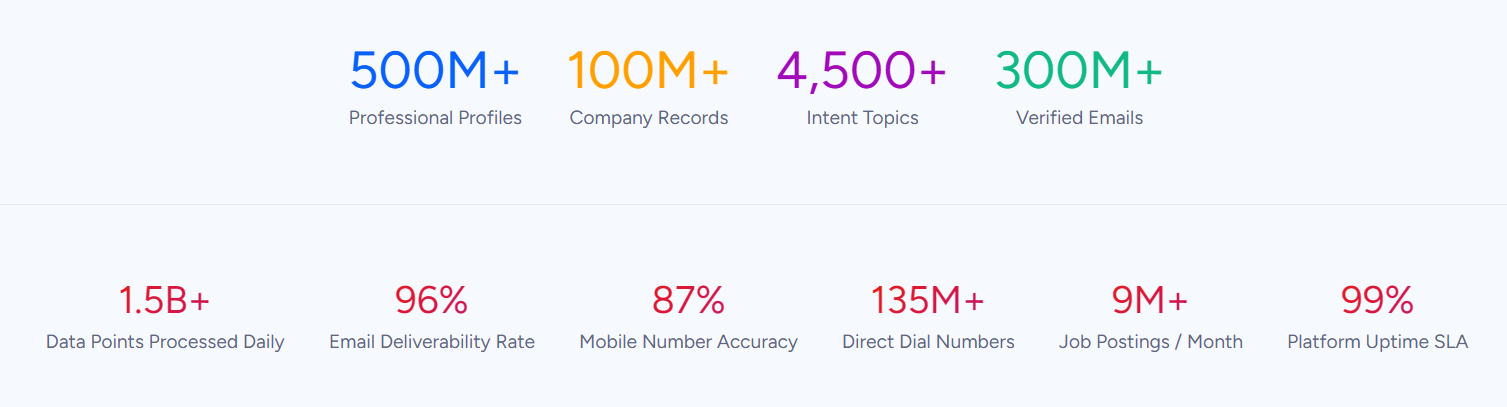
Its GTM Context Graph unifies this data with first-party CRM records, conversation transcripts, and behavioral signals to surface the full context behind every account. Where Dock manages the deal experience, ZoomInfo provides the intelligence that determines which deals are worth creating.
The workflow between the two is sequential. ZoomInfo identifies and prioritizes accounts, surfaces buying signals, and provides verified contact data. That intelligence feeds into the CRM. Dock's CRM automation then triggers workspace creation, populates dynamic variables, and gives reps a buyer-ready collaboration space built on the account data ZoomInfo provided upstream.
Comprehensive B2B Data: The foundation that makes deal rooms worth building.
A Dock deal room is only as good as the intelligence behind it. Building a room for the wrong account, or building one without knowing the buying committee, wastes the rep's time and the buyer's attention.
ZoomInfo's data platform covers three dimensions: identity data (who buyers are and how to reach them, with 120M direct-dial phone numbers and 200M+ verified business email addresses), company context (100M companies with firmographics, org charts, and technographics), and signals revealing when accounts are in-market.
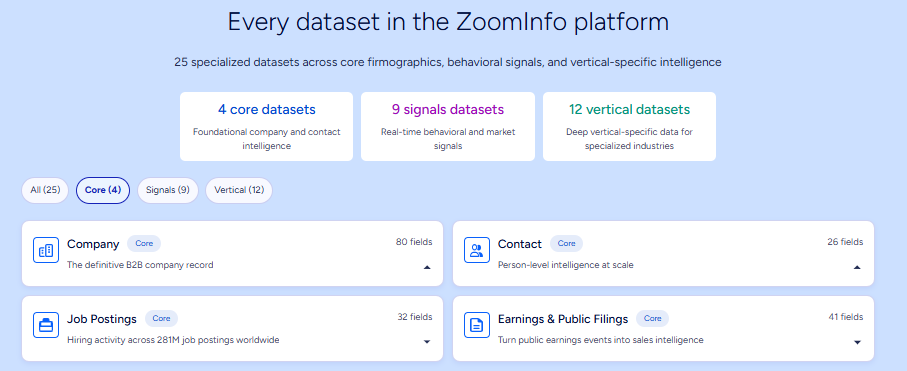
The data is verified through a multi-source pipeline backed by 300+ human researchers achieving up to 95% accuracy on first-party data.
For teams using Dock, this means a rep can consult ZoomInfo before building a deal room and know the full buying committee, their direct contact information, what technology the company uses, and whether they're researching solutions. That context shapes the workspace: which case studies to include, which stakeholders to invite, what competitive positioning to lead with.
In a Fortune 500 competitive RFP analyzing 25 million contacts across vendors, the independent consultant concluded that "no other competitor came even close." ZoomInfo holds 133 No. 1 rankings on G2 across Sales Intelligence, Buyer Intent, and Data Quality categories.
Vensure's VP of Revenue Operations reported that ZoomInfo's data eliminated manual prospect research: "We don't have to go through and spend our time digging. It's already there, so we can be three steps ahead." (Vensure)
GTM Context Graph: Intelligence that explains why deals move, not just that they moved.
ZoomInfo's GTM Context Graph processes 1.5B+ data points daily, combining ZoomInfo's B2B data with a customer's CRM records, conversation transcripts, and behavioral signals into a single intelligence layer.
The result captures not just what happened in a deal, but why it happened.
A CRM records that a deal moved to Stage 3. Dock tracks that the buyer opened the pricing page. But neither captures why the deal accelerated: perhaps the CFO joined the last call and asked about six-month ROI, or the company just posted three VP-level job openings that signal expansion.
The GTM Context Graph connects these signals across thousands of deals, making pattern recognition available to every rep.
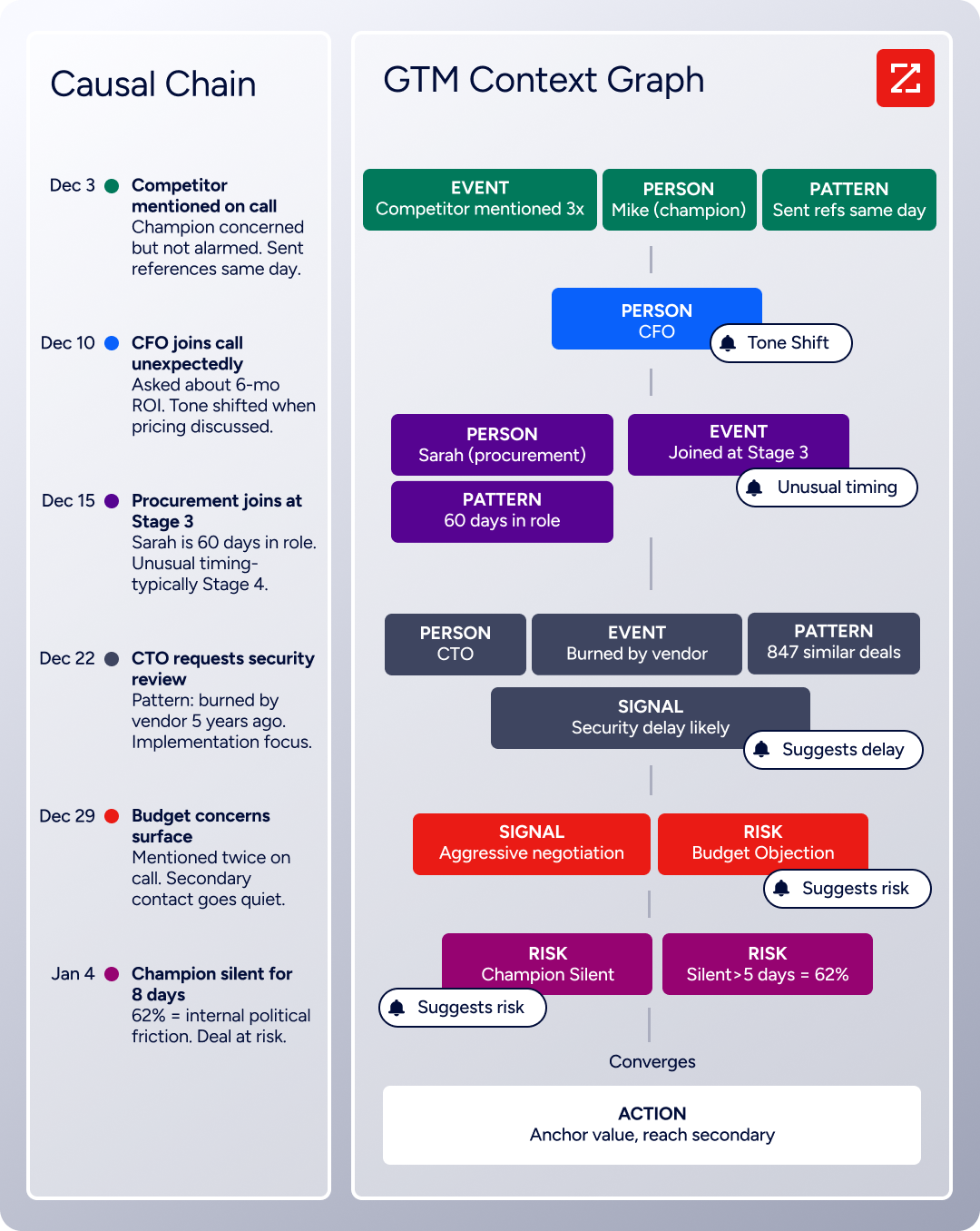
This matters for Dock users because it determines timing. A deal room created too early adds friction. A deal room created at the right moment (when intent signals align with the buying committee's priorities) creates momentum.
ZoomInfo's Buyer Intent data tracks signals from 210 million IP-to-Organization pairings, and Guided Intent (exclusive to ZoomInfo) identifies topics historically correlated with deal success rather than requiring manual topic selection.
Seismic's sales team attributed 39% of active pipeline to opportunities identified or influenced by ZoomInfo signals, with Chief Business Officer Toby Carrington noting: "That combination of our internal CRM data, external signals, and AI that's given all that context has helped us craft very specific account- and persona-based messages." (Seismic)
Universal Access: Intelligence delivered through any tool, including the CRM that powers Dock.
ZoomInfo delivers its intelligence through three channels: GTM Workspace for sellers (an AI-powered workspace with agents that research accounts, draft outreach, and surface next best actions), GTM Studio for marketers and RevOps (an AI canvas for building and launching GTM plays in natural language), and APIs and MCP for any third-party application or AI agent.
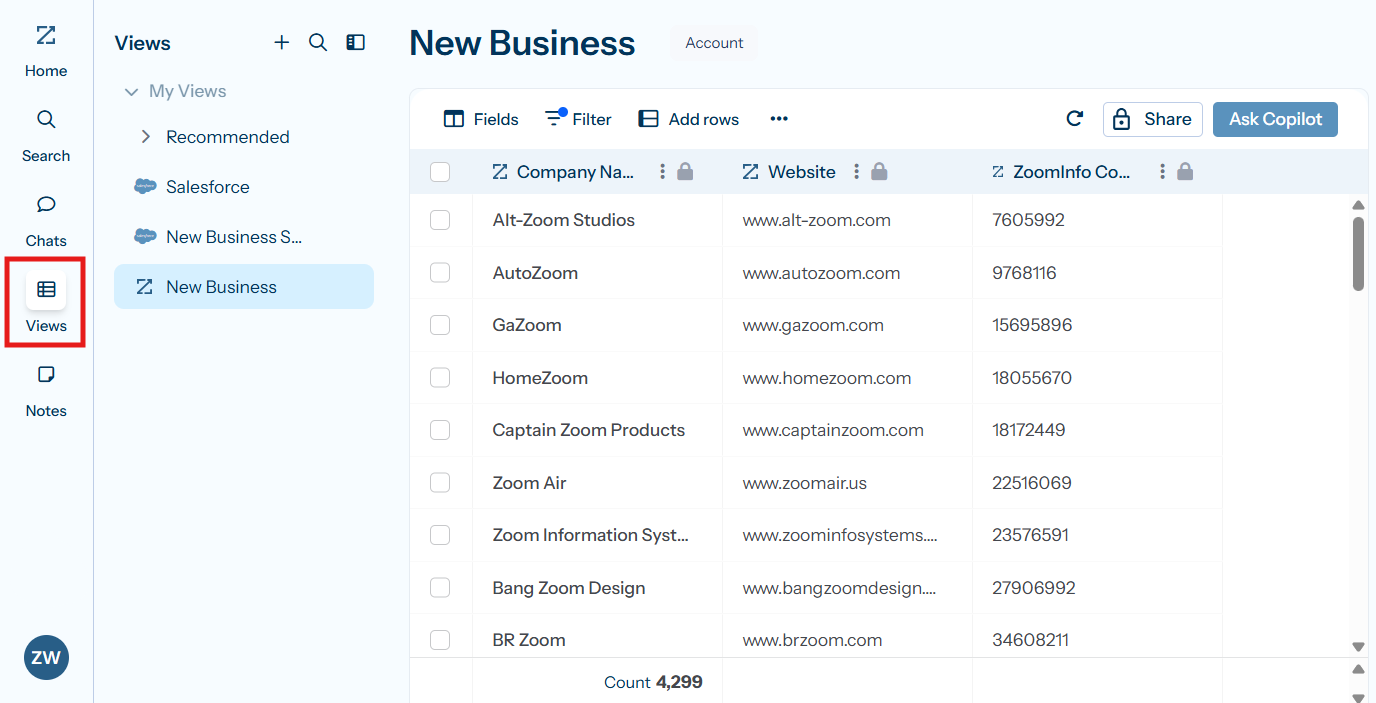
Source: ZoomInfo
For teams running Dock alongside ZoomInfo, the connection flows through the shared CRM. ZoomInfo enriches and updates CRM records with verified contact data, company intelligence, and buying signals.
Dock's CRM automation then uses those enriched records to trigger workspace creation, auto-populate dynamic variables, and surface the right content for each account. The rep doesn't need to transfer data between platforms manually because both connect to the same CRM layer.
ZoomInfo includes a permanent free tier (ZoomInfo Lite) with access to the B2B database, 10 monthly export credits, and website visitor identification. Paid plans use consumption-based pricing with custom quotes. API access is included in all relevant plans.
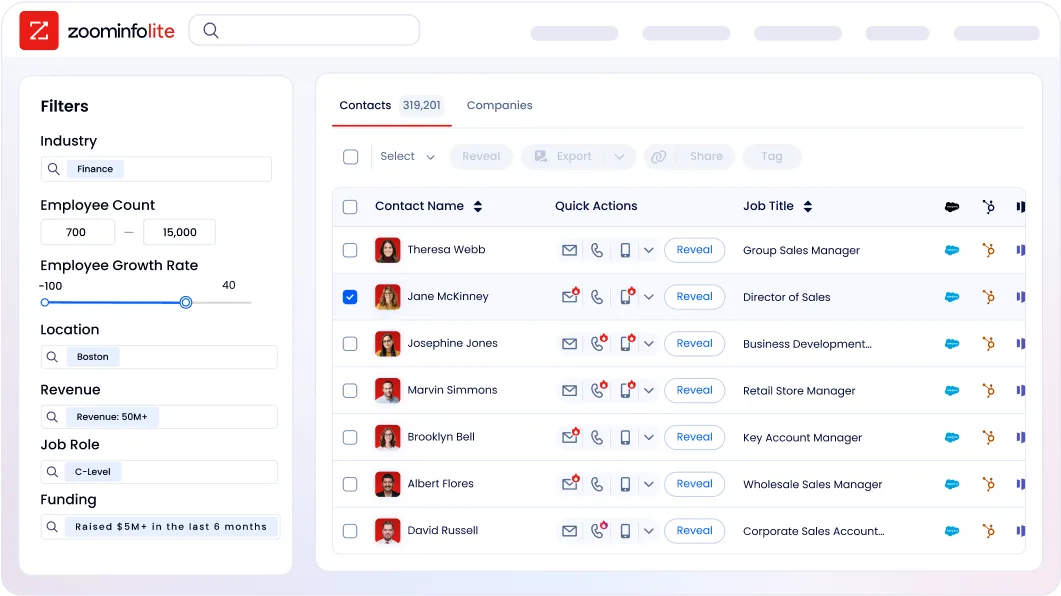
BDO Canada activated ZoomInfo data within internal systems, with Senior Marketing Intelligence Analyst Jerry Wilson noting: "The plug-and-play aspect of the API means I can integrate it very easily into any process and get information at a moment's notice," achieving an 87% reduction in time spent on data updates. (BDO Canada)
Dock and ZoomInfo: Comparison Summary
Aspect | Dock | ZoomInfo |
|---|---|---|
Primary Focus | Buyer collaboration and deal execution | Prospecting intelligence and GTM data |
Workflow Position | During and after the deal | Before and at the start of the deal |
Core Strength | Shared workspaces buyers use | Verified B2B data and buying signals |
Contact Data | None (pulls from CRM) | 500M contacts, 135M+ verified phone numbers |
Buyer Intent Signals | Workspace engagement tracking only | 210M IP-to-Org pairings, Guided Intent |
AI Capabilities | Business case generation, content search, deal review | Account research, outreach drafting, signal monitoring |
CRM Integration | HubSpot, Salesforce | HubSpot, Salesforce, Microsoft Dynamics, 120+ integrations |
Free Plan | 50 workspaces, no time limit | ZoomInfo Lite (permanent, 10 credits/month) |
Paid Starting Price | $350/month (5 seats) | Custom-quoted (consumption-based) |
Best For | Managing the buyer experience across the deal lifecycle | Finding, prioritizing, and engaging the right accounts |
Final Verdict
Dock and ZoomInfo address different phases of the same revenue workflow.
Using one without the other leaves a gap: intelligence without a place to act on it, or a polished deal experience built on incomplete information.
Dock gives revenue teams a shared workspace where buyers collaborate, review content, track milestones, and sign contracts, all from a single branded link. Its strength is the buyer experience: deal rooms, onboarding hubs, and client portals that feel like an extension of your brand rather than another tool in the buyer's inbox.
For B2B companies running multi-stakeholder deals with structured sales and onboarding processes, Dock provides the collaboration layer that Google Docs, email attachments, and project management tools were never designed to deliver.
ZoomInfo provides the intelligence upstream: which accounts match your ideal customer profile, who sits on the buying committee, when they're in-market, and what signals predict deal success. That intelligence flows through the CRM into Dock's workspaces, ensuring every deal room is built for the right account with the right context at the right time.
Get started with ZoomInfo here.
Together, the two platforms create a complete system. ZoomInfo determines which accounts deserve your team's attention. Dock delivers the experience that wins their commitment. Intelligence feeds execution. Execution generates engagement data that refines intelligence. The cycle compounds.
Dock FAQ
What is Dock used for?
Dock is a revenue enablement platform that creates shared digital workspaces between B2B vendors and their customers. Sales teams use it for deal rooms that consolidate demos, case studies, pricing, and mutual action plans in one link. Customer success teams use it for onboarding hubs and client portals.
The same workspace can transition through the entire customer lifecycle, from first deal to renewal, without creating new links.
How much does Dock cost?
Dock offers a free plan with up to 50 workspaces and no time limit. Paid plans start at $350/month for Standard (5 seats, unlimited workspaces, CRM integration) and $1,000/month for Premium (10 seats, content management, order forms, playbooks).
Enterprise pricing is custom. Additional seats are $50/month on Standard and Premium. The gap between the free and paid tiers is a common concern for small teams or solo reps.
Does Dock integrate with CRMs?
Dock integrates natively with Salesforce and HubSpot. These integrations support auto-workspace creation when deals hit specific stages, dynamic variable population from CRM fields, and engagement activity synced back to deal records. Teams on Microsoft Dynamics, Pipedrive, or Zoho do not have the same depth of automation and personalization.
Do buyers need a Dock account to use workspaces?
No. Buyers interact with Dock workspaces through a shared link without creating an account. They can check off tasks, leave comments, upload files, and tag teammates. Access can be restricted by email domain, magic link verification, or Google/Microsoft SSO for additional security. Dock still captures who accessed the workspace and notifies the owner.
Does Dock help with prospecting or finding new leads?
No. Dock manages the deals you already have. It does not include contact databases, lead discovery, buyer intent signals, or prospecting tools. Teams need a separate platform for finding and qualifying prospects before creating deal rooms.
ZoomInfo fills this role with 500M contacts, buyer intent signals, and verified contact data that feeds into the CRM Dock connects to.
What AI features does Dock offer?
Dock AI generates business cases, meeting recaps, proposals, and customer success plans from call transcripts and CRM data. The AI Enablement Agent answers product questions, finds content, reviews deals, and drafts follow-up emails using a team's own data sources. AI Documents are available on all plans including Free. The full AI Enablement Agent requires Premium or Enterprise.
Can Dock replace a CPQ or e-signature tool?
For standard deals, Dock's order forms handle quoting, approval routing, and native e-signature collection inside the workspace. This can replace both a basic CPQ tool and a separate e-signature platform. However, teams with complex multi-tier pricing, configurator-style quoting, or large contracts requiring full audit trails will still need dedicated CPQ and e-signature tools.
How does Dock compare to legacy sales enablement platforms like Highspot or Seismic?
Dock differentiates through its buyer-facing layer. Legacy enablement platforms manage internal content libraries and training but stop at the rep. Dock extends into the buyer's world with shared workspaces that customers interact with directly.
However, Dock has a smaller team and a narrower enterprise footprint than established incumbents, which shows up as feature gaps in some edge cases according to G2 reviewers.
Researching Dock? These comparisons and alternatives help you decide:
