

Expandi has built a solid business in LinkedIn automation since its 2019 launch, growing to over 12,500 B2B businesses on a simple promise: automate your LinkedIn outreach without getting banned. The cloud-based platform assigns each user a dedicated IP address, mimics human behavior with randomized delays, and runs campaigns around the clock so sales teams can prospect while they sleep.
To write this Expandi review, we analyzed the platform in depth. We believe it's the right choice if:
You rely on LinkedIn as your primary prospecting channel and want to automate connection requests, messages, and follow-ups
You run a lead generation agency managing multiple client accounts from one dashboard
You want cloud-based automation that runs without browser extensions or local installs
You value personalization features like dynamic placeholders, custom images, and GIFs in your outreach
You need conditional sequences that adapt based on how prospects respond
However, Expandi might not be the best choice if:
You need verified contact data (direct dials, business emails) beyond what LinkedIn profiles provide
Your outreach extends beyond LinkedIn and basic email to include phone, display ads, or other channels
You want buyer intent signals showing which accounts are actively researching solutions like yours
You need to enrich CRM records, map buying committees, or score accounts by fit
You're concerned about the risk of LinkedIn account restrictions from automation
In this case, consider ZoomInfo: a go-to-market platform that covers the full sales challenge, from identifying which accounts to pursue and why, to equipping sellers with verified contact data, buyer intent signals, and AI-powered outreach. Where Expandi automates one channel, ZoomInfo provides the data, intelligence, and multi-channel execution that B2B teams need to find, win, and grow customers.
We've included a detailed look at ZoomInfo at the end of this Expandi review for teams that need more than LinkedIn automation. If you're ready to explore a broader approach, you can start with ZoomInfo's free plan.
What is Expandi?
Expandi is a cloud-based LinkedIn automation platform founded in 2019 by Stefan Smulders and Glenn Miseroy in Eindhoven, The Netherlands. The idea came from Smulders' experience running a small sales agency, where he manually managed outreach for multiple clients on LinkedIn and realized the process needed automation.
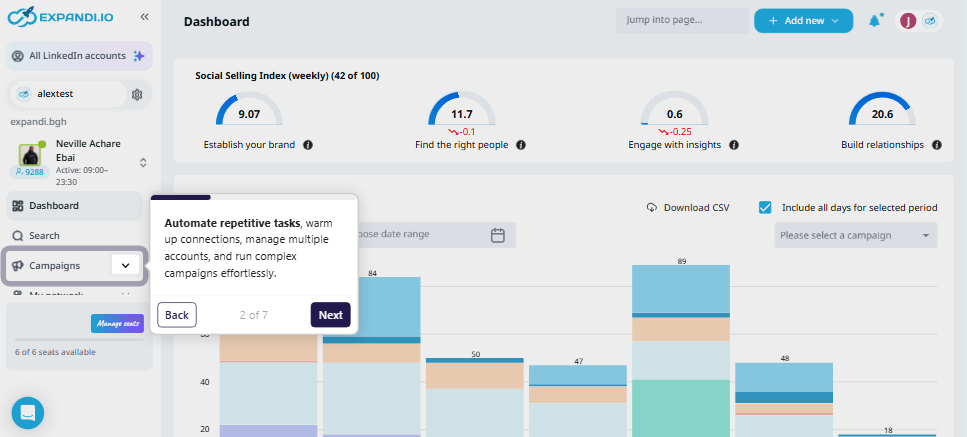
Expandi targets four audiences: lead generation agencies, sales teams, recruiters, and business owners. It differentiates itself from browser extension-based LinkedIn tools through cloud-based architecture that runs campaigns 24/7 from dedicated IP addresses, without requiring a browser to stay open. Core features include social outreach, smart sequences, email outreach, and video and GIF personalization.
Source: Expandi
Expandi Pros & Cons
Pros | Cons |
|---|---|
Cloud-based with dedicated IP addresses for each user | 67% of users report account restriction issues despite safety features |
Smart sequences with conditional branching based on prospect behavior | Integration capabilities reported as lacking by some users |
Agency-optimized with white-label, workspaces, and client reporting | Violates LinkedIn's Terms of Service (as do all LinkedIn automation tools) |
Personalization with dynamic placeholders, images, and GIFs | Image and video personalization cost extra beyond the base subscription |
Mobile Connector campaigns for additional connection requests beyond standard limits | Some users report never gaining full access after payment |
14-day free trial with full feature access | No built-in B2B contact database or buyer intent signals |
Unlimited teammates can be invited to workspaces at no extra cost | Limited to LinkedIn and basic email outreach channels |
Expandi Review: How it Works & Key Features
Social Outreach: Expandi automates LinkedIn prospecting through multiple campaign types with safety features designed to reduce account risk.
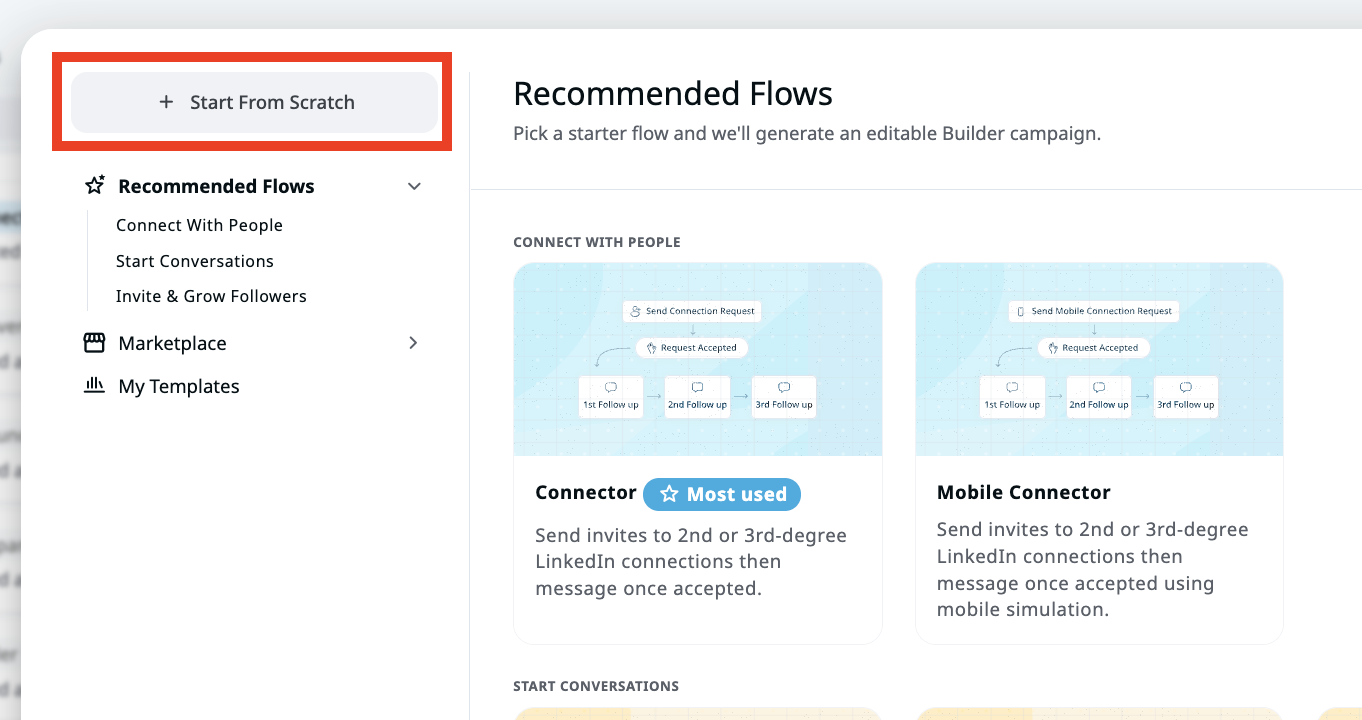
Expandi's core function is automating the LinkedIn actions sales teams would otherwise do by hand: sending connection requests, follow-up messages, profile visits, post likes, and InMails. The platform offers 11+ campaign types, each built for a specific outreach scenario.
The most common starting point is the Connector Campaign, which sends connection requests with personalized notes. For users who need more volume, the Mobile Connector Campaign sends an additional 50-100 connection requests per week through LinkedIn's mobile interface, allowing users to exceed 300 weekly requests when combining desktop and mobile campaigns.
Source: Expandi
Safety is central to the design.
Each account gets a dedicated country-based IP rather than shared proxies. The account warm-up system gradually increases daily limits by user-defined increments, then shifts to randomized ranges that vary day to day to look more human. The platform also supports automatic request revocation when prospects don't accept within a set timeframe, preventing wasted weekly limits.
Prospect lists can be built from LinkedIn search URLs, Sales Navigator, CSV uploads, or Recruiter searches. A global smart inbox consolidates replies from all campaigns in one location with filters, tags, and notes. The platform includes automatic deduplication across campaigns and a blacklist for permanently excluding specific contacts.
Smart Sequences: The Campaign Builder lets users create conditional, multi-step outreach flows that adapt based on prospect behavior.
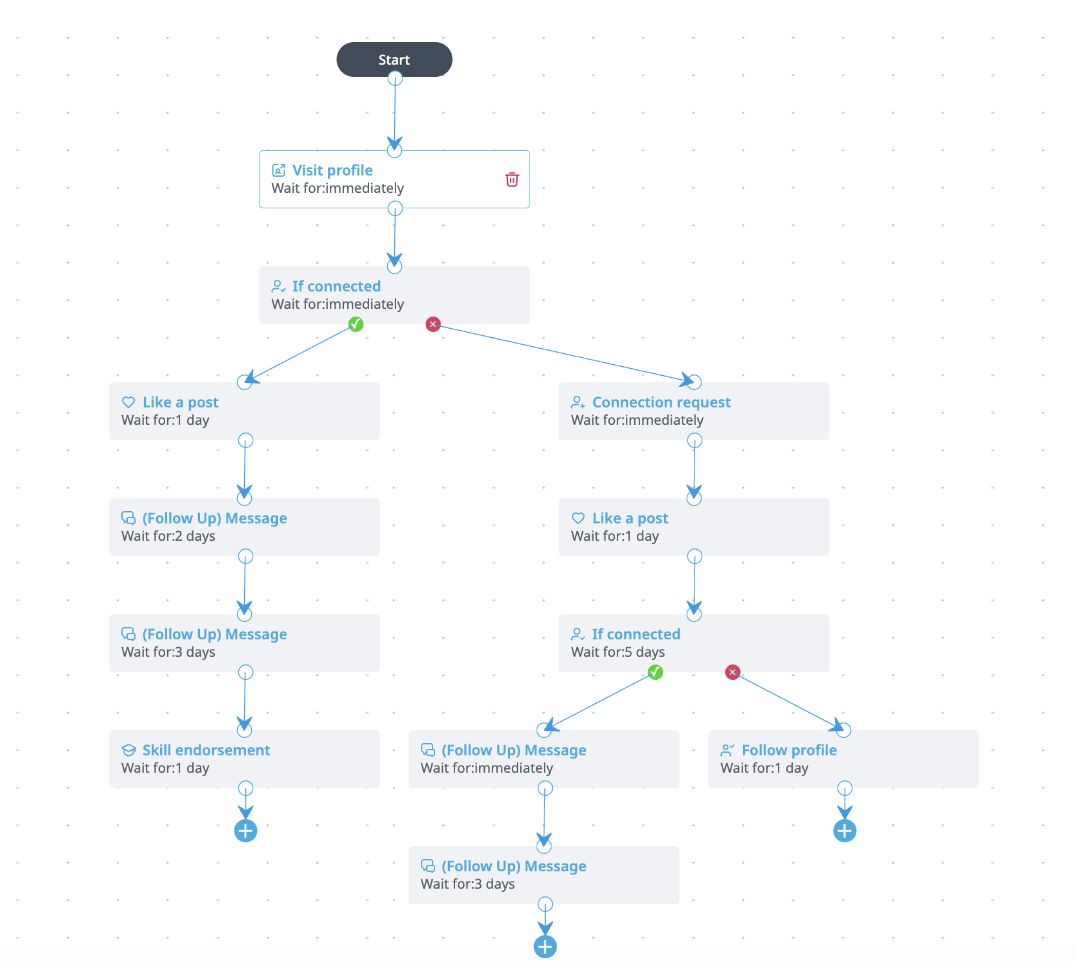
The Campaign Builder is Expandi's visual workflow tool for creating outreach sequences. Instead of sending the same linear sequence to every prospect, users can design branching paths using a drag-and-drop interface that responds to each prospect's behavior.
The builder supports 10 actions (visit profile, follow profile, send connection request, send message, send email, like post, and others) and 10 conditions (if connected, if followed you, if visited your profile, if opened email, if email bounced, and more). These can be combined into sequences of up to 50 steps per campaign.
Source: Expandi
For example, a sequence might start by visiting a prospect's profile and liking a recent post, then send a connection request two days later. If the prospect accepts, the sequence sends a personalized message. If they don't accept but visit your profile, it triggers an Open InMail instead. If neither happens, it falls back to an email follow-up. This behavior-responsive branching makes outreach feel more natural than fixed, linear campaigns.
A Signals feature adds an inbound element, automatically adding people who visit your LinkedIn profile, your company page, or engage with your posts into campaigns. The builder also integrates with Hyperise for personalized images and GIFs within messages, and supports A/B testing to compare messaging approaches.
Email Outreach: Expandi coordinates email and LinkedIn follow-ups within a single workflow.
Expandi's email integration adds a second channel to outreach sequences, letting users combine LinkedIn actions with email follow-ups in the same automated workflow. Users connect any email provider through SMTP, with native support for Gmail, Outlook, Yahoo, and custom providers.
The value lies in the coordination between channels.
When a lead opens an email, Expandi can trigger a LinkedIn message hours later that references it, creating what feels like a connected conversation rather than isolated touches across platforms. If a LinkedIn connection request goes unaccepted for three days, the system can automatically send an email follow-up. If an email bounces, the sequence pivots to LinkedIn outreach with a message explaining the delivery issue.
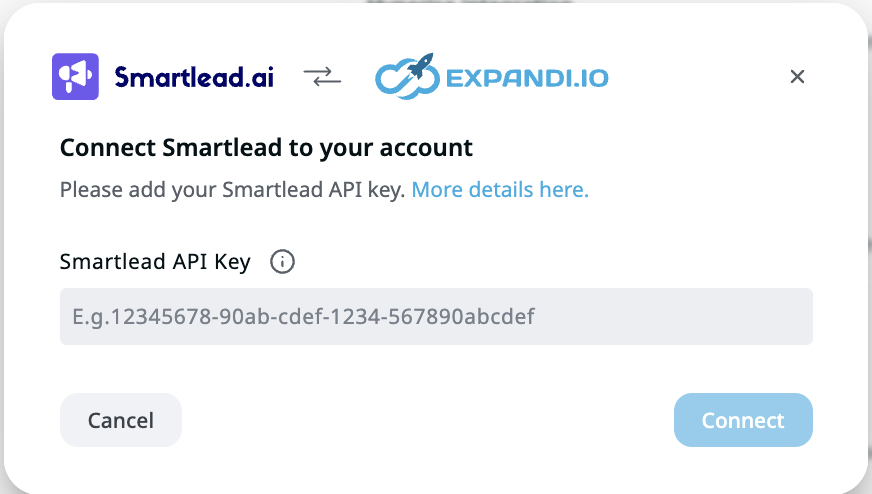
A SmartLead integration enables bidirectional lead syncing between the two platforms, letting teams pull email responders into LinkedIn sequences or push LinkedIn engagers into email campaigns. The platform tracks email and LinkedIn analytics in one dashboard.
Source: SmartLead
Workspaces: Expandi's team management system lets agencies and sales teams coordinate outreach across multiple accounts.
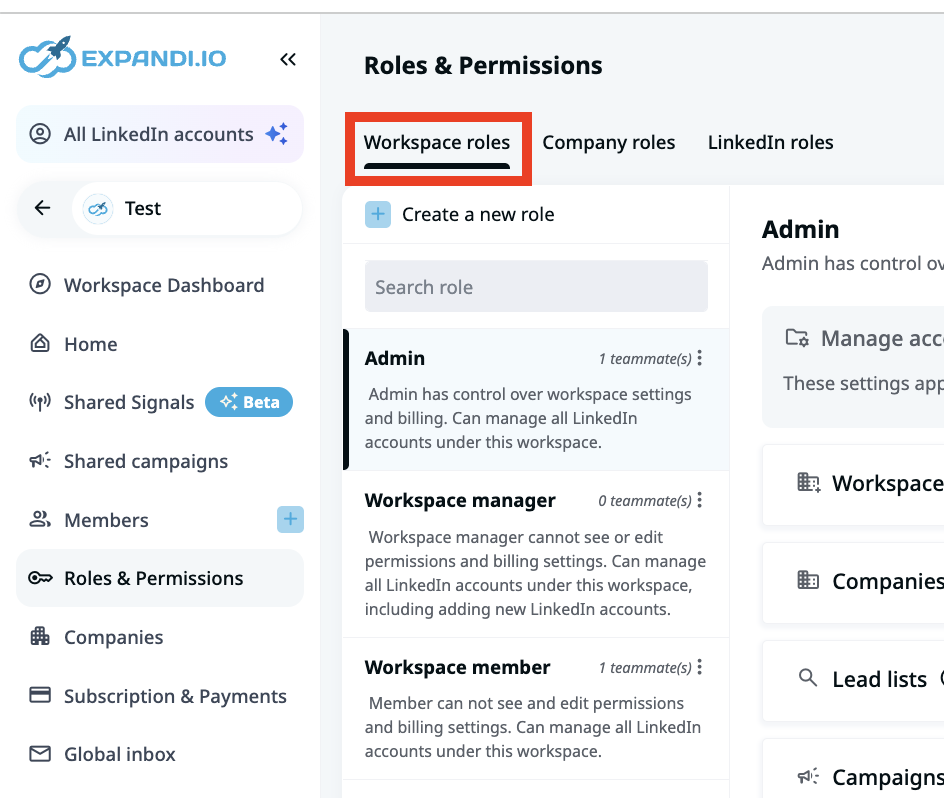
Workspaces is Expandi's system for managing LinkedIn automation across teams. It provides a centralized environment where admins assign roles, manage permissions, and oversee all LinkedIn accounts in one place.
The system operates through a three-level hierarchy: workspace-level access (all accounts), company-level access (accounts tied to specific companies), and individual LinkedIn account-level access. Three preset roles (Admin, Workspace Manager, Workspace Member) cover common needs, but admins can also create custom roles using 110+ permissions.
Source: Expandi
A major advantage for agencies is the pricing model: teammates and clients can be invited at no additional cost. Billing is based on active LinkedIn account seats, not the number of people accessing the workspace. Clients can also add their own credentials directly, so agencies never handle client passwords.
The workspace dashboard displays performance data across all accounts, including connection and reply rates, daily activity stats, and active campaigns. A global inbox consolidates conversations from every LinkedIn account, and shared campaigns can run across multiple accounts at once.
Lead Generation & Scraping: Expandi builds prospect lists from multiple LinkedIn data sources.
Expandi's lead generation system offers 11 lead list types for building prospect lists from different LinkedIn sources. Users can scrape audiences from LinkedIn searches, Sales Navigator results, post engagements (likes, comments, specific reaction types), group memberships, event attendees, company followers, and Recruiter searches.
The engagement-based scraping works well for targeting warm prospects. Users can scrape LinkedIn events with up to 1,000 attendees or extract everyone who liked or commented on a competitor's post. Post engagement lists support filtering by reaction type, so you can target only people who reacted with "Celebrate" versus "Like" for more precise audience building.
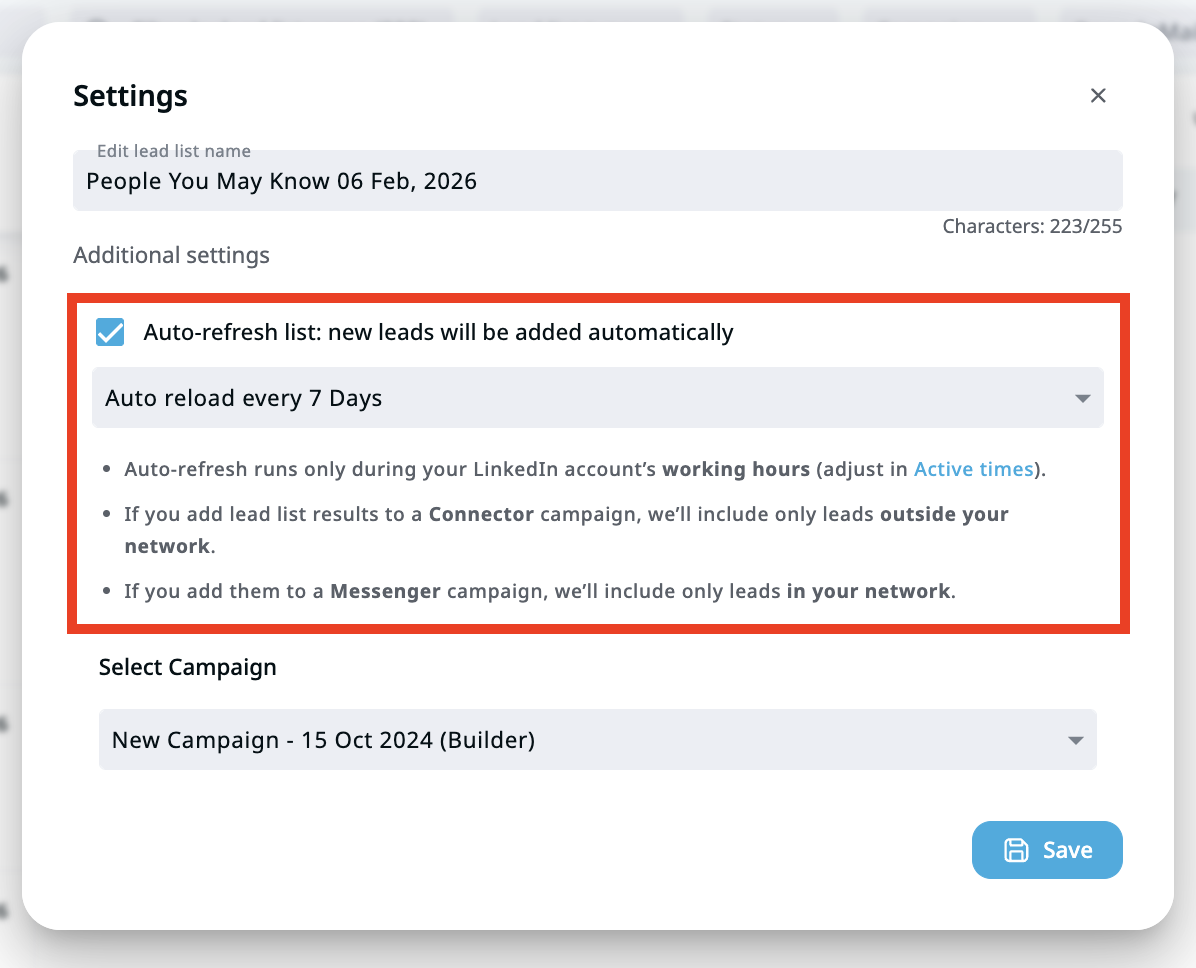
Lists support auto-refresh to periodically update with new prospects and auto-assignment to campaigns upon completion. A multi-level deduplication system prevents duplicate outreach at both the personal and company levels. Users can share lead lists across accounts within workspaces and export data via webhooks for CRM integration.
Source: Expandi
Pricing: Expandi offers a single plan at $99/month with volume discounts for agencies.
Expandi keeps its pricing straightforward with one base plan that includes all core features:
Business Plan: $99/month per seat with monthly billing or $79/month with annual billing (20% discount). Each seat corresponds to one LinkedIn account. The plan includes cloud infrastructure, dedicated IP addresses, account warm-up, unlimited campaigns, smart sequences, multichannel outreach, lead scraping, and CRM integrations with HubSpot, Pipedrive, and Salesforce.
Agency Plan: Custom pricing for 10+ seats with volume discounts. Adds white-label branding, flexible roles and permissions, centralized client management, a dedicated customer success manager, and specialized support.
14-day free trial: Full feature access with no credit card required.
Not everything is included in the base price. Image and GIF personalization cost extra, and video personalization requires a separate Sendspark subscription. Subscriptions are non-refundable and cannot be reactivated once canceled. Expandi also reserves the right to change fees at any time with advance notice.
Where Expandi Falls Short
Expandi handles LinkedIn automation well, but several limitations surface as teams scale or need more from their prospecting workflow.
Account Restriction Risk Remains Real: Despite dedicated IPs, warm-up protocols, and behavior mimicking, 67% of users report account restriction issues according to external research. Expandi's own terms state "Use of Expandi is at your own risk". All LinkedIn automation tools violate LinkedIn's Terms of Service, and no safety engineering eliminates this risk entirely. For teams whose pipeline depends on LinkedIn, a restriction can halt outreach for days or weeks.
No Contact Database or Data Enrichment: Expandi automates actions on LinkedIn but doesn't provide verified contact data like direct-dial phone numbers or business email addresses beyond what's visible on LinkedIn profiles. Sales teams that want to reach prospects by phone or verified email need a separate data provider. Expandi handles the execution but relies on LinkedIn's data (or third-party tools) for targeting.
Limited to Two Channels: Expandi covers LinkedIn and basic email. It doesn't support phone calls, SMS, display advertising, or other channels. For teams running multi-channel campaigns (which increasingly outperform single-channel approaches), this means stitching together multiple tools and managing disconnected workflows.
No Buyer Intent or Account Prioritization: Expandi treats every prospect the same. There's no built-in way to know which accounts are researching solutions, which contacts show buying signals, or which prospects deserve priority. Users define their own target lists, but the platform provides no intelligence about timing or readiness to buy.
Integration Gaps: Users on G2 report integration issues as a recurring pain point, including API errors and connectivity problems. While Expandi offers native integrations with HubSpot, Pipedrive, and Salesforce, its webhook-based architecture is less flexible than a full REST API, making custom integrations harder to build and maintain.
Support Inconsistency: While many users praise Expandi's support team, G2 reviews mention customer support frequently (26 mentions), suggesting experiences vary. For a platform where a misconfigured campaign could risk a LinkedIn account, reliable support matters.
These limitations reflect Expandi's focus: it's a LinkedIn automation specialist, not a go-to-market platform. But for teams that need verified data, multi-channel execution, buyer intelligence, and account prioritization alongside their LinkedIn outreach, those gaps add up.
Top Expandi Alternative for Full Go-to-Market: ZoomInfo
ZoomInfo addresses Expandi's gaps by providing the go-to-market infrastructure that LinkedIn automation alone cannot deliver.
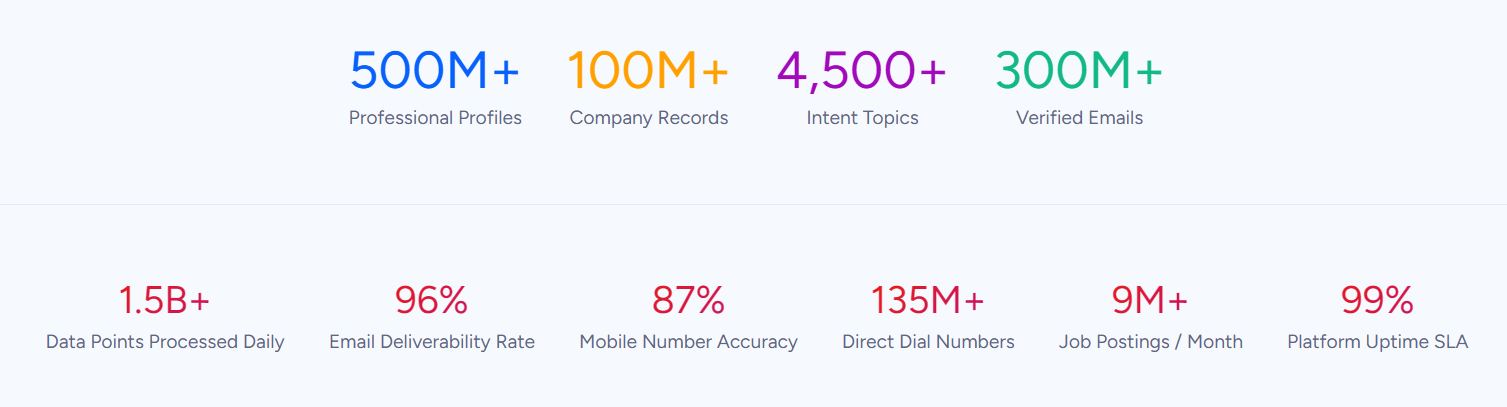
While Expandi automates actions on one channel, ZoomInfo is a go-to-market platform built on a B2B data foundation of 500M contacts, 100M companies, 135M+ verified phone numbers, and 200M+ verified business email addresses.
Its GTM Context Graph processes 1.5B+ data points daily, unifying this data with your CRM records, conversation transcripts, and behavioral signals to reveal the full context of your accounts. That context fuels AI to show not just what happened, but why, and which actions to take next.
Your team can work from the GTM Workspace for sellers, run plays from GTM Studio for marketers, RevOps, and GTM engineers, or power their own tools through APIs and MCP in any front-end.

Verified B2B Data at Scale: ZoomInfo provides the contact and company intelligence that LinkedIn automation tools lack.
Expandi can automate a connection request, but it can't tell you the prospect's direct phone number, verified business email, tech stack, or department budget.
ZoomInfo can.
The platform covers three data dimensions: identity data (who buyers are and how to reach them), company context (firmographics, org charts, technographics across 100M companies), and signals that reveal when accounts are in-market.
Source: ZoomInfo
The data is verified through a multi-source pipeline: automated ML scanning of 28 million site domains daily, third-party partner data covering 95 million businesses, a community of 200,000+ ZoomInfo Lite users who share data back, and an in-house Data Training Lab of 300+ human researchers. First-party data reaches up to 95% accuracy.
This accuracy is not self-reported.
In a Fortune 500 competitive RFP analyzing 25 million contacts across vendors, the independent consultant concluded that "no other competitor came even close." ZoomInfo also holds 133 No. 1 rankings on G2 across Sales Intelligence, Buyer Intent, Data Quality, and Account Data Management.
For sales teams, this means the direct dial actually rings and the email actually lands, instead of relying on LinkedIn InMail or connection requests that prospects may never see.
"ZoomInfo gives us the information we need to execute. We don't have to go through and spend our time digging. It's already there, so we can be three steps ahead." (Vensure)
Buyer Intent and Account Prioritization: ZoomInfo identifies which accounts are actively researching, so teams focus outreach where it matters.
Expandi sends the same sequence to every prospect on your list, with no way to distinguish a company evaluating solutions from one with no current need.
ZoomInfo's Buyer Intent data changes that.
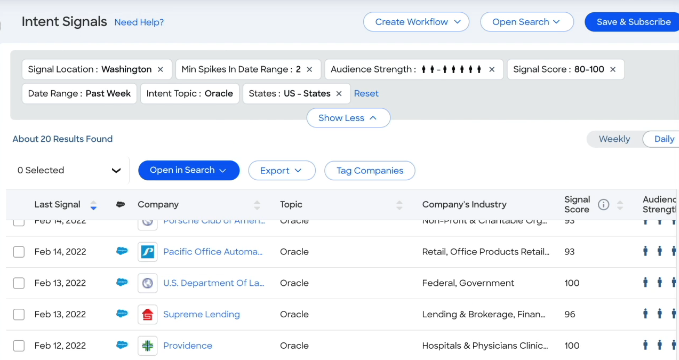
The intent engine tracks signals from 210 million IP-to-Organization pairings and 6 trillion+ new keyword-to-device pairings monthly, identifying companies researching topics relevant to your product. Guided Intent, exclusive to ZoomInfo, identifies topics historically correlated with your deal success rather than requiring manual topic selection.
Source: ZoomInfo
On top of that sits WebSights, which resolves anonymous website traffic to companies and identifies buying team members visiting your site. The system includes Automatic Traffic Filtering that separates real company visits from bot traffic.
This combination lets sales teams prioritize prospects already showing buying behavior, rather than blanketing LinkedIn with the same volume-based approach.
"That combination of our internal CRM data, external signals, and AI that's given all that context has helped us craft very specific account- and persona-based messages. And people have responded to them right away." (Seismic)
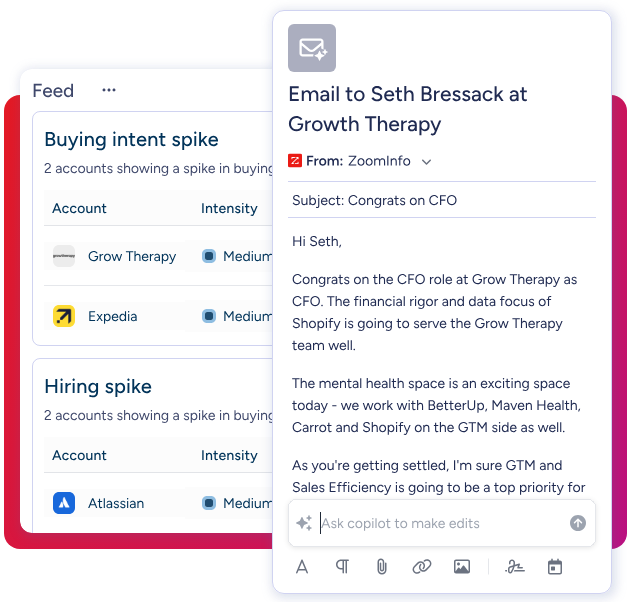
AI-Powered Execution: GTM Workspace gives sellers a single surface for account intelligence, AI-drafted outreach, and deal execution.
Where Expandi focuses on automating LinkedIn actions, ZoomInfo's GTM Workspace gives sellers an AI-powered environment that answers three questions for every account: who to contact, when to engage, and what to say. Built on Anthropic's Claude, the AI agents inside Workspace draw on ZoomInfo's data and the GTM Context Graph.
An Action Feed delivers a live stream of in-market buyers matched to target criteria, with pre-drafted actions on every signal (G2 comparisons, funding events, executive hires). AI-generated outreach creates personalized emails from full account context in seconds. Views combine CRM data with real-time buying signals in a filterable interface.
Source: ZoomInfo
The results are measurable. Seismic's sales team boosted productivity by 54% and attributed 39% of pipeline to ZoomInfo signals. Thomson Reuters increased closed-won deals by 40%. Databricks reached prospects 50% faster.
Multi-Channel Orchestration: GTM Studio enables marketers and RevOps to design and launch plays across every channel.
Expandi coordinates LinkedIn and email.
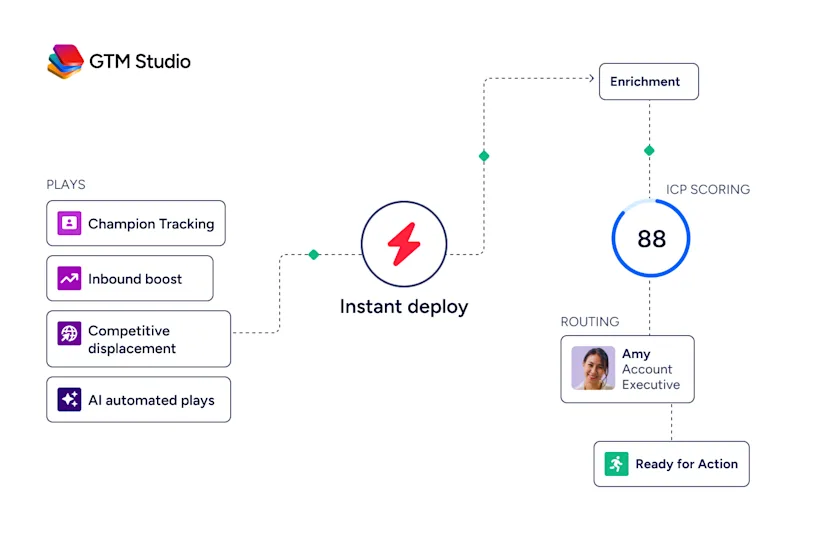
ZoomInfo’s GTM Studio orchestrates plays across email, phone, display ads, LinkedIn, Meta, and Connected TV, all triggered by buyer behavior and powered by the same intelligence.
RevOps teams and GTM engineers build audiences using natural language, enrich them with first- and third-party data, define triggers, and activate plays across channels, without engineering support. Pre-built plays cover common motions like inbound acceleration, champion tracking, competitive displacement, and ICP targeting, launchable in one click.
Source: ZoomInfo
The platform includes waterfall enrichment that evaluates 25+ alternative data sources and returns the highest-confidence result at no additional cost. Expansion plays that used to take 3 weeks now launch in 30 minutes, and every click, open, and reply improves targeting for the next run.
"ZoomInfo has literally changed the way we go to market." (Impartner)
Flexible Pricing with a Permanent Free Tier: ZoomInfo offers free data access that Expandi doesn't match.
ZoomInfo's pricing is custom-quoted based on seats, credits, and features, organized into Sales, Marketing, and Operations product lines, each with Professional, Advanced, and Enterprise tiers. Pricing depends on team size, credit volume, and the capabilities required.
Where ZoomInfo stands apart is its free options.
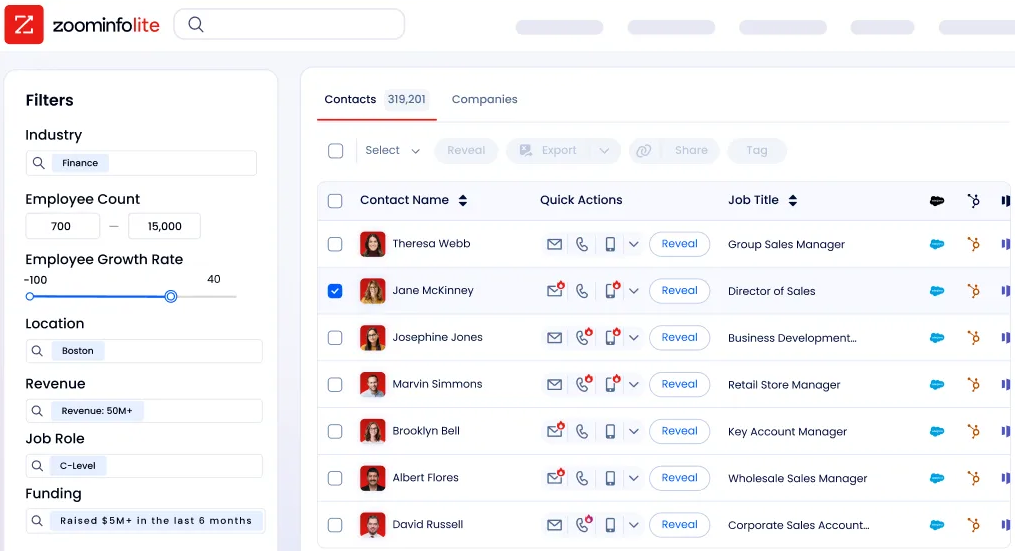
ZoomInfo Lite is a permanent free tier (not a trial) that includes access to ZoomInfo's B2B database with 100M+ verified profiles, 10 monthly export credits, advanced search and filters, the ReachOut Chrome Extension, WebSights Lite (up to 10 website visitor reveals per day), built-in email sending, and HubSpot integration. A separate 7-day free trial of paid features is also available.
Source: ZoomInfo
Note: ZoomInfo is transitioning toward a consumption-based pricing model.
Expandi offers a 14-day free trial but no permanent free plan. Its $99/month base price covers LinkedIn automation, but image personalization, video personalization, and premium support features add to the total cost. ZoomInfo charges more for its paid tiers, but the permanent free access and breadth of included capabilities offer a different value proposition.
Expandi or ZoomInfo: Comparison Summary
Expandi | ZoomInfo | |
|---|---|---|
Primary focus | LinkedIn automation and outreach execution | Go-to-market platform (data, intelligence, execution) |
B2B contact database | No (scrapes from LinkedIn profiles) | Yes, 500M contacts, 200M+ verified emails, 135M+ verified phones |
Buyer intent signals | No | Yes, 210M IP-to-Org pairings, 6T+ keyword signals monthly |
Outreach channels | LinkedIn + basic email | Email, phone, display ads, LinkedIn, Meta, Connected TV |
AI capabilities | Sentiment analysis, conditional sequences | AI agents for account research, outreach drafting, CRM updates |
LinkedIn automation | Yes, full automation (connections, messages, InMails) | Integrates with LinkedIn through workflows and data; no direct LinkedIn message automation |
Agency features | Yes, white-label, workspaces, client reporting | Oriented toward internal sales and marketing teams |
CRM integrations | HubSpot, Pipedrive, Salesforce (webhook-based) | 120+ integrations including Salesforce, HubSpot, Dynamics, plus APIs and MCP |
Free tier | 14-day trial only | Permanent free plan (ZoomInfo Lite) + 7-day trial |
Pricing | $99/month per seat ($79 annual) | Custom-quoted; varies by tier, seats, and credits |
Conversation intelligence | No | Yes, Chorus (call recording, transcription, AI analysis) |
Data compliance | GDPR compliant | ISO 27001, ISO 27701, SOC 2 Type II, TRUSTe GDPR/CCPA |
Best for | Teams focused on LinkedIn-first outreach at scale | Teams needing data, intelligence, and multi-channel execution |
Final Verdict
The choice between Expandi and ZoomInfo depends on the scope of your go-to-market needs.
Choose Expandi if LinkedIn is your primary prospecting channel and you need a tool to automate connection requests, messages, and follow-ups at scale.
It suits lead generation agencies managing multiple client accounts, recruiters automating candidate outreach, and sales teams that have identified their targets and need to execute on LinkedIn. The cloud-based architecture, smart sequences with conditional logic, and agency-friendly features like white-labeling and workspaces make it a strong specialist tool for teams committed to LinkedIn as their main channel.
Choose ZoomInfo if you need the full picture: verified contact data to reach prospects by phone and email, buyer intent signals to know which accounts are in-market, AI-powered account intelligence to know what to say and when, and multi-channel orchestration to engage prospects wherever they are.
ZoomInfo is the platform for teams that have outgrown single-channel automation and need data, intelligence, and execution working together. The GTM Context Graph turns raw data into actionable decisions, and three access points (GTM Workspace, GTM Studio, APIs/MCP) ensure that intelligence reaches every team and tool.
Get started with ZoomInfo here.
The deeper distinction is about what stage of the go-to-market problem each tool solves.
Expandi answers "how do I automate LinkedIn outreach?" ZoomInfo answers "who should I target, why are they likely to buy now, how do I reach them across every channel, and what should I say?" For many teams, the answer to the first question matters only after the second set has been answered.
Expandi FAQ
Is Expandi safe to use with LinkedIn?
Expandi uses several safety measures: dedicated country-based IP addresses, account warm-up protocols, randomized delays between actions, and limit algorithms designed to mimic human behavior.
However, all LinkedIn automation tools violate LinkedIn's Terms of Service, which prohibit unauthorized automation. External research indicates that 67% of users report account restriction issues despite these safety features, and Expandi's own terms state that use is at the user's own risk. No LinkedIn automation tool can guarantee account safety.
How much does Expandi cost?
Expandi's Business Plan costs $99 per month per seat (one seat per LinkedIn account) with monthly billing, or $79 per month with annual billing (a 20% discount). The plan includes all core features.
For agencies with 10 or more seats, custom pricing with volume discounts is available through the Agency Plan. Image and GIF personalization cost extra, and video personalization requires a separate Sendspark subscription.
Does Expandi have a free plan?
No. Expandi offers a 14-day free trial with full feature access and no credit card required. After the trial ends, users must subscribe to continue.
ZoomInfo, by contrast, offers ZoomInfo Lite, a permanent free tier with access to its B2B database, 10 monthly export credits, a Chrome extension, and limited website visitor identification, with no time limit.
What integrations does Expandi support?
Expandi offers native CRM integrations with HubSpot, Pipedrive, and Salesforce for syncing contacts and logging activity. It also supports webhook-based integrations with tools like Zapier, Google Sheets, and SmartLead.
However, users on G2 have reported integration capabilities as a weakness, citing API errors and connectivity issues. Expandi does not offer a traditional REST API; it uses reversed webhooks for external systems to push data into campaigns.
Can Expandi send emails in addition to LinkedIn messages?
Yes. Expandi supports email outreach through SMTP integration with any email provider, including Gmail, Outlook, and Yahoo. Email actions can be combined with LinkedIn actions within the same Campaign Builder sequence, letting users coordinate timing and messaging across both channels.
The platform tracks email opens, clicks, and bounces, and can trigger LinkedIn follow-ups based on email engagement. However, email capabilities are limited compared to dedicated email platforms.
How many connection requests can you send with Expandi?
Using standard Connector Campaigns, users face LinkedIn's typical weekly limit of around 100 connection requests. Expandi's Mobile Connector Campaign adds 50-100 connection requests per week through LinkedIn's mobile interface, bringing the total to 300 or more weekly when combining both campaign types. The Mobile Connector requires two-factor authentication on the LinkedIn account.
Does Expandi provide a B2B contact database?
No. Expandi scrapes prospect data from LinkedIn profiles, groups, events, and post engagements, but does not provide verified direct-dial phone numbers, business email addresses, or company intelligence beyond what LinkedIn makes available.
Teams needing verified contact data, buyer intent signals, or company context would need a separate data platform like ZoomInfo, which maintains a database of 500 million contacts with 200 million verified business emails and 135 million verified phone numbers.
Who is Expandi best suited for?
Expandi suits lead generation agencies managing multiple client LinkedIn accounts, B2B sales teams that rely on LinkedIn as their primary prospecting channel, recruiters automating candidate outreach, and business owners who want to scale LinkedIn networking without manual effort. It works well for teams that have defined their target audience and need an execution tool.
Teams that need help identifying who to target, understanding buying signals, or engaging across multiple channels beyond LinkedIn would benefit from a broader platform.
Looking beyond Expandi? Compare the strongest alternatives side by side:
