
Teams that run HubSpot and Google Analytics side by side discover the same problems within a quarter:
marketing campaigns tracked in Google Analytics generate leads that land in HubSpot with no attribution data attached,
website engagement metrics live in GA4 while contact-level conversion data lives in the CRM, so neither system tells the full story,
and someone on the team is always reconciling traffic numbers against lead counts in a spreadsheet that's outdated by the time it's finished.
However the two platforms ended up coexisting (a marketing team that adopted GA4 for traffic analysis alongside HubSpot for lead management, or an organization where analytics and CRM ownership sits in different departments), the longer both run independently, the wider the gap between what marketing measures and what sales acts on.
Connecting HubSpot and Google Analytics closes that gap.
Visitor behavior tracked in GA4 flows into the same system where your team nurtures leads and closes deals, so marketing attribution reflects pipeline impact rather than proxy metrics.
HubSpot event data feeds back into GA4, putting form submissions, CTA clicks, and lifecycle stage changes alongside pageviews and session data. Analytics teams see conversions past the thank-you page.
HubSpot offers a native Google Analytics integration that embeds GA4 tracking on HubSpot-hosted content.
Teams that need deeper data flow (pushing HubSpot events into GA4 or syncing CRM data back to analytics) can use Zapier, Google Tag Manager, or custom API development, each with different levels of control. The methods differ in setup complexity, sync direction, data coverage, and cost.
One problem no connection method solves: the integration tracks what visitors do, but it does not tell you who those visitors are, whether they match your ideal customer profile, or whether their contact data is still accurate.
That is where ZoomInfo comes in. ZoomInfo integrates natively with HubSpot through its marketplace (providing real-time contact and company enrichment inside HubSpot records) and connects to Google Analytics through its WebSights product via Google Tag Manager, identifying the companies behind anonymous website traffic.
Its Enterprise API and MCP server feed verified data into any workflow, keeping the records behind the analytics accurate and complete.
This article covers the full landscape of the HubSpot-Google Analytics integration: which methods are available, what data each one handles, how to set them up, the use cases that justify connecting both platforms, and the limitations to plan for.
At the end, it covers how ZoomInfo fits in as a data enrichment and visitor identification layer that strengthens both platforms.
Let's start with an overview.
Integration Overview
Source: HubSpot
Does a native integration exist?
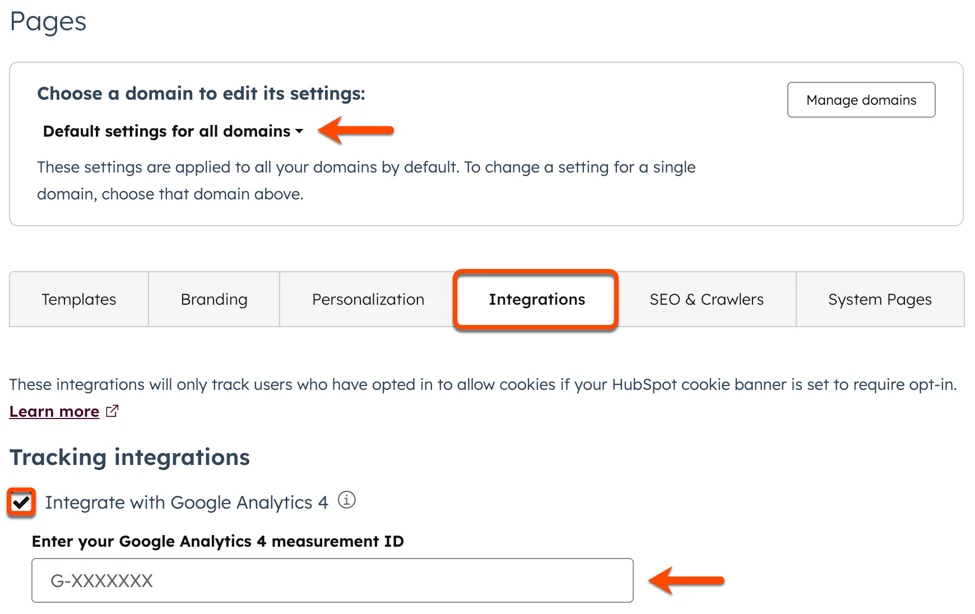
Yes. HubSpot provides a native Google Analytics integration that lets users add a GA4 Measurement ID in HubSpot settings.
HubSpot then embeds GA4 tracking code on all hosted pages (website pages, landing pages, and blog posts), capturing visitor behavior inside GA4 reports. Marketplace apps like the Google Analytics Connector add further syncing capabilities.
What data can sync?
Pageviews, sessions, traffic sources, and user behavior on HubSpot-hosted content flow into GA4 automatically through the native integration.
With Google Tag Manager or custom configuration, you can push HubSpot form submissions, CTA clicks, and lifecycle stage changes to GA4 as custom events. HubSpot's own analytics track contacts, deals, and marketing attribution internally, while GA4 tracks the broader website engagement picture.
Is the sync bidirectional?
Not natively. The primary data flow runs from HubSpot content activity into GA4. GA4 does not push data back into HubSpot through the native integration. Bidirectional flow requires third-party tools or custom API development.
Is it real-time or batch?
The native integration is real-time: GA4 tracking fires on every page load. GA4 processes data with typical freshness of 2 to 6 hours for standard properties, with realtime reports available within minutes. Zapier triggers within 1 to 15 minutes depending on plan tier.
What are the available methods?
Native HubSpot setting (GA4 Measurement ID), Google Tag Manager (GTM) for custom event tracking, third-party automation (Zapier), and custom API development.
Method | Setup Difficulty | Data Flow | Real-time? | Cost |
|---|---|---|---|---|
Native (GA4 Measurement ID) | Easy | HubSpot content to GA4 | Yes | Included |
Google Tag Manager | Medium | HubSpot events to GA4 | Yes | Free |
Zapier | Medium | One-way per Zap | Near real-time (1-15 min) | From $19.99/mo |
Custom API | Hard | Custom | Depends | Dev time |
One distinction worth settling upfront: the native integration and GTM cover ongoing, automatic tracking of website activity and events as they happen. Zapier handles event-triggered flows between the two platforms for specific CRM actions (new contact created, deal stage changed).
Custom API development is the only method with no limit on what data moves or in which direction, but it requires engineering resources to build and maintain.
Integration Methods
Native HubSpot-Google Analytics Integration (GA4 Measurement ID)
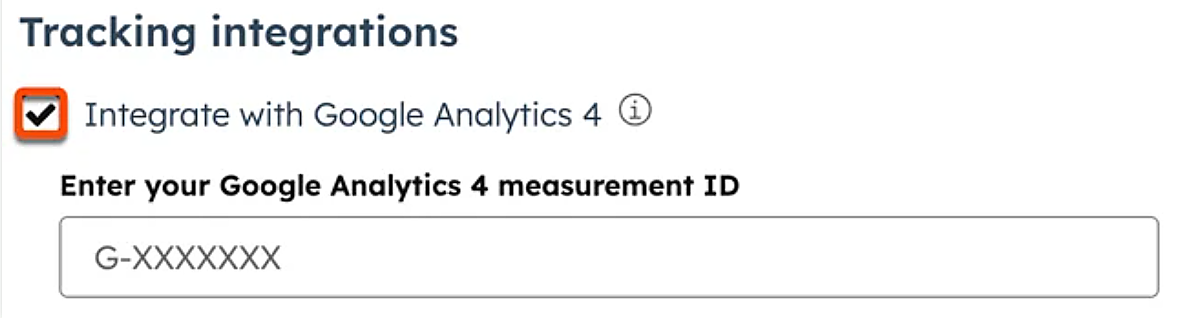
How it works: HubSpot lets administrators add a GA4 Measurement ID in the platform settings. Once configured, HubSpot injects the GA4 tracking code (gtag.js) into the header of all hosted pages: website pages, landing pages, and blog posts.
Source: HubSpot
GA4 captures every visitor interaction on those pages and includes them in standard reports alongside traffic from non-HubSpot sources.
What it syncs: Pageviews, sessions, traffic source attribution, user engagement metrics (scroll depth, outbound clicks, file downloads if enabled in GA4), and any GA4 enhanced measurement events. HubSpot-specific events like form submissions and CTA clicks do not track as GA4 events through this method alone; those require GTM configuration or HubSpot tracking code customization.
Fits: ongoing, automatic tracking of visitor behavior on HubSpot-hosted content; not a data migration or CRM sync tool.
Setup process:
In your GA4 property, locate your Measurement ID (formatted as G-XXXXXXXXXX) under Admin > Data Streams > Web.
In HubSpot, navigate to Settings > Website > Pages (or Settings > Content > Pages, depending on your HubSpot version).
Find the "Integrations" section and paste your GA4 Measurement ID into the Google Analytics tracking field.
If you use HubSpot's CMS for your website, the tracking code applies to all hosted pages automatically. For external pages, add the GA4 tracking code manually or via Google Tag Manager.
Verify the integration by visiting a HubSpot-hosted page and checking GA4's Realtime report for incoming hits.
Configure GA4 enhanced measurement settings (scroll tracking, outbound clicks, site search) to capture additional engagement data automatically.
Strengths: Simplest setup, no third-party tools required. Tracking fires on every HubSpot-hosted page automatically. No ongoing maintenance beyond keeping the Measurement ID current. Free on all HubSpot and GA4 tiers.
Limitations: Only tracks activity on HubSpot-hosted content. HubSpot form submissions and CTA clicks do not appear as discrete GA4 events without additional configuration. No data flows from GA4 back into HubSpot. Does not connect GA4 user sessions to HubSpot contact records (the two systems use different identity models).
Best for: Teams using HubSpot's CMS that want GA4 to capture the same traffic data alongside their other web properties. The starting point for any HubSpot-GA4 connection.
Google Tag Manager (Custom Event Tracking)
How it works: Google Tag Manager sits between HubSpot and GA4 as a container layer, letting teams define custom tags, triggers, and variables that fire GA4 events based on specific user actions.
HubSpot's tracking code emits JavaScript events for form submissions, CTA clicks, and other interactions. GTM captures those events and sends them to GA4 as custom or recommended events, extending the native integration's coverage beyond pageviews.
What it syncs: Any user interaction a JavaScript event or data layer variable can capture: form submissions (including form ID and page URL), CTA clicks, video plays, chat widget interactions, and custom events defined in HubSpot's tracking code.
GTM can also pass HubSpot UTM parameters, referral data, and user properties into GA4 for richer attribution.
Fits: ongoing event tracking for specific HubSpot interactions the native GA4 integration does not capture; works alongside the native Measurement ID setup.
Setup process:
Create a Google Tag Manager account and container if you do not already have one. Add the GTM container snippet to your HubSpot website (Settings > Website > Pages > Site Header HTML, or via a HubSpot module).
In GTM, create a GA4 Configuration tag using your GA4 Measurement ID. Set it to fire on All Pages.
Create custom triggers for HubSpot-specific events. For form submissions, use a Custom Event trigger listening for the hsFormCallback event (HubSpot's JavaScript API fires this on form completion). For CTA clicks, use a Click trigger targeting HubSpot CTA button classes or IDs.
Create GA4 Event tags linked to each trigger. Map relevant data (form ID, page URL, CTA name) as event parameters so they appear in GA4 Explore reports.
Use GTM's Preview mode to test each tag on a HubSpot-hosted page, confirming events fire correctly and parameters carry the expected values.
Publish the GTM container. Verify events appear in GA4's Realtime report and DebugView.
Strengths: Fine control over which HubSpot interactions become GA4 events. No cost beyond configuration time. Keeps all tag management in one place. Supports conditional logic (fire only on specific pages, for specific user segments, or based on URL parameters).
GTM's version control and preview mode reduce the risk of broken tracking.
Limitations: Requires working knowledge of GTM's tag/trigger/variable model. HubSpot's JavaScript event naming and data layer structure can change with platform updates, requiring tag maintenance. Does not push GA4 data back into HubSpot.
The data that flows is event-level, not contact-level: GA4 sees that a form was submitted but does not receive the contact's email, name, or HubSpot lifecycle stage.
Best for: Marketing ops teams that need HubSpot form submissions, CTA clicks, and other conversion events in GA4 reports for attribution modeling and funnel analysis. Teams already using GTM for tag management across their website.
Zapier
How it works: Zapier connects HubSpot and Google Analytics through event-driven automations called Zaps. Each Zap pairs a trigger (an event in one app) with one or more actions (what happens in the other).
Source: HubSpot
Since GA4 lacks a broad Zapier trigger connector, the primary use case flows from HubSpot to GA4: a HubSpot event (new contact, deal stage change, form submission) triggers a Zapier action that sends data to GA4 via the Measurement Protocol or creates a record in an intermediate system.
What it syncs: HubSpot CRM events (new contacts, updated deal properties, form submissions, list membership changes) can trigger GA4 events via the Measurement Protocol.
You can pull basic GA4 report data into other tools through Zapier's GA4 connector, though the available triggers and data scope are narrower than direct API access.
Fits: ongoing event-based sync for specific CRM actions; not a replacement for website tracking or a full analytics pipeline.
Setup process:
Create a Zapier account and connect both your HubSpot and Google Analytics 4 accounts using OAuth.
Choose HubSpot as the trigger app and select the trigger event (e.g., "New Contact," "New Deal," or "New Form Submission").
Choose Google Analytics 4 as the action app. If sending events via the Measurement Protocol, configure the action to POST event data with the appropriate Measurement ID and API secret.
Map HubSpot fields (contact properties, deal values, form IDs) to GA4 event parameters.
Test the Zap with a sample record to verify the event appears in GA4's Realtime report.
Turn the Zap on. Each qualifying HubSpot event triggers the configured GA4 action.
Strengths: No engineering resources required. Quick to set up for specific event flows. Zapier's filter and formatting steps add conditional logic (e.g., only send events for contacts in a specific lifecycle stage). Works with HubSpot's free and paid tiers.
Limitations: Each Zap handles one trigger-action pair, so syncing multiple event types requires multiple Zaps (each counting against your plan's task allocation). GA4's Zapier connector has narrower trigger options than HubSpot's.
The Measurement Protocol requires a client_id for each event, adding complexity to field mapping. Latency runs 1 to 15 minutes rather than instant. Historical data does not sync.
Best for: Teams that want specific CRM events (closed-won deals, MQL status changes) to appear as GA4 events for conversion tracking or audience building, without setting up GTM or custom code.
Custom API Integration
How it works: Both platforms expose full APIs.
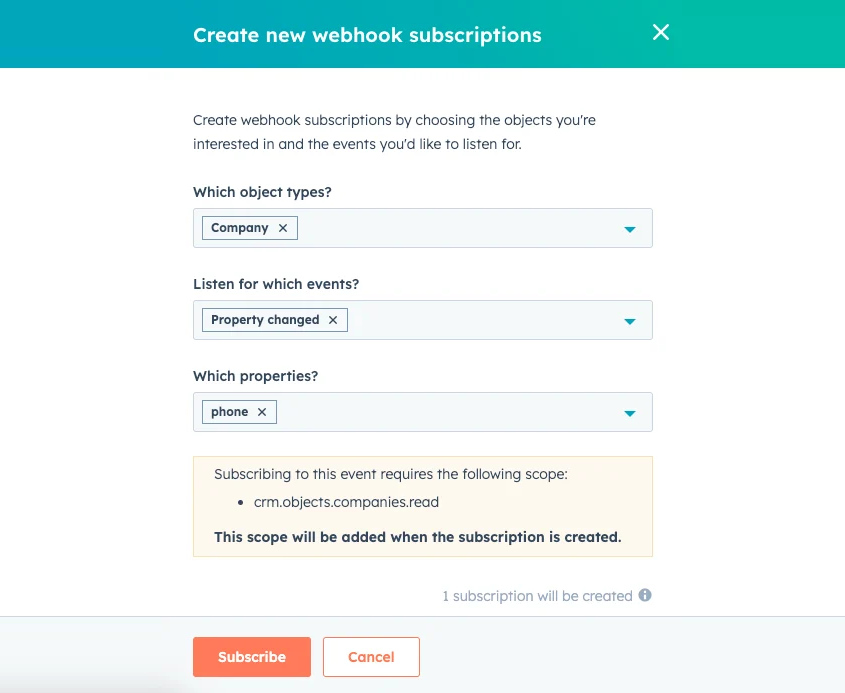
HubSpot's REST API covers all CRM objects, marketing events, and workflow data, with webhook support for real-time event notifications.
Source: HubSpot
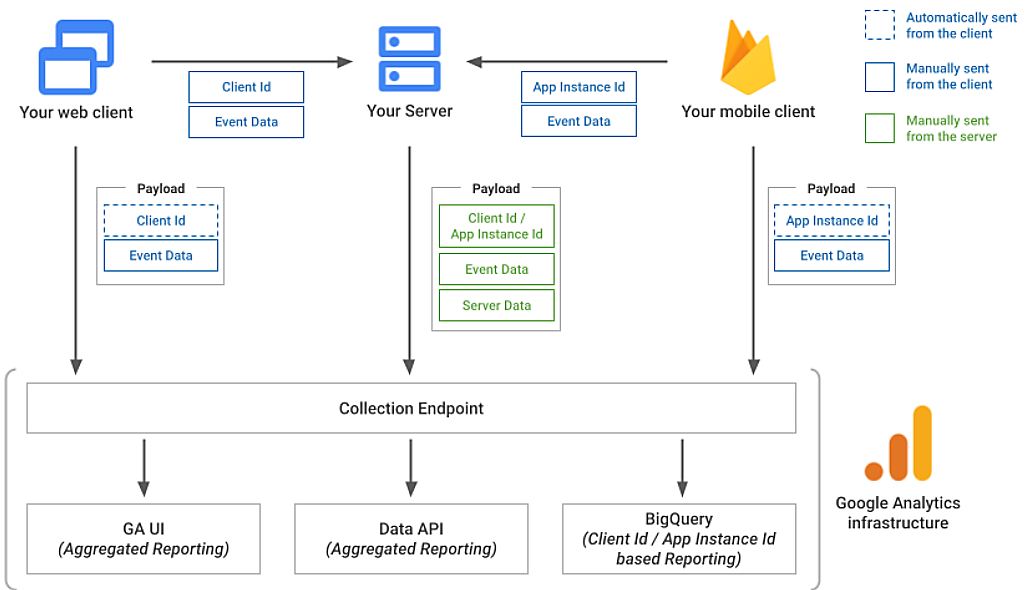
GA4's Data API gives programmatic access to report data, the Admin API manages property configuration, and the Measurement Protocol accepts server-side events via HTTP POST.
Source: Google Analytics
A custom integration connects these APIs directly, with middleware handling authentication, data mapping, and sync logic.
What it syncs: Anything both APIs expose. You can send HubSpot contact and deal data to GA4 as events or user properties via the Measurement Protocol.
You can pull GA4 report data (traffic, conversions, audience membership) into HubSpot via the Data API and store it as contact properties or use it to trigger workflows. This is the only method that supports bidirectional data flow and complex transformation logic.
Fits: either one-time data backfill or ongoing bidirectional sync; the only method with no limit on either.
Setup process:
Register API credentials in both platforms: a HubSpot private app or OAuth app with the required scopes, and a Google Cloud project with the GA4 Data API and Admin API enabled plus OAuth 2.0 or service account credentials.
Design the data model mapping between HubSpot objects and GA4 events/dimensions (e.g., HubSpot lifecycle stage changes become GA4 custom events; GA4 traffic source data becomes a HubSpot contact property).
Build server-side middleware that listens for HubSpot webhooks (contact created, deal stage changed) and sends corresponding events to GA4 via the Measurement Protocol, including a client_id or user_id for identity stitching.
For the reverse direction, build a scheduled job that queries GA4's Data API for relevant metrics and writes them back to HubSpot contact or company records via HubSpot's API.
Add logging, error handling, and retry logic. Both APIs have rate limits (HubSpot's rate limits scale by tier; GA4 Data API uses a token bucket system).
Deploy, monitor, and maintain the integration over time.
Strengths: Full control over what syncs, when, and how. The only method capable of bidirectional data flow. Can implement business logic no off-the-shelf connector supports (e.g., attribution models that combine GA4 path data with HubSpot deal values). No per-record or per-operation fees from a third-party connector.
Limitations: Requires development resources to build and maintain. Identity stitching between GA4's anonymous user model and HubSpot's contact-based model is the primary technical challenge.
Both platforms version their APIs (HubSpot uses date-based versioning; GA4's Data API is on v1beta), requiring ongoing maintenance. The initial build takes weeks, not hours.
Best for: Organizations with in-house development teams that need GA4 analytics data inside HubSpot workflows (or vice versa) in ways no connector or automation tool supports. Enterprise teams building closed-loop attribution models that combine website analytics with CRM revenue data.
Key Use Cases
1. Marketing Attribution Across the Full Funnel
Marketing teams track campaign performance in GA4 (traffic, engagement, conversion events) but measure pipeline impact in HubSpot (leads, MQLs, closed-won deals).
By pushing HubSpot form submissions and lifecycle stage changes into GA4 as custom events (via GTM or the Measurement Protocol), teams can build GA4 funnel reports that extend from first website visit through lead conversion, connecting ad spend to pipeline rather than stopping at the form submission.
Best integration method: Google Tag Manager for form submission events; custom API for lifecycle stage and deal data.
2. GA4 Audience Building from CRM Data
GA4 lets marketers create audiences based on event data and activate them in Google Ads.
Source: Google Analytics
By sending HubSpot CRM events (new MQL, deal stage change, customer status) into GA4 via the Measurement Protocol, teams can build GA4 audiences segmented by CRM lifecycle stage. A "Current Customers" audience in GA4 can exclude acquisition campaigns, while a "High-Intent MQLs" audience can trigger targeted remarketing.
Best integration method: Zapier or custom API (HubSpot lifecycle stage changes sent to GA4 as Measurement Protocol events).
3. Content Performance Tied to Lead Quality
HubSpot tracks which blog posts, landing pages, and CTAs generate leads, but GA4 provides deeper engagement context: time on page, scroll depth, traffic source, and cross-session behavior. Connecting both systems lets marketing teams identify which content drives not just traffic (GA4) but qualified leads (HubSpot), informing content strategy with pipeline data rather than pageview counts.
Best integration method: Native integration (GA4 tracking on HubSpot content) plus GTM (form submission events with page-level parameters).
4. Paid Campaign Optimization with CRM Conversion Data
Google Ads bidding algorithms optimize toward GA4 conversion events. By sending HubSpot deal milestones (SQL, closed-won) back to GA4 as offline conversions via the Measurement Protocol, teams feed actual revenue signals into Google Ads' bidding model. The algorithm then optimizes for clicks that produce revenue, not clicks that produce form fills.
Best integration method: Custom API (HubSpot deal stage webhooks pushing events to GA4 via the Measurement Protocol, with Google Ads linked to the GA4 property).
5. Multi-Touch Reporting Across Channels
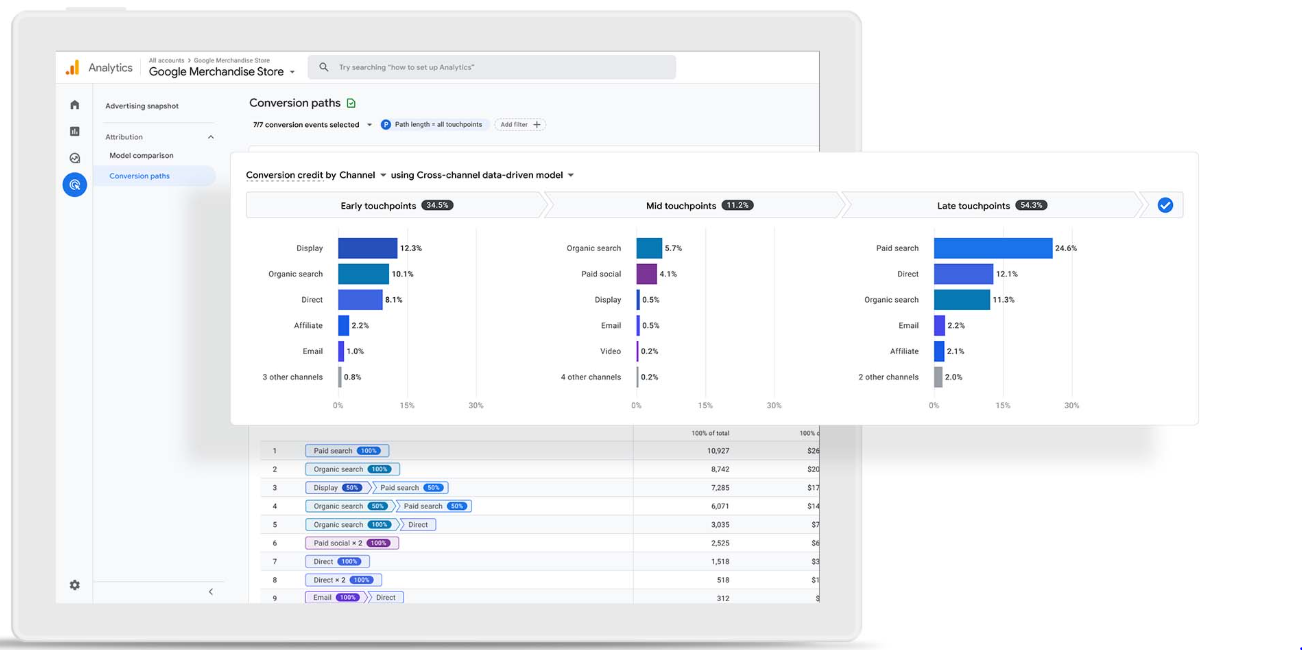
GA4's data-driven attribution distributes conversion credit across touchpoints using machine learning, but it only sees website interactions. HubSpot tracks email opens, meeting bookings, and sales calls.
A custom integration that sends HubSpot engagement events into GA4 extends the attribution model to include offline and CRM-based touchpoints, giving leadership a clearer picture of which channels drive pipeline.
Best integration method: Custom API (HubSpot engagement events pushed to GA4 as Measurement Protocol events with consistent user identifiers).
Limitations and Considerations
Identity Stitching Is the Core Challenge
GA4 tracks anonymous users via client IDs and, optionally, user IDs. HubSpot tracks known contacts via email addresses and HubSpot contact IDs.
These two identity systems share no common key by default. Connecting a GA4 session to a HubSpot contact record requires passing a shared identifier (typically the HubSpot contact ID or a hashed email) into GA4 as a user property at the moment of form submission or login. Without this step, the two platforms' data exists in parallel but cannot be joined at the user level.
Data That Does Not Sync Natively
The native integration is one-directional: it embeds GA4 tracking on HubSpot content so pageview data flows into GA4. HubSpot-specific objects (contacts, deals, tickets, lifecycle stages) do not appear in GA4 without additional configuration. Conversely, GA4 data (sessions, bounce rates, traffic sources, audience membership) does not flow into HubSpot contact records through any native mechanism.
GA4 Data Sampling on the Free Tier
GA4 applies sampling to Explore reports when queries exceed 10 million events, reducing the precision of custom analyses that combine GA4 data with HubSpot event data. Unsampled reporting requires Analytics 360, the paid enterprise tier.
For teams running high-volume campaigns, this sampling introduces uncertainty into attribution models that depend on precise event-level data.
Pricing Implications
The native HubSpot-GA4 integration is free on all tiers of both platforms. GTM is free. Zapier charges by task count (each synced event counts as a task), starting at $19.99/month. Custom API integrations carry developer time and hosting costs.
On the GA4 side, the Data API uses a token bucket quota system with limits that vary by property type (standard vs. Analytics 360). On the HubSpot side, API rate limits scale by subscription tier, from 250,000 requests/day on Free and Starter to 1,000,000 on Enterprise.
Permissions and Access
The native integration requires admin access in HubSpot (Settings > Website > Pages) and a GA4 property with Editor or Administrator access. GTM configuration requires GTM container publish rights plus GA4 Editor access.
Custom API integrations require a HubSpot private app or OAuth app with appropriate scopes and a Google Cloud project with the relevant APIs enabled. Organizations using GA4's field-level data restrictions or property access controls should confirm the integration credentials have sufficient permissions.
Maintenance
Both platforms update regularly. HubSpot introduced date-based API versioning in March 2026 with twice-yearly version releases. GA4's Data API remains in v1beta. GTM tags that rely on HubSpot's JavaScript event names can break if HubSpot changes its tracking code structure.
GA4's enhanced measurement settings can change without notice, affecting which events fire automatically. Any integration beyond the native Measurement ID setup requires periodic review.
What No Method Fixes: The Data Itself
Every method above connects two systems that track visitor behavior and manage contacts. None checks whether the contact records in HubSpot are accurate, whether the companies visiting your website are identifiable, or whether the leads entering your pipeline match your ideal customer profile.
An anonymous visitor in GA4 stays anonymous regardless of how well the tracking works. A HubSpot contact with a dead email address generates a form submission event in GA4 that looks identical to one from a verified buyer.
The integration moves data between platforms; it does not improve the data being moved, and it does not reveal who the anonymous visitors are.
Where ZoomInfo Fits In
Every method in this guide connects HubSpot and Google Analytics for tracking and attribution.
None solves the two problems underneath: anonymous website visitors that GA4 cannot identify beyond a client ID, and CRM records in HubSpot that may be incomplete, outdated, or missing the detail needed to qualify leads.
That is the gap ZoomInfo closes.
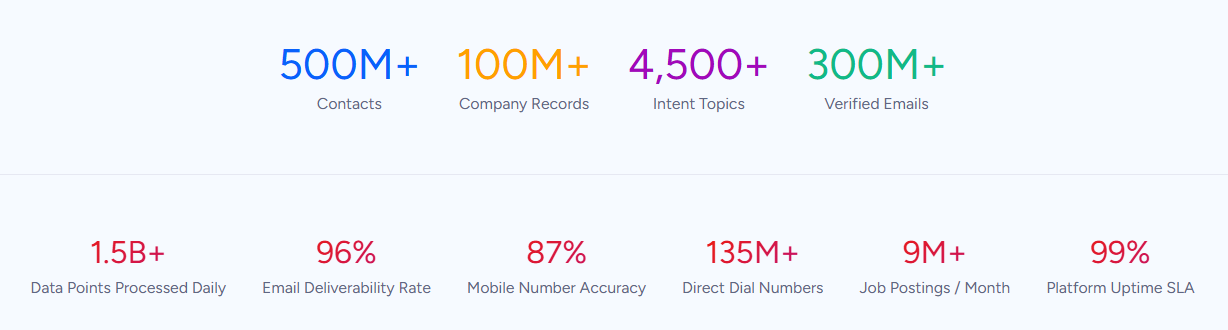
ZoomInfo is a B2B data and go-to-market platform built on 500M contacts, 100M companies, 135M+ verified phone numbers, and 200M+ verified business emails. That data runs through a multi-source verification pipeline backed by 300+ human researchers, reaching up to 95% accuracy on first-party data.
For teams running a HubSpot-Google Analytics integration, ZoomInfo addresses the visitor identification and data quality problems that no connector handles.
On the HubSpot side, ZoomInfo integrates natively through the HubSpot App Marketplace via ZoomInfo Inbound Enrich, providing real-time contact and company data enrichment, scheduled database refresh, and lead scoring and routing inside HubSpot CRM records.
When a new lead enters HubSpot via a form submission, ZoomInfo can automatically append verified business email, direct dial, job title, company attributes, and technographic data to the record, filling gaps the HubSpot-GA4 integration cannot.
On the Google Analytics side, ZoomInfo's WebSights product integrates with GA4 via Google Tag Manager, resolving anonymous website traffic to companies using 210 million IP-to-Organization pairings.
Where GA4 sees an anonymous session with a client ID, WebSights identifies the company behind the visit, the pages they viewed, and the buying team contacts at that company.
That data feeds into ZoomInfo's GTM Context Graph, which processes 1.5B+ data points daily and combines third-party data with CRM records, conversation transcripts, and behavioral signals.
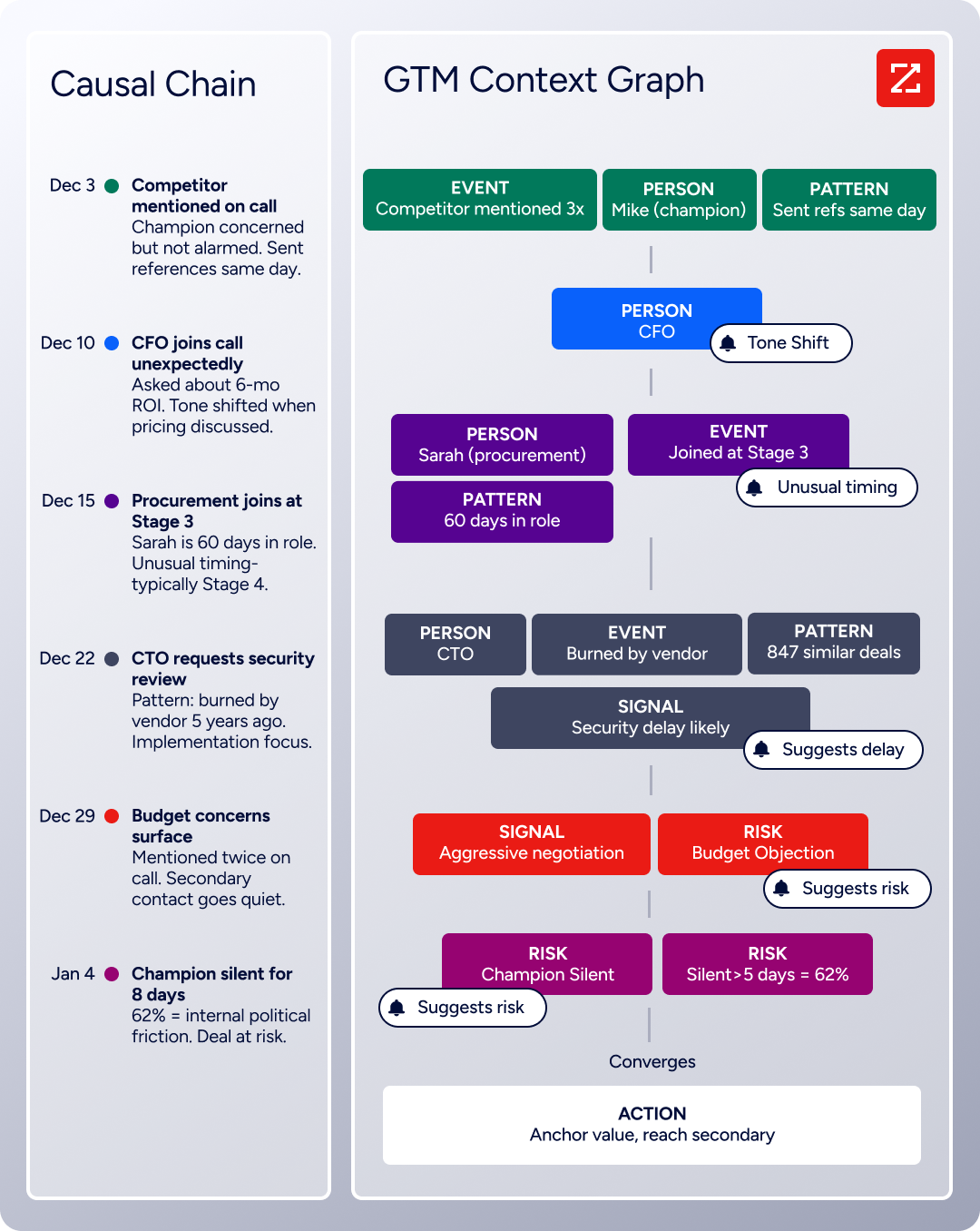
In practice, a team running both HubSpot and GA4 can use ZoomInfo to close the loop on three fronts.
First, WebSights identifies companies visiting your site before they fill out a form, turning GA4 traffic data into account intelligence you can act on.
Second, Inbound Enrich verifies and completes the contact records that enter HubSpot through form submissions, so the data flowing into your CRM (and back into GA4 as events) is accurate.
Third, Buyer Intent data from ZoomInfo prioritizes which accounts to target based on research signals, informing both HubSpot outreach sequences and GA4 audience segments.
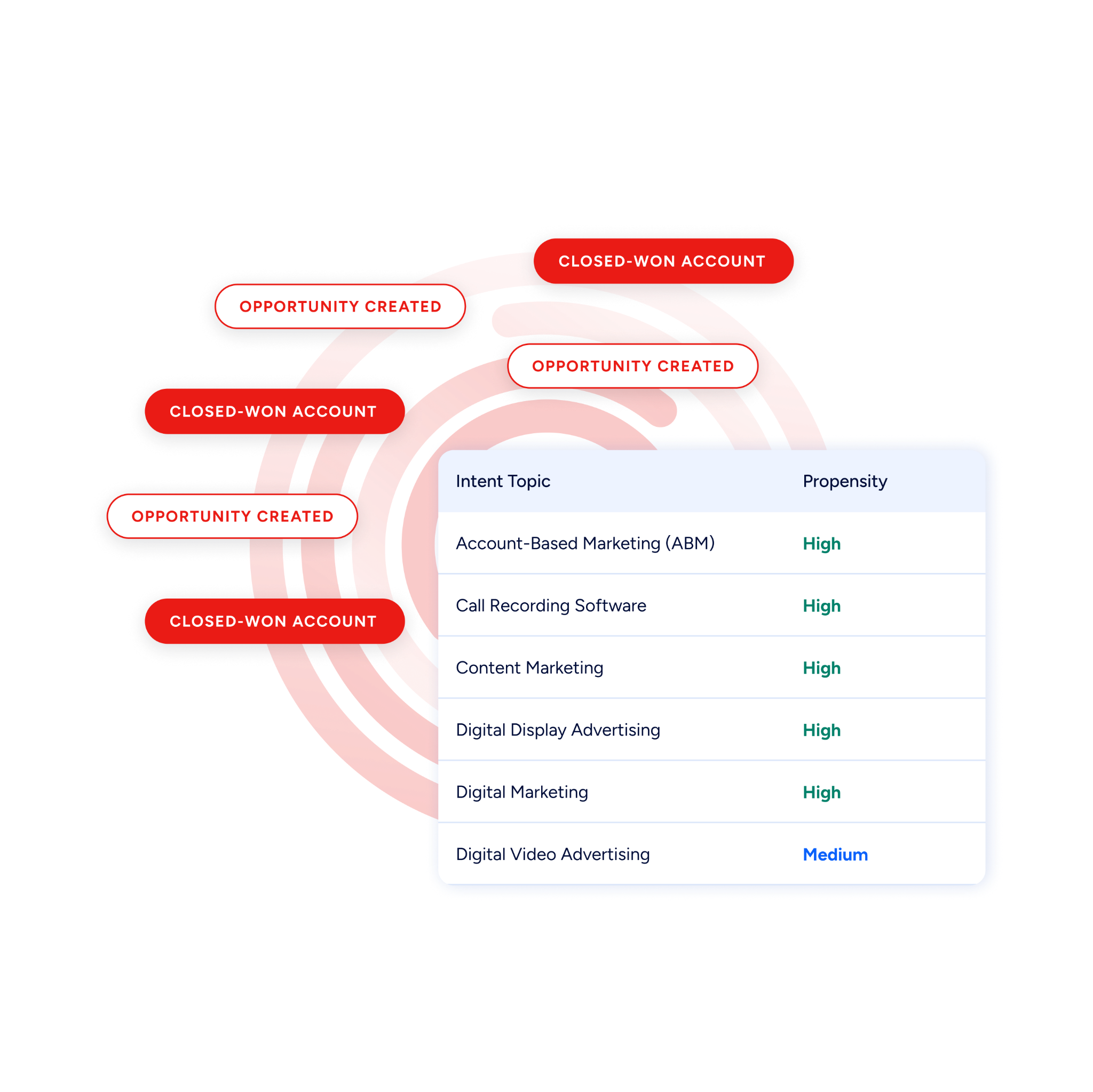
Enriched, identified data also makes the HubSpot-GA4 integration itself more valuable. When lifecycle stage changes flow from HubSpot into GA4 as conversion events, those events attach to records that have been verified and enriched, so GA4's attribution models reflect buyer quality rather than form-fill volume.
When GA4 audiences are built from CRM events, the underlying contact data is complete enough to make those audiences meaningful for Google Ads targeting.
Seismic's sales team attributed 39% of active pipeline to opportunities identified or influenced by ZoomInfo signals, while boosting productivity by 54% and saving 11.5 hours per week. (Seismic)
Final Verdict
A native HubSpot-Google Analytics integration exists, covering the basic job of embedding GA4 tracking on HubSpot-hosted content. Beyond that, every deeper connection (form submission events, CRM data in GA4, GA4 metrics in HubSpot) requires Google Tag Manager, Zapier, or custom development.
For most teams, the right choice depends on scale and complexity.
Small marketing teams that want GA4 to track HubSpot-hosted content should start with the native Measurement ID integration and add GTM for form submission events. Both are free and require no engineering resources beyond initial configuration.
Teams that need specific HubSpot CRM events (lifecycle stage changes, deal milestones) in GA4 for audience building or Google Ads optimization should use Zapier or the Measurement Protocol via a lightweight server-side script.
Organizations building closed-loop attribution models that combine GA4 traffic data with HubSpot pipeline and revenue data should invest in a custom API integration with identity stitching between the two platforms.
Before committing to a method, clarify what question you are trying to answer.
If the question is "how does our HubSpot content perform in the broader context of website traffic," the native integration is enough. If the question is "which marketing channels drive pipeline, not just form fills," you need CRM events flowing into GA4 for attribution.
Either way, the quality of the data in both systems determines whether the integration delivers insight or just connects two incomplete pictures.
ZoomInfo, with its native HubSpot integration, WebSights integration with GA4 via Google Tag Manager, and API and MCP access for any workflow, identifies anonymous visitors, enriches CRM records, and ensures both platforms work from accurate, complete data.
FAQ
Does HubSpot have a native Google Analytics integration?
Yes. HubSpot lets administrators add a GA4 Measurement ID in the website settings, which embeds GA4 tracking code on all HubSpot-hosted pages (website pages, landing pages, blog posts). This captures pageviews and standard engagement metrics in GA4 automatically.
The integration is available on all HubSpot tiers, including the free plan, and works with the free GA4 tier. It requires no third-party tool or custom code.
Can I track HubSpot form submissions in Google Analytics?
Yes, but not through the native Measurement ID integration alone. You can track HubSpot form submissions in GA4 by configuring Google Tag Manager to listen for HubSpot's JavaScript form submission events and fire corresponding GA4 event tags.
This requires GTM access and familiarity with HubSpot's tracking code event structure. Once configured, form submissions appear in GA4's event reports and you can mark them as key events for conversion tracking.
Does GA4 data flow back into HubSpot?
Not through any native integration. The data flow is one-directional: HubSpot content activity goes into GA4. To bring GA4 data into HubSpot (traffic sources, session counts, audience membership), you need a custom API integration that queries the GA4 Data API and writes the results to HubSpot contact or company properties.
Some third-party marketplace apps offer partial solutions, but a complete bidirectional sync requires custom development.
How do I connect GA4 conversion data to HubSpot deals for attribution?
This requires custom development. Send HubSpot deal stage changes (SQL created, closed-won) to GA4 as Measurement Protocol events, using a shared identifier (typically a HubSpot contact ID passed as a GA4 user_id at form submission) to stitch the conversion back to the original website session.
Once connected, GA4's data-driven attribution model distributes credit across the touchpoints that preceded the deal, and the conversion signal can feed into Google Ads for bidding optimization.
What does the integration cost?
The native HubSpot-GA4 integration is free on all tiers of both platforms. Google Tag Manager is free. Zapier plans start at $19.99/month for 750 tasks. Custom API integrations have no platform fees but require developer time and hosting.
Both platforms impose API rate limits that scale with subscription tier. GA4's paid tier (Analytics 360) removes data sampling and adds higher API quotas, but its pricing is not publicly listed and requires contacting Google Sales.
Can I identify which companies visit my website using HubSpot and GA4 together?
Not directly. GA4 tracks anonymous visitors via client IDs, and HubSpot only identifies visitors who fill out a form or match via email. For company-level identification of anonymous website traffic, you need a third-party tool.
ZoomInfo's WebSights product resolves anonymous visits to companies using IP-to-Organization matching and integrates with GA4 via Google Tag Manager, adding a company identification layer that neither platform provides on its own.
How does ZoomInfo improve a HubSpot-Google Analytics integration?
ZoomInfo addresses the two problems no connector solves: anonymous visitor identification and CRM data quality. Its WebSights product identifies companies behind anonymous GA4 sessions via Google Tag Manager. Its native HubSpot integration (ZoomInfo Inbound Enrich) automatically appends verified contact data, company attributes, and technographics to new CRM records.
The result: GA4 traffic data connects to identified companies rather than anonymous sessions, and the HubSpot records behind every conversion event are accurate and complete. Attribution models become more reliable and audience segments more meaningful.
Will the HubSpot-GA4 integration work on non-HubSpot-hosted pages?
The native Measurement ID integration applies only to HubSpot-hosted content (pages built in HubSpot's CMS). For pages hosted elsewhere, add the GA4 tracking code independently (via GTM or a direct gtag.js snippet). You can still add HubSpot's own tracking code to external pages to track contacts, but the native GA4 integration setting in HubSpot does not inject tracking on pages outside HubSpot's CMS.
More HubSpot integrations:
