
Teams that run HubSpot as their CRM and Google Ads as their advertising engine usually discover the same problems within a quarter:
ad spend reports in Google Ads show clicks and conversions, but the CRM tells a different story about which leads actually closed,
customer lists for targeting fall out of sync as contacts move through lifecycle stages in HubSpot but remain static in Google Ads audiences,
and someone on the marketing team is manually uploading CSV lists every week to keep ad targeting current.
However, the two platforms ended up coexisting (a marketing team choosing Google Ads for paid acquisition while sales and ops run on HubSpot, or an organization standardizing on HubSpot's CRM while keeping Google Ads as its primary demand channel), the longer they operate independently, the wider the gap between what marketing spends and what actually generates revenue.
Connecting HubSpot and Google Ads closes that gap.
Offline conversion data flows from HubSpot into Google Ads so Smart Bidding optimizes toward leads that became customers, not form fills. Customer Match audiences sync from HubSpot's CRM segments into Google Ads so ad targeting reflects real lifecycle stages and deal outcomes.
Ad performance data flows back into HubSpot so marketers can attribute revenue to specific campaigns without switching between platforms.
HubSpot offers a native Google Ads integration that connects both platforms directly. For teams needing more flexible automation, Zapier can bridge specific workflows, and Google Ads' Data Manager provides a direct HubSpot connection for offline conversion import and audience sync. Each method differs in setup complexity, sync direction, data coverage, and cost.
One problem no connection method solves: the integration syncs records and conversion events, but it does not improve the quality of the contact data flowing between both systems.
That is where ZoomInfo comes in. ZoomInfo integrates natively with both HubSpot and Google Ads, and offers API and MCP access that can feed verified, enriched contact and company data into any system, so the records behind every ad click and CRM workflow are accurate and complete before the sync moves them.
This article covers the full landscape of the HubSpot-Google Ads integration: which methods are available, what data each one handles, how to set them up, the use cases that justify connecting both platforms, and the limitations to plan for.
It also covers how ZoomInfo fits into the picture as a data enrichment layer that strengthens the records flowing between HubSpot and Google Ads.
Let's start with an overview of the integration.
Integration Overview
Source: YouTube
Does a native integration exist?
Yes. HubSpot offers a native Google Ads integration available through the HubSpot App Marketplace. The integration connects a Google Ads account to HubSpot for ad management, audience syncing, and conversion tracking. Separately, Google Ads offers a direct HubSpot connection through Data Manager for offline conversion import and Customer Match audience sync.
What data can sync?
Ad performance metrics (impressions, clicks, spend, conversions) flow from Google Ads into HubSpot for reporting and attribution. Contact lists and lifecycle-stage-based audiences sync from HubSpot into Google Ads as Customer Match audiences.
Offline conversion events (form submissions, deal stage changes, closed-won deals) can be pushed from HubSpot into Google Ads to inform Smart Bidding.
Is the sync bidirectional?
Partially. Ad performance data flows from Google Ads into HubSpot. Audience lists and offline conversions flow from HubSpot into Google Ads. Each direction serves a different purpose, but both operate through the native connector.
True bidirectional record sync (where a field change in one platform propagates to the other) is not the design here; this is an advertising integration, not a CRM sync.
Is it real-time or batch?
Audience syncing through HubSpot's native integration updates on a schedule as contacts enter or leave HubSpot lists. Offline conversion imports through Google Ads Data Manager run on configurable schedules. Ad performance data in HubSpot refreshes periodically. Zapier triggers within 1 to 15 minutes of an event.
What are the available methods?
Native HubSpot-Google Ads integration, Google Ads Data Manager (direct HubSpot connection), third-party automation (Zapier), and custom API development.
Method | Setup Difficulty | Data Flow | Real-time? | Cost |
|---|---|---|---|---|
Native HubSpot Integration | Low | Bidirectional (ads data in, audiences and conversions out) | Scheduled | Included with Marketing Hub (Starter+) |
Google Ads Data Manager | Medium | HubSpot to Google Ads | Scheduled | Included with Google Ads |
Zapier | Medium | One-way per Zap | Near real-time (1-15 min) | From $19.99/mo |
Custom API | High | Fully customizable | Depends on implementation | Developer time + hosting |
One distinction worth settling upfront: the native HubSpot integration handles ongoing campaign management, audience syncing, and attribution reporting. Google Ads Data Manager focuses on feeding CRM conversion data and customer lists into Google Ads to improve ad targeting and Smart Bidding.
Zapier fills gaps for event-triggered workflows that neither native connector covers (such as pushing a specific deal-stage change into a Google Ads custom conversion). Custom API builds handle anything the other methods cannot, at the cost of development resources.
Integration Methods
Native HubSpot-Google Ads Integration
How it works: HubSpot's native Google Ads integration connects your Google Ads account to HubSpot through OAuth. Once connected, HubSpot pulls ad performance data (impressions, clicks, cost, conversions) into its reporting dashboards and lets you create and manage Google Ads audiences from HubSpot contact lists.
You can also track ad interactions at the contact level, tying specific ad clicks to CRM records and deal outcomes through HubSpot's multi-touch attribution.
What it syncs: Ad performance metrics into HubSpot for reporting and revenue attribution. HubSpot contact lists into Google Ads as Customer Match audiences for targeting and exclusion.
Ad interaction data (which contacts clicked which ads) attached to CRM contact records. Conversion events from HubSpot lifecycle stages back into Google Ads for optimization.
Fits: ongoing sync for campaign management, audience targeting, and attribution; not a one-time data migration tool.
Setup process:
In HubSpot, navigate to Settings > Marketing > Ads. Click "Connect account" and select Google Ads. You need admin access to both HubSpot and the Google Ads account.
Authenticate with your Google account via OAuth. Select the Google Ads account(s) you want to connect. HubSpot supports connecting multiple Google Ads accounts.
Enable ad tracking by installing or verifying the HubSpot tracking code on your website. This lets HubSpot associate ad clicks with specific contact records in the CRM.
Configure audience syncing by creating a HubSpot contact list (static or active) and syncing it to Google Ads as a Customer Match audience. Map the contact properties (email is the primary matching key).
Set up conversion tracking by defining which HubSpot lifecycle stage changes or form submissions should be reported as conversions in Google Ads.
Verify the connection by checking that ad performance data appears in HubSpot's Ads dashboard and that your synced audience appears in Google Ads under Audience Manager.
Strengths: First-party integration maintained by HubSpot. No third-party tool to configure or pay for separately. Contact-level attribution ties ad clicks to CRM records and downstream revenue.
Audience syncing keeps Google Ads targeting aligned with CRM lifecycle stages automatically. Available on HubSpot Marketing Hub Starter and above.
Limitations: Audience sync relies on Customer Match, which requires a minimum audience size and sufficient match rates to be usable in Google Ads. The offline conversion data sent back to Google Ads through this method is more limited than what Google Ads Data Manager can handle.
HubSpot's free CRM tier has limited ads functionality. Conversion tracking requires the HubSpot tracking code on all relevant pages.
Best for: Marketing teams already on HubSpot Marketing Hub that want a single view of Google Ads performance alongside CRM data, with audience syncing and basic conversion tracking handled natively.
Google Ads Data Manager (Direct HubSpot Connection)
How it works: Google Ads Data Manager is Google's built-in tool for connecting first-party data sources to Google Ads.
Source: Google
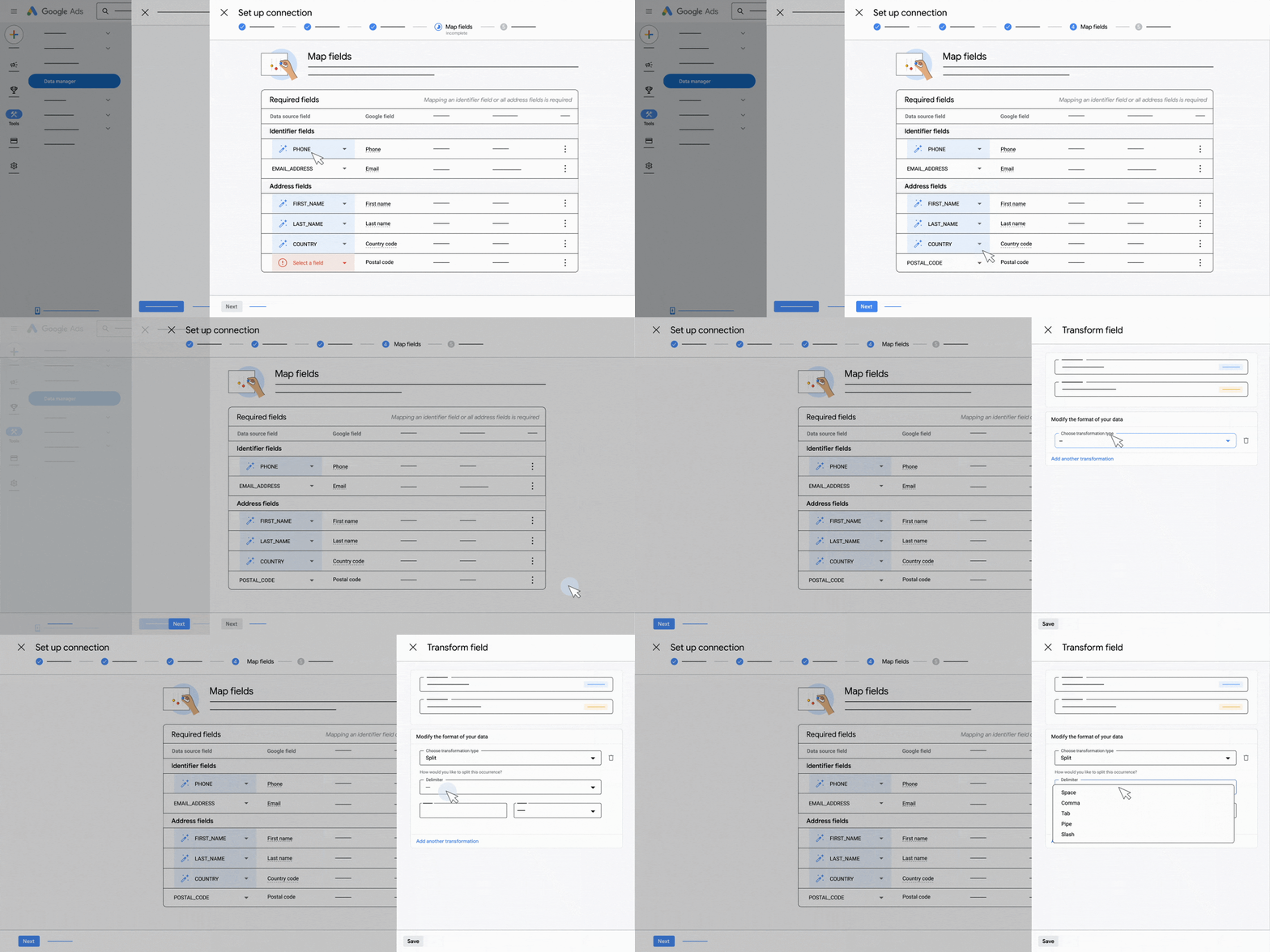
It offers a native HubSpot connector that imports Customer Match audience lists and offline conversion events from HubSpot into Google Ads. This connection is configured on the Google Ads side, meaning Google Ads pulls data from HubSpot rather than HubSpot pushing it. The integration supports field mapping, data transformations, and separation of technical and marketing team responsibilities.
What it syncs: Customer Match audiences (contact lists from HubSpot synced as ad targeting audiences in Google Ads) and offline conversion data (HubSpot lifecycle stage changes, deal closures, and other CRM events mapped to Google Ads conversion actions using GCLID or customer-provided data like email and phone). This is designed to feed HubSpot's CRM signals into Google Ads' Smart Bidding algorithms.
Fits: ongoing sync of CRM conversion data and audience lists into Google Ads; the primary method for optimizing Smart Bidding toward downstream business outcomes rather than ad clicks.
Setup process:
In Google Ads, navigate to Tools > Data Manager. Click "Connect a product" and select HubSpot from the available data sources.
Authenticate with your HubSpot account. Grant Google Ads permission to access your HubSpot CRM data. Admin access in both platforms is required.
Configure the data connection by selecting which HubSpot data to import: Customer Match lists (for audience targeting) and/or offline conversions (for Smart Bidding optimization).
Map HubSpot fields to Google Ads fields. For offline conversions, map HubSpot lifecycle stage changes or deal stage transitions to specific Google Ads conversion actions. Google uses GCLID or hashed customer data (email, phone) to match conversions back to ad clicks.
Set the sync schedule (how frequently Google Ads pulls updated data from HubSpot) and define any data transformation rules.
Test the connection by verifying that imported audiences appear in Audience Manager and that offline conversions appear in Google Ads conversion reporting with a matching status.
Strengths: Configured and maintained on the Google Ads side, so marketing teams managing ad accounts can set it up without depending on HubSpot admins for ongoing configuration. Designed for feeding CRM signals into Smart Bidding, which is the highest-leverage use of this integration.
Supports field mapping and data transformations to align HubSpot's data model with Google Ads' requirements. No third-party tool cost.
Limitations: Data flows one direction only (HubSpot to Google Ads). Does not pull ad performance data back into HubSpot for CRM reporting. Requires admin access on both platforms. The quality of offline conversion matching depends on GCLID capture (which requires proper tracking setup) or hashed customer data match rates.
Setup requires understanding both HubSpot's data model and Google Ads' conversion tracking framework.
Best for: Performance marketing teams focused on optimizing Google Ads Smart Bidding toward revenue and pipeline outcomes rather than lead volume. Teams where the Google Ads account manager wants direct control over what CRM data feeds the ad platform.
Zapier
Source: HubSpot
How it works: Zapier connects HubSpot and Google Ads through event-driven automations called Zaps. Each Zap pairs a trigger (an event in one app) with one or more actions (what happens in the other).
Both platforms are well-supported Zapier connectors, and the available trigger-action combinations cover CRM events, audience management, and conversion tracking workflows that the native integrations may not handle with sufficient granularity.
What it syncs: Depending on the Zap configuration: new HubSpot contacts or deals can trigger Google Ads audience updates or offline conversion uploads. Google Ads lead form submissions can create HubSpot contacts.
Custom event-driven workflows (such as pushing a specific deal property change into Google Ads as a conversion) are configurable through Zapier's filter and formatting steps.
Fits: ongoing event-triggered sync for specific workflows that the native integrations do not cover; not a replacement for the native connector's audience and conversion sync.
Setup process:
Create a Zapier account and connect both your HubSpot and Google Ads accounts using OAuth.
Choose a trigger app (e.g., HubSpot) and select the trigger event (e.g., "New Deal" or "Deal Stage Changed").
Choose the action app (Google Ads) and select the action (e.g., "Upload Offline Conversion" or "Add Contact to Customer List").
Map fields between the two platforms. For offline conversions, map the GCLID (stored as a HubSpot contact property), conversion name, conversion time, and conversion value.
Test the Zap with a sample record to verify the field mapping produces the expected result in Google Ads.
Turn the Zap on. For bidirectional workflows, create a second Zap with the trigger and action apps reversed.
Strengths: Covers edge cases and specific workflows that the native integrations do not handle (such as triggering a conversion upload on a specific custom deal property change). No engineering resources required. Zapier's filter and formatting steps add conditional logic. Quick to set up for simple, targeted automations.
Limitations: Each Zap handles one trigger-action pair, so multiple workflows require separate Zaps (each counting against your plan's task allocation). No built-in deduplication. Zapier charges by task count, and high-volume syncs accumulate costs.
The native integrations are more reliable and complete for standard audience sync and conversion tracking.
Best for: Teams that need a specific automated workflow between HubSpot and Google Ads that the native integrations do not support. Small teams testing a connection before investing in a more permanent setup.
Custom API Integration
How it works: Both HubSpot and Google Ads provide APIs.
HubSpot's REST API covers all CRM objects (contacts, companies, deals, tickets) with webhooks for event-driven notifications.
Google Ads' API supports programmatic campaign management, audience creation, offline conversion uploads, and reporting. A custom integration connects these APIs directly, with middleware handling authentication, data mapping, transformation, and scheduling.
What it syncs: Anything both APIs expose. This is the only method that supports complex scenarios like syncing custom HubSpot objects to Google Ads audiences, building multi-step conversion funnels from CRM data, or creating programmatic campaign structures based on CRM segmentation logic.
Fits: either ongoing sync or bulk operations; the only method with no ceiling on complexity.
Setup process:
Register API credentials in both platforms: a HubSpot private app or OAuth app with appropriate scopes, and a Google Ads API developer token with a Connected App configured for OAuth 2.0.
Design the data flow: which HubSpot objects and events should trigger which Google Ads actions (audience updates, conversion uploads, campaign adjustments).
Build the integration service: a server-side application that listens for HubSpot webhooks or polls on a schedule, transforms data according to the mapping, and writes to the Google Ads API.
Implement error handling and retry logic. Both APIs have rate limits (HubSpot's per-10-second limits vary by tier; Google Ads' daily operation limits vary by access level).
Handle authentication token refresh for both platforms (HubSpot OAuth tokens and Google Ads OAuth tokens both expire and require refresh logic).
Deploy, monitor, and maintain the integration. API changes on either platform require ongoing attention.
Strengths: Full control over what syncs, when, and how. Can implement business logic that no off-the-shelf connector supports. No per-operation fees from a third-party connector. Supports complex multi-step workflows and custom object syncing.
Limitations: Requires development resources to build and maintain. Both APIs evolve independently (HubSpot introduced date-based API versioning in 2026; Google Ads versions its API with regular releases). The initial build takes weeks. You own the infrastructure, monitoring, and error recovery.
Best for: Organizations with complex data models, custom objects, or business logic that must be enforced during sync. Teams with in-house development resources and integration requirements that exceed what the native connectors and Zapier can handle.
Key Use Cases
1. Optimizing Smart Bidding with Closed-Won Revenue Data
Marketing runs Google Ads campaigns that generate leads captured in HubSpot. Without a connection, Google Ads optimizes for form fills, not revenue.
Pushing offline conversion data from HubSpot (deal closed-won events with revenue values) back into Google Ads through Data Manager or the native integration teaches Smart Bidding which keywords, audiences, and creatives drive actual customers, not clicks. Over time, this shifts ad spend toward the queries and audiences that produce pipeline.
Best integration method: Google Ads Data Manager (direct HubSpot connection) for the deepest conversion data; HubSpot's native integration for simpler lifecycle-stage-based conversion tracking.
2. Syncing CRM Segments as Ad Targeting Audiences
Sales identifies a segment of high-value accounts in HubSpot (based on deal size, industry, or lifecycle stage). Marketing wants to target these accounts with Google Ads display or YouTube campaigns.
An active HubSpot list synced as a Customer Match audience in Google Ads ensures ad targeting always reflects the current CRM segment, without manual CSV exports. As accounts move through the pipeline, the audience updates automatically.
Best integration method: Native HubSpot-Google Ads integration (audience syncing from HubSpot contact lists).
3. Excluding Existing Customers from Acquisition Campaigns
Acquisition campaigns waste budget when they serve ads to people who are already customers. A HubSpot list of closed-won contacts synced to Google Ads as a Customer Match exclusion audience prevents current customers from seeing prospecting ads. The exclusion updates automatically as new deals close in HubSpot.
Best integration method: Native HubSpot-Google Ads integration (audience syncing with exclusion configuration in Google Ads).
4. Lead Form Submission to CRM Pipeline
Google Ads lead form extensions capture contact information within the ad unit, without requiring a landing page visit.
A Zapier Zap or the native integration can push these submissions into HubSpot as new contacts with associated deal records, ensuring leads from ad-native forms enter the CRM pipeline alongside website-generated leads.
Best integration method: Zapier (event-triggered lead form capture) or native integration (if the lead form data routes through a connected landing page).
5. Full-Funnel Attribution Reporting in HubSpot
Leadership wants to see which Google Ads campaigns drive revenue, not just leads. The native integration pulls ad performance data (clicks, spend, impressions) into HubSpot and ties it to contact records.
When those contacts close as deals, HubSpot's multi-touch attribution connects the ad click to the revenue event, giving marketing a full-funnel view from ad impression to closed-won deal inside the CRM.
Best integration method: Native HubSpot-Google Ads integration (ad tracking and attribution reporting).
Limitations and Considerations
Customer Match Requirements
Google Ads Customer Match audiences require a minimum audience size and sufficient match rates to be usable for targeting. If your HubSpot list contains contacts with personal email addresses (Gmail, Yahoo) rather than business domains, match rates will be lower.
Small HubSpot lists may not meet the minimum size threshold for Customer Match activation in Google Ads.
Offline Conversion Matching
Offline conversion import depends on matching CRM events back to Google Ads clicks. The most reliable matching key is the GCLID (Google Click ID), which must be captured when a lead first clicks an ad and stored in the HubSpot contact record.
If your forms or landing pages do not capture and store the GCLID, offline conversion matching falls back to hashed email or phone data, which produces lower match rates. Setting up GCLID capture requires configuring hidden form fields or URL parameter tracking in HubSpot.
Pricing Implications
The native HubSpot integration is included with Marketing Hub Starter ($20/seat/month) and above, but advanced ads features (audience syncing, attribution reporting) may require Professional ($890/month) or higher. Google Ads Data Manager is included with Google Ads at no additional cost. Zapier charges by task count (from $19.99/month for 750 tasks).
Both platforms impose API rate limits that affect custom integrations: HubSpot's limits vary by subscription tier, and Google Ads' daily operation limits vary by API access level.
Permissions and Access
Setting up the native integration requires admin access in HubSpot and admin or standard access in the Google Ads account. Google Ads Data Manager requires admin access on both sides.
If your Google Ads account is managed through a Manager Account (MCC), the integration user needs permissions at the individual account level, not just the manager level.
Maintenance
Both platforms evolve independently. HubSpot introduced date-based API versioning in 2026, releasing new versions twice a year. Google Ads migrated its legacy offline conversion upload path to Data Manager as of June 2026, blocking older API-based methods.
Google Ads' AI features (Performance Max, AI Max for Search) change how conversion data is consumed, which can affect how CRM-originated conversions influence bidding. Periodic reviews of the integration's health and data accuracy are warranted.
What No Method Fixes: The Data Itself
Every method above moves records and conversion events between HubSpot and Google Ads. None of them checks whether those records are accurate, complete, or current. A contact with a wrong job title in HubSpot syncs as a Customer Match audience member in Google Ads with a wrong job title. A lead with a personal email address that never matched the GCLID produces a conversion gap the integration cannot close. The integration ensures both systems share data; it does not ensure that data is right.
Where ZoomInfo Fits In
Every method in this guide moves data between HubSpot and Google Ads. None of them improves the data being moved.
When the integration is live but audience match rates are low because contact records have outdated emails, or Smart Bidding is optimizing on incomplete conversion data because half the leads in HubSpot have missing company attributes and cannot be scored, the bottleneck is no longer the connector.
That is the gap ZoomInfo closes.
ZoomInfo is an AI GTM platform built on B2B data covering 500M contacts, 100M companies, 135M+ verified phone numbers, and 200M+ verified business emails. That data is verified through a multi-source pipeline backed by 300+ human researchers and reaching up to 95% accuracy on first-party data. For teams connecting HubSpot and Google Ads, ZoomInfo Agent Teams can run the full play end to end: specialist agents share context, work from each account's current state, and act within the approvals and limits you set.
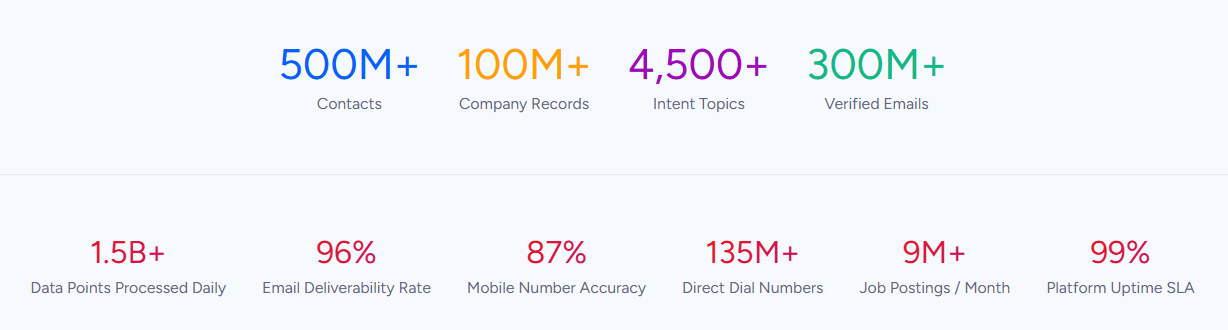
For teams running a HubSpot-Google Ads integration, ZoomInfo addresses the data quality layer that no connector handles.
ZoomInfo integrates natively with both platforms. The HubSpot integration provides real-time contact enrichment and scheduled database refresh within HubSpot CRM, appending verified emails, direct dials, job titles, company attributes, and technographics to contact and company records.
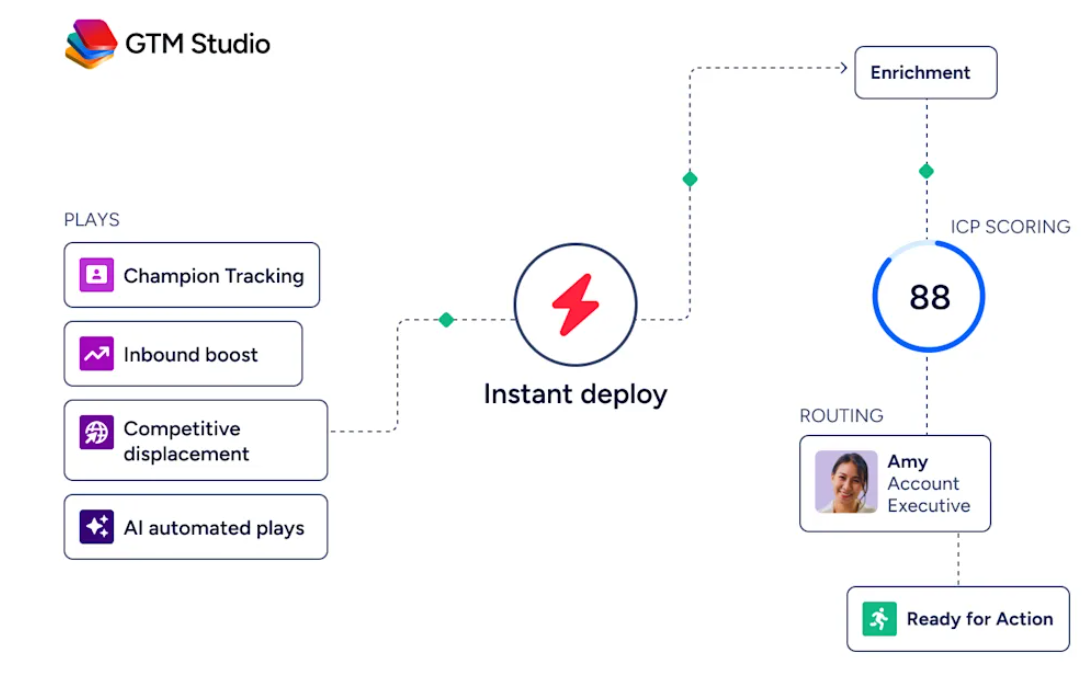
The Google Ads integration through GTM Studio lets teams export ZoomInfo-built audiences into Google Ads for campaign activation and retargeting. ZoomInfo Agent Teams, running in GTM Studio and headless through GTM.AI, can take those audiences further, coordinating specialist agents that act on each account's current state within the approvals and limits you set.
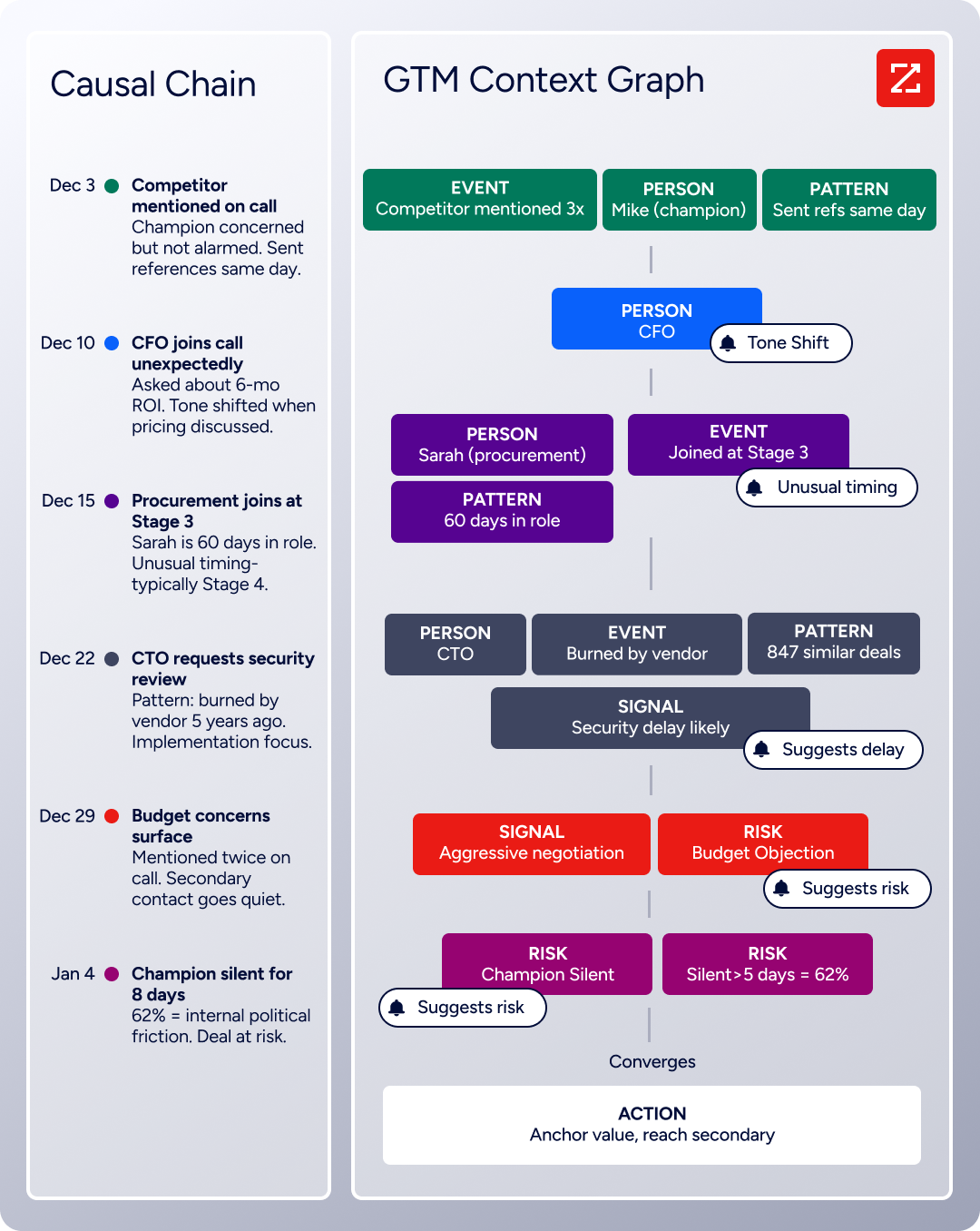
The same data feeds ZoomInfo's GTM Context Graph, which processes 1.5B+ data points daily by unifying third-party intelligence with CRM records, conversation transcripts, and behavioral signals to surface not just what happened in a deal, but why.
In practice, a team running both platforms can use ZoomInfo to enrich HubSpot contact records before they sync as Customer Match audiences to Google Ads.
Verified business emails produce higher match rates. Accurate job titles and company attributes enable more precise audience segmentation. When those enriched contacts convert, the offline conversion data flowing back into Google Ads carries complete records rather than partial ones, giving Smart Bidding a cleaner signal to optimize against.
Buyer Intent data from ZoomInfo, tracking signals from 210 million IP-to-Organization pairings, can inform which accounts to target with Google Ads campaigns in the first place, shifting ad spend toward companies actively researching relevant solutions rather than static CRM segments.
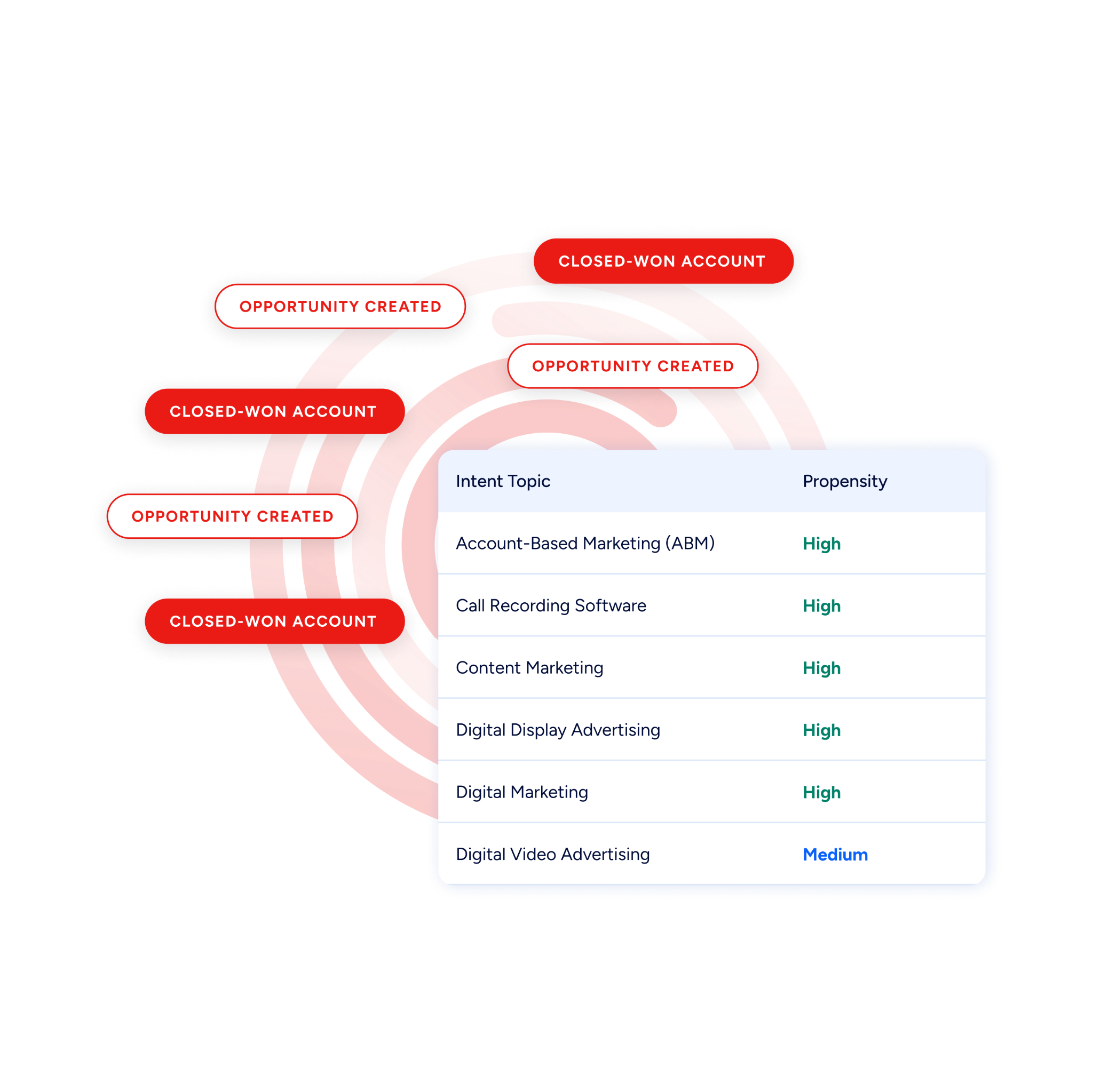
Enriched records also make the integration more reliable. Fewer blank fields mean fewer mismatches during Customer Match syncing. Consistent formatting across contact records reduces the false positives that lower audience quality.
Intent signals help teams decide which segments actually warrant ad spend, rather than pushing every CRM list into Google Ads without discrimination.
Seismic's sales team attributed 39% of active pipeline to opportunities identified or influenced by ZoomInfo signals, while boosting productivity by 54% and saving 11.5 hours per week. (Seismic)
Final Verdict
A native integration between HubSpot and Google Ads exists, with two complementary entry points: HubSpot's built-in Google Ads connector for campaign management, audience syncing, and attribution, and Google Ads Data Manager's direct HubSpot connection for feeding CRM conversion data into Smart Bidding.
For most teams, the right choice depends on which direction of data flow matters most and how deeply they need to optimize.
Marketing teams that want a unified view of ad performance alongside CRM data should start with HubSpot's native Google Ads integration. It handles audience syncing, basic conversion tracking, and full-funnel attribution reporting without requiring a separate tool.
Performance marketing teams focused on optimizing Smart Bidding toward revenue outcomes should configure Google Ads Data Manager's HubSpot connection. It feeds CRM conversion signals into Google Ads' bidding algorithms.
Teams with specific event-driven workflows not covered by either native connector should use Zapier to fill the gaps, and organizations with complex data models or custom sync requirements should invest in a custom API integration.
Before investing in the integration, clarify what outcome you need from it.
If the goal is aligning ad spend with revenue (not just leads), the priority is getting offline conversion data from HubSpot into Google Ads so Smart Bidding optimizes toward business outcomes. If the goal is keeping ad targeting current with CRM lifecycle stages, the priority is audience syncing from HubSpot lists.
Either way, the quality of the contact data in HubSpot determines whether Customer Match audiences find real people and whether offline conversions match back to the right ad clicks.
ZoomInfo, with its native HubSpot and Google Ads integrations and API and MCP access, is the data enrichment layer that ensures both systems work with records that are accurate, complete, and current.
FAQ
Does HubSpot integrate natively with Google Ads?
Yes. HubSpot offers a native Google Ads integration through the HubSpot App Marketplace. It connects Google Ads accounts to HubSpot for ad performance reporting, audience syncing via Customer Match, conversion tracking, and multi-touch attribution.
It is available on Marketing Hub Starter and above, with deeper functionality (audience syncing, attribution) on Professional and Enterprise tiers.
Can I optimize Google Ads Smart Bidding using HubSpot CRM data?
Yes, through offline conversion import. Pushing deal stage changes and closed-won events from HubSpot into Google Ads (via Data Manager's direct HubSpot connection or the native integration) teaches Smart Bidding which keywords, audiences, and creatives drive actual revenue, not form fills.
This requires GCLID capture in HubSpot or sufficient hashed customer data (email, phone) for conversion matching.
What is a GCLID and why does it matter for this integration?
The GCLID (Google Click ID) is a unique identifier appended to the URL when someone clicks a Google Ads ad. Capturing and storing this parameter in a HubSpot contact record is the most reliable way to match offline conversions (like a closed-won deal) back to the original ad click.
Without GCLID capture, offline conversion matching relies on hashed email or phone data, which produces lower match rates.
How often do HubSpot audiences sync to Google Ads?
Through the native integration, HubSpot active lists sync to Google Ads Customer Match audiences on a recurring schedule. The exact frequency depends on the integration configuration and HubSpot plan tier. Changes to list membership (contacts added or removed based on list criteria) propagate on the next sync cycle. Static lists update only when manually edited.
What HubSpot plan do I need for the Google Ads integration?
The basic Google Ads connection (linking accounts for ad performance reporting) is available on Marketing Hub Starter ($20/seat/month). Advanced functionality (audience syncing, offline conversion tracking, and multi-touch attribution reporting) requires Marketing Hub Professional ($890/month) or Enterprise ($3,600/month).
Can I connect multiple Google Ads accounts to one HubSpot portal?
Yes. HubSpot supports connecting multiple Google Ads accounts to a single portal. This is useful for organizations managing separate Google Ads accounts for different regions, brands, or business units while using one centralized CRM.
What is the difference between HubSpot's native integration and Google Ads Data Manager?
HubSpot's native integration is configured on the HubSpot side and handles bidirectional data flow: ad performance data into HubSpot for reporting, and audiences and conversions from HubSpot into Google Ads.
Google Ads Data Manager is configured on the Google Ads side and focuses on importing HubSpot data (audiences and offline conversions) into Google Ads for targeting and Smart Bidding optimization. Teams focused on ad optimization often use both.
How does ZoomInfo improve a HubSpot-Google Ads integration?
ZoomInfo solves the data quality problem that no sync tool addresses. Contact records in CRMs decay as people change jobs, email addresses go stale, and company details shift.
ZoomInfo enriches HubSpot records with verified contact data, company attributes, technographics, and intent signals. Verified business emails improve Customer Match rates in Google Ads. Accurate company data enables more precise audience segmentation.
Intent signals help teams prioritize which accounts should receive ad spend based on active buying behavior, so Google Ads budgets target companies that are actually in-market rather than static CRM segments.
More HubSpot integrations:
