
Finding the right buyers inside 1.3+ billion LinkedIn profiles, understanding what they care about, and reaching them through a channel with response rates up to 5x higher than cold email: that is the job LinkedIn Sales Navigator was built for.
The platform is a B2B sales tool used by 1.5M+ sellers worldwide. It spans search across 50+ filters, AI-generated account and prospect intelligence, InMail outreach, warm introduction paths through colleagues' networks, and CRM integration. This breakdown covers every feature, how it works, who it serves, and which plan unlocks it.
LinkedIn Sales Navigator's feature set has you covered if:
You prospect by targeting specific functions, seniority levels, and companies using advanced filters across LinkedIn's member network
You want AI-generated account briefs and prospect summaries before every sales call, built from first-party LinkedIn data
You need to discover warm introduction paths through your team's LinkedIn connections into target accounts
You use InMail as a primary outreach channel and want AI assistance drafting personalized messages
You manage a sales team and need shared lists, usage monitoring, and centralized billing
You run deals through Salesforce, HubSpot, or Dynamics 365 and want LinkedIn intelligence inside your CRM
You'll reach the edges of its capabilities if:
You need verified direct-dial phone numbers and exportable business email addresses, not just LinkedIn profile access
You want buyer intent data showing which companies are researching your category across the web, not only within LinkedIn
You need conversation intelligence that records, transcribes, and coaches from sales calls
You require marketing orchestration, account-based advertising, or multi-channel campaign management alongside sales execution
You want programmatic API access to build custom integrations or feed B2B data into your own tools and AI agents
For those needs, the reference point is ZoomInfo: a GTM platform built on 500M contacts, 100M companies, 135M+ verified phone numbers, and 200M+ verified business email addresses, with cross-web buyer intent from 6 trillion+ keyword-to-device pairings monthly, conversation intelligence through Chorus, marketing orchestration through GTM Studio, and programmatic access through APIs and MCP.
After the feature breakdown, this article covers where Sales Navigator stops and how ZoomInfo fills those gaps.
LinkedIn Sales Navigator Platform Overview
LinkedIn Sales Navigator turns the world's largest professional network into a sales intelligence and engagement platform for B2B sellers.
The product targets individual sellers (Core plan), sales teams needing collaboration features (Advanced), and enterprise organizations requiring CRM integration (Advanced Plus). Enterprise customers include SAP, Microsoft, Marsh, Canada Post, Genesys, Zendesk, Snowflake, and Zoom.
LinkedIn positions Sales Navigator against two competitor categories: business-generalist tools like LinkedIn free and LinkedIn Premium that are "built for business generalists, not sellers," and other sales intelligence tools that "rely on outdated, static data." LinkedIn's counter-argument: Sales Navigator data is "self-reported and continuously updated by members", with 17,000 new connections forming every minute across the network.
The platform is organized around five capability areas:
Capability Area | What It Does | Plan Availability |
|---|---|---|
50+ filters across 1B+ members, Personas, Relationship Explorer, Account Hub, saved searches with alerts | All plans | |
50 credits/month for direct messaging outside network, Smart Links for trackable content sharing | InMail: all plans; Message Assist and Smart Links: Advanced and above | |
Account IQ, Lead IQ, 180+ Buyer Intent signals, Product Category Intent, Sales Assistant (beta) | Advanced and Advanced Plus | |
Warm intro paths through team connections, Relationship Map, shared lists, usage reporting | Advanced and Advanced Plus | |
Bidirectional sync, Embedded Experiences inside CRM, data validation, activity writeback | Advanced Plus (10+ seats) |
Sales Navigator uses a per-seat subscription model across three tiers: Core at $119.99/month (1 seat minimum), Advanced at $159.99/month (2+ seats), and Advanced Plus at custom pricing (10+ seats, requires contacting sales). All plans include annual billing options. With that structure in place, here is the full tour.
LinkedIn Sales Navigator's Advanced Search and Lead Discovery
Search is the feature most buyers encounter first, and it defines the platform's core value.
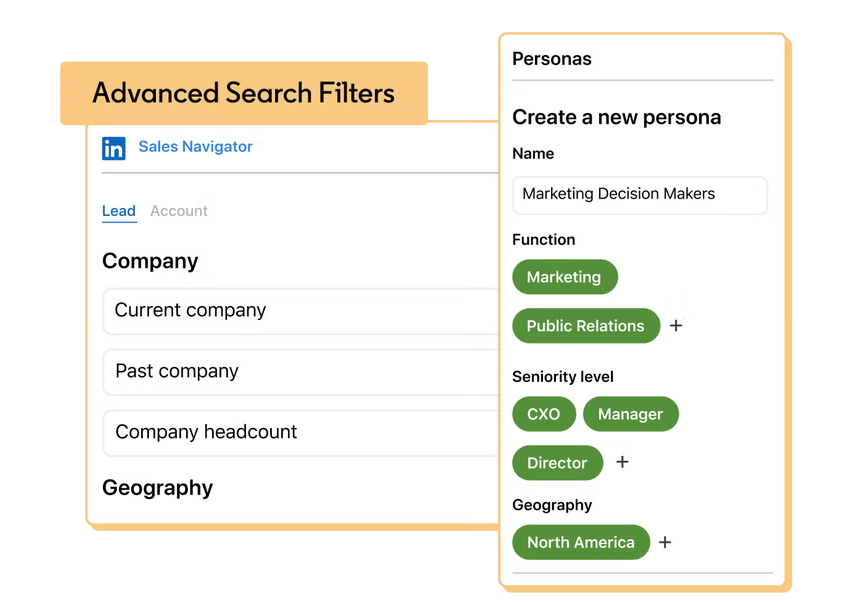
Sales Navigator provides 50+ search filters unavailable on free LinkedIn or LinkedIn Premium, covering Function, Seniority Level, Changed Jobs, Buyer Intent, TeamLink Connections, Department Headcount, Annual Revenue, and more. Boolean search works in Company, Title, and Keyword fields using AND, NOT, OR, quoted phrases, and parenthetical grouping. Results update in real time as you add filters, and the search covers LinkedIn's full 1+ billion member network.
Source: LinkedIn
Personas are the starting point for sustained prospecting.
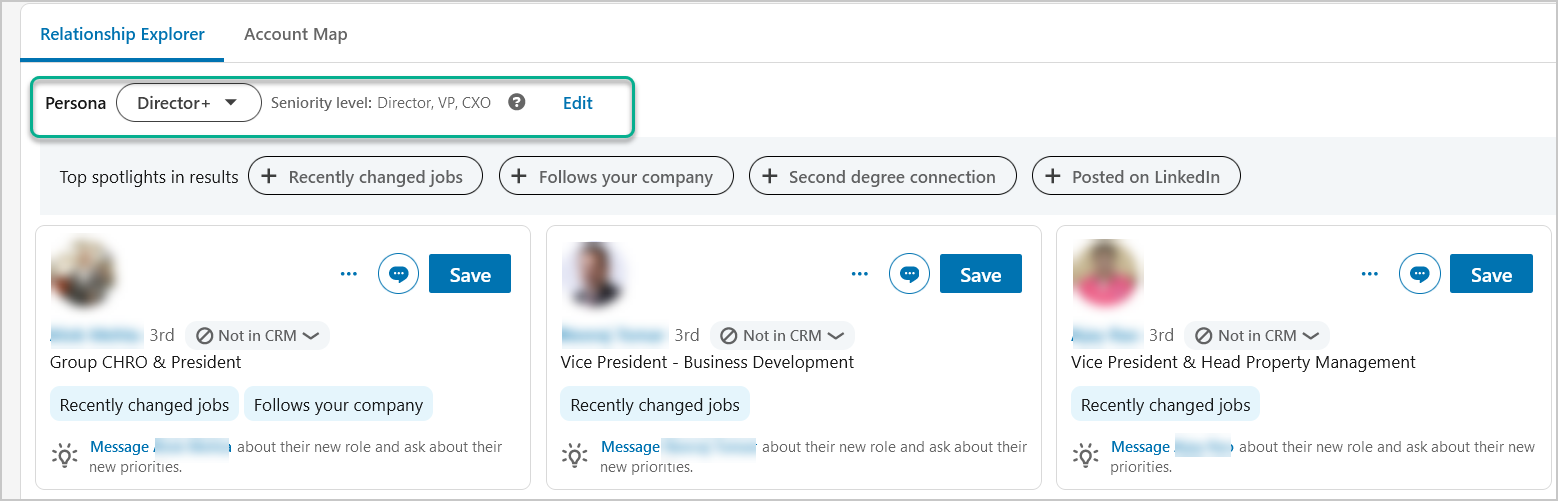
A Persona is a saved ideal customer profile defined by function, seniority, job title, and geography. Sales Navigator ships with two defaults (Director+, CXO) and allows up to three custom Personas, for a total of five. Once defined, Personas carry across search, Relationship Explorer, Account Pages, and Growth Insights, keeping targeting consistent across the platform.
Once you find prospects, the platform provides several ways to organize and track them. You can save up to 50 lead searches and 50 account searches, each delivering weekly email alerts when new matches appear. Custom lists organize saved leads and accounts, and Alerts notify you of job changes, content engagement, intent signals, fundraising events, hiring activity, and leadership changes, bookmarkable for 60 days.
LinkedIn's own data shows that decision-makers are 62% more receptive to outreach after a job change, making the job-change alert a high-value signal.
Source: LinkedIn
Relationship Explorer surfaces up to eight relevant unsaved leads on each Account Page based on your selected Persona, with context including job changes, mutual connections, and recent LinkedIn activity. This is the feature that answers "who should I talk to at this account and how do I get in."
The Account Hub is the dashboard for all saved accounts, surfacing intent scores, connection paths, and growth or risk alerts in one view. Account Pages show each account with Buyer Intent data, Growth Insights, Relationship Map, and Account IQ (on Advanced plans and above). Together, these two views replace bouncing between LinkedIn profiles and spreadsheets to track account activity.
LinkedIn Sales Navigator's InMail and Outreach
InMail is Sales Navigator's native outreach channel.
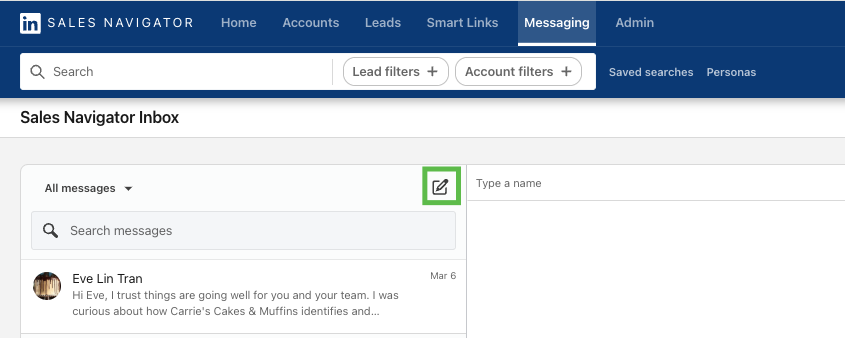
It delivers messages to any LinkedIn member's inbox regardless of connection status. All plans provide 50 InMail credits per month with a maximum accumulation of 150. Credits roll over within a 90-day window. LinkedIn returns a credit when a recipient responds within 90 days (including quick replies like "Interested," "Maybe later," or "Not interested"), so the effective cost of a message that gets a reply is zero. InMails support attachments up to 200 MB.
Source: LinkedIn
Two constraints shape how InMail works in practice.
First, you cannot send a second InMail to the same person until they respond, though LinkedIn sends an automatic reminder within 3 days. Second, you cannot purchase additional credits, and LinkedIn prohibits bulk messaging "to help maintain the quality and personalization of messages." The 50-credit cap and one-message-per-person rule favor personalized outreach over volume.
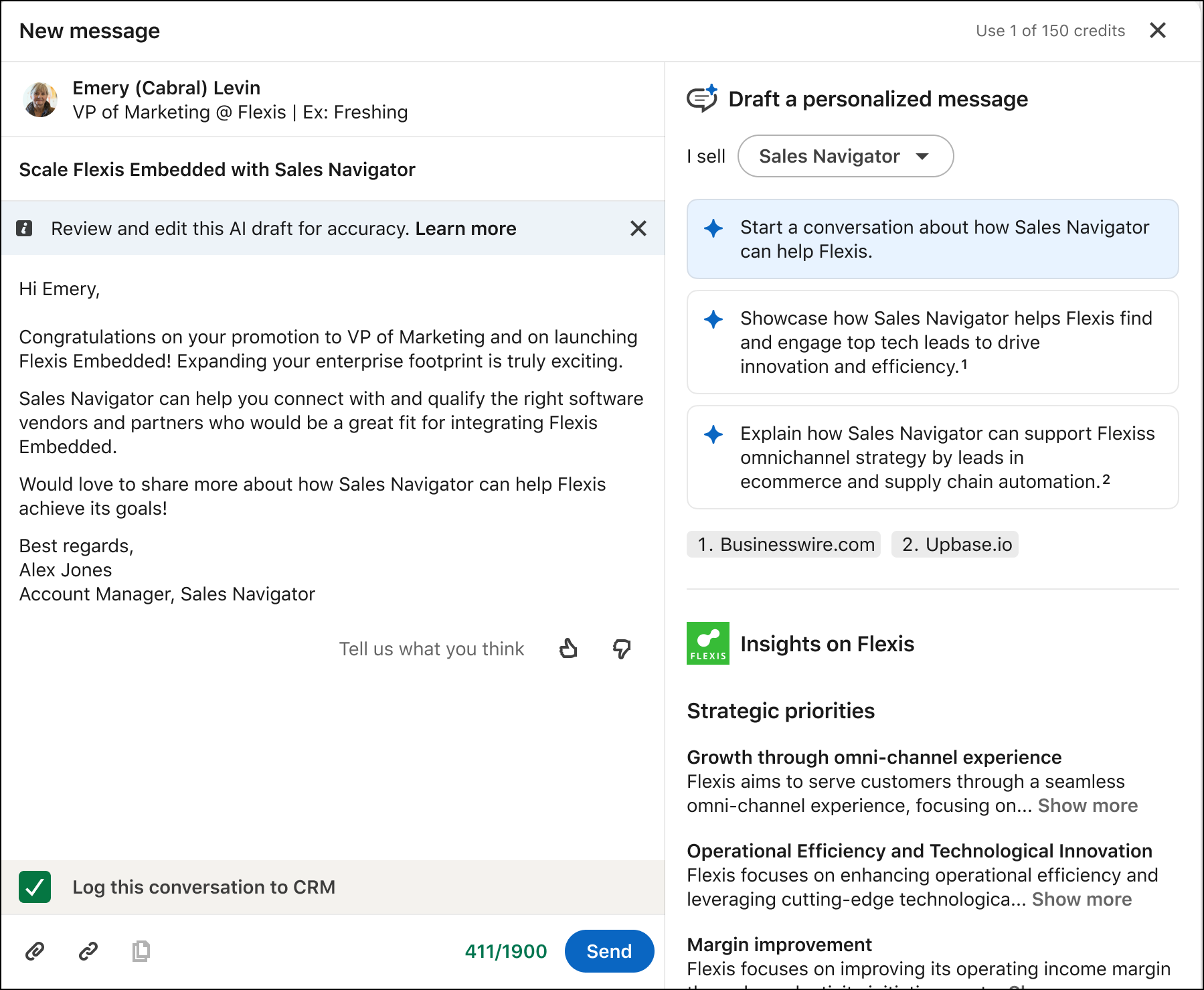
Message Assist drafts personalized InMail using AI, combining Lead IQ insights with Account IQ data and seller-configured product descriptions. The feature is in public beta on Advanced and Advanced Plus plans, English only, with a limit of 6 AI-assisted messages per minute and 50 per month. Recipients are not notified that AI drafted the message.
Source: LinkedIn
Smart Links (Advanced and Advanced Plus) package slides, videos, URLs, and images into a single trackable link. Analytics show who viewed the content, how long they spent, and their access patterns. On Advanced Plus, Smart Link engagement data writes back to the CRM, connecting content engagement to deal progression.
LinkedIn Sales Navigator's AI Intelligence Suite
The AI features are where Sales Navigator shifted from a search tool to an intelligence platform. All require Advanced or Advanced Plus and are English-only.
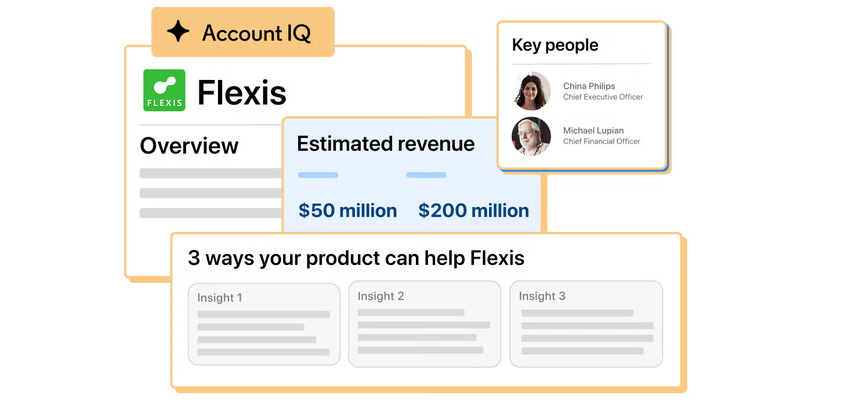
Account IQ generates one-click account summaries on Account Pages covering strategic priorities, pain points, financials, and LinkedIn activity. The summaries combine LinkedIn first-party data with Bing Search API via Azure OpenAI, pulling from both the member graph and public web sources. LinkedIn refreshes summaries every 30 days (30 to 90 days for large or public companies). The feature requires 200+ employees at the target company and excludes government agencies and educational institutions.
Source: LinkedIn
Lead IQ does the same at the individual level, producing AI briefs on prospects covering their background, LinkedIn activity, interests, and company context. It uses GPT-3.5 Turbo via Azure OpenAI and requires a minimum of 3 insights on the lead's profile to generate a summary. LinkedIn guarantees that user data is not used to train or improve OpenAI or Azure OpenAI models for either feature.
Buyer Intent aggregates 180+ signals from four categories:
LinkedIn.com activity: comments, reactions, follows, profile views
LinkedIn advertising: ad engagement, Lead Gen Form completions
Messaging: InMail acceptances
Off-LinkedIn: website visits tracked via the LinkedIn Insight Tag
Each account scores as High, Moderate, Neutral, or Negative. The key distinction: Buyer Intent shows which specific people are signaling interest, not just which companies, because every signal ties to a LinkedIn member identity. Product Category Intent adds a separate layer, using an AI model to identify leads seeking solutions in a specific product category.

Source: LinkedIn
The newest addition is Sales Assistant, currently in beta with select customers including Snowflake, Thomson Reuters, and Grant Thornton. Sales Assistant reviews 63M+ decision-makers daily to surface leads, explain why each fits, identify warm introduction paths, find the best teammate for an introduction, and auto-draft outreach. It learns from seller feedback over time. LinkedIn has not published a general availability date.
LinkedIn Sales Navigator's TeamLink and Team Collaboration
Individual sellers search alone. Teams unlock the full network.
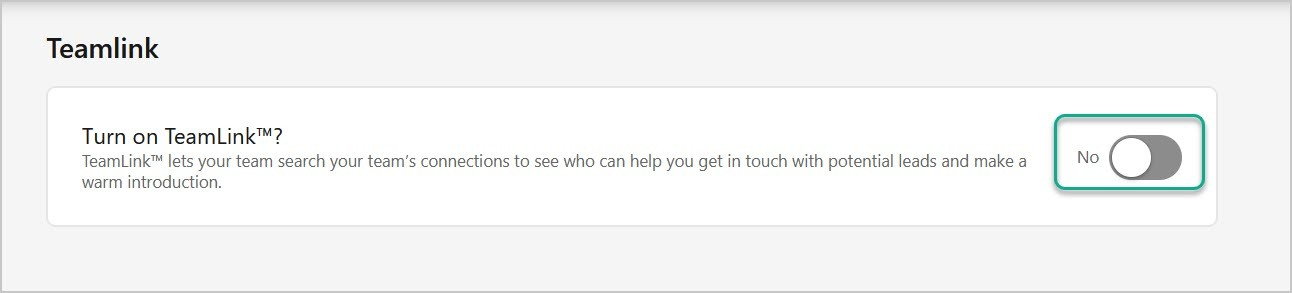
TeamLink pools the 1st-degree LinkedIn connections of every licensed Sales Navigator user on the team, making them visible to everyone.
When any team member is a 1st-degree connection to a lead, that path surfaces in the Connection paths column in Account Hub and as a search filter. TeamLink is enabled by default on Advanced and Advanced Plus; opting out is bilateral (hiding your connections also hides the team's from you). LinkedIn reports that sellers with at least four LinkedIn connections at a target account are 16% more likely to close a deal.
Source: LinkedIn
TeamLink Extend broadens the pool by adding non-Sales Navigator employees' connections via admin-assigned licenses. Invitees receive an email to accept or decline; accepting shares only connection data, not messages or activity.
For large enterprises with multiple contracts, TeamLink Groups extends coverage across subsidiaries (requires LinkedIn Support activation). This means a 500-person company can surface warm paths from every employee's network, not just the 50 who hold Sales Navigator seats.
Once you find a warm path, Ask for Intro using AI drafts introduction requests using the target lead's LinkedIn profile data, recent posts, and shared experiences with the connecting colleague. The colleague receives a ready-to-forward message rather than an open-ended request.
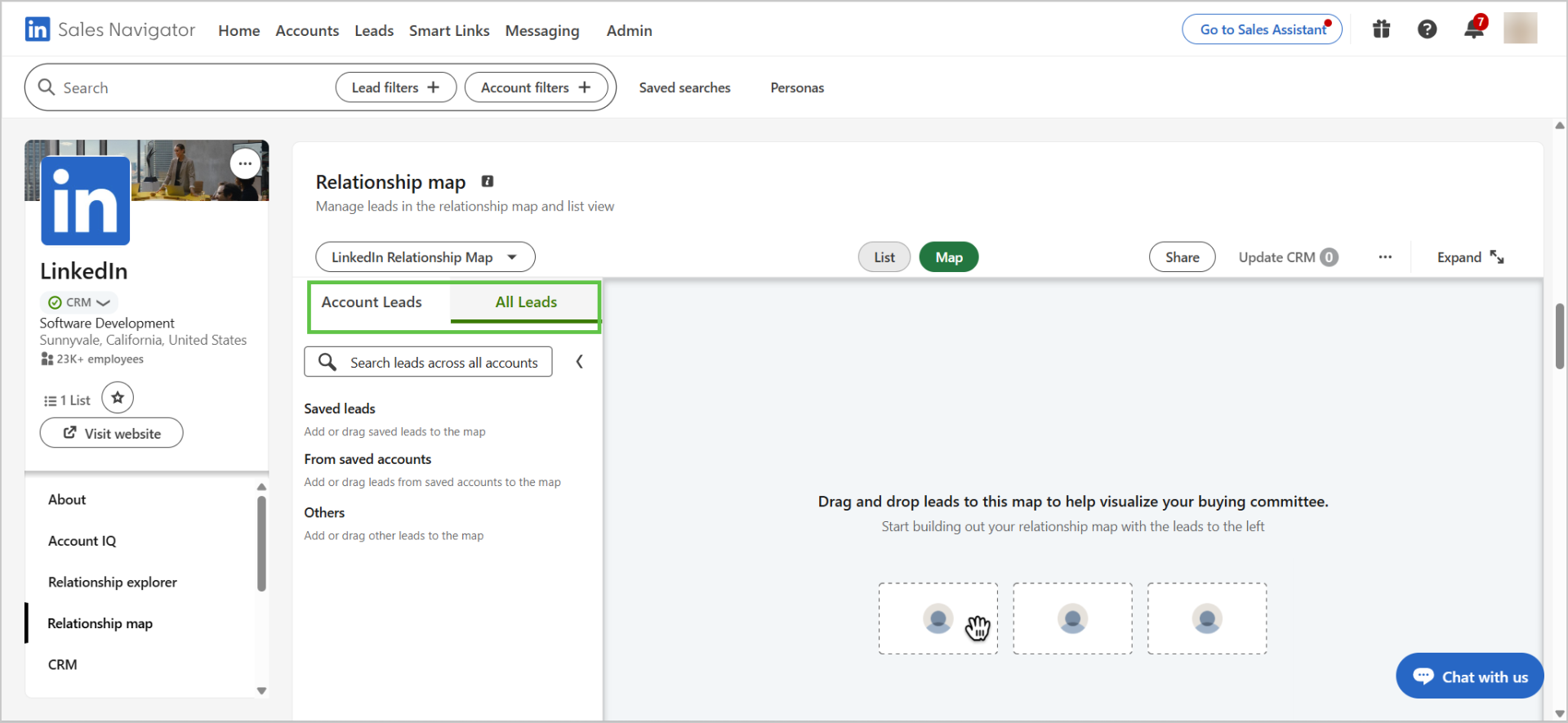
Relationship Map is a visual org chart of the buying committee with drag-and-drop layout and five assignable roles: Decision Maker, Champion, Evaluator, Procurement, and Influencer. Each map supports up to 30 leads, with up to 10 maps per account. Stale-lead alerts flag contacts who have gone quiet, and maps can be shared with unlimited teammates using Can View or Can Edit permissions. If the map creator leaves, ownership transfers to the team.
Source: LinkedIn
Usage Reporting (Advanced and Advanced Plus) lets managers track team adoption, and ROI Reporting (Advanced Plus) connects LinkedIn activity to revenue outcomes through CRM opportunity data.
LinkedIn Sales Navigator's CRM Integration and Embedded Experiences
CRM integration is the defining capability of the Advanced Plus plan and the reason enterprise teams pay for the top tier.
LinkedIn reports that synced users perform 36% more searches per day, view 45% more profiles per day, and generate 25% more content engagement per saved lead, based on analysis of roughly 40,000 license holders.
CRM Sync is a bidirectional data sync that runs daily. Inbound, it auto-imports CRM accounts, contacts, and leads into Sales Navigator lists. Outbound (Activity Writeback), it logs InMails, messages, call logs, connection requests, notes, and Smart Link views back to the CRM. Lead and Contact Creation lets users create CRM records directly from Sales Navigator with auto-populated fields (name, title, country), supported on HubSpot, Dynamics 365, Oracle Sales, and Salesforce.
Embedded Experiences bring Sales Navigator capabilities inside the CRM itself:
CRM | CRM Sync | Embedded Profiles | Embedded Experiences |
|---|---|---|---|
Yes | Yes | Yes | |
Yes | Yes | Yes | |
Yes | Yes | Yes (no Relationship Map) | |
Yes | Yes | Yes | |
No | No | Yes |
Embedded Experiences include Account IQ, Find Key People, and Relationship Map rendered inside the CRM. Embedded Profiles (a lighter integration showing LinkedIn profile data) are available for Pega, SAP, and SugarCRM.
Three features address data hygiene and deal risk.
Data Validation flags CRM contacts who have left their company and surfaces title or location discrepancies. Champions List auto-identifies past customers from closed-won deals who have moved to new companies, creating expansion opportunities. Opportunities at Risk alerts the team when key contacts leave accounts with open deals.
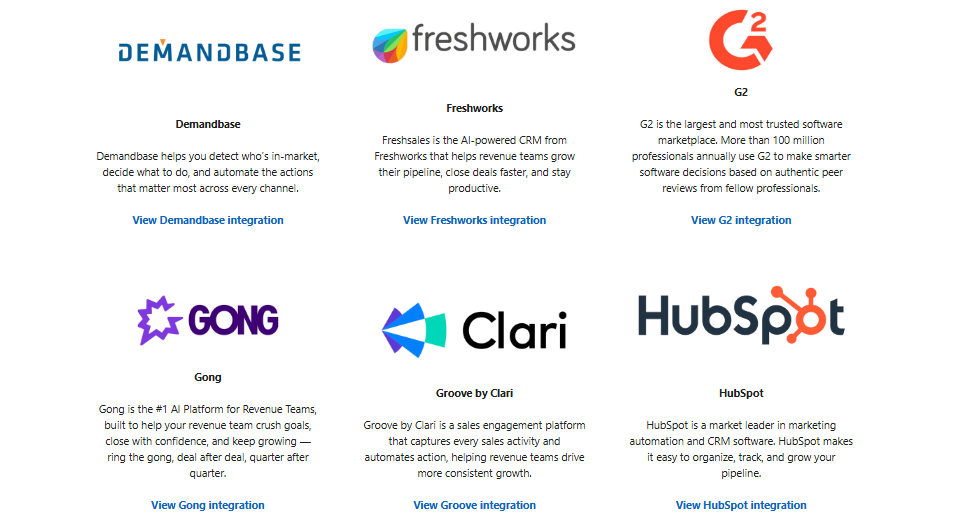
The SNAP (Sales Navigator Application Platform) partner ecosystem includes 15+ certified integrations spanning sales engagement (Gong, Outreach, Salesloft), business intelligence (Power BI, Tableau), ABM (Demandbase, G2), and 18 regulatory compliance partners for financial services (including Global Relay, Smarsh, and Theta Lake).
Source: LinkedIn
A dedicated mobile app for iOS and Android supports Account IQ, alerts, call logging, and lead discovery, and Sales Navigator Coach provides in-product guided learning across five proficiency levels.
Where LinkedIn Sales Navigator Stops: The Gaps
Sales Navigator centers on LinkedIn's social graph: finding buyers through that graph, understanding them through their LinkedIn activity, and reaching them through LinkedIn's messaging. That focus shapes the product's strengths but also defines where its capabilities end.
No verified contact data for export.
Sales Navigator does not provide direct-dial phone numbers or verified business email addresses. You can view a prospect's LinkedIn profile and send InMail, but the platform does not supply the contact details sellers need for phone outreach or email sequences. LinkedIn does not offer the option to export account and lead information from Sales Navigator into CSV or XLS. Data portability exists only through CRM Sync on Advanced Plus.
Intent signals limited to LinkedIn activity.
Buyer Intent aggregates 180+ signals, but all of them originate from LinkedIn's ecosystem: member activity on LinkedIn.com, ad engagement, InMail responses, and website visits tracked via the LinkedIn Insight Tag. The platform does not track which companies are researching topics across the broader web, industry publications, or third-party review sites. A company evaluating competitors through web research outside LinkedIn would not trigger a Buyer Intent signal.
No conversation intelligence.
Sales Navigator provides pre-call intelligence (Account IQ, Lead IQ) but has no capability for what happens during or after a call. There is no call recording, transcription, AI coaching, or deal intelligence extracted from conversations. Teams that need to understand why deals move or stall based on actual conversation data need a separate tool.
No marketing orchestration or ABM.
Sales Navigator serves individual sellers and sales teams. It does not include campaign orchestration, advertising audience management, display ad targeting, or account-based marketing workflows. Marketing teams running demand generation alongside sales execution need a separate platform.
Hard outreach ceiling.
All plans receive 50 InMail credits per month with a 150 maximum accumulation. You cannot purchase additional credits, and LinkedIn prohibits bulk messaging. For SDR teams that need high-volume, multi-channel outreach, 50 credits per month sets a firm limit on LinkedIn as a volume channel.
No public API.
LinkedIn is not currently accepting new partners for Sales Navigator API access. The SNAP partner program is closed, and no iPaaS connectors (Zapier, Make, Workato) are officially supported. Technical teams cannot build custom integrations, feed Sales Navigator data into internal tools, or connect it to AI agents programmatically.
How ZoomInfo Covers the Gaps
The gaps above share a pattern: Sales Navigator runs deep on LinkedIn's social graph but depends on that single data source for intelligence and is confined to LinkedIn's channels for engagement. ZoomInfo supplies the data, the cross-channel intelligence, and the marketing capabilities Sales Navigator does not include, built on a foundation that extends beyond any single network.
ZoomInfo's B2B Data Platform: Verified contacts, direct dials, and business emails for export
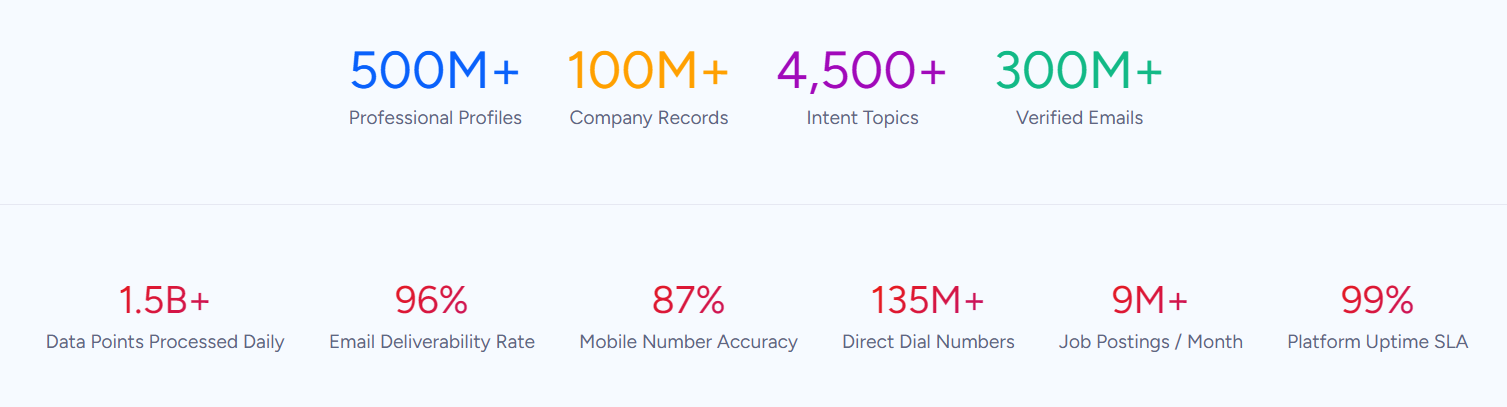
ZoomInfo operates the largest B2B data platform in the industry: 500M contacts, 100M companies, 135M+ verified phone numbers, 120M direct-dial phone numbers, and 200M+ verified business email addresses. The data flows through a verification pipeline backed by 300+ human researchers and automated ML scanning of 28 million site domains daily, reaching up to 95% accuracy on first-party data.
Source: ZoomInfo
Where Sales Navigator lets you see a prospect's LinkedIn profile but not their phone number or email, ZoomInfo provides department org charts with decision-makers' direct dials and emails, 300+ company attributes for segmentation, and contact tracking with job-change alerts.
That data exports to CRMs, engagement platforms, and custom tools with one click. Global coverage extends to 34M+ company profiles outside North America, 200M+ professional profiles outside NA, and 45M+ mobile numbers outside NA.
Third parties validate the data quality: Leader in the Forrester Wave for Intent Data Providers, Q1 2025, Leader in the Gartner Magic Quadrant for ABM Platforms for the second consecutive year, and the only Customers' Choice vendor in the Gartner Voice of the Customer quadrant with a 4.7/5.0 average rating.
In a Fortune 500 competitive RFP analyzing 25 million contacts across vendors, an independent consultant concluded that "no other competitor came even close."
ZoomInfo Intent and WebSights: Cross-web buyer signals beyond LinkedIn's walled garden
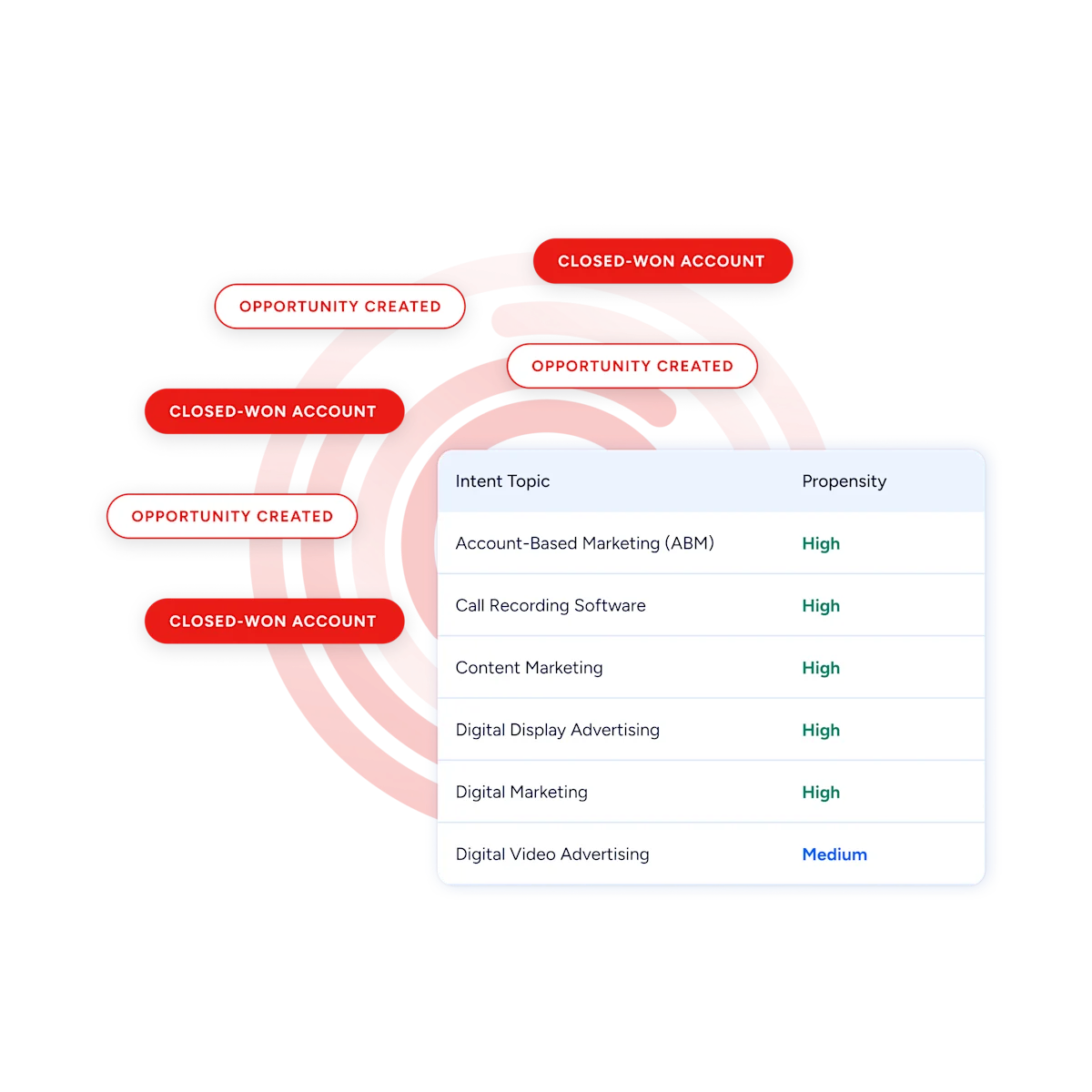
ZoomInfo Intent tracks signals from 210 million IP-to-Organization pairings and 6 trillion+ new keyword-to-device pairings sourced monthly.
Where Sales Navigator's Buyer Intent covers only activity within LinkedIn's platform, ZoomInfo's intent data reveals which companies are researching topics related to your product across the open web, before you have ever contacted them. Guided Intent, exclusive to ZoomInfo, identifies the topics historically correlated with deal success rather than requiring manual topic selection.
Source: ZoomInfo
WebSights resolves anonymous website traffic to companies, with Automatic Traffic Filtering separating real visitors from bots. ZoomInfo Marketing goes further with contact-level site visitor identification, identifying who specifically visited your site (not just which company) and triggering personalized outreach. Sales Navigator's Buyer Intent can track website visits via the LinkedIn Insight Tag, but only at the account level and only through LinkedIn's pixel.
Chorus: Conversation intelligence that captures why deals move
Chorus, ZoomInfo's conversation intelligence engine backed by 14 technology patents, fills the gap Sales Navigator leaves after the first conversation starts. Chorus records and transcribes sales calls, surfaces AI-generated insights (talk ratios, sentiment, objection detection), auto-syncs deal intelligence to the CRM, and provides coaching scorecards and clip sharing.
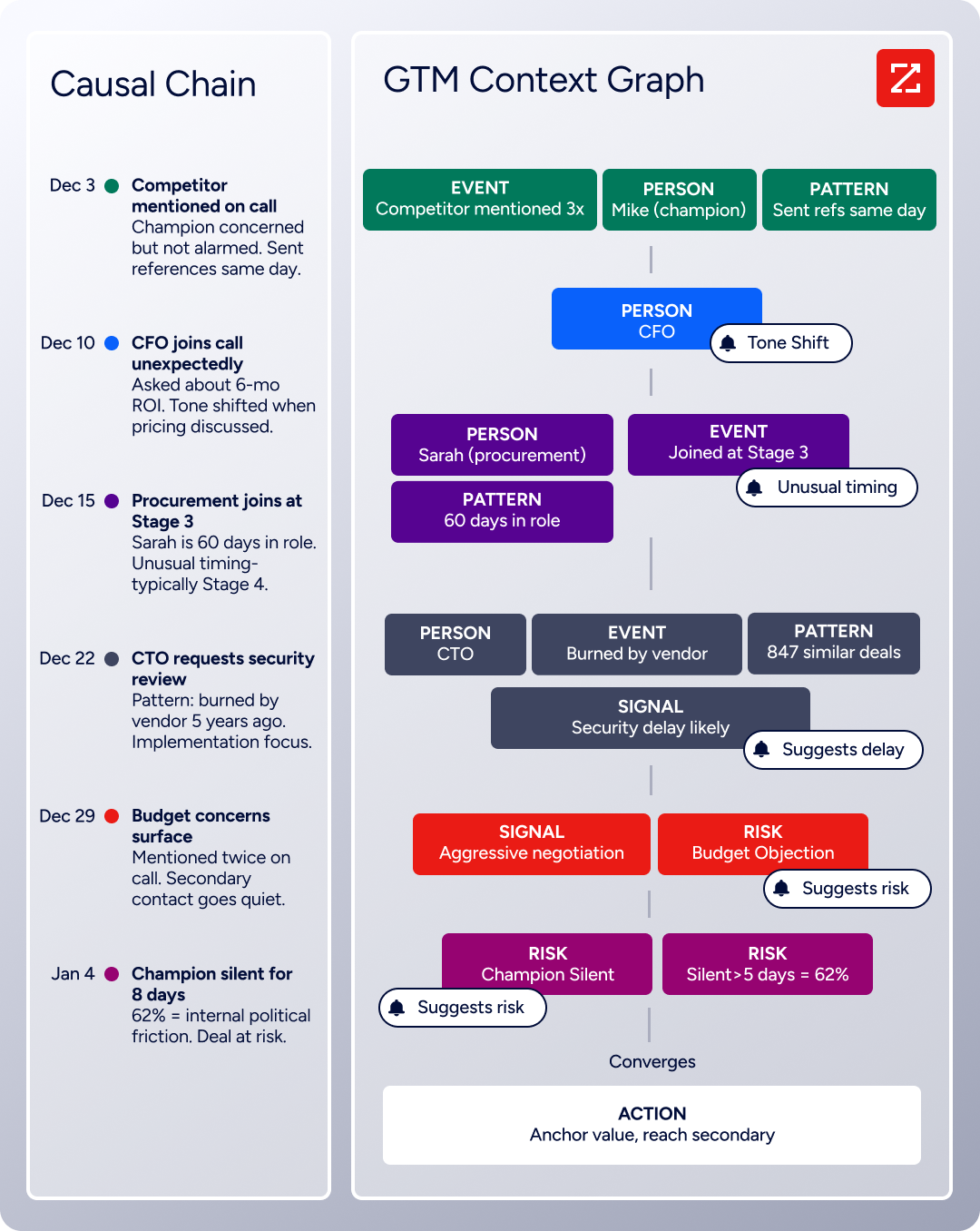
The deeper value is how Chorus feeds ZoomInfo's GTM Context Graph, which processes 1.5B+ data points daily and combines B2B data with CRM records, conversation transcripts, and behavioral signals into one intelligence layer.
A CRM records that a deal moved from Stage 3 to Stage 4. The GTM Context Graph reasons about why: connecting the CFO joining the last call with ROI-focused questions to the pattern behind closed-won deals in the same segment, then linking that to third-party signals showing the company is hiring and researching a competitor. Sales Navigator provides intelligence before the call. ZoomInfo captures what happens during the call and reasons about what it means for the deal.
Source: ZoomInfo
GTM Studio: Marketing orchestration and ABM for the campaigns Sales Navigator cannot run
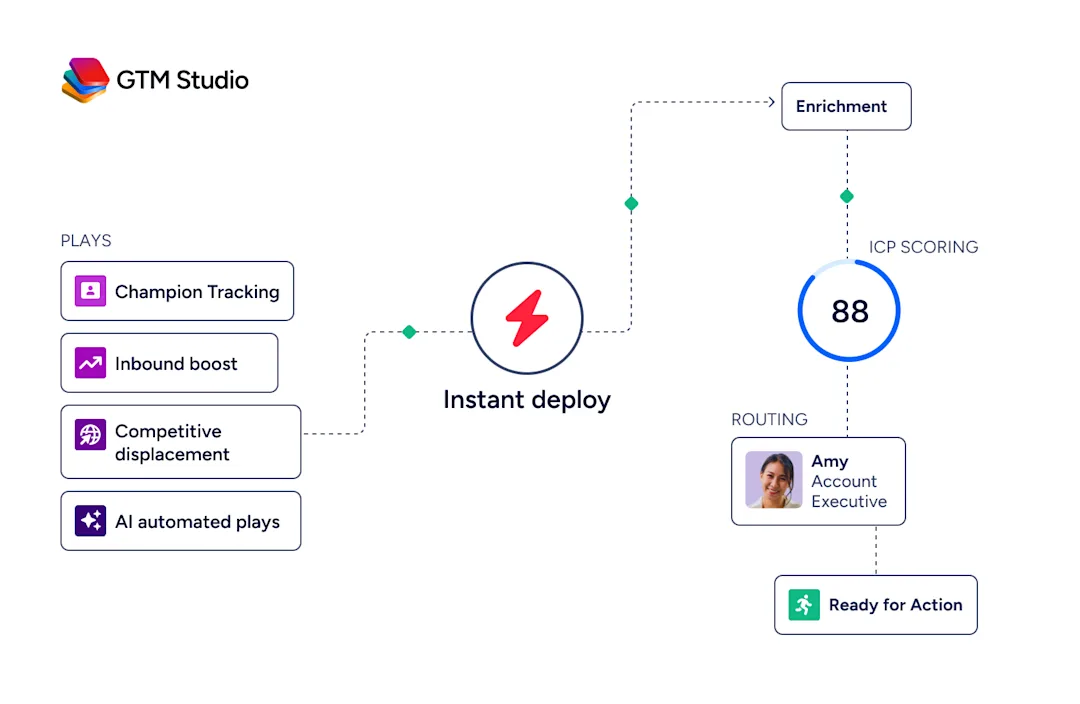
ZoomInfo’s GTM Studio addresses the marketing orchestration gap directly.
Marketers, RevOps teams, and GTM engineers can build audiences using natural language, enrich with first- and third-party data, define triggers, and activate plays across channels (email, calls, display ads, direct mail, LinkedIn, Meta, Connected TV) without engineering support. Pre-built GTM plays cover inbound acceleration, champion tracking, competitive displacement, and ICP targeting. Expansion plays that used to take 3 weeks now launch in 30 minutes.
Source: ZoomInfo
ZoomInfo Marketing includes a native Demand-Side Platform deploying display ads based on 300+ company attributes, FormComplete (reducing forms to a single field while auto-appending data), and Account Fit Scoring (predictive AI scoring 0 to 100 based on company attribute patterns). Sales Navigator has no advertising, no campaign orchestration, and no ABM tooling.
ZoomInfo APIs and MCP: Programmatic access for any tool or AI agent
Where Sales Navigator's SNAP program is closed to new partners and offers no public API, ZoomInfo delivers its intelligence through APIs and MCP (Model Context Protocol) that any application can consume.
The Enterprise API covers Search, Enrich, Copilot (AI intelligence), Marketing (audience management), and Engagements endpoints. The MCP server connects AI models to ZoomInfo's B2B data as a native tool, currently supporting Claude and ChatGPT.
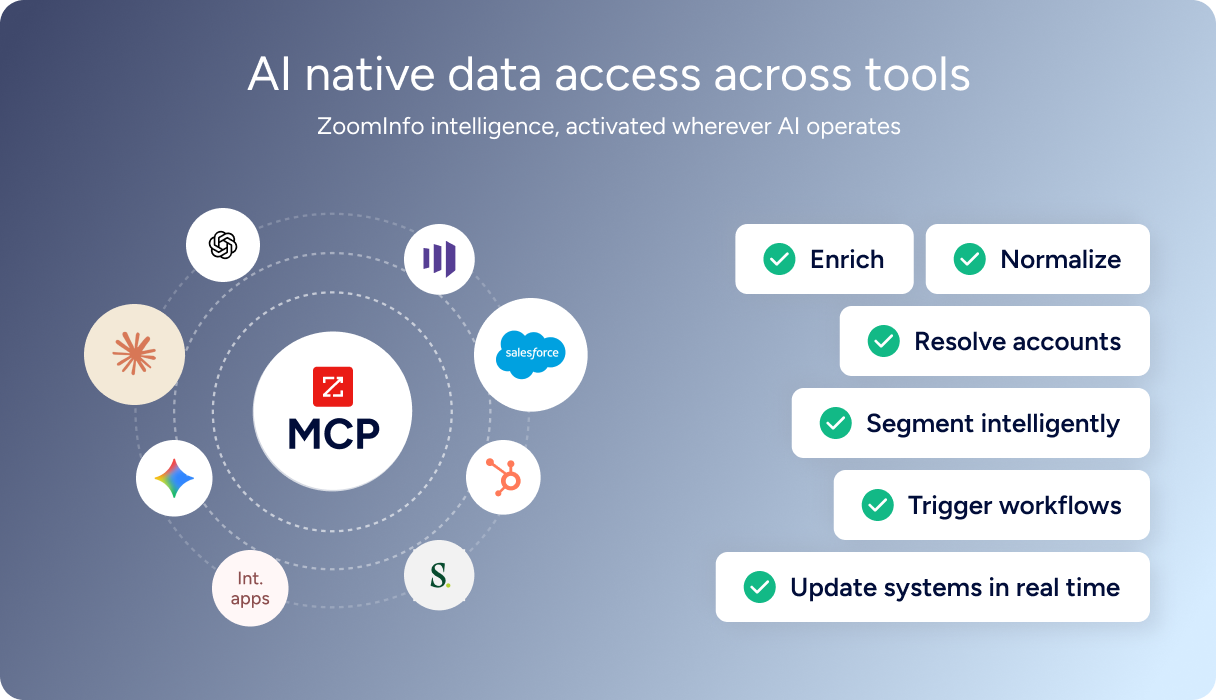
API access is included in all relevant plans, and the ZoomInfo App Marketplace lists 120+ partner integrations across CRM, Marketing Automation, Sales Engagement, Revenue Intelligence, and Data Warehouse categories.
ZoomInfo's Free Entry Points: Evaluation before any commitment
Sales Navigator offers free trials for Core and Advanced (credit card required, auto-converts to paid), but no permanent free tier.
ZoomInfo offers both.
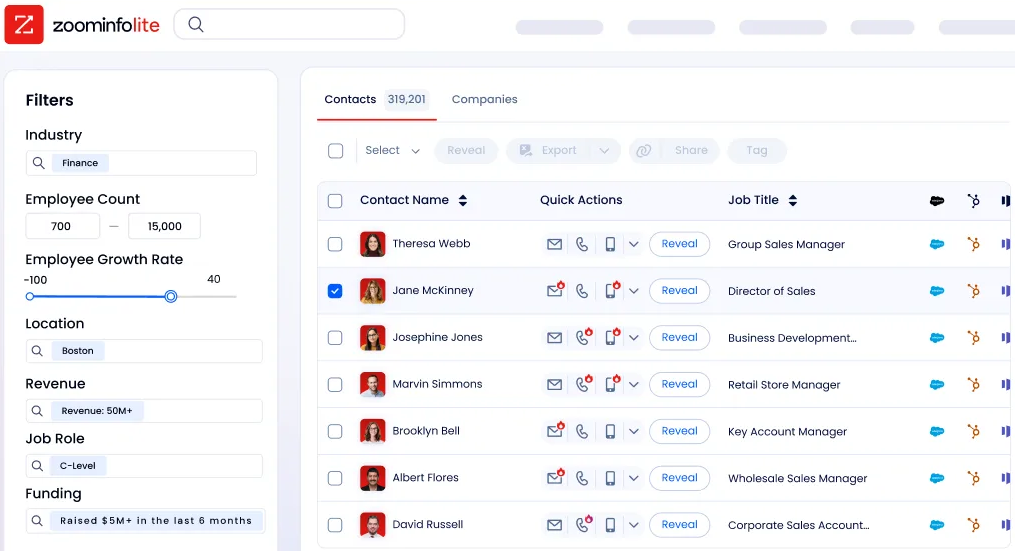
ZoomInfo Lite is a permanent free tier with access to ZoomInfo's B2B database, 10 monthly export credits, individual and company searches, a Chrome extension, and WebSights Lite with up to 10 website visitor reveals per day. A separate 7-day free trial provides broader access with no credit card required.
Source: ZoomInfo
Seismic's sales team attributed 39% of active pipeline to opportunities identified or influenced by ZoomInfo signals, boosted productivity by 54%, and saved 11.5 hours per week per seller. (Seismic Case Study)
Final Summary
LinkedIn Sales Navigator is a strong toolkit for relationship-based B2B selling through LinkedIn's social graph: 50+ search filters across 1+ billion members, AI-generated account and prospect briefs, 180+ buyer intent signals tied to individual member identities, warm introduction paths through TeamLink, and CRM integration with Embedded Experiences on the top tier.
It fits sales teams whose prospecting and engagement runs through LinkedIn and who value self-reported, continuously updated member data over third-party databases.
It is lighter on the layers beyond LinkedIn's network: no verified direct dials or exportable email addresses, no cross-web intent signals, no conversation intelligence, no marketing orchestration, and no programmatic API access.
If your bottleneck is the data underneath the relationship (verified contact details for multi-channel outreach, intent signals from across the web, intelligence from actual sales conversations), that is the ground ZoomInfo covers.
Its 500M-contact, 100M-company database supplies the verified emails and direct dials that LinkedIn profiles do not expose. ZoomInfo Intent surfaces accounts researching your category from 6 trillion+ keyword-to-device pairings monthly, well beyond LinkedIn's walled garden. Chorus captures and analyzes every sales conversation. GTM Studio gives marketing teams multi-channel orchestration. And the GTM Context Graph combines all of it into one intelligence layer that captures why deals move, not just that they moved.
See what that data layer adds to your LinkedIn selling motion: start with ZoomInfo Lite for free, or request a demo to see verified contacts, cross-web intent signals, and conversation intelligence working alongside your Sales Navigator workflow.
FAQ
Which LinkedIn Sales Navigator plan includes AI features like Account IQ and Lead IQ?
Account IQ, Lead IQ, Message Assist, Buyer Intent, TeamLink, and Smart Links all require Advanced or Advanced Plus. The Core plan ($119.99/month) includes 50+ search filters, InMail, Relationship Explorer, and Relationship Map, but none of the AI intelligence features. Individual sellers on Core get a reduced product compared to team users on Advanced ($159.99/month, 2+ seats).
Can you send bulk messages through LinkedIn Sales Navigator?
No. LinkedIn prohibits bulk messaging through Sales Navigator "to help maintain the quality and personalization of messages." You must send InMails individually, and you cannot send a second message to the same person until they respond. The 50 credits per month (150 maximum accumulation) cannot be increased through purchase. This design favors quality over volume.
Does LinkedIn Sales Navigator provide buyer intent data?
Yes, but only from LinkedIn's own ecosystem. Buyer Intent aggregates 180+ signals from LinkedIn.com activity (comments, reactions, follows, profile views), LinkedIn advertising engagement, InMail responses, and website visits tracked via the LinkedIn Insight Tag. It does not track research activity across the broader web, industry publications, or third-party review sites.
ZoomInfo Intent tracks signals from 210 million IP-to-Organization pairings and 6 trillion+ keyword-to-device pairings sourced monthly, covering research activity across the open web.
What CRMs does Sales Navigator integrate with?
Full integration (CRM Sync, Embedded Experiences, and Activity Writeback) is available for Salesforce, HubSpot Smart CRM, Microsoft Dynamics 365, and Oracle Sales, but requires the Advanced Plus plan with a minimum of 10 seats. Embedded Profiles (a lighter integration) are available for Pega, SAP, and SugarCRM. Embedded Experiences are available for Freshworks. Advanced Plus pricing is not published and requires contacting sales.
Does LinkedIn Sales Navigator have a public API?
No. API access is exclusive to the closed SNAP partner program, and LinkedIn is not currently accepting new partners. No iPaaS connectors (Zapier, Make, Workato) are officially supported, and there is no developer self-serve signup or sandbox environment. You also cannot export data to CSV or XLS; data portability exists only through CRM Sync on the Advanced Plus plan.
How much does LinkedIn Sales Navigator cost?
Core costs $119.99/month per seat ($1,079.88/year with a 25% savings). Advanced costs $159.99/month per seat ($1,799.88/year) with a minimum of 2 seats. Advanced Plus requires contacting sales with a minimum of 10 seats. Free trials are available for Core and Advanced (credit card required, auto-converts to paid), but not for Advanced Plus. All prices exclude VAT/GST.
Does LinkedIn Sales Navigator include verified email addresses or phone numbers for export?
No. Sales Navigator provides access to LinkedIn profiles, InMail messaging, and LinkedIn-native buyer signals, but it does not include verified business email addresses, direct-dial phone numbers, or any data export capability. You cannot export leads or accounts to CSV or XLS.
ZoomInfo's database includes 500M contacts, 120M direct-dial phone numbers, and 200M+ verified business email addresses, all exportable to CRMs, engagement platforms, and custom tools, with a permanent free tier (ZoomInfo Lite) that provides 10 monthly export credits at no cost.
More sales tool comparisons:
