

Mailshake is popular with small sales teams and agencies that need a simple way to run cold email campaigns. Founded in 2015 and used by sales teams at 100,000+ companies, it combines email sequencing, LinkedIn automation, and a phone dialer in one dashboard. The pitch is speed: get your reps sending on day one, keep emails out of spam, and manage replies without switching tools.
We analyzed Mailshake for this review. It's a good choice if:
You need a simple, affordable tool for cold email sequences
You value fast onboarding over deep feature sets
Your outreach is mostly email, with some LinkedIn and phone
You're a small team or agency managing outreach for multiple clients
You prefer a focused tool that does one job well
However, Mailshake might not be the best choice if:
You need B2B contact data and company intelligence beyond basic prospecting
You need buyer intent signals to identify accounts that are in-market
You want AI that goes beyond email writing to prioritize accounts, identify buying committees, and draft outreach
You need conversation intelligence, website visitor identification, or account-based marketing
Your team is scaling and needs one platform covering data, intelligence, and execution
In that case, consider ZoomInfo: a GTM platform that covers the full go-to-market lifecycle. Mailshake handles outreach. ZoomInfo handles what comes before, during, and after: identifying buyers across 500M contacts and 100M companies, detecting when those buyers are in-market, and executing outreach through a workspace that tells sellers who to contact, when to engage, and what to say.
We've included a detailed look at ZoomInfo later in this review for teams that have outgrown outreach-only tools. If you're ready to explore a full GTM platform, you can start with ZoomInfo's free trial.
What is Mailshake?
Mailshake is a sales engagement platform founded in 2015 by Bob Senoff, Colin Mathews, and Sujan Patel. The company originally launched as ContentMarketer.io, targeting content marketers and link builders. After about a year of testing with 170 customers, the founders discovered the tool was most valuable for salespeople and rebranded as Mailshake in late 2016.
The company is headquartered in Austin, Texas and operates as a bootstrapped, privately held company with 22-24 employees. It runs under Ramp Ventures, a holding company through which founder Sujan Patel operates five SaaS businesses. In 2024, Mailshake's revenue reached $10M.
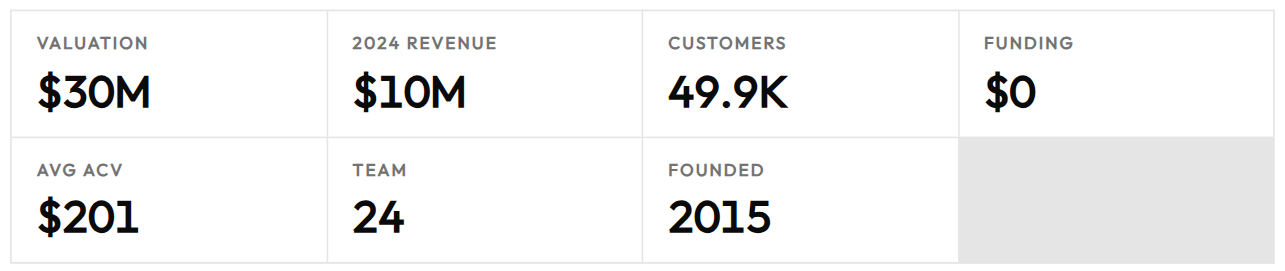
Source: Mailshake Data
Mailshake's core function is automating cold outreach across email, LinkedIn, and phone. It connects to users' email accounts, sends messages that look like personal correspondence, and automates follow-up sequences that pause when a prospect replies. Mailshake positions itself as the user-friendly option, requiring minimal training compared to platforms like Outreach or SalesLoft.
The ideal Mailshake customer is a small or medium-sized business with a sales team that is small but scaling, founders seeking to grow their customer base, or marketing agencies doing link building.
Mailshake Pros & Cons
Pros | Cons |
|---|---|
Fast onboarding with same-day campaign setup | No free trial; payment collected upfront |
Unlimited email warm-up and verification on all plans | Limited B2B database (100M+ contacts vs. larger competitors) |
Built-in deliverability tools (warm-up, list cleaning, DNS setup) | Reported integration issues with CRMs like HubSpot |
Multi-channel sequences (email, LinkedIn, phone) | LinkedIn automation requires Chrome extension to stay open |
AI email writer included free on all plans | Dated interface design |
Strong customer support with weekly live training | No buyer intent signals or account intelligence |
Affordable starting price at $29/month | Limited templates and no campaign cloning |
Mailshake Review: How it Works & Key Features
Email Outreach and Automation: Mailshake sends personalized cold email sequences from your own inbox.
Email automation is Mailshake's core feature. The platform connects directly to users' email accounts and sends through their mail provider via SMTP, making messages appear as one-to-one correspondence. Users can send unlimited emails per month on the Email Outreach and Sales Engagement plans, with the Starter plan limited to 1,500 sends monthly.
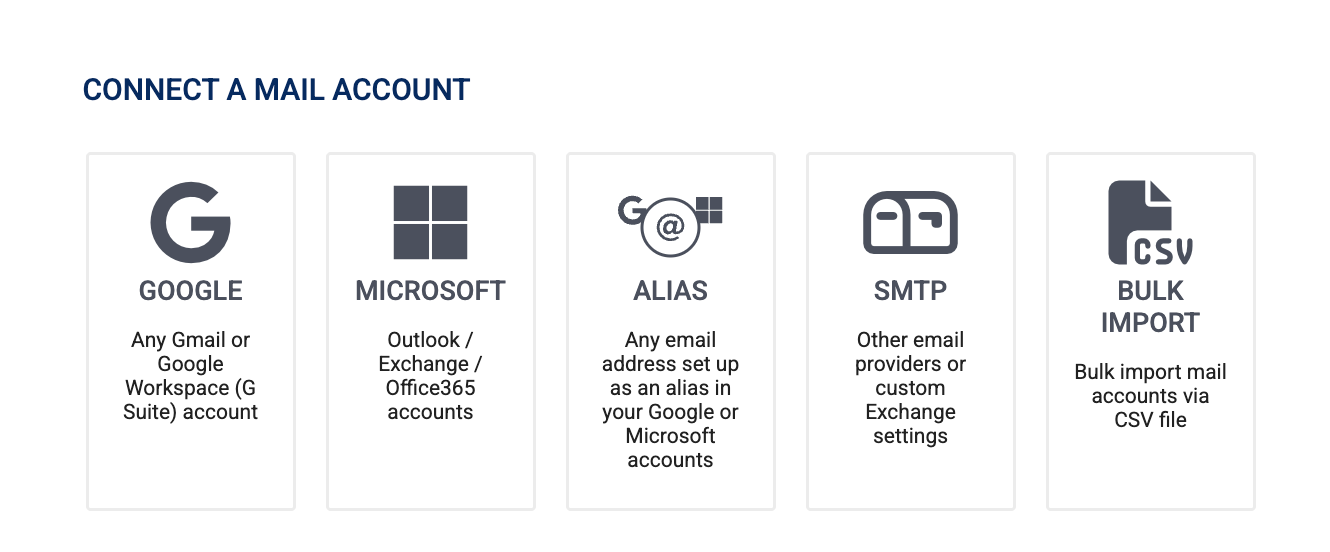
Source: Mailshake Connect
To set up a campaign, you import prospects via CSV files or from connected CRMs, then write a sequence using Mail Merge text replacements that pull in recipient data like name, company, and custom fields. Follow-ups stop automatically when prospects reply, unsubscribe, or bounce, and users can set delays from days to more than 30 days for long-term nurture campaigns.
The platform supports A/B testing of subject lines and body copy, email rotation across multiple sending accounts for better deliverability, and Sending Calendar Rules that control which days, time windows, and volume caps apply. Users can also preview and edit individual prospect messages before launch.
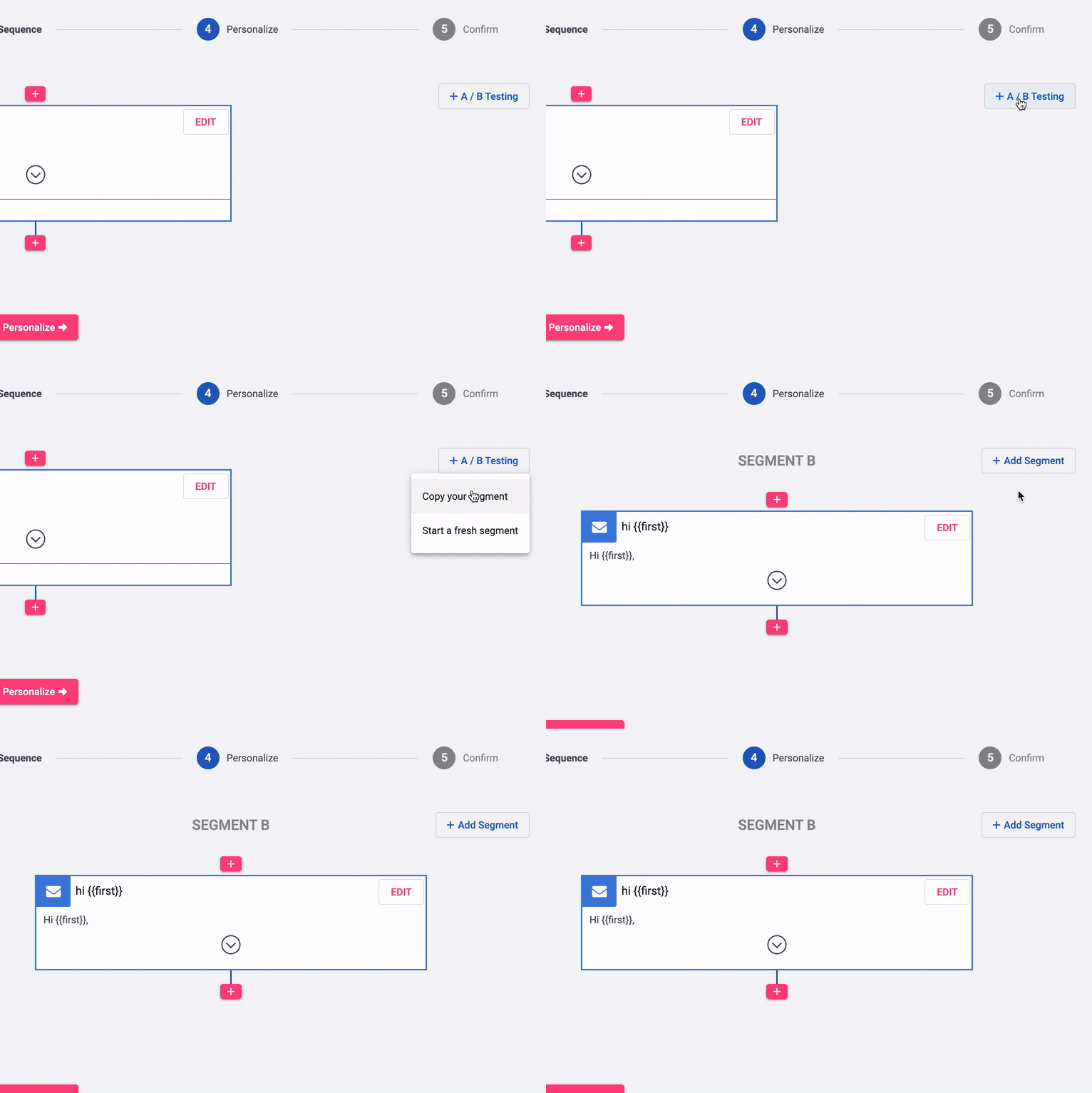
Source: Mailshake A/B Testing
Deliverability Tools: Built-in warm-up, list cleaning, and DNS configuration to keep emails out of spam.
Mailshake focuses on outreach deliverability, and the platform includes several tools aimed at inbox placement.
Email Warm-Up works by sending emails to real email addresses that Mailshake owns and automating replies back. If emails land in spam, the system marks them as "Not Spam", gradually building sender reputation. Mailshake recommends running warm-up for at least 1-2 weeks before sending outreach.
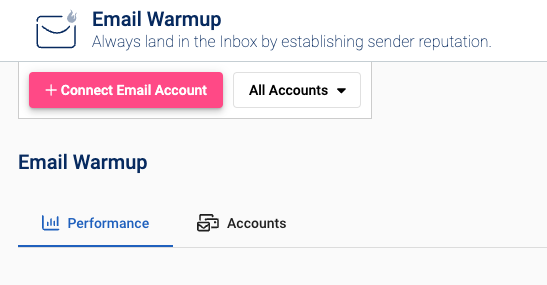
Source: Mailshake Email Warm-Up
Email Validation (list cleaning) runs in the background after importing recipients and classifies each address by bounce risk, flagging addresses as "Risky" or "Bad." Both warm-up and verification are unlimited on all paid plans.
Mailboxes lets users purchase domains with 5 ready-to-use email addresses inside Mailshake, with SPF, MX, and DKIM records already configured for $12/month. The platform also includes an email domain setup assistant for existing domains and an in-app copy analyzer that flags spam trigger words.
Lead Catcher and Multi-Channel Outreach: Manage engaged prospects and add LinkedIn and phone touches to sequences.
Lead Catcher is Mailshake's lead management system that collects engaged prospects into a single queue. By default, anyone who replies becomes a lead, though users can set custom qualification rules based on combinations of replies, link clicks, and open counts. Users mark leads as "won," "lost," or "ignored" and the system advances to the next lead.
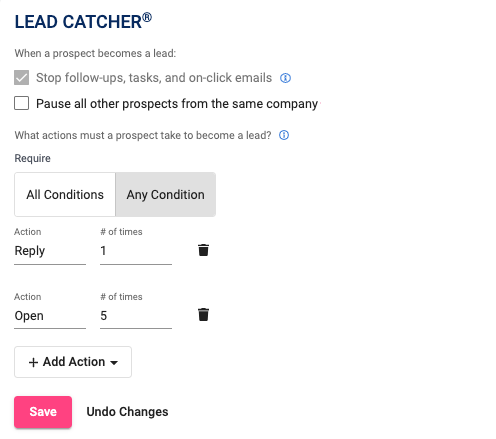
Source: Mailshake Lead Catcher
On the Sales Engagement plan, Lead Temperature classifies prospects as Hot, Warm, or Cold based on engagement, with time-decay that downgrades Hot leads to Warm after 14 days.
LinkedIn Automation (Sales Engagement plan only) lets users automate LinkedIn messages, connection requests, and profile views within multi-channel sequences. The feature runs through a Chrome browser extension in the background. Default limits are conservative (20 messages, 10 connection requests, 10 profile views per day) to avoid LinkedIn blocks, though users can raise them to 100 per day.
Phone Dialer is a browser-based VOIP system with a Power Dialer mode that speed-dials through call queues. The Sales Engagement plan includes unlimited dialer minutes to North American phone numbers plus several other countries. Each user gets one dedicated phone number from US, Canadian, or Australian area codes, with call recording and phone scripts included.
AI and Data Finder: Generate email copy with SHAKEspeare AI and find prospects without leaving the platform.
SHAKEspeare AI is Mailshake's email writing tool, included free on all plans. Users describe their business and the action they want prospects to take, and the tool generates 3 email variations in under a minute. The AI draws on data from thousands of cold email campaigns, so its output reflects patterns that have worked in real outreach.
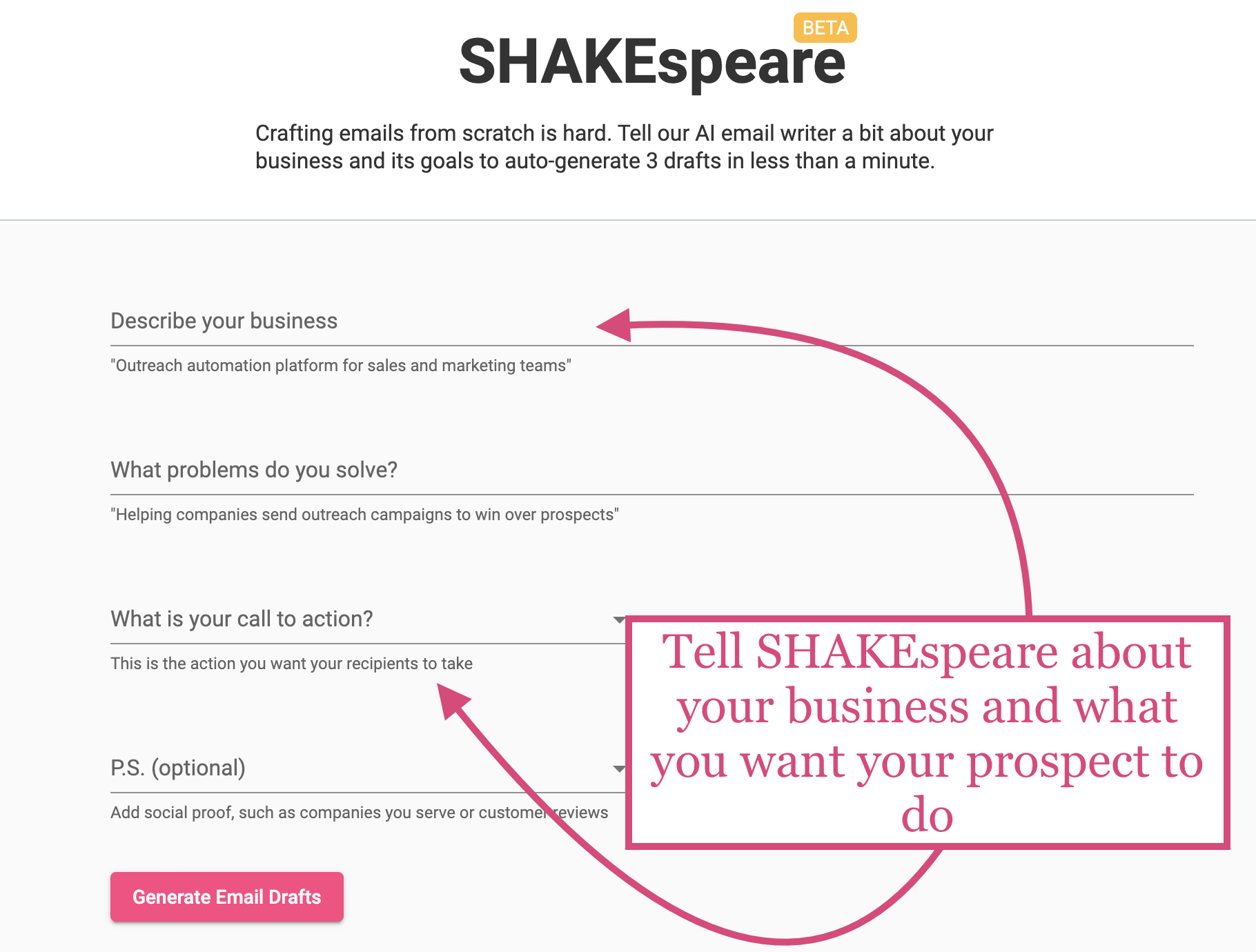
Source: Mailshake SHAKEspeare AI
Additional AI features include Spintax (randomizes portions of email text to improve deliverability), AI Re:Write (one-click rewrites for clearer language and tone), and AI Sequence Suggestions that generate 4-5 follow-up emails with suggested delays after writing a first message.
Data Finder is Mailshake's built-in prospecting tool, drawing from a database of over 100 million prospects. Users can search by job title, company, industry, and location, or use the Chrome extension to find emails from LinkedIn profiles (compatible with Sales Navigator). Found contacts can be pushed directly to campaigns.
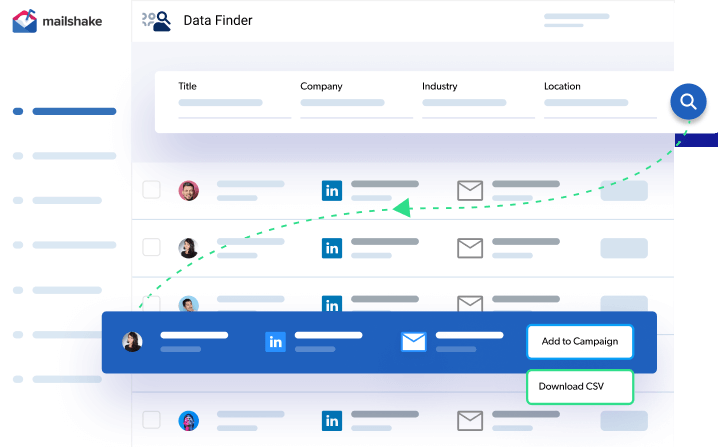
Source: Mailshake Data Finder
Data Finder costs $19/month for unlimited credits as an add-on, or comes with 50 free credits on Starter and Email Outreach plans and 2,500 credits on Sales Engagement.
Pricing: Per-user plans starting at $29/month with no free trial.
Mailshake uses per-user pricing with monthly and annual options. All plans include unlimited uploaded contacts, unlimited campaigns, and unlimited email verification.
Starter ($29/month or $25/month billed yearly): 1 email address, 1,500 email sends per month, 50 Data Finder credits, automated email sequences, A/B testing, and SHAKEspeare AI.
Email Outreach ($49/month or $45/month billed yearly): 2 email addresses, unlimited email sends, email rotation, unified inbox, CRM integrations (Salesforce, HubSpot, Pipedrive), and 1,000+ integrations via Zapier.
Sales Engagement ($99/month or $85/month billed yearly): 10 email addresses, 2,500 Data Finder credits, LinkedIn automation, 5 phone numbers, Power Dialer with unlimited North American minutes, lead temperature, and a 1-on-1 onboarding call.
Agency (custom pricing): All Sales Engagement features, unlimited email addresses, five-seat minimum, combined billing, and swappable seats.
Mailshake does not offer a free trial and collects payment upfront. Cancellations take effect at the end of the billing cycle. No refunds or pro-rated refunds are issued, and subscriptions cannot be paused.
Where Mailshake Falls Short
Mailshake does what it set out to do: make cold email outreach simple. But that simplicity brings trade-offs that show up as teams scale or need more intelligence behind their outreach.
Shallow Prospecting Data: Mailshake's Data Finder covers 100+ million prospects with basic filters for job title, company, industry, and location. That's enough for simple list building, but it lacks the depth growing sales teams need: no org charts, no technographic data, no company intelligence, and no buying intent signals. Users confirm that Mailshake doesn't allow deep prospecting inside the tool.
For teams that need to understand who to contact and why, Data Finder falls short of dedicated intelligence platforms.
No Buyer Intent or Account Intelligence: Mailshake tells you nothing about whether a prospect is researching solutions or ready to buy. There are no intent signals, no website visitor identification, no account scoring, and no way to prioritize accounts by buying readiness. Every prospect in your list looks the same, so reps spend equal time on accounts that are in-market and accounts that aren't.
CRM Integration Issues: Multiple users report integration problems with CRMs like HubSpot, along with slow performance when syncing and analyzing data. For teams that depend on CRM sync to track pipeline and measure outreach, these problems add friction.
No Free Trial: Mailshake collects payment upfront with no free trial, which is unusual for the category. Combined with a no-refund policy, this creates a higher barrier to entry than competitors that let teams evaluate before committing.

Source: Mailshake FAQ
Limited Feature Depth: Users note insufficient templates and limited integrations, no option to edit or delete multiple prospects at once, and no ability to clone a campaign. LinkedIn automation requires a Chrome extension to stay open, and the interface looks dated. These inefficiencies compound as teams and campaigns grow.
These limitations reflect Mailshake's focus on simple outreach for small teams. For organizations that need data-informed selling, the signals and AI capabilities of modern GTM platforms are absent.
Top Mailshake Alternative for Scaling Sales Teams: ZoomInfo
ZoomInfo is a GTM platform built on a large data foundation: 500M contacts, 100M companies, 135M+ verified phone numbers, and 200M+ verified business emails. Where Mailshake handles outreach,
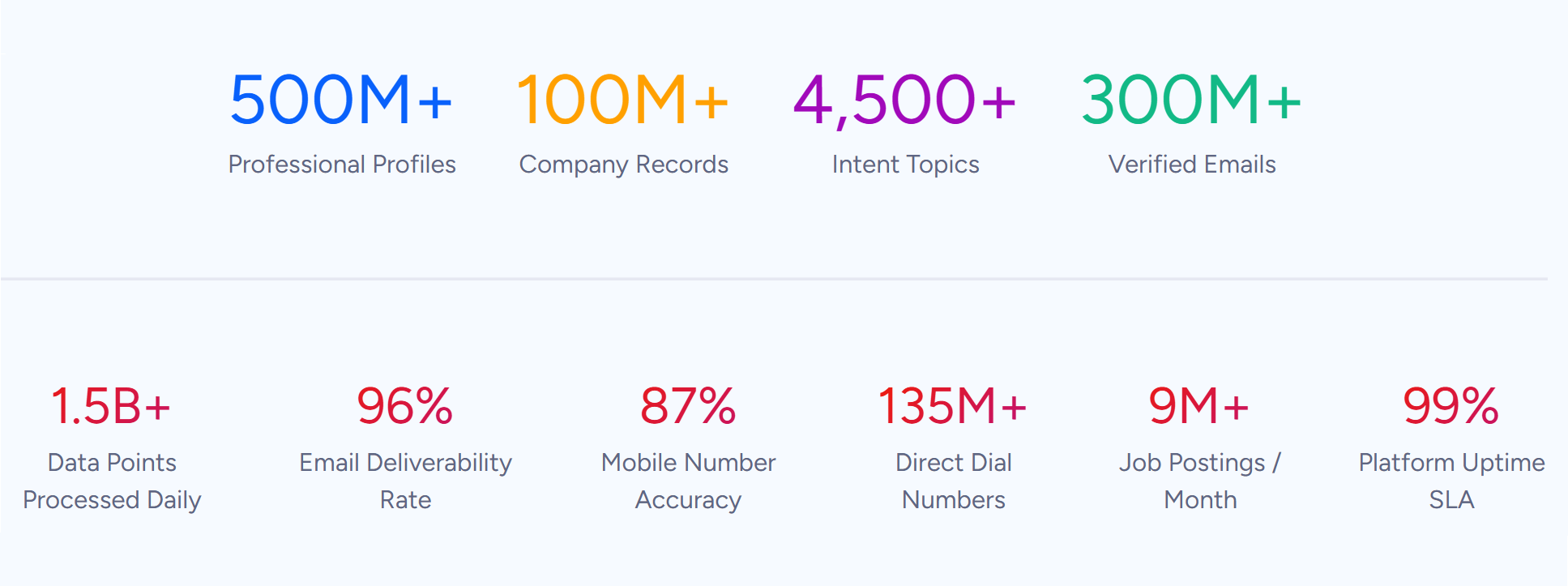
Source: ZoomInfo Data
ZoomInfo covers the full go-to-market lifecycle. Its GTM Context Graph processes 1.5B+ data points daily, combining this data with CRM records, conversation transcripts, and behavioral signals to build a full picture of each account. That intelligence flows to sellers through GTM Workspace, to marketers and RevOps through GTM Studio, or to any tool through APIs and MCP.
ZoomInfo serves 35,000+ companies worldwide, including Adobe, Microsoft, Snowflake, and Thomson Reuters.
B2B Data: ZoomInfo's contact and company database is far larger than Mailshake's Data Finder.
Mailshake's Data Finder offers 100+ million prospects searchable by job title, company, industry, and location.
ZoomInfo's data covers three areas: identity data (500M contacts, 135M+ verified phone numbers, 120M direct-dial phone numbers, 200M+ verified business email addresses), company context (100M companies with attributes, org charts, and technographics), and signals that show when accounts are in-market.
The data is verified through a multi-source pipeline backed by 300+ human researchers and achieves up to 95% accuracy on first-party data. In a Fortune 500 competitive RFP analyzing 25 million contacts across vendors, an independent consultant concluded that "no other competitor came even close."
Beyond contacts, ZoomInfo provides 300+ company attributes for segmentation, department org charts with decision-makers' direct dials, technographic profiles of 30+ million companies tracking 30,000+ technologies, and buyer intent data from 210 million IP-to-Organization pairings. Reps know not just who to contact, but which accounts are researching solutions now.

Source: ZoomInfo Intent Data
ZoomInfo gives us the information we need to execute. We don't have to go through and spend our time digging. It's already there, so we can be three steps ahead. (Vensure)
GTM Context Graph: ZoomInfo's intelligence layer captures why deals move, not just that they moved.
Mailshake tracks basic engagement metrics: opens, clicks, and replies. ZoomInfo's GTM Context Graph processes 1.5B + data points daily, combining ZoomInfo's B2B data with a customer's CRM records, conversation transcripts, email interactions, and behavioral signals into a single view of each account.
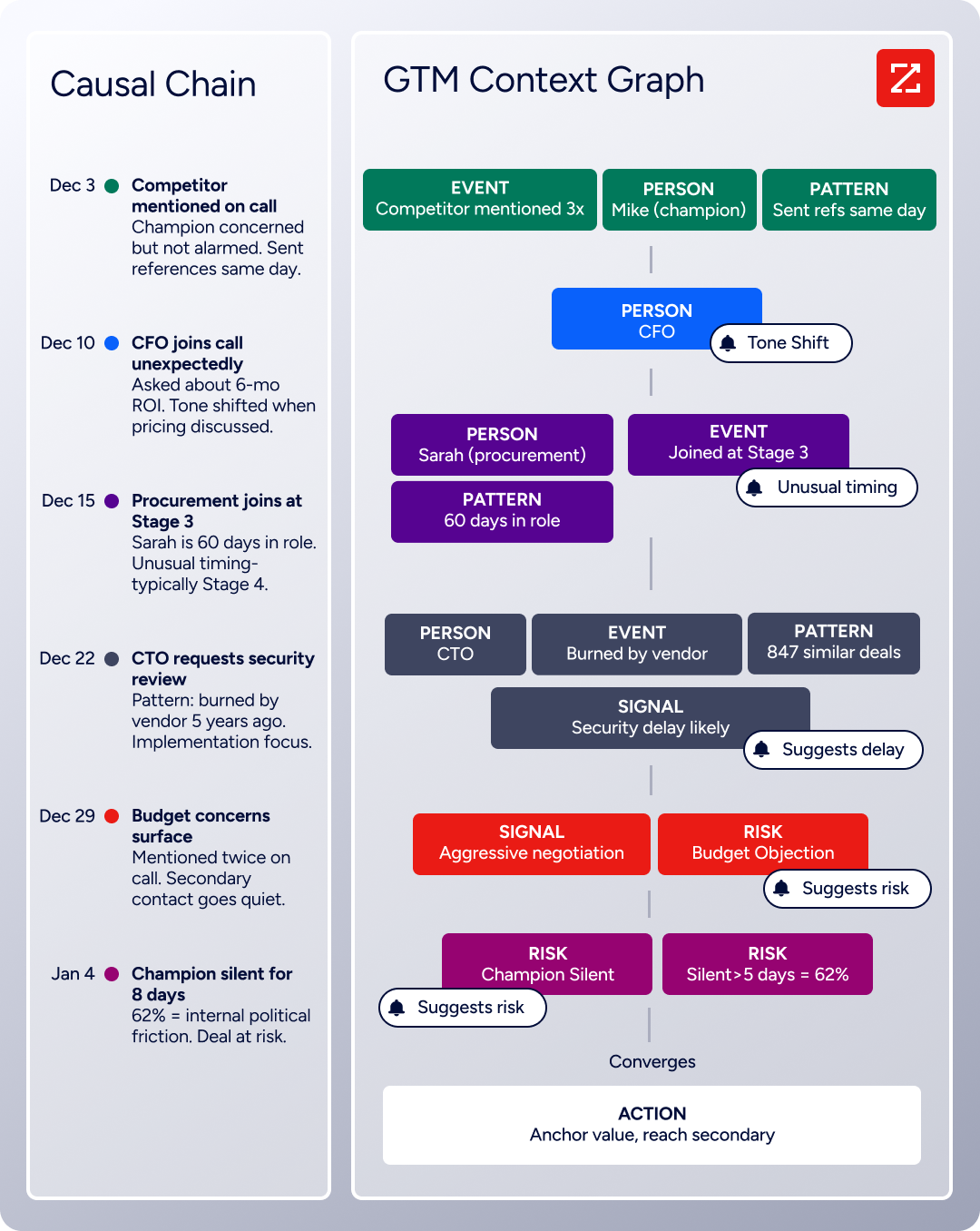
Source: ZoomInfo Context Graph
The difference: a CRM records that a deal stage changed. Mailshake records that an email was opened. The GTM Context Graph captures why the deal moved, connecting executive sponsorship signals, competitive mentions, hiring patterns, and engagement history into patterns that predict what happens next.
This intelligence powers every action downstream, from AI-drafted outreach addressing specific concerns to plays targeting accounts that match proven win patterns.
This exists because ZoomInfo spent 20 years building its B2B data platform and acquired the conversation and behavioral intelligence engines (including Chorus) that feed the graph. No outreach tool can replicate it because none has both the data and the extraction layer required.
That combination of our internal CRM data, external signals, and AI that's given all that context has helped us craft very specific account- and persona-based messages. And people have responded to them right away. (Seismic)
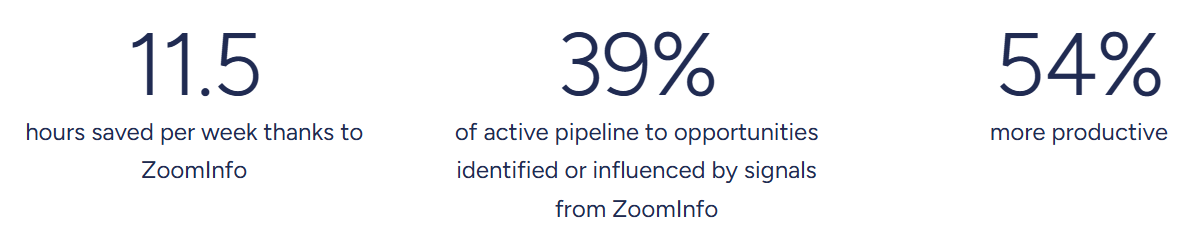
Source: ZoomInfo Seismic
GTM Workspace and GTM Studio: Workspaces designed for sellers, marketers, and RevOps.
Mailshake provides a single dashboard for managing outreach campaigns. ZoomInfo provides three interfaces, each for a different team.
GTM Workspace is the seller's front-end. It brings prioritized accounts, AI-drafted outreach, deal context, and CRM updates into one workspace. Built on Anthropic's Claude, its AI agents handle account research, outreach generation, signal monitoring, and CRM hygiene so reps can focus on selling.
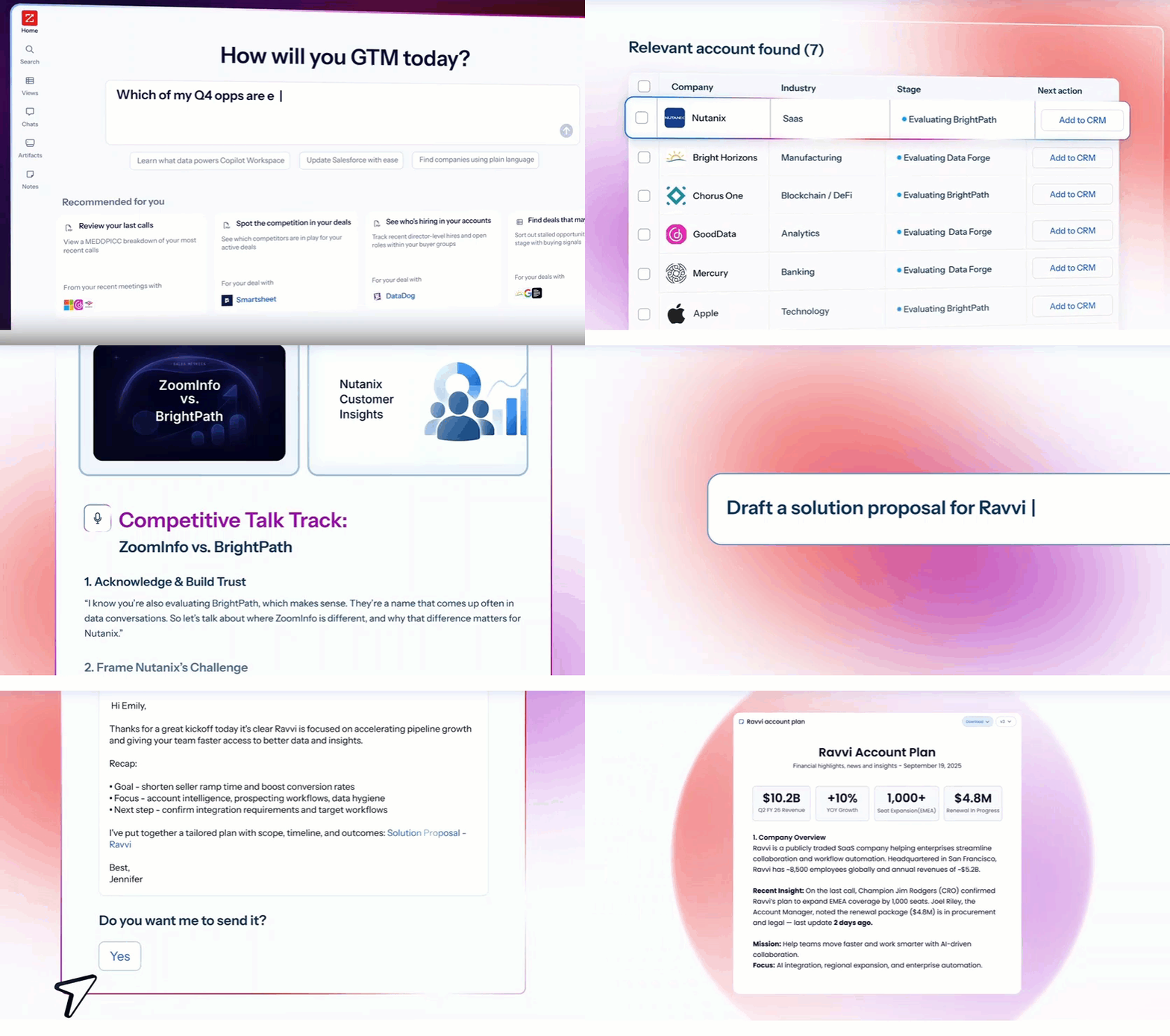
Source: ZoomInfo GTM Workspace
Features include an Action Feed with pre-drafted actions on every signal, Views that combine CRM data with real-time buying signals, and an AI Assistant that generates account briefs in seconds.
GTM Studio is for marketers, RevOps, and GTM engineers. It provides a canvas where teams build audiences using natural language, enrich data from 25+ alternative sources via waterfall enrichment, define triggers, and activate plays across channels. Expansion plays that used to take 3 weeks now launch in 30 minutes.
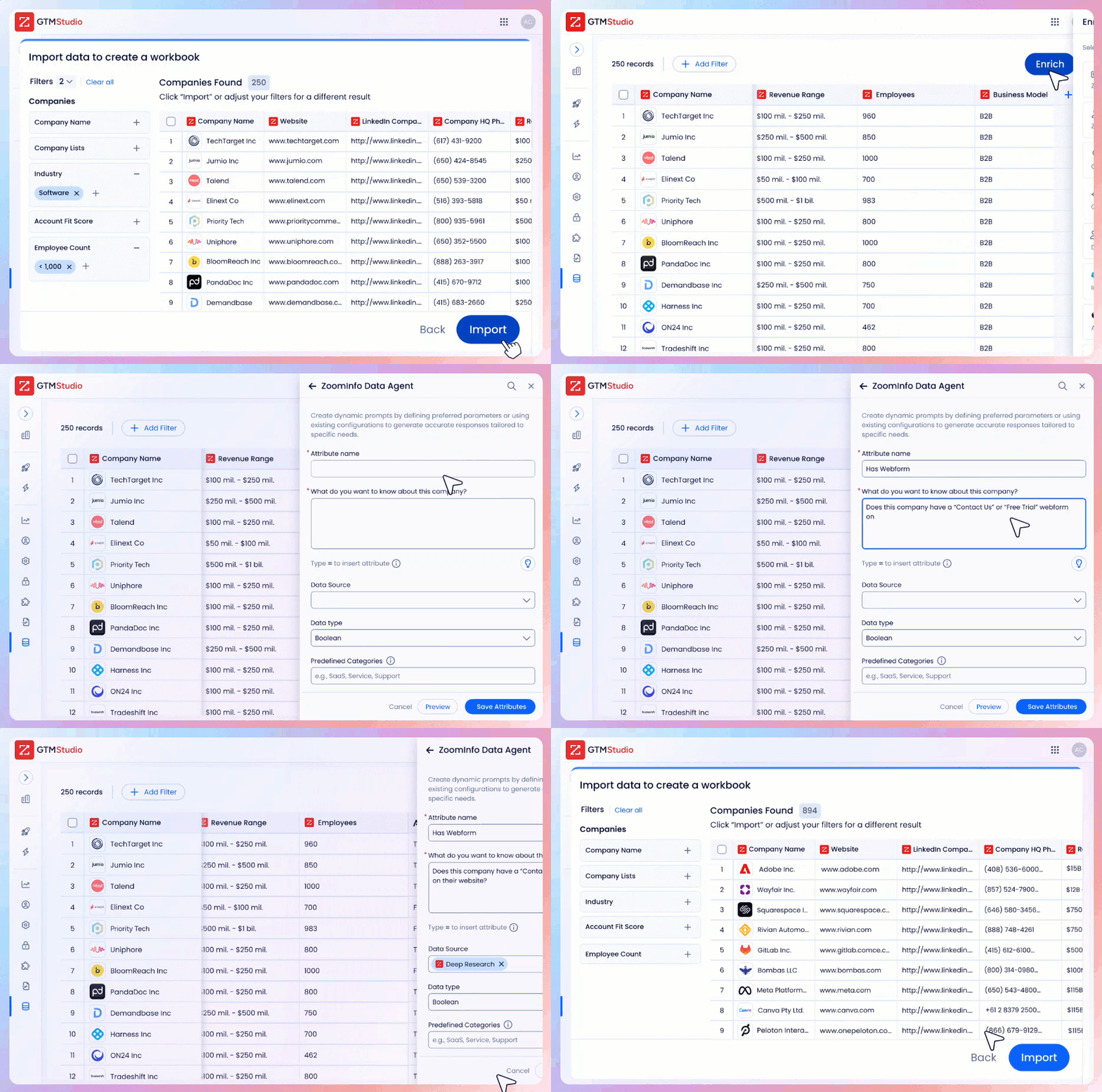
Source: ZoomInfo GTM Studio
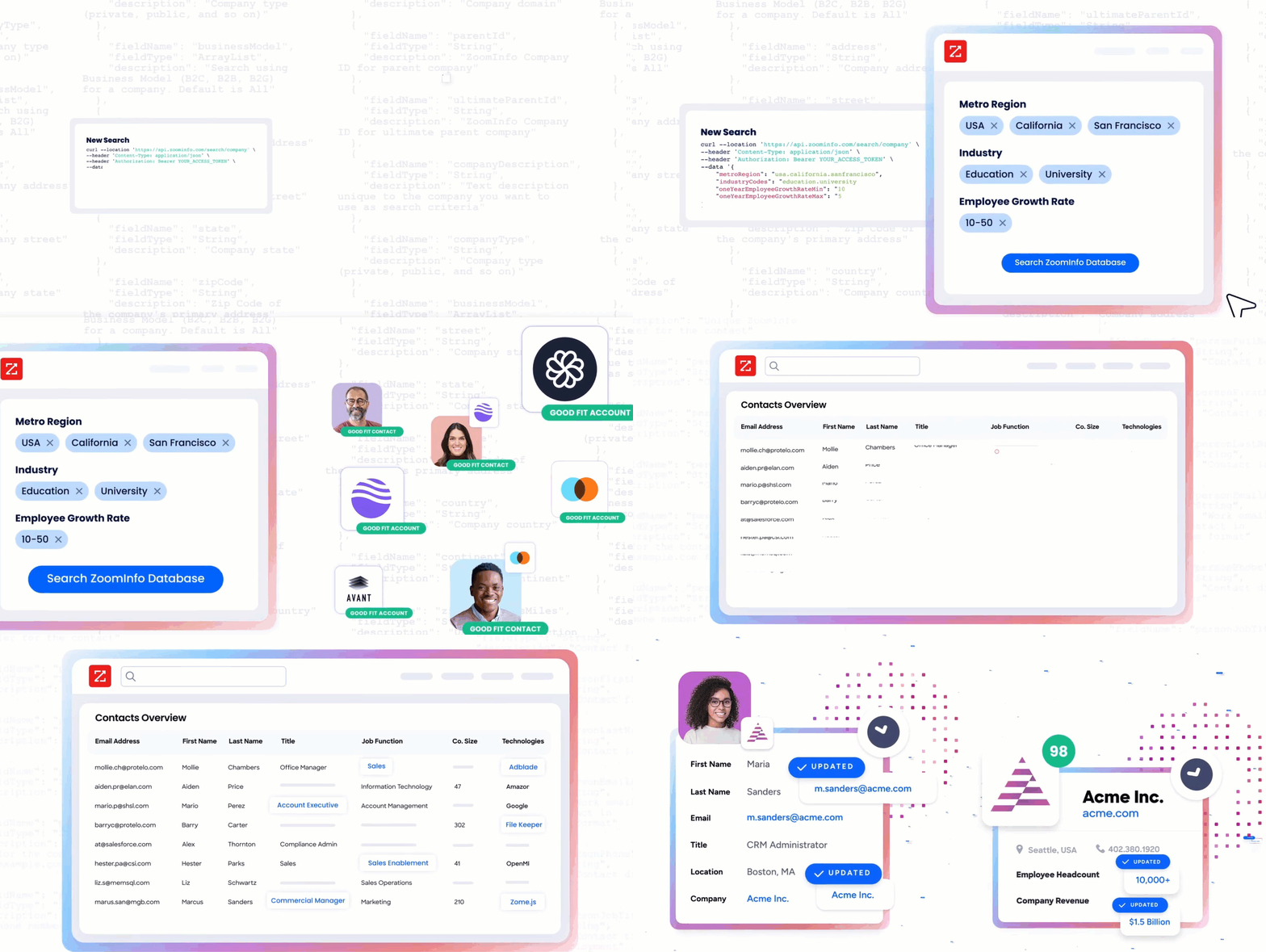
For teams that build beyond ZoomInfo's own products, APIs and MCP expose the same intelligence to any custom agent, internal tool, or partner platform.
Source: ZoomInfo API
Anything that minimizes our team's need to switch contexts is beneficial. ZoomInfo offers a unified view, eliminating the need to navigate between systems. (Spekit)
Pricing and Entry Points: Custom-quoted plans with a permanent free tier and 7-day trial.
ZoomInfo uses a custom-quoted, seat-and-credit-based subscription model. Pricing depends on the number of users, monthly credit volume, features selected, and contract length. Sales plans are organized into Professional, Advanced, and Enterprise tiers, with Marketing plans available separately.
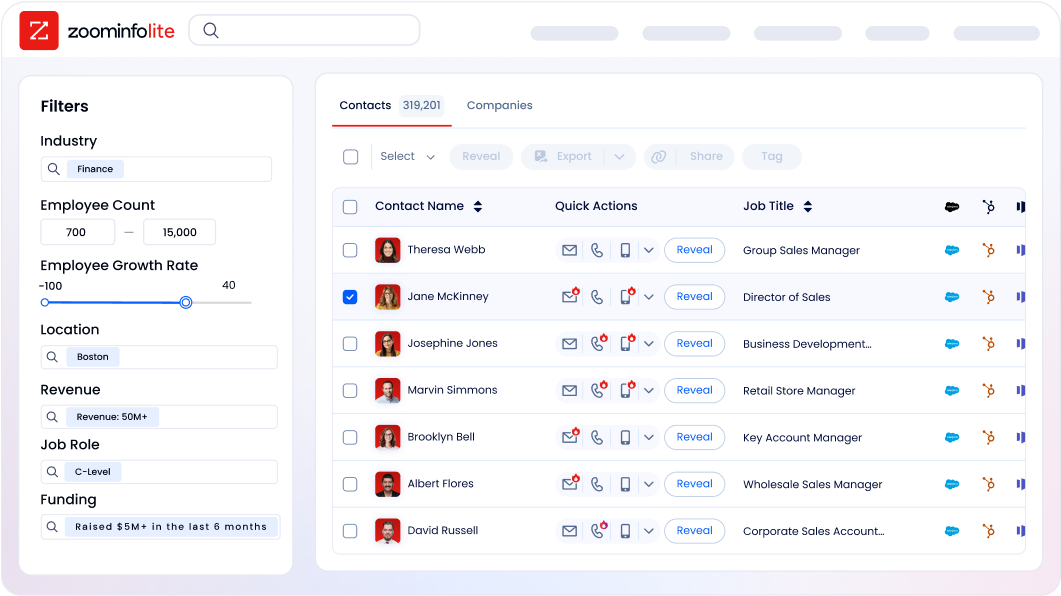
Unlike Mailshake's no-trial approach, ZoomInfo provides two free entry points. ZoomInfo Lite is a permanent free tier (no credit card, no time limit) that includes access to ZoomInfo's B2B database with 10 monthly export credits, individual and company search, a Chrome extension, HubSpot integration, and WebSights Lite for up to 10 website visitor reveals per day.
Source: ZoomInfo Lite
A separate 7-day free trial gives access to core platform features with no credit card required.
ZoomInfo's pricing reflects the data, AI, and platform scope that Mailshake does not include.
Note: ZoomInfo is transitioning toward a consumption-based pricing model.
Mailshake or ZoomInfo: Comparison Summary
Mailshake | ZoomInfo | |
|---|---|---|
Primary focus | Cold outreach execution (email, LinkedIn, phone) | Full GTM lifecycle: data, intelligence, and execution |
B2B contact database | 100M+ prospects with basic filters | 500M contacts, 100M companies, 135M+ verified phone numbers |
Data verification | Built-in email validation | Multi-source pipeline with 300+ human researchers, up to 95% accuracy |
Buyer intent signals | Not available | 210M IP-to-Organization pairings, Guided Intent |
Account intelligence | Basic open/click/reply tracking | GTM Context Graph processing 1.5B+ data points daily |
Conversation intelligence | Not available | Chorus (call recording, transcription, AI analysis) |
AI capabilities | Email writing (SHAKEspeare), Spintax | Account research, outreach drafting, signal monitoring, CRM updates |
Outreach channels | Email, LinkedIn, phone | Email, phone, ads, direct mail (via GTM Studio), plus Salesloft partnership |
Website visitor ID | Not available | WebSights resolves anonymous traffic to companies |
CRM integrations | Salesforce, HubSpot, Pipedrive (reported issues) | Salesforce, HubSpot, Microsoft Dynamics, 120+ marketplace integrations |
API and MCP access | RESTful API (request-only access) | Enterprise API + MCP for any AI agent or third-party tool |
Free entry point | No free trial; payment upfront | ZoomInfo Lite (permanent free) + 7-day free trial |
Pricing | $29-$99/month per user (transparent) | Custom-quoted (seat + credit based) |
Best for | Small teams running focused outreach campaigns | Scaling teams needing data, intelligence, and execution in one platform |
Final Verdict
The choice depends on what your sales team needs now and where it's heading.
Choose Mailshake if you need an affordable, focused tool for running cold email campaigns and don't need data or intelligence behind your outreach. It suits small teams, solo founders, and agencies that already know who they want to reach and just need a reliable way to contact them at scale.
The deliverability tools are solid, the multi-channel capabilities cover the basics, and the learning curve is minimal. If outreach execution is your primary need and budget is a constraint, Mailshake does its job.
Choose ZoomInfo if your team needs more than a sending tool. If you're spending time manually researching accounts, guessing which prospects to prioritize, or stitching together data from multiple vendors to build a target list, ZoomInfo consolidates that workflow.
Verified B2B data at scale, the GTM Context Graph for account intelligence, and workspaces designed for sellers and marketers mean your outreach draws on real buying signals, not volume alone. For teams ready to move from outreach to data-informed selling, ZoomInfo is built for that shift.
Get started with ZoomInfo here.
The difference between these platforms isn't just features. Mailshake helps you send more emails. ZoomInfo helps you send the right emails to the right people at the right time, and understand why it worked.
Mailshake FAQ
Does Mailshake offer a free trial?
No. Mailshake collects payment upfront at the start of each billing cycle. A no-refund policy applies to all cancellations, so teams must commit financially before evaluating the tool. ZoomInfo, by contrast, offers both a permanent free tier (ZoomInfo Lite) and a 7-day free trial with no credit card required.
How much does Mailshake cost?
Mailshake offers three paid plans: Starter at $29/month ($25 billed yearly) with 1,500 email sends per month, Email Outreach at $49/month ($45 yearly) with unlimited sends and CRM integrations, and Sales Engagement at $99/month ($85 yearly) adding LinkedIn automation, a phone dialer, and 2,500 Data Finder credits.
Add-ons include Data Finder at $19/month for unlimited credits and ready-to-use mailboxes at $12/month for a domain with 5 email addresses.
What outreach channels does Mailshake support?
Mailshake supports email, LinkedIn, and phone within a single sequence. Email is available on all plans. LinkedIn automation (messages, connection requests, profile views) and the Power Dialer with unlimited North American calling are exclusive to the Sales Engagement plan at $99/month. LinkedIn automation runs through a Chrome browser extension that must remain open during execution.
Does Mailshake have a built-in contact database?
Yes. Mailshake's Data Finder includes a database of over 100 million prospects, searchable by job title, company, industry, and location. A Chrome extension adds LinkedIn integration for finding emails on prospect profiles. The database lacks the depth of dedicated intelligence platforms: no org charts, technographic data, company hierarchies, or intent signals.
ZoomInfo's database covers 500 million contacts and 100 million companies with attributes, org charts, technographics, and buyer intent data.
Does Mailshake include email warm-up?
Yes. All Mailshake plans include unlimited email warm-up. The system sends emails to addresses Mailshake owns, generating opens and replies to build sender reputation. If emails land in spam, the system marks them as "Not Spam." Mailshake recommends warming up new accounts for at least 1-2 weeks before launching campaigns.
Can Mailshake integrate with my CRM?
Mailshake offers native integrations with Salesforce, HubSpot, and Pipedrive, plus connectivity to over 1,000 apps through Zapier. CRM integrations require the Email Outreach plan ($49/month) or higher. Some users report integration issues and slow performance with CRM sync, particularly with HubSpot.
ZoomInfo integrates with 120+ tools through its App Marketplace, including native connections to Salesforce, HubSpot, and Microsoft Dynamics 365.
What AI features does Mailshake include?
Mailshake's SHAKEspeare AI, included free on all plans, generates three email variations from a business description in under a minute. Additional AI features include Spintax for randomizing email text, AI Re:Write for one-click email polishing, and AI Sequence Suggestions that generate 4-5 follow-up emails with timing recommendations. These features focus on email copy.
ZoomInfo's AI extends to account research, buying committee identification, signal-based outreach prioritization, and CRM automation through its GTM Workspace.
Who is Mailshake best suited for?
Mailshake works well for small to mid-sized sales teams, solo founders, and marketing agencies that need a simple way to run cold outreach campaigns. It is popular with teams doing link building, B2B sales development, and agency client outreach. Teams needing data intelligence, buyer intent signals, conversation analytics, or account-based marketing would benefit from a broader platform like ZoomInfo.
Researching Mailshake? These comparisons and alternatives help you decide:
