

Mixmax turns Gmail into a sales workspace. Instead of asking reps to learn a separate application, it embeds sequences, scheduling, tracking, and CRM sync inside the inbox. For Gmail-first teams, it removes context-switching.
To write this Mixmax review, we analyzed the platform in detail. It's the right choice if:
You run sales execution through Gmail and want to keep it there
You need email sequences, meeting scheduling, and tracking without leaving the inbox
You value fast setup and adoption over analytics depth
Your team is small to mid-sized (under 50 reps) and runs straightforward outreach
You already use Salesforce or HubSpot as your CRM
Mixmax might not fit if:
You need B2B data to identify who to contact in the first place
You require buyer intent signals to know when accounts are in-market
You want AI that reasons across your deals, conversations, and market signals to surface next actions
You need multi-channel outreach beyond email and basic SMS
You're building an enterprise go-to-market operation spanning sales, marketing, and RevOps
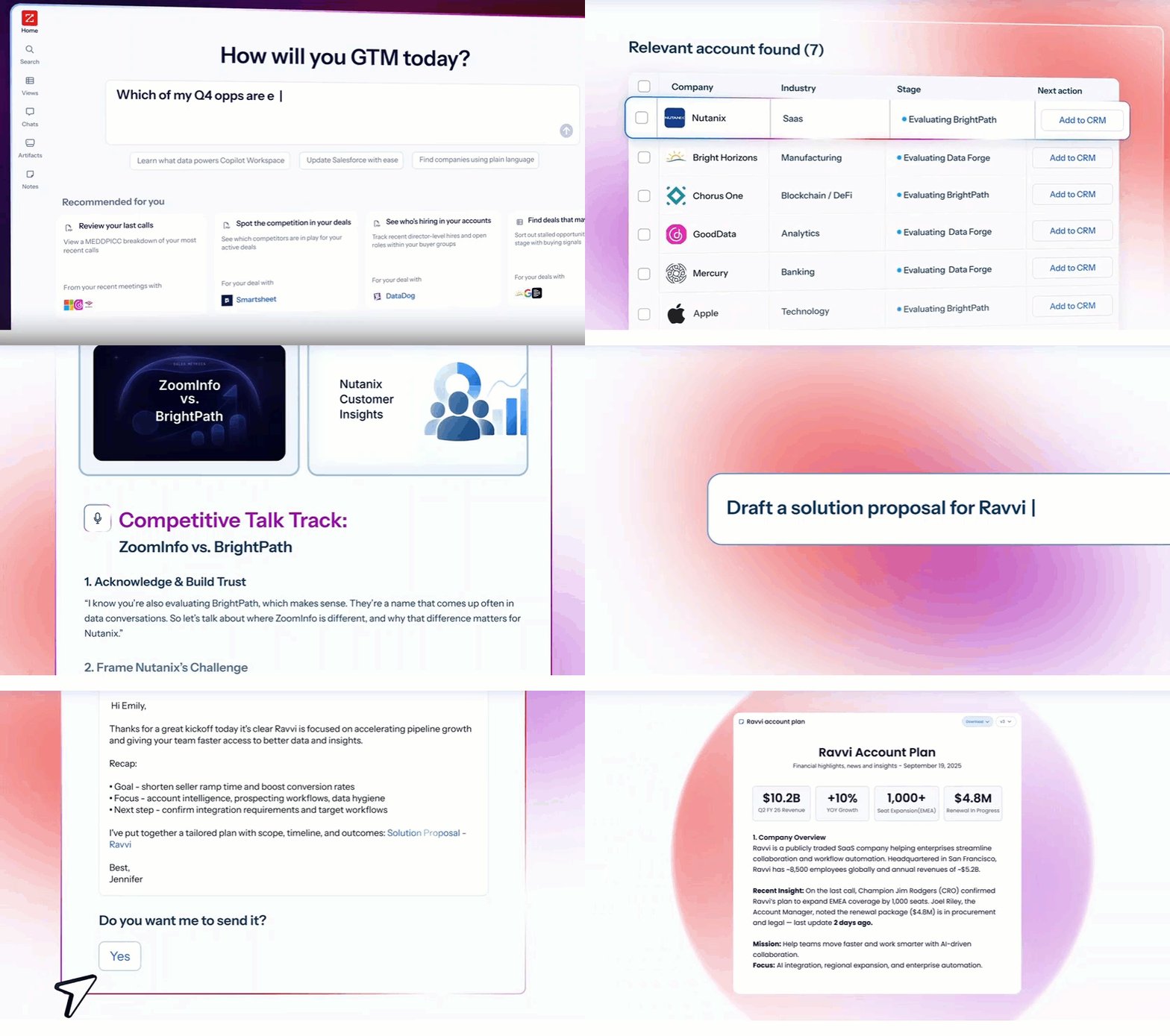
In that case, consider ZoomInfo: an AI-powered go-to-market platform that goes beyond inbox tools. Where Mixmax helps reps send and track outreach, ZoomInfo tells them who to target (with 500M contacts and 100M companies of verified B2B data), when to engage (with buyer intent signals and the GTM Context Graph processing 1.5B+ data points daily), and what to say (with AI agents that draft outreach grounded in deal context, conversation history, and market intelligence). Sellers access this through GTM Workspace, marketers and RevOps through GTM Studio, and any tool through APIs and MCP.
We've included a detailed look at ZoomInfo later in this review for teams that need intelligence and data behind their sales execution, not just inbox tools. If you're ready to see what a go-to-market platform looks like, start with ZoomInfo's free trial.
What is Mixmax?
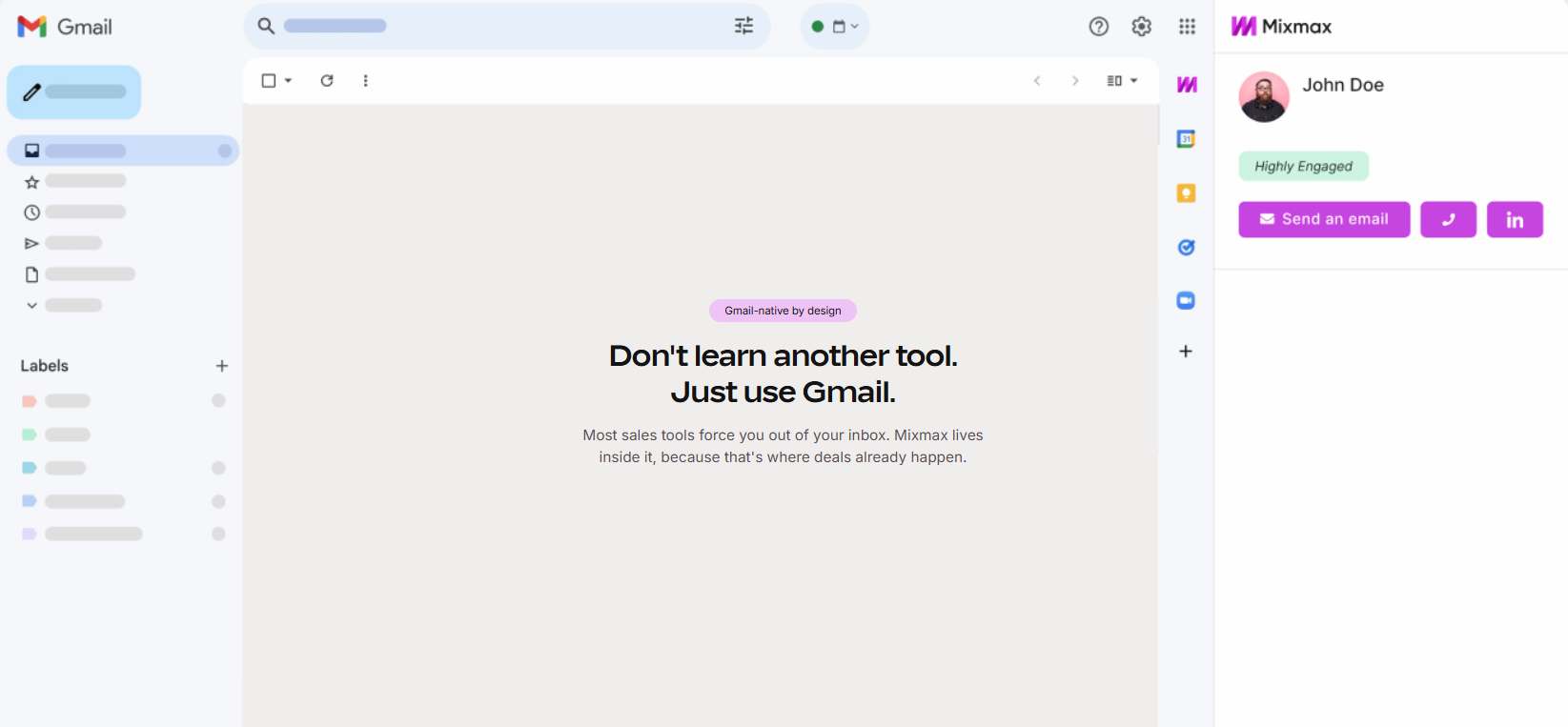
Mixmax is a Gmail-native sales engagement platform founded in 2014 in San Francisco by Olof Mathé, Brad Vogel, and Chanpory Rith. The three co-founders met at Inkling, an e-publishing startup, and built Mixmax around a simple observation: salespeople live in their inbox, so their sales tools should too.
Source: Mixmax
The platform launched publicly in 2015 and grew through word-of-mouth, reaching 5,000+ customers with a reported 20% monthly growth rate in its early years. In late 2024 / early 2025, Mixmax repositioned itself, relaunching as "Mixmax AI" and coining the "AI Sales Execution" category. CEO Mathé called it "the biggest leap" in the company's history, framing legacy sales engagement platforms as tools that "scale activity, not outcomes."
Today Mixmax is organized around three AI Copilots: Inbox Copilot for email prioritization and follow-up prompts, Meeting Copilot for call preparation and post-meeting summaries, and Engagement Copilot for multi-channel sequences and AI-assisted outreach. The platform is used by 1,000+ teams including Meltwater, Brex, Datadog, and Canva, and carries over 1,000 five-star reviews across review sites.
Mixmax targets SDRs running outbound sequences, AEs managing active deals, and customer success teams handling existing accounts, primarily at SMB to lower mid-market B2B companies using Google Workspace or Microsoft 365.
Mixmax Pros & Cons
Pros | Cons |
|---|---|
Lives inside Gmail with no separate app to learn | Key features locked behind the Teams plan (custom pricing) |
Reporting and analytics are limited compared to enterprise SEPs | |
Email tracking with "opened but silent" detection | No native mobile app |
One-click meeting scheduling embedded in emails | Outlook support is still feature-incomplete |
AI-powered sequence creation and meeting transcription | Built-in dialer scores 7.3/10 on G2 with per-minute fees |
Salesforce and HubSpot auto-logging | No built-in B2B contact database |
14-day free trial with no credit card required | No data on who to contact or when accounts are in-market |
Mixmax Review: How it Works & Key Features
Engagement Copilot: Mixmax automates multi-step outreach sequences from inside Gmail.
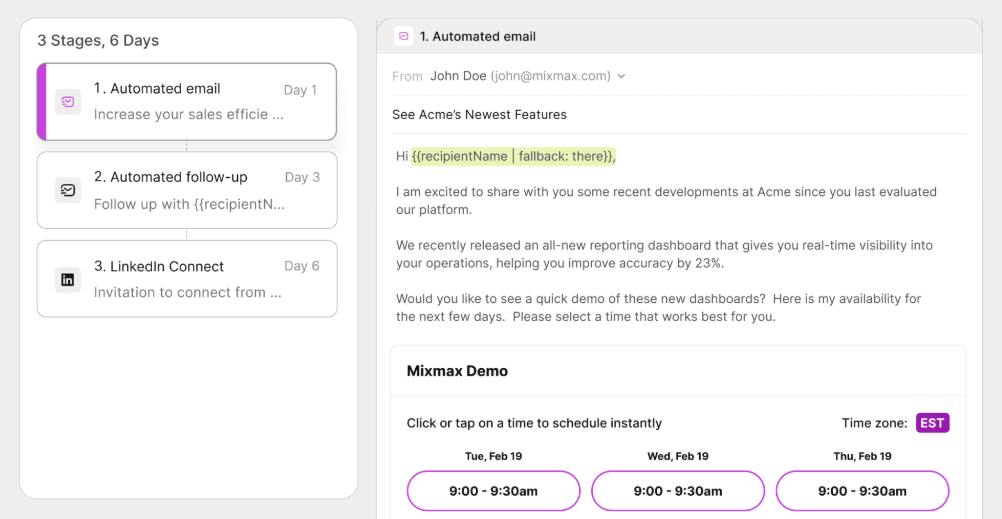
The Engagement Copilot is Mixmax's core outreach tool. Reps build and launch sequences from the Gmail compose window, combining automated emails, manual email tasks, call tasks, to-do steps, LinkedIn Connection Requests, and LinkedIn InMail as stages within a single sequence.
Source: Mixmax
The AI sequence builder is a useful addition. Reps select "Create with AI", fill in a prompt covering audience role, company size, pain points, and desired CTA, and Mixmax generates a multi-stage sequence. If a workspace admin has pre-loaded company values and pain points, those fields auto-populate from workspace-level data, cutting setup time. Reps can also start from templates covering cold prospecting, renewals, and onboarding, then run them through AI personalization.
Sequence messages support template variables from CSV uploads, Salesforce imports, or manual entry, with Liquid Markup for conditional logic. Per-recipient personalization lets reps edit content and send dates for individual contacts without changing the master template. Behind the sequences sits a Rules engine that connects engagement signals to automated actions. When a prospect opens an email three times, clicks a link, or books a meeting, Rules can enroll them in a new sequence, update Salesforce or HubSpot, send a Slack notification, or fire a webhook. Most rules execute within 10-20 minutes of triggering.
Meeting Copilot: AI-powered meeting preparation, transcription, and follow-up.
Meeting Copilot covers the full meeting lifecycle. Before any scheduled meeting with external participants, Mixmax generates a prep email 24 hours in advance. Unlike generic AI research tools, Meeting Prep draws only from the rep's own email history and prior meeting transcripts, surfacing deal context, participant history, and risks from actual interactions.

Source: Mixmax
During calls, the Copilot joins Google Meet automatically and Zoom via the waiting room, transcribing and recording in real time. Users can configure which meetings the Copilot joins: all, hosted only, external only, or internal only. After the call, Mixmax delivers a summary to the rep's inbox with key points, pain points, and next steps with assigned owners. A "Generate follow-up email" button opens a pre-drafted message in Gmail compose. The meeting notes page in the Mixmax dashboard includes the timestamped, speaker-labeled transcript and call recording. Mixmax syncs summaries and transcripts automatically to Salesforce or HubSpot.
Meeting Copilot is limited to English and available on the Meeting Copilot plan ($29/user/month), Mixmax Suite ($89/user/month), and Mixmax for Teams.
Inbox Copilot: Automatic email categorization with AI-timed follow-up prompts.
Inbox Copilot solves a problem that grows with deal volume: important replies get buried under notifications, marketing emails, and internal threads. It automatically sorts incoming emails into ten labels: Todo, Awaiting Reply, Done, Reminder, Sidechat, Notification, Marketing + Cold Email, FYI, Internal, and Sequence.
Source: Mixmax
Labels update as conversations progress. A new inbound message is marked Todo; once the rep replies, it shifts to Awaiting Reply; when the prospect replies back, it returns to Todo. Low-signal categories like Marketing + Cold Email are hidden by default.
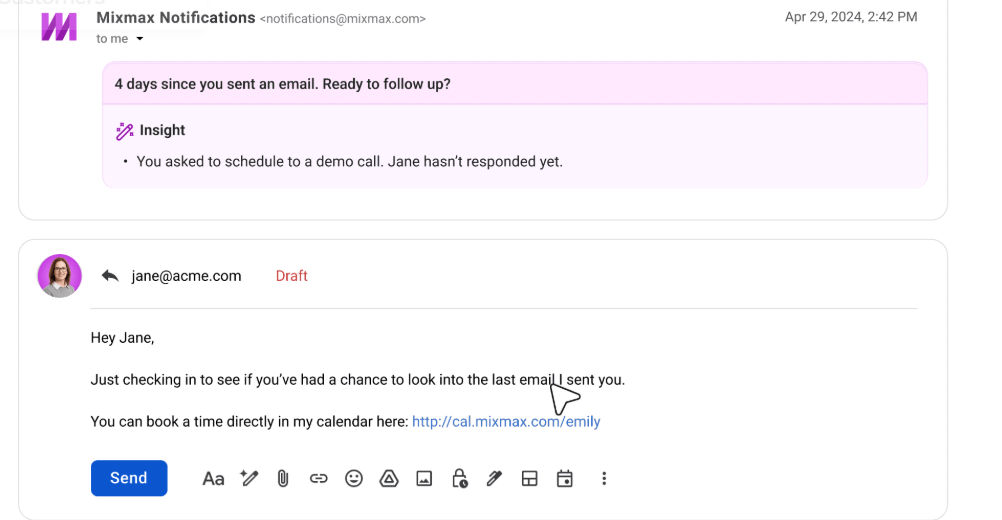
The Signals system monitors conversation events and responds with suggested actions. When an external participant declines a calendar invite, Mixmax waits one hour, then fires a follow-up draft into the existing email thread. When no email goes out within one hour of an external meeting ending, it prompts the rep with a draft drawn from Meeting Copilot notes.
Smart Follow-Ups scan outgoing emails for contextual cues (deadlines, unanswered requests, proposal language) and auto-schedule reminders without manual setup. When a reminder fires, an inline notification explains the reasoning. Reps can mark suggestions as "Too soon," "Too late," or "No" to calibrate future timing. Inbox Copilot does not send emails on the rep's behalf. Every AI action is a suggestion the rep must approve.
Scheduling: One-click meeting booking embedded directly in emails.
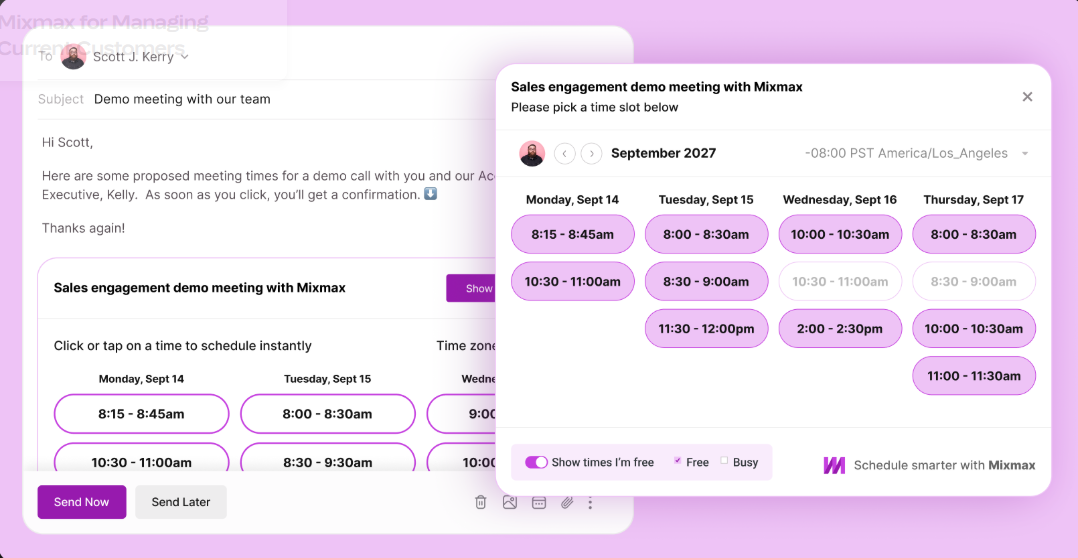
Mixmax Scheduling eliminates the back-and-forth of finding mutual availability. Reps create custom Calendars in the Mixmax web app, then insert availability two ways: typing /meeting in the Gmail compose window to embed clickable time-slot tiles in the email, or sharing a persistent cal.mixmax.com booking link. When a prospect clicks a tile or books through the link, the meeting confirms instantly. All parties get calendar invites, and configurable reminder emails reduce no-shows.
Source: Mixmax
Round Robin scheduling distributes meetings across team members via a queue-based algorithm that respects each member's time zone and working hours. A Group Scheduling Poll lets multiple stakeholders vote on preferred times, useful for multi-person meetings. Custom intake fields collect phone numbers, company names, or other data at booking time, with answers pre-fillable via URL parameters for sequences.
A meeting booking can automatically remove the prospect from an active outreach sequence via Rules, preventing continued cold outreach after a demo is already scheduled.
Pricing: Modular copilots with a bundled suite option.
Mixmax uses per-user, per-month pricing with annual and monthly billing options. The product is structured around three individual Copilots and one bundled Suite, all available self-serve at:
Mixmax Free ($0, permanent):
20 tracked emails/month
50 sequence recipients/month
Unlimited calendars, templates, reminders, and Send Later
No inbox categorization, meeting notes, or AI sequence builder
Inbox Copilot ($29/user/month annual / $34 monthly):
Unlimited email tracking
Inbox categorization and filtering
Smart signals and follow-ups
Meeting scheduling
Meeting Copilot ($29/user/month annual / $34 monthly):
Pre-meeting prep emails
Instant AI meeting notes
Draft follow-up emails
Meeting scheduling
Engagement Copilot ($49/user/month annual / $65 monthly):
Unlimited email sequences
Multi-channel sequences
AI sequence builder
Sequence personalization
Mixmax Suite ($89/user/month annual / $105 monthly, "Most Popular"):
All three Copilots bundled
14-day free trial, no credit card required
Mixmax for Teams (custom pricing, 5+ users minimum):
Everything in Suite plus Custom Branding, Dialer, Custom Domain, Salesforce Insights, and Advanced Workflow Rules
The built-in dialer carries costs beyond the base subscription: a platform fee of $10-$20/user/month depending on features selected, plus per-minute charges ($0.017/min for US & Canada outbound). All users in a workspace must be on the same dialer plan. Annual plans offer no partial refunds upon cancellation, though Mixmax will transfer remaining duration to another account.
Where Mixmax Falls Short
Mixmax excels at Gmail-native sales execution, but several limitations show a platform built for inbox productivity rather than go-to-market intelligence.
No Data Layer. Mixmax tells reps how to reach out but not who to reach out to. There is no built-in B2B contact database, no company intelligence, no org charts, and no verified phone numbers or email addresses. Reps must source their own prospect data from a separate tool or manual research before they can use Mixmax's sequences. For teams without a data provider, the platform's outreach features sit idle until contacts are gathered by hand.
No Buyer Intent or Account Signals. Mixmax tracks what happens after an email is sent (opens, clicks, replies) but cannot tell reps which accounts are researching solutions before outreach begins. There is no intent data, no website visitor identification, and no signal stacking across first-party and third-party sources. Reps time their outreach by calendar cadences rather than buying behavior.
Thin Reporting and Analytics. G2 reviewers and Capterra users consistently flag limited sequence analytics. Open and reply rates are available, but step-level A/B testing, pipeline attribution, and manager-level dashboards are absent. Capterra reviewers note analytics are "not very accurate on more than one occasion." Teams that need to connect outreach activity to revenue outcomes will find the reporting insufficient.
Feature Gating Pushes Costs Up. G2 and Capterra reviewers flag that Salesforce Insights, advanced workflow rules, custom branding, and the built-in dialer are all locked behind the Mixmax for Teams plan (custom pricing, 5+ user minimum). What starts as a $29/user/month tool can grow more expensive as teams need features beyond basic tracking and sequences.
Outlook Still Playing Catch-Up. Mixmax added Outlook support in 2024, but G2 reviewers note that certain features, including Meeting Copilot, remain Gmail-only. For organizations split between Gmail and Outlook, some reps get full functionality while others work with a limited toolset.
No Mobile App. G2 reviews cite the absence of a native mobile app as a recurring pain point. The product is desktop-only, supported only on Chrome with minimum 8GB RAM and 1,280-pixel display width. Reps who work away from their desk have no way to access Mixmax on the go.
These limitations are not failures. They reflect design choices that optimize for inbox simplicity. But they create a clear gap for teams that need intelligence driving their execution, not just tools making it faster.
Top Mixmax Alternative for Full GTM Intelligence: ZoomInfo
ZoomInfo addresses Mixmax's core limitation: execution without intelligence. While Mixmax helps reps send emails and book meetings, it cannot tell them who to target, when accounts are ready to buy, or why a deal is moving. ZoomInfo is an AI-powered go-to-market platform built on a large B2B data foundation, an intelligence layer called the GTM Context Graph, and access through native products and open APIs. It serves 35,000+ companies worldwide including Adobe, Snowflake, Thomson Reuters, and Databricks.
Comprehensive B2B Data: ZoomInfo gives reps verified contacts, direct dials, and company intelligence no inbox tool provides.
The foundation is data. ZoomInfo maintains 500M contacts, 100M companies, 135M+ verified phone numbers, 120M direct-dial phone numbers, and 300M+ verified business email addresses. The verification pipeline includes automated ML scanning of 28 million site domains daily, 300+ human researchers, and a community of 200,000+ ZoomInfo Lite users who share data back. First-party data reaches up to 95% accuracy.
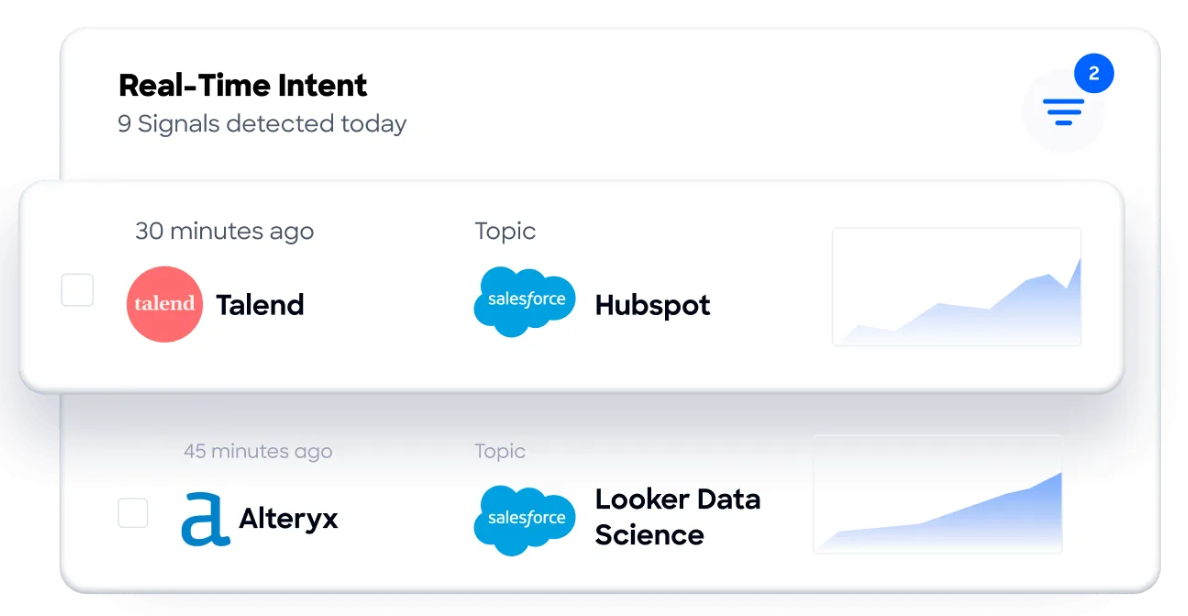
For sales reps, this means the direct dial actually rings and the email actually lands. For RevOps, enrichment workflows don't require stitching together multiple vendors to get a complete account picture. Beyond contact data, ZoomInfo provides 300+ company attributes, department org charts with decision-makers, technographic profiles of 30,000+ technologies across 30M+ companies, and buyer intent data that tracks signals from 210 million IP-to-Organization pairings.
Source: ZoomInfo
No amount of inbox optimization fills this data gap. Mixmax can help you send a well-timed sequence, but if your contact list is incomplete or your emails bounce because addresses are unverified, the execution is wasted.
"ZoomInfo gives us the information we need to execute. It's already there, so we can be three steps ahead." (Vensure)
GTM Context Graph: ZoomInfo's intelligence layer connects deals, conversations, and signals to surface why outcomes happen.
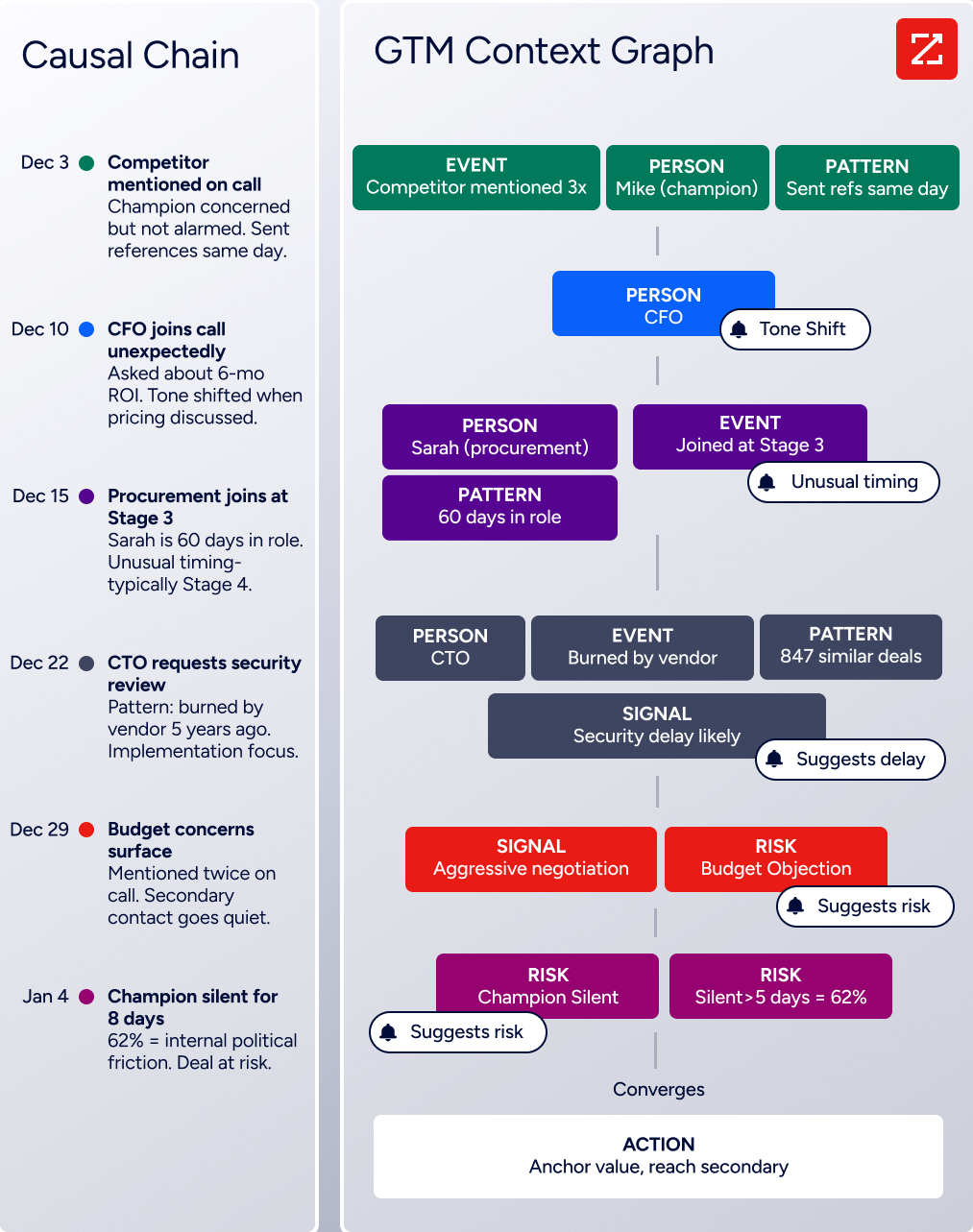
Raw data becomes intelligence through the GTM Context Graph, which processes 1.5B+ data points daily. It combines ZoomInfo's B2B data with a customer's CRM records, conversation transcripts from Chorus (ZoomInfo's conversation intelligence product), email interactions, and behavioral signals into a graph that captures not just what happened in a deal, but why it happened.
As ZoomInfo's Chief Product Officer Dominik Facher writes: "The CRM recorded the state change. It has no record of why it happened." A CRM knows a deal moved from Stage 3 to Stage 4. The GTM Context Graph knows that the CFO joined the last call and asked about six-month ROI, and that this pattern of executive sponsorship matches what drove closed-won deals in similar accounts. That reasoning feeds into every downstream action: outreach that addresses the specific concern raised, plays that target accounts matching actual win patterns, and forecasts weighted by buying evidence rather than stage labels.
Source: ZoomInfo
Mixmax tracks opens and clicks. ZoomInfo connects those engagement signals to intent data, conversation content, CRM state, and market intelligence to explain what they mean and what to do next.
Seismic attributed 39% of active pipeline to ZoomInfo signals and reported 54% productivity gains. CBO Toby Carrington noted: "That combination of our internal CRM data, external signals, and AI that's given all that context has helped us craft very specific account- and persona-based messages." (Seismic)
GTM Workspace: An AI-powered workspace where sellers get prioritized accounts, drafted outreach, and deal intelligence in one view.
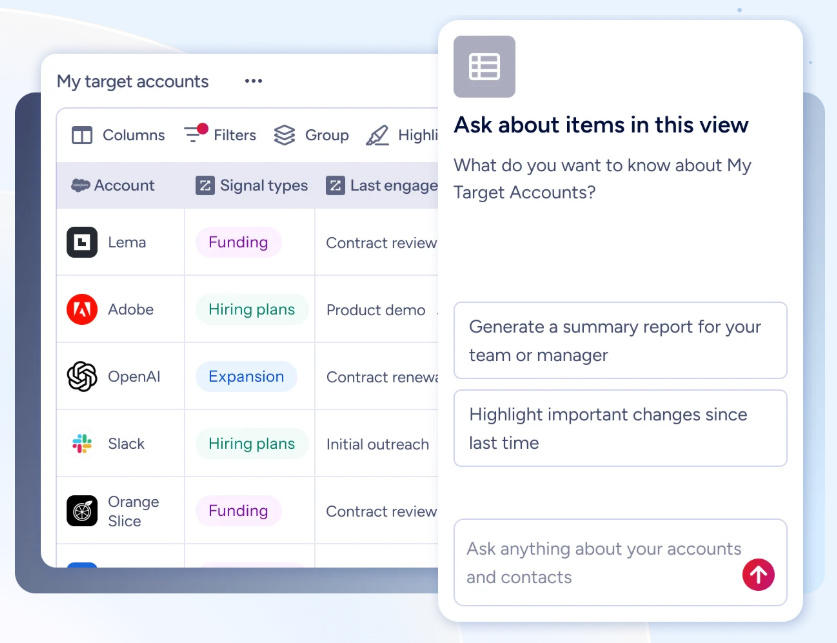
GTM Workspace is ZoomInfo's seller-facing product, launched in October 2025. It integrates with CRM and other go-to-market tools, pulling everything into a single view where AI agents research accounts, generate follow-ups, monitor signals, draft outreach, and update CRM fields.
Source: ZoomInfo
The AI Assistant produces one-click account briefs pulling CRM history, company news, ZoomInfo signals, and stakeholder context into a ten-second summary. The Action Feed delivers a live stream of in-market buyers matched to target criteria, with pre-drafted actions on every signal (G2 comparisons, funding events, executive hires). Views provide dynamic, spreadsheet-style interfaces that combine CRM data with real-time buying signals.
Where Mixmax requires reps to decide whom to email and when, GTM Workspace surfaces the answer: this account, this contact, right now, with a draft that addresses the deal context. Customer results reflect this: Databricks reached prospects 50% faster, Thomson Reuters increased closed-won deals by 40% and achieved 115% average quota attainment each month, and GTM Workspace users report boosting pipelines by 23% and booking nearly 60% more meetings per week.
Spekit's opportunities at higher-scoring accounts moved 58% faster through qualification, with RevOps Manager Ben Perceval noting: "ZoomInfo offers a unified view, eliminating the need to navigate between systems." (Spekit)
Universal Access: ZoomInfo's intelligence is available through native products, APIs, and MCP in any tool or AI agent.
ZoomInfo delivers its intelligence through three channels, so no team is locked into a single interface.
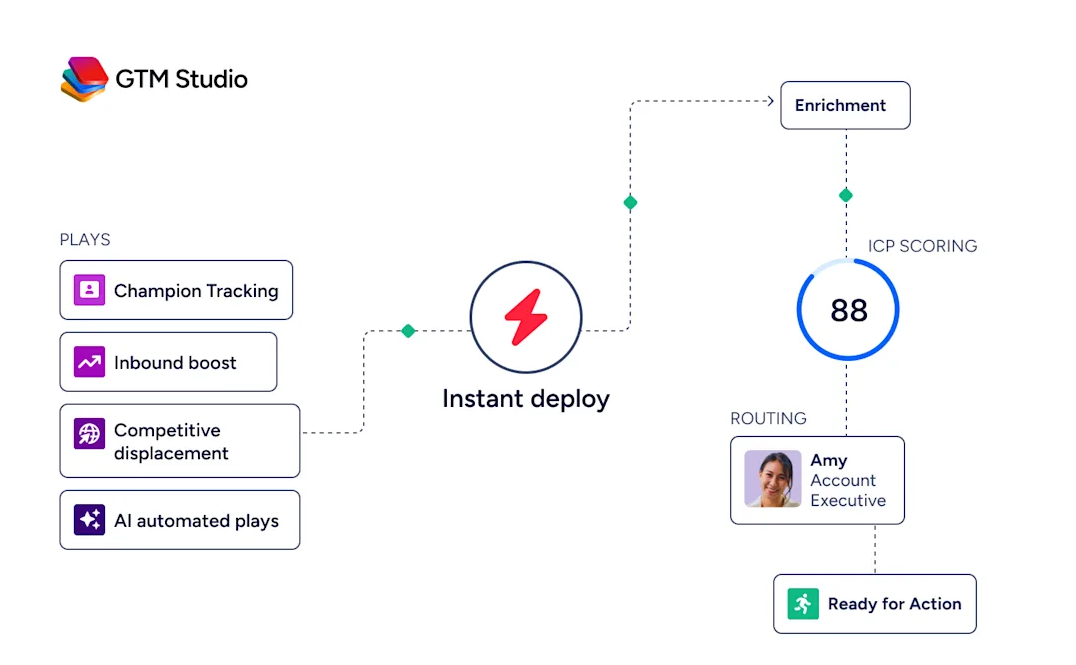
GTM Studio gives marketers, RevOps, and go-to-market engineers an AI-powered canvas where audience definition, campaign orchestration, and pipeline measurement happen in natural language. Expansion plays that used to take 3 weeks now launch in 30 minutes, without engineering support.
Source: ZoomInfo
For teams that build beyond ZoomInfo's own products, APIs and MCP expose the same intelligence to any custom agent, internal tool, or partner platform. The MCP server connects AI models like Claude and ChatGPT directly to ZoomInfo's B2B data as a native tool. API access is included in all relevant plans.
All three channels draw from one GTM Context Graph: the same data, the same reasoning, the same model that updates as new data comes in. Mixmax integrates with some of these systems, but as a consumer of external data rather than a provider of it. ZoomInfo is the intelligence layer that can power Mixmax and every other tool in a team's stack.
"The plug-and-play aspect of the API means I can integrate it very easily into any process and get information at a moment's notice," noted BDO Canada's Jerry Wilson, whose team achieved an 87% reduction in time spent on data dashboard updates. (BDO Canada)
Mixmax or ZoomInfo: Comparison Summary
Mixmax | ZoomInfo | |
|---|---|---|
Primary focus | Gmail-native sales execution | AI-powered go-to-market platform |
B2B contact database | None; reps source their own data | 500M contacts, 200M+ verified emails, 135M+ verified phone numbers |
Buyer intent data | Not available | 210M IP-to-Organization pairings, Guided Intent |
Conversation intelligence | Meeting transcription and summaries | Chorus platform with deal intelligence, coaching, and market insights |
AI capabilities | AI sequence builder, meeting prep, inbox categorization | GTM Context Graph with AI agents for account research, outreach, CRM updates, and signal monitoring |
Primary interface | Gmail sidebar and compose window | GTM Workspace (sellers), GTM Studio (marketing/RevOps), APIs/MCP (any tool) |
CRM integration | Salesforce, HubSpot auto-logging | Salesforce, HubSpot, Microsoft Dynamics + 120 App Marketplace integrations |
Reporting depth | Basic open/reply rates | AI-powered dashboards, pipeline attribution, deal intelligence |
Mobile access | No mobile app | Mobile app available |
Free option | Free plan (20 tracked emails/month) | ZoomInfo Lite (permanent free plan with 10 monthly export credits) |
Pricing | $29-$89/user/month (self-serve) | Custom-quoted based on seats, credits, and features |
Target market | SMB to lower mid-market | Mid-market to enterprise |
Ideal for | Teams that want fast inbox-native execution | Teams that need data, intelligence, and execution in one platform |
Final Verdict
The choice between Mixmax and ZoomInfo depends on what your sales operation needs most: inbox execution tools or go-to-market intelligence.
Choose Mixmax if your team already knows who to contact and needs a fast, lightweight way to execute outreach from Gmail. It suits small to mid-sized sales teams running straightforward email sequences who value quick setup, minimal training, and the comfort of never leaving the inbox. The scheduling features convert email replies into booked meetings well, and the AI Copilots add real automation to daily workflows. At $29-$89/user/month with self-serve pricing, it's accessible for teams that don't need enterprise-scale features.
Choose ZoomInfo if your challenge isn't just how to reach out but who to reach out to, when, and why. ZoomInfo fits teams that need verified B2B data to build their pipeline, buyer intent signals to time their outreach, conversation intelligence to understand their deals, and AI that reasons across all of it to surface the next action. With GTM Workspace for sellers, GTM Studio for marketers and RevOps, and APIs/MCP for any tool, ZoomInfo delivers intelligence wherever your team works. It's the platform for organizations that have outgrown point solutions and need a single go-to-market intelligence layer across their sales operation.
Get started with a ZoomInfo free trial here.
The distinction is structural, not feature-by-feature. Mixmax optimizes what happens after a rep decides to email someone. ZoomInfo shapes the decision itself, connecting data, signals, conversations, and AI so every sales action draws on the full context of the account, the deal, and the market.
Mixmax FAQ
Is there a free version of Mixmax?
Yes. Mixmax offers a permanent free plan with 20 tracked emails per month, 50 sequence recipients per month, and unlimited calendars, templates, reminders, and Send Later. The free plan excludes inbox categorization, smart signals, meeting notes, multi-channel sequences, and the AI sequence builder. Mixmax also offers a 14-day free trial of the Mixmax Suite with no credit card required, which reverts to the free plan if no paid subscription is selected. ZoomInfo offers ZoomInfo Lite, a permanent free plan with access to its B2B database, 10 monthly export credits, and WebSights Lite for website visitor identification.
How much does Mixmax cost?
Individual Copilots start at $29/user/month (annual billing) for Inbox Copilot or Meeting Copilot, and $49/user/month for Engagement Copilot. The Mixmax Suite bundles all three at $89/user/month. Monthly billing runs 15-30% higher. The Mixmax for Teams plan, which adds the dialer, custom branding, Salesforce Insights, and advanced rules, requires custom pricing with a 5-user minimum. The built-in dialer adds $10-$20/user/month plus per-minute charges on top of the base subscription.
Does Mixmax work with Outlook?
Mixmax added Outlook support in 2024, but the experience is not yet at parity with Gmail. Certain features, including Meeting Copilot, remain Gmail-only, and G2 reviewers note UI inconsistencies for teams split between Gmail and Outlook. If your organization runs primarily on Microsoft 365, evaluate the current Outlook feature set carefully before committing.
Does Mixmax include a B2B contact database?
No. Mixmax is a sales execution tool, not a data provider. It includes no database of contacts, companies, phone numbers, or email addresses. Reps must source prospect data from a separate platform or manual research before using Mixmax's sequences. ZoomInfo provides 500M contacts, 200M+ verified business emails, and 135M+ verified phone numbers, giving teams the data foundation that inbox execution tools require.
What CRM integrations does Mixmax support?
Mixmax integrates natively with Salesforce and HubSpot for bidirectional activity sync, sequence launch, and automatic logging of email and meeting data. For other CRMs, Mixmax offers lighter connections through Zapier to Copper, Insightly, Microsoft Dynamics 365, Pipedrive, Monday, and Zoho CRM. Teams on Pipedrive or non-Salesforce/HubSpot CRMs should note that native sync depth is limited.
Can Mixmax track buyer intent or website visitors?
No. Mixmax tracks engagement after emails are sent (opens, clicks, replies, downloads) but does not provide buyer intent signals or website visitor identification. It cannot tell reps which accounts are researching solutions before outreach begins. ZoomInfo's intent data tracks signals from 210 million IP-to-Organization pairings, and its WebSights feature resolves anonymous website traffic to specific companies and buying team members.
Does Mixmax have a mobile app?
No. Mixmax does not offer a native mobile app for iOS or Android. The platform is desktop-only, requiring Chrome (current or immediately previous stable release) with at least 8GB RAM and a 1,280-pixel minimum display width. Chromium-based browsers other than Google Chrome, as well as app wrappers like Station, Shift, or Mailplane, are not supported.
What is Mixmax's AI Sales Execution positioning?
In late 2024 / early 2025, Mixmax relaunched as "Mixmax AI" and coined the "AI Sales Execution" category. The platform is organized around three AI Copilots (Inbox, Meeting, Engagement) that use AI to surface next actions inside the inbox. The positioning emphasizes "elevated execution over scaled activity," meaning helping reps act on signals rather than simply sending more emails. This contrasts with ZoomInfo's approach, where the GTM Context Graph reasons across data, conversations, intent signals, and CRM records to power AI agents that handle the go-to-market workflow across sales, marketing, and RevOps.
More Mixmax comparisons and alternatives:
