

\Woodpecker is a cold email tool for B2B teams who want to send outreach from their own inboxes without landing in spam. Founded in Poland in 2015 and now publicly traded on the Warsaw Stock Exchange, it's one of the few tools in the category with audited financials and a transparent company structure. The platform bundles email sending, verification, warm-up, and LinkedIn automation into a single subscription, with a focus on deliverability.
To write this Woodpecker review, we analyzed the platform extensively. We believe it's the right choice if:
You need a cold email tool with good deliverability protections
You run a lead generation agency managing multiple client accounts
You want free email verification and warm-up included with your plan
You value a simple interface that gets campaigns running in minutes
Your outreach is email and LinkedIn only, without phone or SMS
However, Woodpecker might not be the best choice if:
You need a large, verified B2B contact database with direct dials and mobile numbers
You want buyer intent signals to prioritize which accounts to contact first
You require CRM integration with automated workflows and lead routing
You need conversation intelligence to analyze sales calls and coach reps
Your go-to-market strategy spans prospecting, marketing, and operations in one platform
In this case, consider ZoomInfo: a go-to-market platform that starts where Woodpecker ends. Where Woodpecker handles the sending, ZoomInfo covers the full go-to-market process, from finding the right buyers across 500M contacts and 100M companies, to surfacing intent signals that reveal when those accounts are actively in-market, to executing outreach through its GTM Workspace for sellers and GTM Studio for marketers and RevOps teams.
We've included a detailed look at ZoomInfo later in this Woodpecker review, as the natural step up for teams that need more than email execution. If you're ready to explore the full platform, you can start with ZoomInfo's free trial here.
What is Woodpecker?
Woodpecker is a cold email outreach platform founded in 2015 in Wroclaw, Poland, by cousins Mateusz Tarczyński and Maciej Ciesla. The origin story is an accidental pivot: the founders were building a fitness app for the US market and built internal cold email automation to prospect beta testers. When the fitness app failed, they turned that internal tool into a product. It took nine months to build. In the first month, Woodpecker acquired 38 paying customers.
Today, Woodpecker serves 4,500+ B2B clients in 110 countries, sends 9 million emails per month, and starts 260,000 sales conversations monthly. The company went public on the Warsaw Stock Exchange in 2021 and upgraded to the GPW Main Market in April 2024 (ticker: WPR), making it the only publicly listed company in the cold email category.

Source: Woodpecker
The platform positions itself as "all you need to cold email in one place," targeting five buyer segments: sales teams, lead generation agencies, recruiters, business owners, and cold email marketers. Its core promise is deliverability: it bundles email verification, warm-up, adaptive sending, and inbox rotation so emails land in the primary inbox rather than spam.
Woodpecker Pros & Cons
Pros | Cons |
|---|---|
Free email verification (via Bouncer) on every plan | LinkedIn automation uses credential-based access, not native API |
Free warm-up and adaptive sending included | Reporting and analytics are shallow |
Unlimited team members and email accounts | Add-on costs can multiply the base price |
Dedicated Agency Panel for multi-client management | No built-in phone or SMS channel |
Condition-based campaign branching built in | No native lead enrichment (technographics, intent signals) |
Permanent free plan (500 contacted prospects/month) | API access requires a paid add-on |
GDPR-compliant with EU data hosting | No drag-and-drop sequence editor |
Woodpecker Review: How It Works & Key Features
Cold Email Campaigns: Woodpecker sends automated sequences from your real inbox with built-in safety guards.
Woodpecker's campaign builder follows a three-step editor: Path, Prospects, and Summary. In the Path step, you write your opening email, add follow-ups, set delays, and optionally insert branching conditions. In the Prospects step, you import contacts via CSV or integrations. The Summary step previews everything before launch.
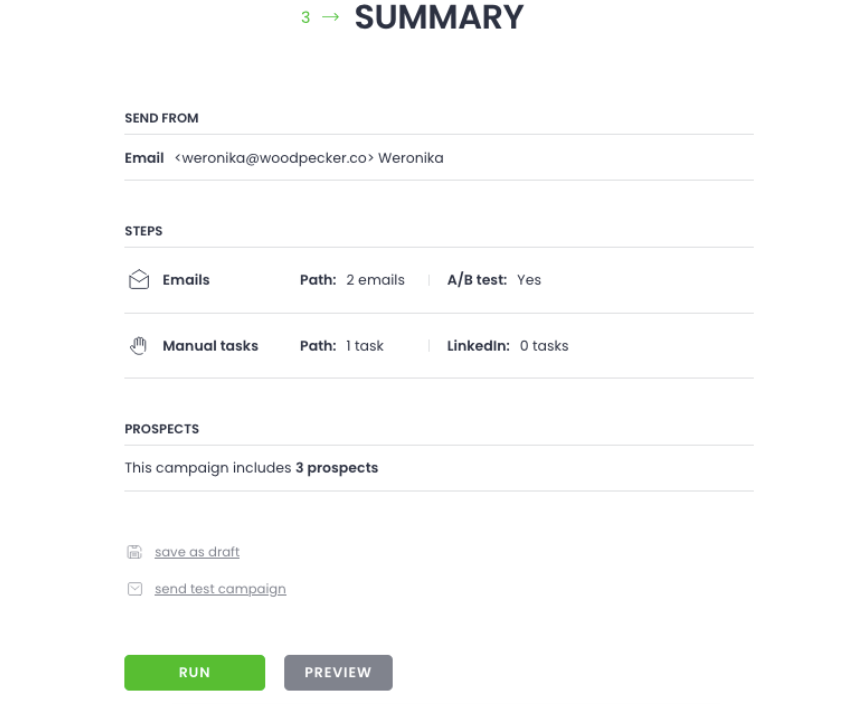
Source: Woodpecker
All emails send from your connected inbox via SMTP/IMAP, not from a third-party sending IP. This matters for deliverability: recipient email providers see a message from a real account, not a bulk sender.
The standout feature is condition-based campaigns. At any point in a sequence, you can split prospects into a YES path and a NO path based on four conditions: whether they opened the email, clicked a link, had a specific snippet value, or completed a task. Competing tools often require Zapier or external logic for this branching. In Woodpecker, it's native.
Other campaign capabilities include up to 5 A/B test variants per step, Spintax and Liquid Syntax for message variation, custom fields with fallback values, delivery scheduling by prospect timezone, and an OpenAI integration for AI-assisted copywriting inside the editor.
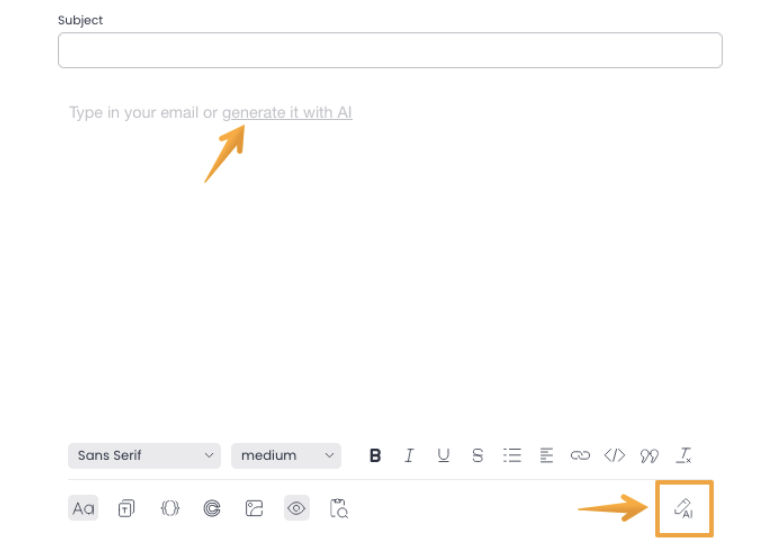
Source: Woodpecker
Workflows move prospects between campaigns automatically based on their status (responded, autoreplied, paused, nonresponsive) and AI-assigned interest level, removing the need for external automation to handle post-campaign routing.
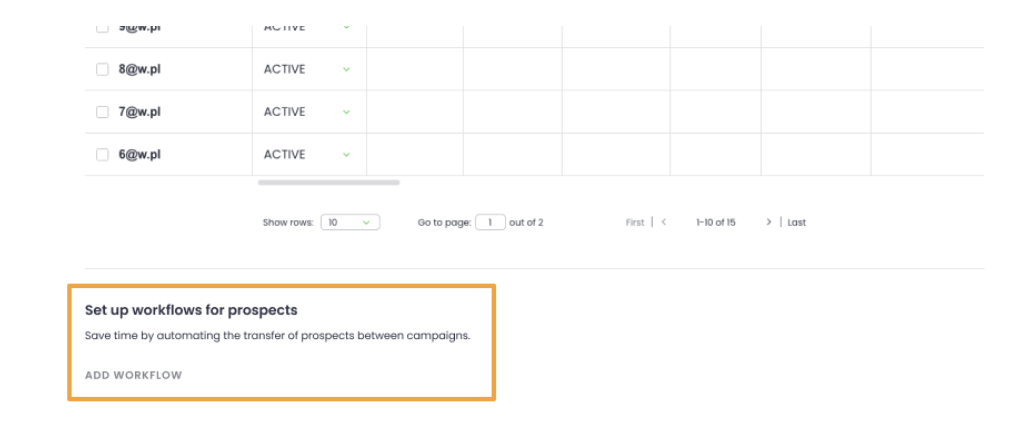
Source: Woodpecker
Email Deliverability: Six integrated tools to keep you in the inbox.
Deliverability is where Woodpecker has invested most. The platform bundles six features that work together, most of them free on every plan.
Email Verification (Bouncer). Every time you click "Send," Woodpecker runs each prospect's address through Bouncer before dispatching the email. Invalid addresses are flagged and withheld automatically. No setup, no extra cost, no separate account. The platform also includes free catch-all email verification.
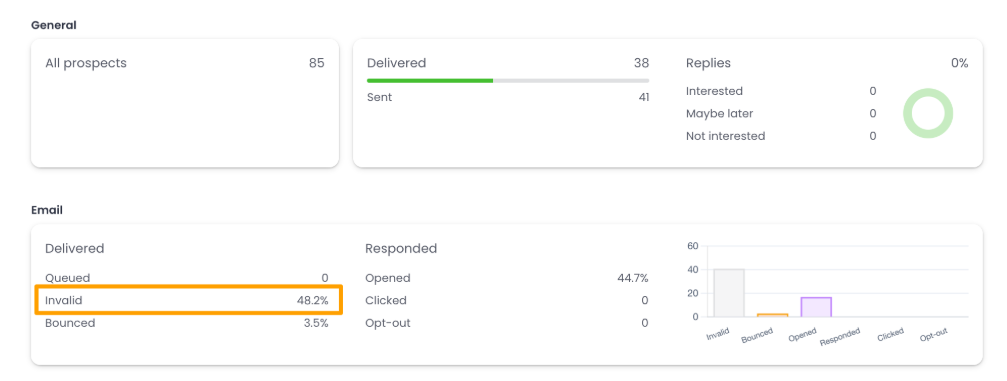
Source: Woodpecker
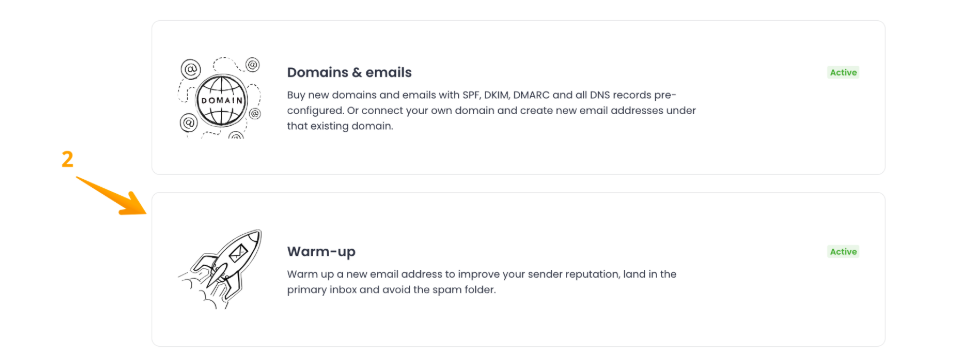
Warm-up. Woodpecker offers automated warm-up via Mailivery or Warmy, gradually ramping sending volume to 50 emails per day with a target reply rate of up to 55%. One useful detail: you can add your actual campaign copy to warm-up, training inbox providers to associate your content with positive engagement before the campaign goes live.
Source: Woodpecker
Adaptive Sending. This runs automatically with no configuration. When outbound volume approaches a provider's daily quota, Woodpecker throttles by 50% for 24 hours or 10% for 10 days. Internal data shows inboxes with Adaptive Sending experience 2.4 times fewer provider-imposed blocks and a 59% reduction in account block risk.
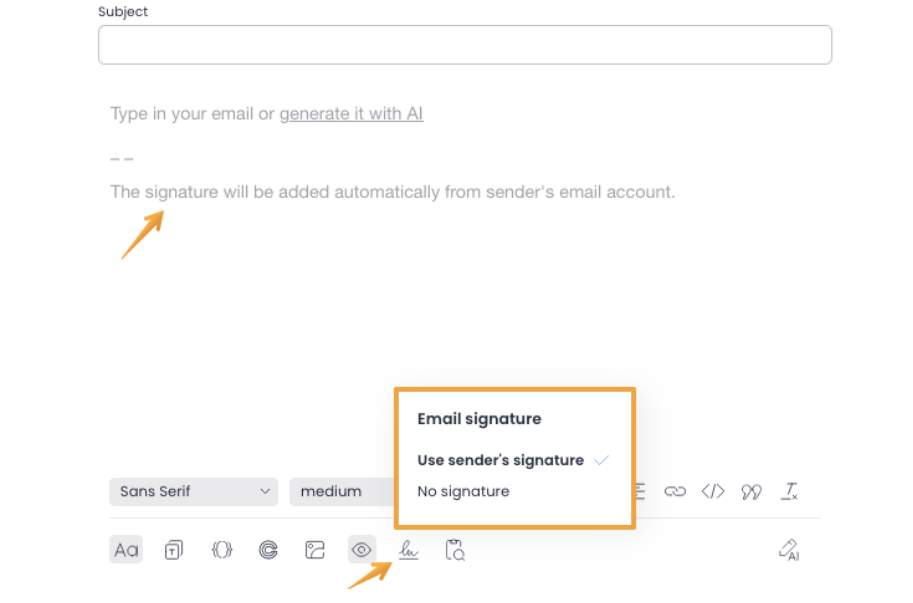
Inbox Rotation. You can assign up to 100 sending email accounts to a single campaign. Woodpecker distributes prospects across mailboxes based on each one's configured limits and current usage, with signatures automatically matched to whichever account sends.
Source: Woodpecker
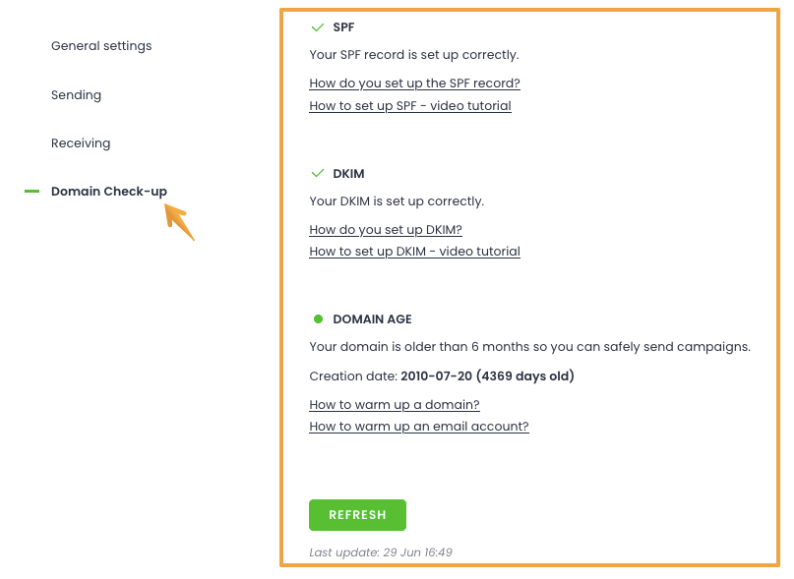
Domain Audit. When an email account is connected, Woodpecker checks SPF, DKIM records, and domain age. You can also buy domains and accounts through Woodpecker with SPF, DKIM, and DMARC pre-configured, removing the most common infrastructure setup friction.
Source: Woodpecker
Spamword Finder. Before launch, the Spamword Finder scans your copy and flags words likely to trigger spam filters.

Source: Woodpecker
Lead Finder: A built-in B2B database with 1 billion+ contacts.
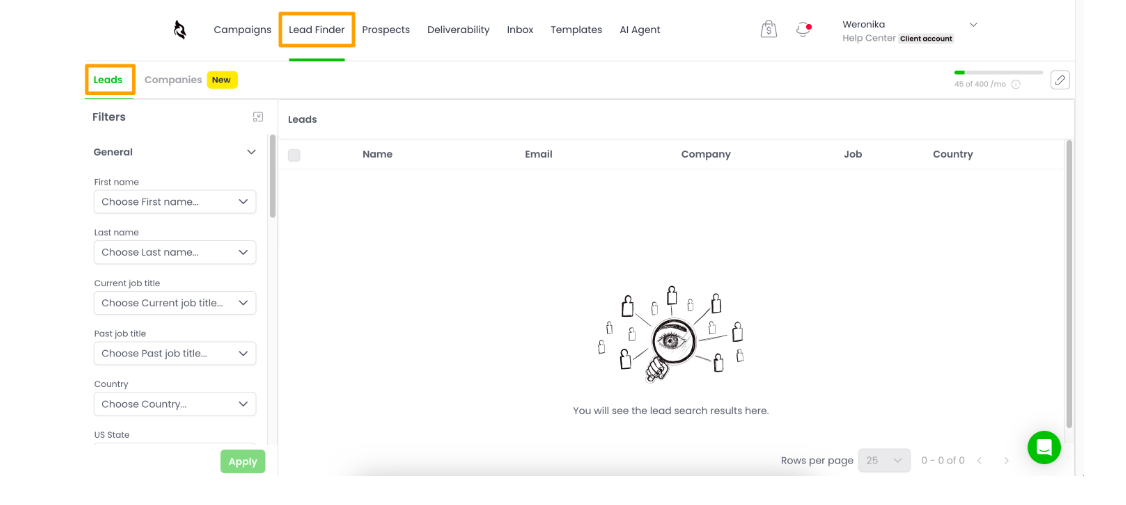
Woodpecker's Lead Finder provides access to over 1 billion contacts inside the app. The tool has two search modes: a Leads tab for filtering by job title, country, industry, department, and seniority, and a Companies tab for searching by company name, industry, employee count, founding year, and location.
Source: Woodpecker
The system uses a credit-based model: viewing a company costs 2 credits, viewing a lead costs 1, and enriching an email address costs 1.5. 400 credits come free each month with every plan (enough for roughly 266 leads). Higher-volume credit packages start at $28/month for 2,000 credits.
The convenience is in the workflow: found leads push into an existing campaign without any CSV export-import cycle. Duplicate protection ensures leads already in your database aren't re-added, and no credits are charged for them.
However, Lead Finder is a search tool, not an enrichment engine. There's no technographic data, no intent signals, no job-change alerts, and no firmographic depth beyond basic company attributes. For anything beyond finding an email address, you'll need third-party tools like Clay or Persana AI.
LinkedIn Outreach: Add profile visits, connection requests, and messages as steps in your email sequences.
LinkedIn Outreach Automation is a paid add-on ($29/month per LinkedIn account) that embeds four LinkedIn action types into the campaign builder: profile visits, connection requests, direct messages, and InMail.
A branching feature routes prospects based on whether they accepted a connection request. If accepted, the sequence moves to a direct message step; if not, it falls back to email. All LinkedIn actions fire between 8 AM and 6 PM on weekdays, with A/B testing for up to 5 message variants per LinkedIn step.
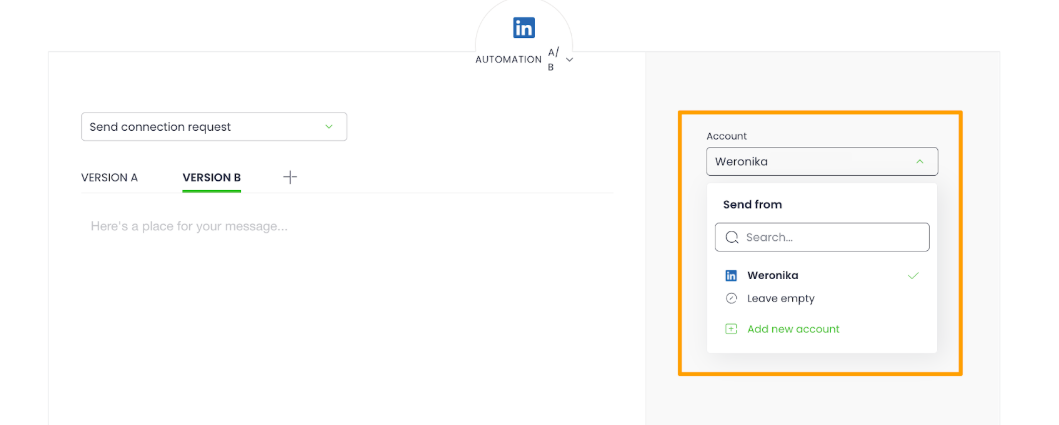
Source: Woodpecker
Daily limits depend on LinkedIn account type: Basic accounts support up to 80 profile visits and 50 direct messages per day, while Sales Navigator accounts allow up to 500 profile visits and 250 direct messages. Replies to LinkedIn messages surface in Woodpecker's inbox under a dedicated LinkedIn tab.
The integration connects via your LinkedIn credentials. Two-factor authentication must be temporarily disabled during setup. Woodpecker doesn't publicly document the technical connection method, but the setup process suggests browser-level automation rather than LinkedIn's official API.
Agency Panel: Manage all client campaigns from a single dashboard.
The Agency Panel is one of Woodpecker's most distinctive features. It's an agency-specific product with its own pricing ($27/month per active client) that lets agencies manage every client's campaigns, mailboxes, and reports from one interface.

Source: Woodpecker
The panel uses a two-layer system: an Agency HQ for the agency's own billing and global settings, and the Agency Panel for client management. Clients connect their own mailboxes via an invitation link, so no password sharing is required. Guest Viewer access lets clients see campaign stats and export data without full login credentials.
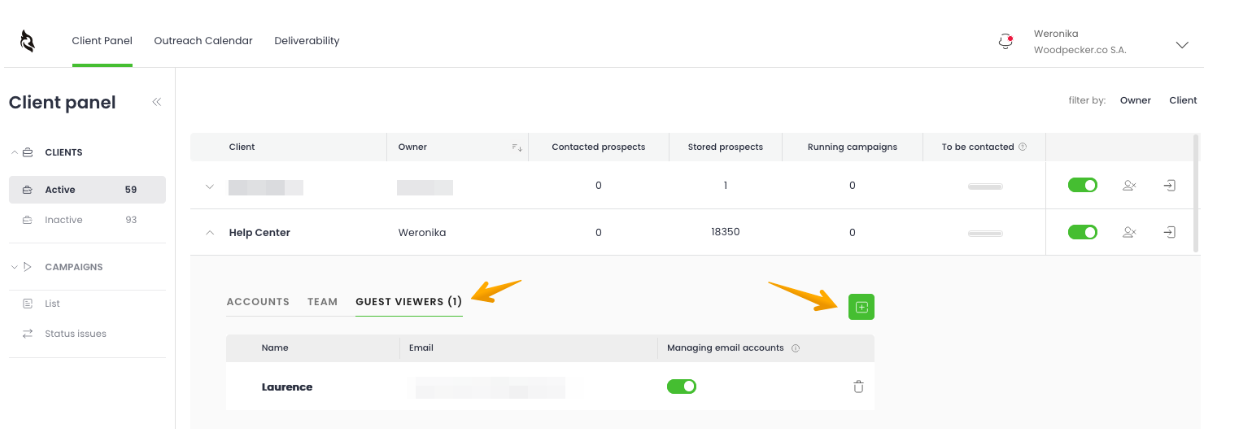
Source: Woodpecker
Agency-specific features include: global domain blacklisting that cascades across all client accounts, a color-coded prospect pipeline bar showing which clients' campaigns are about to run dry, white-label notification emails by default, deliverability monitoring with per-client PDF reports, and a dedicated Agency API for programmatic account management.
Veth Group uses the Agency Panel to run roughly 1,000 client appointments per month, claiming SDR-cost savings of 50%. (Woodpecker Case Study)
Pricing: Contact-based billing with a permanent free plan, but add-ons add up quickly.
Woodpecker uses a contact-based pricing model built around two metrics: contacted prospects per month and stored prospects. There are no per-seat or per-user charges. Team members, email accounts, and A/B tests are all unlimited and free.
Free Plan ($0/month, permanent):
500 contacted prospects/month
Unlimited team members and email accounts
Paid Plans start at $35/month for 500 contacted prospects, scaling at roughly $7 per 100 contacted prospects. Annual plans save 33%, paying for 8 months while receiving 12.
Add-on costs to watch:
LinkedIn outreach: $29/month per LinkedIn account
Lead Finder credits (beyond free 400): from $28/month per 2,000 credits
Extra warm-up slots: $5/month per email account
Agency Panel: $27/month per active client
Agency White Label: $5/month per active client
API access and integrations: listed as a separate paid add-on
An agency running 10 client accounts with LinkedIn outreach on 5 accounts, extra Lead Finder credits, and a few additional warm-up slots could see the base price triple or more. Multiple Capterra reviewers describe the model as "complicated" and "more expensive than it first appears."
Other terms: No contract required; cancel anytime. Accounts can be paused at $10/month, retaining all data but disabling sending. Refunds are only available within three days of charge if the account hasn't been used.
Where Woodpecker Falls Short
Woodpecker does cold email well. But several limitations show a platform built for one slice of the go-to-market process, not the full picture.
No B2B Data Depth.
Woodpecker's Lead Finder gives you a billion-contact search engine, but that's where the data story ends. There are no technographics (what software a company uses), no buyer intent signals (which accounts are actively researching solutions), no org charts, and no job-change alerts. You get a name and an email address. For teams that need to know not just who to contact but when and why, the gap forces reliance on separate tools like Clay, Apollo, or ZoomInfo.
Shallow Reporting.
Multiple G2 and Capterra reviewers call analytics a weak point. Woodpecker shows open rates, reply rates, and basic campaign stats, but lacks conversion-to-meeting attribution, pipeline-level reporting, or AI-driven performance recommendations. Agencies and sales leaders trying to connect outreach activity to revenue will find a gap here.
No Phone or SMS Channel.
Woodpecker covers email and LinkedIn. Teams running phone-heavy workflows or SDR sequences that combine calls, texts, and emails in one cadence need a separate tool. There's no evidence of phone or SMS on the roadmap.
LinkedIn Integration Limitations.
Embedding LinkedIn steps into email sequences is useful, but the implementation has drawbacks. The connection requires LinkedIn credentials with two-factor authentication temporarily disabled. G2 reviewers flag limitations compared to competitors that use safer automation approaches. At $29/month per LinkedIn account, the cost adds up for teams running multiple sender identities.
Add-On Pricing Complexity.
The base pricing looks clean: contact-based, no per-seat fees, transparent tiers. But the practical cost depends on add-ons. LinkedIn outreach, Lead Finder credits, extra warm-ups, Agency Panel fees, white-label reporting, and API access are all separate charges. A team that needs several of these can quickly exceed what a more inclusive competitor would charge for everything bundled.
Narrow Scope in a Broadening Market.
Cold email is one channel in a multi-signal, multi-channel go-to-market world. Woodpecker doesn't capture buyer intent, doesn't track website visitors, doesn't enrich CRM records, and doesn't help marketers run account-based campaigns. Teams growing beyond outbound email execution eventually outgrow the tool. That's not a failure of Woodpecker; it's a consequence of its focused design.
These limitations don't make Woodpecker a bad tool. They make it a focused one. But for teams whose needs extend beyond cold email, a broader platform can consolidate what would otherwise become a fragmented stack of point solutions.
Top Woodpecker Alternative for Growing GTM Teams: ZoomInfo
ZoomInfo is a go-to-market platform that addresses Woodpecker's scope limitations by covering the full process (identifying buyers, executing outreach, measuring results) in one place.
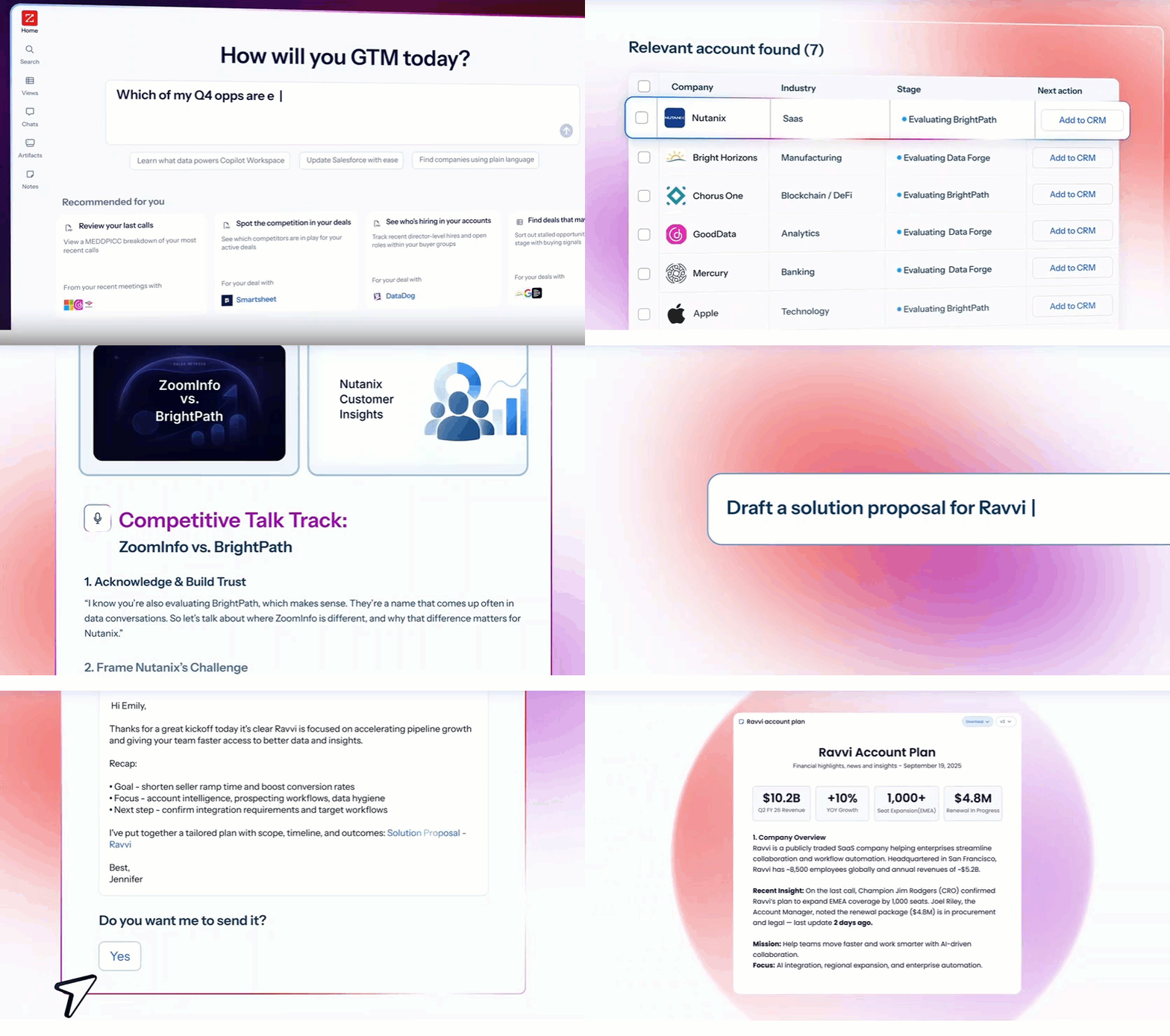
Source: ZoomInfo
Where Woodpecker starts with a blank contact list and a sequence editor, ZoomInfo starts with a B2B data foundation: 500M contacts, 100M companies, 135M+ verified phone numbers, and 200M+ verified business email addresses.

Source: ZoomInfo
Its GTM Context Graph combines that data with your CRM records, conversation transcripts, and behavioral signals to show which contacts are worth reaching today and why. That intelligence flows into GTM Workspace for sellers, GTM Studio for marketers and RevOps, or your own tools through the Enterprise API and MCP server.
Comprehensive B2B Data: The foundation that Woodpecker's Lead Finder can't match.
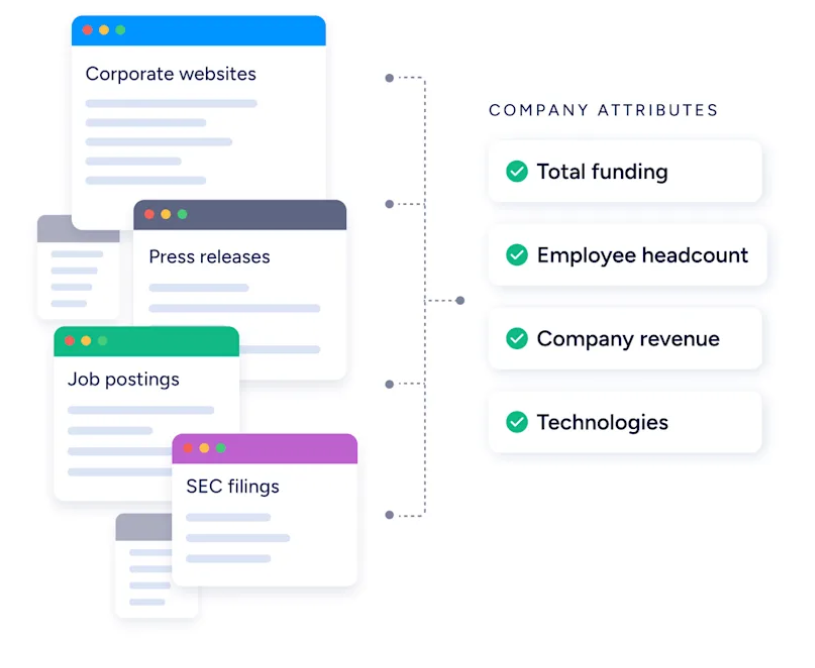
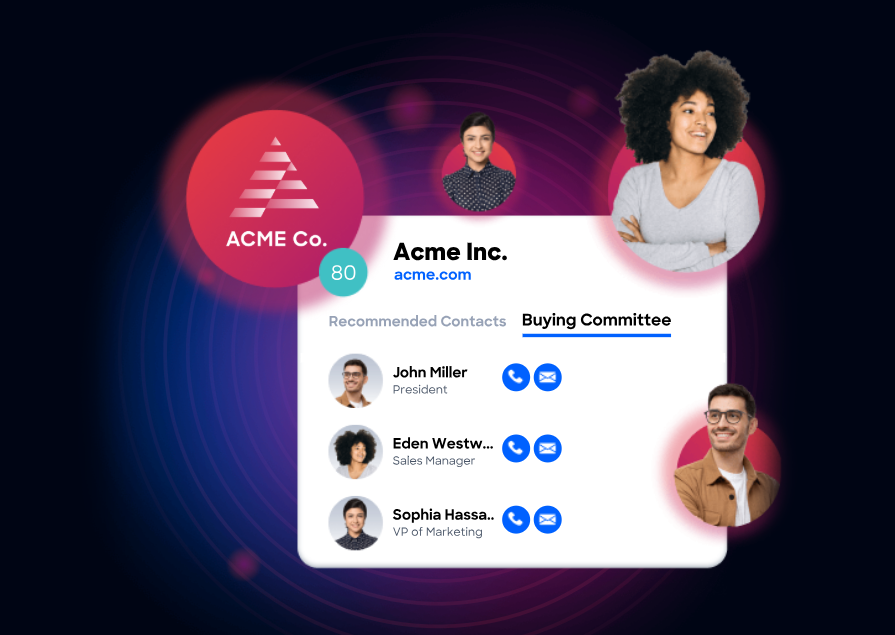
Woodpecker's Lead Finder gives you a name and an email. ZoomInfo provides 120M direct-dial phone numbers, department org charts with decision-makers mapped, technographic data on 30,000+ technologies across 30M+ companies, and 300+ company attributes for market segmentation.
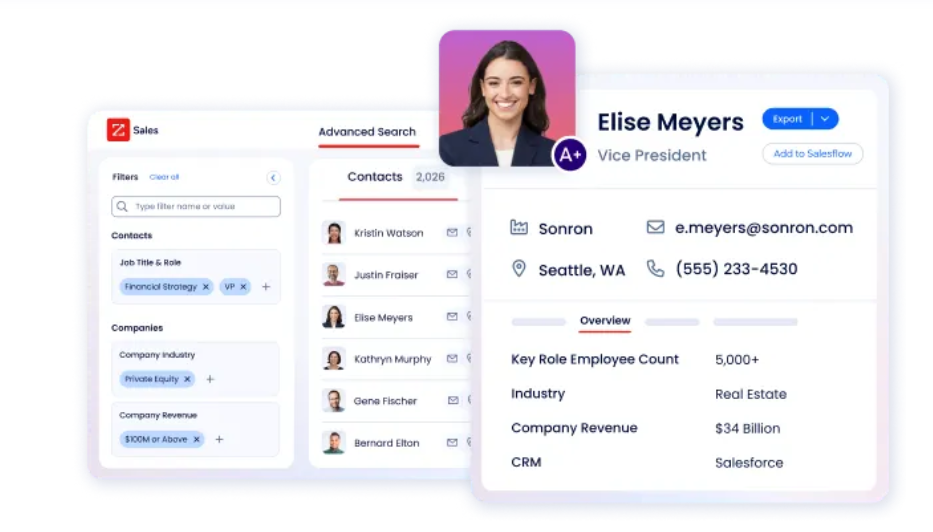
Source: ZoomInfo
The data is built and verified through a multi-source pipeline: automated ML scanning of 28 million site domains daily, third-party partner data covering 95 million businesses, and an in-house Data Training Lab of 300+ human researchers. First-party data reaches up to 95% accuracy. In a Fortune 500 competitive RFP analyzing 25 million contacts across vendors, the independent consultant concluded that "no other competitor came even close."
Source: ZoomInfo
For cold outreach, the difference is practical: direct dials that ring and verified emails that don't bounce. A 30% bounce rate doesn't just waste sends; it damages your sender reputation and buries later emails in spam folders. ZoomInfo solves the data quality problem before you write the first line of copy.
SpringDB used ZoomInfo's enriched data to achieve 2x-3x increases in campaign conversions, a 300% increase in database usability, and a 30-50% uplift in average deal size. (SpringDB Case Study)
GTM Context Graph: Intelligence that tells you who to contact, when, and why.
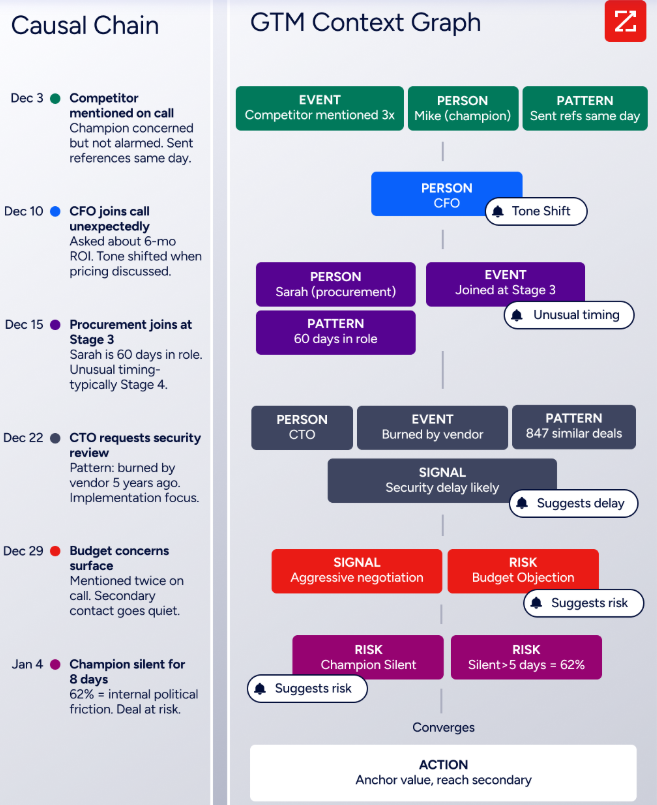
Woodpecker sends emails. ZoomInfo's GTM Context Graph tells you which emails are worth sending. This intelligence layer processes 1.5B+ data points daily, combining ZoomInfo's B2B data with your CRM records, conversation transcripts, and behavioral signals to reveal not just what happened in a deal, but why.
Source: ZoomInfo
Buyer Intent data tracks signals from 210 million IP-to-Organization pairings and 6 trillion+ keyword-to-device pairings monthly. Guided Intent, exclusive to ZoomInfo, identifies topics historically correlated with deal success rather than requiring manual topic selection. WebSights resolves anonymous website traffic to companies and buying teams, including direct contact information.
Source: ZoomInfo
The practical impact: instead of blasting 5,000 prospects and hoping for replies, you target the 200 accounts actively researching solutions in your category this week, with messaging that addresses the specific concerns driving their research. That precision changes reply rates and pipeline velocity in ways that more email volume never will.
Seismic attributed 39% of active pipeline to opportunities identified or influenced by ZoomInfo signals, reported 54% productivity gains, and saved 11.5 hours per week per seller. (Seismic Case Study)
GTM Workspace: A single workspace for sellers.
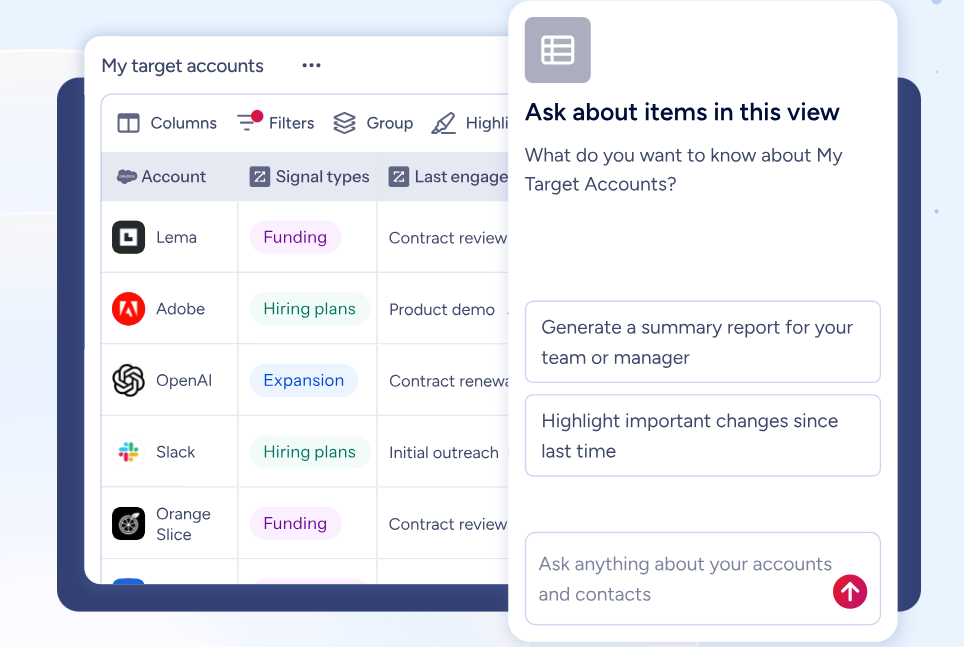
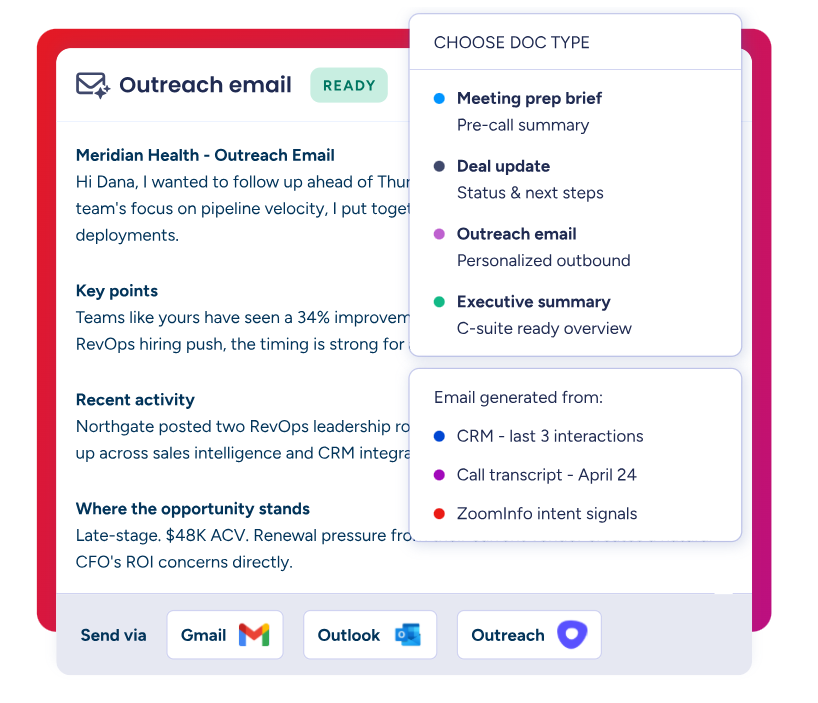
GTM Workspace replaces the seller's tab-switching routine (CRM, data tool, email, calendar, call recorder) with a single interface. Built on Anthropic's Claude, its AI agents answer three questions for every rep: who to contact, when to engage, and what to say.
Source: ZoomInfo
Key capabilities include a complete Book of Business view across CRM, ZoomInfo data, and conversation history; an Action Feed showing in-market buyers matched to your criteria with pre-drafted actions on every signal; AI-generated outreach personalized from full account context; and Views that combine CRM data with real-time buying signals.
Source: ZoomInfo
Where Woodpecker requires you to source contacts, write copy, build sequences, and monitor results across separate workflows, GTM Workspace consolidates research, writing, sending, and CRM updating into one place. Databricks reached prospects 50% faster. Thomson Reuters increased closed-won deals by 40%.
"Anything that minimizes our team's need to switch contexts is beneficial. ZoomInfo offers a single view, eliminating the need to navigate between systems." — Ben Perceval, RevOps Manager (Spekit Case Study)
GTM Studio and Universal Access: Build and activate go-to-market plays from anywhere.
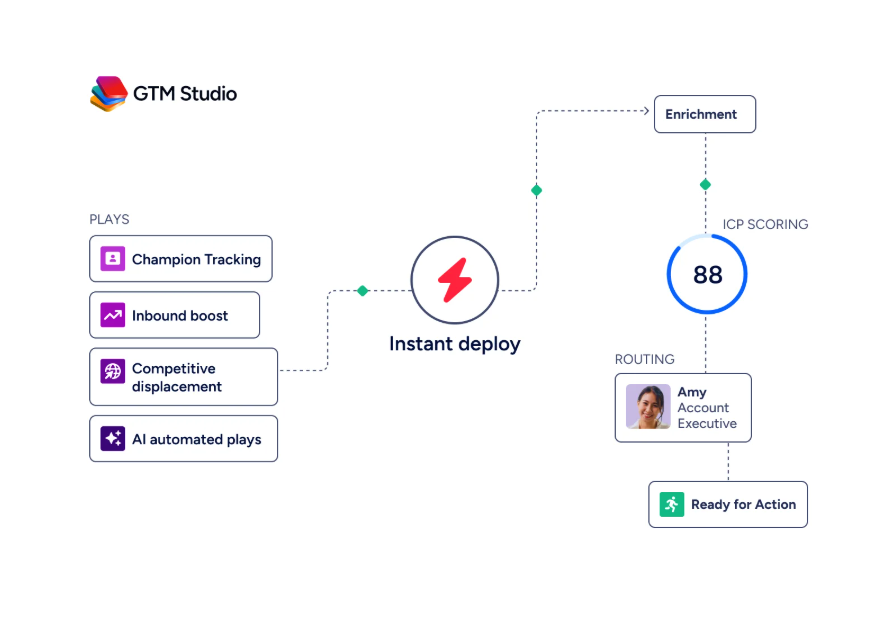
GTM Studio gives marketers, RevOps, and GTM engineers a canvas for building audiences, enriching data, and launching multi-channel plays without engineering support. Expansion plays that used to take 3 weeks now launch in 30 minutes. Pre-built plays cover inbound acceleration, champion tracking, competitive displacement, and ICP targeting. Every click, open, and reply improves targeting automatically.
Source: ZoomInfo
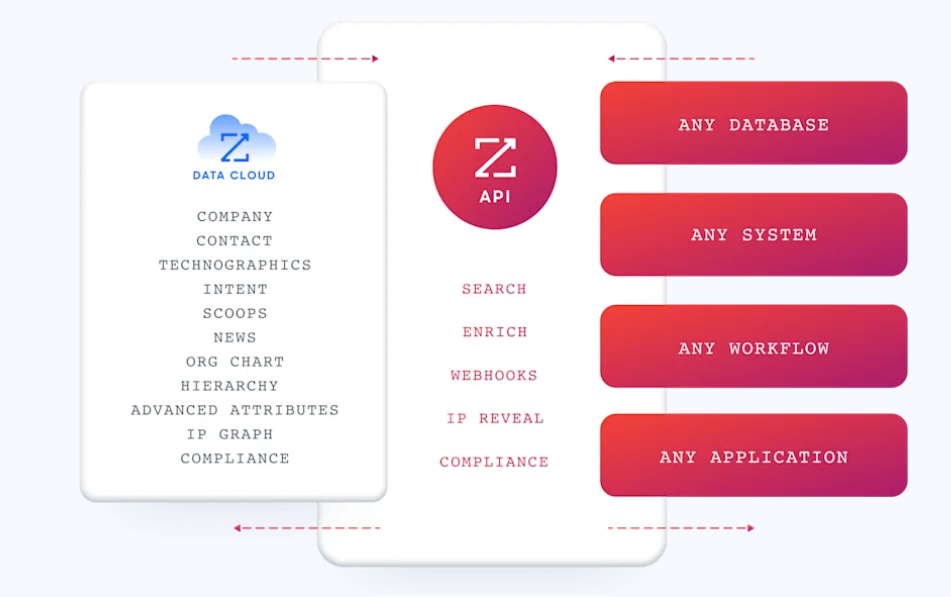
For technical teams, ZoomInfo's Enterprise API and MCP server expose the same intelligence to any custom agent, internal tool, or partner platform. API access is included in all relevant plans. The MCP server connects AI models to ZoomInfo data as a native tool (no custom coding required) and is listed in the Claude directory.
Source: ZoomInfo
Woodpecker also offers an MCP server and CLI for developer-led teams, but its API access is a paid add-on and the scope is limited to campaign management. ZoomInfo's programmatic access spans prospecting, enrichment, intent signals, audience management, and engagement data.
Woodpecker or ZoomInfo: Comparison Summary
Woodpecker | ZoomInfo | |
|---|---|---|
Primary focus | Cold email execution and deliverability | Full go-to-market intelligence and execution |
Target users | Sales teams, agencies, recruiters | Sales, marketing, RevOps, enterprise GTM teams |
Contact database | 1B+ contacts (Lead Finder add-on) | 500M contacts, 100M companies, 135M+ verified phone numbers |
Data accuracy | Email verification via Bouncer | Up to 95% accuracy via multi-source verification |
Buyer intent signals | Not available | 210M IP-to-Org pairings, Guided Intent |
Technographics | Not available | 30,000+ technologies across 30M+ companies |
Email campaign execution | Full campaign builder with deliverability suite | Via GTM Workspace and Salesloft partnership |
LinkedIn outreach | Credential-based automation ($29/mo per account) | Via multi-channel orchestration |
Phone/SMS | Not available | Intelligent dialing; multi-channel sequences |
Conversation intelligence | Not available | Chorus (recording, transcription, AI analysis) |
Website visitor tracking | Not available | WebSights (contact-level identification) |
CRM integration | HubSpot, Pipedrive, Zoho CRM | Salesforce, HubSpot, Microsoft Dynamics, 120+ integrations |
Agency features | Dedicated Agency Panel | Limited (enterprise-focused) |
AI capabilities | OpenAI email writer, AI Video, sentiment detection | GTM Context Graph, AI agents in Workspace and Studio |
Free plan | 500 contacted prospects/month | ZoomInfo Lite (permanent, 10 monthly credits) |
Pricing transparency | Published contact-based tiers (from $35/mo) | Custom-quoted, seat-and-credit-based |
Compliance | GDPR (EU-hosted) | ISO 27001, ISO 27701, SOC 2 Type II, TRUSTe GDPR/CCPA |
Best for | Focused cold email with deliverability priority | Teams needing data, intelligence, and execution in one platform |
Final Verdict
The choice between Woodpecker and ZoomInfo depends on the scope of your go-to-market needs.
Choose Woodpecker if your primary need is sending cold email safely and efficiently. It's the right tool for solo operators, small sales teams, and especially lead generation agencies that need to manage multiple client campaigns from one dashboard. The deliverability suite (free verification, warm-up, adaptive sending, inbox rotation) is strong, the Agency Panel is well-designed for multi-client operations, and the permanent free plan lets you evaluate the platform without financial commitment. If you already have your target contacts and just need to execute the outreach, Woodpecker does that job well.
Choose ZoomInfo if you need more than email execution. If you're spending hours sourcing contacts from multiple databases, guessing which accounts to prioritize, and manually stitching together data from disconnected tools, ZoomInfo consolidates that workflow. The combination of verified B2B data, buyer intent signals, the GTM Context Graph, and execution through GTM Workspace and GTM Studio gives teams a single system where prospecting, intelligence, outreach, and measurement happen in one place. For growing teams where the bottleneck isn't sending emails but knowing which emails to send, ZoomInfo addresses the upstream problem that sending tools cannot solve.
Get started with ZoomInfo here.
The structural difference is scope. Woodpecker optimizes the last mile of outbound: crafting and sending the message. ZoomInfo covers the full distance, from identifying the right buyer to understanding their intent to executing the outreach to analyzing what worked. Teams that start with Woodpecker often find themselves adding data tools, intent platforms, and enrichment services as they scale. ZoomInfo is what you get when those capabilities live in one platform from the start.
Woodpecker FAQ
Is Woodpecker free to use?
Yes. Woodpecker offers a permanent free plan that includes 500 contacted prospects per month, 6,000 emails per month, 2,000 stored prospects, 2 warm-up slots, and 400 Lead Finder credits. Unlimited team members and email accounts are included. This is a functional ongoing plan, not a time-limited trial. A separate 14-day free trial is also available for evaluating all paid features, except LinkedIn slots.
How does Woodpecker's pricing work?
Woodpecker charges based on contacted prospects per month, starting at $35/month for 500 prospects. There are no per-seat or per-user fees. However, several features are sold as separate add-ons: LinkedIn outreach costs $29/month per account, Lead Finder credits beyond the free 400 start at $28/month, extra warm-up slots are $5/month each, and the Agency Panel is $27/month per active client. Annual billing saves 33%.
What deliverability features does Woodpecker include?
Woodpecker bundles six deliverability tools, most at no extra cost: automatic email verification via Bouncer (including catch-all verification), warm-up via Mailivery or Warmy, Adaptive Sending that throttles volume before providers block your account, inbox rotation across up to 100 email accounts per campaign, domain audit checking SPF/DKIM/DMARC, and a Spamword Finder that flags risky language before you send.
Does Woodpecker have a built-in contact database?
Yes. The Lead Finder add-on provides access to over 1 billion contacts, searchable by job title, company, industry, seniority, and location. However, it provides basic contact information only. There are no technographics, intent signals, org charts, or enrichment capabilities. ZoomInfo offers 500M contacts with 135M+ verified phone numbers, 200M+ verified business emails, technographic data on 30M+ companies, and buyer intent signals.
Can Woodpecker send LinkedIn messages?
Yes, as a paid add-on at $29/month per LinkedIn account. You can add profile visits, connection requests, direct messages, and InMail as steps within email sequences. The integration connects via your LinkedIn credentials and supports branching based on connection acceptance. Daily limits vary by LinkedIn account type, with Sales Navigator accounts allowing higher volumes.
Is Woodpecker good for agencies?
Woodpecker's Agency Panel is one of its strongest features. It provides a multi-client management dashboard, guest viewer access for clients, global domain blacklisting across all accounts, white-label notification emails, deliverability monitoring with per-client reports, and a dedicated Agency API. No other cold email tool offers the same depth of agency-specific functionality. Pricing starts at $27/month per active client.
Does Woodpecker integrate with CRMs?
Woodpecker natively integrates with HubSpot, Pipedrive, and Zoho CRM, plus Zapier and Albato for broader connectivity. Some reviewers note that CRM integration quality (particularly with Zoho CRM and HubSpot) can be inconsistent, with data sync gaps. ZoomInfo offers integrations with Salesforce, HubSpot, Microsoft Dynamics, and over 120 tools through its App Marketplace.
How does Woodpecker compare to ZoomInfo for prospecting?
Woodpecker is a sending tool. It helps you execute cold email campaigns efficiently and safely. ZoomInfo is a go-to-market platform that covers the full prospecting workflow: identifying target accounts, finding verified decision-maker contacts, detecting buyer intent, executing outreach through AI tools, and tracking results back to pipeline. Teams that already have their contact lists and just need to send may find Woodpecker sufficient. Teams that need help identifying who to contact, when, and why will find ZoomInfo addresses those upstream questions.
Researching Woodpecker? These comparisons and alternatives help you decide:
