
Most revenue teams have accumulated a lot of AI. There's an assistant in the CRM, enrichment in one tool, and sequencing in another. Each one handles a task inside its own application. None of them coordinates with the others, and none takes responsibility for the outcome you actually care about: winning the deal, saving the renewal, or activating the champion.
So the work that matters most still lands on your team. High-intent signals wait hours for a response. Routing misfires send good leads to the wrong rep. Reps spend their time on admin instead of selling, and before RevOps can act on a single account, they jump through nine different systems to piece together its calls, emails, signals, and contact and company data.
ZoomInfo has launched Agent Teams to close this gap. Built on technology from DoubleO.ai, Agent Teams gives your whole revenue team AI agents that run complete GTM plays reliably. It turns disconnected AI tools, workflows, and signals into coordinated GTM execution, from signal to action. Describe a play in plain English, and Agent Teams builds it.
Agent Teams is available now in GTM Studio.
Give an Agent Team a GTM Motion, Not a Single Task
An Agent Team takes on a complete GTM motion. That could be activating an inbound buyer, re-engaging a champion, handing off a closed-won account, or protecting a renewal. Specialized agents, each with its own role, instructions, and tools, work together inside a single play. They build on one another's work and share context from every prior step.
Each agent evaluates the next best action from the current state of the record rather than a path someone drew months ago, and adapts as conditions change. Real-time evaluations check every step, so the play runs the same way every time, not just in the demo.
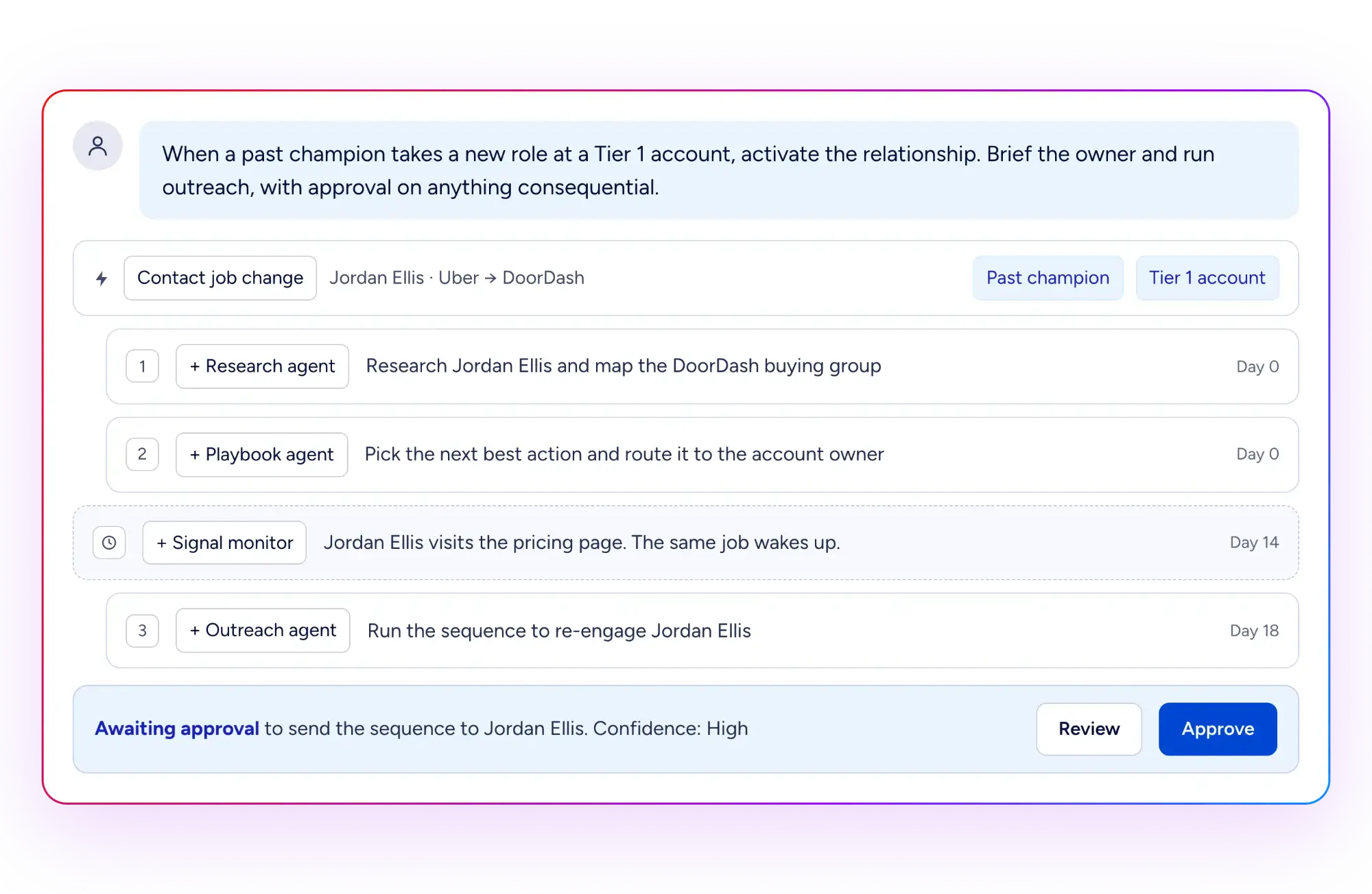
Why a Flowchart Can't Run a Champion Play
Traditional automation follows a fixed path. If this, then that. It breaks the moment reality deviates from the diagram, and your operations team is left adding branches for situations no one anticipated. Every deal is different: an enterprise account needs a different approach from an SMB, and one industry needs a different pitch from another.
Agent Teams works from state and context instead. It reads the current customer situation, evaluates its options, and chooses the next action within the boundaries of your play. Consider the steps in a champion play:
Jordan Ellis helped buy your product at Uber.
Six months later, Jordan became the Director of RevOps at DoorDash, a Tier 1 account.
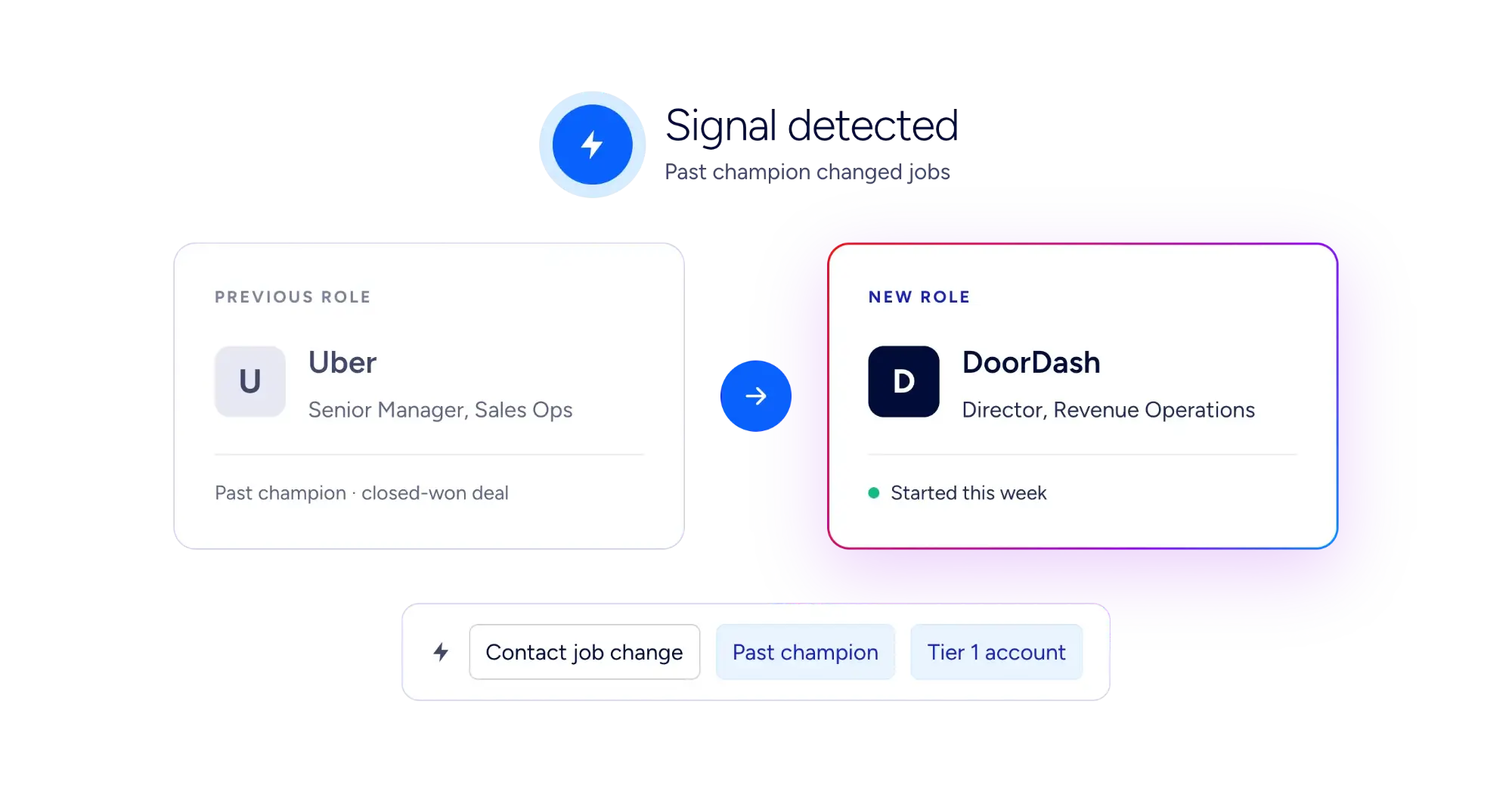
A traditional workflow matches the title, creates a CRM task that says "reach out," and hands off at precisely the point where judgment begins.
An Agent Team runs on a recurring schedule against a ZoomInfo audience of past champions. It spots the move, resolves Jordan and DoorDash, reconstructs Jordan's role in the original Uber deal, and identifies the current account owner. An open opportunity or a different owner can change the route, so it checks both.
It then applies your champion play and your Knowledge Base, drafts outreach grounded in the Uber relationship, and sends the account owner a brief in Slack. When Jordan visits your pricing page two weeks later, a website-visit trigger passes the full event context to the Agent Team so the play keeps moving.
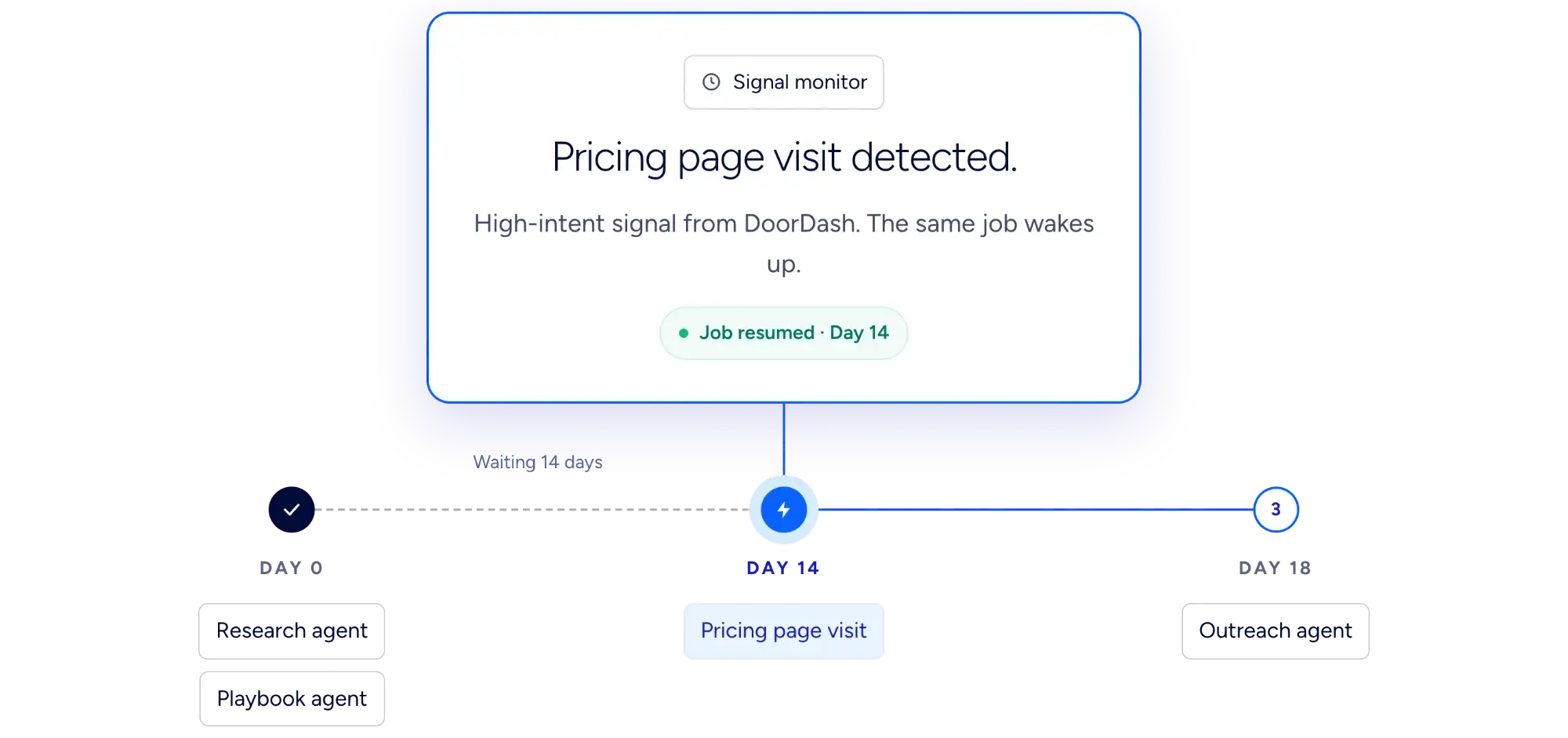
Every step is written back to Salesforce or HubSpot and grounded in your own GTM context, so your reps and your next play start with the full history.
Five More Plays Agent Teams Can Run End to End
A renewal at risk. Ninety days out, engagement has dropped and the champion has gone quiet. Agent Teams assembles the account's engagement history and CRM record, drafts a save plan, and briefs the account owner before the QBR.
A closed-won handoff. Agent Teams packages the deal history, the stakeholders, and every commitment made during the sale, so your customer success team inherits context instead of a blank record.
A closed-lost win-back. On a monthly schedule, Agent Teams reopens closed-lost opportunities, checks what stalled each deal last time, researches what has changed at the account, and proposes a win-back approach to the owner.
An inbound buyer. A new lead in Salesforce or HubSpot starts a play that enriches, scores, and qualifies the buyer. It then enrolls the buyer in the right sequence in SalesLoft or Outreach. The goal is converting a qualified buyer, not just getting a lead routed.
A closed-won deal that creates new pipeline. Every time a deal closes, Agent Teams reviews the full sales cycle, including call transcripts, emails, and CRM records, to understand why the customer bought. It drafts a case study, finds 10 competitors of the new customer that aren't already customers, and reaches out with messaging tailored to each one, backed by the case study.
What It Looks Like Inside an Agent Team
Each Agent Team starts with a trigger, often a buyer's signal. From there, shared context shapes each decision, your play and guardrails set the bounds, and the agents get to work.
Flexible, always-on triggers: Start a play from manual inputs (single or bulk), recurring schedules, webhooks, CRM events in Salesforce or HubSpot, or signal-based events like website visits and completed meetings. ZoomInfo Audiences can also serve as bulk inputs, so signals such as job changes can feed a play. Every trigger passes full event context to the Agent Team.
Multi-agent orchestration: Agent Teams runs on a real-time evaluation architecture. Custom agents, each with configurable roles, instructions, and tools, collaborate within a single play and automatically share context from prior steps. The result is GTM workflows that think across steps instead of just executing them. Conditional routing handles multiple condition paths.
AI-ready GTM intelligence: Every Agent Team has direct access to ZoomInfo's verified B2B data: people, companies, engagement history, intent signals, and account scores. Agents generate complex queries automatically based on the task at hand. That data sits alongside your CRM records, engagement history, and business context, so every agent works from the same complete understanding of your accounts.
Knowledge Base: Encode your ICPs, personas, brand guidelines, SOPs, and competitive intelligence at the organization or workflow level. Every agent draws on it, so outputs reflect how your business actually works.
Context-aware decisioning: Agents decide how to carry out their work as the play runs, not when it was built. Each one works from the current state of the record, the outputs of prior steps, and its own goals, so the play keeps running as conditions change.
Start From a Template, or Describe Your Own Play
Building an Agent Team doesn't require a diagram. Describe your goal in plain English, and Agent Teams generates the full workflow structure. It also handles the edge cases and errors you wouldn't know to account for when building from scratch.
Or start from the template library. Pre-built templates cover the most common GTM motions:
Inbound Lead Activation
Outbound Prospecting
Closed/Won Account Handoff
Closed/Won Competitor Acceleration
Meeting Insights & CRM Update
Weekly Sales Briefing
Deploy a template as-is, then customize it from there.
Works With the Tools Your Team Already Uses
Agent Teams is built into GTM Studio. That's where operators build and run plays, monitor every run, and put Studio's data and audiences to work.
Native integrations: Agent Teams connects natively with Salesforce, HubSpot, Slack, Gmail, SalesLoft, Outreach, and ZoomInfo's own data and audience products. Agents can read, create, and update CRM records, enroll prospects in sequences, and send emails and Slack messages.
Built-in capabilities: Agents come equipped with deep web research, document and spreadsheet creation, and image and audio generation, with no integration required.
ZoomInfo Audiences: Audiences can serve as bulk inputs, and agents can create, update, and enrich them as part of a play.
The wider ZoomInfo platform: The same ZoomInfo intelligence is available to the rest of your AI stack through GTM.AI, ZoomInfo's headless GTM context layer. That includes the API, the GTM CLI, and MCP.
Scale AI With Built-In Governance
You can't hand revenue-critical work to AI without boundaries. A single misfire in a complex GTM workflow can set off a chain of incorrect actions and bad data.
ZoomInfo spent years building a trusted foundation: responsibly sourced data, privacy-rights management, SOC 2 controls, ISO 27001, and ISO 27701-certified systems. Agent Teams runs on that foundation and adds governance to every play.
Monitoring: Monitor every play, then quickly identify and correct mistakes before they affect your business.
Cost visibility: AI credit usage is estimated before you activate a play and tracked for each Agent Team, so there are no surprises and no runaway spend.
Admin controls: Admin dashboards provide organization-wide oversight.
Role-based access: Role management ensures the right people are building and running the right Agent Teams.
Grounded outputs: Organization-level Knowledge Bases keep every agent aligned with your ICPs, brand, and SOPs.
ZoomInfo Agent Teams FAQ
What is Agent Teams?
Agent Teams is agentic orchestration for GTM, built into ZoomInfo GTM Studio. It coordinates teams of agents across your systems, signals, and ZoomInfo intelligence to execute complete GTM motions. Those motions run from signal detection and lead qualification through enrichment, routing, outreach, and CRM updates.
What is the technology behind Agent Teams?
Agent Teams is built on technology from DoubleO.ai, founded by Derek Osgood and Karthik Suresh and now part of ZoomInfo. It's a multi-agent platform with real-time evaluations, designed so GTM teams can build multi-agent automation that runs reliably.
How is Agent Teams different from workflow automation?
Workflow automation follows a predetermined sequence and breaks when inputs change. Agent Teams runs multi-step, multi-agent plays that reason across steps, choose the next best action from the current state of the record, and adapt as conditions change.
How is this different from running my GTM in Claude?
Claude is a great place to build a play, but those projects stay in one person's workspace and run only when they remember to run them. Agent Teams takes the plays that work and runs them for every rep, on every account. It's triggered by live signals, grounded in ZoomInfo data, and is monitored centrally.
Is this a new product or a new SKU?
Neither. Agent Teams is part of GTM Studio. There's no new contract, no new SKU, and no separate purchase.
Who has access?
Agent Teams is available in GTM Studio. Contact your ZoomInfo representative to get started. Admins can control access at the user level through Role Management.
Which systems does it work with?
Salesforce and HubSpot for CRM, SalesLoft and Outreach for sales engagement, and Slack and Gmail for communications, plus ZoomInfo's own data and Audiences. You can also connect ZoomInfo to Claude through MCP, and use GTM.AI to bring ZoomInfo context to the rest of your AI stack.
What controls do I have?
Each play defines its triggers, agents, tools, and instructions. Admin dashboards, role-based access, and credit estimates before activation keep you in control. A Pause for Review step for human-in-the-loop approval is on the roadmap for a future release.
What does it cost?
Agent Teams uses consumption-based AI Credits, billed against your existing ZoomInfo contract. Before you activate a play, you'll see an estimate of the credits it will use. Contact your ZoomInfo representative for pricing details.
How do I start?
Deploy one of the pre-built templates today, or describe a play in plain English and let Agent Teams generate the workflow for you.
