

Inbound revenue turns on how fast a qualified lead reaches the rep who can close it, and that speed depends less on the routing tool than on the data feeding it.
When a form submits, the assignment rule evaluates whatever the record holds at that instant. Blank territory, employee-count, or account-owner fields send the lead to a default queue or the wrong rep, and the response window closes before anyone acts.
This guide breaks down the routing methods that match each sales motion, the data fields each one needs to fire, and the enrichment layer that keeps assignment accurate as companies grow, reps turn over, and contacts change roles.
What is lead routing?
Lead routing is the automated process of assigning inbound leads to the right sales rep based on predefined criteria such as territory, segment, product interest, or account ownership. The system evaluates each record in real time and delivers the prospect to the rep best positioned to convert them, which removes manual assignment delays and keeps response times consistent.
Routing rules decide where each lead goes based on specific criteria:
Territory: geographic region or named account list
Segment: company size, industry, or revenue band
Product interest: which solution or use case the lead expressed interest in
Account ownership: whether the lead belongs to an existing account with an assigned rep
The process runs inside your CRM. A lead submits a form, the system evaluates the data against your assignment rules, and the lead appears in the right rep's queue within seconds. No manual handoffs or spreadsheet triage, just automated assignment against the criteria you define.
Why data quality determines routing success
Routing rules are only as good as the data they read. A blank industry field breaks segment routing. Inconsistent territory values send leads to the wrong region. A company name that does not match your account records breaks lead-to-account matching.
Missing or incorrect data creates routing failures in three ways:
Queue limbo: the lead sits in a default queue with no owner
Wrong assignment: the lead goes to a rep outside their territory or expertise
Rule conflicts: multiple assignment rules fire at once and create confusion
By the time someone catches the error, the lead has gone cold or engaged a competitor. Clean, complete, standardized data is what makes routing rules fire correctly and reach the right rep every time. Sophisticated routing logic on incomplete CRM records produces the same misroutes as no logic at all.
Why lead routing matters for revenue teams
Automated routing is foundational infrastructure for any GTM modernization effort. Without it, leads get abandoned in manual workflows or land with the wrong rep because of missing data fields.
Leads contacted within five minutes of submission are 21x more likely to qualify than those contacted after 30 minutes, yet the average B2B response time is still 47 hours, and only 23% of teams answer inside that window. Many teams miss it because routing logic fires on incomplete data, which sends leads to the wrong rep or leaves them in a default queue.
Effective lead routing delivers four core benefits:
Faster response times: leads are contacted before they go cold or engage a competitor
Higher conversion rates: the right rep with the right expertise handles each lead
Fair workload distribution: prevents top performers from getting overloaded while others sit idle
Better buyer experience: prospects don't get bounced between reps or asked to repeat themselves
Manual routing creates lag, lets reps cherry-pick leads, and leaves high-value opportunities unassigned. Automated routing applies consistent logic at scale and closes those gaps, which is the difference between a five-minute response time and a lead that never gets worked.
Types of lead routing: strategies and when to use them
Different routing methods serve different sales motions. The strategy you choose depends on how your team is structured, what data you have available, and how you segment your market.
Round-robin distribution
Round-robin routing assigns leads in equal rotation across available reps. Lead one goes to Rep A, lead two goes to Rep B, lead three goes to Rep C, then back to Rep A. The cycle repeats until every rep has an equal share.
This method works well for small teams where leads have similar quality and reps have similar capacity. It prevents workload imbalance and ensures no one gets overwhelmed while others sit idle.
The limitation: round-robin doesn't account for rep expertise, territory alignment, or lead value. A West Coast lead might go to an East Coast rep, or an enterprise opportunity might land with an SMB specialist. Some teams address this by using weighted round-robin, which gives more leads to top performers or adjusts distribution based on rep capacity.
Best for: Small teams with homogeneous lead quality and similar rep capacity. Limitation: Ignores territory alignment, rep expertise, and lead value differences.
Territory-based routing
Territory routing assigns leads based on geography or named account lists. West Coast leads go to the West team. EMEA leads go to the EMEA team. Enterprise accounts on a target list go to the enterprise team.
Territory routing requires three data elements to work correctly:
Accurate location data: Standardized country, state, and zip code fields
HQ vs. subsidiary clarity: Understanding whether a lead works at headquarters or a regional office
Routing logic definition: Whether to route by company HQ or individual lead location
ZoomInfo's firmographic data supplies accurate HQ-versus-subsidiary detail and standardized geography fields, so territory rules fire on clean inputs instead of guesswork.
Best for: Regional sales teams with defined geographic or named-account territories. Limitation: Requires consistently formatted location and hierarchy data, inconsistent field values break geo-routing silently.
Segment-based routing
Segment routing assigns leads based on company attributes like employee count, revenue band, or industry vertical. SMB leads go to the SMB team, enterprise leads go to the enterprise team, and healthcare leads go to the healthcare specialist.
Sales teams often organize by segment because buying behavior, deal size, and sales cycle differ dramatically between SMB and enterprise. A rep who excels at high-velocity SMB deals may struggle with six-month enterprise cycles. Segment routing ensures each lead lands with a rep who understands that buyer's world. Segment routing requires reliable firmographic data, if employee count is missing or revenue band is outdated, the routing rule cannot fire correctly.
Best for: Teams with distinct motion differences across company size or vertical. Limitation: Depends entirely on complete, accurate firmographic fields, missing employee count or industry values cause silent misroutes.
Account-based routing
Account-based routing sends leads to the rep who already owns the account. When a new contact from an existing customer submits a form, they get routed to their account owner instead of entering the general lead queue.
This prevents duplicate outreach, keeps continuity, and respects existing relationships. If an AE has worked an account for six months, you don't want a different rep cold-calling a new contact from that same company.
Effective lead-to-account matching depends on accurate domain, company name, and hierarchy data. ZoomInfo's company hierarchy data maps parent-child relationships so leads from any subsidiary route to the rep who owns the parent account. If your CRM holds multiple variations of the same company name or misses parent-child relationships, matching fails and leads get misrouted.
Best for: Account-based sales motions and existing customer expansion. Limitation: Matching accuracy degrades when CRM records have name variants, missing domains, or incomplete hierarchy data.
The table below summarizes which data elements power each routing strategy and when each approach works best.
Routing Method | Required Data | Use Case |
|---|---|---|
Round-robin | Rep availability, capacity | Equal distribution across team |
Territory-based | Geography, HQ location, subsidiaries | Regional sales teams |
Segment-based | Employee count, revenue, industry | SMB vs. mid-market vs. enterprise |
Account-based | Company hierarchy, domain matching | Existing customer expansion |
Lead routing vs. lead scoring: understanding the difference
Lead scoring determines whether a lead is ready to route; lead routing determines where it goes.
Dimension | Lead Scoring | Lead Routing |
|---|---|---|
Input | Behavioral and firmographic signals | Qualified lead + firmographic/territory data |
Output | MQL/SQL qualification score | Rep assignment |
Owner | Marketing/RevOps | RevOps/Sales Ops |
Timing | Before routing fires | After scoring threshold is met |
Goal | Filter out unqualified leads | Match lead to best-fit rep |
The handoff point is the MQL-to-SQL threshold. When a lead crosses the score threshold, routing logic fires: and the accuracy of that routing depends entirely on the completeness of the underlying data fields.
That completeness is exactly where most routing failures originate, not in the assignment logic itself, but in the data gaps that surface once the scoring handoff triggers.
Common lead routing challenges
Routing breaks when data breaks. The most sophisticated assignment rules in the world can't compensate for duplicate records, missing fields, or stale information. These data problems create operational friction that slows response times and frustrates both reps and buyers.
Duplicate records
Duplicates cause leads to get assigned to multiple reps or fall through cracks entirely. When the same person exists twice in your CRM with different data, routing rules may fire inconsistently.
One record triggers territory-based routing. The other triggers round-robin. Both reps reach out. The buyer gets confused.
Worse, duplicates hide account relationships. A new lead from an existing customer might not match to the account owner's record because the company name is spelled differently. Reps who cannot find the correct existing account record often create a new one, compounding the duplicate problem with every new hire and every system migration. Manual deduplication in spreadsheets does not scale. Deduplication must happen before routing, not after. Clean the data first, then route.
Incomplete or stale data
Missing fields cause leads to fall into default queues or get misrouted. No industry value? Segment routing can't fire. No territory field? Geo-routing fails. No employee count? You can't distinguish SMB from enterprise.
Stale data creates the same problem. Old job titles, outdated company information, incorrect location data: all of it breaks routing logic. A lead who changed companies six months ago still shows their old employer, or a company that grew from 50 to 500 employees still shows as SMB.
That stale record does more than misroute the lead. Here’s what Florin Tatulea, GTM Engineer in Residence at ZoomInfo, says:
“You’re losing the trust of a buyer before you even start because you don’t have the right data at the fingertips of the rep.”
Continuous data enrichment fixes this by refreshing records in real time as new data becomes available, which is the practical antidote to stale data.
Misrouted leads
When leads go to the wrong rep, reroutes add lag time and frustrate buyers. The wrong rep wastes time on accounts outside their territory. The right rep doesn't know the lead exists until someone manually reassigns it.
Manual rerouting introduces human error. Someone forgets to notify the new assignee, the lead sits in limbo, and by the time the right rep makes contact, the buyer has moved on.
Routing logic that is over-engineered at setup becomes unmaintainable over time. When the person who built the rules leaves, the system breaks silently and no one knows how to fix it, making simplicity and documentation as important as sophistication.
Free-mail and personal email submissions
Prospects who submit personal email addresses instead of business emails get bucketed into generic accounts rather than matched to the correct company, even when they provided a company name on the form. Enrichment that resolves business identity from partial form data prevents this failure mode.
Lead routing best practices
Effective routing requires more than just setting up assignment rules. You need clean data, standardized fields, and processes that prevent routing failures before they happen.
Maintain clean, enriched data
The foundation for effective lead routing is accurate data. Information that is incorrect, incomplete, or out of date can undermine even the most carefully designed lead-assignment rules.
GTM Studio's waterfall enrichment evaluates 25+ alternative data sources and returns the highest-confidence result, included at no additional cost in the platform. Enriched data creates better lead-to-account matching, resulting in a better overall customer experience.
Enrichment should be continuous, not one-time. Data decays. People change jobs. Companies grow, shrink, or get acquired. Continuous enrichment refreshes records in real time so routing rules always have current information to work with.
Key enrichment fields that power routing include:
Firmographics: Industry, employee count, revenue band
Geography: HQ location, standardized territory fields
Company hierarchy: Parent-child relationships, HQ vs. subsidiary
Contact details: Verified email, direct dial, job title
Standardize routing fields
Standardize the fields your routing rules depend on. If industry values aren't normalized, segment routing breaks. If territory fields use inconsistent naming, geo-routing fails.
One record says "California," another says "CA," another says "West Coast." The routing rule doesn't know they're the same.
Collect routing-relevant data during lead generation. Adding fields that relate to your lead qualification and routing criteria to sign-up forms makes prioritization workflows more effective and improves conversion rates.
Match leads to accounts
Lead-to-account matching checks whether a new lead belongs to an existing account and routes them to the account owner. This prevents duplicate outreach and ensures continuity for existing customer relationships.
Incoming lead data should scan your existing database to identify matches with existing contacts. If a match is found, the lead routes to the sales rep who already owns that account. Effective matching systems let operations teams create custom rules that map to their specific sales structure.
When multiple regional entities share the same parent domain, deduplication logic breaks down. Company hierarchy data that maps legal entity relationships to go-to-market hierarchies prevents leads from routing to the wrong owner. A reliable lead routing system depends on this matching layer firing correctly before assignment logic runs.
Audit and maintain your routing logic
Routing logic that works at launch degrades over time. Territory boundaries change, reps turn over, and the person who built the original rules may no longer be on the team. Build a quarterly audit cadence: review territory assignments, validate enrichment field coverage, check for rules that conflict or never fire, and document every routing rule with its owner and last-reviewed date. Routing logic that no one can explain will eventually break.
A concrete routing scenario: how enrichment-triggered routing works
A VP of Sales at a 400-person fintech company submits a demo request using a personal Gmail address. Here is how enrichment-triggered routing handles it:
Form capture: The lead enters the system with name, company name, and personal email, no firmographic data.
Enrichment on capture: ZoomInfo enriches the record in real time, resolving the company name to a verified firmographic profile: 400 employees, fintech vertical, Series C, HQ in New York.
Lead-to-account matching: The system checks whether this company exists in the CRM. It does, under a slightly different name variant. The lead is matched to the existing account and routed to the AE who owns it.
Buying signal check: The account shows elevated intent on competitor research topics. The lead is flagged for same-day follow-up rather than entering the standard queue.
Rep notification: The AE receives the lead with full account context, org chart, recent activity, and intent signals already loaded in the interface.
Without enrichment at step 2, the personal email address would have caused the lead to fall into a generic queue with no account match and no territory assignment.
How firmographic data and buying signals power lead assignment
Routing problems are data problems. Better data creates better routing. Two types of data power effective lead assignment: firmographic data for segmentation and territory rules, and buying signals for prioritization.
Firmographic data for segmentation
Firmographic fields power segment and territory routing: industry, employee count, revenue band, HQ location, company hierarchy. These fields must be accurate and complete for routing rules to work.
Missing or incorrect firmographic data breaks routing logic:
No employee count: Can't distinguish SMB from enterprise
Wrong industry: Vertical specialists get misrouted leads
Outdated HQ location: Territory routing sends leads to the wrong region
ZoomInfo provides these fields from its data foundation, and they sync to CRM routing rules in Salesforce, HubSpot, and other systems, so the data flows in, the rules fire, and leads land with the right rep.
Buying signals for prioritization
ZoomInfo's GTM Context Graph processes 1.5B+ data points daily, fusing CRM records with third-party intent data, firmographic data, and behavioral events into a unified intelligence layer. For routing, that means buying signals arrive contextualized against account history, org chart movements, and engagement patterns, so the leads flagged for immediate follow-up are the ones most likely to convert.
Buying signals include:
Intent topics: researching solutions in your category
Surge activity: spike in research intensity
Trigger events: new funding, leadership change, hiring patterns, tech installs
These signals don't change where the lead goes. They change how fast it gets attention: high-intent leads are flagged for immediate follow-up, and low-intent leads enter the standard nurture queue.
Momentive rebuilt the data layer under its routing rules and cut inbound response time from twenty minutes to under a minute.

"Thanks to ZoomInfo, we no longer have to question the source or reliability of the data in our systems."
How to automate lead routing with better data
Automation requires clean, complete data to work. Routing rules can't fire if the fields they depend on are empty. Assignment logic can't match leads to accounts if company names don't align. Prioritization can't happen if buying signals aren't captured.
ZoomInfo's all-in-one AI GTM Platform brings together the data, intelligence, and access that routing workflows depend on. The data foundation, 500M contacts, 100M companies, and 135M+ verified phone numbers, keeps routing fields populated and accurate the moment a lead arrives. The GTM Context Graph fuses that data with CRM records, intent signals, and behavioral events to surface not just where a lead should go, but which leads deserve immediate attention. And teams consume it however they work: GTM Studio for RevOps to configure enrichment-on-capture, lead-to-account matching, and routing rules in a codeless interface, or GTM.AI, the headless API and MCP option, for teams that compose their own routing agents.
With any-object routing (the ability to apply assignment logic to leads, contacts, and accounts within the same rule set), the system handles net-new leads and existing contacts submitting new forms through the same routing framework. The routing logic applies consistently regardless of record type.
ZoomInfo supports routing workflows through:
Enrichment on capture: Fills in missing fields so routing rules fire correctly
Lead-to-account matching: Identifies existing account relationships before assignment
Buying signals: Surfaces intent data to prioritize high-value leads
GTM Workspace (with AI agents): Delivers account context, buying signals, conversation history, and stakeholder map directly in the rep's workspace the moment a lead is assigned
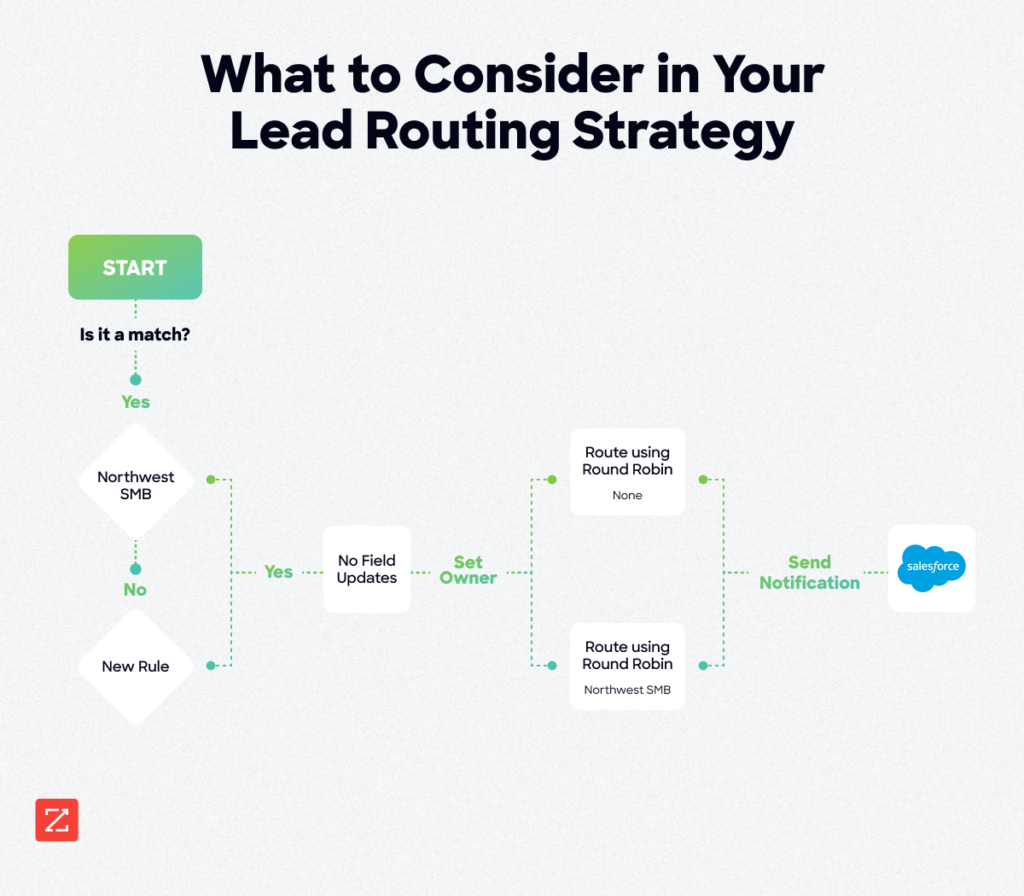
With Forbes estimating 91% of CRM data is incomplete, routing systems built on unverified records keep misfiring. Continuous enrichment and real-time signal capture are the fix: a persistent data layer that keeps routing rules firing correctly as companies grow, reps turn over, and markets shift. Teams that get this right see measurable improvements in conversion rates across every inbound channel.
Talk to our team to see how ZoomInfo helps revenue teams route faster with better data.
Frequently asked questions
What are the three types of lead routing?
The three most common types are round-robin (equal distribution across available reps), territory-based (assignment by geography or named account list), and account-based (routing new contacts from existing accounts to the account owner). Many teams also use segment-based routing (by company size or industry) as a fourth type. Each requires different data inputs: round-robin needs rep availability data, territory-based needs accurate HQ location and hierarchy data, and account-based needs reliable domain and company name matching.
What is a lead routing platform?
A lead routing platform is software that automates the assignment of inbound leads to the right sales rep based on predefined rules, territory, segment, account ownership, or buying signals. Routing platforms connect to your CRM and fire assignment logic the moment a lead enters the system. The effectiveness of any routing platform depends on the quality of the data feeding its rules: platforms with built-in enrichment can fill missing fields at capture and route accurately even when form submissions are incomplete. A lead routing system without an enrichment layer is only as reliable as the data your prospects choose to submit.
What is lead form routing?
Lead form routing is the process of distributing leads to the appropriate sales rep based on data captured in online forms. Because form submissions are often incomplete (prospects use personal emails, skip company size fields, or enter inconsistent values), lead form routing works best when enrichment data fills the gaps before routing rules fire. Enrichment resolves a personal email to a verified business identity, appends missing firmographic fields, and enables accurate territory and segment routing even from short-form submissions.
What is the 5-minute rule for leads?
The five-minute rule is the benchmark that leads contacted within five minutes of submission convert at significantly higher rates than those contacted after 30 minutes. Most organizations fail to hit this window because routing logic fires on incomplete data, sending leads to the wrong rep or leaving them in a default queue. Automated routing with enrichment-on-capture compresses the time between form submission and rep notification, Momentive reduced speed-to-lead from 20 minutes to 60 seconds by fixing the data foundation underneath their routing rules.
What data fields are required for lead routing to work correctly?
The required fields depend on the routing strategy. Territory-based routing needs accurate country, state, and HQ location fields. Segment-based routing needs employee count, revenue band, and industry vertical. Account-based routing needs company domain and standardized company name for lead-to-account matching. All strategies benefit from a verified business email to prevent personal-email mismatches, and understanding the lead qualification criteria that precede routing helps teams identify which fields matter most before assignment logic fires.
How does data enrichment improve lead routing accuracy?
Data enrichment fills in missing fields before routing rules fire. When a lead submits a form with only a name and email, enrichment appends firmographic data (employee count, industry, HQ location, company hierarchy) in real time, which gives routing rules the complete data set they need to assign the lead correctly. Continuous enrichment also keeps existing CRM records current so rules fire correctly on re-engaged contacts, not just net-new leads.