
The most valuable contacts in your CRM are the ones who change jobs. Their moves create some of the highest-converting plays in B2B sales, but only if your team catches them in time. Reps managing 50 to 115 accounts can't manually monitor every contact, and by the time you spot champa move on LinkedIn, your competitor's SDR has already seen it.
Job change alerts surface verified personnel moves in real time, route them to the right rep, and turn each one into a defined play. This guide breaks down the four plays that convert best and shows you how to set up alerts and routing inside ZoomInfo. You'll also get the message frameworks reps can use to act on a move within the 48-hour window that matters most.
What Job Change Alerts Are
Job change alerts are automated notifications triggered when a contact you're tracking moves to a new employer, takes a new role, or changes title within their current company. The signal types include:
Employer changes: A contact leaves Company A for Company B.
Title changes: A Director becomes a VP at the same company.
Department moves: A contact shifts from Marketing to Operations.
Promotions and exits: Internal moves and departures from tracked accounts.
Job change alerts differ from broader buying signals in one important way: they surface identity-resolved events, with a specific person, a specific company, and a specific date. An intent topic spike tells you an account might be researching your category. A job change tells you exactly who moved, where they moved, and when.
That precision matters because job changes are direct revenue events. They represent pipeline that exists today rather than pipeline you have to qualify into existence.
Use Cases and Plays
Job change alerts power four high-leverage plays across the revenue motion. Each one converts at a different rate, on a different timeline, and to a different team.
1. Re-engage former champions at new companies
Former customers are your warmest pipeline asset. They already know your product, understand the business case, and have lived the outcomes — so when they show up at a new company, the qualification work is done.
The operating playbook:
Track former champions across both closed-won AND closed-lost deals, since lost-deal champions can re-engage at new companies where buying conditions are different.
Loop in the AE who originally worked the account before any outreach goes out.
Prioritize champions with longer tenure at the previous role, since they're more likely to bring vendor preferences with them.
Set alerts on the broader original buying committee, not just the named champion, since related contacts often move in clusters.
Run this play in ZoomInfo: Contact External Move.
2. Protect existing accounts from churn
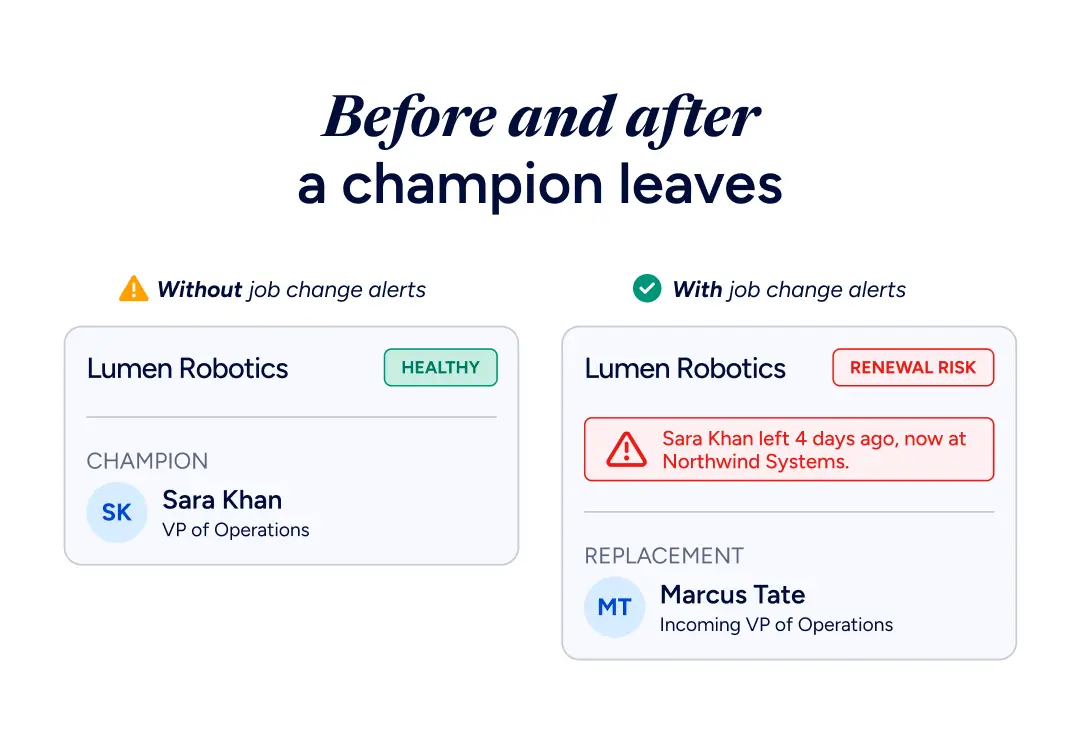
Champion departures are one of the strongest predictors of renewal risk. When the person who bought your product and advocated for it internally leaves, your contract is exposed. Usage data might look stable, and NPS scores might be fine, but the political capital that protected your deal just walked out the door.
As ZoomInfo CEO Henry Schuck has noted, most renewal risk does not show up in your CRM.
The countermove:
Combine job change alerts with renewal dates: a champion departure inside the 90-day renewal window is the highest-priority escalation.
Layer in product usage data, since a flat usage trend plus a champion departure is a stronger churn signal than either alone.
Prioritize champion exits over internal title changes, since internal moves usually preserve the relationship.
Brief the replacement on the original business case before they have time to evaluate alternatives, since they didn't experience the original buying process.
3. Target new decision-makers in buying committees
When a new VP of Sales, CTO, or Head of Marketing joins a company in your Ideal Customer Profile (ICP), it signals fresh budget, new priorities, and willingness to evaluate vendors. These hires are often brought in specifically to drive change, which means their first 90 days include vendor conversations they were never going to have with the previous leader.
How to set this play up:
Track moves into ICP-defining roles (VP of Sales, CTO, Head of Marketing) as priority signals.
Pair the alert with hiring activity at the new company, since multiple new hires in the same department often signal strategic shifts and budget reallocation.
Research the new leader's previous role to understand their likely mandate before reaching out.
Loop in the AE covering the account immediately and run the play as warm inbound from the start.
4. Combine job changes with intent signals
A job change on its own is a lagging indicator — the person already moved. Combining job change data with other buying signals creates a compound signal that is far more predictive of in-market behavior:
Job change + intent data: A former champion moved to a company that is actively researching your category.
Job change + website visits: The new hire is already on your site, evaluating your product.
Job change + hiring activity: The new company is hiring for roles that typically use your solution.
Job change + funding round: The new company just raised, the new hire has budget, and timing aligns.
ZoomInfo's GTM Context Graph connects these signals across contacts, companies, and buying behaviors, giving your team a prioritized view of where to focus first.
How ZoomInfo Delivers Job Change Alerts
Job change alerts are one output of ZoomInfo, the all-in-one AI GTM Platform.
A verified B2B data foundation of 500M+ contacts feeds the GTM Context Graph, the intelligence layer that weighs why a given move matters to your pipeline. Your team then acts on it in whatever tool it already works in, from a seller's workspace to a RevOps-built play. That layered design is what turns a raw personnel change into a routed, prioritized play instead of one more notification to triage.
To fit seamlessly into your existing workflows, ZoomInfo surfaces these job change alerts across four dedicated product surfaces:
Surface | Built for | What it does with job changes |
Copilot Signals | SDRs and AEs running daily prospecting | Surfaces job changes in the Pulse Feed alongside 30+ other signal types |
GTM Workspace | AEs and AMs managing books of business | Account-level job change tracking for expansion and renewal motions |
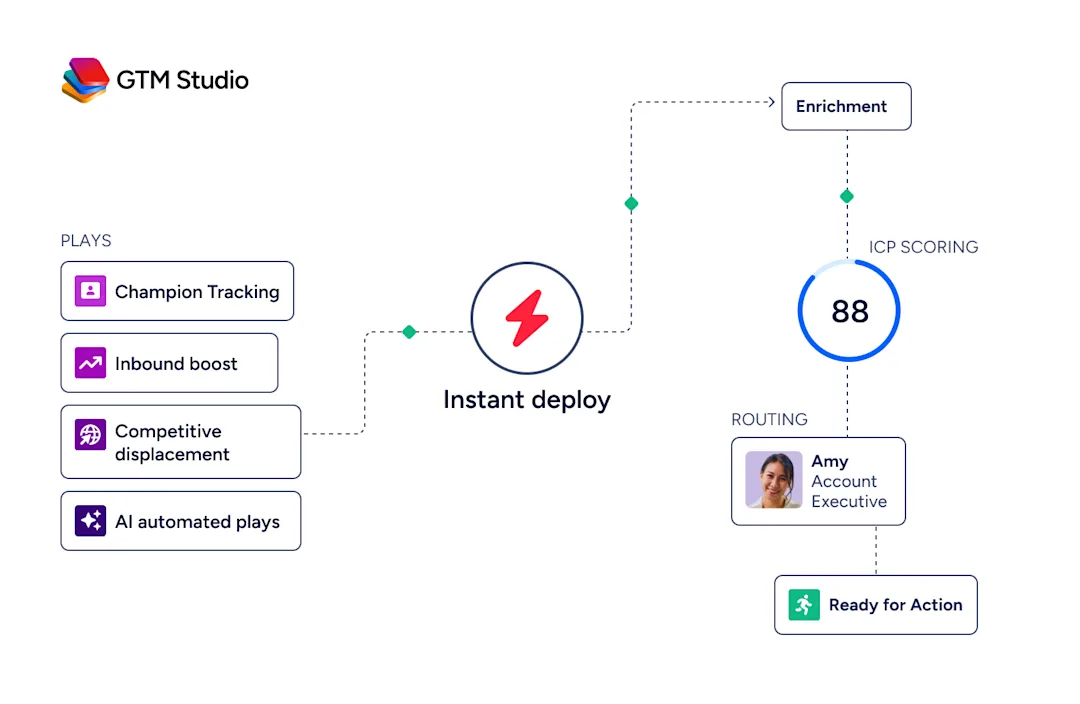
GTM Studio | RevOps building automated plays | Champion Tracking, a pre-built one-click play with built-in routing |
Tracker | Reps monitoring named contact lists | Weekly verification on up to 5,000 tracked contacts per user |
All four pull from the same data foundation: 500M+ contacts, 100M+ companies, and 1B+ buying signals, verified through a multi-source pipeline.
Levanta uses those same signals, job changes among them, to prioritize accounts and time its outreach:

“We use it to find mobile numbers, direct emails, job change signals, anything that helps us break through the noise.”
Where alerts get delivered
Alerts route directly to the channels where your team already works. Configure delivery channels in the ZoomInfo Admin Portal, then toggle on the surfaces you need:
Slack for real-time notifications.
Email for daily or weekly digests.
In-app within GTM Workspace or Copilot.
Salesforce and HubSpot via direct CRM push, so reps see the move on the account record without leaving the tool.
Who to track
The tracked-contact list is the foundation of the whole motion. Build it with the contacts that drive the most pipeline impact when they move:
Active champions in current customer accounts.
Former champions across closed-won and closed-lost deals.
Buying committee members at target accounts.
Decision-makers at high-priority prospect accounts.
Tracker supports up to 5,000 contacts per user. For broader account-level monitoring beyond named lists, configure the Pulse Feed in ZoomInfo GTM Workspace.
Connecting alerts to a play
Alerts only pay off when they trigger an action. Pair job change signals with:
A pre-built Champion Tracking play in GTM Studio for automated routing and sequence enrollment.
A custom Workflow in GTM Studio that updates the CRM record, notifies the rep, and queues an outreach task.
A dedicated Slack channel for renewal-risk alerts, routed straight to the CSM team with named ownership.
What Makes a Job Change Alert Useful
A useful job change alert meets four criteria.
Data accuracy. An alert is worthless if the contact, company, or new role is wrong. ZoomInfo verifies contact data through a multi-source pipeline — automated ML scanning of 28M domains daily, third-party partner data, and a contributory user community — refreshed continuously through 1.5B+ data points processed daily, with up to 95% accuracy on first-party data. Vendors that scrape LinkedIn weekly miss internal title changes, post stale data on departures, and surface false positives.
Entity resolution. The system has to attach the right person to the right company at the right time. Multiple "John Smith" entries across three regional offices, or a former champion who started a new role two months ago at a company already in your CRM, both require deep resolution logic that vendors typically underbuild.
Real-time delivery. Weekly batches don't work for warm outreach. By Friday, the Monday move has already been claimed by a competitor reading the same data. Same-day surfacing of verified moves is the bar.
Routing into the rep's workflow. An alert sitting in an unopened dashboard is useless. Job change signals have to land where the rep works — CRM or Slack — instead of a separate notifications tab.
How to Act on a Job Change Alert
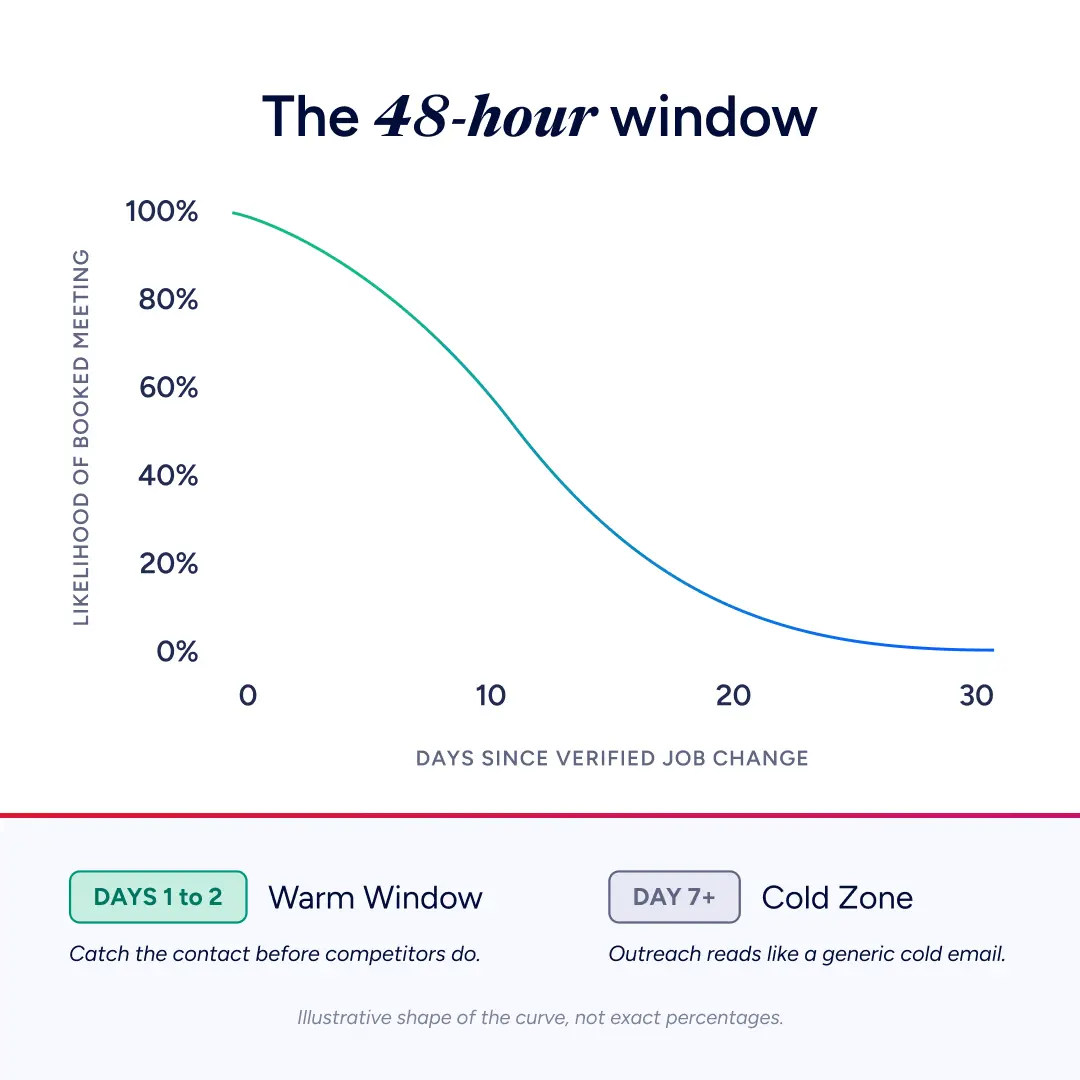
Response time and message framing determine whether a job change alert becomes a meeting or gets ignored. The 48-hour window matters most.
The 48-hour rule
Reps acting within 24 to 48 hours of a verified move catch the contact while they're still ramping into the new role and actively building their tech stack. Wait a week, and the same outreach reads like a generic cold email.
Warm re-engagement framing
For former champions at new companies, this message structure works:
Subject line: reference the move directly ("Congrats on the move to [Company]")
Opener: acknowledge the shared history without overplaying it
Bridge: connect a problem you solved together to a likely challenge in their new role
CTA: low-friction 15-minute reconnect, not a full demo request
New buyer outreach
For new decision-makers in target accounts:
Subject line: position around their first 90 days ("Welcome to [Company], quick context on [category]")
Opener: lead with relevance to their new role's likely priorities
Proof: reference customers in their industry or stage
CTA: offer a discovery conversation tied to their ramp plan
Internal renewal alerts
For champions leaving customer accounts:
Internal trigger: notify the CSM the day the departure is verified
Action: initiate a multi-threading conversation with remaining stakeholders
Goal: re-establish executive sponsorship before the renewal redline
Get Started With Job Change Alerts
The teams that get the most value from job change alerts don't treat them as simple notifications. They treat them as the explicit trigger for a defined play — with an owner, a message structure, and a follow-up sequence already locked in.
Get a demo to see how ZoomInfo Copilot Signals and Workspace surface job change alerts inside your CRM.
Frequently Asked Questions
How Often Should I Update My Tracked-Contact List?
Audit it quarterly. Add champions from recently closed deals, drop contacts now outside your ICP, and refresh the buying committee for any account whose deal stage has changed. Also rebuild lists after any book-of-business reshuffle — rep ownership changes are the most common reason alerts get ignored.
How Quickly Does ZoomInfo Detect Job Changes?
ZoomInfo verifies tracked contacts through a multi-source pipeline backed by 300+ human researchers, with continuous updates flowing through Copilot Signals and the Pulse Feed in real time. Tracker runs on a weekly verification cycle for named contact lists. Some competitors carry data lags of up to 75 days, meaning the move is already cold by the time the alert fires.
Can Job Change Alerts Prevent Customer Churn?
Yes. A champion departure is often the earliest visible signal of renewal risk, firing weeks before NPS scores or product usage data reflect any change. Catching the move while it's fresh gives the CSM team ample time to multi-thread before the contract is exposed.
How Do Job Change Alerts Work With CRM Systems?
Job change alerts work bidirectionally with CRMs. New title and employer data flows into the contact record automatically, keeping the source-of-truth fresh so reps don't see stale information mid-conversation. ZoomInfo integrates directly with Salesforce and HubSpot, with Slack routing available for real-time notifications when an alert fires.
What Is the Difference Between Job Change Alerts and Buyer Intent Signals?
Job change alerts are identity-resolved facts: a specific person, a specific company, a specific date. Intent signals are probabilistic inferences from research behavior across the web. The strongest pipeline opportunities show up where both fire on the same account.
