
Teams that run ZoomInfo and HubSpot side by side usually discover the same problems within a quarter:
contact records enriched in ZoomInfo never make it into HubSpot, so reps work from incomplete profiles,
lead scores in HubSpot rely on stale company data becauhubse the CRM and the intelligence platform update independently,
and someone on the team is always toggling between tabs to piece together a prospect's profile before picking up the phone.
However the two platforms ended up coexisting (a sales team adopting ZoomInfo for prospecting while marketing runs campaigns through HubSpot, or an ops team layering intelligence data onto an established CRM), the longer they operate without a connection, the wider the gap between what ZoomInfo knows and what HubSpot acts on.
Connecting ZoomInfo and HubSpot closes that gap.
Verified contact data, firmographics, technographics, and intent signals from ZoomInfo flow into HubSpot records so that every rep, marketer, and workflow uses the same data.
New leads captured in HubSpot can be enriched automatically so scoring models and nurture sequences start with complete records rather than whatever a form field collected. CRM records stay current as ZoomInfo's verification process catches job changes, title updates, and company shifts before they turn into bounced emails and wasted outreach.
ZoomInfo offers a native HubSpot integration through the "ZoomInfo Inbound Enrich" app on the HubSpot Marketplace. For teams that need custom workflows beyond what the native connector handles, ZoomInfo's Enterprise API and MCP server provide programmatic access to the same data.
Third-party automation tools like Zapier can also bridge specific workflows between the two platforms. Each method differs in setup complexity, data coverage, sync direction, and cost.
This article covers the ZoomInfo-HubSpot integration: which methods are available, what data each one handles, how to set them up, the use cases that justify connecting both platforms, and the limitations to plan for.
Let's start with an overview of the integration.
Integration Overview

Does a native integration exist?
Yes. ZoomInfo offers a native HubSpot integration through the "ZoomInfo Inbound Enrich" app on the HubSpot Marketplace. The integration enables real-time contact enrichment, scheduled database refresh, and lead scoring within HubSpot's CRM.
What data can sync?
Contact data (verified business emails, direct-dial phone numbers, job titles, seniority), company attributes (revenue, employee count, industry, location, technographic profiles), and enrichment attributes (department org charts, company hierarchy).
ZoomInfo pushes enriched data into HubSpot contact and company records. Intent and buying signals from ZoomInfo can also surface in HubSpot through the native integration's workflow triggers.
Is the sync bidirectional?
The primary flow is ZoomInfo to HubSpot: ZoomInfo enriches and updates HubSpot records with verified data. HubSpot records (new leads from forms, imports, or manual entry) can trigger ZoomInfo enrichment automatically, creating a feedback loop, but the intelligence data flows one direction: from ZoomInfo into HubSpot.
Is it real-time or batch?
The native integration supports both. Real-time enrichment triggers when new contacts or companies are created in HubSpot. Scheduled database refresh runs on configurable intervals to keep existing records current. Third-party automation via Zapier operates in near real-time (1 to 15 minutes depending on plan tier).
What are the available methods?
Native ZoomInfo-HubSpot integration, ZoomInfo Enterprise API, ZoomInfo MCP, and third-party automation (Zapier).
Method | Setup Difficulty | Data Flow | Real-time? | Cost |
|---|---|---|---|---|
Native Integration | Low | ZoomInfo to HubSpot | Yes (real-time + scheduled) | Included with ZoomInfo subscription |
ZoomInfo Enterprise API | High | Custom | Depends on implementation | ZoomInfo API package + dev time |
ZoomInfo MCP | Medium | ZoomInfo to any AI agent | Near real-time | Included with eligible ZoomInfo plans |
Zapier | Medium | One-way per Zap | Near real-time (1-15 min) | From $19.99/mo |
One distinction worth settling upfront: the native integration is designed for ongoing enrichment of HubSpot records, both new and existing.
Zapier handles event-triggered flows for specific use cases (e.g., pushing a HubSpot form submission into a ZoomInfo enrichment workflow), but does not replicate the native integration's field mapping depth or scheduled refresh. The API is the only method with no ceiling on customization, but it requires development resources to build and maintain.
Integration Methods
Native ZoomInfo-HubSpot Integration
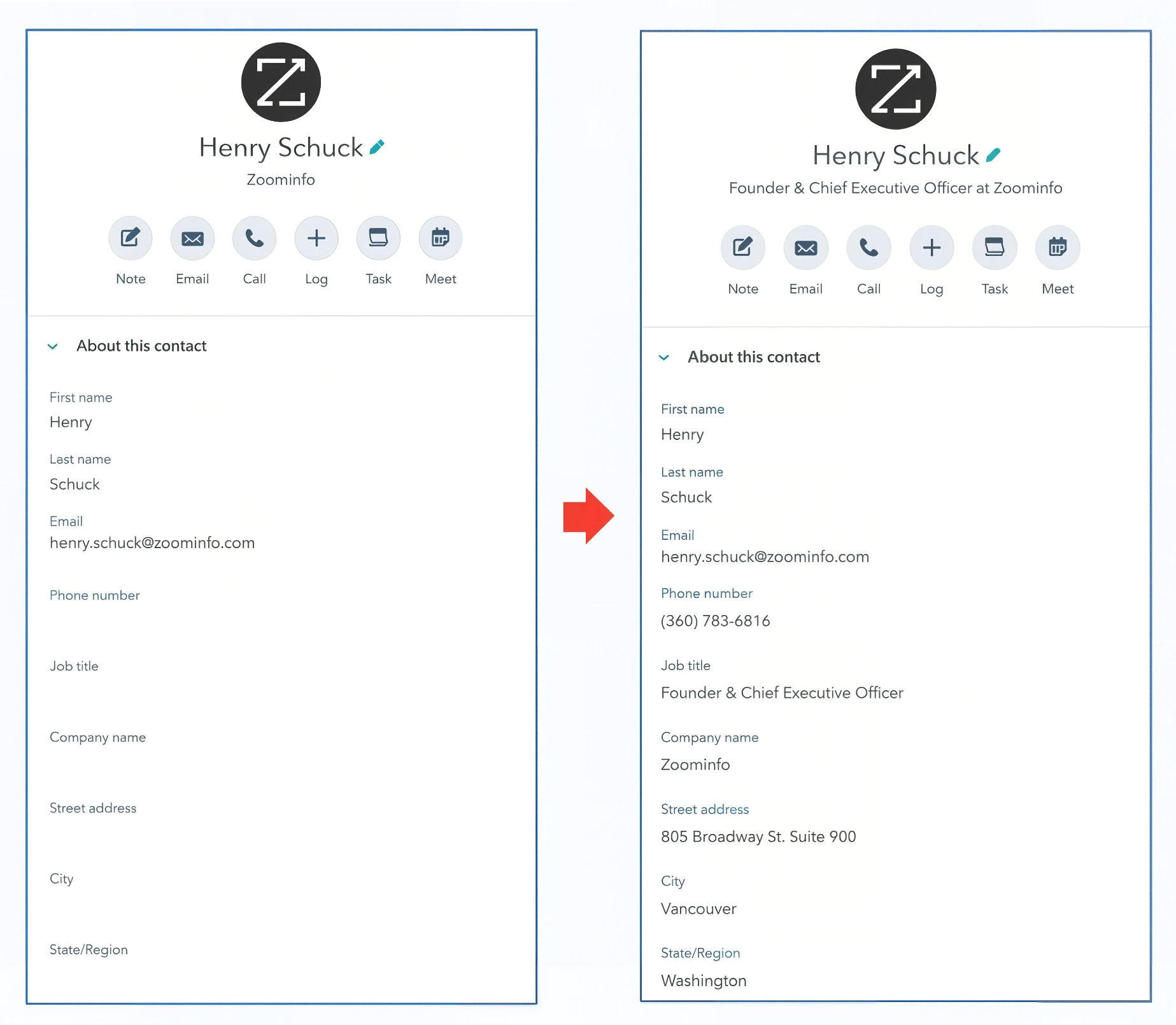
How it works: The ZoomInfo Inbound Enrich integration connects ZoomInfo to HubSpot's CRM. When a new contact or company record is created in HubSpot (through a form submission, import, or manual entry), ZoomInfo automatically enriches it with verified data from its B2B database of 500M contacts and 100M companies.
Source: ZoomInfo
The integration also supports scheduled bulk enrichment to keep existing records current and configurable field mapping so teams control which ZoomInfo fields write to which HubSpot properties.
What it syncs: Verified business email addresses, direct-dial phone numbers, job titles, seniority levels, department information, company firmographics (revenue, employee count, industry, location), technographic profiles, and company hierarchy data.
ZoomInfo's enrichment updates HubSpot contact and company properties with these fields, filling gaps in records that arrived with minimal information (e.g., a form submission with only name and email).
Fits: ongoing enrichment of new and existing HubSpot records; also supports initial database cleanup and enrichment.
Setup process:
Navigate to the HubSpot Marketplace and search for "ZoomInfo Inbound Enrich." Click Install and authorize the connection with your HubSpot account. HubSpot admin access is required.
Log into your ZoomInfo account and navigate to the integrations settings. Connect your HubSpot instance by authenticating via OAuth.
Configure field mapping: select which ZoomInfo data fields map to which HubSpot contact and company properties. ZoomInfo provides default mappings for standard fields (email, phone, title, company name) and lets you map additional fields to HubSpot custom properties.
Set enrichment triggers: choose whether new records are enriched automatically on creation, on a scheduled interval, or both. Configure the scheduled refresh frequency for existing records.
Define enrichment rules: set criteria for which records get enriched (e.g., only contacts with a business email domain, only companies above a certain employee count) to manage credit consumption.
Test the integration by creating a test contact in HubSpot and verifying that ZoomInfo enrichment data populates the mapped fields within minutes.
Strengths: First-party integration maintained by ZoomInfo and available on the HubSpot Marketplace. No third-party middleware to configure or pay for separately. Supports both real-time enrichment of new records and scheduled refresh of existing ones. Field mapping is configurable, so teams control what data enters HubSpot. Enriched records feed HubSpot's workflows, lead scoring, and list segmentation.
Limitations: The primary data flow is ZoomInfo to HubSpot; HubSpot data does not push back into ZoomInfo's platform. Enrichment consumes ZoomInfo credits, so teams need to configure rules carefully to avoid burning credits on low-value records. Advanced use cases (custom enrichment logic, multi-step workflows triggered by ZoomInfo signals) may require the API.
Best for: Sales and marketing teams that use HubSpot as their primary CRM and want verified, current contact and company data in their records without engineering work.
ZoomInfo Enterprise API
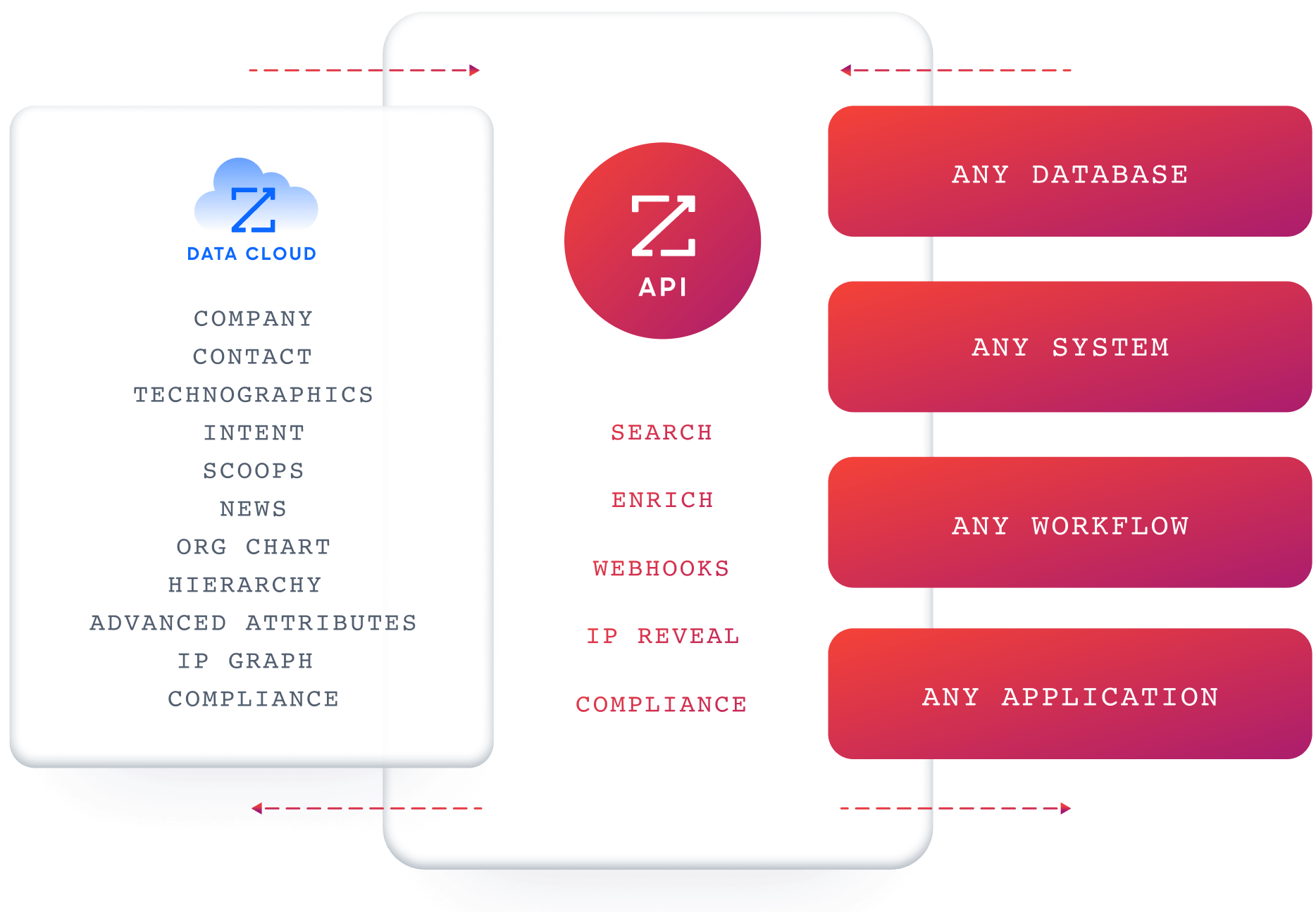
How it works: ZoomInfo's Enterprise API provides programmatic access to ZoomInfo's B2B data. The API follows a search-then-enrich pattern: Search endpoints find matching records (free, no credits consumed), and Enrich endpoints unlock the data payload (one credit per new record).
Source: ZoomInfo
A custom integration connects ZoomInfo's API to HubSpot's REST API through middleware handling authentication, field mapping, transformations, and sync scheduling.
What it syncs: Anything both APIs expose. On ZoomInfo's side: contacts, companies, intent data, scoops (leadership changes, funding events), technographics, org charts, and corporate hierarchy.
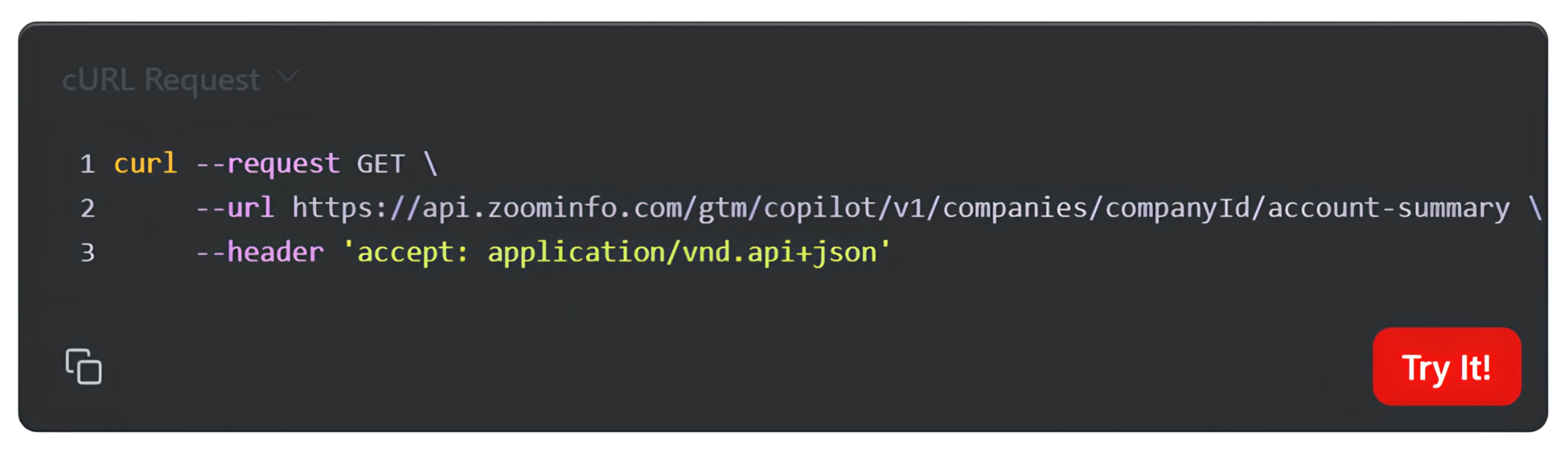
On HubSpot's side: contacts, companies, deals, custom objects, and any custom properties. The API also provides access to ZoomInfo's Copilot API for AI-generated account summaries, company insights, lookalike expansion, and contact recommendations.
Source: ZoomInfo
Fits: ongoing enrichment, bulk migration, or complex custom workflows; the only method with no ceiling on either.
Setup process:
Obtain ZoomInfo API credentials through the ZoomInfo Developer Portal. A ZoomInfo admin must assign the DevPortal subscription to any developer before they can access the portal. Register an application and obtain a Client ID and Client Secret.
Set up HubSpot API access by creating a private app in your HubSpot account (Settings > Integrations > Private Apps) with scopes for the objects you intend to write to (contacts, companies, custom objects).
Build the integration service: authenticate with both APIs using OAuth 2.0 with PKCE for ZoomInfo and Bearer token for HubSpot. Implement the search-then-enrich workflow against ZoomInfo's API, then write enriched data to HubSpot using the CRM Object API.
Design the field mapping and transformation layer. ZoomInfo returns data in JSON:API format; HubSpot's API uses standard JSON. Map ZoomInfo fields to HubSpot properties, including any custom properties you have created.
Implement scheduling, error handling, and credit management. ZoomInfo enforces rate limits (25 req/sec on Standard tier) and credits are consumed per enriched record. HubSpot enforces its own rate limits (100-190 requests per 10 seconds depending on plan).
Deploy, monitor, and maintain. Both APIs evolve independently: HubSpot uses date-based API versioning with twice-yearly releases; ZoomInfo's API is versioned under /gtm/data/v1/.
Strengths: Full control over what data flows, when, and how. Access to ZoomInfo data the native integration does not expose (intent signals by topic, scoops, corporate hierarchy, AI-generated account summaries).
Can implement complex business logic: enrich only records matching specific criteria, trigger HubSpot workflows based on ZoomInfo signal changes, or feed enriched data into multiple systems at once. No per-operation fees from a third-party connector.
Limitations: Requires an Enterprise API or Copilot package from ZoomInfo, priced separately from standard subscriptions. Requires development resources to build and maintain. You own the infrastructure, monitoring, and error recovery. API changes on either platform require ongoing maintenance.
Best for: Enterprise teams with custom enrichment logic, multi-system architectures, or workflow requirements that exceed what the native integration supports. Organizations with in-house development teams that need ZoomInfo data in HubSpot alongside other systems.
ZoomInfo MCP
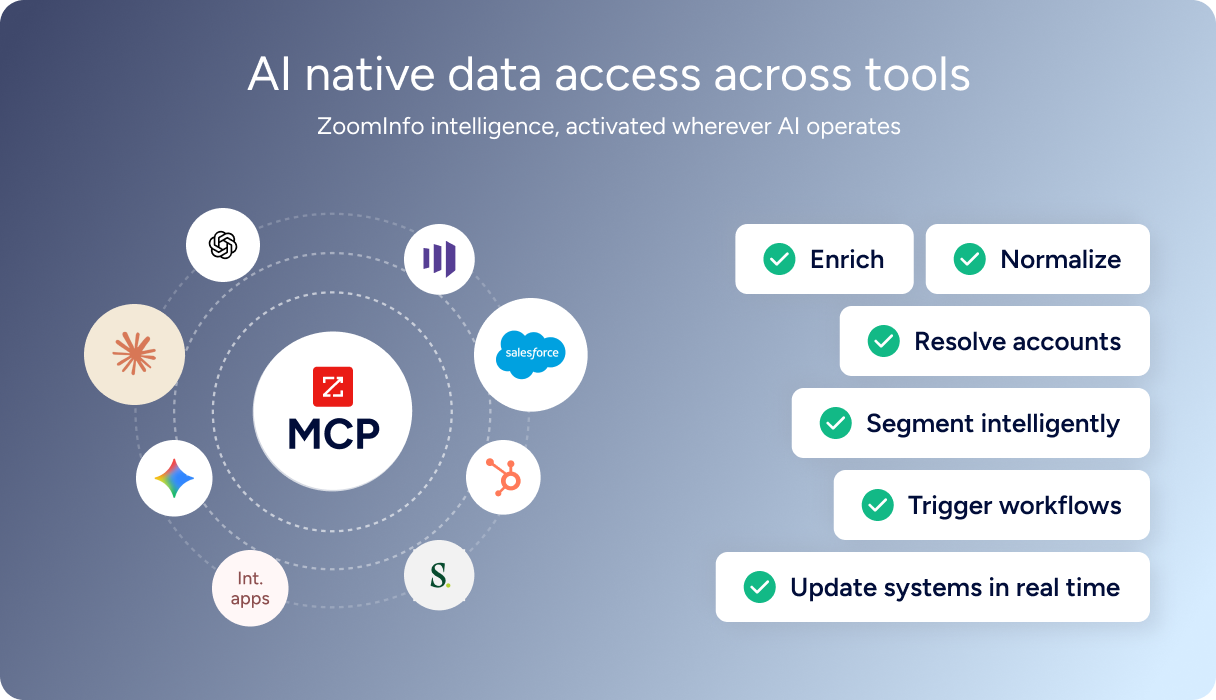
How it works: ZoomInfo's Model Context Protocol server connects AI models to ZoomInfo's B2B data as a tool. The MCP server endpoint at https://mcp.zoominfo.com/mcp exposes ZoomInfo's search, enrichment, and research capabilities to any MCP-compatible AI client. Users interact with ZoomInfo data through natural language, and the AI selects the appropriate tool call automatically.
Source: ZoomInfo
For HubSpot integration, AI agents can pull ZoomInfo data via MCP and write it to HubSpot using HubSpot's remote MCP server or API, creating an AI-driven enrichment pipeline.
What it syncs: The MCP tool set covers five search tools (Search Companies, Search Contacts, Find Similar Companies, Find Similar Contacts, Find Recommended Contacts), two enrichment tools (Enrich Companies, Enrich Contacts), and research tools (Account Research, Contact Research).
Combined with HubSpot's own MCP server or API access, an AI agent can search ZoomInfo for contacts matching specific criteria, enrich them, and create or update the corresponding HubSpot records.
Fits: AI-assisted enrichment workflows, ad hoc research and CRM updates, or building custom AI agents that orchestrate data between ZoomInfo and HubSpot.
Setup process:
Confirm your ZoomInfo subscription includes MCP access (requires any SalesOS or Copilot subscription).
Configure your MCP-compatible AI assistant (Claude, ChatGPT, or another MCP-compatible tool) to connect to ZoomInfo's MCP server at https://mcp.zoominfo.com/mcp. Authentication uses OAuth2 with your ZoomInfo credentials.
Optionally connect HubSpot's remote MCP server to the same AI assistant for read/write access to HubSpot CRM data.
Define the workflow in natural language: "Find the VP of Sales at [company], enrich their contact details, and create a contact record in HubSpot with their verified email and phone number."
Test with a sample query and verify the data flows correctly between both platforms through the AI assistant.
Strengths: No custom code required for basic workflows. Natural language interface makes it accessible to non-technical users. Combines ZoomInfo data with HubSpot CRM operations in one AI-assisted workflow. Search and similarity operations are free; only enrichments consume credits.
Limitations: Depends on MCP-compatible AI tools, which are still maturing. Not designed for high-volume automated sync (the API is better suited for that). Enrichment calls consume ZoomInfo data credits; AI research calls consume separate AI action credits. Workflows are conversational rather than scheduled, making this better for ad hoc research than ongoing automated enrichment.
Best for: Revenue operations teams and individual sellers who want to enrich HubSpot records on demand through AI-assisted workflows without building a custom integration. Teams experimenting with AI agents for GTM operations.
Zapier
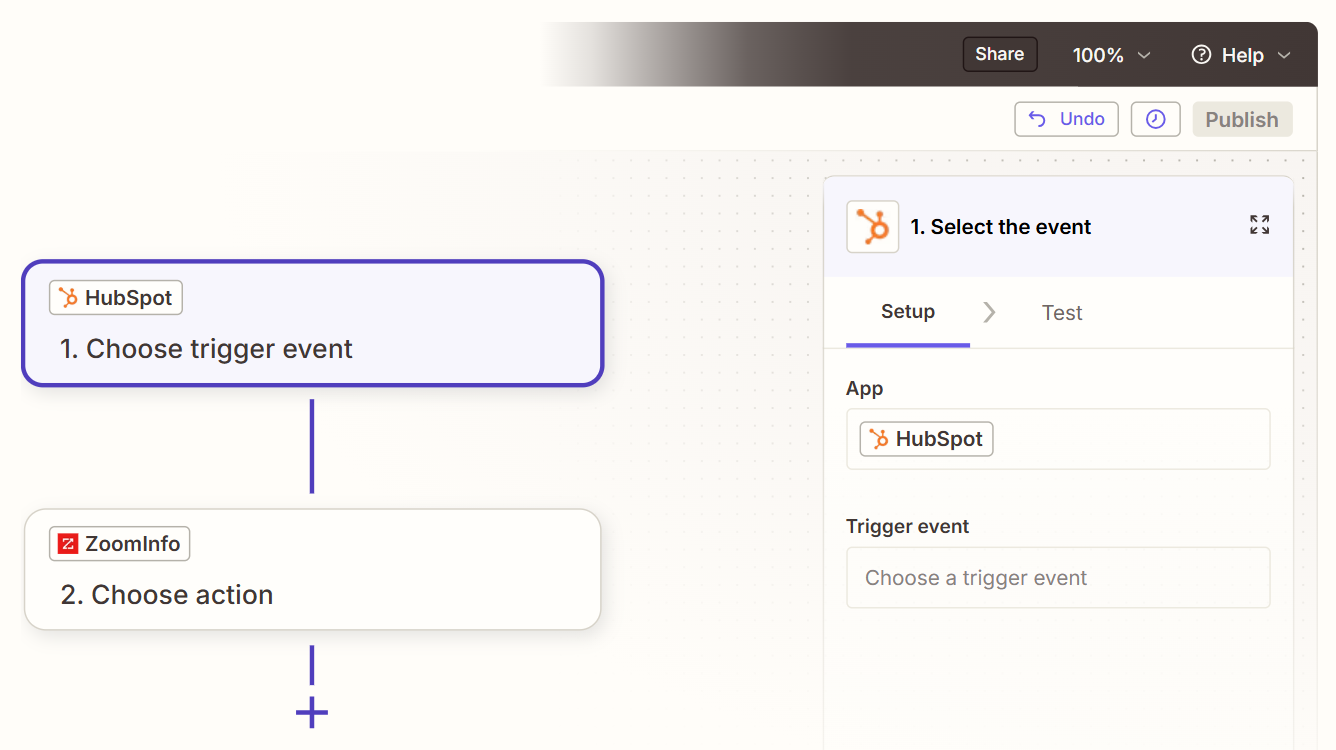
How it works: Zapier connects ZoomInfo and HubSpot through event-driven automations called Zaps. Each Zap pairs a trigger (an event in one app) with one or more actions (what happens in the other). Since both ZoomInfo and HubSpot are supported platforms, teams can build lightweight bridges between specific events without engineering resources.
Source: Zapier
What it syncs: Depending on available triggers and actions, Zapier can push data between the two platforms for specific events (e.g., when a new contact is created in HubSpot, trigger a ZoomInfo lookup and update the record). Field mapping is manual and configurable in the Zap setup flow. Zapier does not replicate the native integration's field mapping depth or scheduled bulk enrichment.
Fits: event-triggered workflows for specific use cases; not a replacement for the native integration's enrichment capabilities.
Setup process:
Create a Zapier account and connect both your ZoomInfo and HubSpot accounts using OAuth.
Choose the trigger app and event (e.g., HubSpot "New Contact" or ZoomInfo "New Contact Found").
Choose the action app and event (e.g., ZoomInfo "Enrich Contact" or HubSpot "Create/Update Contact").
Map the available fields from the trigger step into the action step's fields.
Test the Zap with a sample record to verify the data flows correctly.
Turn the Zap on. Each triggering event will execute the configured action.
Strengths: No engineering resources required. Quick to set up for simple, single-event workflows. Zapier's filter and formatting steps can add conditional logic. Can bridge ZoomInfo and HubSpot for use cases the native integration doesn't cover (e.g., triggering a Slack notification when ZoomInfo detects a job change for a HubSpot contact).
Limitations: Each Zap handles one trigger-action pair, so multiple workflows require multiple Zaps (each counting against your plan's task allocation). Does not support scheduled bulk enrichment or the native integration's field mapping. Historical records created before the Zap was activated do not process. Zapier charges by task count, and high-volume workflows accumulate costs quickly.
Best for: Small teams that need a lightweight bridge between ZoomInfo and HubSpot for a specific workflow the native integration doesn't cover. Teams already using Zapier for other automations who want to add a ZoomInfo-HubSpot connection without a separate tool.
Key Use Cases
1. Inbound Lead Enrichment for Faster Qualification
A prospect fills out a HubSpot form with their name, email, and company. The native ZoomInfo integration enriches the record with verified phone number, job title, seniority level, department, company revenue, employee count, and industry. HubSpot's lead scoring model has enough data to score the lead accurately, and the SDR who picks up the record has a complete profile without manual research.
Best integration method: Native ZoomInfo-HubSpot integration (real-time enrichment trigger on new contact creation).
2. Database Cleanup and Ongoing Hygiene
A marketing team inherits a HubSpot database with 50,000 contacts, many with incomplete or outdated information. The native integration's scheduled refresh enriches existing records in bulk, filling in missing fields and updating stale data (job changes, new phone numbers, company updates). Going forward, the scheduled refresh keeps the database current without manual intervention.
Best integration method: Native ZoomInfo-HubSpot integration (scheduled database refresh).
3. Account-Based Marketing with Intent-Driven Targeting
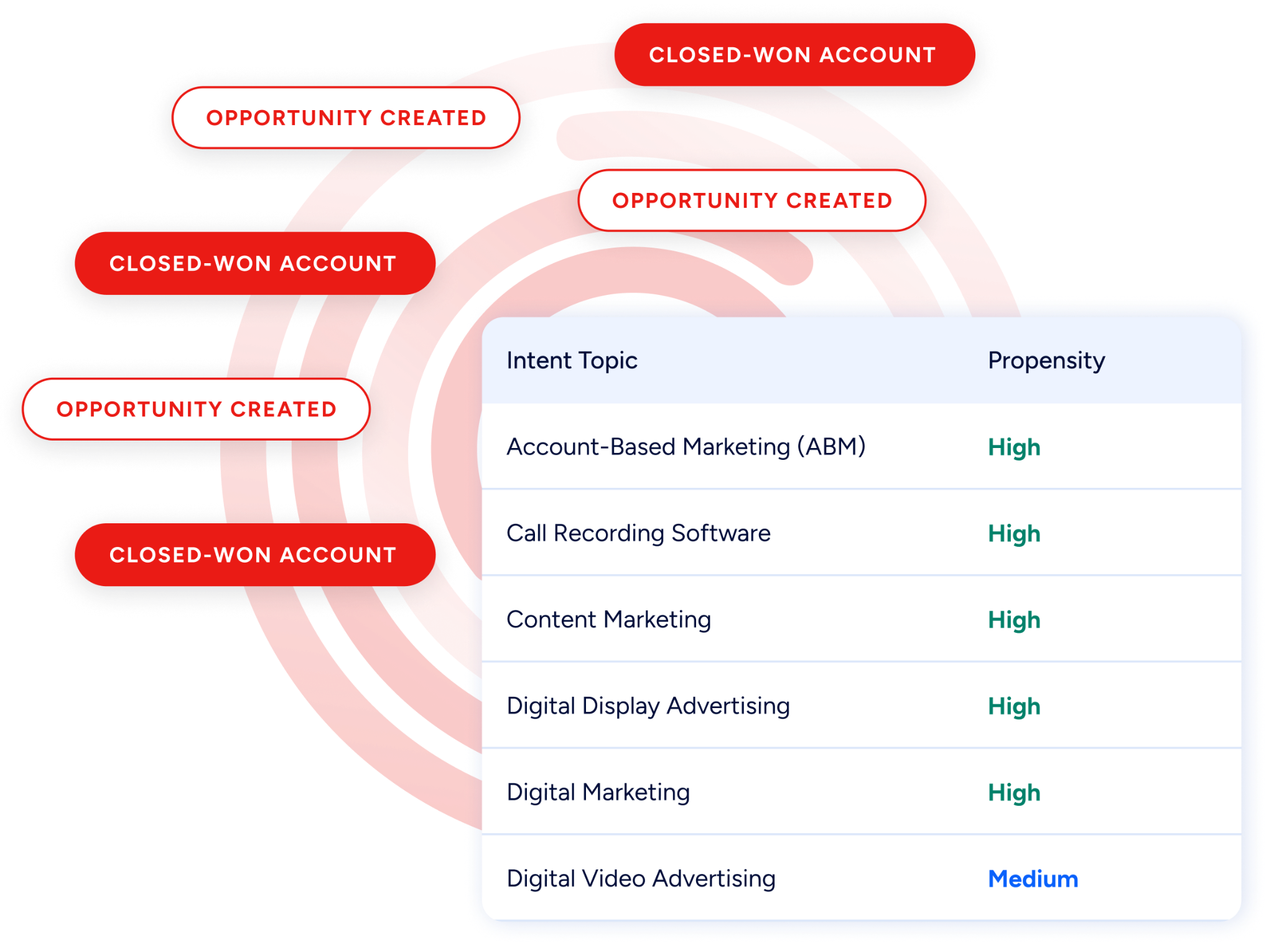
A marketing team uses ZoomInfo's Buyer Intent data to identify accounts actively researching solutions in their category. Intent signals flow into HubSpot, where they trigger ad campaigns, email sequences, and SDR outreach. ZoomInfo's intent data and HubSpot's marketing automation together create a closed-loop ABM workflow.
Source: ZoomInfo
Best integration method: Native integration for contact and company enrichment, supplemented by the ZoomInfo API for intent signal data if the native connector does not surface the specific intent fields needed.
4. AI-Assisted Prospecting and CRM Updates
A seller preparing for a call uses an AI assistant connected to both ZoomInfo (via MCP) and HubSpot (via its MCP server) to research the account, pull the latest buying committee data from ZoomInfo, and update the HubSpot contact records with verified details. The AI handles the research, enrichment, and CRM update in a single conversational workflow.
Best integration method: ZoomInfo MCP combined with HubSpot's remote MCP server.
5. Multi-System Data Orchestration
An enterprise RevOps team needs ZoomInfo data flowing into HubSpot, Salesforce, and a data warehouse simultaneously.
A custom integration built on ZoomInfo's Enterprise API enriches records and distributes them to HubSpot via its API, while the same data feeds the warehouse and other systems through parallel pipelines. Business logic in the middleware determines which records go where based on territory rules and account ownership.
Best integration method: ZoomInfo Enterprise API with custom middleware.
Limitations and Considerations
Credit Consumption and Cost Management
ZoomInfo uses consumption-based pricing: each new record enriched consumes one credit. Teams that connect ZoomInfo to HubSpot without configuring enrichment rules can burn through credits on low-value records (generic email domains, duplicate entries, contacts outside the target market).
Setting up filters in the native integration (e.g., only enrich contacts with corporate email domains, only enrich companies above a certain employee count) is essential for managing costs.
Field Mapping Complexity
HubSpot and ZoomInfo structure data differently. ZoomInfo's contact records include fields (seniority level, management level, department org charts) that have no default HubSpot properties. Teams need to create custom properties in HubSpot to receive these fields and configure the mapping in the integration settings. Misconfigured mappings can result in data landing in the wrong fields or being dropped entirely.
One-Directional Data Flow
The native integration flows from ZoomInfo to HubSpot. HubSpot deal data, lifecycle stages, and custom properties do not push back into ZoomInfo. Teams that want ZoomInfo's AI capabilities (via GTM Workspace or GTM Studio) to reflect the latest HubSpot deal context need to use ZoomInfo's CRM sync features within those products separately from the HubSpot Marketplace integration.
API Rate Limits on Both Sides
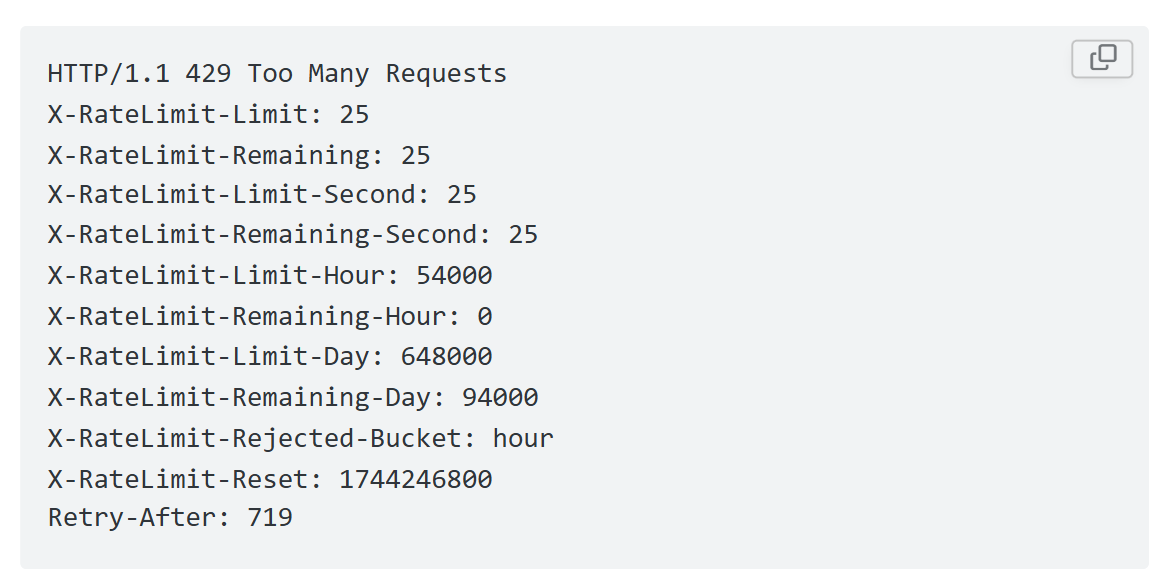
Custom API integrations must respect rate limits from both platforms. ZoomInfo enforces tiered rate limits (25 req/sec on Standard, 35 req/sec on Scaling). HubSpot enforces rate limits of 100 to 190 requests per 10 seconds depending on plan tier and app type, plus daily limits (250,000 to 1,000,000 requests per day). High-volume enrichment runs must be throttled to stay within both platforms' limits.
Source: ZoomInfo
Permissions and Access
Setting up the native integration requires admin access on both sides. In ZoomInfo, an administrator must configure the HubSpot connection in the integrations settings. In HubSpot, account admin rights are needed to install Marketplace apps and authorize OAuth connections.
For the Enterprise API, a ZoomInfo admin must assign DevPortal access to developers. HubSpot's field-level security and custom property permissions must also allow the integration to write to the intended fields.
Maintenance
Both platforms evolve independently. HubSpot uses date-based API versioning with new versions in March and September, each supported for 18 months. ZoomInfo's API is versioned under /gtm/data/v1/ and the platform continues to expand its data model.
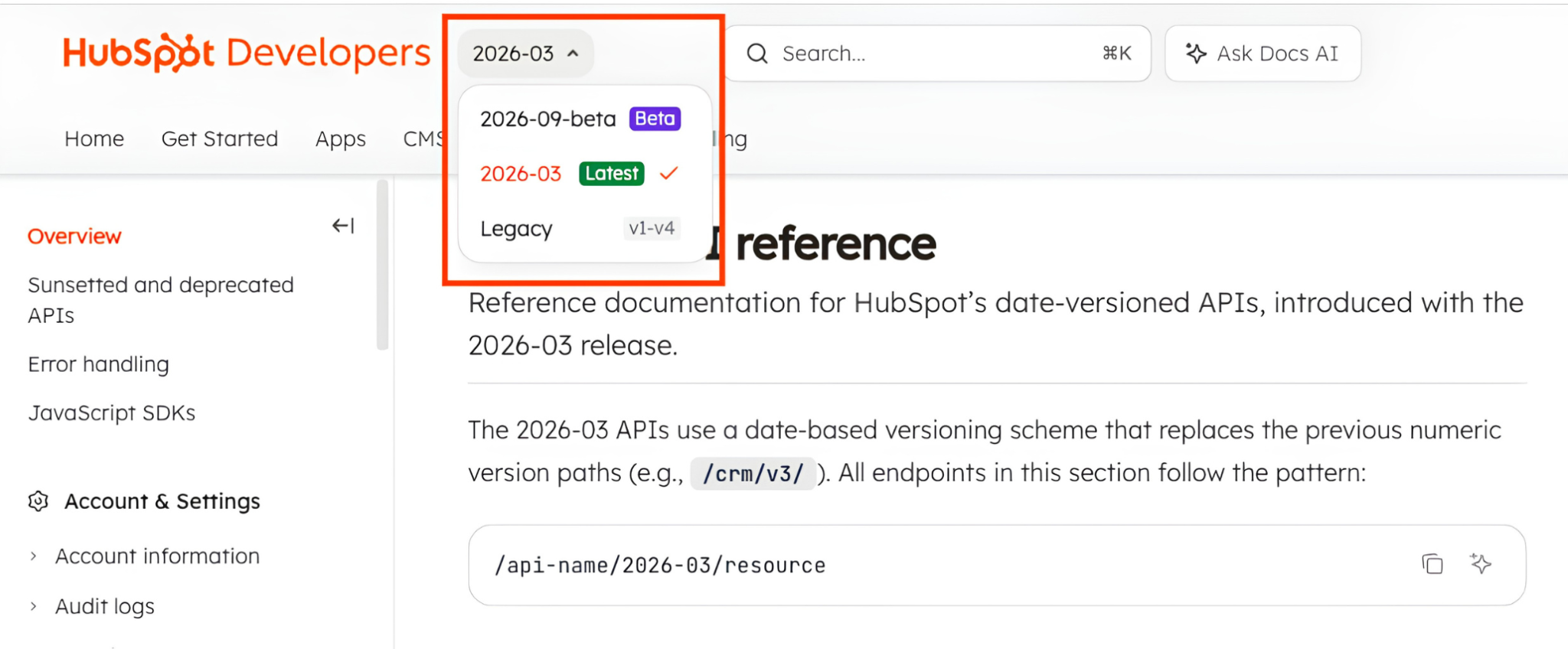
Source: Hubspot
Custom API integrations require periodic maintenance as endpoints, authentication flows, or data schemas change. The native integration is maintained by ZoomInfo and updates automatically, reducing this burden for teams using the Marketplace app.
Final Verdict
A native ZoomInfo-HubSpot integration exists and handles the most common use case: enriching HubSpot CRM records with ZoomInfo's verified B2B data. The right choice depends on the complexity of the team's data workflows and how much customization they need.
Sales and marketing teams that want verified, current contact and company data in HubSpot without engineering work should start with the native integration. It covers real-time enrichment of new records, scheduled refresh of existing ones, and configurable field mapping, all installed from the HubSpot Marketplace in minutes.
Teams that need ZoomInfo's intent signals, AI-generated account intelligence, or custom enrichment logic inside HubSpot should build a custom integration using ZoomInfo's Enterprise API. This is the only method that exposes the depth of ZoomInfo's data and intelligence, but it requires development resources and ongoing maintenance.
Teams exploring AI-assisted workflows should connect both platforms via their MCP servers. This approach suits ad hoc research and enrichment rather than high-volume automated sync, but it lets individual sellers and ops teams orchestrate data between ZoomInfo and HubSpot through natural language.
Small teams with a narrow, event-driven use case the native integration doesn't cover should use Zapier as a lightweight bridge.
Before committing to a method, clarify what data needs to flow and how often.
If the goal is keeping HubSpot records enriched with verified contact and company data, the native integration handles it out of the box. If the goal is an intelligence layer where ZoomInfo's intent signals, buying committee data, and account research drive HubSpot workflows, the API gives you the depth the native connector does not.
Either way, the integration connects HubSpot's CRM and automation capabilities to ZoomInfo's database of 500M contacts, 100M companies, 135M+ verified phone numbers, and 200M+ verified business emails, verified by 300+ human researchers and reaching up to 95% accuracy on first-party data. The CRM becomes the execution layer; ZoomInfo provides the intelligence.
FAQ
Does ZoomInfo integrate natively with HubSpot?
Yes. ZoomInfo offers the "ZoomInfo Inbound Enrich" app through the HubSpot Marketplace. The integration enables real-time contact enrichment when new records are created in HubSpot, scheduled bulk enrichment to keep existing records current, and configurable field mapping that controls which ZoomInfo data points write to which HubSpot properties.
The native integration is included with a ZoomInfo subscription and requires admin access on both platforms to set up.
What data does the ZoomInfo-HubSpot integration sync?
The native integration pushes verified contact data (business emails, direct-dial phone numbers, job titles, seniority, department) and company data (firmographics including revenue, employee count, industry, location, plus technographic profiles) from ZoomInfo into HubSpot contact and company records.
The integration fills gaps in records that arrived with minimal information and updates existing records as ZoomInfo's verification process detects changes.
Does the integration work in both directions?
The primary flow is ZoomInfo to HubSpot. ZoomInfo enriches HubSpot records with verified data, but HubSpot deal stages, lifecycle data, and custom properties do not push back into ZoomInfo through the native integration. HubSpot events (new contact created, form submitted) can trigger ZoomInfo enrichment, creating a feedback loop, but the intelligence data flows in one direction.
How does the integration handle ZoomInfo credits?
Each new record enriched through the integration consumes one ZoomInfo credit. Teams should configure enrichment rules to manage credit consumption: restrict enrichment to contacts with corporate email domains, filter by company size or geography, and set thresholds for which records are worth enriching.
Scheduled bulk refresh also consumes credits for each record updated, so refresh frequency and scope should match the team's credit budget.
Can I use ZoomInfo's intent data in HubSpot?
Intent signals from ZoomInfo can be surfaced in HubSpot, though the depth of intent data available through the native integration may vary.
For teams that need ZoomInfo's full intent intelligence (topic-level research signals from 210 million IP-to-Organization pairings) driving HubSpot workflows, the Enterprise API provides the most complete access. Intent data can be written to HubSpot custom properties and used to trigger workflows, update lead scores, or segment lists.
What HubSpot plan do I need for the integration?
The native ZoomInfo integration is available through the HubSpot Marketplace and works with HubSpot's paid plans.
HubSpot's API access (which custom integrations depend on) is available across all tiers but with different rate limits: Free and Starter plans allow 250,000 API calls per day, Professional allows 625,000, and Enterprise allows 1,000,000. The native Marketplace integration does not require API configuration on the HubSpot side.
How does ZoomInfo compare to HubSpot's built-in data enrichment?
HubSpot's Smart CRM includes native AI enrichment that pulls data from email threads, calls, and HubSpot's own dataset. ZoomInfo operates at a different scale: 500M contacts, 100M companies, 135M+ verified phone numbers, and 200M+ verified business emails, verified by 300+ human researchers.
HubSpot's enrichment works well for data captured through platform interactions, while ZoomInfo provides third-party intelligence on contacts and companies the CRM has never touched. The two are complementary rather than competing. For a deeper look at how the two platforms stack up overall, see our HubSpot vs ZoomInfo comparison.
Can I connect ZoomInfo to HubSpot through an AI assistant?
Yes. ZoomInfo's MCP server and HubSpot's remote MCP server both support connections from MCP-compatible AI assistants like Claude and ChatGPT.
An AI assistant connected to both platforms can search ZoomInfo for contacts or companies, enrich records, and create or update the corresponding HubSpot records through natural language commands. This approach suits ad hoc research and individual record updates rather than high-volume automated enrichment.
Build out your HubSpot stack:
