

What is trade show lead generation and why it requires a system
Trade show lead generation is the process of identifying, engaging, and converting event attendees into qualified pipeline before, during, and after the event. Teams that turn events into pipeline tend to build a system around three phases: pre-show preparation, on-floor qualification, and post-show follow-up.
Events and trade shows are expensive, even if you're not a sponsor. Still, marketers have ranked them among their most important channels: in Bizzabo's 2019 event marketing report, 41% of respondents named live events their most critical marketing channel for achieving business outcomes, and many teams count on them for lead generation. Whether you can justify that spend comes down to the system you build around the event. Booth size and swag come second.
Phase 1: Pre-show strategy that fills your calendar before you arrive
Many of your strongest trade show leads can be secured before you step on the plane. A team that arrives with a prioritized target list and pre-show outreach done already has conversations booked. A team that arrives with only a booth has to hope the right people walk by. Pre-show work is where trade show lead generation actually begins.
Build your target attendee list
A common failure mode in pre-show marketing is arriving at an event with no list, no prioritization, and no outreach history, so every conversation starts from zero. The result is high volume, low quality, and a stack of business cards that go cold within a week.
To avoid it, start building your attendee list as soon as registration opens. If you're an event sponsor, you may receive an attendee list that shows only titles and company names. If you're walking the floor without a booth, you can work from the exhibitor list. Either way, it's worth the time to match those companies and titles to actual contacts.
Look for:
Contacts and companies you already have relationships with
Accounts that are a strong fit for your product or service
Attendees worth reaching out to before the event
If the event hasn't published an attendee list, build one from the primary industry audience within a 50-mile radius of the event location. It's time-consuming without the right tools, but it gives your pre-show outreach a much better starting point.
Prioritize accounts by fit, intent, and opportunity
Once you have a list, prioritize it. In a room of thousands of people and hundreds of booths, your team needs to know where to start. Prioritizing based on fit, intent, and opportunity gives your reps a clear starting point and keeps them from spending time on accounts that will never convert.
Start by looking for patterns among your best customers:
Industry: Which industries do you typically sell to?
Company size/revenue: Enterprise, mid-market, or SMB?
Geographic location: Which regions do your best customers cluster in?
Tech stack: Does your solution pair well with specific technologies?
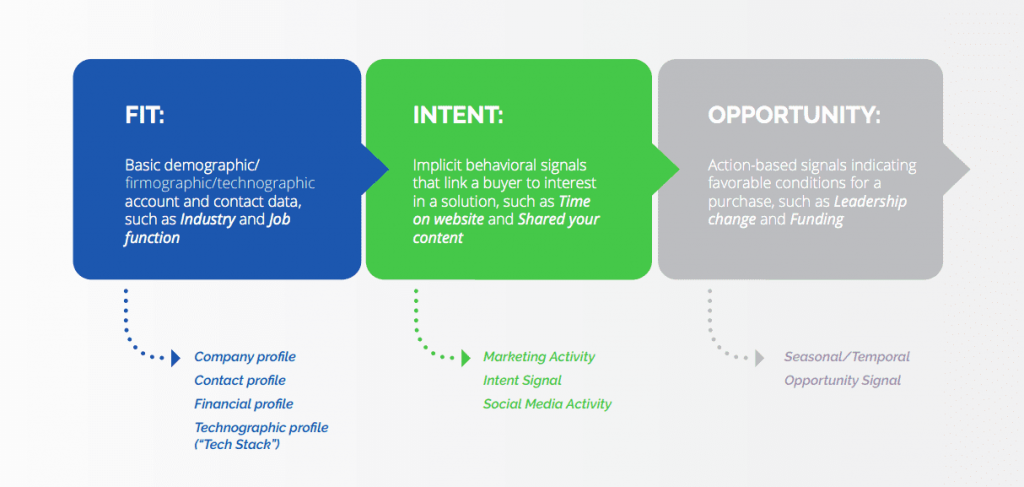
Teams that can't identify good-fit attendees in advance often end up going for volume, casting a wide net with giveaways and prizes because their next customer could be anyone. That approach tends to raise cost per lead without improving quality.
Trade shows are also a strong opportunity to deepen relationships with existing customers who are attending. Planning a dinner or happy hour that mixes prospects and current customers gives your leads a chance to hear directly from people already using your product.
Launch a multi-touch pre-show campaign
With a prioritized list in hand, get sales and marketing aligned on a coordinated pre-show outreach sequence. The goal is simple: by the time the event starts, your top target accounts should already know who you are and have you on their schedule.
A multi-touch pre-show campaign typically includes paid social ads targeting your attendee list with event-specific messaging, personalized email sequences segmented by customer versus prospect, and outbound calls from your sales team inviting priority accounts to book a meeting or demo.
Pick your top 50 target accounts from your prioritized list and launch this sequence two to three weeks before the event. That way you arrive with meetings already on the calendar.
A Hot, Warm, and Cold qualification framework for trade show contacts
Three hundred badge scans make a list. Pipeline takes qualification, and qualification starts at the booth.
A simple three-tier framework gives your team a shared language for sorting contacts in real time.
Follow up today: decision-makers who expressed buying intent
A Hot lead is a decision-maker who expressed buying intent during your conversation and agreed to a specific next step: a follow-up meeting, a demo, or a call with your account executive (AE). These contacts get same-day follow-up. Use lead capture software to flag Hot leads immediately when scanning badges so they don't get buried in a spreadsheet.
Follow up within 48 hours: interested contacts who didn't commit
A Warm lead has a relevant title and showed interest in your product, but didn't commit to a next step. They're worth pursuing within 24 to 48 hours with a personalized follow-up that references the specific conversation you had at the booth.
Route to nurture: unclear fit or no expressed interest
A Cold lead has unclear fit, showed no expressed interest, or stopped by primarily for swag. These contacts go into a longer nurture sequence. Don't let Cold leads consume the same follow-up resources as Hot and Warm contacts.
To assign tier in real time, train your booth staff to ask four qualifying questions during every conversation:
What's driving your interest in this category right now?
Who else is involved in evaluating solutions like this?
What does your timeline look like?
Do you have budget allocated for this, or is this still exploratory?
The answers don't need to be perfect. They only need to be enough to assign a tier before the conversation ends.
Phase 2: On-floor tactics that turn booth traffic into booked meetings
Your event strategy will shift depending on whether you're walking the floor or staffing a booth, but the goal is the same: book a meeting or demo. Keep that objective in front of your team at every moment on the floor.
If you're walking the event
If you're not tethered to a booth, pull up your prioritized list and the event map. Mark the booths of your target accounts and plot a path. Knowing the layout and schedule in advance gives you time to plan engagement touchpoints and identify the best windows for one-on-one conversations before the floor gets crowded.
If you have a booth
Qualified traffic is what you're after. You can use prize drawings, discount codes, or product offers to drive volume to your booth, but make sure whoever is staffing it has your prioritized account list in hand. When someone approaches, check whether their company is on your list. If it is, that conversation gets your full attention.
The goal of every booth conversation is the same: get them to agree to a meeting. Scan their badge, grab their card, or connect on LinkedIn, but push toward a specific next step before they walk away.
Design your booth to qualify visitors
There's a meaningful difference between a booth that attracts attention and a booth that qualifies prospects. An interactive problem-framing setup, where visitors describe a challenge and your team responds with a specific use case, helps you spot buyers.
Gamification mechanics like prize wheels and trivia can help with traffic volume, but anchor your booth design around qualification outcomes. The question to ask when designing your setup is: "Will this interaction help us determine if this person belongs in our Hot, Warm, or Cold tier?"
Lead capture technology: what to use and when
Many shows offer official badge scanners to exhibitors. Check the rental cost and how quickly you can export the data. Dedicated lead capture software apps can give your team more flexibility and integrate more directly with your CRM.
Business card scanning remains a reliable fallback for conversations that happen off the booth floor. AI booth assistants are a newer category. Backtrack, for example, records and saves the previous 5 to 20 minutes of a conversation on demand, so reps don't have to take notes mid-conversation and the detail that usually gets lost between the booth and the follow-up email is kept. Check local consent rules before recording conversations, and expect the tools in this space to change quickly.
Phase 3: Post-show follow-up that converts leads before the window closes
The event is over, and the follow-up work starts now. The first few days after a trade show often decide which conversations turn into pipeline.
Enrich and qualify your lead data within 24 hours
Badge scans and business cards give you contact data. They don't give you the full picture. Titles like "Sales Rockstar" or "Chief Robot Whisperer" can show up in badge scan exports, and even accurate titles don't tell you department budget, tech stack, or planned projects.
The next step is to enrich and qualify your lead data: industry, company size, department budget, tech stack, and buying signals are all data points that determine whether a contact belongs in your follow-up sequence or your nurture queue. Automating this step, so nobody has to download and clean lists by hand over several days, helps keep your data current and your follow-up timely. ZoomInfo's GTM Studio lets RevOps teams and marketers run this without engineering support.
Without automation, the CRM upload can slip to a week after the event, and by then much of the buyer's interest may have faded. Smartsheet shows what enriching contacts at the point of capture can do: after adding ZoomInfo FormComplete to its highest-volume demo form, it saw an 84% increase in MQLs sent to sales and a 26% increase in opportunity rate.
Follow-up timing: a tiered cadence by lead temperature
Write the follow-up cadence down before the show, so every rep works leads the same way.
The timing framework is straightforward:
Hot leads: Same-day outreach, while the conversation is still fresh. Send a personalized message that references the specific conversation and proposes a concrete next step.
Warm leads: Follow up within 24 to 48 hours. Personalize the outreach with the conversation context captured at the booth. Use structured email sequences to keep the cadence consistent across your team.
Cold leads: Add them to a longer nurture sequence within one week. They don't need the same personalization effort as Hot and Warm leads.
Reach the decision-maker as well as the contact you met
No matter how strong the conversation was at the booth, the person you met may not be the decision-maker. The person who stops by your booth is often an individual contributor without budget authority. If your research reveals that a contact isn't in a buying position, that's useful information. Call or email and ask for a referral to the person who owns the budget.
Work through your lead list with subject line personalization and follow-up calls that reference the specific conversation context you captured at the event. Every outreach should have one objective: book a meeting or a demo.
How to measure trade show ROI and cost per lead
Measuring trade show ROI can start with cost per lead: divide your total show cost by the number of qualified leads generated. That gives you your trade show cost per lead (CPL).
Total Show Cost (booth, travel, sponsorship, staff time) divided by Number of Qualified Leads equals Trade Show CPL.
This number anchors the budget justification conversation with a CFO or VP. Without it, you're defending event spend with anecdotes. With it, you can compare trade show performance against other channels and make a data-driven case for where events fit in your demand gen mix.
Trade show CPL can run higher than digital channels like LinkedIn ads or content syndication. Weigh cost against lead quality and intent, since a booth conversation can carry more context than a form fill, and account for that in your full-funnel attribution model.
One important caveat: count only ICP-fit contacts in the denominator. If government agencies, consumer brands, or other out-of-profile companies generate high badge scan volume at your booth, counting every scan makes your CPL look lower than it really is. Filtering for ICP fit before the show as well as after is the fix. Spending your pre-show outreach budget on the right 50 accounts can be more efficient than scanning 300 badges and qualifying them retroactively.
CRM integration and data hygiene after the show
Getting leads into your CRM quickly and cleanly is as important as the follow-up itself. A lead that sits in a spreadsheet for a week is likely going cold.
Required fields for every trade show lead in your CRM:
Lead source (event name and year)
Tier assignment (Hot, Warm, or Cold from your qualification framework)
Conversation context notes (what was discussed, what pain point surfaced)
Agreed next action and owner
Before creating new contact records, run deduplication against your existing CRM data. Badge scans and business cards can create duplicate records for contacts already in your system. Matching new entries against existing accounts before upload keeps your CRM clean and prevents your sales team from treating a known contact as a cold outreach.
Upload leads within 24 hours of the event closing. Otherwise leads often get manually compiled into a spreadsheet, cleaned up over the next few days, and uploaded a week after the event when the conversation is already a distant memory for the contact. By then, the follow-up feels generic because it is. The conversation context that made personalization possible has faded.
For teams using Salesforce, HubSpot, or Marketo as their primary CRM or MAP, many dedicated lead capture tools offer direct sync. Set up the integration before the event. Confirm that your required fields map correctly so tier assignment and conversation notes don't get lost in the sync.
Once leads are in your CRM and properly tagged, evaluate each Warm lead to determine whether it's qualified for follow-up before assigning it to a rep, and confirm each Cold lead belongs in nurture. Hot leads should already have had same-day outreach, but not every one will survive enrichment. Some will reveal fit gaps that weren't visible in the booth conversation. With your leads tagged, sourced, and routed, the next question is which platform gives your team the data depth and automation to act on them at speed.
How ZoomInfo helps you turn event leads into pipeline
ZoomInfo's all-in-one AI GTM Platform supports this kind of workflow: building prioritized attendee audiences before the show, showing which accounts are moving during and after it, and launching follow-up plays without engineering support.
The data foundation is where it starts. With 500M contacts, 100M companies, and 135M+ verified phone numbers, ZoomInfo gives you the enrichment depth to fill the gaps that badge scans and business cards leave behind. When a contact's title says "Account-Based Queen" and their company is missing from your CRM, ZoomInfo's data can resolve that into firmographic and contact data (industry, company size, tech stack, verified phone, and verified business email), so your reps aren't going into follow-up blind.
The GTM Context Graph reasons across ZoomInfo data, your CRM, conversations, and buying signals to show why accounts are moving. That matters for post-show prioritization: a booth visitor whose account is showing buying signals on relevant topics needs a different follow-up than one who collected a t-shirt. Momentive shows what speed looks like in practice: with ZoomInfo Operations, it cut lead follow-up from 20 minutes to 60 seconds.
GTM Studio removes the operational drag between insight and action. Instead of filing a ticket to build a post-show audience segment or launch a follow-up sequence, RevOps teams and marketers design, test, and launch plays without code or dev support. Customers report results with other ZoomInfo products too: Redwood Logistics cut cost per click by nearly 99% with ZoomInfo Marketing display ads and saved 20 to 25 hours a week with ZoomInfo Operations.
Ready to turn your next trade show into pipeline? Request a demo of ZoomInfo's AI GTM Platform.
Final thoughts on trade show lead generation strategies
Trade show lead generation works when you treat it as a system around the event. To return with pipeline, build that system across all three phases: the pre-show preparation that fills your calendar before you arrive, the on-floor discipline that turns booth conversations into qualified warm and hot leads, and the post-show follow-up that converts those leads before the window closes. If you're looking around the conference floor wondering where to start, the pre-show work probably didn't happen. Build the system first.
Frequently asked questions
How do you generate leads at a trade show?
Effective trade show lead generation runs on three phases. Before the event, build a prioritized target attendee list based on fit, intent, and opportunity and launch a multi-touch outreach sequence to book meetings before you arrive. On the floor, use a Hot/Warm/Cold qualification framework to sort contacts in real time instead of treating every badge scan equally. After the event, enrich your lead data within 24 hours and follow up by tier: same day for Hot leads, 24 to 48 hours for Warm, and within one week for Cold.
What is the best way to follow up after a trade show?
Follow up the same day for Hot leads, 24 to 48 hours for Warm leads, and within one week for Cold leads. Personalize each outreach with the specific conversation context captured at the booth. A generic follow-up email can suggest you weren't paying attention. Structured email templates help your team maintain cadence consistency without sacrificing personalization.
How do you prioritize trade show leads?
Use a three-tier system: Hot (decision-maker, expressed buying intent, next step agreed), Warm (relevant title, showed interest, no meeting committed), Cold (unclear fit, no expressed interest, swag-only). Assign tier in real time at the booth using four qualifying questions about what's driving their current interest, who else is involved in the evaluation, what their timeline looks like, and whether budget is allocated. Prioritize Hot leads for same-day follow-up. For deeper context on what separates qualified vs. unqualified leads, the criteria extend well beyond title and company size.
How do you calculate trade show cost per lead?
Divide your total show cost (booth fees, travel, sponsorship, and staff time) by the number of qualified leads generated. That gives you your trade show CPL. Compare it against your digital channel CPL to evaluate relative efficiency. Trade show leads can cost more to acquire, so the comparison should account for lead quality and downstream conversion rates as well as the top-line number. Tag all leads with a trade show source in your CRM to make the calculation accurate and connect event spend to pipeline contribution. For a broader framework on measuring event investment, see the trade show ROI guide.
What data should you collect at a trade show booth?
Beyond name, title, and company, capture lead tier (Hot, Warm, or Cold), specific pain points discussed, buying timeline, decision-making authority, and the agreed next action. Badge scans and business cards give you contact data. The conversation context is what makes follow-up personal and effective. Use lead capture software to flag tier and add conversation notes at the point of capture, before the details fade. Sync all fields to your CRM within 24 hours.
How can ZoomInfo help with trade show lead generation?
ZoomInfo's all-in-one AI GTM Platform supports event lead generation before, during, and after the show. Before the show, its data on 500M contacts and 135M+ verified phone numbers helps you identify and enrich your target attendee list so your pre-show outreach reaches the right people. During and after the show, the GTM Context Graph shows why accounts are moving, so your follow-up priorities reflect buying signals as well as booth traffic. GTM Studio lets RevOps teams and marketers launch post-show follow-up plays without engineering support. Request a demo to see how it works end to end.