
Attio is one of the most promising next-generation CRMs available. Its flexible data model, AI-native architecture, and developer-friendly design fit startups and technical teams that want a CRM they can shape to their workflow.
But as your go-to-market operation scales, Attio's strengths come with trade-offs. Its native integration catalog is still growing, outbound is limited to warm-lead email sequences, reporting lacks formula fields and attribution modeling, and enterprise compliance certifications remain narrow. For teams that need sales intelligence, autonomous AI agents, marketing automation, or a CRM that works natively inside Gmail or LinkedIn, flexibility alone may not be enough.
That's where this guide comes in. We'll explore Attio alternatives that excel where you need them most, whether you're looking to:
Access comprehensive B2B data and AI-powered go-to-market intelligence
Deploy autonomous AI agents that execute sales workflows without manual triggers
Add marketing automation, lead scoring, and revenue attribution to your CRM
Run visual pipeline management with built-in calling and multi-channel sequences
Capture and manage contacts directly from LinkedIn with one-click enrichment
Operate your CRM natively inside Gmail and Google Workspace
Self-host an open-source CRM with AI integration at zero licensing cost
This isn't about finding a "better" CRM. It's about finding the right fit as your requirements grow more complex. Some teams will use these tools alongside Attio, while others will make a full switch.
The Best Attio Alternatives |
|---|
Best Alternative for Comprehensive B2B Data and AI-Powered GTM Intelligence We chose ZoomInfo because it delivers the largest B2B data platform (500M contacts, 100M companies) combined with an AI-powered GTM Context Graph that turns raw data into intelligence, accessible through any tool via APIs and MCP. |
Best Alternative for Enterprise Sales Teams Needing Autonomous AI Agents and Deep Analytics We chose Salesforce because its Agentforce platform, Tableau-powered analytics, and 9,000+ AppExchange integrations provide the enterprise infrastructure that growing teams will eventually require. |
Best Alternative for Teams Needing Marketing, Sales, and Service Under One Roof We chose HubSpot because it combines a permanently free CRM with native marketing automation, multi-touch revenue attribution, and built-in calling, all sharing the same contact database your sales team already uses. |
Best Alternative for Small Teams Needing Visual Pipeline Management and Built-in Calling We chose Pipedrive because its visual pipeline, native calling with call recording, and multi-step sequences with A/B testing address the operational gaps that small teams hit with Attio. |
Best Alternative for LinkedIn-First Relationship Management and AI-Powered Contact Capture We chose folk because its folkX Chrome extension turns LinkedIn into the primary CRM entry point, with 1-click contact capture, on-demand enrichment, and email outreach accessible from the entry paid tier. |
Best Alternative for Google Workspace Teams Needing CRM Context Inside Gmail We chose Copper because it's the only CRM with Google's official "Recommended for Google Workspace" designation, embedding full CRM functionality directly inside Gmail with automatic contact logging and project management. |
Best Alternative for Open-Source, AI-Native CRM at Zero Licensing Cost We chose Twenty because it offers a free self-hosted CRM with a native MCP server, TypeScript extensibility framework, and flexible data model, backed by 49,600+ GitHub stars. |
What is Attio?
Source: Attio
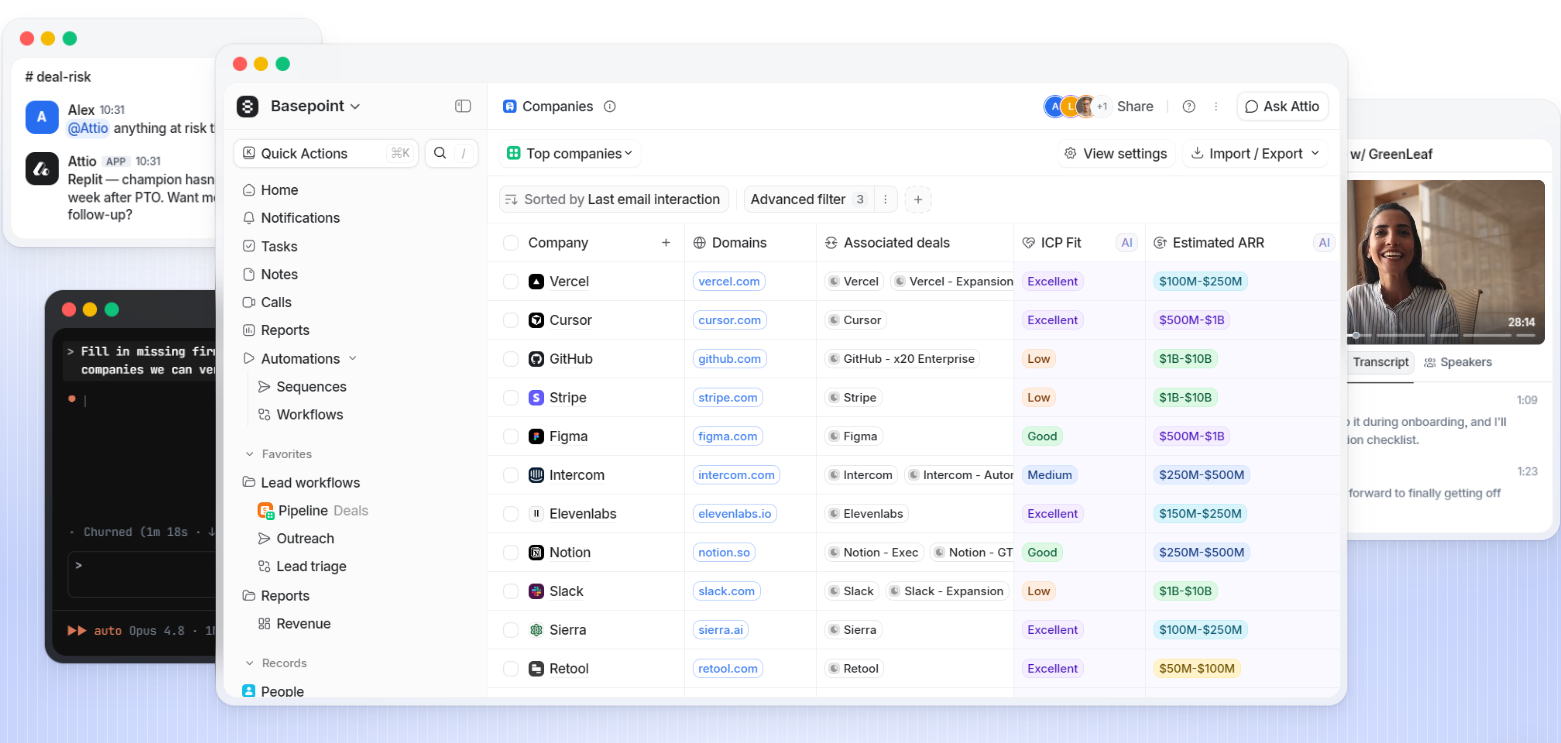
Attio is an AI-native CRM platform designed for startups, scale-ups, and technical teams that want a CRM they can mold to their go-to-market motion. Founded in London in 2019 and backed by $116 million in venture funding (including a Series B led by GV), Attio serves 5,000 paying customers including Granola, Modal, Railway, and Union Square Ventures.
Its key features include:
Flexible data model with custom objects, 17 attribute types, and relational structures that mirror your actual business
Ask Attio AI powered by Universal Context, a single intelligence layer that semantically indexes all CRM data for natural language queries
Visual workflow engine with AI-powered blocks for classification, summarization, and research
Call Intelligence for automatic meeting recording, transcription, and AI-generated insights
Email sequences for warm-lead outreach through connected Gmail or Outlook accounts
Developer platform with REST API, App SDK, and MCP server for customization
Automatic enrichment from hundreds of sources, populating contact and company records with company attributes
Attio's core strength is its flexibility. Teams can build custom objects to track any entity, create workflows without engineering support, and connect product data through native Segment integration or reverse ETL tools. Its sub-50ms latency even with millions of records addresses a common pain point with legacy CRMs.
As teams scale, however, certain limitations surface. Native integrations are still limited compared to established platforms, with no LinkedIn inbox integration or Sales Navigator connector. Email sequences are restricted to warm leads with no SMS, dialer, or A/B testing. Reporting lacks formula fields and advanced analytics, and enterprise features like territory management and multi-BU forecasting are absent. These gaps are where each alternative on our list steps in.
Looking for a platform that combines comprehensive B2B data with AI-powered intelligence, accessible through any tool your team already uses? Learn how ZoomInfo can power your go-to-market motion.
How We Curated Our List of Attio Alternatives
After testing Attio and researching the CRM and GTM market, we found that Attio's developer-first approach serves a specific type of team well, but many growing teams need capabilities that a Series B startup CRM is not yet positioned to deliver. While Attio excels at custom data modeling and AI-powered CRM workflows, businesses often need more from:
Verified B2B contact data and intent signals at enterprise scale
Autonomous AI agents that execute GTM workflows without manual triggers
Marketing automation, lead scoring, and multi-touch revenue attribution alongside sales CRM
Visual pipelines with built-in telephony and multi-channel sequencing
Contact capture directly from LinkedIn with real-time enrichment
A CRM natively inside Gmail without context-switching
A self-hosted CRM with full extensibility at zero licensing cost
Each tool on this list leads in one of these areas. You might use them alongside Attio or switch entirely; it depends on what your growing team needs most.
DISCLAIMER: We aren't covering every CRM or GTM tool. Our focus is on the best alternatives that address Attio's limitations for specific use cases. |
|---|
1. ZoomInfo — Best Alternative for Comprehensive B2B Data and AI-Powered GTM Intelligence
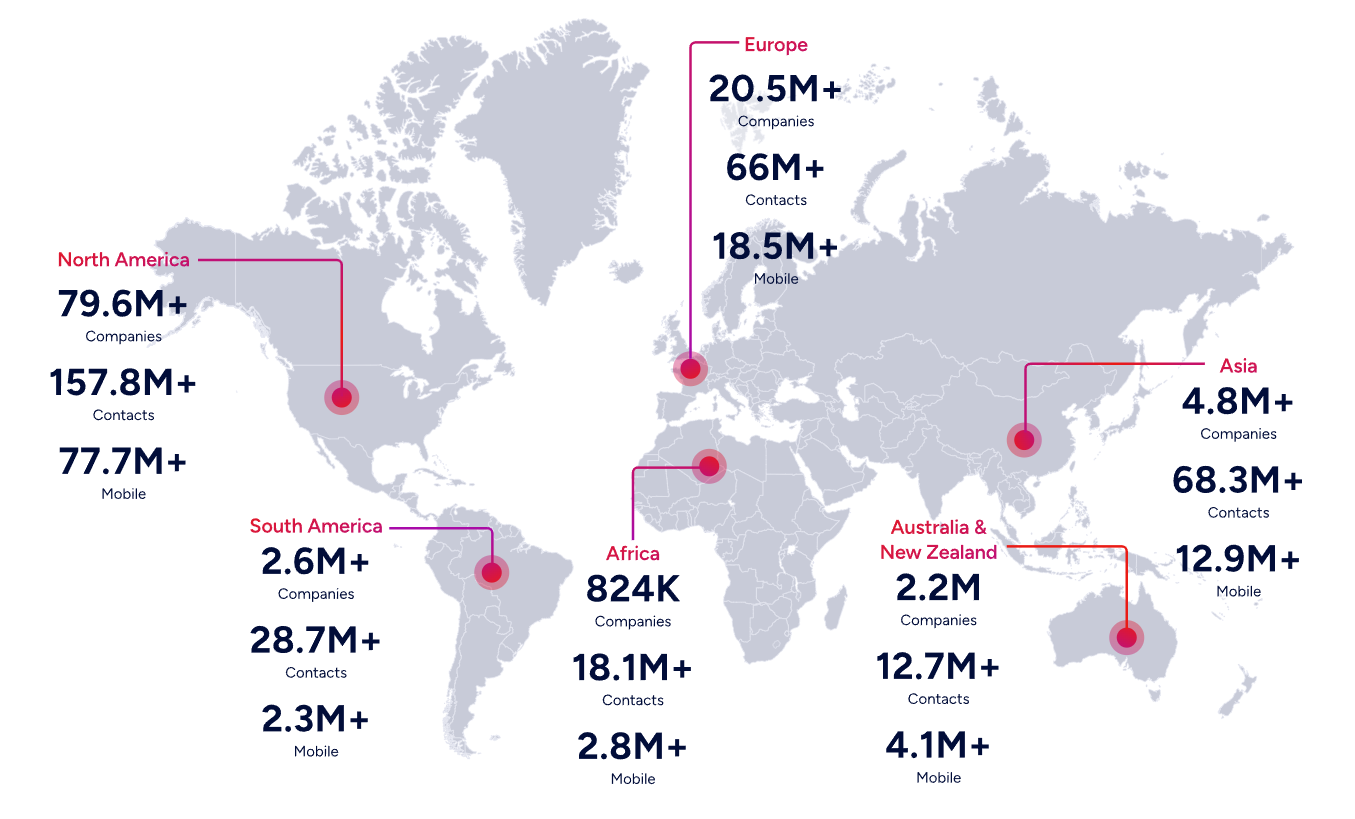
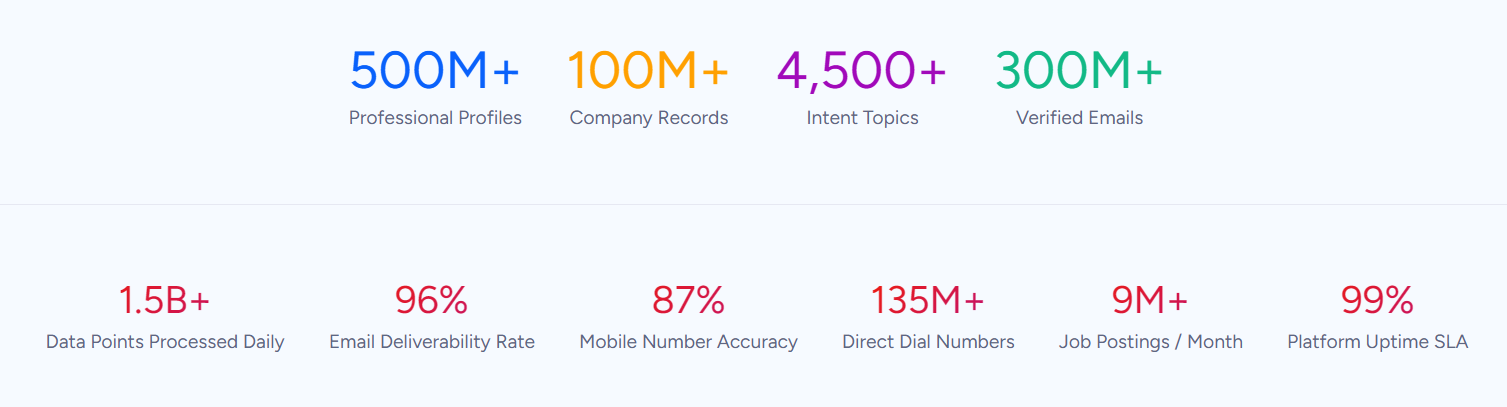
ZoomInfo is an AI GTM platform built on the largest B2B data foundation in the industry: 500M contacts, 100M companies, 135M+ verified phone numbers, and 200M+ verified business email addresses. Its key features include:
B2B data covering identity data, company context, and buying signals, verified by 300+ human researchers with up to 95% accuracy on first-party data
GTM Context Graph that fuses ZoomInfo's data with your CRM records, conversation intelligence, and behavioral signals into a single intelligence layer processing 1.5B+ data points daily
Buyer Intent Data tracking signals from 210 million IP-to-Organization pairings and 6 trillion+ new keyword-to-device pairings sourced monthly
Universal access through APIs and MCP for any tool, GTM Workspace for sellers, and GTM Studio for marketers and RevOps
Chorus conversation intelligence capturing and analyzing all customer calls, meetings, and emails with AI-driven deal insights
Website visitor identification resolving anonymous traffic to companies with Automatic Traffic Filtering that distinguishes real people from bots
ZoomInfo is a broader tool than Attio. Attio is a CRM built around a flexible data model with built-in enrichment from its own sources. ZoomInfo operates the largest B2B data platform in the world, combined with an AI intelligence layer that captures not just what happened in a deal, but why it happened. For teams that need verified contact data, intent signals, and GTM intelligence flowing into any tool they already use, ZoomInfo provides a data and intelligence foundation that no single CRM can replicate.
Why Choose ZoomInfo Over Attio for B2B Data and GTM Intelligence
Attio offers built-in enrichment from hundreds of sources for populating CRM records. ZoomInfo provides a different scale of data and intelligence entirely. The following sections show where ZoomInfo delivers capabilities that Attio's enrichment layer was not designed to match.
Data Scale and Quality: The Foundation That Powers Everything Else
Attio's enrichment is useful when it works. It automatically populates company records with logos, descriptions, ARR estimates, employee counts, and funding data drawn from hundreds of sources. But it has documented limitations: enrichment cannot be triggered on demand, and the data is limited to what public aggregation sources can provide for a given domain or email address.
ZoomInfo's data platform operates at a different order of magnitude. It covers 500M contacts, 100M companies, 135M+ verified phone numbers, 120M direct-dial phone numbers, and 200M+ verified business email addresses. This data is maintained through automated ML scanning of 28 million site domains daily, third-party partner data covering 95 million businesses, and an in-house Data Training Lab of 300+ human researchers. In a Fortune 500 competitive RFP analyzing 25 million contacts across vendors, an independent consultant concluded that "no other competitor came even close."
For sales teams, this means direct dials that ring and emails that land. For RevOps teams, enrichment workflows don't require stitching together multiple vendors to get a complete account picture. For marketers, TAM modeling becomes a verified census of the actual buyable market rather than guesswork built on incomplete data.
ZoomInfo in Action: Your team is preparing for a push into mid-market fintech companies. In Attio, you'd need to manually research each target account and hope enrichment populates the right contacts. With ZoomInfo, you search by industry, headcount, tech stack, and buying intent, and surface verified decision-makers with direct dials and business emails across 300+ company attributes. When those accounts start researching your category, Guided Intent identifies topics historically correlated with deal success, so your team reaches out when receptivity is highest.
The GTM Context Graph: Intelligence That Understands Why Deals Move
Attio's Ask Attio is a strong conversational AI layer. It semantically indexes CRM data and supports natural language queries across records, calls, emails, and notes. But it operates within the boundaries of data that exists in Attio: what the team manually entered, what email and calendar sync captured, and what enrichment populated.
ZoomInfo's GTM Context Graph fuses third-party B2B data with a customer's own first-party data (CRM records, conversation transcripts from Chorus, email threads, product usage signals) into a single intelligence layer that captures not just what happened in a deal, but why it happened. As ZoomInfo's Chief Product Officer Dominik Facher writes: "The CRM recorded the state change. It has no record of why it happened." The GTM Context Graph makes this decision context machine-readable: who influences whom, what each action responded to, what thousands of similar deals suggest happens next.
This intelligence powers every downstream action. The follow-up email addresses the specific concern the CFO raised because the system understands why it matters now. The GTM play targets accounts whose signal combinations match actual win patterns rather than those that tripped a keyword threshold. The forecast weights deals by the strength of buying evidence rather than stage labels and rep optimism.
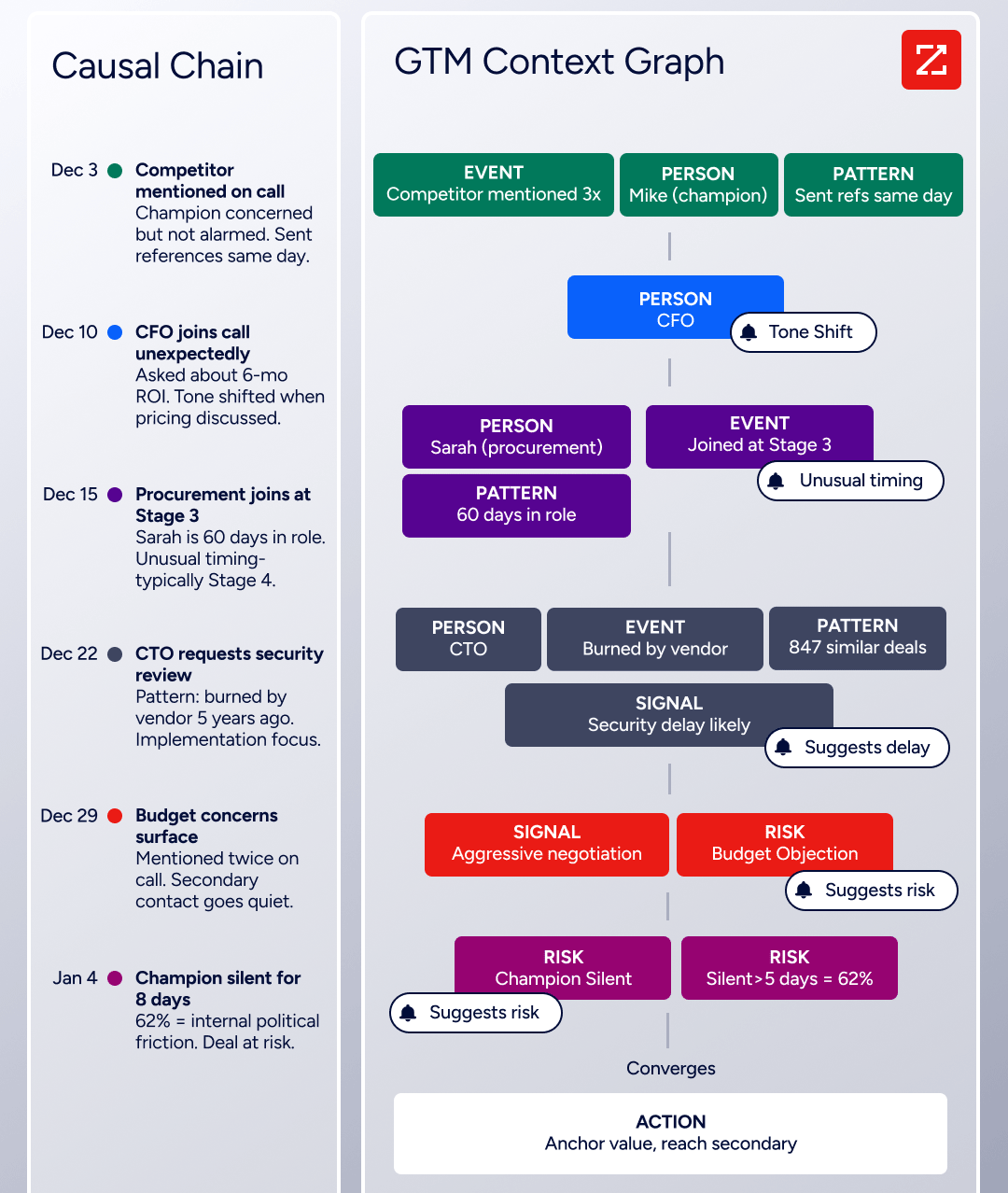
ZoomInfo in Action: A deal in your pipeline just moved to Stage 4, but nobody on the team knows what triggered the movement. In Attio, you'd review call recordings and emails manually. With ZoomInfo's GTM Context Graph, the system has already connected the dots: the CFO joined the last call and asked about six-month ROI (captured by Chorus), combined with third-party signals showing the company just hired three new VPs and is actively researching your competitor. The AI drafts a follow-up that addresses the CFO's ROI concerns while positioning against the competitor they're evaluating.
ZoomInfo has been recognized as a Leader in the Gartner Magic Quadrant for ABM Platforms (2024 & 2025), a Leader in the Forrester Wave for Intent Data Providers B2B (Q1 2025), and Ranked #1 in 142 G2 Reports across Sales Intelligence, Buyer Intent, Data Quality, and Account Data Management.
Universal Access: Use It in Any Tool, Any Workflow, Any AI Agent
Attio's developer platform is strong for a startup CRM: REST API, App SDK, MCP server, and webhooks are all available across every plan. But the intelligence Attio surfaces is limited to what lives inside its own database. If your team builds in Cursor, collaborates in Claude, or runs campaigns in a marketing automation platform, Ask Attio's insights stay inside Attio.
ZoomInfo delivers its intelligence through three channels, all drawing from one GTM Context Graph. GTM Workspace gives sellers a single surface where prioritized accounts, AI-drafted outreach, and deal execution converge. GTM Studio gives marketers and RevOps a builder environment where audience definition, campaign orchestration, and pipeline measurement happen in natural language. APIs and MCP expose the same intelligence to any custom agent, internal tool, or partner platform, from Anthropic Claude to Google to proprietary systems.
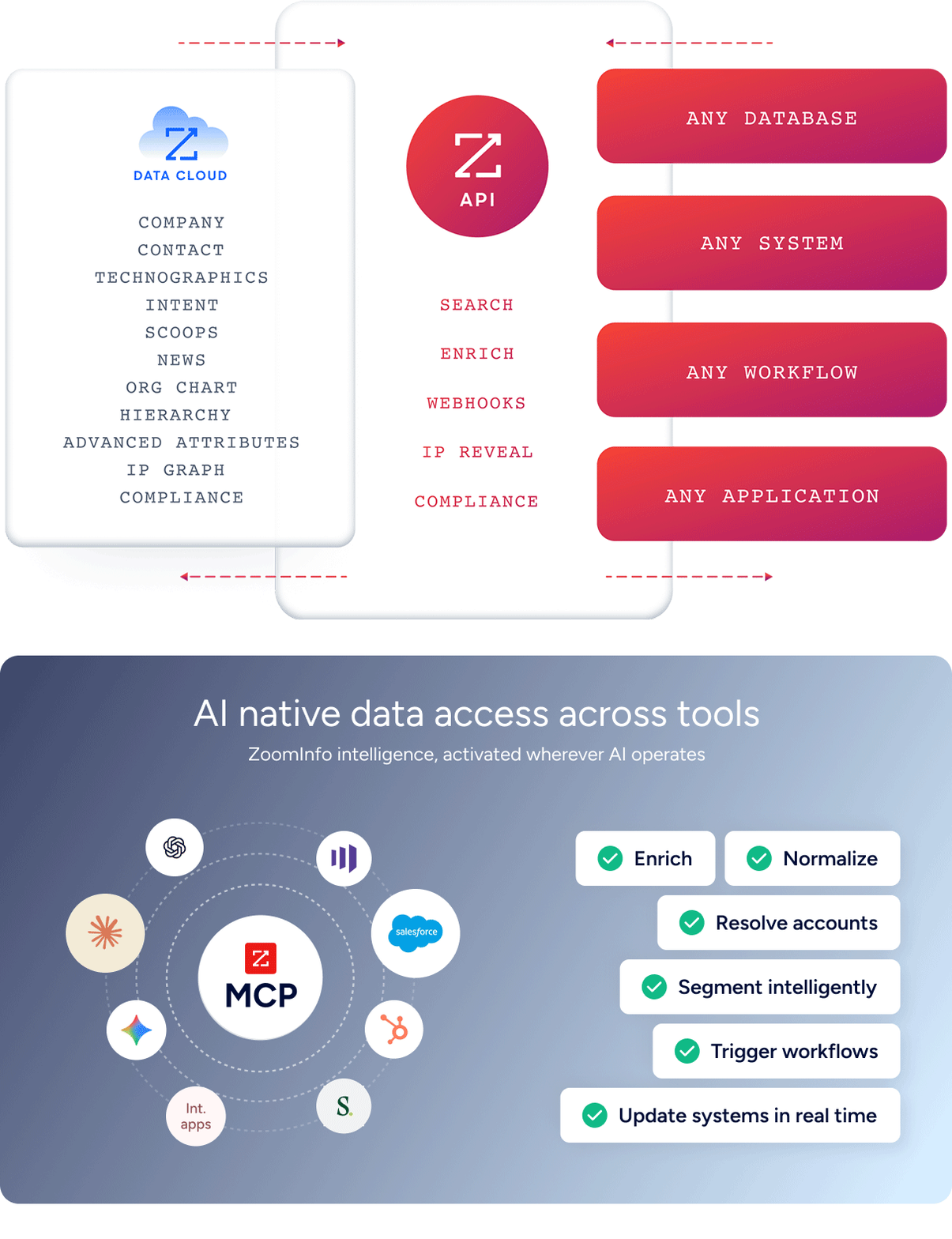
The key architectural point: all three channels draw from one intelligence layer. The same data foundation, the same intelligence, the same continuously learning model. Nothing is degraded or siloed by surface. Agent Teams build on this same foundation, coordinating specialist agents that share context and carry out complete GTM plays end to end, within GTM Studio and headless through GTM.AI, acting within the approvals and limits you set.
"It's not just the data itself. It's more about the right data at the right time to help us reach out with the right message across that full buyer journey." — Chelsea Kenyon, Senior Director of Digital Strategy, Redwood Logistics
NOTE: We also evaluated Apollo.io and Lusha for this data-intelligence archetype. While Apollo offers a competitive contact database with built-in sequencing at a lower price point, and Lusha provides streamlined prospecting for smaller teams, ZoomInfo's data scale (500M contacts vs. Apollo's smaller database), its proprietary GTM Context Graph, and its universal access model (APIs, MCP, GTM Workspace, GTM Studio) make it the strongest platform for teams that need data and intelligence as foundational infrastructure rather than a supplementary prospecting tool.
ZoomInfo Pricing
ZoomInfo uses a custom-quoted, consumption-based pricing model with no publicly listed prices. Pricing scales around enterprise license agreements, data access, API consumption, and AI activity.
Sales Plans:
Professional: Contact and company data with profiles, search and export, mobile numbers and business email, CRM integrations, Chrome extension, and AI-powered email generation
Advanced: Adds AI-driven account prioritization, buyer intent signals, website visitor identification, champion tracking, and automated outreach workflows
Enterprise: Adds real-time buyer intent, advanced company attributes, competitor alerts, custom integrations, and dedicated customer service manager
Free entry points:
ZoomInfo Lite: A permanent free tier (no credit card, no time limit) with access to ZoomInfo's B2B database, 10 monthly export credits, individual and company searches, and HubSpot integration
7-day free trial: Full platform access with no credit card required
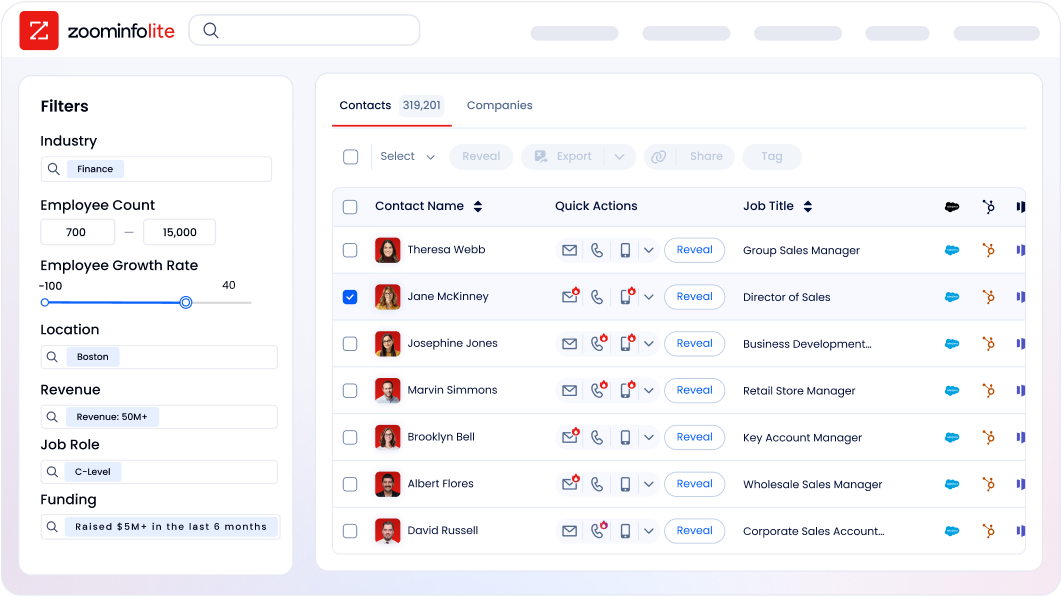
ZoomInfo's credit system means 1 credit equals 1 export of a professional or company profile. Searching and viewing data within ZoomInfo does not consume credits. API access is included in all relevant plans.
Who Should Use ZoomInfo?
Choose ZoomInfo if:
You need verified B2B contact data at scale, with direct dials that ring and emails that land, rather than relying on Attio's passive enrichment from public aggregation sources.
Your team needs intent signals and buying behavior data to identify in-market accounts before they engage vendors, a capability Attio does not offer at any tier.
You want GTM intelligence accessible in any tool your team uses, from Claude and ChatGPT to Salesforce and HubSpot, through APIs and MCP rather than locked inside a single CRM interface.
You're building a data-driven go-to-market operation where the quality of your contact and company data directly determines pipeline velocity and win rates.
Want to see how ZoomInfo's data and intelligence can power your go-to-market motion? Start a free trial or explore ZoomInfo Lite to access the largest B2B database in the industry.
2. Salesforce — Best Alternative for Enterprise Sales Teams Needing Autonomous AI Agents and Deep Analytics
Source: Salesforce
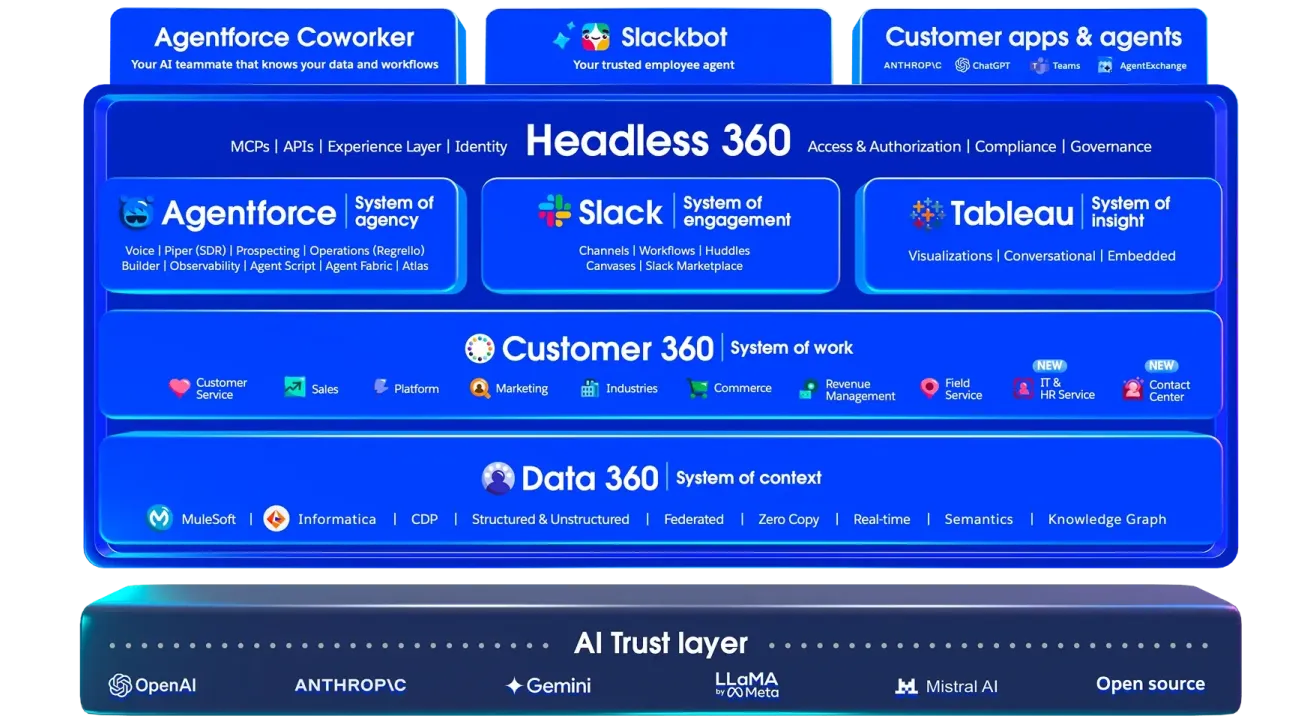
Salesforce is the world's #1 AI CRM, a multi-cloud enterprise platform serving over 150,000 companies worldwide. It stands as a clear alternative to Attio for organizations that have outgrown startup-focused CRMs and now require autonomous AI execution, deep analytics, enterprise territory management, and a compliance stack that satisfies regulated industries. Its key capabilities include:
Agentforce autonomous AI agents that research accounts, draft outreach, update CRM records, and handle multi-step interactions 24/7 without manual triggers
Sales Cloud with Einstein AI for lead scoring, pipeline health signals, and AI-powered coaching
Tableau Next analytics with joined reports, cross-object reporting, formula fields, and agentic analytics
AppExchange marketplace with 9,000+ partner apps and 14+ million installs
Territory management and multi-BU forecasting with org-structure-based routing and multi-currency support
Enterprise compliance including ISO 27001, SOC 1/2/3, FedRAMP (Government Cloud), and HIPAA-compatible configurations
Why Choose Salesforce Over Attio for Enterprise Sales Operations
Salesforce stands out in the following areas:
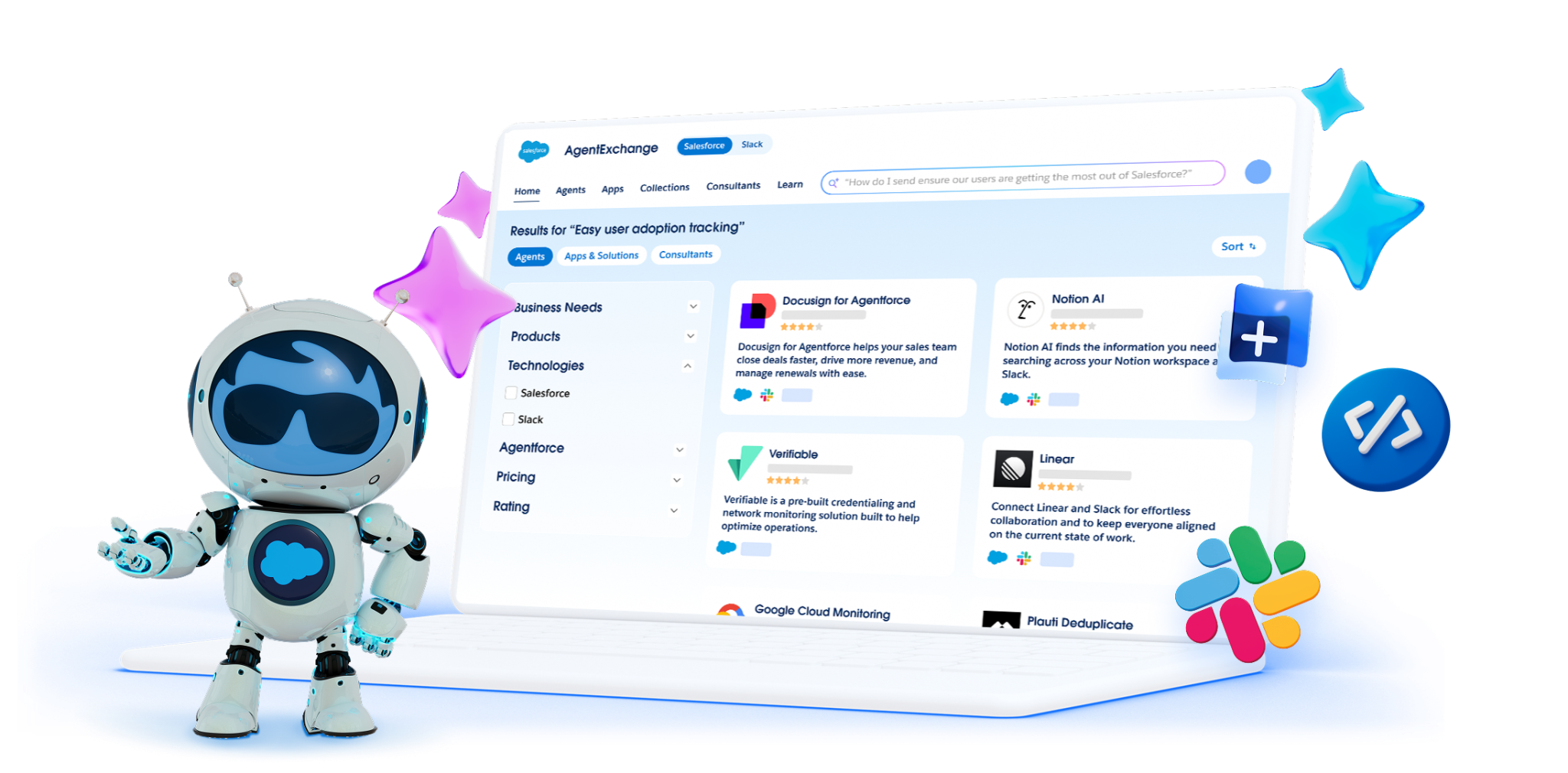
Agentforce: Autonomous AI That Executes, Not Just Assists Attio's Ask Attio is a conversational AI that answers questions, suggests updates, and requires user approval for every change. Salesforce Agentforce operates at a different level of autonomy. Powered by the proprietary Atlas Reasoning Engine, Agentforce agents independently research accounts, engage inbound leads, handle multi-step service inquiries, and update records without any human trigger. Salesforce reports that its own deployment resolves 85% of support requests without human escalation. The AgentExchange marketplace includes 250+ pre-built agent actions from partners including Google Cloud, Docusign, and Workday.
Analytics Depth: Tableau Next vs. Attio's Reporting Ceiling Attio's reporting handles pipeline analytics, but lacks formula fields, cross-object joined reports, and advanced dashboard customization, with reports capped at 100 on the Pro plan. CRM Analytics provides embedded dashboards directly inside records. Tableau Next introduces agentic analytics with AI-powered agents (including Data Pro, Data Concierge, and Data Inspector) that let leaders ask complex questions and receive structured analytical answers. For board-level pipeline dashboards or revenue attribution models, Salesforce's analytics infrastructure is decades more mature.
Ecosystem Depth: 9,000 Apps vs. ~100 Native Integrations Attio's App Store contains over 100 integrations and is growing, but users cite integration gaps as the platform's biggest constraint. The AppExchange has 9,000+ apps with 14+ million installs and 91% of customers using at least one AppExchange app. LinkedIn Sales Navigator, Outreach, Gong, Marketo, Demandbase, and virtually every enterprise tool has a certified connector. MuleSoft's Anypoint Platform handles custom enterprise integrations with hundreds of pre-built connectors.
Source: Salesforce
NOTE: We also evaluated Microsoft Dynamics 365 for this enterprise archetype. While Dynamics 365 offers comparable enterprise depth and suits Microsoft-first organizations better, Salesforce has the broadest ecosystem, the most mature AI agent platform, and the widest analyst validation, making it the clearest enterprise reference point for teams evaluating a move off Attio.
If you want a closer look at how Attio and Salesforce compare on features, pricing, and use cases, our Attio vs Salesforce guide covers the key differences in depth.
Salesforce Pricing
Salesforce operates a multi-tier pricing model. All paid plans except Starter Suite require annual contracts.
Free Suite: $0/user/month (max 2 users); basic lead, account, and opportunity management
Starter Suite: $25/user/month, monthly or annual; unlimited users, AI email sync, lead routing
Pro Suite: $100/user/month, annual; customization, quoting, forecasting, AppExchange access
Enterprise: $175/user/month, annual; AI for sales and service, pipeline insights, workflow automation
Unlimited: $350/user/month, annual; full AI suite, conversation intelligence, Premier Success Plan
Agentforce 1: $550/user/month, annual; unmetered Agentforce, Tableau Next, Slack Enterprise+
Note: Salesforce's total cost of ownership typically exceeds per-user list prices. Implementation often requires partner involvement, and Premier Success Plan adds 30% of net license fees. Request a full cost-of-ownership estimate.
Who Should Use Salesforce?
Choose Salesforce if:
Your sales organization requires territory management, quota tracking, multi-BU forecast rollups, and org-hierarchy-based routing that Attio does not natively support.
You need AI agents that execute autonomously rather than an AI assistant that answers questions and waits for approval.
Your integration stack includes enterprise tools that require certified, production-grade connectors rather than Zapier-dependent workarounds.
Your industry requires compliance certifications (FedRAMP, HIPAA, SOC 1/2/3, field-level encryption) beyond Attio's ISO 27001 and GDPR posture.
3. HubSpot — Best Alternative for Teams That Need Marketing, Sales, and Service Under One Roof
Source: HubSpot
HubSpot is a publicly traded CRM and customer platform serving 288,706 customers across 135+ countries. It consolidates marketing automation, sales pipeline management, customer service, and content operations inside a single shared database. Its key capabilities include:
Permanently free CRM with unlimited contacts (up to 1M records), deal pipelines, and email integration
Marketing Hub with multi-step email automation, A/B testing, lead scoring, and multi-touch revenue attribution
Sales Hub with sequences, built-in VoIP calling with call recording, and a native LinkedIn Sales Navigator connector
Service Hub with omnichannel help desk and AI Customer Agent
Over 2,000 app integrations with 2.5 million active installs
Why Choose HubSpot Over Attio for an All-in-One GTM Platform
HubSpot stands out in the following areas:
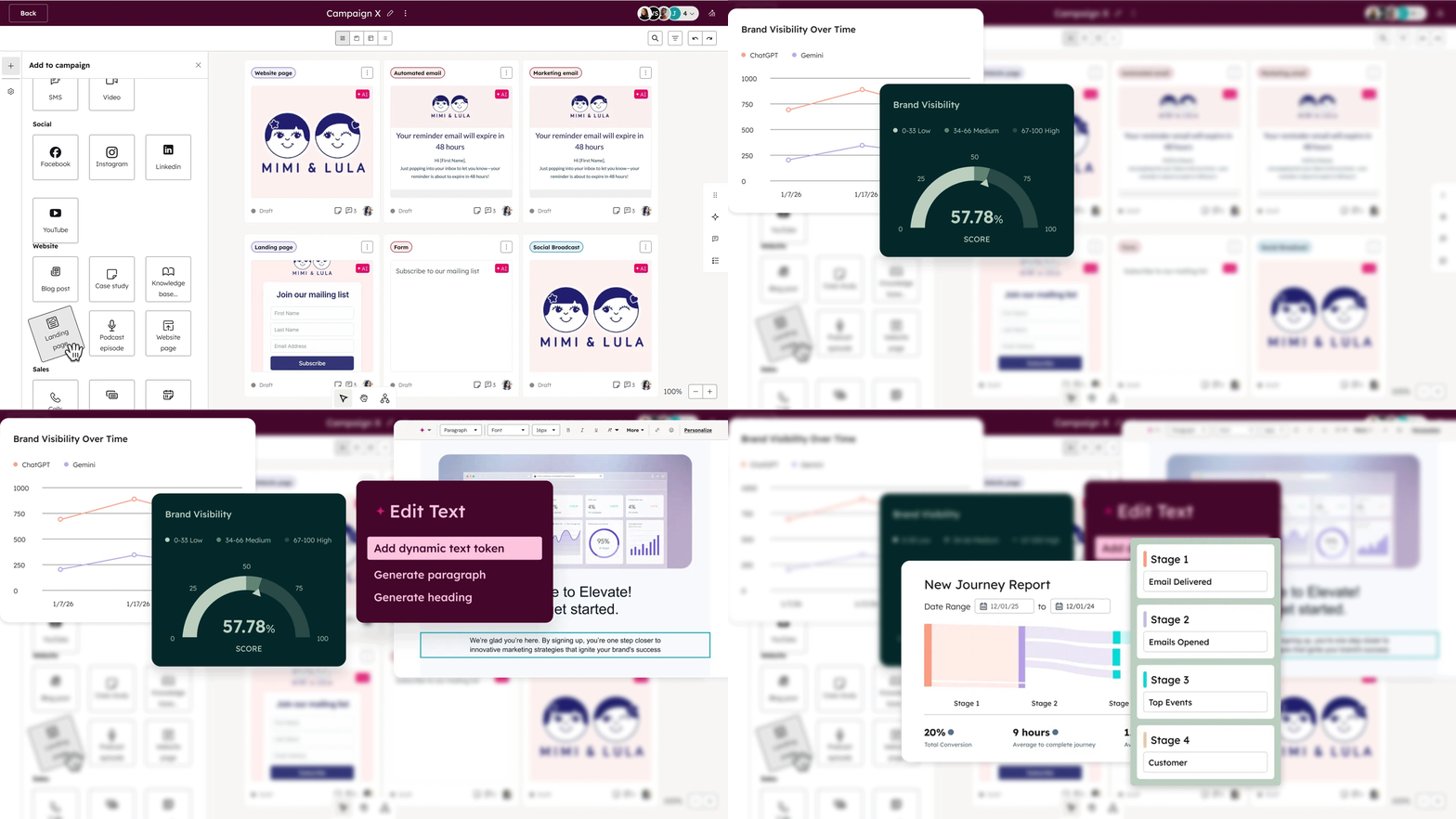
Native Marketing Automation That Attio Does Not Offer Attio is a pure CRM. At no price tier does it include marketing email sending, lead nurturing workflows, landing page creation, or advertising management. HubSpot's Marketing Hub provides a full marketing automation layer on the same platform as the CRM: drag-and-drop email editor with send-time optimization and A/B testing, multi-step nurture workflows triggered by contact behavior, AI-powered lead scoring, and landing page and form builders natively connected to the CRM. Attio's sequences handle warm leads only, with no multi-channel support, no A/B testing, and no built-in email service provider.
Revenue Attribution That Ties Channel Spend to Closed Deals Attio's reporting is real-time and flexible for pipeline analytics, but offers no attribution modeling and no formula fields. Teams scaling paid acquisition need to answer "which of these five channels drove pipeline last quarter?" HubSpot's Advanced Marketing Reporting maps every marketing touchpoint (email clicks, ad impressions, blog visits, form fills) to contact records that became customers, letting marketers justify channel spend with revenue data. The Pathfinder customer journey report visualizes conversion paths across the full customer lifecycle.
Built-In VoIP Calling and LinkedIn Sales Navigator Integration HubSpot Sales Hub includes a native VoIP calling tool with call recording and automatic logging. The LinkedIn Sales Navigator integration lets reps surface LinkedIn insights and send InMails directly from HubSpot. Attio has no built-in calling tool and no native LinkedIn Sales Navigator connector at any tier. HubSpot also includes Conversation Intelligence for call recording, transcription, and coaching insights.
A Free CRM That Scales Without Forcing a Migration HubSpot's free CRM includes unlimited contacts (capped at 1M), deal pipelines, email integration, and basic chat and ticketing with no time limit. As teams grow, paid tiers layer marketing automation, sequences, and service tools on top of the same database. Attio's free plan caps at 3 seats and 50,000 records, and the Plus plan excludes sequences entirely.
Source: HubSpot
NOTE: We also evaluated Freshsales for this archetype. While Freshsales offers competitive pricing with marketing and sales combined, HubSpot has the most recognized free-to-enterprise growth path for B2B teams that need to add marketing and service capability without rebuilding their CRM.
For a head-to-head breakdown of how Attio and HubSpot compare, see our Attio vs HubSpot comparison.
HubSpot Pricing
HubSpot uses a hybrid per-seat and flat-fee model depending on which Hub is purchased. Pricing reflects annual billing.
Free CRM: $0, permanently free; up to 1M contacts, 2 user seats, basic deal pipelines, email integration
Starter Customer Platform: $9/seat/month (annual); Starter editions of all Hubs
Sales Hub Professional: $90/seat/month (annual); $1,500 one-time onboarding fee; sequences with A/B testing, call recording, LinkedIn Sales Navigator, conversation intelligence
Marketing Hub Professional: $800/month flat (3 seats included, annual); $3,000 one-time onboarding fee; 2,000 marketing contacts, multi-step workflows, lead scoring, multi-touch attribution
Note: If a company subscribes to Marketing Hub Professional and Sales Hub Enterprise simultaneously, all Core Seats are billed at the Enterprise rate (the highest tier across any Hub). This can increase total spend for organizations mixing tiers across departments.
Who Should Use HubSpot?
Choose HubSpot if:
Your team needs marketing automation, email nurture, landing pages, and lead scoring on the same contact database your sales team uses, without subscribing to a separate marketing platform.
You require multi-touch revenue attribution to tie channel spend to closed revenue, and Attio's reporting gap compounds as marketing investment grows.
Your sales team relies on phone and LinkedIn as primary outreach channels and needs built-in calling with call recording and a native LinkedIn Sales Navigator connector.
You want to start free and grow into paid marketing, sales, and service tiers on the same platform over time.
4. Pipedrive — Best Alternative for Small Teams Needing Visual Pipeline Management and Built-in Calling
Source: Pipedrive
Pipedrive is a sales CRM built for small and medium-sized businesses. Unlike Attio, which centers on a flexible data model requiring configuration, Pipedrive delivers an immediately usable pipeline without any data architecture decisions. Its key capabilities include:
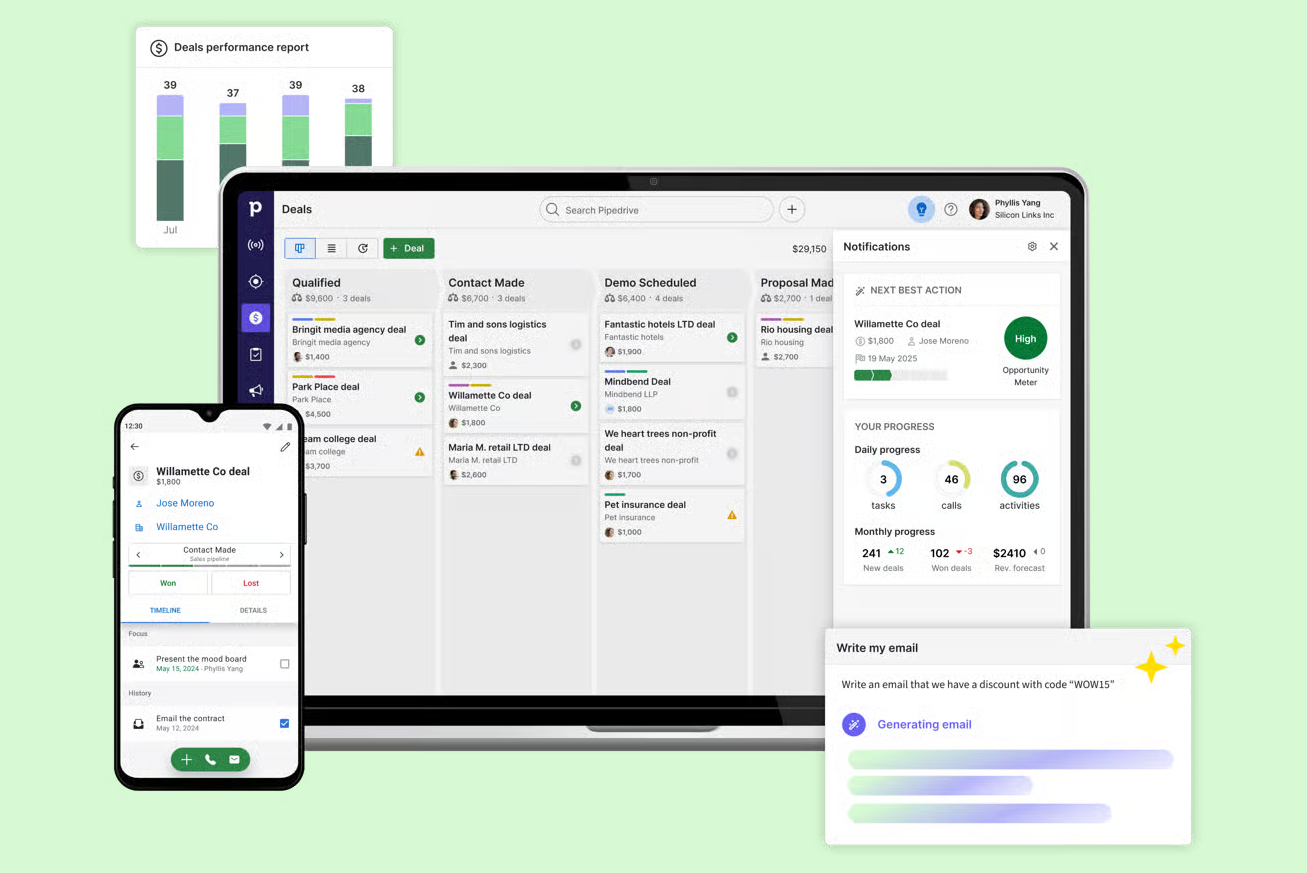
Kanban-style visual pipeline with drag-and-drop deal management and deal rotting alerts
Built-in click-to-call power dialer with automatic call logging and call recording
Multi-step email sequences with A/B testing on subject lines and body content
AI Sales Assistant that flags at-risk deals and surfaces next-action recommendations
500+ native Marketplace integrations including LinkedIn Sales Navigator, Apollo, and Lemlist
Mobile CRM with offline support, in-app calling, and geolocation-based "Nearby" feature
Why Choose Pipedrive Over Attio for Visual Pipeline Management and Sales Execution
Pipedrive stands out in the following areas:
A Pipeline That Works Without Configuration Pipedrive pioneered the kanban-style pipeline view in CRM software. When a salesperson logs in, they see a visual board with deals in named stages, with colored "deal rotting" cues flagging idle deals. No object model to configure, no stage schema to architect. A 14-day free trial with full access lets teams evaluate the tool on day one.
Native Calling and Call Recording Without a Third-Party Dialer Attio has no native telephony at any tier; teams must connect JustCall, Aircall, or RingCentral through the App Store. Pipedrive includes in-app calling with automatic call logging and outcome tracking directly on records. The mobile app extends this to field selling with auto-logging, a business card scanner, and a "Nearby" feature showing geographically close contacts.
Email Sequences With A/B Testing Attio Sequences handle warm leads only, with no A/B testing, and are excluded from the Plus plan entirely. Pipedrive's sequencing through Pulse includes multi-step sequences with A/B testing on subject lines and body content, plus open and click tracking. Sequences auto-pause when a contact engages.
500+ Native Integrations Including LinkedIn Sales Navigator Pipedrive's Marketplace contains 500+ integrations with native connectors for LinkedIn Sales Navigator, Apollo, Lemlist, and Outreach. The Prospector feature within LeadBooster adds a database of over 400 million profiles and 10 million companies.
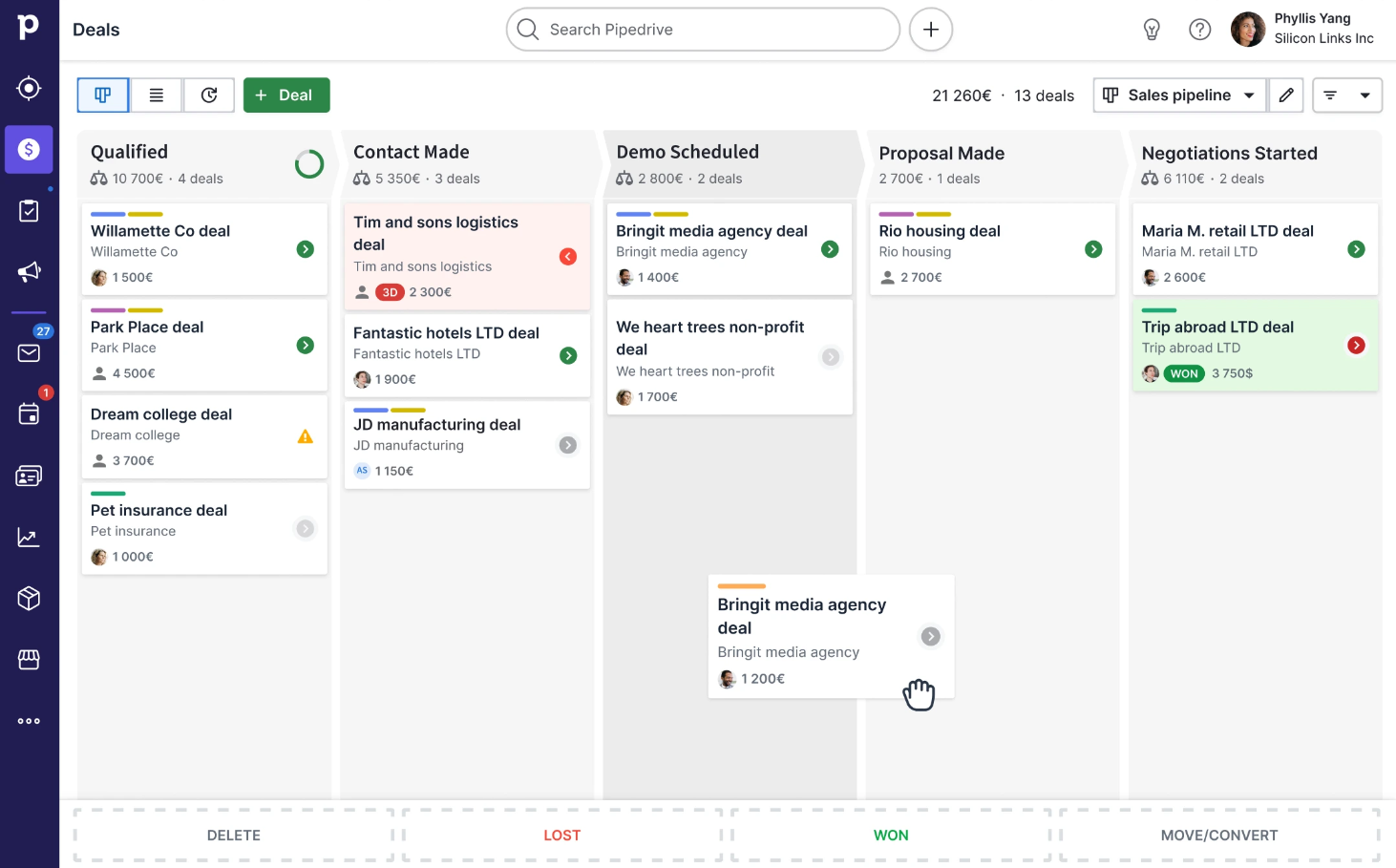
Source: Pipedrive
NOTE: We also evaluated Close CRM for this archetype. Close has stronger infrastructure for high-volume outbound teams and a reputation for calling. We chose Pipedrive because it addresses the full range of Attio user pain points (calling, sequencing, integrations, pipeline simplicity) without narrowing to an outbound-first motion that excludes inbound or relationship-driven sales.
To compare Attio and Pipedrive side by side on features and pricing, see our Attio vs Pipedrive breakdown.
Pipedrive Pricing
Pipedrive offers four plans billed per seat per month, with up to 42% discount on annual billing. No permanent free plan, but a 14-day free trial with full access requires no credit card.
Lite: Starts at $14/month per seat (annual); customizable pipelines, deal rotting, Leads Inbox, product catalog, 500+ integrations, mobile apps
Growth: Adds email sync, email templates, open/click tracking, automations with branching, sequences (up to 5), forecast view
Premium: Includes Smart Docs, Projects, LeadBooster bundled; AI email creation, phone support, 25 sequences
Ultimate: Highest usage limits; 500 custom fields, 50 sequences, 500 enrichment credits, security alerts
Add-ons available separately: Campaigns (email marketing) and Web Visitors (website company identification).
Who Should Use Pipedrive?
Choose Pipedrive if:
Your team wants a CRM that works out of the box without data model configuration. You need pipeline clarity on day one, not after a sprint of workflow setup.
You need a built-in dialer and call recording and don't want to evaluate, integrate, and pay for a separate telephony tool.
You're running active outbound with multi-step sequences and require A/B testing, which Attio's sequencing excludes entirely.
LinkedIn is a core prospecting channel and you need a native Sales Navigator integration rather than routing activity through Zapier.
5. folk — Best Alternative for LinkedIn-First Relationship Management and AI-Powered Contact Capture
Source: folk
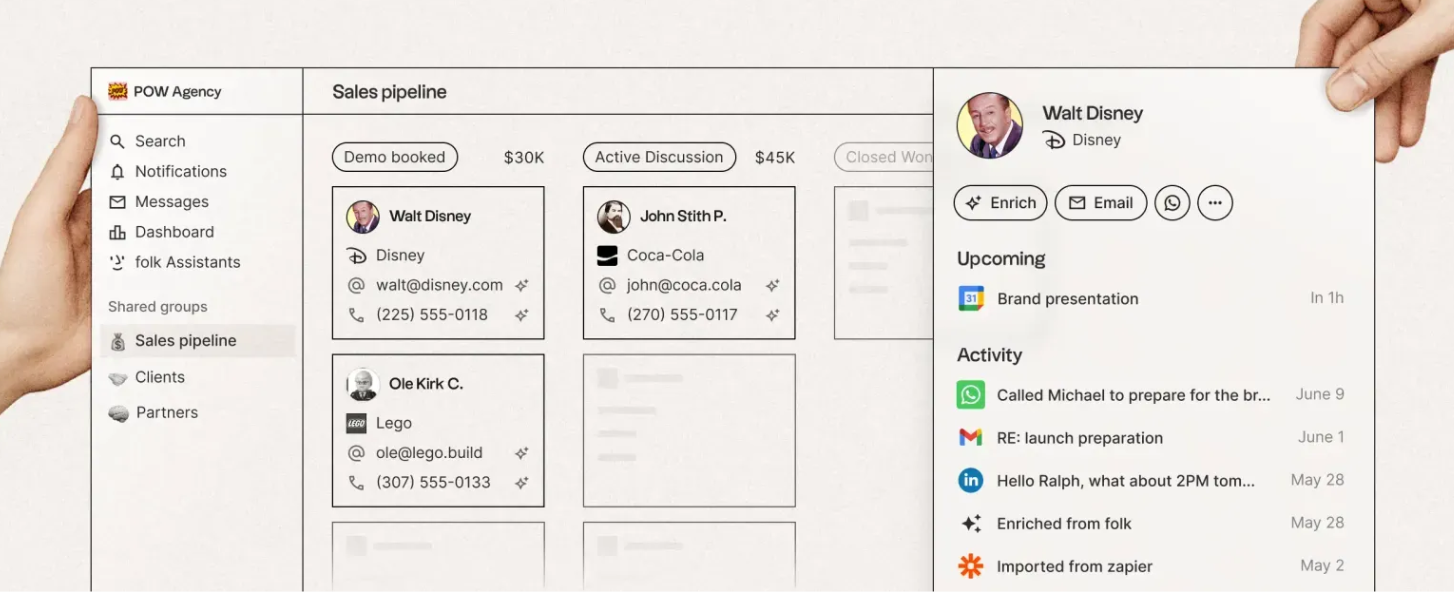
folk is a relationship-first CRM trusted by 4,000+ companies that removes the friction between finding a contact and adding them to your pipeline. While Attio is built for technical GTM teams needing flexible data modeling, folk optimizes for relationship-led sales where capturing and reaching out to LinkedIn contacts in minutes matters more than custom object hierarchies. Its key capabilities include:
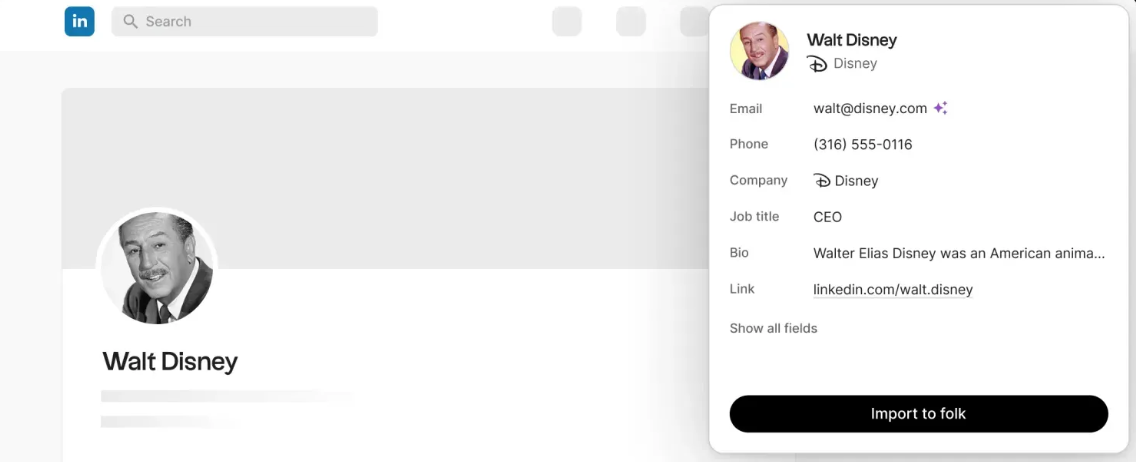
folkX Chrome extension for 1-click contact import from LinkedIn, Sales Navigator, Gmail, Google Meet, WhatsApp, and 7+ platforms
AI Magic Fields that automatically categorize leads, infer company size, and tag by industry using available contact data
Built-in email campaigns and sequences with per-contact AI personalization accessible from the Standard plan
1-click contact enrichment using a waterfall of six providers (Apollo.io, People Data Labs, Clearbit, Datagma, Prospeo, DropContact)
5,000+ integrations via Zapier and Make included on the entry-level Standard plan
Why Choose folk Over Attio for LinkedIn-First Relationship Management
folk stands out in the following areas:
LinkedIn as the Primary CRM Entry Point LinkedIn integration is Attio's most-cited missing capability. Attio has no native LinkedIn inbox integration, no Sales Navigator connector, and no one-click profile capture. The folkX Chrome extension (with 20,000 downloads and a 4.9 rating) captures contact data directly from any LinkedIn profile or Sales Navigator search in a single click. The extension also works across Gmail, WhatsApp, Twitter, Instagram, and Facebook. Users can bulk import lists in-context, and the extension shows who's already in the CRM to prevent duplicates.
On-Demand Enrichment That Works When You Need It Attio's enrichment cannot be triggered on demand. folk's 1-click enrichment can be triggered manually from any contact record or in bulk (up to 500 at once). The system runs a waterfall across six data providers, increasing coverage compared to any single-provider approach. Standard plan users receive 500 enrichment credits per month, with credits consumed only when data is found. The Research Assistant enriches company profiles using People Data Labs for structured data and Perplexity for AI-generated research notes.
Email Outreach Accessible at Entry Tier Attio's sequences are available only on the Pro plan at $69/month per user. folk's Messages and Sequences feature includes bulk email campaigns on the Standard plan at $24/month per user, with 2,000 messages per member per month and per-contact personalization. Multi-step automated sequences are a Premium feature at $48/month, but single-campaign sending with full personalization is accessible from the entry tier.
Source: folk
NOTE: We also evaluated Streak and Capsule CRM for this archetype. While Streak excels at Gmail-native pipeline management and Capsule offers clean contact-centric workflows, folk provides LinkedIn capture as the primary CRM entry point, the single feature Attio users most consistently cite as missing.
For a direct look at how Attio and folk compare for relationship-led sales, read our Attio vs folk comparison.
folk Pricing
Standard: $24/member/month (annual) or $30/month (monthly); unlimited contacts, email campaigns (2,000 messages/member/month), 500 enrichment credits, folkX extension, pipeline management, 5,000+ integrations
Premium: $48/member/month (annual) or $60/month (monthly); adds email sequences, dashboards, API access, custom objects, 5,000 messages/member/month, 1,000 enrichment credits
Custom: Starts at $80/member/month (annual); custom limits, dedicated support, custom billing terms
All plans include a 14-day free trial with full Premium features, no credit card required, and a free migration service.
Who Should Use folk?
Choose folk if:
Your prospecting workflow is primarily LinkedIn-driven and you need to capture contacts directly into a CRM pipeline without switching tabs or copy-pasting data.
Your team is small (under 50 seats) and needs a CRM operational in under 20 minutes with no configuration or custom object architecture required.
You want email campaign sending within the CRM without paying $69/month per user.
You need enrichment you can trigger on demand, not just passive background population.
6. Copper — Best Alternative for Google Workspace Teams Needing CRM Context Inside Gmail
Source: Copper
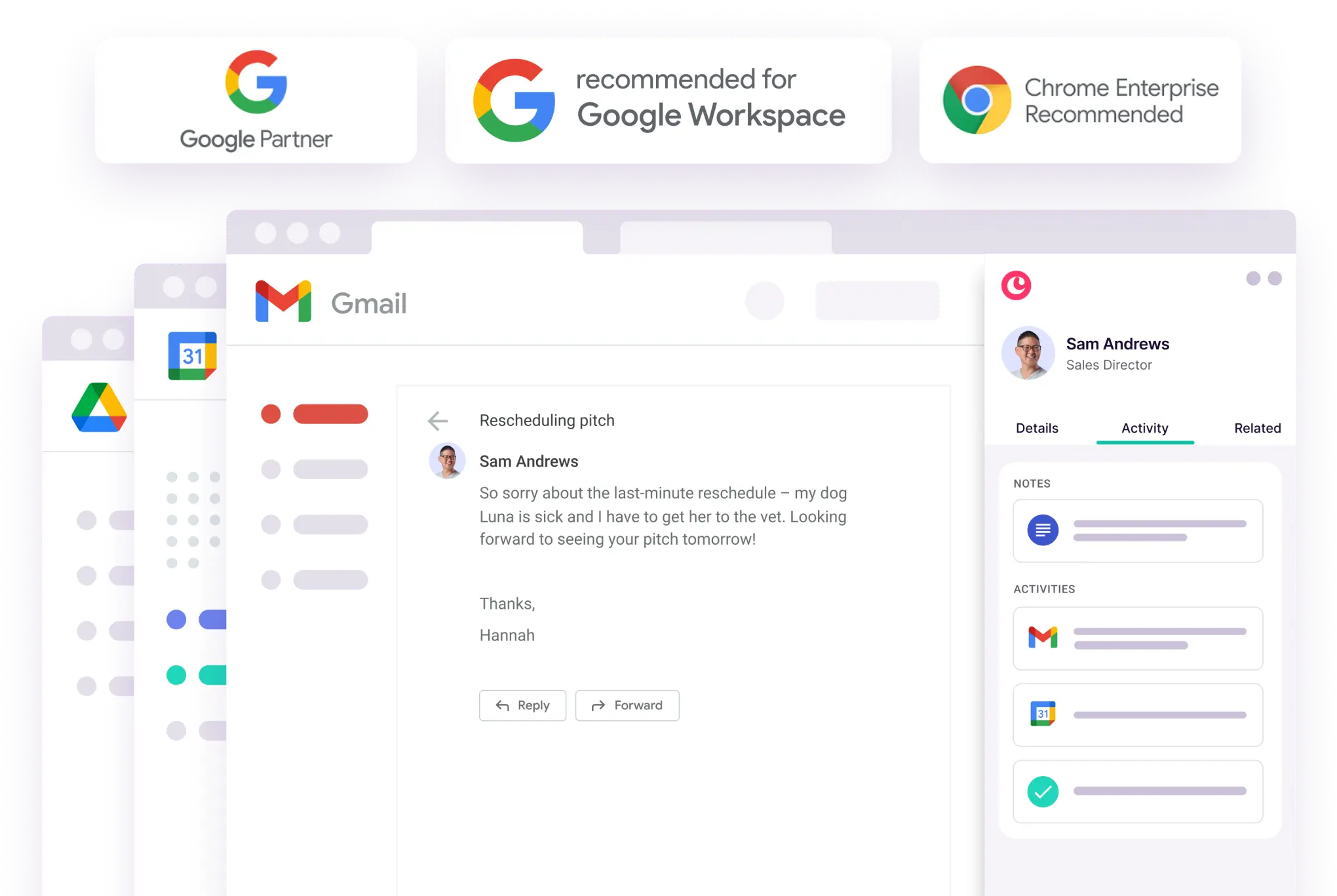
Copper is a CRM built for service businesses running on Google Workspace, making it the only CRM on this list with an official "Recommended for Google Workspace" designation from Google. Where Attio connects to Gmail through an integration, Copper is built to operate inside Gmail, with contacts auto-logged from email threads and meetings populated from Google Calendar. Its key capabilities include:
Native Gmail sidebar with automatic contact and email logging
Two-way Google Calendar sync with automatic meeting-to-record association
Built-in project management with task boards, milestones, and subtasks
Direct deal-to-project conversion without re-entering client data
LinkedIn Chrome Extension for one-click contact capture with duplicate detection
Why Choose Copper Over Attio for Google Workspace-Native CRM
Copper stands out in the following areas:
CRM Context Lives Inside Gmail Attio connects to Gmail as an integration; teams still switch contexts to manage deals and update pipeline stages. The Copper Chrome Extension embeds a full CRM sidebar directly inside Gmail: when a user opens an email, the extension surfaces the sender's complete record (contact details, opportunities, activity, tasks, files) without leaving the inbox. Copper activates Gmail sync automatically on signup, importing up to 90 days and 1,000 emails immediately. Google Calendar sync works both ways: events created in Copper trigger Google Calendar invites, and Calendar events mirror back to Copper automatically.
Built-in Project Management Converts Deals to Active Work Attio has no project management surface. Teams typically export closed deals into Asana, Linear, or Monday.com. Copper's project management module lets closed deals convert directly into project pipeline records, carrying all contact history, email threads, and files without re-entry. Since late 2025, subtasks are fully automation-eligible, and Google Workspace stays woven throughout: tasks sync to Calendar, Gmail conversations auto-log to project records, and file attachments from emails land in the project's Files tab.
Shorter Time-to-Value for Non-Technical Teams
Attio's flexible data modeling comes with a learning curve. For 5-15 person service businesses without RevOps resources, this creates onboarding friction. Because Copper lives inside Gmail, there is no separate interface to learn.
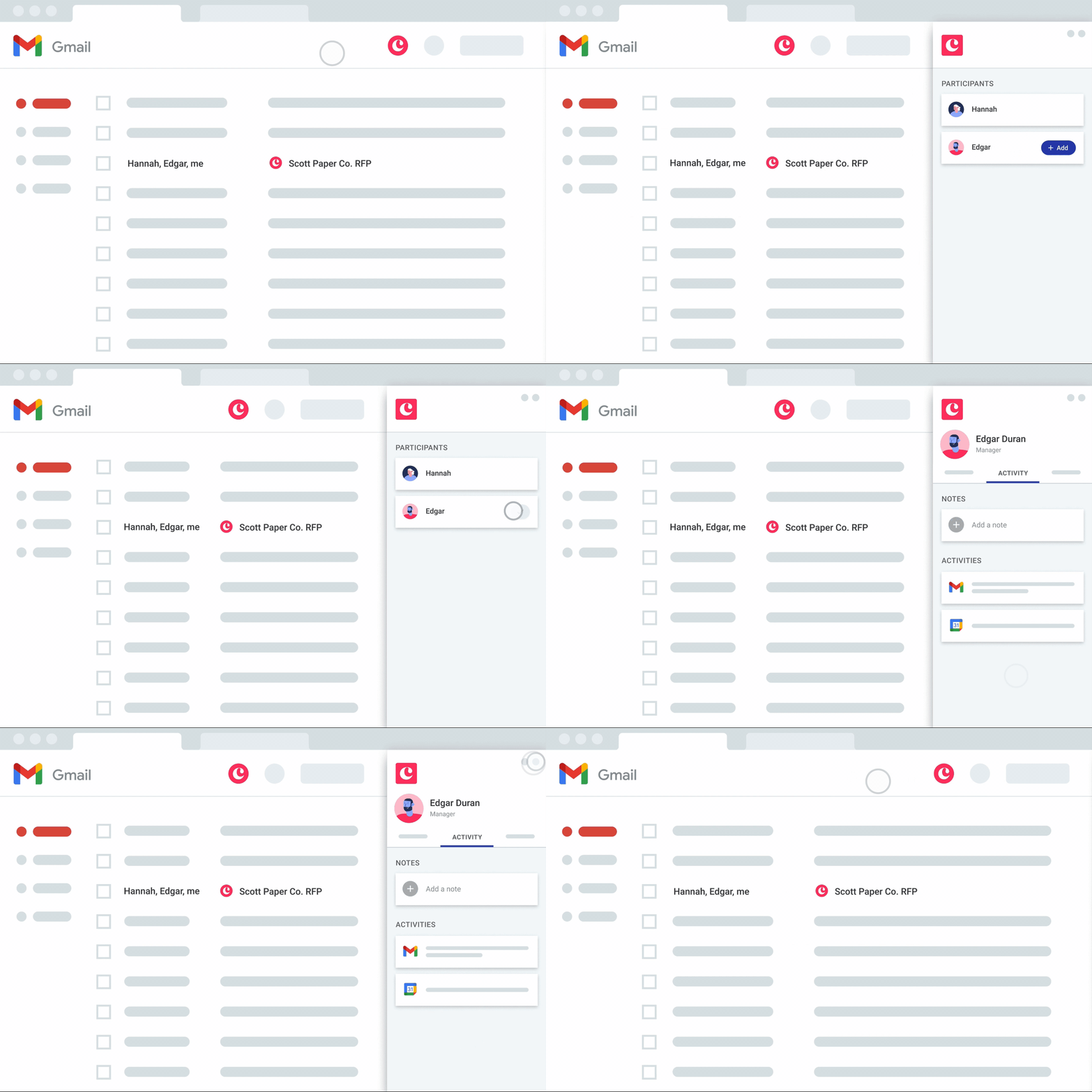
Source: Copper
NOTE: We also evaluated Streak for this category. While Streak is also Gmail-native, it functions primarily as an inbox sidebar plugin rather than a complete CRM. It lacks Copper's project management module, standalone contact database, and mobile field-team capabilities. Copper offers the best Google Workspace-native CRM for teams managing both client relationships and post-sale project delivery.
Copper Pricing
Starter: $9/seat/month (annual); Google Workspace integration, tasks, activity feed, Zapier; up to 1,000 contacts
Basic: $23/seat/month (annual); adds project management, task automation, contact enrichment; up to 2,500 contacts
Professional: $59/seat/month (annual); full workflow automation, bulk email, reporting, all integrations; up to 15,000 contacts
Business: $99/seat/month (annual); email series (up to 7-step), custom reports, multi-currency, API access; unlimited contacts
All plans include a free trial with no credit card required.
Who Should Use Copper?
Choose Copper if:
Your team runs entirely on Google Workspace and you want a CRM that operates inside Gmail rather than requiring a separate tab.
You're in a service-based business (agency, consulting, construction, financial services) that needs to manage both business development and project delivery inside a single platform.
You're a small-to-midsize team that needs to be operational within days and can't staff a RevOps function to build custom CRM configurations.
7. Twenty — Best Alternative for Open-Source, AI-Native CRM at Zero Licensing Cost
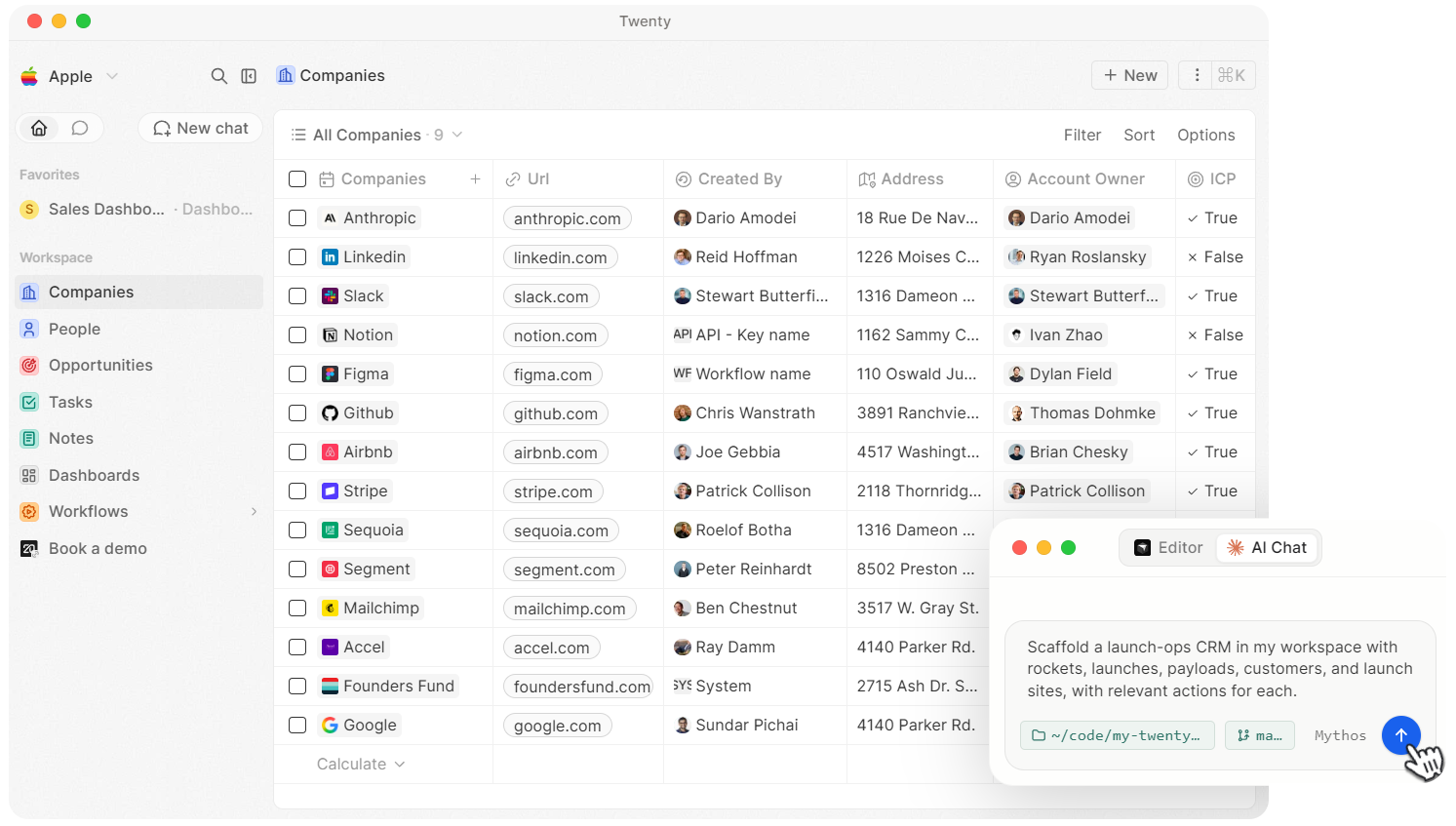
Source: Twenty
Twenty is an open-source CRM platform that combines a customizable data model with a native AI agent framework and Model Context Protocol server. With 49,600+ GitHub stars, it is the fastest-rising open-source CRM project in 2026. Its key capabilities include:
Custom objects, fields, and unlimited records with automatic GraphQL and REST API generation for every object type
Native MCP server on every Cloud workspace connecting Claude, ChatGPT, and Cursor via OAuth
TypeScript Apps framework for building custom workflow steps, record widgets, and integrations
Automated email and calendar sync with Google, Microsoft, IMAP/SMTP, and CalDAV providers
Visual workflow engine with JavaScript code nodes, AI agent steps, and branching logic
Self-hosted deployment at zero licensing cost with the full Cloud Pro feature set
Why Choose Twenty Over Attio for Open-Source, AI-Native CRM
Twenty stands out in the following areas:
Self-Hosted Deployment Eliminates CRM Licensing Costs Attio's pricing starts at $29/user/month on Plus and reaches $86/user/month on monthly Pro. Twenty's self-hosted path costs $0 in licensing: every feature in Cloud Pro, no seat caps, no data caps. The cloud option is still well below Attio: $9/user/month on Cloud Pro (annual) versus $29/user/month for Attio Plus.
MCP Server as a Primary Access Model Twenty ships a native MCP server with every Cloud workspace. Any MCP-compatible AI client (Claude, ChatGPT, Cursor) connects via OAuth and reads and writes CRM records in natural language with no custom code. While Attio also has an MCP server, Twenty positions the CRM as a data endpoint that any MCP-compatible client can consume, rather than a product with its own embedded assistant. For teams whose daily workflow lives in AI coding tools and chat environments, this architectural difference matters.
TypeScript Apps Framework for Extensibility Attio's workflow engine works well for GTM teams without engineering support. But when a team needs custom business logic beyond what a visual block library delivers, Attio's canvas is the ceiling. Twenty's Apps framework lets developers scaffold TypeScript projects, write custom workflow steps, record widgets, and AI agents using define* functions from the SDK.
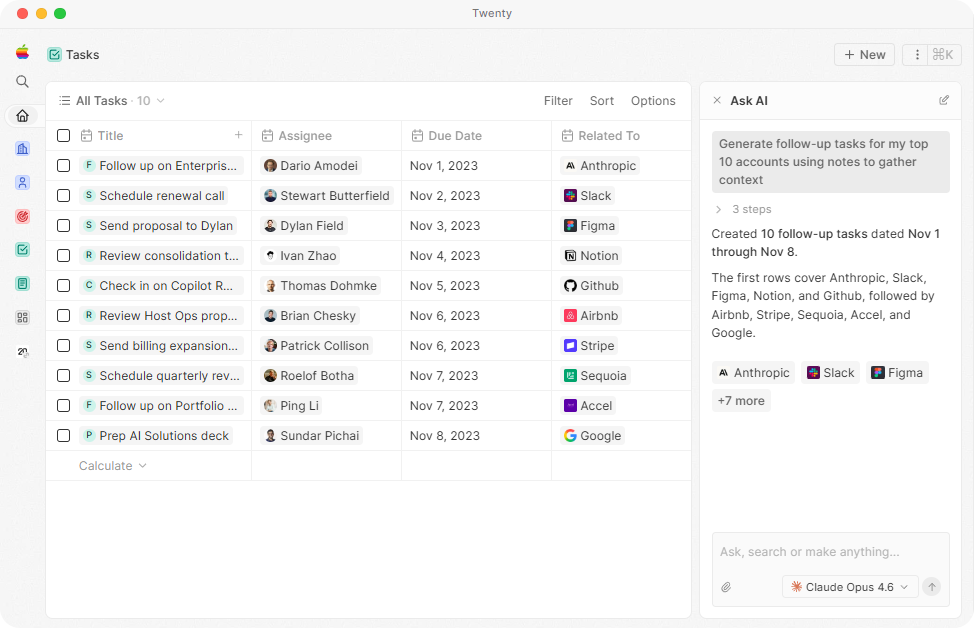
Source: Twenty
NOTE: We also evaluated EspoCRM and SuiteCRM for the open-source slot. While EspoCRM is mature with an established plugin library and SuiteCRM offers extensive legacy functionality, Twenty offers the most polished open-source CRM experience with the strongest AI-native integration story, directly relevant to developer-led teams evaluating Attio.
Twenty Pricing
Cloud Pro: $9/user/month (annual); unlimited seats, custom objects, fields, views, records; full workflow engine, AI agents, MCP server; 50 workflow credits/year
Cloud Organization: $19/user/month (annual); all Pro features plus row-level permissions, SAML/OIDC SSO, custom domain, priority support
Self-Hosted: $0 in licensing; full Cloud Pro feature set on your own infrastructure; community support via Discord (6,800+ members)
Who Should Use Twenty?
Choose Twenty if:
Your team has DevOps capacity and wants to eliminate CRM licensing costs entirely. Twenty's self-hosted tier is the only free path to an extensible CRM on this list.
Your developers already work in Claude, Cursor, or ChatGPT and want CRM data accessible from those environments via natural language.
You need to build custom business logic that exceeds what Attio's visual workflow block library can express, and your team writes TypeScript.
Data sovereignty or regulatory requirements make self-hosting non-negotiable, and you need a CRM backed by a 49,600+ star GitHub community.
The Final Verdict
Attio excels as a flexible, AI-native CRM for startups and technical teams, but growing businesses often need capabilities that go beyond what a single next-generation CRM can deliver. Here are the best alternatives:
ZoomInfo for comprehensive B2B data, AI-powered GTM intelligence, and universal access through any tool via APIs and MCP
Salesforce for autonomous AI agents, deep analytics, and a 9,000+ app ecosystem
HubSpot for marketing automation, revenue attribution, and an all-in-one GTM platform with a free CRM tier
Pipedrive for visual pipeline management with built-in calling, A/B-tested sequences, and 500+ native integrations
folk for LinkedIn-first relationship management with 1-click contact capture and on-demand enrichment
Copper for Google Workspace-native CRM with project management and automatic Gmail logging
Twenty for open-source, self-hosted CRM with native MCP server and TypeScript extensibility at zero licensing cost
You don't have to choose between Attio and these alternatives exclusively. Many teams use Attio alongside specialized tools. Consider your specific needs, team size, and growth trajectory when deciding which solution fits.
Looking for comprehensive B2B data and AI-powered GTM intelligence to power your go-to-market motion? Start your ZoomInfo free trial or explore ZoomInfo Liteto access 500M+ contacts, buyer intent signals, and the GTM Context Graph, accessible through any tool your team already uses. When it's time to act on that intelligence, ZoomInfo Agent Teams run complete GTM plays end to end, with specialist agents that share context and work from each account's current state within the approvals and limits you set.
Attio Alternatives FAQ
Why do businesses look for Attio alternatives?
Attio's main limitations include a still-growing native integration catalog (no LinkedIn inbox integration or Sales Navigator connector), email sequences restricted to warm leads with no SMS, dialer, or A/B testing, reporting that lacks formula fields and attribution modeling, and limited enterprise features like territory management and multi-BU forecasting. Teams that need capabilities beyond a flexible CRM data model often evaluate specialized tools.
What is the best overall Attio alternative?
There is no single best alternative because the right choice depends on what you need. ZoomInfo is the top choice for B2B data and GTM intelligence, HubSpot leads for teams needing marketing automation alongside CRM, Salesforce is strongest for enterprise-scale operations, and Pipedrive is the best fit for small teams wanting visual pipeline management with built-in calling.
Is there a free alternative to Attio?
Yes, several alternatives offer free options. HubSpot provides a permanently free CRM with unlimited contacts (up to 1M records) and basic deal pipelines. ZoomInfo Lite offers a permanent free tier with access to its B2B database and 10 monthly export credits. Twenty can be self-hosted at zero licensing cost with the full Cloud Pro feature set.
Which Attio alternative is best for sales teams that rely on phone outreach?
Pipedrive includes built-in click-to-call with automatic call logging and call recording at every plan tier, eliminating the need for a third-party dialer. HubSpot Sales Hub also includes native VoIP calling with call recording. Attio has no native telephony and requires integration with third-party tools like Aircall, JustCall, or RingCentral.
How does ZoomInfo compare to Attio for data and intelligence?
Attio offers built-in enrichment from hundreds of sources. ZoomInfo operates a larger B2B data platform with 500M contacts, 100M companies, and 135M+ verified phone numbers. ZoomInfo also provides buyer intent signals, the GTM Context Graph for deal-level intelligence, and universal access via APIs and MCP, capabilities that go far beyond CRM enrichment.
Which Attio alternative is best for LinkedIn-based prospecting?
folk is built for LinkedIn-first workflows, with the folkX Chrome extension enabling one-click contact capture from any LinkedIn profile or Sales Navigator search. Pipedrive also offers a native LinkedIn Sales Navigator integration. Both address the most frequently cited gap in Attio user reviews: the lack of LinkedIn native integration.
Is it difficult to migrate from Attio to one of these alternatives?
Migration complexity depends on how extensively you've customized Attio's data model. Pipedrive and folk offer 14-day free trials and fast setup. HubSpot and Copper provide guided onboarding and migration services. Twenty supports data import via API. For teams with complex custom objects and workflows, allocate 1-2 weeks for migration planning.
Which alternative works best for small startups with limited budgets?
Twenty's self-hosted option costs $0 in licensing for teams with DevOps capacity. folk's Standard plan at $24/user/month includes email campaigns and enrichment at a lower price than Attio's Plus tier. Pipedrive Lite starts at $14/user/month with a full visual pipeline. HubSpot's free CRM covers basic needs indefinitely with no time limit.
Looking beyond Attio? Compare the strongest alternatives side by side:
