

Pipedrive is one of the most intuitive CRMs for small and medium-sized businesses. Its visual, pipeline-first design, activity-based selling philosophy, and competitive pricing make it a natural choice for sales teams that want to start fast without enterprise complexity.
But as your revenue operations evolve, Pipedrive's strengths as a pipeline-management tool also define its limits. Its data model is built around contacts, organizations, and deals, with limited ability to model complex business relationships. Its AI features are still maturing, with email summarization in beta and bulk data enrichment noted as "coming soon." There is no native customer service layer, no built-in power dialer, and no enforcement mechanism to keep reps following a consistent sales process as the team scales.
That's where this guide comes in. Whether you're looking to:
Layer B2B intelligence, intent signals, and AI-powered prospecting on top of your CRM workflow
Deploy autonomous AI agents that execute across the full deal cycle, not just surface recommendations
Unify marketing, sales, and customer service under one shared database
Eliminate the cost of a separate dialer with a CRM that includes built-in cloud telephony
Keep your CRM inside Gmail for frictionless activity logging across Google Workspace
Enforce structured sales process compliance with mandatory stage gates and field validation
Build a custom CRM data model that mirrors your actual business relationships
We'll explore alternatives that excel in these areas.
Some of these tools might complement your existing Pipedrive setup, while others could replace it entirely. This isn't about finding a "better" CRM. It's about finding the right fit for how your business operates and where it's headed.
Here are the Pipedrive alternatives that can give your revenue team the specialized capabilities it needs.
The Best Pipedrive Alternatives |
|---|
Best Alternative for B2B Data Intelligence and AI-Powered Prospecting We chose ZoomInfo because it solves the data gap that pipeline-first CRMs like Pipedrive leave open: B2B contact and company intelligence, buyer intent signals, and a GTM Context Graph that tells reps who to target, when to engage, and why it matters. |
Best Alternative for Enterprise Sales Operations and AI Agent Automation We chose Salesforce because its autonomous Agentforce AI agents, platform customization, and enterprise-grade forecasting make it the natural step for organizations that have outgrown Pipedrive's simplicity and need a system that mirrors the full complexity of their sales process. |
Best Alternative for Growing Businesses Needing Marketing, Sales, and Service in One Platform We chose HubSpot because its free Smart CRM, native Marketing Hub, and built-in Service Hub give growing teams a unified customer database that Pipedrive's sales-only scope cannot match. |
Best Alternative for Small Teams Needing Built-In Calling and AI Deal Intelligence We chose Freshsales because it bundles native cloud telephony, Freddy AI deal scoring, and the Freshworks ecosystem into a starting price of $9/user/month, eliminating the $20-50/user/month dialer add-on cost Pipedrive users typically face. |
Best Alternative for Google Workspace Teams That Want Zero-Friction Activity Logging We chose Copper because it is the only CRM with Google's official "Recommended for Google Workspace" badge, embedding the full CRM inside Gmail with automatic activity logging, 12-month retroactive email sync, and built-in project management for service businesses. |
Best Alternative for Budget-Conscious Teams Needing Process Enforcement and AI Pipeline Intelligence We chose Zoho CRM because its permanently free tier, Blueprint process enforcement, and Zia AI engine give budget-conscious teams structured sales process management and predictive pipeline intelligence that Pipedrive does not offer. |
Best Alternative for Teams That Need a Flexible, Custom-Built CRM on a Relational Database We chose Attio because its custom objects architecture, AI-native enrichment, and developer-first design let teams build a CRM that mirrors their actual business relationships rather than forcing everything into a fixed contact-company-deal schema. |
What is Pipedrive?
Source: Pipedrive
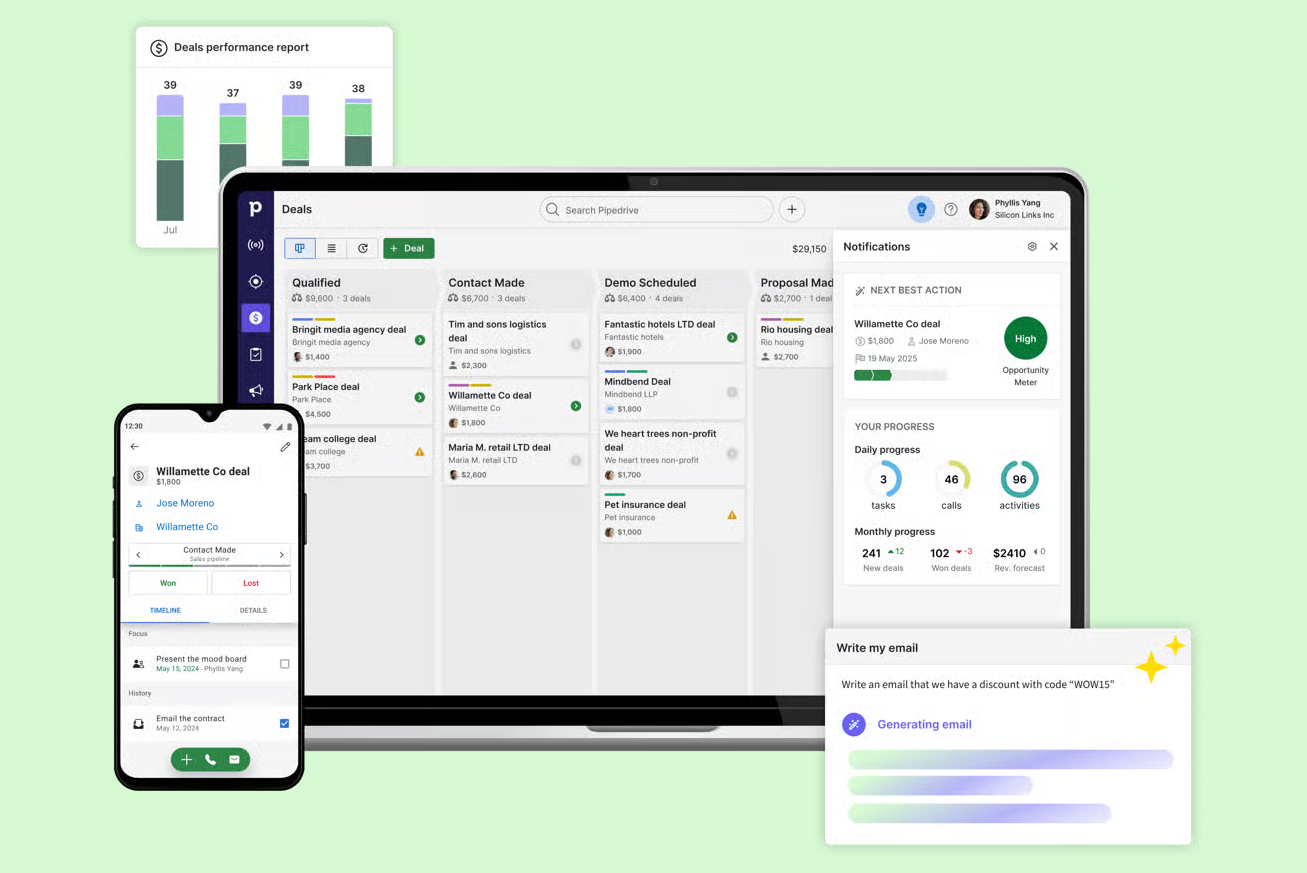
Pipedrive is a visual, pipeline-first CRM built for small and medium-sized businesses. Founded in 2010 in Estonia by five co-founders who were salespeople themselves, Pipedrive was designed from the salesperson's point of view, not the executive's. The company claims to have pioneered the kanban-style pipeline view that has since become an industry standard.
Its key features include:
Visual pipeline management with drag-and-drop deal cards, customizable stages, and color-coded "deal rotting" alerts when deals go idle
Lead management with a dedicated Leads Inbox that separates unqualified leads from active pipeline deals
Sales automation with trigger-action workflows, if/else branching, and wait-until-event conditions
Email sync and tracking with open/click notifications, templates, group emailing, and an AI email writer
Insights and reporting with customizable dashboards, revenue forecasting, and AI-generated reports via natural language
Pulse prospecting toolkit with data enrichment, custom lead scoring, and automated multi-step sequences
500+ marketplace integrations and a free open API available on all plans
Pipedrive serves 100,000+ companies in 179 countries, with plans starting at $14/month per seat. The platform supports 22 languages natively and holds ISO 27001, ISO 27701, and SOC 2 Type 2 certifications. When a deal is created and associated with contacts, everything connects through the pipeline: activities are scheduled, emails are tracked, and performance is measured against goals.
Pipedrive's strength is exactly what makes alternatives worth exploring. Its pipeline-first design keeps things simple, but as your revenue operations grow, you may need deeper B2B intelligence for prospecting, autonomous AI agents that execute rather than recommend, unified marketing-sales-service functionality, or the ability to model complex business relationships beyond the standard deal structure.
That's why we're exploring specialists, not comparing Pipedrive to other generalist CRMs.
How We Curated Our List of Pipedrive Alternatives
After testing Pipedrive and researching the CRM and sales intelligence market, we focused on tools that address specific gaps growing teams encounter. While Pipedrive excels at visual pipeline management for SMBs, businesses often need more power for:
Accessing B2B contact databases, intent signals, and AI-powered prospecting intelligence
Deploying autonomous AI agents that handle pipeline updates, meeting prep, and outreach execution without manual intervention
Unifying marketing automation, sales pipeline, and customer service on a single shared database
Eliminating the cost of separate telephony add-ons with built-in calling, recording, and voicemail transcription
Keeping CRM activity logging frictionless for teams already embedded in Google Workspace
Enforcing structured sales process compliance with mandatory stage gates, required fields, and stagnation alerts
Building custom CRM data models that can represent product-led growth motions, investor pipelines, or marketplace relationships
Each tool on this list leads in one of these areas. You might use them alongside Pipedrive or switch entirely; it depends on what your growing business needs most.
DISCLAIMER: We aren't covering every CRM or sales tool on the market! Our focus is on highlighting alternatives that address Pipedrive's limitations for specific use cases. |
|---|
1. ZoomInfo — Best Alternative for B2B Data Intelligence and AI-Powered Prospecting
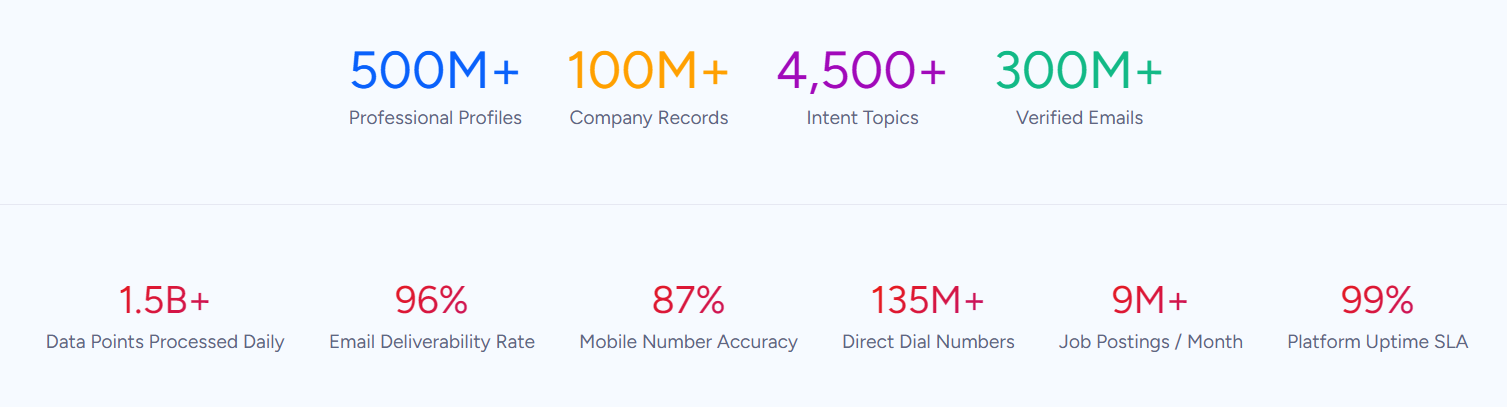
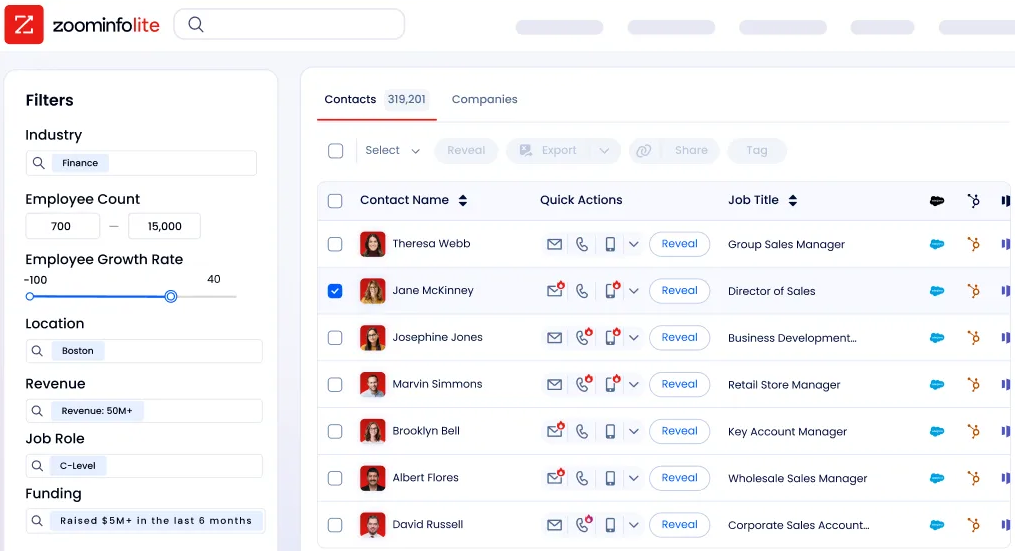
ZoomInfo is an AI GTM platform built on the industry's largest B2B data foundation: 500M contacts, 100M companies, 135M+ verified phone numbers, and 200M+ verified business email addresses. Its key features include:
B2B data covering identity data (direct dials, verified emails), company context (org charts, technographics), and dynamic signals showing when accounts are actively in-market
GTM Context Graph that fuses ZoomInfo's B2B data with your CRM records, conversation transcripts, and behavioral signals into a single intelligence layer processing 1.5B+ data points daily
Buyer Intent Data tracking signals from 210 million IP-to-Organization pairings and 6 trillion+ new keyword-to-device pairings sourced monthly, with Guided Intent that identifies topics correlated with deal success
Universal access through GTM Workspace for sellers, GTM Studio for marketers and RevOps, and APIs and MCP for any third-party tool or AI agent
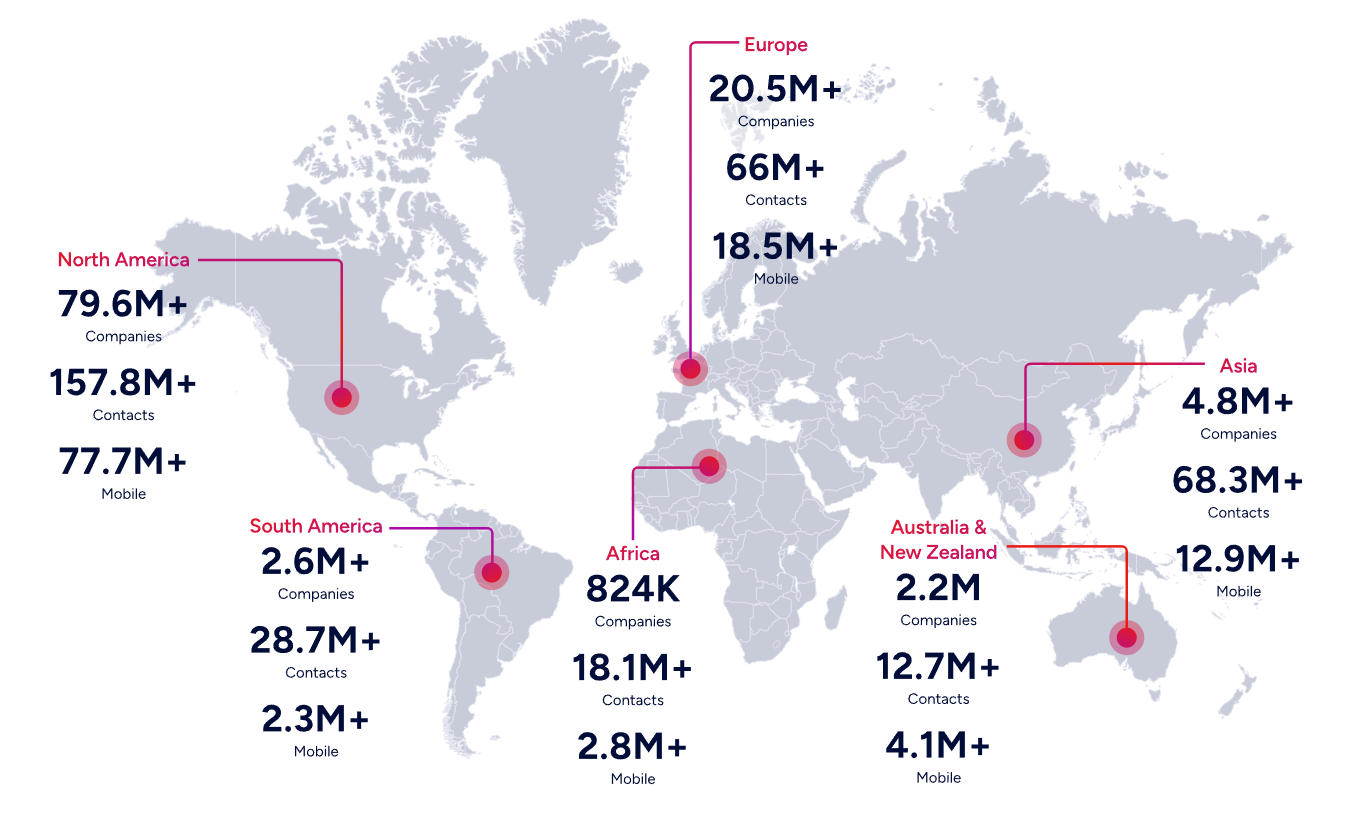
Pipedrive is a pipeline management tool; it tracks deals you're already working. ZoomInfo operates at the intelligence layer above the pipeline, answering the questions Pipedrive can't: which accounts are researching your solution right now, who the decision-makers are and how to reach them, and why a deal is moving or stalling. For B2B revenue teams that need to prospect smarter, not just manage deals more visually, ZoomInfo provides the data foundation and AI reasoning that a pipeline CRM was never designed to deliver.
Why Choose ZoomInfo Over Pipedrive for B2B Data Intelligence and AI-Powered Prospecting
Pipedrive helps you manage deals once they're in your pipeline. ZoomInfo helps you fill that pipeline with the right opportunities and understand the buying context behind every engagement. Here's where ZoomInfo steps up.
Comprehensive B2B Data: Know Exactly Who to Target and How to Reach Them
Pipedrive's Pulse prospecting toolkit includes a database of over 400 million profiles and 10 million companies, with data enrichment that surfaces firmographic data like industry, revenue, and employee count. It's a useful starting point for SMB teams that need basic contact discovery. But Pipedrive's enrichment is gated by plan tier, bulk contact enrichment is still "coming soon," and the data layer was designed as an add-on to a pipeline tool, not as the foundation of a prospecting strategy.
ZoomInfo's data platform operates at a different scale and depth. It covers 500M contacts with 120M direct-dial phone numbers and 200M+ verified business email addresses, verified through a multi-source pipeline backed by 300+ human researchers with up to 95% accuracy on first-party data. Beyond basic company data, ZoomInfo provides technographic profiles for 30,000+ technologies across 30+ million companies, department org charts with decision-maker contact details, and 300+ company attributes for precise market segmentation.
The quality difference is externally validated. In a Fortune 500 competitive RFP analyzing 25 million contacts across vendors, the independent consultant concluded that "no other competitor came even close." ZoomInfo is Ranked #1 in 142 G2 Reports.
"We've seen a higher percentage of conversion of outreach to opportunity created, and opportunity created to opportunity won." (Ashley Wade, CRO, Sago Health)
ZoomInfo in Action: Your sales team needs to break into the mid-market fintech segment. Instead of manually researching companies one by one and hoping Pipedrive's Prospector credits turn up valid contacts, you search ZoomInfo for fintech companies with 200-500 employees that currently use a competitor's technology and show buyer intent signals for your solution category. Within minutes, you have a list of qualified accounts with verified direct dials for the VP of Sales and CTO at each one, complete with org charts showing who reports to whom. That same list feeds directly into your outreach sequence with contacts you know are reachable.
The GTM Context Graph: Intelligence That Explains Why Deals Move, Not Just That They Moved
Pipedrive's AI Sales Assistant flags at-risk deals, sends proactive notifications, and helps prioritize the pipeline. It tells reps what they haven't done yet. ZoomInfo's GTM Context Graph operates as an intelligence layer: it doesn't just record that a deal moved from Stage 3 to Stage 4; it captures why it moved.
The GTM Context Graph unifies your CRM records, conversation intelligence from calls and meetings (via Chorus), email interactions, product usage signals, and ZoomInfo's third-party intelligence into a single graph that extracts the connections between signals and outcomes. As ZoomInfo's Chief Product Officer Dominik Facher writes: "The CRM recorded the state change. It has no record of why it happened."
For example, the GTM Context Graph doesn't just know the CFO joined the last call. It reasons that executive sponsorship entering at this stage, combined with ROI-focused questions, matches the pattern behind closed-won deals in your segment, then connects that to third-party signals showing the company is hiring three new VPs and researching your competitor. That reasoning flows into every downstream action: the follow-up email addresses the specific concern the CFO raised, the play targets accounts whose signal combinations match your actual win patterns, and the forecast weights deals by buying evidence rather than stage labels and rep optimism.
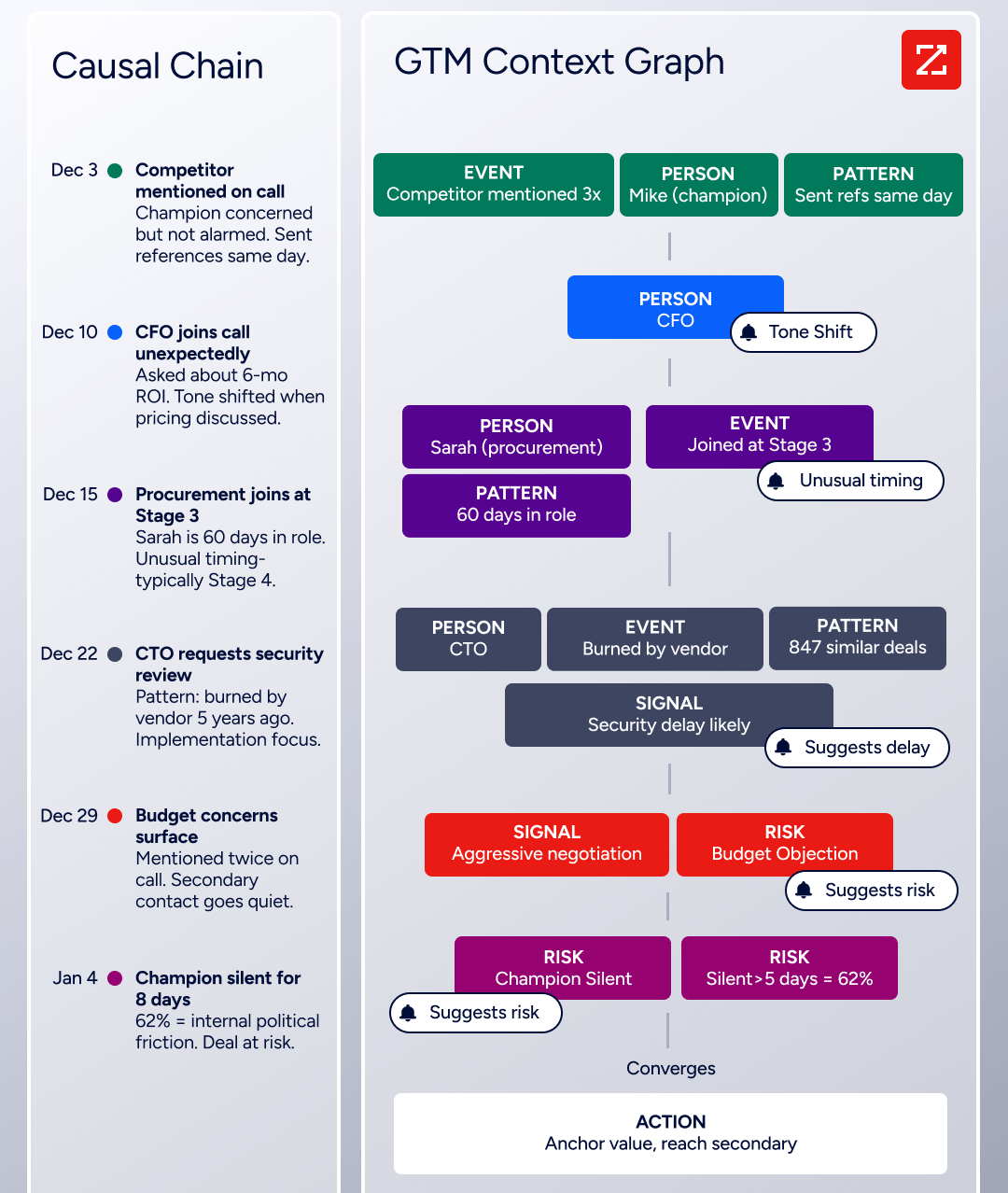
ZoomInfo in Action: You're reviewing your pipeline and notice a deal stuck at the "Evaluation" stage for two weeks. Pipedrive would show you the deal card with a rotting indicator. ZoomInfo's GTM Context Graph tells you why the deal stalled: the champion went quiet after an internal budget review (detected via conversation intelligence), the company's hiring patterns suggest a strategic shift toward a different solution category (third-party signal), and the VP who was your executive sponsor just changed roles (contact tracking alert). Now you know the deal isn't just stale; it needs a different approach, and you know what that approach should be.
Universal Access: Use the Intelligence in Any Tool, Any Workflow
ZoomInfo's intelligence isn't locked inside a single application. Three channels ensure the data and reasoning reach wherever your team works:
GTM Workspace gives sellers a single surface where prioritized accounts, AI-drafted outreach, and deal execution converge. Seismic's sales team boosted productivity by 54% and attributed 39% of pipeline to ZoomInfo signals.
GTM Studio gives marketers and RevOps a builder environment where audience definition, campaign orchestration, and pipeline measurement happen in natural language. Expansion plays that used to take 3 weeks now launch in 30 minutes.
APIs and MCP expose the same intelligence to any custom agent, internal tool, or partner platform. ZoomInfo MCP is listed in the Claude directory and currently supports Claude and ChatGPT.
All three channels draw from one GTM Context Graph: the same data, the same reasoning, the same continuously learning model. A buying signal one team detects is immediately actionable by every other team.
"ZoomInfo's not just a contact data company anymore. They've built a full system of execution. GTM Intelligence actually works the list, writes the outreach, triggers the play, and helps drive predictable growth." (Ian Brodie, CEO & Co-Founder, Levanta)
NOTE: We looked into other B2B data and sales intelligence platforms and found Apollo.io and Lusha frequently mentioned. Apollo.io offers a strong self-serve prospecting experience at accessible price points, and Lusha provides quick contact lookups with a simple Chrome extension. However, neither approaches ZoomInfo's data scale (500M contacts, 135M+ verified phone numbers), depth of intelligence (the GTM Context Graph fusing CRM, conversation, and third-party signals), or breadth of access (APIs, MCP, and native products for sellers and marketers). For teams that need prospecting intelligence as a strategic foundation rather than a point-of-need lookup, ZoomInfo is the more complete choice.
ZoomInfo Pricing
ZoomInfo uses a consumption-based pricing model with custom-quoted plans. Pricing scales around enterprise license agreements, data access, API consumption, and AI activity, so customers pay for what they use. Costs depend on usage patterns, number of users, monthly credit volume, features, company size, and contract length.
Sales plans are organized into three tiers:
Professional includes contact and company data, quick and advanced search, mobile numbers and business email, CRM integrations (HubSpot, Salesforce, and more), Chrome extension, and AI-powered email generation
Advanced adds AI-driven account prioritization, Buyer Intent signals, website visitor identification, Champion Tracking, buying group filters, and automated outreach workflows
Enterprise adds real-time buyer intent signals, advanced company attributes, competitor alerts, custom Intent signals, advanced workflows, and AI-generated account summaries
ZoomInfo also offers a permanently free tier called ZoomInfo Lite: no credit card, no time limit, with access to 100M+ verified profiles, 10 monthly export credits, individual and company searches, WebSights Lite, and HubSpot integration. A separate 7-day free trial provides access to core platform features with no credit card required.
Who Should Use ZoomInfo?
Choose ZoomInfo if:
Your pipeline's biggest constraint isn't deal management; it's finding the right accounts to target. If your team spends hours researching prospects, verifying contact information, and guessing which accounts are in-market, ZoomInfo's data foundation and intent signals solve that problem at the source.
You need intelligence that goes beyond CRM field tracking. If understanding why deals are moving or stalling (not just that they are) would change how your team prioritizes and engages, the GTM Context Graph provides the intelligence layer Pipedrive was never built to deliver.
Your revenue operations span sales, marketing, and RevOps, and you need intelligence accessible in every tool. Whether your sellers work in GTM Workspace, your marketers build plays in GTM Studio, or your engineers embed ZoomInfo data into custom agents via API and MCP, the same intelligence reaches every surface.
You're an enterprise or upper mid-market B2B company that needs verified data at scale with compliance infrastructure built in. ZoomInfo's ISO 27001, ISO 27701, SOC 2 Type II, and TRUSTe GDPR/CCPA certificationsare maintained annually. ZoomInfo is the GTM data layer trusted by over half the Fortune 500, withinvestor-reported customers including Adobe, Microsoft, Snowflake, and Databricks.
Ready to see which accounts are researching your solution right now? Start your free ZoomInfo trial and access the B2B intelligence that tells your team who to target, when to engage, and why it matters.
2. Salesforce Sales Cloud — Best Alternative for Enterprise Sales Operations and AI Agent Automation
Source: Salesforce
Salesforce Sales Cloud, now branded as Agentforce Sales, is an enterprise CRM and sales force automation platform built for revenue organizations that have outgrown a pipeline-first tool and need a system that can mirror the full complexity of their sales process. Its key capabilities include:
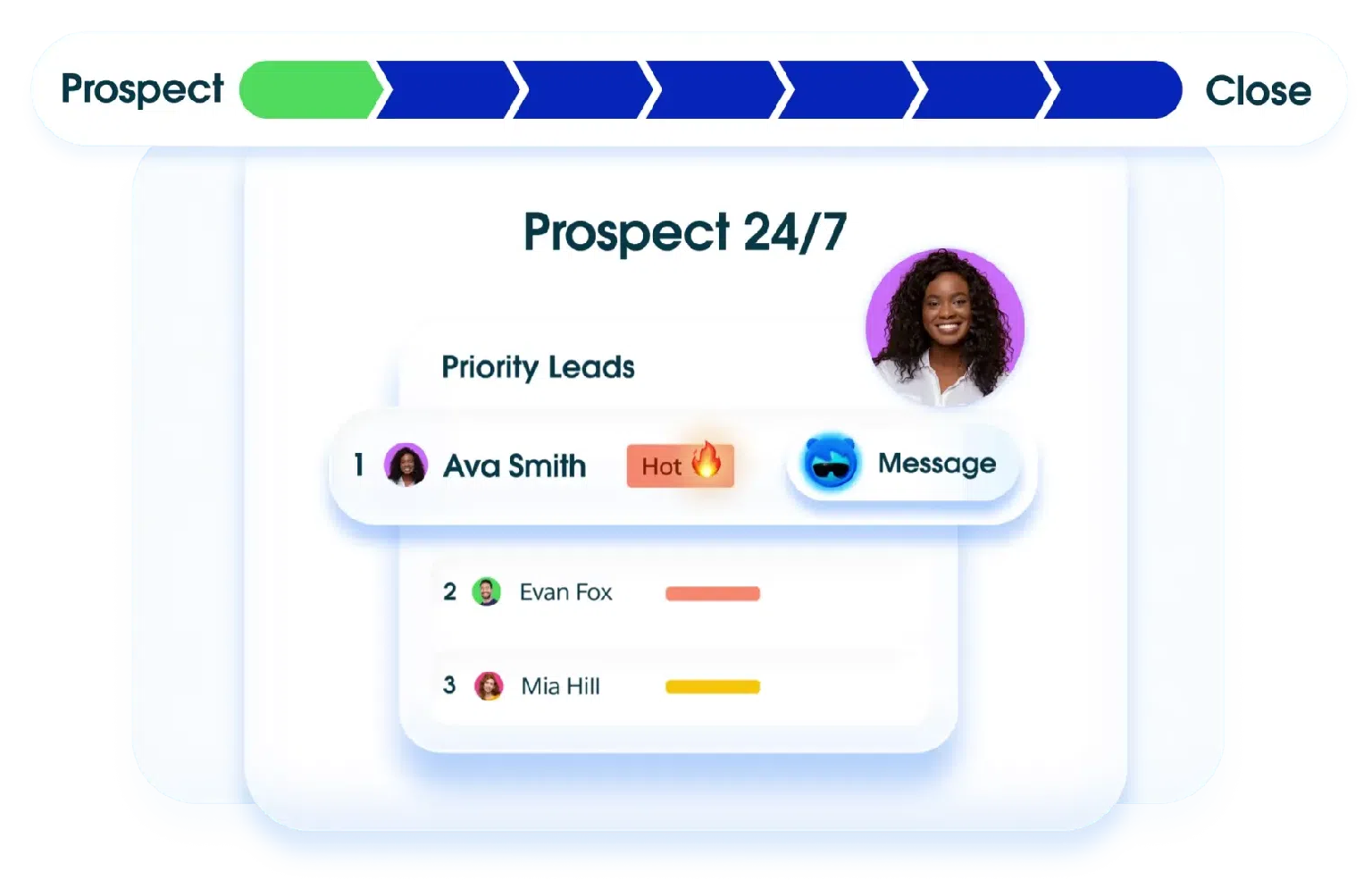
Agentforce AI agents that operate as autonomous participants across the full sales cycle, from prospecting and lead qualification through pipeline updates, meeting prep, and quote generation
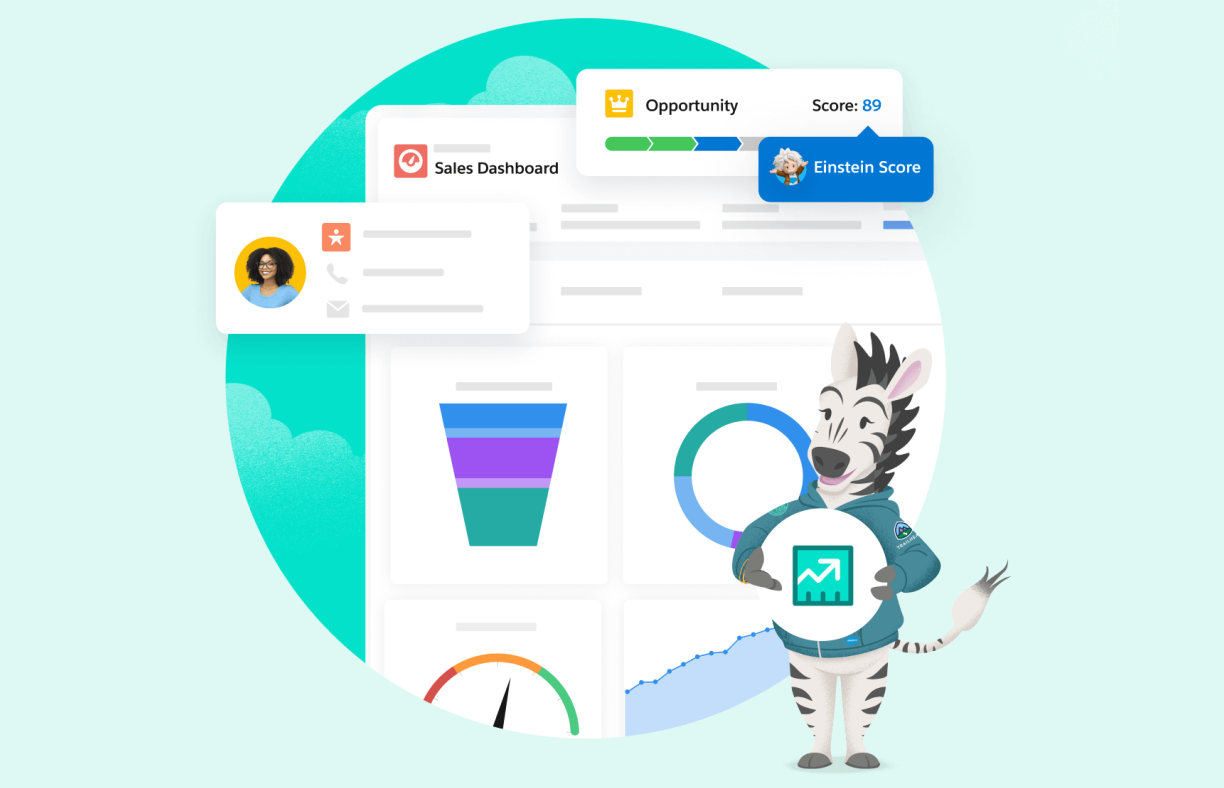
Einstein AI opportunity scoring and predictive forecasting with multi-dimensional deal health indicators, stage-velocity analysis, and out-of-the-box MEDDIC/MEDDPICC methodology support
Configurable data model with custom objects, validation rules, approval workflows, and page layouts that can represent virtually any enterprise sales process
Territory management with geographic and account-based assignment rules and automatic account-to-rep allocation
AppExchange ecosystem with 7,000+ certified apps that extend the same CRM data model without requiring a separate integration layer
For mid-market and enterprise sales organizations where Pipedrive's simplicity has become a ceiling, Salesforce Sales Cloud is the most established CRM on the market, recognized as a Gartner Magic Quadrant Leader for Sales Force Automation for 19 consecutive years.
Why Choose Salesforce Sales Cloud Over Pipedrive for Enterprise Sales Operations
Salesforce Sales Cloud stands out in the following areas:
Autonomous AI Agents That Execute, Not Just Recommend. Pipedrive's AI Sales Assistant flags at-risk deals and drafts emails, but a rep still decides whether to act and executes manually. Salesforce's Agentforce Sales ships six prebuilt agents that take autonomous action. The Prospecting Agent researches signals and pushes tailored outreach drafts into Slack every morning. The Pipeline Management Agent synthesizes call recordings and email threads, then updates the stage, next steps, and close date automatically. The Account Research & Meeting Prep Agent generates briefing documents before every meeting using live CRM data and competitive context. These agents are powered by the Atlas Reasoning Engine, which uses a reason-act-observe-replan loop, and every action runs through the Einstein Trust Layer with zero data retention, field masking, and full audit trails.
Forecasting Built for Revenue Accountability at the Leadership Level. Pipedrive's forecast view shows deal totals by expected close date. Salesforce's Pipeline Inspection consolidates every open opportunity in a configurable grid showing week-over-week deal changes, Einstein opportunity scores (1-99 AI-derived win likelihood), activity coverage, and stakeholder engagement with AI-generated deal risk alerts. Einstein Predictive Forecasting layers an AI prediction column alongside the collaborative rollup, analyzing historical opportunity data, rep win rates, and deal-progression patterns. The June 2026 product release added native MEDDIC and MEDDPICC methodology support, enforcing structured qualification at the record level.
A Platform Data Model That Scales With Enterprise Complexity. Pipedrive provides custom pipelines and custom fields, which work well for straightforward deal tracking. Enterprise revenue orgs hit that ceiling when they need to model complex product configurations, multi-entity deal structures, territory hierarchies with geographic overlaps, or approval workflows where pricing requires finance sign-off. Salesforce's configurable data model supports custom objects, validation rules, approval processes, and page layout customization per record type. The AppExchange ecosystem extends this with 7,000+ certified apps built natively on the Salesforce data model: CPQ systems, conversation intelligence tools, revenue intelligence dashboards, and calling solutions that all share the same schema.
Source: Salesforce
NOTE: We also evaluated Microsoft Dynamics 365 as another enterprise-tier option. While Dynamics 365 offers comparable org-hierarchy customization and tighter Microsoft 365 integration for organizations already standardized on the Microsoft stack, Salesforce Sales Cloud offers more mature Agentforce AI agents, a larger partner ecosystem through AppExchange, and a longer-established native ZoomInfo integration that enterprise teams frequently run alongside Salesforce to layer B2B intelligence into their CRM workflows.
Salesforce Sales Cloud Pricing
Salesforce uses a per-user, per-month pricing model (billed annually) with five main tiers:
Starter Suite — $25/user/month; core CRM objects, no AI agents, no API access
Pro Suite — $100/user/month; adds Sales Quoting and Forecasting; API access is an additional $25/user/month
Enterprise — $175/user/month; includes Pipeline Inspection, Einstein Opportunity Scoring, and Conversation Intelligence; Agentforce for Sales available as an add-on at $125/user/month
Unlimited — $350/user/month; bundles Predictive Forecasting, Sales Engagement, and Premier Success Plan with 24/7 expert support
Agentforce 1 Sales — $550/user/month; includes unmetered Agentforce usage, Salesforce Spiff commission automation, Sales Planning, and Tableau Next analytics
A 30-day free trial is available for all paid editions with no credit card required.
Who Should Use Salesforce Sales Cloud?
Choose Salesforce Sales Cloud if:
Your org has grown beyond what a pipeline-first CRM can model and you need custom objects, approval workflows, and territory assignment logic that maps to your actual org structure.
You're ready to deploy autonomous AI agents that update opportunity fields after calls, build prospect lists overnight, and generate meeting briefs, not an assistant that surfaces recommendations for manual execution.
Your forecasting process requires hierarchical rollups, historical win-rate weighting by rep, and deal-health scoring layered into a single inspection view.
Your team has dedicated Salesforce admin resources or an implementation partner, because the platform's power scales directly with the configuration investment behind it.
For a detailed comparison of how Pipedrive and Salesforce stack up, see our Pipedrive vs Salesforce guide.
3. HubSpot CRM — Best Alternative for Growing Businesses Needing Marketing, Sales, and Service in One Platform
Source: HubSpot CRM
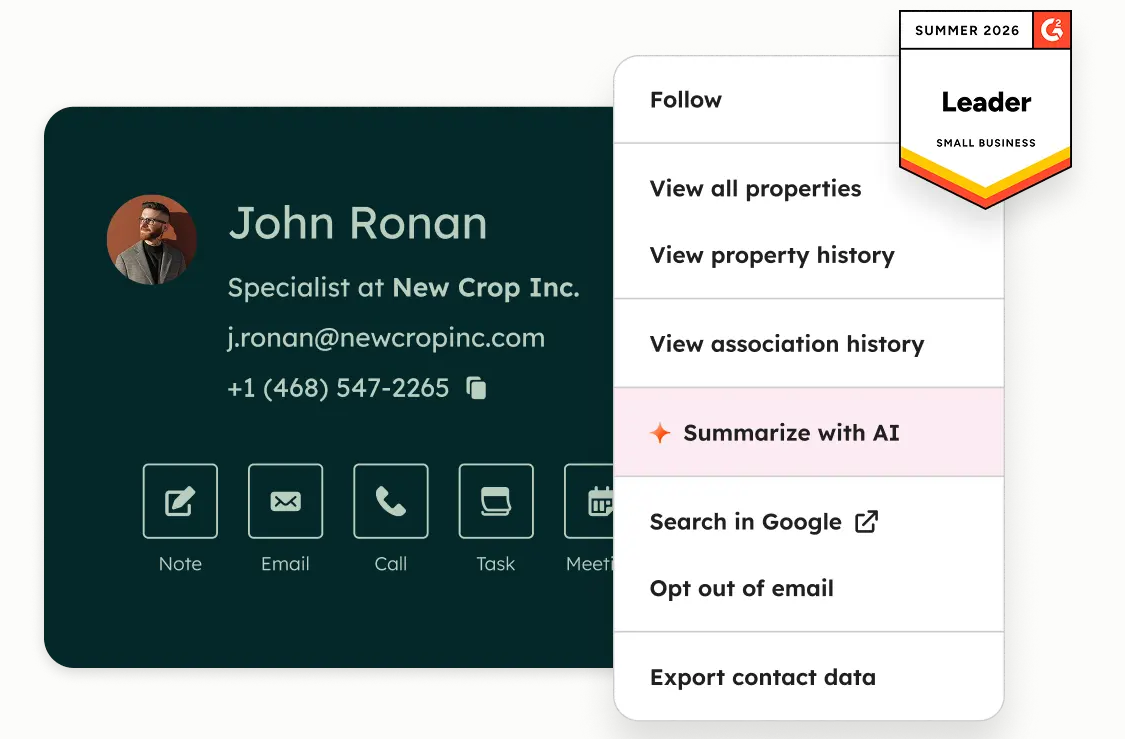
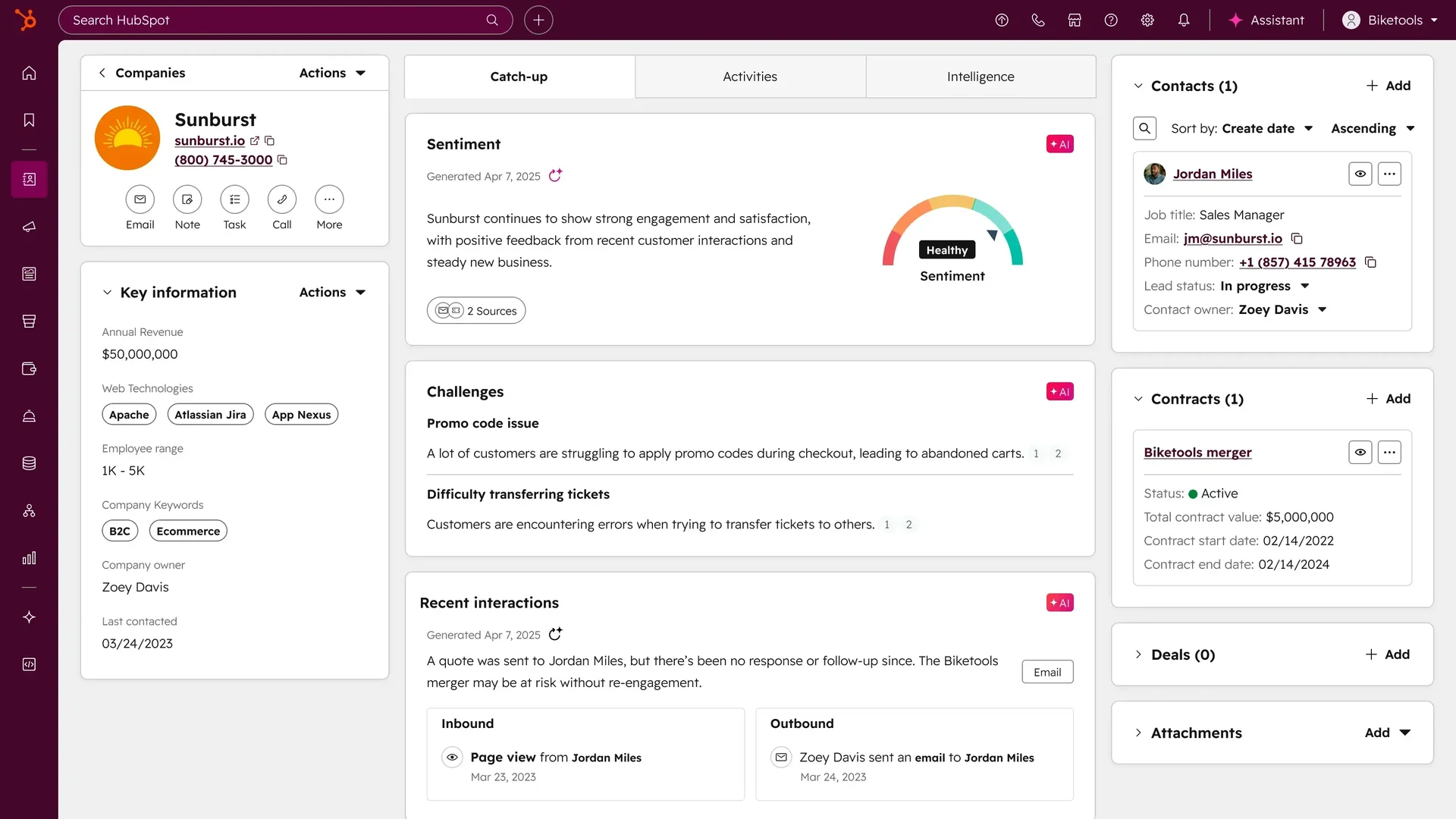
HubSpot CRM is a free, AI-powered Smart CRM and customer platform that serves as a direct alternative to Pipedrive for growing businesses whose go-to-market operations have expanded beyond pipeline management. Its key capabilities include:
Native Marketing Hub with email campaigns, ad management, landing pages, and marketing automation connected to the same contact records as sales
Advanced workflow automation with conditional if/else branching, parallel paths, and cross-object enrollment spanning deals, contacts, and companies simultaneously
Native Service Hub with ticketing, knowledge base, and a shared conversation inbox for pre-sale and post-sale relationship management
Built-in calling with call recording, AI transcription, and automatic deal logging on paid plans
Breeze AI embedded throughout the platform, including a Prospecting Agent, Customer Agent, and Data Agent, with 200+ inline AI features
Permanently free CRM tier with contact management, deal pipelines, and reporting with no time limit
HubSpot is best suited for mid-market and growing businesses that need marketing automation, sales pipeline management, and customer service on one shared database.
Why Choose HubSpot CRM Over Pipedrive for Growing Businesses
HubSpot CRM stands out in the following areas:
Native Multi-Channel Marketing Hub vs. a Paid Email-Only Add-On. Pipedrive's marketing capability is the Campaigns add-on, which covers email marketing only. Multi-channel campaigns (paid ads, social, landing pages) require separate tools with separate data. HubSpot's Marketing Hub runs natively on the same Smart CRM database as Sales Hub, meaning every ad click, landing page view, form submission, and email engagement is automatically appended to the same contact record a sales rep reviews. Reps know which campaigns generated their leads; marketers see which campaigns produced closed revenue.
Automation That Scales With Organizational Complexity. Pipedrive's automation engine handles if/else branching and wait conditions effectively for linear workflows. The limitation surfaces when a team needs parallel branches firing simultaneously or enrollment criteria spanning multiple object types at once. HubSpot's workflow engine at Professional and Enterprise tiers supports parallel branches, wait-until-event conditions, and enrollment criteria spanning deals, contacts, and companies from a single canvas.
Built-In Service Layer That Unifies Pre-Sale and Post-Sale. Pipedrive is a pre-sale pipeline tool. The moment a deal closes, native capabilities end. HubSpot's Service Hub adds ticketing, a shared team inbox, a knowledge base, and customer health tracking, all tied to the same contact and deal records in the sales pipeline. HubSpot's Spring 2025 Spotlight introduced a Customer Success Workspace with health score monitoring and churn risk signals built into the CRM data layer.
Cross-Function Reporting That Connects Marketing, Sales, and Service. Pipedrive's Insights delivers pipeline-specific reporting: revenue forecasting, deal velocity, and team performance. HubSpot's Custom Report Builder allows cross-object reporting spanning contacts, companies, deals, tickets, and custom objects. Multi-touch attribution models connect marketing touchpoints to pipeline creation and closed revenue, and Customer Journey Reports sequence the full lifecycle from anonymous ad click through closed-won outcome.
Source: HubSpot CRM
NOTE: We also evaluated Monday CRM and ActiveCampaign as other growing-business options. While Monday CRM excels at visual project-style deal management for cross-functional teams, and ActiveCampaign is a strong choice for marketing automation-first organizations with a lighter sales motion, HubSpot CRM offers the best combination of marketing, sales, and service for growing teams that need all three functions under a single budget. HubSpot also maintains a native ZoomInfo integration, allowing B2B intelligence to flow directly into HubSpot contact and company records for teams that layer prospecting data on top of HubSpot's engagement engine.
HubSpot CRM Pricing
HubSpot's Smart CRM uses a per-seat, tiered subscription model:
Free — $0, permanently free, no credit card required. Up to 2 users and 1,000 contact records. Includes contact management, deal pipelines, reporting dashboard, and Gmail/Outlook integration.
Starter — $15/seat/month (annual billing). Adds required fields, permission templates, multiple currencies, and 500 HubSpot Credits/month for Breeze AI features.
Professional — $45/seat/month (annual). Adds custom reporting (100 reports), 15 deal pipelines, calculated properties, duplicate management, standard contact scoring, Salesforce integration, and AI Customer Agent access. One-time onboarding fee: $1,500.
Enterprise — $75/seat/month. Adds custom objects, field-level permissions, SSO, 100 deal pipelines, 500 custom reports, and Salesforce custom object sync. One-time onboarding fee: $3,500.
Who Should Use HubSpot CRM?
Choose HubSpot CRM if:
Your team has outgrown Pipedrive's sales-only scope and now needs marketing automation, pipeline management, and customer service on the same contact record without maintaining separate tools and manual data syncs.
You need revenue reporting that crosses the marketing-sales boundary: multi-touch attribution, campaign-to-revenue reporting, or Customer Journey reports connecting ad clicks to closed deals.
You want a free CRM tier that is genuinely functional as a starting point, with a clear upgrade path where paid tiers add depth rather than replace what you've already configured.
Your team is building a customer success function and wants post-sale ticketing, health scores, and support history on the same record as the original deal.
For a side-by-side comparison of HubSpot and Pipedrive, see our HubSpot vs Pipedrive breakdown.
4. Freshsales — Best Alternative for Small Teams Needing Built-In Calling and AI Deal Intelligence
Source: Freshsales
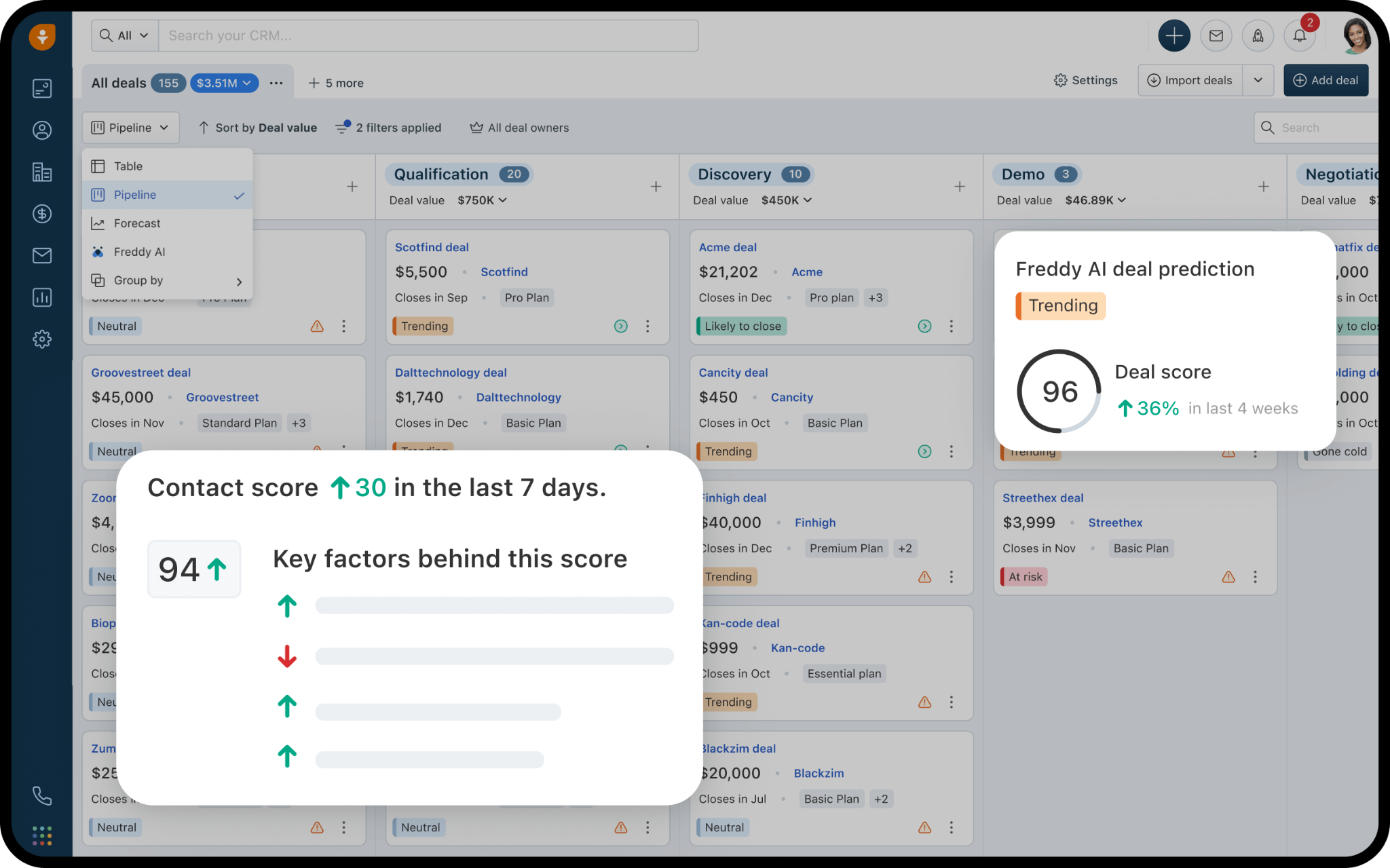
Freshsales is an AI-powered sales CRM built by Freshworks Inc. (NASDAQ: FRSH) that bundles native cloud telephony, Freddy AI-driven deal insights, and multi-pipeline management into a starting price of $9/user/month. Its key capabilities include:
Built-in cloud telephony on every paid plan with call recording, voicemail transcription, and automatic CRM logging, plus Bring Your Own Carrier (BYOC) support
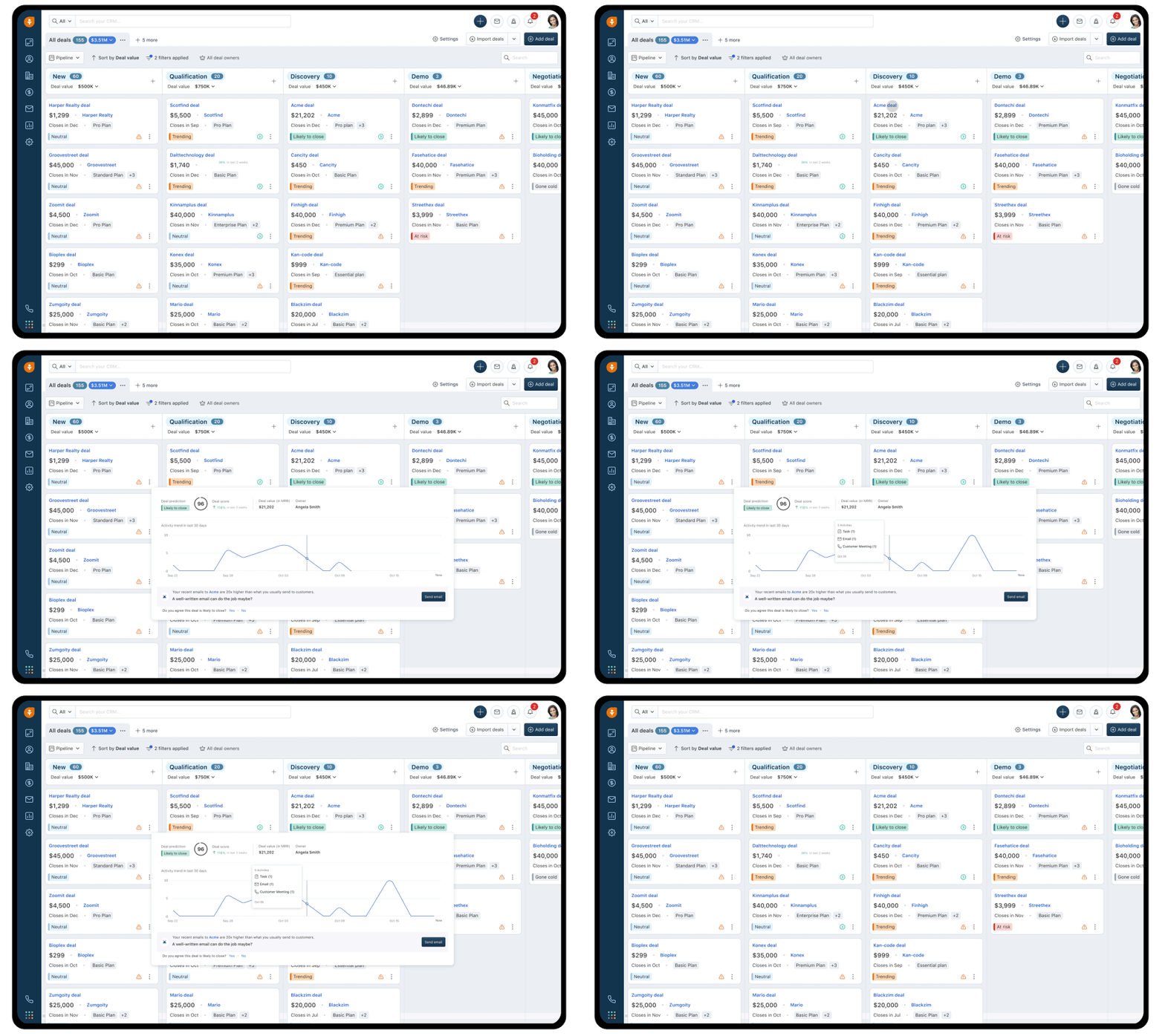
Freddy AI contact scoring (0-99 scale), deal outcome tagging (Likely to Close / At Risk / Gone Cold), next-best-action recommendations, and AI-written prospecting emails
Automatic contact enrichment from email address and website URL alone, pulling social profiles, company logo, industry, and employee count
Freshworks ecosystem connecting natively to Freshdesk (support) and Freshchat (live chat) for a unified customer view
For SMBs where phone outreach is a primary channel, Freshsales eliminates the $20-50/user/month cost of a separate dialer that Pipedrive users typically face.
Why Choose Freshsales Over Pipedrive for Built-In Calling and AI Deal Intelligence
Freshsales stands out in the following areas:
Native Cloud Telephony on Every Paid Plan. Pipedrive does not include a phone system. It integrates with third-party telephony tools like JustCall, Aircall, and Twilio, each adding $20-50/user/month on top of the CRM subscription. Freshsales ships with a complete phone channel on every paid plan, including the $9/user/month Growth tier. Reps can buy numbers directly, port existing numbers, or use BYOC. Every call is automatically logged against the relevant contact and deal record. Optional call recording costs $0.003/minute; voicemail transcription costs $0.004/minute. For teams where phone outreach is primary, the math is concrete: Freshsales starts at $9/user/month with a phone system included, while an equivalent Pipedrive setup (Pipedrive Growth plus a third-party dialer) can run $40-70/user/month before any calling capacity is included.
Freddy AI Provides Deal-Level Predictive Intelligence. Pipedrive's AI Sales Assistant operates primarily as a productivity prompt. Freshsales' Freddy AI operates at a predictive layer: it trains itself on each account's historical CRM data, assigns every contact a score from 0-99 based on configurable signals, and tags every deal with a predicted outcome. Each tag comes with a reason and a recommended next action. Freddy also accepts rep feedback: if a rep marks a tag as inaccurate, the model adjusts, creating a feedback loop that improves over time. At the Pro tier ($39/user/month), Freddy generates prospecting emails from a tone selection and offers text rephrase, expand, and enhance functions. At Enterprise ($59/user/month), Freddy provides Forecasting Insights with AI-driven pipeline projections.
The Freshworks Ecosystem Creates a Unified Customer Record. Pipedrive has no native customer success, support ticketing, or post-sale workflow capability. Freshsales connects natively to Freshdesk and Freshchat, creating a contact record that shows reps not just deal history, but open and closed support tickets and live chat threads in the same scrollable view. The Freshdesk integration is the most-installed app in the Freshsales marketplace at 5,900+ installs, evidence that the support-to-sales connection is a primary buying criterion.
Source: Freshsales
NOTE: We also evaluated Zoho Bigin and Close CRM as small business alternatives. While Zoho Bigin excels at pricing simplicity for the smallest teams (sub-10 users), and Close CRM is built for high-velocity inside sales teams with its own built-in calling and Power Dialer, Freshsales offers the most complete SMB package for teams needing native telephony, AI-assisted pipeline management, and a path to a unified sales-support data layer, all within a single vendor relationship.
Freshsales Pricing
Freshsales offers three paid plans (billed annually), all with built-in phone, email, and live chat:
Growth — $9/user/month. Contact Lifecycle Stages, custom fields, basic workflows, product catalog, 1 CPQ license, curated reports. 21-day free trial, no credit card required.
Pro — $39/user/month. Freddy AI contact scoring, deal insights, AI-written emails, sales sequences, multiple pipelines, territory management, auto-assignment rules, BYOC, custom reports.
Enterprise — $59/user/month. Freddy AI Forecasting Insights, custom modules, field-level permissions, sandbox environment, audit logs.
Who Should Use Freshsales?
Choose Freshsales if:
Your team relies on phone outreach and you want to avoid the $20-50/user/month cost of a separate dialer. Freshsales ships with a complete phone system on every paid plan starting at $9/user/month.
You're running a team of 10-200 users on a tight budget and need AI-assisted lead scoring and deal predictions without an enterprise-tier price. Freddy AI contact scoring and deal outcome tagging are available at the Pro tier.
Your sales team shares customers with a support team, and reps need visibility into open Freshdesk tickets before renewal or upsell calls.
You're considering adding a third-party dialer, a separate sequences platform, and a standalone enrichment tool to Pipedrive, and the combined cost at scale would exceed the Freshsales Pro tier, which includes all three natively.
For a head-to-head look at Freshsales and Pipedrive, see our Freshsales vs Pipedrive comparison.
5. Copper CRM — Best Alternative for Google Workspace Teams That Want Zero-Friction Activity Logging
Source: Copper CRM
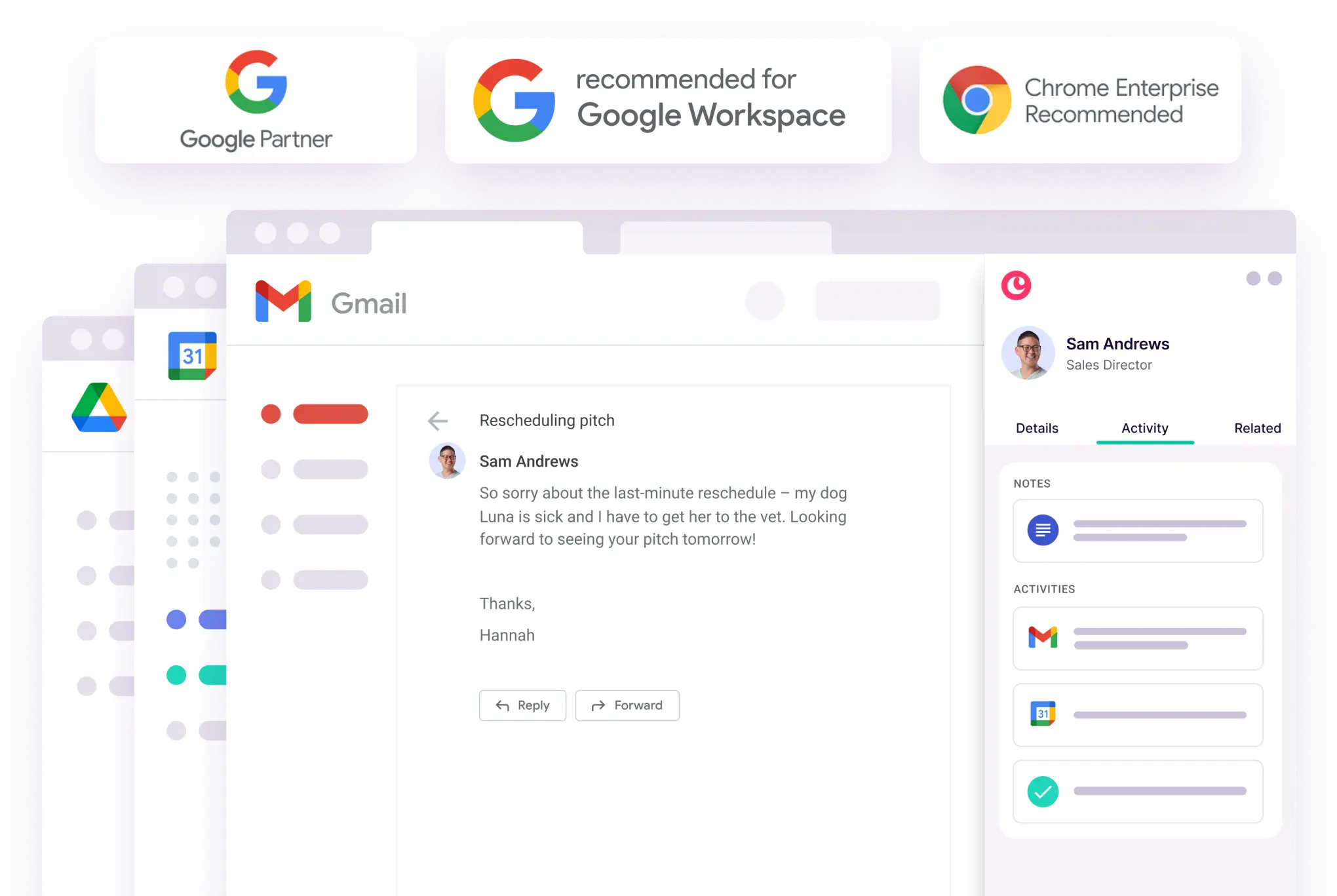
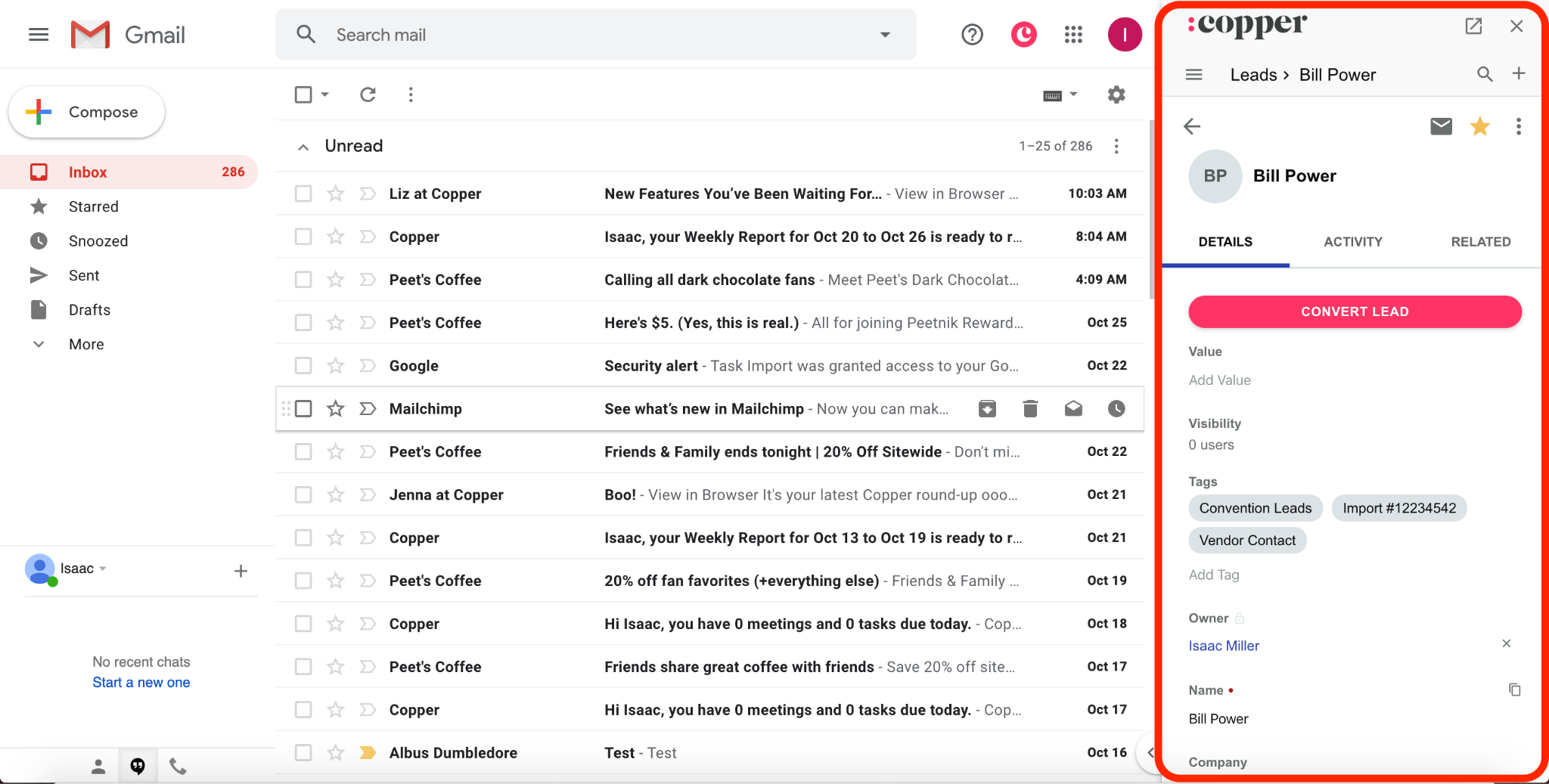
Copper CRM is a CRM built for service businesses that operate on Google Workspace, and the only CRM carrying Google's official "Recommended for Google Workspace" badge. Where Pipedrive treats Gmail as one integration among many, Copper is built around Gmail as the primary work surface. Its key capabilities include:
Chrome extension that surfaces full CRM records, pipeline cards, and contact history directly inside Gmail and Google Calendar
Automatic logging of every email thread, Google Calendar event, and Google Meet call to the correct record with zero manual entry
12-month retroactive email sync that pulls up to a full year of email history when a new contact is added
Built-in project management that converts won deals into delivery pipelines in one click
CopperGPT for querying pipeline and contact data in natural language
Copper fits best in the 2-40 person service firm (agencies, consultancies, financial advisories) that runs on Google Workspace and needs a CRM the team will actually use without a dedicated admin.
Why Choose Copper CRM Over Pipedrive for Google Workspace Teams
Copper CRM stands out in the following areas:
The CRM Is Inside Gmail, Not Linked to Gmail. Pipedrive's Gmail integration is a sync layer: emails are pulled in and associated with deals, but reps still open a separate browser tab to update stages or review contact history. Copper inverts this. The Chrome Extension for Gmail embeds a near-complete CRM replica inside Gmail. Reps can create leads, update opportunities, move pipeline stages, apply email templates, and track email opens without leaving the inbox. The sidebar opens automatically when an email is read and prompts record creation (with web-scraped enrichment pre-populated) if the contact doesn't exist. For teams that live in Gmail eight hours a day, CRM data entry happens as a byproduct of reading email, not as a separate task.
Automatic Activity Logging With 12-Month Retroactive Sync. Pipedrive's email sync requires per-plan access (absent on the Lite plan entirely). Copper authenticates via Google OAuth and reads directly from Gmail and Google Calendar APIs, automatically logging every email and calendar event to the correct record the moment it occurs. When a new contact is added, Copper retrieves up to 12 months of email history for that contact. Pipedrive's retroactive sync goes back only six months. For teams migrating from spreadsheets or switching CRMs, Copper arrives with a populated relationship history, not a blank slate.
The Pipeline Extends Past the Sale Into Project Delivery. Pipedrive is a pre-sale tool. Post-sale work requires exporting context into Asana, Trello, or a project tool, breaking continuity. Copper positions the deal-won state as the beginning of client work. When a deal closes, the Opportunity record duplicates into a Project Pipeline with one click, carrying all communication history, files, and contact relationships forward. Copper includes project management starting on the Basic plan at $23/seat/month (billed annually), while Pipedrive's Projects add-on is only included on Premium at $49/seat/month.
Source: Copper CRM
NOTE: We also evaluated NetHunt CRM as another Gmail-native option. While NetHunt excels at flexible Gmail sidebar customization and is a strong pick for email-heavy sales teams, Copper CRM offers broader Google Workspace integration coverage (Google Calendar, Google Drive, Google Contacts, and Meet), a longer retroactive email sync window, and more active product momentum: 60 new features shipped in 2025, including CopperGPT and LinkedIn Quick Add.
Copper CRM Pricing
Copper offers four tiers with 20% or more savings on annual billing:
Starter (Free) — 1,000 contacts; Google Workspace integration, email templates, mobile apps. No sales pipelines or project management.
Basic — $23/seat/month (annual) / $29/seat/month (monthly). 2,500 contacts; Opportunity and Project pipelines, task automation, SAML SSO.
Professional — $59/seat/month (annual) / $69/seat/month (monthly). 15,000 contacts; workflow and email automation, bulk emailing, Leads module, pipeline reports, team permissions, API access.
Business — $99/seat/month (annual) / $134/seat/month (monthly). Unlimited contacts; email series automation, custom report builder, multi-currency support.
Who Should Use Copper CRM?
Choose Copper CRM if:
Your team runs on Google Workspace and switching contexts to a separate CRM tab is the primary reason CRM adoption has failed before.
You need automatic, zero-manual-entry activity logging across email, calendar, and video calls, with a 12-month retroactive email sync that arrives with relationship history pre-populated.
You are a service business (agency, consultancy, financial advisory) that needs to track deals from prospecting through project delivery in one system.
Your team is 2-40 people and wants a CRM that reaches full team adoption within days, not months.
6. Zoho CRM — Best Alternative for Budget-Conscious Teams Needing Process Enforcement and AI Pipeline Intelligence
Source: Zoho CRM
Zoho CRM is a cloud-based sales CRM that serves as a strong Pipedrive alternative for teams that prioritize process discipline, budget flexibility, and AI-powered pipeline visibility. Unlike Pipedrive, which offers only a 14-day trial before requiring payment, Zoho CRM provides a permanently free tier, a more affordable upgrade path, and a process enforcement layer that Pipedrive lacks. Its key capabilities include:
Permanent free plan for up to 3 users with contact management, deal tracking, and basic workflow rules
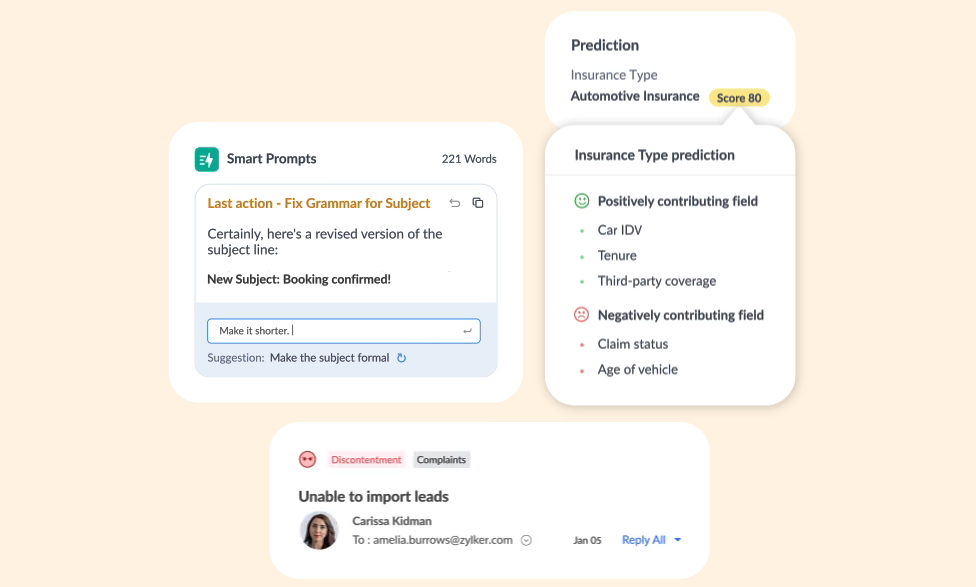
Zia AI assistant for deal win probability predictions, activity anomaly detection, email sentiment and intent analysis, and lead conversion scoring
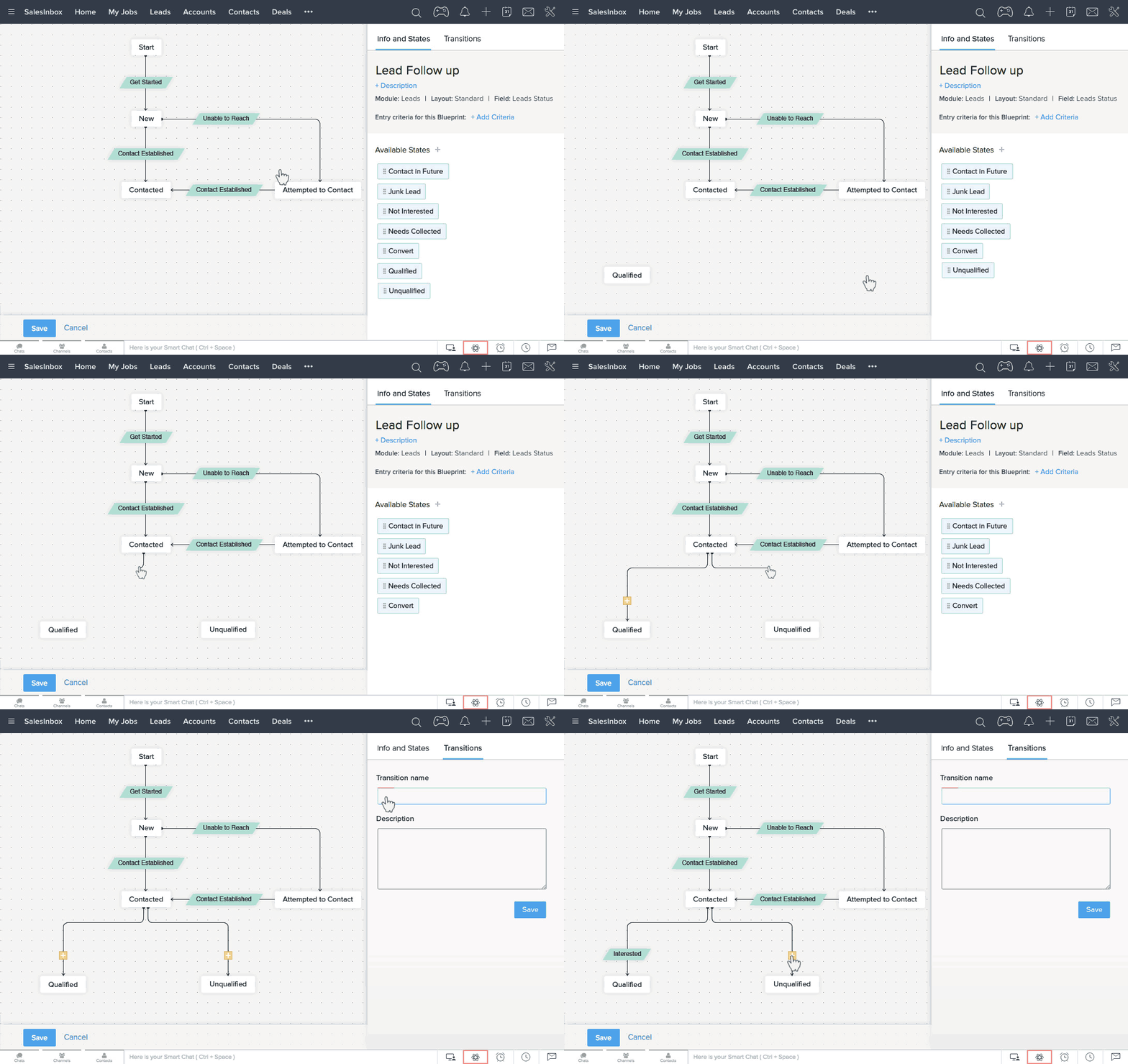
Blueprint for structured sales process management with mandatory stage transitions, required field validation, and stagnation alerts
Omnichannel communication covering email, built-in telephony with call transcription, live chat, WhatsApp Business, SMS, and social media
CPQ (Configure, Price, Quote) built directly into the CRM from the Professional plan
Teams frustrated with Pipedrive's unstructured pipeline or wanting AI-powered deal intelligence without paying for a separate tool will find Zoho CRM more capable at comparable or lower price points.
Why Choose Zoho CRM Over Pipedrive for Process Enforcement and AI Pipeline Intelligence
Zoho CRM stands out in the following areas:
A Permanently Free Tier That Doesn't Expire. Pipedrive offers a 14-day free trial with full access, but there is no free plan. When the trial ends, teams either pay or lose access. Zoho CRM's free plan is permanently free for up to 3 users, including contact management, deal tracking, 10 workflow rules per module, 5,000 daily API credits, and 5,000 record storage. When a Zoho CRM team outgrows the free tier, the upgrade path is also more affordable: Zoho's Standard plan at $14/user/month unlocks custom reports, sales forecasting, and AI agent deployment for sales automation. At $23/user/month (Professional), Zoho adds Blueprint and CPQ, capabilities Pipedrive bundles into higher-priced tiers.
Blueprint: Enforced Process Compliance. This is the most significant structural gap between Zoho CRM and Pipedrive. Zoho's Blueprint models an entire sales workflow as a state machine with stages and the transitions between them, then enforces how deals move through those stages. A rep cannot advance a deal from "Proposal Sent" to "Negotiation" without first logging a call, filling in a required budget field, or completing whatever actions the admin has defined. Blueprint automates follow-on actions at each stage and fires stagnation alerts when deals sit too long without movement. Pipedrive's pipeline view has "deal rotting" color cues when deals go idle, but that is a display and reminder mechanism, not an enforcement system. Reps can skip stages, advance deals without completing data entry, and leave fields blank. As teams scale, the result is inconsistent data quality. Blueprint is available from $23/user/month.
Zia AI: Active Pipeline Intelligence. Zia covers predictive intelligence, generative AI, and agentic AI. On the predictive side, Zia scores leads and deals for conversion likelihood, generates churn predictions, and provides field predictions (custom win/loss probability models). Zia monitors audit logs and activity patterns to surface anomaly detection alerts, flagging when a rep's response time drops on a hot deal or an active deal suddenly goes quiet. Zia's email intelligence layer classifies emails by sentiment, intent, and emotion, and automatically transcribes call recordings with the same analysis. Pipedrive's AI Sales Assistant includes deal prioritization, an AI email writer, and AI-generated reports, but its email summarization is labeled BETA. At Zoho CRM's Enterprise tier ($40/user/month), the full Zia assistant unlocks, including the Zia Agents Store with 100+ pre-built AI agents.
Source: Zoho CRM
NOTE: We also evaluated HubSpot's free CRM tier and Freshsales' free plan as other no-cost starting points. While HubSpot's free tier is feature-rich for marketing-oriented teams, its free plan lacks deal-stage workflow enforcement and AI scoring. Freshsales' free plan covers the basics but offers a more limited upgrade path at comparable price points. Zoho CRM offers the most capable permanently free plan, the most affordable path to AI-powered workflow automation, and Blueprint process enforcement that neither alternative provides.
For a head-to-head comparison of HubSpot and Zoho CRM, see our HubSpot vs Zoho CRM guide.
Zoho CRM Pricing
Zoho CRM uses a per-seat subscription model with annual billing saving approximately 34%:
Free — $0/user/month, permanently free for up to 3 users. Contact management, deal tracking, 5,000 records, basic workflows.
Standard — $14/user/month (annual). Custom reports, sales forecasting, AI agents, Cadences, 100,000 records.
Professional — $23/user/month (annual). Blueprint process management, CPQ, email intelligence with AI sentiment analysis, approximately 5 million records.
Enterprise — $40/user/month (annual). Full Zia AI assistant, territory management, journey orchestration, sandbox, customer portals.
Ultimate — $52/user/month (annual). Custom AI/ML via QuickML, 50 sales pipelines, 150 workflow rules/module, migration assistance.
Who Should Use Zoho CRM?
Choose Zoho CRM if:
You need a genuinely free CRM that doesn't expire. Zoho CRM's permanently free plan for up to 3 users is the only option among these alternatives that provides a working CRM at $0 indefinitely.
You've outgrown Pipedrive's unstructured pipeline and need enforced process compliance. Blueprint's mandatory stage transitions and required-field validation solve inconsistent data quality directly.
You want AI-powered pipeline monitoring (anomaly detection, email sentiment analysis, deal scoring) without paying for a separate tool. Zia is a production-stable system with Gartner recognition.
You need omnichannel communication (phone, WhatsApp, social) consolidated in one CRM record at price points comparable to Pipedrive's entry tiers.
For a direct comparison of Pipedrive and Zoho CRM, see our Pipedrive vs Zoho CRM guide.
7. Attio — Best Alternative for Teams That Need a Flexible, Custom-Built CRM on a Relational Database
Source: Attio
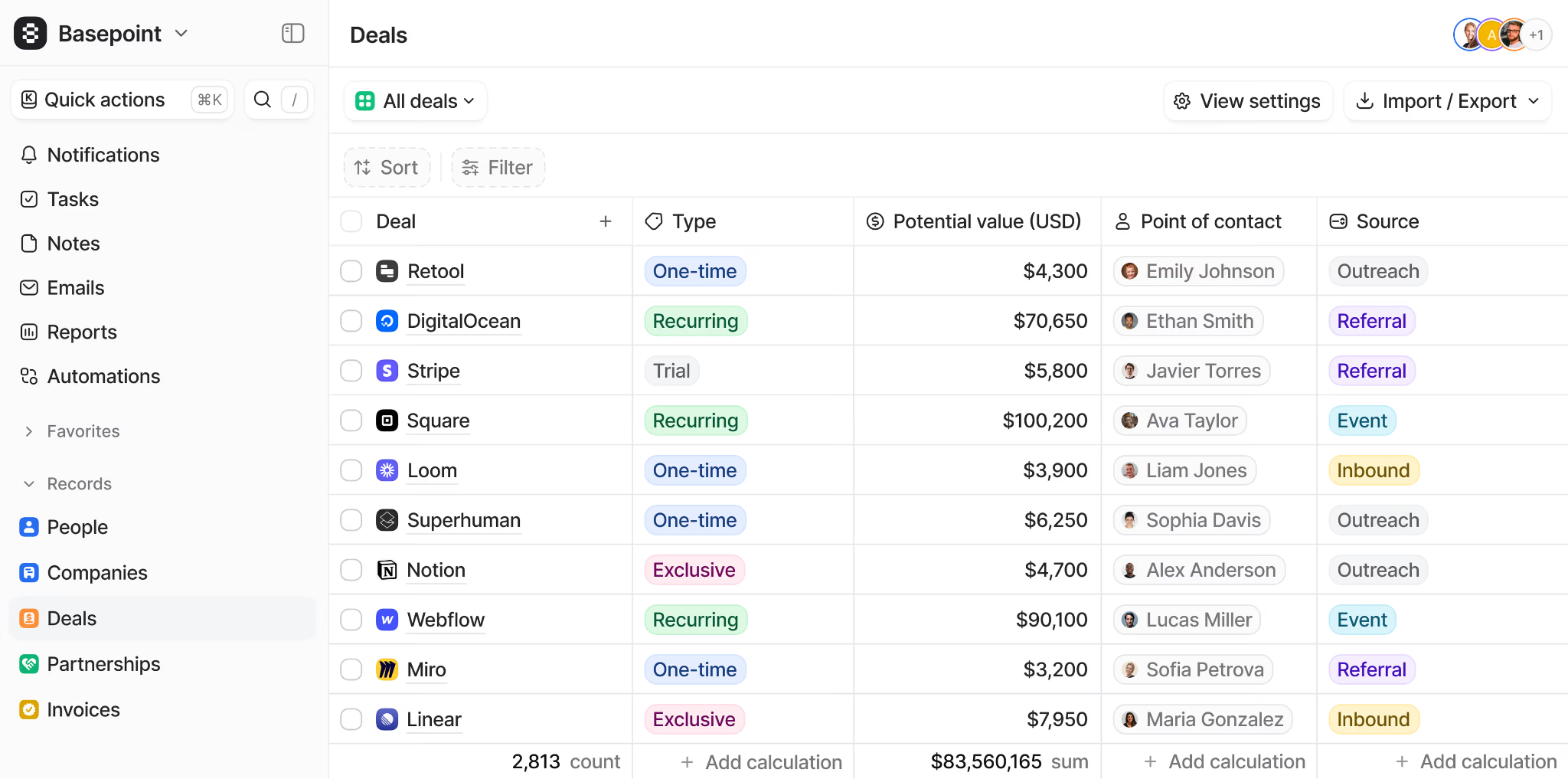
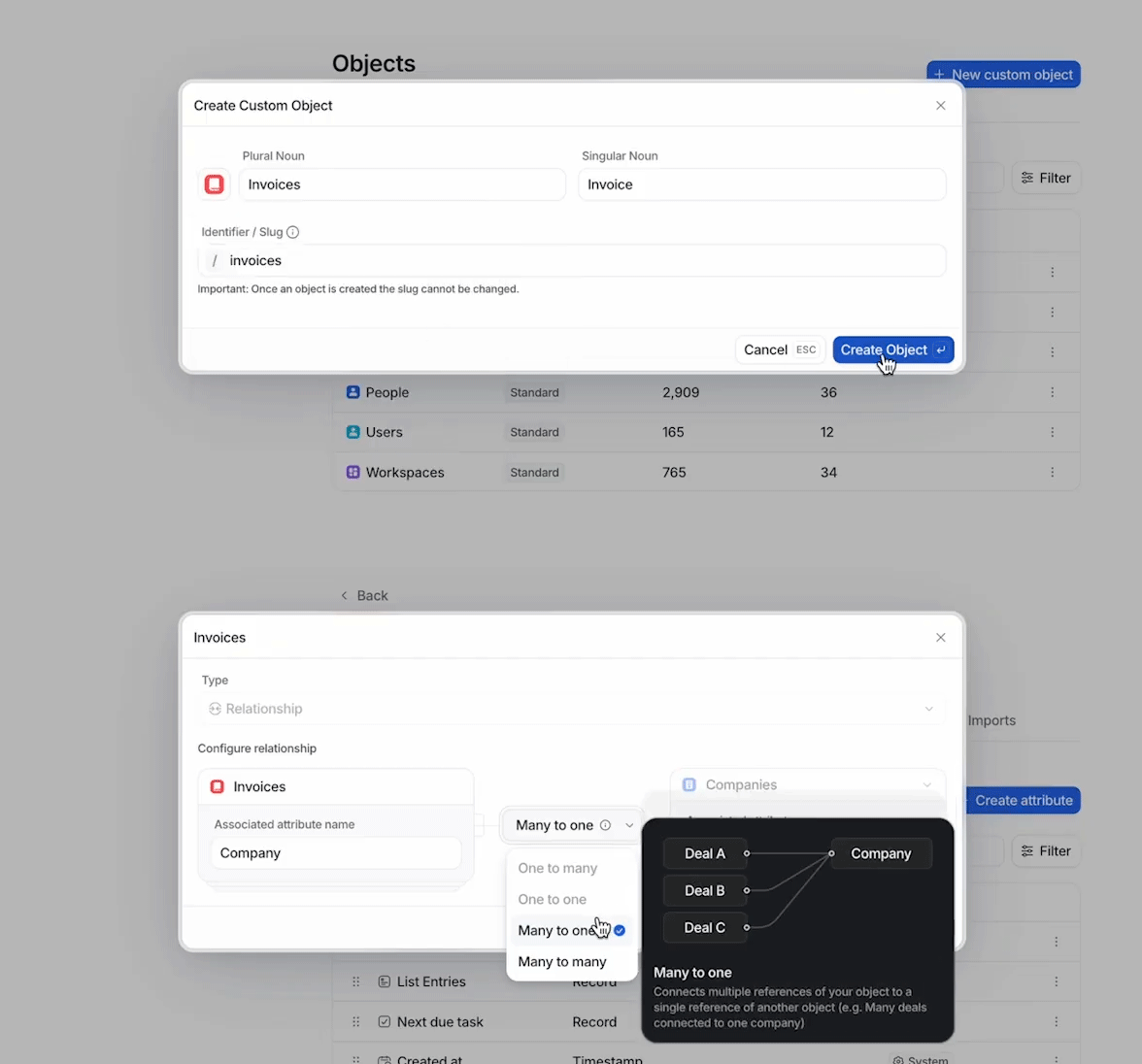
Attio is a data-first CRM built for go-to-market teams that have outgrown the rigid data model most CRMs impose. Rather than organizing everything around fixed objects (contacts, companies, deals), Attio treats the entire CRM as a configurable relational database, letting teams define custom objects that mirror their actual business relationships. Its key capabilities include:
Custom objects architecture supporting partnerships, investor pipelines, hiring workflows, PLG activation tracking, or any relationship structure beyond the standard schema
AI-native enrichment that automatically populates company and contact records upon creation from hundreds of sources
Real-time bidirectional email and calendar sync with no manual tagging, BCC forwarding, or confirmation step required
Ask Attio AI powered by Universal Context that semantically indexes records, emails, calls, notes, and connected data sources for natural-language queries
Developer-first architecture with a REST API, App SDK, and hosted MCP server
Native call intelligence that records, transcribes, and stores meetings from Google Meet, Zoom, and Microsoft Teams directly in the CRM
Attio is the most compelling Pipedrive alternative for seed-to-Series-B B2B startups, product-led growth companies, and engineering-driven GTM teams that need a CRM conforming to their business model, not the other way around.
Why Choose Attio Over Pipedrive for Flexible, Custom-Built Relationship Management
Attio stands out in the following areas:
Custom Objects Replace a Fixed Data Schema. Pipedrive's data model is built around contacts, organizations, and deals, with customization limited to adding fields within that fixed structure. A startup tracking trial-to-paid activation events, a marketplace company modeling both buyers and sellers, or a VC firm connecting deal flow to portfolio companies cannot do this within Pipedrive's schema. Attio's custom objects let teams define any entity type and relate them through Attio's graph model.
Automatic Enrichment and Email Sync Built Into the Data Model. Pipedrive's email sync is absent entirely from the Lite plan. Data enrichment is a separate module in Pulse, gated by plan tier, with bulk enrichment noted as "coming soon." Attio's email and calendar sync is real-time, bidirectional, and automatic across all objects, including custom ones. Enrichment is not a separate module: when a company or person record is created, enrichment activates automatically, populating company attributes (estimated ARR, employee range, funding raised, social profiles) and person attributes (job title, company, profile picture).
Product-Led Growth and Data Integration Capabilities. Pipedrive has no native mechanism for syncing product usage data, behavioral signals, or customer engagement metrics from a SaaS product into the CRM. Attio has a native PLG guide and supports real-time reverse ETL connections from data warehouses (Snowflake, BigQuery, Redshift) through native integrations with Segment, Polytomic, and Hightouch. Product usage data, activation milestones, and churn signals live alongside deal data on the same record.
Source: Attio
NOTE: We also evaluated Folk CRM and Affinity as other modern entrants in the flexible CRM space. While Folk CRM excels at personal relationship management with a Notion-like interface, and Affinity is built for relationship intelligence in VC and investment workflows, Attio offers the most technically sophisticated custom objects architecture and the broadest range of data integrations for B2B teams that need a configurable relational CRM.
Attio Pricing
Attio uses a per-seat pricing model with a 20% discount on annual billing:
Free — $0, up to 3 seats, 50,000 records, 3 custom objects. Email/calendar sync, mobile apps. No Call Intelligence, Ask Attio AI, or AI agents.
Plus — $29/seat/month (annual) / $36/seat/month (monthly). Unlimited seats, 250,000 records, 5 custom objects. Ask Attio, AI agents, Call Intelligence.
Pro — $69/seat/month (annual) / $86/seat/month (monthly). 1,000,000 records, 12 custom objects. Sequences, Call Intelligence, unlimited emails, advanced access permissions.
Enterprise — Custom pricing. Unlimited objects and teams, SAML 2.0 SSO, migration service, priority support.
Who Should Use Attio?
Choose Attio if:
Your CRM needs go beyond the standard contact-company-deal schema, whether you're tracking PLG activation events, investor relationships, marketplace participants, or partnerships.
Your team is seed to Series B and you need a CRM that can evolve from a simple contact manager to a complex operational hub without a painful migration every 18 months.
Your GTM motion is product-led, and you need product usage data and behavioral signals to live in the same system as your pipeline data.
Your engineers or RevOps team will build on top of the CRM, and the REST API, App SDK, and MCP server are more important to you than a drag-and-drop interface.
For a detailed comparison of Attio and Pipedrive, see our Attio vs Pipedrive guide.
The Final Verdict
Pipedrive excels as a visual, pipeline-first CRM for small and medium-sized businesses. But growing revenue teams often need specialized tools with deeper capabilities. Based on our research, here are the best alternatives:
ZoomInfo for B2B data intelligence, buyer intent signals, and a GTM Context Graph that tells reps who to target, when to engage, and why it matters
Salesforce Sales Cloud for enterprise sales operations that require autonomous AI agents, platform customization, and multi-dimensional forecasting
HubSpot CRM for growing businesses that need marketing, sales, and customer service unified on a single shared database
Freshsales for small teams that need built-in cloud telephony, AI deal scoring, and a unified sales-support ecosystem at budget-friendly pricing
Copper CRM for Google Workspace teams that want frictionless activity logging, 12-month retroactive email sync, and built-in project management for service businesses
Zoho CRM for budget-conscious teams that need enforced sales process compliance, AI-powered pipeline intelligence, and a permanently free starting tier
Attio for engineering-driven teams and PLG companies that need a custom CRM data model built on a relational database
You don't have to choose between Pipedrive and these alternatives exclusively. Many businesses use Pipedrive as their pipeline management layer alongside a specialized tool for prospecting, marketing automation, or customer success. Consider your specific needs and growth trajectory when deciding which solution fits best.
Looking for the B2B intelligence layer that makes your revenue engine smarter? Start your free ZoomInfo trial and discover the data, intent signals, and AI-powered insights that tell your team which accounts to target, when to engage, and what to say.
Pipedrive Alternatives FAQ
Why do businesses look for Pipedrive alternatives?
Pipedrive excels at visual pipeline management for small teams, but businesses typically outgrow it in specific areas. The most common gaps include limited B2B prospecting data and intent signals, no native customer service or post-sale functionality, AI features still in development (with email summarization in beta and bulk enrichment noted as coming soon), no built-in power dialer requiring third-party telephony add-ons, and no process enforcement mechanism to keep pipeline data consistent as teams scale.
What is the best overall Pipedrive alternative?
There is no single best alternative because Pipedrive covers a specific function well. ZoomInfo is the top choice for teams that need B2B intelligence and AI-powered prospecting. HubSpot CRM leads for growing businesses that need marketing, sales, and service unified. Salesforce Sales Cloud is the clear winner for enterprise-grade complexity and autonomous AI agents. The right choice depends on which capability your team needs most.
Is there a free alternative to Pipedrive?
Yes, several alternatives offer permanent free plans. HubSpot CRM's free tier includes contact management, deal pipelines, and reporting for up to 2 users with no time limit. Zoho CRM's free plan supports up to 3 users with contact management, deal tracking, and basic workflows permanently. Attio's free plan covers 3 seats with 50,000 records and 3 custom objects. ZoomInfo also offers ZoomInfo Lite, a permanent free tier with access to 100M+ verified profiles and 10 monthly export credits.
Which Pipedrive alternative is best for small teams on a budget?
Freshsales at $9/user/month includes built-in cloud telephony, AI contact scoring, and automatic deal logging, often eliminating the $20-50/user/month dialer add-on that Pipedrive users typically need. Zoho CRM starts with a permanently free tier and reaches Blueprint process enforcement and CPQ at $23/user/month. Both offer more functionality at their entry price points than Pipedrive's comparable tiers. For an even simpler option built for solopreneurs and very small service teams, see our AllClients vs. Pipedrive comparison.
Which alternative works best for enterprise sales teams?
Salesforce Sales Cloud is built for enterprise complexity, with autonomous Agentforce AI agents, custom objects, territory management, approval workflows, and Einstein predictive forecasting. For enterprise teams that also need B2B intelligence layered into their CRM, ZoomInfo integrates natively with Salesforce and provides the data, intent signals, and GTM Context Graph that power enterprise prospecting and deal execution at scale.
Can I use ZoomInfo alongside Pipedrive?
Yes. ZoomInfo functions as an intelligence layer that complements any CRM. Through its APIs and marketplace integrations, ZoomInfo's B2B contact data, intent signals, and account intelligence can flow into Pipedrive to enrich your existing pipeline workflow. Teams that need deeper prospecting data and buyer intent signals but are satisfied with Pipedrive's deal management can use both together.
Which Pipedrive alternative is best for Google Workspace users?
Copper CRM is the clear choice for Google-native teams. It's the only CRM with Google's "Recommended for Google Workspace" badge, embedding the full CRM inside Gmail with automatic activity logging, 12-month retroactive email sync, and Google Calendar and Drive integration. Teams that live in Gmail eight hours a day find Copper eliminates the context-switching that causes CRM adoption to fail.
How difficult is it to migrate from Pipedrive to one of these alternatives?
Migration complexity depends on how deeply your team uses Pipedrive. Most alternatives on this list support CSV/spreadsheet imports and offer guided migration tools. HubSpot, Salesforce, and Zoho CRM all have dedicated migration documentation and onboarding support. For simpler migrations, Copper CRM's 12-month retroactive email sync automatically populates relationship history from Gmail, reducing the manual data transfer burden. Many businesses also run both tools in parallel during a transition period rather than switching overnight.
Looking beyond Pipedrive? Compare the strongest alternatives side by side:
