
Choosing between Dripify vs. Linked Helper for LinkedIn automation often comes down to five questions:
Do you need your campaigns to run 24/7 in the cloud, or are you comfortable keeping your computer on while they execute?
Is a simple, quick setup more important than deep customization and control?
Do you need built-in team management, or are you running outreach solo or with a small team?
Are you looking for the cheapest LinkedIn automation, or willing to pay more for convenience?
Is LinkedIn automation alone enough for your sales process, or do you need verified contact data, buyer intent signals, and multi-channel intelligence to know who to target first?
In short, here's what we recommend:
Dripify is built for sales teams and agencies that want cloud-based LinkedIn automation they can set and forget. Campaigns run around the clock without a browser open, the interface is simple enough to launch a first campaign within an hour, and the Pro and Advanced plans combine LinkedIn sequences with email outreach in the same workflows.
Pricing starts at $39/month (annual) for a Basic plan limited to one campaign and reduced daily quotas, and G2 reviews cite slow customer support response times.
Linked Helper costs a fraction of what Dripify charges and delivers more features per dollar. At $8.25/month (annual, Standard plan), it offers 31 features including a built-in CRM, post engagement automation, and lead collection from LinkedIn search, Sales Navigator, groups, events, and alumni networks.
Its desktop app architecture avoids the browser extension detection methods LinkedIn uses to flag automation tools. The tradeoff: your computer must stay running for campaigns to execute, the interface has a steeper learning curve, and there's no team dashboard for agencies managing multiple accounts.
Both tools solve the same problem: automating LinkedIn actions at scale. Neither answers the question every outreach campaign depends on: are you reaching the right people at the right time? That's where ZoomInfo changes the equation.
ZoomInfo is an AI GTM platform built on a B2B database of 500M contacts, 100M companies, 135M+ verified phone numbers, and 200M+ verified business email addresses. Its GTM Context Graph processes 1.5B + data points daily, combining this data with your CRM records, conversation transcripts, and behavioral signals to show not just what happened, but why deals move or stall.
Sellers work from GTM Workspace, where AI agents handle account research, draft outreach, and suggest next steps. Marketers and RevOps teams run go-to-market plays from GTM Studio, and teams can power their own tools through the API and MCP.
For teams that have outgrown single-channel automation and need to know who to target (not just how to message them), ZoomInfo provides the intelligence that makes every channel more effective.
If building outreach on verified data and buyer intent sounds like the missing piece, see how ZoomInfo works.
Dripify vs. Linked Helper vs. ZoomInfo at a glance
Dripify | Linked Helper | ZoomInfo | |
|---|---|---|---|
Primary function | Cloud-based LinkedIn + email automation | Desktop-based LinkedIn automation with CRM | AI GTM platform |
Architecture | Cloud (runs 24/7) | Desktop app (runs while computer is on) | Cloud platform with API/MCP access |
Contact database | 100 email finder credits/month | 620–3,100 data enrichment credits/month | 500M contacts, 200M+ verified emails, 135M+ verified phones |
Buyer intent signals | None | None | Intent data from 210M IP-to-Organization pairings |
LinkedIn automation | Yes, cloud-based | Yes, desktop-based | No native LinkedIn automation |
Team management | Advanced plan ($79/mo annual) | No native team dashboard | Team workspace with AI agents |
Ease of use | Simple, quick setup | Steep learning curve | Structured onboarding (30–90 days) |
Starting price | $39/user/month (annual) | $8.25/user/month (annual) | Custom-quoted (free tier available) |
Free trial | 7-day, no card required | 14-day, no card required | 7-day trial + permanent free tier (ZoomInfo Lite) |
Cloud convenience vs. desktop control
The architectural difference between Dripify and Linked Helper is the first decision point, and it shapes everything else.
Dripify runs in the cloud. Set up a campaign, close your laptop, and the platform keeps sending connection requests, messages, and profile views from a unique regional IP address assigned to your geographic region.
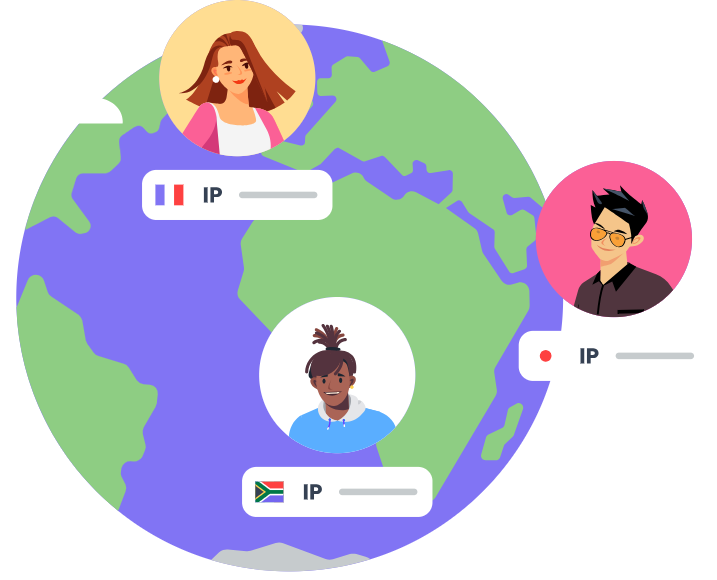
Source: Dripify Unique IP
For sales reps who want to launch sequences before leaving for a client meeting, this is useful. The tradeoff is that cloud-based tools route actions through servers that don't replicate real browser behavior, which LinkedIn's detection systems can flag.
Linked Helper takes the opposite approach. It's a standalone desktop application that opens LinkedIn in its own sandboxed browser. Rather than injecting code into pages or sending API calls through shared servers, it clicks buttons, types text, and navigates LinkedIn the way a human would. This makes it harder to detect than either browser extensions or cloud-based tools.
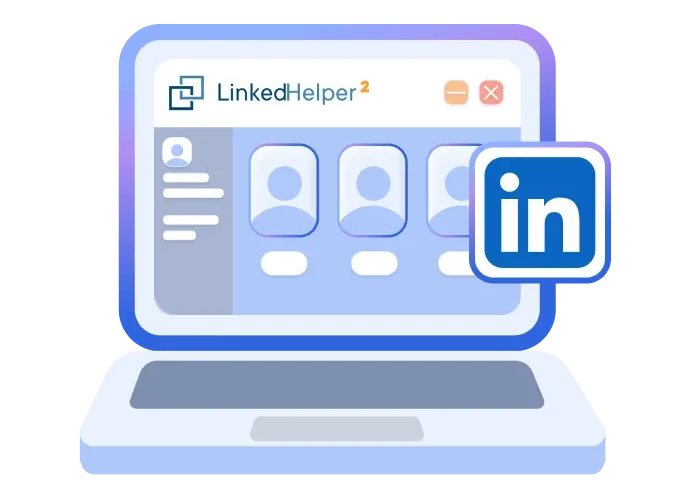
Source: Linked Helper Desktop
The cost: your machine must stay on and logged in while campaigns execute. Users who can't guarantee uptime on a local computer either accept paused campaigns or set up a remote desktop server, which adds complexity.
For solo operators and small teams with a reliable workstation, Linked Helper's desktop approach offers better account safety at a lower price. For teams that need hands-off automation across time zones, Dripify's cloud model removes the infrastructure burden.
Dripify wins on simplicity, Linked Helper wins on depth
Dripify is designed to get users running fast. The three-step workflow (import leads, create a sequence, launch) is straightforward, and Capterra reviewers rate ease of use 4.7/5.
Pre-built sequence templates cover common outreach scenarios, and the drag-and-drop builder lets users combine LinkedIn actions with email steps, delays, and conditional branches (like "If connected" or "If email is available") without technical knowledge.
Linked Helper requires more investment upfront but rewards it with capabilities Dripify doesn't match. The 31-feature toolkit uses a modular plug-in architecture where advanced features are disabled by default, so new users see a simplified dashboard and activate capabilities as they need them.
Beyond basic connection requests and messaging, Linked Helper offers post engagement automation (auto-likes, comments, and its Boost Post feature that tags non-connections under posts), three-mode skill endorsements, bulk event invitations, and lead collection from nine distinct sources including Sales Navigator searches, LinkedIn groups, alumni networks, and event attendee lists.
The difference shows most in campaign design. Dripify's conditional logic covers the basics: branch on connection status, message views, or email availability.
Linked Helper's campaign builder supports IF-THEN-ELSE message logic at the template level, where a single template produces different messages based on a prospect's job title, company, or location, plus Spintax for message variation. Users who want granular control over every step will find more room in Linked Helper.
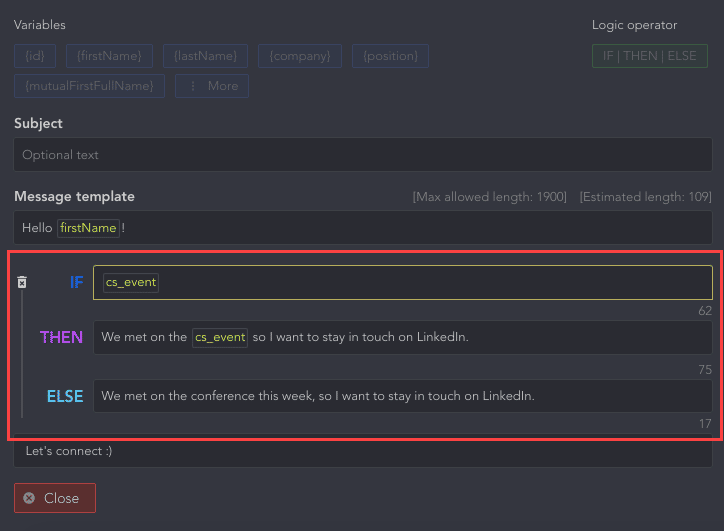
Source: Linked Helper IF-THEN-ELSE
The pricing gap is hard to ignore
Linked Helper is cheaper than Dripify at every tier.
Dripify's Basic plan at $39/month (annual) limits you to a single campaign and reduced daily quotas: 20 connection requests, 30 messages, and 10 InMails per day. Serious outreach requires the Pro plan at $59/month (annual) for unlimited campaigns and full daily quotas (75 connection requests, 100+ messages). Team management features require the Advanced plan at $79/month (annual).
Linked Helper's Standard plan at $8.25/month on a 12-month commitment ($15/month monthly) already includes unlimited campaigns, the full campaign builder, smart daily limits, and the built-in CRM. The Pro plan at $24.75/month (annual) adds unlimited group and event messaging, image attachments, full webhook integration, messaging history exports, and 3,100 data enrichment credits per month.
Put differently: Linked Helper's most expensive annual plan ($24.75/month) costs less than Dripify's cheapest annual plan ($39/month). For agencies or teams running multiple LinkedIn accounts, where each account needs its own license, this difference compounds fast. Ten accounts on Dripify Pro costs $590/month. Ten accounts on Linked Helper Pro costs $247.50/month.
Capterra reviewers rate Linked Helper's value for money at 4.9/5. Dripify's value-for-money rating sits at 4.3/5, the lowest of its category scores.
LinkedIn account safety: different philosophies, same risk
Both platforms invest in keeping LinkedIn accounts safe, but their methods differ.
Dripify relies on cloud infrastructure with behavior simulation. Each user gets a unique local IP address, actions are spaced with randomized delays, and the Activity Control feature ramps up daily limits over time. The Advanced plan adds what Dripify calls "Advanced LinkedIn protection." Because the platform runs in the cloud, users don't manage proxies or browser configurations themselves.
Linked Helper's safety argument is architectural. As a desktop app that doesn't inject code into LinkedIn pages, it avoids the detection vector browser extensions face: LinkedIn can scan for known extension IDs even when extensions aren't active. Each account runs in a separate instance with its own browser fingerprint, cache, cookies, and dedicated IP.
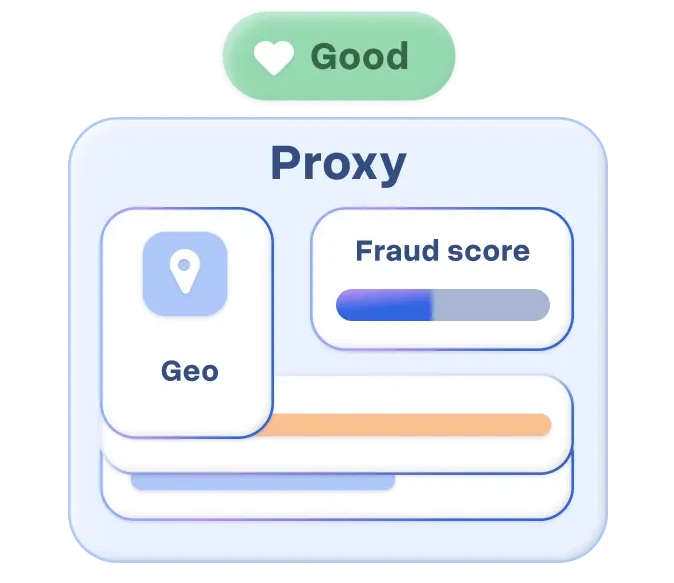
A built-in proxy health check with geomatching and risk scoring validates proxy quality before campaigns begin. Smart Daily Limits add a 10% randomization band to daily action volumes, avoiding the "exactly N actions per day" pattern.
Source: Linked Helper Proxy Health Check
Neither approach is bulletproof. LinkedIn's detection systems keep evolving, and aggressive campaign settings can trigger warnings on any tool. Both platforms operate outside LinkedIn's Terms of Service, and no tool can guarantee immunity from account restrictions.
Email outreach capabilities
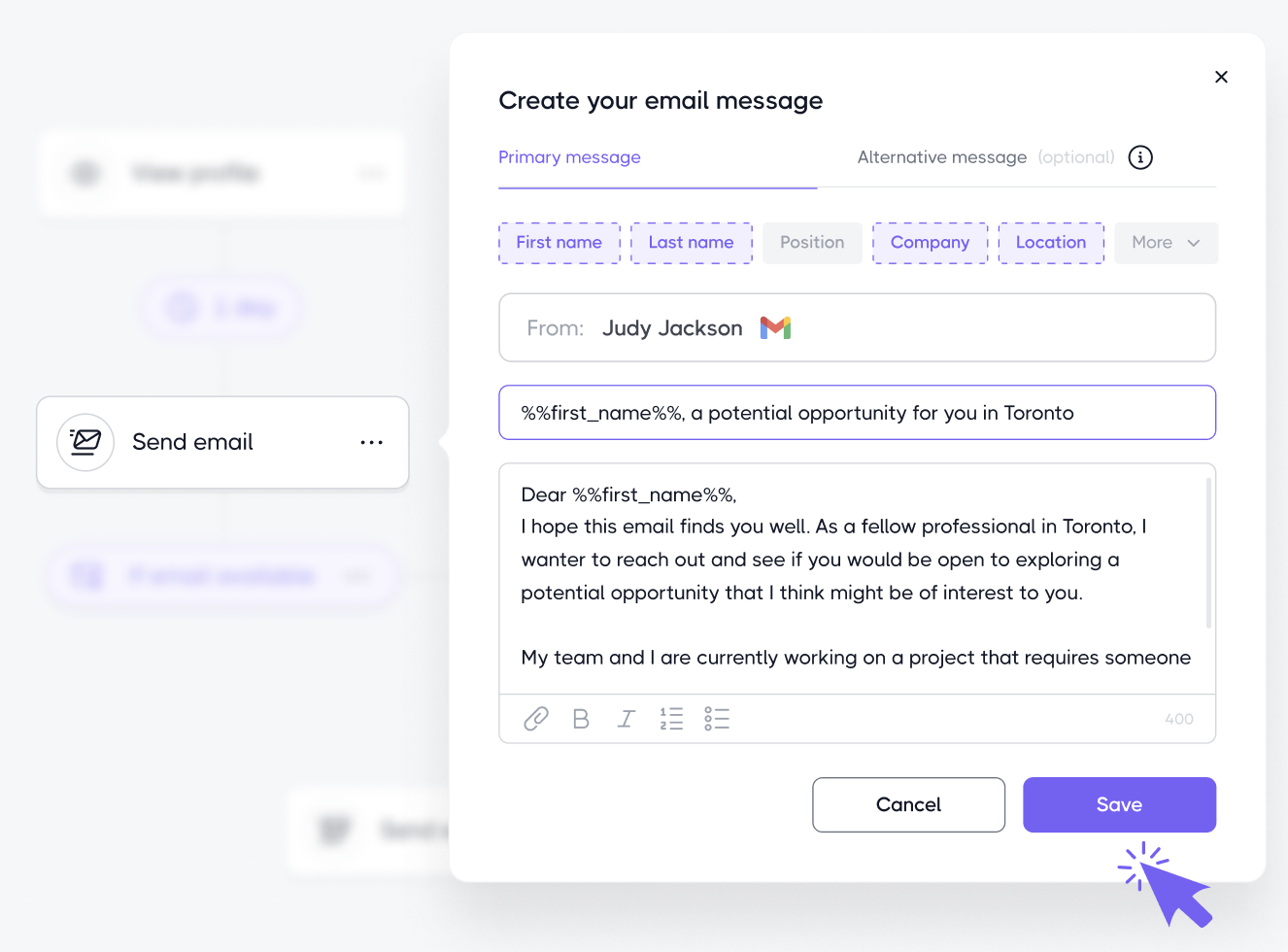
Dripify includes email as a native channel. Users can connect Gmail or Outlook accounts and add "Send Email" actions into LinkedIn sequences, creating multi-channel campaigns where a prospect might receive a connection request, then a follow-up email if there's no response, then a LinkedIn message after connecting.
Source: Dripify Emails
The platform's Email Finder discovers corporate email addresses from LinkedIn profiles with a reported 45-55% success rate, and all plans include 100 email finder credits per month.
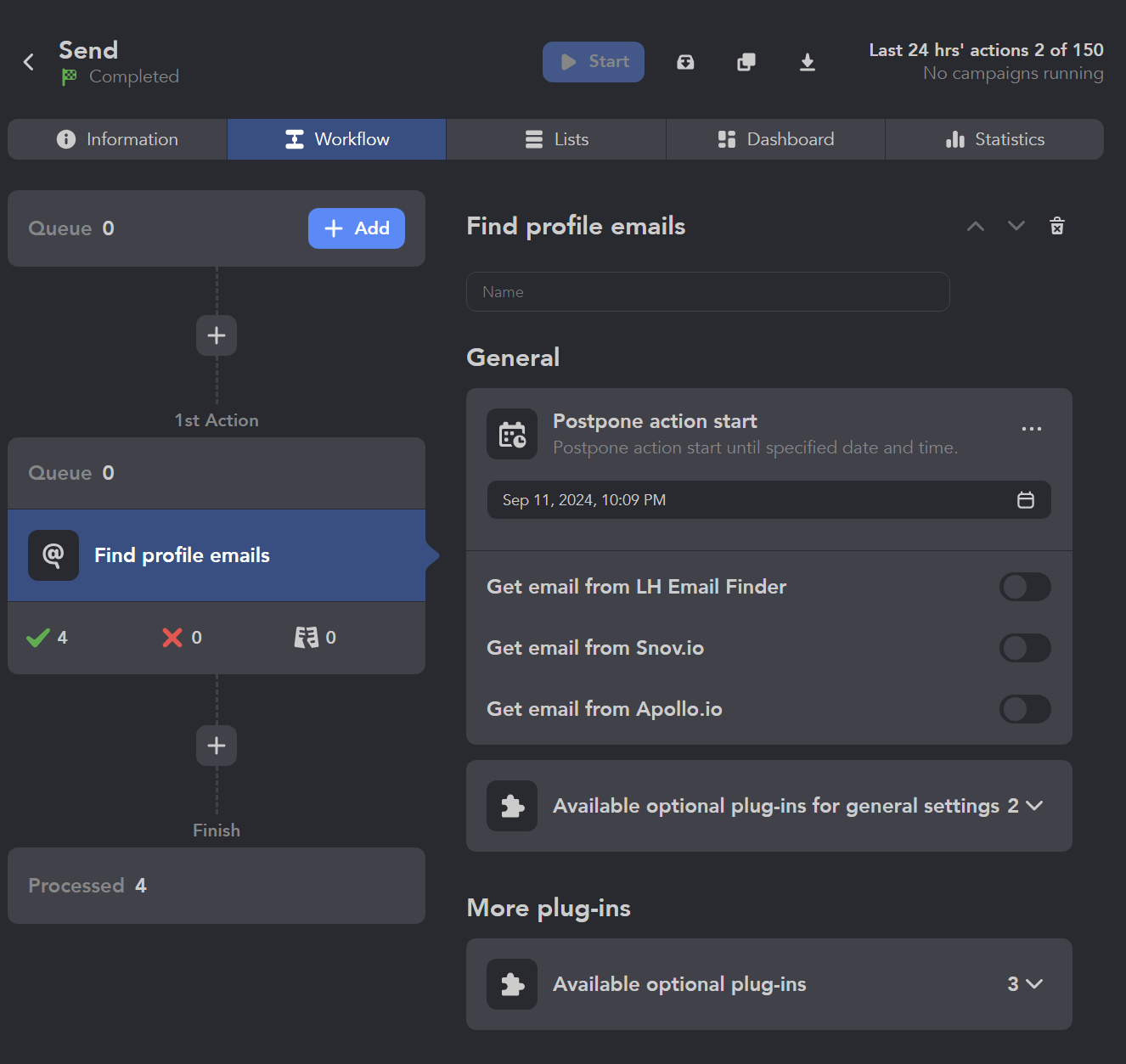
Linked Helper's email capabilities are more limited. It includes an Email Finder and Data Enrichment action that surfaces emails and phone numbers from its own database (Standard: 620 credits/month, Pro: 3,100 credits/month). But Linked Helper doesn't send emails. It discovers contact data and pushes it to external tools (CRMs, email platforms) via webhooks or direct integrations.
Source: Linked Helper Email Finder
If you need LinkedIn and email in one automated sequence, Dripify has the edge. If you prefer dedicated email tools and just need Linked Helper to find the addresses, the credit-based enrichment works.
Both tools face the same constraint: their email databases are small. A 45-55% hit rate on 100 monthly credits (Dripify) or 620-3,100 enrichment credits (Linked Helper) means gaps in coverage, especially for prospects outside well-indexed industries.
ZoomInfo solves the data problem neither tool addresses
Dripify and Linked Helper both automate the mechanics of outreach. They share a blind spot: they don't help you figure out who deserves that outreach.
Both tools start with LinkedIn's search filters. You define criteria, they find matching profiles, and they automate actions against those profiles. This works when your targeting is simple (job title + industry + company size). It falls apart when you need to know which prospects are in-market, which companies use your competitor's product, or who the real decision-makers are behind a LinkedIn profile.
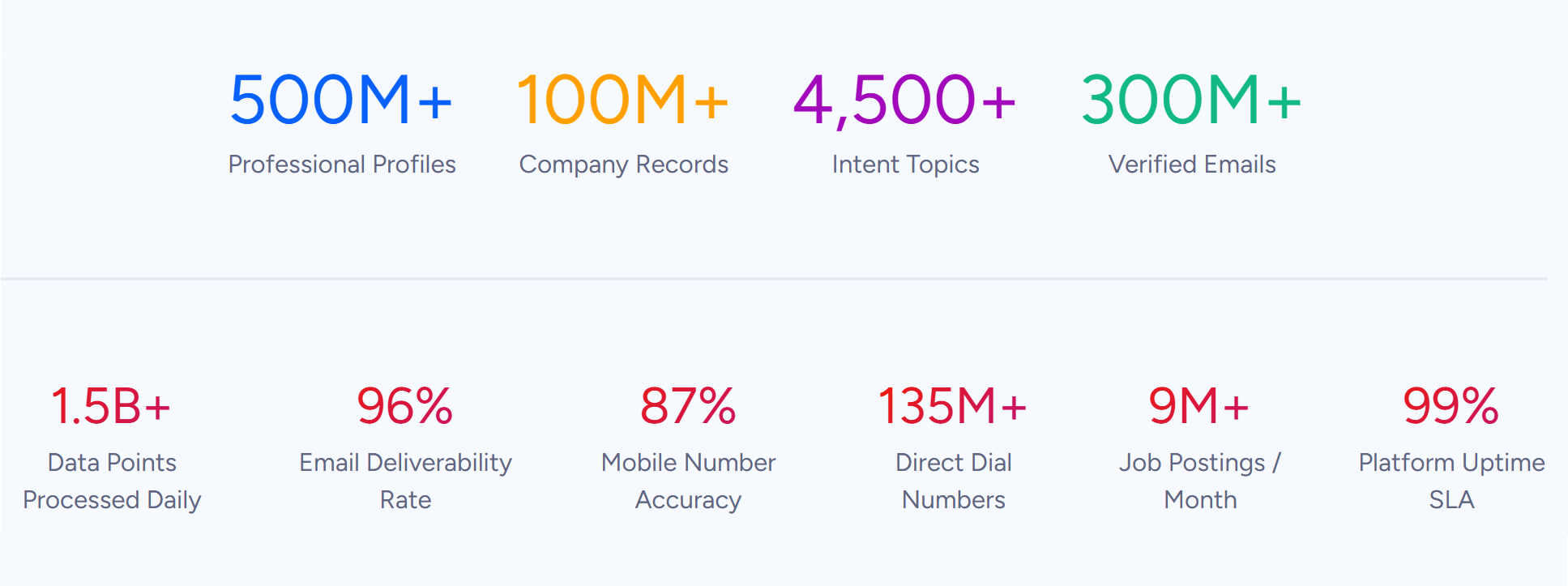
ZoomInfo operates at a different layer. Its database covers 500M contacts and 100M companies with 200M+ verified business email addresses and 135M+ verified phone numbers, verified through a multi-source pipeline backed by 300+ human researchers with up to 95% accuracy on first-party data.
Source: ZoomInfo Data
In a Fortune 500 competitive RFP analyzing 25 million contacts across vendors, the independent consultant concluded that "no other competitor came even close."
The advantage goes beyond scale. ZoomInfo's Buyer Intent data tracks signals from 210M IP-to-Organization pairings and 6 trillion+ new keyword-to-device pairings sourced monthly, surfacing which companies are actively researching solutions like yours. Guided Intent identifies topics historically correlated with deal success rather than requiring manual keyword selection.

Source: ZoomInfo Intent Data
Combined with technographics covering 30,000+ technologies across 30+ million companies, org charts, and department-level intelligence, ZoomInfo answers a question LinkedIn automation tools can't: who should you be targeting right now?
"ZoomInfo gives us the information we need to execute. We don't have to go through and spend our time digging. It's already there, so we can be three steps ahead." (Vensure)
CRM and data management: built-in vs. bolt-on
Linked Helper includes a native CRM that stores every LinkedIn profile processed across all campaigns, with full interaction history, sent/received messages, custom notes, tags, and custom variables at three levels (CRM, campaign, and action).
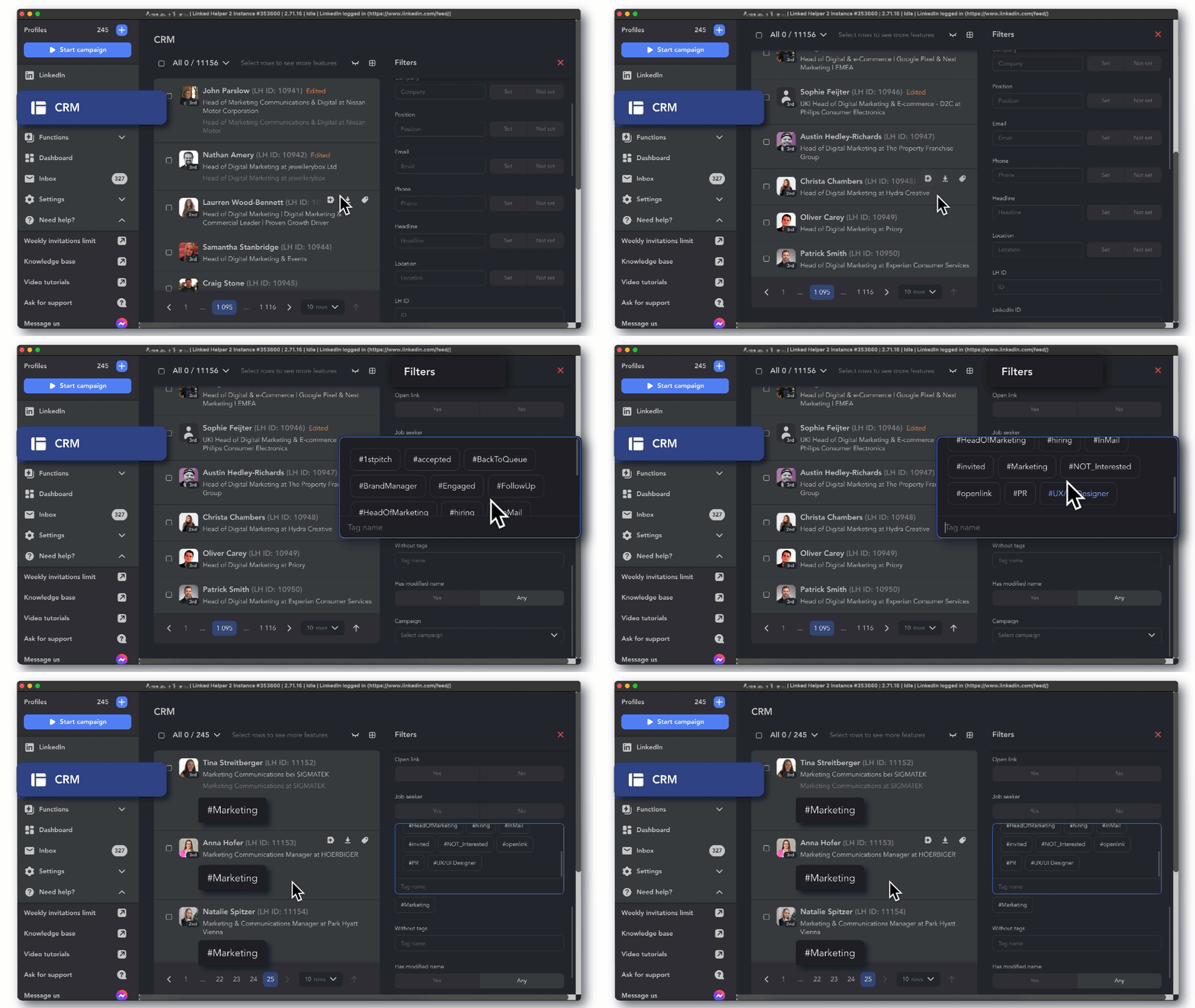
Source: Linked Helper CRM
The CRM isn't a full sales pipeline tool (no deal stages or revenue tracking), but it serves as a persistent contact database with 200+ exportable data fields including complete messaging history. Direct integrations push data to HubSpot, Pipedrive, Salesforce, Zoho, ActiveCampaign, HighLevel, and others.
Dripify doesn't include a CRM. It offers a dedicated inbox (Pro and Advanced plans) that filters and organizes lead conversations, plus integrations with HubSpot, Salesforce, and 1,000+ tools via Zapier. The Advanced plan adds team management with role assignment and duplicate outreach prevention. But lead data management happens in external systems.
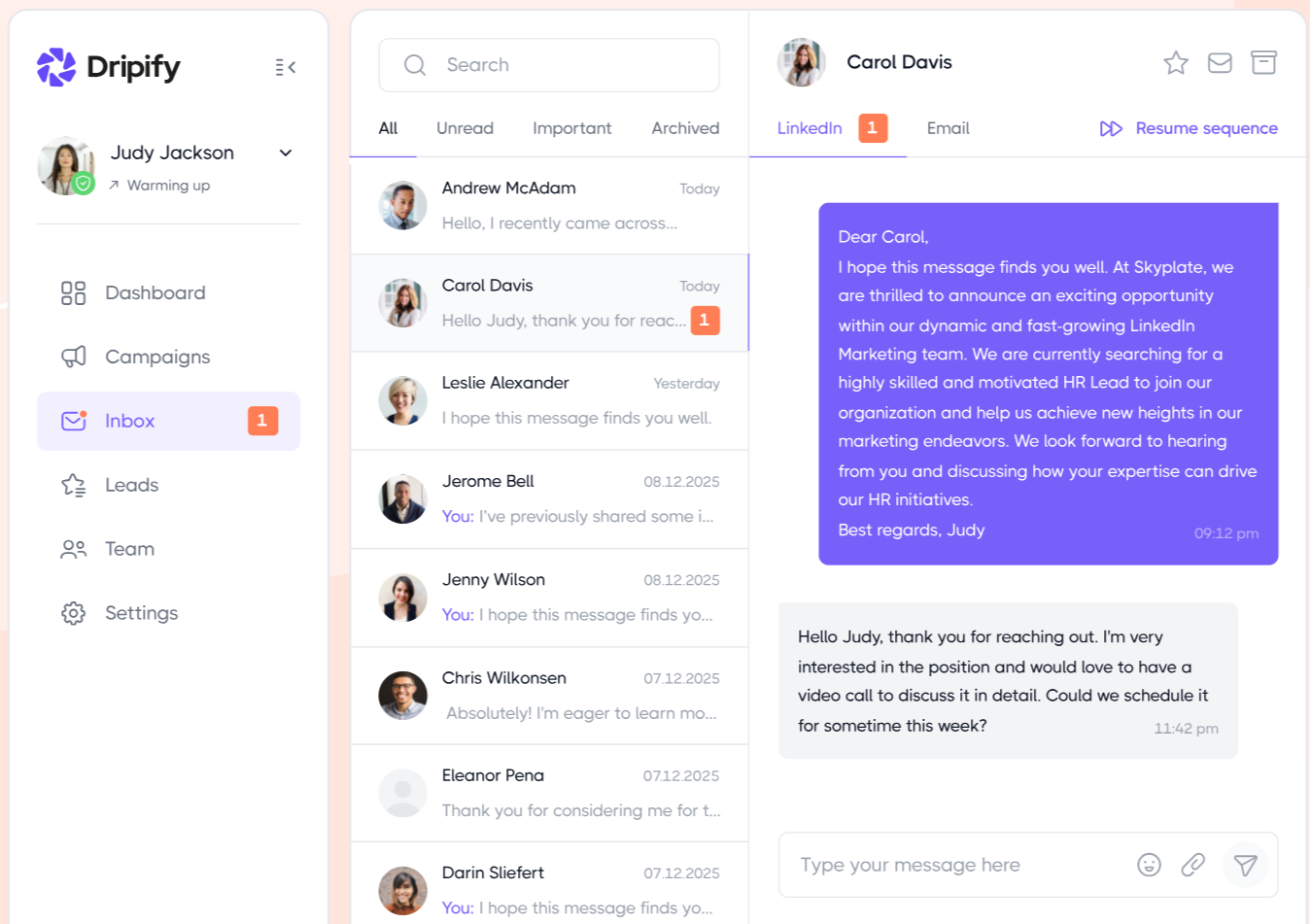
Source: Dripify Inbox
ZoomInfo takes a different approach. Rather than building a CRM, it enriches and powers the CRMs teams already use. GTM Workspace gives sellers a Book of Business view combining CRM data, ZoomInfo intelligence, conversation history, and market signals in one place. AI agents handle account research, CRM updates, and signal monitoring.
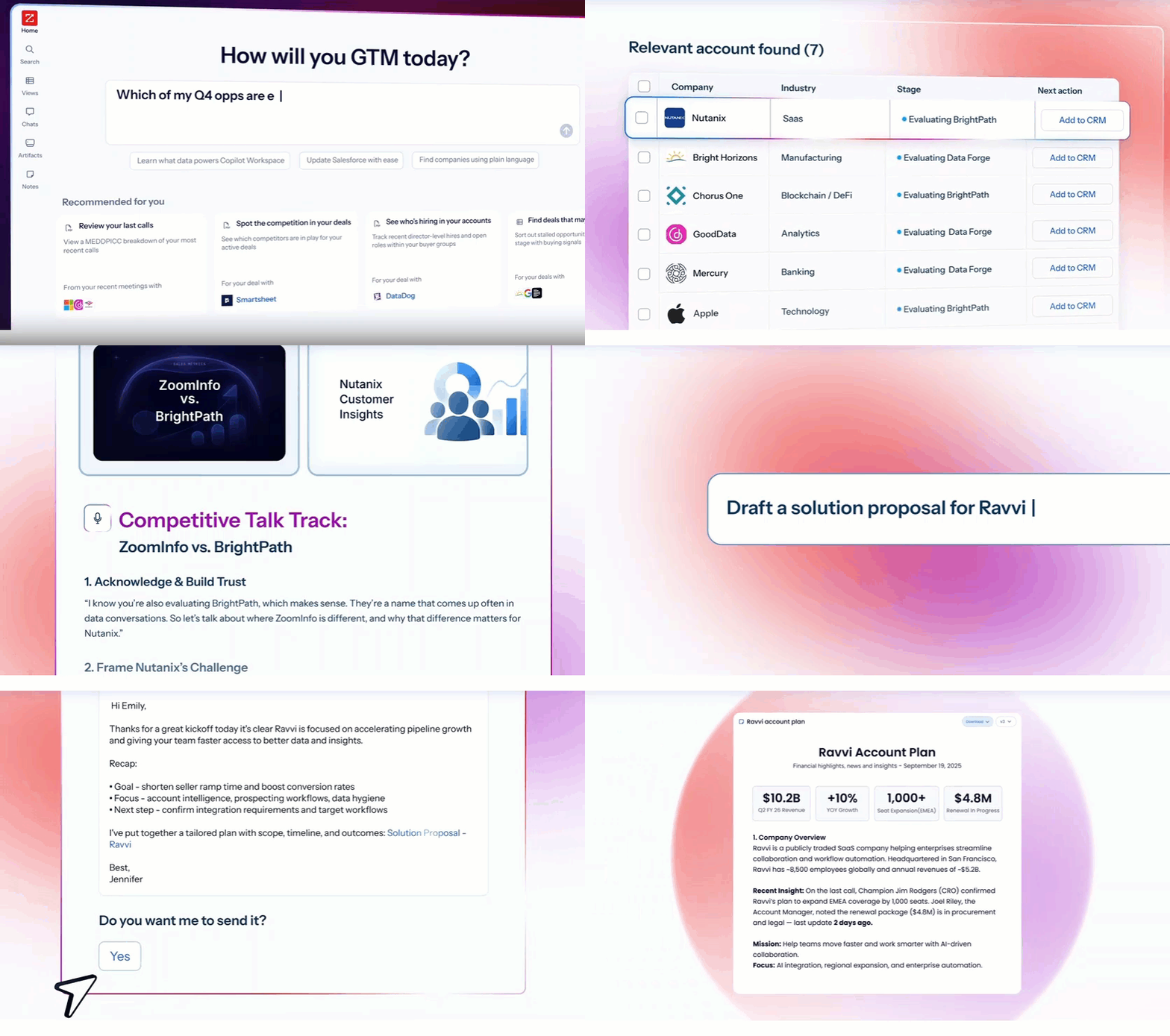
Source: ZoomInfo GTM Workspace
For RevOps teams, ZoomInfo Operations automates data enrichment from approximately 60 vendors, deduplication, and lead routing, keeping CRM data clean without manual work.
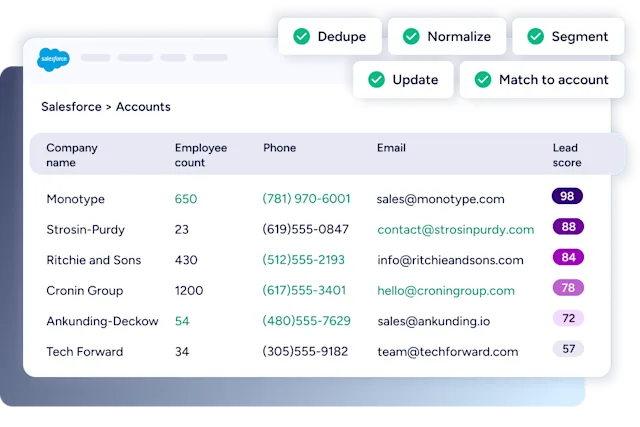
Source: ZoomInfo Operations
"ZoomInfo is our one source of truth for account data, and even more so for contact data. There's no other provider in the market that provides you with that level of detail." (Smartsheet)
Team management and scalability
Scaling outreach across a team exposes each platform's structural limits.
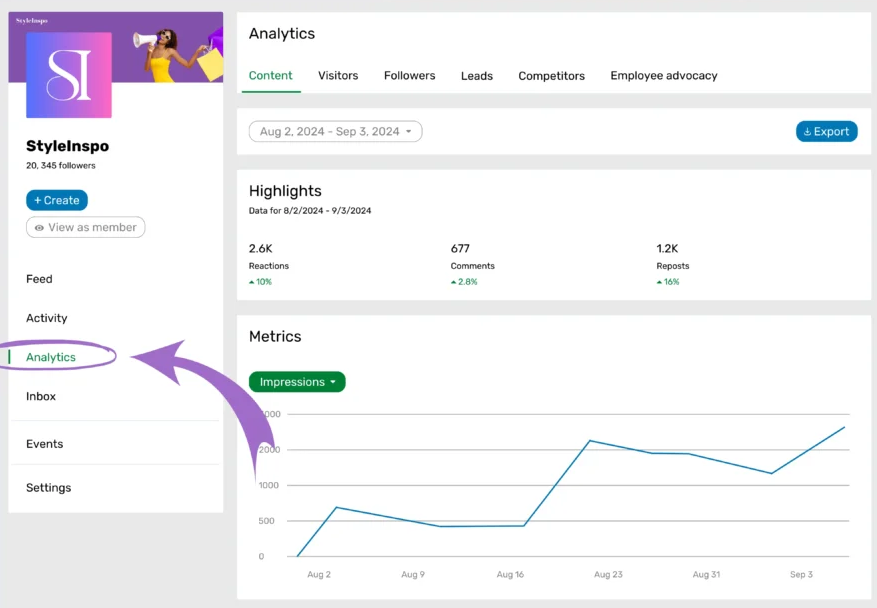
Dripify offers the better team experience of the two LinkedIn tools. The Advanced plan includes role assignment, centralized performance tracking, and duplicate outreach prevention. Managers can view team-wide analytics, compare individual performance, and monitor active campaigns per member. But at $79/user/month (annual), a 10-person sales team costs $790/month before any email credits.
Source: Dripify Performance Tracking
Linked Helper follows a one-license-per-LinkedIn-account model. There's no shared dashboard, no team workspace, and no multi-account view. Agencies managing multiple accounts must run separate app instances, each requiring 2 GB of RAM and 0.5-1 CPU cores.

Source: Linked Helper Requirement
A lead generation agency case study describes scaling from 100-200 to 800-1,000 sequences per month per manager, but the coordination happens outside the tool.
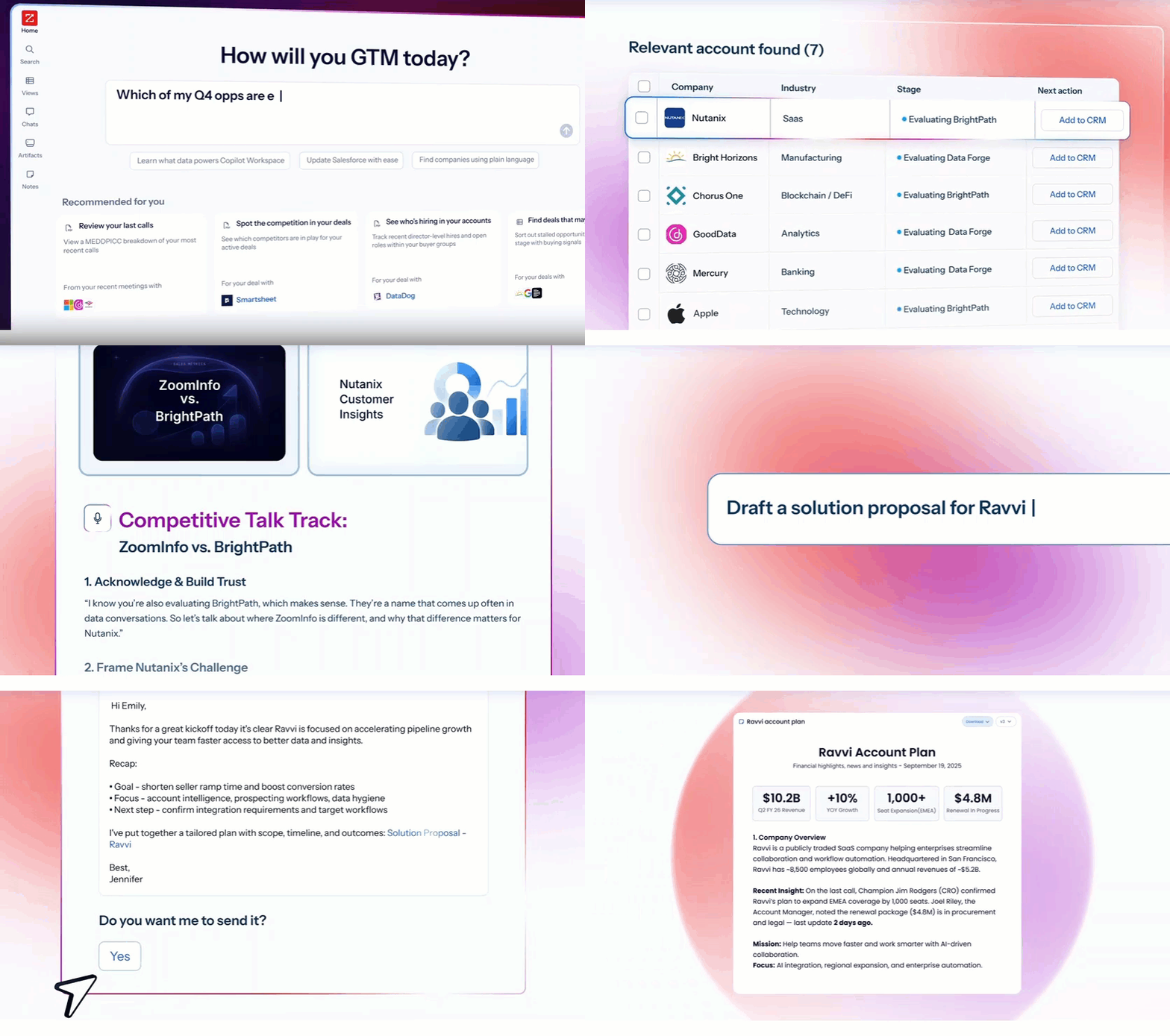
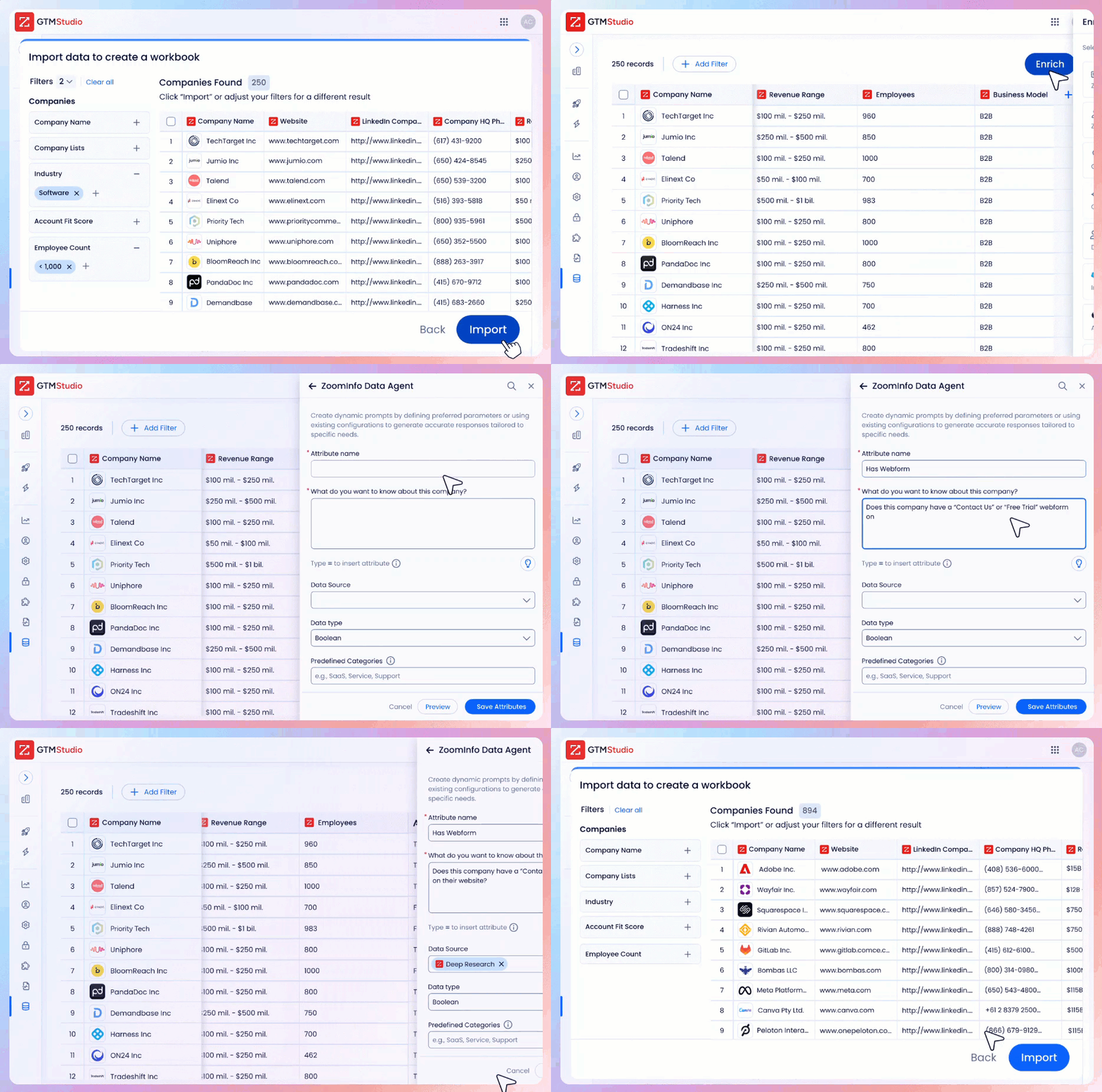
ZoomInfo is built for team-scale operations. GTM Workspace gives each seller AI-powered account prioritization and outreach, while GTM Studio lets marketers and RevOps teams design, enrich, and activate go-to-market plays in natural language.
Source: ZoomInfo GTM Workspace
Actions flow between them: a play designed in GTM Studio delivers accounts and recommended actions into sellers' Workspaces. Seismic's sales team reported 54% productivity gains and 11.5 hours saved per week using this coordinated approach.
Source: ZoomInfo GTM Studio
Outreach intelligence: automation without direction vs. data-driven targeting
The core limitation of standalone LinkedIn automation is that it optimizes the wrong variable. Sending 75 connection requests per day (Dripify) or 150 actions per day (Linked Helper) matters far less than whether those actions reach the right people at the right time.
Consider a typical workflow with either tool: filter LinkedIn by job title and industry, import matching profiles, launch a sequence. The campaign might reach thousands of prospects, but without intent data, you can't know which of them are evaluating solutions.
Without verified direct phone numbers or business emails beyond LinkedIn, you have no fallback when LinkedIn messages go unread. Without org chart intelligence, you can't identify the full buying committee.
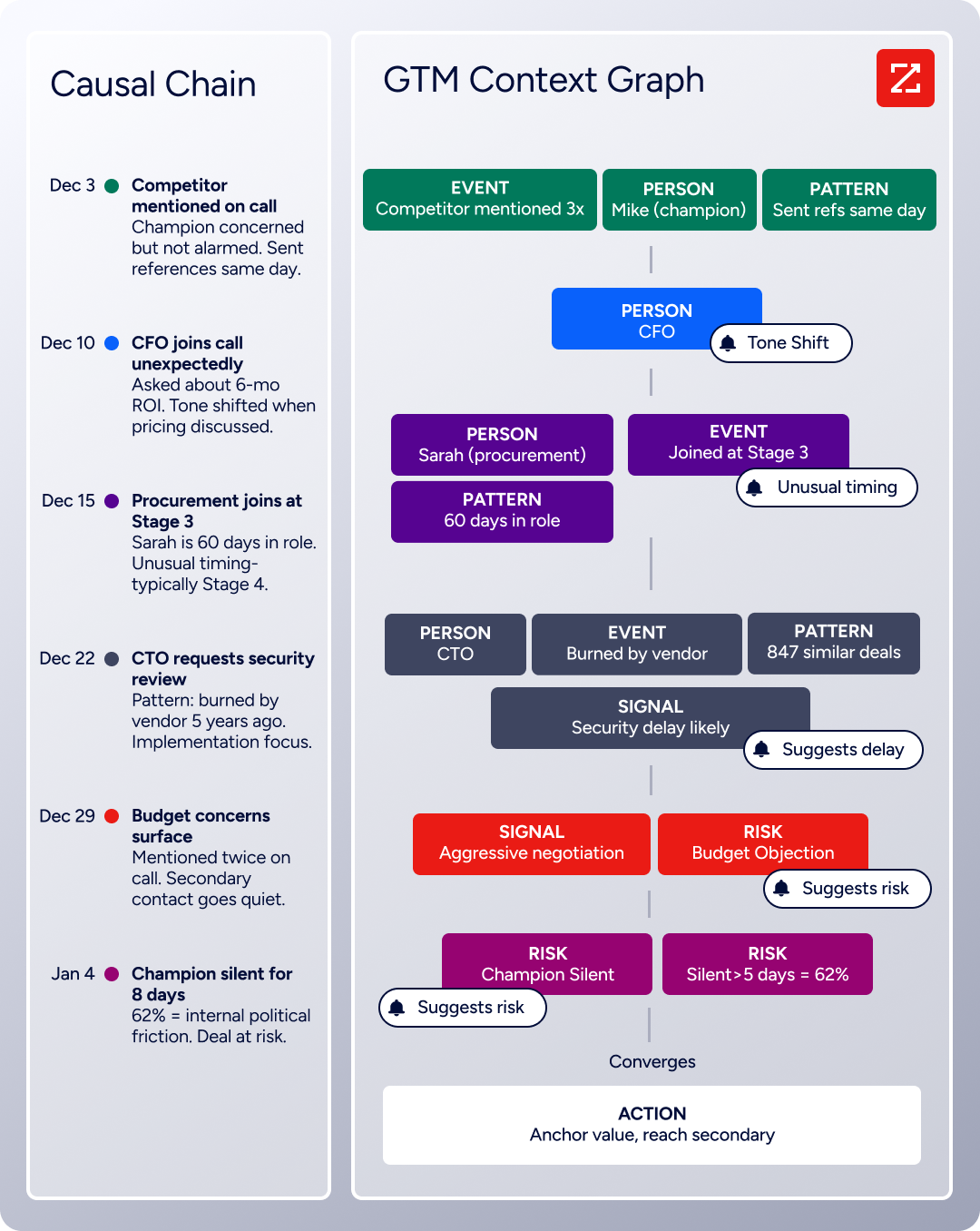
ZoomInfo's GTM Context Graph addresses each gap. It processes 1.5B + data points daily and fuses ZoomInfo's B2B data with a customer's CRM records, conversation transcripts, and behavioral signals. The result isn't a bigger contact list but a system that captures why deals move or stall and which signal combinations predict success.
Source: ZoomInfo Context Graph
GTM Workspace's Action Feed delivers a live stream of in-market buyers with pre-drafted actions on every signal, from G2 comparisons to funding events to executive hires.
"That combination of our internal CRM data, external signals, and AI that's given all that context has helped us craft very specific account- and persona-based messages. And people have responded to them right away." (Seismic)
Support and documentation
Dripify provides 24/7 live support across all plans, with a Help Center covering nine topic collections and video tutorials. Enterprise subscribers get onboarding and a dedicated customer success manager. G2 reviews consistently cite slow support response times, a gap between the "24/7" promise and the actual experience.
Linked Helper claims 24/7 support with approximately 20-minute resolution times, and Capterra reviewers consistently validate this: "Support team is responsive, professional, and always provides clear solutions." The knowledge base at support.linkedhelper.com is well-organized with recipes, tips, and integration walkthroughs. The product UI supports English, French, German, Spanish, and Portuguese.
Source: Linked Helper 24/7 Support
ZoomInfo offers support through a Help Center with five primary resources, ZoomInfo University with role-specific learning paths and certifications, and professional services through ZoomInfo Labs. The company's redesigned onboarding program produced a 25% improvement in customer satisfaction scores and won Rocketlane's Golden Comet award for Best Customer Onboarding Team.

Source: ZoomInfo University
Dripify vs. Linked Helper vs. ZoomInfo: Which should you choose?
The right choice depends on where your outreach bottleneck sits.
Choose Dripify if:
You want cloud-based LinkedIn automation that runs without keeping a computer on
Quick setup and simple campaign management matter more than deep customization
You need LinkedIn and email in the same automated sequences
Your team needs built-in role management and performance tracking
You're comfortable with higher per-seat costs for convenience
Choose Linked Helper if:
Budget is a primary concern and you want the most features per dollar
Account safety is a priority and you prefer the desktop app approach
You need deep campaign customization with conditional logic, Spintax, and multi-source targeting
A built-in CRM for contact management and data export is valuable
You can keep a desktop machine (or remote server) running during campaigns
Choose ZoomInfo if:
Your challenge isn't automating outreach but knowing who to target and when
You need verified contact data at scale (direct dials, business emails) beyond what LinkedIn provides
Buyer intent signals and account-level intelligence would improve your prospecting
You want AI-powered execution across multiple channels, not just LinkedIn
Your team has outgrown single-channel automation and needs a unified GTM platform
Start with ZoomInfo Lite for free, or request a demo.
LinkedIn automation tools like Dripify and Linked Helper have made it possible for any sales team to scale outreach on the platform. Each does the job well, with Dripify favoring simplicity and cloud convenience, and Linked Helper offering depth and value. But automating outreach without intelligence is like sending more mail to a bad address list. The volume increases; the results don't.
ZoomInfo provides the data and intelligence that makes outreach (on LinkedIn or any channel) reach the right people at the right moment. For teams ready to move beyond single-channel automation to data-driven go-to-market execution, that's the difference between activity and results.
Dripify vs. Linked Helper vs. ZoomInfo FAQ
What is the main difference between Dripify and Linked Helper?
Dripify is a cloud-based LinkedIn automation tool that runs campaigns 24/7 without keeping your computer on. It combines LinkedIn and email outreach in the same sequences and offers built-in team management.
Linked Helper is a desktop application that runs campaigns only while your machine is active but offers a broader feature set (31 features including a built-in CRM, post engagement automation, and multi-source lead collection) at a lower price.
Which LinkedIn automation tool is cheaper?
Linked Helper is cheaper. Its Standard plan starts at $8.25/month on an annual commitment, and the Pro plan costs $24.75/month annually. Dripify's Basic plan starts at $39/month annually with limited features (one campaign, reduced quotas), and its Pro plan costs $59/month annually. For ten accounts, Linked Helper Pro totals $247.50/month compared to Dripify Pro at $590/month.
Is cloud-based or desktop-based LinkedIn automation safer for my account?
Neither approach is risk-free, as both operate outside LinkedIn's Terms of Service. Dripify's cloud-based approach assigns each user a unique local IP and simulates human behavior, but routes actions through external servers.
Linked Helper's desktop app runs LinkedIn in its own sandboxed browser without injecting code, making it harder for LinkedIn to detect through extension fingerprinting. Linked Helper also supports per-account proxy isolation with a built-in health check. Aggressive campaign settings can trigger restrictions on either platform.
How does ZoomInfo compare to Dripify and Linked Helper?
ZoomInfo is not a LinkedIn automation tool. It's an AI GTM platform that provides the data and intelligence LinkedIn automation tools lack. With 500M contacts, 200M+ verified business emails, 135M+ verified phone numbers, and buyer intent signals, ZoomInfo answers who to target and when.
Dripify and Linked Helper answer how to automate LinkedIn actions. Many teams use a data platform like ZoomInfo alongside LinkedIn automation to ensure outreach reaches the right prospects.
Can Dripify and Linked Helper find email addresses for prospects?
Both include email finding, but with limited capacity. Dripify provides 100 email finder credits per month across all plans with a 45-55% success rate on LinkedIn profiles. Linked Helper includes 620 enrichment credits per month on Standard and 3,100 on Pro for discovering emails and phone numbers.
Neither approaches the scale of a dedicated data platform. ZoomInfo's database contains 200M+ verified business email addresses with up to 95% accuracy on first-party data.
Which tool has better team management features?
Dripify's Advanced plan ($79/user/month annual) includes team management with role assignment, duplicate outreach prevention, and centralized performance tracking. Linked Helper has no team dashboard; each LinkedIn account requires a separate license and app instance with no shared view.
ZoomInfo's GTM Workspace provides a team-level platform with AI agents, shared account intelligence, and coordinated execution across sales, marketing, and RevOps.
Do I need buyer intent data, or is LinkedIn automation enough?
LinkedIn automation addresses outreach volume, but it doesn't tell you which prospects are evaluating solutions. Without intent data, you're messaging thousands of contacts hoping some are in-market.
ZoomInfo's Buyer Intent data tracks signals from 210 million IP-to-Organization pairings to identify companies researching relevant topics. Teams that layer intent data on top of outreach report higher conversion rates. Spekit saw opportunities at higher-scoring accounts become 43% more likely to turn into qualified pipeline.
Can I use ZoomInfo together with Dripify or Linked Helper?
Yes. ZoomInfo's contact data and intent signals can be exported via CSV or pushed through its API and CRM integrations, then imported into either LinkedIn automation tool as a lead source. This combines ZoomInfo's targeting intelligence with LinkedIn's outreach channel.
ZoomInfo also integrates natively with CRMs like Salesforce and HubSpot, which both Dripify and Linked Helper connect to via webhooks or direct integrations.
Comparing Dripify and Linked Helper? These related breakdowns go deeper:
