

Dux-Soup is a LinkedIn automation tool that has served sales professionals for a decade. As a Chrome extension on top of LinkedIn, it automates profile visits, connection requests, and follow-up messages, so you spend less time clicking and more time selling.
To write this Dux-Soup review, we analyzed the platform. It's the right choice if:
You prospect primarily through LinkedIn and want to automate outreach tasks
You need affordable automation starting at $14.99/month
You want account safety features like daily limits and human-speed behavior
You're an agency managing LinkedIn outreach across multiple client accounts
You want a tool that works inside LinkedIn without third-party API access
Dux-Soup might not be the right choice if:
You need to reach prospects through channels beyond LinkedIn (email, phone, ads)
You need a verified B2B contact database beyond what LinkedIn provides
You want intent signals showing which accounts are researching solutions like yours
You need AI that tells reps who to prioritize and what to say
Your go-to-market strategy requires coordinating sales, marketing, and operations in one platform
In that case, consider ZoomInfo: a GTM platform that goes beyond LinkedIn automation. With verified contact data covering 500M contacts and 200M+ business email addresses, intent signals that identify in-market buyers, and AI tools that help sellers research accounts, draft outreach, and update CRM without switching applications, ZoomInfo makes every outreach channel more effective.
We've included a detailed look at ZoomInfo later in this review, for teams ready to expand beyond LinkedIn-only prospecting. If you want to explore what a GTM platform can do, start with ZoomInfo's free plan.
What is Dux-Soup?
Dux-Soup is a LinkedIn automation tool founded in July 2015 by Will van der Sanden, a software developer in the Netherlands. The story behind it is simple: van der Sanden's wife needed to identify and contact schools at scale for a publishing business, and doing it manually was too slow. He built automation scripts first for Yahoo and Yellow Pages, then for LinkedIn. When others saw what it could do, demand followed.
The tool runs as a Chrome browser extension with a cloud option, requiring no third-party API access to LinkedIn. It works across standard LinkedIn, LinkedIn Recruiter, and LinkedIn Sales Navigator. Automated actions include profile visits, connection requests, personalized messages, InMails, skill endorsements, post likes, and data export to CSV.

Source: Dux-Soup
With over 300,000 users worldwide and a 10th anniversary in 2025, Dux-Soup is one of the longest-running LinkedIn automation tools on the market. The company targets four buyer segments: sales and marketing professionals, growth hackers, agencies, and business owners generating leads through LinkedIn. The legal entity, Supertec BV, is registered in Ulvenhout, Netherlands.
Dux-Soup Pros & Cons
Pros | Cons |
|---|---|
Affordable entry at $14.99/month | LinkedIn-only (no email, phone, or ads) |
10-year track record adapting to LinkedIn changes | Core drip campaigns require $55/month Turbo plan |
Works across LinkedIn, Sales Navigator, and Recruiter | Pro and Turbo tiers pause when browser closes |
Built-in safety features with daily limit controls | No native AI message personalization |
Agency plan with single-dashboard client management | No independent B2B contact database |
14-day free trial with no credit card required | No intent signals or buying signal detection |
Native CRM integrations (HubSpot, Pipedrive, Salesforce) | Modest review volume relative to 300,000 user base |
Dux-Soup Review: How it Works & Key Features
LinkedIn Profile Automation: Dux-Soup automates the full range of LinkedIn prospecting actions from inside your browser.
Dux-Soup runs as a Chrome extension on top of a live LinkedIn session. You navigate to any people list (a LinkedIn search, Sales Navigator lead list, group member list, event attendee list, or company page) and click the Dux-Soup icon to start automation.
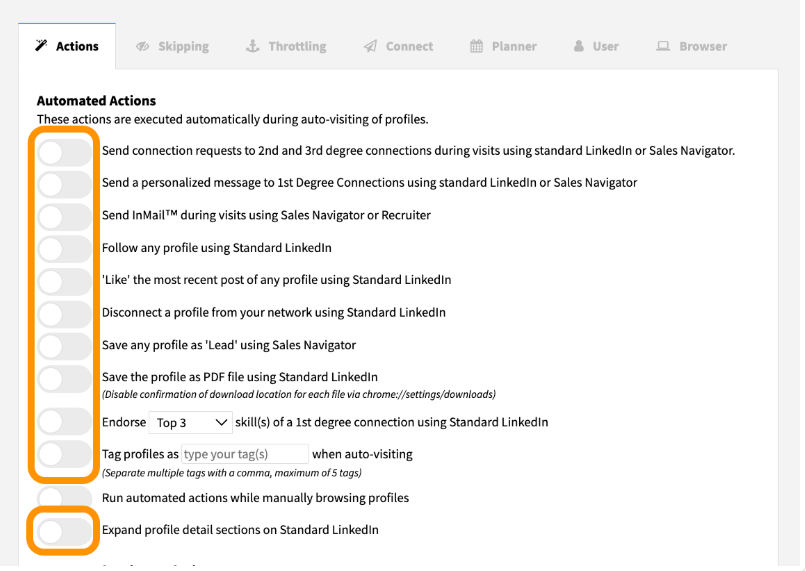
The core mechanism is the Visit Profiles command. When triggered, Dux-Soup opens LinkedIn profiles one at a time, mimicking human clicking. During each visit, it can execute connection requests, messages, InMails, follows, skill endorsements, and tagging in a single pass. Each visit triggers LinkedIn's "someone viewed your profile" notification, which warms up the prospect before direct outreach.
Source: Dux-Soup
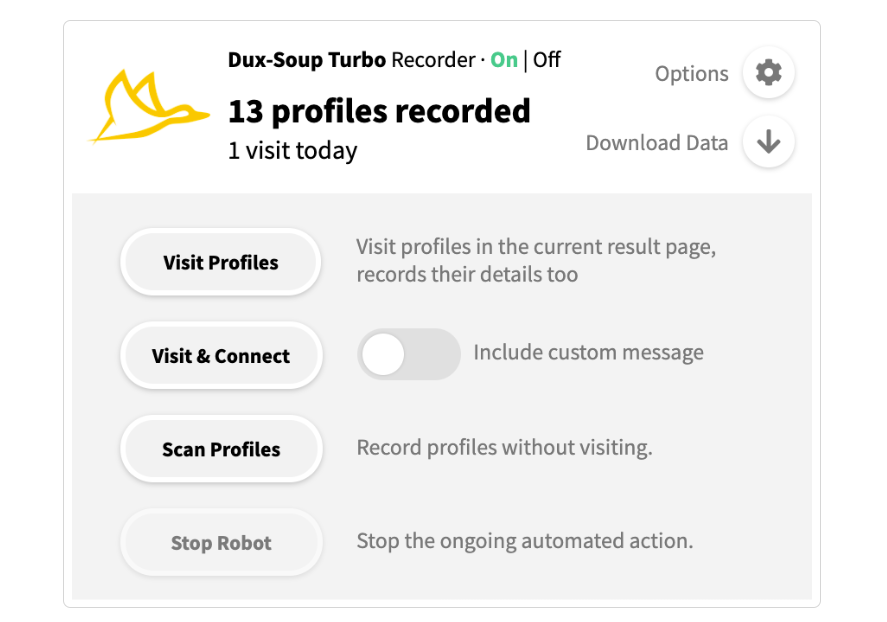
A separate Scan Profiles mode processes data from list views without opening individual profiles. Scanning runs at roughly 6 pages per minute and captures fewer fields, useful for building CSV prospect lists quickly without consuming visit quota.
Source: Dux-Soup
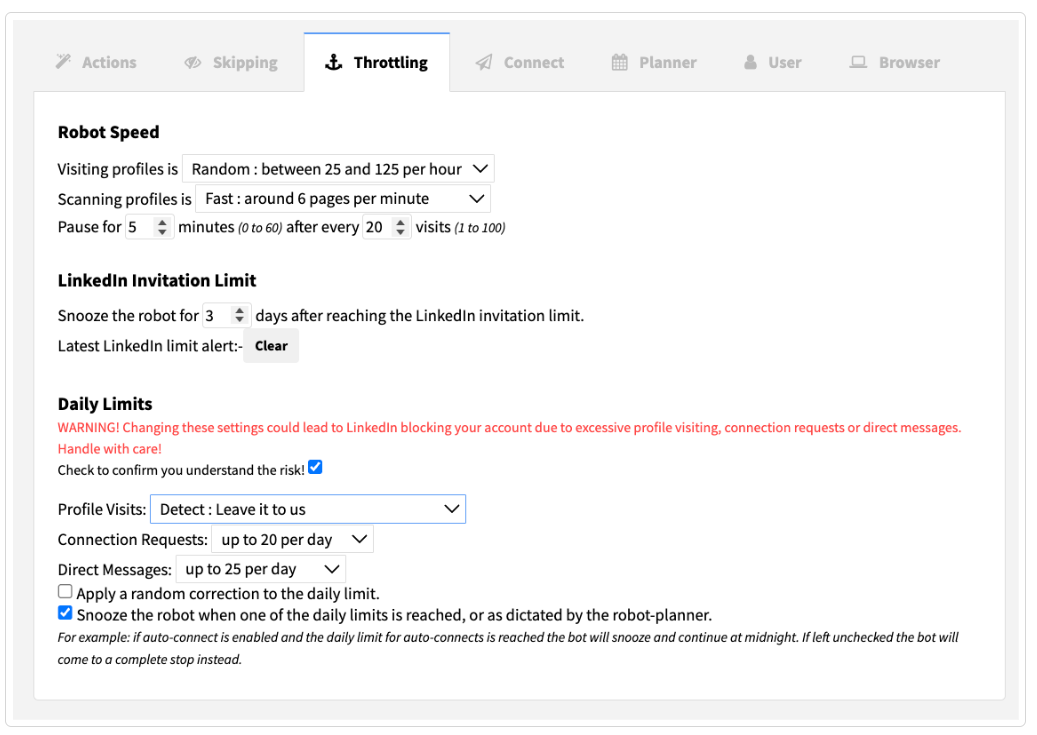
Safety features are central to the design. Dux-Soup runs at randomized speeds between 25 and 125 profiles per hour, pauses for 5 minutes after every 20 visits, and applies account-type-aware daily limits by detecting whether you're on free LinkedIn, Premium, Sales Navigator, or Recruiter. Connection request limits default to 20 per day, with guidance to start at 5-10 daily for new accounts.
Source: Dux-Soup
Profile data capture covers 30+ fields including name, title, company, location, email (for 1st-degree connections), phone, employment history, education, and skills, all exportable as CSV.
Drip Campaigns: Multi-step automated sequences that nurture prospects from connection request to booked meeting.
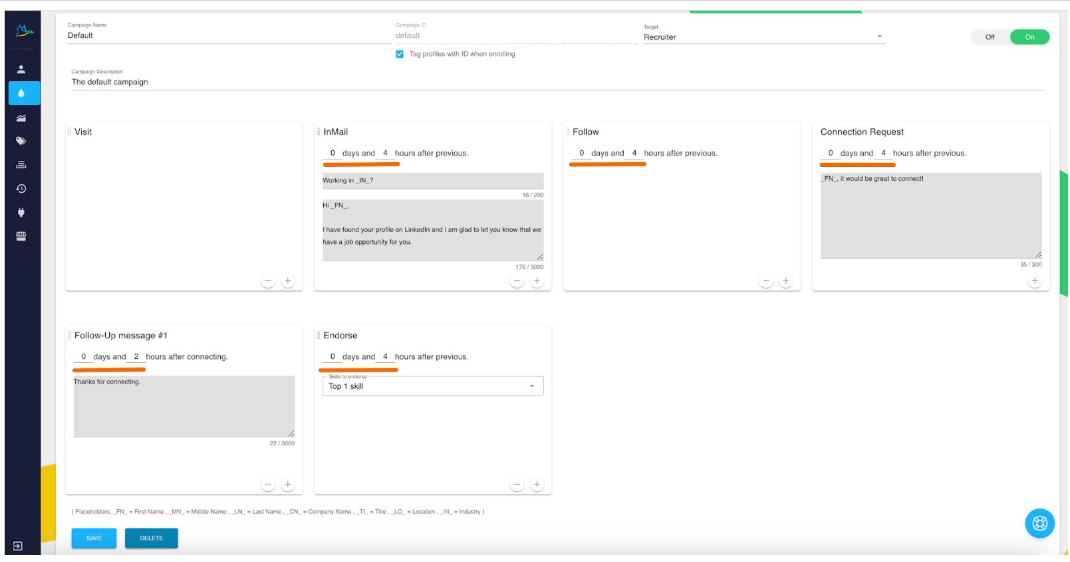
Drip Campaigns are Dux-Soup's main outreach feature, available on the Turbo ($55/month) and Cloud ($99/month) plans. Users build sequences of up to 12 LinkedIn actions (profile visits, connection requests, follow-up messages, InMails, endorsements, follows, and post likes) with adjustable delays between steps.
Source: Dux-Soup
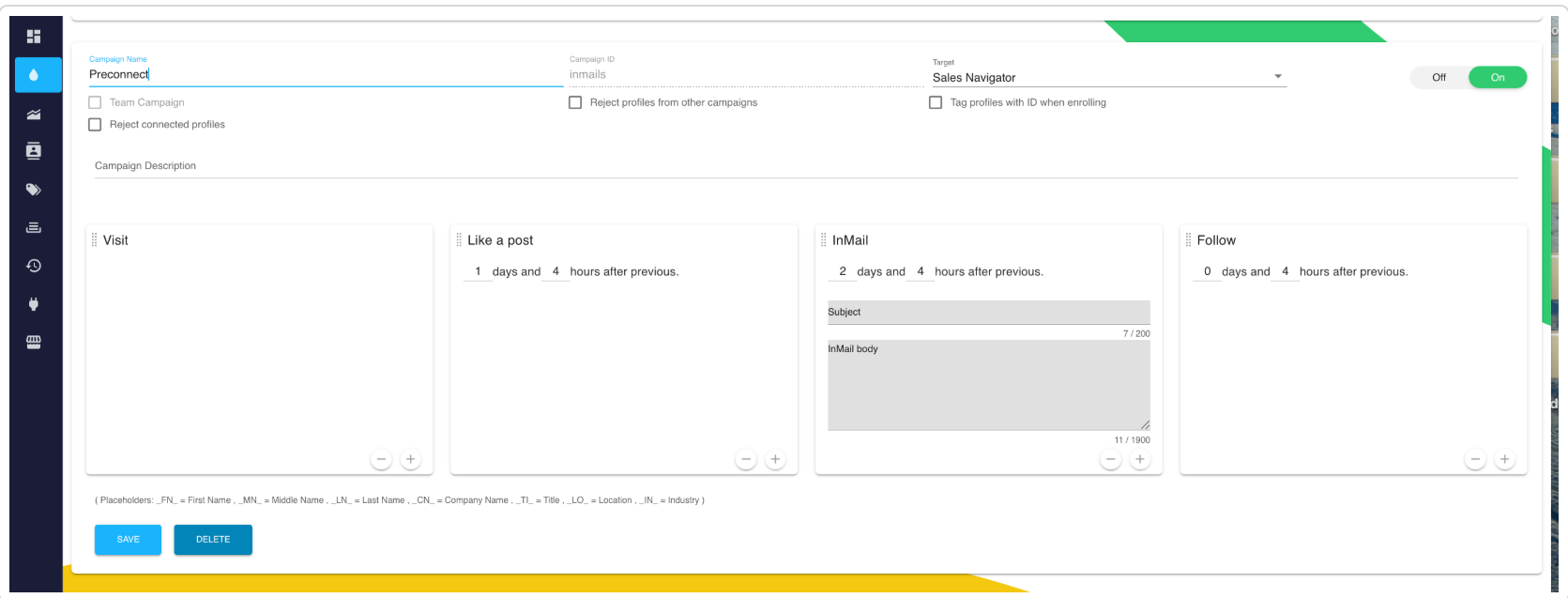
Users build campaigns in Dux-Dash, a web dashboard at app.dux-soup.com, using a drag-and-drop builder. The sequence must respect LinkedIn's connection model: InMails can only go before a connection request, and follow-up messages cannot appear before the connection is established.

Source: Dux-Soup
The system includes four campaign types tailored to connection degree: Preconnect (for unconnected actions like visits, InMails, and post likes), Postconnect (for connected actions like messages and endorsements), Connect (all actions across all profiles), and Visit (visit-only). This ensures actions only trigger when valid for the prospect's current connection status.
Source: Dux-Soup
When a prospect replies to any message in the sequence, Dux-Soup detects the response and stops all remaining queued actions, so it doesn't keep sending follow-ups after someone has replied.
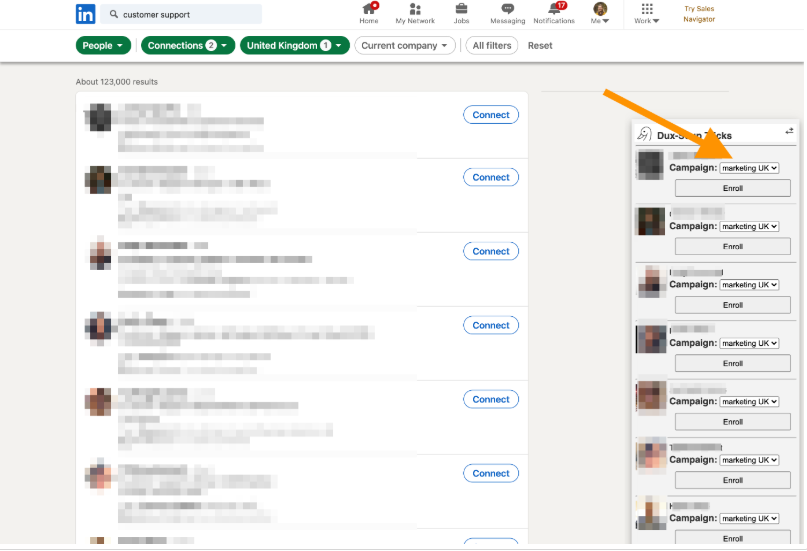
Prospects can be enrolled through bulk enrollment from LinkedIn search, individual enrollment from a profile, or via the API. Multiple campaigns can run concurrently, and deduplication prevents the same prospect from being enrolled twice.
Source: Dux-Soup
Lead Management & Analytics: Funnel Flow provides a combined reporting dashboard and live pipeline view.
Turbo and Cloud subscribers get access to Funnel Flow, a three-panel interface in Dux-Dash that works as both a reporting dashboard and pipeline manager.
Source: Dux-Soup
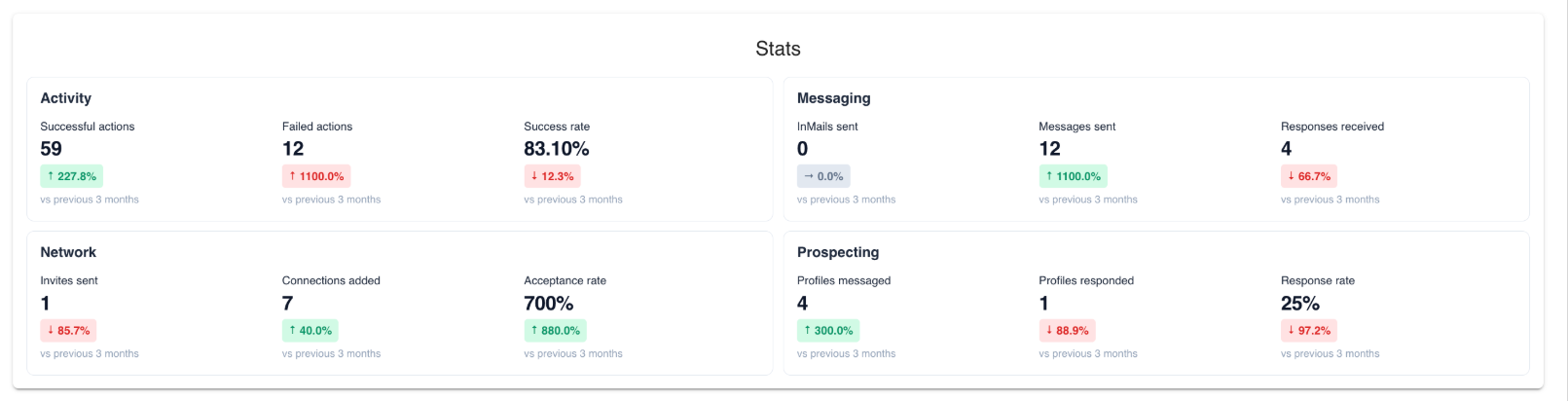
The Stats panel tracks 12 metrics across four groups: Activity (successful/failed actions, success rate), Messaging (InMails sent, messages sent, responses received), Network (invites sent, connections added, acceptance rate), and Prospecting (profiles messaged, profiles responded, response rate). Each metric compares against the previous period.
Source: Dux-Soup
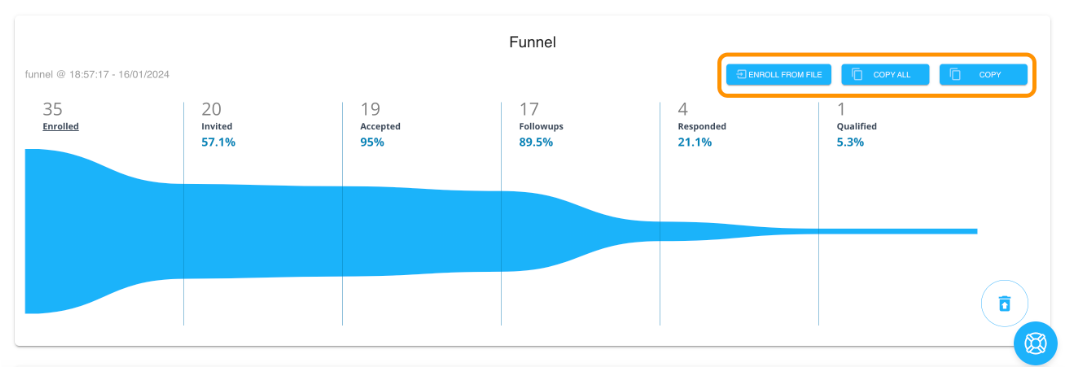
The Funnel panel shows where every prospect sits in the pipeline stages: Enrolled, Invited, Accepted, Followups, Responded, Qualified, or Disqualified. Users can qualify leads in or out from the Prospects panel, send manual messages, switch prospects to different campaigns, or unenroll them.
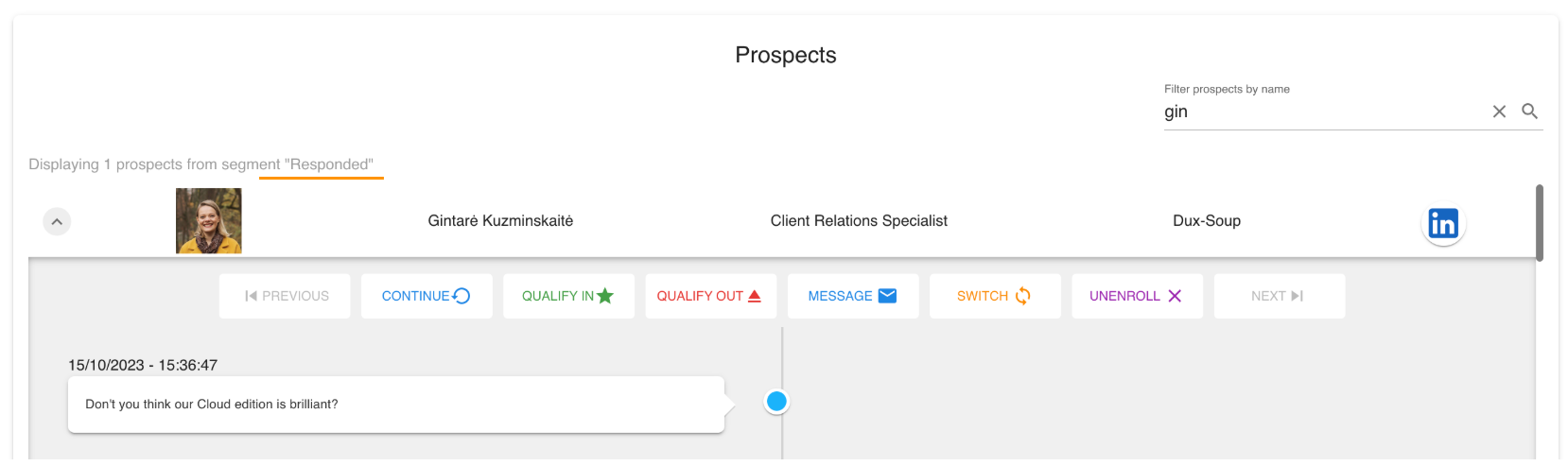
Source: Dux-Soup
Dux-Soup separates Stats from Funnel by design. As the documentation explains, "Stats and Funnel measure completely different things": Stats counts historical events and never changes retroactively, while Funnel reflects each prospect's current state. This prevents qualification decisions from corrupting historical performance data.
The Contacts page auto-populates a database the moment Dux-Soup visits any profile, including LinkedIn conversation history as an exportable field. No manual data entry required.
Pricing Structure: Dux-Soup uses a three-tier model.
Dux-Soup offers three individual plans, plus team and agency editions. All prices are exclusive of VAT.
Pro Dux ($14.99/month, $11.25/month annual):
Personalized connection requests and messages to 1st-degree connections
Profile visits, tagging, and post likes
CSV export of profile data and email addresses (1st-degree)
Four safety features (randomized speed, auto-pauses, daily limits, anti-detection)
No drip campaigns, no CRM integrations, no analytics dashboard
Turbo Dux ($55/month, $41.25/month annual):
Everything in Pro, plus unlimited drip campaigns with up to 12 actions
Campaign statistics and Funnel Flow analytics
Lead management dashboard and contact management
CRM integrations (HubSpot, Pipedrive, Salesforce, Freshsales, SharpSpring, HighLevel)
Browser must remain open for campaigns to run
Cloud Dux ($99/month, $74.17/month annual):
Everything in Turbo, plus cloud-based execution on Dux-Soup's infrastructure
Campaigns run 24/7, even when the computer is off
Server-side speed management removes user error as a safety variable
Team and Agency Plans:
Team plans start at the same per-seat rates with volume discounts for annual commitments (dropping to ~$20.83/seat/month for 51+ Turbo seats). Cloud Agency at $371/month covers 5 client seats with unlimited campaigns and a single dashboard for managing all client LinkedIn accounts. Additional seats beyond 5 cost $74.20/seat.
A 14-day free trial with no credit card required is available. Users can cancel, pause, or change plans at any time from the account portal. Refunds are available within 31 days of purchase.
Where Dux-Soup Falls Short
Dux-Soup does LinkedIn automation well, but its limitations show when teams try to reach prospects beyond that single channel.
Single-Channel Constraint: Dux-Soup is a LinkedIn automation tool only. It doesn't send emails, make phone calls, or run ads. For teams whose prospects respond better to email or phone, or who need to coordinate outreach across channels, LinkedIn-only automation misses those prospects. The company's own webinar content on combining email and LinkedIn outreach acknowledges this gap but recommends pairing with external tools rather than solving it natively.
No Independent Contact Database: Dux-Soup captures data from LinkedIn profiles as you visit them, but it doesn't maintain its own verified B2B database. You're limited to what LinkedIn exposes: no direct-dial phone numbers for unconnected prospects, no verified business emails beyond 1st-degree connections (unless you purchase Dux-points), and no company data like revenue, technographics, or org charts beyond what LinkedIn displays. For teams that need to research accounts before reaching out, this creates a dependency on external data providers.
Browser Dependency at Entry and Mid Tiers: At the Pro ($14.99) and Turbo ($55) pricing levels, campaigns stop when the browser closes or the computer sleeps. The Cloud tier ($99) solves this by moving execution to Dux-Soup's infrastructure, but it nearly doubles the cost from Turbo. Dux-Soup's own blog confirms this is a common pain point driving upgrades.
No Native AI Personalization: Competitors now build AI message personalization into their platforms. Dux-Soup's blog features a case study combining ChatGPT with Dux-Soup and Pipedrive, but no native AI writing or personalization engine appears on any product page. Users who want AI-personalized outreach must connect external tools and manage the workflow themselves.
No Intent or Buying Signals: Dux-Soup automates actions against lists you define, but it provides no signals about whether those prospects are in-market. There's no intent data, no website visitor identification, no buying committee intelligence. You prospect based on profile attributes rather than purchase readiness, so you spend equal effort on prospects months from buying and those evaluating solutions today.
These aren't failures; they follow from building a focused LinkedIn tool over a decade. But they create a ceiling for teams that need multi-channel outreach backed by verified data and buyer intelligence.
Top Dux-Soup Alternative for Complete Go-to-Market: ZoomInfo
ZoomInfo addresses these limitations by working at a different level. Instead of automating one channel, ZoomInfo provides verified data, account intelligence, and multi-channel tools that power a go-to-market operation.
Founded in 2007 by Henry Schuck and now serving 35,000+ companies worldwide (including Adobe, Snowflake, and Thomson Reuters), it's a GTM platform built on three pillars: B2B data, an intelligence layer called the GTM Context Graph, and access through its own products and APIs.
Comprehensive B2B Data: ZoomInfo maintains a large verified B2B contact and company database.
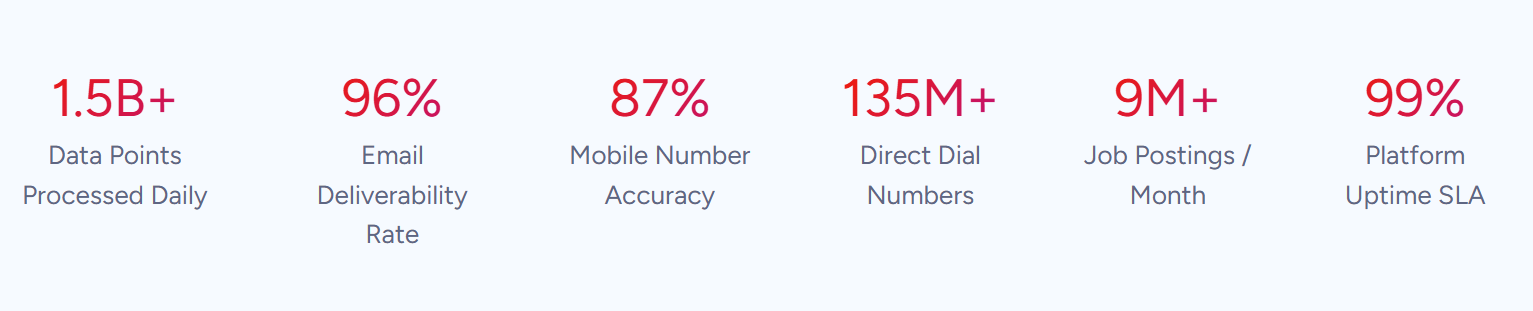
Where Dux-Soup captures profile data from LinkedIn as you visit, ZoomInfo starts with 500M contacts, 100M companies, 135M+ verified phone numbers, 120M direct-dial phone numbers, and 200M+ verified business email addresses, all available before you send a single outreach message.

Source: ZoomInfo
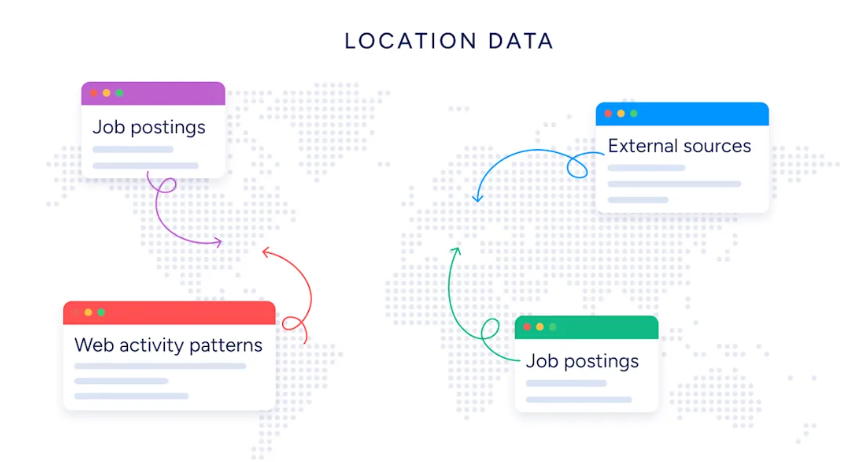
The database covers identity data (who buyers are and how to reach them), company context (industry data, org charts, technographics spanning 30,000+ technologies across 200+ categories), and signals that reveal when accounts are in-market.
Data verification runs through multiple sources: automated scanning of 28 million site domains daily, third-party partners covering 95 million businesses, 200,000+ ZoomInfo Lite users who contribute data back, and an in-house Data Training Lab of 300+ human researchers. First-party data reaches up to 95% accuracy.
Source: ZoomInfo
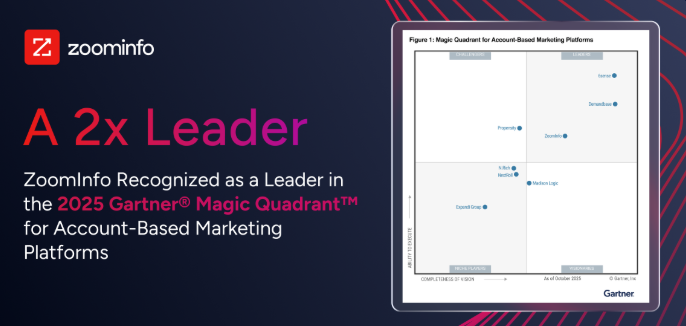
Independent testing supports these claims. In a Fortune 500 competitive RFP analyzing 25 million contacts across vendors, the independent consultant concluded that "no other competitor came even close." ZoomInfo holds 133 No. 1 rankings on G2 and was named a Gartner Magic Quadrant Leader for ABM Platforms for the second consecutive year.
Source: ZoomInfo
For sales reps, the difference is concrete: the phone number actually rings and the email actually lands, instead of relying on LinkedIn messaging and connection requests alone.
SpringDB used ZoomInfo's data to achieve 2x-3x increases in campaign conversions and a 30-50% uplift in average deal size for their clients. (SpringDB)
AI-Powered GTM Intelligence: The GTM Context Graph turns data into usable account insights.
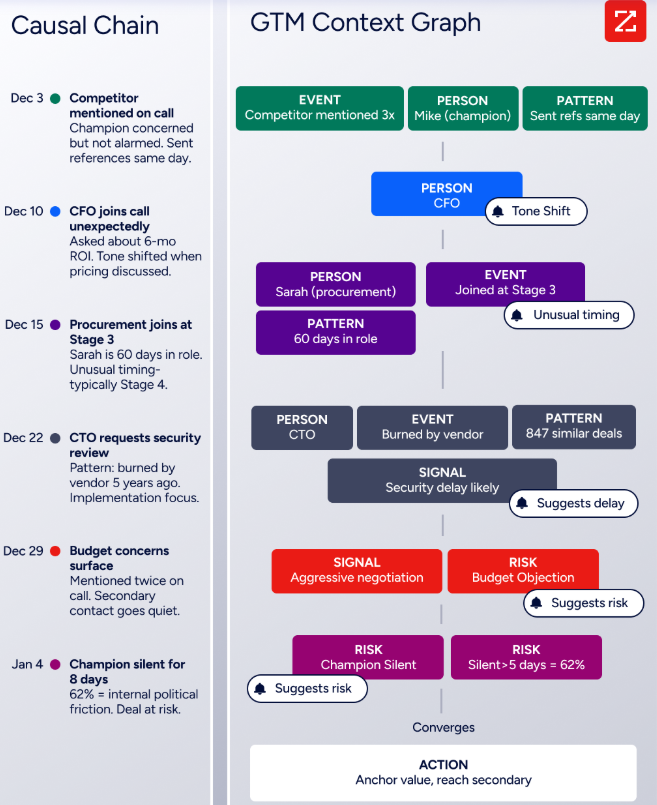
Dux-Soup tells you what happened in your LinkedIn outreach (acceptance rates, response rates, funnel stage). ZoomInfo's GTM Context Graph explains why deals move or stall.
Source: ZoomInfo
The GTM Context Graph processes 1.5B+ data points daily, combining ZoomInfo's B2B data with a customer's own CRM records, conversation intelligence from calls and meetings, email interactions, and behavioral signals into a single intelligence layer.
Source: ZoomInfo
A CRM records that a deal moved to Stage 3. Conversation intelligence transcribes what the VP of Finance said on the last call. Intent data logs a spike in research activity. The GTM Context Graph connects all three to capture the context behind each deal event.
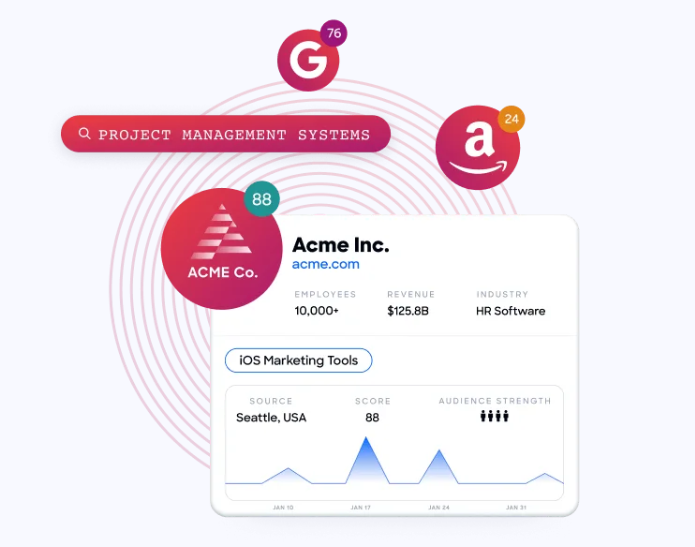
This powers capabilities a LinkedIn automation tool cannot provide: Buyer Intent Data tracking signals from 210 million IP-to-Organization pairings to identify companies researching your type of solution, website visitor identification that resolves anonymous traffic to specific companies and contacts, and AI agents that generate account research, draft personalized outreach, and recommend next actions based on the full context of each deal.
Source: ZoomInfo
Seismic attributed 39% of active pipeline to opportunities identified or influenced by ZoomInfo signals, with their sales team becoming 54% more productive. (Seismic)
Multi-Channel Execution: GTM Workspace and GTM Studio deliver intelligence to sellers, marketers, and RevOps across channels.
Dux-Soup executes on one channel. ZoomInfo delivers intelligence through three access points built for different teams and workflows.
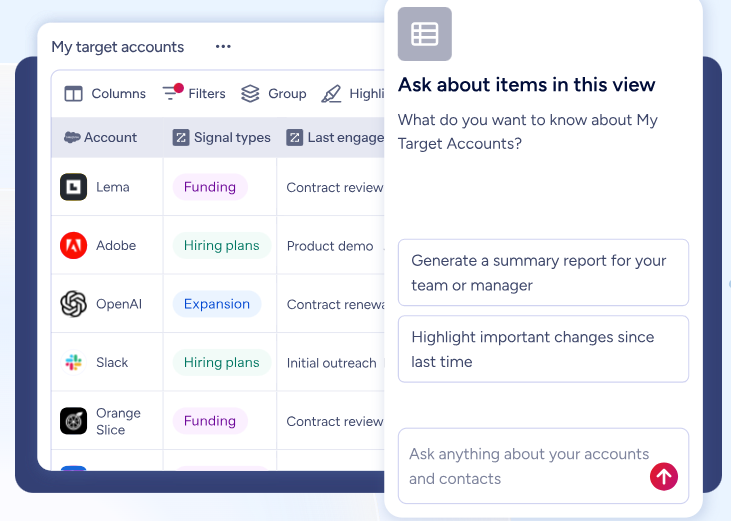
GTM Workspace is the seller's front-end. It combines prioritized account feeds, AI-drafted outreach, deal context, and CRM updates in one screen.
Source: ZoomInfo
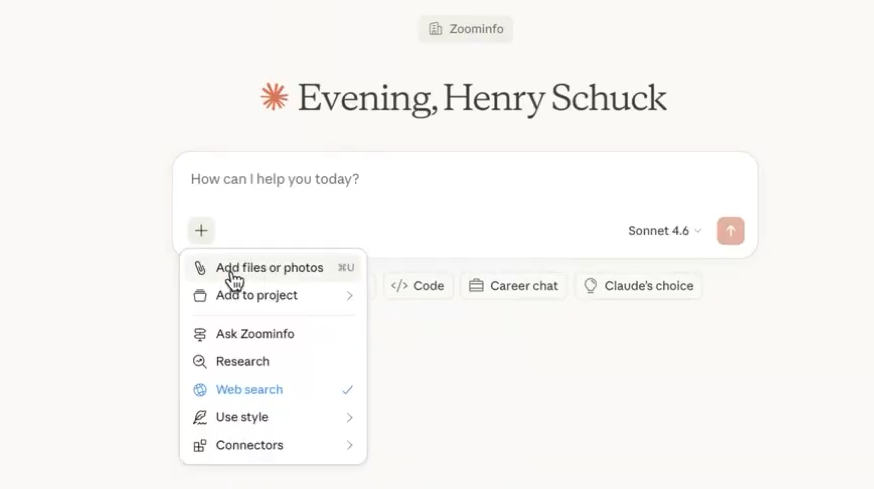
Built on Anthropic's Claude, AI agents handle account research, signal monitoring, and outreach generation, answering three questions for every rep: who to contact, when to engage, and what to say. Integrations with Salesforce, HubSpot, and Microsoft Dynamics pull data into one view so reps stop toggling between applications.
Source: ZoomInfo
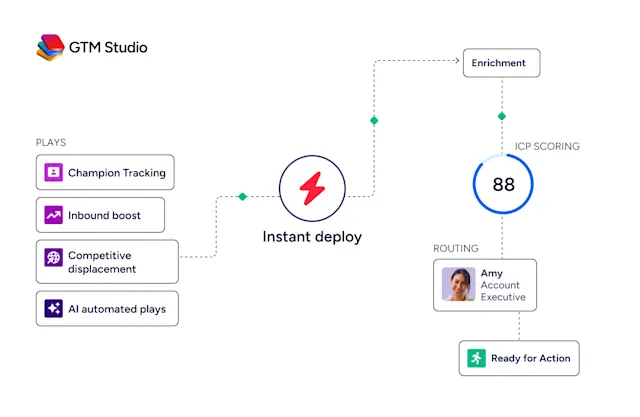
GTM Studio is built for marketers, RevOps, and GTM engineers. It lets teams define audiences in natural language, launch multi-channel plays (email, calls, ads, and direct mail), and measure pipeline impact, all without engineering support. Plays that used to take 3 weeks now launch in 30 minutes.
Source: ZoomInfo
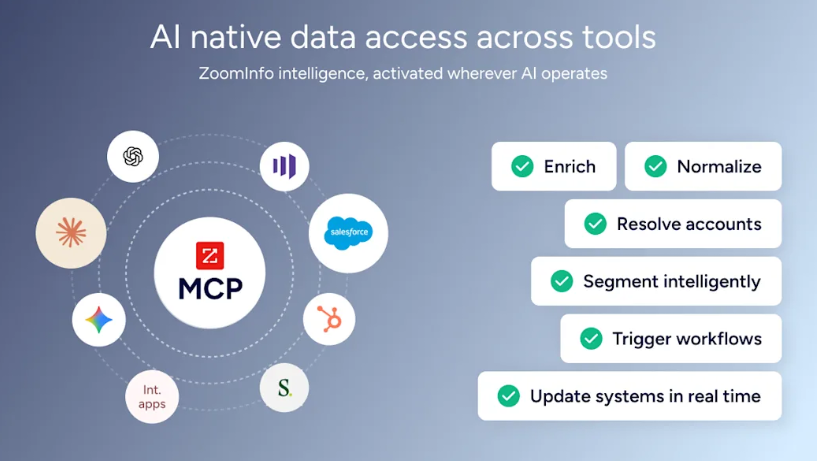
For teams building beyond ZoomInfo's own products, APIs and MCP expose the same data and intelligence to any third-party tool or AI agent. API access is included in all relevant plans.
Source: ZoomInfo
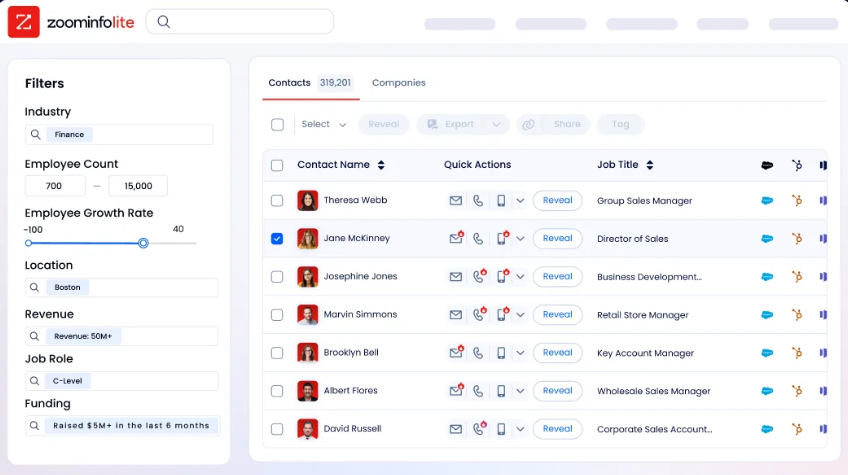
ZoomInfo also offers a permanent free tier. ZoomInfo Lite provides access to ZoomInfo's B2B database with 10 monthly export credits, contact information and email addresses, the ReachOut Chrome Extension, WebSights Lite (up to 10 website visitor reveals per day), and HubSpot integration, with no credit card or time limit.
Source: ZoomInfo
"Anything that minimizes our team's need to switch contexts is beneficial. ZoomInfo offers a unified view, eliminating the need to navigate between systems." (Spekit)
Dux-Soup or ZoomInfo: Comparison Summary
Dux-Soup | ZoomInfo | |
|---|---|---|
Primary focus | LinkedIn automation | AI GTM platform |
Outreach channels | LinkedIn only | Email, phone, LinkedIn, ads, direct mail |
B2B contact database | Captures data from LinkedIn profiles only | 500M contacts, 200M+ verified emails, 135M+ verified phones |
Intent signals | Not available | Buyer intent from 210M IP-to-Organization pairings |
AI personalization | Requires external tools | Native AI outreach and account research |
CRM integrations | HubSpot, Pipedrive, Salesforce, Freshsales, SharpSpring | 120+ integrations including Salesforce, HubSpot, Dynamics |
Analytics | Funnel Flow with 12 metrics | Revenue attribution, deal intelligence, pipeline analytics |
Deployment | Chrome extension + cloud option | Cloud-native platform |
Free tier | 14-day trial (no credit card) | ZoomInfo Lite (permanent, no credit card) |
Paid pricing | $14.99-$99/month per user (published) | Custom-quoted (not published) |
Target user | Solo prospectors, SDRs, agencies | Enterprise sales, marketing, and RevOps teams |
Best for | Focused LinkedIn prospecting on a budget | Multi-channel GTM with verified data and AI |
Final Verdict
The choice between Dux-Soup and ZoomInfo depends on the scope of your go-to-market operation.
Choose Dux-Soup if you prospect primarily through LinkedIn and want a focused tool that automates profile visits, connection requests, and follow-up sequences. It fits solo prospectors, small sales teams, and agencies whose outreach centers on LinkedIn. At $14.99/month for basic automation and $55/month for drip campaigns, it saves time without a large commitment.
Choose ZoomInfo if your go-to-market strategy extends beyond LinkedIn into a coordinated, multi-channel effort. ZoomInfo is built for teams that need verified contact data to reach buyers through email, phone, and ads, intent signals that identify which accounts are in-market, AI that researches accounts and drafts personalized outreach, and execution tools that connect sales, marketing, and operations on one platform. It fits organizations where LinkedIn automation is one piece of a larger revenue effort, not the whole strategy.
Get started with ZoomInfo here.
Dux-Soup automates a channel. ZoomInfo powers a go-to-market strategy. Your decision comes down to whether your team's needs stop at LinkedIn or extend across the full buyer journey.
Dux-Soup FAQ
Is Dux-Soup safe to use with LinkedIn?
Dux-Soup includes safety features to reduce account risk: randomized visit speeds between 25 and 125 profiles per hour, automatic 5-minute pauses after every 20 visits, account-type-aware daily limits that adjust based on whether you use free LinkedIn, Premium, Sales Navigator, or Recruiter, and updated anti-detection functions. On the Cloud plan, speed management runs entirely server-side, removing user error as a variable. That said, all LinkedIn automation tools carry account risk, since LinkedIn's enforcement changes over time.
Does Dux-Soup have a free plan?
No. Dux-Soup offers a 14-day free trial with no credit card required, letting you evaluate the platform before committing. After the trial, the lowest-cost option is the Pro Dux plan at $14.99/month. ZoomInfo, by comparison, offers ZoomInfo Lite as a permanent free tier with access to its B2B database, 10 monthly export credits, and a Chrome extension, with no time limit.
What is the difference between Pro, Turbo, and Cloud Dux?
Pro Dux ($14.99/month) covers basic LinkedIn automation: profile visits, connection requests, messages, and CSV data export. Turbo Dux ($55/month) adds multi-step drip campaigns with up to 12 actions, campaign analytics via Funnel Flow, and CRM integrations, but requires keeping your browser open. Cloud Dux ($99/month) moves execution to Dux-Soup's infrastructure so campaigns run 24/7 without a browser. The gap between Pro and Turbo is large; most documented results come from Turbo or Cloud users.
Can Dux-Soup send emails or make phone calls?
No. Dux-Soup is a LinkedIn automation tool only. It does not support email outreach, phone calls, SMS, or advertising. If your outreach strategy requires multiple channels, you need to pair Dux-Soup with separate email and phone tools and manage the coordination yourself. ZoomInfo supports email, phone, LinkedIn, display ads, and direct mail from a single platform with coordinated workflows.
Does Dux-Soup work with Sales Navigator and LinkedIn Recruiter?
Yes. Dux-Soup works across standard LinkedIn, LinkedIn Sales Navigator, and LinkedIn Recruiter. The tool auto-detects your LinkedIn account type and applies appropriate daily limits. All core automation features (profile visiting, connection requests, messages, and drip campaigns) work on all three surfaces.
What CRM integrations does Dux-Soup support?
CRM integrations are available on Turbo and Cloud plans only (not Pro). Native integrations include HubSpot, Pipedrive, Salesforce, Freshsales, SharpSpring, and HighLevel. Additional connectivity is available through Zapier, Make, and the Dux-Soup API. The API, included with Turbo and Cloud licenses, supports programmatic enrollment of prospects into campaigns and covers six sub-APIs for LinkedIn activity scheduling, user settings, queue management, and more.
How does Dux-Soup's agency plan work?
The Cloud Agency plan costs $371/month and includes 5 pre-paid client seats with unlimited campaigns per client. Additional seats beyond 5 are billed at $74.20/seat on the next invoice. Agencies manage all client LinkedIn accounts from a single dashboard, switching between sessions without logging in and out of LinkedIn. All campaigns run on Dux-Soup's cloud infrastructure, so client campaigns continue 24/7 regardless of whether the agency operator is logged in. The plan includes High Flyer VIP status with priority support.
Researching Dux-Soup? These comparisons and alternatives help you decide:
