

Teams that run Gravity Forms on WordPress and Salesforce as their CRM usually hit the same problems within a quarter:
leads submitted through web forms sit in the WordPress database while sales reps work from Salesforce, creating a copy-paste bottleneck that delays follow-up,
contact records drift out of sync as reps update Salesforce fields that never reflect back in Gravity Forms entries,
and someone on the marketing or operations team is always reconciling spreadsheets to figure out which form submissions actually reached the CRM.
However, the two platforms ended up coexisting (a marketing team building lead capture on WordPress while sales lives in Salesforce, an agency managing client sites that feed into a centralized CRM, or different departments choosing tools independently), the longer they run without a connection, the more submissions fall through the cracks and the harder it gets to measure what converts.
Connecting Gravity Forms and Salesforce closes that gap.
Form submissions flow into Salesforce as Leads, Contacts, or custom objects so sales reps see new prospects without waiting for a manual handoff. Field values map from form inputs to CRM fields so the data arrives structured, consistent, and ready for routing or nurture sequences.
When a form captures a phone number, company name, or budget range, that information lands in the right Salesforce field automatically instead of sitting in a WordPress entry list that no one checks.
Gravity Forms offers a native Salesforce Add-On included with its Elite license ($259/year). For teams on lower tiers, third-party automation tools like Zapier and Make can bridge the two platforms with configurable triggers and actions.
Custom API development is also possible, though it requires working with Gravity Forms' REST API and Salesforce's REST API independently. Each method differs in setup complexity, data coverage, sync direction, and cost.
One problem no connection method solves: the integration moves form data into Salesforce, but it does not verify whether the person who filled out the form provided accurate information, whether their contact details are current, or whether the company data is complete.
That is where ZoomInfo comes in. ZoomInfo integrates natively with Salesforce and connects to Gravity Forms through Zapier and connects to Gravity Forms through Zapier, so the records created by form submissions arrive in Salesforce enriched with verified emails, direct dials, company attributes, and technographics instead of relying on what the visitor chose to type. From there, ZoomInfo Agent Teams can run complete GTM plays end to end, with specialist agents that share full account context and act within the approvals and limits you set.
This article covers the Gravity Forms-Salesforce integration landscape: which methods are available, what data each one handles, how to set them up, the use cases that justify connecting both platforms, and the limitations to plan for. It also covers how ZoomInfo fits as a data enrichment layer that strengthens the records flowing from Gravity Forms into Salesforce.
Let's start with an overview of the integration.
Integration Overview
Source: Gravity Forms
Does a native integration exist?
Yes. Gravity Forms offers a native Salesforce Add-On that sends form submission data into Salesforce objects. The add-on is available only on the Elite license ($259/year) and the Nonprofit license ($129/year).
What data can sync?
Form field values map to Salesforce object fields: name, email, phone, company, address, custom fields, and any other data the form collects. The native add-on supports creating or updating Leads, Contacts, Accounts, Cases, Opportunities, and custom objects in Salesforce. Third-party tools like Zapier support the same standard objects with manual field mapping.
Is the sync bidirectional?
No. Data flows one direction: from Gravity Forms into Salesforce. Form submissions push data to the CRM, but Salesforce records do not flow back into Gravity Forms. This is a submission-to-CRM pipeline, not a two-way sync.
Is it real-time or batch?
The native add-on sends data to Salesforce on each form submission in real-time. Third-party tools like Zapier trigger within 1 to 15 minutes depending on plan tier. Custom API integrations can process submissions in real-time using Gravity Forms' webhook capabilities.
What are the available methods?
Native Gravity Forms Salesforce Add-On (Elite/Nonprofit licenses), third-party automation (Zapier, Make), third-party WordPress plugins, and custom API development.
Method | Setup Difficulty | Data Flow | Real-time? | Cost |
|---|---|---|---|---|
Native Salesforce Add-On | Low | Gravity Forms to Salesforce | Yes (on submission) | Included with Elite ($259/yr) or Nonprofit ($129/yr) |
Zapier | Medium | One-way per Zap | Near real-time (1-15 min) | From $19.99/mo + Gravity Forms Pro ($159/yr) |
Make | Medium | Configurable per scenario | Near real-time or scheduled | From $10.59/mo + Gravity Forms Pro ($159/yr) |
Custom API | High | Custom | Depends on implementation | Developer time + hosting |
One distinction worth settling upfront: all of these methods handle ongoing form-to-CRM submission flow, not bulk migration of historical data. If you need to push existing Gravity Forms entries into Salesforce retroactively, you will need a custom script or a data migration tool. None of the standard connectors backfill old submissions.
Integration Methods
Native Gravity Forms Salesforce Add-On (Elite/Nonprofit License)
How it works: The Gravity Forms Salesforce Add-On is a first-party integration built by Rocketgenius. It connects to Salesforce via the Salesforce API, creating or updating records each time a form is submitted. The add-on uses a feed-based system: you configure one or more feeds per form, each mapping form fields to Salesforce object fields and specifying which object to create or update.

Source: Gravity Forms
What it syncs: Any data captured by the form can map to Salesforce fields: text inputs, dropdowns, checkboxes, email, phone, address components, file upload URLs, and hidden fields.
Supported Salesforce objects include Leads, Contacts, Accounts, Cases, Opportunities, and custom objects. Conditional logic controls which feed fires based on form values (e.g., route enterprise inquiries to Opportunities and general inquiries to Leads).
Fits: ongoing real-time submission-to-CRM flow; not a migration tool for historical entries.
Setup process:
Confirm your Gravity Forms license is Elite ($259/year) or Nonprofit ($129/year). The Salesforce Add-On is not available on Basic or Pro licenses.
Install the Salesforce Add-On from the WordPress admin under Forms > Add-Ons. Activate the plugin.
Navigate to Forms > Settings > Salesforce and authenticate with your Salesforce org using OAuth. System Administrator access in Salesforce is required to authorize the connection.
Open the form you want to connect, go to Settings > Salesforce, and create a new feed. Select the Salesforce object type (Lead, Contact, Account, Case, Opportunity, or custom object).
Map each form field to the corresponding Salesforce field. The add-on displays all available fields from the selected object. Apply conditional logic if the feed should only fire on certain form values.
Test by submitting the form with sample data and verifying the record appears in Salesforce with the correct field values.
Strengths: First-party integration maintained by Rocketgenius, the team that builds Gravity Forms. No third-party tool to configure or pay for. Supports conditional feed logic, so a single form can route submissions to different Salesforce objects based on user input. Leads appear in Salesforce immediately on submission. Supports custom Salesforce objects, not just standard ones.
Limitations: Available only on Gravity Forms' Elite ($259/year) or Nonprofit ($129/year) licenses. One-directional (form to Salesforce only). Does not update existing Salesforce records by default without matching rules configured. If the Salesforce API is unreachable during submission (network issue, API limit hit), the entry saves in Gravity Forms but may not reach Salesforce without a retry mechanism.
Best for: WordPress teams already on the Gravity Forms Elite license that need a direct connection from web forms to Salesforce. Organizations with multiple forms feeding into different Salesforce objects, where conditional feed routing eliminates the need for separate integrations per form.
Zapier
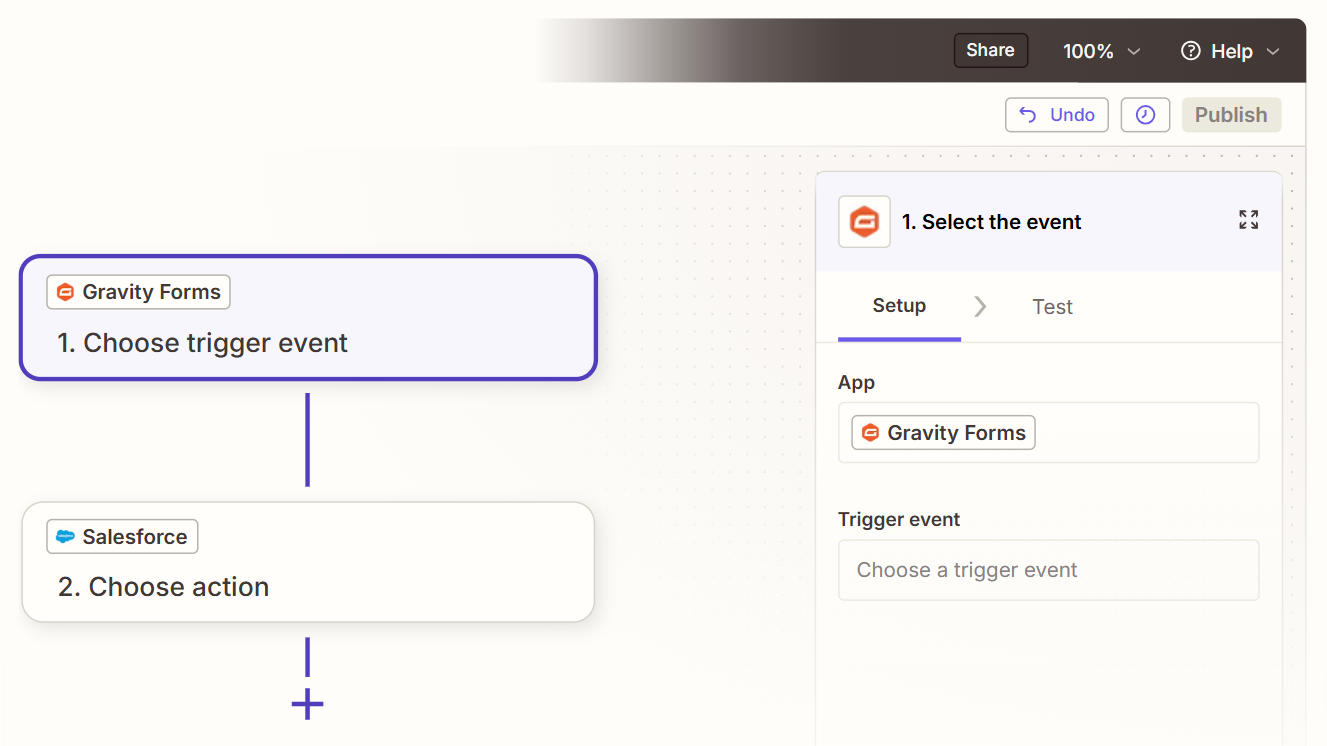
How it works: Zapier connects Gravity Forms and Salesforce through event-driven automations called Zaps. Each Zap pairs a trigger (a new form submission in Gravity Forms) with one or more actions (create or update a record in Salesforce). Gravity Forms has an official Zapier Add-On available on the Pro tier and above, and Salesforce is one of Zapier's most used connectors.
Source: Zapier
What it syncs: Any form field value can map to a Salesforce field in the Zap configuration. Zapier supports creating Leads, Contacts, Accounts, Opportunities, Cases, Tasks, and custom objects in Salesforce. Multi-step Zaps can look up existing records before creating new ones, reducing duplicates. Custom fields on both sides work with manual mapping.
Fits: ongoing submission-to-CRM flow with optional conditional logic; not a migration tool for historical entries.
Setup process:
Confirm your Gravity Forms license is Pro ($159/year) or higher. Install and activate the Zapier Add-On from Forms > Add-Ons.
Create a Zapier account and start a new Zap. Choose Gravity Forms as the trigger app and select "Form Submission" as the trigger event.
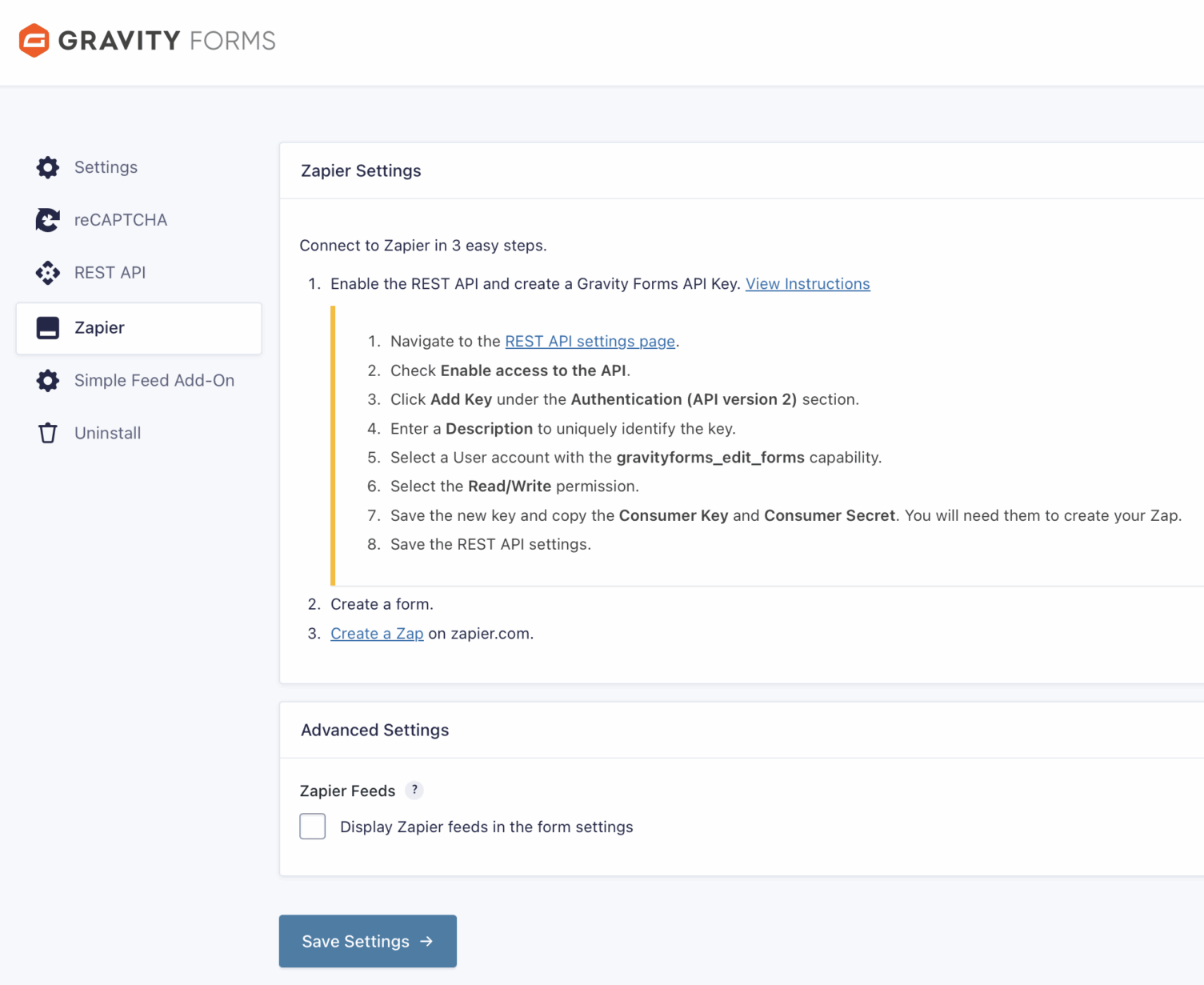
Connect your Gravity Forms account to Zapier by entering the site URL and API key generated by the Zapier Add-On.
Choose Salesforce as the action app and select the action (e.g., "Create Lead," "Create Contact," or "Create/Update Record"). Authenticate with Salesforce via OAuth.
Map form fields to Salesforce fields. Zapier displays all available fields from both sides. Use Zapier's formatter steps if data needs transformation (e.g., splitting a full name into first and last name fields).
Test the Zap with a sample submission to verify the data flows correctly, then turn it on.
Source: Zapier
Strengths: Available to teams on Gravity Forms Pro ($159/year), $100 less than the Elite license the native add-on requires. No engineering resources needed. Zapier's multi-step Zaps can add lookup steps to check for existing Salesforce records before creating new ones. Filter steps can route submissions conditionally. Zapier's template library includes pre-built Gravity Forms-to-Salesforce workflows.
Limitations: Each Zap handles one trigger-action pair, so routing submissions to multiple Salesforce objects requires separate Zaps (each counting against your plan's task allocation). Near real-time rather than instant (1 to 15 minutes depending on plan). Historical form entries submitted before the Zap was activated do not sync. Zapier charges by task count, and high-volume forms can accumulate costs quickly.
Best for: Teams on Gravity Forms Pro that want to connect forms to Salesforce without upgrading to Elite. Organizations that need conditional routing or data transformation between the form and the CRM. Teams already using Zapier for other automation who want to consolidate integrations on one platform.
Make (Formerly Integromat)
How it works: Make uses a visual scenario builder where modules represent app actions connected in a flowchart.
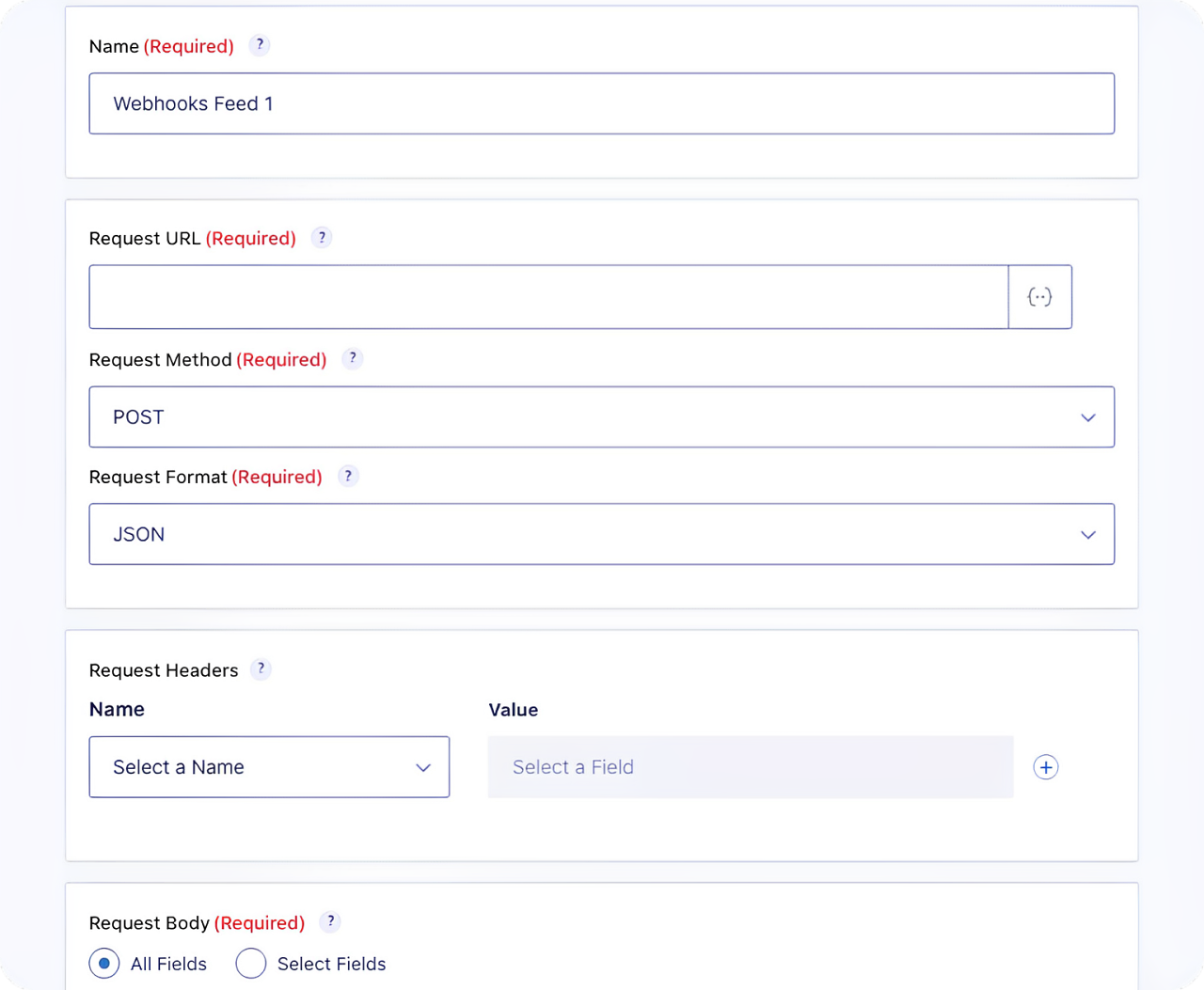
A Gravity Forms module watches for new submissions (via the Webhooks Add-On on Elite, or through Make's HTTP module receiving webhook payloads), and a Salesforce module creates or updates records. Scenarios can branch, filter, loop, and handle errors, giving more control than Zapier's linear structure.
Source: Gravity Forms
What it syncs: The same data as Zapier (any form field values mapped to Salesforce fields), with more flexibility in data transformation. Make supports iterators for batch processing, routers for conditional paths, and aggregators for combining records. All standard and custom Salesforce objects are supported.
Fits: ongoing submission-to-CRM flow with conditional logic and data transformation; not a migration tool.
Setup process:
Set up a webhook in Gravity Forms to send submission data to Make. If on the Elite license, use the Webhooks Add-On to configure an outbound POST to Make's webhook URL. If on Pro, use the Zapier Add-On's webhook capability or a third-party webhook plugin.
Create a Make account and build a new scenario. Add a Webhooks module as the trigger, configured to receive the Gravity Forms payload.
Add a Salesforce module and select an action (e.g., "Create a Record" for Leads or Contacts). Authenticate with Salesforce via OAuth.
Map incoming webhook fields to Salesforce fields. Make provides functions for transforming data (e.g., formatting phone numbers, concatenating address components, converting dropdown values to Salesforce picklist values).
Add error-handling modules to catch failures (e.g., log to a spreadsheet or send a Slack notification when a Salesforce API call fails).
Activate the scenario and set it to run on each webhook event or on a time-based schedule.
Strengths: Fine-grained control over data transformation and conditional routing. The visual builder makes complex workflows easier to follow than code. Error handling and retry logic are built in. Per-operation pricing is lower than Zapier at higher volumes. Can handle multi-step workflows like creating an Account, then a Contact linked to that Account, then an Opportunity linked to both.
Limitations: Steeper learning curve than Zapier's guided setup. Requires configuring webhooks on the Gravity Forms side, adding a setup step. The Gravity Forms Webhooks Add-On is Elite-only, so Pro users need an alternative webhook method. Salesforce API rate limits apply to high-volume scenarios.
Best for: Teams with conditional routing requirements (e.g., route form submissions to different Salesforce record types based on form values, or create related objects in a specific sequence). Mid-size teams whose submission volumes make Zapier's per-task pricing expensive.
Custom API Integration
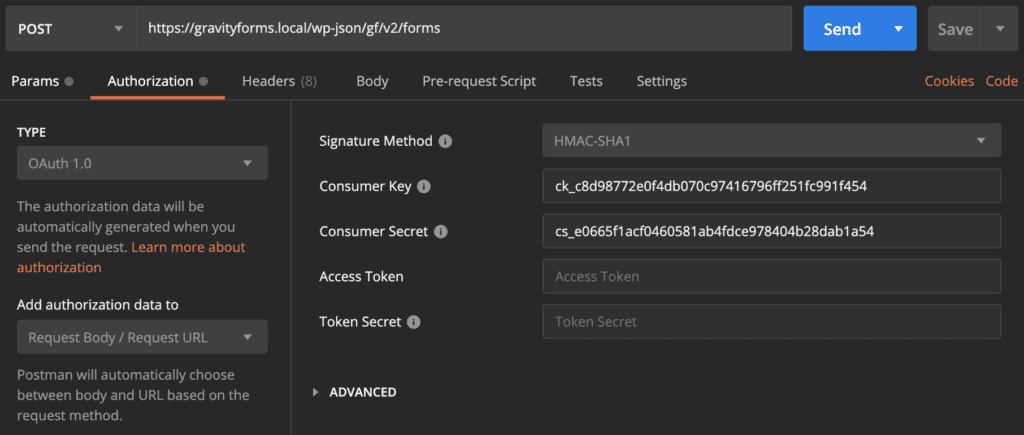
How it works: Gravity Forms provides a REST API (v2, built on the WordPress REST API) and a Webhooks Add-On (Elite only) for outbound HTTP requests on submission. Salesforce provides REST and Bulk APIs for creating, reading, and updating any standard or custom object.
Source: Gravity Forms
A custom integration connects these APIs with your own middleware handling authentication, field mapping, data transformation, validation, and error recovery.
What it syncs: Anything both platforms expose. Gravity Forms' REST API provides access to forms and entries, including all field values, entry metadata, and submission timestamps. Salesforce's API covers all standard and custom objects.
This is the only method that supports complex scenarios like merging duplicate leads during submission, running validation against Salesforce records before accepting a form entry, or syncing file uploads as Salesforce attachments.
Fits: both ongoing submission processing and historical entry migration; the only method with no ceiling on either.
Setup process:
Enable the Gravity Forms REST API in WordPress and generate API credentials (via WordPress REST API authentication or the legacy Gravity Forms API keys).
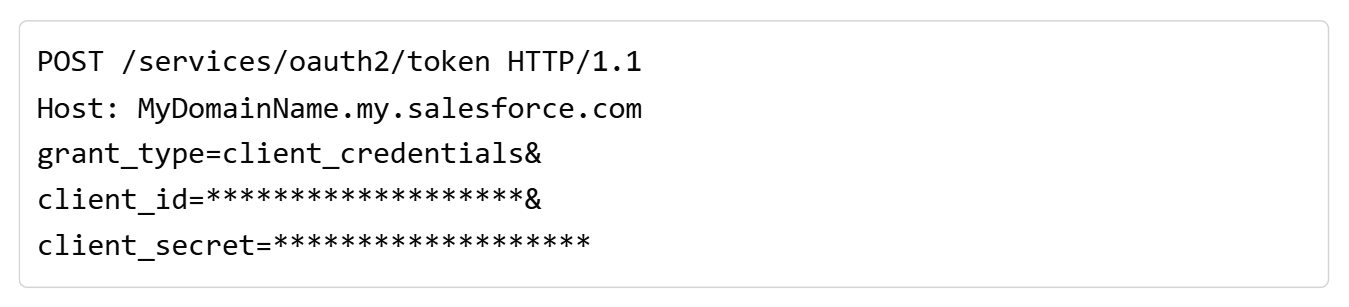
Create a Salesforce Connected App with OAuth 2.0 credentials. The Client Credentials Flow is recommended for server-to-server integrations.
Build a middleware service that listens for Gravity Forms webhooks (or polls the Gravity Forms Entries API), transforms the form data according to your field mapping, and writes records to Salesforce via its REST API.
Implement deduplication and matching logic: before creating a new Lead or Contact, query Salesforce for existing records by email or another unique identifier.
Add logging, error handling, and retry logic. Salesforce's daily API request allocation starts at 100,000 requests per 24 hours for Professional and Enterprise editions.
Deploy, monitor, and maintain the integration. Salesforce versions its API with each seasonal release; the current version is Summer '26, API version 67.0.
Source: Salesforce
Strengths: Full control over what data flows, when, and how. Can implement complex business logic (deduplication, conditional object creation, cross-object relationships). Can process historical entries, not just new submissions. No per-task or per-operation fees from a third-party connector.
Limitations: Requires development resources to build and maintain. You own the infrastructure, monitoring, and error recovery. API changes on either side require ongoing maintenance. The initial build takes weeks, not hours. Gravity Forms does not publish formal rate limits for its REST API, but performance depends on the WordPress hosting environment.
Best for: Organizations with complex data mapping requirements that no off-the-shelf connector satisfies. Teams with in-house development resources and a long-term commitment to the Gravity Forms-Salesforce pipeline. Companies that need to migrate historical form entries into Salesforce alongside ongoing submission processing.
Key Use Cases
1. Lead Capture from WordPress Forms into Salesforce Pipeline
Marketing runs lead generation forms (gated content downloads, demo requests, contact forms) on a WordPress site using Gravity Forms. Each submission creates a Salesforce Lead with the captured name, email, company, and form-specific fields (e.g., "product interest" or "company size"). Sales reps see new leads in Salesforce immediately and can begin outreach without waiting for a handoff or CSV import.
Best integration method: Native Salesforce Add-On (real-time, no middleware).
2. Event Registration with Salesforce Campaign Tracking
An organization uses Gravity Forms to handle event registration (with payment via Stripe or PayPal). Each registration creates a Salesforce Contact and adds them as a Campaign Member on the corresponding Salesforce Campaign. Marketing can track registration volume, attendance, and post-event engagement within Salesforce's campaign reporting.
Best integration method: Zapier or Make (multi-step workflow: create Contact, then add Campaign Member).
3. Customer Support Intake Routed to Salesforce Cases
A support team uses a Gravity Forms contact form with conditional logic to collect issue type, priority, and description. Submissions create Salesforce Cases assigned to the appropriate support queue based on the issue type selected in the form. Attachments uploaded through the form can be linked to the Case record.
Best integration method: Native Salesforce Add-On (direct Case creation with conditional feeds) or custom API (if attachment handling requires special logic).
4. Multi-Step Application Forms Feeding Salesforce Opportunities
An agency or services company uses multi-page Gravity Forms to collect project requirements, budget ranges, and timelines from potential clients. On submission, the integration creates a Salesforce Opportunity with project details mapped to custom fields, assigns it to the right sales rep based on territory or service type, and attaches the form data as a related record.
Best integration method: Make or custom API (multi-object creation with conditional routing).
5. Nonprofit Donation Forms Updating Salesforce Donor Records
A nonprofit collects donations through Gravity Forms (using the Stripe or PayPal payment add-ons) and needs each donation to update the donor's Salesforce Contact record and create a related Donation object. Recurring donation setups create Salesforce records that track the subscription status.
Best integration method: Native Salesforce Add-On (included with the Nonprofit license at $129/year).
Limitations and Considerations
One-Directional Data Flow
Every method in this guide pushes data from Gravity Forms into Salesforce. None sends Salesforce data back to Gravity Forms.
If you need to pre-populate form fields with Salesforce data (e.g., showing an existing contact's company name when they revisit a form), you will need Gravity Forms' dynamic population feature combined with a custom solution that queries Salesforce. That falls outside the scope of the standard connectors.
License Tier Gating on Gravity Forms
The native Salesforce Add-On requires the Elite license at $259/year or the Nonprofit license at $129/year. Teams on Basic ($59/year) or Pro ($159/year) cannot access the native connector.
The Webhooks Add-On, which enables outbound HTTP requests useful for Make or custom integrations, is also Elite-only. Pro users can use Zapier (the Zapier Add-On is available at the Pro tier), but this introduces a third-party dependency and per-task costs.
Field Mapping Complexity
Gravity Forms and Salesforce model data differently. A Gravity Forms "Name" field is a composite of prefix, first, middle, last, and suffix subfields. Salesforce stores first name and last name as separate fields on the Lead and Contact objects.
Multi-select checkbox fields in Gravity Forms need formatting as semicolon-separated strings for Salesforce multi-select picklists. Address fields require mapping each component (street, city, state, zip, country) individually. The native add-on handles these translations automatically for standard fields, but Zapier, Make, and custom builds require manual configuration.
Salesforce API Limits
All integration methods that write to Salesforce consume API calls. Salesforce's daily API request allocation starts at 100,000 requests per 24 hours for Professional and Enterprise editions, plus per-license allocations.

Source: Salesforce
For most form-to-CRM use cases, this is more than sufficient. High-traffic websites with thousands of daily form submissions may need to monitor API consumption, particularly if the integration creates multiple Salesforce objects per submission (e.g., Account + Contact + Opportunity).
Duplicate Record Management
The native add-on creates a new Salesforce record on each submission by default. Without matching rules in Salesforce (e.g., duplicate detection on email address), repeated submissions by the same person create duplicate Leads or Contacts.
Zapier offers a "Find or Create" action that checks for existing records before creating new ones, but this consumes additional tasks. Custom API builds can implement upsert logic using Salesforce's external ID matching. Whichever method you choose, plan for deduplication from the start.
Permissions and Access
Setting up the native add-on requires Gravity Forms license admin rights (to install the add-on) and Salesforce System Administrator access (to authorize the OAuth connection).
If your Salesforce org uses field-level security or sharing rules, the integration user's profile must have create and edit access to every object and field you intend to write to. Zapier and Make require OAuth authorization from a Salesforce user with appropriate permissions.
Maintenance
Both platforms evolve independently. Gravity Forms releases updates that may affect add-on compatibility (the plugin requires WordPress latest and PHP v7.4+). Salesforce versions its API with each seasonal release. Custom fields added to either platform after the initial setup will not sync unless the integration configuration is updated.
Third-party tools like Zapier may change their pricing, deprecate connectors, or alter authentication methods. Plan for periodic reviews of the integration's configuration and health.
What No Method Fixes: The Data Itself
Every method above moves form submission data into Salesforce. None checks whether that data is accurate, complete, or current.
A visitor who enters a personal email instead of a business email creates a Lead with no company domain to match. A prospect who types a former job title creates a Contact with stale information. Someone who misspells their company name creates a record that won't match against the correct Salesforce Account. The integration delivers exactly what the form collected, no more.
Where ZoomInfo Fits In
Every method in this guide moves form data from Gravity Forms into Salesforce. None improves the data being moved. When the integration is live but lead records arrive with missing company names, personal email addresses, no phone numbers, and job titles the visitor chose not to provide, the bottleneck is no longer the connector.
That is the gap ZoomInfo closes.
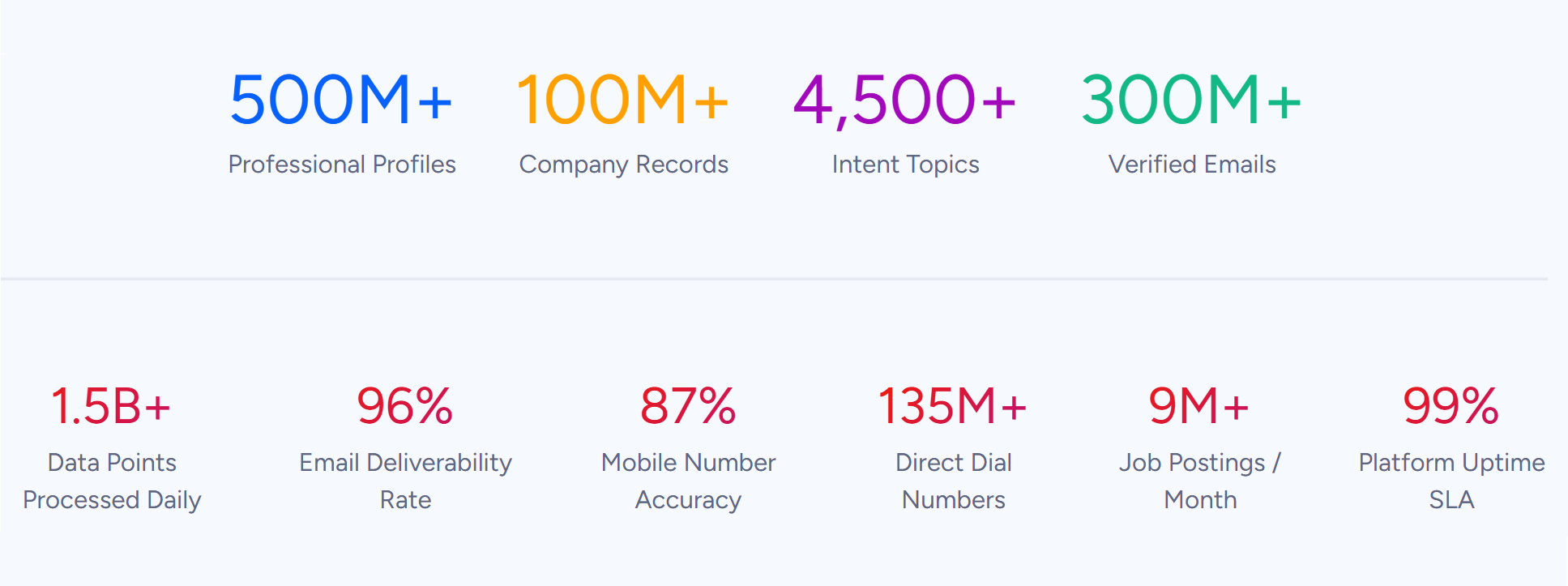
ZoomInfo is a B2B data and go-to-market platform with 500M contacts, 100M companies, 135M+ verified phone numbers, and 200M+ verified business emails.
Source: ZoomInfo
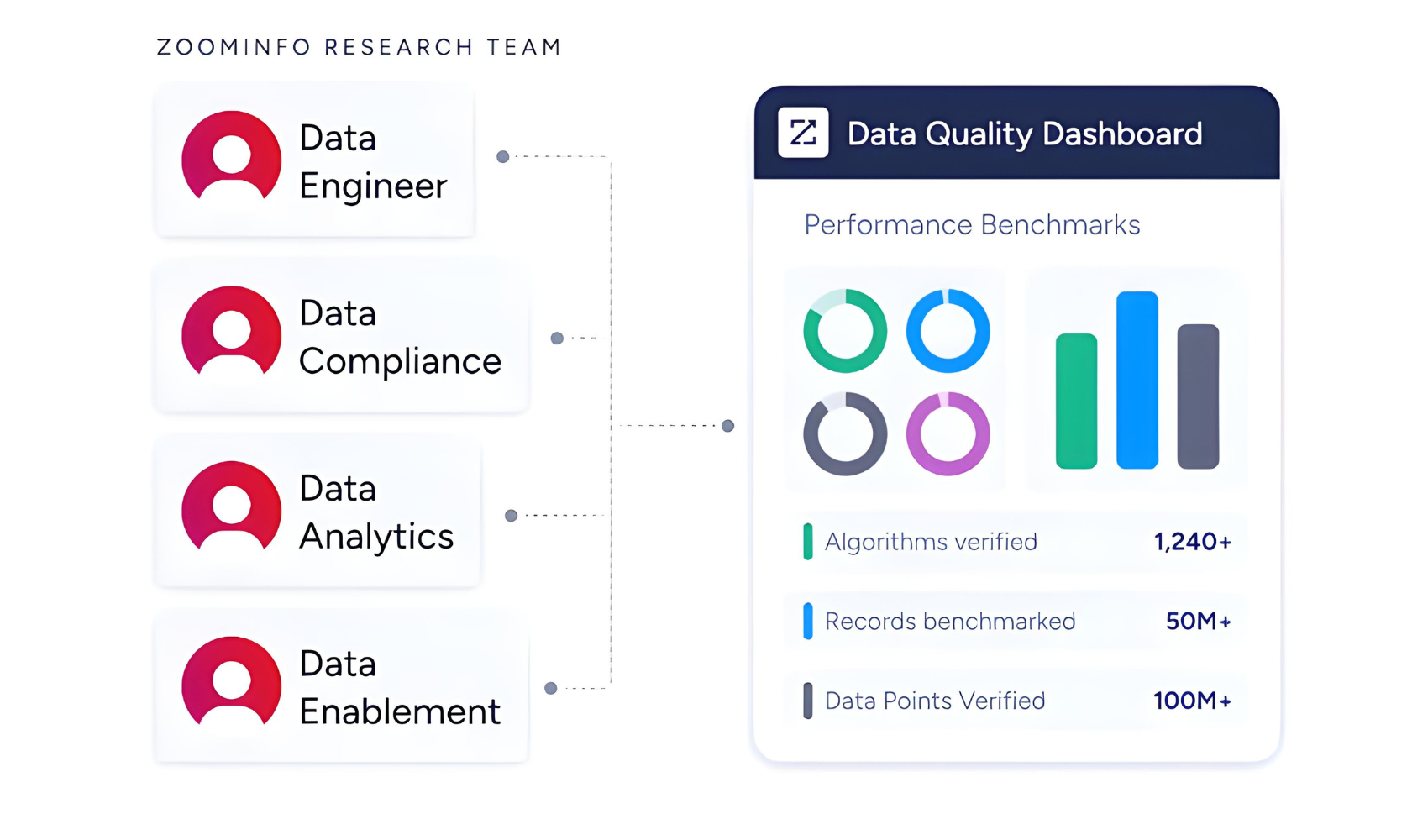
That data is verified through a multi-source pipeline backed by 300+ human researchers and reaching up to 95% accuracy on first-party data. For teams running a Gravity Forms-to-Salesforce pipeline, ZoomInfo addresses the data quality layer that no form connector handles.
Source: ZoomInfo
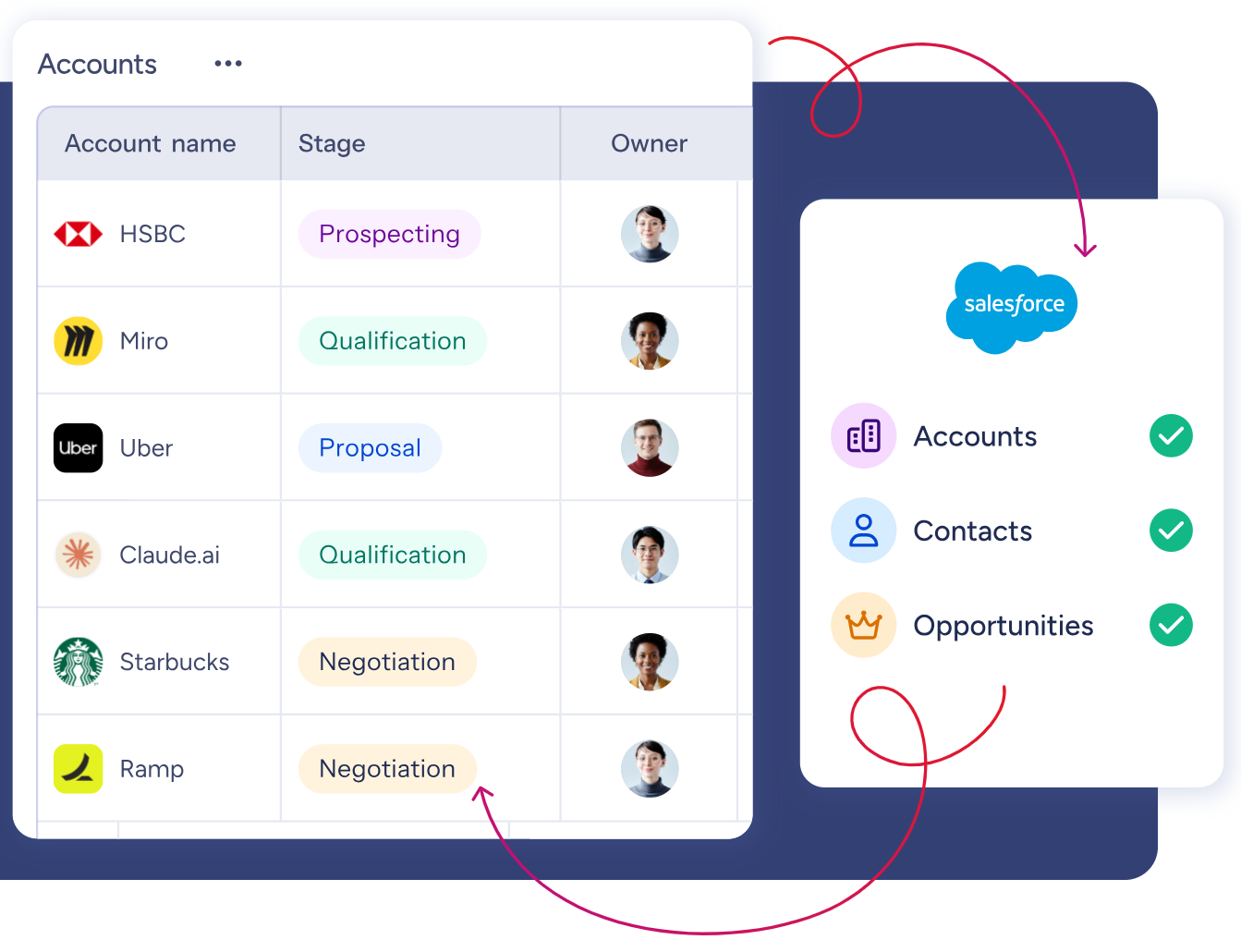
ZoomInfo integrates natively with Salesforce through the AppExchange, providing CRM enrichment, lead routing, and real-time data updates inside Salesforce records. When a form submission creates a new Salesforce Lead with just a name and email address, ZoomInfo can automatically append the verified phone number, job title, company attributes, technographic profile, and org chart context.
Source: ZoomInfo
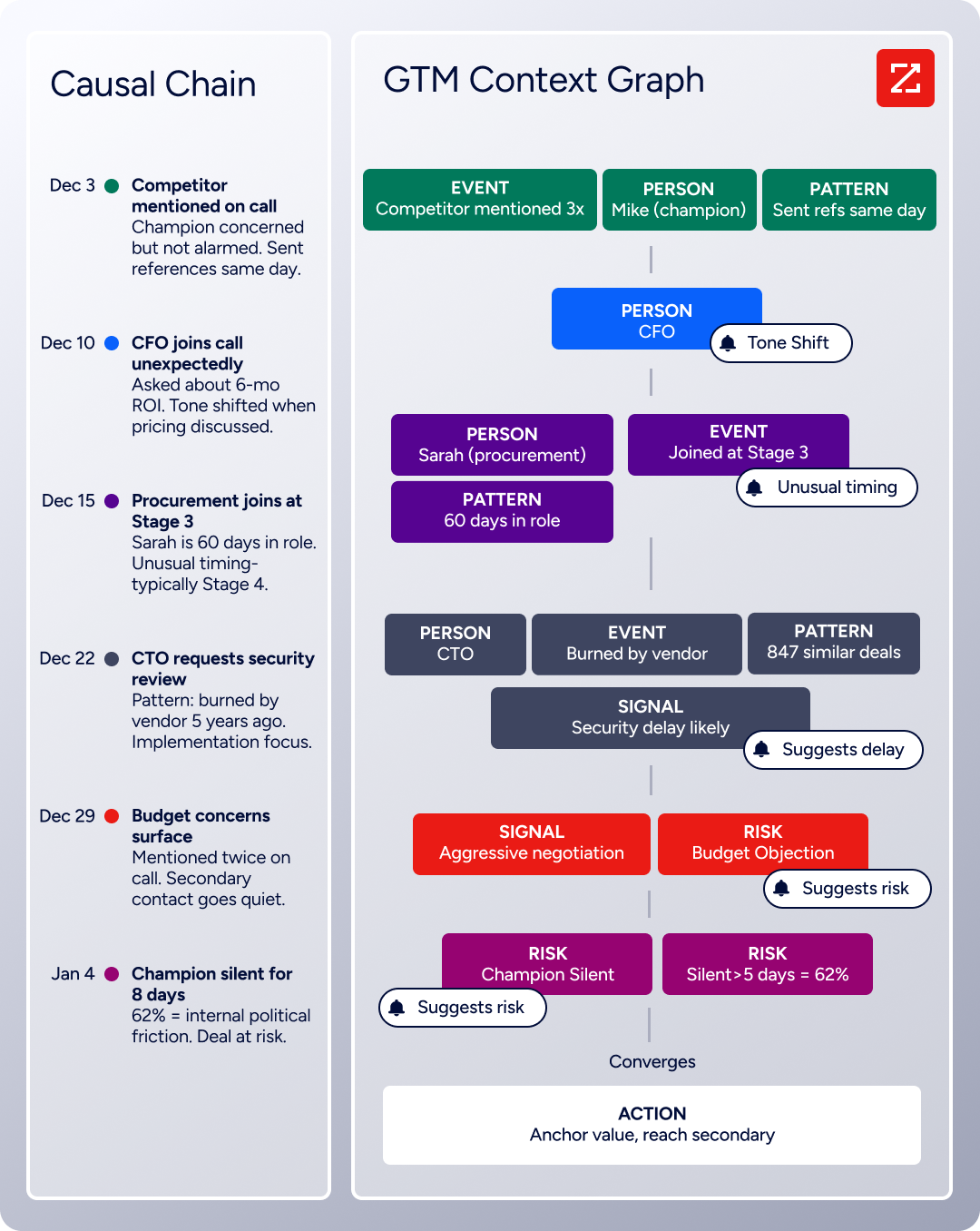
The same data feeds ZoomInfo's GTM Context Graph, which processes 1.5B + data points daily and combines third-party intelligence with CRM records, conversation transcripts, and behavioral signals to surface not just what happened in a deal, but why.
Source: ZoomInfo
On the Gravity Forms side, ZoomInfo connects through Zapier, which can trigger enrichment actions when a new form entry is submitted. A submission can be enriched before or as it arrives in Salesforce, so the Lead record is complete from the moment a rep sees it.
ZoomInfo's FormComplete takes this further: it reduces form fields to a minimum (as few as a single email field), then auto-appends the remaining data from ZoomInfo's database. Fewer fields mean higher conversion rates, and the data that arrives in Salesforce is more accurate than what most visitors would have typed.
Buyer Intent data from ZoomInfo, tracking signals from 210 million IP-to-Organization pairings, can also layer onto form-generated Leads in Salesforce.

Source: ZoomInfo
When a form submission comes from a company actively researching solutions in your category, ZoomInfo surfaces that intent signal so reps can prioritize follow-up. Enriched contact data combined with buying signals turns a basic form submission into a prioritized lead. With Agent Teams, that same signal can trigger the full play, from enrichment to outreach, rather than ending as a task sitting in the CRM.
Seismic's sales team attributed 39% of active pipeline to opportunities identified or influenced by ZoomInfo signals, while boosting productivity by 54% and saving 11.5 hours per week. (Seismic)
Final Verdict
A native Gravity Forms-Salesforce integration exists, but it is gated behind the Elite ($259/year) or Nonprofit ($129/year) license. Teams on lower tiers can use Zapier or Make to bridge the two platforms, and custom API development offers full flexibility at the cost of engineering resources. For most teams, the right choice depends on scale and complexity.
Small teams running a few lead capture forms should start with the native Salesforce Add-On if they are on Elite, or Zapier if they are on Pro. Both are fast to set up, require no engineering resources, and handle the standard form-to-Lead workflow reliably.
Organizations with conditional routing needs (different form values creating different Salesforce object types, or multi-object creation per submission) should look at Make or the native add-on's conditional feed logic, which handles branching without a third-party tool.
Teams with complex data models, high submission volumes, or historical migration requirements should invest in a custom API integration for full control over deduplication, field transformation, and multi-object relationships.
Before committing to a method, clarify what the form-to-CRM pipeline needs to accomplish.
If the goal is getting new leads from WordPress into Salesforce with minimal delay, the native add-on or Zapier covers it. If the goal is building a complete lead intake system with validation, enrichment, and routing, the method matters less than the data quality layer underneath it.
ZoomInfo, with its native Salesforce integration and Zapier connectivity to Gravity Forms, is the enrichment layer that turns partial form submissions into complete, verified, prioritized leads in Salesforce.
FAQ
Does Gravity Forms have a native Salesforce integration?
Yes. Gravity Forms offers a Salesforce Add-On that creates or updates Salesforce records (Leads, Contacts, Accounts, Cases, Opportunities, and custom objects) on each form submission. The add-on is included with the Elite license ($259/year) and the Nonprofit license ($129/year). It is not available on Basic or Pro licenses.
Can I connect Gravity Forms to Salesforce without the Elite license?
Yes. Teams on the Pro license ($159/year) can use Zapier, which has an official Gravity Forms Add-On available at the Pro tier. Zapier connects form submissions to Salesforce through event-driven automations. Make is another option, though it requires configuring webhooks on the Gravity Forms side, which may need the Elite-only Webhooks Add-On or an alternative webhook plugin.
What Salesforce objects can I create from a Gravity Forms submission?
The native Salesforce Add-On supports Leads, Contacts, Accounts, Cases, Opportunities, and custom objects. Zapier and Make support the same standard objects plus Tasks and Events. Custom API integrations can write to any object the Salesforce REST API exposes.
How do I prevent duplicate records in Salesforce from form submissions?
Configure Salesforce duplicate rules and matching rules to catch duplicates at the CRM level. In Zapier, use a "Find or Create" action that searches for an existing record by email before creating a new one. The native add-on can update existing records rather than always creating new ones, depending on your matching criteria. Custom API builds should use Salesforce's upsert operation with an external ID field.
Does form submission data sync in real-time?
The native Salesforce Add-On sends data to Salesforce immediately on form submission. Zapier processes triggers within 1 to 15 minutes depending on your plan tier (Starter plans poll every 15 minutes; Professional and higher plans poll every 1 to 2 minutes). Make scenarios can run instantly on webhook triggers or on a configurable schedule.
Can I map Gravity Forms conditional logic to different Salesforce objects?
Yes. The native Salesforce Add-On supports conditional feed logic: you can create multiple feeds on a single form, each targeting a different Salesforce object, and set conditions for when each feed fires.
For example, a "Contact Us" form could create a Salesforce Lead for general inquiries and a Salesforce Case for support requests, based on the value of a dropdown field. Zapier achieves the same result with filter steps or separate Zaps.
What happens if the Salesforce API is down when a form is submitted?
The form entry saves in the Gravity Forms entries database in WordPress regardless of whether the Salesforce API call succeeds. However, the record may not reach Salesforce. The native add-on does not include automatic retry. Zapier provides built-in retry logic for failed tasks.
For mission-critical submissions, a custom integration with queuing and retry mechanisms is the most reliable approach. Regular monitoring of integration health catches failures before the gap widens.
How does ZoomInfo improve a Gravity Forms-Salesforce pipeline?
ZoomInfo solves the data quality problem that no form connector addresses. Web form visitors provide only what they choose to type, which is often incomplete: a personal email instead of a business email, no phone number, a vague job title.
ZoomInfo enriches the resulting Salesforce records with verified business emails, direct dials, company attributes, technographics, and org chart data. Its native Salesforce integration handles enrichment automatically on the CRM side, while its Zapier connectivity to Gravity Forms can trigger enrichment at the point of submission.
The result: form-generated Leads arrive in Salesforce complete and actionable, with intent signals that help reps prioritize follow-up.
Other tools that connect to Salesforce:
