
Teams running Twilio for communications and Salesforce as their CRM usually hit the same problems within a quarter:
Customer interaction data lives in Twilio (call logs, SMS history, verification events) while contact and deal records live in Salesforce, so reps piece together context from two disconnected systems,
inbound calls and messages arrive without CRM context, forcing agents to look up the caller before they can respond,
and outbound activity (calls placed, texts sent, campaign messages delivered) never makes it back into Salesforce, leaving timelines incomplete and reporting unreliable.
However, the two platforms ended up coexisting (a dev team building on Twilio's APIs while the sales org runs Salesforce, a support team using Twilio Flex alongside Salesforce Service Cloud, or separate departments choosing tools independently), the longer they run without a connection, the wider the gap between communication data and CRM records.
Connecting Twilio and Salesforce closes that gap.
Call activity flows into Salesforce Leads, Contacts, and Opportunities so reps see a complete interaction history without leaving the CRM. SMS and WhatsApp messages sync as Activities so outreach is tracked alongside emails and meetings. Inbound calls trigger screen pops with CRM context so agents know who is calling and which deals are active before they pick up.
A native integration exists through Twilio's managed package for Salesforce, and Twilio Flex offers a CTI connector on the Salesforce AppExchange. Beyond the native options, third-party automation tools (Zapier, Make) and custom API development provide additional methods. Each differs in setup complexity, sync direction, data coverage, and cost.
There is also one problem no connection method solves: the integration moves communication records into the CRM, but it does not verify, complete, or improve the contact data those communications depend on.
And that is where ZoomInfo comes in. ZoomInfo integrates natively with Salesforce and offers API and MCP access that can feed verified, enriched contact data into any system, so the records behind every Twilio call and message are accurate and complete before outreach begins.
This article covers the Twilio-Salesforce integration landscape: which methods are available, what data each one handles, how to set them up, the use cases that justify connecting both platforms, and the limitations to plan for. It also covers how ZoomInfo fits in as a data enrichment layer that strengthens the records flowing between Twilio and Salesforce.
Let's start with an overview of the integration.
Integration Overview
Source: Twilio
Does a native integration exist?
Yes. Twilio provides a managed package for Salesforce that enables SMS via Process Builder, SMS campaigns, and one-on-one messaging within Salesforce.
Twilio Flex also offers a CTI connector on the Salesforce AppExchange for contact center integration, including click-to-dial, screen pop, activity logging, and SSO. Twilio Segment provides a separate Salesforce destination connector for routing customer data into Salesforce.
What data can sync?
SMS and voice activity (call logs, message records, campaign sends), interaction metadata (timestamps, duration, status), and customer data platform events via Twilio Segment. The Flex CTI connector syncs call activity, screen pop context, and agent interaction logs. Custom API integrations can sync any data both platforms expose.
Is the sync bidirectional?
Partially. The native Twilio for Salesforce package pushes communication data from Twilio into Salesforce (call logs, SMS activity). Salesforce contact data can inform Twilio's outbound communications (screen pops, contact lookup), but full bidirectional record sync requires custom development or middleware.
Is it real-time or batch?
The native integration runs in near real-time for event-driven data (inbound calls, SMS sends, Flex agent interactions). Twilio Segment's Salesforce destination can run on event triggers or configurable schedules. Third-party tools like Zapier trigger within 1 to 15 minutes depending on plan tier.
What are the available methods?
Native Twilio for Salesforce package, Twilio Flex CTI connector, Twilio Segment destination, third-party automation (Zapier, Make), and custom API development.
Method | Setup Difficulty | Data Flow | Real-time? | Cost |
|---|---|---|---|---|
Twilio for Salesforce (Managed Package) | Low | Twilio to Salesforce | Near real-time | Included (Twilio usage fees apply) |
Twilio Flex CTI Connector | Medium | Bidirectional (call context) | Real-time | Flex pricing + Twilio usage |
Twilio Segment Destination | Medium | Segment to Salesforce | Near real-time or scheduled | Segment pricing (contact sales) |
Zapier | Low | One-way per Zap | Near real-time (1-15 min) | From $19.99/mo |
Custom API | High | Fully customizable | Real-time via webhooks | Developer time + hosting |
One distinction worth settling upfront: the managed package and the Flex CTI connector handle different jobs. The managed package is built for messaging workflows (SMS campaigns, one-on-one texting, automated notifications) inside Salesforce.
The Flex CTI connector is built for contact center operations (inbound/outbound voice, screen pops, agent routing). Teams running both voice and messaging may use both simultaneously.
Integration Methods
Twilio for Salesforce (Managed Package)
How it works: The Twilio for Salesforce managed package installs into a Salesforce org and connects Twilio's Programmable Messaging to Salesforce workflows.
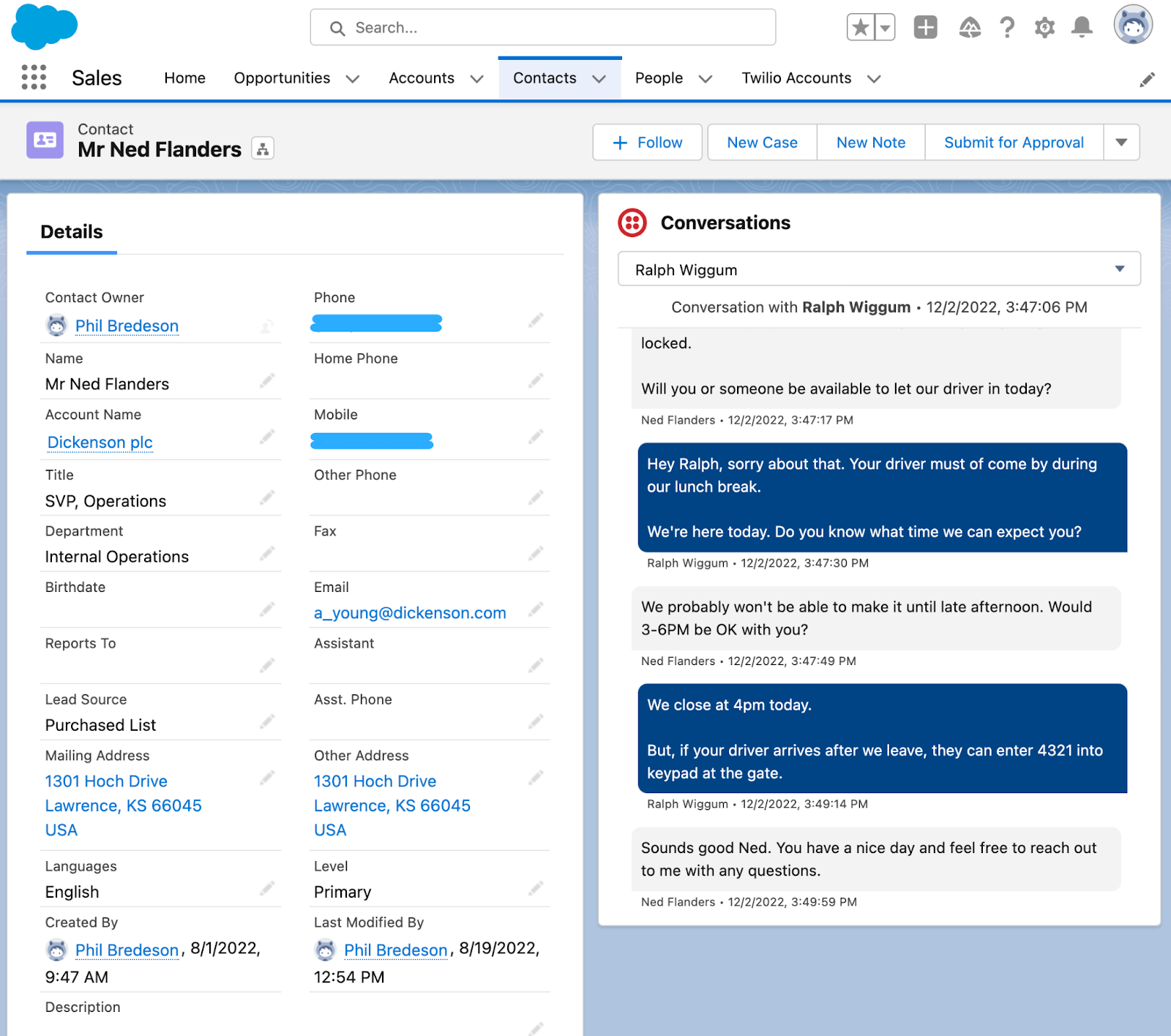
It lets teams send SMS and MMS from within Salesforce using Process Builder automation, run bulk SMS campaigns to Salesforce contact lists, and hold one-on-one text conversations through a messaging console embedded in Salesforce. Messages log as Activities on the associated Salesforce records.
Source: Twilio
What it syncs: Outbound and inbound SMS/MMS messages, message delivery status, and conversation history. Messages link to Salesforce Leads, Contacts, or custom objects. The package also supports click-to-dial for initiating calls, with call activity logging back into Salesforce.
Fits: ongoing sync of messaging activity into Salesforce as part of sales and support workflows; also supports bulk campaign sends.
Setup process:
Install the Twilio for Salesforce package from the Salesforce AppExchange into your Salesforce org. System Administrator access is required.
In Twilio, confirm you have an active account with a provisioned phone number capable of SMS. Note your Account SID and Auth Token from the Twilio Console.
In Salesforce, navigate to the Twilio package settings and enter your Account SID and Auth Token to authenticate the connection.
Configure messaging workflows: set up Process Builder rules to trigger automated SMS sends on Salesforce events (e.g., new Lead created, Opportunity stage change), or enable the one-on-one messaging console for manual texting.
Map the Twilio phone number to the Salesforce org and configure which object types (Lead, Contact, Account) should receive message activity logging.
Test by sending a message to a known Salesforce contact and verifying the activity appears on their record.
Strengths: First-party integration maintained by Twilio. No third-party middleware required. SMS activity logs automatically to Salesforce records, keeping communication history complete. Supports both automated (Process Builder) and manual (one-on-one console) messaging workflows. SSO support simplifies authentication for teams already using Salesforce identity.
Limitations: Focused on SMS/MMS messaging. Voice call integration requires the separate Flex CTI connector or custom development. The package's automation depends on Salesforce Process Builder (or Flow), which may require admin expertise for complex workflows. Twilio usage fees (per-message, per-call) apply on top of the free package installation.
Best for: Sales and support teams that need SMS messaging inside Salesforce, including automated notifications, bulk campaigns, and one-on-one conversations with activity logging.
Twilio Flex CTI Connector
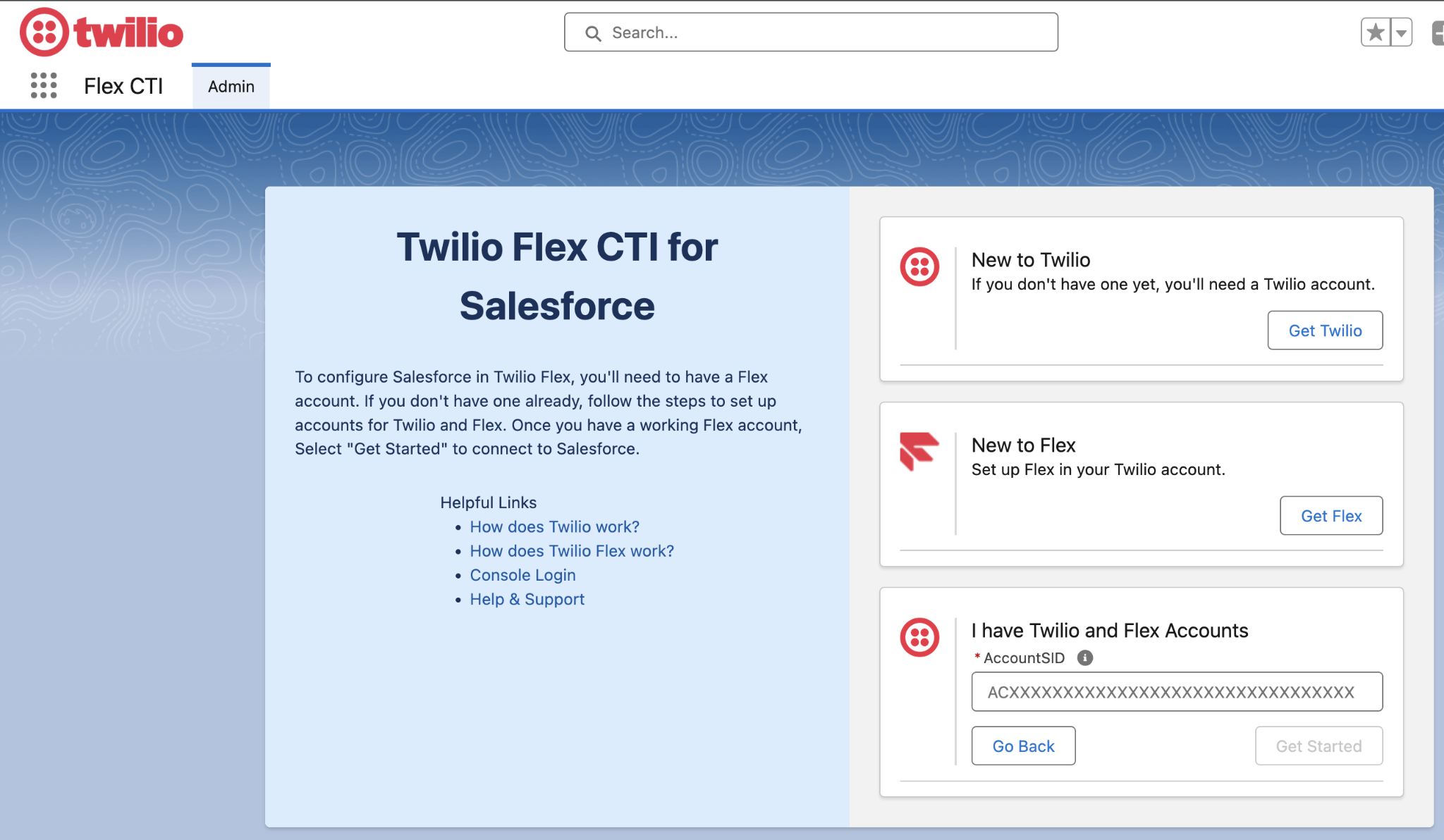
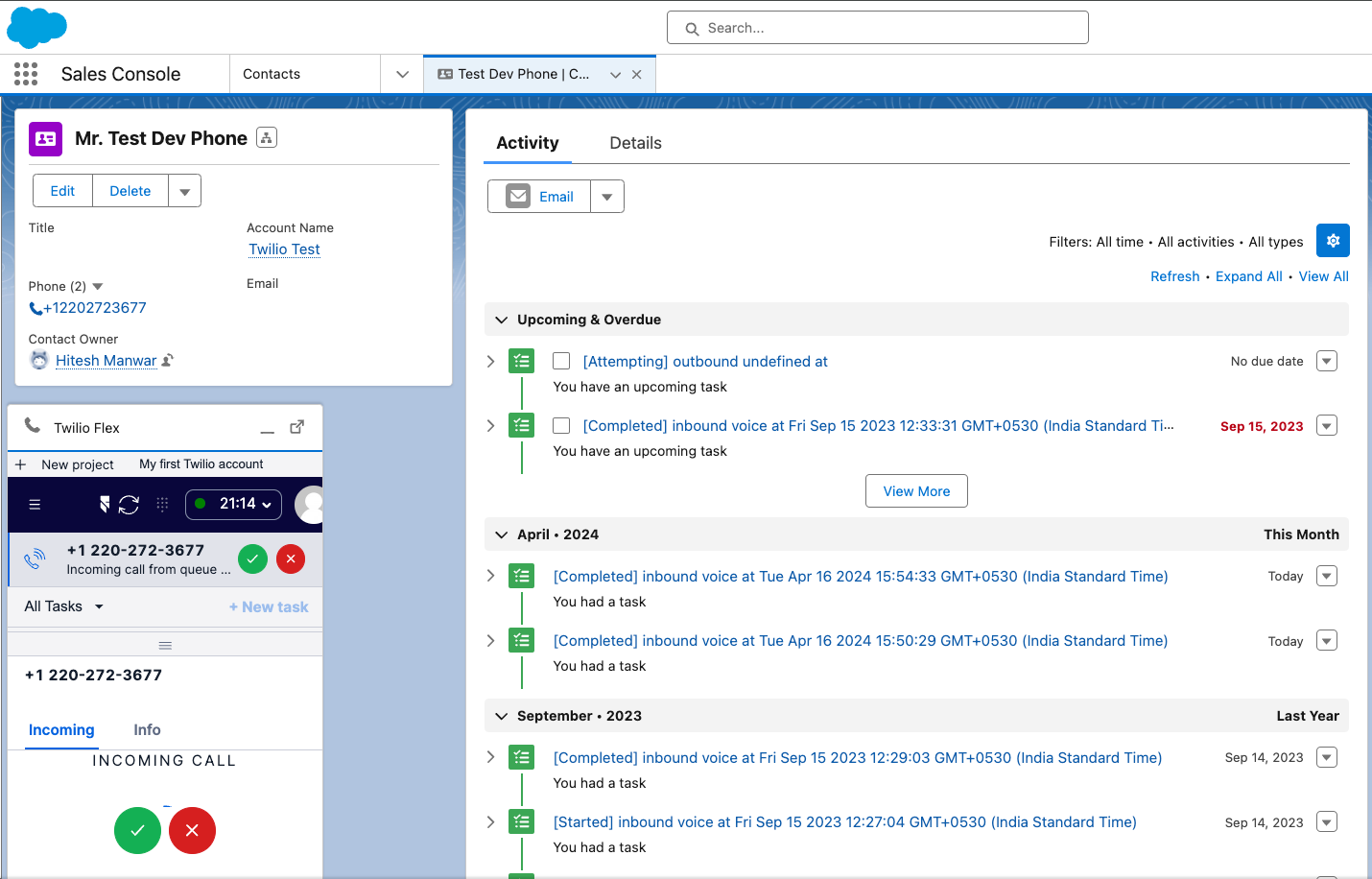
How it works: Twilio Flex is Twilio's programmable cloud contact center, and its Salesforce CTI connector embeds the Flex agent interface inside Salesforce as an iframe.
Source: Twilio
When a call arrives, the connector matches the caller's phone number against Salesforce records and displays a screen pop with the contact's CRM profile. Agents handle voice, SMS, WhatsApp, and chat interactions without leaving Salesforce, and all activity logs back to the associated record.
What it syncs: Inbound and outbound call activity, call duration, agent notes, screen pop context (Salesforce record data displayed to the agent), and interaction status. The connector creates Salesforce Tasks or Activity records for each interaction. Routing decisions in Flex's TaskRouter can reference Salesforce data (account tier, open cases, deal stage) for skills-based assignment.
Fits: ongoing real-time sync for contact center operations; not a messaging campaign tool.
Setup process:
Confirm your Twilio Flex instance is active and configured. Flex requires a Twilio account with Flex pricing enabled (from $1/active user hour or $150/named user/month).
Install the Twilio Flex CTI connector from the Salesforce AppExchange. System Administrator access is required.
Configure the Salesforce Open CTI softphone layout to embed the Flex interface in the Salesforce console. Define which Salesforce objects (Contact, Lead, Account, Case) trigger screen pops on inbound calls.
Set up phone number matching rules so inbound calls resolve to the correct Salesforce record. Configure fallback behavior for unmatched callers (create new Lead, route to manual lookup).
Map call activity fields between Flex and Salesforce: call duration, disposition codes, agent notes, and interaction channel should all log as Activities or Tasks on the Salesforce record.
Test with an inbound call to a known contact, verifying the screen pop displays correct CRM data and the call activity logs after hangup.
Source: Twilio
Strengths: Real-time, bidirectional context sharing. Agents see Salesforce CRM context on every inbound interaction. All call and messaging activity logs to Salesforce automatically.
The Flex interface is customizable via React-based plugins, so teams can add widgets, data panels, or custom workflow steps. SSO integration means agents authenticate once. Supports voice, SMS, WhatsApp, and webchat through a single agent workspace.
Limitations: Requires Twilio Flex, which carries its own pricing (from $1/active user hour) on top of per-minute voice charges. Setup is more complex than the managed messaging package, requiring both Salesforce CTI configuration and Flex workspace customization.
The React-based plugin system requires development resources to customize beyond the default layout. Screen pop matching depends on phone number accuracy in Salesforce records.
Best for: Contact center teams running Twilio Flex that use Salesforce as their CRM. Sales and support organizations that handle high inbound call volumes and need agents to see CRM context during every interaction.
Twilio Segment Salesforce Destination
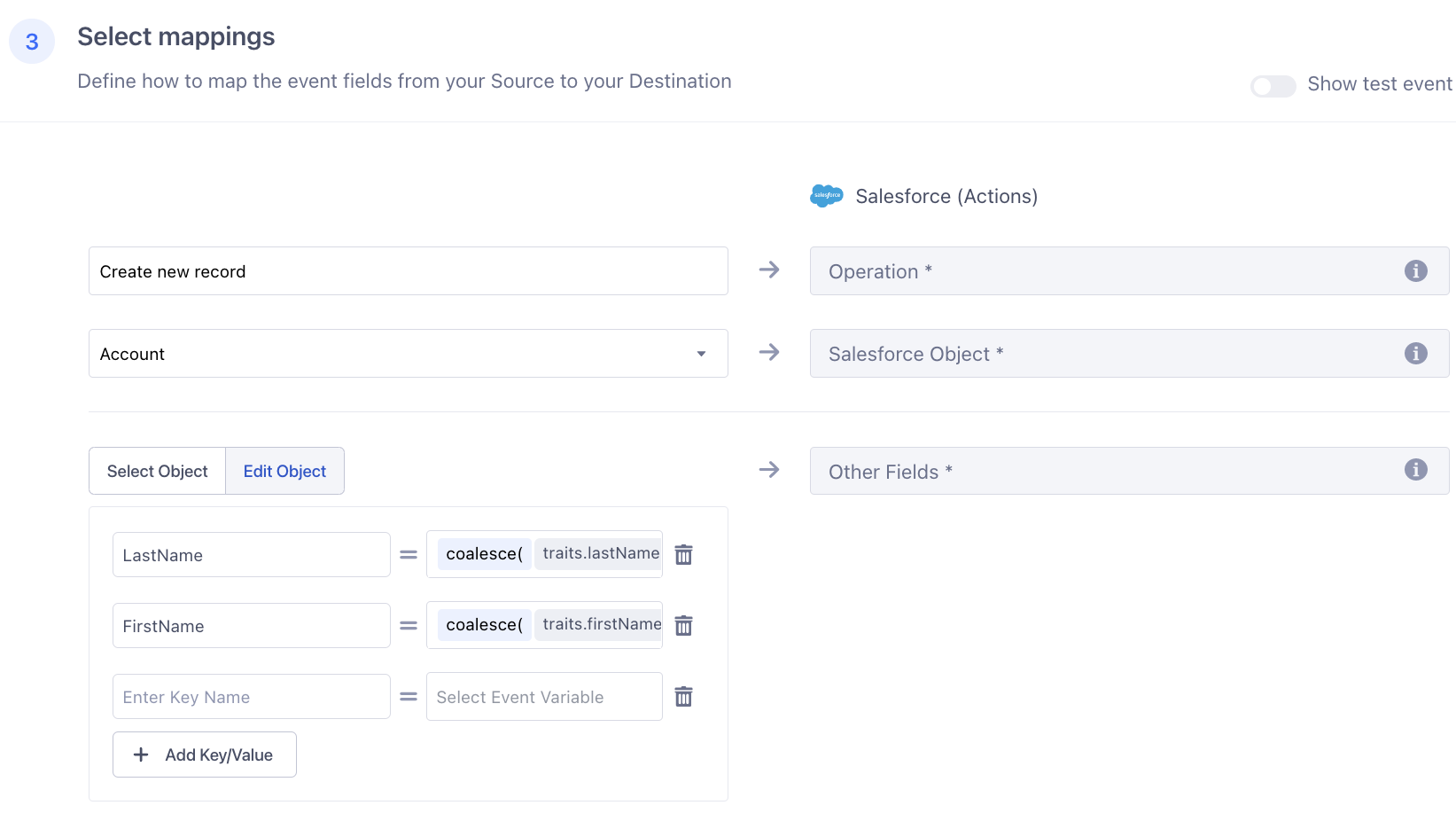
How it works: Twilio Segment is Twilio's customer data platform, and its Salesforce destination connector routes customer event data from Segment's unified profiles into Salesforce records.
Source: Twilio
When a customer triggers an event tracked by Segment (page view, product action, conversion), that event can create or update Leads, Contacts, or custom objects in Salesforce. This connector bridges Twilio's behavioral data with Salesforce's CRM records.
What it syncs: Customer identity traits (name, email, company), behavioral events (page views, product interactions, conversions), and computed traits from Segment's identity resolution. Data flows one direction: from Segment into Salesforce. The connector supports creating Leads, updating Contacts, and writing to custom objects.
Fits: ongoing sync of customer behavioral data and identity traits into Salesforce; complements (not replaces) the direct Twilio-Salesforce communication integrations.
Setup process:
In your Twilio Segment workspace, navigate to Destinations and search for Salesforce.
Authenticate with your Salesforce org using OAuth credentials. The connecting user needs API-enabled profile access.
Configure which Segment events should trigger Salesforce actions (e.g., "Identify" call creates or updates a Lead, "Track" call creates a Task).
Map Segment traits and properties to Salesforce fields. Standard fields (email, name, company) auto-map; custom traits require manual field mapping.
Set identity resolution rules: define how Segment matches incoming events to existing Salesforce records (by email, external ID, or custom key).
Activate the destination and monitor the event delivery dashboard for sync errors.
Strengths: Connects Twilio's behavioral data to Salesforce, enriching CRM records with website activity, product usage, and conversion events. Benefits from Segment's 700+ source integrations, meaning data from any Segment-connected tool can flow into Salesforce. Identity resolution matches events to existing CRM records, reducing duplicates.
Limitations: Requires a Twilio Segment subscription (custom pricing, contact sales). Only flows data from Segment into Salesforce (not bidirectional). Does not handle Twilio communication data (call logs, SMS); those require the managed package or Flex connector. Setup requires familiarity with both Segment's event model and Salesforce's data model.
Best for: Teams already using Twilio Segment as their CDP that want behavioral and identity data flowing into Salesforce alongside communication activity from the native Twilio integrations.
Zapier
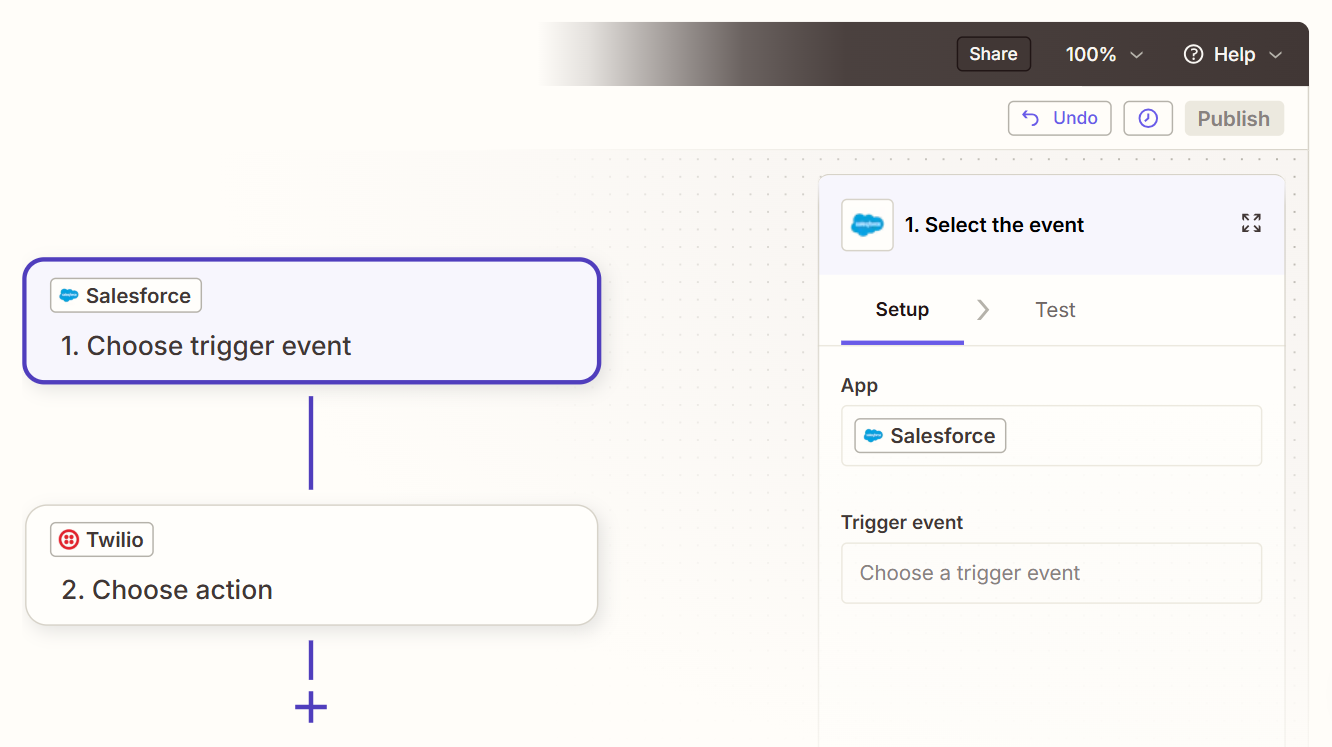
How it works: Zapier connects Twilio and Salesforce through event-driven automations called Zaps. Each Zap pairs a trigger (an event in one app) with one or more actions (what happens in the other).
Source: Zapier
Both platforms are well-supported in Zapier, with Twilio triggers covering new SMS received, new call, call completed, and new recording, and Salesforce actions covering record creation and updates across standard objects.
What it syncs: Depending on configuration: inbound SMS can create Salesforce Leads or Tasks, completed calls can log as Activities, new Salesforce records can trigger outbound Twilio SMS notifications. Each object type and direction requires its own Zap. Custom fields can be mapped in the setup flow.
Fits: ongoing event-triggered sync for specific workflows; not a replacement for the native integrations' depth.
Setup process:
Create a Zapier account and connect both your Twilio and Salesforce accounts using OAuth.
Choose a trigger app (e.g., Twilio) and select the trigger event (e.g., "New SMS Received" or "Call Completed").
Choose the action app (Salesforce) and select the action (e.g., "Create Lead" or "Create Task").
Map fields from the Twilio trigger (phone number, message body, call duration) into the corresponding Salesforce fields.
Test the Zap with a sample event to verify the field mapping produces the expected result in Salesforce.
Turn the Zap on. For bidirectional workflows (e.g., new Salesforce Contact triggers a Twilio welcome SMS), create a second Zap with the apps reversed.
Strengths: No coding required. Fast setup for single-event workflows. Useful for teams that need specific automations without the complexity of the native integrations. Zapier's filter and formatting steps add conditional logic (e.g., only log calls longer than 60 seconds, only send SMS to Contacts in a specific Salesforce campaign).
Limitations: Each Zap handles one trigger-action pair, so multiple workflows require multiple Zaps (each counting against the plan's task allocation). No screen pop, no embedded agent interface, no real-time voice integration. Historical data created before the Zap was activated does not sync. Zapier charges by task count, and high-volume Twilio accounts can accumulate costs quickly.
Best for: Small teams that need a quick connection for specific event-driven workflows (e.g., logging inbound SMS as Salesforce Leads) without investing in the native integration setup.
Custom API Integration
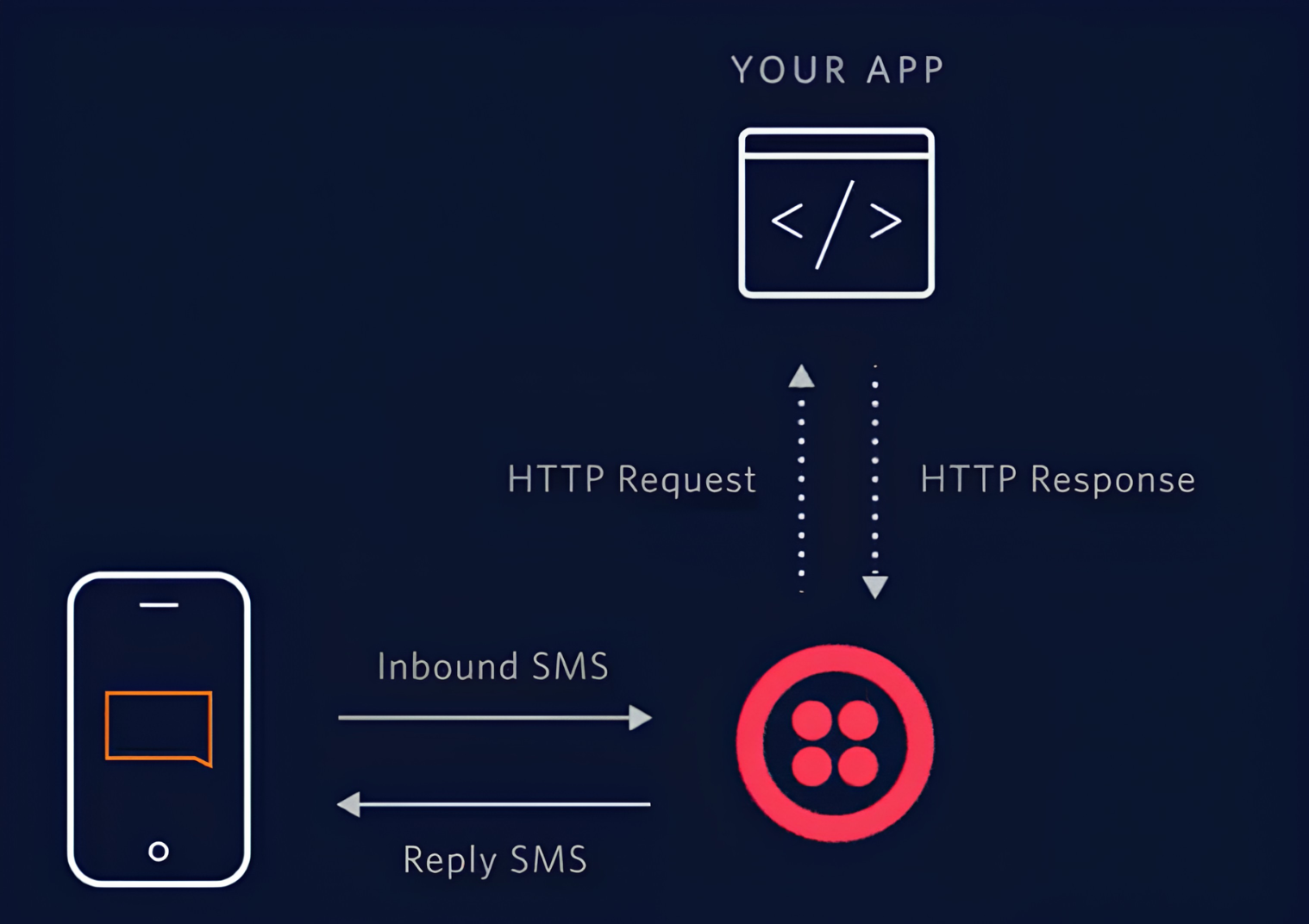
How it works: Both Twilio and Salesforce provide broad APIs. Twilio's REST API covers Messages, Voice, Verify, Lookup, and Conversations, with webhook support for real-time event notifications on every interaction.
Source: Twilio
Salesforce's REST API covers all standard and custom objects, with Platform Events and Change Data Capture for event-driven sync. A custom integration connects these APIs directly, with your own middleware handling authentication, data mapping, transformation, and error recovery.
What it syncs: Anything both APIs expose. This is the only method that supports complex scenarios like syncing Twilio Verify authentication events to custom Salesforce objects, correlating Twilio Segment behavioral data with Salesforce Opportunity stages, or building custom routing logic that references CRM data in real-time during Twilio call flows.
Fits: either one-time data migration or ongoing real-time sync; the only method with no ceiling on either.
Setup process:
Register API credentials in both platforms: Twilio Account SID and Auth Token (or API Key SID and Secret for production); Salesforce Connected App with OAuth 2.0 via the Client Credentials Flow.
Design the data model mapping between Twilio event types and Salesforce objects. Define which Twilio events (new SMS, call completed, verification success) create or update which Salesforce records (Task, Activity, custom object).
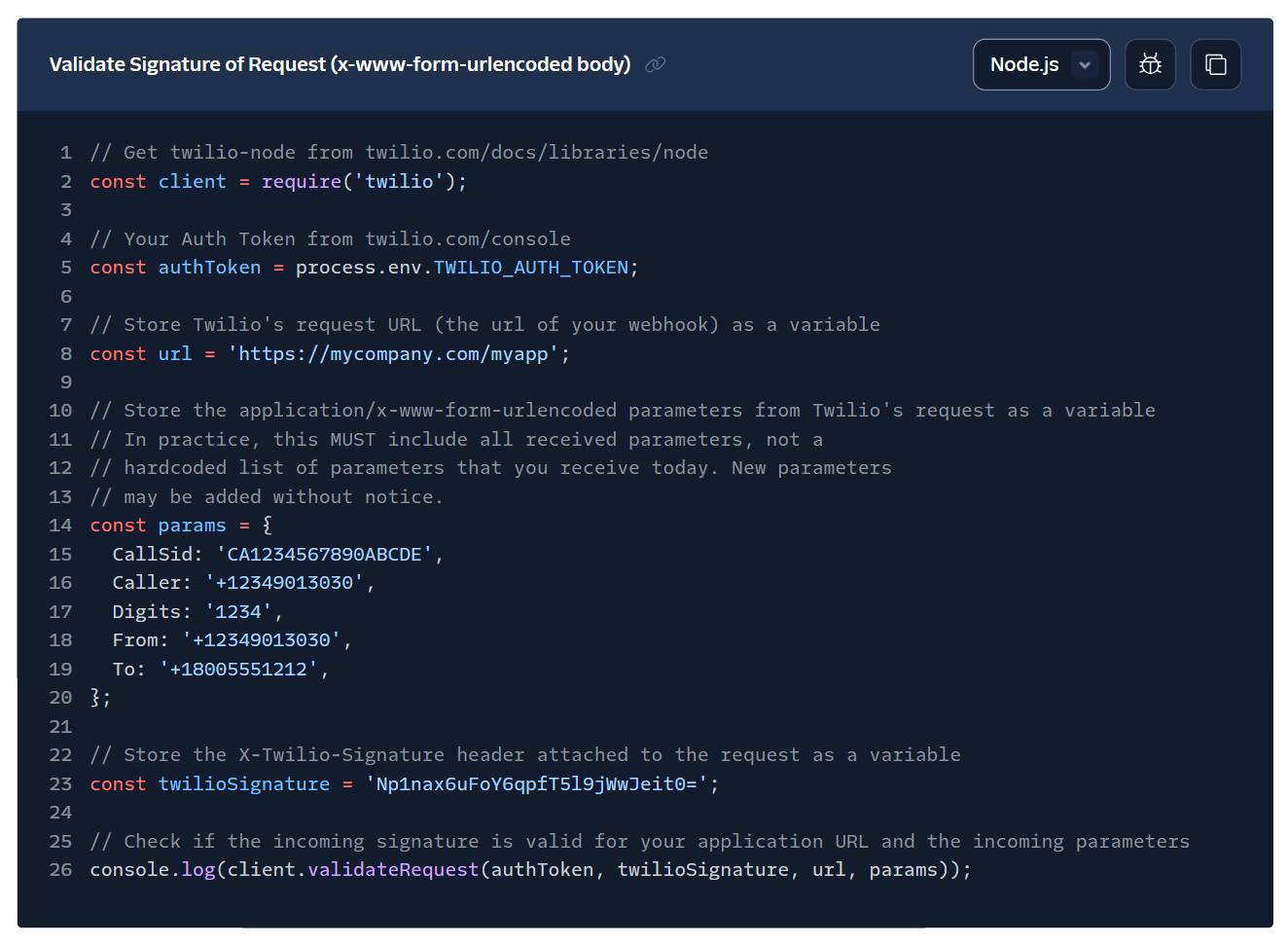
Build the integration service: a server-side application that receives Twilio webhooks, transforms the payload, and writes to Salesforce via the REST API. For Salesforce-to-Twilio flows, subscribe to Platform Events or Change Data Capture and trigger Twilio API calls accordingly.
Implement webhook signature validation on the Twilio side and OAuth token management on the Salesforce side.
Add logging, error handling, and retry logic. Both platforms enforce rate limits: Salesforce's daily API allocation scales by edition and license count; Twilio's limits vary by product and account tier.
Deploy, monitor, and maintain the integration over time.
Source: Twilio
Strengths: Full control over what syncs, when, and how. Real-time sync via Twilio webhooks and Salesforce Platform Events. Can implement complex business logic (e.g., route calls based on Salesforce deal stage, trigger Twilio SMS based on Salesforce workflow rules, sync Verify events to custom compliance objects). No per-record fees from a third-party connector.
Limitations: Requires development resources to build and maintain. You own the infrastructure, monitoring, and error recovery. API changes on either platform require ongoing maintenance. Twilio's REST API versioning and Salesforce's seasonal API releases (current: Summer '26, API version 67.0) both require attention. The initial build takes weeks, not hours.
Best for: Enterprise teams with complex integration requirements that no off-the-shelf connector satisfies. Organizations with in-house development teams that need to sync custom Twilio products (Verify, Lookup, Conversations, Segment) with Salesforce objects in ways the native packages do not support.
Key Use Cases
1. SMS Sales Outreach with CRM Activity Logging
Sales reps send personalized SMS messages to prospects from Salesforce using the Twilio for Salesforce managed package.
Every outbound message and reply logs as an Activity on the Lead or Contact record, keeping the communication timeline complete alongside emails, calls, and meetings. Managers see SMS outreach volume and response rates in Salesforce reports without reps manually logging each text.
Best integration method: Twilio for Salesforce managed package.
2. Inbound Call Routing with CRM Context
A customer calls the support line. Twilio Flex receives the call, matches the phone number against Salesforce records, and displays a screen pop showing the caller's account status, open cases, and recent Opportunities.
The agent greets the customer by name and sees that a renewal is pending, turning a cold handoff into an informed conversation. After the call, Salesforce creates a Task on the Contact with the call duration, notes, and disposition code.
Best integration method: Twilio Flex CTI connector.
3. Automated Appointment Reminders Triggered by Salesforce Events
A Salesforce workflow fires when an Opportunity reaches the "Demo Scheduled" stage. The workflow triggers a Twilio SMS to the contact's mobile number with the meeting details and a confirmation prompt. The contact's reply (confirmed/rescheduled) logs back to the Opportunity as an Activity. This automation reduces no-show rates without the rep sending the reminder manually.
Best integration method: Twilio for Salesforce managed package or Zapier (for teams wanting no-code setup).
4. Contact Center Quality Monitoring and Reporting
Support managers use Twilio Flex to handle customer interactions across voice, SMS, and WhatsApp. The Flex CTI connector logs every interaction to Salesforce, where managers run reports on call volume, average handle time, first-call resolution, and channel distribution.
Because the data lives in Salesforce alongside case and account records, they can correlate support patterns with customer health metrics and renewal outcomes.
Best integration method: Twilio Flex CTI connector.
5. Lead Capture from Inbound SMS
Prospects text a short code or toll-free number promoted in a marketing campaign. Twilio receives the message and, via a Zapier Zap or custom webhook, creates a new Salesforce Lead with the phone number, message content, and campaign source. The Lead enters the sales team's assignment queue and routes based on territory rules. No manual data entry required.
Best integration method: Zapier (for quick setup) or custom API (for high-volume campaigns with complex routing logic).
Limitations and Considerations
Data That Doesn't Sync Easily
Twilio and Salesforce model communication data differently. Twilio tracks interactions as discrete API events (a message sent, a call completed, a verification checked), while Salesforce organizes data around relational records (Leads, Contacts, Accounts, Opportunities).
Mapping between these models requires decisions: does a Twilio call log become a Salesforce Task, an Activity, or a custom object? The answer depends on the team's reporting needs, and the native integrations make opinionated choices that may not fit every workflow.
Full call recordings stored in Twilio do not transfer into Salesforce through the native integrations. At most, a link to the recording URL can be logged as a field on the Salesforce Activity. Twilio Segment behavioral data (page views, product events) requires the separate Segment destination connector and does not flow through the Twilio for Salesforce package.
Sync Conflicts
Because data flows primarily from Twilio into Salesforce (not bidirectionally), classic sync conflicts (two systems updating the same field at once) are less common than in CRM-to-CRM integrations.
The risk is narrower: phone number formatting inconsistencies between Twilio (E.164 format) and Salesforce (variable formatting depending on admin configuration) can cause matching failures, where an inbound call from a known contact does not resolve to their Salesforce record because the formats don't match.
Pricing Implications
The native Twilio for Salesforce package and the Flex CTI connector are free to install, but Twilio's usage fees apply to every message sent and every call minute consumed.
US SMS costs $0.0083 per message plus carrier surcharges. Outbound voice costs $0.0140 per minute for local US calls. Flex adds from $1/active user hour or $150/named user/month. Phone numbers carry monthly fees ($1.15/month for local, $2.15/month for toll-free). At high volumes, these costs compound.
On the Salesforce side, API request limits start at 100,000 requests per 24 hours for Professional and Enterprise editions, with per-license allocations on top. Custom API integrations consuming large volumes of Salesforce API calls may require a higher-tier edition or additional API call purchases.
Permissions and Access
Setting up the native integrations requires admin access on both sides. In Twilio, account-level credentials (Account SID and Auth Token) or API keys are needed. In Salesforce, System Administrator access is required to install AppExchange packages and configure CTI layouts.
Salesforce orgs using field-level security or sharing rules must ensure the integration user's profile has write access to every object and field where Twilio data will be stored.
For the Flex CTI connector, the Salesforce admin must configure Open CTI softphone layouts and assign CTI permissions to agent profiles. On the Twilio side, Flex workspace admin access is required.
Maintenance
Both platforms evolve independently. Twilio updates its APIs and SDKs regularly (the Twilio for Salesforce package receives periodic updates). Salesforce versions its API with each seasonal release.
Custom integrations built on Twilio webhooks require monitoring for webhook URL accessibility, authentication token rotation, and payload format changes. Third-party connectors (Zapier Zaps, Make scenarios) may break if either platform changes its OAuth flow or adds required fields.
Twilio's Event Streams retain application logs for 7 days and account-level error logs for 23 days. Organizations should implement their own logging and alerting to catch integration failures beyond those windows.
What No Method Fixes: The Data Itself
Every method above moves communication records between Twilio and Salesforce. None of them checks whether the contact data in Salesforce is accurate, current, or complete.
An outbound SMS sent to a phone number that changed six months ago never delivers. A sales call placed to a direct dial that now belongs to someone else wastes the rep's time and damages credibility. The integration faithfully connects communication events to CRM records that may have been wrong before the first message was ever sent.
Where ZoomInfo Fits In
Every method in this guide connects Twilio's communication infrastructure to Salesforce's CRM records. None of them improves the contact data those communications depend on.
When the integration is live but outbound calls reach voicemail because the direct dial is stale, SMS messages bounce because the mobile number changed, or screen pops display a job title from two promotions ago, the bottleneck is no longer the connector.
That is the gap ZoomInfo closes.
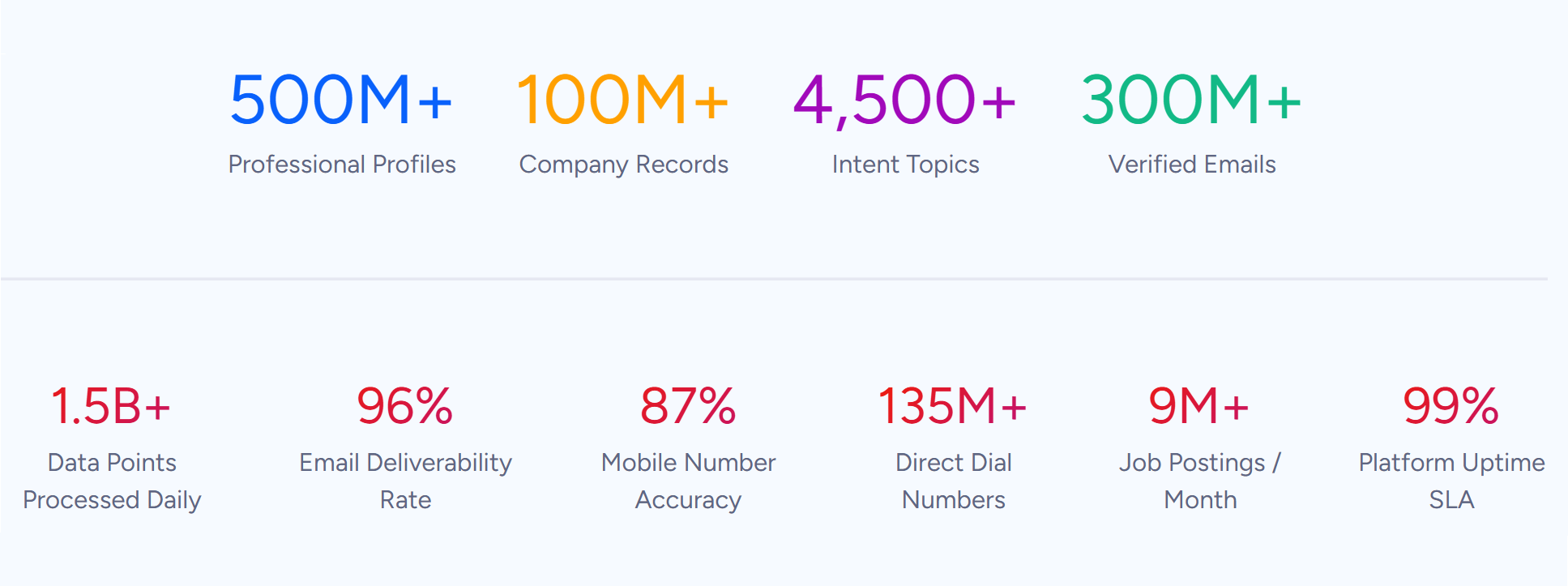
ZoomInfo is an AI-powered go-to-market platform built on 500M contacts, 100M companies, 135M+ verified phone numbers, and 200M+ verified business emails.
Source: ZoomInfo
That data is verified through a multi-source pipeline backed by 300+ human researchers, reaching up to 95% accuracy on first-party data. For teams running Twilio communications through Salesforce, ZoomInfo addresses the data quality layer that no communication connector handles.
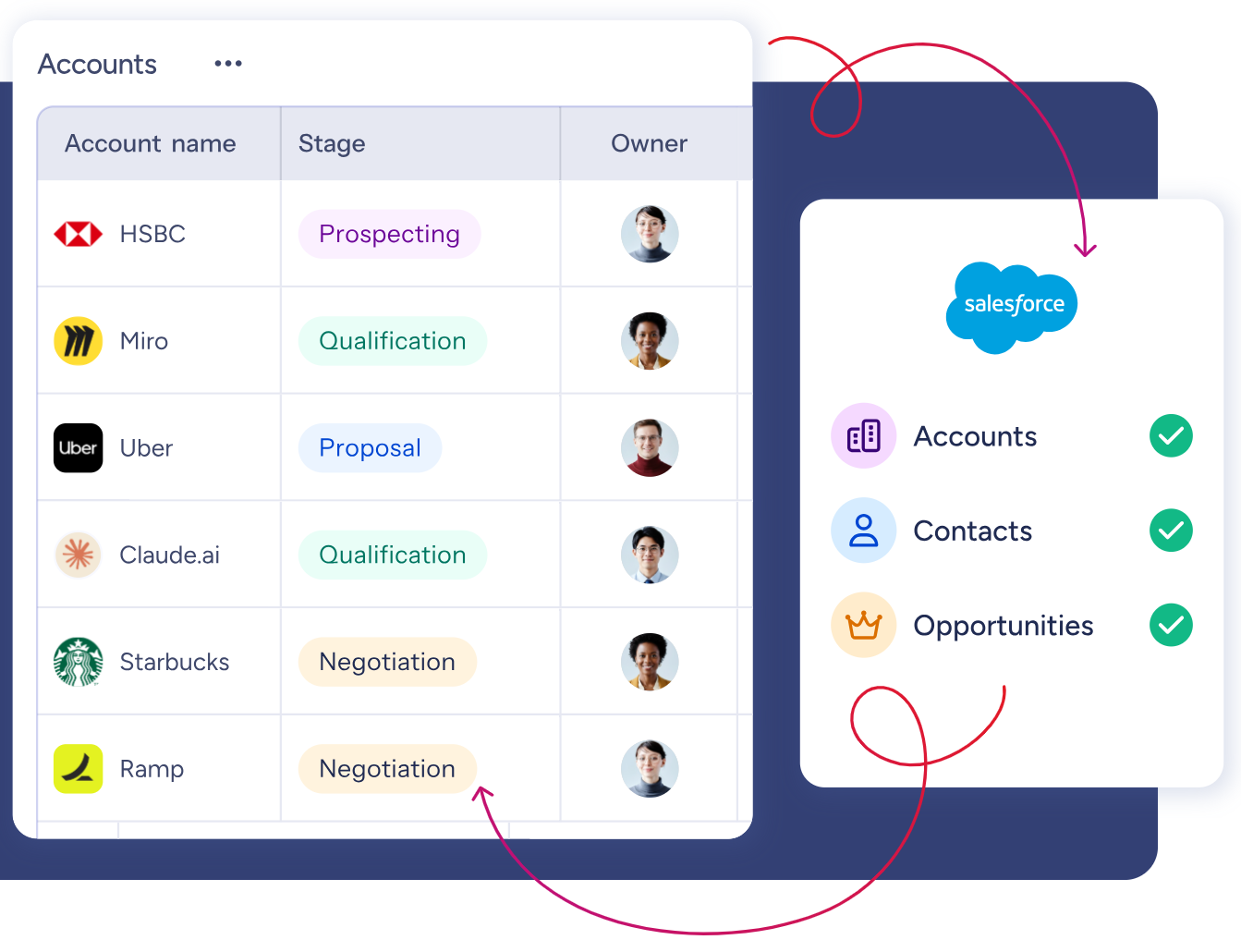
ZoomInfo integrates natively with Salesforce through the AppExchange, providing CRM enrichment, lead routing, and real-time data updates inside Salesforce records.,
Source: ZoomInfo
Before a rep picks up the phone or sends an SMS through Twilio, ZoomInfo ensures the Salesforce record has a verified direct dial (so calls connect), an accurate job title (so the conversation is relevant), current company details (so the rep is not pitching someone who left), and a verified business email.
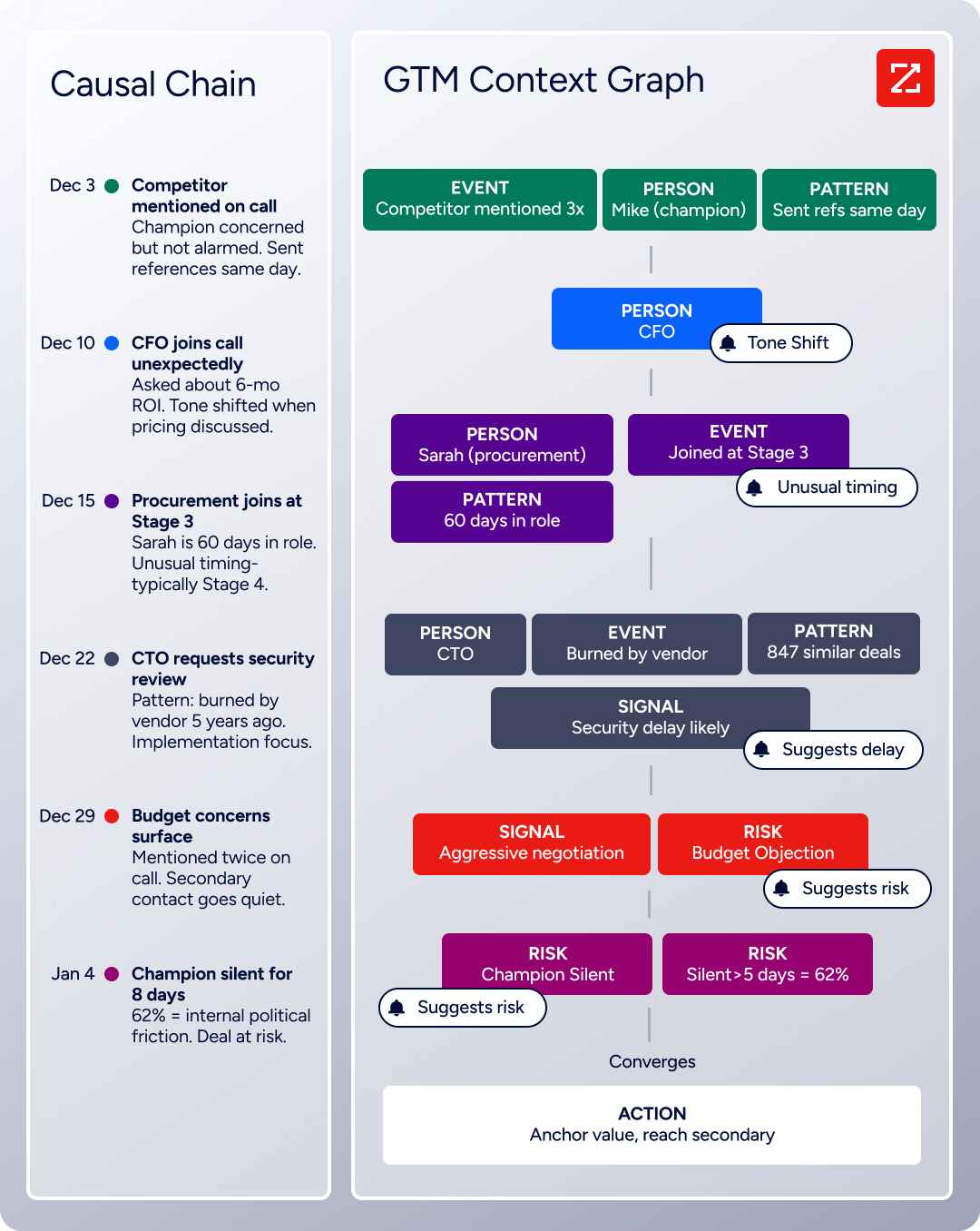
The same data feeds ZoomInfo's GTM Context Graph, which processes 1.5B + data points daily by fusing ZoomInfo's B2B data with your CRM records, conversation transcripts, and behavioral signals to show not just what happened in a deal, but why.
Source: ZoomInfo
In practice, a team using Twilio and Salesforce together can use ZoomInfo to enrich Salesforce records before any communication takes place. Verified phone numbers mean Twilio calls reach real people. Accurate mobile numbers mean SMS messages land.
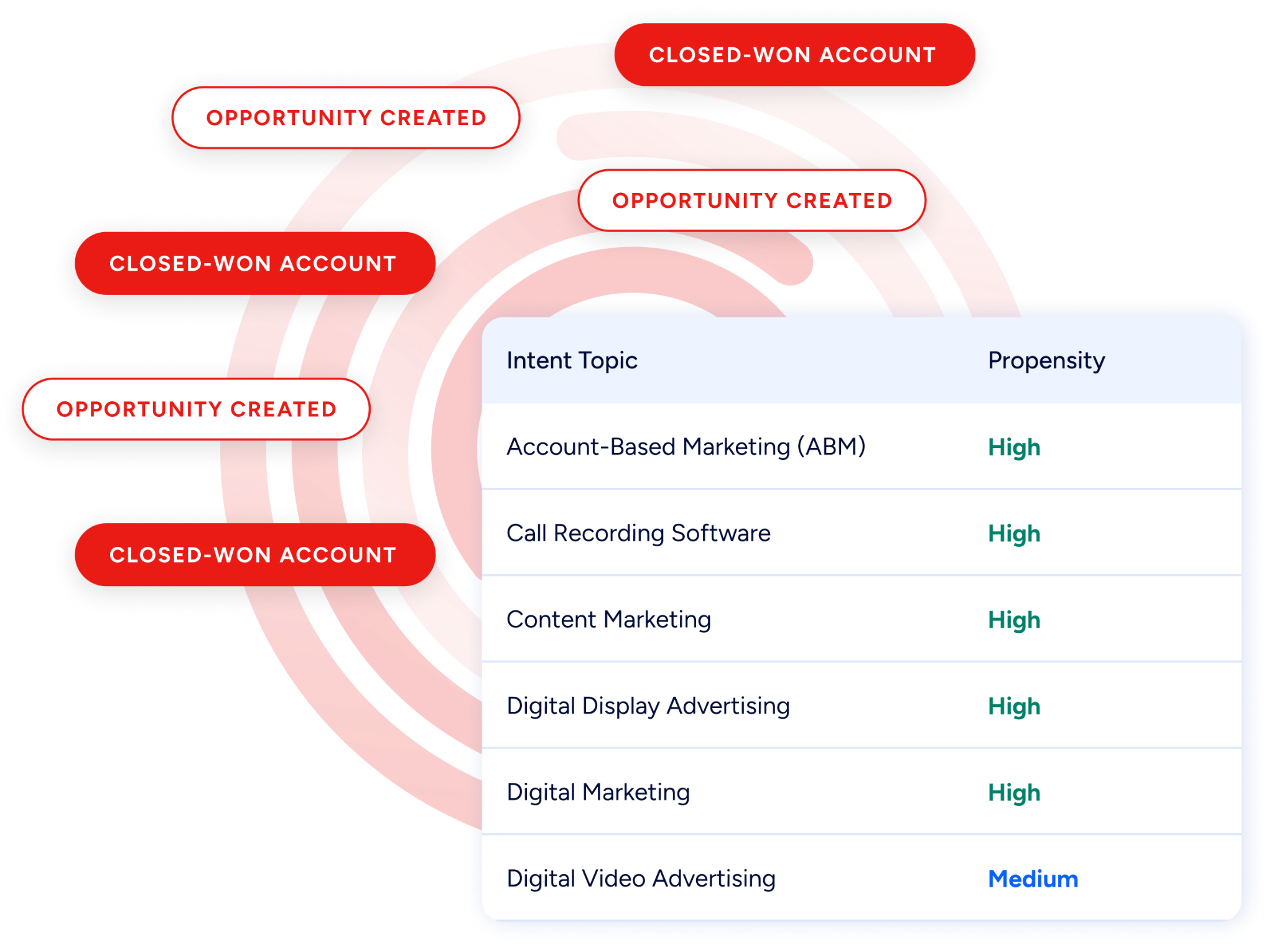
Buyer Intent data from ZoomInfo, tracking signals from 210 million IP-to-Organization pairings, can prioritize which contacts receive outbound calls or SMS campaigns through Twilio, so reps spend their communication budget on prospects who are actively researching relevant solutions rather than blasting a stale list.
Source: ZoomInfo
Enriched records also make the Twilio-Salesforce integration more reliable. Phone number formatting issues that cause screen pop failures drop when Salesforce records carry standardized, verified phone data from ZoomInfo. Fewer blank fields mean fewer unmatched inbound calls.
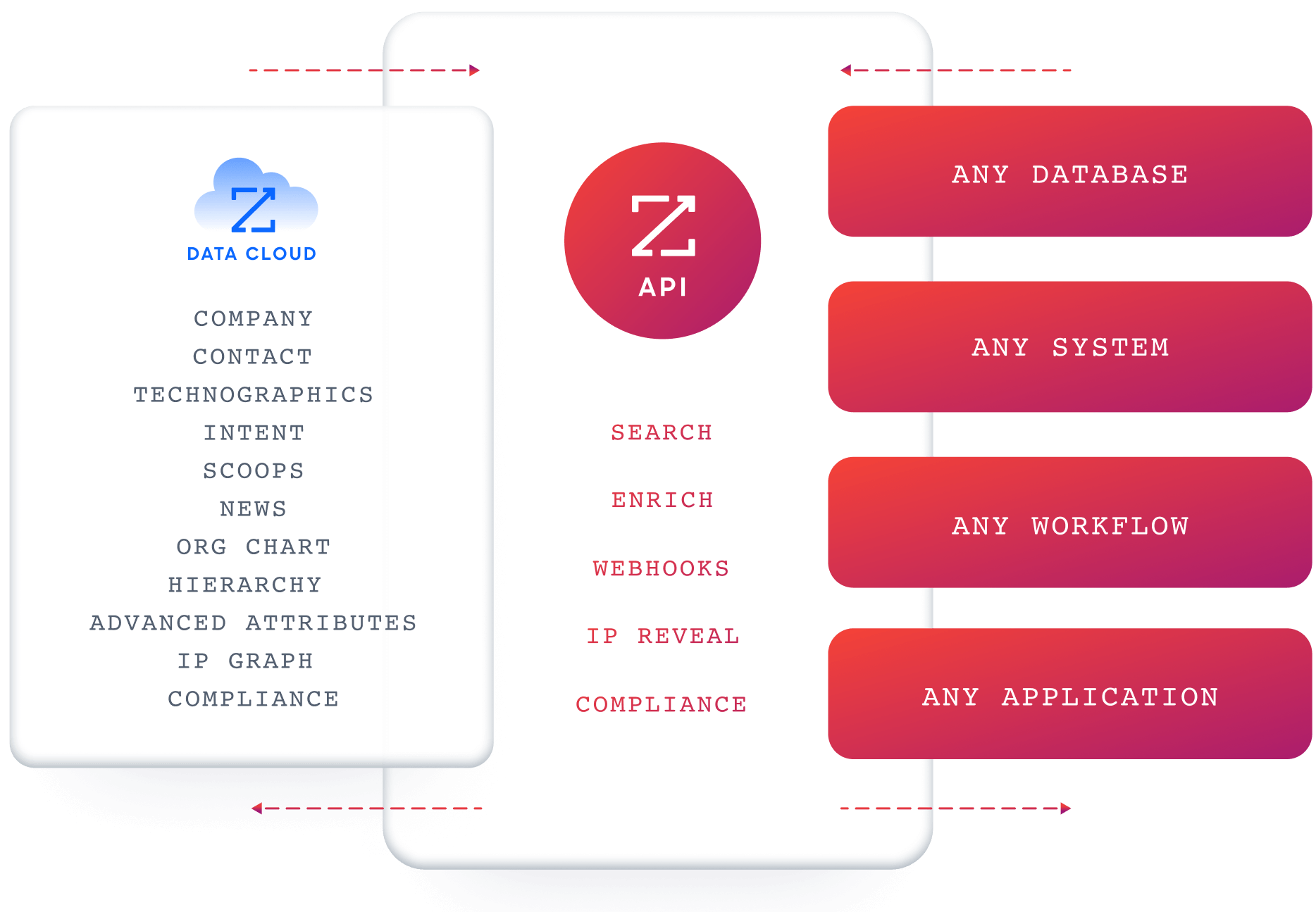
And for teams using ZoomInfo's API or MCP access, the same verified data can power custom Twilio workflows, automated lead enrichment before SMS campaigns, or AI agent research through any MCP-compatible tool.
Source: ZoomInfo
Seismic's sales team attributed 39% of active pipeline to opportunities identified or influenced by ZoomInfo signals, while boosting productivity by 54% and saving 11.5 hours per week. (Seismic)
Final Verdict
A native integration between Twilio and Salesforce exists through multiple first-party connectors: the Twilio for Salesforce managed package for messaging workflows and the Flex CTI connector for contact center operations. Third-party automation and custom API development extend what the native options cover.
For most teams, the right choice depends on which Twilio products they use and how deeply they need communication data embedded in Salesforce.
Teams using Twilio for SMS outreach and notifications should start with the Twilio for Salesforce managed package. It is free to install, requires no engineering resources, and logs messaging activity to CRM records.
Contact center teams running Twilio Flex should install the Salesforce CTI connector for real-time screen pops, call logging, and agent context. The setup is more involved but delivers the deepest integration between voice operations and CRM data.
Teams with complex requirements (syncing Verify events, Lookup data, or Segment behavioral data into custom Salesforce objects) should invest in a custom API integration.
Small teams that need a quick, targeted automation (e.g., inbound SMS creates a Salesforce Lead) can start with Zapier.
Before committing to a method, clarify what communication data matters most in the CRM.
If the goal is complete activity logging (every call, every text, every interaction tracked on the Salesforce record), the native integrations cover the core use case. If the goal is real-time agent context during live calls, the Flex CTI connector is the right tool. Either way, the quality of the contact data in Salesforce determines whether communications reach the right people.
ZoomInfo, with its native Salesforce integration, API, and MCP access, is the data enrichment layer that ensures reps call verified numbers, text active mobile lines, and work from accurate, current records.
FAQ
Does Twilio integrate natively with Salesforce?
Yes. Twilio offers a managed package for Salesforce that enables SMS/MMS messaging within Salesforce, including Process Builder automation, bulk SMS campaigns, and one-on-one texting.
Separately, Twilio Flex provides a CTI connector on the Salesforce AppExchange for contact center integration with click-to-dial, screen pops, and activity logging. Both are first-party integrations maintained by Twilio.
Can I send SMS from Salesforce using Twilio without writing code?
Yes. The Twilio for Salesforce managed package supports no-code SMS sending through Salesforce Process Builder (or Flow). You configure the trigger (e.g., new Lead created) and the action (send SMS via Twilio), map the fields, and activate the automation. One-on-one messaging is also available through an embedded console. Zapier offers an alternative no-code path for simpler event-triggered SMS.
What does the Twilio-Salesforce integration cost?
The native managed package and CTI connector are free to install. However, Twilio charges usage fees on every message and call: US SMS costs $0.0083 per message plus carrier surcharges, outbound voice costs $0.0140 per minute for local calls, and phone numbers carry monthly fees.
Twilio Flex adds its own pricing (from $1/active user hour or $150/named user/month). Salesforce API limits may require higher-tier editions for custom integrations with high call volumes.
Does call recording data sync between Twilio and Salesforce?
Not automatically through the native integrations. Twilio stores call recordings in its own infrastructure. The CTI connector can log a link to the recording URL as a field on the Salesforce Activity record, but the audio file itself does not transfer into Salesforce storage. Custom API integrations can build this workflow, but storage and access controls must be managed on both sides.
Can I use Twilio Flex inside Salesforce?
Yes. The Twilio Flex CTI connector, available on the Salesforce AppExchange, embeds the Flex agent interface as an iframe within the Salesforce console. Agents handle inbound and outbound voice, SMS, WhatsApp, and chat interactions without leaving Salesforce. Screen pops display CRM context on every interaction, and call activity logs automatically to the associated record.
What Salesforce permissions are needed to set up the Twilio integration?
System Administrator access in Salesforce is required to install the managed package or CTI connector from the AppExchange. For the CTI connector, the admin must also configure Open CTI softphone layouts and assign CTI permissions to agent profiles.
If the Salesforce org uses field-level security or sharing rules, the integration user's profile must have write access to every object and field where Twilio activity data will be stored.
How does Twilio Segment fit into the Twilio-Salesforce integration?
Twilio Segment is Twilio's customer data platform, and it has a separate Salesforce destination connector. This connector routes behavioral and identity data (page views, product events, computed traits) from Segment into Salesforce records. It does not handle Twilio communication data (call logs, SMS).
Teams using both Twilio's communication products and Segment's CDP can run the native Twilio-Salesforce messaging/voice integrations alongside the Segment-Salesforce connector for full coverage.
How does ZoomInfo improve a Twilio-Salesforce integration?
ZoomInfo solves the data quality problem that sits upstream of every communication. Before a rep sends an SMS or makes a call through Twilio, ZoomInfo ensures the Salesforce record has a verified phone number (so the call connects), an accurate mobile number (so the text delivers), and current employment details (so the outreach is relevant).
Its native Salesforce integration handles enrichment automatically, and its Buyer Intent data can prioritize which contacts should receive outbound communication based on active research signals. The result: Twilio communications reach the right people, and the activity data flowing back into Salesforce connects to accurate, actionable records.
Other tools that connect to Salesforce:
